
Providing Out-of-Band Connectivity to Mission-Critical IT Resources

Are Public Switched Telephone Network (PSTN) Lines still the best Failover option?

Most of us still remember the sounds of an analog modem connecting to the ISP or back to the corporate office. These nostalgic sounds are a thing of the past as broadband connections have pushed PSTN lines further away from the norm.

For some, a PSTN line is still a reality, especially in scenarios where a slow connection is better than no connection. PSTN lines are still used for remote management of IT infrastructure in cases of disaster recovery. For example: A branch office has gone completely offline… In this case it is important to identify if the cause of failure is a misconfigured VPN connection, other configuration changes causing unforeseen results, or if the broadband connection is down and it’s time to call the ISP.

In today’s Blog, we will review why PSTN lines are still being used for failover and some of the misconceptions associated as to why switching to another alternative failover method can be a complicated task.


Why are PSTN lines still in use?

PSTN lines are still in use because the technology has been around for a long time and the solution simply works. A dial up connection might be finicky, but give it a little bit of time and it will sort itself out. Besides this, the following reasons play a big part:

  • For a console, analog connection speed is acceptable
  • Some end devices, specifically in older branch offices only support analog modem connections
  • It provides a simple method of implementing a Point-to-Point communication
  • Analog Modems are still supported by vendors
  • Analog Technology is vendor neutral
  • Other communication options might not be stable enough or even available in the specific region
  • Some existing infrastructure management solutions offer solutions which can manage both the infrastructure management and the fallback connection of a single device

Overall PSTN lines have provided a stable and secure method of connectivity over the years, so why change? The pressure to change has increased over the years as ISP’s have updated their hardware and broadband connectivity. It has become cumbersome for phone companies to offer analog lines to end users. Analog solutions require additional maintenance and cabling costs, resources which can be better utilized by the ISP’s on more profitable, technologically advanced solutions. It has become increasingly difficult to get a PSTN line installed and in some areas, PSTN lines are no longer available. Line quality has also become an issue as noise affects speed and reliability. To decrease noise levels requires active maintenance of the older, legacy equipment and technology.

Another obstacle is fewer manufacturers produce replacement parts and the number of available modems by different vendors is very short as most devices are OEM products. On a recent project, we had difficulty finding a working modem which could handle the noise; We tested multiple modems all with the same result. We managed to find two modems that solved the customers line noise dilemma, neither was under $100.

It is only a matter of time, where even the last few implementations will have to be changed to alternative connection methods.


Alternative Connection Methods

Rented/Dedicated connection

This option would be the closest to a PSTN line in the sense that it can provide a real point to point connection. For most customers, this option will be far too expensive, especially if we are looking at redundant connections for disaster recovery scenarios. Although this solution provides a point to point connection, it also runs through the same exchanges as the normal broadband connection. Only a few will actually have their own cable going to every branch office. This means there is some shared infrastructure which increases risk and could potentially expose the data going over the cable. Based on this, most customers would still run a site to site VPN to secure the connection.

Backup Broadband Connection (Secondary ISP)

This solution is typically easier to implement, but can be very costly as it may require a completely new line to be brought into the building. The advantage is the second line can be used for other failover scenarios. In any case, a VPN solution is necessary to establish point to point security between the sides.

Mobile Broadband (Cellular Connectivity)

This solution is the easiest to implement and is used by most customers. Mobile broadband devices are available for a variety of devices and offer wide spread support from vendors. Taking the commitment by most countries and ISPs to expand their mobile broadband offerings in their regions, the coverage and availability will increase even further over the next few years. The question is, which version will be available in which region? The first real mobile broadband was introduced in 2001 with 3G and with a roll-out of 5G in planned for 2020, we will have at least three different versions available. All need to be supported by the hardware. Regardless of the mobile broadband version, a VPN solution is required here as well.


Now, what does this all mean for existing disaster recovery infrastructure management scenarios? For one, existing PSTN, solutions still work, but their time is limited, as challenges with replacement parts and availability of the actual line through the ISP’s will increase. Alternatives exist, but solutions will consist of at least 2 main parts; The actual broadband connection and a VPN solution. This means we have the option to invest in two or more individual appliances which will manage the broadband connection, VPN and the infrastructure management or invest in an infrastructure management solution which offers everything in one appliance.

Investing in multiple devices has the advantage that standardized hardware can be deployed on all sites this means small sites needed the same infrastructure as a large site, requiring the same administrative overhead, space and power, which can become very costly and non-scalable.

Infrastructure Appliances which support different broadband connections, VPN’s and infrastructure management protocols exist, but the appliances themselves are not the complete solution. The connection of these devices through broadband means they are exposed for long periods of time to the internet, and have security risks. The solution should be selected with the idea in mind that it is secure today, (capable of running secure operating system versions, cyphers, VPN and firewalls) and in the future. It should have enough flexibility built in to support upcoming connectivity options, management and security requirements while supporting current IT management standards.


The Solution: Open Infrastructure Management with Nodegrid

The Nodegrid Family of products are the ideal solution for maintaining maximum connectivity, with support for all of the alternative connection methods listed above; Nodegrid utilizes multi-routing tables to assign connectivity for a secondary broadband connection, comes equipped with provider agnostic cellular connectivity capabilities, and makes the migration from PSTN lines to alternative connection methods quick and easy. Nodegrid Manager software is up-to-date with security protocols, allows for automation and scripting, and provides a vendor neutral software-defined approach to infrastructure management, all of which allow for an unmatched level of flexibility, automation, and security. ZPE’s combination of modern hardware and built-in support for various connectivity methods, paired with the powerful Nodegrid Manager software results in a centralized and secure management platform with maximum uptime and reliability at the core.

For more information regarding the Nodegrid family of products and failover connectivity capabilities, give us a call or send us an email – We’d love to hear from you.
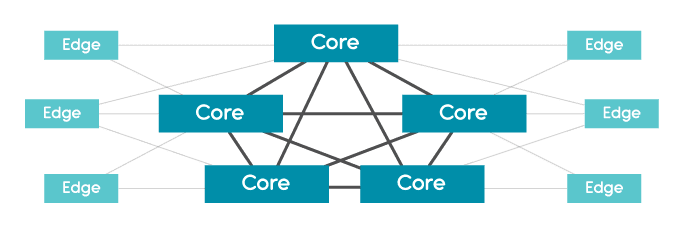
10 Things to Consider when Choosing an Edge Solution

The edge is changing; CAPEX & OPEX costs, scalability, the number of devices and tools that make up the environment, and the speed of deployment, all need to be taken into consideration for the evolving EDGE.

Many of these devices and tools are outdated, sit in silos, and were never designed for the complexities of today’s smart infrastructures.
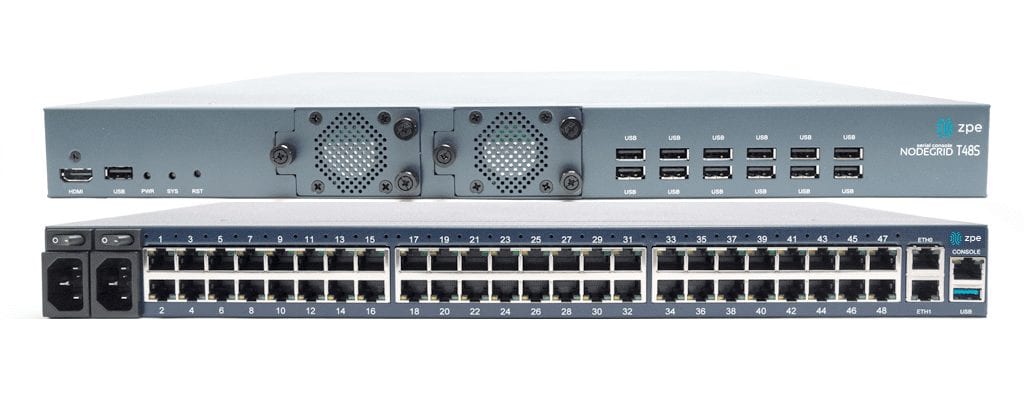
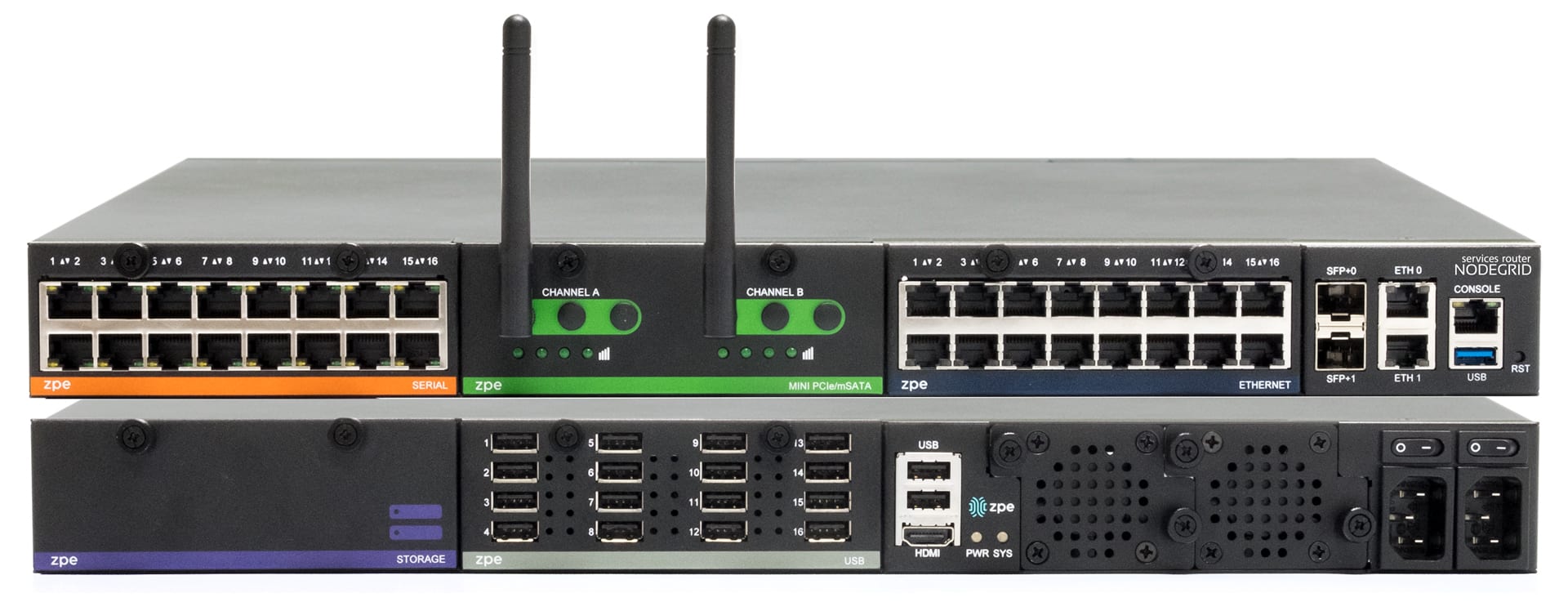
We now have more advanced solutions that can be applied to legacy systems as well as new data flows using edge computing, cloud computing, machine learning, and AI to provide new capabilities, reduce complexities, and further drive operational efficiencies.


1. Ease of Deployment

Is your EDGE solution simple to deploy? Can your Smart Hands get the job done? Will they be able to keep the devices up to date at each location without issue? Is Zero Touch Provisioning via WAN (IPv4 and IPv6) supported? There’s nothing more satisfying than plugging in a device, and having everything just work.

2. Safety / Keeping your Data Center Safe

EDGE devices can potentially serve as a backdoor into your data center… What happens if someone uses the EDGE device to connect back to your data center and gain unauthorized access to the network? Does your solution have the proper security features in place to ensure that not only do the proper people have access, but also validate that the access is coming from an authorized location?

3. Centralized Remote Management

Can your EDGE devices be supported by an SDN, remote management or Out-of-Band solution? Does it allow you to manage all devices locally, and at each of your EDGE branches/locations? Does the solution give you a 360° view of the entire network infrastructure without the need and complexity of a high-level management platform?

4. Notifications and Actionable Data

Because it’s very costly to have IT support staff present in every one of your locations (local and remote), you need a solution that provides data logging, notification, and automation capabilities to help reduce, or eliminate, the need for onsite IT staff, or expensive remote hands at every site… You need to be informed of configuration changes and possible security risks. Receive notifications and take proactive steps to ensure uptime, whether it be through human intervention or automation scripts. Will your solution keep up with your needs?

5. Protect your Data

Is you data safe? Does your current or planned EDGE devices support the latest in data, hardware, and storage encryption protocols, and if needed, a kill switch?

6. Multi-function EDGE Device

How do you reduce the number of devices at each EDGE location you have to maintain and periodically update to help reduce power, cooling and space costs? Is there a Multi-function Edge device that provides Switching and Routing capabilities as well as VNF support and on premise vCPE, Firewall, VPN, Compute, Storage, and Failover to Cellular so I have a 24×7 virtual IT presence?

7. Telemetry

Does your solution collect critical data points, allow you to inspect data logs, build an audit trail of actions and have a dashboard for visualization KPI’s?

8. Scalability

Does your EDGE solution allow you to easily grow and rapidly scale to meet business needs; Or is it complicated, cumbersome and an overall hindrance? Can it grow with you or will it need to be replaced as you scale? Your EDGE solution needs to be easily replicated across the various branches, offices, and retail locations.

9. True Solution Cost

CAPEX and OPEX – What is the initial cost of your solution and what would it end up costing to implement, maintain, and manage? There’s money to be saved if a solution costs less to maintain. Low initial costs generally come with hefty hidden fees – Training, maintenance and operational costs all add up, and in most cases, end up costing you more in the long run. A “set it and forget it” type of solution that adds automation capabilities may have a higher initial cost, but results in a tremendous savings because it doesn’t need to be replaced as often or have dedicated staff to operate and maintain.

10. Vendor Neutrality

What good is an EDGE solution if it doesn’t play nice with other EDGE location devices? You’re at the mercy of the various device vendors, their timetables and patch schedules and applications. You need a solution that adapts to your requirements, is built on an Open Platform and allows you to integrate seamlessly with other solutions.

Bottom Line

Check out ZPE Systems family of solutions for your Data Center, Lab, and Edge location requirements. You’ll be glad you did!


Need More Information?

If you would like more information on how the Nodegrid family of Open Infrastructure Management Solutions address all the needs of Edge networks, contact a ZPE solution specialist by giving us a call -or- sending us an email. We look forward to hearing from you.

How Nodegrid Serial Console / Nodegrid Services Router can improve the Test Lab with Automation

Are you in a test lab that needs automation? Are you in a test lab that has automation, but you need to get more out of it? We can help.

This situation seems to be quite common from what we’ve seen. Lab managers either have an “automation” solution that’s limited in abilities or they don’t have automation at all. Here’s how it breaks down:


Test Lab Environments (without Automation)

Companies that still perform manual testing may face the following obstacles:

  • The testing process takes much longer to complete versus that of an automated solution (time is money, without automation in place, each test must be initiated manually, requiring staff on hand to execute)
  • Requires a highly technical staff to complete testing on time (Not just any staff can run testing, staff on hand has to be knowledgeable.)
  • Human Error – Human error is not a myth, it exists.. ex: Amazon AWS Outage of 2017 – A simple slip of the finger can result in a catastrophic situation. Testers may miss steps and are prone to committing errors or not catching configuration issues
  • Lack of analysis – Data stored for analysis in case of errors needs to be logged manually

Test Lab Environments (with Basic Automation)

A basic automation solution can speed up the process of testing, but it is not without its gripes. Here’s some of the issues that have been brought to our attention.

  • Legacy console servers do not handle multiple concurrent sessions – This reduces the # of devices and connections supported in testing
  • Serial ports cannot use high baud rate (such as 115200bps) in all ports. Users tend to experience slowdown in the console server as it starts to hang or freeze up as more and more sessions are established – You are limited in the amount of sessions before the solution ultimately crashes
  • Not full automation – Scripts need to be tweaked to accommodate to devices (Delays and pauses are necessary in order to see the command all the way through, if supported).
  • Script limitations – Some popular scripting languages are not supported in some offerings

Even though you have an automation solution in place, if it requires you to be there monitoring the execution of scripts and commands, is it really automation?


Test Lab Environments with ZPE’s Nodegrid Advanced Automation Solutions

What ZPE’s Nodegrid family of products brings you is automation without compromise. Nodegrid addresses the pain points common to test labs. Nodegrid’s value is in the ability to automate, test, and collect data without limits. Queue commands and scripts from beginning to end. If an automation solution doesn’t work the way you need it to, then is it really an automation solution?

  • Intel x86-64 bit server-like Linux OS allows for faster processing, docker applications, and new automation and DevOps tools.
  • Time savings – With ZPE you can push configurations, software/firmware upgrades, and tests in bulk
  • Supported scripting languages and protocols: python, javascript (node.js), bash, ruby, or perl.
  • Fully automate your test and configuration processes
  • 48 Ports @ 115200 – 20 concurrent ssh/telnet sessions per port in all 48 ports
  • 96 Ports @ 115200 – 10 concurrent ssh/telnet sessions per port in all 96 ports
  • Increased processing power = get more done faster + improved boot times
  • Hook to Reservation system so serial ports are not available for other users to access during the reserved period
  • Serial ports settings can be customized to have simple connection (no additional text information, no authentication)
  • Serial Data Logs captured and saved into local file or NFS file, and to Syslog servers, for testing auditing
  • Specific groups to access their own devices via group authorization permissions
  • Boot up times significantly faster (Average Nodegrid Boot Time: < 1:40min | Competition Boot Time: Over 3:00min)
  • Automate the entire process, from ZTP and initial setup to end configuration.

For more information regarding the Nodegrid family of products and how they can benefit your Test Lab environment with Automation, give us a call or send us an email – We’d love to hear from you.

Data Logging, Alert Notifications and Actionable Data

When you’re the one responsible for critical infrastructure assets within the data center, you’ve got to be quick to respond and readily available to take care of any issues that might surface.

What if something goes wrong?

Without Nodegrid’s Data Logging features, here’s how your day could go:

  • You only know of the issue after the fact. You’re made aware once someone has reported the issue.
  • Now you need to find out the location of the server – Where is the issue stemming from?
  • You need to look for the console access that is connected to the device
  • In case of power, you need to gain access to the PDU, enter those credentials (that you might have forgot), identify which outlet the device is plugged into, and then initiate the power cycle to that outlet.
  • You might not even know what happened to the device in the first place.

All these steps take time, time which is of the essence especially when it comes to critical infrastructure assets. Uptime is of the utmost importance.

This is why Nodegrid is trusted by some of the data center world’s largest companies.

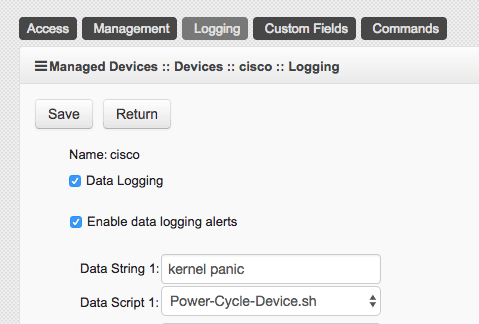
Nodegrid’s Data Logging abilities allow you to collect a wide variety of data, such as key input, console messages and errors, and console usage.

Set actionable string alerts and notifications whenever a known problem occurs – Choose any or all of the following notification types: e-mail, text, syslog, or snmptrap.
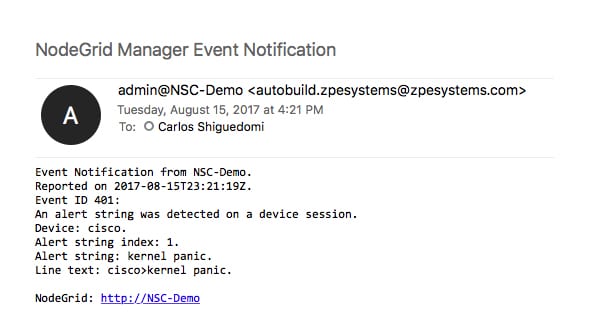
Nodegrid allows you to take actions based on string matches and console output. A recurring issue pops up, if its string matches, your selected script will be executed to alleviate the problem. Automate your fixes to save time and money.

All this is done in a matter of seconds:

  • A problem happens, Nodegrid finds a string match and executes the repair script
  • You get a detailed notification, telling you which devices experienced a specific problem
  • Data log is also sent to you to further investigate the issue and check for anomalies.

Nodegrid’s 64-bit Linux OS is ready for your automation scripts, allowing for multiple language options such as Python, JavaScript on Node.js, Bash, and more…

If data logging, alert notifications, and actually doing something with that information through actionable data is something that’s important to you, contact a ZPE representative to find out how we can help you out.

ZPE Systems, Inc. Announces Significant Litigation Victories

Fremont, CA, August 23, 2018 – ZPE Systems, Inc., a California-based company that provides hardware and software products to control IT infrastructures, recently obtained two significant favorable rulings in a patent litigation brought against it by Avocent Huntsville, LLC., a subsidiary of Vertiv Co. On July 23, 2018, the court issued an order allowing ZPE to proceed with counterclaims against Avocent, including counterclaims that Avocent is in violation of Federal antitrust laws because it filed the case knowing that its patents were invalid and unenforceable, for the improper purpose of restraining competition and to interfere with ZPE’s business. On August 23, 2018, the court issued an order finding each patent claim asserted by Avocent against ZPE invalid for being indefinite under 35 U.S.C. § 112, ¶2, resulting in a complete victory for ZPE against Avocent’s patent infringement claims. “ZPE is very pleased that the court recognized that Avocent’s patents are invalid and cannot be used to prevent ZPE, or anyone else, from competing with Avocent,” said ZPE CEO and co-founder, Arnaldo Zimmermann.  “We are also pleased the court’s ruling allows the focus of the case going forward to now be properly placed on whether Avocent’s conduct in obtaining and attempting to enforce these patents violated antitrust law.” ZPE is represented in the litigation by Robert Whitman of Mishcon de Reya New York, LLP.  The case is Avocent Huntsville, LLC v. ZPE Systems, Inc., case number 3:17-cv-04319, in the U.S. District Court for the Northern District of California.