Learn the basics of Zero Touch Provisioning (ZTP) in this 2 1/2 minute video. Rene Neumann, EU Solutions Engineering Manager at ZPE Systems shares his IT and data center expertise to provide a high-level overview of ZTP.
What is ZTP?
What pain points does it address?
How does it benefit businesses?
How does it help system and network administrators?
Ready to learn more about Zero Touch Provisioning?
Our previous post about zero touch provisioning (ZTP) details the basics about what makes ZTP work. You need to have the proper scripting and automation tools, along with a well-designed workflow. These help you test and prepare configurations in a lab environment, and ultimately lead to deployments that are faster, consistent, and automatic.In this article, we’re going to take a closer look at zero touch provisioning to see how it compares to manual methods of deploying networks.But first, here’s a recap about ZTP:
What is it? — Zero touch provisioning automates network configuration tasks, so you can deploy new networks simply by connecting & booting your devices.
Why use it? — Scaling can be a chore. You need to coordinate so many devices and IT resources, and staff need to be on-site to tediously configure each appliance. ZTP eliminates all of this so you can scale on demand.
What are the benefits? — On the network side, ZTP eliminates the need for time-consuming, error-prone manual configurations. Using well-tested scripts, you can automate deployments with networks that build themselves quickly, consistently, and reliably. For business, this means a more nimble network edge that can keep up with growth. You get the security of shipping unconfigured devices, the cost savings of reduced on-site support, and the consistency of automation. Deploying takes minutes and gives you the peace of mind knowing that your new networks meet compliance standards.
Now, let’s take a look at common ways of provisioning that you’re probably familiar with, and how zero touch provisioning makes them obsolete.
Manual Provisioning
If you’re not familiar with zero touch provisioning, you know the hassle that comes with manually deploying networks. Once you acquire all of your physical network appliances and IT resources, you need to get them on-site at your new location. This involves coordinating shipments and staff travel plans, which oftentimes leads to waiting periods and expensive delays. Staying on track to meet your timelines can be a joke even before deployment begins.After tackling the logistical hurdle, the real work starts. Your on-site IT staff must connect to each device separately, and then make configurations using the command line interface (CLI).
This is time consuming — Connecting to each device requires staff to provide their credentials to gain access. Once they’re granted access, they must manually enter commands into the CLI, which can take minutes or even hours depending on the configuration. This needs to be repeated for each appliance until the entire stack is properly configured and the network can be deployed.
This leads to errors — Human error is a major contributor to network outages and downtime. Requiring manual input for each network appliance means more chances for mistakes. This could be an overlooked typo on the CLI, installation of an old and incorrect configuration file, or something as simple as mixing up port assignments.
This burdens your staff — Performing hundreds or even thousands of manual tasks for each deployment requires an extensive, on-site staff presence. Even with an experienced and highly-skilled team, setting up your network can take days’ worth of work and pulls employees away from more business-critical tasks.
Minimal Touch Provisioning
Different methods have been developed to address some of the drawbacks to manual configuration. One of these includes minimal touch provisioning (MTP), which is essentially a process improvement. MTP involves working with a pre-approved set of commands that can be easily pasted, either individually or as a batch, into the CLI. The advantage here is mostly in time savings, as simple copy/paste tasks involve significantly fewer keystrokes than manually entering every command.However, this minimal touch approach inherits some of the same drawbacks, and introduces its own.
This still requires on-site staff — MTP doesn’t reduce the need for on-site staff to configure your stacks. As with manual provisioning, setting up using MTP still requires teams to manually input configurations into the CLI. More important business activities must take a back seat while your engineers deploy each new location.
This still exposes you to errors — A minimal touch approach isn’t without human error. Your IT staff still need to connect separately to each device. And even though they have a predetermined set of commands at their disposal, simple mistakes can happen due to fatigue, forgetfulness, or improper keystrokes.
This requires extensive testing — MTP requires you to test your configuration in a lab environment before deploying to production networks. This helps you fix potential issues and develop configuration commands that are highly repeatable. However, the drawback is that this extensive work upfront doesn’t eliminate the manual work required for each deployment.
Zero Touch Provisioning
Zero touch provisioning makes the most of scripting and automation. ZTP virtually eliminates all of the issues that come with a manual or minimal touch approach, by combining the right tools with process improvements. There are no headaches involving shipping devices, coordinating staff, or keeping up with deployment schedules.Of course, preparing configurations requires thorough planning and testing upfront, but you’re left with a network that’s highly nimble and can scale right when you need it.Here are some reasons why it’s called “zero touch”:
Scripting and automation carry out all the tasks that are usually delegated to staff for manual input.
You only need to perform the simple physical tasks — just connect the power & network cables, boot your devices, and then the network builds itself.
You don’t need specialized staff on-site. All you need is someone to physically install your devices.
Zero touch provisioning also allows you to pinpoint and fix potential human errors in your lab environment. This way you can ensure that all of your commands and configuration files are correct before they’re pushed to your new networks.
What does Nodegrid bring to ZTP?
ZTP comes with several significant benefits for your networking capabilities and your business, from branch locations that can be deployed fast, to the cost savings that come with minimal on-site support. ZPE Systems’ Nodegrid adds even more to your zero touch toolkit so you can get even more from each deployment.Nodegrid features consolidated, all-in-one network appliances, which means a smaller stack that can handle every network function. You can get on location easier with fewer capital expenses, and reduced shipping costs and travel costs.On top of this, zero touch provisioning with Nodegrid allows you to push configurations to other devices. This includes devices from many vendors. As long as you properly test and configure your scripts, you can extend your zero touch provisioning capabilities simply by connecting devices to your Nodegrid appliances.After your initial deployment, your Nodegrid appliances can connect to ZPE Cloud for easy and convenient configuration management. You can eliminate the need to juggle files and updates. ZPE Cloud stores all your config files and supports automation, so you can push changes and make other adjustments automatically, and from the safety of the cloud.
Another day, another deployment. Business is good and you’re scaling fast to keep up. This means opening more data centers, branch offices, and retail locations. Large or small, each deployment takes careful planning and coordination to pull off successfully, all while meeting strict deadlines.
One of the first things to consider when deploying a new site is how to safely deliver all of the equipment to the final location. There are typically two options:
Pre-configuring in-house offers the advantage of using local staff to perform the initial configurations and upgrades which can reduce additional travel expenses and overtime pay. This also allows for an almost plug-and-play deployment once the equipment arrives at the new location. The downside to this method is the heightened security risk incurred when shipping anything with sensitive data.
Shipping equipment with factory default settings eliminates the security risk, but places the burden of configuring and provisioning entirely on the remote staff. This can equate to higher travel expenses and additional overtime pay, not to mention reduced staff back home.
Regardless of the method chosen, both still share the time consuming and boring task of physically connecting to each appliance via console, setting the configuration (typically done by pasting from a template), and updating the software. More equipment requires more time and resources, and also increases the likelihood of a mistake being made. So, is there a better way?
Introducing Zero Touch Provisioning (ZTP)
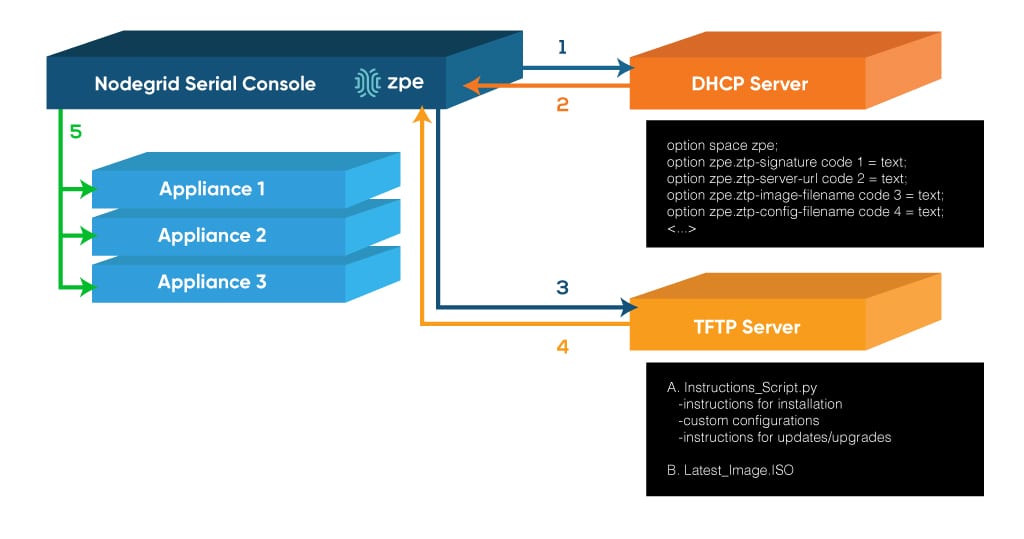
ZTP is a feature that automates the building process (configuration and provisioning) of network hardware and applications. This is typically achieved by pointing devices to a local configuration repository where they can retrieve the required settings. With ZTP, IT professionals can drastically reduce the amount of time consuming labor that comes with manual configuration, which frees up more resources that can be dedicated to other tasks. Since settings are managed and provisioned from the cloud via templates, engineers may even perform configurations and updates from remote locations (once basic racking and network connectivity are established at the new location).
The Right Tools Make All the Difference
While ZTP can greatly improve deployments by reducing costs, errors, and time, having the right tool can offer even more benefits. ZPE Systems Nodegrid can take your ZTP project to the next level by keeping everything open and flexible. For devices with built-in ZTP features, Nodegrid can leverage various capabilities such as SSH to serial console and may also serve as the local configuration repository. Even if your devices do not have built in ZTP support, Nodegrid can still store, deploy, and archive configurations that will allow you to bring all of your devices online fast and with ease.
Nodegrid also offers full 4G/LTE cellular connectivity so you can deploy from anywhere via ZPE Cloud, even without having local connectivity configured. With Nodegrid, you can eliminate worry and reduce security concerns by shipping bare-metal devices that do not contain any sensitive data. Once your devices arrive, are racked and connected, simply use ZPE Cloud to download and run all of your automated scripts. Provisioning is automatic, consistent, and error free which save you time and money. Learn more about what goes into ZTP.
Ready to Take Your Next Deployment to the Next Level?
Without zero touch provisioning (ZTP), setting up a new data center or branch location takes work. You know that along with all your new hardware comes plenty of manual input and configuration before things can function properly. After unboxing and racking your switches, servers, and routers, and making all the necessary physical connections to each, you need to bring these devices online to serve your network.
But when you use zero touch provisioning, you automate all of these necessary tasks so that devices become configured and operational — with little or no user input. Of course, ZTP is not a turnkey solution offering total plug-n-play simplicity, but it does significantly reduce your workload when provisioning and deploying new locations.
What Goes Into Zero Touch Provisioning?
Even though zero touch provisioning automates and simplifies scaling, it still requires you to make preparations to get devices up and running. These preparations can include things like predetermining console port assignments and ethernet management ports. Also, you need to test and adjust configuration settings in your test environment, so that your devices are configured properly when it comes time to deploy.
ZTP requires you to put forth effort up front, but it pays off later when scaling with new data center and branch locations. With your preparations in place, ZTP eliminates the need for repetitive manual work, and instead gives you streamlined, consistent provisioning.
Several companies are also including zero touch provisioning features in their hardware, through DHCP, Preboot Execution Environment (PXE), and other custom services and apps. For example, some hardware vendors now have devices that, when unable to find a startup configuration, automatically enter zero touch provisioning mode, which allows them to execute the proper scripts for configuration.
Devices that come with ZTP features can help to further reduce your workload. But even when you use them, best practices call for you to have:
The right scripting and automation tools
A properly designed ZTP workflow
Adequate scripting and automation tools are just as important as the hardware you choose to deploy. This not only helps with ZTP, but also helps you avoid vendor lock-in down the road when performing additional management and scaling. For example, using an open infrastructure platform such as ZPE Systems’ Nodegrid allows you to employ the tools of your choice, while also giving you serial console accessibility via SSH. Use Puppet, Chef, Ansible, and others as needed. Nodegrid also extends ZTP capabilities to connected devices, regardless of vendor.
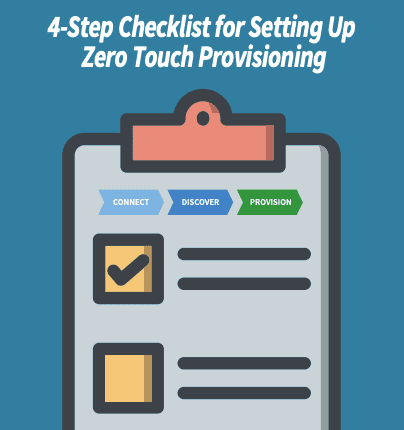
Along with having an environment that supports the right tools, zero touch provisioning works best when you develop a preparations workflow. You want every deployment to go smoothly, and this workflow helps you strive to achieve a more streamlined provisioning process. It starts with having a plan even before your hardware goes in the rack. Here’s a top-level overview of what should be part of your plan:
Ensure your devices are configured for ZTP.
Inventory your devices so that you know what hardware is at each location. A manufacturer or vendor-provided list can help you document MAC addresses, model & serial numbers, and other critical device data.
Add your device inventory to your device database, so that data can be handled and configured during provisioning.
Use your test environment to configure ZTP scripts, and then script and automate to your device database.
How Does Nodegrid Improve Zero Touch Provisioning?
Whether for your data center or branch locations, Nodegrid can help you with zero touch provisioning that’s open and flexible.
Not only can Nodegrid devices leverage existing ZTP features of your infrastructure, using capabilities such as SSH to serial consoles, but they can also serve as the local configuration repository if you’re preconfiguring and shipping devices. They can store, deploy, and archive configurations, allowing you to extend ZTP to other appliances, including those that don’t come with ZTP features.
For more distributed and remote sites, Nodegrid supports 4G/LTE cellular connectivity that allows you to deploy ZTP from anywhere through ZPE Cloud. You can ship bare-metal devices and stay protected knowing that sensitive data can’t get lost or stolen. Once these devices reach their appropriate destination, you can use ZPE Cloud to download and run all your automation scripts, for automatic and consistent provisioning.
Don’t miss out!
Now that you know more about zero touch provisioning and how it helps you scale, make sure you stay up to date for all the latest about ZTP. Subscribe for updates and be the first to see new, helpful content.
ZPE Systems delivers innovative solutions to simplify infrastructure managment at the datacenter, branch, and edge.
Learn how our Zero Pain Ecosystem can solve your biggest network orchestration pain points.