Providing Out-of-Band Connectivity to Mission-Critical IT Resources

Data Center Environmental Risks & Practical Solutions That Can Save You Millions
shutterstock_548312899

Today, many businesses are completely unable to operate without their data center infrastructure, so data center downtime is getting more and more expensive. According to Uptime Institute’s 2021 Global Data Center Survey, over 60% of respondents lost more than $100,000 to downtime, with 15% reporting losses of over $1 million.

While there are many causes of downtime, one factor you can’t afford to overlook is data center environmental risks. In this blog, we’ll describe some of the most significant environmental risks in your data center, as well as the practical solutions that can save you millions.


Data center environmental risks you need to be aware of

The biggest data center environmental risks include:

Temperature

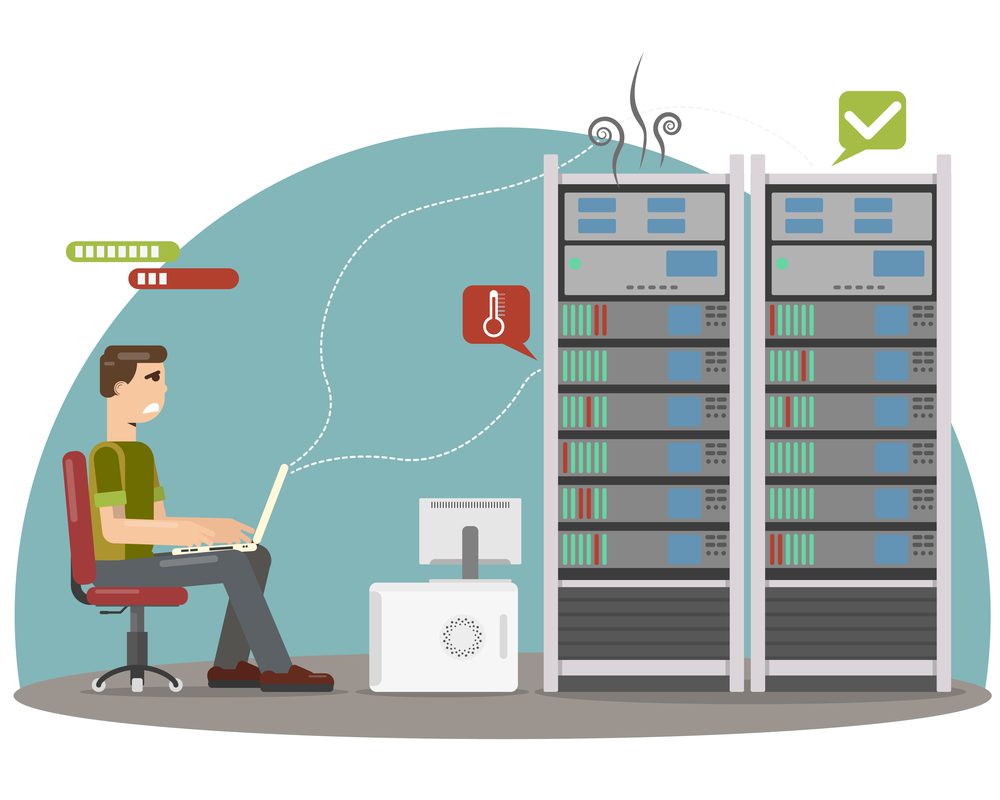
There is an optimal temperature range at which your data center devices work best. According to the American Society of Heating, Refrigerating, and Air-Conditioning Engineers (ASHRAE), the recommended temperature range for your data center is between 64° and 81° F (or 18° to 27° C). When the ambient temperature rises above that range, your equipment runs the risk of overheating, which can cause permanent damage to your expensive appliances.

Humidity

ASHRAE recommends keeping data center humidity around 50%, with a minimum of 20% and a maximum of 80%. If the air in your data center grows too humid, moisture may collect on the internal components of your appliances and cause corrosion, shorts, or other failures. Unfortunately, the air conditioning systems that keep your data center cool also contribute to ambient humidity, increasing your risk. On the other hand, if humidity gets too low, you run the risk of electrostatic discharge (ESD) damaging your equipment. In addition to humidity, you’re also at risk of moisture from water leaks, fire suppression systems, spills, and other sources damaging your data center equipment.

Fire

Data center fires are relatively rare, but they can still be catastrophic when they do occur. For example, a fire at a French data center resulted in an estimated $122 million in losses. A fire could directly burn your equipment, raise the ambient temperature beyond acceptable limits, or activate automatic fire suppression controls that damage your devices.

Power failure

Managing power flows, and loads is a massive aspect of data center infrastructure management (DCIM). Though universal power supplies offer protection against short-term outages and power surges, a long-term loss of power could eventually bring down critical systems and appliances. For example, a power outage at one of Amazon’s data centers affected major clients like Slack and Hulu.

Physical security

Most data centers provide some level of physical protection against unauthorized access, such as biometric door locks and CCTV cameras. However, suppose someone is able to get past those measures—perhaps because they’re authorized to enter the facility for other reasons—they could potentially tamper with your equipment, either damaging it or trying to breach your network.

Air quality

Any particulates in the air could potentially damage your data center infrastructure. For example, gaseous contaminants and ground-level ozone can cause oxidation on internal components, and dust can clog up vents and lead to overheating.

Practical solutions for the biggest data center environmental risks

The first and most obvious solution to prevent these data center environmental risks is an environmental monitoring solution. This usually involves a series of sensors that detect and report on conditions within your rack, connected to a terminal console server or gateway router that reports back to your monitoring team at HQ.

One limitation of many environmental monitoring systems is maintaining your virtual presence in the data center even if there’s an outage. If your main ISP connection to the data center goes down, for instance, you need eyes and ears on the situation to ensure it’s not a symptom of a larger problem (such as a power outage or fire). The answer to this problem is remote out-of-band (OOB) management. OOB gives you a dedicated network connection to your critical remote infrastructure – such as your environmental monitoring solution – so you have an alternate path in case of an outage.

Another challenge is that many environmental monitoring systems are designed for on-premises architectures, meaning you need to be on the enterprise network—either directly or via VPN—to manage the solution. To address that limitation, you should look for a cloud-based platform that gives your engineers access to these critical sensors and alerts from anywhere in the world.

Finally, your environmental sensors will collect a lot of data. You can set up automatic alarms and alerts to notify you when there’s an issue. But, if you want to identify opportunities to optimize your data center infrastructure, you need more sophisticated data analysis and visualizations. For instance, you might use this data to create more efficient power control maps.

Environmental monitoring is the bare minimum required to detect and prevent data center environmental risks. However, a robust environmental monitoring solution will also provide cloud-based control from anywhere in the world, remote OOB management for uninterrupted access, and sophisticated data analysis tools so you can optimize your data center operations.


Addressing data center environmental risks with a comprehensive solution

The Nodegrid solution from ZPE Systems addresses data center environmental monitoring with a comprehensive range of environmental sensors, including temperature and humidity, smoke, airflow, dry contact, dust and particulate, and more. When you connect your environmental sensors to a Nodegrid device in your data center, you get secure, 3rd-generation OOB access through a high-speed 4G/5G cellular connection.

You can monitor and control your sensors from anywhere in the world through ZPE Cloud, a vendor-neutral, cloud-based infrastructure management portal. ZPE Cloud includes comprehensive alerts and data visualizations, and you can dig into your data even deeper through Nodegrid Data Lake. Nodegrid is a complete solution for preventing, monitoring, fixing, and learning from your data center environmental risks.

Address your biggest data center environmental risks with the Nodegrid solution.

Learn more about how data center environmental monitoring can stop disaster before it strikes, or contact ZPE Systems today.

Contact Us

Benefits of SD-WAN for Hybrid Cloud Infrastructure

Cloud,Computing,Digital,Information,Data,Center,Technology.,Computer,Information,Storage.
Hybrid cloud—using a combination of public and private clouds to host your data, applications, and services—is one of the most popular enterprise infrastructure models. According to Flexera’s 2021 State of the Cloud Report, 82% of enterprises have a hybrid cloud infrastructure. However, the hybrid model comes with some unique networking challenges, including:

  • Orchestrating WAN (wide area networking) connections across multiple clouds
  • Optimizing network performance between sites
  • Securing WAN connections without impacting performance or productivity

SD-WAN, or software-defined wide area networking, addresses many of the inherent challenges of hybrid cloud computing. SD-WAN separates the control and management processes from your underlying WAN hardware and virtualizes them as software or script-based configurations that you can easily and automatically deploy.

SD-WAN is usually a cloud-based service that provides centralized orchestration and management, so you can control your entire WAN architecture (including hybrid cloud, multi-cloud, and branch office infrastructure) from behind one pane of glass.

Let’s examine the benefits of SD-WAN for hybrid cloud infrastructure by discussing how SD-WAN addresses the biggest challenges you face in a hybrid cloud environment.

Benefits of SD-WAN for hybrid cloud infrastructure


1. Orchestrate WAN infrastructure across clouds

SD-WAN addresses the challenge of orchestrating WAN connections across a hybrid cloud architecture by virtualizing control and management processes and separating them out from the underlying infrastructure.

Often, your different clouds will also have different levels of administrative authority, meaning your administrator user role may not give you the same level of control over networking on each platform. In addition, your disparate providers may offer varying degrees of visibility into your WAN connections to their service. Plus, you may need to use multiple types of WAN circuits (MPLS, broadband, LTE, etc.) to reach your different clouds. This can make it challenging to employ network automation (much less orchestration) because you have to tailor your scripts and configurations to each WAN link to accommodate these inconsistencies.

With SD-WAN, you get complete control and visibility over your entire WAN architecture, across all your public and private clouds, from one cloud-based platform. Since your management processes are decoupled from the underlying hardware, you can manage all your WAN circuits from one location regardless of type. This decoupling, or abstraction, also means you’re not reliant on vendor-provided tools for managing and monitoring your WAN connections to their service.

In addition, you can apply consistent, role-based access policies to all your WAN connections, so your network administrators have the same level of control across your entire environment. SD-WAN facilitates orchestration by giving you comprehensive and consistent control over your hybrid cloud WAN infrastructure.

SD-WAN provides centralized, vendor-neutral orchestration of WAN deployment, lifecycle management, performance optimization, and issue remediation so you can efficiently manage your hybrid cloud infrastructure.

2. Optimize network performance between sites

Another common issue with hybrid cloud infrastructures is maintaining the speed and performance of WAN connections between your enterprise and your public and private cloud providers, even though you may be using completely different circuits or appliances. SD-WAN overcomes this issue in multiple ways.

  • First, SD-WAN gives you full visibility into every part of your WAN architecture, which means you can monitor performance across your entire hybrid cloud infrastructure to ensure consistent speed and availability at every site.
  • Second, SD-WAN uses network optimization features like application awareness and guaranteed minimum bandwidth to optimize connections to your most critical applications and services automatically.
  • Third, SD-WAN provides an on-ramp to SASE, or Security Access Service Edge. SASE gives you a way to separate out your remote, cloud-destined traffic from your branch locations or work-from-home employees and route it through a separate, secure connection directly to the public or private cloud resource. SASE with SD-WAN eliminates the need to backhaul this network traffic through a firewall on your enterprise network, reducing bottlenecks and improving network performance for remote and on-premises systems.
  • Fourth, and most importantly, SD-WAN offers true hybrid cloud WAN orchestration, which means much of the work of optimizing your network performance between sites happens automatically. Your network engineers don’t need to manually monitor, troubleshoot, and optimize WAN traffic because your SD-WAN solution does all of this in a faster, more precise, and ultimately more efficient way.

SD-WAN offers the ability to monitor and maintain WAN performance through automation, and provides an on-ramp to cloud-focused security and networking solutions like SASE. In this way, SD-WAN makes it possible to orchestrate and optimize network performance between your clouds.

3. Provide secure and efficient connections to hybrid cloud services

As mentioned above, SD-WAN provides an on-ramp to SASE, which applies advanced security features to remote, cloud-destined traffic, so you don’t have to backhaul it through your main data center.

SASE takes an entire cloud security technology stack—including things like firewall as a service (FWaaS), cloud access security broker (CASB), and zero trust network access (ZTNA)—and rolls it up into a single cloud-based service or platform. SASE uses SD-WAN technology to separate out the WAN traffic destined for other cloud locations, and then routes it through this cloud security platform before sending it to its intended destination. This allows you to apply enterprise security policies and controls to your remote, cloud-destined traffic, keeping both your users and hybrid cloud services more secure.

SD-WAN provides the application-aware routing that’s necessary to intelligently detect and route this remote, cloud-destined traffic through your SASE security stack. That’s how SD-WAN provides your remote and branch office users with secure and efficient connections to your hybrid cloud services.

SD-WAN improves WAN technology by abstracting the management and control functions as software, giving you a central platform to orchestrate your entire WAN architecture. The benefits of using SD-WAN for hybrid cloud infrastructures involve solving three of the biggest challenges inherent in this type of deployment—orchestrating across multiple WAN circuits and clouds, optimizing network traffic between sites, and securing these connections without impacting performance.

Deploy SD-WAN in your hybrid cloud infrastructure

SD-WAN technology provides many benefits in hybrid cloud infrastructure, but you need to choose the right solution to manage and orchestrate your architecture. For instance, ZPE Cloud offers one centralized platform to manage your entire hybrid cloud infrastructure. In addition to a secure, intuitive SD-WAN orchestration solution, ZPE Cloud integrates with top SASE providers like Palo Alto Networks so you can consolidate your hybrid cloud infrastructure management behind one pane of glass.

Unlock the benefits of SD-WAN for hybrid cloud infrastructure with ZPE Cloud.

Contact us today or request a free demo.

Contact Us

Data Center Environmental Monitoring: How to Stop Disaster Before It Strikes

Business,Risk,Control,Concept,,Businessman,Protect,Wooden,Block,Fall,To

Environmental threats—such as heat, moisture, power, smoke, and tampering—constitute a significant cause of data center downtime. According to a recent ITIC survey, a single hour of downtime could cost over $300,000 in lost business, which means you can’t afford to ignore the environmental risks in your data center.

Let’s discuss the most prominent environmental threats you need to prepare for, and how data center environmental monitoring can help you prevent expensive outages by detecting disasters before they strike.

What are the environmental risks in your data center?

When you host critical infrastructure in a data center or colocation facility, you may not be able to physically view your equipment or sense the conditions in your cabinet. This is especially true for highly distributed networks in which critical remote infrastructure resides in small data centers hundreds or thousands of miles away from your IT team’s headquarters. However, that infrastructure is still vulnerable to environmental damage, including:

Heat

A data center appliance—like a switch, router, or console server—generally has an optimal temperature range in which it will operate most efficiently. Keeping the environment in your data center within that temperature range will reduce the energy consumption of your appliances and help control power costs. However, the significant risk with temperature is overheating beyond just rising electricity bills. If the temperature in the data center increases beyond acceptable limits due to an AC unit failure, your critical infrastructure could overheat and malfunction. Detecting temperature fluctuations before systems overheat is thus crucial to preventing outages and costly equipment failures.

Moisture

Moisture (from atmospheric humidity, water leaks, etc.) is essentially kryptonite to your data center infrastructure. When moisture collects in or on your appliances, it can cause corrosion, shorts, and component failures. It is  important that you keep data center humidity within acceptable limits and monitor for moisture within your cabinet.

Power

All data center equipment, including your appliances, climate controls, and physical security devices (biometric scanners, CCTV cameras, etc.), require consistent and uninterrupted power. It’s important to monitor the flow of current coming into your facility, cabinet, or rack so you can detect outages as soon as possible and enable backup measures or an orderly shutdown.

Smoke

While data center fires may be rare, smoke is a more common risk to your critical infrastructure, and can also be the first warning sign of another serious issue. For example, an uninterrupted power supply (UPS) may overheat and generate smoke, which can damage the sensitive internal components of your appliances and/or give you advanced warning that a power outage is about to occur.

Tampering

When you have critical infrastructure hosted at a remote colocation facility, you need to prevent and detect unauthorized access to your equipment. Physical security controls like cabinet locks, CCTV cameras, and biometric doors will deter most malicious actors. However, you also need to be notified whenever your cabinet door is opened or closed if someone makes it past these barriers and accesses your equipment without authorization.

Your critical data center infrastructure is at risk from various environmental threats. Still, you may not have on-site staff available to monitor the conditions in your cabinet physically. That’s why you need a comprehensive data center environmental monitoring solution to prevent a disaster from causing expensive downtime.

Data center environmental monitoring prevents disaster before it strikes

A robust data center environmental monitoring solution consists of three key components:

  • Environmental sensors to collect data on the conditions in your cabinet. For example, the Nodegrid environmental monitoring solution includes sensors for temperature, humidity, airflow, particulates, smoke, and more.
  • A serial console server to connect those sensors to your data center infrastructure. A high-density serial console like Nodegrid gives you the ability to monitor and manage up to 96 devices in a single 1U appliance.
  • A data center infrastructure management (DCIM) solution provides central management and analysis of your environmental data. For instance, ZPE Cloud gives you a powerful, web-based dashboard from which to monitor all your environmental sensors as well as manage your entire data center infrastructure.

A complete data center environmental monitoring solution like Nodegrid gives you all the tools you need to optimize the conditions in your rack and detect potential issues before they cause downtime.

Learn more about how Nodegrid’s data center environmental monitoring solution can help you prevent disaster before it strikes.

Contact ZPE Solutions today or request a free demo.

Contact Us

Q&A With a 20-Year DCIM Expert

Businessman,Putting,A,Card,With,Text,Ask,The,Expert
Data center infrastructure management, or DCIM, involves monitoring and controlling the infrastructure within a data center. That means supporting the appliances and the underlying infrastructure—everything from servers and switches to power and HVAC systems. 

Though DCIM is crucial for maintaining your business-critical systems and networks, it’s often misunderstood even by other IT professionals. That’s why we’ve asked two DCIM experts with 20+ years of experience to answer some of the most frequently asked questions about data center infrastructure management.

Tell us a bit about your experience in DCIM work. 

Expert 1: At the company I previously worked for, I was a Sales Engineer selling and supporting their DCIM solution both pre and post-sales.

Expert 2: I have 25 years of DCIM experience, working as the director of design-build for a colocation company, and as the director of engineering/CTO for a company named Global DCIM. 

Tell us about a typical day in the life of a DCIM engineer.

A typical DCIM engineer is responsible for the following day-to-day activities:

  • Expert 2: Asset management: recording the physical location, unit height, power control mapping, and other crucial information in the DCIM. 
    • Expert 1: Also, asset tagging appliances within the data center. 
  • Expert 1: CLR (Continuous License Reconciliation) management: keeping licenses up-to-date and optimizing subscription utilization.
  • Expert 2: Rack management: strategically organizing racks and monitoring and managing power loads, temperature, the weight of racks, and other physical and environmental factors.
    • Expert 1: This also changes rack and cabinet configuration based on the changing environment.
  • Expert 2: New install planning: Determine the best location and configuration for new equipment and physically install it in the data center. 
    • Expert 1: Recording new installs and configurations in the DCIM software, including the power control mapping.
  • Expert 2: Decomm planning: identifying end-of-life devices and organizing retirement activities such as uninstalling equipment and selling or disposing of it.
  • Expert 2: Change management compliance: implementing new equipment and solutions while maintaining compliance with relevant regulations or industry standards. 

Is there a part of DCIM work that people don’t hear about enough? Too much? 

Expert 1: Yes—in my opinion, there are three components of DCIM that often go unrecognized or overlooked:

Capacity Planning:

Capacity planning means you’re not just planning for your current setup, but also preparing to scale up in the future. For instance, let’s say you get four new Dell PowerEdge R730xd and six new HP ProLiant Gen10 servers. What if you placed them in rack-5, row-2? How much extra heat would they generate, and would you have enough cooling to support them? Do you have enough available power? DCIM capacity planning gives you the ability to prepare for these “what if” scenarios.

Project and workflow planning

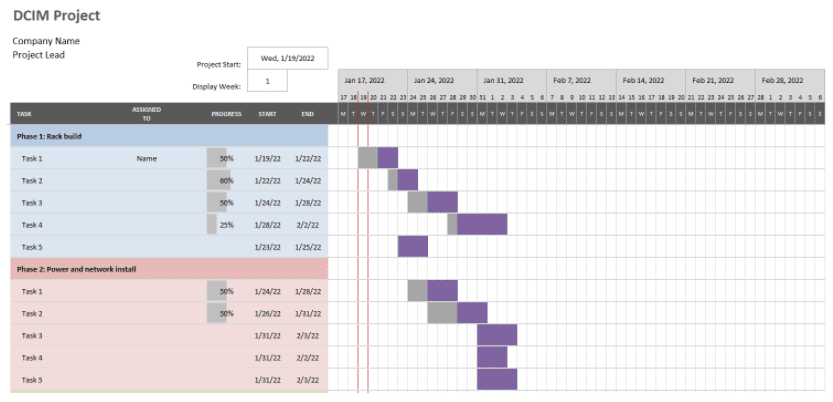
It’s a DCIM expert’s responsibility to plan out new builds and installs and determine the workflow for all stakeholders in the project. How much time will the facilities team need to build out the racks? When will the rack and stack be ready for the IT team to jump in? This often involves using a tool such as a Gantt chart to plan and manage these workflows and timelines. 

Capture. DCIM

Inventory Management:

Inventory management involves tracking the physical location of inventory in the data center using the following:

  • Asset tag number
  • IP address
  • Nameplate
  • “Friendly name”

A quality DCIM solution should allow you to see server or asset locations on the map of the data center. It should give you a 3D view that you can zoom into on the rack level to see the exact U-space location of the asset. You should also be able to “flip the rack” view from front to back. The DCIM should also give you a proper visual representation of each device.

Expert 2: Most people don’t realize that an appropriate expert of DCIM tracks and labels every cable and cross-connect in the data center, which is a massive undertaking.

What are the major concerns for modern data centers?

Expert 1: Ensuring there’s available power, backup, and cooling will always be a concern.

Expert 2: Our biggest concerns are power, cooling, and space, which are the same issues we were worried about 20 years ago. The difference now is that the client typically wants to be part of this discussion, and in the past, they didn’t.

In your experience, do your clients approach your profession with realistic expectations of what you can do?

Expert 2: The client always says they want everything done right and documented thoroughly, but then when the timeline gets tight, they say, “just do it.” Then, when the install or maintenance window is complete, you’re not allowed to touch anything to label and document it correctly.

What do you think is the best thing data centers can do to reduce emissions and power/water consumption?

Expert 1: Reduce data center emissions; it’s essential to downsize, streamline, and organize. You should eliminate redundant and “ghost” servers, for instance, and consolidate your infrastructure.

Expert 2: As data center density increases, the power, cooling, and water requirements per rack will also increase. However, telemetry-based lighting and evaporative cooling will help reduce emissions.

Do you view DCIM cloud migration as a boon or a potential risk for your industry?

Expert 2: If anything, data center cloud migration makes the job on the ground more critical. However, moving to the cloud gives DCIM experts a single pane of glass to manage their assets, cabling, and power, which makes our jobs easier.

How have data centers changed over the last 20 years?

Expert 1: Implementing cloud computing and more streamlined and centralized management solutions have created a more efficient DCIM environment.

Expert 2: To produce cloud services, compute power density has grown exponentially. This has led to higher power and cooling consumption.

What do you see as the future of data centers?

Expert 2: The future involves finding more efficient cooling techniques. For example, building sites on cold water streams, or completely submerged in liquid. Or, DC power bussing to eliminate thermal load at a gear level.

What advice would you give to young DCIM up and comers?

Expert 2: Be diligent in doing things right, or it will come back to bite you in the ass later!

What are the biggest DCIM industry trends coming in 2022?

Expert 2: DCIM typically revolves around layer 1—the physical layer—of the OSI model, which means it cannot be changed or replaced in the near future. However, as I mentioned before, I predict we’ll see a rise in alternative cooling strategies.

The right solution for your DCIM needs

A DCIM expert is responsible for many crucial tasks in your data center, including asset management, environmental monitoring, and strategic planning. One way you can make their job easier is by consolidating your infrastructure management behind one cloud-based pane of glass. For instance, Nodegrid gives your DCIM engineers complete control over your data center assets—including on-premises, colocation, and cloud infrastructure—from anywhere in the world. With additional features like remote OOB (out of band) management and a full range of environmental sensors, Nodegrid provides full data center visibility even during outages.

Give your DCIM experts the tools they need to succeed.

Contact ZPE Systems or request a demo of the Nodegrid infrastructure management solution today.

Contact Us

Data Center Environmental Monitoring: How to Stop Disaster Before It Strikes

Business,Risk,Control,Concept,,Businessman,Protect,Wooden,Block,Fall,To

Environmental threats—such as heat, moisture, power, smoke, and tampering—constitute a significant cause of data center downtime. According to a recent ITIC survey, a single hour of downtime could cost over $300,000 in lost business, which means you can’t afford to ignore the environmental risks in your data center. 

Let’s discuss the most prominent environmental threats you need to prepare for, and how data center environmental monitoring can help you prevent expensive outages by detecting disasters before they strike.

What are the environmental risks in your data center?

When you host critical infrastructure in a data center or colocation facility, you may not be able to physically view your equipment or sense the conditions in your cabinet. This is especially true for highly distributed networks in which critical remote infrastructure resides in small data centers hundreds or thousands of miles away from your IT team’s headquarters. However, that infrastructure is still vulnerable to environmental damage, including:

Heat

A data center appliance—like a switch, router, or console server—generally has an optimal temperature range in which it will operate most efficiently. Keeping the environment in your data center within that temperature range will reduce the energy consumption of your appliances and help control power costs. However, the significant risk with temperature is overheating beyond just rising electricity bills. If the temperature in the data center increases beyond acceptable limits due to an AC unit failure, your critical infrastructure could overheat and malfunction. Detecting temperature fluctuations before systems overheat is thus crucial to preventing outages and costly equipment failures.

Moisture

Moisture (from atmospheric humidity, water leaks, etc.) is essentially kryptonite to your data center infrastructure. When moisture collects in or on your appliances, it can cause corrosion, shorts, and component failures. It is  important that you keep data center humidity within acceptable limits and monitor for moisture within your cabinet.

Power

All data center equipment, including your appliances, climate controls, and physical security devices (biometric scanners, CCTV cameras, etc.), require consistent and uninterrupted power. It’s important to monitor the flow of current coming into your facility, cabinet, or rack so you can detect outages as soon as possible and enable backup measures or an orderly shutdown.

Smoke

While data center fires may be rare, smoke is a more common risk to your critical infrastructure, and can also be the first warning sign of another serious issue. For example, an uninterrupted power supply (UPS) may overheat and generate smoke, which can damage the sensitive internal components of your appliances and/or give you advanced warning that a power outage is about to occur.

Tampering

When you have critical infrastructure hosted at a remote colocation facility, you need to prevent and detect unauthorized access to your equipment. Physical security controls like cabinet locks, CCTV cameras, and biometric doors will deter most malicious actors. However, you also need to be notified whenever your cabinet door is opened or closed if someone makes it past these barriers and accesses your equipment without authorization.

Your critical data center infrastructure is at risk from various environmental threats. Still, you may not have on-site staff available to monitor the conditions in your cabinet physically. That’s why you need a comprehensive data center environmental monitoring solution to prevent a disaster from causing expensive downtime.

Data center environmental monitoring prevents disaster before it strikes

A robust data center environmental monitoring solution consists of three key components:

  • Environmental sensors to collect data on the conditions in your cabinet. For example, the Nodegrid environmental monitoring solution includes sensors for temperature, humidity, airflow, particulates, smoke, and more.
  • A serial console server to connect those sensors to your data center infrastructure. A high-density serial console like Nodegrid gives you the ability to monitor and manage up to 96 devices in a single 1U appliance.
  • A data center infrastructure management (DCIM) solution provides central management and analysis of your environmental data. For instance, ZPE Cloud gives you a powerful, web-based dashboard from which to monitor all your environmental sensors as well as manage your entire data center infrastructure.

A complete data center environmental monitoring solution like Nodegrid gives you all the tools you need to optimize the conditions in your rack and detect potential issues before they cause downtime.

Want to learn more about how Nodegrid’s data center environmental monitoring solution can help you prevent disaster before it strikes?

Contact ZPE Solutions today or request a free demo.

Contact Us