
Providing Out-of-Band Connectivity to Mission-Critical IT Resources

Why Your Business Continuity Plan Needs Cellular Failover

Cellular failover sets a new standard in high availability. When your primary WAN connection goes down, this wireless option keeps you safe from expensive outages. Compared to traditional redundancy strategies, cellular comes with a few very crucial advantages for your business and your network IT staff.

But first, let’s see what cellular failover is and why your continuity plan needs to include it.

What is Cellular Failover?

Cellular failover essentially makes high availability possible through wireless carriers. Traditional redundancy strategies place secondary, tertiary, and other backup connections in the ground using land lines (T1, T3, MPLS, etc.), however these usually offer limited reliability. When your main line suffers an outage or disruption, it’s likely that your wired backups will, too.

Using cellular failover, your backup connection is provided over 3G, 4G LTE, and even 5G networks, instead of through physical connections in the ground.
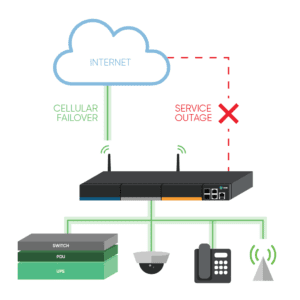
Cellular Failover


Why Do You Need Cellular Failover?

Wired connections are expensive to add, and most of the time they follow the same path as your main line. This means that when something disrupts your primary connection — such as a nearby construction crew that accidentally digs through your line — your wired backups go down as well. Cellular failover offers backup connectivity wirelessly, so issues like this won’t affect your network.

Gartner estimates that downtime costs an average of $300K per hour. This can cripple your organization while you wait for a temporary or permanent fix to your wired solutions, which can take hours or days at a minimum. Most wireless carriers, on the other hand, provide network uptime of 99.5% or more, which means you don’t have to wait for cable repair or new lines to be trenched. The right cellular failover solution keeps you covered automatically and seamlessly.

Your business continuity plan should include cellular failover, because it:

  • Provides backup connectivity for your production network and your critical functions
  • Offers a reliable, isolated, and secure path for out-of-band management (OOB)

What Business Benefits Come With Cellular Failover?

Cellular failover offers more reliability and flexibility than wired options.

  • Stay disruption-proof: With cellular failover, you don’t have to wait for your main connection to come back online. When your primary link is unavailable, cellular failover automatically kicks in to handle your network traffic. And because many carriers have robust and reliable networks that operate for years without disruption, your business can keep going regardless of what happens to your underground connections.
  • Set up & scale fast: Deploying new locations often means waiting weeks for wired connections to be installed. On top of this, these wired connections can leave you with a single point of failure at each location (such as when a router or switch goes down). When you introduce wireless connectivity via cellular failover, you can deploy in hours or less without waiting for crews to install physical lines. This means your business can scale quickly, whether you’re setting up permanent branch locations or temporary kiosks.
  • Fix issues remotely: Cellular failover via ZPE’s Nodegrid allows your backup connection to also serve as an OOB path. If a network problem arises at one of your branch locations, such as a device becoming unresponsive, your IT staff can use your wireless redundancy path to access the network and resolve the device issue. You don’t have to spend time and money bringing in on-site support.

How Do Network IT Staff Benefit?

Because wireless connectivity can serve as an OOB management path, your network IT staff also benefit from having cellular failover at their disposal.

During outages, cellular failover allows your admins to maintain visibility and control of your network. Instead of having to go on-site to each location and physically connect to each device, your staff can remotely connect to monitor your network, troubleshoot issues, and make adjustments as needed. This helps streamline network management processes and tasks by offering a convenient access method to branch locations and remote sites.

When it comes to deployment, cellular failover not only helps you get sites online faster, but it also offers staff the peace of mind that comes with a more flexible, resilient link. Should issues arise during deployment, your wireless connection can kick in to help finish the job. If your scaling strategy takes advantage of methods like zero touch provisioning, you don’t have to wait for your primary link to be available. Cellular failover helps staff get sites up and running quickly, and gives them a secure pathway to manage your network before, during, and after each deployment.
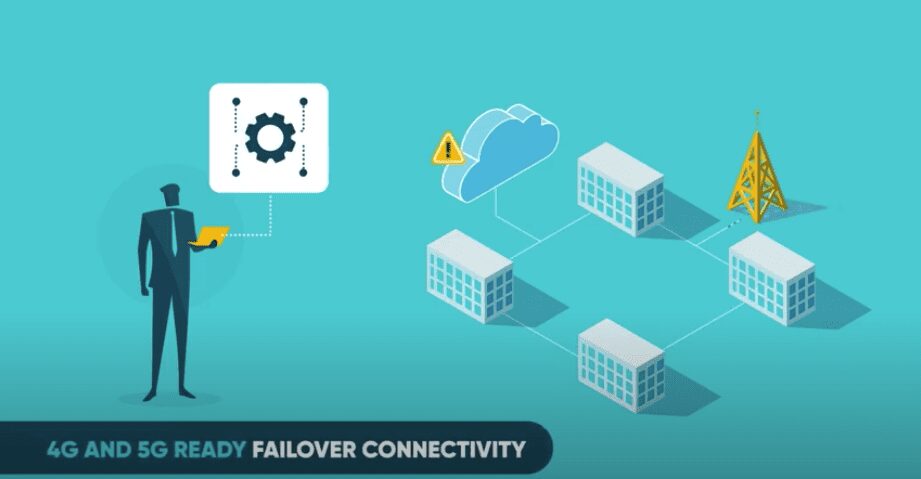
Learn how to prepare for cellular failover.

How to Prepare for Cellular Failover

How to Prepare for Cellular Failover
It’s 3AM and you’ve just been woken up by the sound of your phone ringing. As you struggle to shake off the drowsiness, you start to feel that all too familiar wave of stress wash over you. A critical system at one of your remote branch locations is down. There’s also no network connectivity so your team is unable to remote in and troubleshoot the issue. To top that off, this site has no on-site team and the closest engineer is two hours away. 

We’ve all been there at one time or another, but with today’s modern technology do we really need to keep putting ourselves and our teams in this position? With the variety of out of band (OOB) management solutions available, local support for every remote office or branch location is a thing of the past. Engineers can connect to most equipment from anywhere around the world to diagnose and correct issues. This allows for true 24/7 access and support which drastically reduces costs and downtime. With the proper OOB solution, most issues can be corrected in minutes rather than hours. However, this can all be for naught if the local connection goes down and there’s no way to connect.


Not All OOB Solutions Are Created Equal 

When choosing the best solution for your business, you want to make sure that every scenario is accounted for. Cellular failover built into your OOB solution can eliminate the possibility of full lockout due to a network outage or configuration error. When properly deployed, a cellular connection leverages the power of local providers to allow for an always-up pathway to every device on your network. Systems administrators and engineers can use this backup connection to access your devices from anywhere regardless of the status of the local network, thus saving your business time and money.

ZPE Systems’ Nodegrid Family of Open Infrastructure Management™ Solutions address the critical needs of networking, in-band and out-of-band IT infrastructure. With flexible network interface options including dual cellular fail-over with dual SIM, a modern and secure Nodegrid OS, OOB management, cloud orchestration and add-on virtualized applications for SASE and SD-BRANCH, Nodegrid has it all. 

With ZPE Cloud™, you no longer need to get bogged down by provisioning or on-site support. Configure, deploy, & manage all your appliances from our secure cloud platform.

Thanks to dual cellular failover that supports all major carriers, you get strong backup when your network goes down. 4G/LTE connectivity means more reliability and uptime for your network and less stress for you and your team. 


Leveraging Cellular Connectivity for New Deployments

Take your deployment to the next level by leveraging Nodegrid’s built-in 4G/LTE cellular connectivity and Zero Touch Provisioning (ZTP). Deploy from anywhere via ZPE Cloud, even without having local connectivity configured. With Nodegrid, you can eliminate worry and reduce security concerns by shipping bare-metal devices that do not contain any sensitive data. Once your devices arrive, are racked and connected, simply use ZPE Cloud to download and run all of your automated scripts. Provisioning is automatic, consistent, and error free which save you time and money. 

Vendor Neutral

Nodegrid is also vendor neutral which allows you to add management capabilities to all your devices without the need to learn vendor-specific tools. All commands are normalized and available on one console.

Ready to Learn More?

Take a deeper dive into celluar failover with this free ebook: Your Complete Guide to Cellular Failover.

For more information on ZPE’s full product line, please visit our products page.Have a specific question or want to experience a live demonstration for yourself? Reach out to us via our Contact page. We’re here for you!

Are Public Switched Telephone Network (PSTN) Lines still the best Failover option?

Most of us still remember the sounds of an analog modem connecting to the ISP or back to the corporate office. These nostalgic sounds are a thing of the past as broadband connections have pushed PSTN lines further away from the norm.

For some, a PSTN line is still a reality, especially in scenarios where a slow connection is better than no connection. PSTN lines are still used for remote management of IT infrastructure in cases of disaster recovery. For example: A branch office has gone completely offline… In this case it is important to identify if the cause of failure is a misconfigured VPN connection, other configuration changes causing unforeseen results, or if the broadband connection is down and it’s time to call the ISP.

In today’s Blog, we will review why PSTN lines are still being used for failover and some of the misconceptions associated as to why switching to another alternative failover method can be a complicated task.


Why are PSTN lines still in use?

PSTN lines are still in use because the technology has been around for a long time and the solution simply works. A dial up connection might be finicky, but give it a little bit of time and it will sort itself out. Besides this, the following reasons play a big part:

  • For a console, analog connection speed is acceptable
  • Some end devices, specifically in older branch offices only support analog modem connections
  • It provides a simple method of implementing a Point-to-Point communication
  • Analog Modems are still supported by vendors
  • Analog Technology is vendor neutral
  • Other communication options might not be stable enough or even available in the specific region
  • Some existing infrastructure management solutions offer solutions which can manage both the infrastructure management and the fallback connection of a single device

Overall PSTN lines have provided a stable and secure method of connectivity over the years, so why change? The pressure to change has increased over the years as ISP’s have updated their hardware and broadband connectivity. It has become cumbersome for phone companies to offer analog lines to end users. Analog solutions require additional maintenance and cabling costs, resources which can be better utilized by the ISP’s on more profitable, technologically advanced solutions. It has become increasingly difficult to get a PSTN line installed and in some areas, PSTN lines are no longer available. Line quality has also become an issue as noise affects speed and reliability. To decrease noise levels requires active maintenance of the older, legacy equipment and technology.

Another obstacle is fewer manufacturers produce replacement parts and the number of available modems by different vendors is very short as most devices are OEM products. On a recent project, we had difficulty finding a working modem which could handle the noise; We tested multiple modems all with the same result. We managed to find two modems that solved the customers line noise dilemma, neither was under $100.

It is only a matter of time, where even the last few implementations will have to be changed to alternative connection methods.


Alternative Connection Methods

Rented/Dedicated connection

This option would be the closest to a PSTN line in the sense that it can provide a real point to point connection. For most customers, this option will be far too expensive, especially if we are looking at redundant connections for disaster recovery scenarios. Although this solution provides a point to point connection, it also runs through the same exchanges as the normal broadband connection. Only a few will actually have their own cable going to every branch office. This means there is some shared infrastructure which increases risk and could potentially expose the data going over the cable. Based on this, most customers would still run a site to site VPN to secure the connection.

Backup Broadband Connection (Secondary ISP)

This solution is typically easier to implement, but can be very costly as it may require a completely new line to be brought into the building. The advantage is the second line can be used for other failover scenarios. In any case, a VPN solution is necessary to establish point to point security between the sides.

Mobile Broadband (Cellular Connectivity)

This solution is the easiest to implement and is used by most customers. Mobile broadband devices are available for a variety of devices and offer wide spread support from vendors. Taking the commitment by most countries and ISPs to expand their mobile broadband offerings in their regions, the coverage and availability will increase even further over the next few years. The question is, which version will be available in which region? The first real mobile broadband was introduced in 2001 with 3G and with a roll-out of 5G in planned for 2020, we will have at least three different versions available. All need to be supported by the hardware. Regardless of the mobile broadband version, a VPN solution is required here as well.


Now, what does this all mean for existing disaster recovery infrastructure management scenarios? For one, existing PSTN, solutions still work, but their time is limited, as challenges with replacement parts and availability of the actual line through the ISP’s will increase. Alternatives exist, but solutions will consist of at least 2 main parts; The actual broadband connection and a VPN solution. This means we have the option to invest in two or more individual appliances which will manage the broadband connection, VPN and the infrastructure management or invest in an infrastructure management solution which offers everything in one appliance.

Investing in multiple devices has the advantage that standardized hardware can be deployed on all sites this means small sites needed the same infrastructure as a large site, requiring the same administrative overhead, space and power, which can become very costly and non-scalable.

Infrastructure Appliances which support different broadband connections, VPN’s and infrastructure management protocols exist, but the appliances themselves are not the complete solution. The connection of these devices through broadband means they are exposed for long periods of time to the internet, and have security risks. The solution should be selected with the idea in mind that it is secure today, (capable of running secure operating system versions, cyphers, VPN and firewalls) and in the future. It should have enough flexibility built in to support upcoming connectivity options, management and security requirements while supporting current IT management standards.


The Solution: Open Infrastructure Management with Nodegrid

The Nodegrid Family of products are the ideal solution for maintaining maximum connectivity, with support for all of the alternative connection methods listed above; Nodegrid utilizes multi-routing tables to assign connectivity for a secondary broadband connection, comes equipped with provider agnostic cellular connectivity capabilities, and makes the migration from PSTN lines to alternative connection methods quick and easy. Nodegrid Manager software is up-to-date with security protocols, allows for automation and scripting, and provides a vendor neutral software-defined approach to infrastructure management, all of which allow for an unmatched level of flexibility, automation, and security. ZPE’s combination of modern hardware and built-in support for various connectivity methods, paired with the powerful Nodegrid Manager software results in a centralized and secure management platform with maximum uptime and reliability at the core.

For more information regarding the Nodegrid family of products and failover connectivity capabilities, give us a call or send us an email – We’d love to hear from you.