Providing Out-of-Band Connectivity to Mission-Critical IT Resources

SASE vs Security Service Edge: What’s the difference?

Employee tapping into cloud services such as security service edge

Security Service Edge. Is it just another fancy networking term? After all, we’ve already got SASE (Secure Access Service Edge), so why throw another buzzword into the mix?

The truth is, there’s a big difference between Security Service Edge (SSE) and SASE. SSE is a foundational element of SASE, but there’s another necessary component you need to be aware of. In this article, we’ll break down the differences between these two acronyms so you can understand how to achieve better security for your distributed users and devices.

But first, let’s quickly recap why networking and security have become decentralized.

Security Service Edge: An evolving need

The modern workforce is increasingly distributed. In fact, Gartner research shows that demand for remote work will increase 30% by 2030, as Gen Z fully enters the workforce. Another factor is the ongoing coronavirus pandemic, which has forced companies worldwide to accommodate off-site staff.

But the need for distributed networking goes back much earlier than the previous 18 months.

Connectivity and network architectures used to be simple. In the 1990s and 2000s, companies centralized data in the data center, connected branch offices to the data center, and set up simple security measures in between. Most staff worked from the office, which made it easy to provide secure access to and from these enterprise locations and resources.
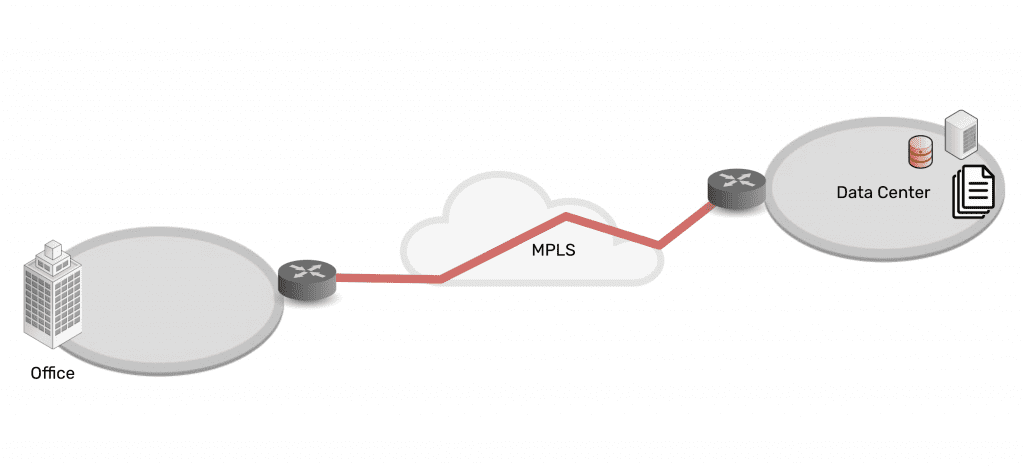
Network architecture showing simplicity of data center connected via MPLS to branch office

As technologies advanced, companies and their employees discovered that it was becoming easier to work outside of the office. Cloud, SaaS, and edge offerings emerged to create a hybrid infrastructure, as everything moved from being centralized to highly distributed. Now data, security, networking, and computing are everywhere and comprise a complex web of services — owned by enterprises themselves as well as third parties. Securing it all has been an impossible feat for more than a decade.
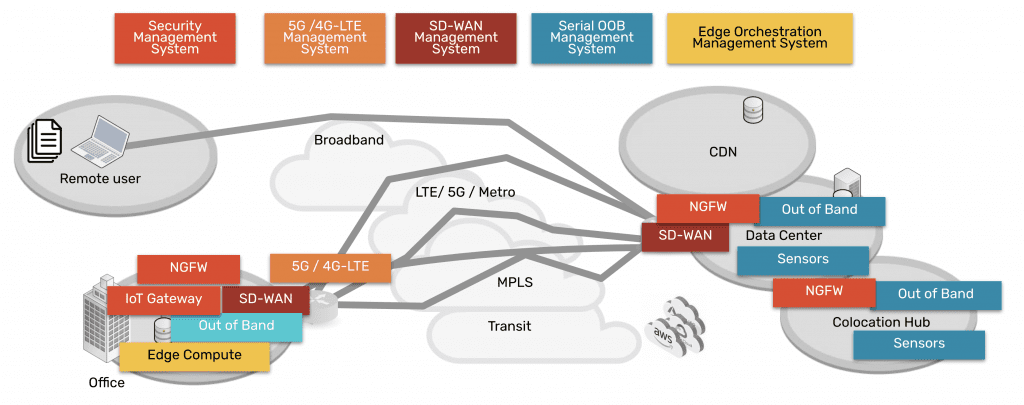
Network architecture showing complexity of data center, CDN, remote user, branch office, all connected via many paths

Fortunately, Security Service Edge and SASE are models that can address this challenge.

SASE vs Security Service Edge (SSE)

Security Service Edge is a main component of SASE. In the simplest terms, SASE is the architecture that organizations strive to build. It involves delivering networking and security via the cloud, directly to the end user, device, office, etc. instead of having to backhaul through the company’s data center. Aside from SSE, the other main component of SASE is the access portion, which allows the edge services to be deployed and managed. This access portion includes the physical hardware required to connect ‘network’ the edges and services.

Therefore, SASE breaks down into two main components:

  • Security Service Edge, and
  • Access

Keep reading for a detailed explanation of each and why they have been separated out into two pieces now.

Security Service Edge

Security Service Edge (SSE) is the security component of SASE. As Gartner states, SSE ensures secure access to the web, cloud services, and applications. SSE is delivered via the cloud and offers several capabilities, including threat protection, security monitoring, and data security.

Security Service Edge capabilities are available from companies who provide NGFWs (next generation firewalls), SWGs (secure web gateways), and CASBs (cloud access security brokers).

  • NGFWs: Next generation firewalls are implemented to not only secure networking components and services, but also to protect against modern threats that exploit weaknesses in applications.  This type of service secures all the traffic even traffic that’s UDP and also non web based applications including malware exploits.
  • SWGs: Secure web gateways are self explanatory. They are placed between the user and the web, serving as a gateway that provides secure access to the web. Basic functions of SWGs include blocking access to certain websites, preventing unauthorized transfers of data, and inspecting for malicious content.  As its name implies this type of service is limited to web traffic and is used in specific use cases.
  • CASBs: Cloud access security brokers are software that sit between cloud users and cloud applications, to monitor activity and enforce security policies. This software keeps a close eye on data as it moves between cloud environments, SaaS, and users, and enforces security policies to block malware, protect sensitive data, and maintain compliance.  This type of service also has a specific use case of only examining specific cloud applications as its name suggests.

Access for Security Service Edge

In order to use the capabilities of Security Service Edge, you need the physical hardware to deploy services at your locations. This hardware is the access component, and includes SD-WAN capabilities. When deployed, it connects your location to a variety of services (NGFWs, SWGs, CASBs mentioned above) in order to make those services available to your location.

SASE = Security Service Edge + Access

A simple way to think about the SASE concept and its components is to imagine a skyscraper.

Imagine SSE capabilities live in the clouds, and you’d like to bring them down to your enterprise. You’ve got the blueprints to build a skyscraper (SASE) that can connect you to these cloud-based capabilities. But before you can do any of that, you need a sturdy foundation (the access portion) on which to build it all. In other words, your investment in cloud services needs a solid access onramp to those services.

With the right access component, your employees can shuffle in and out of your skyscraper, and easily perform their job functions using SSE capabilities in the cloud. And if you deploy a more robust access solution such as ZPE Systems’ Nodegrid, you’ll be able to maintain your SASE architecture no matter how the clouds change.

How to implement SASE: Focus on Access

When you’re considering implementing SASE architecture, you might be inclined to go to a SASE company to buy everything. But Gartner states that companies that offer the two segments have more mature offerings. 

Therefore, you should focus on purchasing the right solution for the access portion, since it serves as the foundation of your infrastructure at the edge, and then marry this to the right SSE solution for your company. This separation of vendors gives you flexibility to manage several IT systems, and eliminates vendor tie in.

Nodegrid puts the Access in SASE

The Nodegrid SR family of edge routers serves as the access portion in your SASE architecture. A single Nodegrid SR device is a powerful, cost-effective solution to connecting sites to Security Service Edge providers.

The onboard Intel CPU and Linux-based Nodegrid OS offer speed and flexibility. Orchestrate freely across vendors to activate service licenses, spin up VMs, and get your SSE solutions up and running automatically. Additional RAM and storage also help you deploy edge computing for data thinning, de-duplication, monitoring, and other edge workloads.

On top of this, Nodegrid gives you out-of-band management capabilities so you can remotely manage your SASE architecture from anywhere. If you need to optimize bandwidth, investigate data logs for security, or simply power cycle an edge device, you don’t have to get out of your pajamas. Nodegrid gives you secure access to everything via your web browser.

To summarize, the reason SSE has been separated from SASE is that many SD-WAN vendors began to confuse the market by advertising that they offered SASE. This prompted Gartner to point out that there are security-savvy companies that give you more mature security solutions, and to consider such solutions from vendors like zScaler, Netskope, and Acreto, for example. Regarding the Access component, vendors like ZPE Systems provide more capable and robust solutions for connectivity to cloud services, when compared to SD-WAN companies that claim to offer SASE.

Don’t miss out on valuable SSE content. Make sure to sign up for our newsletter using the form below.

If you have questions or would like to speak with an expert, feel free to contact us.



3 Tips to Improve Edge Network Resilience

ZPE Systems and Palo Alto Networks

When it comes to improving edge network resilience, traditional WAN architectures can easily get in your way.

Suppose you’re setting up an electrical substation, cellular base station, or other distributed remote infrastructure to incorporate cloud-based networking. To deploy, you need to configure a slew of cloud-enabled devices, from IoT sensors, to routers, firewalls, SD-WAN boxes, and out-of-band and cellular failover appliances. The physical footprint alone is intimidating, and is rife with points of failure. On top of all this, you need the right management tools to ensure everything runs smoothly. You might need visibility on power grid sampling, application performance, or user experience, with management software that lets you troubleshoot individual components of your infrastructure.

It’s not just your network or your business riding on your shoulders — it’s people’s livelihoods, whether they rely on you for delivering essential utilities or keeping them connected to the world.

That’s why it’s so important to boost edge network resilience and shield your customers from outages. And it’s why ZPE Systems now hosts Palo Alto Networks’ Prisma SD-WAN offering. Read the full press release, and download the brief below for details.

But before you do, here are three tips to help you improve edge network resilience.

How to improve edge network resilience

1. Respond fast with out-of-band

It’s 8pm, and suddenly a surge of customer tickets crowds your support desk. You quickly scan the issues and realize that one of your towers is offline, causing an outage for many of your rural customers. One of your on-call technicians is standing by for dispatch, but the hour-long drive means your teams will be fielding complaints for at least 60 minutes. Meanwhile, customer satisfaction begins to drop and one star reviews pour into your online channels.

This is all too common with edge network support, and it highlights why out-of-band management can be a life saver. Instead of having to dispatch IT support technicians to establish a physical connection and allow HQ to remote-in for troubleshooting, what if you could respond instantly from anywhere? With out-of-band, you get an isolated management network that’s separate from your production network, and you can establish a connection using cellular, broadband, DSL, or even phone lines. This means you can quickly gain access to your infrastructure, and with an advanced out-of-band solution like Nodegrid, you can simply open your web browser to troubleshoot and resolve issues — whether you need to reboot a network switch, reconfigure a firewall, or analyze and adjust traffic flows.

No matter your deployment, out-of-band is essential to improving edge network resilience.

2. Stay connected with cellular backup

Part of boosting edge network resilience involves diversifying the types of connections at each location. But this doesn’t mean adding more layers of physical connections.

Although T1, T3, and MPLS links can serve as reliable backups, these physical connections most likely follow the same path as your main connection. So when a flood sends currents your way or a construction crew sinks a thousand-pound excavator bucket into your main line, chances are your physical backups will go down, too.

Backhoe digging a large trench, putting underground communication lines at risk.

If you have 5G/4G LTE cellular, you can keep your locations online through all this. Your cellular connections can serve as failover paths, but also provide reliable backup for out-of-band networks. Download the joint solutions brief below and see how Nodegrid’s failover helped a large oil and gas company eliminate the majority of their continuity issues at the edge.

3. Go vendor-neutral to centralize control

One of the biggest drawbacks to managing traditional WAN architecture is vendor lock-in. When you purchase one provider’s SD-WAN or security solution, you’re limited to using their unique management tools and integrating only pre-approved solutions (usually from them as well). This can make edge network resilience difficult to maintain, since you’ll have to learn several different systems, protocols, interfaces, commands, etc.

When you centralize control, however, you get access to all the tools you need, using a single gateway. The best platforms for this feature a vendor-neutral operating system and rich API library that can accommodate your custom and third-party integrations.

Imagine no longer needing to log in and out of every solution in your stack, and instead using single sign-on to gain access to your SD-WAN’s cloud controller, next-gen firewall, application performance monitoring app, and every part of your edge infrastructure. For a major digital security company, this meant cutting resolution times in half using a single tool that helped them provide continuous monitoring and achieve instant response times.

See how Palo Alto Networks and ZPE Systems boost edge network resilience

Prisma SD-WAN and Nodegrid help companies streamline deployment, configuration, and management of their edge networks. Download the brief for full details.

SASE Implementation: A Step-by-Step Guide for Businesses

shutterstock_1902760141

SASE—which stands for secure access service edge—is a relatively new framework that converges wide-area networking with security into one cloud-based service stack. SASE uses software-defined wide area network (SD-WAN) technology to directly connect branch offices and remote users to the cloud and software-as-a-service (SaaS) resources without backhauling traffic through the primary firewall. 

SD-WAN traffic can bypass a firewall because SASE enables the application of enterprise security policies, traffic filtering, and other controls to that remote traffic. By using cloud-based security features like firewall-as-a-service (FWaaS), cloud access security brokers (CASBs), and zero trust network access (ZTNA).

SASE provides numerous benefits to businesses to simplify, optimize, and secure their network edge, including:

  • SASE reduces network latency for both enterprise and remote traffic. SASE separates remote, cloud-destined traffic from the rest of your SD-WAN traffic, so a branch office user doesn’t need to go through an HQ firewall just to access a web service like Office 365. SASE increases the security of the network edge by allowing you to implement the same enterprise security policies and controls to all remote traffic.
  • SASE simplifies and optimizes network administration by consolidating SD-WAN management and edge security controls into one unified platform.

A successful SASE implementation requires a lot of planning, as well as a comprehensive understanding of your existing infrastructure, requirements, and pain points.

SASE implementation: A step-by-step guide for businesses

Each SASE implementation is unique to the business it serves. However, there are six basic steps that most successful SASE deployments follow:

Step 1: Define SASE goals and requirements

During the planning phase of the SASE implementation, the first step is defining the project’s business goals. Identify SASE use cases: What problems need a solution, and what benefits does your organization hope to gain? These use cases will inform how to conduct the following steps—once the goals are clear, developing plans for reaching them is what follows.

For example, you may want to use SASE to secure and optimize SD-WAN traffic. In this case, you already have SD-WAN technology, so the primary goal is to add SASE’s cloud-based network security stack to protect that traffic. 

The following steps determine whether the existing SD-WAN architecture can support SASE and ensure preferred SASE vendors integrate with your existing infrastructure. Once you know why SASE is essential, decide what technologies, processes, and training to implement to reach those goals.

Step 2: Assess the environment and identify gaps

Next is to conduct a thorough assessment of your existing network infrastructure and resources to identify any gaps in the ability to achieve your SASE goals. Use the following questions as a checklist:

  • Do the critical staff members have the knowledge and skills to implement and manage a SASE deployment?
  • Do you need an access on-ramp to the SASE service provider (e.g., an SD-WAN backbone)?
  • Can any existing infrastructure be used with SASE implementation, or do you need to purchase new hardware for your edge?

Review technical documentation and network diagrams, interview key staff about their requirements and training, and examine the security and network configurations to assemble a complete picture of your current environment. Choosing this before defining SASE requirements is vital because a thorough understanding of existing infrastructure can make it much easier to identify pain points and business goals.

With a clear picture of where you are now and what you hope to achieve with SASE in the future, you can start choosing SASE vendors and solutions.

Step 3: Choose SASE vendors and solutions

There aren’t any fully mature, single-solution SASE providers yet. Some vendors provide access via SD-WAN and related technologies, while others offer security service edge via cloud-based network security features. If you have an existing SD-WAN backbone that provides all networking functionality, then a single vendor for a cloud-based security stack is only needed. Otherwise, combine a security service edge solution with an SD-WAN solution to complete SASE implementation.

SD-WAN and cloud security solutions need to work well together. Security service edge providers often partner with SD-WAN vendors to create fully integrated solutions managed from one unified platform. For example, ZPE Systems partners with Palo Alto Networks to provide an SD-WAN on-ramp to the Prisma Access security service edge solution. Enterprises should prioritize integration when evaluating potential vendors.

Step 4: Stage and test SASE deployment

The exact steps to configure services will vary depending on the provider, environment, and requirements.

We recommend creating a staging and testing environment separate from the production environment, so you can perform thorough integration and user acceptance testing before going live with SASE deployment. Test how cloud security stack integrates with an SD-WAN solution, as well as other applications and tools like security information and event management (SIEM), role-based access control (RBAC), and security orchestration, automation, and response (SOAR).

Additionally, perform user acceptance testing with real users and workloads to accurately picture how these changes will affect the people using your systems every day. This will help identify bugs and issues, determine what kind of user training is needed at the cutover time, and optimize the overall user experience to make the transition to SASE easier for your organization as a whole.

Step 5: Cutover, troubleshoot, and support

Even the most meticulously planned deployments can go awry, so companies should have support staff ready to handle any user complaints and technical staff on hand to troubleshoot any configuration or deployment errors. After cutover, your support staff also needs to provide training and documentation for the user base to ensure they know how their daily processes will change and what to do if they encounter any problems.

Step 6: Continuously optimize SASE implementation

Once your SASE implementation is live, you should constantly monitor it and look for ways to improve and optimize. Infrastructures will evolve, as will the technology offered by SASE vendors. As adding new cloud infrastructure, SaaS platforms, branch offices, and other edge computing requirements, you should evaluate the SASE technology to see if additional functionality is needed or desired.

You should plan and implement a SASE deployment that addresses a unique environment, requirements, and business goals by practicing these six steps.

Discover more on how to simplify SASE implementation

A successful SASE implementation requires in-depth planning and preparation, robust testing, comprehensive training and support, and continuous monitoring and optimization. You can make this process easier by investing in SASE solutions that integrate and consolidate management tasks behind one pane of glass. 

For example, you can use Nodegrid’s innovative SD-WAN and remote branch management solutions as your on-ramp to secure service edge technologies. We partner with trusted SASE providers to deliver an integrated platform that consolidates and simplifies your SASE management and optimization.

Want to learn more about how ZPE Systems’ Nodegrid can help your business with SASE implementation?

Call 1-844-4ZPE-SYS or schedule a free demo.

Watch A Demo

The Importance of Micro-Segmentation for Zero Trust Networks

shutterstock_1920245057

As workloads, applications, and data move to the cloud and business operations expand to include branch offices, remote data centers, and work-from-home staff, how do you define your network security perimeter? With zero trust networks, you don’t have to.

Zero trust security doesn’t follow the old “castle and moat” strategy of assuming everything on an internal network is safe and creating one large security perimeter (or moat) to protect it. Instead, zero trust security follows the principle of “never trust, always verify.” Any user, device, or application that requests access to a sensitive network resource needs to verify its identity and prove its trustworthiness, whether they’re 3,000 miles away or in a cubicle down the hall.

To implement zero trust security, shrink your focus from one large network perimeter to the individual systems and services that need protection. And to do that, you need network micro-segmentation. Let’s discuss micro-segmentation for zero trust networks, how it works, and its importance.

What is micro-segmentation for zero trust networks?

Traditional network security perimeters need to encompass the entire enterprise and edge network to protect all data, accounts, devices, and applications. Not only do you need to extend the perimeter to include cloud and remote resources, but you also need security controls at that perimeter to account for every single vulnerability. You may end up with a bloated, expensive patchwork of appliances and services that are a hassle to manage across platforms. Even worse, the difficulty of managing such a large perimeter could leave gaps in security coverage.

Instead, a zero trust network focuses on breaking down the perimeter into a series of smaller micro-perimeters around the necessary resources needing protection. You use micro-segmentation to logically separate network data, applications, assets, and services so that you can then implement the specific security policies and controls needed to secure each of those segments. To ensure maximum protection without impacting productivity, you can address specific security vulnerabilities, access needs, and interdependencies of each micro-segment.

The importance of micro-segmentation for zero trust networks

You can’t implement a zero trust network without micro-segmentation for the following reasons:

1. Granular access policies. 

When micro-segmenting a network, you can create exact policies dictating who and what can access each segment. This means you can apply for the least privilege access, granting users and devices access to only the bare minimum network resources they need to accomplish their tasks. Using the principle of least privilege helps you control lateral movement within a network in the event of a breach. 

For example, during a recent attack on Microsoft Exchange servers, hackers gained access to compromised email accounts. If one of those compromised accounts had unrestricted network access, it could have been used to cripple an enterprise network. However, if that compromised account only had the least-privileged access, the hacker would be limited to the specific applications and files that particular user had rights to access, and couldn’t jump to more critical systems and servers.

2. Targeted security controls.

A micro-perimeter of security controls protects each zero trust network micro-segment. This means you can develop each micro-perimeter to specifically target the security risks and vulnerabilities of the resources in that micro-segment. Protecting a file server in a local office requires different tools and policies than you would use to protect an enterprise application hosted in a public cloud. 

For on-premises systems, you’re responsible for physical security (e.g., biometric locks on doors, CCTV security cameras in the data center, etc.) as well as network and endpoint security, for example. In a public cloud, you share some responsibility with your provider. Still, you also have to worry about securing API connections, extending identity management to your edge, and other cloud-specific concerns. Zero trust micro-segmentation ensures you can always apply the proper security controls for the job.

3. Establishing identities and trust.

To follow the principle of “never trust, always verify,” you need to establish the identity and trustworthiness of an account or device before it can access any network or cloud resources. This is much easier to do if a network is micro-segmented because you can incorporate zero trust identity and access management (IAM) into the micro-perimeters. You get greater visibility and control over how trust is established for individual applications and data, which means you can ensure your security policies are applied correctly.

For example, just because an entry-level employee has access rights to a cloud-based accounting app doesn’t mean they should have the same access to the on-premises financial database. However, an SQL service account might require the same level of access to both. When you microsegment your network and implement IAM controls at each micro-perimeter, you can ensure that your granular security policies prevent unnecessary and unauthorized access while allowing critical services and accounts to access the resources they need.

In short, micro-segmentation is the foundation upon which to build a zero trust network. Dividing an enterprise and edge network into micro-segments allows you to implement specific security policies and controls, verify identities, and establish trust for the individual resources you’re trying to protect.

How to implement micro-segmentation 

Now that you understand why micro-segmentation is essential, you’re ready to apply it to your enterprise zero trust network. Depending on your security requirements, business goals, and existing infrastructure, you can use various strategies and tools to micro-segment a network. Here are a few best practices to keep in mind:

  1. Start by mapping existing network traffic flows and interdependencies. You don’t want to accidentally create a micro-perimeter that isolates an enterprise application from a critical data source, for example.


  2. Identify every “protect surface” or network resource that needs to be defended and then use your traffic flow and interdependency map to inform how you micro-segment the network around each protect surface.
  3. Consider using a vendor-neutral zero trust framework that integrates your IAM solution, next-generation firewall, and other zero trust network technologies to simplify network management.

You can’t implement a zero trust security strategy without network micro-segmentation. Micro-segmentation allows you to establish specific security policies and controls. It also makes it easier to verify the identity of the users, devices, applications, and other entities on your enterprise network.

Nodegrid’s open platform simplifies micro-segmentation for zero trust networks

To implement micro-segmentation for zero trust networks, you should look for a zero trust framework that integrates all your security controls and technologies to provide one simplified management interface. For example, ZPE Systems has partnered with providers like Okta and Palo Alto Networks to deliver the Nodegrid Zero Trust Security Framework Foundation

Nodegrid allows you to consolidate all your zero trust network management into one unified control panel. You can also use the Nodegrid solution to manage your remote and branch infrastructure with out-of-band network management and software-defined wide area network (SD-WAN) technology.

Want to learn more about how ZPE Systems can help you implement micro-segmentation for zero trust networks?

Contact us or call 1-844-4ZPE-SYS.

Contact Us

Detecting Ransomware on a Network: 3 Critical Steps to Ensure Network Security

shutterstock_1612695883

Ransomware is one of the biggest threats to enterprise network security. Recent findings show that 37% of organizations were affected by ransomware attacks in 2020 alone. These attacks can be financially devastating, costing companies an average of $1.85 million in payouts and damages.

To minimize the impact of a ransomware attack, it is critical to detect and mitigate the infection as early as possible. Still, traditional signature-based firewalls and antivirus software may not be able to detect novel malware (new viruses that haven’t been seen before) and zero-day exploits that hackers frequently use to deploy ransomware on a network. For example, in early 2021, Microsoft detected multiple zero-day exploits that hackers used to attack on-premises Exchange servers. That is why it is essential to have a comprehensive network monitoring solution for preventing, detecting, and removing ransomware on a network. However, it’s essential to understand what ransomware is and how it works before diving into the best strategies for detecting ransomware on a network.

What is ransomware, and how does it work?

Ransomware is malware (malicious software) that takes systems or data hostage until you pay a ransom to the hacker. Usually, hackers will encrypt your files, and after you pay the ransom, they’ll provide an encryption key. On some occasions, the hacker will just take your money and run; other times, they’ll decrypt your files but leave malware on your system so they can attack in the future.

Even in the best-case scenario, where access to your files is fully restored, and the malware is completely removed, you’re likely to face significant business interruptions both during and after the breach. One notable example would be Colonial Pipeline, which faced a ransomware attack in May of 2021. Even after paying the ransom, they had to shut down operations for several days while removing all traces of malware from their network, causing President Biden to declare a state of emergency. 

So, not only do you pay a steep cost for the ransom, but you’ll also pay the cost of lost business, lost consumer trust, and even potential legal fines if regulated data was exposed during the attack.

Detecting ransomware on a network

Detecting ransomware on a network is notoriously difficult until it has fully infected the network and activated its encryption. That’s because traditional security solutions rely on signature-based detection, which means they keep a database of known virus types to compare potential infections. If a piece of malware doesn’t match anything in the signature database, or if that database isn’t kept up-to-date, it could get through firewall and antivirus software.

Since ransomware attacks frequently use novel malware, you may need to instead look for signs of that infection interacting with systems and files on your network. This requires a comprehensive network that gives complete visibility on enterprise infrastructure, including edge networks and remote and branch locations. For example, a SIEM (security information and event management) solution offers a holistic view of your network by collecting logs and event data from all your systems and applications.

Collecting data is only the first step—you also need to know what to look for. Here are some of the signs of a ransomware infection that you can detect through network monitoring:

  • New processes and code. Any unfamiliar processes and programs launching on your systems could be a sign of ransomware taking hold.
  • Registry changes. Unexpected changes to the Windows registry on servers and other devices are also early warning signs of ransomware.
  • Unusual internal and external traffic. Traffic to and from an unknown external source could be a sign of hackers controlling their ransomware or exfiltrating data. Unusual traffic between systems on your network that don’t usually communicate could be a sign of ransomware spreading between devices.
  • Elevated PowerShell scripts. Hackers frequently use elevated PowerShell scripts to propagate ransomware throughout a network.
  • Unexpected file modifications. Ransomware typically works by encrypting your files so that anomalous file modification activity could be a late-stage sign of a ransomware infection.
  • Data exfiltration. Hackers can remove valuable data from your network to use in their ransom requests. If you notice any large-scale data transfers of your network, it’s another late-stage warning of a ransomware attack.

If you catch a ransomware infection on your network before it has encrypted any of your files, then you may be able to remove it the same way you’d remove other kinds of malware. You should isolate infected devices, run malware removal programs, and thoroughly scrub for any lingering trace of ransomware. It may be necessary to reinstall the operating system from scratch to clean the system entirely. 

However, if the ransomware infection has begun encrypting files already, none of these removal methods will reverse that process or restore access to your files. That’s why it’s so essential to prevent a ransomware infection in the first place.

Three critical steps to ensure network security against ransomware

Though there aren’t any security solutions or strategies that provide 100% protection against malware, there are still some best practices to follow to decrease the risk of infection:

1. Simplify your security and infrastructure management.

Often, large enterprises end up with a patchwork of security solutions and infrastructure configurations spread out across many geographic locations and cloud providers. Maintaining security standards, patch management schedules, and monitoring dashboards across many different platforms increases the chances of mistakes leading to a ransomware attack. That’s why you should look for opportunities to consolidate your security and infrastructure management to reduce the number of physical devices you’re responsible for configuring and securing. You should also avoid vendor lock-in by choosing a vendor-neutral infrastructure management solution,  so your security teams can provide the best possible care and attention across your entire enterprise network from one unified control panel.

2. Establish a robust and secure backup strategy.

You need to backup all your critical data systems and fully secure backups. Backups need to be isolated from the enterprise network so ransomware can’t access them from any other infected systems. It is also important to test backups frequently and ensure teams know how to execute disaster recovery plans. If a solid backup and recovery strategy is in place, many of the expenses involved in a ransomware attack may be avoided.

3. Create a culture of security.

Hackers frequently use social engineering tactics (such as phishing) to get their ransomware onto a network. Educating staff on recognizing social engineering attempts, avoiding clicking on suspicious links, and reporting potential security incidents to IT can go a long way towards preventing a ransomware infection. Every member of an organization should feel responsible for enterprise network security and know how to spot and respond to a potential infection.

Detect and prevent ransomware attacks with the right solutions

Ransomware is a major threat to enterprise network security, but you can detect or even prevent an attack with the right tools and plans in place. By utilizing SIEM or other comprehensive network monitoring solutions, you can spot the signs of ransomware moving throughout your network. 

Even better, you can prevent a ransomware attack from occurring at all by implementing a robust backup strategy, educating staff at every level of your organization, and consolidating your security and infrastructure management tools with a solution like Nodegrid. ZPE Systems’ Nodegrid simplifies network management by reducing remote and edge infrastructure into one centralized control panel.

Learn more about detecting ransomware on a network and preventing infections with the Nodegrid infrastructure management solution.

Contact ZPE Systems today.

Contact Us