Providing Out-of-Band Connectivity to Mission-Critical IT Resources

What Are the Key Zero Trust Security Principles?

shutterstock_497278348

Perimeter-based security is no longer sufficient for today’s enterprise network. You may even struggle to define your network perimeter anymore, mainly if you use cloud infrastructure, have remote data centers and branch offices, or rely on “Internet of Things” (IoT) devices in the field. Zero trust security addresses the weaknesses in a perimeter-based strategy by focusing on protecting and securing your users, devices, and services wherever they may be located.

The methodology of zero trust security is “never trust, always verify.” That means you operate under the assumption that no network entities should be trusted, whether they’re inside or outside the enterprise network. To implement this strategy, you must understand the key zero trust security principles and how they work together to protect your enterprise.

What are the key zero trust security principles?

For a successful zero trust security implementation, your enterprise should follow these four key principles:

1. Define your protect surface, not your perimeter

The first key principle of zero trust security involves shrinking your focus from the network perimeter to the individual systems and services you need to protect.

Traditional perimeter-based security strategies require you to identify and defend an attack surface—the sum of all the potential vulnerabilities and access points that a hacker could use to breach your network. You then need to create and maintain a perimeter around your entire network, with security policies and controls that account for every possible weakness.

However, as your enterprise networks expand to include remote data centers, public cloud platforms, work-from-home employees, and other complications, your attack surface grows more complex. How do you create and defend a perimeter that large, and how can you possibly account for every network vulnerability with one set of security policies and controls? With zero trust security, you don’t have to.

Instead, you need to define your protect surface in a zero trust security strategy—each specific network entity you need to protect from an attack. A protect surface should fall under one of these four categories, known by the acronym DAAS:

  • Data: The sensitive, proprietary, or legally regulated data that you need to keep private. You should identify and classify your data based on its value (to your company and hackers) and relative sensitivity so you can implement the right security policies and controls to protect it. The best way to do so is with data discovery tools that automatically index, classify, and organize data according to your requirements.
  • Applications: The applications that introduce security vulnerabilities to your network, contain proprietary code, or process sensitive data. You also need to protect and map all application interdependencies (e.g., databases, enterprise servers, third-party integrations, etc.) to ensure your security controls don’t break anything or leave any weaknesses unaccounted for. Automation is also recommended for this task—you can use application dependency mapping software to identify and trace interdependencies on your network.
  • Assets: The devices that connect to your enterprise network. In addition to inventorying your users’ laptops, cell phones, and other desktop devices, you also need details on every point-of-sale terminal, security camera, and IoT device. No matter how small or inconsequential a device is, if it touches your network, you need to know what it is so you can protect it. You’ll also need device details such as the serial number and firmware version to verify its identity with your zero trust security controls. You should employ an automated device discovery tool to find all the devices on your network and collect the necessary information.
  • Services: The business-critical services that a hacker could take down to cripple your networks, such as DNS, DHCP, and Active Directory. Hackers can also use these services to gain access to other areas of your network with more valuable data—for example; a recent report found that 79% of companies experienced DNS attacks in 2019. If you’re following network management best practices, you should already monitor these services, which makes this step easier. Otherwise, you need to invest in and implement a comprehensive infrastructure and network monitoring solution. You simply can’t adopt a zero trust security strategy without complete visibility on your entire enterprise infrastructure.

Defining your protect surface is the first principle of zero trust security because you simply cannot apply any of the following components without this information. Once you’ve done that, you can move on to principle No. 2.

2. Apply micro-segmentation and micro-perimeters

The second principle of zero trust security is segmenting your network as much as possible, and then you can apply highly specific security policies and controls in your micro-perimeters.

After you’ve defined your DAAS, mapped interdependencies, and identified the individual vulnerabilities and access points that need to be protected, you can determine how you’ll segment your network. Look at which items can be logically sorted together based on who or what needs access to them, which security controls are required to protect them, and how they interact with other resources inside and outside your enterprise. Then, you’ll create your micro-perimeters around each network segment.

The goal is to create policies and controls that are highly precise to the DAAS you’re protecting. You should use the principle of least privilege (PoLP) to inform your policies. PoLP states that network entities should only receive the permissions necessary to perform their function. This ensures that a compromised account can only access limited resources on your network, which reduces the amount of potential damage a hacker could do to your network.

You’ll need advanced firewalling technology to create your micro-segments and micro-perimeters and to enforce your policies. For example, you could use a firewall as a service (FWaaS) solution that takes all the next-generation firewall functionality and makes it available as a cloud-based software platform. You can use FWaaS to manage your zero trust micro-perimeters across your entire enterprise network, including in the cloud and remote data centers.

These first principles focus on how to implement a zero trust security strategy. Next, we’ll look at the principles involved in actively using a zero trust security strategy in your enterprise.

3. Assess trust dynamically and consistently

As previously stated, the foundation of zero trust is “never trust, always verify.” This means any time an account wants to access a network resource, you need to verify their identity and trustworthiness first. You must assess their reliability dynamically based on the context of the situation. Is this a standard time for this user to be online? Are they in a geographic location that makes sense in this situation? Has this account been involved in any suspicious behavior elsewhere on your network? You need to consistently apply the same criteria every time this account tries to access a network resource, whether they’re in the home office or traveling abroad.

To apply this level of scrutiny to all your network entities, you’ll likely need an identity and access management (IAM) solution that incorporates user and entity behavior analytics (UEBA). UEBA establishes a baseline for the expected behavior of users and network entities, so it can then spot unusual or risky activity and report it. Your zero trust IAM and firewall solutions can then use that information to assess the trustworthiness of the entity requesting access.

4. Monitor and optimize constantly

As mentioned above, you can’t implement zero trust security without complete visibility on every part of your enterprise network. You need monitoring tools to discover your DAAS, track the traffic flow between micro-perimeters, and verify that security policies and controls are being applied correctly, for example.

A zero trust security architecture can be very challenging to monitor because networks are so distributed and highly segmented. To ensure full visibility on every micro-segment, you need a monitoring solution that employs automation and machine learning to ease the burden on your engineers. For example, security orchestration, automation, and response (SOAR) solutions can detect security incidents, identify root causes, and apply or recommend remediations without any human intervention.

Some unified zero trust security solutions include monitoring functionality or recommend integrations that address these challenges. However, one of the benefits of zero trust security for enterprises is that you can often use your existing tools and infrastructure without needing an expensive upgrade. So, if you’re already using SIEM (security information and event management) or another automated network management solution, you can likely achieve the level of visibility you need.

Lastly, you should always look for opportunities to optimize your zero trust security strategy. With your monitoring logs and analyses, you should be able to spot any weaknesses or other issues with your micro-perimeters, policies, and controls. It is also necessary to keep building out your zero trust architecture as you add or change applications, infrastructure, and workloads. Additionally, you should keep an eye out for ways to smooth and optimize the process of creating new network segments and micro-perimeters.

Applying key zero trust security principles in your enterprise

Though zero trust security is powerful enough to protect modern enterprise networks from cyberthreats, the strategy can be broken down into four key principles. Abandon the idea of a large network perimeter and focus instead on identifying the individual data, applications, assets, and services you must protect. Larger enterprises need a heavily segmented zero trust architecture, with precise security policies and controls creating a micro-perimeter around each segment. With these policies and controls, you must dynamically and consistently assess the trustworthiness of every network entity and constantly monitor and optimize your zero trust network.

Applying these key zero trust security principles in your enterprise is much easier with a unified platform that integrates all your tools, features, and controls behind one pane of glass, like ZPE Cloud. Not only does ZPE Cloud provide vendor-neutral integrations with zero trust tools like Okta and Duo, but you can also use it to manage your entire infrastructure whether on-prem or in the cloud. ZPE Systems also offers the Nodegrid line of network management solutions for remote out-of-band network management, SD-WAN, and secure access service edge (SASE) to complement your zero trust security architecture.

Learn more about how ZPE Systems can help you apply zero trust security principles in your enterprise.

Book a free demo or contact us anytime. 

Contact Us

Centralized vs. Distributed Network Management: Which One to Choose?

Smart,City,And,Communication,Network,Concept.,Iot(internet,Of,Things).,Ict(information

Though every business network is unique, they all broadly fall under one of the following architecture categories: centralized (or decentralized using server clusters) and distributed. Let’s discuss how centralized vs. distributed network management models work, comparing the advantages and disadvantages of each. By the end of this article, you will better understand each of these architectures to decide which is the right approach for managing your enterprise IT assets.

Centralized network management

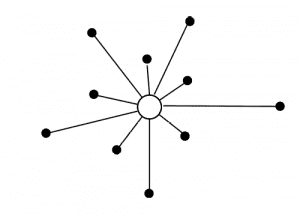
Illustration of centralized network managementA centralized network is built around a single, central server that handles all major management and data processing functions. Other types of servers may connect to this master server and manage other specific functions, but those other servers cannot work independently of the central server.
Client systems and users cannot directly access resources or services on different servers without first going through the centralized master server. If the central server goes down, the entire network goes down with it. An example of a centralized network would be a small business using a single domain controller (DC). They might have a separate database server or print server, but that server relies on the DC for clock synchronization, identity management and authentication, DHCP, and other vital network services.

Let’s take a look at the advantages and disadvantages of centralized network management:

Centralized Network Management
Advantages Disadvantages
A single central server is quick and easy to deploy because you only have to manage one configuration without load balancing or orchestration. A single master server presents a single point of failure on the network. If the master server goes down because of a bug or attack, or if you need to restart the server for maintenance, your entire network goes down.
You can easily add and remove client systems, users, and other servers without waiting for replication among decentralized or distributed servers. All your valuable and sensitive data is stored and accessible from one server in a centralized network, presenting a security risk. If hackers get into your single DC, they can access everything from that one location, rather than needing to jump to different systems and servers to find everything they want.
Centralized networks are relatively inexpensive because you’re using a limited number of servers, which means purchasing less equipment and fewer licenses. Centralized networks are challenging to scale because there’s a limit to how much computing power you can add to a single server. A central server can also create bottlenecks when your network traffic increases beyond the limitations of a single node.

Because this model simply cannot cope with the amount of network traffic and computing power needed in an enterprise environment, proper centralized network management isn’t used much anymore, outside of small businesses and specialized LANs. Older network management guides list Wikipedia as an example of a centralized network. In the early days of the internet, Wikipedia’s database would have been stored on one central server. Every time you wanted to read an article, your computer would need to communicate with that central server across the internet. Now, of course, a single server couldn’t possibly handle all of Wikipedia’s data and traffic.

Many companies have turned their centralized network into a decentralized network by implementing server clusters to handle vital network processes, so understanding decentralized network management is important when deciding which network management model to use.

Decentralized network management

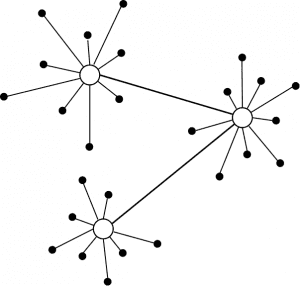
Illustration of decentralized network managementA decentralized network architecture uses multiple servers in place of a single centralized server. Each of these servers can act as an independent master server, with the necessary workloads distributed across them for load balancing. If one server goes down, another server can take over its load to minimize network interruption.
Decentralized network management does not evenly or automatically split network loads among the cluster of master servers but instead splits the load according to parameters specified by the network admin. An example of a decentralized network would be a small or medium business (SMB) that uses three domain controllers. Each DC provides the same crucial network services, but the business has split their client systems and users between the three DCs, so each one only handles roughly 1/3 of the total load. If one DC goes down, its load gets temporarily redirected to another DC until the issue is fixed.

Let’s explore the main advantages and disadvantages of this model:

Decentralized Network Management
Advantages Disadvantages
Decentralized networks are more reliable than centralized networks because there are multiple points of failure. Decentralized networks are more expensive and time-consuming to deploy because you need to install and configure multiple servers with load balancing and failover capabilities.
Decentralized network management scales more efficiently since it enables you to add more servers to the cluster as your business grows. Decentralized networks require replication and coordination among multiple servers, and any errors or interruptions in this process can cause security issues and service disruptions.
There are fewer bottlenecks in a decentralized network because this model can split traffic among multiple servers, and those servers can also be deployed to branch offices and data centers. Though a decentralized network is more secure than a centralized network because there are more points of failure, the replication between master servers ensures that hackers can still access most or all your network from a single location.

The main difference between a centralized and decentralized network is the number of master servers that control and coordinate your network services and processes. A centralized network relies on a single central server or domain controller, which simplifies your network management but presents many limitations. A decentralized network is controlled by a cluster of domain controllers that share the network load and provide redundancy if one server goes down.

Decentralized networks are by far the most common type because they address many of the limitations of a centralized network. However, there’s another network architecture that takes things a step further.

Distributed network management

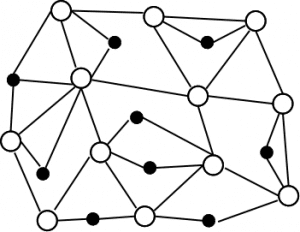
Illustration of distributed network managementIn a distributed network, all network services and coordination tasks are split evenly among many equal servers across the entire enterprise network.


A distributed network doesn’t use a single central server or a cluster of domain controllers—all data processing, computational resources, and network management functions are shared by nodes distributed geographically and logically across the whole enterprise network.

Some distributed networks go even further by crowdsourcing processing power from client systems (desktop and laptop computers), taking advantage of how overpowered and underutilized a lot of these devices can be.

An example of a distributed network would be a large enterprise with thousands of employees and systems that are geographically spread out across branch offices and data centers. Rather than putting a single DC (or DC cluster) in each remote location, they’ve distributed servers throughout the network and use network orchestration to balance the load automatically and continuously among them. Let’s explore the advantages and disadvantages of distributed network management:

Distributed Network Management
Advantages Disadvantages
Distributed networks are extremely fault-tolerant because any server can fail independently without impacting the rest of the network at all—that server’s functions are automatically shared among the other available servers. Distributed network management is more expensive because it requires network orchestration tools to provide continuous load balancing and ensure that all nodes coordinate with each other for configuration and routing updates and changes to security policies.
Distributed networks are highly scalable because you can add new servers wherever they’re needed at any time. Distributed networks are more complicated to architect and implement, and not as many network engineers and sysadmins have hands-on experience working with them.
Distributed networks experience lower latency than other architectures because network processing power is evenly distributed among many nodes.  
On a distributed network, no single server controls all your enterprise’s sensitive data and critical services. If a hacker breaches one node, they’ll only be able to see the process and resources controlled by that individual server.  
A hacker can only inflict minimal damage to a server on a distributed network before your network orchestration solution redistributes network processes to a different server.  

Distributed network management advantages greatly outweigh its disadvantages and take decentralization to a new level by equally and automatically sharing processes, tasks, and functions among servers across your entire enterprise network. Though distributed networks are not yet as common as centralized or decentralized networks, they benefit large business networks and may see greater future adoption.

Choosing between centralized vs. distributed network management

Comparing centralized vs. distributed network management is a moot point for most organizations because centralized architectures are too limited for the needs of the modern enterprise network and have fallen out of favor. In some circumstances, you may still find centralized network management helpful, such as data center management and isolated LANs used for testing environments or government classified work.

However, most organizations use a decentralized network architecture that relies on clusters of master servers to coordinate and control network processes and functions. Decentralized network management can be deployed across multiple data centers, colocation sites, and branch offices. Making them ideal for enterprises who need fast and reliable access to network resources, but don’t have the expertise or tools to implement a fully distributed network.

Distributed network management further decentralizes your network by moving your master servers out among the other systems on your network. Distributed networks are fault-tolerant, highly scalable, and are generally faster and more secure than different network architectures. However, distributed networks are more complicated to orchestrate and manage, which can be a barrier to adoption. Distributed network management can be used in the same scenarios as decentralized networks but is typically favored by high-tech organizations that prioritize security and privacy. For example, cryptocurrencies tend to use distributed networks, so it’s nearly impossible for a hacker to access the entire database of digital wallets or take down the network.

No matter which network architecture you choose, ZPE Systems’ Nodegrid can help you simplify your infrastructure management. Nodegrid brings all your infrastructure under one centralized management interface, overcoming the challenges of distributed network management.

Still can’t choose between centralized vs. distributed network management?

Contact ZPE Systems to discover how our Nodegrid solutions can help simplify your distributed network management and orchestration.

Contact Us

Zero touch provisioning: 3 drawbacks you need to know

It’s Friday morning, and you’re bringing a new site online with zero touch provisioning. Your remote branch devices arrived the night before, and all you want the store manager to do is plug them in. A few minutes later, your job is finished and you’ve still got your entire day left. What are you going to do with all your free time?

This is the picture that’s commonly painted of zero touch provisioning. And why not? When compared to manual provisioning, zero touch brings drastic improvements and efficiency to deploying networks. Its biggest benefits include:

  • Helping you deploy sites fast, because it’s a plug ‘n play solution
  • Reducing manual work and errors, because it’s automatic
  • Supporting on-demand scaling without bogging down your resources

Business person using laptop connected to network users and services.

With zero touch, you don’t have to be on site for days or weeks manually configuring individual devices. You also shrink the risk of human error that can unwind all your deployment progress and force you to start over. And when it comes to scaling, it eliminates so many of the shipping costs and technician expenses, and instead lets you spin up new sites in a single day.

So what’s the problem with zero touch provisioning?

The trouble with zero touch provisioning is that it usually comes with hidden obstacles that vendors don’t tell you about. Zero touch promises to make deployments quick and easy, but these obstacles can eat up your time savings and make you vulnerable to attacks.

Here are 3 big drawbacks you need to know about zero touch provisioning.

Drawback: Zero touch provisioning is limited to one vendor

Imagine you’re on location setting up a plethora of devices from different vendors. You plug in your zero touch solution, but you still have to manually configure three other vendor devices that make up your stack. This is the first major drawback to zero touch provisioning.

For the most part, zero touch is limited to one vendor’s solutions and doesn’t extend to devices or solutions from other providers. This is usually to encourage purchasing multiple solutions from or standardizing on one vendor.

Why is this a drawback? This is just another approach to vendor lock-in. It limits your freedom when trying to leverage zero touch provisioning, which can be a major drawback especially in custom, multi-vendor environments. When you’re choosing a zero touch solution, consider how much of your stack it can actually automate and how much time you’ll still have to spend on manual provisioning.

Drawback: Zero touch provisioning isn’t secure

What happens if you set up your site with zero touch provisioning, only to discover that your network is already under attack? You wonder how it could have happened, but then you remember all of the preconfiguring required to make zero touch possible. This is another major drawback.

Most solutions do live up to the promise of being ‘zero touch,’ but only after you’ve performed extensive preconfiguring of your devices. This is a major security concern because you’re loading up your stack with sensitive information about your network. Recent reports show that ransomware claimed a victim every 10 seconds in 2020.

Why is this a drawback? With your network attack surface more distributed now, especially during the pandemic, it’s critical to minimize your exposure to threats. But having to preconfigure your devices for zero touch provisioning makes it easier for you to become a victim. Even if you can keep careful watch over your devices to ensure no physical attacks occur, hackers can easily exploit your systems through something like an open port that one of your employees forgot to close. In a nutshell, preconfiguring puts you at unnecessary risk.

Drawback: Zero touch provisioning limits orchestration

The ultimate goal of using zero touch provisioning is to add convenience to deployments and management. You want to save time and effort all around by eliminating manual work. But another major drawback to zero touch is that it puts a limit on how much and how many of your processes you can orchestrate.

Automation is when you can automate simple tasks, while orchestration is when you can automate entire processes and workloads. Most zero touch solutions allow you to implement a little bit of both automation and orchestration, but limit or simply lack support for orchestrating across devices and environments.

Why is this a drawback? The more manual work you have to perform, the less value you get out of zero touch provisioning. And most solutions require you to manually bootstrap VMs, activate service licenses, run Docker apps, and even update device firmware as new patches are released. Though zero touch might save you time and effort on initial setup, consider how these savings might evaporate in the long run.

Can you avoid these drawbacks?

Imagine you’re setting up a new network. Your environment is tailored specifically to your needs, which includes a custom-built monitoring application, Palo Alto NGFW, data thinning workloads, and a host of other solutions meant to optimize operations. And the best part is, you don’t have to worry about vendor lock-in, security gaps, or limited orchestration. All you need to do is plug in your devices, and the entire environment will build itself in just a matter of hours. Everything just works so you don’t have to.

That is what true zero touch provisioning feels like, and it’s something we’re passionate about at ZPE Systems. That’s why we’ve spent years building zero touch convenience features into our Nodegrid solutions. You don’t have to put up with these major drawbacks any longer.

Nodegrid’s zero touch provisioning extends across vendor solutions, even to devices that don’t support automation. This means that you can automate and push configurations to whatever you connect to Nodegrid — including legacy switches, routers, and other equipment.

Nodegrid’s zero touch provisioning also eliminates the need to preconfigure devices. ZPE Cloud serves as your repository for configuration files and allows you to remotely push these files to 100% factory-default devices. Physical attacks no longer pose a threat, while built-in security features and alerts automatically block and pinpoint attacks.

Because Nodegrid OS is Linux-based, it gives you the freedom to orchestrate across devices and environments, with a rich API library and your choice of tools like Ansible, Chef, Puppet, and REST. You can save time and effort on deployments and ongoing management. This means that you can implement a zero touch provisioning solution that automatically spins up VMs, deploys Docker containers, activates service licenses and configures service chaining, updates firmware, and carries out any number of workloads you need.

Get free resources to help you deploy zero touch provisioning

When you’re choosing a zero touch solution, carefully consider how these drawbacks will impact your deployment and management efforts. To help you, download The Definitive Guide to Zero Touch Provisioning, and when you’re ready to implement your solution, use our 4-Step Checklist for Setting Up Zero Touch Provisioning.

For regular updates to help you streamline enterprise networking, sign up for our newsletter using the form below.

Understanding Key SASE Components & Benefits

Vector,Of,Men,And,Women,Using,Mobile,Devices,,Computers,Uploading

SASE—secure access service edge—combines SD-WAN technology with network security functionality into a single cloud-native solution. SASE uses SD-WAN’s intelligent routing to connect remote and branch users directly to cloud services, improving network and application performance for end-users. In addition, it is combined with security features like CASB, FWaaS, and ZTNA to provide a secure and scalable network architecture.

Outstanding right? Still, there’s one unanswered question: What are all these key SASE components, and how do they work? In this article, we will dive deeper into the key SASE components and benefits. 


The four key SASE components and benefits

SASE combines SD-WAN networking with advanced security functionality, including cloud access security brokers, firewall as a service, and zero trust network access. Let’s examine each of these features in detail.

1. SD-WAN: Intelligent routing of your WAN traffic

Software-defined wide area network, or SD-WAN, is the critical component of SASE’s networking stack. SD-WAN is a virtualized service that securely and intelligently routes traffic across the WAN. This gives your users a secure and reliable connection to enterprise and cloud-based applications from anywhere in the world.

In a traditional WAN, all remote traffic—even traffic destined for the cloud—gets backhauled to a firewall in a hub or headquarters data center. This causes bottlenecks and delays, impacting network and application performance. 

SD-WAN solves this problem using intelligent and application-aware routing to directly and securely connect remote and branch office users to your cloud and software as a service (SaaS) resources. This increases the performance of both your enterprise and cloud applications and improves the end-user experience.

SD-WAN works by separating the control and management processes from the underlying WAN hardware, making them available as software—that’s why it’s called software-defined WAN. If you’ve already implemented an SD-WAN architecture, you can layer SASE’s security stack on top of your SD-WAN backbone. However, SASE simplifies the security aspects of SD-WAN management, so some organizations prefer to implement them simultaneously.

That’s because, in a typical SD-WAN architecture, you still need to install security appliances and solutions at each branch office and data center to keep that traffic secure. SASE takes SD-WAN functionality and rolls it up with network security features into one unified solution, saving you the time and money of deploying security controls at each remote site. Let’s take a deeper look at SASE’s network security functionality.

2. CASB: Extending your security to the cloud

Cloud access security brokers, or CASBs, are software gatekeepers that sit between your on-premises infrastructure and your cloud-based infrastructure and services. A CASB ensures that network traffic between your enterprise network and your cloud provider complies with your organizational security policies. 

CASBs typically include the following five components:

User  User and Entity Behavior Analytics (UEBA)
A CASB uses UEBA to detect unusual behavioral patterns and enforce security policies on traffic between your enterprise and the cloud traffic.
Cloud Application Discovery
A CASB uses UEBA to detect unusual behavioral patterns and enforce security policies on traffic between your enterprise and the cloud traffic.
Data Loss Prevention (DLP)
CASBs prevent the exfiltration of sensitive and proprietary data according to your data governance policies.
Adaptive Access Control
A CASB analyzes the context of access requests to determine risk, looking at factors such as user location and the time/date of the request.
Malware Detection
CASBs use firewall technology to identify and block malware from entering the enterprise network


A cloud access security broker provides cross-platform security policy management and enforcement from one control panel. When CASB functionality is combined with SASE’s other network security features, you gain even more control over your cloud and edge network security.

3. FWaaS: Unlimited scaling of advanced firewall functionality

Firewall as a service, or FWaaS, is pretty much exactly what it sounds like—a firewall solution delivered as a cloud-based service. FWaaS provides next-generation firewall capabilities such as web filtering, advanced threat protection (ATP), domain name system (DNS) security, and intrusion prevention. Since FWaaS is cloud-based, you can quickly and easily scale it up as your network edge expands to include new branch offices and cloud infrastructure.

In addition to typical stateful firewall features like packet filtering, network monitoring, and IP mapping, FWaaS also uses deep packet inspection (DPI) to identify malware and other threats. DPI analyzes the information contained in the header of each data packet and the content of the packet itself to determine whether the packet is malicious. 

FWaaS also uses machine-learning tools to analyze network traffic for abnormal behavior, which means it can detect novel and zero-day threats that have never been encountered before. This improves upon traditional signature-based threat detection that relies on a database of previously-encountered threats to determine whether to block a connection.

Since FWaaS is a cloud-based service, your provider is responsible for maintaining and upgrading the hardware infrastructure needed to power your solution. This gives you the freedom to scale up your services on-demand without worrying about provisioning new hardware. For example, FWaaS solutions are typically highly customizable, meaning you can add or subtract some security features as your business requirements change. You can also add new data centers, branch offices, and cloud services to your FWaaS solution with the click of a button.

Essentially, firewall as a service provides all the functionality of a next-generation firewall, without the hassle of deploying and managing any hardware. Plus, all of these features are contained within a single unified control panel, which is why FWaaS integrates so well with SASE architectures.

4. ZTNA: Remote access without sacrificing security

Zero trust network access, or ZTNA, is a cloud-based service that applies the principles of zero trust security (“never trust, always verify”) to your remote traffic. Whenever a remote user, device, application, or service attempts to access a resource within your enterprise or cloud infrastructure, ZTNA verifies their identity and gives them only the specific access they need to perform their function. This enables you to provide remote users a reliable connection to enterprise and cloud resources without sacrificing the security of your network.

Traditionally, remote users connect to enterprise networks using a VPN, which creates a secure tunnel to your LAN. Once a remote user authenticates with your VPN, they gain full access to all the resources on your LAN that they’d have if they were on premises. ZTNA, by comparison, only grants access to the specific applications, services, or resources that the remote user needs to complete their task.

ZTNA prevents remote users from seeing any network resources they haven’t been permitted to access. This decreases your attack surface if a hacker uses a compromised account to access your network remotely. The damage done by such an attack will be limited to the few systems they were granted access to during their remote ZTNA session.

Like CASB, ZTNA can also use context-based access control policies to determine the active risk of allowing a remote user or device to connect. For example, you can implement location-based policies that prevent remote devices from accessing your network if they leave a specific geographic area. Or, you could create device-specific policies that require remote devices to upgrade to a particular firmware or OS version to patch vulnerabilities before they can connect.

ZTNA replaces VPNs by giving your remote users access to the enterprise and cloud resources they need while keeping them isolated from your main LAN. Zero trust network access, cloud access security brokers, and firewall as a service are the key components of the SASE security stack, though individual SASE solutions and offerings may use additional or varying technologies as well.


Implementing the key SASE components for your enterprise

SASE combines SD-WAN and network security into one solution that you can manage from a single pane of glass. In addition to SD-WAN, SASE’s key components include cloud access security broker (CASB), firewall as a service (FWaaS), and zero trust network access (ZTNA). Together, this cloud-based functionality gives you greater control over your network, improves your overall network security, and enables easy scaling so your SASE solution can grow with your business.

Putting these key SASE components to work for your enterprise requires a robust and flexible branch edge security and management solution like Nodegrid. ZPE Systems’ Nodegrid is a vendor-neutral platform of hardware and software tools that support SASE deployment and management, including console servers for remote out of band management and zero touch provisioning to automate device setup and configuration.


Learn more about how Nodegrid can help your enterprise put these key SASE components to work.

Schedule a free demo or get in touch with ZPE Systems today.

Contact Us

Out-of-Band Network Management: Fundamental Principles & Use Cases

shutterstock_1006041130

Out-of-band network management gives enterprises secure and remote access to critical network infrastructure, even during outages and service interruptions. It separates your production network from your management plane, allowing you to remotely troubleshoot, monitor, and administer your infrastructure without relying on a LAN or ISP connection.

Let’s take a closer look at the Out-of-band network management fundamental principles, use cases, and their benefits.

Out-of-band network management fundamental principles

Out-of-band (OOB) network management provides a secure, remote connection to your network that’s available during outages, breaches, and other service disruptions. It does this using a network that’s specifically dedicated to infrastructure management and is completely independent of your primary network. OOB uses serial console servers to create an alternate path to critical network devices with a separate management plane, typically using a 4G LTE cellular connection to provide you with uninterrupted access to your network.

You implement out-of-band network management by deploying these serial console servers at every office, remote branch, data center, and other physical sites. By physically connecting your OOB serial consoles to critical network devices like routers, switches, and servers, you ensure engineers and administrators can always reach those devices without an IP address. That means your management plane is always available, even if your ISP connection goes down.

OOB network management provides higher-level remote access and control capabilities for multiple devices from one pane of glass. If your primary network experiences an outage, you can use OOB to reboot routers, troubleshoot connection problems, or perform device health checks. 

The best part is that you can access your out-of-band serial console servers from anywhere in the world – so your team can respond to issues at remote sites just as quickly as at your main office.


Out-of-band network management use cases and benefits

shutterstock_1936608907

The ability to remotely manage your infrastructure from a dedicated network presents many business advantages. Let’s examine some out-of-band network management use cases and benefits in greater detail.

Remote troubleshooting

Imagine getting a phone call at 3 a.m. because a remote site on the other side of the country has gone dark, and nobody knows why. This scenario is every network engineer’s nightmare for a good reason—in the past, you’d have to pack a bag and hop on a plane just to get any sort of visibility on the infrastructure and what the problem might be. The cost of an outage like this, both in travel expenses and the hours of business downtime, can be devastating. For example, in a recent Information Technology Intelligence Consulting survey, four in ten enterprise organizations said an hour of downtime now costs their firms from $1 million to over $5 million. Now imagine how many hours it would take just to fly to your remote site to get eyes on the problem.

  • Benefits of out-of-band network management in this scenario

With out-of-band network management, this exact scenario is much easier to manage. As soon as your branch office goes dark, you can use your OOB management solution to connect and begin troubleshooting in a matter of minutes. Using the figure above, three hours of downtime while your technician travels to your remote site could cost up to $15 million. With OOB management, you could potentially avoid those hours of travel and downtime, saving your business a lot of money.

If your enterprise has many remote sites spread out over a wide geographical area, out-of-band network management can simplify remote infrastructure troubleshooting and support. Rather than hiring a technician for each region or paying to fly out your engineers every time there’s an issue, your team can fully support all your remote sites from a centralized location.

Remote infrastructure management

Without any sort of unified infrastructure management, engineers must work with many different devices and interfaces. Needing to learn and configure so many systems and constantly hop from machine to machine and interface to interface increases the potential for mistakes. According to ITIC, misconfigurations and other human errors are the top cause of unplanned downtime, so it’s critical to look for ways to simplify infrastructure management and reduce staff mistakes.

  • Benefits of Out-of-band network management in this scenario

Out-of-band network management isn’t just for outages—it’s a dedicated network you can use to manage all your critical infrastructure from one unified tool. OOB allows you to monitor, manage, and manipulate servers and appliances remotely. You can check event logs, monitor temperature, and even remotely control the keyboard and mouse to manage server operating systems. In addition, OOB network management consoles can automate some commands and functions, further simplifying your infrastructure management.

Data center admins and service providers need to manage a huge amount and variety of network infrastructure so having a unified out-of-band solution can help them realize many benefits. Using OOB to monitor and manage servers and appliances remotely, engineers can control multiple facilities from one central console, saving time and reducing the number of staff required at each location.

Network isolation and security

With in-band network management, all your administration and management ports are connected to the production network. If an attacker breaches your production network, they could use those ports to access more sensitive parts of your infrastructure. Plus, if your production network goes down, so does your management network. With out-of-band network management, all your administration functions are on an entirely independent network, separating user and management traffic. In the event of a breach, engineers can use their OOB console to isolate parts of the network, restrict access, and secure the management plane.

Another security pain point addressed by OOB network management is keeping colocation infrastructure protected while still ensuring adequate visibility. Often, physical access to colocation hardware is restricted for security purposes, so if there’s an outage or breach, you may not be able to get visibility on the problem.

  • Benefits of out-of-band network management in this scenario

With out-of-band network management, you can remotely access and manage your colocation infrastructure even when the ISP connection is down. This allows you to fully control your hardware and remediate issues quickly without compromising facility security.

Network security should be on every enterprise’s priority list right now. Cyberattacks are common and can be economically disastrous—according to a recent IBM study, the average cost of a data breach is $3.86 million. Investing in an out-of-band network solution that allows you to isolate your production network from your management plane and gain visibility on physically secure devices could prevent such a breach from occurring and save you money in the long run.


The right out-of-band network management solution

Out-of-band network management provides numerous benefits to any organization seeking to improve its remote infrastructure management capabilities. Using OOB, you can remotely troubleshoot network issues from anywhere in the world, even if the primary ISP is down. OOB solutions also simplify remote infrastructure management by providing a unified control panel to monitor, manage, and manipulate all your servers and appliances. 

Finally, you can improve your network security by segregating all device management from your production network while still maintaining remote and colocation hardware. All of this is possible with a unified out-of-band network management solution, like ZPE Systems’ Nodegrid.

Nodegrid is a complete out-of-band network management solution that offers you total network control from any location.

To learn more about how ZPE Systems can help you streamline your remote infrastructure management, contact us online or call 1-844-4ZPE-SYS.

Contact Us