Providing Out-of-Band Connectivity to Mission-Critical IT Resources

ZPE Systems announces Nodegrid Data Lake, app marketplace, and sensors to help organizations uncover valuable data for edge operations
CloudApps
Fremont, CA, August 10, 2021 – ZPE Systems launches a new applications marketplace, along with a portfolio of USB-type environmental sensors, meant to help organizations leverage valuable data generated by their IT components. As networks and users become more distributed, it’s imperative that organizations uncover hidden data to optimize availability and user experiences. Nodegrid sensors allow organizations to collect critical data points, for deep insights into their infrastructures, systems, and security logs, among other categories.

Enterprises in telco, content delivery, manufacturing, and other industries can benefit from Nodegrid Data Lake. This application gathers previously uncollected data points to give network admins and engineers visibility into key performance indicators (KPIs). Nodegrid Data Lake helps inspect and visualize data points for:

  • Infrastructure components, such as power, cooling, relay, dry contact
  • Environmental conditions, such as temperature, humidity, air flow
  • System utilization, such as disk usage, processes, memory
  • User experience applications, such as Office365, Zoom, point of sale
  • Security, such as system logs, data logs, GPS data
  • Networking, such as data traffic, application profiling, antenna/tower traffic
  • Previously hidden server and switch logs from IPMI and RS232 serial console

Gartner considers Nodegrid Data Lake a killer app, as it’s indispensable to maximizing business continuity and avoiding downtime.

ZPE Cloud’s additional applications help enterprises and resellers gain further insights and convenience. These applications include:

  • Extended Storage — Save time with centralized file management and add disk space via the cloud
  • Generic Forwarder — Secure distributed users with software-defined perimeter gateways on-prem or cloud-delivered
  • Reports — Drive smart decision making with comprehensive reports on device availability and other metrics
  • Palo Alto Prisma Access — Easily manage Palo Alto security solutions using centralized access
  • ZPE Cloud mobile — Never lose sight of network performance using the ZPE Cloud mobile app, available free on App Store and Google Play

These applications begin an extended product roadmap designed to optimize the configuration, access, and management capabilities offered via ZPE Cloud.

ZPE Systems also launches USB-type environmental sensors, to help ensure optimal utilization of critical physical infrastructure components. These sensors can be managed independently via Nodegrid devices, or via Nodegrid Data Lake for complex event processing. Nodegrid sensors support alert triggers and tracking, and integrate seamlessly with ZPE Cloud’s management interface. Available sensors include:

  • Temperature and humidity
  • Airflow and temperature
  • Smoke
  • Particulate
  • GPIO
  • Relay
  • Proximity
  • Beacon (no alarm)
  • Beacon (with alarm)
  • Door lock with RFID tag

“IT staff struggle with downtime, yet their infrastructure generates so much valuable data that goes to waste,” says Arnaldo Zimmermann, CEO and Cofounder of ZPE Systems. “Our apps and sensors help capture this information. They can use it to prevent device failures, adjust cooling systems, or pinpoint why their Zoom app is suddenly lagging, for example.”

Nodegrid Data Lake and ZPE Cloud apps are now available. Get a free 90-day trial by visiting the ZPE Cloud Apps page.

Nodegrid sensors are also available. Learn more on the Nodegrid Environmental Sensors page.

About ZPE Systems, Inc.

ZPE Systems frees enterprises from today’s networking challenges.

Nodegrid’s Intel-based serial consoles & modular services routers deliver power to datacenter & branch applications, while the Linux-based Nodegrid OS replaces vendor lock-in with limitless flexibility. With ZPE Cloud for fast & secure provisioning, this platform streamlines networking using virtualization, prevents downtime using automation, and offers convenience via remote management capabilities.

Intel-based serial consoles & modular services routers deliver unparalleled power to datacenter & branch applications, while the Linux-based Nodegrid OS replaces vendor lock-in with limitless flexibility. With ZPE Cloud for fast & secure provisioning, it’s the only networking platform to streamline the stack using virtualization, prevent downtime using automation, and offer convenience using in-depth remote management capabilities.

ZPE collaborates with best-in-class technology partners, to add value by integrating with SD-WAN, firewall, IoT, and other solutions. The world’s top companies trust ZPE Systems to provide advanced out-of-band management, Secure Access Service Edge (SASE) platforms, and SD-Branch networking.

Top companies trust ZPE Systems to provide advanced out-of-band management, Secure Access Service Edge (SASE) platforms, and SD-Branch networking.

ZPE Systems is based in Fremont, California with offices worldwide. Visit ZPE Systems website at
www.zpesystems.com.

The SASE Model: Key Use Cases & Benefits

shutterstock_1748437547

Secure access service edge (SASE) is the recommended architecture for security and connectivity.  SASE combines wide area network (WAN) technology for robust onramp to cloud and network security services into one cloud-delivered connectivity and security software stack. This allows enterprises to connect geographically diverse workforces securely while reducing network latency and performance issues. 

Though SASE is a relatively new concept, it’s taking the IT world by storm, partially due to the pandemic forcing companies to adopt or improve their remote work capabilities. In addition, SASE addresses the security challenges of using WAN and SD-WAN (software-defined wide area network) technology for remote and branch office (ROBO) network management. 

Let’s examine two essential SASE model use cases and discuss the benefits of integrating SASE into your enterprise network management and security strategy.

SASE model key use cases and benefits

SASE offers numerous benefits for remote and branch office security, performance, and network management, which may be why Gartner predicts that at least 40% of enterprises will have explicit plans for SASE adoption by 2024. Consider these use cases as you decide whether adopting the SASE model aligns with your business goals and network management and security requirements.


SASE use case #1: Replacing VPNs for remote work


shutterstock_1687381003

The need to pivot to a remote workforce in 2020 has driven many organizations to prioritize SASE adoption. Enterprises use VPNs (virtual private networks) to handle their limited work-from-home traffic. But scaling up a VPN solution with enough licenses and VPN concentrators to meet an entirely remote workforce’s increased demand can be more expensive. 

Additionally, not all VPN services include centralized remote management to deploy, monitor, and manage remote connections. This could be a minor issue if you only have a handful of remote employees at any given time, but a substantial logistical challenge when your entire workforce must suddenly pivot to work from home. 

If you were relying on a VPN solution for all remote work, you likely found yourself overwhelmed by the need to deploy and troubleshoot hundreds or thousands of new VPN client installations, keep those connections secure without crippling your network performance, and ensure that all your enterprise and cloud applications were tested and supported for VPN access.


SASE model benefits of replacing VPNs for remote work

SASE implementations can solve a lot of these remote work challenges. Instead of creating an encrypted tunnel between each remote workstation and your primary network, like a VPN, SASE connects remote users to nearby points of presence (PoPs) to access enterprise applications and resources in the cloud or the data center. 

All traffic to and from a PoP is encrypted, with other security technologies—such as secure web gateways (SWGs), remote browser isolation, and cloud firewalls—layered to monitor and protect system use. SASE provides additional security by using cloud access security brokers (CASBs) to apply enterprise access control policies to resources outside of the data center, such as Software as a Service (SaaS) tools or other cloud applications.

Despite these robust security controls, SASE still reduces network latency and improves application performance for remote workers compared to a VPN. Instead of relying on a limited number of VPN gateways to handle all your remote traffic, SASE uses a wide network of PoPs to connect remote users to the services and applications they need. 

If a remote user needs to access a cloud application, a PoP can connect them directly to that service, bypassing your data centers and reducing the load on your network. In addition, many SASE providers house their PoPs in the same facilities as major SaaS providers—Microsoft 365 and Salesforce, for example—optimizing the routing paths to these applications and improving performance for remote workers.

IT teams may find SASE easier to manage than VPNs as well. One of SASE’s big selling points for engineers and security teams is reduced network complexity—SASE seeks to replace the physical and virtual VPN appliances you use for remote traffic with a single cloud-native solution. One main advantage is that the end user experience is at its best since the traffic can reach the destination quickly without tromboning (hairpinning) through the datacenter and competing for bandwidth with increased latency. 

This also reduces the amount of time and resources spent on updates and patching, device maintenance, and configuration management for your VPN appliances and other remote and branch network infrastructure. SASE also provides one centralized management platform to control identity management and security policies for the entire enterprise and monitor and manage remote network traffic.

Replacing VPNs with SASE for your remote workforce improves the security of your remote traffic and systems, reduces network latency, increases SaaS and cloud application performance, and simplifies remote network and security management.


SASE use case #2: Optimizing SD-WAN security and performance


shutterstock_1097989835

Many enterprises have already jumped from VPN and traditional WAN technology to SD-WAN or software-defined vast area networks. SD-WAN improves upon WAN technology—often using existing public and private WAN connections as a backbone or underlay network—to connect remote workers and branch offices to enterprise services and applications. 

SD-WAN separates the control and management processes from the underlying WAN hardware and makes those functions available as software (hence the name “software-defined” WAN). This virtualized overlay network creates a private, encrypted WAN to connect branch locations, prioritize and route ROBO traffic, and manage and monitor network performance.

SD-WAN does present some security challenges, however. An SD-WAN implementation requires the use of firewalls, intrusion prevention, and web filtering at each branch office, which could mean installing and configuring hundreds or thousands of security appliances. Cyberattacks are becoming a more significant threat each year, reportedly costing businesses up to $4 billion in 2020, so many enterprises are looking to a security-centric solution like SASE to protect their network edge. SASE essentially combines SD-WAN functionality with network security features and bundles them together as a single solution.


SASE model benefits of optimizing SD-WAN security and performance

SASE allows teams to manage both SD-WAN traffic and security from a single pane of glass. SASE solutions roll up security features like CASB, firewall as a service (FWaaS), and zero trust network access (ZTNA) into a single cloud-native service to prevent, detect and mitigate network attacks without the need to deploy multiple security appliances and solutions for all your branch sites. 

For existing SD-WAN implementations, you can layer SASE’s network security features into the WAN appliances at each branch office to provide next generation firewall, intrusion protection, analytics, and unified threat management functionality without purchasing new infrastructure. This means you can manage the security of all your branch locations without needing to install firewalls and other security appliances at each site, reducing network complexity by combining SD-WAN and security into one centrally managed solution.

Plus, since the SASE model connects remote and branch users with SaaS and cloud applications via PoPs, you won’t need to backhaul your branch office traffic through your leading network’s firewall. This means your external-to-external traffic (from branch sites to cloud services and vice versa) bypasses your primary network entirely, reducing bottlenecks and delays and improving network and application performance.

You can use SASE to integrate cloud-based security functionality like CASB, FWaaS, and ZTNA with your existing SD-WAN infrastructure, or you can use SASE’s combined security and SD-WAN service stack to upgrade a traditional WAN architecture. Either way, you’ll reduce network complexity and provide a centralized solution for managing ROBO network traffic and security, all while reducing network bottlenecks and application performance issues.

Take complete advantage of all SASE model benefits

Two of the biggest use cases driving enterprises to adopt SASE include the recent pivot to a remote, home-based workforce and the need to improve the security and management of WAN and SD-WAN technology for branch offices.

The SASE model combines SD-WAN technology with network security features into a unified, cloud-native service stack to provide enterprises with many benefits, including increased security, improved application, network performance, and simplified management for remote and branch office connections.  

To realize a SASE architecture organizations need a robust and extensible branch edge device that can be the ‘Access’ on-ramp to the cloud delivered ‘Secure Service Edge’ (SSE.)

ZPE Systems’ Nodegrid family of hardware and software is a modular, vendor-neutral solution that provides innovative features such as 4G/LTE failover to maintain business continuity, remote out-of-band management (OOBM) for greater device visibility, and zero touch provisioning (ZTP) to automate deployment.  And our SR family can be the on-ramp to SSE vendors such as zScaler, Netscope, Acreto or similar.  Contact us for a deep dive video demo of our solution providing the Access onramp for SSE to flexibly realize the SASE architecture. 

ZPE Systems’ Nodegrid platform is a comprehensive branch networking solution that supports a comprehensive SASE model platform. 

To learn more about how Nodegrid’s built-in automation and ROBO management features can streamline your SASE deployment, get in touch with ZPE Systems today.

Contact Us

4 Things to Avoid When Choosing a VPN

Do you know what to avoid when choosing a VPN? These virtual private networks are commonly promoted as the key to online privacy and security, as they employ dedicated point-to-point connections, tunneling protocols, and encryption. With the sharp increase in distributed workforces and Ransomware outbreaks during 2020, it’s no wonder why consumers and enterprises alike showed significantly more interest in VPNs last year.

But before we dive into what you should avoid when choosing a VPN, here’s a brief refresher on this decades-old technology.

What is a VPN, and what is it used for?

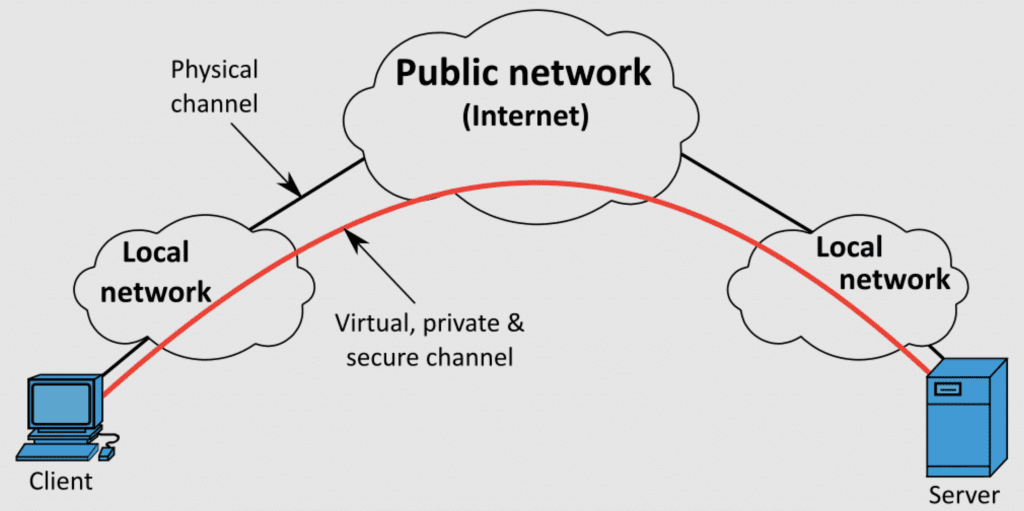
A VPN, or virtual private network, is a private network that allows users to send and receive data over a public or shared network, without having to establish a physical connection with the private network. Essentially, a VPN uses a dedicated tunnel that connects through the Internet and to a private network, such as a company’s intranet.

A remote computer using a secure VPN tunnel to connect through the Internet and to its private office network.

Here’s an example:

The year is 2020, and you’ve just been sent home to work remotely. On your personal computer, you open a browser tab and try to access your everyday business applications, but to no avail. Then you remember the VPN instructions sitting in your inbox. You use them to set up your computer with a VPN configuration, which includes selecting the appropriate protocol and entering your authentication credentials. Once you finish, you turn on the VPN connection, and suddenly you gain access to your applications as if you were sitting at the office.

Of course, there’s more work involved when setting up on the business side, such as selecting the right services and/or components. But once you have these in place, you can start configuring and using your VPN for access to the resources you need.

Enterprises commonly use VPNs to allow their workers to remotely access their private networks and their connected resources, as in the example above. For enterprise IT staff, such as a data center network technician, a VPN gives them access to important data center management tools without exposing their actions or data to the unsecured public internet.

Enterprises also use VPNs to connect multiple networks or offices to each other and/or to a data center location. This is called a site-to-site configuration. Site-to-site configurations can involve multiple sites owned by one organization, called intranet site-to-site; or multiple sites owned by multiple organizations, called extranet site-to-site.

Enterprises are drawn to using VPNs because they can provide several advantages. They offer a convenient way for staff to remotely access resources, but also hide users’ IP addresses and can encrypt sensitive data for added security.

However you should be aware that not all VPN services are created equal. It’s really quite the opposite, so whether you already use one or are ready to shop around, keep in mind these four things to avoid when choosing a VPN.

4 things to avoid when choosing a VPN

False sense of security

Aside from providing remote access capabilities, a VPN’s purpose is to help you communicate securely without exposing your data to public or shared networks. However, VPN (as its name implies) is about privacy, not security. Many VPN service providers give you a false sense of security when in fact your data can still contain malware and spread to your peers. Many VPN vendors also leak and log your data. Aside from connection logs, which typically contain usage data used for optimizing the provider’s operations, there are IP address and traffic logs that some providers employ. Data like your IP address, browsing history, and even recent online purchases can be stored in these logs, which means they could potentially be sold to advertisers, or worse — attackers. When you’re considering a VPN provider, be sure to read the fine print in their service agreement and see whether they log IP addresses, usage, traffic, or other sensitive information.

Slow speeds

Imagine your data center technician is trying to resolve a critical issue and uphold your stringent service level agreement (SLA). Recent social distancing guidelines restrict the technician from resolving the issue on site, so they must connect via VPN for remote troubleshooting. The problem is, it’s peak usage time and the public network is overloaded. What would have been a five-minute job turns into an hour-long waiting game punctuated by unresponsive experiences.

Slow speeds are common with VPNs. That’s because data packets need to be re-routed and encrypted through a VPN server. The farther this server is located from your users, the longer it will take for your data to reach this server. This slowness is exacerbated when you opt for a free VPN service or plan, as these likely don’t offer or prioritize high-speed connections. When considering a VPN, be sure to get a free trial that will enable you to check your speeds.

Potential abuse

If instead of setting up your own VPN architecture, you opt to use a VPN service, keep in mind that there are many providers on the market. And if you choose a provider whose services are operated and maintained in a country where regulation is minimal, such as in China or Russia, you need to understand that your data is vulnerable to abuse. Providers who offer bulletproof hosting (BPH) services in foreign countries, for example, often serve as safe havens for criminals and cyberattackers. Because these operations are typically well insulated against judicial action from governing bodies in the U.S. and other western nations, there’s no legal remedy for customers who suffer from abuse. When considering a VPN service, always choose a trusted provider who operates in a well-regulated country, so you can have the confidence that your data won’t be abused.

Potential abuse

If instead of setting up your own VPN architecture, you opt to use a VPN service, keep in mind that there are many providers on the market. And if you choose a provider whose services are operated and maintained in a country where regulation is minimal, such as in China or Russia, you need to understand that your data is vulnerable to abuse. Providers who offer bulletproof hosting (BPH) services in foreign countries, for example, often serve as safe havens for criminals and cyberattackers. Because these operations are typically well insulated against judicial action from governing bodies in the U.S. and other western nations, there’s no legal remedy for customers who suffer from abuse. When considering a VPN service, always choose a trusted provider who operates in a well-regulated country, so you can have the confidence that your data won’t be abused.

All for the money

This somewhat reiterates the first point above, but can’t be understated. The fact is that with thousands of VPN providers to choose from, many exist solely to make money.

Trusted providers may use RAM-based servers that don’t have the ability to log any of your data. To further protect you, they typically encrypt your traffic using 256-bit encryption or higher, which makes it impossible to hack your sensitive information. These are just a couple features that reliable VPN services provide in order to keep your data private and secure, but unfortunately there are many providers who lack these basic components.

Some providers turn on logs temporarily to identify suspicious users. This can be beneficial in preventing abuse, cybercrime, and illegal activities, but also puts the average user’s data at risk, especially if the provider retains all logged data. Some of the worst VPN providers don’t even employ VPN servers, and instead use peer-to-peer connections, which forces users to share bandwidth and use each other’s IP addresses. Insecure practices like these show that companies don’t truly have their customers’ best interests in mind, and are instead focused mostly on minimizing infrastructure costs in order to make more money.

When choosing a VPN, opt for a trusted provider who can provide secure service to your remote users as well as your branch office employees. Or simply deploy ZPE Systems’ Nodegrid portfolio of flexible branch routers, which serve as your on-ramp to VPN-as-a-service. These make it easy to secure your connections, because you can deploy virtual machines directly on Nodegrid devices and run apps from security leaders like Palo Alto Networks or Fortinet. You could also use Nodegrid routers simply as your access to Secure Service Edge (SSE) providers like Zscaler or CloudFlare, and easily build your Secure Access Service Edge architecture.

Don’t fall into VPN traps

Your IT infrastructure’s integrity is a top priority, especially with cybercrime on the rise and expected to cost $10.5 trillion by 2025. Your staff need secure remote connectivity to maintain network and business operations. But with so many options available, it can be difficult to choose the best approach — VPN or otherwise.

To make sure you don’t expose your staff or your business to unsafe services, contact one of our experts today. We can show you the most secure way to gain remote access to your IT infrastructure, with or without using a VPN! You can take a free tour of ZPE Cloud, which gives you VPN-less access to your distributed infrastructure, and provides completely secure, end-to-end encryption to and from the cloud. Get in touch for a first-hand look.