Providing Out-of-Band Connectivity to Mission-Critical IT Resources

7 Reasons Why We Put Intel CPUs in the Nodegrid Serial Console

Intel® CPUs power many of the computers we use today. These include everything from personal desktops and laptops, to high performance computing clusters that aggregate power to solve major global issues. So when choosing a suitable processor to build into our Nodegrid Serial Console, Intel was the obvious choice. In this post, we’ll go over 7 reasons why we put Intel CPUs in the NSC.

But before we get into the details, let’s review some basics.

Besides Intel CPUs, What Else is Available?

There are mainly two types of CPUs, or processors, available today: x86 (such as Intel’s offerings) and ARM. Though they serve a variety of purposes and can have some overlapping applications, x86 processors are typically deployed when speed & power are main concerns. Meanwhile, ARM processors are used in implementations geared toward minimizing power consumption and maximizing battery life.

The way these types of processors work is based on their underlying instruction set. x86 CPUs take advantage of the Complex Instruction Set Computer (CISC), which is able to process complex instructions that are crammed into a single line. ARM-based CPUs, on the other hand, use the Reduced Instruction Set Computer (RISC), which processes simple instructions over a span of multiple lines.

As for the advantages, x86 processors are able to perform more tasks rapidly, while ARM processors are able to consume less power and maximize energy efficiency. The main drawbacks include more power consumption for the x86 CPU, and slower speeds for the ARM CPU.

This is why purpose-built appliances, such as modems & routers, typically employ an ARM-based processor, while highly demanding devices such as desktops & servers use an x86 CPU.

In a nutshell, this is why we chose the multi-core Intel CPU for the Nodegrid Serial Console. But here’s a more detailed breakdown of the reasons for our choice.

Performance is Key

The Nodegrid Serial Console is designed to maximize speed and capabilities. Using x86 Intel CPUs, we created the world’s fastest 1U serial console that doesn’t compromise on performance. This processor allows for more simultaneous operations, more users, and more input/output than ARM-based CPUs. In terms of real-world benefits, this blazing fast processor means quicker CPU cycles that help customers complete more tasks, reduce MTTR, and increase their ROI.

Commonality Helps Users and Developers

Many existing servers use x86-based CPUs. Naturally, we wanted Nodegrid to integrate seamlessly for both users and developers. The Intel-based processor promises a common platform that these users are already accustomed to. They don’t have to worry about application incompatibilities or slowdowns, nor do they have to spend time learning new systems. The x86 CPU provides a management and maintenance experience that users are familiar with, so they can maintain OS & application availability.

Customization Through a Common Dev Environment

Our Intel-based devices are a perfect platform to deploy custom solutions. The x86 CPU allows developers to benefit from a variety of readily-downloadable SDKs and environments. The Nodegrid Serial Console’s SDK comes with Yocto, which means customers always have the latest updates, packages, and DIY customization capabilities. No more waiting for third-party fixes or workarounds, because customers can create solutions that meet their unique requirements.

Docker

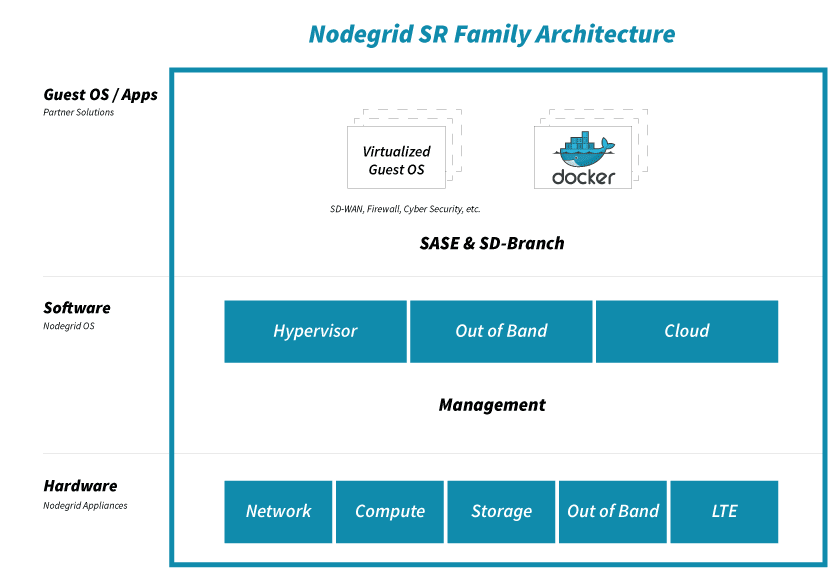
Because the x86 platform is capable of robust performance, Nodegrid allows users to leverage Docker containers and deploy virtualized solutions. With regards to Docker, the Nodegrid Serial Console is optimizable right out of the box so customers can get the most functionality out of a single device.

Availability of Security

When it comes to open networking, the Intel CPU is the industry standard, which means customers get security patches as soon as they’re available. They don’t have to be left vulnerable waiting for third-party kernel patches from other chip makers. With an x86-based device, customers remain safe with up-to-date security, and in some cases can even apply patches before official updates are available.

Peripheral Support Via Multiple Interfaces

Part of designing a more powerful serial console was having the ability to support a variety of peripherals. The Nodegrid Serial Console features USB 3.0 and USB 2.0 ports, allowing customers to connect an array of add-on devices. They’re no longer limited by a single-purpose appliance that comes with minimal additional ports. With the NSC, customers can extend the box’s functionality by adding cellular, Wi-Fi, storage, and other peripherals.

Greater Storage

With power and speed at the core of the Nodegrid Serial Console, we needed to incorporate enough drive space. We built the NSC with 32GB of storage, along with 4GB of RAM. Not only can it store plenty of data, but it also has a healthy amount of memory to accommodate running more apps and functions. And if 32GB isn’t enough, customers can connect external drives via USB for even more local storage capacity.

This list is made up of 7 compelling reasons why we chose x86 Intel CPUs for our devices. However, there’s an 8th reason that we love to share…

Cost Savings That We Pass to Customers

By choosing the readily-available x86 CPU, we pass powerful processing along with cost savings to customers every day. Because we think having the world’s best serial console shouldn’t be prohibitively expensive.

ZPE Systems is an Intel Network Builders Winners’ Circle Partner
Intel

Driving digital innovations and network transformation are visions we closely share with Intel. That’s why ZPE Systems has been recognized as a Winners’ Circle Member and Solution Plus Partner. Together, we offer go-to-market solutions that cultivate customer success and enrich our partner ecosystem with innovative networking technologies.

We partner with Intel to transform networking. See how we do the same with our other partners by visiting our Strategic Alliances page.
Help NetOps Teams Using Application Hosting & Guest OS

Application hosting helps your business become more flexible. This virtualization approach is a perfect solution if you’re looking to reduce your networking stack, make critical services more globally available, and ensure that your network is always up to date.

If you’re not familiar with application hosting, read our other blog post to get acquainted.

Application hosting helps your business become more flexible. This virtualization approach is a perfect solution if you’re looking to reduce your networking stack, make critical services more globally available, and ensure that your network is always up to date.

If you’re not familiar with application hosting, read our other blog post to get acquainted.

Give NetOps a Break with Application Hosting & Guest OS

For a quick recap, here are some things to know:

  • Application hosting means creating a cloud-based model (SaaS) through which to deliver your applications. One of the biggest benefits is that you don’t have to install and manage applications locally, and can instead keep them centralized on a server and bring them to clients anywhere in your organization.
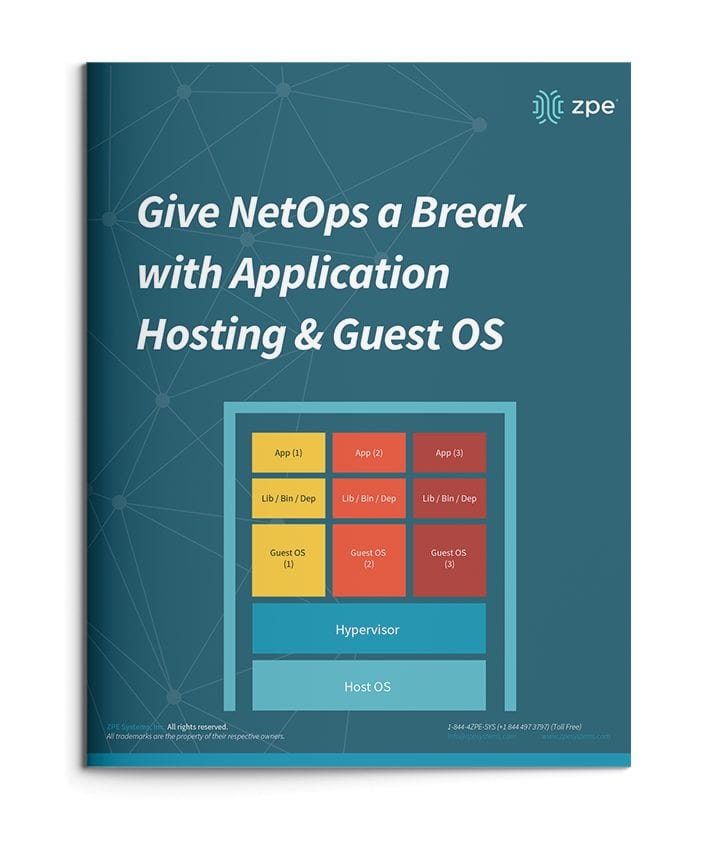
  • To use application hosting, you need a virtual machine (VM) and something called a ‘Guest OS’.
  • Running on a VM, a guest OS can be Windows, Linux, Ubuntu, or other common operating system, and it’s this operating system that determines what applications you can run.
  • In between your device’s operating system (or host OS) and the guest OS is something called a hypervisor. A hypervisor is able to create VMs and tell the hardware how to allocate resources for VMs. This is an essential component of virtualization and application hosting.

How Does Application Hosting Help NetOps?

Modern business moves faster than ever, and to reach your goals, your NetOps teams need a modernized network that moves fast, too. But this can be difficult to achieve, since your network is likely made up of many different hardware & software systems, and admin protocols. There’s just so much to juggle that it seems like your network his holding back operations.

The good news is, application hosting and virtualization can alleviate many of the obstacles standing in the way of your network. Let’s compare how you manage your solutions before and after application hosting.

NetOps the Old Way

To boil it down, NetOps the old way is slow and cumbersome. This is mainly due to having many physical devices that you have to manage, which puts time consuming on-site support at the top of your priorities. This becomes even more complicated when you have many branch and remote networks.

Without application hosting, you need to install applications locally. Your only option is to put IT staff on site for this task. From there, the job can take days to complete, especially if your stack consists of many devices. And this is all part of a best-case scenario, which unfortunately isn’t the norm.

Another problem can arise — hardware & software incompatibilities. Suppose you try to install or update applications, and once you connect to a device you discover that the latest OS doesn’t support your software. Now what? Since you recently updated the OS for devices at every location, you have to roll back configurations or find a workaround for your application’s new release.

All of this can quickly become complex and difficult to track. Having to locally manage your edge environment leaves your network open to human errors. Your peace of mind is merely wishful thinking, because your physical & virtual assets aren’t as consistent, secure, or reliable as you’d hoped.

NetOps with Application Hosting

When you introduce application hosting, NetOps becomes fast and agile. Putting all your applications in the cloud means you can deliver them right where they’re needed, and thanks to guest OS, you don’t have to worry about incompatibilities.

Put your applications in a centralized server, and you no longer need to worry about on-site support. Your NetOps teams can tap into your server to install, update, and manage applications no matter where they are. This means faster releases and shorter time-to-market, so you can support your business alongside demand.

If you choose a powerful platform like Nodegrid, you can further help NetOps with even more capabilities. The Nodegrid Services Router can pack all your network functions into a single box, with add-on compute modules that allow you to run many guest OSes. Not only does this cut your stack, but it also gives your NetOps teams reliable remote access via out-of-band.

See how you can streamline NetOps with application hosting and Nodegrid.

3 Ways Docker Improves Network Management

Docker is the best way to deploy applications. There are several ways Docker improves network management. From being compatible with almost any programming language and machine, to its ability to run multiple containers in the same infrastructure, Docker has a lot to offer when it comes to automation and out-of-band management (OOB). But before we dive into the benefits of implementing it into your strategy, let’s take a closer look at what Docker is.


What is Docker?

Virtualization using virtual machines (VMs) was a game changer when first introduced. It allowed businesses to take full advantage of their network resources by giving them the ability to efficiently run multiple OSs and apps on the same host. When deploying new hardware, VMs significantly cut down the time it took to set up devices, allowing teams to configure resources in minutes instead of days.

But VMs have limitations. Aside from having to boot up an OS, each new addition requires virtual resources to be allocated (such as RAM), which can quickly strain your system when running multiple VMs. When porting, VMs typically cause compatibility issues, too, and they can’t share data volumes.

Docker is equally as revolutionary as VMs, and has been rapidly adopted by organizations since its initial release in 2013.

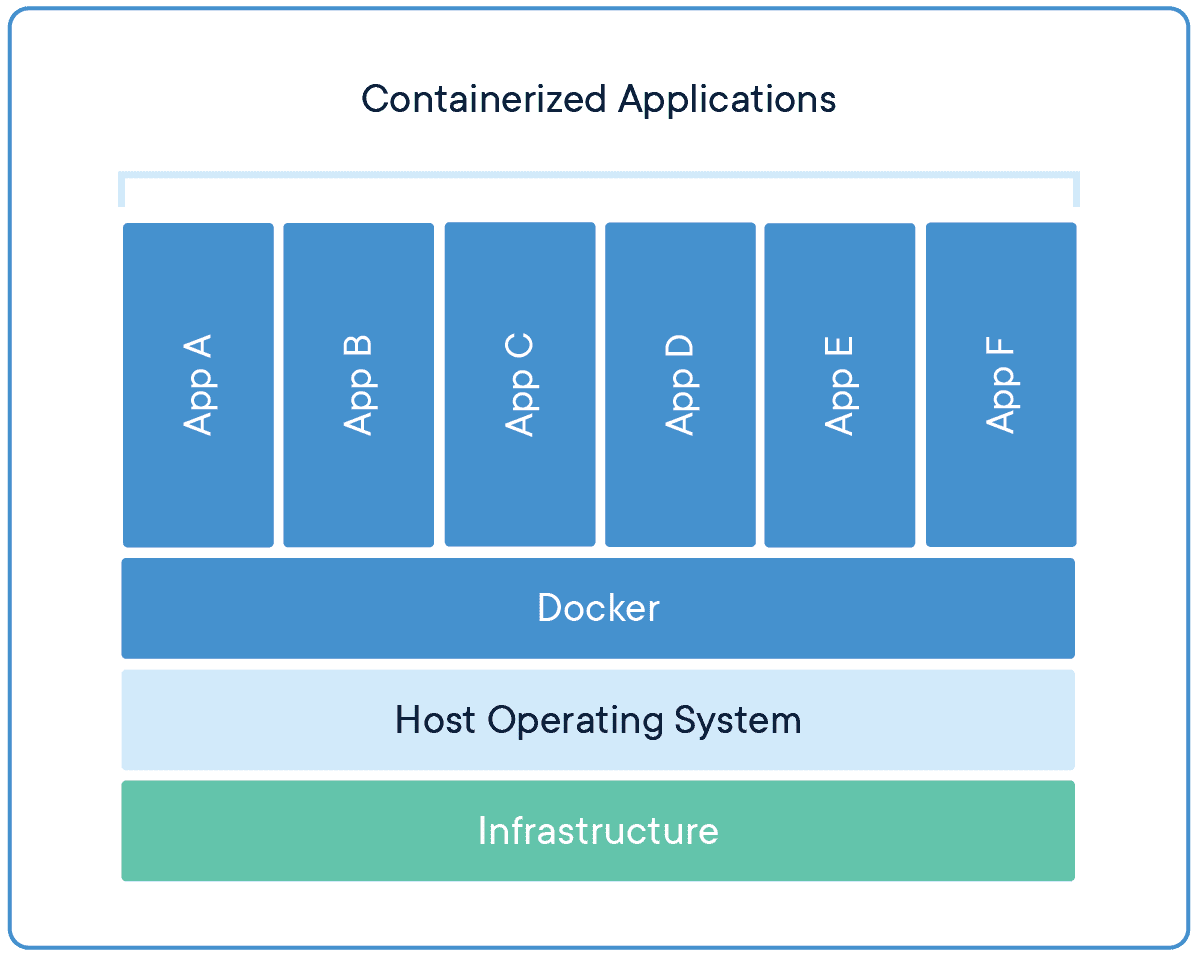
Docker takes virtualization in a different route, using something called containerization. Docker containers are lightweight and automate deployment of applications so they can work in different environments (i.e. on different machines). Each container is essentially its own software package that contains the dependencies to run an application, such as code, configuration files, processes, networking info, and sometimes even pieces of an OS.

So instead of running separate desktop environments, as with resource-hungry VMs, Docker containers run on a single system kernel and allow you to maintain isolated applications that work properly — regardless of what machine they’re running on.


How Docker Improves Network Management

Modern OOB networks employ an array of sophisticated tools, like those that support monitoring, management, and automation. Using Docker containers means that you can deploy applications and know that they’ll work on any resource, because Docker works on the client side. Docker can also act as a service and be deployed onto any server. And because all application dependencies are contained directly on the image, management is easier as well.

On a high level, using Docker containers brings these advantages to OOB:

  • You save on resource allocation, because containers require only a small amount of server space.
  • You can gather info and monitor your system by easily deploying lightweight apps.
  • Because containers are highly portable, you can use them for diagnostics, even when devices go offline.
  • Adding to the previous point, you can use containers for quick deployments, as well as for maintenance and backup.
  • With regards to things that require safeguarding, such as temporary configuration data or emergency recovery data, containers allow you to add them quickly on-demand.

On top of all these advantages, Docker improves network management by giving you three major benefits.


Docker Simplifies Virtualization

VMs allow you to run any platform — along with its unique configuration — on your infrastructure. However, VMs come with drawbacks because they require significant resources in order to work properly. Essentially, running a VM means running a separate, virtual desktop environment on your hardware. And with each VM you run, your device must allocate RAM and other resources, which can be expensive and lead to unstable performance.

Docker containers are much more lightweight, and you can run multiple containers using only a single OS kernel. Containers use less memory than VMs, they boot faster (because they don’t have to spool up an OS), and they can share and reuse data volumes. In a nutshell, containers make virtualization simple, highly efficient, and easy to configure, which significantly reduces the overhead associated with virtualization when compared to using VMs.

Docker Makes Deployment Fast

Before VMs, setting up new hardware took days because of the tedious, manual configuration that was required. With VMs, devices could be configured in minutes (and remotely), but IT teams still lost time due to the need to boot up an OS for each VM.

Using Docker containers, fresh resources can be configured in seconds because there’s no need to boot up an OS. Multiple containers running on the same hardware can run isolated applications, such as those containing configuration data and automation scripts, to help you rapidly deploy resources to your network. Simply create a container for the appropriate job.

Docker Helps With Disaster Recovery

When it comes to business continuity, traditional approaches call for assigning a single purpose site to disaster recovery efforts. This means that resources sit idle at this site, because most of the time your organization is not focused on recovering from disaster. In essence, a traditional approach leaves disaster recovery as an afterthought, which means that managing and maintaining its infrastructure is costly and complex.

However, by using Docker containers, you can transform disaster recovery to be just another stage in the integration and development pipeline. This means that your recovery infrastructure is expanded from a single site to an entire region (or your entire organization), because containers allow you to utilize more resources more frequently. And should disaster strike, containers offer accurate automation for fast and reproducible deployments, so you can recover quickly and continue with your business continuity efforts.

Remember that a robust OOB solution takes advantage of the latest tools to give you more visibility & control of your network. Docker is one of those tools. It allows you to automate and take full advantage of your network resources, and you can focus on running only your necessary applications (not entire VMs). It introduces more efficiency with highly portable containers that work across platforms, and saves your system from the strain of deploying many resource-hungry VMs.

To get the latest network tips and out-of-band management advice, sign up for tips and updates.