
Providing Out-of-Band Connectivity to Mission-Critical IT Resources

Maintain Uptime With a Reliable Data Center and Business Continuity

The data center and business continuity — these go hand-in-hand, as one relies so heavily on the other. Because your data centers are mission critical, an outage can bring down your network and your business. But taking control of your data centers can be more than a hassle, especially if you use traditional out-of-band management (OOB) solutions.

In this article, you’ll explore some major shortcomings of common OOB, how they interfere with business continuity, and what ZPE Systems’ Nodegrid does to restore your peace of mind.

Challenges Involving the Data Center and Business Continuity

You Need to Stay Close.

For network maintenance and management, traditional out-of-band solutions force you to keep staff close to the data center. Not only is this because you need to perform routine tasks, such as monitoring power or opening shells for customers, but also because you need a reliable response in the event that your network faces major disruption. Otherwise, issues can result in you spending sums of time and money to put staff on-site, sometimes requiring late night wakeup calls and expensive round-trip airfare.

You Need Many Devices.

Rack space and energy consumption are at a premium when it comes to data center computing. But by nature, data centers require many appliances just to handle all necessary functions. Introducing OOB management typically involves adding even more devices, which steals more rack space, power, and money from your business. And with traditional OOB solutions, you usually end up with a rigid and complicated system that makes your job that much more difficult. Resolving most issues involves a lengthy administration protocol due to your enormous stack.

You Need Lots of Time.

When scaling and managing via traditional OOB solutions, time isn’t on your side. To deploy a new location, you need to risk shipping preconfigured devices that contain sensitive configuration data. Once you pass this first hurdle, you then need to put staff on-site to manually set up these devices, which can take weeks. Finally, your ongoing management of data center infrastructure involves juggling many vendor-specific consoles and interfaces. If you need to make quick adjustments or pinpoint a failed device, you’re forced to invest more time navigating a complex stack.

Nodegrid Improves Management of the Data Center and Business Continuity

Restore Uptime From Anywhere.

Nodegrid lets you untether staff from the data center’s physical location, and instead gives them the freedom to perform tasks 100% remotely. When you need to adapt to sudden work-from-home guidelines, or restore connectivity after a 3am outage, Nodegrid lets you thanks to flexible out-of-band management. It uses broadband links and 4G/LTE cellular to provide you with more speed than traditional OOB solutions, and you can even take control fo power management. No more midnight flights just to reboot devices — cycle power remotely and rest easy.

Save space and power

Nodegrid’s consolidated devices address the data center’s need for less — less occupied rack space, and less consumed energy. The all-in-one appliances handle network, compute, storage, and power functions, and also feature a blazing fast x86 64-bit architecture that supports direct third-party application hosting. For out-of-band management, you can connect via many common serial or digital interfaces, and even get a reliable cellular connection for backup. Nodegrid’s efficient devices free up rack space, consume less energy, and help you resolve issues faster.

Scale and manage fast

Nodegrid makes scaling quick and easy. With patented, all-in-one devices, cloud-based flexibility via ZPE Cloud, and Nodegrid Manager software, you can deploy and manage in minutes. Instead of shipping sensitive devices to your new location, you just need to send a bare-metal Nodegrid appliance. Once it’s safely at your new data center, simply plug it in and watch it work. ZPE Cloud delivers zero touch provisioning that’s secure, automatic, and consistent. For ongoing management, use this cloud connectivity coupled with Nodegrid Manager to get a full, in-depth view of your network infrastructure. Alerts and notifications pinpoint potential issues, and you can employ automation tools via Ansible, Puppet, Chef, and others for self-healing and repair.

Nodegrid keeps you secure with two-factor authentication and single sign-on. For added convenience and improved management, Nodegrid also comes with a screen- and session-sharing feature that lets you collaborate with others in real time. You can team up with your experts to find and fix issues fast.

If you want to see Nodegrid’s next gen out-of-band solution for the data center, schedule a demo now.
Are Public Switched Telephone Network (PSTN) Lines still the best Failover option?

Most of us still remember the sounds of an analog modem connecting to the ISP or back to the corporate office. These nostalgic sounds are a thing of the past as broadband connections have pushed PSTN lines further away from the norm.

For some, a PSTN line is still a reality, especially in scenarios where a slow connection is better than no connection. PSTN lines are still used for remote management of IT infrastructure in cases of disaster recovery. For example: A branch office has gone completely offline… In this case it is important to identify if the cause of failure is a misconfigured VPN connection, other configuration changes causing unforeseen results, or if the broadband connection is down and it’s time to call the ISP.

In today’s Blog, we will review why PSTN lines are still being used for failover and some of the misconceptions associated as to why switching to another alternative failover method can be a complicated task.


Why are PSTN lines still in use?

PSTN lines are still in use because the technology has been around for a long time and the solution simply works. A dial up connection might be finicky, but give it a little bit of time and it will sort itself out. Besides this, the following reasons play a big part:

  • For a console, analog connection speed is acceptable
  • Some end devices, specifically in older branch offices only support analog modem connections
  • It provides a simple method of implementing a Point-to-Point communication
  • Analog Modems are still supported by vendors
  • Analog Technology is vendor neutral
  • Other communication options might not be stable enough or even available in the specific region
  • Some existing infrastructure management solutions offer solutions which can manage both the infrastructure management and the fallback connection of a single device

Overall PSTN lines have provided a stable and secure method of connectivity over the years, so why change? The pressure to change has increased over the years as ISP’s have updated their hardware and broadband connectivity. It has become cumbersome for phone companies to offer analog lines to end users. Analog solutions require additional maintenance and cabling costs, resources which can be better utilized by the ISP’s on more profitable, technologically advanced solutions. It has become increasingly difficult to get a PSTN line installed and in some areas, PSTN lines are no longer available. Line quality has also become an issue as noise affects speed and reliability. To decrease noise levels requires active maintenance of the older, legacy equipment and technology.

Another obstacle is fewer manufacturers produce replacement parts and the number of available modems by different vendors is very short as most devices are OEM products. On a recent project, we had difficulty finding a working modem which could handle the noise; We tested multiple modems all with the same result. We managed to find two modems that solved the customers line noise dilemma, neither was under $100.

It is only a matter of time, where even the last few implementations will have to be changed to alternative connection methods.


Alternative Connection Methods

Rented/Dedicated connection

This option would be the closest to a PSTN line in the sense that it can provide a real point to point connection. For most customers, this option will be far too expensive, especially if we are looking at redundant connections for disaster recovery scenarios. Although this solution provides a point to point connection, it also runs through the same exchanges as the normal broadband connection. Only a few will actually have their own cable going to every branch office. This means there is some shared infrastructure which increases risk and could potentially expose the data going over the cable. Based on this, most customers would still run a site to site VPN to secure the connection.

Backup Broadband Connection (Secondary ISP)

This solution is typically easier to implement, but can be very costly as it may require a completely new line to be brought into the building. The advantage is the second line can be used for other failover scenarios. In any case, a VPN solution is necessary to establish point to point security between the sides.

Mobile Broadband (Cellular Connectivity)

This solution is the easiest to implement and is used by most customers. Mobile broadband devices are available for a variety of devices and offer wide spread support from vendors. Taking the commitment by most countries and ISPs to expand their mobile broadband offerings in their regions, the coverage and availability will increase even further over the next few years. The question is, which version will be available in which region? The first real mobile broadband was introduced in 2001 with 3G and with a roll-out of 5G in planned for 2020, we will have at least three different versions available. All need to be supported by the hardware. Regardless of the mobile broadband version, a VPN solution is required here as well.


Now, what does this all mean for existing disaster recovery infrastructure management scenarios? For one, existing PSTN, solutions still work, but their time is limited, as challenges with replacement parts and availability of the actual line through the ISP’s will increase. Alternatives exist, but solutions will consist of at least 2 main parts; The actual broadband connection and a VPN solution. This means we have the option to invest in two or more individual appliances which will manage the broadband connection, VPN and the infrastructure management or invest in an infrastructure management solution which offers everything in one appliance.

Investing in multiple devices has the advantage that standardized hardware can be deployed on all sites this means small sites needed the same infrastructure as a large site, requiring the same administrative overhead, space and power, which can become very costly and non-scalable.

Infrastructure Appliances which support different broadband connections, VPN’s and infrastructure management protocols exist, but the appliances themselves are not the complete solution. The connection of these devices through broadband means they are exposed for long periods of time to the internet, and have security risks. The solution should be selected with the idea in mind that it is secure today, (capable of running secure operating system versions, cyphers, VPN and firewalls) and in the future. It should have enough flexibility built in to support upcoming connectivity options, management and security requirements while supporting current IT management standards.


The Solution: Open Infrastructure Management with Nodegrid

The Nodegrid Family of products are the ideal solution for maintaining maximum connectivity, with support for all of the alternative connection methods listed above; Nodegrid utilizes multi-routing tables to assign connectivity for a secondary broadband connection, comes equipped with provider agnostic cellular connectivity capabilities, and makes the migration from PSTN lines to alternative connection methods quick and easy. Nodegrid Manager software is up-to-date with security protocols, allows for automation and scripting, and provides a vendor neutral software-defined approach to infrastructure management, all of which allow for an unmatched level of flexibility, automation, and security. ZPE’s combination of modern hardware and built-in support for various connectivity methods, paired with the powerful Nodegrid Manager software results in a centralized and secure management platform with maximum uptime and reliability at the core.

For more information regarding the Nodegrid family of products and failover connectivity capabilities, give us a call or send us an email – We’d love to hear from you.

Data Logging, Alert Notifications and Actionable Data

When you’re the one responsible for critical infrastructure assets within the data center, you’ve got to be quick to respond and readily available to take care of any issues that might surface.

What if something goes wrong?

Without Nodegrid’s Data Logging features, here’s how your day could go:

  • You only know of the issue after the fact. You’re made aware once someone has reported the issue.
  • Now you need to find out the location of the server – Where is the issue stemming from?
  • You need to look for the console access that is connected to the device
  • In case of power, you need to gain access to the PDU, enter those credentials (that you might have forgot), identify which outlet the device is plugged into, and then initiate the power cycle to that outlet.
  • You might not even know what happened to the device in the first place.

All these steps take time, time which is of the essence especially when it comes to critical infrastructure assets. Uptime is of the utmost importance.

This is why Nodegrid is trusted by some of the data center world’s largest companies.

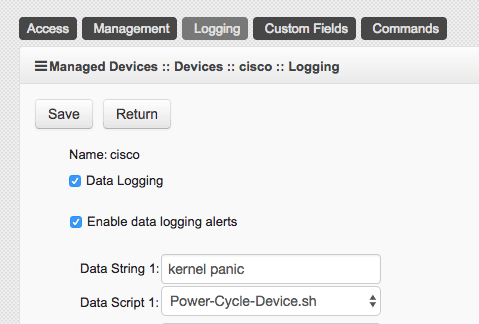
Nodegrid’s Data Logging abilities allow you to collect a wide variety of data, such as key input, console messages and errors, and console usage.

Set actionable string alerts and notifications whenever a known problem occurs – Choose any or all of the following notification types: e-mail, text, syslog, or snmptrap.
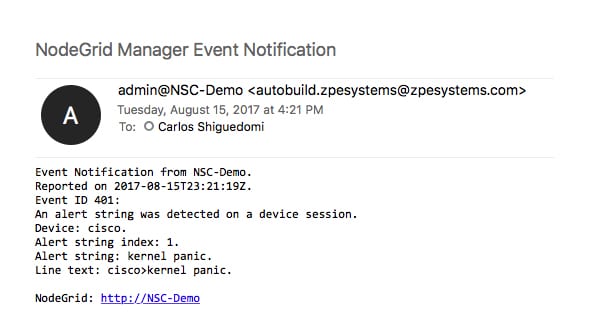
Nodegrid allows you to take actions based on string matches and console output. A recurring issue pops up, if its string matches, your selected script will be executed to alleviate the problem. Automate your fixes to save time and money.

All this is done in a matter of seconds:

  • A problem happens, Nodegrid finds a string match and executes the repair script
  • You get a detailed notification, telling you which devices experienced a specific problem
  • Data log is also sent to you to further investigate the issue and check for anomalies.

Nodegrid’s 64-bit Linux OS is ready for your automation scripts, allowing for multiple language options such as Python, JavaScript on Node.js, Bash, and more…

If data logging, alert notifications, and actually doing something with that information through actionable data is something that’s important to you, contact a ZPE representative to find out how we can help you out.