Providing Out-of-Band Connectivity to Mission-Critical IT Resources

3 Ways Docker Improves Network Management

Docker is the best way to deploy applications. There are several ways Docker improves network management. From being compatible with almost any programming language and machine, to its ability to run multiple containers in the same infrastructure, Docker has a lot to offer when it comes to automation and out-of-band management (OOB). But before we dive into the benefits of implementing it into your strategy, let’s take a closer look at what Docker is.


What is Docker?

Virtualization using virtual machines (VMs) was a game changer when first introduced. It allowed businesses to take full advantage of their network resources by giving them the ability to efficiently run multiple OSs and apps on the same host. When deploying new hardware, VMs significantly cut down the time it took to set up devices, allowing teams to configure resources in minutes instead of days.

But VMs have limitations. Aside from having to boot up an OS, each new addition requires virtual resources to be allocated (such as RAM), which can quickly strain your system when running multiple VMs. When porting, VMs typically cause compatibility issues, too, and they can’t share data volumes.
Docker is equally as revolutionary as VMs, and has been rapidly adopted by organizations since its initial release in 2013.

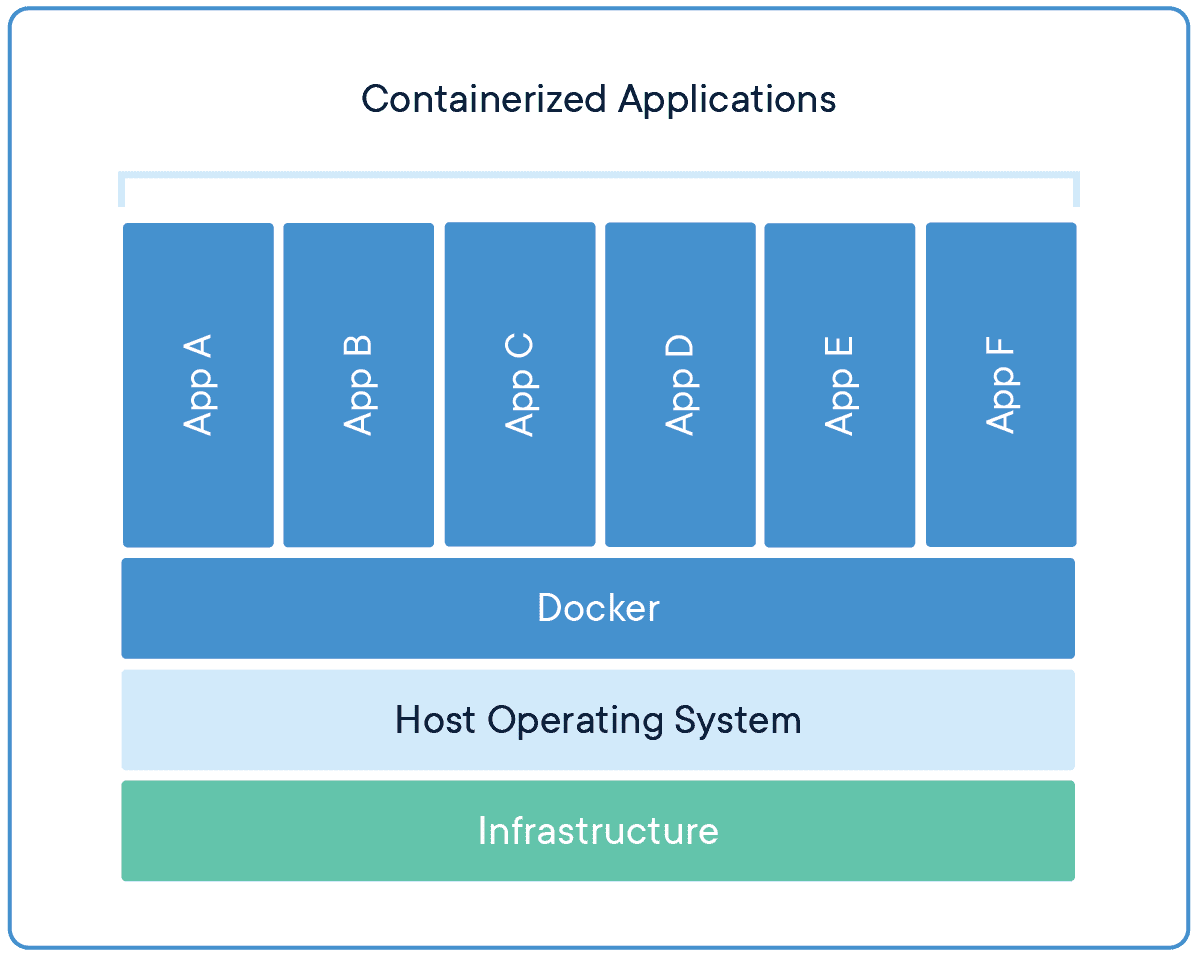
Docker takes virtualization in a different route, using something called containerization. Docker containers are lightweight and automate deployment of applications so they can work in different environments (i.e. on different machines). Each container is essentially its own software package that contains the dependencies to run an application, such as code, configuration files, processes, networking info, and sometimes even pieces of an OS.

So instead of running separate desktop environments, as with resource-hungry VMs, Docker containers run on a single system kernel and allow you to maintain isolated applications that work properly — regardless of what machine they’re running on.


How Docker Improves Network Management

Modern OOB networks employ an array of sophisticated tools, like those that support monitoring, management, and automation. Using Docker containers means that you can deploy applications and know that they’ll work on any resource, because Docker works on the client side. Docker can also act as a service and be deployed onto any server. And because all application dependencies are contained directly on the image, management is easier as well.

On a high level, using Docker containers brings these advantages to OOB:

  • You save on resource allocation, because containers require only a small amount of server space.
  • You can gather info and monitor your system by easily deploying lightweight apps.
  • Because containers are highly portable, you can use them for diagnostics, even when devices go offline.
  • Adding to the previous point, you can use containers for quick deployments, as well as for maintenance and backup.
  • With regards to things that require safeguarding, such as temporary configuration data or emergency recovery data, containers allow you to add them quickly on-demand.

On top of all these advantages, Docker improves network management by giving you three major benefits.


Docker Simplifies Virtualization

VMs allow you to run any platform — along with its unique configuration — on your infrastructure. However, VMs come with drawbacks because they require significant resources in order to work properly. Essentially, running a VM means running a separate, virtual desktop environment on your hardware. And with each VM you run, your device must allocate RAM and other resources, which can be expensive and lead to unstable performance.

Docker containers are much more lightweight, and you can run multiple containers using only a single OS kernel. Containers use less memory than VMs, they boot faster (because they don’t have to spool up an OS), and they can share and reuse data volumes. In a nutshell, containers make virtualization simple, highly efficient, and easy to configure, which significantly reduces the overhead associated with virtualization when compared to using VMs.

Docker Makes Deployment Fast

Before VMs, setting up new hardware took days because of the tedious, manual configuration that was required. With VMs, devices could be configured in minutes (and remotely), but IT teams still lost time due to the need to boot up an OS for each VM.

Using Docker containers, fresh resources can be configured in seconds because there’s no need to boot up an OS. Multiple containers running on the same hardware can run isolated applications, such as those containing configuration data and automation scripts, to help you rapidly deploy resources to your network. Simply create a container for the appropriate job.

Docker Helps With Disaster Recovery

When it comes to business continuity, traditional approaches call for assigning a single purpose site to disaster recovery efforts. This means that resources sit idle at this site, because most of the time your organization is not focused on recovering from disaster. In essence, a traditional approach leaves disaster recovery as an afterthought, which means that managing and maintaining its infrastructure is costly and complex.

However, by using Docker containers, you can transform disaster recovery to be just another stage in the integration and development pipeline. This means that your recovery infrastructure is expanded from a single site to an entire region (or your entire organization), because containers allow you to utilize more resources more frequently. And should disaster strike, containers offer accurate automation for fast and reproducible deployments, so you can recover quickly and continue with your business continuity efforts.

Remember that a robust OOB solution takes advantage of the latest tools to give you more visibility & control of your network. Docker is one of those tools. It allows you to automate and take full advantage of your network resources, and you can focus on running only your necessary applications (not entire VMs). It introduces more efficiency with highly portable containers that work across platforms, and saves your system from the strain of deploying many resource-hungry VMs.

To get the latest network tips and out-of-band management advice, sign up for tips and updates.

Use These Best Practices to Set up Your Out-Of-Band Network

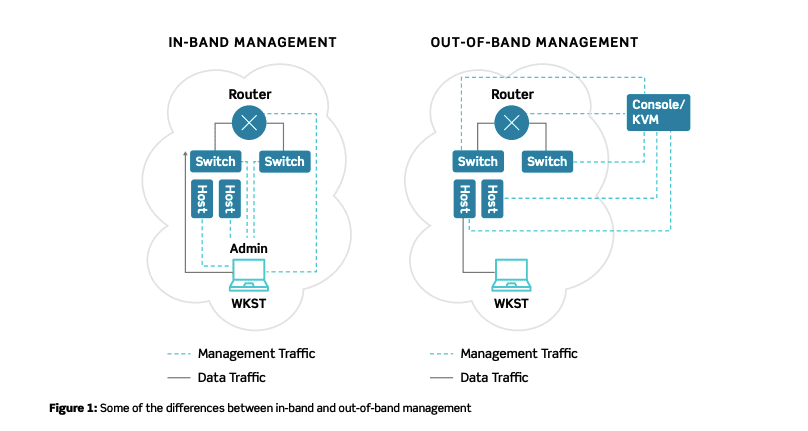
If you’ve read our previous post about out-of-band management 101, you know how important it is to have an out-of-band network. To recap, there are two methods you can use when managing your network: in-band and out-of-band.

In-band management involves connecting to devices and systems using your main production network. The major drawback to using this method is that your ability to manage depends entirely on the availability of your production network, and any changes you implement (such as installing patches) can slow down your network.

Out-of-band (OOB) management involves a completely separate connection, meaning your management efforts do not depend on the availability of your production network. So when you need to adjust traffic settings, install software updates, or troubleshoot issues, your OOB solution makes it possible even if your production network is down or unavailable.

In this post, you’ll discover two critical best practices to follow when setting up your out-of-band network. But first, let’s look at OOB design and review a few key characteristics to keep in mind.


Out-Of-Band Network Design

OOB has been around for decades, and has traditionally been designed around serial connections to dial-up links. Using this design, you typically need to connect a modem and phone line to every device that you want to be part of your OOB network. Modern out-of-band networks, however, use ethernet links and other digital connections, and even 5G wireless, which provide much faster speeds than traditional setups.

Regardless of design, you should be concerned with:

  • Security: your out-of-band network should only allow access for authorized personnel.
  • Accessibility: your OOB solution should be accessible even during outages or disasters.
  • Availability: your OOB network should be always on and always ready.

To help you address these concerns, here are best practices to use.

Use These Best Practices When Setting up Your Out-Of-Band Network

If your OOB network is not secure, accessible, or available, your entire organization can suffer from major setbacks due to data leaks and downtime. That’s why it’s important to follow these best practices when setting up your out-of-band network:

  • Make sure it’s (completely) isolated
  • Make sure it works (and works properly)

Isolate Your Out-Of-Band Network

The strongest foundation for OOB begins with isolating the network from production networks. You need to make sure you set up a completely separate and exclusive management path, which will help ensure optimal security, accessibility, and availability.

To do so, you need to set up hardware and critical infrastructure dedicated solely to OOB management. Make sure to set static IP addresses, isolate access controls, and create distinct, well-protected management accounts for authorized users. All of these measures help to keep your OOB network secure and reliable.

Test Your Out-Of-Band Network

After you set up your dedicated management path, it’s critical to ensure that it works properly. This involves following through with comprehensive security checks such as penetration testing. Overall, the goal of performing tests should verify that:

  • There is no access between production and OOB networks.
  • Admin credentials are secure and enforced.
  • All sensitive information handled by storage and retrieval tools is adequately protected.

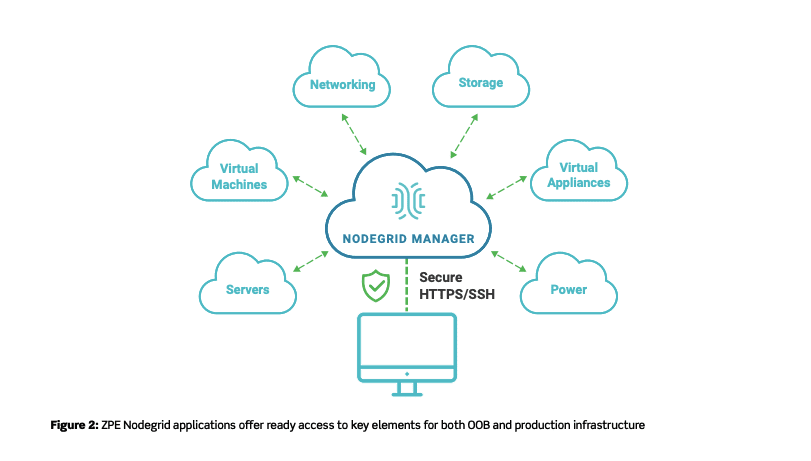
Nodegrid offers access for OOB and production infrastructure

Once you properly set up and test your out-of-band network, you can begin to benefit from having a secure management path. And if you implement a modern solution, such as ZPE Systems’ Nodegrid, you get more robust and flexible capabilities. These include features like fast broadband connections with reliable 4G/LTE backup, cloud-based security & management, and one consistent tool to manage every appliance, regardless of vendor.

Read the full tech brief to discover more about the logic behind these best practices, and how Nodegrid supports business continuity with innovative OOB.

Download the Tech Brief


3 Reasons Why Your Business Needs Out-of-Band Management

Tech Brief - Out-of-Band Management 101

Out-of-band management is an essential tool that should be part of your business continuity strategy.

But What Exactly is Out-of-Band, or OOB?

Your network is comprised of many devices and solutions, and it allows your organization to carry out normal operations. To gain access to your hardware and infrastructure, you typically might use an in-band connection, which relies on the production network.

Out-of-band management uses a completely separate network that’s dedicated strictly to managing infrastructure. So if you need to reboot a router, collect data for regulatory compliance, or adjust QoS settings due to traffic changes, OOB makes it possible — even if your production network is down.

IT admins across the globe love OOB for its exclusive connectivity and extended capabilities. See for yourself with these 3 reasons why your business needs out-of-band management.

Here’s a brief look at how OOB helps keep your network up and running from anywhere.

Network Infrastructure Diagram - In-Band vs. Out-of-Band

Restore Uptime Fast From Anywhere

One of the biggest benefits of OOB is that it gives you the ability to restore uptime faster.

Think about this scenario: on the other side of the world, one of your most isolated sites loses connectivity. If you don’t have OOB, you need to troubleshoot on-site, which means finding the right support staff, spending time & money on travel, and making a host of other arrangements — all while the site continues to suffer from downtime. To add insult to injury, what if the fix is as simple as rebooting a device? You spent thousands in support costs and lost uptime just for someone to flip a switch.

Out-of-band management gives you remote control of your devices, which allows you to troubleshoot from anywhere and resolve issues without being on-site. And if you choose a complete solution, like ZPE Systems’ Nodegrid, you can even cycle power from thousands of miles away.

Get Unified Control of Our Network

To manage your infrastructure without OOB, you need to juggle many interfaces, protocols, and UIs specific to each device. This can require you to invest loads of time and resources into support, considering you need to train staff on how to use the different pieces of your infrastructure.

But with OOB, you can remotely manage everything with one tool. Support staff won’t get overwhelmed or fatigued switching from device to device, and instead can easily control it all from one platform — whether it’s networking, compute, storage, or power.


Manage More Functions

Hardware consolidation is on the rise, which means fewer devices are responsible for controlling more functions. Routing, switching, serving, and more are being crammed into single appliance offerings. This is great for boosting efficiency and reducing your footprint. But with everything, there’s a tradeoff.

In this case, issues can have a greater effect on your network and take down several functions at once. If one of your consolidated devices fails and you don’t have out-of-band, you need on-site staff who can troubleshoot issues across the board. However with out-of-band management, you can troubleshoot and control all your network functions and applications remotely using a single tool.

Did you know: OOB lets you put your best people on the job, no matter how far away they are from your network devices. And with a solution like Nodegrid, you get screen- and session-sharing features, so your top experts can collaborate in real time to keep your network running.

Overall, out-of-band management supports business continuity by giving you more control over your network infrastructure. It helps you quickly recover from and prevent downtime, gives you one simple tool to make management easy, and puts you in charge of all your network functions.

Download the Tech Brief


The Role of OOB Management – Today and into the Future

In this 5 1/2 minute video Scott D. Lowe, CEO of ActualTech Media, talks about the importance of Out-of-Band Management to keep organizations’ IT up and running from anywhere even when your IT team isn’t available. He talks through some of the benefits of automation in OOBM and how using an alternate communications path enables functions to engage more quickly and precisely resulting in:

  • Reduced complexity of network infrastructure, increasing efficiency, and shortening deployment times
  • Improved business continuity as consistent higher levels of service are delivered and failures are detected proactively
  • Greater business agility by expediting time to market when deploying new applications and services, improving ROI

He touches on how network automation supports programmatic behavior of network activities, which is on the forefront of AI, machine learning, IoT, and advanced data analytics. Zero touch provisioning provides speed, accuracy, scalability needed for legal and regulatory compliance. OOBM is helping organizations provide a consistent and coherent view of their network health, stability, and performance.

Reducing Downtime and Saving Money with a Well-orchestrated Out-of-Band Infrastructure

A well-orchestrated Out-of-Band infrastructure (OOBI), or Remote Access and Control solution (as it’s sometimes called) is a vital component in the fight against downtime and lost revenue.

Every second a network, server, Virtual Machine, or storage device is down, not responding, or sitting idle, it simply costs your company money. When unplanned outages rear their ugly heads, you need to (or should) have a well-orchestrated Out-of-Band infrastructure standing by that enables you to immediately respond, diagnose, and repair the outage to (first and foremost) reduce lost revenue.

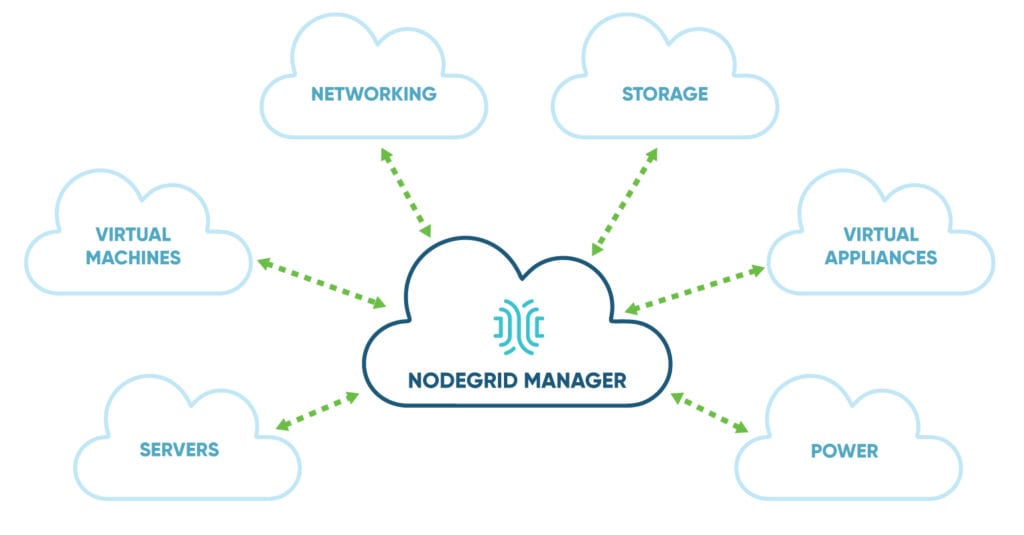
A well-orchestrated OOBI gives the authorized user immediate access to all Network, Server, Storage, Virtual Machines, and even Power devices located anywhere throughout the company’s IT Infrastructure. Whether they be local or in remote offices, retail stores, or data center locations.

There are many different OOB products available that provide access to, and control of, IT equipment. Serial Console switches, KVM/IP Switches, embedded Service processors (IPMI, DRAC, ILO, CIMC, etc.), as well as Virtual Machines. Each method has its own interface and command stack giving you control over that particular brand of device. (Yet another management tool). While these methods enable you to eventually get the job done, they lack organization, consolidation, simplification, and standardization across all of the different platforms.

A well-orchestrated OOBI should provide a simplified, consolidated and organized method of accessing and controlling Network, Server, Storage, Virtual Machine and Power devices over your networks. The user should have the exact same experience and command stack regardless of device type and manufacturer to quickly and easily respond to outages of these devices attached to the network, in turn saving you money.

If responding to outages or problems with Network, Server, Storage, Virtual Machine and Power devices are part of your responsibilities, and your OOBI is anything but well-orchestrated, (meaning the use of numerous separate products or solutions to access and control Network, Server, Storage, Virtual Machines, and Power devices in your infrastructure), you should take a look at ZPE Systems’ well-orchestrated and unified OOB management solution, NodeGrid.

NodeGrid was designed from day one to provide a vendor neutral common UI and Commands for Accessing and Controlling Network, Server, Storage, Virtual Machines, and power devices from just about any manufacturer in use today.

NodeGrid was built by Out-of-Band industry veterans who realized the market lacked a Vendor Neutral, easy to use, organized and consolidated OOB management solution.

Want To Learn More?

For more information or to see a demo, contact a ZPE solution specialist by giving us a call -or- send us an email. We’re here to help.

One Easy Way To Consolidate Your Out-Of-Band Management – And Save Money

Did you know there’s an easy way to consolidate your Out-Of-Band data center management – and save money?

For all that IT provides, there is a constant cry from businessmen to cut costs, find cheaper vendors, outsource whatever can be outsourced – and provide better service.

Maintaining and upgrading your data center IT systems is critical to business continuity. For most businesses, maintaining this ever changing multi-vendor environment — using many different and expensive proprietary management tools — just doesn’t scale.


What is the solution?

To cut costs while improving data security and DevOps productivity, businesses need a smart, consolidated, vendor-neutral Out-Of-Band IT infrastructure management solution. A flexible solution that replaces dozens of other IT device administration tools saves you time and simplifies Out-Of-Band management.

ZPE Systems automates and consolidates management of your physical and virtual IT infrastructure while helping you cut costs to gain competitive advantage. ZPE Systems’ vendor-neutral Nodegrid family of products unifies your Out-Of-Band management of hardware, virtual machines and converged infrastructure. Nodegrid scales to your company’s needs with Nodegrid Manager® for software-defined infrastructure, Nodegrid Serial Console for legacy servers, PDUs and network gear.


Nodegrid Manager


Nodegrid Manager is the industry’s first and only Software-Defined Infrastructure virtual appliance that provides access and control of server, storage, networking, virtual machine, PDU and UPS devices from one screen. Nodegrid Manager is great for heavily software-based companies.

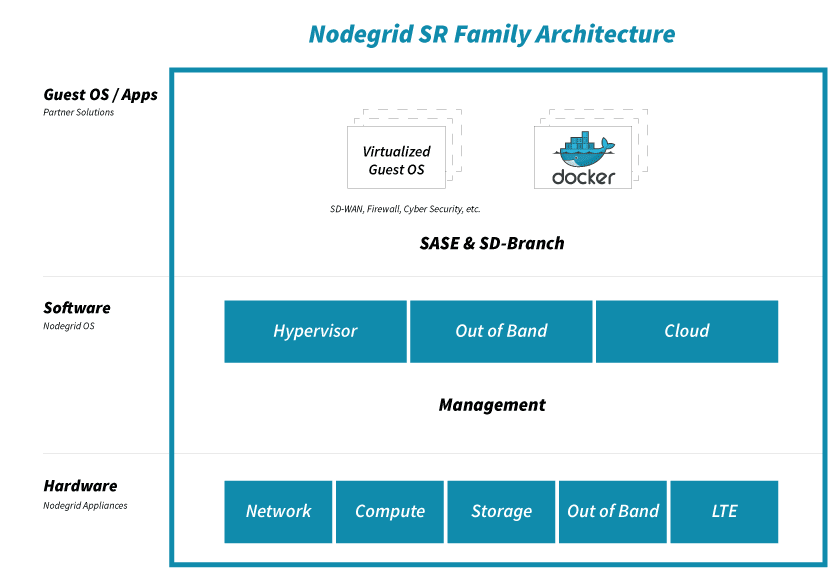
The Nodegrid OS core engine utilizes a unique technology stack that allows for policy-based automated discovery and configuration of device consoles to minimize configuration and maintenance. The core engine utilizes a unique interface abstraction layer which provides translation of the many protocols and methods required to access and control device consoles from multiple vendors. It also supports Environmental and Power Monitoring with NodeStash data collection, correlation, natural language search and dashboard and Vendor-Neutral Power Management for VMs, IPMI and PDU’s

A flexible, unified interface with Web GUI, CLI (for scripting) and RESTful API enables automated customization and integration of your console portals and applications.

Cluster multiple Nodegrid Managers together for a complete 360° view of all your assets via a secured and resilient internal cloud. Find any device quickly using natural language search to quickly access and control IT assets. Bookmark common devices for instant access.


Nodegrid Serial Console

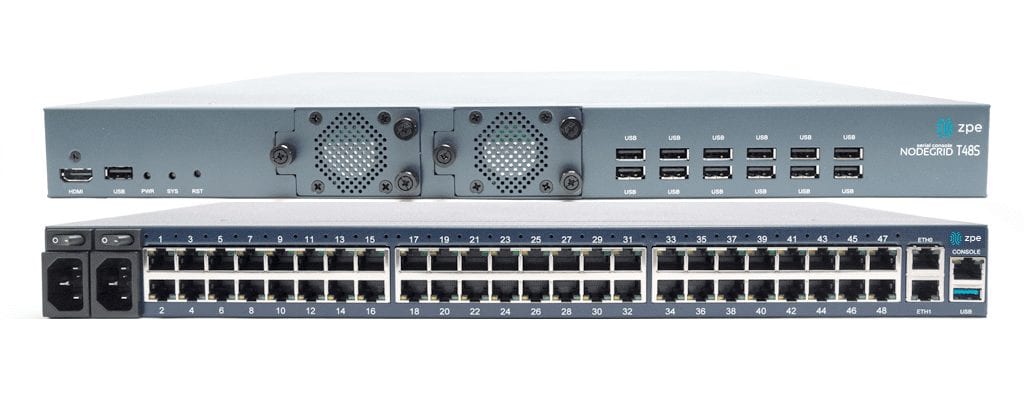
Nodegrid Serial Console is the data center industry’s next generation serial console switch and the highest density console in the world. Nodegrid Serial Console boosts productivity, multi-user access and reduces infrastructure costs with the latest technologies. Open modular hardware design, blazing fast CPU speed and more memory together with the latest 64-bit Linux OS enable lightning fast response times. Support for Docker Containers enables feature expansion. Multiple industry-first security measures protect your business, including bare metal booting and configuration security checksum. It also supports Zero-Touch Provisioning for easy and simple configuration and Browser-in-a-Container for secure HTML5 navigation to IT infrastructure devices without deprecated NPAPI/Java code viewers. Designed by industry veterans, Nodegrid Serial Console is available in many 1U configurations—96, 48, 32 and 16 port models.


Ordering Details:

The Nodegrid Product Family Provides Robust Management Features:

  • Secure Out-Of-Band (and In-Band) access and control of numerous vendors’ devices including: VM, server, IPMI, networking, storage, serial console and power
  • Docker apps integration and 64-bit direct Linux shell for powerful scripting
  • Industry exclusive security measures, including bare metal booting and configuration security checksum
  • Browser-in-a-Container for secure navigation without deprecated NPAPI/Java code viewers
  • Cross-device HTML5 remote console access
  • Policy-based authorization and authentication via AD/LDAP
  • Data logging, event notification and alarms
  • Environmental and Power Monitoring with NodeStash data collection, correlation, search and dashboard
  • Premise, Hybrid and Cloud device management
  • Vendor-neutral power management: Cyclades/Avocent, Raritan/Legrand, ServerTech, Emerson, APC/Schneider and more

Nodegrid Benefits

  • Minimizes MTTR, downtime and expenses with secure, centralized remote device access and control
  • Increases site reliability with open industry standard hardware, and simplified easy-to- use software
  • Remote vendor-neutral power control embedded on session (hot keys) or via web (buttons)
  • Avoid travel and access your device anytime and anywhere over the network
  • Increase productivity by accessing all your devices from a clustered system for a complete asset view
  • Increase security with encrypted, logged access to devices
  • Self-healing system based on actionable data and triggers
  • Extended automation and custom scripts based on actionable real-time data and alert triggers
  • Search for any device information, including custom fields, to quickly access your device
  • Easy integration with 3rd party management tools via APIs and CLI
  • Add further value with licensed features like Docker, Clustering and Managed Devices

Want to Know More? Let’s Chat!

Still have questions about how easy it is to use Nodegrid Out-Of-Band management products? Give us a call or email us, we’re happy to discuss how Nodegrid can support your environment.