Providing Out-of-Band Connectivity to Mission-Critical IT Resources

Help NetOps Teams Using Application Hosting & Guest OS

Application hosting helps your business become more flexible. This virtualization approach is a perfect solution if you’re looking to reduce your networking stack, make critical services more globally available, and ensure that your network is always up to date.

If you’re not familiar with application hosting, read our other blog post to get acquainted.
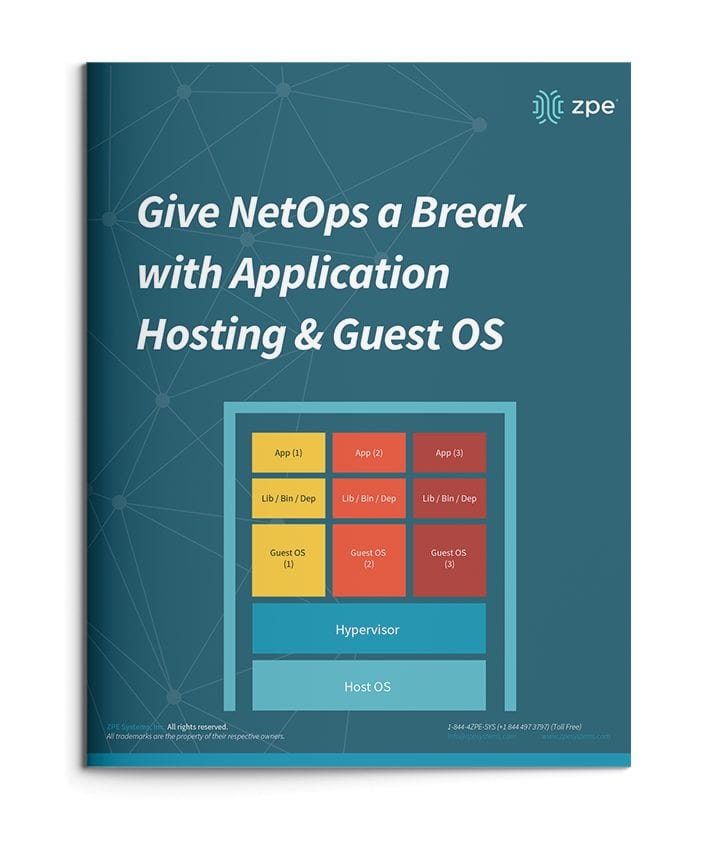
Application hosting helps your business become more flexible. This virtualization approach is a perfect solution if you’re looking to reduce your networking stack, make critical services more globally available, and ensure that your network is always up to date.

If you’re not familiar with application hosting, read our other blog post to get acquainted.

Give NetOps a Break with Application Hosting & Guest OS

For a quick recap, here are some things to know:

  • Application hosting means creating a cloud-based model (SaaS) through which to deliver your applications. One of the biggest benefits is that you don’t have to install and manage applications locally, and can instead keep them centralized on a server and bring them to clients anywhere in your organization.
  • To use application hosting, you need a virtual machine (VM) and something called a ‘Guest OS’.
  • Running on a VM, a guest OS can be Windows, Linux, Ubuntu, or other common operating system, and it’s this operating system that determines what applications you can run.
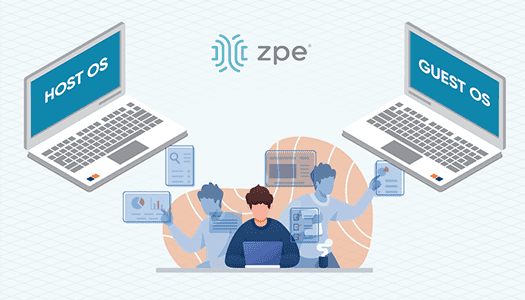
  • In between your device’s operating system (or host OS) and the guest OS is something called a hypervisor. A hypervisor is able to create VMs and tell the hardware how to allocate resources for VMs. This is an essential component of virtualization and application hosting.

How Does Application Hosting Help NetOps?

Modern business moves faster than ever, and to reach your goals, your NetOps teams need a modernized network that moves fast, too. But this can be difficult to achieve, since your network is likely made up of many different hardware & software systems, and admin protocols. There’s just so much to juggle that it seems like your network his holding back operations.

The good news is, application hosting and virtualization can alleviate many of the obstacles standing in the way of your network. Let’s compare how you manage your solutions before and after application hosting.

NetOps the Old Way

To boil it down, NetOps the old way is slow and cumbersome. This is mainly due to having many physical devices that you have to manage, which puts time consuming on-site support at the top of your priorities. This becomes even more complicated when you have many branch and remote networks.

Without application hosting, you need to install applications locally. Your only option is to put IT staff on site for this task. From there, the job can take days to complete, especially if your stack consists of many devices. And this is all part of a best-case scenario, which unfortunately isn’t the norm.

Another problem can arise — hardware & software incompatibilities. Suppose you try to install or update applications, and once you connect to a device you discover that the latest OS doesn’t support your software. Now what? Since you recently updated the OS for devices at every location, you have to roll back configurations or find a workaround for your application’s new release.

All of this can quickly become complex and difficult to track. Having to locally manage your edge environment leaves your network open to human errors. Your peace of mind is merely wishful thinking, because your physical & virtual assets aren’t as consistent, secure, or reliable as you’d hoped.

NetOps with Application Hosting

When you introduce application hosting, NetOps becomes fast and agile. Putting all your applications in the cloud means you can deliver them right where they’re needed, and thanks to guest OS, you don’t have to worry about incompatibilities.

Put your applications in a centralized server, and you no longer need to worry about on-site support. Your NetOps teams can tap into your server to install, update, and manage applications no matter where they are. This means faster releases and shorter time-to-market, so you can support your business alongside demand.

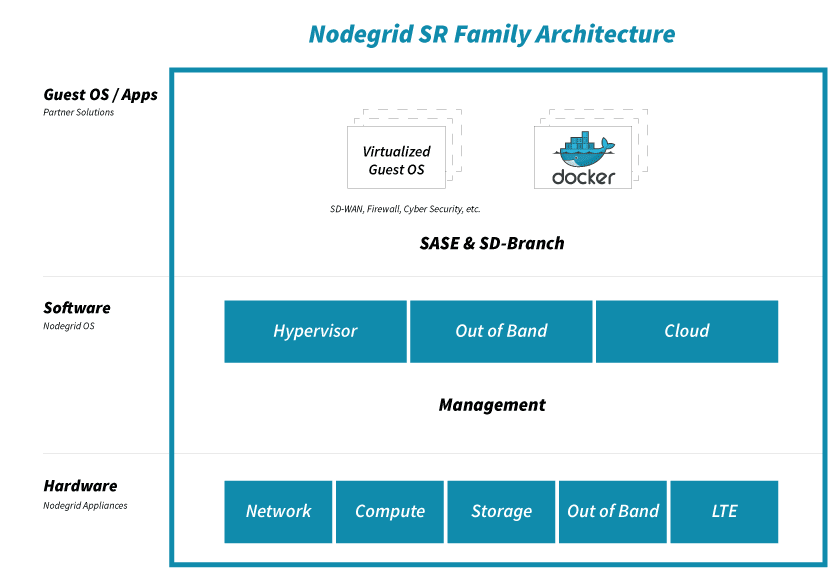
If you choose a powerful platform like Nodegrid, you can further help NetOps with even more capabilities. The Nodegrid Services Router can pack all your network functions into a single box, with add-on compute modules that allow you to run many guest OSes. Not only does this cut your stack, but it also gives your NetOps teams reliable remote access via out-of-band.

See how you can streamline NetOps with application hosting and Nodegrid.
Your Application Hosting & Guest OS Checklist

Follow these simple steps to get started setting up your virtual network environment

Checklist-App

Application Hosting and Guest OS Alleviate Many Problems for NetOps Teams.

You typically need to install and manage applications on local devices. This is challenging because each appliance has its own operating system, which is compatible with some applications but not others. You need to alter your stack in order to make changes or updates, while on-site support keeps costing you time, money, and valuable resources. With application hosting, you virtualize your environment and deliver applications via server. It’s an SaaS model that allows you to distribute the network apps you need — when and where you need them. You don’t have to deal with the tedious tasks that come with managing localized apps. And using guest OS, you further streamline your environment by deploying virtualized operating systems on VMs, eliminating OS incompatibilities across the edge.

  • Instead of waiting, you can deploy applications on demand
  • You don’t need on-site support — virtualization lets NetOps manage from anywhere
  • You get consistent peace of mind at the edge, with the latest updates and fixes

Put application hosting and guest OS to work and streamline your operations. Here’s how to get started:


Deploy Your Physical System

Set up your server and other necessary infrastructure components, such as databases or repositories. Use the Nodegrid Services Router for all-in-one functionality. The NSR provides server, compute, storage, and other capabilities in one device. You save space and power consumption.


Load a Hypervisor-Capable OS

To make the most of application hosting and keep your stack compact using guest OS, you need to install an operating system that’s capable of being a hypervisor. This is the layer that’s capable of interacting with both your VM/application layer, and your hardware. Nodegrid OS is capable of being a hypervisor, and supports out-of-band and cloud connectivity. This versatile software is built into every Nodegrid device, and is also available as a standalone package.


Deploy VMs and Guest OSes

With your hardware and software set up, you can deploy your virtual machines (VMs) and guest OSes. These allow you to virtualize and diversity the OS layer of your infrastructure. You don’t have to clutter your stack with many specialized devices each running a unique OS. Just spin up an appropriate VM with compatible guest OS, and it’s easy to deploy the applications you need. The NSR can directly host guest OSes, third-party and custom applications, and Docker and Kubernetes containers.


Maintain Port & IP Addresses

To keep your infrastructure properly connected and traffic flowing, you need to configure and maintain your network port and IP addresses. This means adjusting NAT settings to allow application requests and deny unsecured traffic. With the NSR, you can host network ports and IP addresses, making management even easier. For more information about application hosting, guest OS, or how to set up your environment, get in touch with ZPE Systems.

Better Application Hosting & Guest OS

Better Application Hosting & Guest OS

As your business continues to expand, your infrastructure needs to adapt and grow to keep up with increases in demand. Rack space in your data centers comes at a premium with little to no additional room for unnecessary equipment. Cooling and power costs must also be considered whenever any additional equipment is needed. This creates a delicate balancing act between function, need, and cost that requires decision makers to think carefully before approving any new deployments.

Branch Locations

Branch locations also add to the puzzle as most will need at least some hardware to be located on site in order to support basic business operations. The more branch locations you have, the more hardware is required, along with all of the cost associated with maintaining it. In some situations, your new branch location may not even have a pre-built server room. This can lead to additional construction costs to create one, or you may need to make use of a storage room that does not have independent cooling available. In this case, you may be greatly limited to how much hardware you can reasonably accommodate without worrying about overheating. 


Virtualization Technology

Fortunately, virtualization technology is growing rapidly and can address many of the issues that companies are facing in today’s ever evolving market. With virtualization, you are able to run more applications using substantially less hardware. This leads to a significant reduction in capital spending on hardware, as well reduced power consumption and cooling costs. For branch locations without dedicated server rooms, you can now worry less about rack space and overheating issues and focus more on critical tasks.

While virtualization can offer great solutions to many key issues that companies today are facing, it is not without its own set of challenges. Even if several virtual instances are running on a single piece or hardware, that hardware must still be managed. With remote branch locations, this may offer an additional challenge as there may not be a dedicated team on site. On top of this, virtual machines are managed differently than physical hardware which can add an additional layer of complexity to the entire infrastructure.  There is also an increased need for managing network infrastructure like switches, routers, firewalls or even storage hardware. System admins are forced to use multiple methods of managing a growing proliferation of device types, protocols and brands.


Choice Matters

Selecting the proper solution to suit your business needs is critical. ZPE Systems Nodegrid solution offers a best in class “Open Infrastructure Management Solution™” for in-band and out-of-band access and control of Network, Compute, Storage and Power Devices in both physical and virtual IT Infrastructures. The NodeGrid® platform easily consolidates, organizes, and simplifies the need for a complete and highly secure remote access and control solution.

ZPE’s Nodegrid SR family of Open Infrastructure Management Solutions have been tested to work with a full suite of Virtualized Network Function (VNF) Applications including Darktrace, 128 Technology, Palo Alto Networks, Ubuntu, HP, SAP, Fortinet, and more. You can see the full list of prevalidated virtual applications here.


Ready to Learn More?

For more information on ZPE’s full product line, please visit our products page.

Have a specific question or want to experience a live demonstration for yourself? Reach out to us via our contact page. We’re here for you!

Transform Enterprise Network Operations With Application Hosting & Guest OS

Application hosting and guest OS are transforming enterprise network operations. With the ability to globally distribute software via the cloud and take advantage of applications regardless of operating system requirements, application hosting and guest OS deliver major benefits to NetOps teams. Here’s a more detailed look at what they are, how they help business, and how they’re made better by Nodegrid.

Application Hosting and Guest OS

What Are Application Hosting and Guest OS?

Application hosting is essentially putting your apps in the cloud (think SaaS). Instead of having applications installed locally on each device, you can host them on a server. This way, you can virtualize your enterprise applications and have them delivered to clients throughout your organization.

Because virtualization requires virtual machines (VMs) to run in your environment, guest OS becomes a key component in application hosting. Guest OS is the software that is installed and running on a VM, and it’s this software that dictates what applications can run on that VM.

Here’s another way to look at it using an example: you want to use three separate applications on a device, but your device’s operating system, or host OS, is compatible with only one of the applications. The two others require Windows Server 2012. You don’t have to do without, because on the device you can deploy a VM using Windows Server 2012 as the guest OS, which then allows you to take advantage of the remaining applications.


What Issues Do They Address?

You’re probably used to juggling network infrastructure solutions throughout your organization. It takes time and resources to deploy, manage, and maintain physical devices at each location. The same goes for all of your applications – installing, updating or rolling back, and troubleshooting can add to your management headaches.

  • It can take days or weeks to get a new service up and running
  • Having localized applications bogs you down with on-site support
  • Your edge network suffers from inconsistencies, leaving you open to security threats and disruptions

Application hosting and guest OS drastically uncomplicate how you manage your infrastructure, by eliminating these issues.

  • You can deploy and distribute applications on demand
  • You can make applications available globally and manage them remotely
  • Your edge network is standardized, with the latest application updates and fixes keeping you safe

You don’t have to worry about the problems or interruptions that can occur from, say, having different software versions across your network. Application hosting and guest OS let you deliver a consistent experience no matter how distributed your infrastructure might be.


How Do Application Hosting & Guest OS Help Business?

The business benefits of application hosting and guest OS can be summed up with one word: savings.

For starters, you save space and resources at each location, which helps you slash CAPEX and OPEX costs. When deploying, you no longer need to spend time and money on many pieces of hardware, or put together a hodgepodge stack that sacrifices on capabilities. You can instead deploy consolidated devices running all the OSes and applications you need, for a network that’s flexible and adaptable. And because ongoing maintenance can be performed remotely, you don’t need to put support staff on-site.

You also increase uptime, because having a virtual presence allows you to respond fast from anywhere.

Your network staff benefit from easier deployment and maintenance. To bring a site online, they don’t have to manually install and configure every device and app. Instead, they can take advantage of zero touch provisioning, which builds the network itself and helps make applications available quickly. To maintain and manage the network environment, your staff have a virtual presence that lets them update apps, install patches, or troubleshoot as needed — without having to commute to the location and physically connect to devices. Application hosting and guest OS also simplify integrations within your network, and they boost security by centralizing your authentication processes.


How Does Nodegrid Make Them Better?

ZPE’s Nodegrid hardware and software allow you to host applications and guest OSes, putting both layers in one place for simplified management. Not only can you easily perform app installations and maintenance, but you can also troubleshoot any issues should you have problems with the guest OS layer.

Nodegrid also makes it easier to deploy your own tools and utilities. If you’ve developed custom applications, whether for added security, better traffic routing, or faster kickoff configuring, you can deploy them directly on Nodegrid devices. You don’t have to find third-party hosting providers, and can instead use Nodegrid to get your private cloud and applications running in no time.

Consolidated appliances support automation and containerization using common tools like Puppet, Chef, Docker, and Kubernetes. These devices and capabilities deliver a vendor-agnostic system to help you free up rack space and streamline your NetOps workload. Since your network functions can also be hosted on a single Nodegrid device, you no longer need to separately maintain additional IP addresses, either.

For the ultimate in uptime and accessibility, Nodegrid provides you with a secure out-of-band management path. This allows you to remotely manage guest OSes and applications across your network, without having to put teams on-site. This secure OOB network is also accessible via 4G/LTE cellular failover. Should any main-line outages or disruptions occur, you can keep your network running and continue to manage your applications no matter where you are.

Keep up with the latest in application hosting, zero touch provisioning, and more networking innovations from ZPE. Visit our blog page for tons of free resources to help turn your network into a powerful asset.

3 Ways Docker Improves Network Management

Docker is the best way to deploy applications. There are several ways Docker improves network management. From being compatible with almost any programming language and machine, to its ability to run multiple containers in the same infrastructure, Docker has a lot to offer when it comes to automation and out-of-band management (OOB). But before we dive into the benefits of implementing it into your strategy, let’s take a closer look at what Docker is.


What is Docker?

Virtualization using virtual machines (VMs) was a game changer when first introduced. It allowed businesses to take full advantage of their network resources by giving them the ability to efficiently run multiple OSs and apps on the same host. When deploying new hardware, VMs significantly cut down the time it took to set up devices, allowing teams to configure resources in minutes instead of days.

But VMs have limitations. Aside from having to boot up an OS, each new addition requires virtual resources to be allocated (such as RAM), which can quickly strain your system when running multiple VMs. When porting, VMs typically cause compatibility issues, too, and they can’t share data volumes.

Docker is equally as revolutionary as VMs, and has been rapidly adopted by organizations since its initial release in 2013.

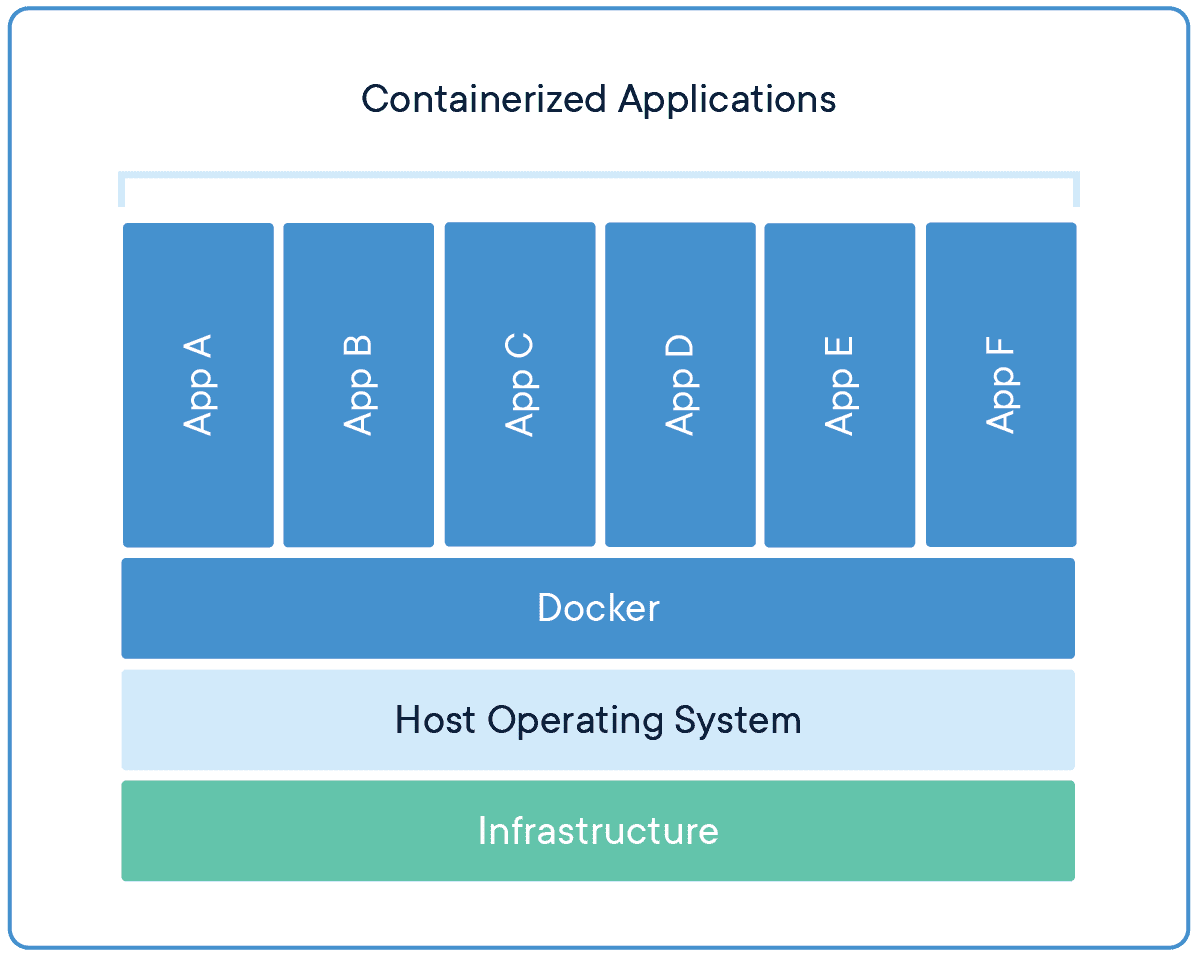
Docker takes virtualization in a different route, using something called containerization. Docker containers are lightweight and automate deployment of applications so they can work in different environments (i.e. on different machines). Each container is essentially its own software package that contains the dependencies to run an application, such as code, configuration files, processes, networking info, and sometimes even pieces of an OS.

So instead of running separate desktop environments, as with resource-hungry VMs, Docker containers run on a single system kernel and allow you to maintain isolated applications that work properly — regardless of what machine they’re running on.


How Docker Improves Network Management

Modern OOB networks employ an array of sophisticated tools, like those that support monitoring, management, and automation. Using Docker containers means that you can deploy applications and know that they’ll work on any resource, because Docker works on the client side. Docker can also act as a service and be deployed onto any server. And because all application dependencies are contained directly on the image, management is easier as well.

On a high level, using Docker containers brings these advantages to OOB:

  • You save on resource allocation, because containers require only a small amount of server space.
  • You can gather info and monitor your system by easily deploying lightweight apps.
  • Because containers are highly portable, you can use them for diagnostics, even when devices go offline.
  • Adding to the previous point, you can use containers for quick deployments, as well as for maintenance and backup.
  • With regards to things that require safeguarding, such as temporary configuration data or emergency recovery data, containers allow you to add them quickly on-demand.

On top of all these advantages, Docker improves network management by giving you three major benefits.


Docker Simplifies Virtualization

VMs allow you to run any platform — along with its unique configuration — on your infrastructure. However, VMs come with drawbacks because they require significant resources in order to work properly. Essentially, running a VM means running a separate, virtual desktop environment on your hardware. And with each VM you run, your device must allocate RAM and other resources, which can be expensive and lead to unstable performance.

Docker containers are much more lightweight, and you can run multiple containers using only a single OS kernel. Containers use less memory than VMs, they boot faster (because they don’t have to spool up an OS), and they can share and reuse data volumes. In a nutshell, containers make virtualization simple, highly efficient, and easy to configure, which significantly reduces the overhead associated with virtualization when compared to using VMs.

Docker Makes Deployment Fast

Before VMs, setting up new hardware took days because of the tedious, manual configuration that was required. With VMs, devices could be configured in minutes (and remotely), but IT teams still lost time due to the need to boot up an OS for each VM.

Using Docker containers, fresh resources can be configured in seconds because there’s no need to boot up an OS. Multiple containers running on the same hardware can run isolated applications, such as those containing configuration data and automation scripts, to help you rapidly deploy resources to your network. Simply create a container for the appropriate job.

Docker Helps With Disaster Recovery

When it comes to business continuity, traditional approaches call for assigning a single purpose site to disaster recovery efforts. This means that resources sit idle at this site, because most of the time your organization is not focused on recovering from disaster. In essence, a traditional approach leaves disaster recovery as an afterthought, which means that managing and maintaining its infrastructure is costly and complex.

However, by using Docker containers, you can transform disaster recovery to be just another stage in the integration and development pipeline. This means that your recovery infrastructure is expanded from a single site to an entire region (or your entire organization), because containers allow you to utilize more resources more frequently. And should disaster strike, containers offer accurate automation for fast and reproducible deployments, so you can recover quickly and continue with your business continuity efforts.

Remember that a robust OOB solution takes advantage of the latest tools to give you more visibility & control of your network. Docker is one of those tools. It allows you to automate and take full advantage of your network resources, and you can focus on running only your necessary applications (not entire VMs). It introduces more efficiency with highly portable containers that work across platforms, and saves your system from the strain of deploying many resource-hungry VMs.

To get the latest network tips and out-of-band management advice, sign up for tips and updates.