Providing Out-of-Band Connectivity to Mission-Critical IT Resources

How to build a secure isolated recovery environment (SIRE)

An illustration of someone paying a ransom for their encrypted data, showing what can happen if an organization does not implement an isolated recovery environment (IRE).

Ransomware is one of the biggest cybersecurity threats to enterprises. Sophos reports that in 2024, 59% of organizations suffered a ransomware attack, and the average cost to recover (excluding ransom payment) was $2.73 million. The frequency of ransomware attacks is so high that it’s no longer a question of ‘if,’ but ‘when’ an organization will be hit. Since ransomware encrypts critical data, applications, and systems, an attack can be extremely disruptive to business. During prolonged downtime, revenue slows or stops altogether, recovery costs skyrocket, and the company’s reputation and customers’ trust are severely damaged.

To reduce ransomware recovery times, companies must shift their focus away from prevention and detection and instead invest more time and money into recovery strategies. Ransomware recovery is especially challenging because of how easily its malicious code can spread from production into backup data and systems. What’s needed, according to the experts at Gartner, is a designated, secure isolated recovery environment (SIRE) that’s fully separated from the production infrastructure.

What is a secure isolated recovery environment (SIRE)?

A recovery environment is made up of systems and network resources that are dedicated to recovering from ransomware and other cybersecurity breaches. The recovery environment is where teams work to restore data and rebuild applications before they’re pushed back to the production network.

Many organizations implement a recovery environment by creating an isolated VLAN on the enterprise network. However, if the recovery environment has any dependencies on the production network, there’s a risk that ransomware will cut off access. For example, if malware infects authentication systems, routers, or switches, then admins might lose access to the recovery VLAN. In addition, production dependencies provide a way for ransomware to jump to the recovery environment, reinfecting systems and spoiling recovery efforts.

A secure isolated recovery environment (SIRE) uses a designated network infrastructure that’s completely separate from the production environment. The SIRE uses tools like Retention Lock, role-based access control (RBAC), and out-of-band (OOB) management to ensure that admins can quickly recover critical business services without the risk of reinfection. Let’s discuss these components in greater detail, as well as how to implement them to create an IRE.

How to build a secure isolated recovery environment

The ideal SIRE is built around three concepts: survivable data, separation and isolation, and designated infrastructure.
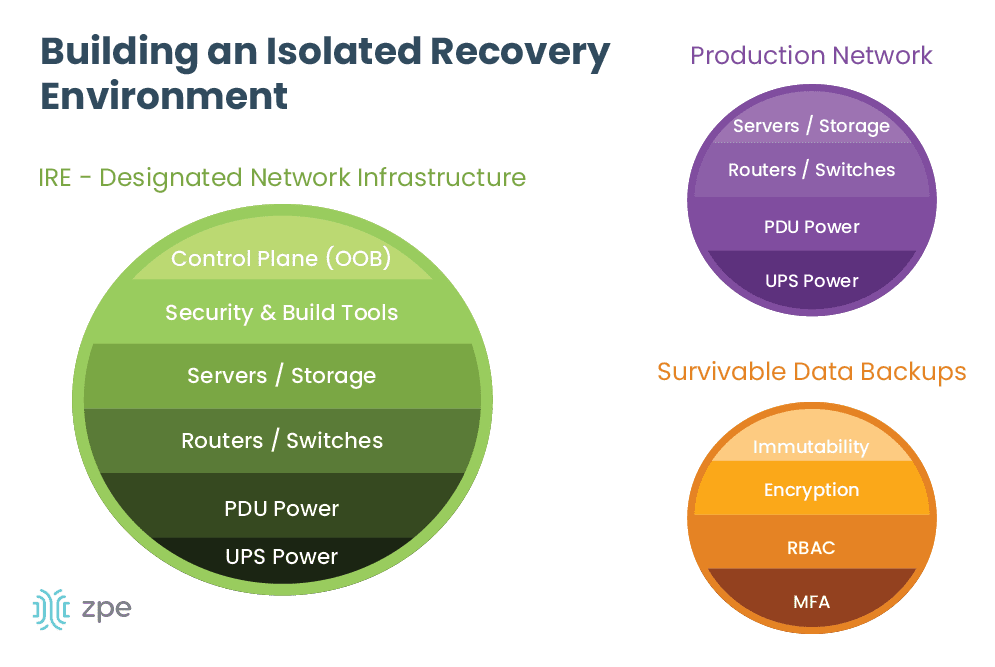
build an isolated recovery environment

Survivable data

Ransomware earned its name because it encrypts data and systems and demands a ransom (typically in the form of cryptocurrency) to get the decryption key. However, there’s no guarantee that the attackers will provide a valid decryption key upon receiving their bounty, so it’s best to avoid the cost and risk altogether by ensuring you have clean backup data. These backups are known as survivable data – data that can’t be removed or encrypted by attackers.

To ensure your backup data is survivable, you should implement:

  • Immutability: Something is considered immutable if it can’t be changed in any way, such as immutable infrastructure. Immutable data backups can’t be modified once they’re in place, which makes it impossible for ransomware and other malware to encrypt or corrupt the files. Data immutability can be enforced with tools such as Retention Lock.
  • Encryption: For backup data to be survivable, it must be encrypted both in transit and at rest. This is sort of like fighting fire with fire – if your data is already encrypted, it will be much harder for ransomware to apply its own encryption. Plus, encrypting data in transit makes it harder for attackers to intercept and steal it as it’s moving between your production, backup, and recovery environments.
  • RBAC: Role-based access control, or RBAC, refers to policies that restrict access based on an account’s role or function (e.g., ‘administrators,’ or ‘human resources’). Ideally, only the key personnel involved in recovery operations (their role may be ‘recovery engineers,’ for example) will have access to backup systems, which limits the risk that over-privileged accounts will be compromised and used to exfiltrate data.
  • MFA: Multi-factor authentication, or MFA, forces users to prove their identity in multiple ways before they can access a system or application. For example, an admin may need to provide their username and password, plus a six-digit code sent to their authorized mobile device or email address, to prove that they are who they say they are. If an attacker steals an admin’s username and password, MFA prevents them from being able to access, steal, or encrypt backup systems.

Separation and isolation

Recovery efforts need to take place in an isolated environment so there’s no risk that malware will cross over from the production network. Newly recovered systems, applications, and data also need to be scanned and verified to ensure they’re clean before they’re reintegrated into production. The only way to achieve this is by building a completely isolated environment using a designated network infrastructure.

Designated infrastructure

The SIRE needs to be both physically and logically separated from the production network to ensure there’s a completely clean environment in which to perform system, application, and data restoration. That means the SIRE should have its own routers, switches, storage devices, compute options, and power. In addition, the SIRE needs its own out-of-band (OOB) control plane that’s accessible via a dedicated network interface (such as 4G or 5G cellular). This will ensure that admins have continuous remote access to the SIRE even if the LAN or WAN goes down due to configuration errors or other problems.
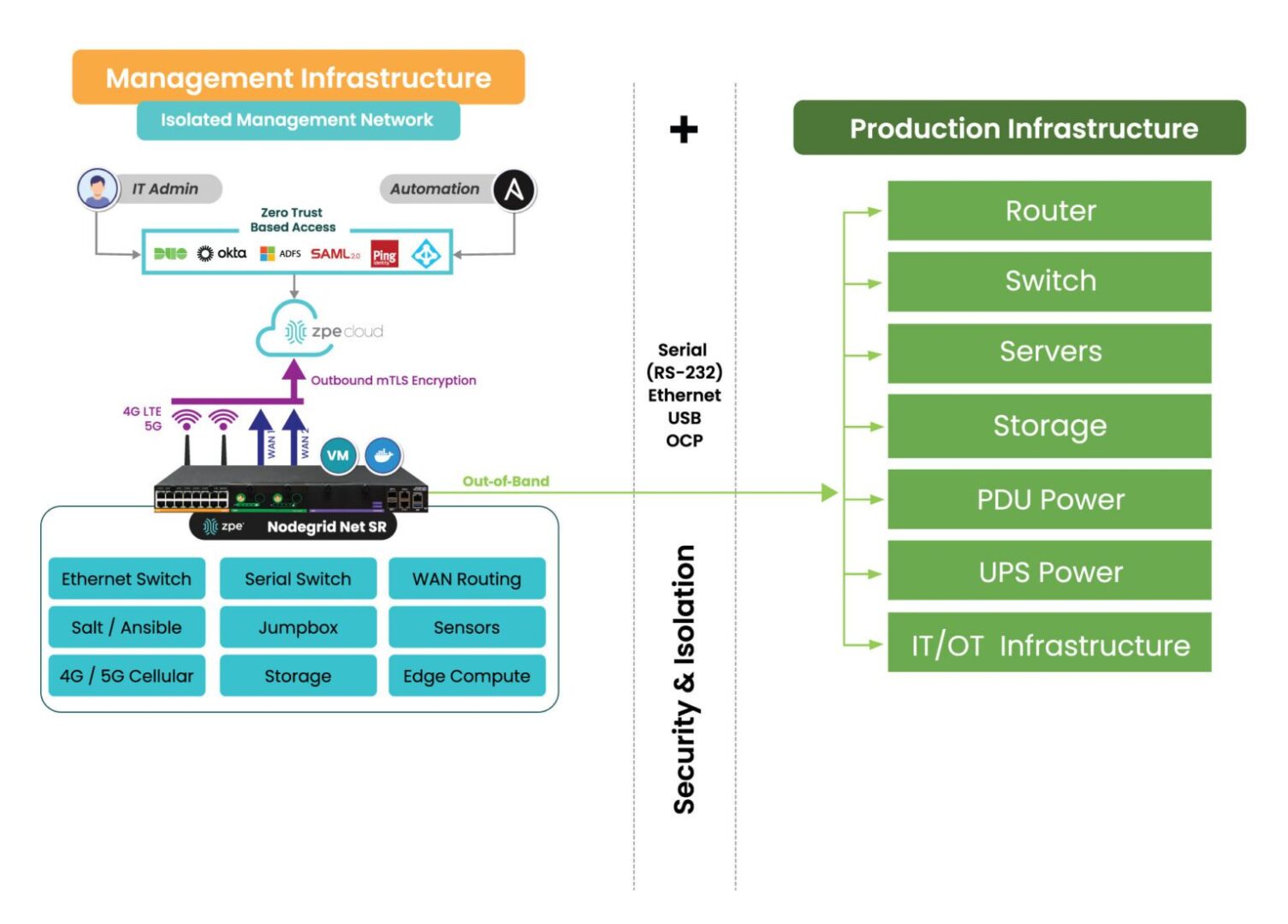
How the Nodegrid Net SR isolates and protects the management network.

Image: Deploying a SIRE is only possible through the use of a dedicated control plane, or Isolated Management Infrastructure shown here.

Teams will also need access to their security and build tools in the SIRE, so these need to be configured and ready to go before an attack occurs. Organizations also must ensure the secure isolated recovery environment has enough storage to handle all of the backup data and server rebuilds.

Additional resources for building a secure isolated recovery environment (SIRE)

A secure isolated recovery environment (SIRE) ensures that admins have a dedicated environment in which to rebuild and restore critical business services during a ransomware attack. Survivable data backups, complete isolation, and designated infrastructure are needed to maintain the integrity of recovery operations and prevent reinfection.

For more information about how to recover from ransomware using a secure isolated recovery environment, download our whitepaper, 3 Steps to Ransomware Recovery.

Implementing and using a SIRE requires Isolated Management Infrastructure. IMI provides the management foundation and is a best practice recommended by CISA, because it fully separates admin access from relying on production infrastructure. Through IMI, teams gain a host of capabilities including out-of-band management and remote access, which not only help with ransomware recovery, but also for break/fix troubleshooting, device monitoring, and outage recovery. The ZPE Systems team created the blueprint that organizations can use to implement this crucial IMI foundation.

To get the blueprint for building Isolated Management Infrastructure, download the Network Automation Blueprint.

Want to see the Secure Isolated Recovery Environment in action?

Our engineers are ready to show you what it takes to recover from ransomware. Click the button to get in touch, and we’ll walk you through IMI, out-of-band, and the Secure Isolated Recovery Environment.
Contact Us

SD-WAN Benefits: Your Definitive Guide

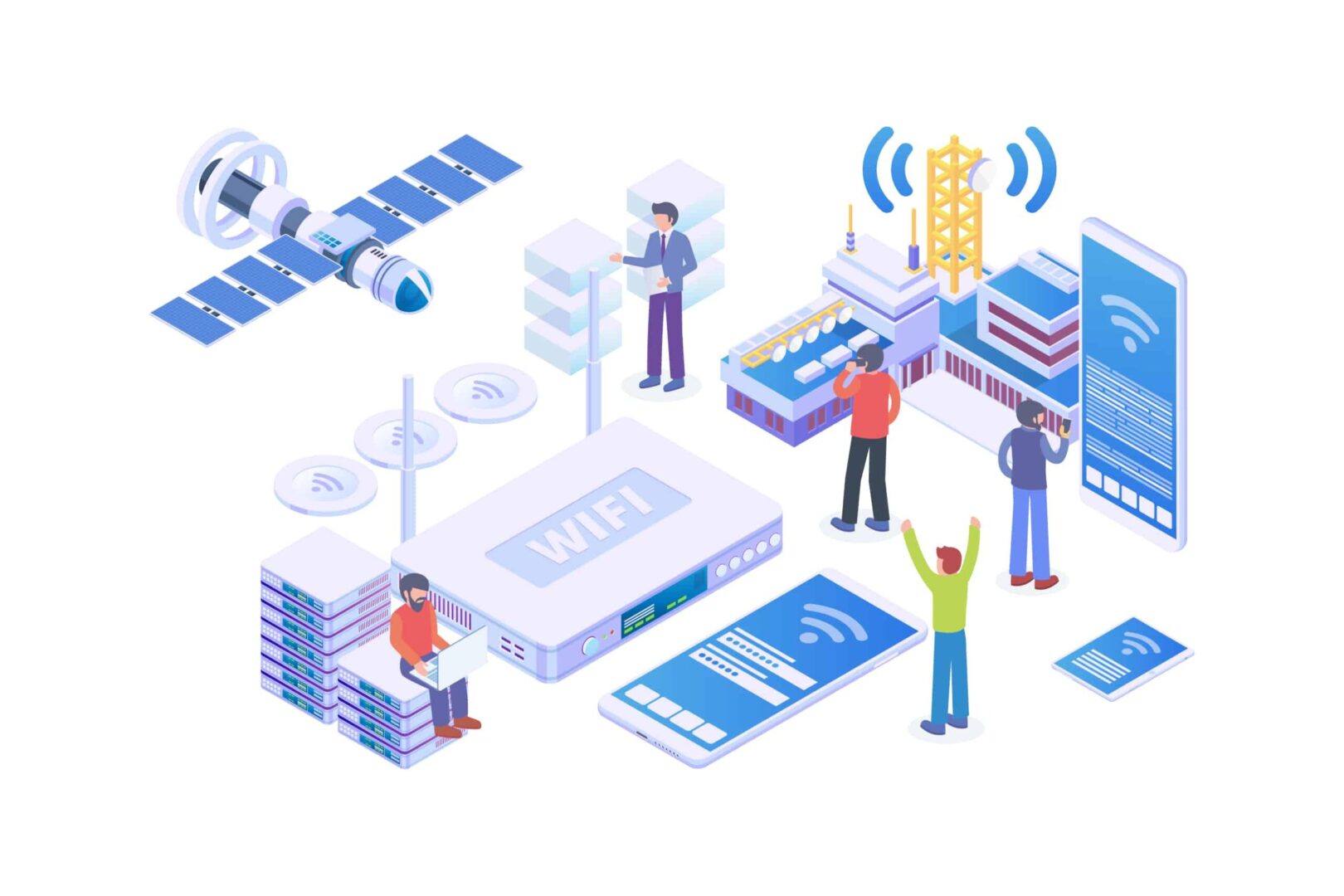
Illustration of a variety of devices connected to a complex enterprise WAN that needs SD-WAN benefits like centralized orchestration and enhanced security.
SD-WAN, or software-defined wide area networking, is on the rise as organizations grow more distributed and networks get more complicated. SD-WAN’s market share was an estimated $3.4 billion in 2022 and is predicted to increase to $13.7 billion by 2027. Orgs leverage SD-WAN to reduce MPLS costs, improve WAN performance, facilitate greater automation and orchestration capabilities, and improve their security posture. This post explains how SD-WAN works in addition to its benefits.

How does SD-WAN work?

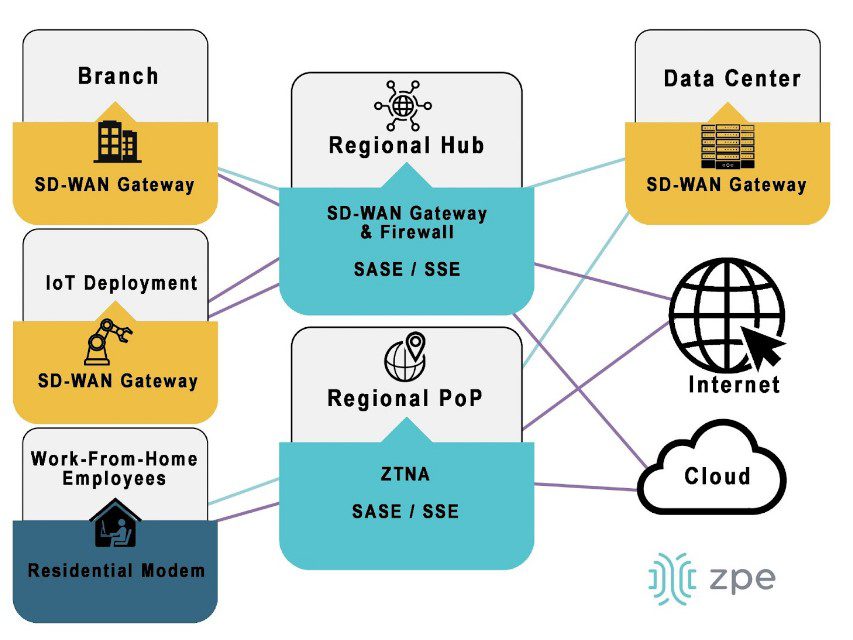
SD-WAN uses software abstraction to decouple WAN control functions from the underlying hardware. When possible, it leverages traditional MPLS to handle requests for enterprise resources in the data center, but it can also use less-expensive cellular and public internet links to handle cloud-destined traffic. SD-WAN uses virtualized and cloud-based security technologies to securely connect remote sites to SaaS, web, and cloud resources, reducing MPLS bandwidth and eliminating the need for VPNs.

SDWan Gateway
Organizations install SD-WAN gateways at campuses, branches, data centers, and any other business locations accessing the WAN architecture. These gateways virtualize WAN management at their sites, giving admins control via centralized software (which is often cloud-based).

Regional points-of-presence (PoPs) act as SD-WAN gateways for employees working from home, giving them access to enterprise network resources without a VPN. Often, major SD-WAN providers have an existing network of regional PoPs to take advantage of, but large or especially geographically diverse organizations may also wish to deploy their own PoPs in specific areas.

There are several different SD-WAN deployment architectures for companies to choose from depending on their specific requirements and capabilities. Learn more in A Guide to SD-WAN Deployment Models.

SD-WAN benefits guide

SD-WAN benefits organizations with complex and highly-distributed networks in the following ways:

SD-WAN Benefits

Reduces costs

  • MPLS bandwidth reduction
  • Fewer circuit installations
  • Faster branch deployments

Improves performance

  • Fewer data center bottlenecks
  • Faster issue response
  • Holistic performance monitoring

Enables automation & orchestration

  • Automated configurations
  • Policy-based workflow automation
  • Centralized orchestration

Enhances branch security capabilities

  • On-ramp to SSE technology
  • Enterprise policy extension
  • Secure access for remote users

SD-WAN reduces costs

MPLS bandwidth is far more expensive than standard broadband, fiber, or cellular, often hundreds of dollars per megabit per month. For branches with existing MPLS circuits installed, SD-WAN reduces bandwidth costs by redirecting traffic that’s destined for the cloud or internet across less-expensive channels, reserving the MPLS for enterprise traffic alone.

For some branch networking use cases, such as IoT (internet of things) deployments relying entirely on cloud-based software and data processing, organizations may opt to forgo a new MPLS installation and rely solely on SD-WAN and cloud-based security solutions. Not only does this save money on installation costs and bandwidth, but it significantly reduces the time it takes to spin up a new branch, enabling that branch to generate revenue sooner.

SD-WAN improves performance

SD-WAN uses technologies like application awareness and guaranteed minimum bandwidth to provide efficient, intelligent routing for improved performance. For example, in organizations with SASE (secure access service edge) deployments, SD-WAN automatically separates cloud- and SaaS-destined traffic to flow through the cloud-based SASE stack instead of the central firewall. This reduces the load on the firewall and ensures improved performance for users who do need to access enterprise resources, while at the same time providing a “shortcut” for remote users trying to reach the cloud.

SD-WAN also responds to availability and performance issues much faster than human admins are capable of, automatically redirecting traffic to avoid bottlenecks or downed nodes to ensure a seamless end-user experience. In addition, SD-WAN’s software abstraction makes it easier to centralize WAN management, giving admins full visibility into every part of the WAN architecture for holistic performance monitoring.

SD-WAN enables automation & orchestration

SD-WAN’s software abstraction opens up many automation opportunities because WAN configurations and workflows are no longer tied to the underlying hardware. For example, device, system, and service configurations can be written as scripts or playbooks and deployed automatically to reduce the time and effort required to spin up a new branch. Policy-based automation can handle additional tasks such as load balancing and failover, and route automation faster and more efficiently than human beings can.

SD-WAN also makes it possible to bring the WAN under one management platform for holistic monitoring and centralized orchestration. This gives admins control over large, distributed, and complex WAN architectures. For example, a centralized SD-WAN platform makes it easier to orchestrate traffic across hybrid cloud architectures because admins can monitor and manage WAN workflows across their various branches, private clouds, and public clouds.

SD-WAN automation and orchestration reduce the number of tedious, manual workflows that fall on overworked networking teams. This helps to decrease the rate of human error in device and security configurations, which in turn decreases the risk that mistakes will cause outages or be exploited by cybercriminals. Centralized SD-WAN orchestration also helps organizations improve their security posture by providing more holistic visibility into things like patch statuses, system changes, and traffic patterns.

SD-WAN enhances branch security capabilities

Another way SD-WAN improves network security is by making it easier to enforce security policies at branches and edge sites without deploying additional hardware or backhauling traffic through a central firewall. Since the SD-WAN control plane is decoupled from the underlying WAN hardware, organizations can also deploy advanced security technologies with fewer device compatibility issues.

SD-WAN enables organizations to use cloud-based security solutions like SSE (security service edge). SD-WAN’s intelligent, application-aware routing can automatically separate traffic from branches and other remote sites based on whether it’s destined for enterprise data center resources or resources that live in the cloud. Cloud-destined traffic is then diverted through the SSE stack, bypassing the main firewall and reducing bottlenecks at the data center.

SSE’s security stack typically includes Firewall-as-a-Service (FWaaS) technology which provides the same (or better) capabilities as a hardware appliance. SSE is also used to extend enterprise security and access control policies to traffic between remote sites and the cloud.

In addition, the SSE stack supports Zero Trust Network Access (ZTNA), which provides secure remote access to enterprise and cloud resources to WFH employees and other systems outside the WAN. In this way, ZTNA is similar to a VPN, only more secure. ZTNA only lets remote users see and interact with one specific resource at a time, and makes them re-authenticate if they wish to access something else. If a remote user account is compromised, this re-authentication step increases the chances that unusual behavior or failed multi-factor authentication (MFA) attempts will trigger an account lock, decreasing the blast radius of an attack.

When SD-WAN and SSE are married together under a single orchestration platform, the result is SASE (secure access service edge). Organizations can purchase a complete SASE solution, or use a vendor-neutral platform to combine the SD-WAN and SSE solutions of their choice for greater customization.

Learn more about SD-WAN benefits

SD-WAN helps organizations reduce MPLS-related costs, improve WAN performance, enable greater automation and orchestration capabilities, and improve overall network security. Learn more about SD-WAN from the branch networking experts at ZPE Systems.

SD-WAN Learning center

Ready to learn more about SD-WAN benefits?

To see how a vendor-neutral orchestration platform simplifies branch management and accelerates SD-WAN benefits, request a free demo of the Nodegrid solution from ZPE Systems.

Contact Us

Simplifying Retail Network Management

Retail network management is visualized with interconnecting icons of networked retail services displayed in front of a retail warehouse

Fast and reliable networks are critical to the success of retail operations. Without network access, stores can’t process payments, handle customer data, or update inventory, which makes outages highly disruptive. According to a recent study, downtime could cost over $300,000 per hour in lost business, which is why it’s crucial that admins have the necessary tools to effectively monitor, manage, and optimize retail networks. This blog discusses some of the specific challenges involved in retail network management and how the right edge gateway solution can help overcome these difficulties.

Retail network management challenges

Managing a retail network comes with unique challenges, especially as the size and geographical distribution of the organization grows. Examples of these challenges include:

  1. Extending fast, reliable connectivity to the entire store for payment processing machines, inventory scanners, and other crucial devices. This is especially challenging in big box stores and other locations with large footprints as well as service-based chains with mechanics’ bays, drive-thrus, and other outdoor or semi-outdoor devices.
    .
  2. Maintaining optimal environmental conditions for networking equipment that’s often installed in closets, storage rooms, warehouses, and other out-of-the-way locations. The priority is typically to keep these devices hidden from customers, so they’re kept in areas that may not be climate controlled and may not have staff physically checking them every day. This increases the risk of environmental issues (like heat and humidity) causing a device failure and means no one is likely to notice the issue until it’s too late.
    .
  3. Remotely troubleshooting and recovering from issues without any on-site technicians. If the ISP connection, WAN, or LAN go down, there’s often no way to remotely access on-site equipment to diagnose and fix the problem. That means network outages require truck rolls to solve, with stores losing money waiting for technicians to travel on-site.
    .
  4. Efficiently monitoring and managing a distributed retail network architecture made up of many different network solutions and platforms. The lack of centralized management increases the risk of human error and makes it difficult to preemptively address potential problems or optimize the speed and performance of the network.

Retail network management teams need a robust solution that addresses these particular challenges. For example, they need small and powerful network devices that use centralized management to reduce management complexity. They also need a way to monitor environmental conditions and recover from outages without having to be on-site.

Simplifying retail network management

Now, let’s discuss how a robust branch gateway solution can help organizations address these challenges.

Compact, all-in-one networking

The layout of a retail store is carefully planned to ensure an optimal experience for customers, which means networking devices need to be as unobtrusive as possible. The ideal branch gateway for retail is compact and combines multiple networking functions, reducing the number of devices that need to be installed. Retail notoriously operates on a small profit margin, so the branch gateway also needs to be affordable without sacrificing performance.

Environmental monitoring

Environmental monitoring sensors collect data on conditions like temperature, humidity, and air quality in the location where networking equipment is installed. These sensors typically connect to the retail branch gateway via USB and report back to the management platform, giving admins the ability to remotely monitor the environment. This is crucial when most retail networks are managed by admins in a centralized office which may be hundreds or thousands of miles away from the stores themselves. Environmental monitoring allows them to identify and resolve potential problems before they cause device failures and outages. For example, if environmental sensors detect high temperatures, admins can get on-site personnel to turn up the air conditioning or call in an HVAC repair before devices overheat and bring down the network.

Out-of-band (OOB) management

Out-of-band (OOB) management uses redundant network interfaces (often cellular) to provide an alternative path to remote infrastructure. A branch gateway with OOB allows admins to remotely connect to devices in the store without relying on an IP address from the LAN, which means they’ll always have access even if the production network goes down. Without OOB management, the retail location goes offline for hours or even days waiting for a technician to arrive on-site, diagnose, and repair the issue. With OOB, admins can remotely access the infrastructure to restore services, often so fast that customers don’t even notice. That means they can remotely recover from more outages without truck rolls, saving time and money.

Vendor-neutral orchestration

A vendor-neutral branch gateway can interface with all the other devices in a retail network infrastructure, even if they’re from a different vendor’s ecosystem. This gives admins a single platform from which to monitor and manage every device in the store. Even better is when all of the branch gateways in the entire retail network architecture hook into a single, centralized, cloud-based orchestration platform. Admins can then monitor, control, and optimize network infrastructure for all the retail locations from one place for ultimate efficiency.

In addition, a vendor-neutral retail network management platform enables the use of third-party automation solutions. Automation reduces the risk of human error and makes it easier for teams to effectively manage and optimize even complex retail network architectures.

Retail network management with Nodegrid

Compact, all-in-one branch gateways like Nodegrid use environmental monitoring, OOB management, and vendor-neutral platforms to simplify retail network management. The Nodegrid Mini SR, for example, is an inexpensive retail branch gateway that’s roughly the size of an iPhone, so you can easily deploy them anywhere in your store without disrupting the customer experience. Despite its small size and low price point, the MSR still delivers Gen 3 OOB management capabilities while supporting Nodegrid environmental monitoring sensors and third-party automation. The Nodegrid platform is also completely vendor-neutral, giving retail network admins a single pane of glass from which to monitor, orchestrate, and optimize the entire distributed network architecture.

Ready to learn more about Nodegrid?

To learn more about about simplifying retail network management with Nodegrid, click here to download the Mini SR datasheet, or contact ZPE Systems today.

Contact Us

Retail Cost Savings Using Network Consolidation

When it comes to infrastructure, network consolidation is becoming a must-have. This is especially true in hyper converged architectures, where streamlining operations means the difference between profitability and major losses. Combining systems and reducing the number of disparate solutions helps you achieve an efficient network that supports your business goals — whether it means speeding up the customer experience, decreasing points of failure, saving on support costs, or anything in between.

With legacy infrastructure configurations, you’re forced to deploy purpose-built appliances that add complexity. This complexity is reflected not only by your physical topology, but also by your management practices, system integrations, and end-user experiences. No matter what industry you’re in, you can unwind your tangled enterprise network and reap many benefits using a consolidated solution.

In this entry, you’ll explore network consolidation and why a global retailer could no longer do business without the advantages it offers.

Network consolidation means simpler networking

Network consolidation is a straightforward concept that you can implement on several levels.

If you draw a layout of your hardware configurations, your legacy setups most likely resemble intricate webs. Network traffic must travel along many paths and stop at each hardware node for processing. Heavy user loads can easily bog down your system, especially because your legacy devices don’t come with processors built for performance.

But when you consolidate, you can implement multi-function devices and replace many disparate appliances. Instead of having a complicated stack comprised of switches, routers, firewall boxes, modems, and other devices, you can get a powerful solution that combines all these into one.

Consolidating can also involve taking advantage of virtualization to simplify your infrastructure. You can deploy applications, run VMs or Docker containers, use automation tools, and more. You can cut complexity and further reduce your hardware stack by virtualizing your environments.

For management purposes, you can also consolidate your efforts using software that unifies your different solutions. This involves deploying tools to centralize your control, so you don’t have to juggle unique management UIs and vendor-specific software.

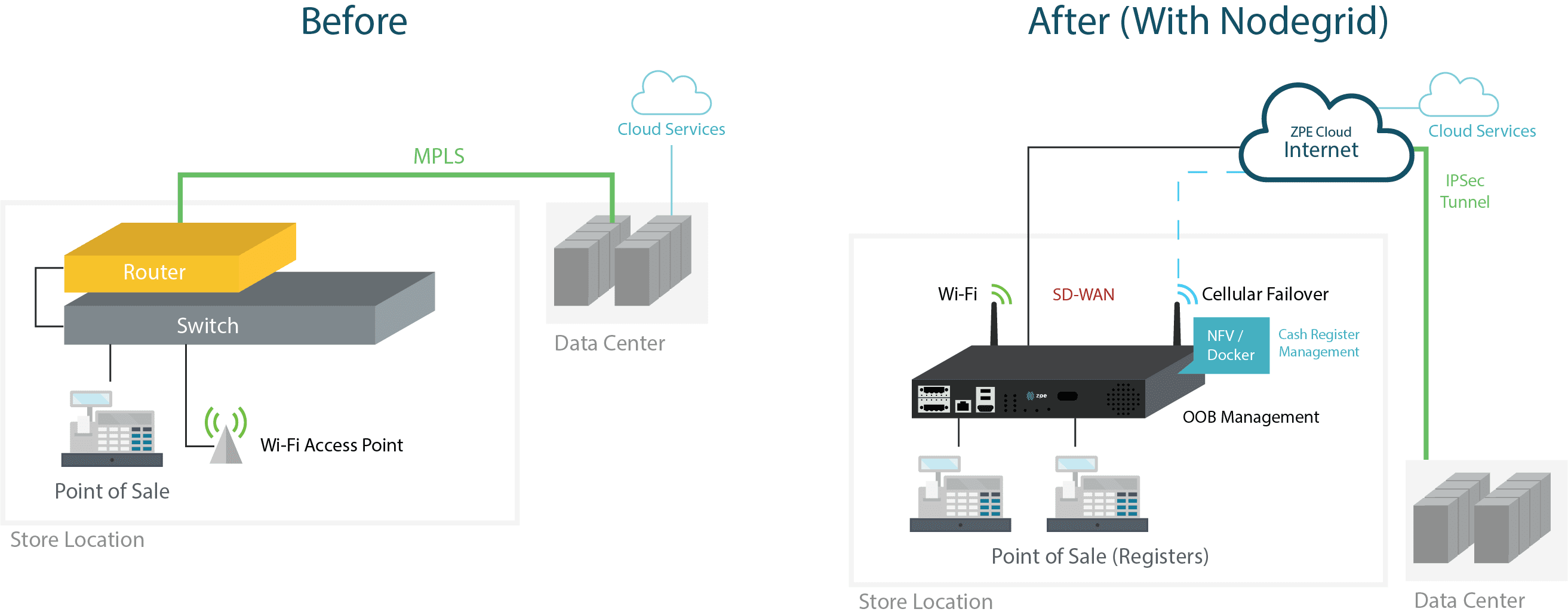
Retail Diagram O

Network consolidation comes with many benefits

When you adopt all-in-one hardware, your deployments become simple, fast, and cost effective. You save on capital expenses and shipping costs, and you don’t have to configure and provision an array of separate devices. If you also use zero touch provisioning, deployments become plug ’n play simple. You only need someone to physically install and boot your boxes, and your sites automatically come online in minutes. On top of this, your user experiences become smoother because your network is streamlined with appliances that are more powerful.

Virtualization also speeds up the customer experience thanks to more efficient integrations and service chaining. You can closely integrate solutions to boost efficiency, without being held back and forced to make changes at the hardware level. You can provide an experience that’s responsive, even during increased traffic flows and heavy workloads.

If you consolidate management with a unified software tool, your IT teams can do away with cumbersome administration protocols and practices. They no longer need to be dispatched to perform on-site maintenance or perform lengthy troubleshooting to find problems. A centralized management suite helps pinpoint issues and offers remote control for instant response times. Use it in conjunction with all-in-one hardware, and you don’t need to waste time connecting to check on non-problematic devices. You know exactly where to focus your efforts, while your software tool gives you unified control of all your integrated solutions — from SD-WAN, to routing, switching, security, and more.

How does a large retailer benefit from network consolidation?

When a global retailer’s costs began to skyrocket, their network was to blame. They knew that in order to maintain profitability, they needed to move away from their legacy infrastructure configuration. This consisted of MPLS lines at each branch location, with separate devices for switching, routing, and security.

Their customer experience was unresponsive, and came with long transaction times and even longer checkout lines. Disruptions exacerbated everyday operations, forcing technicians to be dispatched to set up LTE modems while MPLS connections were restored.

Their network was costing too much money to maintain, and their poor customer experience led to too much lost revenue.

But a single Nodegrid solution allowed them to achieve network consolidation and leave behind all of these problems. They streamlined their hardware stack at each location, and allowed IT teams to support their networks with extreme efficiency.

Virtual Customer Premises Equipment with Palo Alto Networks and Nodegrid

Virtual Customer Premises Equipment

Virtual Customer Premises Equipment, or vCPE, is the epitome of network function virtualization. Enterprises are implementing this form of customer premises equipment because it brings many benefits, such as faster deployments, optimized resource allocation, and unlimited flexibility. Service providers are especially keen to using vCPE to simplify service delivery and dramatically improve customer experiences.

Regardless of what industry you’re in, you can use this virtualization approach to streamline your enterprise networking.

What is Virtual Customer Premises Equipment?

Virtual customer premises equipment makes use of virtualization to deliver network services. This approach essentially uses a virtual environment that consists of software-based functions. These functions can include routing, security/firewalls, VPNs, and much more.

How is Virtual Customer Premises Equipment different?

Networking typically involves deploying stacks of purpose-built devices at each location. These appliances must be configured, provisioned, and maintained by specialized staff, who are usually required to be on site to perform these tasks. This can become expensive — not just to purchase devices (and perpetually replace them every few years), but also to provide support and maintenance. And because branch offices usually have limited physical space, large stacks of equipment can be obtrusive and take up significant real estate.

vCPE vaporizes these large stacks, and instead puts the different network functions into a cloud-based model. These functions are hosted at a separate site or data center. Instead of using many dedicated appliances, branch locations need only one or two devices to run software that can deliver these functions to the site.

Why use Virtual Customer Premises Equipment?

Virtual customer premises equipment helps you gain more business agility. If you look at it from a hardware consolidation standpoint alone, it’s plain to see how much more easily you can deploy and manage your distributed networks.

  • Deploy faster & save money — Fewer pieces of hardware means you no longer need to haul many devices to each location. Once you have your virtualized functions set up at your service delivery site/data center, you can bring branch sites online using a single box. If you also use automation via zero touch provisioning, all you have to do is install & boot each device and watch your network build itself. You can deploy in minutes, while saving on device, shipping, and support costs.
  • Use exactly what you need — Purpose-built hardware can be difficult to optimize — usually, they are over-utilized and cause problems, or under-utilized and lead to wasted resources. Because vCPE allows you to set up a custom & dynamic environment, you can easily optimize resource allocation to eliminate problems and waste, so your network uses exactly what it needs.
  • Get endless flexibility — Software-based solutions are much simpler to deploy, manage, and replace than physical hardware. This gives you the ability to remain flexible as requirements change, especially if you choose a vendor-neutral vCPE platform. Imagine how simple it is to spin up a VM and run a new application, as opposed to purchasing, deploying, and provisioning a new dedicated device to go in each location.

You can get an all-in-one vCPE solution

ZPE Systems and Palo Alto Networks have partnered to bring you an all-in-one joint solution.

Using the Nodegrid Services Router (NSR), you can directly host Palo Alto’s VM-Series next-gen virtual firewalls. These powerful tools allow you to secure all traffic, including out-of-band paths, using a single solution. This makes it easy to deploy sites without hassle and get peace of mind knowing your networks are completely protected.

Here’s a brief video showing how easy it is to deploy your vCPE solution:

On top of this, the NSR allows you to host virtualized network functions (VNFs) from other vendors of your choice. The NSR is also an x86 Intel-powered device that features modular add-ons for compute and storage capabilities. You can deploy powerful vCPE implementations at branch sites, using a single box for routing, switching, computing, security, and other critical functions.

Click the link to read the full joint solutions brief, and contact us to set up a demo.

7 Reasons Why We Put Intel CPUs in the Nodegrid Serial Console

Intel® CPUs power many of the computers we use today. These include everything from personal desktops and laptops, to high performance computing clusters that aggregate power to solve major global issues. So when choosing a suitable processor to build into our Nodegrid Serial Console, Intel was the obvious choice. In this post, we’ll go over 7 reasons why we put Intel CPUs in the NSC.

But before we get into the details, let’s review some basics.

Besides Intel CPUs, What Else is Available?

There are mainly two types of CPUs, or processors, available today: x86 (such as Intel’s offerings) and ARM. Though they serve a variety of purposes and can have some overlapping applications, x86 processors are typically deployed when speed & power are main concerns. Meanwhile, ARM processors are used in implementations geared toward minimizing power consumption and maximizing battery life.

The way these types of processors work is based on their underlying instruction set. x86 CPUs take advantage of the Complex Instruction Set Computer (CISC), which is able to process complex instructions that are crammed into a single line. ARM-based CPUs, on the other hand, use the Reduced Instruction Set Computer (RISC), which processes simple instructions over a span of multiple lines.

As for the advantages, x86 processors are able to perform more tasks rapidly, while ARM processors are able to consume less power and maximize energy efficiency. The main drawbacks include more power consumption for the x86 CPU, and slower speeds for the ARM CPU.

This is why purpose-built appliances, such as modems & routers, typically employ an ARM-based processor, while highly demanding devices such as desktops & servers use an x86 CPU.

In a nutshell, this is why we chose the multi-core Intel CPU for the Nodegrid Serial Console. But here’s a more detailed breakdown of the reasons for our choice.

Performance is Key

The Nodegrid Serial Console is designed to maximize speed and capabilities. Using x86 Intel CPUs, we created the world’s fastest 1U serial console that doesn’t compromise on performance. This processor allows for more simultaneous operations, more users, and more input/output than ARM-based CPUs. In terms of real-world benefits, this blazing fast processor means quicker CPU cycles that help customers complete more tasks, reduce MTTR, and increase their ROI.

Commonality Helps Users and Developers

Many existing servers use x86-based CPUs. Naturally, we wanted Nodegrid to integrate seamlessly for both users and developers. The Intel-based processor promises a common platform that these users are already accustomed to. They don’t have to worry about application incompatibilities or slowdowns, nor do they have to spend time learning new systems. The x86 CPU provides a management and maintenance experience that users are familiar with, so they can maintain OS & application availability.

Customization Through a Common Dev Environment

Our Intel-based devices are a perfect platform to deploy custom solutions. The x86 CPU allows developers to benefit from a variety of readily-downloadable SDKs and environments. The Nodegrid Serial Console’s SDK comes with Yocto, which means customers always have the latest updates, packages, and DIY customization capabilities. No more waiting for third-party fixes or workarounds, because customers can create solutions that meet their unique requirements.

Docker

Because the x86 platform is capable of robust performance, Nodegrid allows users to leverage Docker containers and deploy virtualized solutions. With regards to Docker, the Nodegrid Serial Console is optimizable right out of the box so customers can get the most functionality out of a single device.

Availability of Security

When it comes to open networking, the Intel CPU is the industry standard, which means customers get security patches as soon as they’re available. They don’t have to be left vulnerable waiting for third-party kernel patches from other chip makers. With an x86-based device, customers remain safe with up-to-date security, and in some cases can even apply patches before official updates are available.

Peripheral Support Via Multiple Interfaces

Part of designing a more powerful serial console was having the ability to support a variety of peripherals. The Nodegrid Serial Console features USB 3.0 and USB 2.0 ports, allowing customers to connect an array of add-on devices. They’re no longer limited by a single-purpose appliance that comes with minimal additional ports. With the NSC, customers can extend the box’s functionality by adding cellular, Wi-Fi, storage, and other peripherals.

Greater Storage

With power and speed at the core of the Nodegrid Serial Console, we needed to incorporate enough drive space. We built the NSC with 32GB of storage, along with 4GB of RAM. Not only can it store plenty of data, but it also has a healthy amount of memory to accommodate running more apps and functions. And if 32GB isn’t enough, customers can connect external drives via USB for even more local storage capacity.

This list is made up of 7 compelling reasons why we chose x86 Intel CPUs for our devices. However, there’s an 8th reason that we love to share…

Cost Savings That We Pass to Customers

By choosing the readily-available x86 CPU, we pass powerful processing along with cost savings to customers every day. Because we think having the world’s best serial console shouldn’t be prohibitively expensive.

ZPE Systems is an Intel Network Builders Winners’ Circle Partner

Intel

Driving digital innovations and network transformation are visions we closely share with Intel. That’s why ZPE Systems has been recognized as a Winners’ Circle Member and Solution Plus Partner. Together, we offer go-to-market solutions that cultivate customer success and enrich our partner ecosystem with innovative networking technologies.

We partner with Intel to transform networking. See how we do the same with our other partners by visiting our Strategic Alliances page.