Providing Out-of-Band Connectivity to Mission-Critical IT Resources

Data Center Temperature & Humidity Best Practices: A Complete Checklist

Businessman,Holding,Pencil,At,Complete,Checklist,With,Tick,Marks.,Business

Temperature and humidity have a significant impact on your data center infrastructure. High temperatures can cause devices to overheat, whereas extreme low temperatures can cause mechanical and electrical failures. High humidity can lead to moisture build-up, corrosion, and shorts, but low humidity can lead to electrostatic discharge. That’s why it’s critical that you monitor the environment in your cabinets and follow data center temperature and humidity best practices.

Data center temperature and humidity guidelines

Each piece of data center equipment—including enterprise servers, storage devices, switches, firewalls, and other appliances—has a recommended temperature and humidity range at which it operates most efficiently. However, you can’t create individual climates for each piece of gear, because it all needs to coexist in the same space. That’s why broader guidelines exist, such as those provided by ASHRAE (the American Society of Heating, Refrigerating and Air-Conditioning Engineers).

ASHRAE outlines four classes, based on temperature and humidity sensitivity, into which you can organize your data center equipment. Plus, arranging the layout of your data center to account for these classes can help you manage environmental conditions more efficiently (more on that later). The four equipment classes are:

A1: The most sensitive enterprise servers, legacy hardware, and specialty equipment that requires the strictest level of environmental control.

  • Temperature range: 15°C (59°F) to 32°C (89.6°F)
  • Relative humidity range: 20% to 80%

A2: Most modern servers, appliances, storage devices, and personal workstations fall into this class.

  • Temperature range: 10°C (50°F) to 35°C (95°F)
  • Relative humidity range: 20% to 80%

A3: Some newer equipment that’s designed to withstand a broader range of temperatures and humidity.

  • Temperature range: 5°C (41°F) to 40°C (104°F)
  • Relative humidity range: 8% to 85%

A4: Equipment that’s specifically made to operate in extreme environments.

  • Temperature range: 5°C (41°F) to 45°C (113°F)
  • Relative humidity range: 8% to 90%

It’s important to note that there is still a “sweet spot” where a piece of equipment will perform best even within these recommended temperature ranges. The key is to balance that performance against other devices’ cooling costs and needs in the same rack or cabinet.

Data center temperature and humidity best practices: a complete checklist

Now, let’s dig into the data center temperature and humidity best practices to help you achieve these standards.

1. Monitor rack conditions, not just room conditions

The location of your sensors matters a lot. Simply monitoring the ambient temperature and humidity in the room doesn’t give you an accurate picture of the conditions in each rack. Different spots within the room may report different readings depending on the location of the cooling system vents, how particular hot machines are running, and other factors.

Instead, data center temperature and humidity best practices recommend installing multiple sensors in each cabinet. You need to monitor the air that’s flowing into your equipment, so to get the most accurate readings you should place your sensors near the air intake vents (typically at the front of a rack-mount chassis).

2. Calculate and optimize your power usage effectiveness (PUE)

Power usage effectiveness, or PUE, is a metric that data center infrastructure management (DCIM) engineers track to determine their data center’s energy efficiency. You calculate data center PUE by dividing the amount of power flowing into the facility by the power usage of the devices and infrastructure contained within. The higher your PUE number, the less efficiently you’re using your power. According to Uptime Institute’s annual Global Data Center Survey, the average PUE was 1.57 in 2021. You want your PUE to be as close to 1 as possible, but at the bare minimum, you should strive to meet that average number.

Data center HVAC (heating, ventilation, and air conditioning) systems are notorious power hogs. You need to keep temperature and humidity within acceptable limits, but you also need to consider the power costs—both in terms of money and your data center carbon footprint. Keeping an eye on your PUE will help you determine that balance.

3. Design for more efficient cooling

If your PUE is too high, you should look into more efficient cooling techniques to build on that last point. Data center cooling systems are known as CRACs (computer room air conditioners) or CRAHs (computer room air handlers). CRACs use refrigerants and compressors to cool the air, whereas CRAHs blow air across chilled water. Both systems require a lot of power, but there are ways to increase your cooling efficiency without increasing your energy consumption.

For example, you can strategically arrange your data center equipment to maximize cooling efficiency. In a smaller server room, you could place your highly sensitive, A1-class equipment closest to your cooling system. The best practice is in large data centers and colocation facilities to have “hot and cold aisles.” That means arranging cabinet aisles back-to-back, so all the hot air venting out the back of your equipment flows to the exit vents in one concentrated stream.

It would be best if you always strived to stay within the temperature and humidity guidelines specified by device manufacturers, and your data center should follow the environmental standards outlined by ASHRAE. These data center temperature and humidity best practices for environmental monitoring, power usage tracking, and efficient cooling will help you meet those standards while saving money and optimizing performance.

4. Monitor the environment in your cabinets

Environmental monitoring sensors collect data on the conditions in your rack so you can ensure that the temperature and humidity are within recommended limits. Some best practices for data center environmental monitoring include:

  • If you’re managing remote data center infrastructure, you should implement remote out-of-band management, which provides a dedicated connection to your environmental sensors even during a network outage.
  • Temperature and humidity aren’t the only data center environmental risks. Your environmental monitoring solution should also include sensors for tampering, smoke, airflow, dust, and particulates.
  • You can’t keep your eyes on your monitoring logs 24/7, so you should set up automatic alerts, so you’ll be notified if conditions exceed expected thresholds. To gain even more control, you should look for an environmental monitoring solution that includes web dashboards with visualizations so you can track conditions over time and spot opportunities for optimization.

Achieve comprehensive data center temperature and humidity monitoring with Nodegrid

Nodegrid’s line of environmental monitoring sensors gives you a complete picture of the conditions in your rack so you can follow data center temperature and humidity best practices. With sensors for airflow and temperature, particulates, smoke, proximity, temperature, and humidity, you can keep a close eye on your physical equipment even from thousands of miles away.

ZPE Cloud provides a cloud-based web portal to monitor and manage your sensors, with analytics and visualizations to help you monitor power usage trends, detecting temperature spikes, and more. Plus, when you connect your rack infrastructure to Nodegrid Serial Consoles, you get reliable, secure out-of-band access to your environmental sensors and other data center devices, even during a network outage.

Learn more about data center environmental monitoring

Learn more about Nodegrid’s data center solutions

Need more help achieving data center temperature and humidity best practices with Nodegrid?

Reach out to contact ZPE Systems online or call 1-844-4ZPE-SYS.
Contact Us

Customer strategies in Ukraine to protect privacy and IP

ZPEUkraine (1)

How autonomous decommissioning via out-of-band has become essential to disaster recovery for edge deployments in uncertain geographies

To say there’s instability in Eastern Europe would be a drastic understatement. Russia continues its attacks on many fronts in Ukraine, displacing millions of Ukrainians who are now left with an uncertain future. Security is on everyone’s mind, and while many have answered the call to arms and stand ready with AK-74 in hand, others recognize that defending Ukraine involves shielding IT infrastructure and intellectual property from cyberattacks.

For this, some of ZPE Systems’ customers are using an unlikely defense: out-of-band management. Despite recent attacks using wiper malware and DDoS to take down government websites, organizations are able to use generation 3 out-of-band to decommission their sites in order to protect their data against adversaries who have boots on the ground.

In this post, we’ll examine the current issues surrounding compromised edge sites and what organizations are doing right now to shield their intellectual property (IP).

What’s at stake?

Many companies have critical IT infrastructure distributed across countries, regions, and continents. This infrastructure consists of networking gear and edge compute equipment, such as servers, switches, routers, and other end devices. These are responsible for connecting users and customers to essential services, processing and storing sensitive data, and running intellectual property such as proprietary operating systems, applications, and network certificates.

All of these are essential to supporting normal business operations and the customers they serve.

For example, telco companies rely on their infrastructure of cell tower sites, fiber cable lines, and their connected hardware and software to provide voice networks and Internet service. These companies run intellectual property within their infrastructure. In many cases, this intellectual property includes software that can cover a range of types and uses, from multi-protocol access proxies that enable IT admins to remotely manage edge network clusters, to analytics applications that track data usage for media delivery and customer experience optimization.

These companies are also responsible for handling sensitive data. For administrative purposes, billing, and compliance, these companies use devices that process and store personal identifying information for customers, including names, addresses, birth dates, etc.

All of this is what is at stake when faced with disaster. This is why it’s important to have the proper disaster recovery plan and tools in place, and mitigate the risk of losing sensitive information or having it fall into the wrong hands.

What disaster looks like

Every enterprise and government organization should assess their level of risk regarding equipment deployed at the edge. Risks can come from geographical and geopolitical factors — such as tornadoes or flooding during seasons of inclimate weather, or regional instability during times of international conflict.

Imagine you’re in charge of a corporate or government organization. One day you stop receiving pingbacks from your edge sites, and you suddenly find that you’re cut off from these locations.

There’s no network. There’s no access. And like many organizations currently struggling in Ukraine, you’re simply no longer in control of what happens to your data.

What do you do now?

Your sensitive user credentials, customer information, and intellectual property are in jeopardy, and possibly being stolen by adversaries.

Could you have prevented this?

Disaster recovery: Autonomous decommissioning to stop data theft

Part of an adequate disaster recovery plan involves having hermetic and autonomous operations, down to the device level. In the case that you need to go into disaster recovery mode, consider all of the information that needs to be wiped at your locations:

  • Servers need to be wiped
  • Disks and partitions need to be wiped
  • Disks need to be overwritten so data can’t be recovered
  • Switches and supporting infrastructure need their configurations wiped

The problem is that since you’re cut off and unable to remotely access this equipment, you can’t perform these tasks.

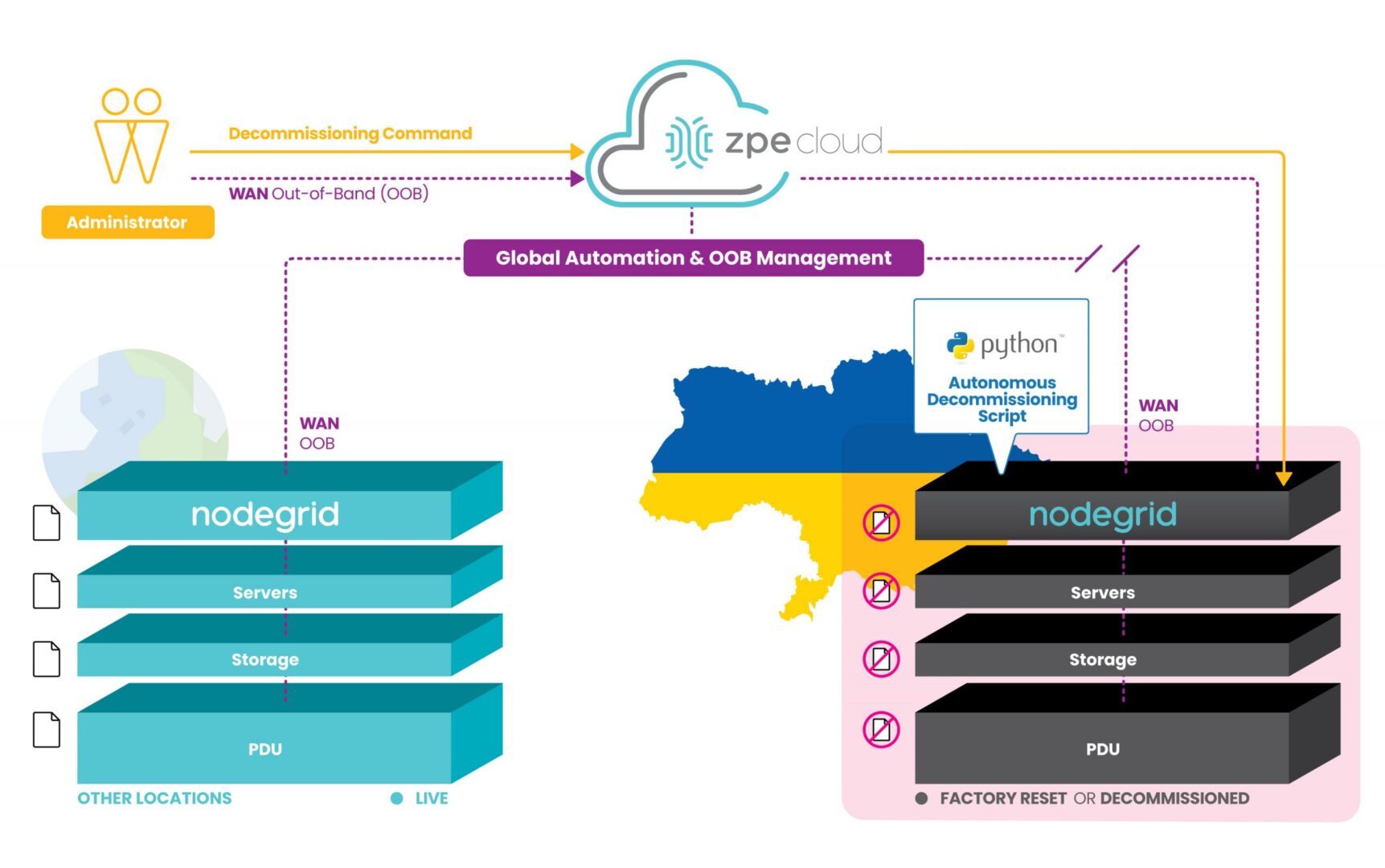
However, ZPE’s customers are currently using our programmable out-of-band infrastructure for this exact use case. It’s being called ‘autonomous decommissioning’, and it combines network automation with manual commands to essentially perform the inverse of launching network sites. This process is being used to protect IP and personal identifying information from falling into the wrong hands.

How does it work?

With our generation 3 serial consoles and services routers co-located at data center and critical edge locations, customers are able to connect all of their equipment to the out-of-band network. Receiving pingbacks at regular intervals from HQ signals that all is well at these sites.

Due to instability in the region, some sites are becoming compromised and cut off from HQ. When this happens, the infrastructure goes into disaster decommissioning mode, and ZPE’s devices serve as on-prem automation workers which help remote IT admins to begin wiping the entire infrastructure.

Autonomous decommissioning network diagram

These devices are hooked into every piece of equipment, and they’re able to receive automated scripts and manual commands from remote admins to push decommissioning tasks to all connected gear. The ZPE device is then able to have its own configuration wiped and returns to its initial ‘seed of life’ mode, in which it awaits further instructions until the connection is restored to HQ. Once this connection is restored, Nodegrid waits for instructions to rebuild the infrastructure following the immutable infrastructure framework.

This autonomous decommissioning prevents data from being stolen by adversaries. By wiping all data and returning to its seed-of-life state, it also keeps the environment’s configurations secure. That’s because the devices no longer contain any configuration information once they’ve been wiped, and configurations can only be restored once an authenticated connection is reestablished with HQ.

Check out a live demo at ONUG!

See how to automate without anxiety to combat cyberattacks. Join us Thursday, April 28 at 11:10am EST at ONUG for a live demo. Click here to register or get your free virtual pass.

ZPE Systems named Rahi Partner of the Year

ZPE Systems has been named Rahi’s 2021 Partner of the Year. The company outperformed more than 400 Rahi partners by excelling at revenue attainment, customer satisfaction, and support, among other important performance factors.

ZPE Systems' CEO Arnaldo Zimmermann accepts the award for Rahi Partner of the Year

ZPE Systems’ CEO and Co-founder Arnaldo Zimmermann accepted the award, and was joined on stage by ZPE’s VP of Products & Marketing, Koroush Saraf, and Rahi’s VP of Global Marketing & Business Development, Martin Bach.

Rahi’s CEO Tarun Raisoni said: “ZPE has been a longstanding partner and always brings tremendous value to Rahi and our customers. This year they exceeded their already exceptional performance standards. All of their teams are incredibly knowledgeable and committed, which is without a doubt what contributed to their high revenue attainment and customer satisfaction scores. ZPE Systems is a power player that enables our entire organization, and we look forward to continued success alongside them.”

According to Rahi, the Partner of the Year is recognized for ‘consistently meeting customer expectations through dedication, teamwork, technology, and a commitment to excellence.’ Rahi’s selection criteria weighs a partner’s yearly performance based on several metrics, and ZPE was chosen based on:

  • High revenue attainment
  • Consistently high customer satisfaction scores
  • Low RMAs
  • A widely relevant technology portfolio
  • Responsive engineering services
  • Exceptional deliverability, fulfillment, and back-end support

“2021 was another difficult year due to Covid,” said Arnaldo Zimmermann. “But I’m extremely proud of our dedication to supporting partners like Rahi. I’m accepting this award on behalf of Engineering, Operations, Business Development, and every team within ZPE, because everyone did their part to ensure this success.”

To learn more or become a ZPE Systems partner, visit partners.zpesystems.com.