
Providing Out-of-Band Connectivity to Mission-Critical IT Resources

10 Things to Consider when Choosing a Branch Networking Solution

Branch networking is evolving. From the core to the edge, you need to consider so many factors, such as scalability, costs of deployment & maintenance, the speed of installation, and much more. What affects all these the most are the devices and tools you use, which are likely obsolete, sitting in silos, and unable to handle the smart infrastructure of the modern network.

Advanced solutions are now available, and you can apply them to your legacy systems as well as new data flows. From cloud & edge computing, to machine learning & AI, you can take advantage of new capabilities, simplify management, and turn your network into a powerful asset

As you consider branch networking solutions, here are 10 things to keep in mind:

1. How Easy is it to Deploy?

Think about the entire deployment. Can your smart hands see the job through, and keep devices up to date? Can you download automation scripts from the cloud for quick, consistent scaling? Do you have zero-touch provisioning via WAN (IPv4 and IPv6) on your side?

If not, imagine how satisfying it would be to plug in your devices, and then everything just works. That’s the type of solution to look for.

2. Does it Keep Everything Secure?

Branch devices could let intruders through the back door, leaving your data center vulnerable. What do you do if this happens and an unauthorized user wreaks havoc on your data center? Do you have a built-in firewall, and can you enforce continuous security via cloud-based configuration backup and restore? Are authentication and security features strong enough to make sure only the right users have access from authorized locations?

Don’t settle for weak security that’ll leave you scrambling after an attack. Consider only a branch solution that delivers total peace of mind.

3. Can you get Secure Access from Anywhere?

You typically need high-level management software to gain access to your infrastructure. With that in mind, do you have a comprehensive out-of-band solution and branch devices that you can orchestrate remotely? Does your solution give you a 360-degree view of your entire infrastructure, without the need to set up a VPN or gain access via your data center?

On-site support is costly and time-consuming. That means you need a solution that provides robust remote capabilities for easy, secure access from anywhere — using just your browser.

4. Does it Prevent Issues & Keep Business Running?

Reducing maintenance needs and expenses is critical to having a modern network deliver value to your business. Does your solution pinpoint issues before they happen? Does it offer data logging and automation capabilities to help you ensure uptime? Can it alert you to configuration changes and possible security risks, and give you the tools to keep up with your needs?

No matter what solution you’re looking for, business continuity should be your top priority.

5. Does it Protect your Data?

Protecting your data means more than setting up a firewall and a few security measures. You need complete protection to safeguard your network (and your business). Do your branch devices support the latest in data and hardware security, with TPM for storing certificates? Do you have encrypted storage, multi-side certificates, and TLS 1.3 encryption? How about protection for boot and BIOS passwords, and even a kill switch?

Your data should always be safe, and your branch solution is a major component in securing all information that goes through your network.

6. Does it Cut Costs & Consolidate?

No matter how many branch locations you have, you need to reduce costs and maximize available space. Does your solution offer multi-function branch devices that are power- and cost-efficient? Does it give you switching and routing capabilities, support for virtualized functions, and on-premise vCPE, firewall, VPN, compute, and storage capabilities? Does it provide you with a 24×7 virtual presence thanks to reliable cellular failover?

The most efficient branch solutions consolidate functions into a single device, letting you take advantage of reduced operational expenses and a smaller network stack.

7. Can you See its Performance?

You can’t optimize your network without knowing where to start. Does your solution collect critical data points and allow you to inspect data logs? Does it build an audit trail of actions, and visualize KPIs with an intuitive, easy-to-use dashboard?

You need to know how your network performs, and your solution should give you critical insights and tools to keep your infrastructure healthy.

8. Can you Scale Quickly & Easily?

For a modern network, your branch solution should be easy to replicate across many locations. Is it simple to deploy and provision? Will it grow as your business grows? Can you foresee the need to replace any devices, or will your solution help you scale even in the long run?

Whether you’re in IT, manufacturing, or retail, your branch solution needs to keep up with business no matter how far and wide you go.

9. Is it Truly Saving you Money?

When it comes to CAPEX and OPEX, you need to think long-term savings. Instead of getting excited over low initial costs, which usually come with additional expenses for training, maintenance, and more, think about how much it will cost over time. Will it need to be replaced often? Does it require anything else to run smoothly, and will it need frequent maintenance? Are there hidden fees or necessary add-ons to consider?

To maximize your savings, expect to pay more upfront for a true “set it and forget it” solution. In the long run, you’ll pay much less thanks to automation and other robust capabilities that minimize downtime and expenses.

10. Does it Work with Many Vendors?

Your network has devices from many vendors, which means your branch solution should work well with all of them. If it doesn’t, you’ll deal with ballooning time and cost expenses that will exhaust your staff and your business.

Look for a solution that streamlines the experience and gives you control with intuitive software. You’ll find an open-platform solution gives you seamless integration that helps you manage your entire infrastructure.


Bottom Line

If you’re in the market for a branch solution, get Nodegrid’s family of business-friendly hardware and software. Not only will you benefit from robust, consolidated devices, you’ll discover effortless network management that puts you in control no matter where you are.

Need More Information?

If you would like more information on how the Nodegrid family of Open Infrastructure Management Solutions address all the needs of Branch networks, contact a ZPE solution specialist by giving us a call -or- sending us an email. We look forward to hearing from you.
What is Cellular Failover?

Learn the basics of Cellular Failover in this 2 1/2 minute video. John Paul Kang, Solutions Engineer at ZPE Systems, shares his IT and data center expertise to provide a high-level overview of cellular failover.

  • What is Cellular Failover?
  • What problems does it address?
  • How does it benefit businesses?
  • How does it help system and network administrators?

Best Practices for Deploying your Branch Network

Even if you’re familiar with these 10 things to consider when choosing a branch solution, you might not be sure about how to overcome the challenges of deploying branch networks. Here are some of those challenges.

Deploying Your Branch Network is a Physical Ordeal

Typically, deploying a branch network involves sending lots of equipment and staff to each satellite location. This is easier said than done, as anyone with any experience can tell you that it can be quite a monumental undertaking. That’s because there are many pieces to set into motion (figuratively and literally).

For starters, you need to define the location’s networking needs, and then develop a plan to set up your devices appropriately. When you’re ready, you need to ship your stacks of equipment to the location, which can take plenty of time and cost a lot of money, especially if the site is isolated.

You also need to define your staff needs and coordinate schedules. Putting the right personnel on-site subjects you to travel times and expenses, which can increase substantially even with minor delays.

Juggling all this can make it extremely difficult to stick to your timelines.


Managing the Branch Pulls Your Resources Away

Once you have all your devices and personnel on-site, all essential duties must be performed at the location. This includes not only your initial set up, but also for ongoing maintenance and management.

Installing, configuring, and provisioning your branch network requires staff to connect to each device. Using the command line interface (CLI) and other tools, they need to perform the tedious tasks that come with manually configuring every component in the stack.

The same goes for troubleshooting issues and managing the location going forward. If a critical issue arises, an outage occurs, or a change must be made, you need to put staff on-site. To keep the branch running, it’s imperative that you maintain some sort of physical staff presence at or near the location, which pulls them away from more critical business duties.


Scaling Doesn’t Scale Well

Deploying one branch network can be a challenge when you follow the typical methods. So what happens when you try to set up three, four, five — or fifteen — new locations?

As you can imagine, the logistics involved can make for a very hairy business situation, one that can bog down your resources and devour your budgets. Think of how costly it could be sending a dozen locations’ worth of equipment through customs, on top of the travel expenses necessary for many teams of specialized staff.

In short, scaling without the right tools and practices requires you to devote heaps of time and resources.


The Good News is, Nodegrid Makes it Easy

Branch Deployment Best Practices

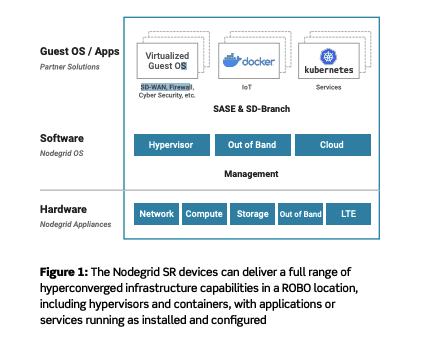
ZPE Systems’ Nodegrid platform was built for branch networking. It includes everything you need to deploy, manage, and scale your branch networks. Features like all-in-one devices and intuitive software cut your stack in half (or more), while ZPE Cloud makes configuration management quick and easy.


Download the Tech Brief


Why Your Business Continuity Plan Needs Cellular Failover

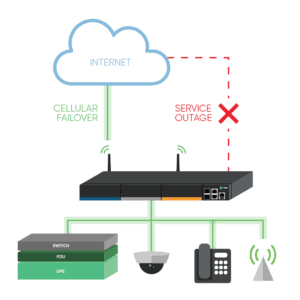
Cellular failover sets a new standard in high availability. When your primary WAN connection goes down, this wireless option keeps you safe from expensive outages. Compared to traditional redundancy strategies, cellular comes with a few very crucial advantages for your business and your network IT staff.

But first, let’s see what cellular failover is and why your continuity plan needs to include it.

What is Cellular Failover?

Cellular failover essentially makes high availability possible through wireless carriers. Traditional redundancy strategies place secondary, tertiary, and other backup connections in the ground using land lines (T1, T3, MPLS, etc.), however these usually offer limited reliability. When your main line suffers an outage or disruption, it’s likely that your wired backups will, too.

Using cellular failover, your backup connection is provided over 3G, 4G LTE, and even 5G networks, instead of through physical connections in the ground.

Cellular Failover


Why Do You Need Cellular Failover?

Wired connections are expensive to add, and most of the time they follow the same path as your main line. This means that when something disrupts your primary connection — such as a nearby construction crew that accidentally digs through your line — your wired backups go down as well. Cellular failover offers backup connectivity wirelessly, so issues like this won’t affect your network.

Gartner estimates that downtime costs an average of $300K per hour. This can cripple your organization while you wait for a temporary or permanent fix to your wired solutions, which can take hours or days at a minimum. Most wireless carriers, on the other hand, provide network uptime of 99.5% or more, which means you don’t have to wait for cable repair or new lines to be trenched. The right cellular failover solution keeps you covered automatically and seamlessly.

Your business continuity plan should include cellular failover, because it:

  • Provides backup connectivity for your production network and your critical functions
  • Offers a reliable, isolated, and secure path for out-of-band management (OOB)

What Business Benefits Come With Cellular Failover?

Cellular failover offers more reliability and flexibility than wired options.

  • Stay disruption-proof: With cellular failover, you don’t have to wait for your main connection to come back online. When your primary link is unavailable, cellular failover automatically kicks in to handle your network traffic. And because many carriers have robust and reliable networks that operate for years without disruption, your business can keep going regardless of what happens to your underground connections.
  • Set up & scale fast: Deploying new locations often means waiting weeks for wired connections to be installed. On top of this, these wired connections can leave you with a single point of failure at each location (such as when a router or switch goes down). When you introduce wireless connectivity via cellular failover, you can deploy in hours or less without waiting for crews to install physical lines. This means your business can scale quickly, whether you’re setting up permanent branch locations or temporary kiosks.
  • Fix issues remotely: Cellular failover via ZPE’s Nodegrid allows your backup connection to also serve as an OOB path. If a network problem arises at one of your branch locations, such as a device becoming unresponsive, your IT staff can use your wireless redundancy path to access the network and resolve the device issue. You don’t have to spend time and money bringing in on-site support.

How Do Network IT Staff Benefit?

Because wireless connectivity can serve as an OOB management path, your network IT staff also benefit from having cellular failover at their disposal.

During outages, cellular failover allows your admins to maintain visibility and control of your network. Instead of having to go on-site to each location and physically connect to each device, your staff can remotely connect to monitor your network, troubleshoot issues, and make adjustments as needed. This helps streamline network management processes and tasks by offering a convenient access method to branch locations and remote sites.

When it comes to deployment, cellular failover not only helps you get sites online faster, but it also offers staff the peace of mind that comes with a more flexible, resilient link. Should issues arise during deployment, your wireless connection can kick in to help finish the job. If your scaling strategy takes advantage of methods like zero touch provisioning, you don’t have to wait for your primary link to be available. Cellular failover helps staff get sites up and running quickly, and gives them a secure pathway to manage your network before, during, and after each deployment.

Learn how to prepare for cellular failover.

Why Out-of-Band Management for the Branch is Better With Nodegrid

Out-of-band management (OOB) and business continuity go hand-in-hand. If set up properly, your OOB network should provide safe, reliable, always-ready access to your critical infrastructure components. Even when there’s not an outage, OOB is the key to optimizing your network — from troubleshooting issues, to maintaining speed & availability to all your users.

If you’re not entirely sure about out-of-band management’s big benefits, here are 3 reasons why you shouldn’t go a day without it.

OOB is essential to branch and satellite IT sites, where specialized personnel might only occasionally drop in. With this in mind, ZPE Systems’ Nodegrid platform offers OOB that’s far beyond ordinary:

  • Take advantage of secure access technologies, including non-VPN access links that work over any available WAN
  • Use zero touch provisioning for hands-off, automatic deployments — for even your most remote locations
  • Set up automation using popular tools & languages, for help with management of branch offices
  • Get ZPE Cloud for even more flexibility and remote management capabilities