Providing Out-of-Band Connectivity to Mission-Critical IT Resources

What is FCAPS?

What is FCAPS?

Successful businesses rely heavily on their network infrastructure to keep up with demand and to allow work to flow smoothly. When outages occur, whole operations can come to a standstill which equates to wasted time & money, and most importantly, unhappy customers. As networks continue to grow and become more complex, so does the amount of effort and resources needed to keep them running at optimal efficiency. The goal is to migrate away from a reactive form of management and move to a proactive approach that can allow administrators to identify and correct issues before they become problems.  

Industry leaders are constantly searching for enterprise grade tools and solutions that allow them to take more control of their infrastructure, and the best of them follow the FCAPS model and framework for network management.  

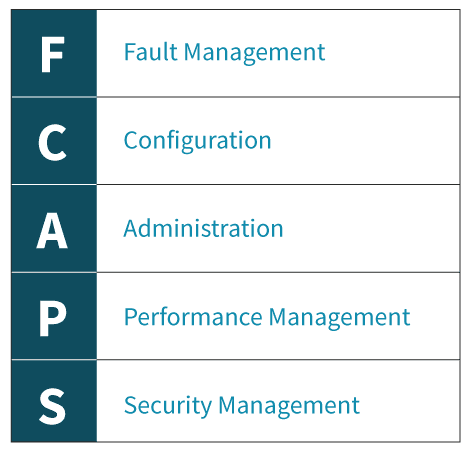
FCAPS is the ISO Telecommunications Management Network model and framework for network management. The term itself is an acronym for the five areas of function within the model: 
ZPE’s Nodegrid solutions consolidate and virtualize all your network functions onto one platform, no matter which vendors you use. Nodegrid makes it easy for you to monitor, configure, administer and secure your network from one centralized location while also providing you with the metrics and data you need to make smarter business decisions. Of course, Nodegrid meets all aspects of the FCAPS framework. 


Fault Management 

Network faults happen, so catching them before they can cause serious issues is critical. The ability to identify, isolate, log, and correct them is a necessary component to every network. Further, the ability to review historical fault data in order to identify trends allows you to take proactive measures that can greatly improve network stability.  

Nodegrid’s tracking features provide information about the system and connected devices such as Open Sessions, Routing Table, System Usage, Discovery Logs, LLDP and Serial Statistics. The Event List feature provides statistical information on all system events occurrences which can help you to quickly visualize your data.  


Configuration 

Configuration management plays a substantial role within your network. From deployments to upkeep, everything must be centralized and tracked in order to keep everything running smoothly. For optimal ease of use, a great system should: 

  • Centralized storage of configurations 
  • Simplify device configurations and provisioning 
  • Track changes 
  • Allow for future expansion 

Nodegrid makes managing and configuring devices simple and easy. With Zero Touch Provisioning (ZTP), deploying new devices while maintaining consistency and reducing errors is a snap. Nodegrid can even leverage the existing ZTP features of your infrastructure and extend ZTP to other appliances, including those that don’t come with ZTP features. Nodegrid’s Auditing tool allows you to track everything from one location, ensuring that nothing gets lost in the shuffle.


Administration 

Administration allows you to configure users and groups based on permissions allocated to them within the systems. Access should be restricted to ensure that only authorized users can make significant changes to critical systems.  

Nodegrid offers you the ability to create various groups and users with specific permissions to meet your needs. More specific profile settings can also be configured, such as sudo permissions, custom session timeouts, and default startup applications.  


Performance Management 

Ensuring that network performance is consistently operating within optimal levels is another key aspect to successful network management. Tools should be available that allow you to monitor performance and troubleshoot issues while being easy to access and use on a regular basis. Data should also be readily accessible to allow for the identification of trends which can assist with future planning.  

Nodegrid offers a dashboard tool to visually see Event Details, Managed Device details, and Monitoring Data from the system and all Managed Devices. It gives you the flexibility to create several dashboards for different purposes and monitor data points such as Power Consumption, Voltage (V), Current (A), Temperature, Fan speed, and many more. It provides options to show data from a different period of times such as the last 15 minutes, the last hour, the last day, this week, this month, or the last 5 years. Nodegrid also offers a full suite of Network Tools which allow you to run various tests in real time. 


Security Management 

Security management is all about limiting and controlling access to assets located within the network. User authentication, ACLs, and encryption all add layers to secure your network against threats and malicious attacks. 

Nodegrid offers a robust security suite to ensure that your network stays secure. From a built-in firewall, customizable users and groups, configurable password complexity and expiration, as well as standard SSH and SSL protocols, you are in full control. Nodegrid offers the option to use 2-factor authentication for an extra layer of security. Single Sign-On (SSO) is also available and can be used with Duo, Okta, G Suite, or other custom SAML Identity Providers.  

Want to learn more?

For more information on ZPE’s full product line, please visit our products page. 

Have a specific question or want to experience a live demonstration for yourself? Reach out to us via our contact page. We’re here for you! 

Help NetOps Teams Using Application Hosting & Guest OS

Application hosting helps your business become more flexible. This virtualization approach is a perfect solution if you’re looking to reduce your networking stack, make critical services more globally available, and ensure that your network is always up to date.

If you’re not familiar with application hosting, read our other blog post to get acquainted.

Application hosting helps your business become more flexible. This virtualization approach is a perfect solution if you’re looking to reduce your networking stack, make critical services more globally available, and ensure that your network is always up to date.

If you’re not familiar with application hosting, read our other blog post to get acquainted.

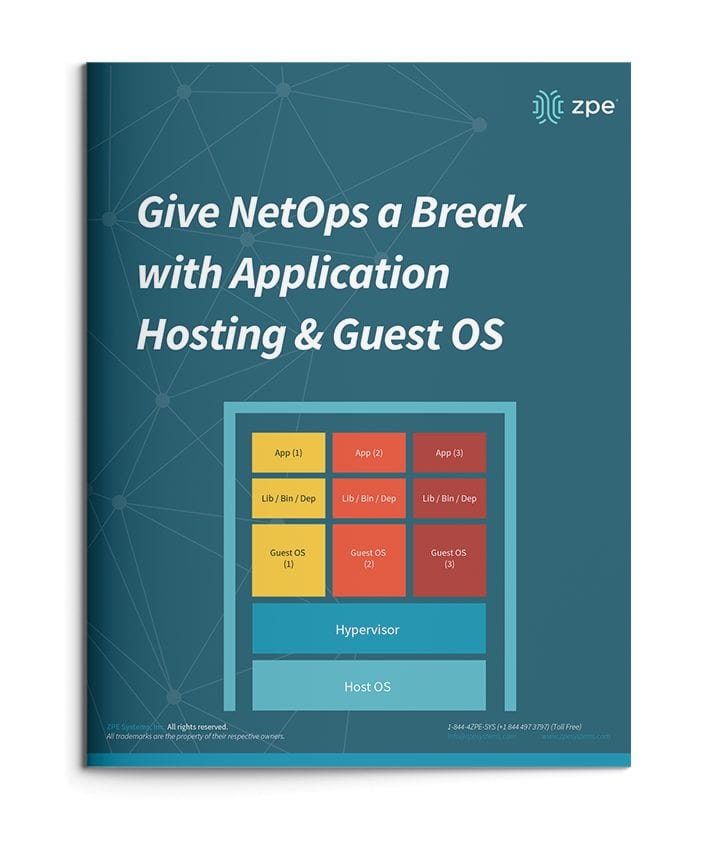
Give NetOps a Break with Application Hosting & Guest OS

For a quick recap, here are some things to know:

  • Application hosting means creating a cloud-based model (SaaS) through which to deliver your applications. One of the biggest benefits is that you don’t have to install and manage applications locally, and can instead keep them centralized on a server and bring them to clients anywhere in your organization.
  • To use application hosting, you need a virtual machine (VM) and something called a ‘Guest OS’.
  • Running on a VM, a guest OS can be Windows, Linux, Ubuntu, or other common operating system, and it’s this operating system that determines what applications you can run.
  • In between your device’s operating system (or host OS) and the guest OS is something called a hypervisor. A hypervisor is able to create VMs and tell the hardware how to allocate resources for VMs. This is an essential component of virtualization and application hosting.

How Does Application Hosting Help NetOps?

Modern business moves faster than ever, and to reach your goals, your NetOps teams need a modernized network that moves fast, too. But this can be difficult to achieve, since your network is likely made up of many different hardware & software systems, and admin protocols. There’s just so much to juggle that it seems like your network his holding back operations.

The good news is, application hosting and virtualization can alleviate many of the obstacles standing in the way of your network. Let’s compare how you manage your solutions before and after application hosting.

NetOps the Old Way

To boil it down, NetOps the old way is slow and cumbersome. This is mainly due to having many physical devices that you have to manage, which puts time consuming on-site support at the top of your priorities. This becomes even more complicated when you have many branch and remote networks.

Without application hosting, you need to install applications locally. Your only option is to put IT staff on site for this task. From there, the job can take days to complete, especially if your stack consists of many devices. And this is all part of a best-case scenario, which unfortunately isn’t the norm.

Another problem can arise — hardware & software incompatibilities. Suppose you try to install or update applications, and once you connect to a device you discover that the latest OS doesn’t support your software. Now what? Since you recently updated the OS for devices at every location, you have to roll back configurations or find a workaround for your application’s new release.

All of this can quickly become complex and difficult to track. Having to locally manage your edge environment leaves your network open to human errors. Your peace of mind is merely wishful thinking, because your physical & virtual assets aren’t as consistent, secure, or reliable as you’d hoped.

NetOps with Application Hosting

When you introduce application hosting, NetOps becomes fast and agile. Putting all your applications in the cloud means you can deliver them right where they’re needed, and thanks to guest OS, you don’t have to worry about incompatibilities.

Put your applications in a centralized server, and you no longer need to worry about on-site support. Your NetOps teams can tap into your server to install, update, and manage applications no matter where they are. This means faster releases and shorter time-to-market, so you can support your business alongside demand.

If you choose a powerful platform like Nodegrid, you can further help NetOps with even more capabilities. The Nodegrid Services Router can pack all your network functions into a single box, with add-on compute modules that allow you to run many guest OSes. Not only does this cut your stack, but it also gives your NetOps teams reliable remote access via out-of-band.

See how you can streamline NetOps with application hosting and Nodegrid.

ZPE Systems and 128 Technology Announce Strategic Partnership

Fremont, CA, September 17, 2020 – Today, ZPE Systems, Inc., a leading provider of network infrastructure management solutions, and 128 Technology, Inc. (128T), a leading provider of software-defined networking solutions, announced a strategic partnership to offer combined networking and out-of-band management capabilities. As a result of the agreement, customers will experience faster and smarter designs, deployments, and support for their networking solutions.

ZPE Systems’ Nodegrid hardware and software directly host 128T’s SD-WAN offerings, such as their Session Smart™ routing application, for an all-in-one platform that vastly improves branch networking. Nodegrid’s strong capabilities are enhanced by this tight integration with 128T, to deliver a powerful combined solution that’s easier to deploy and support.

“ZPE has a very strong communications channel with 128T,” says ZPE Systems’ CEO and Cofounder Arnaldo Zimmermann. “With this partnership, our customers can benefit from an always-ready OOB platform with SD-WAN and cellular failover. In addition, they no longer need to worry about the handoff during support — they get direct assistance with both their Nodegrid appliances and their 128T solution.”

“The evolution to software-defined networking is delivering breakthroughs across several quantifiable areas and giving enterprises newfound freedom and business agility.  However, because most networks today are a heterogenous mix of solutions from several vendors, the complexity of managing today’s enterprise networks has increased significantly as well,” said Ritesh Mukherjee, Vice President of Product Management, 128 Technology.  “ZPE Systems has established itself as an innovator in the area of network management. Through this partnership we are taking steps to ensure our customers can experience the benefits of software-defined routing, while also maintaining the highest levels of visibility, management and control of their networks.”

Both companies are intimately familiar with each other’s products, which makes for an ideal offering for customers looking to consolidate their infrastructure, cut costs, and meet the demands of their branch networks. This all-in-one solution is further improved by Nodegrid’s remote out-of-band capabilities. Nodegrid’s out-of-band is supported through separate WAN links as well as through major cellular networks. This gives customers reliable access to their critical systems and high-availability environments, even during outages and service disruptions.

Together, ZPE Systems and 128T pledge to deliver the highest quality support, and have already demonstrated their strong partnership for a top utilities provider. When this customer required help with their proof-of-concept (POC), ZPE and 128T came together to assist with creating a streamlined and efficient design for the customer’s required implementation.

Read the official press release here.

About ZPE Systems, Inc.

ZPE Systems is rethinking the way networks are built and managed by providing software-defined, vendor-neutral infrastructure management and networking solutions.

ZPE Systems’ Nodegrid® platform consolidates, organizes, and simplifies the need for a complete remote access and control solution; Nodegrid solutions address the OOB management needs of the data center, unifies edge networking environments, manages converged infrastructure and provides intelligent automation. ZPE’s smart, consolidated IT management solutions reduce downtime, deliver OPEX savings, and extend the reach of IT workforces.

ZPE’s global headquarters is located in Fremont, California with offices throughout the US and globally in Ireland, India, Brazil and Japan.

ZPE Systems, the ZPE logo and Nodegrid are registered trademarks of ZPE Systems, Inc.

To learn more, visit www.zpesystems.com.

About 128 Technology

We’re relentless in our commitment to creating a world where the network is no longer following changes in the computing environment—it’s leading.

We are serial entrepreneurs, die-hard technologists, and principled pragmatists. But most of all, we’re purists—when there’s an important problem to solve, we do it right, or we don’t do it at all. The world needs more than yet another temporary solution. It needs a radical redesign of the core network building block—the router—and that’s what we’ve done. We took our innovation down to the IP layer to solve for every connected session because when the underlay works, the overlay goes away—and so does the accumulation of technical debt.

To learn more, visit www.128technology.com.

How Nodegrid Improves Network Automation in the Test Lab

Is Your Test Lab Lacking Network Automation? Is Manual Testing Still Taking Up Resources?

Without network automation, you’re familiar with having to spend time and resources on manual testing. You need highly technical staff to be on-hand, who then spend days or weeks going through testing procedures. Even with basic automation, you’re left with limited capabilities and plenty of time-consuming, manual work. Here’s a look at different lab environments showing how manual testing compares to automated processes.

The Automation-Free Test Lab

If you haven’t implemented any automation solutions, your test lab eats up your time and resources. Every procedure must be performed manually. Because of this, you constantly face issues like:

  • Having to invest lots of time — Each test must be initiated manually, which means many working hours spent in the lab. This can take days or weeks (or even longer) depending on your network needs.
  • Having to tie up critical staff — You can’t just assign unspecialized staff to follow through with testing. With manual procedures, you need to put your most knowledgeable people on the job, which pulls them away from more critical functions.
  • Being vulnerable to human error — A simple typo can result in catastrophe (i.e. Amazon AWS outage of 2017). Human error is more prominent than you’d think, and is actually the biggest contributor to downtime. Without automation, you’re vulnerable to human-induces mistakes both big and small.
  • Lacking analysis — When errors occur, you need to log data for analysis. Because this needs to be done manually, you might not prioritize this task, leaving issues without analyses. If you do store this data, you’re open to human errors that could affect any analyses you perform.

The Somewhat Automated Test Lab

If you have implemented some automation solutions, you’re on your way to a more efficient lab experience. However, there are still issues you may face, like:

  • Lacking concurrent sessions — Legacy console servers aren’t capable of handling many concurrent sessions, which reduces the number of devices and connections you can support during testing.
  • Crashing — Your console servers have serial ports that can’t use high baud rates (such as 115200bps) in all ports. As more sessions are established, users experience slowdowns due to limited session capacity. Ultimately, the solution crashes.
  • Frequent tweaking — Without a full automation solution, you need to tweak scripts regularly to accommodate any changes you make. Delays and disruptions can occur when, say, you need to replace devices or add new hardware.
  • Unsupported scripting — Some offerings only support certain scripting languages, leaving you to adapt. You either need to spend time and money to learn the supported languages, or add new team members who are familiar with the supported tools.

Ask yourself: Does your automation solution require you to monitor script/command execution? If so, can you really call it ‘automation’?


The Advanced Test Lab Using Nodegrid

For network automation you dream of, Nodegrid delivers without compromise. The Nodegrid hardware and software support unlimited automation, testing, and data collection.

  • Save time — Nodegrid allows you to push configurations, software/firmware upgrades, and tests in bulk. And for a little extra time savings, Nodegrid devices boot more than a minute faster than competitor appliances.
  • Make deployments effortless — Use zero touch provisioning to automate the deployment process.
  • Get full automation — The Linux OS running on Intel x86 64-bit architecture means faster processing, support for Docker & Kubernetes applications, and support for common scripting languages like Python, Bash, Perl, and others.
  • Handle many concurrent sessions — You can support 20 concurrent sessions per port in all 48 ports, or 10 sessions per port in all 96 ports. And the reservation system allows users to reserve ports.
  • Tailor port settings — You can customize serial port settings so connecting is easy (i.e. require no additional text information or authentication).
  • Get full analyses — For data logging and auditing, you can capture and save serial data logs to a local file, NFS file, and/or Syslog server.
  • Set up groups — Create authorization permissions for certain groups, so they can efficiently access their own devices.

Download our ebook to learn more: How Automation is Transforming the Datacenter Landscape

Are you ready to let Nodegrid work for you? Schedule a demo today and see how you can benefit from network automation in your test lab.

Automation: Reducing Costs and Improving Efficiency

Network Automation

As networks and data centers grow and become more advanced, the time and maintenance required to keep them operating at peak efficiency also increases. This leads to more engineers working more hours which greatly increases your company’s overhead costs and cuts into your profit margin. Is there a way to pursue an aggressive growth strategy while also increasing efficiency?

Out-of-Band Solutions

Implementing an effective out-of-band (OOB) solution is the first critical step to improving any networking environment. With a well positioned OOB management plan in place, engineers across multiple time zones can access your critical infrastructure from anywhere, anytime. This alone can greatly reduce travel costs and potential overtime payouts by freeing up more local resources who can then focus on other tasks.

Not all OOB solutions are created equal. To reap the full benefits they can provide, you need to ensure that the solution you choose offers all of the tools and services you need to make the most of everything you already have in place. The last thing you want is to add another complex system spanning multiple vendors with multiple new interfaces to learn, or worse, to be locked into a vendor specific platform that does not offer any flexibility to build on to.

ZPE’s Nodegrid solutions consolidate and virtualize all your network functions onto one platform, no matter which vendors you use. You get a smaller stack that’s more powerful and easy to manage. With features such as flexible network interface options, dual cellular fail-over with dual SIM, a modern and secure Nodegrid OS, OOB management, cloud orchestration and add-on virtualized applications for SASE and SD-BRANCH, Nodegrid has you covered.

Automating Repetitive Processes

The next order of business is to begin analyzing your processes to see where improvements can be made. Most IT professionals spend countless hours on simple, repetitive tasks that could easily be completed without any human input. These can include simple tasks such as logging data, upgrading or patching, and monitoring system health metrics, or even more complex activities such as provisioning new equipment. This is where automation can come into play to increase efficiency and productivity by allowing certain tasks to be completed on their own.

Most organizations today have plans in place to invest in automation with the goal being to streamline processes in order to reduce costs and errors. When your processes are properly configured and tested, they can be expanded throughout your network. No need to worry about inconsistencies or potential human errors which can lead to downtime and wasted man hours troubleshooting issues.

Automated Scaling with Zero Touch Provisioning (ZTP)

Beyond repetitive day to day tasks, automation can also help your business scale quickly and securely to ensure you can keep up with today’s ever growing demand. Manually configuring devices takes time and personnel away from other areas where it may be better spent. It may also lead to more human errors which can leave your network vulnerable to security threats and potential downtime and data loss. Thanks to Zero Touch Provisioning (ZTP), all of these worries can be a thing of the past. Scaling with ZTP is always fast and consistent across every location, on every deployment.

ZTP is a feature that automates the building process (configuration and provisioning) of network hardware and applications. This is typically achieved by pointing devices to a local configuration repository where they can retrieve the required settings. With ZTP, IT professionals can drastically reduce the amount of time consuming labor that comes with manual configuration, which frees up more resources that can be dedicated to other tasks. Since settings are managed and provisioned from the cloud via templates, engineers may even perform configurations and updates from remote locations (once basic racking and network connectivity are established at the new location). Check out our other articles to learn more about ZTP.

Automating Your Test Lab

Another area that can greatly benefit from automation is your test lab environment. Without automation, each test scenario must be initiated manually. This requires engineering resources to be on hand for each run which adds to costs and can take critical personnel away from other projects. Human error can also be a factor, as a missed test, error, or configuration mistake can lead to disastrous results later down the road.

ZPE’s Nodegrid family of products brings you automation without compromise. Nodegrid addresses the pain points common to test labs with the ability to automate, test, and collect data without limits. Queue commands and scripts from beginning to end. Learn more about how Nodegrid can help you automate your test lab.

For more information on ZPE’s full product line, please visit our products page.
Have a specific question or want to experience a live demonstration for yourself? Reach out to us via our contact page. We’re here for you!