Providing Out-of-Band Connectivity to Mission-Critical IT Resources

Home » Archives for ZPE Systems » Page 16

SD-Branch for a Digital Security Leader

SD-Branch delivers some major advantages over traditional SD-WAN capabilities. Where typical software-defined approaches fall short at the branch level, SD-Branch picks up the slack to help you see and do much more.

In case you need to catch up, here’s a 90-second video showing some ways you can benefit from using SD-Branch.

If you’re super short on time, the advantages boil down like this:

  • SD-Branch lets you see inside your branch locations, by combining SD-WAN, routing, security, and all your network functions
  • You can see & control on a granular level, including activity for IoT devices, cameras, laptops, & all clients on your branch networks
  • You get more operational agility with a system that centralizes your infrastructure management & lets you take control remotely

Now that you’re caught up, you might be wondering…

How does Nodegrid make SD-Branch better?

Nodegrid gives you SD-Branch capabilities and a lot more. All-in-one Nodegrid devices, like the Nodegrid Services Router (NSR), reduce your stack thanks to the ability to handle many network functions in a single box. Support for automation and containerization via tools like Puppet, Ansible, Docker, and Kubernetes takes your orchestration and management capabilities to an entirely new level. It gets even better with out-of-band management that you can use even during an outage (thanks to cellular failover). Nodegrid hardware and software are vendor neutral, too, which means you can adapt your network to your changing business needs.

Sounds Pretty Awesome. But How Does it Work in the Real World?

See What SD-Branch Brings to a Leading Digital Security Company
Cellular-Failover-Diagram-628LI

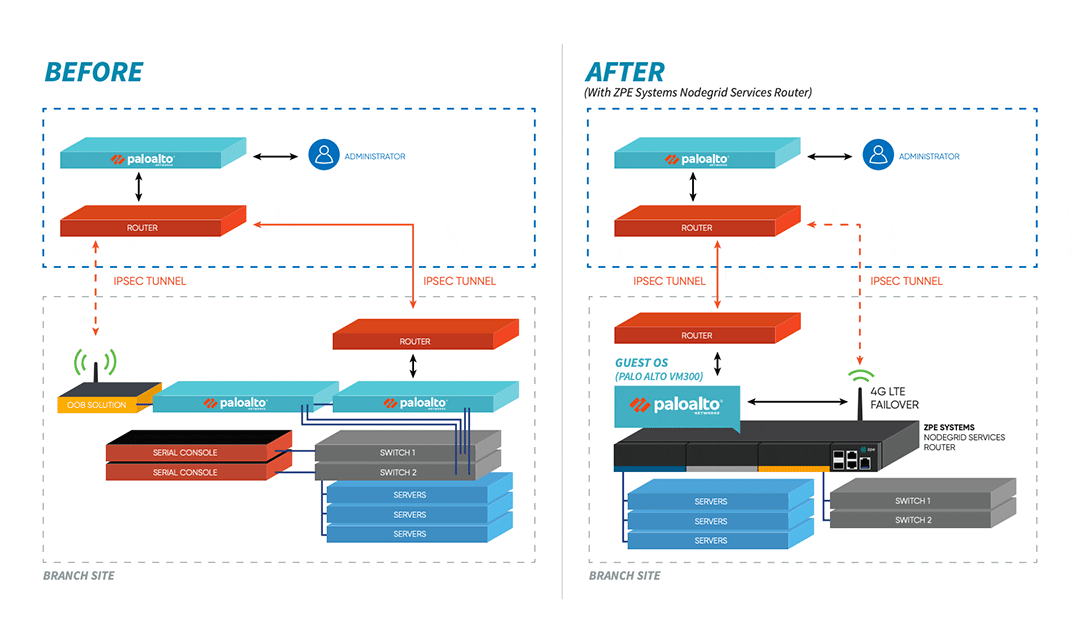
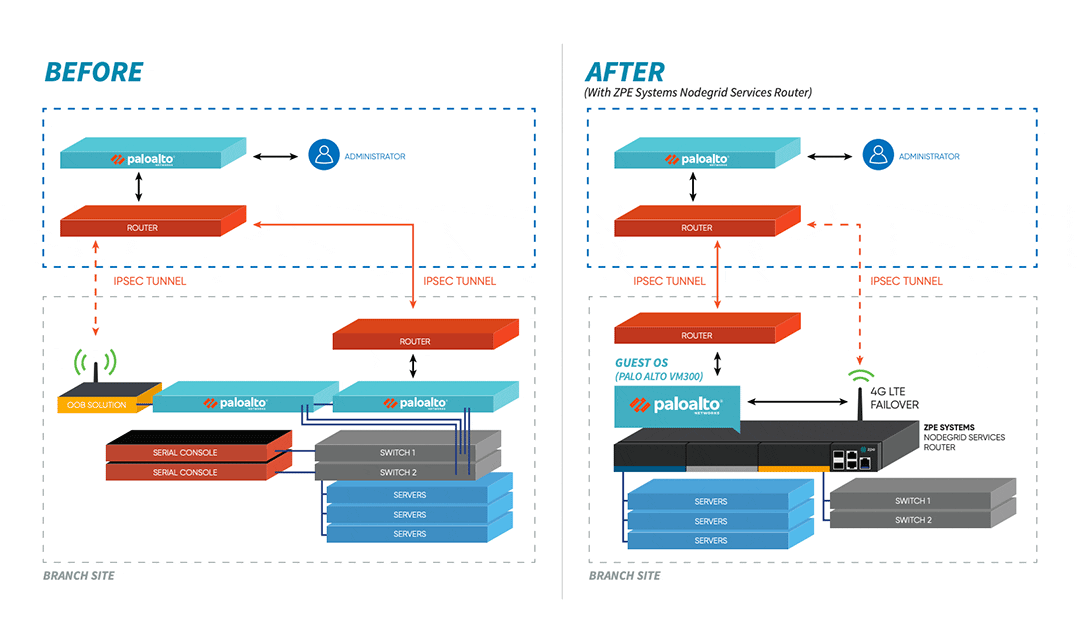
When a digital security enterprise, whose offices span the globe, needed help with their complex network infrastructure, they chose ZPE Systems’ Nodegrid. The powerful NSR solution relieved many of their branch network headaches, and even extended additional benefits to their data center operations. Their large, cumbersome stacks were replaced by a streamlined, all-in-one solution that made management easy, provided reliable backup via cellular, and leveraged the world-class security of Palo Alto Networks’ next-gen firewalls. Ready for the details?
Your Application Hosting & Guest OS Checklist

Follow these simple steps to get started setting up your virtual network environment

Checklist-App

Application Hosting and Guest OS Alleviate Many Problems for NetOps Teams.

You typically need to install and manage applications on local devices. This is challenging because each appliance has its own operating system, which is compatible with some applications but not others. You need to alter your stack in order to make changes or updates, while on-site support keeps costing you time, money, and valuable resources. With application hosting, you virtualize your environment and deliver applications via server. It’s an SaaS model that allows you to distribute the network apps you need — when and where you need them. You don’t have to deal with the tedious tasks that come with managing localized apps. And using guest OS, you further streamline your environment by deploying virtualized operating systems on VMs, eliminating OS incompatibilities across the edge.

  • Instead of waiting, you can deploy applications on demand
  • You don’t need on-site support — virtualization lets NetOps manage from anywhere
  • You get consistent peace of mind at the edge, with the latest updates and fixes

Put application hosting and guest OS to work and streamline your operations. Here’s how to get started:


Deploy Your Physical System

Set up your server and other necessary infrastructure components, such as databases or repositories. Use the Nodegrid Services Router for all-in-one functionality. The NSR provides server, compute, storage, and other capabilities in one device. You save space and power consumption.


Load a Hypervisor-Capable OS

To make the most of application hosting and keep your stack compact using guest OS, you need to install an operating system that’s capable of being a hypervisor. This is the layer that’s capable of interacting with both your VM/application layer, and your hardware. Nodegrid OS is capable of being a hypervisor, and supports out-of-band and cloud connectivity. This versatile software is built into every Nodegrid device, and is also available as a standalone package.


Deploy VMs and Guest OSes

With your hardware and software set up, you can deploy your virtual machines (VMs) and guest OSes. These allow you to virtualize and diversity the OS layer of your infrastructure. You don’t have to clutter your stack with many specialized devices each running a unique OS. Just spin up an appropriate VM with compatible guest OS, and it’s easy to deploy the applications you need. The NSR can directly host guest OSes, third-party and custom applications, and Docker and Kubernetes containers.


Maintain Port & IP Addresses

To keep your infrastructure properly connected and traffic flowing, you need to configure and maintain your network port and IP addresses. This means adjusting NAT settings to allow application requests and deny unsecured traffic. With the NSR, you can host network ports and IP addresses, making management even easier. For more information about application hosting, guest OS, or how to set up your environment, get in touch with ZPE Systems.

Case Study: SD-Branch for a Digital Security Leader

SD-Branch delivers some major advantages over traditional SD-WAN capabilities. Where typical software-defined approaches fall short at the branch level, SD-Branch picks up the slack to help you see and do much more.

In case you need to catch up, here’s a 90-second video showing some ways you can benefit from using SD-Branch.

If you’re super short on time, the advantages boil down like this:

  • SD-Branch lets you see inside your branch locations, by combining SD-WAN, routing, security, and all your network functions
  • You can see & control on a granular level, including activity for IoT devices, cameras, laptops, & all clients on your branch networks
  • You get more operational agility with a system that centralizes your infrastructure management & lets you take control remotely

Now that you’re caught up, you might be wondering…

How does Nodegrid make SD-Branch better?

Nodegrid gives you SD-Branch capabilities and a lot more. All-in-one Nodegrid devices, like the Nodegrid Services Router (NSR), reduce your stack thanks to the ability to handle many network functions in a single box. Support for automation and containerization via tools like Puppet, Ansible, Docker, and Kubernetes takes your orchestration and management capabilities to an entirely new level. It gets even better with out-of-band management that you can use even during an outage (thanks to cellular failover). Nodegrid hardware and software are vendor neutral, too, which means you can adapt your network to your changing business needs.

Sounds Pretty Awesome. But How Does it Work in the Real World?

See What SD-Branch Brings to a Leading Digital Security Company

Cellular-Failover-Diagram

When a digital security enterprise, whose offices span the globe, needed help with their complex network infrastructure, they chose ZPE Systems’ Nodegrid. The powerful NSR solution relieved many of their branch network headaches, and even extended additional benefits to their data center operations. Their large, cumbersome stacks were replaced by a streamlined, all-in-one solution that made management easy, provided reliable backup via cellular, and leveraged the world-class security of Palo Alto Networks’ next-gen firewalls. Ready for the details?
Download the Case Study

Aging/Unsupported In-Band and Out-of-Band Infrastructure

Background/Problem

A large distributed business enterprise with multiple data centers located around the globe, housing thousands of physical and virtual devices, routinely requires sysadmins to access the devices within these data centers. Sysadmins need to make any number of changes once given access to enterprise server farms: run scripts, reboot devices, provision users and servers, upgrade software, audit systems and so on.

This enterprise also has multiple admins at various data centers with overlapping responsibilities. These admins need a session sharing solution for collaboration — along with logging capability for auditing. Sounds simple, right?

Unfortunately, it’s not always that simple. Each manufacturer of Servers, Switches, Routers, Storage, Power, and whatever, have their own unique command structure that pertains to their specific pieces of equipment, primarily because they want the user to standardize on, and only use, their equipment. With just a couple of server and power vendors and only one vendor of other device types, you could have eight or more management tools to use. Makes perfect sense right?

That’s not reality. There are many reason why enterprises have a mix of manufacturers’ equipment in their data centers. We’ll examine that at another time. For now let’s just focus on the fact that any given enterprise has a mix of Server, Switch and Router vendors, multiple Storage vendors, and uses VMware for their server virtualization environment. So what do they do about access and control?

This enterprise has a well-known and aging, In-Band and Out-of-Band solution deployed for access and control of their Serial Console Servers, KVM Switches, IPMI, DRAC, etc… with an outdated software component striving to pull all the pieces together. As for the Virtual world or the Cloud, every brand and enterprise has separate access and control solutions deployed specifically for virtual environments.

While these solutions work most of time, and will most likely continue to work for a while longer, they’re not likely the most efficient or cost effective way to go about access and control in today’s world. This is mainly because they really don’t work together to provide a single access and control solution across your enterprise. Other solutions on the market don’t provide a common user experience, don’t simplify complexity very well, and haven’t been upgraded to meet modern IT needs and requirements.

This is also true of other In-Band and Out-of Band solutions in existence today. They are growing old, have not really been upgraded (no new features or functions), are losing or will lose active support sooner rather than later, they don’t keep up with latest JAVA security requirements, and they still don’t provide access to other manufacturers’ devices, nor to your virtualized infrastructure in a single pane of glass solution. It would be far easier to use one tool instead of eight tools, to manage all of this enterprise’s IT devices.

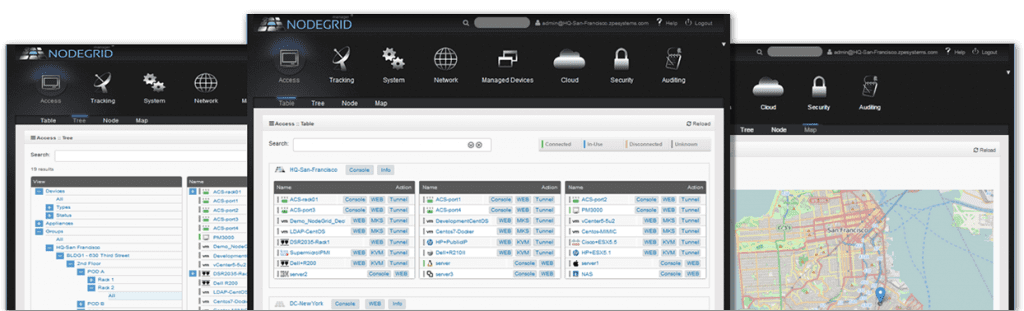
The Solution – Nodegrid Manager Consolidated IT Device Management

The world’s first software defined infrastructure that provides secure, vendor-neutral access and control of physical and virtual environments.

Nodegrid Manager delivers a common user interface and a standardized command stack across all supported physical and virtual devices. One solution for IT infrastructure access and control.

Gone are the days when we need to know each manufacturer’s server and command structure to communicate with every device and virtual machine. NodeGrid Manager’s Normalization Engine handles all communication and translation of commands, allowing for seamless access to all supported physical and virtual environments and devices.

nodegrid-manager-screenshots-20151-1024×311

Key Benefits

Secure In-Band and Out-of-Band Network

  • Provides management of Virtual Appliances, VMs, Service Processors, Serial Consoles and KVM/IP
  • Day-Zero Provisioning

Vendor Independence

  • Service Processors: HP iLO, Dell DRAC, Cisco CIMC/UCS, IBM IMM, Oracle ILOM, IPMI (NetApp, EMC)
  • Serial Appliances: Opengear, Emerson/Avocent/Cyclades, Digi, Raritan, Lantronix
    KVM/IP: Avocent/Cyclades
  • Power: Emerson/Avocent, Raritan,
  • ServerTech, APC/Schneider
  • VMware VM: vSPC, MKS
  • Kernel-based Virtual Machine: virtual serial port

Easy Configuration and Installation

  • Policy based discovery and management minimizes configuration overhead

Compliance with Data Center Access and Security Policies

  • Customizable, multiple access levels and user group based roles

Automatic Event Tracking

  • Notification of fault conditions and alerts

Regulatory Compliance and Easy Troubleshooting

  • Online and off-line data logging with time stamps, auditing, local/remote record archiving.

Next Steps: Schedule a Demo and See What NodeGrid Can Do For You

We are perfectly positioned to meet anything manufacturers can throw at us. We pioneered IT infrastructure access and control back in the day and we’re pioneering IT infrastructure access and control for today and the future. Check us out. You’ll be glad you did.

Easily Migrate from One Console Server Maker and VM Vendor to Many Vendors

Easily Migrate from One Console Server Maker and VM Vendor to Many Vendors

Background/Problem

A few years back, this company standardized on a particular vendor’s console servers. On top of this, they developed their own management tools based on scriptable CLI to the devices. However, they no longer want to be locked in to one specific console vendor’s server hardware. Also, they need to provide seamless access to the virtual serial port (vSPC) of thousands of VMware VMs and KVM VMs from the same solution, so they can run their scripts on the VMs without having to re-write them.

The Solution – Nodegrid Manager

Deploy NodeGrid Manager to bridge legacy and next-generation hardware, as well as abstract heterogeneous constellations of multi-vendor consoles. One of NodeGrid’s key strengths is that it doesn’t care which console server vendor is in use. Whether you’re using one or all of these brands (Cyclades/Avocent/Emerson, Raritan/Legrand, DIGI, OpenGear, Lantronix, Uplogix, Perle, Tripp Lite, WTI, etc), NodeGrid easily and seamlessly provides an agnostic approach to Access and Control across the enterprise. Hardware- and Hypervisor-agnostic NodeGrid manages multiple console server makers’ hardware. But that’s not all that NodeGrid does for you.

NodeGrid also provides remote out-of-band infrastructure (OOBI) management of multi-vendor servers, network switches and routers, storage gear, PDUs, UPSs, and virtual KVM or VMware VMs — all from one control surface.

Additionally, with the same interface and set of commands, NodeGrid provides secure remote control and migration tracking of VMware VMs and Linux KVM VMs. You choose how to access your IT assets:

  • Web browser via HTTPS/HTTP for accessing physical and virtual devices using a direct MKS graphical interface or native Service Processor portal.
  • Command line (CLI) to NodeGrid and the Console of your physical and virtual devices via SSH1/SSH2/Telnet
  • DeviceURLâ„¢ direct bookmarks for MKS, CLI, web GUI, or FireTrailâ„¢ secure tunnel-through-firewall IT asset access methods
  • NodeIQâ„¢ natural language search for all IT assets regardless of vendor, model or location
  • NodeGrid manages up to 1,000 managed devices (physical and virtual) per instance. NodeGrid ensures efficient and fast delivery of services to these devices by way of live connections. These live connections also provide an active conduit of data collection to notify sysadmins immediately of customizable alarm conditions on a 24 x 7 basis.

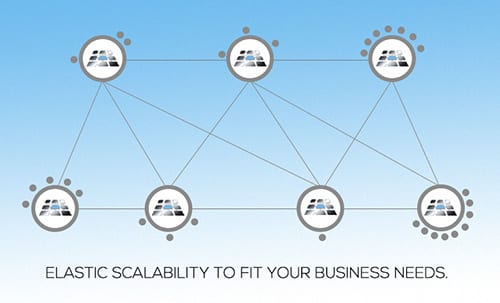
Multiple NodeGrid instances easily manage many thousands of IT devices regardless of where they physically or virtually reside.NodeGrid provides scalable software-defined access and control of your IT Infrastructure in true cloud cluster configuration.

Key FireTrail Tunnel Features

Secured tunnel via SSH TCP port forwarding
Keeps your Firewall whole. There’s no need to punch holes in your Firewall to give per-user access to various devices and ports.
Controlled user visibility of Authorized Devices behind Firewalls based on AD/LDAP enterprise authorization.
Dynamic user/device association. Users receive controlled access per managed device and per TCP port.

elast1

Next Step: Schedule a Demo and See What NodeGrid Can Do For You

We are perfectly positioned to meet anything manufacturers can throw at us. We pioneered IT infrastructure access and control back in the day and we’re pioneering IT infrastructure access and control for today and the future. Check us out. You’ll be glad you did.