
Providing Out-of-Band Connectivity to Mission-Critical IT Resources

A Brief Introduction to Zero-Touch Provisioning

Another day, another deployment. Business is good and you’re scaling fast to keep up. This means opening more data centers, branch offices, and retail locations. Large or small, each deployment takes careful planning and coordination to pull off successfully, all while meeting strict deadlines. 

One of the first things to consider when deploying a new site is how to safely deliver all of the equipment to the final location. There are typically two options:
Zero Touch Provisioning

Pre-configuring in-house offers the advantage of using local staff to perform the initial configurations and upgrades which can reduce additional travel expenses and overtime pay. This also allows for an almost plug-and-play deployment once the equipment arrives at the new location. The downside to this method is the heightened security risk incurred when shipping anything with sensitive data.

Shipping equipment with factory default settings eliminates the security risk, but places the burden of configuring and provisioning entirely on the remote staff. This can equate to higher travel expenses and additional overtime pay, not to mention reduced staff back home. 

Regardless of the method chosen, both still share the time consuming and boring task of physically connecting to each appliance via console, setting the configuration (typically done by pasting from a template), and updating the software. More equipment requires more time and resources, and also increases the likelihood of a mistake being made. So, is there a better way? 

Introducing Zero Touch Provisioning (ZTP)

ZTP is a feature that automates the building process (configuration and provisioning) of network hardware and applications. This is typically achieved by pointing devices to a local configuration repository where they can retrieve the required settings. With ZTP, IT professionals can drastically reduce the amount of time consuming labor that comes with manual configuration, which frees up more resources that can be dedicated to other tasks. Since settings are managed and provisioned from the cloud via templates, engineers may even perform configurations and updates from remote locations (once basic racking and network connectivity are established at the new location). 

The Right Tools Make All the Difference

While ZTP can greatly improve deployments by reducing costs, errors, and time, having the right tool can offer even more benefits. ZPE Systems Nodegrid can take your ZTP project to the next level by keeping everything open and flexible. For devices with built-in ZTP features, Nodegrid can leverage various capabilities such as SSH to serial console and may also serve as the local configuration repository. Even if your devices do not have built in ZTP support, Nodegrid can still store, deploy, and archive configurations that will allow you to bring all of your devices online fast and with ease. 

Nodegrid also offers full 4G/LTE cellular connectivity so you can deploy from anywhere via ZPE Cloud, even without having local connectivity configured. With Nodegrid, you can eliminate worry and reduce security concerns by shipping bare-metal devices that do not contain any sensitive data. Once your devices arrive, are racked and connected, simply use ZPE Cloud to download and run all of your automated scripts. Provisioning is automatic, consistent, and error free which save you time and money. Learn more about what goes into ZTP.

Ready to Take Your Next Deployment to the Next Level? 

Download the Definitive Guide to Zero Touch Provisioning.

For more information on ZPE’s full product line, please visit our products page.

Have a specific question or want to experience a live demonstration for yourself? Reach out to us via our Contact page. We’re here for you!

Understanding SD-Branch

This 90-second video explains how you can remotely take full control of your network with 360-degree visibility to all your devices.

Learn how ZPE System’s Nodegrid appliances and vendor-neutral management software extends beyond your data center with a solution that lets you remotely manage servers, routers, firewalls, power, and more from one console.

  • Imagine the time savings when you no longer have to configure, update, manage and secure multiple vendor-specific devices.
  • Benefit from failover connectivity that keeps your network running for a fraction of what one hour of downtime costs.
  • Locks out potential back-door security threats while letting you deploying branches in minutes instead of days.
  • Learn how to manage your network better than ever before.  Protect your bottom line and your reputation.

    The Benefits of Cloud-based Deployment for Your Out-of-band Network

    Your out-of-band (OOB) network can make scaling more bitter than sweet. Growing your business comes with exciting new opportunities, and you know how to
    set up your OOB connections for proper network management. But if you’re still using traditional deployment methods, just the thought of opening a new location can take the wind out of your sails.

    Challenges With Typical Out-of-Band Network Deployment

    There are a lot of moving pieces that you need to coordinate when deploying remote or branch locations. You typically spend a lot of time and money preparing the physical devices that make up your stack. On top of this, you need to orchestrate your IT support staff so they can work on-site to perform necessary tasks, like installing, configuring, updating, etc. All of this leads to scaling that’s more rigid than nimble, which can slow down your business operations.


    Prepping Your Stack and Coordinating Staff

    Traditional deployment protocols involve plenty of manual configuration. If you ship unconfigured devices to the new location, you need to put IT staff on-site to manually configure and install every component in your stack. This can be very time consuming and costly. Also, the more your deployment relies on manual input from IT personnel, the more chances there are for issues or failures to arise as the result of human error.

    To help with this, you could preconfigure devices before sending them to their destination. However, this could add costs if you need to ship these appliances multiple times (for example, from HQ to the staging location to the final destination). When you also consider the fact that preconfigured devices contain sensitive information, you’re risking your data’s security.

    What Would you do if your devices get sent to the wrong location?

    Can you incur the costs of multiple shipments, especially if you’re shipping through customs and/or over long distances?

    And what protocols are in place to address lost or stolen devices?

    Whichever procedure you choose to follow, you’ll also need to involve IT staff once your appliances have arrived at the destination. This presents its own set of challenges, because you’ll have to coordinate schedules, set up travel arrangements, and in some cases maintain an on-site staff presence full-time or part-time. Initial deployment can take days or weeks, even if the work goes smoothly with the right people on the job.

    Overall, traditional out-of-band network deployment at remote locations presents issues like:

    • Security risks
    • Increased potential for human error
    • Heavy reliance on staff

    These issues make scaling difficult, and even more so when you need to deploy distant, isolated locations. Luckily, recent developments have taken advantage of the cloud’s flexibility, and now you can address these problems for smoother deployments.


    Use the Cloud for Smooth Out-of-Band Network Deployments

    Thanks to the cloud, you can eliminate major challenges during branch deployments. Using the right solution allows you to gain comprehensive visibility and control over your remote out-of-band networks. You can easily set up each location and maintain ongoing management with little or no on-site staff presence.

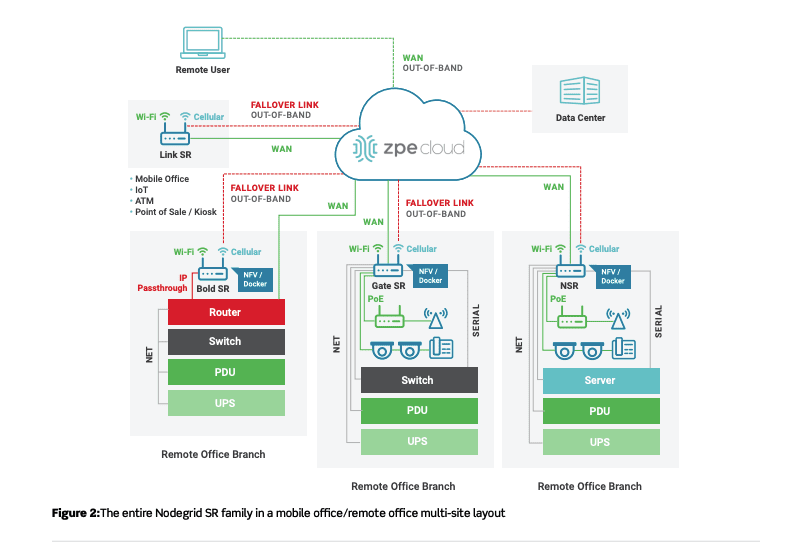
    OOBM Remote office multi-site layout

    The cloud adds convenience and peace of mind to your deployments:

    • Better security — A proper cloud solution allows you to deploy using secure, encrypted connections. In addition, the cloud allows you to perform configuration and provisioning tasks remotely. You no longer need to ship preconfigured devices containing sensitive data, and instead can send plain-vanilla or bare-metal appliances. The cloud helps you set up these appliances only when they’re safely under your control.
    • Fewer errors — Cloud-based solutions allow you to deploy using automation and scripting tools. Of course, you’ll need to thoroughly configure and test in a lab to ensure proper setup. However, this means you can find and eliminate human errors before deploying to branch locations. And should you need to resolve an issue at multiple sites, the cloud allows you to automatically troubleshoot problems and implement fixes remotely.
    • Easier on staff — Zero touch provisioning means deployments require little IT staff involvement. Some solutions, such as ZPE Cloud, only require someone to physically plug in and install devices. There’s no more need to coordinate specialized staff for on-site configuration and provisioning. Even inexperienced personnel can plug in appliances, which then connect to your NOC and self-configure right out of the box.

    Cloud-based solutions streamline your out-of-band network deployments, especially at remote locations. There’s even more that’s available to keep your network secure, stable, and flexible, detailed in the complete tech brief.

    Download the Tech Brief

    Serial Console Servers: 5 Reasons Why Your Business Needs Them

    serial console serverToday, businesses depend highly on IT, and they cannot afford to experience downtime. That’s why they need robust IT infrastructure. Robust IT infrastructure can ensure businesses do not experience downtime and prevent financial losses resulting from the inability to communicate and process payments, and prevent loss of sensitive information. Robust IT infrastructure is not the preserve of only large companies. Small businesses need it, too, since 43% of cyber-attacks target them. Whether small or big, all businesses can benefit from having robust IT systems in place.

    A serial console server is essential to a robust system as it helps maintain uptime and prevent losses.

    What is a Serial Console Server?

    A serial console server, also known as a console server, enables IT and network administrators to access, manage, and monitor networking devices such as switches, routers, and servers.

    Why Businesses Need Serial Console Servers

    Does your business use serial console servers? If not, here’s why your business needs to start using them:

    1. Faster Troubleshooting

    When devices go offline, IT technicians may need to reboot them so that they work again. Commuting to remote sites where networking devices are located to reboot them can prove costly and time-consuming. Serial console servers can resolve this. With serial console servers, IT technicians don’t need to travel long distances to reboot devices. They can be rebooted remotely.

    2. Better Security

    With security breaches on the rise, businesses cannot afford to take security for granted. Serial console servers provide enhanced security. First, serial console servers grant specific people the ability to monitor and manage the network. These authorized people can restrict access to the network and bolster security. Moreover, because serial console servers enable centralized data management, access to the network is limited and thus more secure.

    3. Easier Management

    More equipment adds to a network’s complexity. A serial console server can cut down on the equipment needed to manage a network. By storing server information in one central place, serial console servers make it easier for IT technicians to manage the network.

    4. Reduce Costs

    Downtime is costly. Businesses lose about $26.5 billion annually, thanks to it. Your business cannot afford to lose money due to downtime. Serial console servers can mitigate losses and maintain uptime. If a disruption happens, IT technicians can connect to networking devices, diagnose the problem and resolve it remotely. Thus, serial console servers can significantly cut down on downtime.

    5. Enhanced Monitoring

    Several networking problems can be prevented if they are identified early. Serial console servers monitor networking devices and enable network administrators to detect critical issues in real-time and resolve them before they get out of hand. For example, a serial console server can detect extreme temperatures in a server rack. Consequently, the network administrator can resolve the issue before it escalates.

    Businesses need robust IT infrastructure. Serial console servers are a key component of a robust system. They can enable you to take control of your network and prevent unauthorized access. Additionally, they can enable easier management, improve monitoring, save your business money, and prevent downtime, making them a worthwhile investment.

    Want to experience these benefits? Contact ZPE Systems for specialized assistance.

    OOBM: 4 Reasons Why You Need it for Your Business

    out-of-band connectivity and management The IT industry is rapidly growing. In 2020, spending on IT services reached almost $952 billion worldwide, with software accounting for the largest percentage of spending. However, while companies spend more on software, there’s one key thing they need to spend on — out-of-band connectivity and management.

    In-Band vs. Out-of-Band Management

    In-Band Management entails managing network devices via the LAN, HTTPS, or the web browser. Out-of-band management (OOBM), on the other hand, does not rely on LAN. Instead, it uses a secure and solitary network to ensure networking devices such as switches and routers stay connected.

    Why Your Business Needs OOBM

    In-Band Management is inexpensive and easy to implement since it only requires one network. Conversely, out-of-band connectivity and management can be costly and more complex to implement. So why should you consider OOBM over in-band?

    1. Cheaper Over Time

    The initial cost of OOBM can be relatively high, but it may be cheaper in the long term. While in-band management is cheaper to implement, it is more prone to outages. System outages are costly. Moreover, they are often time-consuming to sort out since technicians may be required on-site. OOBM networks are less prone to system outages. As a result, they can save your business a significant amount of money in the long run.

    2. Enforced Security

    Security breaches are on the rise. In 2020, it was estimated that companies lost an average of $3.86 million thanks to them. Many times, they happen due to cyberattacks from hackers. Networks that use in-band management are at a higher risk of getting compromised because if a hacker infiltrates the network, the whole network is at risk. Out-of-band connectivity and management, on the other hand, offer better network security. Unlike in-band, OOBM enables specific administrators to manage networking devices without disrupting the normal workflow. Administrators can manage devices and restrict access to the network to prevent security breaches.

    3. Limit Access

    If you’ve outsourced a third party to manage some of your network devices, you should consider out-of-band connectivity and management. With OOBM, you’ll be able to take control of your network and prevent the third party from accessing sensitive information on it.

    4. Maintain Uptime

    In-band networks are more susceptible to downtime. Downtime is costly. An hour of it can cost an average of $260,000. Your business cannot afford to lose that much money. Out-of-band connectivity and management can ensure your business does not experience downtime. Unlike in-band, OOBM can give you the ability to restart devices that have gone offline remotely. Overall, it’s better for troubleshooting and network automation.

    Your business cannot afford downtime. Dispatching technicians to data centers to address downtime issues is costly and time-consuming. You cannot afford to allow hackers to access or destroy sensitive information either. That’s why you need to invest in out-of-band connectivity and management. While it may be expensive at first, the long-term benefits make it a worthwhile investment. Are you considering investing in OOBM for your business or making the switch to it? For professional assistance, contact ZTE Systems to learn more.