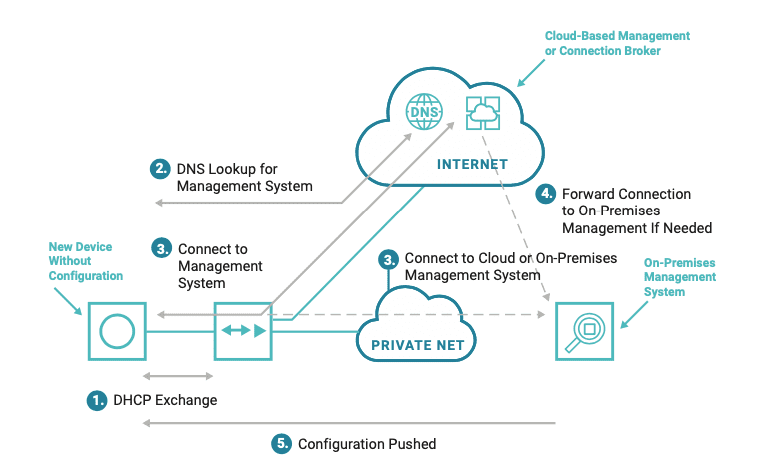
Without zero touch provisioning (ZTP), setting up a new data center or branch location takes work. You know that along with all your new hardware comes plenty of manual input and configuration before things can function properly. After unboxing and racking your switches, servers, and routers, and making all the necessary physical connections to each, you need to bring these devices online to serve your network.
But when you use zero touch provisioning, you automate all of these necessary tasks so that devices become configured and operational — with little or no user input. Of course, ZTP is not a turnkey solution offering total plug-n-play simplicity, but it does significantly reduce your workload when provisioning and deploying new locations.
What Goes Into Zero Touch Provisioning?
Even though zero touch provisioning automates and simplifies scaling, it still requires you to make preparations to get devices up and running. These preparations can include things like predetermining console port assignments and ethernet management ports. Also, you need to test and adjust configuration settings in your test environment, so that your devices are configured properly when it comes time to deploy.
ZTP requires you to put forth effort up front, but it pays off later when scaling with new data center and branch locations. With your preparations in place, ZTP eliminates the need for repetitive manual work, and instead gives you streamlined, consistent provisioning.
Several companies are also including zero touch provisioning features in their hardware, through DHCP, Preboot Execution Environment (PXE), and other custom services and apps. For example, some hardware vendors now have devices that, when unable to find a startup configuration, automatically enter zero touch provisioning mode, which allows them to execute the proper scripts for configuration.
Devices that come with ZTP features can help to further reduce your workload. But even when you use them, best practices call for you to have:
The right scripting and automation tools
A properly designed ZTP workflow
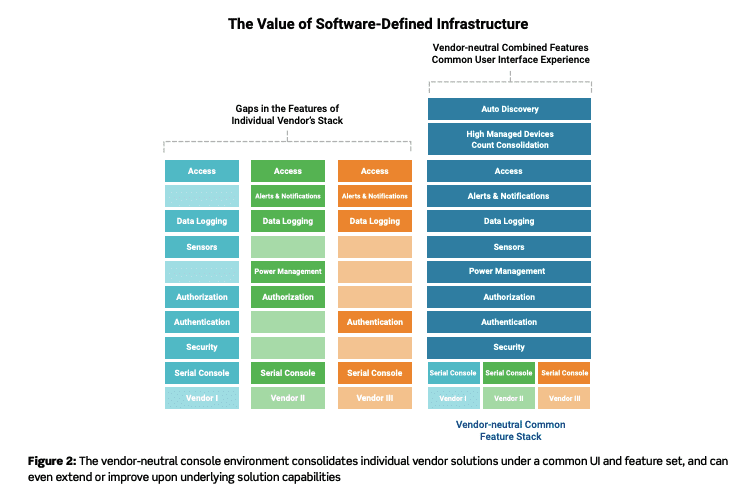
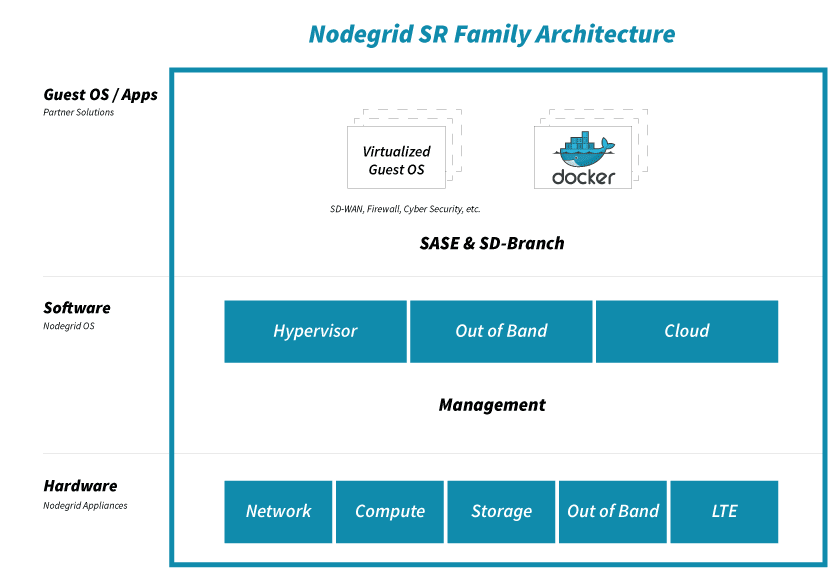
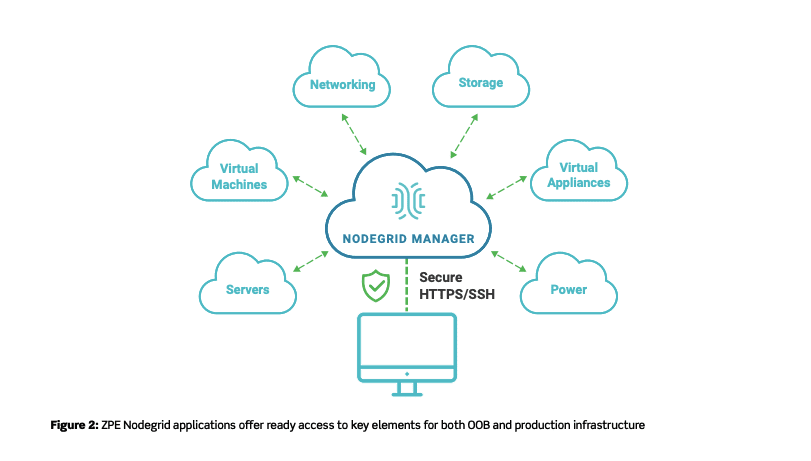
Adequate scripting and automation tools are just as important as the hardware you choose to deploy. This not only helps with ZTP, but also helps you avoid vendor lock-in down the road when performing additional management and scaling. For example, using an open infrastructure platform such as ZPE Systems’ Nodegrid allows you to employ the tools of your choice, while also giving you serial console accessibility via SSH. Use Puppet, Chef, Ansible, and others as needed. Nodegrid also extends ZTP capabilities to connected devices, regardless of vendor.
Along with having an environment that supports the right tools, zero touch provisioning works best when you develop a preparations workflow. You want every deployment to go smoothly, and this workflow helps you strive to achieve a more streamlined provisioning process. It starts with having a plan even before your hardware goes in the rack. Here’s a top-level overview of what should be part of your plan:
Ensure your devices are configured for ZTP.
Inventory your devices so that you know what hardware is at each location. A manufacturer or vendor-provided list can help you document MAC addresses, model & serial numbers, and other critical device data.
Add your device inventory to your device database, so that data can be handled and configured during provisioning.
Use your test environment to configure ZTP scripts, and then script and automate to your device database.
How Does Nodegrid Improve Zero Touch Provisioning?
Whether for your data center or branch locations, Nodegrid can help you with zero touch provisioning that’s open and flexible.
Not only can Nodegrid devices leverage existing ZTP features of your infrastructure, using capabilities such as SSH to serial consoles, but they can also serve as the local configuration repository if you’re preconfiguring and shipping devices. They can store, deploy, and archive configurations, allowing you to extend ZTP to other appliances, including those that don’t come with ZTP features.
For more distributed and remote sites, Nodegrid supports 4G/LTE cellular connectivity that allows you to deploy ZTP from anywhere through ZPE Cloud. You can ship bare-metal devices and stay protected knowing that sensitive data can’t get lost or stolen. Once these devices reach their appropriate destination, you can use ZPE Cloud to download and run all your automation scripts, for automatic and consistent provisioning.
Don’t miss out!
Now that you know more about zero touch provisioning and how it helps you scale, make sure you stay up to date for all the latest about ZTP. Subscribe for updates and be the first to see new, helpful content.
COVID-19 meant even the largest companies had to figure out remote work. And they had to adjust fast, not only to stay afloat and maintain business continuity, but also to establish a “new normal” that made them more responsive to change.
Aside from adapting their networks to accommodate a distributed workforce, most companies were left to contemplate one crucial component: best practices for managing a remote team.
We sat down with ZPE Co-Founder and VP of Engineering, Livio Ceci. Livio has more than 15 years of experience managing teams spread across the globe, and he’s offered some important advice you can use right now.
Stay Human
Because of COVID-19, every business interaction we have is through the computer screen. It might seem easy to become somewhat detached from your teams, but maintaining emotional intelligence is more important than ever with a remote workforce.
Apart from adjusting to any new cultural or language barriers you’re faced with, remember to help employees achieve a healthy work/life balance. Especially now, things are a little heavy on the life side, but your staff members want to continue to contribute and provide value to your company. Show employees that you sympathize with them, and in return, they’ll prove their commitment to you.
Here are a few things to keep in mind:
Establish trust — Remote or not, keeping promises goes a long way when it comes to establishing good relationships. When you say you’re going to do something, follow through by doing it. Send those account details on time, start sourcing the additional help you promised, and make sure everyone gets the new software you purchased.
Communicate clearly — Now there’s more standing between you and your teams, so miscommunication is more likely to happen. Make sure you and your employees are asking enough questions so that nothing gets lost in translation.
Talk about life — Of course you want to be as efficient as possible with your time. But part of establishing strong relationships is talking about what’s going on in people’s lives. Ask Marisol how her kids are adjusting to school at home, check in on Farook’s emergency roof repair, and celebrate Rajiv’s fifth anniversary.
Cover the Basics
If you’re new to working remotely, you’re probably well aware of the differences between the office and your home environment. There can be a ton of distractions at home, from the TV, to family, to chores, and it might be difficult for you to be productive. Before you can manage your distributed teams, you need to be able to focus, which means taking care of these work-from-home basics:
Set up a dedicated workspace — Limit distractions by setting up a space designated as your office. Use a room that is away from high-traffic areas in your home, so that you can focus on your tasks throughout the day.
Make sure your Wi-Fi is strong — Connectivity is crucial to remote work, but you might find it’s limited in certain areas of your home — including where you set up your workspace. Double-check your connection speed and strength to make sure it holds up, and consider upgrading or extending your Wi-Fi if necessary. The last thing you want is to suddenly drop off during an important video conference.
Block background noise — If you live near others or with family, you know that noise happens. One of the easiest ways block it out is by investing in a decent headset and microphone. You can also change your office by adding noise-blocking foam or insulation. Once you are able to cancel out noisy distractions, you and your team will be able to focus on your work.
Have the right hardware & software — From a laptop to a webcam, to mission-critical software, you need adequate tools to do your job effectively. Make sure you have everything you need so that you can be as productive as you used to be from the regular office.
Use the Right Tools
Going off the previous point, using the right tools is essential to managing a remote team. Not only do you need the right hardware and software, but you also need everyone to be on the same page for efficient, productive work. Communication and collaboration are key to business continuity.
There are many communication platforms available, and you’ll likely use a combination of tools because each has its own strengths. You’ll have different needs depending on your organization, but your ability to perform relies heavily on how you stay in touch with your teams every day. Instant messaging tools such as Slack can help you stay organized and chat with the right people, while video conferencing platforms like Zoom allow you to have meetings and conference calls.
In the office, you may have used a physical board to collaborate and track productivity. Now that you’re doing it all in a virtual environment, consider using tools like Jira or Asana to keep tabs on work. These allow you to easily manage tasks, set priorities, and delegate responsibilities.
Sharing tools are also invaluable to working remotely. These include file sharing platforms like SharePoint and knowledge base programs like Confluence, which allow you to easily collaborate on files and documents. And if software development is a large part of your organization, you’re probably already aware of the benefits that something like GitHub brings to the table. In a remote work environment, it’s now more crucial than ever and provides the version control hosting you need.
Pro tip: Keep your company’s info secure
Having the right tools in place helps you stay productive. But you also need to make sure your company’s info stays safe.
Use proper security measures to protect your data, and implement backup protocols that help you restore data in case issues arise.
Keep your code and other intellectual property on-prem to minimize vulnerabilities.
For your employees, give them only the minimum number of permissions necessary to do their job.
At ZPE, one of the ways we securely access our data and infrastructure is by using ZPE Cloud. Existing customers are eligible to get a free 3-month trial.
Focus on Goals
From everyday meetings, to task-specific goals, being able to focus greatly improves your ability to manage. But when you’re in charge of steering the ship while your crew is spread across the globe, it’s challenging. You might struggle to assign priorities, and deliverables might be vastly different than what you expected. Complicating things even more is the anxiety that can come with not being able to check in on what everyone is doing. You might feel like you’re not in control.
All you need to do is adjust your thinking. Just because you’re no longer in the office and can’t see the work getting done in front of you, doesn’t mean it’s not getting done. So, focus on the goals — not the activity.
When you consider everything that goes into working remotely — from time zone differences, to technical issues or sudden emergencies — it’s not effective to keep wondering, “Is Tabitha working right now on the latest feature we discussed?” Not only does it distract you from your own tasks, but it can lead you toward micro-managing, whichlowers trust and morale.
Instead, focusing on the goals and outcomes allows you to exercise the trust that you and your teams have established.
Here are some tips from Livio to help you and others focus on your goals:
Set expectations — Communicate what’s to be expected, so that everyone has a clear picture of what to shoot for. And when things change, make sure to update everyone involved. This goes for everything from meetings to deliverables, to big-picture stuff like new releases and prototypes. Are the presentation materials due Wednesday at 5pm Pacific? Which features should be released with version 1.4? Will the new admin start on Tuesday or Thursday? Check in regularly to make sure that everyone is on the same page.
Prioritize — Obviously, more important things should be at the top of everyone’s priority list, while minor things should be assigned a lower priority. This helps to keep expectations clear and make sure the focus remains on the appropriate goal.
Assign smaller deliverables — This one’s mostly for engineering teams, but can also be applied across various disciplines. By assigning smaller deliverables (and shorter sprints), near-term goals are easier to focus on and accomplish, which ultimately contribute to the end goal.
Hold regular meetings — Frequently go over expectations, deliverables, announcements, and other important topics, either via conference call or video chat.
Have an agenda — When it comes to business, and especially focusing on goals, make sure you have an agenda that you can share with others. Having a clear agenda makes for efficient use of everyone’s time, keeps the focus on appropriate tasks and outcomes, and limits distractions, whether you’re preparing for a meeting or finishing up the week’s sprint.
Pro tip: Set priorities straight
When considering expectations and task priorities for remote teams, ask, “How does this contribute to the end goal?” This helps you break down each piece of work into smaller chunks, so that you can delegate appropriately.
Stay Committed
Do you know what’s driving timelines? Answer: your commitment.
Whether your projects are short-term, long-term, or both, your commitment to them is what will keep you and your teams on track to reach your goals. When it comes to software development projects, Livio shares a few best practices:
Make two major releases per year (give or take one, depending on the project scope).
Develop a cycle that calls for a short time-to-market, with one small release per month.
Test, test, test! Set yourself up for continuous integration that ensures only stable code is committed.
Pro tip: What about the unexpected?
Over the years, Livio has found that the unexpected is the biggest disruptor to even the most meticulous plans. Whether it’s a critical bug or an urgent, last-minute request from the client, unforeseen hurdles always complicate the development process. To combat this, Livio suggests building in extra time from the beginning. This helps you adjust to abrupt changes or issues without having to alter more (or all) of your plans.
No matter how permanent our new normal may be, you can make the most of managing a remote team. If it’s a pandemic, natural disaster, or human error that threatens continuity, take this advice to keep business running even with a distributed workforce.
There’s More to Come
We’ve got one goal: to help you transform your business’ network into a value center. Sign up for news and updates for more free tips and advice about out-of-band, SASE, SD-everything, and more!
3 Ways the Cloud Improves Out-Of-Band Management at the Branch
For decades, out-of-band management (OOB) has been supporting business continuity needs for organizations of all sizes. It’s a crucial tool for deploying new locations, setting traffic rules, optimizing connectivity, and so much more. OOB offers an exclusive path to your network so you can control your infrastructure without relying on production networks.
But modern technology advancements have allowed the scope of networking to expand well beyond the data center. This means that the enterprise infrastructure is more distributed than ever, with branch locations throughout the globe. One problem that organizations face is how to manage such a widely distributed network.
This is where the cloud comes in. Not only does it provide better OOB in data center environments, but also for managing your entire network, even at the branch level.
Here’s How the Cloud Delivers Better Out-Of-Band Management at the Branch:
Deploy Faster and More Secure
The cloud accommodates zero touch provisioning (ZTP), which essentially offers scaling with little or no human intervention. Instead of shipping preconfigured devices that require manual setup and extensive user input, you can ship plain-vanilla devices that can be automatically configured. Not only does this keep you safe from potential security threats (as unconfigured devices don’t contain any data to be stolen), but also allows you to have plug-n-play simplicity when scaling. Just connect your devices to the network, and the cloud does the rest.
Get a Full Network View
A cloud-based environment can provide a 360-degree view of your network. This can include even your most remote branch locations. Aside from offering more convenient scaling, the cloud gives you in-depth visibility of devices connected to your network, even if they’re across the globe. If you implement a robust SD-Branch solution as well, you can also see the activity inside each branch — including for connected IoT devices, cameras, laptops, and others.
Take More Control
On top of faster, more secure scaling and in-depth branch network visibility, the cloud provides remote access to your out-of-band management path. Once you’ve successfully provisioned and deployed a new location, you can use the cloud for maintenance, troubleshooting, and management. You can adjust access policies, tailor QoS settings, block specific domains, and much more, all from the safety of your network operations center (NOC). Additionally, cellular connectivity can provide you with reliable backup to your OOB network, so you can manage your infrastructure even during an outage.
Use Nodegrid With ZPE Cloud
Nodegrid’s consolidated devices give you complete control of your network, with out-of-band capabilities you’ve never seen before. One of Nodegrid’s biggest strengths is that it offers all of these cloud benefits using ZPE Cloud.
Deploy quickly with zero touch provisioning, and manage all of your devices with the help of a strong cloud platform. The reliability of 4G/LTE cellular failover keeps your business running, and an innovative ‘Reset’ button lets you reconnect devices to ZPE Cloud without hassle.
Read the full tech brief if you want to explore more benefits of using the cloud with your out-of-band management strategy.
Docker is the best way to deploy applications. There are several ways Docker improves network management. From being compatible with almost any programming language and machine, to its ability to run multiple containers in the same infrastructure, Docker has a lot to offer when it comes to automation and out-of-band management (OOB). But before we dive into the benefits of implementing it into your strategy, let’s take a closer look at what Docker is.
What is Docker?
Virtualization using virtual machines (VMs) was a game changer when first introduced. It allowed businesses to take full advantage of their network resources by giving them the ability to efficiently run multiple OSs and apps on the same host. When deploying new hardware, VMs significantly cut down the time it took to set up devices, allowing teams to configure resources in minutes instead of days.
But VMs have limitations. Aside from having to boot up an OS, each new addition requires virtual resources to be allocated (such as RAM), which can quickly strain your system when running multiple VMs. When porting, VMs typically cause compatibility issues, too, and they can’t share data volumes.
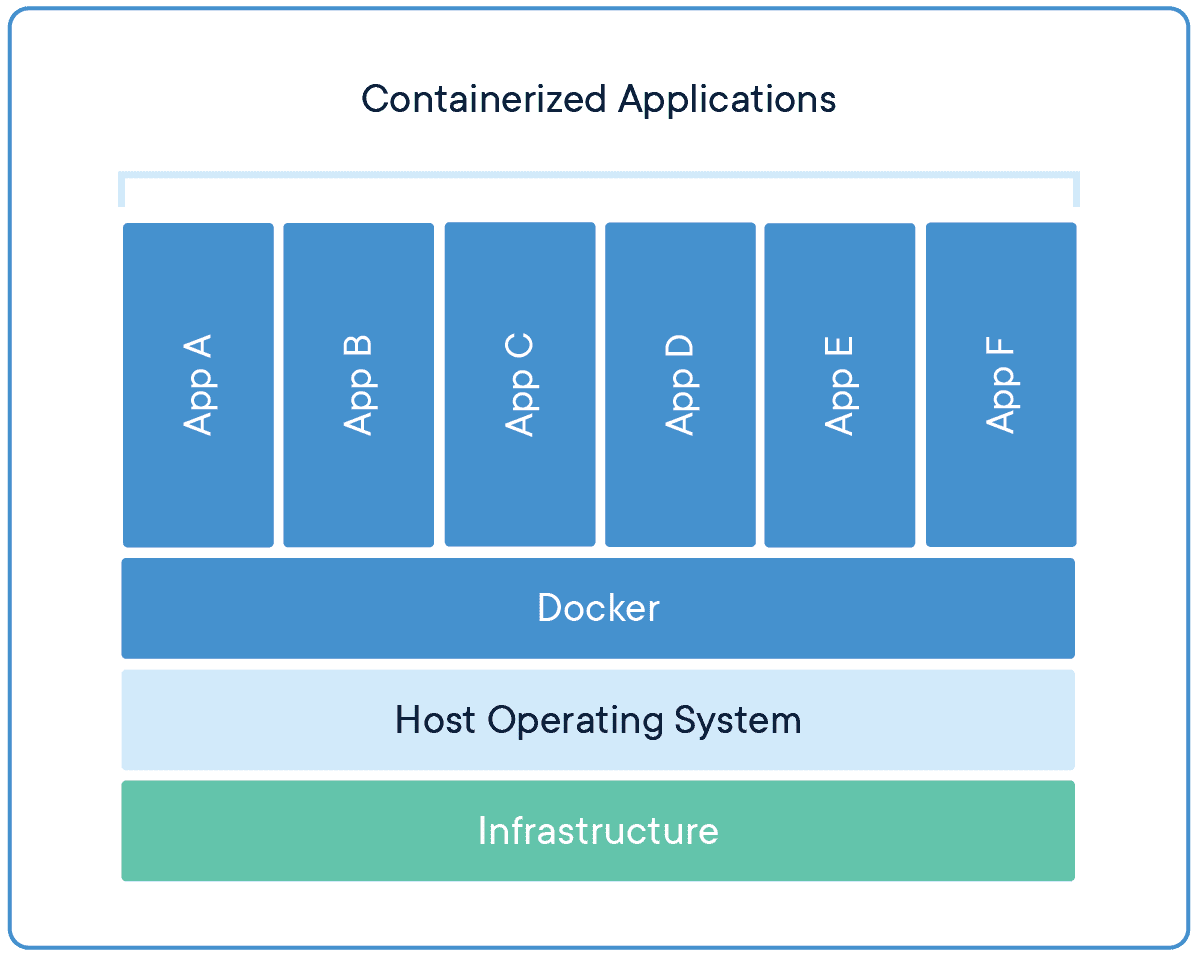
Docker takes virtualization in a different route, using something called containerization. Docker containers are lightweight and automate deployment of applications so they can work in different environments (i.e. on different machines). Each container is essentially its own software package that contains the dependencies to run an application, such as code, configuration files, processes, networking info, and sometimes even pieces of an OS.
So instead of running separate desktop environments, as with resource-hungry VMs, Docker containers run on a single system kernel and allow you to maintain isolated applications that work properly — regardless of what machine they’re running on.
How Docker Improves Network Management
Modern OOB networks employ an array of sophisticated tools, like those that support monitoring, management, and automation. Using Docker containers means that you can deploy applications and know that they’ll work on any resource, because Docker works on the client side. Docker can also act as a service and be deployed onto any server. And because all application dependencies are contained directly on the image, management is easier as well.
On a high level, using Docker containers brings these advantages to OOB:
You save on resource allocation, because containers require only a small amount of server space.
You can gather info and monitor your system by easily deploying lightweight apps.
Because containers are highly portable, you can use them for diagnostics, even when devices go offline.
Adding to the previous point, you can use containers for quick deployments, as well as for maintenance and backup.
With regards to things that require safeguarding, such as temporary configuration data or emergency recovery data, containers allow you to add them quickly on-demand.
On top of all these advantages, Docker improves network management by giving you three major benefits.
Docker Simplifies Virtualization
VMs allow you to run any platform — along with its unique configuration — on your infrastructure. However, VMs come with drawbacks because they require significant resources in order to work properly. Essentially, running a VM means running a separate, virtual desktop environment on your hardware. And with each VM you run, your device must allocate RAM and other resources, which can be expensive and lead to unstable performance.
Docker containers are much more lightweight, and you can run multiple containers using only a single OS kernel. Containers use less memory than VMs, they boot faster (because they don’t have to spool up an OS), and they can share and reuse data volumes. In a nutshell, containers make virtualization simple, highly efficient, and easy to configure, which significantly reduces the overhead associated with virtualization when compared to using VMs.
Docker Makes Deployment Fast
Before VMs, setting up new hardware took days because of the tedious, manual configuration that was required. With VMs, devices could be configured in minutes (and remotely), but IT teams still lost time due to the need to boot up an OS for each VM.
Using Docker containers, fresh resources can be configured in seconds because there’s no need to boot up an OS. Multiple containers running on the same hardware can run isolated applications, such as those containing configuration data and automation scripts, to help you rapidly deploy resources to your network. Simply create a container for the appropriate job.
Docker Helps With Disaster Recovery
When it comes to business continuity, traditional approaches call for assigning a single purpose site to disaster recovery efforts. This means that resources sit idle at this site, because most of the time your organization is not focused on recovering from disaster. In essence, a traditional approach leaves disaster recovery as an afterthought, which means that managing and maintaining its infrastructure is costly and complex.
However, by using Docker containers, you can transform disaster recovery to be just another stage in the integration and development pipeline. This means that your recovery infrastructure is expanded from a single site to an entire region (or your entire organization), because containers allow you to utilize more resources more frequently. And should disaster strike, containers offer accurate automation for fast and reproducible deployments, so you can recover quickly and continue with your business continuity efforts.
Remember that a robust OOB solution takes advantage of the latest tools to give you more visibility & control of your network. Docker is one of those tools. It allows you to automate and take full advantage of your network resources, and you can focus on running only your necessary applications (not entire VMs). It introduces more efficiency with highly portable containers that work across platforms, and saves your system from the strain of deploying many resource-hungry VMs.
If you’ve read our previous post about out-of-band management 101, you know how important it is to have an out-of-band network. To recap, there are two methods you can use when managing your network: in-band and out-of-band.
In-band management involves connecting to devices and systems using your main production network. The major drawback to using this method is that your ability to manage depends entirely on the availability of your production network, and any changes you implement (such as installing patches) can slow down your network.
Out-of-band (OOB) management involves a completely separate connection, meaning your management efforts do not depend on the availability of your production network. So when you need to adjust traffic settings, install software updates, or troubleshoot issues, your OOB solution makes it possible even if your production network is down or unavailable.
In this post, you’ll discover two critical best practices to follow when setting up your out-of-band network. But first, let’s look at OOB design and review a few key characteristics to keep in mind.
Out-Of-Band Network Design
OOB has been around for decades, and has traditionally been designed around serial connections to dial-up links. Using this design, you typically need to connect a modem and phone line to every device that you want to be part of your OOB network. Modern out-of-band networks, however, use ethernet links and other digital connections, and even 5G wireless, which provide much faster speeds than traditional setups.
Regardless of design, you should be concerned with:
Security: your out-of-band network should only allow access for authorized personnel.
Accessibility: your OOB solution should be accessible even during outages or disasters.
Availability: your OOB network should be always on and always ready.
To help you address these concerns, here are best practices to use.
Use These Best Practices When Setting up Your Out-Of-Band Network
If your OOB network is not secure, accessible, or available, your entire organization can suffer from major setbacks due to data leaks and downtime. That’s why it’s important to follow these best practices when setting up your out-of-band network:
Make sure it’s (completely) isolated
Make sure it works (and works properly)
Isolate Your Out-Of-Band Network
The strongest foundation for OOB begins with isolating the network from production networks. You need to make sure you set up a completely separate and exclusive management path, which will help ensure optimal security, accessibility, and availability.
To do so, you need to set up hardware and critical infrastructure dedicated solely to OOB management. Make sure to set static IP addresses, isolate access controls, and create distinct, well-protected management accounts for authorized users. All of these measures help to keep your OOB network secure and reliable.
Test Your Out-Of-Band Network
After you set up your dedicated management path, it’s critical to ensure that it works properly. This involves following through with comprehensive security checks such as penetration testing. Overall, the goal of performing tests should verify that:
There is no access between production and OOB networks.
Admin credentials are secure and enforced.
All sensitive information handled by storage and retrieval tools is adequately protected.
Once you properly set up and test your out-of-band network, you can begin to benefit from having a secure management path. And if you implement a modern solution, such as ZPE Systems’ Nodegrid, you get more robust and flexible capabilities. These include features like fast broadband connections with reliable 4G/LTE backup, cloud-based security & management, and one consistent tool to manage every appliance, regardless of vendor.
Read the full tech brief to discover more about the logic behind these best practices, and how Nodegrid supports business continuity with innovative OOB.
ZPE Systems delivers innovative solutions to simplify infrastructure managment at the datacenter, branch, and edge.
Learn how our Zero Pain Ecosystem can solve your biggest network orchestration pain points.