Providing Out-of-Band Connectivity to Mission-Critical IT Resources

What Makes a Gen 3 Serial Console?

The Gen 3 serial console is the latest innovation in out-of-band management.
But what exactly is it, and where did it come from? In this post, we’ll briefly cover the basics of serial consoles and why you need them, and then dive into the evolving needs that brought about the Gen 3 serial console.

What Makes a Gen 3 – Teaser

Customer strategies in Ukraine to protect privacy and IP

ZPEUkraine (1)

How autonomous decommissioning via out-of-band has become essential to disaster recovery for edge deployments in uncertain geographies

To say there’s instability in Eastern Europe would be a drastic understatement. Russia continues its attacks on many fronts in Ukraine, displacing millions of Ukrainians who are now left with an uncertain future. Security is on everyone’s mind, and while many have answered the call to arms and stand ready with AK-74 in hand, others recognize that defending Ukraine involves shielding IT infrastructure and intellectual property from cyberattacks.

For this, some of ZPE Systems’ customers are using an unlikely defense: out-of-band management. Despite recent attacks using wiper malware and DDoS to take down government websites, organizations are able to use generation 3 out-of-band to decommission their sites in order to protect their data against adversaries who have boots on the ground.

In this post, we’ll examine the current issues surrounding compromised edge sites and what organizations are doing right now to shield their intellectual property (IP).

What’s at stake?

Many companies have critical IT infrastructure distributed across countries, regions, and continents. This infrastructure consists of networking gear and edge compute equipment, such as servers, switches, routers, and other end devices. These are responsible for connecting users and customers to essential services, processing and storing sensitive data, and running intellectual property such as proprietary operating systems, applications, and network certificates.

All of these are essential to supporting normal business operations and the customers they serve.

For example, telco companies rely on their infrastructure of cell tower sites, fiber cable lines, and their connected hardware and software to provide voice networks and Internet service. These companies run intellectual property within their infrastructure. In many cases, this intellectual property includes software that can cover a range of types and uses, from multi-protocol access proxies that enable IT admins to remotely manage edge network clusters, to analytics applications that track data usage for media delivery and customer experience optimization.

These companies are also responsible for handling sensitive data. For administrative purposes, billing, and compliance, these companies use devices that process and store personal identifying information for customers, including names, addresses, birth dates, etc.

All of this is what is at stake when faced with disaster. This is why it’s important to have the proper disaster recovery plan and tools in place, and mitigate the risk of losing sensitive information or having it fall into the wrong hands.


What disaster looks like

Every enterprise and government organization should assess their level of risk regarding equipment deployed at the edge. Risks can come from geographical and geopolitical factors — such as tornadoes or flooding during seasons of inclimate weather, or regional instability during times of international conflict.

Imagine you’re in charge of a corporate or government organization. One day you stop receiving pingbacks from your edge sites, and you suddenly find that you’re cut off from these locations.

There’s no network. There’s no access. And like many organizations currently struggling in Ukraine, you’re simply no longer in control of what happens to your data.

What do you do now?

Your sensitive user credentials, customer information, and intellectual property are in jeopardy, and possibly being stolen by adversaries.

Could you have prevented this?

Disaster recovery: Autonomous decommissioning to stop data theft

Part of an adequate disaster recovery plan involves having hermetic and autonomous operations, down to the device level. In the case that you need to go into disaster recovery mode, consider all of the information that needs to be wiped at your locations:

  • Servers need to be wiped
  • Disks and partitions need to be wiped
  • Disks need to be overwritten so data can’t be recovered
  • Switches and supporting infrastructure need their configurations wiped

The problem is that since you’re cut off and unable to remotely access this equipment, you can’t perform these tasks.

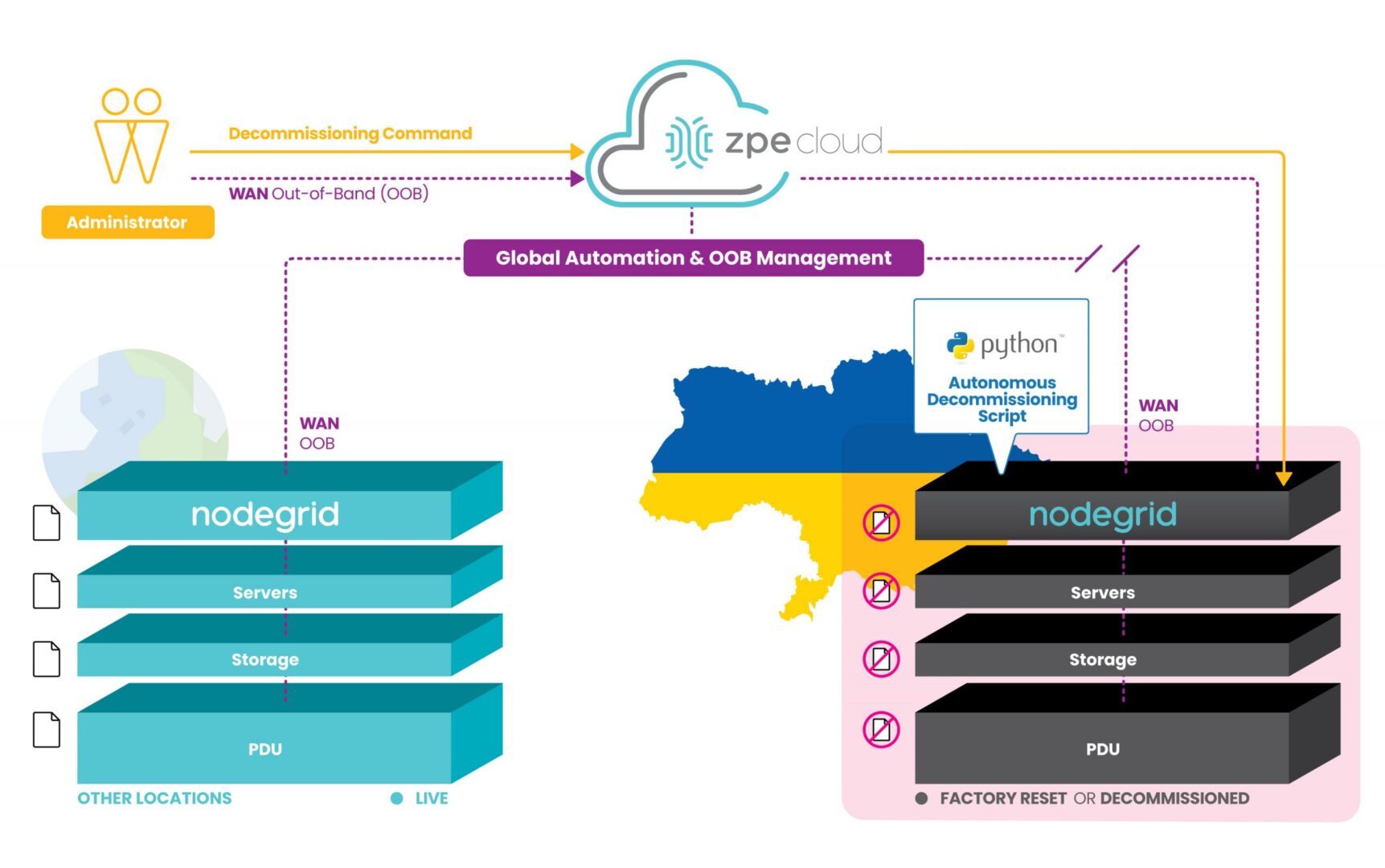
However, ZPE’s customers are currently using our programmable out-of-band infrastructure for this exact use case. It’s being called ‘autonomous decommissioning’, and it combines network automation with manual commands to essentially perform the inverse of launching network sites. This process is being used to protect IP and personal identifying information from falling into the wrong hands.

How does it work?

With our generation 3 serial consoles and services routers co-located at data center and critical edge locations, customers are able to connect all of their equipment to the out-of-band network. Receiving pingbacks at regular intervals from HQ signals that all is well at these sites.

Due to instability in the region, some sites are becoming compromised and cut off from HQ. When this happens, the infrastructure goes into disaster decommissioning mode, and ZPE’s devices serve as on-prem automation workers which help remote IT admins to begin wiping the entire infrastructure.

Autonomous decommissioning network diagram

These devices are hooked into every piece of equipment, and they’re able to receive automated scripts and manual commands from remote admins to push decommissioning tasks to all connected gear. The ZPE device is then able to have its own configuration wiped and returns to its initial ‘seed of life’ mode, in which it awaits further instructions until the connection is restored to HQ. Once this connection is restored, Nodegrid waits for instructions to rebuild the infrastructure following the immutable infrastructure framework.

This autonomous decommissioning prevents data from being stolen by adversaries. By wiping all data and returning to its seed-of-life state, it also keeps the environment’s configurations secure. That’s because the devices no longer contain any configuration information once they’ve been wiped, and configurations can only be restored once an authenticated connection is reestablished with HQ.

Check out a live demo at ONUG!

See how to automate without anxiety to combat cyberattacks. Join us Thursday, April 28 at 11:10am EST at ONUG for a live demo. Click here to register or get your free virtual pass.

Nodegrid OS Version 5.4 New Features

See the new features in Nodegrid OS v5.4

Watch this video to see the new features in the latest release of Nodegrid OS, version 5.4. Sales Engineering Manager Rene Neumann shows you how to use the newest features, and gives you a look at Nodegrid OS’s added support for:

  • Nodegrid Hive SR
  • Out-of-band and gateway profiles
  • Software & security updates
  • Gen 3 out-of-band improvements
  • Networking, ZPE Cloud, & SD-WAN improvements

Watch the walkthrough now. If you have questions or would like a deeper dive, reach out to techdemo@zpesystems.com.

What Makes a Gen 3 Serial Console?

NSCPDDC

The Gen 3 serial console is the latest innovation in out-of-band management.
But what exactly is it, and where did it come from? In this post, we’ll briefly cover the basics of serial consoles and why you need them, and then dive into the evolving needs that brought about the Gen 3 serial console.

What is a serial console?

A serial console is a multi-port device that you connect to the console port of other devices. This allows you to gain management access to each device via one serial console, instead of having to individually connect to each separate device.

If you have a data center or other location with lots of IT equipment, a serial console is a must-have. It doesn’t just give you convenient access to your device stacks; the serial console is also a foundational component of out-of-band management. Out-of-band means having a completely separate network that you can use to manage your equipment, instead of having to rely on your main production network.

Why do you need out-of-band management?

Imagine relying on your production network to troubleshoot and manage your device stacks. This jeopardizes your security since it exposes you to any bad actors lurking on your network, and significantly increases this risk if directly connected to the Internet. Security risks aside, how are you going to remote-in to a server or router if your network suddenly goes offline?

With out-of-band, you have a management network that’s completely separate from your production network. This drastically shrinks or eliminates your exposure to threats, and also lets you access your assets even if there’s a main network outage. If a server needs to be rebuilt or a router needs to be power cycled, out-of-band lets you gain access through your serial console to perform these tasks independently of your production network.

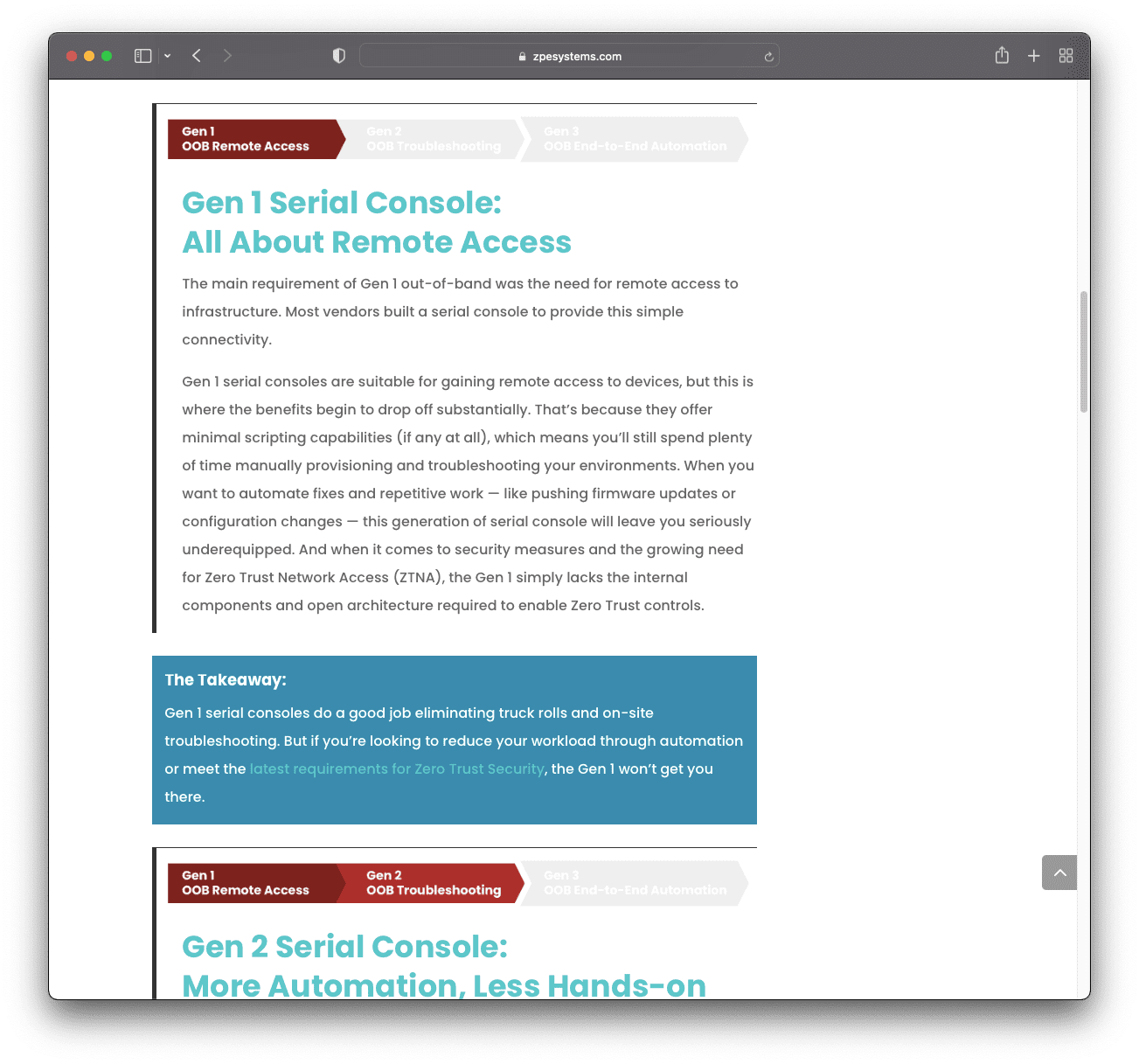
Out-of-band has been around for a couple decades, and is now going through another evolution in which its requirements are changing. We’ll cover these evolving needs in the next sections, but here’s a quick breakdown to give you an idea:

ZPE – Serial Console Gen
Each generation requires a serial console that brings additional capabilities to network management. Now let’s take a look at these evolving needs, starting with Gen 1.
Gen1

Gen 1 Serial Console:
All About Remote Access

The main requirement of Gen 1 out-of-band was the need for remote access to infrastructure. Most vendors built a serial console to provide this simple connectivity.

Gen 1 serial consoles are suitable for gaining remote access to devices, but this is where the benefits begin to drop off substantially. That’s because they offer minimal scripting capabilities (if any at all), which means you’ll still spend plenty of time manually provisioning and troubleshooting your environments. When you want to automate fixes and repetitive work — like pushing firmware updates or configuration changes — this generation of serial console will leave you seriously underequipped. And when it comes to security measures and the growing need for Zero Trust Network Access (ZTNA), the Gen 1 simply lacks the internal components and open architecture required to enable Zero Trust controls.

The Takeaway:

Gen 1 serial consoles do a good job eliminating truck rolls and on-site troubleshooting. But if you’re looking to reduce your workload through automation or meet the latest requirements for Zero Trust Security, the Gen 1 won’t get you there.

Gen2

Gen 2 Serial Console:
More Automation, Less Hands-on Troubleshooting

With admins and engineers able to remotely access their infrastructure, it became natural to wonder, “What added features could make the job easier?” This brought about a new set of out-of-band requirements focused on automating troubleshooting, and the Gen 2 serial console was born.

The Gen 2 features the same remote access capabilities as its predecessor, but brings more value to troubleshooting by expanding the automation toolkit. This serial console generation enables scripting and automation for more than just basic tasks. For example, if your servers were manually installed and configured but you recently discovered a bug, the Gen 2 allows you to script a fix and automatically push a new bug-free configuration across the environment. On the more advanced side, you could automate provisioning, feature delivery, and device recovery — but only if you have the right amount of resources and tenacity at hand.

Although Gen 2 serial consoles offer more automation capabilities than Gen 1 devices, most vendors limit how far you can extend your automation. Many of these serial consoles feature closed architecture that integrates only with specific vendor devices or APIs, meaning your automation eventually stops at some point. They also require you to learn certain programming languages like Python, or support only a limited set of workflows or Ansible playbooks.

On top of this, many claim to have added security features, but this can give you a false sense of security. Some use the Trusted Platform Module (TPM) but don’t properly integrate it, leaving you without a secure root of trust that makes you vulnerable when implementing new hardware and software. Vendors also often stop supporting their devices after a few years, meaning you don’t get an updated OS or the latest security patches.  Because Out-of-Band devices have access to your entire production environment, an adversary can take over of our OOB also gives them access to your in-band systems and ultimately your business.  Therefore the correct security implementation is even more important requirement in OOB deployments as it has a major impact on business continuity. 

The Takeaway:

Gen 2 serial consoles help you with remote troubleshooting and can reduce some of your manual work through automation. But if you strive to maximize uptime, site reliability, and security, the Gen 2’s rigidity and vendor lock-in will only hold you back.

Gen3

Gen 3 Serial Console:
End-to-end Automation, Security, and Control

Many enterprises realize that Gen 2 serial consoles don’t provide the flexibility for them to automate what they need to. There’s growing business demand for availability (i.e. everything needs to work 99.999% of the time), and also more attack vectors that hackers can exploit. In short, the network simply needs to work — from installation through refresh. That’s why we worked with many enterprises and the world’s tech giants to gather the latest out-of-band requirements and create a blueprint for the Gen 3 serial console.

The Gen 3 serial console comes with beefed-up capabilities in remote access and automation, along with added layers of security that enable true ZTNA. Here’s how this serial console meets Gen 3 out-of-band requirements:

Full Pipeline Automation

The Gen 3 serial console helps you minimize human intervention using full pipeline automation. This can only be achieved using an open architecture and rich API libraries. With a Gen 3 serial console, you can automate deployments with Ansible, Chef, Puppet;  run own own tools in VM, Docker or Kubernetes; create complex workflows using any APIs you need; and interoperate with other systems in your enterprise ecosystem.  Gen 3 addresses the requirements for Immutable infrastructure and NetDevOps.

The Takeaway:

Gen 3 lets you automate what you need not just what you can, without vendor lock-in getting in your way. You can use your existing expertise along with human-readable commands, instead of having to learn new programming languages and skills. Faster response times and fewer failures makes it easier to achieve 99.999% availability or more.

Enterprise-grade Security

The same ZTNA principles need to apply to the OOB infrastructure both at HW, SW and management level.  Gen 3 system have enterprise-grade security features like UEFI secure boot, encrypted disk, properly implemented TPM 2.0 security, and ongoing swift patches. These give you a sturdy foundation on which to build your automation, so you can maintain a secure root of trust, segment your network, and integrate the variety of Zero Trust controls you need.

The Takeaway:

Gen 3 security seals backdoor vulnerabilities by checking the integrity of hardware and software that you integrate. Its open architecture also allows you to implement Zero Trust policy tools, Identity and Access Management solutions, and safeguards of your choice.

In-depth Remote Control

Gen 3 serial consoles enable out-of-band that gives you complete access to all connected equipment. This includes the typical servers, switches, and routers, but also PDUs, IPMI devices, environmental sensors, and other physical or virtual assets. The Gen 3 can host all the tools your automation needs for virtual remote presence and also serve as your crash cart when humans want to log in.  Centralized cloud management and out-of-box playbooks also helps Gen 3 enable true zero trust provisioning of entire environments.

The Takeaway:

Gen 3 enables remote out-of-band control of your entire infrastructure, as if you were physically at each location. And it serve as the right device for your automation journey by being the first device in the rack as the bootstrapping target, and also as your crash cart for automated or manual troubleshooting and management beyond Day 0.

Access our trade-in program and switch to Gen 3


Our trade-in program gives you money back for every device you trade in. If you have devices from Avocent, Cisco, Opengear, or other vendors, you can benefit from upgrading to Gen 3 through this program:

  • Get money back for every device you trade in
  • Improve uptime and cut workloads with Gen 3 out-of-band remote access and automation
  • Bonus: Get access to ZPE Cloud for intuitive, browser-based global fleet management

Network Field Day 27

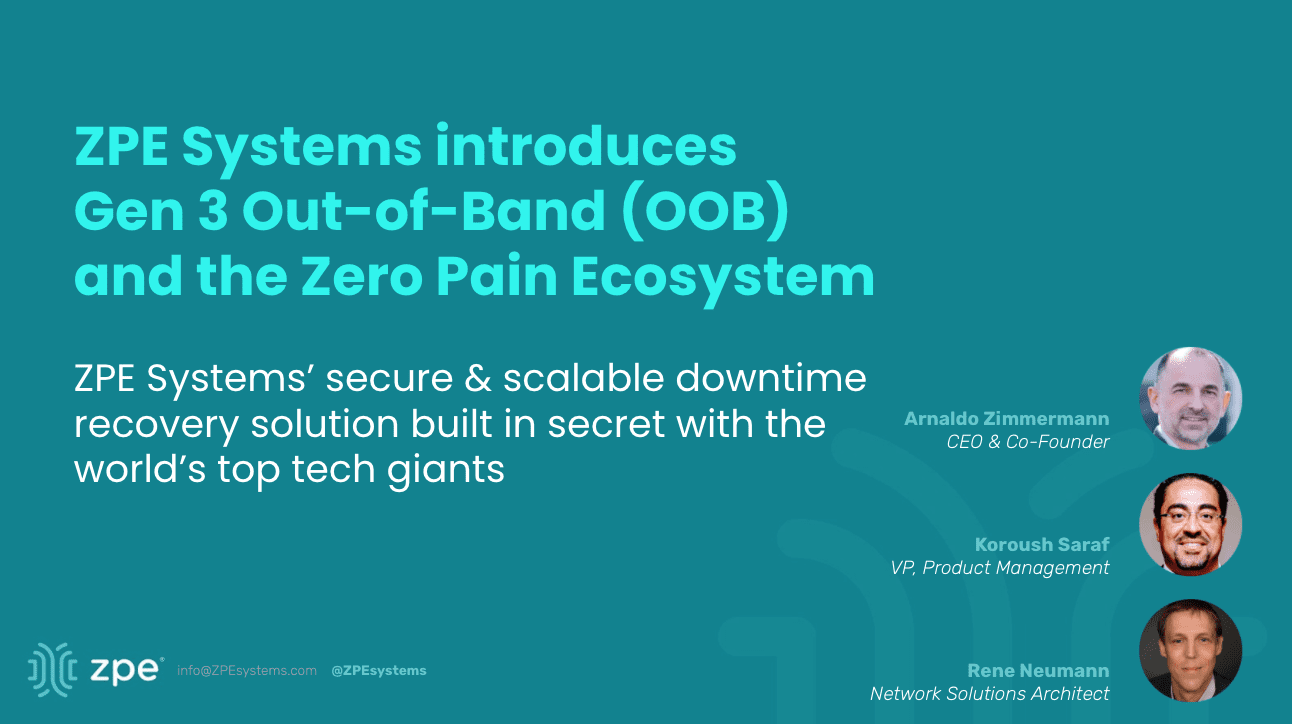
Download our Networking Field Day 27 Presentation

Check out the blueprints for Gen 3 Out-of-Band, our Zero Pain Ecosystem, and real customer deployments — all built in secret with tech giant’s to maximize resilience and minimize downtime.

NFD27 Overview

Agenda:


Problems that led ZPE to develop the Zero Pain Ecosystem

Explore the gaps in existing solutions and the downtime-inducing issues that inspired development of our Zero Pain Ecosystem. See ZPE’s core elements that enable the world’s largest enterprises to improve network reliability, address personnel & expertise shortages, and strengthen weak security postures. Learn about the latest Gen 3 requirements and see the blueprints for implementing the Zero Pain Ecosystem in data center, campus, colocation, branch, and edge environments.


How ZPE customers use Gen 3 OOB to automate remote critical infrastructure and edge networks

See how ZPE transformed critical data center infrastructure for tech giants, and extended this technology to enable the same openness, security, and scalability for remote critical infrastructure. Explore modern use cases for Gen 3 OOBI, end-to-end automation, NetOps / NetDevOps, next-gen SD-Branch gateways, and AIOps.


Demo No. 1: Hands on with Gen 3 OOB to resolve edge operational challenges

Live demo of a real customer deployment. We will remotely demo an IT admin in Europe managing infrastructure as if they are virtually present in California. Including connectivity, security, automation of critical edge infrastructure.


Demo No. 2: Go beyond standard OOB and explore the automated Zero Pain Ecosystem

Demo 2 goes beyond the standard of remote access. ZPE will show the open ecosystem that makes IT wishes come true by enabling flexible automation & orchestration by Zero Touch/Zero Trust Provisioning, and open 3rd party orchestration stack as well as 3rd party tools like Rumble scanners, pen testing, and automation playbooks.

Liked what you saw?

Check out our other Network/Security Field Day Presentations

Networking Field Day 26

  • Introduction to ZPE Systems
  • Global Data Center Infrastructure Management & Orchestration with ZPE Systems
  • Deploying & Managing Critical Remote Edge Infrastructure with ZPE Systems Nodegrid
  • Tour ZPE Systems’ Nodegrid and ZPE Cloud

View the Networking Field Day 26 Presentation

Security Field Day 7

  • ZPE Introduction: Why Cybersecurity for Enterprise Can’t Be Solved By One Vendor
  • ZPE Demo: Immutable Principles of Branch Deployment
  • ZPE Demo: Zero Pain Ecosystem – Launching Security Apps from ZPE’s Cybersecurity Platform

View the Security Field Day 7 Presentation