Providing Out-of-Band Connectivity to Mission-Critical IT Resources

Home » Improve Network Security » SD-WAN » Page 9

Benefits of SD-WAN for Hybrid Cloud Infrastructure

Cloud,Computing,Digital,Information,Data,Center,Technology.,Computer,Information,Storage.
Hybrid cloud—using a combination of public and private clouds to host your data, applications, and services—is one of the most popular enterprise infrastructure models. According to Flexera’s 2021 State of the Cloud Report, 82% of enterprises have a hybrid cloud infrastructure. However, the hybrid model comes with some unique networking challenges, including:

  • Orchestrating WAN (wide area networking) connections across multiple clouds
  • Optimizing network performance between sites
  • Securing WAN connections without impacting performance or productivity

SD-WAN, or software-defined wide area networking, addresses many of the inherent challenges of hybrid cloud computing. SD-WAN separates the control and management processes from your underlying WAN hardware and virtualizes them as software or script-based configurations that you can easily and automatically deploy.

SD-WAN is usually a cloud-based service that provides centralized orchestration and management, so you can control your entire WAN architecture (including hybrid cloud, multi-cloud, and branch office infrastructure) from behind one pane of glass.

Let’s examine the benefits of SD-WAN for hybrid cloud infrastructure by discussing how SD-WAN addresses the biggest challenges you face in a hybrid cloud environment.

Benefits of SD-WAN for hybrid cloud infrastructure


1. Orchestrate WAN infrastructure across clouds

SD-WAN addresses the challenge of orchestrating WAN connections across a hybrid cloud architecture by virtualizing control and management processes and separating them out from the underlying infrastructure.

Often, your different clouds will also have different levels of administrative authority, meaning your administrator user role may not give you the same level of control over networking on each platform. In addition, your disparate providers may offer varying degrees of visibility into your WAN connections to their service. Plus, you may need to use multiple types of WAN circuits (MPLS, broadband, LTE, etc.) to reach your different clouds. This can make it challenging to employ network automation (much less orchestration) because you have to tailor your scripts and configurations to each WAN link to accommodate these inconsistencies.

With SD-WAN, you get complete control and visibility over your entire WAN architecture, across all your public and private clouds, from one cloud-based platform. Since your management processes are decoupled from the underlying hardware, you can manage all your WAN circuits from one location regardless of type. This decoupling, or abstraction, also means you’re not reliant on vendor-provided tools for managing and monitoring your WAN connections to their service.

In addition, you can apply consistent, role-based access policies to all your WAN connections, so your network administrators have the same level of control across your entire environment. SD-WAN facilitates orchestration by giving you comprehensive and consistent control over your hybrid cloud WAN infrastructure.

SD-WAN provides centralized, vendor-neutral orchestration of WAN deployment, lifecycle management, performance optimization, and issue remediation so you can efficiently manage your hybrid cloud infrastructure.

2. Optimize network performance between sites

Another common issue with hybrid cloud infrastructures is maintaining the speed and performance of WAN connections between your enterprise and your public and private cloud providers, even though you may be using completely different circuits or appliances. SD-WAN overcomes this issue in multiple ways.

  • First, SD-WAN gives you full visibility into every part of your WAN architecture, which means you can monitor performance across your entire hybrid cloud infrastructure to ensure consistent speed and availability at every site.
  • Second, SD-WAN uses network optimization features like application awareness and guaranteed minimum bandwidth to optimize connections to your most critical applications and services automatically.
  • Third, SD-WAN provides an on-ramp to SASE, or Security Access Service Edge. SASE gives you a way to separate out your remote, cloud-destined traffic from your branch locations or work-from-home employees and route it through a separate, secure connection directly to the public or private cloud resource. SASE with SD-WAN eliminates the need to backhaul this network traffic through a firewall on your enterprise network, reducing bottlenecks and improving network performance for remote and on-premises systems.
  • Fourth, and most importantly, SD-WAN offers true hybrid cloud WAN orchestration, which means much of the work of optimizing your network performance between sites happens automatically. Your network engineers don’t need to manually monitor, troubleshoot, and optimize WAN traffic because your SD-WAN solution does all of this in a faster, more precise, and ultimately more efficient way.

SD-WAN offers the ability to monitor and maintain WAN performance through automation, and provides an on-ramp to cloud-focused security and networking solutions like SASE. In this way, SD-WAN makes it possible to orchestrate and optimize network performance between your clouds.

3. Provide secure and efficient connections to hybrid cloud services

As mentioned above, SD-WAN provides an on-ramp to SASE, which applies advanced security features to remote, cloud-destined traffic, so you don’t have to backhaul it through your main data center.

SASE takes an entire cloud security technology stack—including things like firewall as a service (FWaaS), cloud access security broker (CASB), and zero trust network access (ZTNA)—and rolls it up into a single cloud-based service or platform. SASE uses SD-WAN technology to separate out the WAN traffic destined for other cloud locations, and then routes it through this cloud security platform before sending it to its intended destination. This allows you to apply enterprise security policies and controls to your remote, cloud-destined traffic, keeping both your users and hybrid cloud services more secure.

SD-WAN provides the application-aware routing that’s necessary to intelligently detect and route this remote, cloud-destined traffic through your SASE security stack. That’s how SD-WAN provides your remote and branch office users with secure and efficient connections to your hybrid cloud services.

SD-WAN improves WAN technology by abstracting the management and control functions as software, giving you a central platform to orchestrate your entire WAN architecture. The benefits of using SD-WAN for hybrid cloud infrastructures involve solving three of the biggest challenges inherent in this type of deployment—orchestrating across multiple WAN circuits and clouds, optimizing network traffic between sites, and securing these connections without impacting performance.

Deploy SD-WAN in your hybrid cloud infrastructure

SD-WAN technology provides many benefits in hybrid cloud infrastructure, but you need to choose the right solution to manage and orchestrate your architecture. For instance, ZPE Cloud offers one centralized platform to manage your entire hybrid cloud infrastructure. In addition to a secure, intuitive SD-WAN orchestration solution, ZPE Cloud integrates with top SASE providers like Palo Alto Networks so you can consolidate your hybrid cloud infrastructure management behind one pane of glass.

Unlock the benefits of SD-WAN for hybrid cloud infrastructure with ZPE Cloud.

Contact us today or request a free demo.

Contact Us

How to Implement Zero Trust: Technologies to Shield You From Million-Dollar Losses

Staff on laptop with zero trust security in place.

How to implement zero trust security is a growing focus of organizations across the globe. With cyber attacks frequently hitting some of the largest companies and threatening entire economies, it’s no wonder why comprehensive network security is a top priority among public- and private-sector entities.

In this post, we’ll show you what you need to implement zero trust security, from big-picture items to individual technologies.

But first, here’s a recap of zero trust security and why your business won’t be safe without it.

Why you need Zero Trust Security

Imagine bringing in a new hire to your department. Soon after, you notice suspicious computer slowdowns and applications that don’t respond as usual. You dive into your program files and discover an unknown .exe file, and you dive deeper to discover attackers actively exploiting your resources. You quickly pull your team together to lock down your network, sanitize every computer and connection, and send out a company-wide instruction to have every employee reset their password.

It turns out, your newest employee unknowingly clicked a bad link and opened the door for a trojan horse attack. But because of your quick response, no significant damage was done and you can rest easy again.

Months later, you come in for your normal workday only to find all your systems locked and unresponsive. Dave, a senior engineer, retired on the day of the attack and never reset his password. The hackers stole his credentials and have gone unnoticed for months. Now your company and its customers are compromised, and the consumer markets you serve are in a frenzy due to a shortage of goods. You can’t help but feel somewhat responsible for the entire ordeal.

This example mimics recent real-world cyberattacks and highlights the importance of moving away from traditional security approaches.

Traditional architecture uses the castle-and-moat security approach. Once a user gains access (crosses the moat), they become trusted to use your organization’s resources (the castle). Aside from the occasional password reset or other authentication protocol, this approach leaves plenty of opportunities for outsider and insider attacks. Zero trust security, however, places a moat around every node and user. This means that no matter how often a system or user needs to access a resource, they always have to verify their identity and intent.

In other words: never trust, always verify. In our example above, implementing simple two-factor authentication could have alerted Dave to his stolen credentials, which would have prevented the attack.

The need for zero trust is due to the explosion of distributed networking. Communications used to be straightforward and centralized: a trusted user using a trusted device would connect from a trusted office location to the data center. Apps and data were securely transmitted between parties, and sealing out attackers could be as simple as deploying a new point solution or product. But user expectations changed all this; now, they need to connect from anywhere using a variety of devices, which means the modern network includes SaaS, cloud, and third-party platforms. This hybrid infrastructure means there are now more nodes and lines of communication than ever — and each is vulnerable to attack.

If the recent attacks on SolarWinds, Microsoft Exchange, and Colonial Pipeline aren’t convincing enough, consider the latest hack involving Kaseya, an American company that specializes in IT and network management software. By exploiting the virtual systems/server administrator (VSA), attackers were able to compromise up to 1,500 of Kaseya’s customers, shutting down educational services, law firms, and an outpatient surgical center in South Carolina.

Pervasive attacks like these have prompted political action, with the President signing a cybersecurity executive order this past May. Read our breakdown of the legislation and how it aims to improve cybersecurity across public and private sectors.

Now that you know why you need better security, how do you implement zero trust?

How to implement Zero Trust: The big picture

Zero trust is merely a concept, however implementing Zero Trust Network Access (ZTNA) means putting this concept to work. Implementing ZTNA involves two parts:

  • The processes, which we covered in a previous post, and
  • The technologies, which we’ll talk about in this post

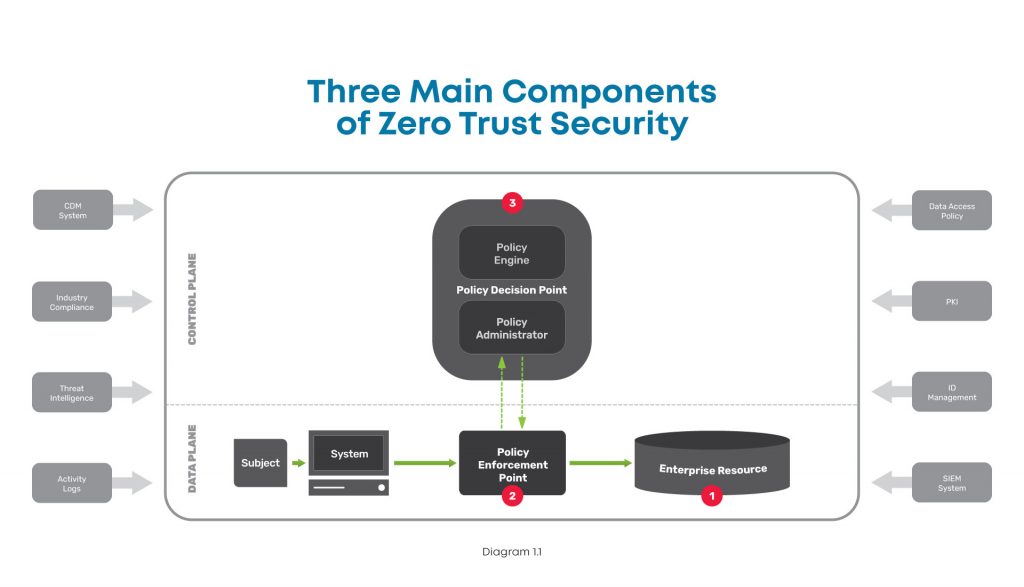
At a high level, this diagram shows the components you need when considering how to implement zero trust.

A high level diagram of the three main components of zero trust security, including the enterprise resource, policy enforcement point, and policy decision point.

There are three major components to look at in the big picture of zero trust security:

  1. Enterprise resource — This includes all the IT stuff you need to protect and that your business relies on, like hardware, software, and network equipment. In simple terms, this is like the gold that you keep carefully guarded in the center of your castle.
  2. Policy enforcement point — This is the datapath element that enables, monitors, and terminates connections between users / devices / applications and enterprise resources. Simply put, this is like the guard that accompanies those wishing to access your gold.
  3. Policy decision point — This is the layer that decides who / what is safe and grants / revokes access accordingly. In other words, this is the gatekeeper who determines who is allowed into your castle.

To better understand these, here’s a closer look at each:

Enterprise resource

This component is pretty straightforward, and consists of elements you need to operate and manage IT environments. These elements can include hardware like computers and data storage devices; software such as web servers, content management systems, and operating systems; and network equipment like servers, routers, firewalls, and out-of-band devices.


Policy enforcement point

This component consists of the datapath elements that enable, monitor, and terminate connections between subjects (users / devices / applications) and your enterprise resources. Though this is represented as one component, it is comprised of two parts that are both typically used in deployments. These parts are:

  • A client-side agent, usually deployed on a laptop or server.
  • A resource-side gateway, which controls access in cases where a client-side agent is not used. Examples where gateways are used include regulated healthcare equipment, ATM machines, and operational technology equipment.


Policy decision point

This component is the management and orchestration layer. This layer essentially checks identities to verify who is safe, and assigns policies to determine who gets access and to what. This is also represented as one component but is comprised of two parts:

  • Policy engine — This is the engine that decides whether a machine or web traffic is safe. To accomplish this, the engine uses a variety of data sources when making its determination, such as PKIs and identity management providers, CDM systems, and activity logs.
  • Policy administrator — This administrator uses the policy engine’s determination to grant or revoke access to a machine or web traffic.

There are many tools available to help you monitor and visualize traffic, so you can create policies and configure your policy decision point to meet your zero trust outcomes.

In order to create your zero trust configuration, you need to deploy several essential technologies.

How to implement Zero Trust: Essential technologies

Zero trust is a complete re-imagining of network security and can be a daunting task. But when you add its fundamental technologies to your toolkit, you can effectively build the three components described above and achieve Zero Trust Network Access (ZTNA). Here are the essential technologies you need to accomplish this.


Identity and access management

Such a big part of zero trust security relies on verifying that a device or user really is who they say they are. For this, you need an identity management solution from a trusted provider and public key infrastructure (PKI). This allows you to essentially create and issue a digital fingerprint for every user, and includes information such as their username, role, and other unique data. Multi-factor authentication is a critical component of identity verification, which requires users to present two or more pieces of identification/verification before granting access.

Additionally, access management is an important piece that determines a user’s authorization level, or in other words, which resources they can access. Identity and access management both feed information into your zero trust model’s policy engine.


Policy management

Another essential technology to have is a policy management solution. This is integrated into your security stack and serves as a single policy creation point. This allows you to define access and authentication policies for your entire organization.

You can specify data access rules for users, devices, and roles, which is vital to achieving micro-segmentation, limiting lateral movement, and enforcing least-privilege access. All of these feed into your policy engine and are used by your policy enforcement point to validate whether a session is allowed to continue.


Zero trust equipment and applications

Tying everything together requires equipment and applications that are able to enforce your policies. These are physical or virtual solutions that sit in front of servers and serve as your enforcement points. For example, this could be your next-gen firewall (NGFW) that initiates the multi-factor authentication protocol, verifies a user’s identity, and uses your defined policies to restrict the user’s access to a specific segment of your network.

Where can you get these essential Zero Trust technologies?

When considering how to implement zero trust, keep in mind that there are many vendors who can provide you with the essential technologies.

  • Obtaining an identity and access management solution is the easiest task when implementing zero trust. Many organizations offer an identity store, such as Azure Active Directory or Google Cloud Identity. You can also use companies dedicated to identity management, such as Duo, Okta, or Ping Identity. Keep in mind that if you need to control third-party access, such as for customers or equipment management contractors, you’ll need a solution that can access multiple identity stores simultaneously.
  • Obtaining a policy management solution requires careful consideration and should be part of your overall security stack. Look for a solution that allows you to create policies and set up datapath enforcement points. An adequate framework enables you to create authentication and post-authentication access rules, with an enforcement point that segments your network and continuously authenticates sessions. This security stack can be an on-prem NGFW, or delivered via the cloud using a Secure Access Service Edge (SASE) model, both of which are available from trusted providers like Palo Alto Networks.
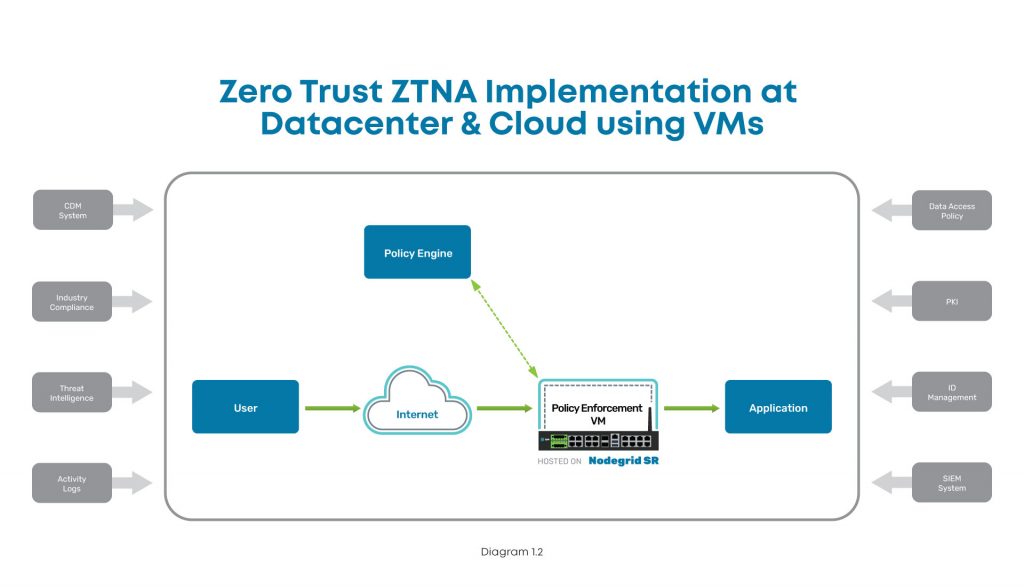
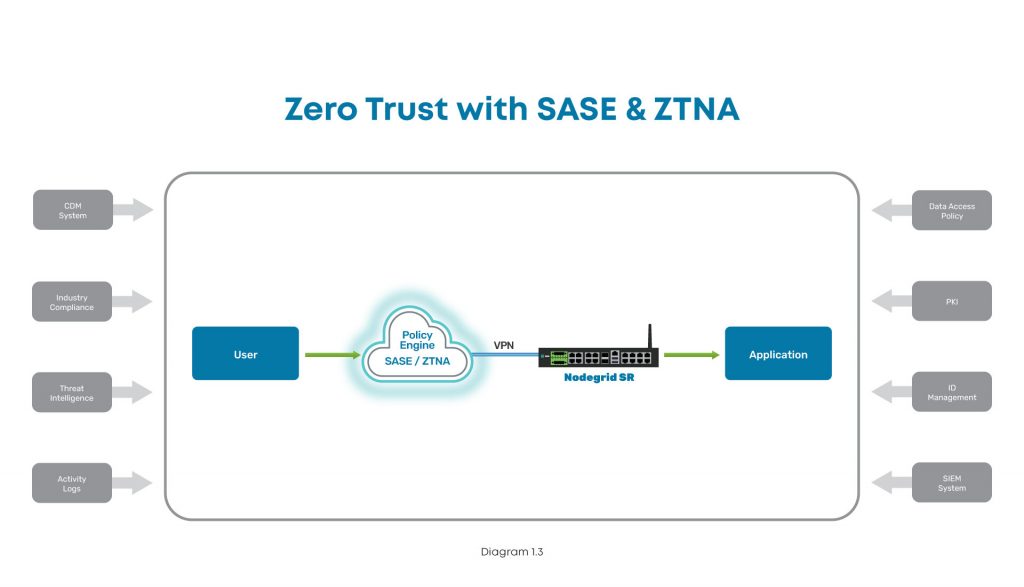
  • Regardless of whether you use an on-prem or SASE model, you need an edge infrastructure platform to sit in front of servers and host the enforcement point. For on-prem, this platform must be able to host an NGFW to secure network segments and VLANs. For SASE, this platform must be able to create VPN tunnels to your SASE platform, which can be used for inline inspection and policy enforcement. Either approach requires powerful computing capabilities and a flexible operating system to accommodate workloads for detecting, analyzing, and automatically responding to threats, which few vendors offer.

Here are examples of what proper zero trust implementations look like, with ZPE Systems’ Nodegrid as the edge infrastructure platform:

Implementation diagram showing how to implement ZTNA at the data center using Nodegrid.

In this diagram, you can see where ZTNA and Nodegrid fit into the scheme at the data center. The user connects via Internet, and the Nodegrid SR device serves as the Policy Enforcement Point hosting a VM. This VM communicates with the Policy Engine to authenticate the user, and then grants access to the data center application.

Implementation diagram showing how to implement ZTNA at a branch, edge, or other distributed location.

In this diagram, the user tries to connect to an application at a branch, edge, or other distributed location. The user connects via Internet, where SASE and ZTNA provide secure connectivity. The Nodegrid SR device connects via VPN to the Policy Engine for authentication, and then grants access to the branch application.

How to implement Zero Trust: A recap

To protect your organization, implementing zero trust requires you to build out the main components. With the policy decision point and policy enforcement point in place, you can secure your enterprise resources from outsider and insider attacks. Ensuring these components work like a well-oiled machine means you need the proper identity and access management tools, a complete policy management solution built into your security stack, and equipment and applications that can enforce your zero trust security policies.

Because user expectations have caused infrastructure to become incredibly distributed and complex, the attack surface has increased dramatically. The traditional castle-and-moat approach to security is no longer adequate, and recent newsworthy cyberattacks showcase the network vulnerabilities that even the largest companies still struggle to address. The President’s latest cybersecurity executive order is a step in the right direction to bolster infrastructure protection for public and private sector entities, and you can use this blog as a starting point to begin your zero trust journey.

Don’t get caught without these 5 security must-haves

Watch our webinar, Cyberattacks: 5 Security Must-Haves for Hybrid Infrastructure Gateways, and learn how to lay a solid foundation that makes implementing zero trust easier. Our experts will talk you through how to:

  • Keep edge networks and users fully protected
  • Make smart buying decisions
  • Get complete security and control for years of serviceability

Watch now to protect your business from growing cybercrime.

SASE vs Security Service Edge: What’s the difference?

Employee tapping into cloud services such as security service edge

Security Service Edge. Is it just another fancy networking term? After all, we’ve already got SASE (Secure Access Service Edge), so why throw another buzzword into the mix?

The truth is, there’s a big difference between Security Service Edge (SSE) and SASE. SSE is a foundational element of SASE, but there’s another necessary component you need to be aware of. In this article, we’ll break down the differences between these two acronyms so you can understand how to achieve better security for your distributed users and devices.

But first, let’s quickly recap why networking and security have become decentralized.

Security Service Edge: An evolving need

The modern workforce is increasingly distributed. In fact, Gartner research shows that demand for remote work will increase 30% by 2030, as Gen Z fully enters the workforce. Another factor is the ongoing coronavirus pandemic, which has forced companies worldwide to accommodate off-site staff.

But the need for distributed networking goes back much earlier than the previous 18 months.

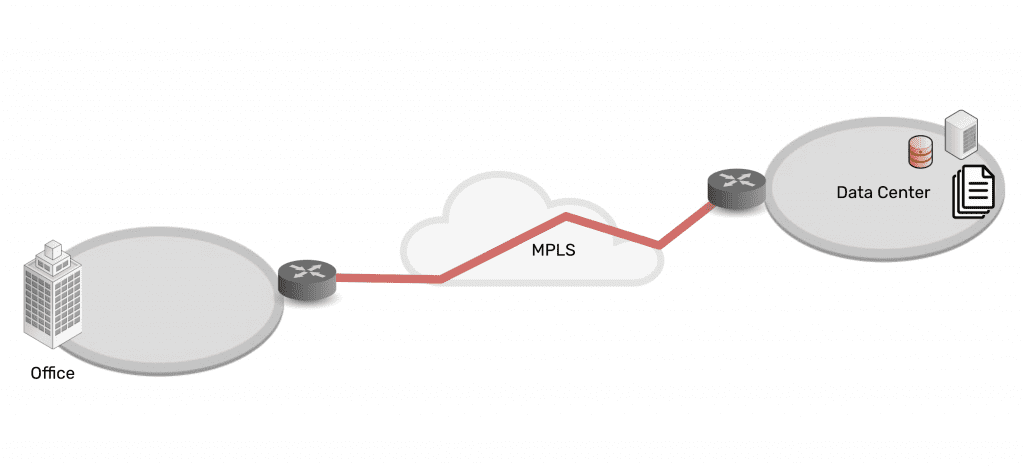
Connectivity and network architectures used to be simple. In the 1990s and 2000s, companies centralized data in the data center, connected branch offices to the data center, and set up simple security measures in between. Most staff worked from the office, which made it easy to provide secure access to and from these enterprise locations and resources.

Network architecture showing simplicity of data center connected via MPLS to branch office

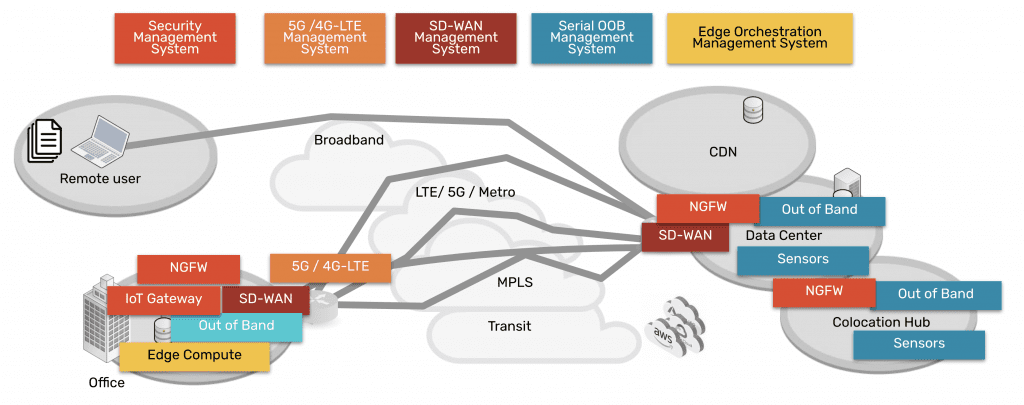
As technologies advanced, companies and their employees discovered that it was becoming easier to work outside of the office. Cloud, SaaS, and edge offerings emerged to create a hybrid infrastructure, as everything moved from being centralized to highly distributed. Now data, security, networking, and computing are everywhere and comprise a complex web of services — owned by enterprises themselves as well as third parties. Securing it all has been an impossible feat for more than a decade.

Network architecture showing complexity of data center, CDN, remote user, branch office, all connected via many paths

Fortunately, Security Service Edge and SASE are models that can address this challenge.

SASE vs Security Service Edge (SSE)

Security Service Edge is a main component of SASE. In the simplest terms, SASE is the architecture that organizations strive to build. It involves delivering networking and security via the cloud, directly to the end user, device, office, etc. instead of having to backhaul through the company’s data center. Aside from SSE, the other main component of SASE is the access portion, which allows the edge services to be deployed and managed. This access portion includes the physical hardware required to connect ‘network’ the edges and services.

Therefore, SASE breaks down into two main components:

  • Security Service Edge, and
  • Access

Keep reading for a detailed explanation of each and why they have been separated out into two pieces now.

Security Service Edge

Security Service Edge (SSE) is the security component of SASE. As Gartner states, SSE ensures secure access to the web, cloud services, and applications. SSE is delivered via the cloud and offers several capabilities, including threat protection, security monitoring, and data security.

Security Service Edge capabilities are available from companies who provide NGFWs (next generation firewalls), SWGs (secure web gateways), and CASBs (cloud access security brokers).

  • NGFWs: Next generation firewalls are implemented to not only secure networking components and services, but also to protect against modern threats that exploit weaknesses in applications.  This type of service secures all the traffic even traffic that’s UDP and also non web based applications including malware exploits.
  • SWGs: Secure web gateways are self explanatory. They are placed between the user and the web, serving as a gateway that provides secure access to the web. Basic functions of SWGs include blocking access to certain websites, preventing unauthorized transfers of data, and inspecting for malicious content.  As its name implies this type of service is limited to web traffic and is used in specific use cases.
  • CASBs: Cloud access security brokers are software that sit between cloud users and cloud applications, to monitor activity and enforce security policies. This software keeps a close eye on data as it moves between cloud environments, SaaS, and users, and enforces security policies to block malware, protect sensitive data, and maintain compliance.  This type of service also has a specific use case of only examining specific cloud applications as its name suggests.

Access for Security Service Edge

In order to use the capabilities of Security Service Edge, you need the physical hardware to deploy services at your locations. This hardware is the access component, and includes SD-WAN capabilities. When deployed, it connects your location to a variety of services (NGFWs, SWGs, CASBs mentioned above) in order to make those services available to your location.

SASE = Security Service Edge + Access

A simple way to think about the SASE concept and its components is to imagine a skyscraper.

Imagine SSE capabilities live in the clouds, and you’d like to bring them down to your enterprise. You’ve got the blueprints to build a skyscraper (SASE) that can connect you to these cloud-based capabilities. But before you can do any of that, you need a sturdy foundation (the access portion) on which to build it all. In other words, your investment in cloud services needs a solid access onramp to those services.

With the right access component, your employees can shuffle in and out of your skyscraper, and easily perform their job functions using SSE capabilities in the cloud. And if you deploy a more robust access solution such as ZPE Systems’ Nodegrid, you’ll be able to maintain your SASE architecture no matter how the clouds change.

How to implement SASE: Focus on Access

When you’re considering implementing SASE architecture, you might be inclined to go to a SASE company to buy everything. But Gartner states that companies that offer the two segments have more mature offerings. 

Therefore, you should focus on purchasing the right solution for the access portion, since it serves as the foundation of your infrastructure at the edge, and then marry this to the right SSE solution for your company. This separation of vendors gives you flexibility to manage several IT systems, and eliminates vendor tie in.

Nodegrid puts the Access in SASE

The Nodegrid SR family of edge routers serves as the access portion in your SASE architecture. A single Nodegrid SR device is a powerful, cost-effective solution to connecting sites to Security Service Edge providers.

The onboard Intel CPU and Linux-based Nodegrid OS offer speed and flexibility. Orchestrate freely across vendors to activate service licenses, spin up VMs, and get your SSE solutions up and running automatically. Additional RAM and storage also help you deploy edge computing for data thinning, de-duplication, monitoring, and other edge workloads.

On top of this, Nodegrid gives you out-of-band management capabilities so you can remotely manage your SASE architecture from anywhere. If you need to optimize bandwidth, investigate data logs for security, or simply power cycle an edge device, you don’t have to get out of your pajamas. Nodegrid gives you secure access to everything via your web browser.

To summarize, the reason SSE has been separated from SASE is that many SD-WAN vendors began to confuse the market by advertising that they offered SASE. This prompted Gartner to point out that there are security-savvy companies that give you more mature security solutions, and to consider such solutions from vendors like zScaler, Netskope, and Acreto, for example. Regarding the Access component, vendors like ZPE Systems provide more capable and robust solutions for connectivity to cloud services, when compared to SD-WAN companies that claim to offer SASE.

Don’t miss out on valuable SSE content. Make sure to sign up for our newsletter using the form below.

If you have questions or would like to speak with an expert, feel free to contact us.


3 Ways Your Critical Remote Infrastructure Is Costing You

It’s easy to imagine all the ways that downtime can throw a wrench into your critical remote infrastructure operations. Things like scaling, service outages, and tedious management are just part of the job. No matter how much these stand in the way of business, there’s not much that you can do about them, right?

Not quite. In this post, we’ll explore three reasons your complex critical remote infrastructure is costing you, and how Nodegrid is the simple solution that helps you save.

If you’re short on time, here’s a two-minute video explaining how you can cut through the complexity of managing your network.

Deploying critical remote infrastructure

You’re probably familiar with long deployment times for your critical remote infrastructure. Manually provisioning and setting up networks consumes a lot of time and resources. The obvious costs here are the staff wages and device shipping expenses; however, the not-so-obvious cost is the business opportunity that you miss. The longer it takes you to deploy, the longer your location goes without meeting demand or generating revenue.

How can you minimize this cost? By using zero touch provisioning.

Zero touch provisioning uses automation to automatically configure and build your networks. Instead of putting staff on site to manually set up each device in your stack, you can instruct even unskilled staff to simply plug in and boot your devices. Zero touch provisioning does the rest of the work and can bring you online in hours.

Not all zero touch provisioning is the same, though. Most vendors only allow you to use it for their devices or products, which means unless you standardize on their offerings, you’re going to be limited in terms of what systems and services you can automatically deploy. On top of this, you still need to pre-configure devices and put sensitive info at risk, as well as perform manual orchestration and firmware updates.

This is where Nodegrid sets itself apart. Because it features the vendor-neutral Nodegrid OS, it allows you to use your choice of automation tools as well as build custom scripts to orchestrate across devices and environments. This means you can use true zero touch provisioning that extends to every part of your infrastructure — from configuring end devices from different vendors, to bootstrapping VMs, activating service licenses, and setting up your entire network. It offers airtight security as well, because you can completely provision bare-metal devices via ZPE Cloud.

When it comes to your critical remote infrastructure, Nodegrid is your go-to solution for fast, complete, and secure network deployments.

Keeping critical remote infrastructure online

How often does your critical remote infrastructure go offline? When it does, you can suffer losses at a rate of $5,000 or more per minute, according to Gartner. And this only covers the monetary portion. You also need to consider the reputation damage, degradation of trust, and decreased customer satisfaction that result from sudden outages.

If you’re familiar with redundant solutions, you know that these can be a life saver — but on the other hand, they come with two times the number of solutions that you need to purchase, deploy, and manage.

You typically need to deploy two boxes for each function you wish to add redundancy to, and connect them in a high availability configuration. In other words, two firewalls, two routers, two SD-WAN boxes, etc. All this means the initial and ongoing burden of redundancy can be…off-putting.

However, Nodegrid devices feature a powerful hypervisor that allows you to deploy virtualized network functions (VNFs). The onboard, multi-core Intel CPU and Linux-based Nodegrid OS provide you with enough resources to spin up VMs, guest operating systems, applications, and Docker containers directly on Nodegrid appliances. Instead of spending tons of money on more devices that clutter your infrastructure and management efforts, you can host firewalls, virtual routers, SD-WAN solutions, and custom and third-party solutions on one box. You can easily shrink a redundant setup of six devices into two Nodegrid boxes.

Beyond covering your network services with redundancy, Nodegrid also gives you built-in 5G/4G LTE connectivity available via two and four SIM cards, respectively. You don’t have to worry about a main line outage taking down an entire office or store location. Nodegrid automatically switches to your backup cellular connections, so you can keep critical remote infrastructure online and operations running.

Responding to critical remote infrastructure problems

It can be difficult to manage critical remote infrastructure because it’s, well, remote. You may have store locations that are very far away from any skilled IT staff. Or you may operate in an industry such as utilities or oil and gas, where you have critical components distributed across power grids or offshore drilling platforms.

Unless you have a robust remote management tool in place, you’re losing time and money responding to problems. This also means the user experience suffers and is difficult to optimize.

For your business, the losses can start to pile up even before an issue is reported. Your efforts are pulled into managing and dispatching IT teams for on-site support, while users and customers put up with poor network performance or even complete outages.

But when you use Nodegrid and ZPE Cloud, you gain in-depth management capabilities that allow you to fully support your network from a distance. You can save significantly on operational costs by reducing or eliminating the need to roll support trucks. That’s because ZPE Cloud gives you a complete view of your distributed infrastructure, and gives you convenient remote access to manage all your solutions. Use your browser to securely connect without a VPN. You can instantly troubleshoot issues and even reboot devices from thousands of miles away.

Want more tactics to help you reduce downtime?

Watch our free webinar to see how you can cut downtime 50% or more using a Fortune 500 strategy.

Zero Trust Architecture: What to Know About the Latest Cybersecurity Executive Order and How to Implement It

Without a zero trust architecture in place, your business might suffer a setback of $4 million or more due to cybercrime. That’s how much the Colonial Pipeline recently paid out after hackers shut down their oil delivery infrastructure and held its restoration for ransom (reference at bottom). The reality is, this is just a drop in the bucket when it comes to risks and losses overall, but it’s why cybersecurity and zero trust are again in the national spotlight.

On May 12, the President acknowledged the importance of protecting public and private sectors from incidents like these, by signing an executive order to improve the nation’s cybersecurity. One of the order’s main callings is for organizations to adopt a zero trust architecture.

Zero Trust Architecture

 In this post, we’ll examine some goals of this executive order and how it seeks to improve cybersecurity for both public and private entities.

But first, let’s recap zero trust and why it’s critical to protecting more than just sensitive data.

What is zero trust architecture?

A zero trust architecture is made up of systems that verify every user, device, application, etc. that tries to access a business’ IT resources. In networking, this involves creating micro-segments or perimeters within each network, and continuously verifying who and what is granted access.

The philosophy behind zero trust architecture is fundamentally this: trust nothing, because threats are everywhere, always.

Here’s a brief rundown of zero trust’s guiding principles:

  • Always verify — Treat every user, device, application, etc. as untrusted, and always verify to determine access.
  • Deny by default — Assume that your environment is already under attack, and continuously monitor for anomalies and malicious activities.
  • Grant least-privilege access — Allow users, devices, applications, etc. access to only the minimum resources needed to perform their jobs.

Zero trust isn’t a turnkey solution, nor does it rely on a single technology. Instead, it involves transforming network security by taking a holistic approach to safeguard every network interaction. This includes implementing hardware, software, and virtual solutions built with security in mind — from Trusted Platform Modules (TPMs), to multi-factor authentication and user access rights — as well as transforming security processes in your organization.

For a closer look at zero trust architecture and its origins, read our previous post.

Does zero trust architecture matter that much?

Zero trust architecture is key to protecting both public and private sector organizations. Though it can be more difficult to measure how attacks impact less tangible things like public safety or brand reputation, the cybersecurity risks are apparent just by looking at monetary losses.

In 2020, cybercrime cost businesses and consumers billions of dollars in the United States alone. In California for example, total financial losses reported as a result of cybercrime totaled more than $621 million, with leading types of crime including phishing, extortion, data breach, identity theft, and misrepresentation, among others. Other states including Colorado, Ohio, and New York ranked with staggeringly high losses as well, which ranged from $100 million to over $400 million.

Aside from causing financial damages, cyberattacks can open the door to allowing very sensitive info to fall into the wrong hands, which can jeopardize public safety and economic stability. Just imagine what malicious actors could do with classified government information or access to public or private infrastructure.

  • In early 2020, the major IT firm SolarWinds was attacked by hackers using malicious code. They successfully created a backdoor to access information and systems belonging to 18,000 SolarWinds customers, which include Fortune 500 companies and government agencies. The attackers were able to spy on customers and infect even more with malware.
  • In early 2021, hackers attacked on-prem versions of Microsoft Exchange Server using zero day exploits (flaws that haven’t yet been patched by the vendor). They were able to access email accounts and install web shell malware that gave them ongoing admin access to victims’ servers. It’s reported that more than 250,000 organizations have been affected worldwide.
  • In May 2021, hackers gained access to the Colonial Pipeline and shut down oil delivery. For six days, the 5,500-mile-long pipeline was offline. Because it carries 45% of the fuel used on the U.S. East Coast, fuel prices skyrocketed before a $4.4 million ransom payment was made to unlock the compromised systems and restore fuel flow.

These attacks and others could have been prevented — or at least dramatically reduced through better containment — with zero trust architecture in place.

For example, if a hacker attempted to embed malicious code into a device, this device would already be trusted in a traditional network security model. This implicit trust would allow the malicious code to go unnoticed, giving the hacker remote access to sensitive information and systems. But with zero trust architecture, implicit trust is eliminated. In this example, the hacker might still be able to remotely access the device, but micro-segmentation would deny access to other devices, and continuous monitoring and analytics would alert company staff to the anomalous activity. In essence, zero trust would contain the threat and help the organization pinpoint the system that requires attention, without having to suffer potentially catastrophic losses.

For all of these reasons, comprehensive cybersecurity is a must-have for organizations. The President’s executive order aims to help catalyze the rapid adoption of better cyber protection methods such as zero trust.

What does the cybersecurity executive order do?

The Executive Order on Improving the Nation’s Cybersecurity seeks to improve protection for federal government networks, and in turn encourage private entities to do the same for their own networks. To achieve these goals, the executive order focuses on three major areas:

  • Removing barriers to threat information sharing Until now, contractual barriers often prevented companies from sharing information with the government about cyber threats that compromised their security. The executive order removes these barriers, and also requires companies to share information regarding security breaches that could impact government networks.
  • Bringing stronger cybersecurity standards to the federal government
    Systems have historically become compromised due to outdated security models and best practices. The executive order seeks to modernize cybersecurity for the federal government, through the adoption of secure cloud services, zero trust architecture, and multi-factor authentication and encryption. The order attaches a specific time period (see below) by which federal agencies must develop plans for implementing these approaches.
  • Improving software supply chain security
    Software is inevitably shipped with vulnerabilities that can pose significant danger of being exploited. The executive order combats this by establishing baseline security standards for software developed and sold to the government. The order calls for the creation of a pilot program for an ‘energy star’ type of label that will allow organizations to easily determine whether software has been created securely. Additionally, the order creates a concurrent public-private process to foster secure software development; incentivizes the market with federal procurement; and requires developers to maintain greater software visibility and make security data publicly available.

Specifically regarding zero trust, the order states that within 60 days, the head of each federal agency must develop a plan to implement zero trust architecture. The order also states that within 90 days, the Cybersecurity and Infrastructure Security Agency (CISA) must assist the Secretary of Homeland Security and the Administrator of General Services to develop a federal cloud-security strategy and issue appropriate guidance to government-wide agencies. In all, these efforts will modernize the federal government’s cybersecurity as agencies move to cloud services and require more comprehensive network protection.

With the federal government leading the charge, the President hopes that private sector organizations will follow by implementing their own zero trust architectures and best practices. The executive order encourages these efforts through additional steps and resources, which include:

  • Creating a review board— The order calls for the creation of a cybersecurity safety review board. This board will be responsible for analyzing cyber incidents and making concrete recommendations that will improve security.
  • Creating a playbook — The order requires the creation of a standard playbook for responding to cyber incidents. This playbook will ensure government agencies can take uniform steps to identify and mitigate threats, and will also serve as a template for private sector entities to create their own playbooks.
  • Enabling better detection — The order calls for enabling government-wide endpoint detection, response systems, and information sharing to improve detection of cybersecurity incidents on government networks.
  • Creating log requirements— The order calls for improving investigative and remediation capabilities, through the creation of cybersecurity event log requirements for federal departments and agencies.

How can you implement zero trust?

Remember that implementing a zero trust architecture isn’t as simple as deploying a piece of hardware or software. Because the threat landscape is constantly evolving, you need to take a holistic approach in transforming your security from the inside out. Despite the risks that seem to loom larger with every passing day and make you anxious to fortify your networks, keep in mind that achieving zero trust is a gradual process. Here are some tips to help you overcome common challenges:

Think processes

  • Implement gradually — Zero trust is a reimagining of your network security model, so you need to implement it gradually at the process level. This will help you identify what needs urgent attention while also preventing you from making widespread changes that can create security gaps.
  • Perform routine maintenance — From a security standpoint, your requirements are constantly changing (adding customers, adjusting user access rights, etc.). Routine maintenance ensures that you don’t leave vulnerabilities on your network when, say, a new customer requires user group access, or one of your employees moves to a different department.
  • Consider employee productivity — If you’re a little too ambitious to implement zero trust, you could end up causing issues that affect your employees’ ability to do their jobs. Again, take time to gradually implement your zero trust architecture, so that you don’t inadvertently lock out an entire department or blacklist the wrong mail server.
Think technologies

  • Zero trust equipment and applications — Without the right infrastructure components in place, zero trust is only an idea. Bring it to life by deploying equipment and applications that can enforce multi-factor authentication, verify identities, and allow access only as needed.
  • Identity and access management for all equipment — A critical component of zero trust is being able to determine who needs access to your infrastructure. Because you need to limit admission on a need-to-know basis, your design and security teams need the appropriate tools that will allow them to map user access, and also precisely identify users and applications.
  • Complete and cloud-enabled security stack — Gone are the days of simply plugging into firewall devices for total security. With cloud models and distributed networks and staff, you need end-to-end security offered by segmentation capabilities, and also solutions such as Secure Access Service Edge (SASE). These give you the ability to provide secure, least-privilege access, whether users try to connect from HQ or using airport Wi-Fi on another continent.
  • Infrastructure edge platform to isolate, and connect it all — In order to bring everything together and remain in control of your solutions, you need a robust and secure edge platform. Not only will this help you securely fuse together your zero trust architecture components, but it will provide you with protected out-of-band management of your infrastructure. A truly powerful edge platform will also accommodate additional workloads to help detect, analyze, and automatically respond to threats.

Get serious about these zero trust technologies

With cyberattacks on the rise, tomorrow is too late to start thinking about zero trust architecture. Recent executive action means it’s time to get serious about fortifying networks and the sensitive data they handle. Read our next post for a deeper dive into the technologies that can save you from crippling ransomware and malicious attacks.

ZeroTrust-1

Questions? Contact us with your concerns about zero trust or to see a free demo.

What Is the Network Edge, and How Do You Manage It? Watch Our Webinar

What is the network edge?

The network edge consists of systems that are not part of the data center. Think of a typical enterprise network: the data center is at the core, and then there are locations distributed across a market, area, or region, or even across the globe. These distributed locations are considered to be at the network edge, because they require infrastructure that connects them back to the data center and to the rest of the enterprise.

The network edge can cover everything from branch office locations, retail shops, and university campuses, to smart city infrastructures, factories, and faraway mining locations.

The network edge includes critical remote infrastructure

At the business-need level, the network edge must provide its customers with the appropriate experience. This can mean authenticating account info for ATM users, processing in-store transactions for shoppers, or providing real-time sensor readings to drilling crews. All of these require critical remote infrastructure to be in place.

Critical remote infrastructure includes the systems that can communicate with the data center, cloud, and/or other edge locations in order to provide the intended user experience.

Why is network edge infrastructure so important?

The network edge is part of the backbone of distributed enterprise. It’s what allows operations to happen quickly and efficiently outside of the data center. Having the right edge infrastructure in place means the difference between smooth operations that keep customers happy, and constant slowdowns and outages that hamper business growth or even lead to severe losses.

As an example, consider what can happen at a popular retailer’s newly-opened branch location. By using solutions that aren’t optimized for the edge, such as MPLS lines and many disparate devices, the customer experience can be very unresponsive. When it takes 20 minutes or more to check product availability, or several minutes just to process a purchase, the simple logistics slow down business and limit the amount of revenue that the day can bring. Even if shoppers don’t abandon their carts, slow infrastructure means slow business.

But with the right edge infrastructure in place, business changes dramatically. Processing tasks can be performed quickly at the edge instead of having to rely on slow MPLS lines to communicate back to HQ. Customers can get product updates in real time, and transactions can be completed in seconds. Optimized infrastructure is the key to meeting demand at the network edge.

Why you need the best edge network management tools

Just as critical as edge network infrastructure are the tools you use to manage it.

Having distributed locations poses challenges because of physical and geographic limitations. These challenges are only compounded as you deploy your edge farther away and in more remote locations. And with typical management solutions, you’re forced to spend monumental sums of time and money performing on-site support — for even the smallest troubleshooting tasks.

Consider this real-world example: an offshore drilling company requires strong connectivity, which means each rig needs a networking stack. Managing these stacks used to require on-site support, which came with extreme costs and risks. On-call IT teams had to be dispatched via helicopter, sometimes traveling more than 100 miles out to sea to simply cycle device power or install a firmware upgrade.

Luckily, the company deployed out-of-band management, which allowed them to gain remote control of their networking infrastructure. They no longer needed to spend thousands on support or put employees at risk. Their out-of-band solution let them perform even complex troubleshooting and recovery tasks from thousands of miles away.

Want to learn more about this customer and how you can save at the edge?

Watch our free webinar, Managing the Network Edge.