Providing Out-of-Band Connectivity to Mission-Critical IT Resources

Improving Network Design for a Major Online Retailer

Out-of-band management is a critical component of network design. Instead of using one of your main networks for administrative tasks, out-of-band (OOB) gives you admin access via a completely separate path. In this blog, you’ll learn about how one of the world’s largest online retailers implemented OOB, and how Nodegrid brought a few major surprises to the table.

Why consider out-of-band in network design?

How you approach network design depends on your industry, business goals, customers, and many other factors. However, enterprises across the spectrum implement out-of-band because it’s crucial to keeping networks running.

Out-of-band (OOB) gives you an isolated access path to your network’s assets. When it’s time to make routine updates, implement configuration changes, or address network threats, OOB is your secure line for administration. You don’t have to put your main network at risk or interrupt service. And with modern OOB solutions like Nodegrid, you can give support staff convenient remote access. No more rolling a truck for issues like resetting a password or updating firmware — you can do it all even from half a world away.

Here’s a recap video explaining Out-of-Band Management:

Along with OOB, you should also think about automation and consolidation when considering network design. Together, these three solutions bring you significant benefits like time and cost savings:

  • Out-of-band gives you remote access to your infrastructure. Think about no longer having to roll a truck every time a device needs to be rebooted, a patch installed, or a configuration rolled back. This can save you tremendously on support costs, boost response times, and help you maintain network & business continuity.
  • Network automation lets you automate critical tasks. When it comes to deploying new locations, you can take advantage of zero touch provisioning and get a network that builds itself. This helps you allocate resources more efficiently (i.e. let staff provision remotely instead of having to coordinate expensive travel plans & on-site work). You can also automate ongoing tasks and even non-routine work, saving you even more time & money on support.
  • Consolidation using all-in-one devices helps you save on CAPEX, rack space, and energy. Instead of having to deploy several devices to deliver failover, Wi-FI access, switching, routing, etc., you can use consolidated appliances. This can significantly reduce your stack, deployment costs, and support expenses.

How does Nodegrid improve network design?

ZPE Systems’ Nodegrid is pioneering network design capabilities that weren’t available until just a few years ago. And as you’ll see with this case study, we’re reinventing networking with possibilities that network engineers only dreamed of until recently.

Nodegrid’s advanced out-of-band gives you remote access without slow modems and phone lines. It takes advantage of fast broadband over WAN, and is even supported by cellular failover paths. So even if all your other network connections suffer an outage, Nodegrid’s out-of-band gives you continuous access to your infrastructure.

Nodegrid also supports custom automation via the most popular automation tools. Not only can you use zero touch provisioning and make configuration management a breeze, but you can also deploy your own in-house applications for seamless integration.

On top of all this, Nodegrid features all-in-one devices that let you wield the power of consolidation. In fact, you can replace up to six devices using the Nodegrid Services Router, which is a powerful appliance for converged infrastructure and features capabilities like switching, routing, cellular failover, and more.

But don’t just take our word for it.

Here’s how Nodegrid improved a major retailer’s network design

When a Fortune 500 business needed out-of-band at its distribution centers, they were faced with drawbacks. Traditional thinking meant they would install a network switch and an out-of-band device at each MDF. But Nodegrid came along and completely reimagined their network design.

Instead of wasting rack space, energy, and CAPEX & OPEX by implementing a traditional solution, the Nodegrid Services Router was deployed and helped save across the board. Without expanding their stack, the e-commerce giant got an all-in-one device with serial and networking capabilities that allowed them to gain full control of MDFs and IDF closets.

Out-of-band and consolidation were vital components of the implementation. But a major key would be seamless integration with the company’s automation-heavy environment. Nodegrid’s open, automation-friendly platform fit right into their network, and they deployed their proprietary kick-off application with ease.

Want to get the full story? You’ll get the details about how Nodegrid streamlined network design to deliver savings, convenient management, and customer satisfaction.
Download the case study now!

Your 5-Step Checklist to Network Automation

How can you overcome the challenges of network automation?

Network automation is key to simplifying administration. As infrastructures become increasingly complex, IT teams everywhere struggle to optimize their enterprise networks and minimize downtime. This brings challenges like:

  • Huge deployments with aggressive roll-out deadlines
  • Growing lists of manual tasks just to maintain normal operations
  • Failing to make infrastructure and services more predictable and reliable

All of these call for quick changes and rapid response times that only network automation can deliver. But the truth is, automation is difficult to implement. With so many vendors and technologies integrated into your infrastructure, how do you even begin to implement automation? It’s certainly not a “one size fits all” solution, and is instead as unique as each organization.

AutomationChecklist

Follow this 5-step checklist to network automation

The good news is, we’ve put together this checklist to make implementation less daunting for you.

Here are five best practices for adopting network automation.

1.  Discover and identify

You first want to find out what you can and can’t automate. Focus on things that improve business value and the end-user experience. A key value proposition of network automation is how quickly it scales, so identify your most important capabilities and services that need rapid scaling.

    • Bring in cross-team collaboration. Discuss and align all input and output dependencies, along with interoperability requirements for each of the building block components.
    • For manual processes, optimize them before you automate them. This ensures you’re as efficient as possible, and provides a strong foundation for implementing the automation process (what must be automated vs what shouldn’t be automated).
    • Take inventory of the state of your network by identifying components and configurations in your data centers.
    • Identify and list manual tasks and workloads, their dependencies, and time-consuming, error-prone activities. Example: If you spend tons of time on requests for routine changes, find the requests that bog you down most.
    • Identify the scripting requirements for successful automation. Which language(s) do you need? Do you need more training, or a bigger headcount?

Tip: Automate everything you can, even niche and non-recurring things like:

    • Scheduling tasks
    • Insights into servers and nodes, and their configurations
    • Patching, updating, and monitoring & reporting tasks

2.  Segment and analyze

Once you’ve identified the tasks for network automation, it’s time to determine the process, based on the tasks the automation will perform. Build a decision matrix to determine how different network functional blocks interact with one another. Based on various network services, you can segment the infrastructure into different blocks and then analyze how they interact.

Automation solutions can be as varied as the systems and software found in the data center. As application environments get created, a number of manual tasks and vendors could introduce numerous opportunities for error.

On infrastructure and network services, automation must be segmented in small blocks so you can understand how each component of the infrastructure architecture interacts. This is where cross-team collaboration comes into play to help you identify the various dependencies.

3.  Simplify and standardize

In this step, your goal is to simplify and standardize work processes and requirements (inputs/outputs). This marks the start of your full-fledged automation solution. When you simplify the deployment process, you reduce the time-to-market for both new and existing workloads.

To simplify existing processes, you need to define standard network service configurations to respond to repetitive tasks and requests. By doing so, you can address more than half of the change requests and significantly reduce implementation time. For new requests, you can either work them atop the existing configuration, or the existing configuration to satisfy the new requests.

Insight: By defining the automation process early on, you define how to implement it at scale.

4.  Design and test

After identifying, simplifying, and standardizing the automation tasks, you can work on the smaller items from the list you created in Step 1. Start with simple tasks and then move on to more complex workflows.

Here are some tips:

      1. Start small. Use trial and error to automate the easiest tasks, and work your way to automating more complex tasks. This approach helps you achieve successful implementation at every level, while allowing you to roll back small changes and quickly fix issues that may occur.
      2. Define a testing strategy. With this in place, you can take advantage of maintenance windows by testing automated tasks to make sure they’re working as best as possible.
      3. Aim for a self-healing system capable of detecting events and applying necessary changes automatically.
      4. Design the automation and workflow of each network component to deploy self-servicing capabilities. Also, be sure to associate incremental tasks so they align to create business services and activities.

5.  Implement and manage

With all the testing and planning taken care of, it’s time to implement and manage your newly automated systems. It’s important to remain vigilant while continuing to learn and grow, so that you can implement automation quickly, safely, and efficiently. Fine tune your process, and focus on more than improving uptime — strive for continuous improvement of how your network can respond to issues and changes.

Part of managing your automated systems is to not just fix issues as they occur, but to constantly monitor and re-test tasks. Even seemingly non-impactful changes can break automated tasks, which can leave you with network disruptions and outages. To address and prevent this, test your automated tasks regularly to ensure that they continue to perform as needed.

Tip: Make sure your network documentation is centralized, accessible, and editable. When you make changes, always update and re-verify your documentation. This ensures accurate information is available for those who need it most.

Need more help with network automation?

For specialized help with your unique network automation challenges, contact ZPE Systems.

Provision Offline with Bluetooth Pairing for Nodegrid

Deployment day is here and it’s time to get your new remote branch up and running. Months of planning and preparation have gone into this project to ensure that everything goes smoothly. All of the vendors have been scheduled and the latest dry run went off without a hitch, so everyone is feeling confident. The phase two team is standing by and ready to move in as soon as the network is up and running. With such strict deadlines, any setbacks will cause a ripple effect that could severely impact the project deadline and cause a loss of revenue.

The Pressure is On

As the deployment is progressing, the tech from your Internet Service Provider ( ISP) seems to be having difficulties bringing up the internet connection. After further troubleshooting, they let you know that there is a problem with the equipment and they won’t be able to complete their portion until the next business day. Without network connectivity the deployment will need to be postponed, thus setting everything back and causing a huge problem for all of the other teams. With so much on the line this simply is not an option, but what can you do without an active internet connection?

Be the Hero

Planning for the unexpected is crucial for any pre-deployment planning and testing. With so many parties involved and multiple vendors on call, even minor issues can lead to large amounts of wasted time and money. Luckily, you did your homework and chose the solution with a backup plan, so you’re ready to handle anything this deployment can throw at you.

Introducing Bluetooth Pairing for Nodegrid

ZPE System’s Nodegrid comes ready to go right out of the box with no pre-configuration required on the unit itself. Simply unbox the unit and power it on; you don’t even need to connect it to your local network to get started. No local internet connection? No problem!


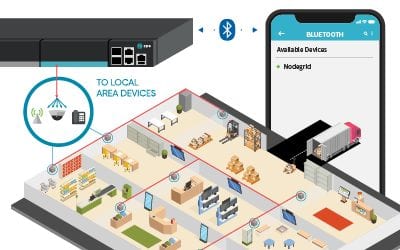
  • Connecting Nodegrid via Bluetooth® to a cell phone is simple: The new Nodegrid device is powered on (no screen or keyboard required)
  • On a cell phone, Nodegrid will show up as an available device within Bluetooth® settings
Bluetooth Tethering 600 x 450
After just a few taps, Nodegrid goes live and automatically connects to the ZPE Cloud. There, all of your saved configurations are ready and waiting to be downloaded to your new device. Once configured, your device is now secure and ready to unlock the full potential of the Nodegrid Platform. Just plug Nodegrid into your network and allow it to serve as a temporary gateway for your other connected devices. Within minutes, your internet connection is established and you’re back on track to finish on time, as expected.

Instant Reset

With Nodegrid, resetting and restarting the process is just a click away. Simply press the factory reset button and start with a clean slate, anytime, at any location. Less worry, more convenience.

As Easy as it Gets

With ZPE Systems Nodegrid, provisioning has never been easier and more reliable. From Zero Touch Provisioning (ZTP), to automation via deployment scripts and more, your new remote branch is ready in no time with minimal on-site resources required. Combined with ZPE Cloud, provisioning is fast, secure, and consistent across your entire network. Once up and running, Nodegrid’s 360° network visibility allows your team to monitor and maintain all of your connected devices from one easy to use, vendor neutral platform.

Ready to take your network to the next level?

For more information on ZPE’s full product line, please visit our products page.

Have a specific question or want to experience a live demonstration for yourself?
Reach out to us via our Contact page. We’re here for you!

6 IT Solutions to Implement Right Now for More Effective Remote Work

ZPE Systems Blog Photo- Header

Many companies have found it difficult to adjust to remote work. In the face of drastic changes brought on by pandemics, natural disasters, and other challenges, untethering your workforce from the office can be a big ask. Your success relies on one crucial component: your network.

Keeping your enterprise connected – both internally and to customers – is the only way to maintain business continuity and customer satisfaction. Unfortunately, traditional networking solutions were built for the office. Not only does this slow down your transition to working remotely, but also makes everyday operations anything but efficient.

The good news is, our experts have pinpointed six IT solutions that will make your company more effective at remote work, using a network that accommodates distributed business better than ever.

ZPE Systems Blog Photo- Body Image

1. Give Network Staff Convenient Access With Advanced Out-of-Band

Out-of-band (OOB) management is not a new technology. But taking advantage of this tool has traditionally proven cumbersome and inefficient.

It’s not uncommon for businesses to treat their OOB network as an afterthought, something they might use once in a while when an update or fix is needed. Phone lines, modems, and dedicated OOB devices make management a chore, even for tasks like resetting passwords, rebooting devices, and other routine work.

Remote access via DSL or dial-up is too slow, which takes time, puts your security at risk, and forces you to juggle delicate admin protocols. Putting staff on site is another option, but also eats up time and binds specialized IT personnel to specific locations.

Fortunately, you can take advantage of advanced out-of-band, which lets you perform network management tasks from anywhere.

An advanced out-of-band solution gives you a secure management path that’s completely separate from all other networks. Not only do you stay protected from unwanted traffic and attacks, but you can also get blazing fast access to your management network via broadband connection.

This means that for issues large and small, you can slash response times and put your best people on the job – even if they’re across the globe. And if your main connection suffers an outage, you can remote-in to your out-of-band network via cellular failover backup.

Advanced out-of-band makes network management convenient and efficient.

2. Protect Business From Costly Downtime Thanks to Cellular Failover

If one of your critical locations suddenly goes offline, your business could lose up to thousands of dollars per hour. Restoring your main connection can take hours or days, while your employee and customer interactions come to a standstill. Business stops, and your reputation plummets alongside customer satisfaction.

However, cellular failover is a simple solution that can prevent all of this, so you can leave downtime in the past. When your main connection drops, your failover-equipped network automatically switches to 3G, 4G, or even 5G cellular to give employees and customers a seamless experience.

Capable cellular solutions give you freedom of choice, allowing you to determine which wireless carriers you use, as well as letting you take advantage of multiple backups. It’s like an insurance policy for your connectivity, with most cellular providers sporting over 99% reliability.

When you need to deploy a new location, cellular failover can even help you bring critical systems online – before your main connection is established. It’s a wireless solution that lets you scale on demand and helps you increase your business’ agility.

3. Keep Staff Connected Using Secure Access Service Edge

Accommodating remote work usually involves a slow, stringent process. You need to purchase and configure laptops and other equipment, create users and groups, and adjust other hardware- and network-specific settings. All of this just to allow staff to work away from the office.

ZPE Systems - SASE Image

On top of this, all traffic likely gets routed through your main enterprise firewall. This degrades performance and speed for every user, and can bring business operations to a grinding halt.

But Secure Access Service Edge, or SASE, is a transformative technology that does away with the traditional hassles of setting up for remote work, and instead puts networking and security into the cloud. This allows safe connectivity to be delivered close to users no matter where they are. And because SASE uses an identity-driven model, your employees don’t have to rely on special hardware. They can access your network using their smartphone, tablet, desktop, or other device.

SASE gives your employees flexible network access, and also frees your main enterprise connection for more business-critical traffic. You can deploy your SASE solution and get a network that keeps your staff connected.

4. Fully Optimize Using a Vendor-Neutral System

Typical networking solutions cause vendor lock-in. This is when you’re limited to choosing specific hardware and software products that are compatible only with each other. Vendor lock-in forces you to make sacrifices during implementation, so you end up with a solution that doesn’t entirely satisfy your requirements.

But with a vendor-neutral management platform, you can boost efficiency even on your existing network.

A vendor-neutral system means you don’t have to worry about over-buying or under-serving, and can instead connect the physical and virtual assets of your choice. You can optimize your network with SD-WAN, firewall, routing, and other solutions that perfectly suit your needs.

Some providers even offer a unified management tool that consolidates control of your network solutions, regardless of which vendors they’re from. Your IT staff no longer need to jump from one unique UI to another, because everything can be controlled under a simple management umbrella. You can update firmware, change traffic priorities, monitor devices, and more from one clean interface.

With a vendor-neutral system in place, you can turn your network into a powerful asset that supports your global enterprise.

5. Streamline with virtualization

You’re probably used to having dedicated, single-purpose devices for your network functions. Even if these deliver all the capabilities you need, you’ll inevitably find it difficult to scale and manage due to large stacks of hardware & software solutions.

But you can significantly reduce your physical stack and your management efforts by using virtualization.

With the right devices, you can consolidate and virtualize your network functions to streamline every part of infrastructure management.

And the more guest operating systems you can run, the better. With virtualization, you can host custom or third-party applications, so instead of deploying separate appliances for SD-WAN, routing, failover, and firewall functions, you can use fewer devices capable of handling it all. This means smaller stacks, tighter solution integrations, and easier management of network functions.

6. Use Automation to Take Work off Your Hands

You spend a lot of time and money just to keep your network running. Routine tasks and configuration management are some of your biggest challenges, simply because they pull critical resources away from more urgent business needs. Moreover, you’re left vulnerable to human error that can cause interruptions and downtime.

 This is where automation comes into play, which helps by doing some (or all) of the work for you.

For everything from routine fixes, to provisioning, to configuration updates and rollbacks, automation helps you achieve autonomous networking. Use your favorite tools like Ansible, Chef, and Python to create workflows that carry out themselves, and set up zero touch provisioning for push-button deployments. Automation is the only solution that helps you replicate and scale with consistency, so you can avoid costly errors while keeping specialized staff focused on the core of your business.

Take advantage of automation capabilities for more efficient and productive enterprise networking.

Remote work can be difficult to accommodate, especially when your business is distributed across the globe. But you can help your entire organization operate more effectively through networking.

At ZPE Systems, we’re leading the remote-work initiative with comprehensive offerings for all six of these IT solutions. From advanced out-of-band, to virtualized, vendor-neutral infrastructure and management, our hardware & software help your business work better from anywhere.

To take advantage of these solutions, get in touch today!

How Nodegrid Improves Network Automation in the Test Lab

Is Your Test Lab Lacking Network Automation? Is Manual Testing Still Taking Up Resources?

Without network automation, you’re familiar with having to spend time and resources on manual testing. You need highly technical staff to be on-hand, who then spend days or weeks going through testing procedures. Even with basic automation, you’re left with limited capabilities and plenty of time-consuming, manual work. Here’s a look at different lab environments showing how manual testing compares to automated processes.

The Automation-Free Test Lab

If you haven’t implemented any automation solutions, your test lab eats up your time and resources. Every procedure must be performed manually. Because of this, you constantly face issues like:

  • Having to invest lots of time — Each test must be initiated manually, which means many working hours spent in the lab. This can take days or weeks (or even longer) depending on your network needs.
  • Having to tie up critical staff — You can’t just assign unspecialized staff to follow through with testing. With manual procedures, you need to put your most knowledgeable people on the job, which pulls them away from more critical functions.
  • Being vulnerable to human error — A simple typo can result in catastrophe (i.e. Amazon AWS outage of 2017). Human error is more prominent than you’d think, and is actually the biggest contributor to downtime. Without automation, you’re vulnerable to human-induces mistakes both big and small.
  • Lacking analysis — When errors occur, you need to log data for analysis. Because this needs to be done manually, you might not prioritize this task, leaving issues without analyses. If you do store this data, you’re open to human errors that could affect any analyses you perform.

The Somewhat Automated Test Lab

If you have implemented some automation solutions, you’re on your way to a more efficient lab experience. However, there are still issues you may face, like:

  • Lacking concurrent sessions — Legacy console servers aren’t capable of handling many concurrent sessions, which reduces the number of devices and connections you can support during testing.
  • Crashing — Your console servers have serial ports that can’t use high baud rates (such as 115200bps) in all ports. As more sessions are established, users experience slowdowns due to limited session capacity. Ultimately, the solution crashes.
  • Frequent tweaking — Without a full automation solution, you need to tweak scripts regularly to accommodate any changes you make. Delays and disruptions can occur when, say, you need to replace devices or add new hardware.
  • Unsupported scripting — Some offerings only support certain scripting languages, leaving you to adapt. You either need to spend time and money to learn the supported languages, or add new team members who are familiar with the supported tools.

Ask yourself: Does your automation solution require you to monitor script/command execution? If so, can you really call it ‘automation’?


The Advanced Test Lab Using Nodegrid

For network automation you dream of, Nodegrid delivers without compromise. The Nodegrid hardware and software support unlimited automation, testing, and data collection.

  • Save time — Nodegrid allows you to push configurations, software/firmware upgrades, and tests in bulk. And for a little extra time savings, Nodegrid devices boot more than a minute faster than competitor appliances.
  • Make deployments effortless — Use zero touch provisioning to automate the deployment process.
  • Get full automation — The Linux OS running on Intel x86 64-bit architecture means faster processing, support for Docker & Kubernetes applications, and support for common scripting languages like Python, Bash, Perl, and others.
  • Handle many concurrent sessions — You can support 20 concurrent sessions per port in all 48 ports, or 10 sessions per port in all 96 ports. And the reservation system allows users to reserve ports.
  • Tailor port settings — You can customize serial port settings so connecting is easy (i.e. require no additional text information or authentication).
  • Get full analyses — For data logging and auditing, you can capture and save serial data logs to a local file, NFS file, and/or Syslog server.
  • Set up groups — Create authorization permissions for certain groups, so they can efficiently access their own devices.

Download our ebook to learn more: How Automation is Transforming the Datacenter Landscape

Are you ready to let Nodegrid work for you? Schedule a demo today and see how you can benefit from network automation in your test lab.

Automation: Reducing Costs and Improving Efficiency

Network Automation

As networks and data centers grow and become more advanced, the time and maintenance required to keep them operating at peak efficiency also increases. This leads to more engineers working more hours which greatly increases your company’s overhead costs and cuts into your profit margin. Is there a way to pursue an aggressive growth strategy while also increasing efficiency?

Out-of-Band Solutions

Implementing an effective out-of-band (OOB) solution is the first critical step to improving any networking environment. With a well positioned OOB management plan in place, engineers across multiple time zones can access your critical infrastructure from anywhere, anytime. This alone can greatly reduce travel costs and potential overtime payouts by freeing up more local resources who can then focus on other tasks.

Not all OOB solutions are created equal. To reap the full benefits they can provide, you need to ensure that the solution you choose offers all of the tools and services you need to make the most of everything you already have in place. The last thing you want is to add another complex system spanning multiple vendors with multiple new interfaces to learn, or worse, to be locked into a vendor specific platform that does not offer any flexibility to build on to.

ZPE’s Nodegrid solutions consolidate and virtualize all your network functions onto one platform, no matter which vendors you use. You get a smaller stack that’s more powerful and easy to manage. With features such as flexible network interface options, dual cellular fail-over with dual SIM, a modern and secure Nodegrid OS, OOB management, cloud orchestration and add-on virtualized applications for SASE and SD-BRANCH, Nodegrid has you covered.

Automating Repetitive Processes

The next order of business is to begin analyzing your processes to see where improvements can be made. Most IT professionals spend countless hours on simple, repetitive tasks that could easily be completed without any human input. These can include simple tasks such as logging data, upgrading or patching, and monitoring system health metrics, or even more complex activities such as provisioning new equipment. This is where automation can come into play to increase efficiency and productivity by allowing certain tasks to be completed on their own.

Most organizations today have plans in place to invest in automation with the goal being to streamline processes in order to reduce costs and errors. When your processes are properly configured and tested, they can be expanded throughout your network. No need to worry about inconsistencies or potential human errors which can lead to downtime and wasted man hours troubleshooting issues.

Automated Scaling with Zero Touch Provisioning (ZTP)

Beyond repetitive day to day tasks, automation can also help your business scale quickly and securely to ensure you can keep up with today’s ever growing demand. Manually configuring devices takes time and personnel away from other areas where it may be better spent. It may also lead to more human errors which can leave your network vulnerable to security threats and potential downtime and data loss. Thanks to Zero Touch Provisioning (ZTP), all of these worries can be a thing of the past. Scaling with ZTP is always fast and consistent across every location, on every deployment.

ZTP is a feature that automates the building process (configuration and provisioning) of network hardware and applications. This is typically achieved by pointing devices to a local configuration repository where they can retrieve the required settings. With ZTP, IT professionals can drastically reduce the amount of time consuming labor that comes with manual configuration, which frees up more resources that can be dedicated to other tasks. Since settings are managed and provisioned from the cloud via templates, engineers may even perform configurations and updates from remote locations (once basic racking and network connectivity are established at the new location). Check out our other articles to learn more about ZTP.

Automating Your Test Lab

Another area that can greatly benefit from automation is your test lab environment. Without automation, each test scenario must be initiated manually. This requires engineering resources to be on hand for each run which adds to costs and can take critical personnel away from other projects. Human error can also be a factor, as a missed test, error, or configuration mistake can lead to disastrous results later down the road.

ZPE’s Nodegrid family of products brings you automation without compromise. Nodegrid addresses the pain points common to test labs with the ability to automate, test, and collect data without limits. Queue commands and scripts from beginning to end. Learn more about how Nodegrid can help you automate your test lab.

For more information on ZPE’s full product line, please visit our products page.
Have a specific question or want to experience a live demonstration for yourself? Reach out to us via our contact page. We’re here for you!