Providing Out-of-Band Connectivity to Mission-Critical IT Resources

4 Critical Things to Know About Zero Trust Security
Zero trust security is not a new concept, however it has gained popularity in recent years. As companies become increasingly distributed, they must offer network access that’s flexible, without putting sensitive data at risk. This is where zero trust security comes in.

In this post, we’ll cover 4 critical things you should know about zero trust security, such as what it is, why companies use it, how it works, and more.

What is Zero Trust Security?

Zero trust security can be boiled down to a simple concept: always verify every user and device trying to access the network.

Traditional networking safeguards are based on the castle-and-moat architecture. This means that all users and devices within the network are deemed trustworthy and can access the resources they need. Those outside of the network (or moat) must be verified and trusted before gaining access to the network. One of the glaring problems with this approach is that it doesn’t consider the possibility of attacks coming from a trusted user/device within the network. This means that an attacker simply needs to hack into the network, and then there are few (if any) obstacles remaining in their way.

Zero trust reimagines security with the concept that organizations should not automatically trust anyone/anything trying to connect to their network. Instead, they should verify everyone and everything that tries to connect, including users/devices outside and inside of its perimeter. In other words, trust no one.

Where Did Zero Trust Security Come From?

The zero trust concept was first prototyped in the early 2000s. In 2010, John Kindervag coined the term ‘zero trust’ for the concept, and its adoption by Google a few years later increased the industry’s interest in the zero trust model.

This new security architecture came from the realization that the traditional castle-and-moat configuration was becoming increasingly vulnerable. Years ago, a typical organization’s data and sensitive information were kept in a central location. This made the network and its resources easy to protect, and also easy for IT staff to monitor for threats and address attacks.

Now, organizations are adopting technologies that offer greater networking capabilities for distributed access. These technologies include public and private clouds, third-party services, virtualized SD-WAN & firewall solutions, and more. Securing an entire network means putting in place multiple safeguards. The traditional architecture is now being replaced by the more robust yet nimble security setup of zero trust.

Why Are Companies Using Zero Trust Security?

One of the canonical goals of networking is to allow information to flow between computers, people, and organizations. Yet with information becoming more and more decentralized and relayed through various channels, risk is on the rise. And because traditional security architectures simply can’t provide omnipresent protection for data and communications, zero trust security is being adopted by organizations across the globe.

A major benefit of zero trust is that it provides hardened security, regardless of how distributed the network is. Whether a company serves a single contained network, or hundreds of branch locations distributed around the world, zero trust security offers peace of mind for every interaction. This means more thorough protection from outside and inside threats, because verification is needed — always.

This complements Secure Access Service Edge and SD-Perimeter implementations (more on those below), which companies use to offer more flexible networking and define least-privilege access rights. Used in conjunction with these configurations, zero trust security also eliminates the need for companies to backhaul traffic through their main security controls. This translates to fewer slowdowns and more availability, so companies can meet their business goals without their networks holding them back.

Real-world examples include scaling, working from home, and even securing data at HQ.

  • Setting up new locations comes with its own set of security risks. However, companies using a zero trust model can get granular control of who & what can access their network. This can help eliminate attacks from stolen equipment, devices, and credentials.
  • When setting up a Secure Access Service Edge (SASE) implementation, whether for faraway locations or remote & on-the-go workers, zero trust keeps networks & resources secure. It requires user identities and devices to be verified, eliminating many methods of attack.
  • When defining access rights using an SD-Perimeter approach, zero trust enables companies to make sure that access to resources is given only to appropriate personnel. This ensures data stays secure from malicious intent by actors outside or inside of the organization.
  • How Does Zero Trust Security Work?

    Zero trust security assumes that threats can come from anywhere, including from inside the organization. The big takeaway, however, is that zero trust is not a single new tool or technology. Instead, it uses a combination of existing tech and methodologies such as micro-segmentation, multi-factor authentication, and least-privilege access.

    A zero trust model works by segmenting parts of the network into small sections, each with their own security controls. In order to gain access to a segment, a user must verify their identity using multi-factor authentication (MFA). Once a user is verified, least-privilege access means they can use only the resources they need to perform their job. This is essentially a perimeter around what the user is allowed to access.

    Here’s a basic example: One segment contains SD-WAN and firewall controls. If Ryan is an admin responsible for SD-WAN management, and Priya is an admin responsible for firewall management, the company must define these perimeters respectively. Then, Ryan can be verified and granted access only to the SD-WAN tools, while Priya can be verified and granted access only to the firewall tools. If either user tries to gain access outside of their perimeter, they will be denied by their company’s zero trust security measures.

    Though it’s not a quick fix or turnkey solution, zero trust is transforming the ways organizations secure their networks. What’s more, the market is expanding with new solutions that offer increased granular control over access, using technologies like IP tracking, geo-fencing, and others. And using an open platform like Nodegrid, the possibilities are endless for organizations wishing to evolve their security and block threats from across the globe.

    Check out ZPE Systems’ full list of security partners that can help you achieve a zero trust model.

    Managing a Remote Team

    It Happened Overnight.

    One day it was business as usual. The next, we were scrambling to set up our home offices.

    COVID-19 meant even the largest companies had to figure out remote work. And they had to adjust fast, not only to stay afloat and maintain business continuity, but also to establish a “new normal” that made them more responsive to change.

    Aside from adapting their networks to accommodate a distributed workforce, most companies were left to contemplate one crucial component: best practices for managing a remote team.

    We sat down with ZPE Co-Founder and VP of Engineering, Livio Ceci. Livio has more than 15 years of experience managing teams spread across the globe, and he’s offered some important advice you can use right now.

    Stay Human

    Because of COVID-19, every business interaction we have is through the computer screen. It might seem easy to become somewhat detached from your teams, but maintaining emotional intelligence is more important than ever with a remote workforce.

    Apart from adjusting to any new cultural or language barriers you’re faced with, remember to help employees achieve a healthy work/life balance. Especially now, things are a little heavy on the life side, but your staff members want to continue to contribute and provide value to your company. Show employees that you sympathize with them, and in return, they’ll prove their commitment to you.

    Here are a few things to keep in mind:

    • Establish trust — Remote or not, keeping promises goes a long way when it comes to establishing good relationships. When you say you’re going to do something, follow through by doing it. Send those account details on time, start sourcing the additional help you promised, and make sure everyone gets the new software you purchased.
    • Communicate clearly — Now there’s more standing between you and your teams, so miscommunication is more likely to happen. Make sure you and your employees are asking enough questions so that nothing gets lost in translation.
    • Talk about life — Of course you want to be as efficient as possible with your time. But part of establishing strong relationships is talking about what’s going on in people’s lives. Ask Marisol how her kids are adjusting to school at home, check in on Farook’s emergency roof repair, and celebrate Rajiv’s fifth anniversary.

    Cover the Basics

    If you’re new to working remotely, you’re probably well aware of the differences between the office and your home environment. There can be a ton of distractions at home, from the TV, to family, to chores, and it might be difficult for you to be productive. Before you can manage your distributed teams, you need to be able to focus, which means taking care of these work-from-home basics:

    • Set up a dedicated workspace — Limit distractions by setting up a space designated as your office. Use a room that is away from high-traffic areas in your home, so that you can focus on your tasks throughout the day.
    • Make sure your Wi-Fi is strong — Connectivity is crucial to remote work, but you might find it’s limited in certain areas of your home — including where you set up your workspace. Double-check your connection speed and strength to make sure it holds up, and consider upgrading or extending your Wi-Fi if necessary. The last thing you want is to suddenly drop off during an important video conference.
    • Block background noise — If you live near others or with family, you know that noise happens. One of the easiest ways block it out is by investing in a decent headset and microphone. You can also change your office by adding noise-blocking foam or insulation. Once you are able to cancel out noisy distractions, you and your team will be able to focus on your work.
    • Have the right hardware & software — From a laptop to a webcam, to mission-critical software, you need adequate tools to do your job effectively. Make sure you have everything you need so that you can be as productive as you used to be from the regular office.

    Use the Right Tools

    Going off the previous point, using the right tools is essential to managing a remote team. Not only do you need the right hardware and software, but you also need everyone to be on the same page for efficient, productive work. Communication and collaboration are key to business continuity.

    There are many communication platforms available, and you’ll likely use a combination of tools because each has its own strengths. You’ll have different needs depending on your organization, but your ability to perform relies heavily on how you stay in touch with your teams every day. Instant messaging tools such as Slack can help you stay organized and chat with the right people, while video conferencing platforms like Zoom allow you to have meetings and conference calls.

    In the office, you may have used a physical board to collaborate and track productivity. Now that you’re doing it all in a virtual environment, consider using tools like Jira or Asana to keep tabs on work. These allow you to easily manage tasks, set priorities, and delegate responsibilities.

    Sharing tools are also invaluable to working remotely. These include file sharing platforms like SharePoint and knowledge base programs like Confluence, which allow you to easily collaborate on files and documents. And if software development is a large part of your organization, you’re probably already aware of the benefits that something like GitHub brings to the table. In a remote work environment, it’s now more crucial than ever and provides the version control hosting you need.


    Pro tip: Keep your company’s info secure

    Having the right tools in place helps you stay productive. But you also need to make sure your company’s info stays safe.

    • Use proper security measures to protect your data, and implement backup protocols that help you restore data in case issues arise.
    • Keep your code and other intellectual property on-prem to minimize vulnerabilities.
    • For your employees, give them only the minimum number of permissions necessary to do their job.

    At ZPE, one of the ways we securely access our data and infrastructure is by using ZPE Cloud. Existing customers are eligible to get a free 3-month trial.


    Focus on Goals

    From everyday meetings, to task-specific goals, being able to focus greatly improves your ability to manage. But when you’re in charge of steering the ship while your crew is spread across the globe, it’s challenging. You might struggle to assign priorities, and deliverables might be vastly different than what you expected. Complicating things even more is the anxiety that can come with not being able to check in on what everyone is doing. You might feel like you’re not in control.

    All you need to do is adjust your thinking. Just because you’re no longer in the office and can’t see the work getting done in front of you, doesn’t mean it’s not getting done. So, focus on the goals — not the activity.

    When you consider everything that goes into working remotely — from time zone differences, to technical issues or sudden emergencies — it’s not effective to keep wondering, “Is Tabitha working right now on the latest feature we discussed?” Not only does it distract you from your own tasks, but it can lead you toward micro-managing, which lowers trust and morale.

    Instead, focusing on the goals and outcomes allows you to exercise the trust that you and your teams have established.

    Here are some tips from Livio to help you and others focus on your goals:

    • Set expectations — Communicate what’s to be expected, so that everyone has a clear picture of what to shoot for. And when things change, make sure to update everyone involved. This goes for everything from meetings to deliverables, to big-picture stuff like new releases and prototypes. Are the presentation materials due Wednesday at 5pm Pacific? Which features should be released with version 1.4? Will the new admin start on Tuesday or Thursday? Check in regularly to make sure that everyone is on the same page.
    • Prioritize — Obviously, more important things should be at the top of everyone’s priority list, while minor things should be assigned a lower priority. This helps to keep expectations clear and make sure the focus remains on the appropriate goal.
    • Assign smaller deliverables — This one’s mostly for engineering teams, but can also be applied across various disciplines. By assigning smaller deliverables (and shorter sprints), near-term goals are easier to focus on and accomplish, which ultimately contribute to the end goal.
    • Hold regular meetings — Frequently go over expectations, deliverables, announcements, and other important topics, either via conference call or video chat.
    • Have an agenda — When it comes to business, and especially focusing on goals, make sure you have an agenda that you can share with others. Having a clear agenda makes for efficient use of everyone’s time, keeps the focus on appropriate tasks and outcomes, and limits distractions, whether you’re preparing for a meeting or finishing up the week’s sprint.

    Pro tip: Set priorities straight

    When considering expectations and task priorities for remote teams, ask, “How does this contribute to the end goal?” This helps you break down each piece of work into smaller chunks, so that you can delegate appropriately.


    Stay Committed

    Do you know what’s driving timelines? Answer: your commitment.

    Whether your projects are short-term, long-term, or both, your commitment to them is what will keep you and your teams on track to reach your goals. When it comes to software development projects, Livio shares a few best practices:

    • Make two major releases per year (give or take one, depending on the project scope).
    • Develop a cycle that calls for a short time-to-market, with one small release per month.
    • Test, test, test! Set yourself up for continuous integration that ensures only stable code is committed.

    Pro tip: What about the unexpected?

    Over the years, Livio has found that the unexpected is the biggest disruptor to even the most meticulous plans. Whether it’s a critical bug or an urgent, last-minute request from the client, unforeseen hurdles always complicate the development process. To combat this, Livio suggests building in extra time from the beginning. This helps you adjust to abrupt changes or issues without having to alter more (or all) of your plans.


    No matter how permanent our new normal may be, you can make the most of managing a remote team. If it’s a pandemic, natural disaster, or human error that threatens continuity, take this advice to keep business running even with a distributed workforce.

    There’s More to Come

    We’ve got one goal: to help you transform your business’ network into a value center. Sign up for news and updates for more free tips and advice about out-of-band, SASE, SD-everything, and more!

    Make Management More Secure and Easy with Single Sign-On

    Managing many network devices and applications can be a chore, and a lot of this stems from having to manually authenticate with each. You typically need to keep a spreadsheet containing your different credentials (or run the risk associated with having one set of credentials across the board). And until now, Nodegrid offered this typical experience. But you no longer need to be left with a juggling act when it comes to managing your network. That’s because Nodegrid now supports single sign-on (SSO).

    What is Single Sign-On?

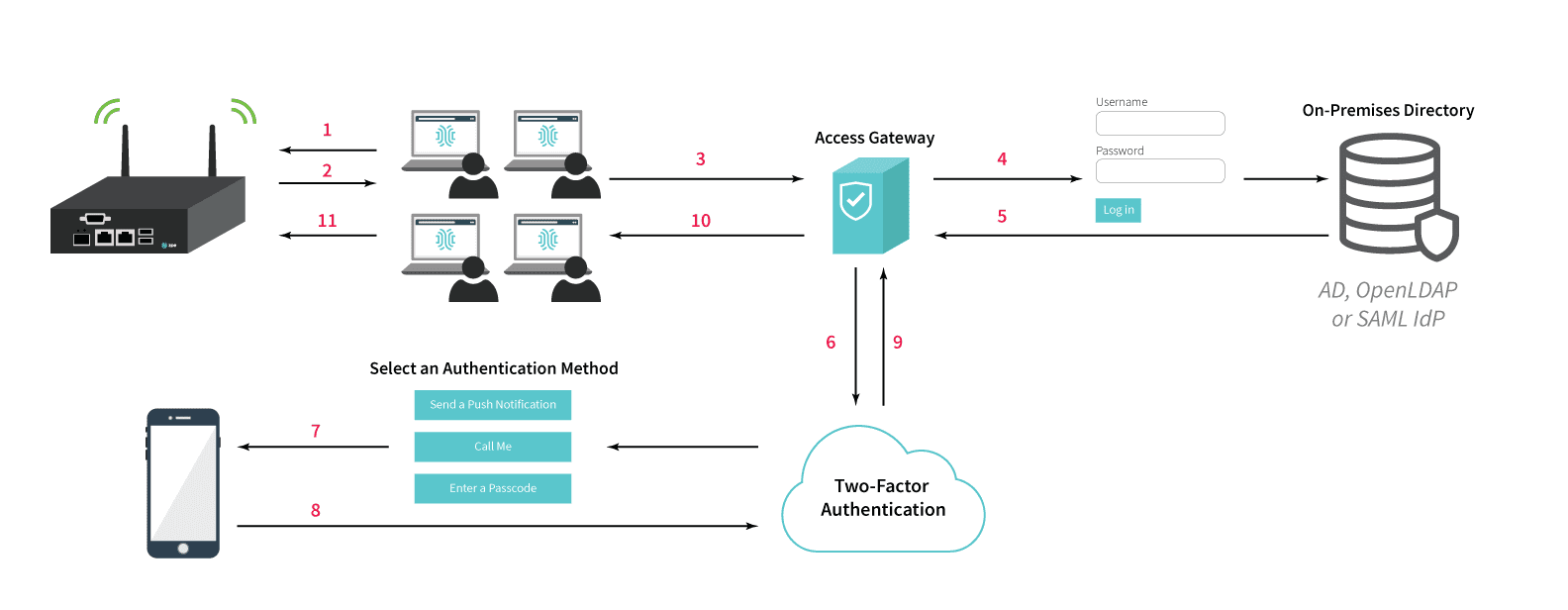
    Single sign-on allows you to authenticate with multiple applications simultaneously, using only a single set of credentials. It’s like having one key that opens every door in the house! Once you successfully sign in to an application, you’re automatically signed in to all other connected applications. SSO allows you to access Nodegrid appliances and applications with ease, and you can seamlessly navigate back and forth without having to get bogged down by sign-in screens.

    Benefits of Single Sign-On

    SSO offers much more ease-of-use and increases security. Before SSO, you needed to keep track of many unique credentials. When managing appliances and applications, this forced you to sign into each individually. Aside from presenting you with frequent obstacles that slowed you down, this also left you to deal with the hassle of resetting or retrieving credentials if you forgot or lost them. You’d have to put in more time and effort to update your spreadsheet, and then get used to using your updated credentials (which often led to more resetting and retrieving). Now, you only need one set of credentials to sign in to everything. This means that you no longer need a lengthy spreadsheet with many usernames and passwords, and you don’t need to be frequently slowed down by having to sign in to each application separately. You also don’t need to worry about compromising security by trying to create easy-to-remember credentials, or by frequently going through password reset/retrieval protocols. If you do forget your credentials, one reset is all you need to get back up and running. And for network administrators, SSO simplifies user administration. Admins no longer need to add, remove, or modify users on separate applications. Nodegrid now puts convenient control in one place, so administration actions are consolidated and go into effect across all user access points.

    Why use SSO with Nodegrid?

    Nodegrid’s single sign-on currently integrates with many popular identity providers. These include Duo, Ping Identity, and Okta.
    Nodegrid also uses the industry-standard Security Assertion Markup Language (SAML), so you can easily integrate with any identity provider who supports SAML 2.0. Single sign-on is easy to configure, and provides more convenient, secure access to applications and appliances. To get the most streamlined and safe experience with Nodegrid, consider taking full advantage with SSO.