Providing Out-of-Band Connectivity to Mission-Critical IT Resources

Top Security Service Edge Use Cases & Benefits for Enterprises

shutterstock_1608251770

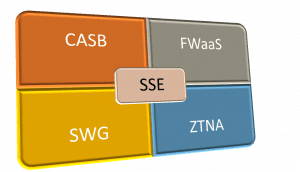
Security service edge (SSE) is an emerging network security model, first announced by Gartner in their 2021 Hype Cycle, that stems from the need to retool the industry’s thinking about SASE (secure access service edge). SSE protects your network edge by combining cloud-based security technologies, including:

  • Firewall as a Service (FWaaS), which rolls up firewall technology into a cloud-based service
  • Zero Trust Network Access (ZTNA), which applies zero trust security principles to remote traffic
  • Cloud Access Security Broker (CASB), which applies enterprise security controls and policies to traffic between the cloud and on-premise networks

Several use cases are driving enterprises to adopt SSE, including securing traffic from remote workers. This allows the migration to cloud and SaaS platforms while applying the same level of security as on-premises, and simplifying the security of an SD-WAN architecture. Let’s dive into the top SSE use cases and benefits for enterprises.

Top SSE use cases and benefits for enterprises

The top use case driving SSE adoption, and the most relevant to many enterprises right now, is the need to provide secure and reliable access for remote employees. We’ll also touch upon how SSE enables secure adoption of cloud and SaaS solutions and how you can combine SSE with SD-WAN technology to achieve the SASE model.

SSE use case #1: Securing remote access for remote employees

The pandemic forced many enterprises to adopt new remote access technologies—or upgrade existing ones—so their employees could safely work from anywhere without affecting productivity. However, even pre-pandemic, many organizations were recognizing the limitations of VPNs (virtual private networks) for a workforce that might need access to enterprise resources from anywhere in the world at any time. VPNs present numerous security challenges for enterprises:

  • To secure remote traffic, you need to route it through a firewall or security appliance at your headquarters or data center. This can create significant bottlenecks on your enterprise network and affect performance for both remote and on-premises users.
  • Typical VPN solutions don’t provide any mechanism for centrally managing your deployments or monitoring the devices that remotely connect to your network. For an enterprise setting, it means you could be allowing hundreds or thousands of remote VPN connections to your primary enterprise network, from devices that may or may not have adequate security controls without verifying the identity or trustworthiness of the person connecting.
  • In addition, once a user or device connects via VPN, they can freely move about your enterprise network just as if they were in the office. If a hacker compromises a privileged account with VPN access, they could jump from system to system, exfiltrating data and causing financial and reputational damage in the process.

SSE benefits for securing remote connections of enterprises, cloud, and SaaS services

Enterprises can significantly reduce bottlenecks by bypassing their headquarters since most remote traffic is destined for services outside the network. SSE eliminates the need for remote, cloud, or web-destined traffic to route through the enterprise network firewall, because it provides security as a cloud-based service. That means you’re routing remote traffic through an SSE solution in the cloud, rather than a physical device through the office or data center, reducing the enterprise network’s load.

SSE uses technology like ZTNA to provide granular visibility, control, and verification of all the remote users and devices connecting to the enterprise resources. For example, with ZTNA, you can apply specific access control policies that grant remote users access to only the specific resource they need for the task at hand. Once a remote user authenticates, ZTNA creates a secure, encrypted tunnel to that application or resource, removing the need for a VPN.

SSE also provides a unified, cloud-based security stack that you can access and manage from anywhere at any time. Through components like FWaaS, you can monitor and track all remote devices from one control panel. For instance, you can ensure all laptops are running the latest security definitions and create rules that block connections from a device that isn’t up-to-date.

In addition, SSE restricts lateral movement on your network, following what’s known as the “dark cloud” principle (also known as software-defined perimeter) to prevent remote users from seeing or interacting with anything except the specific application they’ve been authenticated for. If a remote user needs to access a different resource, their privileges and trustworthiness can be re-verified using specific security policies for that new resource.

SSE addresses VPNs’ security concerns, by providing an alternative way for remote users to securely access the cloud, SaaS, and web services they need without contacting your enterprise network. Using technologies like ZTNA and FWaaS, SSE allows you to centrally manage the remote users and devices, apply highly precise security policies, and restrict lateral movement on the network, while still providing secure and reliable access to enterprise resources. That’s why you should consider replacing VPN with SSE for the work-from-anywhere user base.

SSE use case #2: Public cloud and SaaS adoption without sacrificing security

Security is one of the primary concerns when migrating workloads or services to the cloud. For example, you may find it challenging to apply enterprise security and access control policies to your SaaS or cloud platform, leading to inadequate policy enforcement in the name of convenience.

Another example is when you process regulated data for healthcare or financial systems; you may need to enforce specific data governance policies about who can access what information for which reasons. It can be challenging to gain visibility on how your users are accessing data in the cloud, mainly if you rely on the monitoring functionality provided by individual cloud vendors.

SSE benefits for securing public cloud and SaaS implementation

Cloud and SaaS services need the same level of security as your enterprise network, and SSE makes that possible. SSE uses an integrated CASB to apply enterprise security, access, governance, and compliance policies across all cloud and SaaS platforms. The CASB also uses an API integration to automatically discover data, both at rest and in transit, across all cloud services so you can easily see who is accessing it and how it’s being used. This API integration allows the CASB to scan for malware and policy violations, send alerts, and automatically remediate threats.

SSE doesn’t just benefit remote workforces. Using an integrated CASB, SSE also allows enterprises to migrate from on-premises data centers to cloud and SaaS platforms while applying the same security, access, and data governance policies. We recommend adopting SSE if you’re migrating any critical or sensitive resources to the cloud.

SSE use case #3: Combining SSE with SD-WAN to achieve SASE

Secure access service edge, is a popular network security model introduced by Gartner in 2019. SASE combines a cloud-based security stack with software-defined wide area network (SD-WAN) technology to provide an integrated solution for accessing and securing your network edge.

The SASE stack includes the same technologies as SSE, and you’ve probably noticed the names are very similar. That’s because SASE is essentially SSE plus access—which is provided by an SD-WAN backbone.

Benefits of combining SSE with SD-WAN to achieve the SASE model

There are numerous benefits to implementing both SD-WAN and SSE to achieve the SASE model. For one, SSE doesn’t provide any mechanism to connect your remote and branch office users to the cloud and SaaS resources it’s protecting. SD-WAN’s intelligent and application-aware routing lets you send remote traffic directly to your cloud and SaaS platforms and bypass your enterprise network.

In addition, SD-WAN technology doesn’t come with any mechanisms for security—you still need to use firewalls and other appliances at all your data centers and branch offices to protect that traffic. The more remote locations you add to your SD-WAN implementation, the more security appliances you need to manage. SSE simplifies things by consolidating all your SD-WAN security into a single cloud-based stack.

SSE and SD-WAN complement each other well, and when you combine them, you end up with a comprehensive SASE implementation. If you have an existing SD-WAN architecture and want to simplify and streamline your network security, then you should add SSE to achieve full SASE. And the reverse is also true—if you’re going to implement SSE but don’t have the existing architecture for enabling remote and branch office access, then you should consider SD-WAN technology.

Accelerate your SSE deployment with Nodegrid

If you’re looking for a better way to secure remote traffic, cloud resources, and SD-WAN architecture, then your enterprise may benefit from a security service edge. Suppose you don’t already have an SD-WAN backbone on which to build SSE implementation. In that case, consider a vendor-neutral platform that works with a security service edge provider. ZPE Systems’ Nodegrid partners with top SSE providers, including Palo Alto, to provide a seamless SD-WAN onramp to your security service edge functionality. The Nodegrid SD-WAN platform for enterprise networks is key to making SSE work for your enterprise.

Want to learn more about how Nodegrid can help support your SSE use case?

Contact us online or call 1-844-4ZPE-SYS today.

Contact Us

Understanding Key Components of SSE (Security Service Edge)

shutterstock_1463056847

Modern network management involves a wide variety of distributed technologies. Because of this, enterprises have progressively moved towards the Security Access Service Edge (SASE) model to provide remote users with secure cloud-based services. Even though these services came together to form a comprehensive network and security stack, several providers made inaccurate claims that their products offered an all-in-one solution.

Consequently, the SASE model has undergone a rebranding. The new and improved focus on Security Service Edge (SSE) programs has confused those interested in transitioning to a remote structure. This article will help you understand SSE, its components, and how SSE differs from SASE.

In addition, we will discuss how you can implement SSE into networks and start your journey towards the SSE architecture suited for your enterprise.

What is Security Service Edge (SSE)?

SSE is a combination of cloud-based security technologies designed to protect your edge network. With all its programs combined, it forms half of the SASE framework. SSE provides cloud-based security and SaaS programs to the edge network perimeter, allowing remote users to access these services without being in the office.

What are the key SSE components?

To understand how SSE works, you need to understand its components and how they come together to form a more cohesive edge computing architecture.

Let’s dive deeper into each SSE component to understand them better.

sse components

Zero Trust Network Access (ZTNA)

Zero trust is one of the most important aspects of a robust SSE architecture. Zero trust is a security framework that operates on the central principle that “no device is trustworthy.” This includes devices within a company’s perimeter, which traditional “castle and moat” models ignore.

While zero trust exists as a general security architecture involving a variety of principles, zero trust network access (ZTNA) is the practice of applying zero trust principles to a  comprehensive SSE security stack. When applied correctly, ZTNA uses features such as:

  • Uniform security policies
  • Identity-based authentication
  • Centralized visibility
  • Granular access
  • Threat monitoring following access

ZTNA emphasizes “granular” access since it limits who can access and to what. In this way, it helps prevent the possibility of cyberattacks and minimizes their effects if they happen.

Cloud Access Security Broker (CASB)

CASB works as a form of cloud-based security. Whereas ZTNA focuses on the granular task of monitoring individual points of access, CASB focuses on tracking data transference from one cloud environment to another. When we talk about CASB, it is essential to specify that we mean integrated CASB instead of traditional CASB, which only offers piecemeal security protocols that solely cover data already in the cloud.

Integrated CASB uses an API-based security system that communicates between various SaaS applications commonly used by SSE networks. The significant advantage of taking this approach towards cloud security is updating and automatically possessing integration capabilities as new SaaS programs are introduced. With the rise of SaaS usage by large and small enterprises alike, CASB is undoubtedly a central need for any strong SSE network.

Secure Web Gateway (SWG)

As SSE networks exist almost entirely on the premise of edge computing, it makes sense that users want to emphasize a well-secured access terminal. The purpose of SWG is to provide this terminal in a remote location that exists on the edge of the security perimeter. Secure web gateways protect user access by:

  • Limiting website access once accessed
  • Enforcing security policies
  • Protecting data transfer

By limiting and restricting access, remote users will be less likely to access materials that could contain malware or ransomware, for which Palo Alto cites the ransom amounts having climbed by 82% in the first half of 2020. SWG makes up an integral part of the SSE security stack, providing the access terminal through which users begin to interact with the other programs.

Firewall as a Service (FWaaS)

FWaaS uses a SaaS service structure to provide firewall services for clients. FWaaS offers large and small enterprises with cloud-based firewalls, which they can customize to work around company applications or cloud-based services; without needing to route traffic through a physical firewall appliance at a data center.

The main advantage of FWaaS is adaptability—since it is constantly updated to integrate with new and existing services commonly used in SSE networks. With FWaaS, you avoid all the hassle of deploying and managing hardware at every branch office or the performance issues that come from backhauling remote traffic through a single appliance at the primary data center.

SSE vs. SASE: What is the Difference?

The transition to SSE networks might seem confusing for network administrators who have been working on the SASE model in recent years. This is an understandable confusion, but the differences between them are significant and merit some studies. The basic breakdown is as follows:

  • SASE = Secure Access Service Edge
  • SSE = Security Service Edge

This distinction seems odd on its face. The difference between the two is just the element of access. That essentially means SASE=SSE+Access. The access portion of SASE is also a collection of several components itself. SD-WAN, routers, and gateway all play essential roles in granting remote users access to the programs offered by the SSE stack. Together, the two create the comprehensive SASE architecture, which has become the benchmark for remote access over the last few years.

Why Does “Access” Matter as an SSE Component?

It’s easy to look at the equation above and think that enterprises are losing something with the move to SSE, since SASE seems to have something (access) that SSE does not. This is why it’s important to remember that SASE is a collection of programs and is not offered as an all-in-one system anywhere. This has not stopped various SD-WAN network providers from claiming to provide a SASE connection, confusing the market and necessitating the move in distinction to SSE.

What SSE components can do for your organization

Whether you plan on switching over to an SSE network entirely, the fact remains that many SSE components are good tools to have in your security stack. Even if your company has not gone remote and operates using a traditional “castle and moat” model, things like ZTNA, CASB, and SWG still have a lot to offer in making your business more secure.

For enterprises wishing to switch over to a SASE framework, ZPE’s Nodegrid series of routers offers options for both SD-WAN solutions and Zero Trust Network Access, making it the perfect start on your SASE journey.

Want to learn more?

Contact us for more information on how we can help get your enterprise on the right track.

Contact Us

How to Implement Zero Trust: Technologies to Shield You From Million-Dollar Losses

Staff on laptop with zero trust security in place.

How to implement zero trust security is a growing focus of organizations across the globe. With cyber attacks frequently hitting some of the largest companies and threatening entire economies, it’s no wonder why comprehensive network security is a top priority among public- and private-sector entities.

In this post, we’ll show you what you need to implement zero trust security, from big-picture items to individual technologies.

But first, here’s a recap of zero trust security and why your business won’t be safe without it.

Why you need Zero Trust Security

Imagine bringing in a new hire to your department. Soon after, you notice suspicious computer slowdowns and applications that don’t respond as usual. You dive into your program files and discover an unknown .exe file, and you dive deeper to discover attackers actively exploiting your resources. You quickly pull your team together to lock down your network, sanitize every computer and connection, and send out a company-wide instruction to have every employee reset their password.

It turns out, your newest employee unknowingly clicked a bad link and opened the door for a trojan horse attack. But because of your quick response, no significant damage was done and you can rest easy again.

Months later, you come in for your normal workday only to find all your systems locked and unresponsive. Dave, a senior engineer, retired on the day of the attack and never reset his password. The hackers stole his credentials and have gone unnoticed for months. Now your company and its customers are compromised, and the consumer markets you serve are in a frenzy due to a shortage of goods. You can’t help but feel somewhat responsible for the entire ordeal.

This example mimics recent real-world cyberattacks and highlights the importance of moving away from traditional security approaches.

Traditional architecture uses the castle-and-moat security approach. Once a user gains access (crosses the moat), they become trusted to use your organization’s resources (the castle). Aside from the occasional password reset or other authentication protocol, this approach leaves plenty of opportunities for outsider and insider attacks. Zero trust security, however, places a moat around every node and user. This means that no matter how often a system or user needs to access a resource, they always have to verify their identity and intent.

In other words: never trust, always verify. In our example above, implementing simple two-factor authentication could have alerted Dave to his stolen credentials, which would have prevented the attack.

The need for zero trust is due to the explosion of distributed networking. Communications used to be straightforward and centralized: a trusted user using a trusted device would connect from a trusted office location to the data center. Apps and data were securely transmitted between parties, and sealing out attackers could be as simple as deploying a new point solution or product. But user expectations changed all this; now, they need to connect from anywhere using a variety of devices, which means the modern network includes SaaS, cloud, and third-party platforms. This hybrid infrastructure means there are now more nodes and lines of communication than ever — and each is vulnerable to attack.

If the recent attacks on SolarWinds, Microsoft Exchange, and Colonial Pipeline aren’t convincing enough, consider the latest hack involving Kaseya, an American company that specializes in IT and network management software. By exploiting the virtual systems/server administrator (VSA), attackers were able to compromise up to 1,500 of Kaseya’s customers, shutting down educational services, law firms, and an outpatient surgical center in South Carolina.

Pervasive attacks like these have prompted political action, with the President signing a cybersecurity executive order this past May. Read our breakdown of the legislation and how it aims to improve cybersecurity across public and private sectors.

Now that you know why you need better security, how do you implement zero trust?

How to implement Zero Trust: The big picture

Zero trust is merely a concept, however implementing Zero Trust Network Access (ZTNA) means putting this concept to work. Implementing ZTNA involves two parts:

  • The processes, which we covered in a previous post, and
  • The technologies, which we’ll talk about in this post

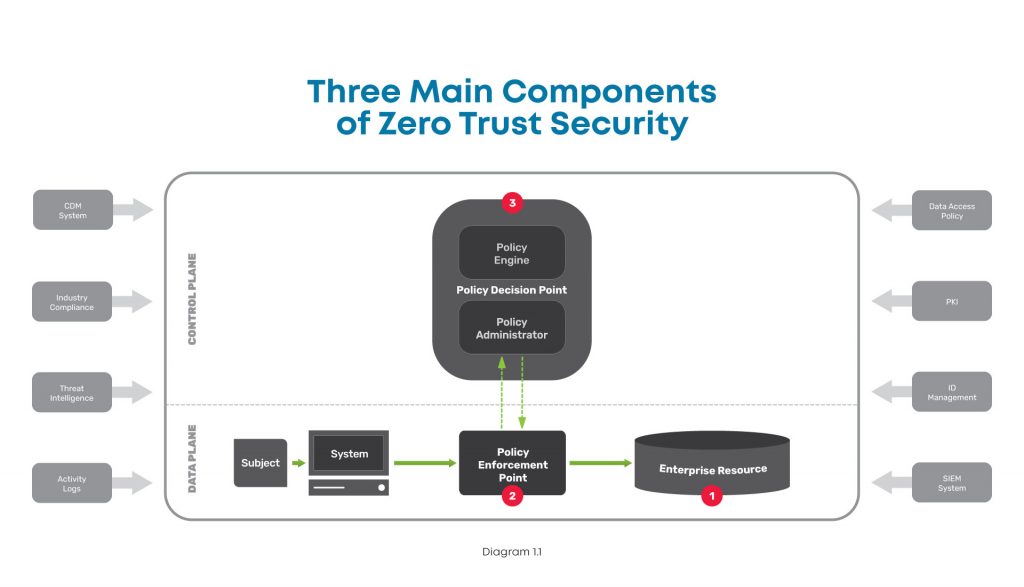
At a high level, this diagram shows the components you need when considering how to implement zero trust.

A high level diagram of the three main components of zero trust security, including the enterprise resource, policy enforcement point, and policy decision point.

There are three major components to look at in the big picture of zero trust security:

  1. Enterprise resource — This includes all the IT stuff you need to protect and that your business relies on, like hardware, software, and network equipment. In simple terms, this is like the gold that you keep carefully guarded in the center of your castle.
  2. Policy enforcement point — This is the datapath element that enables, monitors, and terminates connections between users / devices / applications and enterprise resources. Simply put, this is like the guard that accompanies those wishing to access your gold.
  3. Policy decision point — This is the layer that decides who / what is safe and grants / revokes access accordingly. In other words, this is the gatekeeper who determines who is allowed into your castle.

To better understand these, here’s a closer look at each:

Enterprise resource

This component is pretty straightforward, and consists of elements you need to operate and manage IT environments. These elements can include hardware like computers and data storage devices; software such as web servers, content management systems, and operating systems; and network equipment like servers, routers, firewalls, and out-of-band devices.


Policy enforcement point

This component consists of the datapath elements that enable, monitor, and terminate connections between subjects (users / devices / applications) and your enterprise resources. Though this is represented as one component, it is comprised of two parts that are both typically used in deployments. These parts are:

  • A client-side agent, usually deployed on a laptop or server.
  • A resource-side gateway, which controls access in cases where a client-side agent is not used. Examples where gateways are used include regulated healthcare equipment, ATM machines, and operational technology equipment.


Policy decision point

This component is the management and orchestration layer. This layer essentially checks identities to verify who is safe, and assigns policies to determine who gets access and to what. This is also represented as one component but is comprised of two parts:

  • Policy engine — This is the engine that decides whether a machine or web traffic is safe. To accomplish this, the engine uses a variety of data sources when making its determination, such as PKIs and identity management providers, CDM systems, and activity logs.
  • Policy administrator — This administrator uses the policy engine’s determination to grant or revoke access to a machine or web traffic.

There are many tools available to help you monitor and visualize traffic, so you can create policies and configure your policy decision point to meet your zero trust outcomes.

In order to create your zero trust configuration, you need to deploy several essential technologies.

How to implement Zero Trust: Essential technologies

Zero trust is a complete re-imagining of network security and can be a daunting task. But when you add its fundamental technologies to your toolkit, you can effectively build the three components described above and achieve Zero Trust Network Access (ZTNA). Here are the essential technologies you need to accomplish this.


Identity and access management

Such a big part of zero trust security relies on verifying that a device or user really is who they say they are. For this, you need an identity management solution from a trusted provider and public key infrastructure (PKI). This allows you to essentially create and issue a digital fingerprint for every user, and includes information such as their username, role, and other unique data. Multi-factor authentication is a critical component of identity verification, which requires users to present two or more pieces of identification/verification before granting access.

Additionally, access management is an important piece that determines a user’s authorization level, or in other words, which resources they can access. Identity and access management both feed information into your zero trust model’s policy engine.


Policy management

Another essential technology to have is a policy management solution. This is integrated into your security stack and serves as a single policy creation point. This allows you to define access and authentication policies for your entire organization.

You can specify data access rules for users, devices, and roles, which is vital to achieving micro-segmentation, limiting lateral movement, and enforcing least-privilege access. All of these feed into your policy engine and are used by your policy enforcement point to validate whether a session is allowed to continue.


Zero trust equipment and applications

Tying everything together requires equipment and applications that are able to enforce your policies. These are physical or virtual solutions that sit in front of servers and serve as your enforcement points. For example, this could be your next-gen firewall (NGFW) that initiates the multi-factor authentication protocol, verifies a user’s identity, and uses your defined policies to restrict the user’s access to a specific segment of your network.

Where can you get these essential Zero Trust technologies?

When considering how to implement zero trust, keep in mind that there are many vendors who can provide you with the essential technologies.

  • Obtaining an identity and access management solution is the easiest task when implementing zero trust. Many organizations offer an identity store, such as Azure Active Directory or Google Cloud Identity. You can also use companies dedicated to identity management, such as Duo, Okta, or Ping Identity. Keep in mind that if you need to control third-party access, such as for customers or equipment management contractors, you’ll need a solution that can access multiple identity stores simultaneously.
  • Obtaining a policy management solution requires careful consideration and should be part of your overall security stack. Look for a solution that allows you to create policies and set up datapath enforcement points. An adequate framework enables you to create authentication and post-authentication access rules, with an enforcement point that segments your network and continuously authenticates sessions. This security stack can be an on-prem NGFW, or delivered via the cloud using a Secure Access Service Edge (SASE) model, both of which are available from trusted providers like Palo Alto Networks.
  • Regardless of whether you use an on-prem or SASE model, you need an edge infrastructure platform to sit in front of servers and host the enforcement point. For on-prem, this platform must be able to host an NGFW to secure network segments and VLANs. For SASE, this platform must be able to create VPN tunnels to your SASE platform, which can be used for inline inspection and policy enforcement. Either approach requires powerful computing capabilities and a flexible operating system to accommodate workloads for detecting, analyzing, and automatically responding to threats, which few vendors offer.

Here are examples of what proper zero trust implementations look like, with ZPE Systems’ Nodegrid as the edge infrastructure platform:

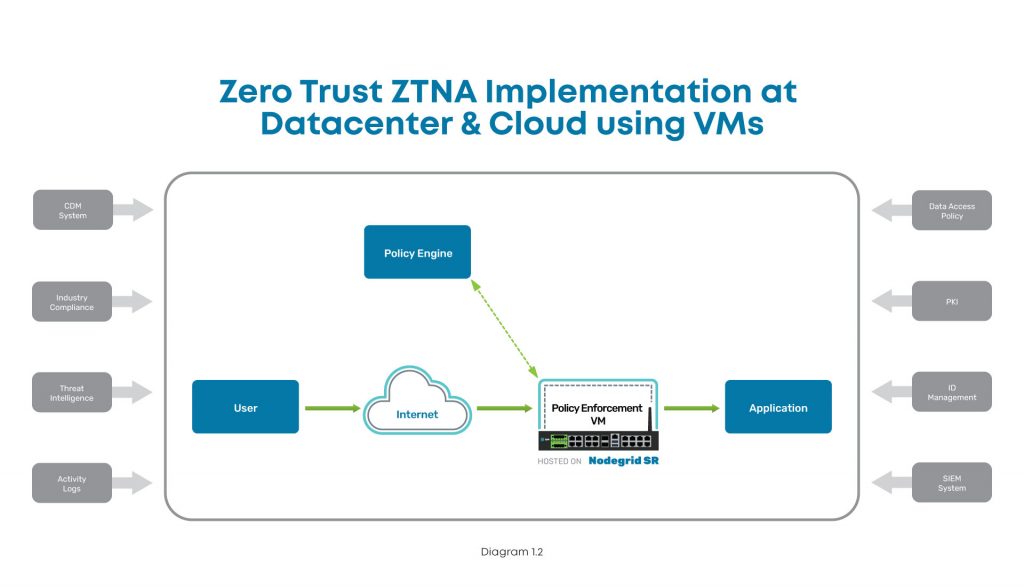
Implementation diagram showing how to implement ZTNA at the data center using Nodegrid.

In this diagram, you can see where ZTNA and Nodegrid fit into the scheme at the data center. The user connects via Internet, and the Nodegrid SR device serves as the Policy Enforcement Point hosting a VM. This VM communicates with the Policy Engine to authenticate the user, and then grants access to the data center application.

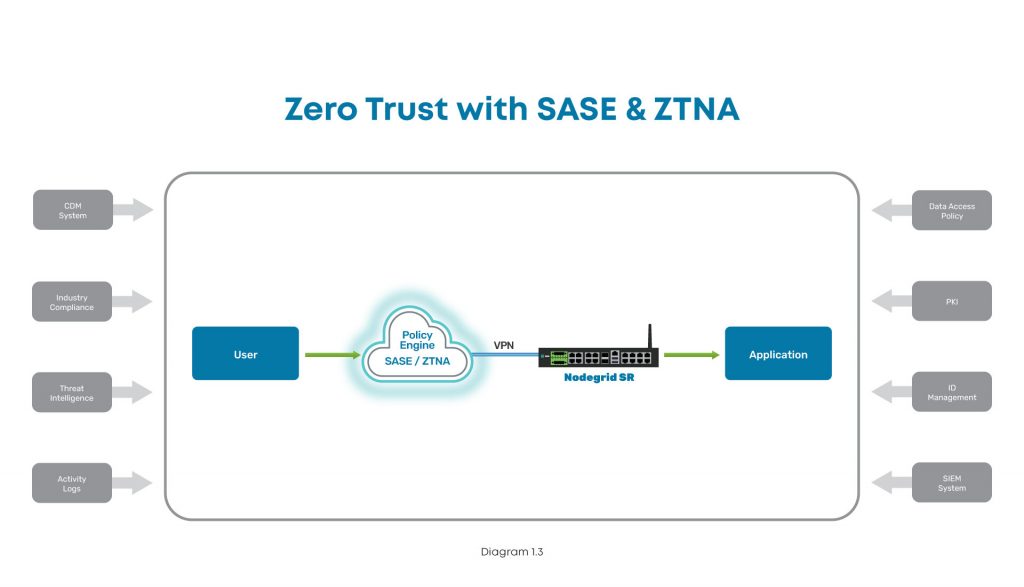
Implementation diagram showing how to implement ZTNA at a branch, edge, or other distributed location.

In this diagram, the user tries to connect to an application at a branch, edge, or other distributed location. The user connects via Internet, where SASE and ZTNA provide secure connectivity. The Nodegrid SR device connects via VPN to the Policy Engine for authentication, and then grants access to the branch application.

How to implement Zero Trust: A recap

To protect your organization, implementing zero trust requires you to build out the main components. With the policy decision point and policy enforcement point in place, you can secure your enterprise resources from outsider and insider attacks. Ensuring these components work like a well-oiled machine means you need the proper identity and access management tools, a complete policy management solution built into your security stack, and equipment and applications that can enforce your zero trust security policies.

Because user expectations have caused infrastructure to become incredibly distributed and complex, the attack surface has increased dramatically. The traditional castle-and-moat approach to security is no longer adequate, and recent newsworthy cyberattacks showcase the network vulnerabilities that even the largest companies still struggle to address. The President’s latest cybersecurity executive order is a step in the right direction to bolster infrastructure protection for public and private sector entities, and you can use this blog as a starting point to begin your zero trust journey.

Don’t get caught without these 5 security must-haves

Watch our webinar, Cyberattacks: 5 Security Must-Haves for Hybrid Infrastructure Gateways, and learn how to lay a solid foundation that makes implementing zero trust easier. Our experts will talk you through how to:

  • Keep edge networks and users fully protected
  • Make smart buying decisions
  • Get complete security and control for years of serviceability

Watch now to protect your business from growing cybercrime.

How Automated Network Management Helps in the Remediation of Human Error

shutterstock_1181226613

Large enterprises rely on the management and administration of their networks to continue their daily operations. In recent years, networking trends have pointed towards using automated processes to regulate and administer enterprise networks. Automated networks free up administrators to tackle more complex and specialized problems requiring the human touch. In addition, the automation process offers the advantage of eliminating the possibility of common mistakes caused by user miscalculations.

Network automation isn’t just growing in terms of ability; it’s also becoming much more popular. GM Insights illustrates how the network automation market is expected to grow by 26% CAGR between 2020 and 2026. This trend continues the general move towards automation in previous decades, where its use as a replacement for human involvement has become mainstream. This dramatic rise in usage will likely set the standard for network management in the years to come, making it more important for administrators to wrap their heads around it.

This article discusses network automation and illustrates use cases, the challenges, and solutions of automated network management.

What is network automation?

Simply put, network automation is the use of software to automatically perform tasks and protocols formerly performed manually by network engineers. This means the granular work of configuring and reconfiguring switches and routers is done automatically through preset automated scripting initially set up by the administrator. This shifts the network administrator’s role to focus on creating these processes and adjusting them, when necessary.

The applications for these processes change by industry. For example, a network administrator working in healthcare typically needs to monitor, adjust, and repair broken systems on their own to ensure that the network is running smoothly. In particular, they need this network to be exceptionally secure—if it is not, the medical information on the network could potentially be at risk. Similarly, they have to ensure that their network is updated to comply with HIPAA privacy laws. This process can be incredibly time-consuming, taking up time better spent on different specialized tasks.

Automated network management applications

Although the push to automate networks is far more popular today than five or 10 years ago, some are still waiting for more information before committing to the switch. Network automation offers several advantages over manual network operation, including:

  • Easier management
  • Faster workflow
  • Frees administrator time

The effects of networks not being appropriately managed are too significant to ignore. When a network is left unattended or not managed enough, it experiences difficulties with everything from application performance and lag to (at maximum) major security breaches. The dangers of network failure are even more prominent for businesses, resulting in potential data leaks and cyberattacks. Damages to the business’s reputation are also crucial factors to consider, which creates PR nightmares and financial losses that may take years to recover from.

While automation benefits apply across the board, there are also specific use cases where network automation offers unique advantages. Below we discuss automated networks and how they benefit configuration management, changes, and compliance.

Automating configurations

Network configuration refers to how the network is set up and organized. It contains information on all hardware devices attached to the network and controls all processes involved with repair and maintenance. In this sense, a network’s configuration management database may be one of the essential elements to automate.

The benefits of an automated configuration management network include:

  • Replacing network functions in the event of a failure
  • Saving configurations in different formats
  • Controlling and monitoring network repairs
  • Overseeing network upgrades
  • Storing information on default network systems

Automated networks perform these actions automatically (or automatically notify the administrator, if preferred), taking the labor demand out of them. It similarly offers network engineers the option of saving different configuration options for when they might want to enable them.

Automating changes

It’s important to remember that the systems we use to regulate our networks today are not necessarily the same systems we will use in the future. As the tools and programs used to regulate a network evolve and grow over time, network administrators also benefit from a system that automatically updates and adapts to them. Automated updates benefit every industry from tech to automotive, as businesses are generally more successful when they can quickly adapt and integrate new technologies as they become available.

Automating compliance

Although the internet used to be the wild west in terms of legislative regulations, legal restrictions quickly catch up with technology. The last two decades have seen major legislation regulating user privacy (HIPAA) record-keeping (Sarbanes-Oxley Act) and transparency (Gramm-Leach-Bliley Act), but industry projections expect new laws to be enacted, which networks will have to reflect.

Manual networks pose a much more significant challenge to administrators trying to compensate for these regulations. By switching to an automated system, administrators can ensure that their network meets the criteria as defined by the law and focus their energy on more advanced issues.

The challenges and solutions of network automation

Despite everything that automated networks provide for administrators and users alike, many are hesitant to embrace them, citing a variety of potential problems with their use. A few major concerns include:

  • Perceived loss of security
  • Complex tools which require management themselves
  • Need for customization
  • Legacy systems & devices

Some of these issues are more about the perception of automated networks rather than the networks themselves. However, others represent real concerns. A banking company, for example, may have excessive security needs to protect customer funds. The consideration of legacy systems—outdated non-integrative software still in use—affects all industries.

These concerns are understandable, but often don’t reflect reality. The complex tools involved in an automated network, no matter how difficult, do not hold a candle to the energy required to manage a manual network. Nearly all automated networks offer the customization options sought by significant industries, and legacy devices are, in reality, not quite as unreachable as most of us think. More information on the steps to network automation will illuminate how automation can adapt to practically any setting.

Network Automation; the next steps

The trend of automation is becoming more critical to understand than ever. As network management trends move further away from traditional human-centered models, the hardware used to manage them will quickly become outdated. It will become vital for competitive enterprises to automate their networks to stay relevant with that in mind.

Moving forward, automated network management is much easier with the help of an experienced partner.

ZPE Systems offers excellent options to bring your network management to the next level. Feel free to contact us for more information.

Contact Us

What Is Zero Trust Security? 5 Critical Things You Need to Know

Data,Protection,Cyber,Security,Privacy,Business,Internet,Technology,Concept

Zero trust security is not a new concept, but it has gained popularity in recent years. As companies become increasingly distributed, they must offer flexible network access without putting sensitive data at risk. That’s where zero trust security comes in. What is zero trust security? Let’s discuss the five critical things you should know.

What is zero trust security?

Zero trust security can be boiled down to a simple concept: never trust, always verify. That means you must always verify the identity and trustworthiness of every user and device trying to access your network. Traditional networking safeguards are based on a castle-and-moat architecture. This means that all users and devices within the network are assumed to be trustworthy and can access the resources they need. Those outsides of the network (or moat) must be verified and trusted before gaining access. One of the glaring problems with this approach is that it doesn’t consider the possibility of insider attacks coming from an authorized user/device within the network. That means that an attacker simply needs to hack into the network—for example, by compromising a user account—and then there are few, if any, obstacles remaining in their way. What is zero trust security? It’s a reimagining of network security based on the concept that you shouldn’t automatically trust anyone or anything trying to connect to your network. Instead, you should verify users and devices that try to connect, whether they’re coming from the outside or inside the network perimeter. In other words: trust no one.

Where did zero trust security come from?

The concept of zero trust was first prototyped more than a decade ago by John Kindervag at Forrester, but it didn’t truly gain traction in the industry until recently. The zero trust security architecture came from the realization that the traditional castle-and-moat model was becoming increasingly vulnerable. Years ago, a typical organization’s sensitive data was kept in a central location. This made the network and its resources easy to monitor for threats and protect from attacks. Now, many enterprises are adopting technologies that offer more outstanding networking capabilities for distributed access. These technologies include public and private clouds, service-based software and infrastructure, virtualized SD-WAN and firewall solutions, and more. Securing an entire enterprise network means putting multiple safeguards in place. The traditional security architecture is being replaced by the more flexible and robust zero trust security model.

Zero trust security benefits

One of the fundamental goals of networking is to allow the flow of information between computers, people, and organizations. However, that information is becoming more decentralized and must be relayed through various channels, which increases risk.  Since traditional security architectures simply can’t provide omnipresent protection for data and communications, organizations around the globe are adopting zero trust security.

Zero trust security use cases and examples

  • Scaling with remote and branch offices: Setting up new branches comes with its own set of security risks. However, using a zero trust model, you can get granular control over who and what can access your network. This can help eliminate attacks from stolen equipment, devices, or credentials.
  • Remote and work-from-home: When setting up a Secure Access Service Edge (SASE) configuration, whether for faraway branch offices or remote and traveling workers, zero trust security keeps networks and resources secure. Zero trust requires user identities and devices to be verified, which eliminates many methods of attack.
  • Securing data at HQ: When you define access rights using an SD-Perimeter approach, zero trust enables you to restrict access to sensitive resources to only the personnel who need it. This restricts lateral movement on your network and keeps data secure from both outside actors and malicious insiders.

Zero trust security benefits your business by giving you granular control over security controls and access policies, so you can better protect the network.

How to implement zero trust security

Now that you understand what zero trust security is, you can create a plan for implementing it. The best strategy is to break your implementation process up into a series of small, repeatable steps so you can slowly build out your zero trust architecture while improving and refining things as you go. The five basic steps to implement zero trust security are:

Step 1: Define your protect surface(s)

You may be familiar with the term “attack surface,” which is the sum of all the potential access points an attacker could use to penetrate your network. With traditional network security methodologies, you need to defend your attack surface by creating a perimeter of security controls (like firewalls and intrusion detection systems) that extends around your entire network. This used to be easy when all of your sensitive data was located on one centralized server, and you could only access it from inside the local network. Now that your enterprise data, devices, and users can be located in and accessed from anywhere in the world, it’s essentially impossible to identify, define, and defend every potential access point. The zero trust security model asks you to focus on the micro-level—the individual data, applications, assets, and services you need to protect. These items are known as your protect surfaces, and your goal is to create access control policies and establish security controls specifically designed to protect each of them. So, the first step towards implementing zero trust security is to identify and define each protect surface. You may find it helpful to use the acronym DAAS—Data, Applications, Assets, and Services—when determining what to include in your protect surfaces: D: Identify any data that contains sensitive or proprietary information that may be valuable to a hacker or damaging to your organization if it were stolen—e.g., HIPAA data, financial records, trade secrets. A: Do any of your enterprise applications process sensitive data or contain proprietary code? Those applications need to be included in a protect surface. A: All network assets, including laptops, point-of-sale terminals, IoT devices, cell phones, and manufacturing equipment, need to be inventoried and protected. S: Identify and locate all critical network services that could impact your business productivity or security, such as DHCP, Active Directory, and VoIP.

Step 2: Map your interdependencies

How do traffic and data flow between each of the items you identified in your DAAS? You need to know how each of these resources interact with each other to account for these interdependencies when you create access policies and enable security controls around protect surfaces. By mapping your interdependencies ahead of time, you can safeguard each protect surface without accidentally breaking anything.

Step 3: Construct micro-perimeters

You’ve already narrowed your focus from one attack surface to many small protect surfaces. Now you need to shrink your big network perimeter into a series of smaller micro-perimeters. That means you need to segment your network around your DAAS and implement security controls for each individual protect surface.   One of the greatest things about zero trust security is getting very granular with your security controls. Since you’re focusing on a small network segment, you can use the best security technology for that specific job. You want to segment your network as much as possible to create small protect surfaces that target security controls with a high level of specificity.

Step 4: Establish access control policies

Your micro-perimeters will rely on access control policies to determine who can have access and how to establish trust. You should use the “Kipling Method” to decide who should have access to each protect surface, which means asking the following questions:

  1. Who should have access to this resource?
  2. What application is being used to access this resource?
  3. When is the resource being accessed?
  4. Where is the user or device that’s requesting access?
  5. Why do they need access to this resource?
  6. How should you allow access to this resource?

Again, the smaller your network segments, the more precise you can get with your access control policies.

Step 5: Monitor and optimize

Once you’ve segmented your network, created micro-perimeters, and enabled your zero trust access control policies, you need to monitor each protect surface and conduct frequent log reviews to ensure operations are running smoothly. You should look for signs of latency and performance issues, as well as make sure your policies are being applied correctly and your security controls are restricting access appropriately. By following these five basic steps, you can create a zero trust security implementation that’s completely customized around your business requirements, protect surfaces, and security vulnerabilities.

Zero trust security best practices

Here are some additional tips for implementing zero trust security in your enterprise.

1. Assess your current strengths and weaknesses:

Zero trust security doesn’t necessarily require an expensive technology upgrade to implement. Instead, you should look for ways to augment your existing network and security architecture using zero trust principles and policies. By thoroughly analyzing your existing tools and solutions, you can identify gaps in your zero trust readiness and avoid spending money on things you don’t need or already have.

2. Invest in discovery and classification tools:

Identifying your DAAS is the critical first step in your zero trust journey, so you should make things easier on yourself by investing in the right tools for the job. Look for solutions that can automatically discover network assets, application interdependencies, and sensitive data. These automated tools won’t just make your job faster—they’ll ensure you don’t let anything slip between the cracks.

3. Assess trust dynamically and consistently:

Verifying the identity of a user or device is only part of the zero trust equation— you also need to determine their trustworthiness, which may change depending on context. For example, is this an average time for this user to connect to your network? Is this device in a geographic location that makes sense in this situation? Has the user or device been involved in any suspicious behavior elsewhere on your network? You need to determine trust on a dynamic basis, and apply the same criteria to every account, whether they’re in the office, at home, or abroad.

4. Implement zero trust identity and access management (IAM):

Without an identity and access management (IAM) solution that supports zero trust security principles and security controls, you can’t verify identities and establish trust. For example, you may want a solution that incorporates user and entity behavior analytics (UEBA), which monitors account and device behavior so it can spot unusual or risky activity, report it, and block access. You’ll also need features such as single sign-on (SSO) and multi-factor authentication (MFA) to provide additional identity verification and security levels. SSO allows users to access all enterprise resources using the same user name and password, which means you can enforce the same password complexity requirements and access control policies across your entire network. MFA requires users to provide a second method of identity verification, usually with a code texted to their smartphone or generated by an app.

Zero trust security simplified

What is zero trust security? It’s both a mindset and a methodology for security that addresses the limitations of a castle-and-moat architecture for today’s distributed business network. By following the principle of “never trust, always verify,” and using the implementation steps and best practices outlined above, you can take advantage of zero trust security’s benefits for your enterprise. Are you looking for a way to streamline your zero trust deployment without sacrificing security? Nodegrid’s Zero Trust Security Framework Foundation is a family of network management hardware and software that supports zero trust principles through features like:

  • Secure boot and geofencing technology so only you can install and boot your configuration
  • Integration with zero trust IAM providers like Duo, Okta, and Ping for SSO and MFA capabilities
  • Unified cloud management, control, and access for consistent configuration across branches

What is zero trust security?

Learn more about zero trust or request a demo of Nodegrid’s zero trust framework by contacting ZPE Systems today at 1-844-4ZPE-SYS.

Contact Us