Successful businesses rely heavily on their network infrastructure to keep up with demand and to allow work to flow smoothly. When outages occur, whole operations can come to a standstill which equates to wasted time & money, and most importantly, unhappy customers. As networks continue to grow and become more complex, so does the amount of effort and resources needed to keep them running at optimal efficiency. The goal is to migrate away from a reactive form of management and move to a proactive approach that can allow administrators to identify and correct issues before they become problems.
Industry leaders are constantly searching for enterprise grade tools and solutions that allow them to take more control of their infrastructure, and the best of them follow the FCAPS model and framework for network management.
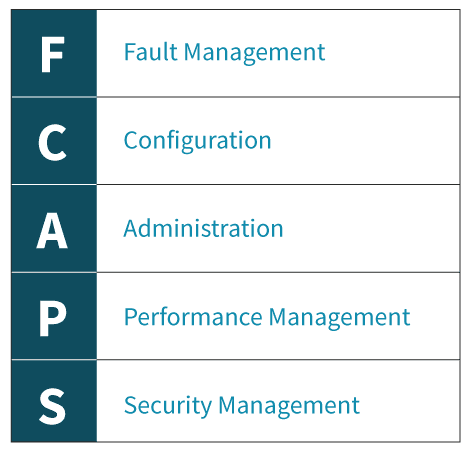
FCAPS is the ISO Telecommunications Management Network model and framework for network management. The term itself is an acronym for the five areas of function within the model:
ZPE’s Nodegrid solutions consolidate and virtualize all your network functions onto one platform, no matter which vendors you use. Nodegrid makes it easy for you to monitor, configure, administer and secure your network from one centralized location while also providing you with the metrics and data you need to make smarter business decisions. Of course, Nodegrid meets all aspects of the FCAPS framework.
Fault Management
Network faults happen, so catching them before they can cause serious issues is critical. The ability to identify, isolate, log, and correct them is a necessary component to every network. Further, the ability to review historical fault data in order to identify trends allows you to take proactive measures that can greatly improve network stability.
Nodegrid’s tracking features provide information about the system and connected devices such as Open Sessions, Routing Table, System Usage, Discovery Logs, LLDP and Serial Statistics. The Event List feature provides statistical information on all system events occurrences which can help you to quickly visualize your data.
Configuration
Configuration management plays a substantial role within your network. From deployments to upkeep, everything must be centralized and tracked in order to keep everything running smoothly. For optimal ease of use, a great system should:
Centralized storage of configurations
Simplify device configurations and provisioning
Track changes
Allow for future expansion
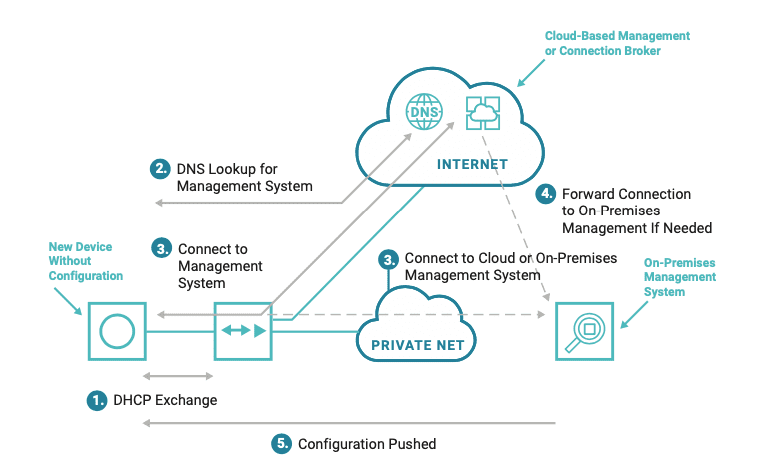
Nodegrid makes managing and configuring devices simple and easy. With Zero Touch Provisioning (ZTP), deploying new devices while maintaining consistency and reducing errors is a snap. Nodegrid can even leverage the existing ZTP features of your infrastructure and extend ZTP to other appliances, including those that don’t come with ZTP features. Nodegrid’s Auditing tool allows you to track everything from one location, ensuring that nothing gets lost in the shuffle.
Administration
Administration allows you to configure users and groups based on permissions allocated to them within the systems. Access should be restricted to ensure that only authorized users can make significant changes to critical systems.
Nodegrid offers you the ability to create various groups and users with specific permissions to meet your needs. More specific profile settings can also be configured, such as sudo permissions, custom session timeouts, and default startup applications.
Performance Management
Ensuring that network performance is consistently operating within optimal levels is another key aspect to successful network management. Tools should be available that allow you to monitor performance and troubleshoot issues while being easy to access and use on a regular basis. Data should also be readily accessible to allow for the identification of trends which can assist with future planning.
Nodegrid offers a dashboard tool to visually see Event Details, Managed Device details, and Monitoring Data from the system and all Managed Devices. It gives you the flexibility to create several dashboards for different purposes and monitor data points such as Power Consumption, Voltage (V), Current (A), Temperature, Fan speed, and many more. It provides options to show data from a different period of times such as the last 15 minutes, the last hour, the last day, this week, this month, or the last 5 years. Nodegrid also offers a full suite of Network Tools which allow you to run various tests in real time.
Security Management
Security management is all about limiting and controlling access to assets located within the network. User authentication, ACLs, and encryption all add layers to secure your network against threats and malicious attacks.
Nodegrid offers a robust security suite to ensure that your network stays secure. From a built-in firewall, customizable users and groups, configurable password complexity and expiration, as well as standard SSH and SSL protocols, you are in full control. Nodegrid offers the option to use 2-factor authentication for an extra layer of security. Single Sign-On (SSO) is also available and can be used with Duo, Okta, G Suite, or other custom SAML Identity Providers.
Want to learn more?
For more information on ZPE’s full product line, please visit ourproducts page.
Have a specific question or want to experience a live demonstration for yourself? Reach out to us via our contact page. We’re here for you!
The advent of AR/VR, autonomous cars, smart everything, IoT, and other 5G applications requires processing of data at the edge of the network to shave off response times, manage core bandwidth, and improve security. This drives the requirement for having high performance low-cost compute at edge locations along with intelligent discovery and routing to connect end-user devices to these locations.
In this webinar we will discuss how Session Smart™ routers running on Nodegrid can enable the Smart Edge. We will share real world deployment experiences on how KAEMI is providing managed services utilizing Tunnel-free SD-WANs on the ZPE Systems platform to connect to public clouds as well as to build the Smart Edge close to users.
About the Speakers:
Rene Neumann is the Solutions Engineering Manager at ZPE Systems. He has helped some of the largest companies in the world such as Amazon, Apple, Societe-Generale, and Exxon-Mobil rebuild customer satisfaction with better networking. His IT & data center expertise spans 22 years. Using ZPE’s powerful platform of consolidated devices and intuitive software, Rene continues to improve network architecture for companies across the globe.
Sven Launspach is the founder and managing director of KAEMI GmbH, an integrated IT/OT infrastructure and managed service provider based in Berlin, Germany. One of KAEMI’s guiding principles is: “We take care of connectivity, so that the customer can concentrate entirely on its core business.” His expertise includes managed services, SD-WAN, multi-cloud applications, and NFV/SDN. As a Consultant previously, he has led digitization projects for Lufthansa, which saved millions of euros in operating costs. He is particularly in demand for sharing his thoughts in conferences and IT events. He is also managing director of Consultpool GmbH & Co. KG who offer high skill consulting especially for DAX companies.
Dr. Ritesh Mukherjee leads Routing strategy at 128 Technology. His expertise includes routing and switching, Data center, Cloud, SDN/NFV, and IoT. Prior to 128 Technology, Ritesh was Director, Network Solutions at Huawei leading the technical solutions team and Manager, Product Management at Cisco leading the software operating systems group. Ritesh holds a PhD in Computer Science from Concordia University, Montreal.
Today, businesses depend highly on IT, and they cannot afford to experience downtime. That’s why they need robust IT infrastructure. Robust IT infrastructure can ensure businesses do not experience downtime and prevent financial losses resulting from the inability to communicate and process payments, and prevent loss of sensitive information. Robust IT infrastructure is not the preserve of only large companies. Small businesses need it, too, since 43% of cyber-attacks target them. Whether small or big, all businesses can benefit from having robust IT systems in place.
A serial console server is essential to a robust system as it helps maintain uptime and prevent losses.
What is a Serial Console Server?
A serial console server, also known as a console server, enables IT and network administrators to access, manage, and monitor networking devices such as switches, routers, and servers.
Why Businesses Need Serial Console Servers
Does your business use serial console servers? If not, here’s why your business needs to start using them:
1. Faster Troubleshooting
When devices go offline, IT technicians may need to reboot them so that they work again. Commuting to remote sites where networking devices are located to reboot them can prove costly and time-consuming. Serial console servers can resolve this. With serial console servers, IT technicians don’t need to travel long distances to reboot devices. They can be rebooted remotely.
2. Better Security
With security breaches on the rise, businesses cannot afford to take security for granted. Serial console servers provide enhanced security. First, serial console servers grant specific people the ability to monitor and manage the network. These authorized people can restrict access to the network and bolster security. Moreover, because serial console servers enable centralized data management, access to the network is limited and thus more secure.
3. Easier Management
More equipment adds to a network’s complexity. A serial console server can cut down on the equipment needed to manage a network. By storing server information in one central place, serial console servers make it easier for IT technicians to manage the network.
4. Reduce Costs
Downtime is costly. Businesses lose about $26.5 billion annually, thanks to it. Your business cannot afford to lose money due to downtime. Serial console servers can mitigate losses and maintain uptime. If a disruption happens, IT technicians can connect to networking devices, diagnose the problem and resolve it remotely. Thus, serial console servers can significantly cut down on downtime.
5. Enhanced Monitoring
Several networking problems can be prevented if they are identified early. Serial console servers monitor networking devices and enable network administrators to detect critical issues in real-time and resolve them before they get out of hand. For example, a serial console server can detect extreme temperatures in a server rack. Consequently, the network administrator can resolve the issue before it escalates.
Businesses need robust IT infrastructure. Serial console servers are a key component of a robust system. They can enable you to take control of your network and prevent unauthorized access. Additionally, they can enable easier management, improve monitoring, save your business money, and prevent downtime, making them a worthwhile investment.
Want to experience these benefits? Contact ZPE Systems for specialized assistance.
COVID-19 meant even the largest companies had to figure out remote work. And they had to adjust fast, not only to stay afloat and maintain business continuity, but also to establish a “new normal” that made them more responsive to change.
Aside from adapting their networks to accommodate a distributed workforce, most companies were left to contemplate one crucial component: best practices for managing a remote team.
We sat down with ZPE Co-Founder and VP of Engineering, Livio Ceci. Livio has more than 15 years of experience managing teams spread across the globe, and he’s offered some important advice you can use right now.
Stay Human
Because of COVID-19, every business interaction we have is through the computer screen. It might seem easy to become somewhat detached from your teams, but maintaining emotional intelligence is more important than ever with a remote workforce.
Apart from adjusting to any new cultural or language barriers you’re faced with, remember to help employees achieve a healthy work/life balance. Especially now, things are a little heavy on the life side, but your staff members want to continue to contribute and provide value to your company. Show employees that you sympathize with them, and in return, they’ll prove their commitment to you.
Here are a few things to keep in mind:
Establish trust — Remote or not, keeping promises goes a long way when it comes to establishing good relationships. When you say you’re going to do something, follow through by doing it. Send those account details on time, start sourcing the additional help you promised, and make sure everyone gets the new software you purchased.
Communicate clearly — Now there’s more standing between you and your teams, so miscommunication is more likely to happen. Make sure you and your employees are asking enough questions so that nothing gets lost in translation.
Talk about life — Of course you want to be as efficient as possible with your time. But part of establishing strong relationships is talking about what’s going on in people’s lives. Ask Marisol how her kids are adjusting to school at home, check in on Farook’s emergency roof repair, and celebrate Rajiv’s fifth anniversary.
Cover the Basics
If you’re new to working remotely, you’re probably well aware of the differences between the office and your home environment. There can be a ton of distractions at home, from the TV, to family, to chores, and it might be difficult for you to be productive. Before you can manage your distributed teams, you need to be able to focus, which means taking care of these work-from-home basics:
Set up a dedicated workspace — Limit distractions by setting up a space designated as your office. Use a room that is away from high-traffic areas in your home, so that you can focus on your tasks throughout the day.
Make sure your Wi-Fi is strong — Connectivity is crucial to remote work, but you might find it’s limited in certain areas of your home — including where you set up your workspace. Double-check your connection speed and strength to make sure it holds up, and consider upgrading or extending your Wi-Fi if necessary. The last thing you want is to suddenly drop off during an important video conference.
Block background noise — If you live near others or with family, you know that noise happens. One of the easiest ways block it out is by investing in a decent headset and microphone. You can also change your office by adding noise-blocking foam or insulation. Once you are able to cancel out noisy distractions, you and your team will be able to focus on your work.
Have the right hardware & software — From a laptop to a webcam, to mission-critical software, you need adequate tools to do your job effectively. Make sure you have everything you need so that you can be as productive as you used to be from the regular office.
Use the Right Tools
Going off the previous point, using the right tools is essential to managing a remote team. Not only do you need the right hardware and software, but you also need everyone to be on the same page for efficient, productive work. Communication and collaboration are key to business continuity.
There are many communication platforms available, and you’ll likely use a combination of tools because each has its own strengths. You’ll have different needs depending on your organization, but your ability to perform relies heavily on how you stay in touch with your teams every day. Instant messaging tools such as Slack can help you stay organized and chat with the right people, while video conferencing platforms like Zoom allow you to have meetings and conference calls.
In the office, you may have used a physical board to collaborate and track productivity. Now that you’re doing it all in a virtual environment, consider using tools like Jira or Asana to keep tabs on work. These allow you to easily manage tasks, set priorities, and delegate responsibilities.
Sharing tools are also invaluable to working remotely. These include file sharing platforms like SharePoint and knowledge base programs like Confluence, which allow you to easily collaborate on files and documents. And if software development is a large part of your organization, you’re probably already aware of the benefits that something like GitHub brings to the table. In a remote work environment, it’s now more crucial than ever and provides the version control hosting you need.
Pro tip: Keep your company’s info secure
Having the right tools in place helps you stay productive. But you also need to make sure your company’s info stays safe.
Use proper security measures to protect your data, and implement backup protocols that help you restore data in case issues arise.
Keep your code and other intellectual property on-prem to minimize vulnerabilities.
For your employees, give them only the minimum number of permissions necessary to do their job.
At ZPE, one of the ways we securely access our data and infrastructure is by using ZPE Cloud. Existing customers are eligible to get a free 3-month trial.
Focus on Goals
From everyday meetings, to task-specific goals, being able to focus greatly improves your ability to manage. But when you’re in charge of steering the ship while your crew is spread across the globe, it’s challenging. You might struggle to assign priorities, and deliverables might be vastly different than what you expected. Complicating things even more is the anxiety that can come with not being able to check in on what everyone is doing. You might feel like you’re not in control.
All you need to do is adjust your thinking. Just because you’re no longer in the office and can’t see the work getting done in front of you, doesn’t mean it’s not getting done. So, focus on the goals — not the activity.
When you consider everything that goes into working remotely — from time zone differences, to technical issues or sudden emergencies — it’s not effective to keep wondering, “Is Tabitha working right now on the latest feature we discussed?” Not only does it distract you from your own tasks, but it can lead you toward micro-managing, whichlowers trust and morale.
Instead, focusing on the goals and outcomes allows you to exercise the trust that you and your teams have established.
Here are some tips from Livio to help you and others focus on your goals:
Set expectations — Communicate what’s to be expected, so that everyone has a clear picture of what to shoot for. And when things change, make sure to update everyone involved. This goes for everything from meetings to deliverables, to big-picture stuff like new releases and prototypes. Are the presentation materials due Wednesday at 5pm Pacific? Which features should be released with version 1.4? Will the new admin start on Tuesday or Thursday? Check in regularly to make sure that everyone is on the same page.
Prioritize — Obviously, more important things should be at the top of everyone’s priority list, while minor things should be assigned a lower priority. This helps to keep expectations clear and make sure the focus remains on the appropriate goal.
Assign smaller deliverables — This one’s mostly for engineering teams, but can also be applied across various disciplines. By assigning smaller deliverables (and shorter sprints), near-term goals are easier to focus on and accomplish, which ultimately contribute to the end goal.
Hold regular meetings — Frequently go over expectations, deliverables, announcements, and other important topics, either via conference call or video chat.
Have an agenda — When it comes to business, and especially focusing on goals, make sure you have an agenda that you can share with others. Having a clear agenda makes for efficient use of everyone’s time, keeps the focus on appropriate tasks and outcomes, and limits distractions, whether you’re preparing for a meeting or finishing up the week’s sprint.
Pro tip: Set priorities straight
When considering expectations and task priorities for remote teams, ask, “How does this contribute to the end goal?” This helps you break down each piece of work into smaller chunks, so that you can delegate appropriately.
Stay Committed
Do you know what’s driving timelines? Answer: your commitment.
Whether your projects are short-term, long-term, or both, your commitment to them is what will keep you and your teams on track to reach your goals. When it comes to software development projects, Livio shares a few best practices:
Make two major releases per year (give or take one, depending on the project scope).
Develop a cycle that calls for a short time-to-market, with one small release per month.
Test, test, test! Set yourself up for continuous integration that ensures only stable code is committed.
Pro tip: What about the unexpected?
Over the years, Livio has found that the unexpected is the biggest disruptor to even the most meticulous plans. Whether it’s a critical bug or an urgent, last-minute request from the client, unforeseen hurdles always complicate the development process. To combat this, Livio suggests building in extra time from the beginning. This helps you adjust to abrupt changes or issues without having to alter more (or all) of your plans.
No matter how permanent our new normal may be, you can make the most of managing a remote team. If it’s a pandemic, natural disaster, or human error that threatens continuity, take this advice to keep business running even with a distributed workforce.
There’s More to Come
We’ve got one goal: to help you transform your business’ network into a value center. Sign up for news and updates for more free tips and advice about out-of-band, SASE, SD-everything, and more!
Out-of-band management is an essential tool that should be part of your business continuity strategy.
But What Exactly is Out-of-Band, or OOB?
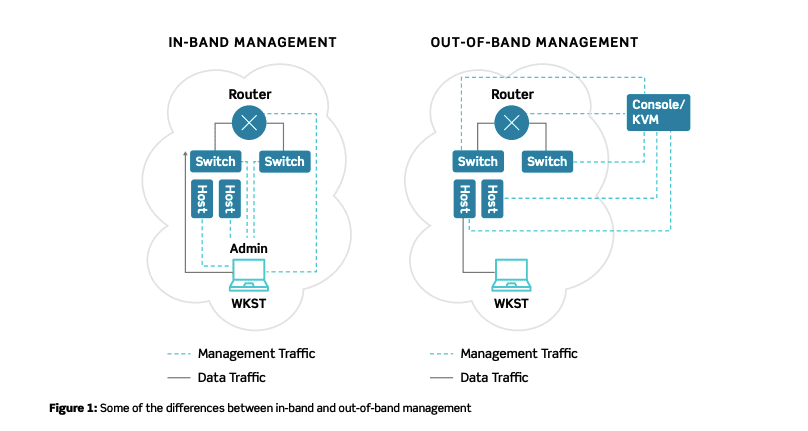
Your network is comprised of many devices and solutions, and it allows your organization to carry out normal operations. To gain access to your hardware and infrastructure, you typically might use an in-band connection, which relies on the production network.
Out-of-band management uses a completely separate network that’s dedicated strictly to managing infrastructure. So if you need to reboot a router, collect data for regulatory compliance, or adjust QoS settings due to traffic changes, OOB makes it possible — even if your production network is down.
IT admins across the globe love OOB for its exclusive connectivity and extended capabilities. See for yourself with these 3 reasons why your business needs out-of-band management.
Here’s a brief look at how OOB helps keep your network up and running from anywhere.
Restore Uptime Fast From Anywhere
One of the biggest benefits of OOB is that it gives you the ability to restore uptime faster.
Think about this scenario: on the other side of the world, one of your most isolated sites loses connectivity. If you don’t have OOB, you need to troubleshoot on-site, which means finding the right support staff, spending time & money on travel, and making a host of other arrangements — all while the site continues to suffer from downtime. To add insult to injury, what if the fix is as simple as rebooting a device? You spent thousands in support costs and lost uptime just for someone to flip a switch.
Out-of-band management gives you remote control of your devices, which allows you to troubleshoot from anywhere and resolve issues without being on-site. And if you choose a complete solution, like ZPE Systems’ Nodegrid, you can even cycle power from thousands of miles away.
Get Unified Control of Our Network
To manage your infrastructure without OOB, you need to juggle many interfaces, protocols, and UIs specific to each device. This can require you to invest loads of time and resources into support, considering you need to train staff on how to use the different pieces of your infrastructure.
But with OOB, you can remotely manage everything with one tool. Support staff won’t get overwhelmed or fatigued switching from device to device, and instead can easily control it all from one platform — whether it’s networking, compute, storage, or power.
Manage More Functions
Hardware consolidation is on the rise, which means fewer devices are responsible for controlling more functions. Routing, switching, serving, and more are being crammed into single appliance offerings. This is great for boosting efficiency and reducing your footprint. But with everything, there’s a tradeoff.
In this case, issues can have a greater effect on your network and take down several functions at once. If one of your consolidated devices fails and you don’t have out-of-band, you need on-site staff who can troubleshoot issues across the board. However with out-of-band management, you can troubleshoot and control all your network functions and applications remotely using a single tool.
Did you know: OOB lets you put your best people on the job, no matter how far away they are from your network devices. And with a solution like Nodegrid, you get screen- and session-sharing features, so your top experts can collaborate in real time to keep your network running.
Overall, out-of-band management supports business continuity by giving you more control over your network infrastructure. It helps you quickly recover from and prevent downtime, gives you one simple tool to make management easy, and puts you in charge of all your network functions.
Business Continuity: Why Better Networking Helps you Weather the Storm
Even with an adequate out-of-band (OOB) management path established, managing your network infrastructure can still leave you wanting more efficiency across the board. The good news is, network automation can help you improve your OOB operations, and ultimately your business continuity efforts.
Here’s a brief look at how network automation helps you do away with loads of busywork and lets you scale with ease.
Network Automation Streamlines Business
Nearly 50% of organizations plan to make investments in network automation. The biggest benefits it brings to the table is that it helps streamline processes and fosters more autonomous networking.
Your IT professionals undoubtedly spend plenty of time and effort performing repetitive tasks and manual procedures. These can include routine updating, patching, and data logging, or more involved processes like provisioning resources for new employees.
By introducing network automation to your out-of-band management solution, you can become more efficient and productive with tasks that are completed on their own.
Automated, error-free workflows perform tasks faster and eliminate human error.
Downtime can be prevented with automatic health monitoring and self-healing.
You can standardize compliance by automating policy enforcement and management.
Not only does network automation streamline processes to free up staff for more critical needs, but it also allows for more autonomous networking. With the right orchestration tools, you can introduce programmatic behavior to support network activities like load balancing and provisioning. Instead of involving staff in these activities, which can be inefficient and pose the risk of human error, automation can handle the job quickly and consistently.
You no longer need to keep pulling critical personnel into these tasks, because automation keeps your networking running like a well-oiled machine.
Zero Touch Provisioning Makes Scaling Easy
Scaling can be a challenge without automation. Typically, you need to manually configure devices for deployment, which can leave you open to security threats, repeated human errors, and unreliable provisioning. It doesn’t matter whether you’re expanding your operation by adding 10 sites or 100 sites — having to manually deploy each location increases the potential for error, which can have major consequences now or in the future.
But thanks to zero touch provisioning (ZTP), scaling is secure, consistent, and accurate.
ZTP involves scripting and automation that allow devices to be configured automatically. Developing and testing ZTP in a lab environment is crucial to fine tuning before putting it into play on production networks. This, however, is one of the strengths of automation. It allows you to ensure that your scripts are set up correctly, and then you can deploy quickly and consistently at scale.
ZTP is typically performed for data center locations, however ZPE Systems offers ZTP via the cloud for deploying remote sites and branch offices.
ZPE Systems delivers innovative solutions to simplify infrastructure managment at the datacenter, branch, and edge.
Learn how our Zero Pain Ecosystem can solve your biggest network orchestration pain points.


 Today, businesses depend highly on IT, and they cannot afford to experience downtime. That’s why they need robust IT infrastructure. Robust IT infrastructure can ensure businesses do not experience downtime and prevent financial losses resulting from the inability to communicate and process payments, and prevent loss of sensitive information. Robust IT infrastructure is not the preserve of only large companies. Small businesses need it, too, since 43% of cyber-attacks target them. Whether small or big, all businesses can benefit from having robust IT systems in place.