Providing Out-of-Band Connectivity to Mission-Critical IT Resources

White Box Networking: Making the Switch

A close up of fingers plugging an Ethernet cable into a white box networking switch
Vendor lock-in is risky to corporate revenue and security. Enterprise technology ends up on rails, so to speak. Organizations lose the ability to choose the best features, pricing, and functionality for their use cases and instead must go along with their vendor’s roadmap. This is leading executives to take a hard look at their existing networking tech stacks so they can break out of their closed ecosystems. White box networking solutions, which are designed around completely open and customizable hardware components, offer an escape from vendor lock-in. In this blog, we’ll discuss how white box networking works, what the benefits and challenges are, and how to build the best solution.

Table of Contents

  1. White box networking explained
  2. The benefits of white box networking
  3. The problem with white box networking
  4. The solution: White box networking with ZPE Systems

To see an example of white box networking in action, request a

free Nodegrid demo

White box networking explained

White box networking involves the use of hardware – like switches and routers – that are built with commodity parts and can run any software. These solutions are highly customizable, enabling organizations to mix and match parts from different suppliers to get exactly the features they need, like port configurations, storage capacity, and computational power. In addition, white box devices can run operating systems and software that’s been custom-made or heavily modified, allowing even greater flexibility.

The benefits of white box networking
.

Cost savings: Network Operating Systems (NOS) are often the most expensive component of a networking solution, involving recurring licensing fees, support contracts, and periodic update costs. Plus, the vendor may decide to overhaul or replace their software platform, requiring expensive network hardware replacements and licensing upsells to maintain support. White box networking decouples the hardware and software, giving organizations complete control over their NOS and allowing the use of open source or in-house operating systems. By eliminating their reliance on commercial NOS, companies can reduce both their upfront software costs and their recurring licensing fees.

Hardware and software freedom: Even if an off-the-shelf networking solution comes with the necessary features and functionality right now, that’s no guarantee that the feature roadmap will always align with an enterprise’s goals and future growth. A white box solution can be changed at any time by installing new software or replacing hardware components, so it can grow and evolve with an organization. This also means that companies can take advantage of new and emerging technologies like SD-WAN or AIOps as quickly as they want without needing to completely replace the underlying infrastructure – they can simply add the required hardware and software to their existing white box solutions.

Easy management and interoperability: The biggest benefit of white box networking is that it can be managed by any platform and integrated with any third-party solutions. This makes it easier for an organization to create a fully unified environment with centralized orchestration, end-to-end network automation, and complete visibility. Network teams get holistic control over the entire white box infrastructure from a single pane of glass, using their preferred automation scripts and orchestration tools, which ensures greater performance, reliability, and efficiency.
.

The problem with white box networking

Though white box networking has many advantages in theory, a lot of companies find it hard to achieve these benefits in practice. For one thing, many white box vendors focus simply on the hardware and don’t provide a default NOS. That means organizations need to spend additional time purchasing, customizing, or writing their own NOS as well as deploying that NOS to all new white box devices.

In addition, white box hardware is often sold in bulk and can become prohibitively expensive if bought in smaller quantities. An organization might end up buying a lot of extra parts they don’t need just to avoid outrageous shipping fees, and then they’re left with the hassle of storing or reselling that hardware.

White box networking also requires a lot of extra work to configure, deploy, and manage compared to a commercial off-the-shelf (COTS) solution. For many companies, the complexity of enterprise networks and the tech talent shortage make white box networking too much of a headache. Plus, white box manufacturers typically don’t provide ongoing support in the form of NOS updates and security patches, which means the enterprise must take on this responsibility themselves.

Plus, white box devices can also increase the security attack surface of the enterprise network. A poorly configured and unpatched NOS is a tempting target for cybercriminals, who can use a compromised white box device to access sensitive network resources.

The solution: White box networking with ZPE Systems

To use white box networking effectively while avoiding these challenges, you need a complete solution, not just disparate parts to assemble on your own. That solution should combine the open ecosystem approach of white box hardware, the centralized management and security patch advantages of point solutions, and pre-validated applications that don’t require a professional coder to deploy.

For example, the Nodegrid platform from ZPE Systems turns white box networking into a complete enterprise solution. Nodegrid devices are highly customizable, inexpensive, and arrive fully assembled. These devices come pre-installed with the Nodegrid OS, which is built on an x86-64 bit Linux kernel to ensure easy setup and interoperability. ZPE Systems can even manage Nodegrid OS updates and security patches for you, helping to reduce your attack surface and close the tech talent gap. Plus, you can directly host or integrate your choice of networking applications (including Docker containers and SASE solutions) for greater functionality, security, and ease of use.

The Nodegrid solution addresses every major challenge of white box networking so you get complete vendor freedom and simplified management in a single, affordable platform.

Ready to learn more?

To learn more about white box networking with Nodegrid,contact ZPE Systems today. Contact Us

Why You Need an Out-of-Band Cybersecurity Platform

out of band cyber security
As enterprise networks continue to grow in size and complexity, many organizations struggle to defend their expanding attack surface. The cost of failure also continues to grow – according to IBM’s 2022 Cost of a Data Breach report, the average cost of a successful ransomware attack reached $4.54 million. Koroush Saraf, VP of Product Management at ZPE Systems, identified the top five cybersecurity gaps that must be closed to achieve holistic cybersecurity, which include:

  • Unnecessary exposure of management ports
  • Credential theft
  • Unpatched infrastructure
  • Inability to deploy the right security tools
  • Human error

Closing these gaps requires a three-pronged approach – out-of-band infrastructure, an open platform from which to deploy and manage security tools, and end-to-end automation (aka, hyperautomation). In this blog, we’ll explain how an out-of-band cybersecurity platform combines these three key features into a single, holistic network security solution. Want to see an out-of-band cybersecurity platform in action? Request a free demo of the Nodegrid solution.

Why you need an out-of-band cybersecurity platform

An out-of-band (OOB) cybersecurity platform provides a single, unified interface from which to:

  • View and manage network infrastructure
  • Deploy and control all of the various security policies and applications needed to protect that infrastructure, and
  • Orchestrate network, infrastructure, and security automation.

This platform resides and operates on an out-of-band network running parallel to the production network, which ensures 24/7 availability even if there’s a LAN failure or ISP outage. All network, infrastructure, and security management occur OOB, which prevents resource-intensive orchestration workflows from negatively impacting performance. This vendor-neutral, automation-friendly, out-of-band approach to cybersecurity helps you in several areas.

Reduce your attack surface

The management ports on devices like servers and switches are frequently targeted by cybercriminals because they can be used to gain access to valuable data and resources on the production network. With an out-of-band cybersecurity platform, all infrastructure and network management occurs on the OOB network, which means you no longer need to expose management ports on the production network. Isolating management and orchestration workflows to the OOB network helps reduce the attack surface by making it much more difficult for attackers to find and access those open management ports. Vendor-neutral OOB cybersecurity platforms can also help companies reduce the number of individual devices and solutions on their network, which decreases the attack surface even more. An open OOB serial console like the Nodegrid Serial Console Plus (NSCP) can host other vendors’ applications and solutions and seamlessly integrate them into the cybersecurity platform, so there are fewer devices to patch and defend, and fewer vectors through which cybercriminals can attack.

Understand your attack surface

A centralized, vendor-neutral cybersecurity platform is able to dig its hooks into every component of an enterprise network, providing a complete overview of the entire architecture. With this holistic view, security analysts gain a better understanding of the attack surface and what’s needed to protect each vulnerability. For example, a cybersecurity platform can provide information about software versioning to help with security patch management or help identify which ports are open in various applications and why. Armed with this knowledge, an organization can then deploy granular policies, tools, and controls that are custom-tailored to provide the best defense.

Mitigate human error

Even the best network engineer, working in the ideal environment, will occasionally make mistakes. For example, a recent FAA outage that delayed thousands of flights was caused by a contractor mistakenly deleting some files. And unfortunately, the combination of a tech industry recession and a tech talent gap has meant that many IT teams are overworked and understaffed – far from an ideal situation. Human error is a leading cause of successful breaches, so network automation can reduce human error by letting scripts and playbooks handle many of the tedious and repetitive workflows involved in network management. An out-of-band cybersecurity platform can host or integrate with all the leading automation solutions and scripting languages, giving overworked admins the freedom to use the tools they’re most comfortable with. The centralized platform consolidates automated workflows in a single place for streamlined deployments and efficient management. Organizations can even achieve hyperautomation – automating every task and workflow across the network and security architecture – using the cybersecurity platform as an orchestration hub. This empowers understaffed teams to optimize network performance and security while reducing manual interventions, mitigating the risk of human error.

Ensure 24/7 coverage and availability

An out-of-band cybersecurity platform uses a dedicated network interface – such as a 5G cellular modem – to ensure continuous management access even when there’s an outage on the production network. That means admins have 24/7 access to the cybersecurity platform itself, as well as the devices and systems being protected by that platform. And, crucially, all of the security policies and tools will continue to protect production network infrastructure during that downtime. This continuous availability makes it possible for IT teams to remotely recover from device and network failures without the need for costly and time-consuming truck rolls. Or, in the event of a successful attack such as ransomware, admins can conduct recovery operations on the OOB network, creating an isolated recovery environment (IRE) that’s inaccessible to attackers.

Why choose Nodegrid as your OOB cybersecurity platform

An out-of-band cybersecurity platform uses OOB infrastructure, vendor-neutral management software, and end-to-end automation to provide holistic network security. The Nodegrid platform from ZPE Systems delivers all of this functionality in a single package. Using Gen 3 out-of-band serial consoles and integrated services routers, Nodegrid can dig its orchestration hooks into every system, device, and solution in your infrastructure for complete control. Nodegrid can host or integrate with your choice of automation tools (such as Chef, Ansible, and Puppet) and security applications (such as NGFWs and SSE) for seamless and unified network security management. Plus, with fast and reliable OOB network interface options – including 5G cellular and Wi-Fi – you can maintain 24/7 security coverage and management availability.

Ready to learn more?

To learn more about the Nodegrid out-of-band cybersecurity platform, contact ZPE Systems today. Contact Us
How to Implement Zero Trust: Technologies to Shield You From Million-Dollar Losses

Staff on laptop with zero trust security in place.

How to implement zero trust security is a growing focus of organizations across the globe. With cyber attacks frequently hitting some of the largest companies and threatening entire economies, it’s no wonder why comprehensive network security is a top priority among public- and private-sector entities.

In this post, we’ll show you what you need to implement zero trust security, from big-picture items to individual technologies.

But first, here’s a recap of zero trust security and why your business won’t be safe without it.

Why you need Zero Trust Security

Imagine bringing in a new hire to your department. Soon after, you notice suspicious computer slowdowns and applications that don’t respond as usual. You dive into your program files and discover an unknown .exe file, and you dive deeper to discover attackers actively exploiting your resources. You quickly pull your team together to lock down your network, sanitize every computer and connection, and send out a company-wide instruction to have every employee reset their password.

It turns out, your newest employee unknowingly clicked a bad link and opened the door for a trojan horse attack. But because of your quick response, no significant damage was done and you can rest easy again.

Months later, you come in for your normal workday only to find all your systems locked and unresponsive. Dave, a senior engineer, retired on the day of the attack and never reset his password. The hackers stole his credentials and have gone unnoticed for months. Now your company and its customers are compromised, and the consumer markets you serve are in a frenzy due to a shortage of goods. You can’t help but feel somewhat responsible for the entire ordeal.

This example mimics recent real-world cyberattacks and highlights the importance of moving away from traditional security approaches.

Traditional architecture uses the castle-and-moat security approach. Once a user gains access (crosses the moat), they become trusted to use your organization’s resources (the castle). Aside from the occasional password reset or other authentication protocol, this approach leaves plenty of opportunities for outsider and insider attacks. Zero trust security, however, places a moat around every node and user. This means that no matter how often a system or user needs to access a resource, they always have to verify their identity and intent.

In other words: never trust, always verify. In our example above, implementing simple two-factor authentication could have alerted Dave to his stolen credentials, which would have prevented the attack.

The need for zero trust is due to the explosion of distributed networking. Communications used to be straightforward and centralized: a trusted user using a trusted device would connect from a trusted office location to the data center. Apps and data were securely transmitted between parties, and sealing out attackers could be as simple as deploying a new point solution or product. But user expectations changed all this; now, they need to connect from anywhere using a variety of devices, which means the modern network includes SaaS, cloud, and third-party platforms. This hybrid infrastructure means there are now more nodes and lines of communication than ever — and each is vulnerable to attack.

If the recent attacks on SolarWinds, Microsoft Exchange, and Colonial Pipeline aren’t convincing enough, consider the latest hack involving Kaseya, an American company that specializes in IT and network management software. By exploiting the virtual systems/server administrator (VSA), attackers were able to compromise up to 1,500 of Kaseya’s customers, shutting down educational services, law firms, and an outpatient surgical center in South Carolina.

Pervasive attacks like these have prompted political action, with the President signing a cybersecurity executive order this past May. Read our breakdown of the legislation and how it aims to improve cybersecurity across public and private sectors.

Now that you know why you need better security, how do you implement zero trust?

How to implement Zero Trust: The big picture

Zero trust is merely a concept, however implementing Zero Trust Network Access (ZTNA) means putting this concept to work. Implementing ZTNA involves two parts:

  • The processes, which we covered in a previous post, and
  • The technologies, which we’ll talk about in this post

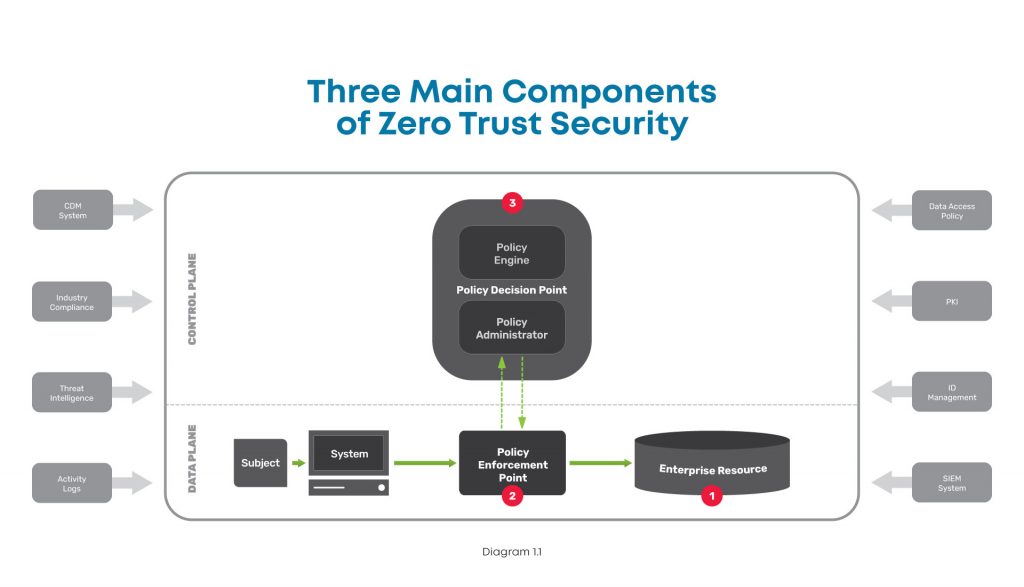
At a high level, this diagram shows the components you need when considering how to implement zero trust.

A high level diagram of the three main components of zero trust security, including the enterprise resource, policy enforcement point, and policy decision point.

There are three major components to look at in the big picture of zero trust security:

  1. Enterprise resource — This includes all the IT stuff you need to protect and that your business relies on, like hardware, software, and network equipment. In simple terms, this is like the gold that you keep carefully guarded in the center of your castle.
  2. Policy enforcement point — This is the datapath element that enables, monitors, and terminates connections between users / devices / applications and enterprise resources. Simply put, this is like the guard that accompanies those wishing to access your gold.
  3. Policy decision point — This is the layer that decides who / what is safe and grants / revokes access accordingly. In other words, this is the gatekeeper who determines who is allowed into your castle.

To better understand these, here’s a closer look at each:

Enterprise resource

This component is pretty straightforward, and consists of elements you need to operate and manage IT environments. These elements can include hardware like computers and data storage devices; software such as web servers, content management systems, and operating systems; and network equipment like servers, routers, firewalls, and out-of-band devices.


Policy enforcement point

This component consists of the datapath elements that enable, monitor, and terminate connections between subjects (users / devices / applications) and your enterprise resources. Though this is represented as one component, it is comprised of two parts that are both typically used in deployments. These parts are:

  • A client-side agent, usually deployed on a laptop or server.
  • A resource-side gateway, which controls access in cases where a client-side agent is not used. Examples where gateways are used include regulated healthcare equipment, ATM machines, and operational technology equipment.


Policy decision point

This component is the management and orchestration layer. This layer essentially checks identities to verify who is safe, and assigns policies to determine who gets access and to what. This is also represented as one component but is comprised of two parts:

  • Policy engine — This is the engine that decides whether a machine or web traffic is safe. To accomplish this, the engine uses a variety of data sources when making its determination, such as PKIs and identity management providers, CDM systems, and activity logs.
  • Policy administrator — This administrator uses the policy engine’s determination to grant or revoke access to a machine or web traffic.

There are many tools available to help you monitor and visualize traffic, so you can create policies and configure your policy decision point to meet your zero trust outcomes.

In order to create your zero trust configuration, you need to deploy several essential technologies.

How to implement Zero Trust: Essential technologies

Zero trust is a complete re-imagining of network security and can be a daunting task. But when you add its fundamental technologies to your toolkit, you can effectively build the three components described above and achieve Zero Trust Network Access (ZTNA). Here are the essential technologies you need to accomplish this.


Identity and access management

Such a big part of zero trust security relies on verifying that a device or user really is who they say they are. For this, you need an identity management solution from a trusted provider and public key infrastructure (PKI). This allows you to essentially create and issue a digital fingerprint for every user, and includes information such as their username, role, and other unique data. Multi-factor authentication is a critical component of identity verification, which requires users to present two or more pieces of identification/verification before granting access.

Additionally, access management is an important piece that determines a user’s authorization level, or in other words, which resources they can access. Identity and access management both feed information into your zero trust model’s policy engine.


Policy management

Another essential technology to have is a policy management solution. This is integrated into your security stack and serves as a single policy creation point. This allows you to define access and authentication policies for your entire organization.

You can specify data access rules for users, devices, and roles, which is vital to achieving micro-segmentation, limiting lateral movement, and enforcing least-privilege access. All of these feed into your policy engine and are used by your policy enforcement point to validate whether a session is allowed to continue.


Zero trust equipment and applications

Tying everything together requires equipment and applications that are able to enforce your policies. These are physical or virtual solutions that sit in front of servers and serve as your enforcement points. For example, this could be your next-gen firewall (NGFW) that initiates the multi-factor authentication protocol, verifies a user’s identity, and uses your defined policies to restrict the user’s access to a specific segment of your network.

Where can you get these essential Zero Trust technologies?

When considering how to implement zero trust, keep in mind that there are many vendors who can provide you with the essential technologies.

  • Obtaining an identity and access management solution is the easiest task when implementing zero trust. Many organizations offer an identity store, such as Azure Active Directory or Google Cloud Identity. You can also use companies dedicated to identity management, such as Duo, Okta, or Ping Identity. Keep in mind that if you need to control third-party access, such as for customers or equipment management contractors, you’ll need a solution that can access multiple identity stores simultaneously.
  • Obtaining a policy management solution requires careful consideration and should be part of your overall security stack. Look for a solution that allows you to create policies and set up datapath enforcement points. An adequate framework enables you to create authentication and post-authentication access rules, with an enforcement point that segments your network and continuously authenticates sessions. This security stack can be an on-prem NGFW, or delivered via the cloud using a Secure Access Service Edge (SASE) model, both of which are available from trusted providers like Palo Alto Networks.
  • Regardless of whether you use an on-prem or SASE model, you need an edge infrastructure platform to sit in front of servers and host the enforcement point. For on-prem, this platform must be able to host an NGFW to secure network segments and VLANs. For SASE, this platform must be able to create VPN tunnels to your SASE platform, which can be used for inline inspection and policy enforcement. Either approach requires powerful computing capabilities and a flexible operating system to accommodate workloads for detecting, analyzing, and automatically responding to threats, which few vendors offer.

Here are examples of what proper zero trust implementations look like, with ZPE Systems’ Nodegrid as the edge infrastructure platform:

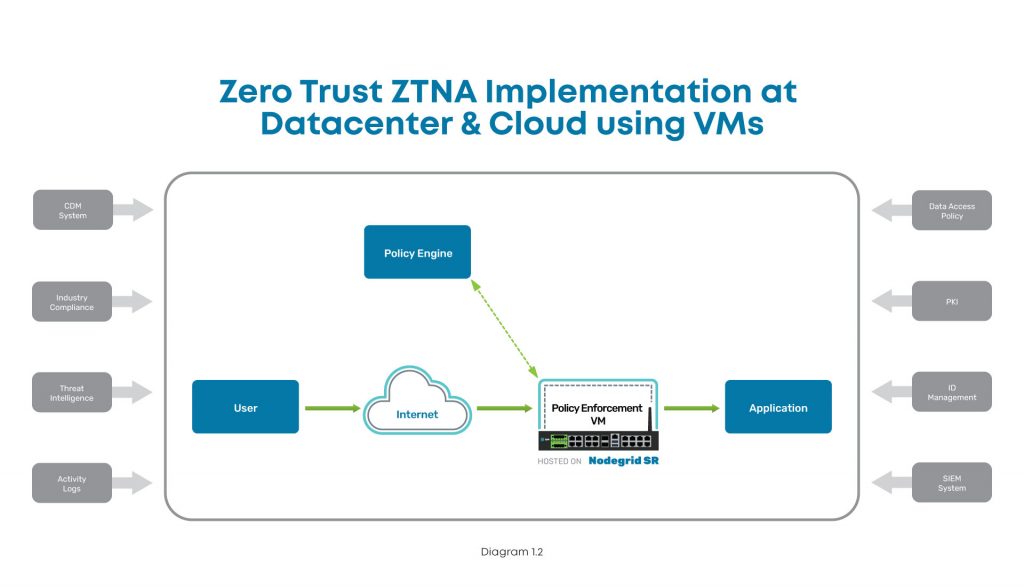
Implementation diagram showing how to implement ZTNA at the data center using Nodegrid.

In this diagram, you can see where ZTNA and Nodegrid fit into the scheme at the data center. The user connects via Internet, and the Nodegrid SR device serves as the Policy Enforcement Point hosting a VM. This VM communicates with the Policy Engine to authenticate the user, and then grants access to the data center application.

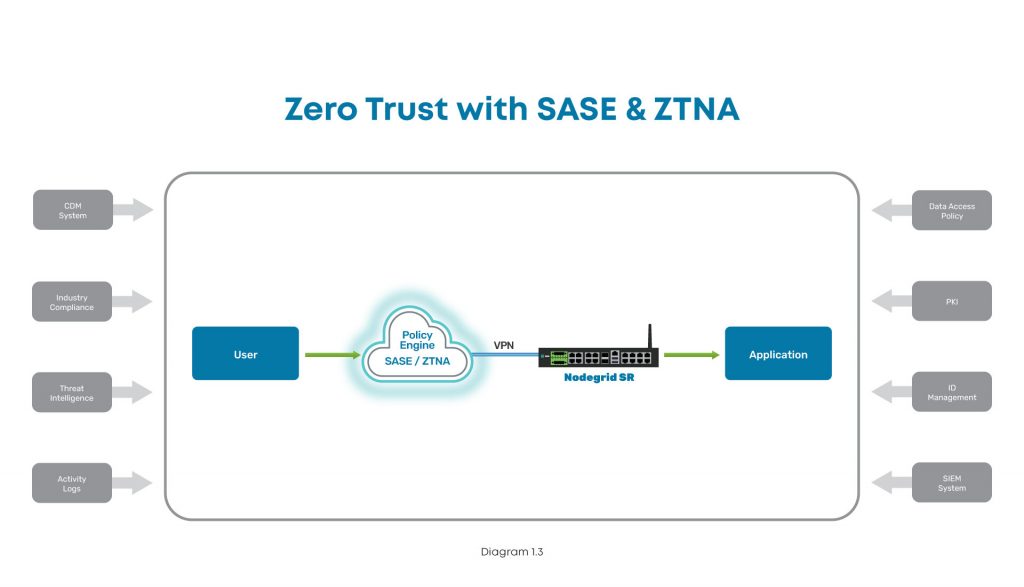
Implementation diagram showing how to implement ZTNA at a branch, edge, or other distributed location.

In this diagram, the user tries to connect to an application at a branch, edge, or other distributed location. The user connects via Internet, where SASE and ZTNA provide secure connectivity. The Nodegrid SR device connects via VPN to the Policy Engine for authentication, and then grants access to the branch application.

How to implement Zero Trust: A recap

To protect your organization, implementing zero trust requires you to build out the main components. With the policy decision point and policy enforcement point in place, you can secure your enterprise resources from outsider and insider attacks. Ensuring these components work like a well-oiled machine means you need the proper identity and access management tools, a complete policy management solution built into your security stack, and equipment and applications that can enforce your zero trust security policies.

Because user expectations have caused infrastructure to become incredibly distributed and complex, the attack surface has increased dramatically. The traditional castle-and-moat approach to security is no longer adequate, and recent newsworthy cyberattacks showcase the network vulnerabilities that even the largest companies still struggle to address. The President’s latest cybersecurity executive order is a step in the right direction to bolster infrastructure protection for public and private sector entities, and you can use this blog as a starting point to begin your zero trust journey.

Don’t get caught without these 5 security must-haves

Watch our webinar, Cyberattacks: 5 Security Must-Haves for Hybrid Infrastructure Gateways, and learn how to lay a solid foundation that makes implementing zero trust easier. Our experts will talk you through how to:

  • Keep edge networks and users fully protected
  • Make smart buying decisions
  • Get complete security and control for years of serviceability

Watch now to protect your business from growing cybercrime.

ZPE Systems announces Nodegrid Data Lake, app marketplace, and sensors to help organizations uncover valuable data for edge operations

CloudApps
Fremont, CA, August 10, 2021 – ZPE Systems launches a new applications marketplace, along with a portfolio of USB-type environmental sensors, meant to help organizations leverage valuable data generated by their IT components. As networks and users become more distributed, it’s imperative that organizations uncover hidden data to optimize availability and user experiences. Nodegrid sensors allow organizations to collect critical data points, for deep insights into their infrastructures, systems, and security logs, among other categories.

Enterprises in telco, content delivery, manufacturing, and other industries can benefit from Nodegrid Data Lake. This application gathers previously uncollected data points to give network admins and engineers visibility into key performance indicators (KPIs). Nodegrid Data Lake helps inspect and visualize data points for:

  • Infrastructure components, such as power, cooling, relay, dry contact
  • Environmental conditions, such as temperature, humidity, air flow
  • System utilization, such as disk usage, processes, memory
  • User experience applications, such as Office365, Zoom, point of sale
  • Security, such as system logs, data logs, GPS data
  • Networking, such as data traffic, application profiling, antenna/tower traffic
  • Previously hidden server and switch logs from IPMI and RS232 serial console

Gartner considers Nodegrid Data Lake a killer app, as it’s indispensable to maximizing business continuity and avoiding downtime.

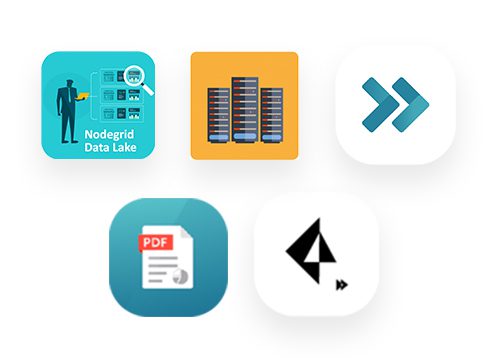
ZPE Cloud’s additional applications help enterprises and resellers gain further insights and convenience. These applications include:

  • Extended Storage — Save time with centralized file management and add disk space via the cloud
  • Generic Forwarder — Secure distributed users with software-defined perimeter gateways on-prem or cloud-delivered
  • Reports — Drive smart decision making with comprehensive reports on device availability and other metrics
  • Palo Alto Prisma Access — Easily manage Palo Alto security solutions using centralized access
  • ZPE Cloud mobile — Never lose sight of network performance using the ZPE Cloud mobile app, available free on App Store and Google Play

These applications begin an extended product roadmap designed to optimize the configuration, access, and management capabilities offered via ZPE Cloud.

ZPE Systems also launches USB-type environmental sensors, to help ensure optimal utilization of critical physical infrastructure components. These sensors can be managed independently via Nodegrid devices, or via Nodegrid Data Lake for complex event processing. Nodegrid sensors support alert triggers and tracking, and integrate seamlessly with ZPE Cloud’s management interface. Available sensors include:

  • Temperature and humidity
  • Airflow and temperature
  • Smoke
  • Particulate
  • GPIO
  • Relay
  • Proximity
  • Beacon (no alarm)
  • Beacon (with alarm)
  • Door lock with RFID tag

“IT staff struggle with downtime, yet their infrastructure generates so much valuable data that goes to waste,” says Arnaldo Zimmermann, CEO and Cofounder of ZPE Systems. “Our apps and sensors help capture this information. They can use it to prevent device failures, adjust cooling systems, or pinpoint why their Zoom app is suddenly lagging, for example.”

Nodegrid Data Lake and ZPE Cloud apps are now available. Get a free 90-day trial by visiting the ZPE Cloud Apps page.

Nodegrid sensors are also available. Learn more on the Nodegrid Environmental Sensors page.

About ZPE Systems, Inc.

ZPE Systems frees enterprises from today’s networking challenges.

Nodegrid’s Intel-based serial consoles & modular services routers deliver power to datacenter & branch applications, while the Linux-based Nodegrid OS replaces vendor lock-in with limitless flexibility. With ZPE Cloud for fast & secure provisioning, this platform streamlines networking using virtualization, prevents downtime using automation, and offers convenience via remote management capabilities.

Intel-based serial consoles & modular services routers deliver unparalleled power to datacenter & branch applications, while the Linux-based Nodegrid OS replaces vendor lock-in with limitless flexibility. With ZPE Cloud for fast & secure provisioning, it’s the only networking platform to streamline the stack using virtualization, prevent downtime using automation, and offer convenience using in-depth remote management capabilities.

ZPE collaborates with best-in-class technology partners, to add value by integrating with SD-WAN, firewall, IoT, and other solutions. The world’s top companies trust ZPE Systems to provide advanced out-of-band management, Secure Access Service Edge (SASE) platforms, and SD-Branch networking.

Top companies trust ZPE Systems to provide advanced out-of-band management, Secure Access Service Edge (SASE) platforms, and SD-Branch networking.

ZPE Systems is based in Fremont, California with offices worldwide. Visit ZPE Systems website at
www.zpesystems.com.

Data Logging, Alert Notifications and Actionable Data

When you’re the one responsible for critical infrastructure assets within the data center, you’ve got to be quick to respond and readily available to take care of any issues that might surface.

What if something goes wrong?

Without Nodegrid’s Data Logging features, here’s how your day could go:

  • You only know of the issue after the fact. You’re made aware once someone has reported the issue.
  • Now you need to find out the location of the server – Where is the issue stemming from?
  • You need to look for the console access that is connected to the device
  • In case of power, you need to gain access to the PDU, enter those credentials (that you might have forgot), identify which outlet the device is plugged into, and then initiate the power cycle to that outlet.
  • You might not even know what happened to the device in the first place.

All these steps take time, time which is of the essence especially when it comes to critical infrastructure assets. Uptime is of the utmost importance.

This is why Nodegrid is trusted by some of the data center world’s largest companies.

Nodegrid’s Data Logging abilities allow you to collect a wide variety of data, such as key input, console messages and errors, and console usage.

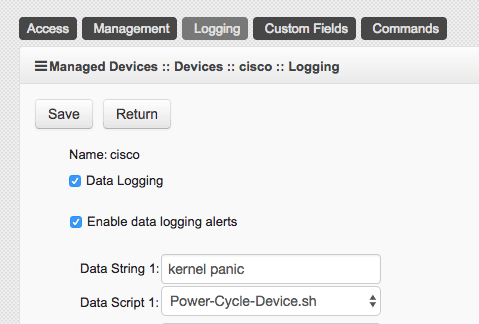
Set actionable string alerts and notifications whenever a known problem occurs – Choose any or all of the following notification types: e-mail, text, syslog, or snmptrap.
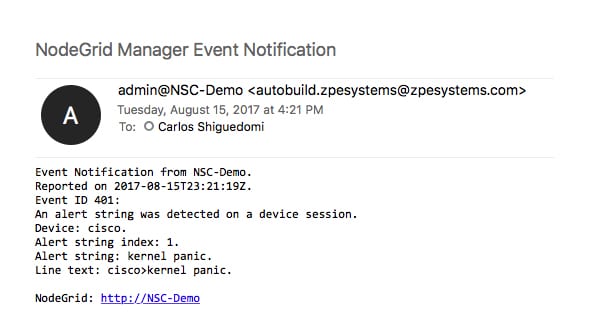
Nodegrid allows you to take actions based on string matches and console output. A recurring issue pops up, if its string matches, your selected script will be executed to alleviate the problem. Automate your fixes to save time and money.

All this is done in a matter of seconds:

  • A problem happens, Nodegrid finds a string match and executes the repair script
  • You get a detailed notification, telling you which devices experienced a specific problem
  • Data log is also sent to you to further investigate the issue and check for anomalies.

Nodegrid’s 64-bit Linux OS is ready for your automation scripts, allowing for multiple language options such as Python, JavaScript on Node.js, Bash, and more…

If data logging, alert notifications, and actually doing something with that information through actionable data is something that’s important to you, contact a ZPE representative to find out how we can help you out.