Deployment day is here and it’s time to get your new remote branch up and running. Months of planning and preparation have gone into this project to ensure that everything goes smoothly. All of the vendors have been scheduled and the latest dry run went off without a hitch, so everyone is feeling confident. The phase two team is standing by and ready to move in as soon as the network is up and running. With such strict deadlines, any setbacks will cause a ripple effect that could severely impact the project deadline and cause a loss of revenue.
The Pressure is On
As the deployment is progressing, the tech from your Internet Service Provider ( ISP) seems to be having difficulties bringing up the internet connection. After further troubleshooting, they let you know that there is a problem with the equipment and they won’t be able to complete their portion until the next business day. Without network connectivity the deployment will need to be postponed, thus setting everything back and causing a huge problem for all of the other teams. With so much on the line this simply is not an option, but what can you do without an active internet connection?
Be the Hero
Planning for the unexpected is crucial for any pre-deployment planning and testing. With so many parties involved and multiple vendors on call, even minor issues can lead to large amounts of wasted time and money. Luckily, you did your homework and chose the solution with a backup plan, so you’re ready to handle anything this deployment can throw at you.
Introducing Bluetooth Pairing for Nodegrid
ZPE System’s Nodegrid comes ready to go right out of the box with no pre-configuration required on the unit itself. Simply unbox the unit and power it on; you don’t even need to connect it to your local network to get started. No local internet connection? No problem!
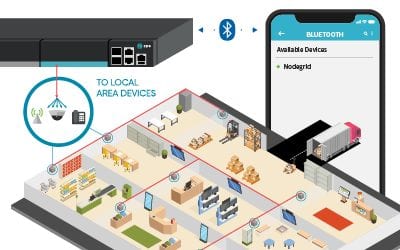
Connecting Nodegrid via Bluetooth® to a cell phone is simple: The new Nodegrid device is powered on (no screen or keyboard required)
On a cell phone, Nodegrid will show up as an available device within Bluetooth® settings
After just a few taps, Nodegrid goes live and automatically connects to the ZPE Cloud. There, all of your saved configurations are ready and waiting to be downloaded to your new device. Once configured, your device is now secure and ready to unlock the full potential of the Nodegrid Platform. Just plug Nodegrid into your network and allow it to serve as a temporary gateway for your other connected devices. Within minutes, your internet connection is established and you’re back on track to finish on time, as expected.
Instant Reset
With Nodegrid, resetting and restarting the process is just a click away. Simply press the factory reset button and start with a clean slate, anytime, at any location. Less worry, more convenience.
As Easy as it Gets
With ZPE Systems Nodegrid, provisioning has never been easier and more reliable. From Zero Touch Provisioning (ZTP), to automation via deployment scripts and more, your new remote branch is ready in no time with minimal on-site resources required. Combined with ZPE Cloud, provisioning is fast, secure, and consistent across your entire network. Once up and running, Nodegrid’s 360° network visibility allows your team to monitor and maintain all of your connected devices from one easy to use, vendor neutral platform.
Ready to take your network to the next level?
For more information on ZPE’s full product line, please visit our products page.
Have a specific question or want to experience a live demonstration for yourself?
Reach out to us via our Contact page. We’re here for you!
Many companies have found it difficult to adjust to remote work. In the face of drastic changes brought on by pandemics, natural disasters, and other challenges, untethering your workforce from the office can be a big ask. Your success relies on one crucial component: your network.
Keeping your enterprise connected – both internally and to customers – is the only way to maintain business continuity and customer satisfaction. Unfortunately, traditional networking solutions were built for the office. Not only does this slow down your transition to working remotely, but also makes everyday operations anything but efficient.
The good news is, our experts have pinpointed six IT solutions that will make your company more effective at remote work, using a network that accommodates distributed business better than ever.
1. Give Network Staff Convenient Access With Advanced Out-of-Band
Out-of-band (OOB) management is not a new technology. But taking advantage of this tool has traditionally proven cumbersome and inefficient.
It’s not uncommon for businesses to treat their OOB network as an afterthought, something they might use once in a while when an update or fix is needed. Phone lines, modems, and dedicated OOB devices make management a chore, even for tasks like resetting passwords, rebooting devices, and other routine work.
Remote access via DSL or dial-up is too slow, which takes time, puts your security at risk, and forces you to juggle delicate admin protocols. Putting staff on site is another option, but also eats up time and binds specialized IT personnel to specific locations.
Fortunately, you can take advantage of advanced out-of-band, which lets you perform network management tasks from anywhere.
An advanced out-of-band solution gives you a secure management path that’s completely separate from all other networks. Not only do you stay protected from unwanted traffic and attacks, but you can also get blazing fast access to your management network via broadband connection.
This means that for issues large and small, you can slash response times and put your best people on the job – even if they’re across the globe. And if your main connection suffers an outage, you can remote-in to your out-of-band network via cellular failover backup.
Advanced out-of-band makes network management convenient and efficient.
2. Protect Business From Costly Downtime Thanks to Cellular Failover
If one of your critical locations suddenly goes offline, your business could lose up to thousands of dollars per hour. Restoring your main connection can take hours or days, while your employee and customer interactions come to a standstill. Business stops, and your reputation plummets alongside customer satisfaction.
However, cellular failover is a simple solution that can prevent all of this, so you can leave downtime in the past. When your main connection drops, your failover-equipped network automatically switches to 3G, 4G, or even 5G cellular to give employees and customers a seamless experience.
Capable cellular solutions give you freedom of choice, allowing you to determine which wireless carriers you use, as well as letting you take advantage of multiple backups. It’s like an insurance policy for your connectivity, with most cellular providers sporting over 99% reliability.
When you need to deploy a new location, cellular failover can even help you bring critical systems online – before your main connection is established. It’s a wireless solution that lets you scale on demand and helps you increase your business’ agility.
3. Keep Staff Connected Using Secure Access Service Edge
Accommodating remote work usually involves a slow, stringent process. You need to purchase and configure laptops and other equipment, create users and groups, and adjust other hardware- and network-specific settings. All of this just to allow staff to work away from the office.
On top of this, all traffic likely gets routed through your main enterprise firewall. This degrades performance and speed for every user, and can bring business operations to a grinding halt.
But Secure Access Service Edge, or SASE, is a transformative technology that does away with the traditional hassles of setting up for remote work, and instead puts networking and security into the cloud. This allows safe connectivity to be delivered close to users no matter where they are. And because SASE uses an identity-driven model, your employees don’t have to rely on special hardware. They can access your network using their smartphone, tablet, desktop, or other device.
SASE gives your employees flexible network access, and also frees your main enterprise connection for more business-critical traffic. You can deploy your SASE solution and get a network that keeps your staff connected.
4. Fully Optimize Using a Vendor-Neutral System
Typical networking solutions cause vendor lock-in. This is when you’re limited to choosing specific hardware and software products that are compatible only with each other. Vendor lock-in forces you to make sacrifices during implementation, so you end up with a solution that doesn’t entirely satisfy your requirements.
But with a vendor-neutral management platform, you can boost efficiency even on your existing network.
A vendor-neutral system means you don’t have to worry about over-buying or under-serving, and can instead connect the physical and virtual assets of your choice. You can optimize your network with SD-WAN, firewall, routing, and other solutions that perfectly suit your needs.
Some providers even offer a unified management tool that consolidates control of your network solutions, regardless of which vendors they’re from. Your IT staff no longer need to jump from one unique UI to another, because everything can be controlled under a simple management umbrella. You can update firmware, change traffic priorities, monitor devices, and more from one clean interface.
With a vendor-neutral system in place, you can turn your network into a powerful asset that supports your global enterprise.
5. Streamline with virtualization
You’re probably used to having dedicated, single-purpose devices for your network functions. Even if these deliver all the capabilities you need, you’ll inevitably find it difficult to scale and manage due to large stacks of hardware & software solutions.
But you can significantly reduce your physical stack and your management efforts by using virtualization.
With the right devices, you can consolidate and virtualize your network functions to streamline every part of infrastructure management.
And the more guest operating systems you can run, the better. With virtualization, you can host custom or third-party applications, so instead of deploying separate appliances for SD-WAN, routing, failover, and firewall functions, you can use fewer devices capable of handling it all. This means smaller stacks, tighter solution integrations, and easier management of network functions.
6. Use Automation to Take Work off Your Hands
You spend a lot of time and money just to keep your network running. Routine tasks and configuration management are some of your biggest challenges, simply because they pull critical resources away from more urgent business needs. Moreover, you’re left vulnerable to human error that can cause interruptions and downtime.
This is where automation comes into play, which helps by doing some (or all) of the work for you.
For everything from routine fixes, to provisioning, to configuration updates and rollbacks, automation helps you achieve autonomous networking. Use your favorite tools like Ansible, Chef, and Python to create workflows that carry out themselves, and set up zero touch provisioning for push-button deployments. Automation is the only solution that helps you replicate and scale with consistency, so you can avoid costly errors while keeping specialized staff focused on the core of your business.
Take advantage of automation capabilities for more efficient and productive enterprise networking.
Remote work can be difficult to accommodate, especially when your business is distributed across the globe. But you can help your entire organization operate more effectively through networking.
At ZPE Systems, we’re leading the remote-work initiative with comprehensive offerings for all six of these IT solutions. From advanced out-of-band, to virtualized, vendor-neutral infrastructure and management, our hardware & software help your business work better from anywhere.
Application hosting helps your business become more flexible. This virtualization approach is a perfect solution if you’re looking to reduce your networking stack, make critical services more globally available, and ensure that your network is always up to date.
If you’re not familiar with application hosting, read our other blog post to get acquainted.
Application hosting helps your business become more flexible. This virtualization approach is a perfect solution if you’re looking to reduce your networking stack, make critical services more globally available, and ensure that your network is always up to date.
Application hosting means creating a cloud-based model (SaaS) through which to deliver your applications. One of the biggest benefits is that you don’t have to install and manage applications locally, and can instead keep them centralized on a server and bring them to clients anywhere in your organization.
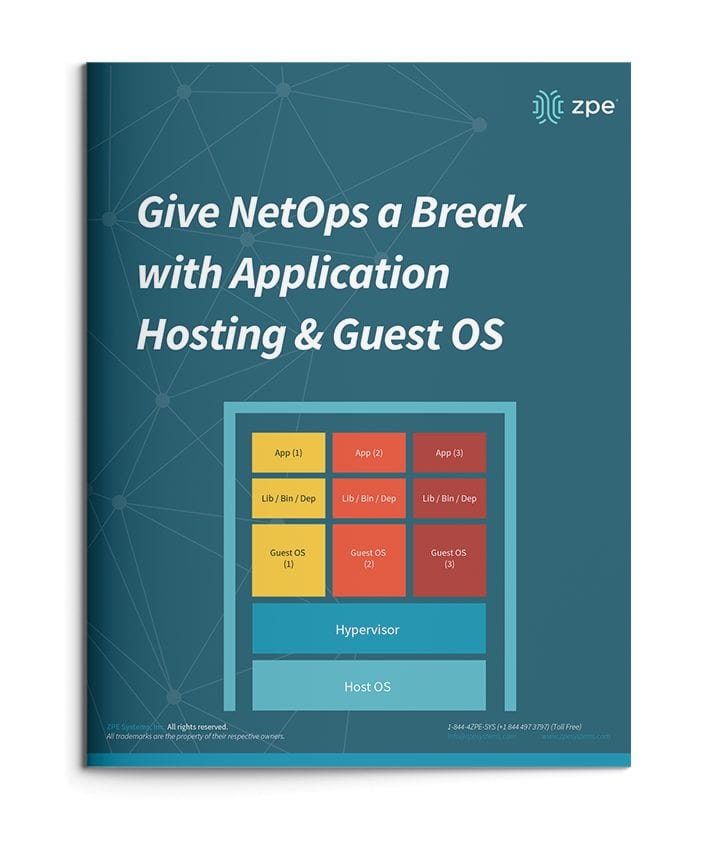
To use application hosting, you need a virtual machine (VM) and something called a ‘Guest OS’.
Running on a VM, a guest OS can be Windows, Linux, Ubuntu, or other common operating system, and it’s this operating system that determines what applications you can run.
In between your device’s operating system (or host OS) and the guest OS is something called a hypervisor. A hypervisor is able to create VMs and tell the hardware how to allocate resources for VMs. This is an essential component of virtualization and application hosting.
How Does Application Hosting Help NetOps?
Modern business moves faster than ever, and to reach your goals, your NetOps teams need a modernized network that moves fast, too. But this can be difficult to achieve, since your network is likely made up of many different hardware & software systems, and admin protocols. There’s just so much to juggle that it seems like your network his holding back operations.
The good news is, application hosting and virtualization can alleviate many of the obstacles standing in the way of your network. Let’s compare how you manage your solutions before and after application hosting.
NetOps the Old Way
To boil it down, NetOps the old way is slow and cumbersome. This is mainly due to having many physical devices that you have to manage, which puts time consuming on-site support at the top of your priorities. This becomes even more complicated when you have many branch and remote networks.
Without application hosting, you need to install applications locally. Your only option is to put IT staff on site for this task. From there, the job can take days to complete, especially if your stack consists of many devices. And this is all part of a best-case scenario, which unfortunately isn’t the norm.
Another problem can arise — hardware & software incompatibilities. Suppose you try to install or update applications, and once you connect to a device you discover that the latest OS doesn’t support your software. Now what? Since you recently updated the OS for devices at every location, you have to roll back configurations or find a workaround for your application’s new release.
All of this can quickly become complex and difficult to track. Having to locally manage your edge environment leaves your network open to human errors. Your peace of mind is merely wishful thinking, because your physical & virtual assets aren’t as consistent, secure, or reliable as you’d hoped.
NetOps with Application Hosting
When you introduce application hosting, NetOps becomes fast and agile. Putting all your applications in the cloud means you can deliver them right where they’re needed, and thanks to guest OS, you don’t have to worry about incompatibilities.
Put your applications in a centralized server, and you no longer need to worry about on-site support. Your NetOps teams can tap into your server to install, update, and manage applications no matter where they are. This means faster releases and shorter time-to-market, so you can support your business alongside demand.
If you choose a powerful platform like Nodegrid, you can further help NetOps with even more capabilities. The Nodegrid Services Router can pack all your network functions into a single box, with add-on compute modules that allow you to run many guest OSes. Not only does this cut your stack, but it also gives your NetOps teams reliable remote access via out-of-band.
See how you can streamline NetOps with application hosting and Nodegrid.
Is Your Test Lab Lacking Network Automation? Is Manual Testing Still Taking Up Resources?
Without network automation, you’re familiar with having to spend time and resources on manual testing. You need highly technical staff to be on-hand, who then spend days or weeks going through testing procedures. Even with basic automation, you’re left with limited capabilities and plenty of time-consuming, manual work. Here’s a look at different lab environments showing how manual testing compares to automated processes.
The Automation-Free Test Lab
If you haven’t implemented any automation solutions, your test lab eats up your time and resources. Every procedure must be performed manually. Because of this, you constantly face issues like:
Having to invest lots of time — Each test must be initiated manually, which means many working hours spent in the lab. This can take days or weeks (or even longer) depending on your network needs.
Having to tie up critical staff — You can’t just assign unspecialized staff to follow through with testing. With manual procedures, you need to put your most knowledgeable people on the job, which pulls them away from more critical functions.
Being vulnerable to human error — A simple typo can result in catastrophe (i.e. Amazon AWS outage of 2017). Human error is more prominent than you’d think, and isactually the biggest contributor to downtime. Without automation, you’re vulnerable to human-induces mistakes both big and small.
Lacking analysis — When errors occur, you need to log data for analysis. Because this needs to be done manually, you might not prioritize this task, leaving issues without analyses. If you do store this data, you’re open to human errors that could affect any analyses you perform.
The Somewhat Automated Test Lab
If you have implemented some automation solutions, you’re on your way to a more efficient lab experience. However, there are still issues you may face, like:
Lacking concurrent sessions — Legacy console servers aren’t capable of handling many concurrent sessions, which reduces the number of devices and connections you can support during testing.
Crashing — Your console servers have serial ports that can’t use high baud rates (such as 115200bps) in all ports. As more sessions are established, users experience slowdowns due to limited session capacity. Ultimately, the solution crashes.
Frequent tweaking — Without a full automation solution, you need to tweak scripts regularly to accommodate any changes you make. Delays and disruptions can occur when, say, you need to replace devices or add new hardware.
Unsupported scripting — Some offerings only support certain scripting languages, leaving you to adapt. You either need to spend time and money to learn the supported languages, or add new team members who are familiar with the supported tools.
Ask yourself: Does your automation solution require you to monitor script/command execution? If so, can you really call it ‘automation’?
The Advanced Test Lab Using Nodegrid
For network automation you dream of, Nodegrid delivers without compromise. The Nodegrid hardware and software support unlimited automation, testing, and data collection.
Save time — Nodegrid allows you to push configurations, software/firmware upgrades, and tests in bulk. And for a little extra time savings, Nodegrid devices boot more than a minute faster than competitor appliances.
Make deployments effortless — Usezero touch provisioning to automate the deployment process.
Get full automation — The Linux OS running on Intel x86 64-bit architecture means faster processing, support for Docker & Kubernetes applications, and support for common scripting languages like Python, Bash, Perl, and others.
Handle many concurrent sessions — You can support 20 concurrent sessions per port in all 48 ports, or 10 sessions per port in all 96 ports. And the reservation system allows users to reserve ports.
Tailor port settings — You can customize serial port settings so connecting is easy (i.e. require no additional text information or authentication).
Get full analyses — For data logging and auditing, you can capture and save serial data logs to a local file, NFS file, and/or Syslog server.
Set up groups — Create authorization permissions for certain groups, so they can efficiently access their own devices.
As networks and data centers grow and become more advanced, the time and maintenance required to keep them operating at peak efficiency also increases. This leads to more engineers working more hours which greatly increases your company’s overhead costs and cuts into your profit margin. Is there a way to pursue an aggressive growth strategy while also increasing efficiency?
Out-of-Band Solutions
Implementing an effective out-of-band (OOB) solution is the first critical step to improving any networking environment. With a well positioned OOB management plan in place, engineers across multiple time zones can access your critical infrastructure from anywhere, anytime. This alone can greatly reduce travel costs and potential overtime payouts by freeing up more local resources who can then focus on other tasks.
Not all OOB solutions are created equal. To reap the full benefits they can provide, you need to ensure that the solution you choose offers all of the tools and services you need to make the most of everything you already have in place. The last thing you want is to add another complex system spanning multiple vendors with multiple new interfaces to learn, or worse, to be locked into a vendor specific platform that does not offer any flexibility to build on to.
ZPE’s Nodegrid solutions consolidate and virtualize all your network functions onto one platform, no matter which vendors you use. You get a smaller stack that’s more powerful and easy to manage. With features such as flexible network interface options, dual cellular fail-over with dual SIM, a modern and secure Nodegrid OS, OOB management, cloud orchestration and add-on virtualized applications for SASE and SD-BRANCH, Nodegrid has you covered.
Automating Repetitive Processes
The next order of business is to begin analyzing your processes to see where improvements can be made. Most IT professionals spend countless hours on simple, repetitive tasks that could easily be completed without any human input. These can include simple tasks such as logging data, upgrading or patching, and monitoring system health metrics, or even more complex activities such as provisioning new equipment. This is where automation can come into play to increase efficiency and productivity by allowing certain tasks to be completed on their own.
Most organizations today have plans in place to invest in automation with the goal being to streamline processes in order to reduce costs and errors. When your processes are properly configured and tested, they can be expanded throughout your network. No need to worry about inconsistencies or potential human errors which can lead to downtime and wasted man hours troubleshooting issues.
Automated Scaling with Zero Touch Provisioning (ZTP)
Beyond repetitive day to day tasks, automation can also help your business scale quickly and securely to ensure you can keep up with today’s ever growing demand. Manually configuring devices takes time and personnel away from other areas where it may be better spent. It may also lead to more human errors which can leave your network vulnerable to security threats and potential downtime and data loss. Thanks to Zero Touch Provisioning (ZTP), all of these worries can be a thing of the past. Scaling with ZTP is always fast and consistent across every location, on every deployment.
ZTP is a feature that automates the building process (configuration and provisioning) of network hardware and applications. This is typically achieved by pointing devices to a local configuration repository where they can retrieve the required settings. With ZTP, IT professionals can drastically reduce the amount of time consuming labor that comes with manual configuration, which frees up more resources that can be dedicated to other tasks. Since settings are managed and provisioned from the cloud via templates, engineers may even perform configurations and updates from remote locations (once basic racking and network connectivity are established at the new location). Check out our other articles to learn more about ZTP.
Automating Your Test Lab
Another area that can greatly benefit from automation is your test lab environment. Without automation, each test scenario must be initiated manually. This requires engineering resources to be on hand for each run which adds to costs and can take critical personnel away from other projects. Human error can also be a factor, as a missed test, error, or configuration mistake can lead to disastrous results later down the road.
ZPE’s Nodegrid family of products brings you automation without compromise. Nodegrid addresses the pain points common to test labs with the ability to automate, test, and collect data without limits. Queue commands and scripts from beginning to end. Learn more about how Nodegrid can help you automate your test lab.
For more information on ZPE’s full product line, please visit our products page. Have a specific question or want to experience a live demonstration for yourself? Reach out to us via our contact page. We’re here for you!
Docker is the best way to deploy applications. There are several ways Docker improves network management. From being compatible with almost any programming language and machine, to its ability to run multiple containers in the same infrastructure, Docker has a lot to offer when it comes to automation and out-of-band management (OOB). But before we dive into the benefits of implementing it into your strategy, let’s take a closer look at what Docker is.
What is Docker?
Virtualization using virtual machines (VMs) was a game changer when first introduced. It allowed businesses to take full advantage of their network resources by giving them the ability to efficiently run multiple OSs and apps on the same host. When deploying new hardware, VMs significantly cut down the time it took to set up devices, allowing teams to configure resources in minutes instead of days.
But VMs have limitations. Aside from having to boot up an OS, each new addition requires virtual resources to be allocated (such as RAM), which can quickly strain your system when running multiple VMs. When porting, VMs typically cause compatibility issues, too, and they can’t share data volumes.
Docker takes virtualization in a different route, using something called containerization. Docker containers are lightweight and automate deployment of applications so they can work in different environments (i.e. on different machines). Each container is essentially its own software package that contains the dependencies to run an application, such as code, configuration files, processes, networking info, and sometimes even pieces of an OS.
So instead of running separate desktop environments, as with resource-hungry VMs, Docker containers run on a single system kernel and allow you to maintain isolated applications that work properly — regardless of what machine they’re running on.
How Docker Improves Network Management
Modern OOB networks employ an array of sophisticated tools, like those that support monitoring, management, and automation. Using Docker containers means that you can deploy applications and know that they’ll work on any resource, because Docker works on the client side. Docker can also act as a service and be deployed onto any server. And because all application dependencies are contained directly on the image, management is easier as well.
On a high level, using Docker containers brings these advantages to OOB:
You save on resource allocation, because containers require only a small amount of server space.
You can gather info and monitor your system by easily deploying lightweight apps.
Because containers are highly portable, you can use them for diagnostics, even when devices go offline.
Adding to the previous point, you can use containers for quick deployments, as well as for maintenance and backup.
With regards to things that require safeguarding, such as temporary configuration data or emergency recovery data, containers allow you to add them quickly on-demand.
On top of all these advantages, Docker improves network management by giving you three major benefits.
Docker Simplifies Virtualization
VMs allow you to run any platform — along with its unique configuration — on your infrastructure. However, VMs come with drawbacks because they require significant resources in order to work properly. Essentially, running a VM means running a separate, virtual desktop environment on your hardware. And with each VM you run, your device must allocate RAM and other resources, which can be expensive and lead to unstable performance.
Docker containers are much more lightweight, and you can run multiple containers using only a single OS kernel. Containers use less memory than VMs, they boot faster (because they don’t have to spool up an OS), and they can share and reuse data volumes. In a nutshell, containers make virtualization simple, highly efficient, and easy to configure, which significantly reduces the overhead associated with virtualization when compared to using VMs.
Docker Makes Deployment Fast
Before VMs, setting up new hardware took days because of the tedious, manual configuration that was required. With VMs, devices could be configured in minutes (and remotely), but IT teams still lost time due to the need to boot up an OS for each VM.
Using Docker containers, fresh resources can be configured in seconds because there’s no need to boot up an OS. Multiple containers running on the same hardware can run isolated applications, such as those containing configuration data and automation scripts, to help you rapidly deploy resources to your network. Simply create a container for the appropriate job.
Docker Helps With Disaster Recovery
When it comes to business continuity, traditional approaches call for assigning a single purpose site to disaster recovery efforts. This means that resources sit idle at this site, because most of the time your organization is not focused on recovering from disaster. In essence, a traditional approach leaves disaster recovery as an afterthought, which means that managing and maintaining its infrastructure is costly and complex.
However, by using Docker containers, you can transform disaster recovery to be just another stage in the integration and development pipeline. This means that your recovery infrastructure is expanded from a single site to an entire region (or your entire organization), because containers allow you to utilize more resources more frequently. And should disaster strike, containers offer accurate automation for fast and reproducible deployments, so you can recover quickly and continue with your business continuity efforts.
Remember that a robust OOB solution takes advantage of the latest tools to give you more visibility & control of your network. Docker is one of those tools. It allows you to automate and take full advantage of your network resources, and you can focus on running only your necessary applications (not entire VMs). It introduces more efficiency with highly portable containers that work across platforms, and saves your system from the strain of deploying many resource-hungry VMs.
ZPE Systems delivers innovative solutions to simplify infrastructure managment at the datacenter, branch, and edge.
Learn how our Zero Pain Ecosystem can solve your biggest network orchestration pain points.