Providing Out-of-Band Connectivity to Mission-Critical IT Resources

Retail Cost Savings Using Network Consolidation

When it comes to infrastructure, network consolidation is becoming a must-have. This is especially true in hyper converged architectures, where streamlining operations means the difference between profitability and major losses. Combining systems and reducing the number of disparate solutions helps you achieve an efficient network that supports your business goals — whether it means speeding up the customer experience, decreasing points of failure, saving on support costs, or anything in between.

With legacy infrastructure configurations, you’re forced to deploy purpose-built appliances that add complexity. This complexity is reflected not only by your physical topology, but also by your management practices, system integrations, and end-user experiences. No matter what industry you’re in, you can unwind your tangled enterprise network and reap many benefits using a consolidated solution.

In this entry, you’ll explore network consolidation and why a global retailer could no longer do business without the advantages it offers.

Network consolidation means simpler networking

Network consolidation is a straightforward concept that you can implement on several levels.

If you draw a layout of your hardware configurations, your legacy setups most likely resemble intricate webs. Network traffic must travel along many paths and stop at each hardware node for processing. Heavy user loads can easily bog down your system, especially because your legacy devices don’t come with processors built for performance.

But when you consolidate, you can implement multi-function devices and replace many disparate appliances. Instead of having a complicated stack comprised of switches, routers, firewall boxes, modems, and other devices, you can get a powerful solution that combines all these into one.

Consolidating can also involve taking advantage of virtualization to simplify your infrastructure. You can deploy applications, run VMs or Docker containers, use automation tools, and more. You can cut complexity and further reduce your hardware stack by virtualizing your environments.

For management purposes, you can also consolidate your efforts using software that unifies your different solutions. This involves deploying tools to centralize your control, so you don’t have to juggle unique management UIs and vendor-specific software.
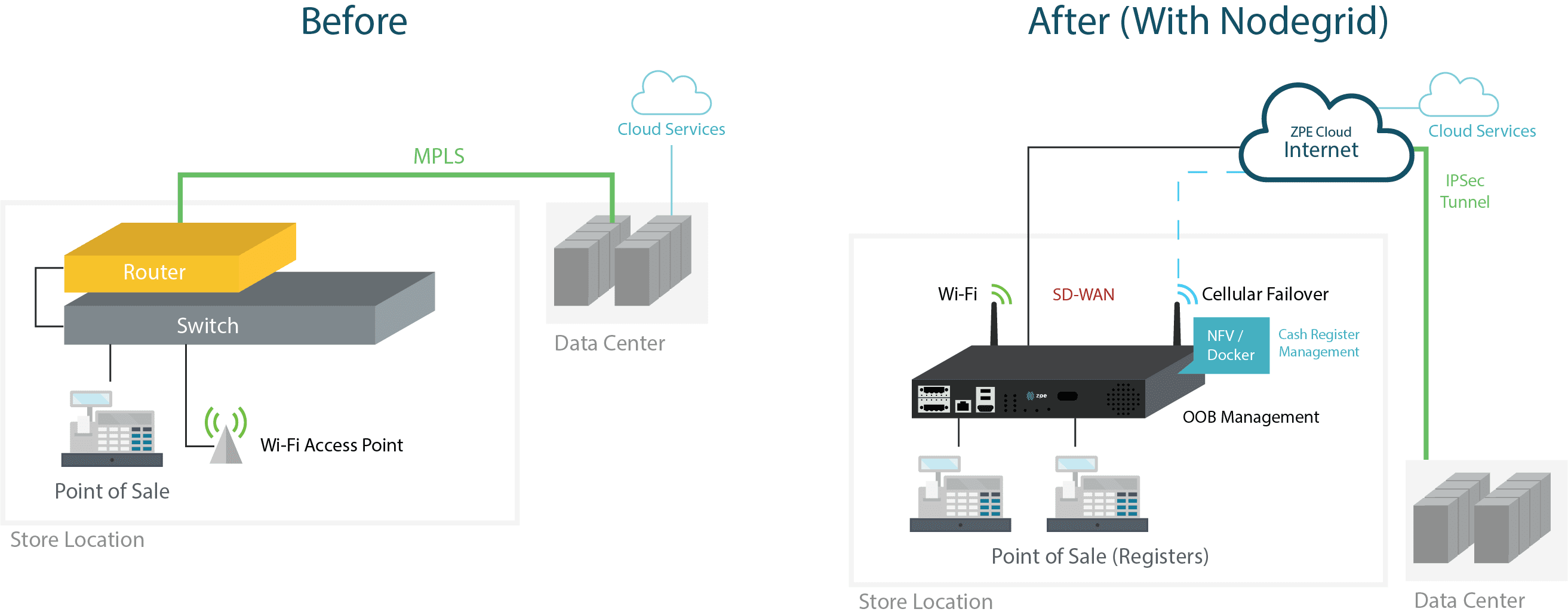
Retail Diagram O

Network consolidation comes with many benefits

When you adopt all-in-one hardware, your deployments become simple, fast, and cost effective. You save on capital expenses and shipping costs, and you don’t have to configure and provision an array of separate devices. If you also use zero touch provisioning, deployments become plug ’n play simple. You only need someone to physically install and boot your boxes, and your sites automatically come online in minutes. On top of this, your user experiences become smoother because your network is streamlined with appliances that are more powerful.

Virtualization also speeds up the customer experience thanks to more efficient integrations and service chaining. You can closely integrate solutions to boost efficiency, without being held back and forced to make changes at the hardware level. You can provide an experience that’s responsive, even during increased traffic flows and heavy workloads.

If you consolidate management with a unified software tool, your IT teams can do away with cumbersome administration protocols and practices. They no longer need to be dispatched to perform on-site maintenance or perform lengthy troubleshooting to find problems. A centralized management suite helps pinpoint issues and offers remote control for instant response times. Use it in conjunction with all-in-one hardware, and you don’t need to waste time connecting to check on non-problematic devices. You know exactly where to focus your efforts, while your software tool gives you unified control of all your integrated solutions — from SD-WAN, to routing, switching, security, and more.

How does a large retailer benefit from network consolidation?

When a global retailer’s costs began to skyrocket, their network was to blame. They knew that in order to maintain profitability, they needed to move away from their legacy infrastructure configuration. This consisted of MPLS lines at each branch location, with separate devices for switching, routing, and security.

Their customer experience was unresponsive, and came with long transaction times and even longer checkout lines. Disruptions exacerbated everyday operations, forcing technicians to be dispatched to set up LTE modems while MPLS connections were restored.

Their network was costing too much money to maintain, and their poor customer experience led to too much lost revenue.

But a single Nodegrid solution allowed them to achieve network consolidation and leave behind all of these problems. They streamlined their hardware stack at each location, and allowed IT teams to support their networks with extreme efficiency.

Virtual Customer Premises Equipment with Palo Alto Networks and Nodegrid

Virtual Customer Premises Equipment

Virtual Customer Premises Equipment, or vCPE, is the epitome of network function virtualization. Enterprises are implementing this form of customer premises equipment because it brings many benefits, such as faster deployments, optimized resource allocation, and unlimited flexibility. Service providers are especially keen to using vCPE to simplify service delivery and dramatically improve customer experiences.

Regardless of what industry you’re in, you can use this virtualization approach to streamline your enterprise networking.

What is Virtual Customer Premises Equipment?

Virtual customer premises equipment makes use of virtualization to deliver network services. This approach essentially uses a virtual environment that consists of software-based functions. These functions can include routing, security/firewalls, VPNs, and much more.

How is Virtual Customer Premises Equipment different?

Networking typically involves deploying stacks of purpose-built devices at each location. These appliances must be configured, provisioned, and maintained by specialized staff, who are usually required to be on site to perform these tasks. This can become expensive — not just to purchase devices (and perpetually replace them every few years), but also to provide support and maintenance. And because branch offices usually have limited physical space, large stacks of equipment can be obtrusive and take up significant real estate.

vCPE vaporizes these large stacks, and instead puts the different network functions into a cloud-based model. These functions are hosted at a separate site or data center. Instead of using many dedicated appliances, branch locations need only one or two devices to run software that can deliver these functions to the site.

Why use Virtual Customer Premises Equipment?

Virtual customer premises equipment helps you gain more business agility. If you look at it from a hardware consolidation standpoint alone, it’s plain to see how much more easily you can deploy and manage your distributed networks.

  • Deploy faster & save money — Fewer pieces of hardware means you no longer need to haul many devices to each location. Once you have your virtualized functions set up at your service delivery site/data center, you can bring branch sites online using a single box. If you also use automation via zero touch provisioning, all you have to do is install & boot each device and watch your network build itself. You can deploy in minutes, while saving on device, shipping, and support costs.
  • Use exactly what you need — Purpose-built hardware can be difficult to optimize — usually, they are over-utilized and cause problems, or under-utilized and lead to wasted resources. Because vCPE allows you to set up a custom & dynamic environment, you can easily optimize resource allocation to eliminate problems and waste, so your network uses exactly what it needs.
  • Get endless flexibility — Software-based solutions are much simpler to deploy, manage, and replace than physical hardware. This gives you the ability to remain flexible as requirements change, especially if you choose a vendor-neutral vCPE platform. Imagine how simple it is to spin up a VM and run a new application, as opposed to purchasing, deploying, and provisioning a new dedicated device to go in each location.

You can get an all-in-one vCPE solution

ZPE Systems and Palo Alto Networks have partnered to bring you an all-in-one joint solution.

Using the Nodegrid Services Router (NSR), you can directly host Palo Alto’s VM-Series next-gen virtual firewalls. These powerful tools allow you to secure all traffic, including out-of-band paths, using a single solution. This makes it easy to deploy sites without hassle and get peace of mind knowing your networks are completely protected.

Here’s a brief video showing how easy it is to deploy your vCPE solution:

On top of this, the NSR allows you to host virtualized network functions (VNFs) from other vendors of your choice. The NSR is also an x86 Intel-powered device that features modular add-ons for compute and storage capabilities. You can deploy powerful vCPE implementations at branch sites, using a single box for routing, switching, computing, security, and other critical functions.

Click the link to read the full joint solutions brief, and contact us to set up a demo.

Investing in Out-of-Band Management to Reduce Risks

Case Study – Investing in OOB – Thumbnail 2

In the finance industry, network modernization protects the most confidential customer data. Whether for processing minor withdrawals & deposits, or recording asset transactions & real estate purchases, your network must be secure and reliable from the ground up. This is one of the biggest obstacles when trying to modernize.

Using traditional solutions forces you to overhaul your infrastructure and disrupt your business, or endure a very slow, piece-by-piece implementation. Either approach requires plenty of time, money, and resources. And without careful planning, you may end up with a solution that becomes obsolete sooner rather than later.

In this post, you’ll see why you need to focus on network modernization, and how it helped one of ZPE Systems’ finance customers protect their data.

What is network modernization?

Network modernization means updating your infrastructure and management tools, so that you can address current challenges and future requirements. This approach allows you to get the most out of your legacy solutions, while setting up a foundation that can help you adapt to change. Network modernization involves at least one of the following:

  • Deploying a solution that integrates in-depth control of legacy and modern systems
  • Eliminating points of failure using more resilient systems and streamlined architecture
  • Adopting extensible software or hardware that can accommodate changing needs

Why focus on network modernization?

When you adopt an approach that focuses on network modernization, you can realize many benefits even into the future. The most important thing to understand is that the more you modernize, the more benefits you’ll see. For example, if you focus solely on deploying new hardware, you may experience advantages at the onset but eventual diminishing returns without modernized software. And if you implement only newer software, you’ll run into the same issue due to the limited capabilities of your legacy hardware.

Network modernization is a multi-faceted concept, but comes with many benefits:

  • Using powerful, multi-function devices helps you save on deployment costs & efforts. You can replace many purpose-built appliances with a single box. This shrinks capital & shipping expenses, streamlines setup, and makes ongoing management much simpler.
  • Using an in-depth software solution for management helps you save on support expenses. You can control your legacy systems and extend functionalities to them, while giving IT teams remote access to your infrastructure layer. Instead of training on many UIs and dispatching technicians to troubleshoot issues, modernized software lets you control everything seamlessly from afar.
  • With an extensible solution, you get peace of mind knowing you can adapt to future requirements. Demands will continue to evolve (especially at the edge), and a flexible platform helps you accommodate changes. This could mean implementing the latest SD-WAN solutions, deploying compute power at the edge, or further reducing hardware stacks to meet business goals.
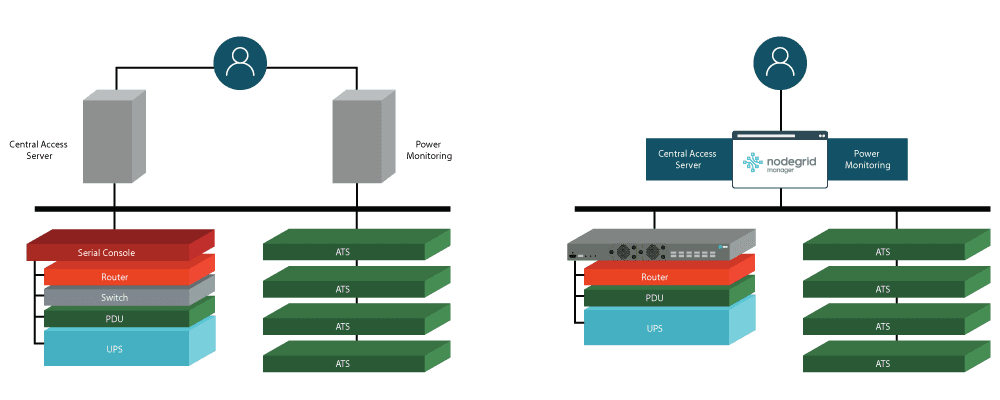
Finance-Diagram

Network modernization helps a large financial firm

A major financial institution began to see weaknesses in their legacy system, and they knew that modernization was the solution. Their traditional infrastructure employed too many disparate systems that were difficult to manage, even to maintain everyday operations. Security and compliance issues were also developing, and to top it off, they would need to implement a new solution by taking a gradual approach.

For out-of-band management, they were using too many devices at the rack level. Their management solutions also lacked the ability to give them control over all their systems. Their servers and automatic transfer switches required separate gateways, which increased response times and made support difficult to manage.

So how were they able to replace these headaches with an efficient, cost-saving network? They used Nodegrid hardware and software to achieve a comprehensive network modernization solution.

For full details, read the case study.

Edge Networking: Your 4-Step Checklist to Becoming Future-Proof

Edge Networking Checklist

Why you need to focus on edge networking

You may already be witnessing a shift toward more advanced edge networking. The industry is realizing the drawbacks of traditional core-to-edge configurations, such as high latency due to bottlenecking and increased workloads on the data center. Networks are becoming even more distributed and connected, which has ushered in the reimagining of conventional networking and processing.

According to Gartner, “more than 50% of enterprise-generated data will be created and processed outside the data center or cloud” by 2022.

You can no longer rely on edge locations to simply deliver all data to the core for processing. As more information is generated at distributed locations, your data center will become overwhelmed should you continue using a traditional approach. This is why it’s important to bolster your edge networks with processing and other capabilities that will help balance the workload.

What does the future of edge networking look like?

The future of edge networking will help you and your users realize benefits like:

  • Improved responsiveness due to decreased latency
  • Better, faster performance due to optimized bandwidth
  • Secure & reliable global access using modern technologies

Instead of waiting for data to be processed at the core, your edge users will get a more responsive experience. Both internal and external users will be able to take advantage of locally-stored & processed information that’s readily available when they need it. On top of this, you’ll be able to provide better global access using the latest methodologies & tech, which will keep users & information secure regardless of your expanded network presence.

#1 Get edgified

Better edge networking starts with laying sturdy groundwork. Build a strong platform using edgified hardware, software, and management capabilities that let you do more at the edge. Here’s more about these key areas:

Hardware

  • Choose appliances that make deployments easy, with features like zero touch provisioning over WAN. Even untrained staff can simply connect & boot these appliances, and automation configures the rest.
  • Look for multi-function, all-in-one devices that can perform networking and computing/storage tasks. All of these functions will be critical to your future edge.
  • Select secure hardware that comes with security built in. Make sure your boxes come with CPUs from trusted providers like Intel®, which allow you to maintain integrity of all your hardware & software integrations.
Software

  • Ensure your hardware comes with a powerful software layer capable of performing multiple critical functions. Don’t settle for purpose-built devices & simple operating systems.
  • Virtualized network functions (VNFs) are the future. Choose software that lets you deploy virtual solutions for SD-WAN, firewalls, IoT, and more, using a powerful hypervisor that supports Guest OS & Docker containers.
  • Optimize using automation. Your software should accommodate popular automation tools like Ansible, Puppet, RESTful, & others. This will help you automate deployments, troubleshooting, and more to provide better experiences for all your users.
Management

  • Make sure your management solution is comprehensive and gives you control of multiple layers.
  • Get remote out-of-band access to your networking solutions, regardless of which vendors they’re from.
  • Choose a remote out-of-band solution that also lets you control your infrastructure, so you can update firmware, patch configurations, etc.

#2 Get protected

Increasing your global network footprint helps you accommodate users into the future. But it also means increasing your vulnerability to attacks. Here are some ways to stay protected regardless of how distributed and complex your edge networks become:

Hardware

  • Carefully select edgified hardware that keeps your data secure before, during, and after deployments.
  • Gain the ability to track and secure your appliances. Get devices with built-in GPS tracking and geofencing, so you can know your investment’s location and ensure safe booting only after appliances reach their destination.
  • Get a secure platform that doesn’t require pre-configuring. Choose hardware that comes with secure boot, self-encrypted disk, signed OS, and trusted platform module.
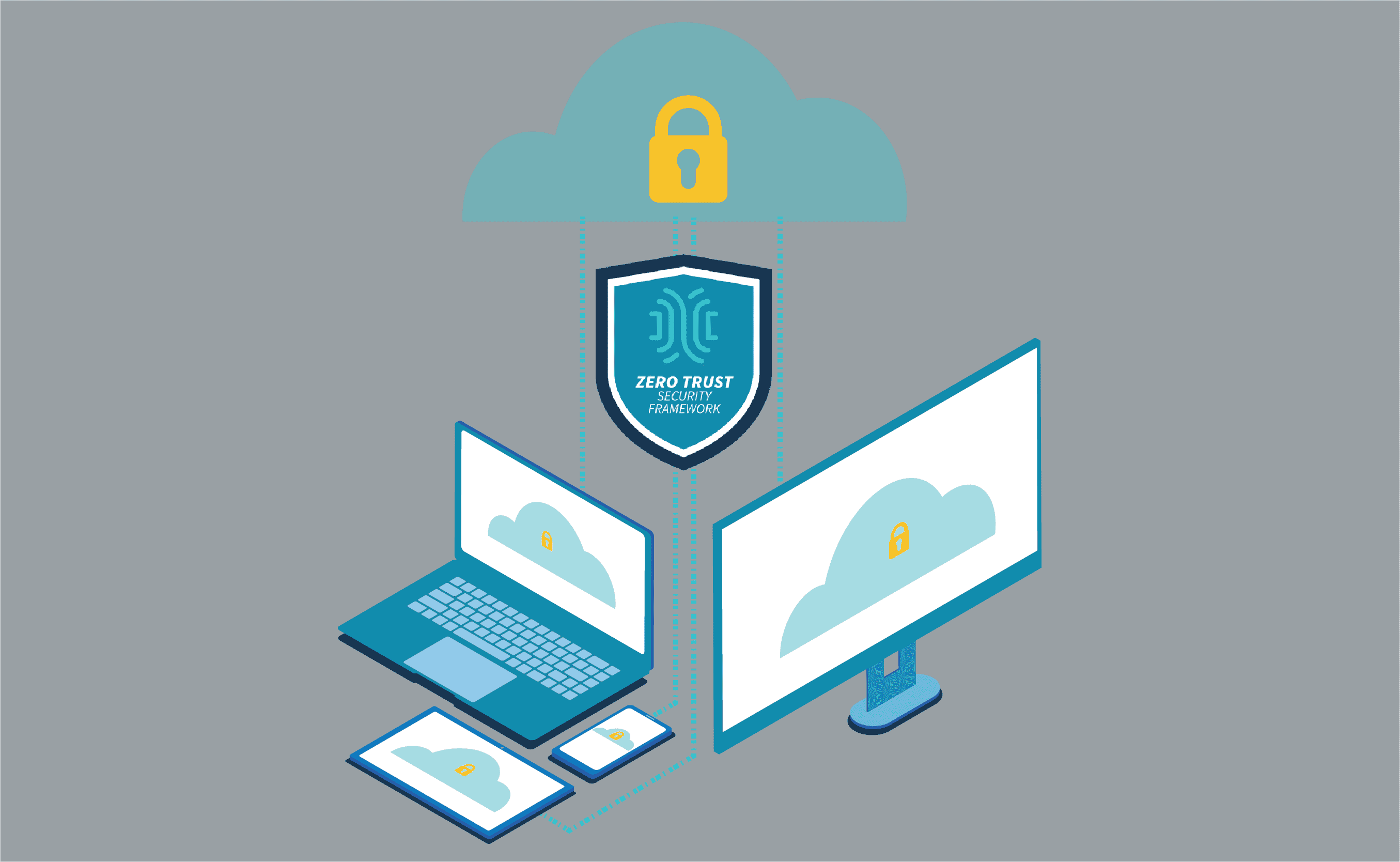
Zero Trust Security

  • Implement a thorough zero trust security model that secures every point of network access. This means always verifying users & devices, even those already within your organization.
  • Deploy micro-segments and software-defined perimeters (SD-P) that let users access only resources they need for their job.
  • Use multi-factor authentication and network monitoring to protect interactions. This ensures your enterprise adheres to a proper identity-based approach to zero trust security.

#3 Become adaptable

Extensibility directly impacts your organization’s ability to adapt. Because edge networking is still a young landscape, leading vendors and technologies will continue to emerge. You can’t lock yourself into a single provider’s solution, and instead must remain flexible to the volatile edge networking market.

  • Adopt a platform that offers wide-ranging extensibility. The more flexible you become, the better.
  • Choose truly vendor-neutral software that lets you extend capabilities with third-party & custom solutions — no matter which vendors they’re from.
  • Ensure extensibility that accommodates in-depth customization. The future of edge networking will require more unique environments than ever before, and you’ll need a platform that you can tailor to your exact requirements — regardless of how much they change.

#4 Evolve your data

Enormous amounts of data are coming your way (if they haven’t already). It will become critical to optimize your data processing and information lifecycle management capabilities. With valuable data being processed and available, you’ll be able to provide the appropriate information to all of your systems and users.

  • Place more processing and storage capabilities close to the edge. This will help you alleviate your stressed data center and help operations perform more efficiently in the future.
  • Deploy analytics and monitoring solutions at the edge. These solutions will be able to find data that’s valuable and ensure availability to appropriate systems and users, for more responsive user experiences.
  • Again, choose a platform that’s extensible and accommodates custom or third-party data management solutions. Your requirements will change and your capabilities will evolve, so it’s critical to have more room to adapt and grow.

Ready for the future?

Set up a Nodegrid demo and see how to get a head start on the future. You’ll see how Nodegrid’s hardware & software deliver all of the capabilities you need and meet the requirements outlined in this checklist.

How to Overcome 5 Challenges of Zero Trust Security

How to Overcome 5 Challenges of Zero Trust Security

Zero Trust Security protects your enterprise inside and out. By safeguarding connections with approaches like traffic segmentation and multi-factor authentication, you can ensure total network security. But implementing and maintaining a zero trust posture poses unique challenges that you must be ready to address.

In this post, we’ll cover five challenges of zero trust security and how to help your enterprise stay protected.

But first, here’s a recap about zero trust security.

Zero Trust Security: What is it, and why use it?

Zero trust security is a relatively new approach to protecting enterprise networks and data. Traditional methods follow a castle-and-moat structure, in which the enterprise is the castle and network security is the moat. When a user or device is granted access to the enterprise network (the castle), it is considered trusted and allowed past security (the moat). The problem with this is that it assumes everything that has access to the castle can be trusted, and also that threats only come from the outside.

It’s no secret that attacks are constantly evolving and can come from within an organization. Zero trust security was conceptualized to address vulnerabilities no matter where they may come from. It takes an ‘always verify, never trust’ approach to network security. This means that every user and device is always verified, regardless of whether they’ve had previously been granted access.

Because business is becoming more distributed, organizations are moving away from the castle-and-moat approach. Zero trust security is a potent and thorough security solution that addresses the need for total protection of global networks. For more about its advantages, read our other post about zero trust security.

Now let’s take a look at some major challenges that come with implementing this approach.

5 Challenges of Zero Trust Security

Zero Trust Security is not a turnkey solution

Implementing zero trust security does not mean deploying a single technology or solution. Instead, it’s a reimagining of your enterprise’s approach to network security. In order to achieve a zero trust environment, you need to take a holistic approach and start from the ground up. The biggest obstacle here is that you can be left with hidden gaps in your protection — especially if you’re replacing legacy security solutions.

It would be great if locking down your network was as simple as flipping a Zero Trust Security switch. But the reality is, you need to usher in a new security model. This means identifying users & devices, deploying monitoring tools, setting up access controls, and more. On top of this, you need secure hardware & software that keep your deployment and management efforts secure.

To overcome this obstacle, implement zero trust gradually. This helps you identify key areas that need immediate attention, and also helps you prevent gaps from going unnoticed or becoming significant vulnerabilities. This makes it easier to see and address issues as they arise, especially if you’re rolling back legacy solutions.

Zero Trust Security requires ongoing management

Some security solutions can be configured and deployed, and then left unmanaged for long periods of time. But because zero trust security is an approach (a mindset, if you will), it requires ongoing management to ensure ongoing protection.

Though it does provide hardened security across your distributed networks, zero trust security is not a ‘set it and forget it’ approach. Your business is constantly changing inside and out, whether it’s employees gaining different responsibilities, or adding new sites, staff, and customer accounts. Your network security requires ongoing administration to ensure that all of these activities are kept safe.

Imagine you recently adopted a zero trust model, but your newest deployment includes hardware with outdated & vulnerable firmware onboard. Or, one of your customers suffered a data breach and you suddenly need to protect their accounts from hackers. With zero trust, you need to make sure your devices are properly patched & secure, and you need to have monitoring tools in place to catch malicious activities.

To help with this challenge, it’s beneficial to implement routine maintenance tasks & checkups into your processes. This is where automation tools can come in handy to consistently check for firmware upgrades, or assist with security configuration changes. You can also use monitoring tools, alerts, and notifications to help you stay ahead of attacks.

Zero Trust Security can impact staff performance

Another challenge of zero trust security is the potential for losing productivity. In a way, this obstacle arises alongside the challenge of requiring ongoing management.

As you implement your zero trust posture and continue to manage it, you may unknowingly create issues with security settings. Imagine you adjust your firewall incorrectly or enter a typo into the CLI, which then inadvertently locks out an entire department of employees. Solving this problem may involve a quick fix, or it could take days. Meanwhile, your workers get set back and can’t perform optimally.

The best way to overcome this is, again, by gradually implementing your zero trust posture and routinely managing your solutions. As you make the transition away from your legacy systems, you can address setbacks like these as they come to you. You won’t have to deal with an array of issues all at once, and you can instead pinpoint specific areas that cause disruptions.

Zero Trust Security calls for secure hardware

Many purpose-built appliances come with some form of built-in safeguards. However, part of implementing a zero trust security framework involves securing your hardware. This means patching and updating your existing boxes, or deploying new devices altogether. Remember that if you don’t lock down your assets, including the physical appliances that make up your infrastructure, you remain open to attack.

When you deploy your hardware, there’s always a chance that it might get lost or stolen during shipment. Once it gets installed and set up, attacks could also come from on site, via additional hardware/software integrations, or over your network. The bottom line: you need devices that are secure inside & out.

Combat these vulnerabilities by choosing hardware with trusted CPUs, like those from Intel®, which make it easy to maintain system integrity. This means features like secure boot, signed OS, and trusted platform module that protect you at the lowest levels. Also, look out for features like GPS tracking and geofencing. These help you keep an eye on your devices during shipment, and allow only you to boot & provision once safely under your control.

Zero Trust Security requires flexible software

With security solutions spread across your networks, you run into challenges trying to manage it all. Every vendor has their unique tools and UIs, and there are different limitations in terms of features, capabilities, and integrations. Comprehensive management software goes a long way in giving you control of certain solutions. But you also need software that is flexible and can pull everything together under a simplified UI.

Consider everything that you need to manage, like user roles, access rights, firewall settings, device firmware, etc. Zero trust security is an all-encompassing approach that gives you more protection, but also more work. This is why it’s important to use software that is flexible and can accommodate third-party solutions, regardless of vendor.

One way to overcome this challenge is by using a complete tool like ZPE Cloud. This vendor-neutral cloud platform gives you secure remote access to both your solutions layer and your infrastructure layer — no matter which vendor solutions you deploy on your network. It also helps you connect seamlessly to third-party integrations like Palo Alto Panorama and Prisma Access. ZPE Cloud serves as a single gateway to keeping your network secure, whether you need to manage your next-gen virtual firewalls, or update device firmware with the latest security patches.

If you’d like to learn more, visit our Zero Trust Security page and see how you can deploy a secure network platform.