Providing Out-of-Band Connectivity to Mission-Critical IT Resources

How to Implement Zero Trust: Technologies to Shield You From Million-Dollar Losses

Staff on laptop with zero trust security in place.

How to implement zero trust security is a growing focus of organizations across the globe. With cyber attacks frequently hitting some of the largest companies and threatening entire economies, it’s no wonder why comprehensive network security is a top priority among public- and private-sector entities.

In this post, we’ll show you what you need to implement zero trust security, from big-picture items to individual technologies.

But first, here’s a recap of zero trust security and why your business won’t be safe without it.

Why you need Zero Trust Security

Imagine bringing in a new hire to your department. Soon after, you notice suspicious computer slowdowns and applications that don’t respond as usual. You dive into your program files and discover an unknown .exe file, and you dive deeper to discover attackers actively exploiting your resources. You quickly pull your team together to lock down your network, sanitize every computer and connection, and send out a company-wide instruction to have every employee reset their password.

It turns out, your newest employee unknowingly clicked a bad link and opened the door for a trojan horse attack. But because of your quick response, no significant damage was done and you can rest easy again.

Months later, you come in for your normal workday only to find all your systems locked and unresponsive. Dave, a senior engineer, retired on the day of the attack and never reset his password. The hackers stole his credentials and have gone unnoticed for months. Now your company and its customers are compromised, and the consumer markets you serve are in a frenzy due to a shortage of goods. You can’t help but feel somewhat responsible for the entire ordeal.

This example mimics recent real-world cyberattacks and highlights the importance of moving away from traditional security approaches.

Traditional architecture uses the castle-and-moat security approach. Once a user gains access (crosses the moat), they become trusted to use your organization’s resources (the castle). Aside from the occasional password reset or other authentication protocol, this approach leaves plenty of opportunities for outsider and insider attacks. Zero trust security, however, places a moat around every node and user. This means that no matter how often a system or user needs to access a resource, they always have to verify their identity and intent.

In other words: never trust, always verify. In our example above, implementing simple two-factor authentication could have alerted Dave to his stolen credentials, which would have prevented the attack.

The need for zero trust is due to the explosion of distributed networking. Communications used to be straightforward and centralized: a trusted user using a trusted device would connect from a trusted office location to the data center. Apps and data were securely transmitted between parties, and sealing out attackers could be as simple as deploying a new point solution or product. But user expectations changed all this; now, they need to connect from anywhere using a variety of devices, which means the modern network includes SaaS, cloud, and third-party platforms. This hybrid infrastructure means there are now more nodes and lines of communication than ever — and each is vulnerable to attack.

If the recent attacks on SolarWinds, Microsoft Exchange, and Colonial Pipeline aren’t convincing enough, consider the latest hack involving Kaseya, an American company that specializes in IT and network management software. By exploiting the virtual systems/server administrator (VSA), attackers were able to compromise up to 1,500 of Kaseya’s customers, shutting down educational services, law firms, and an outpatient surgical center in South Carolina.

Pervasive attacks like these have prompted political action, with the President signing a cybersecurity executive order this past May. Read our breakdown of the legislation and how it aims to improve cybersecurity across public and private sectors.

Now that you know why you need better security, how do you implement zero trust?

How to implement Zero Trust: The big picture

Zero trust is merely a concept, however implementing Zero Trust Network Access (ZTNA) means putting this concept to work. Implementing ZTNA involves two parts:

  • The processes, which we covered in a previous post, and
  • The technologies, which we’ll talk about in this post

At a high level, this diagram shows the components you need when considering how to implement zero trust.
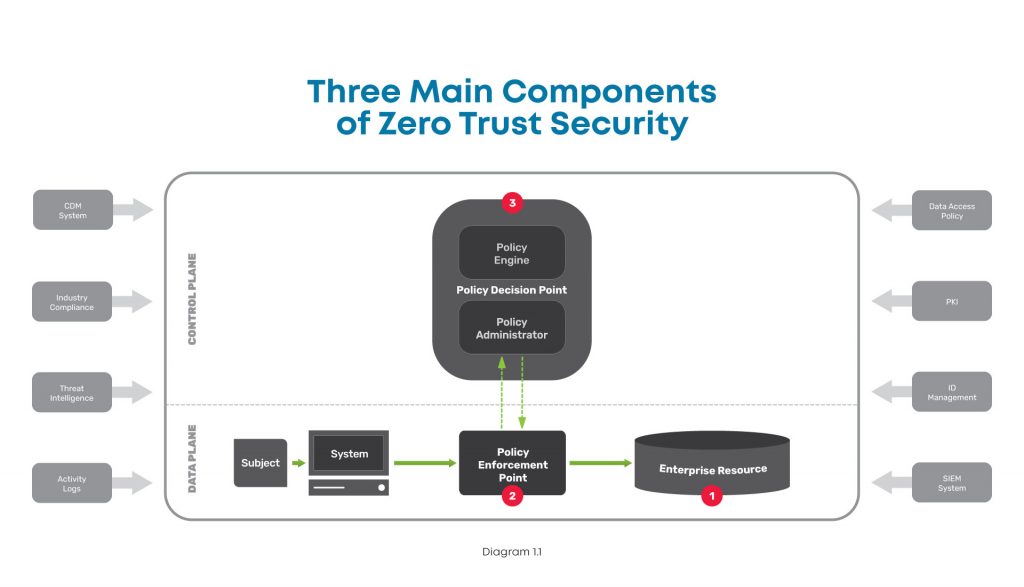
A high level diagram of the three main components of zero trust security, including the enterprise resource, policy enforcement point, and policy decision point.

There are three major components to look at in the big picture of zero trust security:

  1. Enterprise resource — This includes all the IT stuff you need to protect and that your business relies on, like hardware, software, and network equipment. In simple terms, this is like the gold that you keep carefully guarded in the center of your castle.
  2. Policy enforcement point — This is the datapath element that enables, monitors, and terminates connections between users / devices / applications and enterprise resources. Simply put, this is like the guard that accompanies those wishing to access your gold.
  3. Policy decision point — This is the layer that decides who / what is safe and grants / revokes access accordingly. In other words, this is the gatekeeper who determines who is allowed into your castle.

To better understand these, here’s a closer look at each:

Enterprise resource

This component is pretty straightforward, and consists of elements you need to operate and manage IT environments. These elements can include hardware like computers and data storage devices; software such as web servers, content management systems, and operating systems; and network equipment like servers, routers, firewalls, and out-of-band devices.


Policy enforcement point

This component consists of the datapath elements that enable, monitor, and terminate connections between subjects (users / devices / applications) and your enterprise resources. Though this is represented as one component, it is comprised of two parts that are both typically used in deployments. These parts are:

  • A client-side agent, usually deployed on a laptop or server.
  • A resource-side gateway, which controls access in cases where a client-side agent is not used. Examples where gateways are used include regulated healthcare equipment, ATM machines, and operational technology equipment.


Policy decision point

This component is the management and orchestration layer. This layer essentially checks identities to verify who is safe, and assigns policies to determine who gets access and to what. This is also represented as one component but is comprised of two parts:

  • Policy engine — This is the engine that decides whether a machine or web traffic is safe. To accomplish this, the engine uses a variety of data sources when making its determination, such as PKIs and identity management providers, CDM systems, and activity logs.
  • Policy administrator — This administrator uses the policy engine’s determination to grant or revoke access to a machine or web traffic.

There are many tools available to help you monitor and visualize traffic, so you can create policies and configure your policy decision point to meet your zero trust outcomes.

In order to create your zero trust configuration, you need to deploy several essential technologies.

How to implement Zero Trust: Essential technologies

Zero trust is a complete re-imagining of network security and can be a daunting task. But when you add its fundamental technologies to your toolkit, you can effectively build the three components described above and achieve Zero Trust Network Access (ZTNA). Here are the essential technologies you need to accomplish this.


Identity and access management

Such a big part of zero trust security relies on verifying that a device or user really is who they say they are. For this, you need an identity management solution from a trusted provider and public key infrastructure (PKI). This allows you to essentially create and issue a digital fingerprint for every user, and includes information such as their username, role, and other unique data. Multi-factor authentication is a critical component of identity verification, which requires users to present two or more pieces of identification/verification before granting access.

Additionally, access management is an important piece that determines a user’s authorization level, or in other words, which resources they can access. Identity and access management both feed information into your zero trust model’s policy engine.


Policy management

Another essential technology to have is a policy management solution. This is integrated into your security stack and serves as a single policy creation point. This allows you to define access and authentication policies for your entire organization.

You can specify data access rules for users, devices, and roles, which is vital to achieving micro-segmentation, limiting lateral movement, and enforcing least-privilege access. All of these feed into your policy engine and are used by your policy enforcement point to validate whether a session is allowed to continue.


Zero trust equipment and applications

Tying everything together requires equipment and applications that are able to enforce your policies. These are physical or virtual solutions that sit in front of servers and serve as your enforcement points. For example, this could be your next-gen firewall (NGFW) that initiates the multi-factor authentication protocol, verifies a user’s identity, and uses your defined policies to restrict the user’s access to a specific segment of your network.

Where can you get these essential Zero Trust technologies?

When considering how to implement zero trust, keep in mind that there are many vendors who can provide you with the essential technologies.

  • Obtaining an identity and access management solution is the easiest task when implementing zero trust. Many organizations offer an identity store, such as Azure Active Directory or Google Cloud Identity. You can also use companies dedicated to identity management, such as Duo, Okta, or Ping Identity. Keep in mind that if you need to control third-party access, such as for customers or equipment management contractors, you’ll need a solution that can access multiple identity stores simultaneously.
  • Obtaining a policy management solution requires careful consideration and should be part of your overall security stack. Look for a solution that allows you to create policies and set up datapath enforcement points. An adequate framework enables you to create authentication and post-authentication access rules, with an enforcement point that segments your network and continuously authenticates sessions. This security stack can be an on-prem NGFW, or delivered via the cloud using a Secure Access Service Edge (SASE) model, both of which are available from trusted providers like Palo Alto Networks.
  • Regardless of whether you use an on-prem or SASE model, you need an edge infrastructure platform to sit in front of servers and host the enforcement point. For on-prem, this platform must be able to host an NGFW to secure network segments and VLANs. For SASE, this platform must be able to create VPN tunnels to your SASE platform, which can be used for inline inspection and policy enforcement. Either approach requires powerful computing capabilities and a flexible operating system to accommodate workloads for detecting, analyzing, and automatically responding to threats, which few vendors offer.

Here are examples of what proper zero trust implementations look like, with ZPE Systems’ Nodegrid as the edge infrastructure platform:
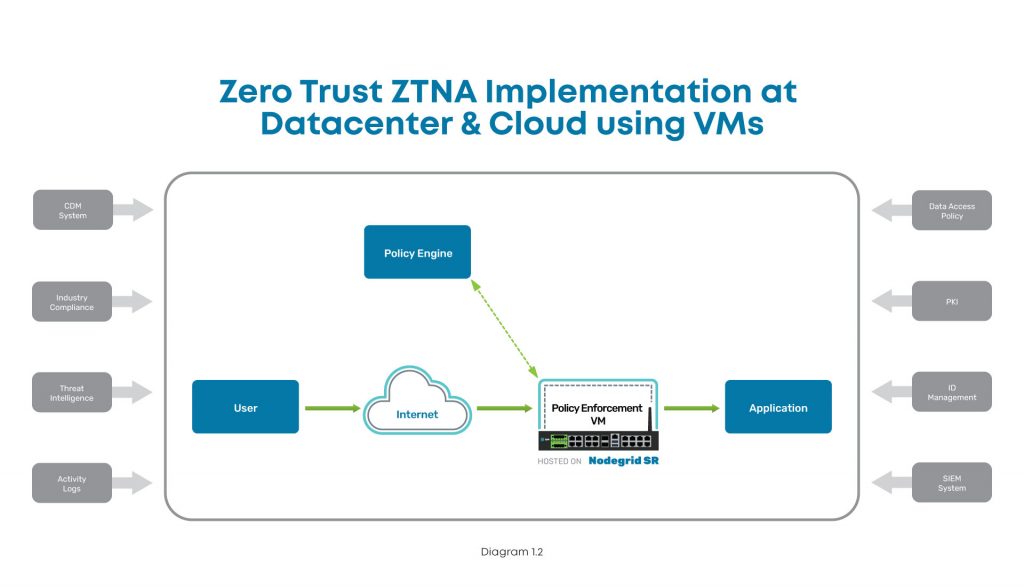
Implementation diagram showing how to implement ZTNA at the data center using Nodegrid.

In this diagram, you can see where ZTNA and Nodegrid fit into the scheme at the data center. The user connects via Internet, and the Nodegrid SR device serves as the Policy Enforcement Point hosting a VM. This VM communicates with the Policy Engine to authenticate the user, and then grants access to the data center application.
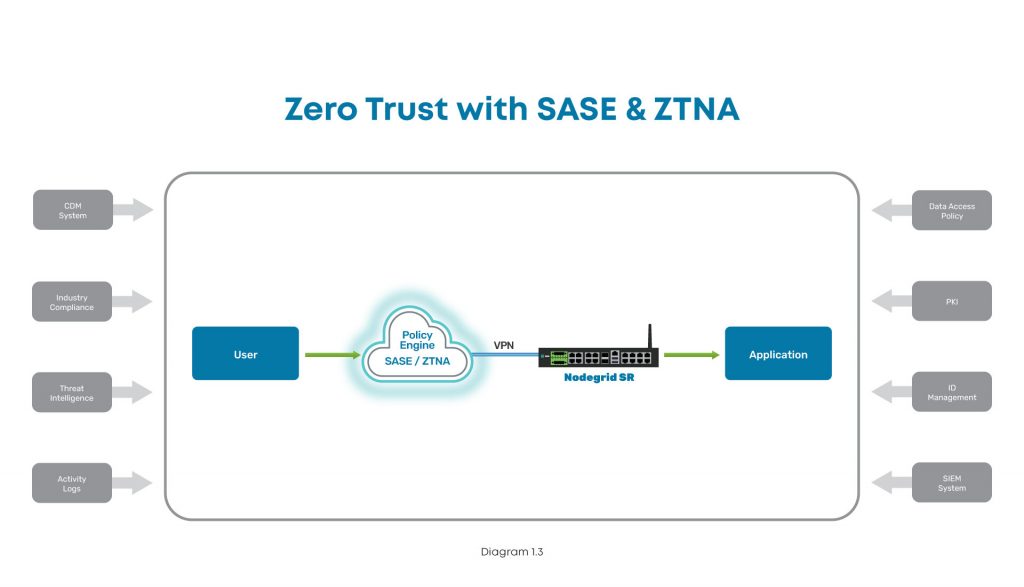
Implementation diagram showing how to implement ZTNA at a branch, edge, or other distributed location.

In this diagram, the user tries to connect to an application at a branch, edge, or other distributed location. The user connects via Internet, where SASE and ZTNA provide secure connectivity. The Nodegrid SR device connects via VPN to the Policy Engine for authentication, and then grants access to the branch application.

How to implement Zero Trust: A recap

To protect your organization, implementing zero trust requires you to build out the main components. With the policy decision point and policy enforcement point in place, you can secure your enterprise resources from outsider and insider attacks. Ensuring these components work like a well-oiled machine means you need the proper identity and access management tools, a complete policy management solution built into your security stack, and equipment and applications that can enforce your zero trust security policies.

Because user expectations have caused infrastructure to become incredibly distributed and complex, the attack surface has increased dramatically. The traditional castle-and-moat approach to security is no longer adequate, and recent newsworthy cyberattacks showcase the network vulnerabilities that even the largest companies still struggle to address. The President’s latest cybersecurity executive order is a step in the right direction to bolster infrastructure protection for public and private sector entities, and you can use this blog as a starting point to begin your zero trust journey.

Don’t get caught without these 5 security must-haves

Watch our webinar, Cyberattacks: 5 Security Must-Haves for Hybrid Infrastructure Gateways, and learn how to lay a solid foundation that makes implementing zero trust easier. Our experts will talk you through how to:

  • Keep edge networks and users fully protected
  • Make smart buying decisions
  • Get complete security and control for years of serviceability

Watch now to protect your business from growing cybercrime.

SASE & Zero Trust: How They Come Together to Improve Network Security

shutterstock_1908952546

How do secure access service edge (SASE) and zero trust work together to improve network security? Simply put, SASE works by deploying security via the cloud, and zero trust deploys security in the least privileged access method.

Networking trends have heavily shifted in favor of SASE following the shift to remote work. Gartner predicts that 60% of businesses will adopt or begin to adopt a SASE-oriented model for their company by 2025. Let’s discover more about how SASE and zero trust work together to benefit large enterprise networks.

SASE and zero trust defined

The rise of SASE has made it one of the most talked-about terms in the world of networking, but defining it in simple terms has proved challenging for some. Palo Alto Networks defines SASE as a convergence of several protocols into a cloud-based interface, including wide area networking (WAN), cloud access security broker (CASB), firewall as a service (FWaaS), data loss protection (DLP), and zero trust. 

SASE uses edge computing to solve the inherent bandwidth issues caused by the in-and-out traffic of proxy connections to SaaS programs via the company data center. SASE allows companies to apply their security measures to these programs, preventing possible security leaks and mitigating them when they do happen.

SASE’s emphasis on applied proxy security is due to zero trust architecture, which has recently gained popularity. Traditional models have used a “castle & moat” approach, installing firewall protection around a business’s network perimeter. These models assume, however, that devices within the network are inherently trustworthy. Zero trust architecture never changes these protocols to make such an assumption, demanding that the user or device provide credentials regardless of circumstance. Learn more about the SASE model’s key use cases and benefits and the zero trust security benefits for large companies. 

How SASE and zero trust work together

The new focus on proxy connections is what truly defines both SASE and zero trust. Whereas the company data center used to act as the nerve cluster of business operations, that role has now been fundamentally decentralized and relegated to many smaller data paths coming from remote locations. 

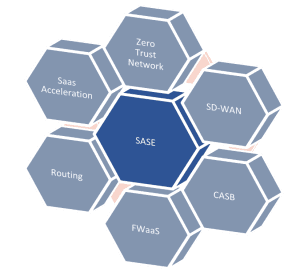
SASE: Zero Trust, SD-WAN, CASB, FWaaS, Routing, and SaaS Acceleration.This decentralization means an increased reliance on programs found in the cloud, as it offers the most convenient access for employees working from home. This is the ultimate goal of SASE; the use of edge computing to redirect traffic from the data center to the cloud, easing the traffic flow.

2020 saw a rise in cybercrime due to an increased dependency on unprotected (or poorly protected) cloud and remote access programs during the pandemic—the FBI reported a 75% increase in daily cybercrimes by June. This exposed a dire need for protocols that offer security rules. Zero trust architecture provided precisely this opportunity, using SASE’s emphasis on edge computing to issue company protections from proxy locations onto cloud-based services.

However, zero trust security doesn’t just provide multiple checkpoints for potential users in a network; it also restricts user access once checkpoints have been cleared. Think of your enterprise network like a concert—the ticket gets you into the venue, but if you want to access the VIP or backstage areas, you need to clear additional checkpoints with an ID badge or backstage pass. With zero trust security, users and devices only gain access to the specific resources they’ve authenticated to—they’ll need to prove their identity and verify their privileges if they want to move to any other area of your network.

These security protocols are critical to successful SASE implementation, as it allows companies to implement their security protocols for SaaS programs and mitigate potential leaks when they do happen. Together, they provide the best of both worlds, allowing for a decentralized network model that still provides the security needed for such a model to exist. It is precisely this balance between access and safety that makes SASE and zero trust what you need to shield your business as you continue to accommodate remote work and distributed users.

Why does my company need both SASE and zero trust?

A SASE network implementation lacking zero trust principles is left drastically exposed to potential cyberattacks. For example, the lack of internal protection ensures that a more extensive information leak could happen.

Consider what would happen if you implemented SASE without zero trust, and a hacker used a compromised account to connect to one of your cloud applications. In addition to stealing the data available in that cloud app, they could potentially jump to other edge resources using the same username and password, or even find an access point to your primary enterprise network. The more lateral movement that account has on your network, the more sensitive data they could exfiltrate. Additionally, the absence of intensive logs ensures that these leaks will consume a great deal of time and energy as network managers attempt to locate and neutralize threats when they arise.

On the other hand, while it’s never a bad idea to put extra measures in place to secure your data, the purpose of zero trust is to handle edge computing access to cloud-based SaaS applications. Zero trust is a welcome addition to your existing security stack and removes the necessity of having a centralized model.

Talking about SASE and zero trust individually makes the two of them sound as though they are mutually exclusive; they aren’t. Zero trust security is one of many programs integral to the successful implementation of SASE. This listing of the key SASE components gives more context regarding how these systems work together.  

Implementing SASE and zero trust protocols

The advantages these two protocols offer companies stem from the way they are used together. When combined, SASE and zero trust allow companies to recenter their business models around a proxy structure. This new model gives employees the flexibility of working from home while ensuring that sensitive information remains safeguarded against ransomware and cyber attacks. Palo Alto Networks cites that the advantages of combining SASE & zero trust are: 

  • Stronger network security
  • Streamlined network management
  • Reduced costs of deploying security at scale
  • A single, holistic view of the whole network

The final benefit listed above is worth further consideration. Instead of viewing your company’s systems as individual pieces, conversion to the SASE model allows you to view your company’s network through a single lens. This helps to streamline your business model even further, making you that much more competitive in the workplace of tomorrow.

We encourage you to read Gartner’s roadmap for SASE convergence for more information. 

Ready to begin your conversion to SASE?

Our products page boasts several options to get you started. Contact us for further questions and get started today! 

Contact Us

SASE vs Security Service Edge: What’s the difference?

Employee tapping into cloud services such as security service edge

Security Service Edge. Is it just another fancy networking term? After all, we’ve already got SASE (Secure Access Service Edge), so why throw another buzzword into the mix?

The truth is, there’s a big difference between Security Service Edge (SSE) and SASE. SSE is a foundational element of SASE, but there’s another necessary component you need to be aware of. In this article, we’ll break down the differences between these two acronyms so you can understand how to achieve better security for your distributed users and devices.

But first, let’s quickly recap why networking and security have become decentralized.

Security Service Edge: An evolving need

The modern workforce is increasingly distributed. In fact, Gartner research shows that demand for remote work will increase 30% by 2030, as Gen Z fully enters the workforce. Another factor is the ongoing coronavirus pandemic, which has forced companies worldwide to accommodate off-site staff.

But the need for distributed networking goes back much earlier than the previous 18 months.

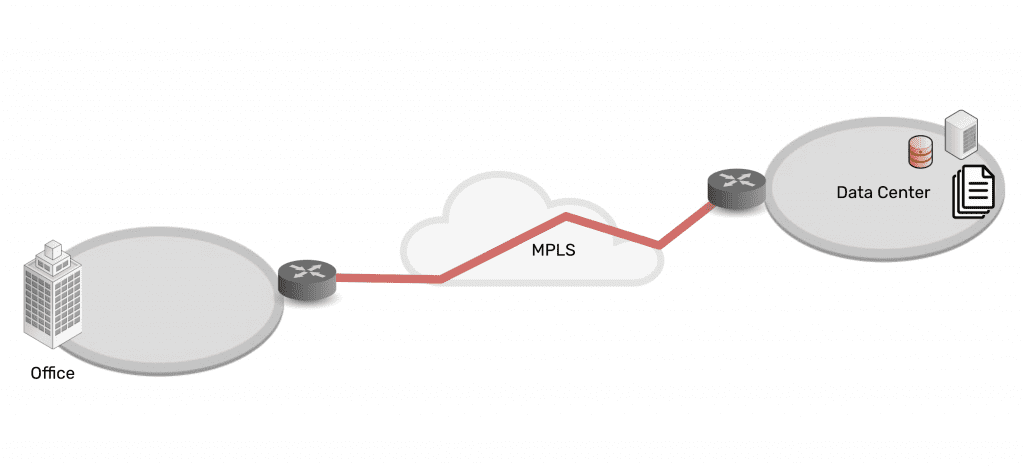
Connectivity and network architectures used to be simple. In the 1990s and 2000s, companies centralized data in the data center, connected branch offices to the data center, and set up simple security measures in between. Most staff worked from the office, which made it easy to provide secure access to and from these enterprise locations and resources.

Network architecture showing simplicity of data center connected via MPLS to branch office

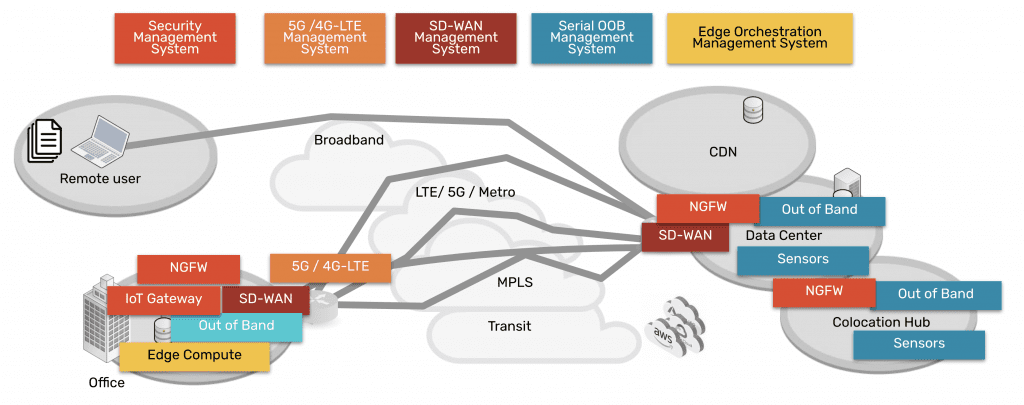
As technologies advanced, companies and their employees discovered that it was becoming easier to work outside of the office. Cloud, SaaS, and edge offerings emerged to create a hybrid infrastructure, as everything moved from being centralized to highly distributed. Now data, security, networking, and computing are everywhere and comprise a complex web of services — owned by enterprises themselves as well as third parties. Securing it all has been an impossible feat for more than a decade.

Network architecture showing complexity of data center, CDN, remote user, branch office, all connected via many paths

Fortunately, Security Service Edge and SASE are models that can address this challenge.

SASE vs Security Service Edge (SSE)

Security Service Edge is a main component of SASE. In the simplest terms, SASE is the architecture that organizations strive to build. It involves delivering networking and security via the cloud, directly to the end user, device, office, etc. instead of having to backhaul through the company’s data center. Aside from SSE, the other main component of SASE is the access portion, which allows the edge services to be deployed and managed. This access portion includes the physical hardware required to connect ‘network’ the edges and services.

Therefore, SASE breaks down into two main components:

  • Security Service Edge, and
  • Access

Keep reading for a detailed explanation of each and why they have been separated out into two pieces now.

Security Service Edge

Security Service Edge (SSE) is the security component of SASE. As Gartner states, SSE ensures secure access to the web, cloud services, and applications. SSE is delivered via the cloud and offers several capabilities, including threat protection, security monitoring, and data security.

Security Service Edge capabilities are available from companies who provide NGFWs (next generation firewalls), SWGs (secure web gateways), and CASBs (cloud access security brokers).

  • NGFWs: Next generation firewalls are implemented to not only secure networking components and services, but also to protect against modern threats that exploit weaknesses in applications.  This type of service secures all the traffic even traffic that’s UDP and also non web based applications including malware exploits.
  • SWGs: Secure web gateways are self explanatory. They are placed between the user and the web, serving as a gateway that provides secure access to the web. Basic functions of SWGs include blocking access to certain websites, preventing unauthorized transfers of data, and inspecting for malicious content.  As its name implies this type of service is limited to web traffic and is used in specific use cases.
  • CASBs: Cloud access security brokers are software that sit between cloud users and cloud applications, to monitor activity and enforce security policies. This software keeps a close eye on data as it moves between cloud environments, SaaS, and users, and enforces security policies to block malware, protect sensitive data, and maintain compliance.  This type of service also has a specific use case of only examining specific cloud applications as its name suggests.

Access for Security Service Edge

In order to use the capabilities of Security Service Edge, you need the physical hardware to deploy services at your locations. This hardware is the access component, and includes SD-WAN capabilities. When deployed, it connects your location to a variety of services (NGFWs, SWGs, CASBs mentioned above) in order to make those services available to your location.

SASE = Security Service Edge + Access

A simple way to think about the SASE concept and its components is to imagine a skyscraper.

Imagine SSE capabilities live in the clouds, and you’d like to bring them down to your enterprise. You’ve got the blueprints to build a skyscraper (SASE) that can connect you to these cloud-based capabilities. But before you can do any of that, you need a sturdy foundation (the access portion) on which to build it all. In other words, your investment in cloud services needs a solid access onramp to those services.

With the right access component, your employees can shuffle in and out of your skyscraper, and easily perform their job functions using SSE capabilities in the cloud. And if you deploy a more robust access solution such as ZPE Systems’ Nodegrid, you’ll be able to maintain your SASE architecture no matter how the clouds change.

How to implement SASE: Focus on Access

When you’re considering implementing SASE architecture, you might be inclined to go to a SASE company to buy everything. But Gartner states that companies that offer the two segments have more mature offerings. 

Therefore, you should focus on purchasing the right solution for the access portion, since it serves as the foundation of your infrastructure at the edge, and then marry this to the right SSE solution for your company. This separation of vendors gives you flexibility to manage several IT systems, and eliminates vendor tie in.

Nodegrid puts the Access in SASE

The Nodegrid SR family of edge routers serves as the access portion in your SASE architecture. A single Nodegrid SR device is a powerful, cost-effective solution to connecting sites to Security Service Edge providers.

The onboard Intel CPU and Linux-based Nodegrid OS offer speed and flexibility. Orchestrate freely across vendors to activate service licenses, spin up VMs, and get your SSE solutions up and running automatically. Additional RAM and storage also help you deploy edge computing for data thinning, de-duplication, monitoring, and other edge workloads.

On top of this, Nodegrid gives you out-of-band management capabilities so you can remotely manage your SASE architecture from anywhere. If you need to optimize bandwidth, investigate data logs for security, or simply power cycle an edge device, you don’t have to get out of your pajamas. Nodegrid gives you secure access to everything via your web browser.

To summarize, the reason SSE has been separated from SASE is that many SD-WAN vendors began to confuse the market by advertising that they offered SASE. This prompted Gartner to point out that there are security-savvy companies that give you more mature security solutions, and to consider such solutions from vendors like zScaler, Netskope, and Acreto, for example. Regarding the Access component, vendors like ZPE Systems provide more capable and robust solutions for connectivity to cloud services, when compared to SD-WAN companies that claim to offer SASE.

Don’t miss out on valuable SSE content. Make sure to sign up for our newsletter using the form below.

If you have questions or would like to speak with an expert, feel free to contact us.


SASE Implementation: A Step-by-Step Guide for Businesses

shutterstock_1902760141

SASE—which stands for secure access service edge—is a relatively new framework that converges wide-area networking with security into one cloud-based service stack. SASE uses software-defined wide area network (SD-WAN) technology to directly connect branch offices and remote users to the cloud and software-as-a-service (SaaS) resources without backhauling traffic through the primary firewall. 

SD-WAN traffic can bypass a firewall because SASE enables the application of enterprise security policies, traffic filtering, and other controls to that remote traffic. By using cloud-based security features like firewall-as-a-service (FWaaS), cloud access security brokers (CASBs), and zero trust network access (ZTNA).

SASE provides numerous benefits to businesses to simplify, optimize, and secure their network edge, including:

  • SASE reduces network latency for both enterprise and remote traffic. SASE separates remote, cloud-destined traffic from the rest of your SD-WAN traffic, so a branch office user doesn’t need to go through an HQ firewall just to access a web service like Office 365. SASE increases the security of the network edge by allowing you to implement the same enterprise security policies and controls to all remote traffic.
  • SASE simplifies and optimizes network administration by consolidating SD-WAN management and edge security controls into one unified platform.

A successful SASE implementation requires a lot of planning, as well as a comprehensive understanding of your existing infrastructure, requirements, and pain points.

SASE implementation: A step-by-step guide for businesses

Each SASE implementation is unique to the business it serves. However, there are six basic steps that most successful SASE deployments follow:

Step 1: Define SASE goals and requirements

During the planning phase of the SASE implementation, the first step is defining the project’s business goals. Identify SASE use cases: What problems need a solution, and what benefits does your organization hope to gain? These use cases will inform how to conduct the following steps—once the goals are clear, developing plans for reaching them is what follows.

For example, you may want to use SASE to secure and optimize SD-WAN traffic. In this case, you already have SD-WAN technology, so the primary goal is to add SASE’s cloud-based network security stack to protect that traffic. 

The following steps determine whether the existing SD-WAN architecture can support SASE and ensure preferred SASE vendors integrate with your existing infrastructure. Once you know why SASE is essential, decide what technologies, processes, and training to implement to reach those goals.

Step 2: Assess the environment and identify gaps

Next is to conduct a thorough assessment of your existing network infrastructure and resources to identify any gaps in the ability to achieve your SASE goals. Use the following questions as a checklist:

  • Do the critical staff members have the knowledge and skills to implement and manage a SASE deployment?
  • Do you need an access on-ramp to the SASE service provider (e.g., an SD-WAN backbone)?
  • Can any existing infrastructure be used with SASE implementation, or do you need to purchase new hardware for your edge?

Review technical documentation and network diagrams, interview key staff about their requirements and training, and examine the security and network configurations to assemble a complete picture of your current environment. Choosing this before defining SASE requirements is vital because a thorough understanding of existing infrastructure can make it much easier to identify pain points and business goals.

With a clear picture of where you are now and what you hope to achieve with SASE in the future, you can start choosing SASE vendors and solutions.

Step 3: Choose SASE vendors and solutions

There aren’t any fully mature, single-solution SASE providers yet. Some vendors provide access via SD-WAN and related technologies, while others offer security service edge via cloud-based network security features. If you have an existing SD-WAN backbone that provides all networking functionality, then a single vendor for a cloud-based security stack is only needed. Otherwise, combine a security service edge solution with an SD-WAN solution to complete SASE implementation.

SD-WAN and cloud security solutions need to work well together. Security service edge providers often partner with SD-WAN vendors to create fully integrated solutions managed from one unified platform. For example, ZPE Systems partners with Palo Alto Networks to provide an SD-WAN on-ramp to the Prisma Access security service edge solution. Enterprises should prioritize integration when evaluating potential vendors.

Step 4: Stage and test SASE deployment

The exact steps to configure services will vary depending on the provider, environment, and requirements.

We recommend creating a staging and testing environment separate from the production environment, so you can perform thorough integration and user acceptance testing before going live with SASE deployment. Test how cloud security stack integrates with an SD-WAN solution, as well as other applications and tools like security information and event management (SIEM), role-based access control (RBAC), and security orchestration, automation, and response (SOAR).

Additionally, perform user acceptance testing with real users and workloads to accurately picture how these changes will affect the people using your systems every day. This will help identify bugs and issues, determine what kind of user training is needed at the cutover time, and optimize the overall user experience to make the transition to SASE easier for your organization as a whole.

Step 5: Cutover, troubleshoot, and support

Even the most meticulously planned deployments can go awry, so companies should have support staff ready to handle any user complaints and technical staff on hand to troubleshoot any configuration or deployment errors. After cutover, your support staff also needs to provide training and documentation for the user base to ensure they know how their daily processes will change and what to do if they encounter any problems.

Step 6: Continuously optimize SASE implementation

Once your SASE implementation is live, you should constantly monitor it and look for ways to improve and optimize. Infrastructures will evolve, as will the technology offered by SASE vendors. As adding new cloud infrastructure, SaaS platforms, branch offices, and other edge computing requirements, you should evaluate the SASE technology to see if additional functionality is needed or desired.

You should plan and implement a SASE deployment that addresses a unique environment, requirements, and business goals by practicing these six steps.

Discover more on how to simplify SASE implementation

A successful SASE implementation requires in-depth planning and preparation, robust testing, comprehensive training and support, and continuous monitoring and optimization. You can make this process easier by investing in SASE solutions that integrate and consolidate management tasks behind one pane of glass. 

For example, you can use Nodegrid’s innovative SD-WAN and remote branch management solutions as your on-ramp to secure service edge technologies. We partner with trusted SASE providers to deliver an integrated platform that consolidates and simplifies your SASE management and optimization.

Want to learn more about how ZPE Systems’ Nodegrid can help your business with SASE implementation?

Call 1-844-4ZPE-SYS or schedule a free demo.

Watch A Demo

Understanding Key SASE Components & Benefits

Vector,Of,Men,And,Women,Using,Mobile,Devices,,Computers,Uploading

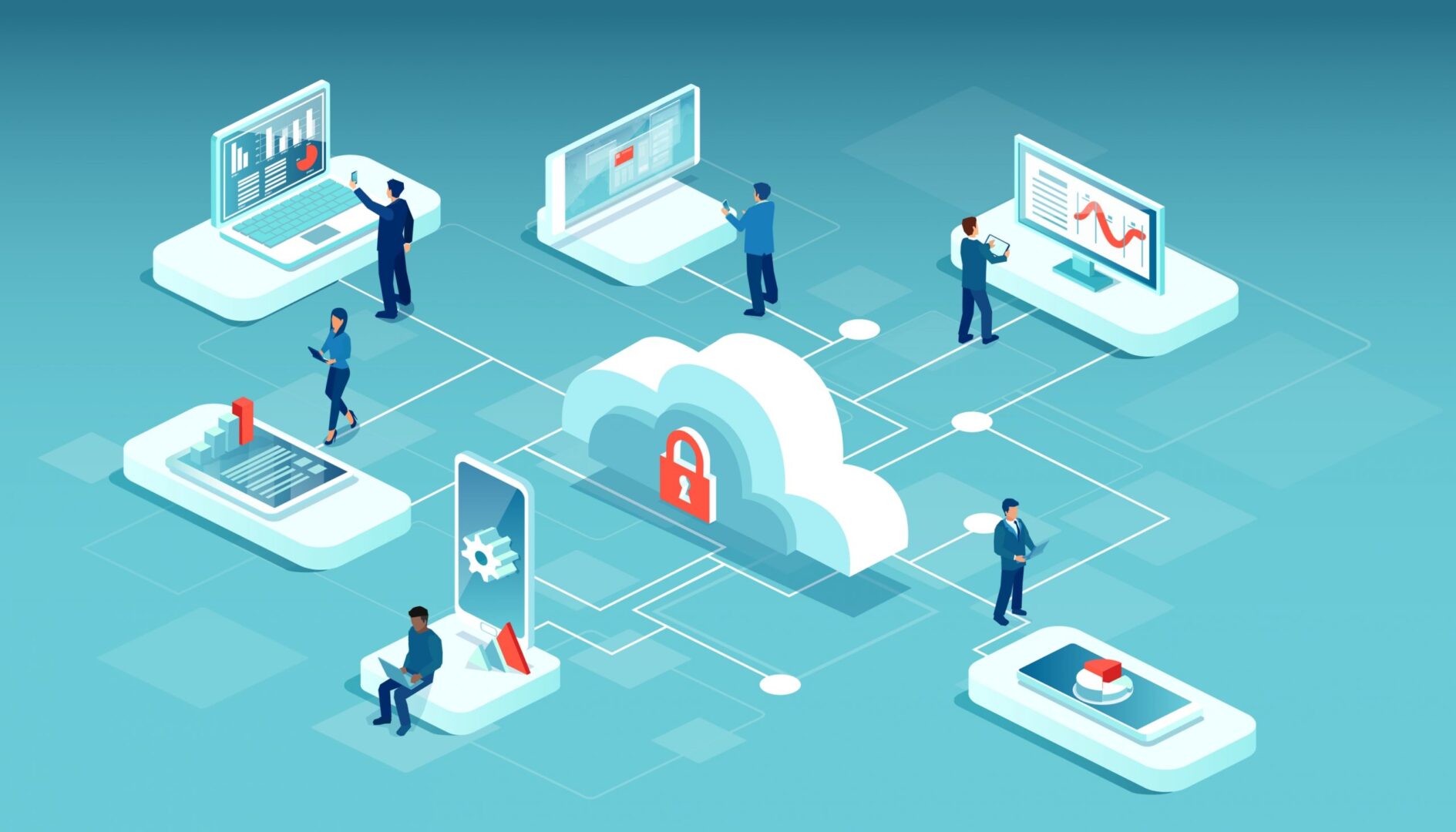
SASE—secure access service edge—combines SD-WAN technology with network security functionality into a single cloud-native solution. SASE uses SD-WAN’s intelligent routing to connect remote and branch users directly to cloud services, improving network and application performance for end-users. In addition, it is combined with security features like CASB, FWaaS, and ZTNA to provide a secure and scalable network architecture.

Outstanding right? Still, there’s one unanswered question: What are all these key SASE components, and how do they work? In this article, we will dive deeper into the key SASE components and benefits. 


The four key SASE components and benefits

SASE combines SD-WAN networking with advanced security functionality, including cloud access security brokers, firewall as a service, and zero trust network access. Let’s examine each of these features in detail.

1. SD-WAN: Intelligent routing of your WAN traffic

Software-defined wide area network, or SD-WAN, is the critical component of SASE’s networking stack. SD-WAN is a virtualized service that securely and intelligently routes traffic across the WAN. This gives your users a secure and reliable connection to enterprise and cloud-based applications from anywhere in the world.

In a traditional WAN, all remote traffic—even traffic destined for the cloud—gets backhauled to a firewall in a hub or headquarters data center. This causes bottlenecks and delays, impacting network and application performance. 

SD-WAN solves this problem using intelligent and application-aware routing to directly and securely connect remote and branch office users to your cloud and software as a service (SaaS) resources. This increases the performance of both your enterprise and cloud applications and improves the end-user experience.

SD-WAN works by separating the control and management processes from the underlying WAN hardware, making them available as software—that’s why it’s called software-defined WAN. If you’ve already implemented an SD-WAN architecture, you can layer SASE’s security stack on top of your SD-WAN backbone. However, SASE simplifies the security aspects of SD-WAN management, so some organizations prefer to implement them simultaneously.

That’s because, in a typical SD-WAN architecture, you still need to install security appliances and solutions at each branch office and data center to keep that traffic secure. SASE takes SD-WAN functionality and rolls it up with network security features into one unified solution, saving you the time and money of deploying security controls at each remote site. Let’s take a deeper look at SASE’s network security functionality.

2. CASB: Extending your security to the cloud

Cloud access security brokers, or CASBs, are software gatekeepers that sit between your on-premises infrastructure and your cloud-based infrastructure and services. A CASB ensures that network traffic between your enterprise network and your cloud provider complies with your organizational security policies. 

CASBs typically include the following five components:

User  User and Entity Behavior Analytics (UEBA)
A CASB uses UEBA to detect unusual behavioral patterns and enforce security policies on traffic between your enterprise and the cloud traffic.
Cloud Application Discovery
A CASB uses UEBA to detect unusual behavioral patterns and enforce security policies on traffic between your enterprise and the cloud traffic.
Data Loss Prevention (DLP)
CASBs prevent the exfiltration of sensitive and proprietary data according to your data governance policies.
Adaptive Access Control
A CASB analyzes the context of access requests to determine risk, looking at factors such as user location and the time/date of the request.
Malware Detection
CASBs use firewall technology to identify and block malware from entering the enterprise network


A cloud access security broker provides cross-platform security policy management and enforcement from one control panel. When CASB functionality is combined with SASE’s other network security features, you gain even more control over your cloud and edge network security.

3. FWaaS: Unlimited scaling of advanced firewall functionality

Firewall as a service, or FWaaS, is pretty much exactly what it sounds like—a firewall solution delivered as a cloud-based service. FWaaS provides next-generation firewall capabilities such as web filtering, advanced threat protection (ATP), domain name system (DNS) security, and intrusion prevention. Since FWaaS is cloud-based, you can quickly and easily scale it up as your network edge expands to include new branch offices and cloud infrastructure.

In addition to typical stateful firewall features like packet filtering, network monitoring, and IP mapping, FWaaS also uses deep packet inspection (DPI) to identify malware and other threats. DPI analyzes the information contained in the header of each data packet and the content of the packet itself to determine whether the packet is malicious. 

FWaaS also uses machine-learning tools to analyze network traffic for abnormal behavior, which means it can detect novel and zero-day threats that have never been encountered before. This improves upon traditional signature-based threat detection that relies on a database of previously-encountered threats to determine whether to block a connection.

Since FWaaS is a cloud-based service, your provider is responsible for maintaining and upgrading the hardware infrastructure needed to power your solution. This gives you the freedom to scale up your services on-demand without worrying about provisioning new hardware. For example, FWaaS solutions are typically highly customizable, meaning you can add or subtract some security features as your business requirements change. You can also add new data centers, branch offices, and cloud services to your FWaaS solution with the click of a button.

Essentially, firewall as a service provides all the functionality of a next-generation firewall, without the hassle of deploying and managing any hardware. Plus, all of these features are contained within a single unified control panel, which is why FWaaS integrates so well with SASE architectures.

4. ZTNA: Remote access without sacrificing security

Zero trust network access, or ZTNA, is a cloud-based service that applies the principles of zero trust security (“never trust, always verify”) to your remote traffic. Whenever a remote user, device, application, or service attempts to access a resource within your enterprise or cloud infrastructure, ZTNA verifies their identity and gives them only the specific access they need to perform their function. This enables you to provide remote users a reliable connection to enterprise and cloud resources without sacrificing the security of your network.

Traditionally, remote users connect to enterprise networks using a VPN, which creates a secure tunnel to your LAN. Once a remote user authenticates with your VPN, they gain full access to all the resources on your LAN that they’d have if they were on premises. ZTNA, by comparison, only grants access to the specific applications, services, or resources that the remote user needs to complete their task.

ZTNA prevents remote users from seeing any network resources they haven’t been permitted to access. This decreases your attack surface if a hacker uses a compromised account to access your network remotely. The damage done by such an attack will be limited to the few systems they were granted access to during their remote ZTNA session.

Like CASB, ZTNA can also use context-based access control policies to determine the active risk of allowing a remote user or device to connect. For example, you can implement location-based policies that prevent remote devices from accessing your network if they leave a specific geographic area. Or, you could create device-specific policies that require remote devices to upgrade to a particular firmware or OS version to patch vulnerabilities before they can connect.

ZTNA replaces VPNs by giving your remote users access to the enterprise and cloud resources they need while keeping them isolated from your main LAN. Zero trust network access, cloud access security brokers, and firewall as a service are the key components of the SASE security stack, though individual SASE solutions and offerings may use additional or varying technologies as well.


Implementing the key SASE components for your enterprise

SASE combines SD-WAN and network security into one solution that you can manage from a single pane of glass. In addition to SD-WAN, SASE’s key components include cloud access security broker (CASB), firewall as a service (FWaaS), and zero trust network access (ZTNA). Together, this cloud-based functionality gives you greater control over your network, improves your overall network security, and enables easy scaling so your SASE solution can grow with your business.

Putting these key SASE components to work for your enterprise requires a robust and flexible branch edge security and management solution like Nodegrid. ZPE Systems’ Nodegrid is a vendor-neutral platform of hardware and software tools that support SASE deployment and management, including console servers for remote out of band management and zero touch provisioning to automate device setup and configuration.


Learn more about how Nodegrid can help your enterprise put these key SASE components to work.

Schedule a free demo or get in touch with ZPE Systems today.

Contact Us

The SASE Model: Key Use Cases & Benefits

shutterstock_1748437547

Secure access service edge (SASE) is the recommended architecture for security and connectivity.  SASE combines wide area network (WAN) technology for robust onramp to cloud and network security services into one cloud-delivered connectivity and security software stack. This allows enterprises to connect geographically diverse workforces securely while reducing network latency and performance issues. 

Though SASE is a relatively new concept, it’s taking the IT world by storm, partially due to the pandemic forcing companies to adopt or improve their remote work capabilities. In addition, SASE addresses the security challenges of using WAN and SD-WAN (software-defined wide area network) technology for remote and branch office (ROBO) network management. 

Let’s examine two essential SASE model use cases and discuss the benefits of integrating SASE into your enterprise network management and security strategy.

SASE model key use cases and benefits

SASE offers numerous benefits for remote and branch office security, performance, and network management, which may be why Gartner predicts that at least 40% of enterprises will have explicit plans for SASE adoption by 2024. Consider these use cases as you decide whether adopting the SASE model aligns with your business goals and network management and security requirements.


SASE use case #1: Replacing VPNs for remote work


shutterstock_1687381003

The need to pivot to a remote workforce in 2020 has driven many organizations to prioritize SASE adoption. Enterprises use VPNs (virtual private networks) to handle their limited work-from-home traffic. But scaling up a VPN solution with enough licenses and VPN concentrators to meet an entirely remote workforce’s increased demand can be more expensive. 

Additionally, not all VPN services include centralized remote management to deploy, monitor, and manage remote connections. This could be a minor issue if you only have a handful of remote employees at any given time, but a substantial logistical challenge when your entire workforce must suddenly pivot to work from home. 

If you were relying on a VPN solution for all remote work, you likely found yourself overwhelmed by the need to deploy and troubleshoot hundreds or thousands of new VPN client installations, keep those connections secure without crippling your network performance, and ensure that all your enterprise and cloud applications were tested and supported for VPN access.


SASE model benefits of replacing VPNs for remote work

SASE implementations can solve a lot of these remote work challenges. Instead of creating an encrypted tunnel between each remote workstation and your primary network, like a VPN, SASE connects remote users to nearby points of presence (PoPs) to access enterprise applications and resources in the cloud or the data center. 

All traffic to and from a PoP is encrypted, with other security technologies—such as secure web gateways (SWGs), remote browser isolation, and cloud firewalls—layered to monitor and protect system use. SASE provides additional security by using cloud access security brokers (CASBs) to apply enterprise access control policies to resources outside of the data center, such as Software as a Service (SaaS) tools or other cloud applications.

Despite these robust security controls, SASE still reduces network latency and improves application performance for remote workers compared to a VPN. Instead of relying on a limited number of VPN gateways to handle all your remote traffic, SASE uses a wide network of PoPs to connect remote users to the services and applications they need. 

If a remote user needs to access a cloud application, a PoP can connect them directly to that service, bypassing your data centers and reducing the load on your network. In addition, many SASE providers house their PoPs in the same facilities as major SaaS providers—Microsoft 365 and Salesforce, for example—optimizing the routing paths to these applications and improving performance for remote workers.

IT teams may find SASE easier to manage than VPNs as well. One of SASE’s big selling points for engineers and security teams is reduced network complexity—SASE seeks to replace the physical and virtual VPN appliances you use for remote traffic with a single cloud-native solution. One main advantage is that the end user experience is at its best since the traffic can reach the destination quickly without tromboning (hairpinning) through the datacenter and competing for bandwidth with increased latency. 

This also reduces the amount of time and resources spent on updates and patching, device maintenance, and configuration management for your VPN appliances and other remote and branch network infrastructure. SASE also provides one centralized management platform to control identity management and security policies for the entire enterprise and monitor and manage remote network traffic.

Replacing VPNs with SASE for your remote workforce improves the security of your remote traffic and systems, reduces network latency, increases SaaS and cloud application performance, and simplifies remote network and security management.


SASE use case #2: Optimizing SD-WAN security and performance


shutterstock_1097989835

Many enterprises have already jumped from VPN and traditional WAN technology to SD-WAN or software-defined vast area networks. SD-WAN improves upon WAN technology—often using existing public and private WAN connections as a backbone or underlay network—to connect remote workers and branch offices to enterprise services and applications. 

SD-WAN separates the control and management processes from the underlying WAN hardware and makes those functions available as software (hence the name “software-defined” WAN). This virtualized overlay network creates a private, encrypted WAN to connect branch locations, prioritize and route ROBO traffic, and manage and monitor network performance.

SD-WAN does present some security challenges, however. An SD-WAN implementation requires the use of firewalls, intrusion prevention, and web filtering at each branch office, which could mean installing and configuring hundreds or thousands of security appliances. Cyberattacks are becoming a more significant threat each year, reportedly costing businesses up to $4 billion in 2020, so many enterprises are looking to a security-centric solution like SASE to protect their network edge. SASE essentially combines SD-WAN functionality with network security features and bundles them together as a single solution.


SASE model benefits of optimizing SD-WAN security and performance

SASE allows teams to manage both SD-WAN traffic and security from a single pane of glass. SASE solutions roll up security features like CASB, firewall as a service (FWaaS), and zero trust network access (ZTNA) into a single cloud-native service to prevent, detect and mitigate network attacks without the need to deploy multiple security appliances and solutions for all your branch sites. 

For existing SD-WAN implementations, you can layer SASE’s network security features into the WAN appliances at each branch office to provide next generation firewall, intrusion protection, analytics, and unified threat management functionality without purchasing new infrastructure. This means you can manage the security of all your branch locations without needing to install firewalls and other security appliances at each site, reducing network complexity by combining SD-WAN and security into one centrally managed solution.

Plus, since the SASE model connects remote and branch users with SaaS and cloud applications via PoPs, you won’t need to backhaul your branch office traffic through your leading network’s firewall. This means your external-to-external traffic (from branch sites to cloud services and vice versa) bypasses your primary network entirely, reducing bottlenecks and delays and improving network and application performance.

You can use SASE to integrate cloud-based security functionality like CASB, FWaaS, and ZTNA with your existing SD-WAN infrastructure, or you can use SASE’s combined security and SD-WAN service stack to upgrade a traditional WAN architecture. Either way, you’ll reduce network complexity and provide a centralized solution for managing ROBO network traffic and security, all while reducing network bottlenecks and application performance issues.

Take complete advantage of all SASE model benefits

Two of the biggest use cases driving enterprises to adopt SASE include the recent pivot to a remote, home-based workforce and the need to improve the security and management of WAN and SD-WAN technology for branch offices.

The SASE model combines SD-WAN technology with network security features into a unified, cloud-native service stack to provide enterprises with many benefits, including increased security, improved application, network performance, and simplified management for remote and branch office connections.  

To realize a SASE architecture organizations need a robust and extensible branch edge device that can be the ‘Access’ on-ramp to the cloud delivered ‘Secure Service Edge’ (SSE.)

ZPE Systems’ Nodegrid family of hardware and software is a modular, vendor-neutral solution that provides innovative features such as 4G/LTE failover to maintain business continuity, remote out-of-band management (OOBM) for greater device visibility, and zero touch provisioning (ZTP) to automate deployment.  And our SR family can be the on-ramp to SSE vendors such as zScaler, Netscope, Acreto or similar.  Contact us for a deep dive video demo of our solution providing the Access onramp for SSE to flexibly realize the SASE architecture. 

ZPE Systems’ Nodegrid platform is a comprehensive branch networking solution that supports a comprehensive SASE model platform. 

To learn more about how Nodegrid’s built-in automation and ROBO management features can streamline your SASE deployment, get in touch with ZPE Systems today.

Contact Us