Providing Out-of-Band Connectivity to Mission-Critical IT Resources

Optimize Edge Networking With This Free Guide to Out-of-Band, SD-Branch, & More
GG2 – branch and edge networking

Edge networking continues to grow as a vital component to business. With more people working remotely, whether from home, in the field, or on the road, it’s now critical to have a network that goes wherever your people go. And achieving that kind of connectivity is becoming easier by the day, as companies like ZPE Systems carry on innovating new technologies to accommodate secure, on-the-go networking.

Traditional network architectures are becoming obsolete, simply because they can’t offer flexibility at the edge. Their rigid systems and protocols restrict both IT and non-IT staff from accessing the resources they need, when they need them. This has only spurred the evolution of better edge networking, and now many companies operate remotely 100-percent of the time.

Even if your goal isn’t to fully migrate your workforce out of the office, you can reap major benefits from strengthening your edge networking capabilities. That’s why you need to get our free Gorilla Guide to Deploying, Maintaining, and Maximizing Branch & Edge Networking. Keep reading to learn more.

What are some crucial edge networking capabilities & their benefits?

Think of a few ideal capabilities you’d like your business network to have.

  • Do you want to give full remote access to IT and network staff?
  • Do you want to gain in-depth visibility & control of branch networks?
  • Do you want to deliver safe, reliable connectivity where your workers go?
The good news is, you can get all these and more when you use an open, cloud-enabled edge networking platform like Nodegrid. Here’s how you can benefit:

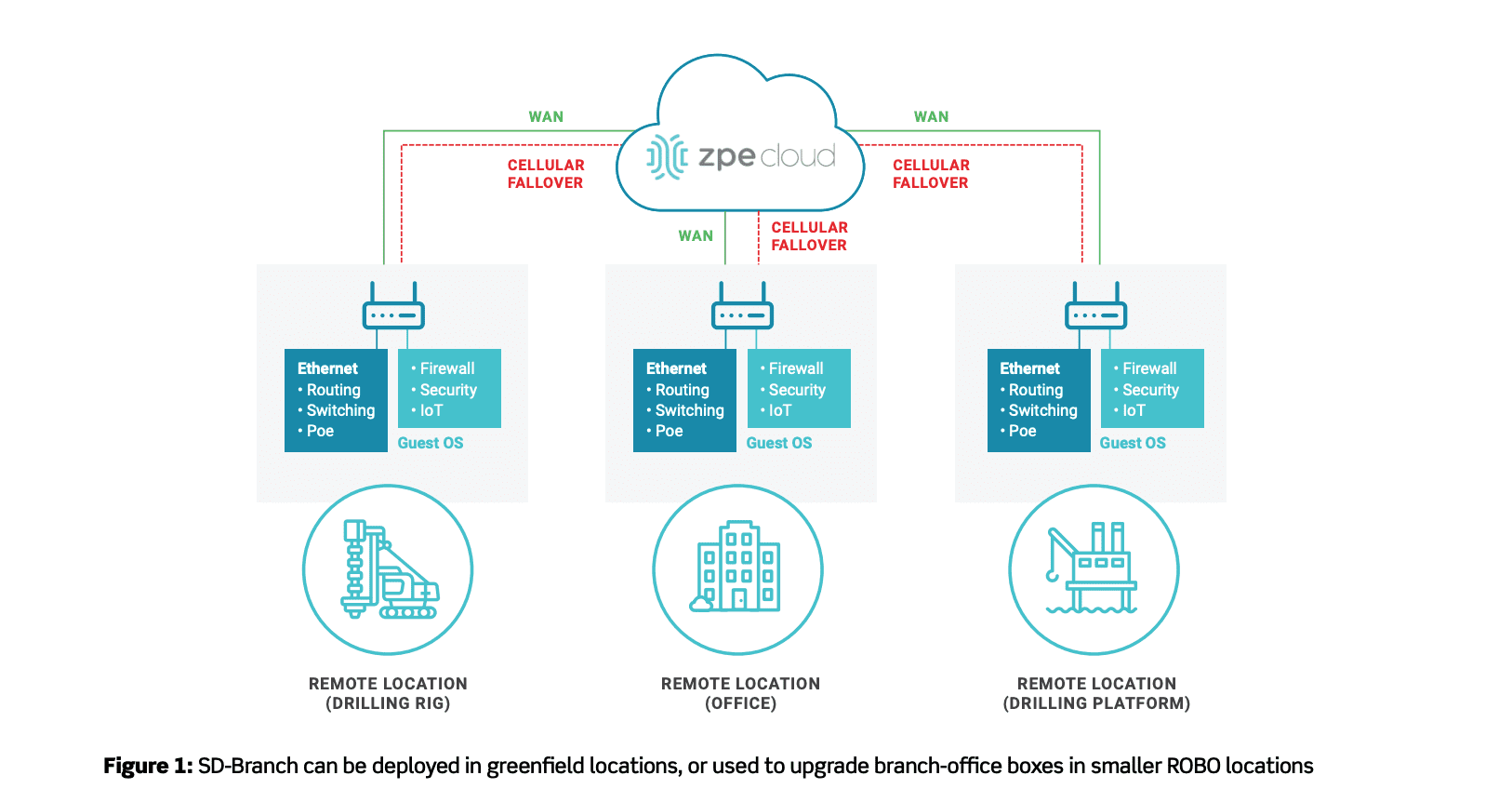
  • You can make easy work of every deployment thanks to cloud-based provisioning. If you need to set up a new branch network, even at a very isolated location such as an offshore drilling platform, the cloud gives you push-button simplicity. You don’t have to preconfigure devices or put staff on-site to manually provision the stack. You can ship boxes that are 100% unconfigured, which gives you complete security, and then simply boot your devices. The cloud does everything for you using zero touch provisioning, so you can sit back and watch your network build itself.
  • You don’t have to put IT staff on-site in order to troubleshoot network issues, fix configuration errors, and restore uptime. You can take advantage of remote out-of-band management and cloud-based provisioning. These allow you to fulfill all of your network administration duties from afar. When a router goes offline or a software version needs to be rolled back, you can respond quickly and remediate the problem — even from thousands of miles away. These technologies work together so you can maintain branch networks without breaking a sweat.
  • You can optimize your branch networks by taking advantage of software-defined branch (SD-Branch) capabilities. Traditionally, SD-WAN gives you control of only what goes to and from your branch networks. But with SD-Branch, you can see and control WANs and LANs, with comprehensive capabilities that let you access what goes on inside each location. SD-Branch lets you manage at a granular level. Not only can you adjust traffic priorities and specific device settings, but you can also manage all the clients connected to your network. This means that you don’t need to dispatch support teams for troubleshooting or management, so you can save time & money on operations.
  • You can deliver pick-up-and-go networking by using Secure Access Service Edge. SASE is a new model that combines networking and security in the cloud, and delivers them to users wherever they need secure network access. It’s also identity driven to provide even more flexibility. For remote and on-the-go workers, you no longer need to allocate resources to configure company laptops or other devices. Because SASE ties network access to a user’s identity, you can let them connect from anywhere using any device. With SASE, business can continue seamlessly no matter what change you need to adapt to.

Why download our free guide?

For details about how you can improve your edge networking abilities, get our free Gorilla Guide to Deploying, Maintaining, and Maximizing Branch & Edge Networking. It shows you:

  • Why you need cloud provisioning — Discover how a cloud-based approach to provisioning gives you valuable benefits, such as hardened security and effortless deployments.
  • How the cloud makes out-of-band better — See how to easily maintain branch locations with the cloud on your side, from remote troubleshooting to configuration management.
  • Best practices for optimizing branch networks — Learn how to deploy and optimize your distributed networks, and take advantage of in-depth SD-Branch for total network control.
  • Why you need to get SASE — Explore Secure Access Service Edge and how it transforms the edge with nimble networking & security, for business that goes wherever your employees go.

It’s never been more critical to give your edge networking capabilities a boost. Now’s your chance to improve business agility with a free download, the Gorilla Guide to Deploying, Maintaining, and Maximizing Branch & Edge Networking.
4 Critical Things to Know About Zero Trust Security

Zero trust security is not a new concept, however it has gained popularity in recent years. As companies become increasingly distributed, they must offer network access that’s flexible, without putting sensitive data at risk. This is where zero trust security comes in.

In this post, we’ll cover 4 critical things you should know about zero trust security, such as what it is, why companies use it, how it works, and more.

What is Zero Trust Security?

Zero trust security can be boiled down to a simple concept: always verify every user and device trying to access the network.

Traditional networking safeguards are based on the castle-and-moat architecture. This means that all users and devices within the network are deemed trustworthy and can access the resources they need. Those outside of the network (or moat) must be verified and trusted before gaining access to the network. One of the glaring problems with this approach is that it doesn’t consider the possibility of attacks coming from a trusted user/device within the network. This means that an attacker simply needs to hack into the network, and then there are few (if any) obstacles remaining in their way.

Zero trust reimagines security with the concept that organizations should not automatically trust anyone/anything trying to connect to their network. Instead, they should verify everyone and everything that tries to connect, including users/devices outside and inside of its perimeter. In other words, trust no one.

Where Did Zero Trust Security Come From?

The zero trust concept was first prototyped in the early 2000s. In 2010, John Kindervag coined the term ‘zero trust’ for the concept, and its adoption by Google a few years later increased the industry’s interest in the zero trust model.

This new security architecture came from the realization that the traditional castle-and-moat configuration was becoming increasingly vulnerable. Years ago, a typical organization’s data and sensitive information were kept in a central location. This made the network and its resources easy to protect, and also easy for IT staff to monitor for threats and address attacks.

Now, organizations are adopting technologies that offer greater networking capabilities for distributed access. These technologies include public and private clouds, third-party services, virtualized SD-WAN & firewall solutions, and more. Securing an entire network means putting in place multiple safeguards. The traditional architecture is now being replaced by the more robust yet nimble security setup of zero trust.

Why Are Companies Using Zero Trust Security?

One of the canonical goals of networking is to allow information to flow between computers, people, and organizations. Yet with information becoming more and more decentralized and relayed through various channels, risk is on the rise. And because traditional security architectures simply can’t provide omnipresent protection for data and communications, zero trust security is being adopted by organizations across the globe.

A major benefit of zero trust is that it provides hardened security, regardless of how distributed the network is. Whether a company serves a single contained network, or hundreds of branch locations distributed around the world, zero trust security offers peace of mind for every interaction. This means more thorough protection from outside and inside threats, because verification is needed — always.

This complements Secure Access Service Edge and SD-Perimeter implementations (more on those below), which companies use to offer more flexible networking and define least-privilege access rights. Used in conjunction with these configurations, zero trust security also eliminates the need for companies to backhaul traffic through their main security controls. This translates to fewer slowdowns and more availability, so companies can meet their business goals without their networks holding them back.

Real-world examples include scaling, working from home, and even securing data at HQ.

  • Setting up new locations comes with its own set of security risks. However, companies using a zero trust model can get granular control of who & what can access their network. This can help eliminate attacks from stolen equipment, devices, and credentials.
  • When setting up a Secure Access Service Edge (SASE) implementation, whether for faraway locations or remote & on-the-go workers, zero trust keeps networks & resources secure. It requires user identities and devices to be verified, eliminating many methods of attack.
  • When defining access rights using an SD-Perimeter approach, zero trust enables companies to make sure that access to resources is given only to appropriate personnel. This ensures data stays secure from malicious intent by actors outside or inside of the organization.
  • How Does Zero Trust Security Work?

    Zero trust security assumes that threats can come from anywhere, including from inside the organization. The big takeaway, however, is that zero trust is not a single new tool or technology. Instead, it uses a combination of existing tech and methodologies such as micro-segmentation, multi-factor authentication, and least-privilege access.

    A zero trust model works by segmenting parts of the network into small sections, each with their own security controls. In order to gain access to a segment, a user must verify their identity using multi-factor authentication (MFA). Once a user is verified, least-privilege access means they can use only the resources they need to perform their job. This is essentially a perimeter around what the user is allowed to access.

    Here’s a basic example: One segment contains SD-WAN and firewall controls. If Ryan is an admin responsible for SD-WAN management, and Priya is an admin responsible for firewall management, the company must define these perimeters respectively. Then, Ryan can be verified and granted access only to the SD-WAN tools, while Priya can be verified and granted access only to the firewall tools. If either user tries to gain access outside of their perimeter, they will be denied by their company’s zero trust security measures.

    Though it’s not a quick fix or turnkey solution, zero trust is transforming the ways organizations secure their networks. What’s more, the market is expanding with new solutions that offer increased granular control over access, using technologies like IP tracking, geo-fencing, and others. And using an open platform like Nodegrid, the possibilities are endless for organizations wishing to evolve their security and block threats from across the globe.

    Check out ZPE Systems’ full list of security partners that can help you achieve a zero trust model.

    6 IT Solutions to Implement Right Now for More Effective Remote Work

    ZPE Systems Blog Photo- Header

    Many companies have found it difficult to adjust to remote work. In the face of drastic changes brought on by pandemics, natural disasters, and other challenges, untethering your workforce from the office can be a big ask. Your success relies on one crucial component: your network.

    Keeping your enterprise connected – both internally and to customers – is the only way to maintain business continuity and customer satisfaction. Unfortunately, traditional networking solutions were built for the office. Not only does this slow down your transition to working remotely, but also makes everyday operations anything but efficient.

    The good news is, our experts have pinpointed six IT solutions that will make your company more effective at remote work, using a network that accommodates distributed business better than ever.

    ZPE Systems Blog Photo- Body Image

    1. Give Network Staff Convenient Access With Advanced Out-of-Band

    Out-of-band (OOB) management is not a new technology. But taking advantage of this tool has traditionally proven cumbersome and inefficient.

    It’s not uncommon for businesses to treat their OOB network as an afterthought, something they might use once in a while when an update or fix is needed. Phone lines, modems, and dedicated OOB devices make management a chore, even for tasks like resetting passwords, rebooting devices, and other routine work.

    Remote access via DSL or dial-up is too slow, which takes time, puts your security at risk, and forces you to juggle delicate admin protocols. Putting staff on site is another option, but also eats up time and binds specialized IT personnel to specific locations.

    Fortunately, you can take advantage of advanced out-of-band, which lets you perform network management tasks from anywhere.

    An advanced out-of-band solution gives you a secure management path that’s completely separate from all other networks. Not only do you stay protected from unwanted traffic and attacks, but you can also get blazing fast access to your management network via broadband connection.

    This means that for issues large and small, you can slash response times and put your best people on the job – even if they’re across the globe. And if your main connection suffers an outage, you can remote-in to your out-of-band network via cellular failover backup.

    Advanced out-of-band makes network management convenient and efficient.

    2. Protect Business From Costly Downtime Thanks to Cellular Failover

    If one of your critical locations suddenly goes offline, your business could lose up to thousands of dollars per hour. Restoring your main connection can take hours or days, while your employee and customer interactions come to a standstill. Business stops, and your reputation plummets alongside customer satisfaction.

    However, cellular failover is a simple solution that can prevent all of this, so you can leave downtime in the past. When your main connection drops, your failover-equipped network automatically switches to 3G, 4G, or even 5G cellular to give employees and customers a seamless experience.

    Capable cellular solutions give you freedom of choice, allowing you to determine which wireless carriers you use, as well as letting you take advantage of multiple backups. It’s like an insurance policy for your connectivity, with most cellular providers sporting over 99% reliability.

    When you need to deploy a new location, cellular failover can even help you bring critical systems online – before your main connection is established. It’s a wireless solution that lets you scale on demand and helps you increase your business’ agility.

    3. Keep Staff Connected Using Secure Access Service Edge

    Accommodating remote work usually involves a slow, stringent process. You need to purchase and configure laptops and other equipment, create users and groups, and adjust other hardware- and network-specific settings. All of this just to allow staff to work away from the office.

    ZPE Systems - SASE Image

    On top of this, all traffic likely gets routed through your main enterprise firewall. This degrades performance and speed for every user, and can bring business operations to a grinding halt.

    But Secure Access Service Edge, or SASE, is a transformative technology that does away with the traditional hassles of setting up for remote work, and instead puts networking and security into the cloud. This allows safe connectivity to be delivered close to users no matter where they are. And because SASE uses an identity-driven model, your employees don’t have to rely on special hardware. They can access your network using their smartphone, tablet, desktop, or other device.

    SASE gives your employees flexible network access, and also frees your main enterprise connection for more business-critical traffic. You can deploy your SASE solution and get a network that keeps your staff connected.

    4. Fully Optimize Using a Vendor-Neutral System

    Typical networking solutions cause vendor lock-in. This is when you’re limited to choosing specific hardware and software products that are compatible only with each other. Vendor lock-in forces you to make sacrifices during implementation, so you end up with a solution that doesn’t entirely satisfy your requirements.

    But with a vendor-neutral management platform, you can boost efficiency even on your existing network.

    A vendor-neutral system means you don’t have to worry about over-buying or under-serving, and can instead connect the physical and virtual assets of your choice. You can optimize your network with SD-WAN, firewall, routing, and other solutions that perfectly suit your needs.

    Some providers even offer a unified management tool that consolidates control of your network solutions, regardless of which vendors they’re from. Your IT staff no longer need to jump from one unique UI to another, because everything can be controlled under a simple management umbrella. You can update firmware, change traffic priorities, monitor devices, and more from one clean interface.

    With a vendor-neutral system in place, you can turn your network into a powerful asset that supports your global enterprise.

    5. Streamline with virtualization

    You’re probably used to having dedicated, single-purpose devices for your network functions. Even if these deliver all the capabilities you need, you’ll inevitably find it difficult to scale and manage due to large stacks of hardware & software solutions.

    But you can significantly reduce your physical stack and your management efforts by using virtualization.

    With the right devices, you can consolidate and virtualize your network functions to streamline every part of infrastructure management.

    And the more guest operating systems you can run, the better. With virtualization, you can host custom or third-party applications, so instead of deploying separate appliances for SD-WAN, routing, failover, and firewall functions, you can use fewer devices capable of handling it all. This means smaller stacks, tighter solution integrations, and easier management of network functions.

    6. Use Automation to Take Work off Your Hands

    You spend a lot of time and money just to keep your network running. Routine tasks and configuration management are some of your biggest challenges, simply because they pull critical resources away from more urgent business needs. Moreover, you’re left vulnerable to human error that can cause interruptions and downtime.

     This is where automation comes into play, which helps by doing some (or all) of the work for you.

    For everything from routine fixes, to provisioning, to configuration updates and rollbacks, automation helps you achieve autonomous networking. Use your favorite tools like Ansible, Chef, and Python to create workflows that carry out themselves, and set up zero touch provisioning for push-button deployments. Automation is the only solution that helps you replicate and scale with consistency, so you can avoid costly errors while keeping specialized staff focused on the core of your business.

    Take advantage of automation capabilities for more efficient and productive enterprise networking.

    Remote work can be difficult to accommodate, especially when your business is distributed across the globe. But you can help your entire organization operate more effectively through networking.

    At ZPE Systems, we’re leading the remote-work initiative with comprehensive offerings for all six of these IT solutions. From advanced out-of-band, to virtualized, vendor-neutral infrastructure and management, our hardware & software help your business work better from anywhere.

    To take advantage of these solutions, get in touch today!

    Secure Access Service Edge For an Oil & Gas Provider

    Secure Access Service Edge is a new concept that’s transforming the edge network. SASE delivers more flexible and secure network access, so your business can adapt to drastic changes and accommodate a distributed workforce.

    Want to see it in action? Here’s a 90-second explainer video to help you visualize business with SASE.

    In a nutshell, SASE delivers a ton of benefits:

    • SASE combines networking and security in a cloud environment. This means you don’t have to backhaul traffic through your main enterprise firewall, which causes slowdowns and degraded performance. Instead, you can deliver safe network access directly to users, which makes it easy to connect from anywhere. At the same time, this lets your main network breathe so business can continue without interruptions or lagging network speeds.
    • SASE is identity-driven. This means network connectivity is tied to users instead of to specific devices or access points. So when changes force you to accommodate remote work or distributed staff, your IT teams don’t have to be burdened configuring countless laptops, smartphones, tablets, etc. Your workers can simply pick up and go, and connect to your network even using their own devices or public access points.
    • SASE converges network functions for secure and easy management. Accommodating a more agile edge network used to require adding purpose-built solutions to your stack. This made a nightmare out of deploying and scaling, and management became more complex because each solution came with its own UI, architecture, requirements, etc. With SASE, you can virtualize all your essential functions. This helps reduce your stack to make scaling simple, and centralizes functions so IT staff can manage your network in one place.

    Why is SASE better with Nodegrid?

    Nodegrid provides a SASE platform that’s unlike other solutions on the market. This owes to all-in-one devices and the 64-bit, Linux-based Nodegrid OS. With more speed and compute power, Nodegrid offers even more flexibility through virtualization, capable of running multiple guest operating systems (guest OS) and directly hosting your choice of applications.

    Nodegrid also supports automation and zero touch provisioning. In order to deploy new locations, just install your Nodegrid devices, and then provisioning can be executed automatically. This significantly increases security, since you can ship 100% unconfigured devices and then provision only when they’re under your control. This also saves on deployment resources, because you don’t have to send specialized IT staff to each site for time-consuming, manual setup tasks.

    How does Nodegrid deliver SASE in the real world?

    A global oil & gas provider needed to streamline their edge networking solutions.

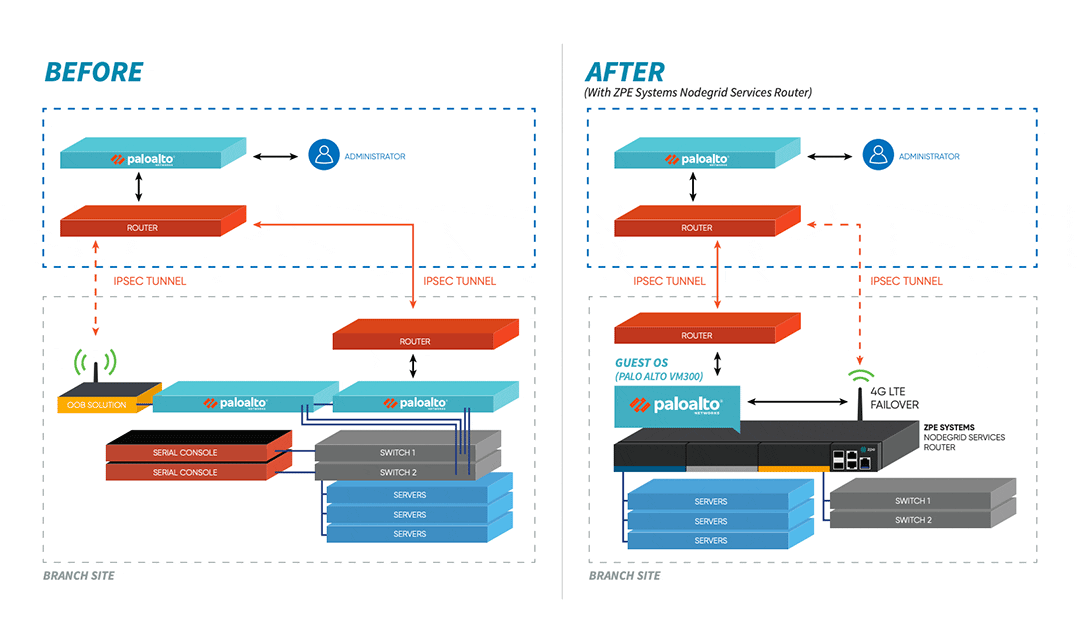
    Their hardware stack consisted of many devices that were difficult to deploy and manage. This was a major hurdle for the company, considering their remote sites were very limited by physical space constraints. Additionally, support costs continued to rise and IT staff were dispatched to fix even minor issues.

    The company needed a streamlined solution that was more space- and energy-efficient, and that could also maintain a high availability environment. Nodegrid was the only platform that could meet all their needs.

    Want to learn how the company cut their stack in half, maintained a secure & highly-available environment, and saved on support?

    Case Study: SD-Branch for a Digital Security Leader

    SD-Branch delivers some major advantages over traditional SD-WAN capabilities. Where typical software-defined approaches fall short at the branch level, SD-Branch picks up the slack to help you see and do much more.

    In case you need to catch up, here’s a 90-second video showing some ways you can benefit from using SD-Branch.

    If you’re super short on time, the advantages boil down like this:

    • SD-Branch lets you see inside your branch locations, by combining SD-WAN, routing, security, and all your network functions
    • You can see & control on a granular level, including activity for IoT devices, cameras, laptops, & all clients on your branch networks
    • You get more operational agility with a system that centralizes your infrastructure management & lets you take control remotely

    Now that you’re caught up, you might be wondering…

    How does Nodegrid make SD-Branch better?

    Nodegrid gives you SD-Branch capabilities and a lot more. All-in-one Nodegrid devices, like the Nodegrid Services Router (NSR), reduce your stack thanks to the ability to handle many network functions in a single box. Support for automation and containerization via tools like Puppet, Ansible, Docker, and Kubernetes takes your orchestration and management capabilities to an entirely new level. It gets even better with out-of-band management that you can use even during an outage (thanks to cellular failover). Nodegrid hardware and software are vendor neutral, too, which means you can adapt your network to your changing business needs.

    Sounds Pretty Awesome. But How Does it Work in the Real World?

    See What SD-Branch Brings to a Leading Digital Security Company

    Cellular-Failover-Diagram

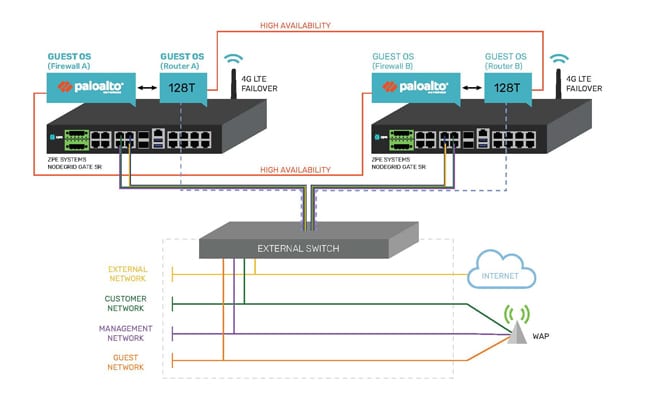
    When a digital security enterprise, whose offices span the globe, needed help with their complex network infrastructure, they chose ZPE Systems’ Nodegrid. The powerful NSR solution relieved many of their branch network headaches, and even extended additional benefits to their data center operations. Their large, cumbersome stacks were replaced by a streamlined, all-in-one solution that made management easy, provided reliable backup via cellular, and leveraged the world-class security of Palo Alto Networks’ next-gen firewalls. Ready for the details?

    Download the Case Study

    Secure Access Service Edge: What It Is, Why It Matters

    Secure Access Service Edge (SASE): It’s one of those new-ish IT acronyms that many folks have heard about, but far fewer have actually used or really even understand it. But if you have remote and branch office (ROBO) infrastructure as part of your operations, you will need to know about it—and sooner rather than later.

     As its name implies, it helps secure your network edge. But SASE provides much more than secure connectivity and remote access—it also provides add-ons to edge devices that can bring hyper converged infrastructure (HCI) capabilities to branch offices. 

    Edge computing lifts the lid on local computing capabilities, and can support local data acquisition, filtering, and clean-up before sending data into the cloud or data center location for further aggregation and analysis. This is particularly useful for locations where large volumes of data may be collected at the edge.


    Cloud Safety

    SASE provides networking and security to ROBO locations via the cloud. SASE is identity-driven and supports all edge locations. Users can identify themselves at the edge, and establish proper credentials and access controls before they access WAN or Internet connections. This helps give users safe, reliable access to the organization’s network no matter where they might be located.

    Tech Brief 8 SASE + OOBM

    SASE also addresses important needs for more secure, flexible connectivity in the field. Traditional networking is neither designed nor built to accommodate a widely distributed staff base. Nor is it well-adapted to cope with a plethora of BYOD devices (personal computers, laptops, notebooks, tablets, and smartphones), any or all of which may be used to access corporate resources such as email, collaboration tools, tele- or video-conferencing, and so forth. Too often, this puts remote workers at a disadvantage, encumbered with slow, restricted network access with less-than-industrial strength security.

     Without SASE, organizations must backhaul traffic through their main network’s firewall. This creates a bottleneck that bogs down productivity with reduced speeds, frequent delays, and occasional interruptions of service. Remote connections may be more open to threats, owing to thinner, less comprehensive security measures.

     Simply put, legacy solutions limit networks to specific locations and devices. Until recently, adding agility or extra capability meant adding to an already complex stack of applications and devices. In stark contrast, SASE beats legacy solutions because it lets employees connect from anywhere. It also protects those employees (and your organization) through its robust security capabilities delivered via the cloud.


     Location Freedom

    Instead of forcing staff to expend extra effort to work remotely, SASE packs everything they need into the cloud. Because the cloud is accessible anywhere there’s an Internet link, workers need not remain tethered to a specific workstation or a custom-configured laptop. Instead, they can use any device to enjoy secure access to the physical and cloud resources that SASE provides.

    Whereas remote legacy solutions require a lot of setup, such as installing proper laptop software, adjusting network settings, establishing reliable VPN links, and more, SASE lets staff authenticate locally and seamlessly pick up the software, services, and configurations they need.

    SASE offers comprehensive control and flexibility through its converged software stack for everything from SD-WAN and traffic management, to firewall and security. It also eliminates any need for discrete or loosely coupled point solutions that take extra time and money to learn, buy, and maintain.

    Instead, SASE lets organizations control all networking and security functions through a single, consistent console. Also, access is no longer bound to specific locations, so IT staff can manage the entire network from wherever they happen to be—even across the globe.


    SASE Flexibility and Power

    Not all SASE solutions are created equal, so exercise care when researching vendors. ZPE Nodegrid supports a comprehensive SASE platform you can deploy to the network edge, for more flexibility and edge computing power. Nodegrid’s patented 64-bit architecture supports guest OS runtime environments. In turn, those guest OSes support virtualized applications, so organizations can deploy them directly on Nodegrid SR devices.

    Thus, organizations can craft and tailor network security solutions by deploying WAN accelerators (which have both central office and branch office components), additional firewalls, anti-malware and content filtering solutions, and more. In addition, Nodegrid’s modularity means that organizations can customize solutions for specific branch or remote office requirements with very little added effort and expense.


    Nodegrid: Your Ready-to-Run SASE Platform

    ZPE Nodegrid allows organizations to take advantage of flexible, secure ROBO connectivity and capability. Organizations can add applications and services to properly equipped Nodegrid SR devices in the branch to support IoT, data acquisition and analysis, local services and applications, enhanced security, and more.

    Nodegrid’s built-in automation also helps to streamline deployment and scaling. This makes SASE easy to set up and use across an entire organization, including HQ, data center, and ROBO locations. With its 4G/LTE failover (5G solutions are on the way) and OOBM, organizations gain in-depth control over SD-WAN, security, and third-party applications and services. Nodegrid offers complete flexibility to your organization’s network. Learn more in our latest tech brief: Branch Out-of-Band Management is Deployed. Now what?


    Download the Tech Brief