Providing Out-of-Band Connectivity to Mission-Critical IT Resources

SASE vs Security Service Edge: What’s the difference?

Employee tapping into cloud services such as security service edge

Security Service Edge. Is it just another fancy networking term? After all, we’ve already got SASE (Secure Access Service Edge), so why throw another buzzword into the mix?

The truth is, there’s a big difference between Security Service Edge (SSE) and SASE. SSE is a foundational element of SASE, but there’s another necessary component you need to be aware of. In this article, we’ll break down the differences between these two acronyms so you can understand how to achieve better security for your distributed users and devices.

But first, let’s quickly recap why networking and security have become decentralized.

Security Service Edge: An evolving need

The modern workforce is increasingly distributed. In fact, Gartner research shows that demand for remote work will increase 30% by 2030, as Gen Z fully enters the workforce. Another factor is the ongoing coronavirus pandemic, which has forced companies worldwide to accommodate off-site staff.

But the need for distributed networking goes back much earlier than the previous 18 months.

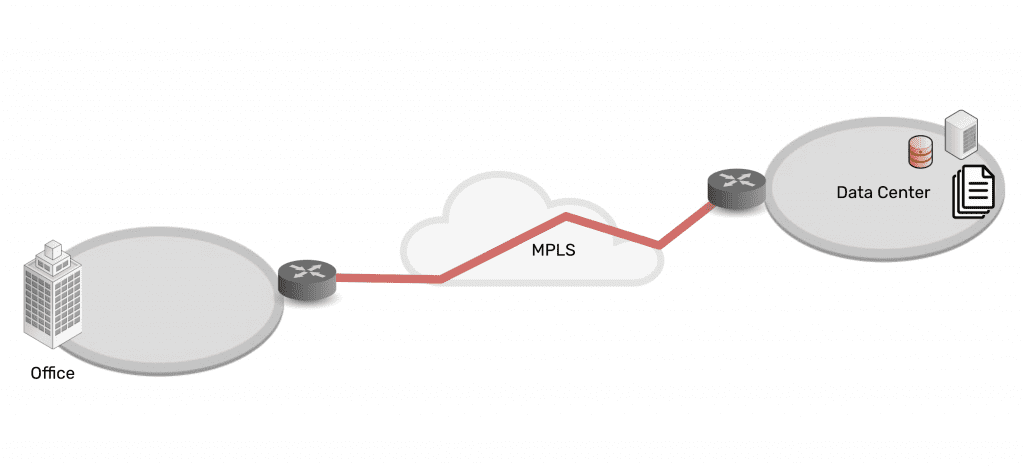
Connectivity and network architectures used to be simple. In the 1990s and 2000s, companies centralized data in the data center, connected branch offices to the data center, and set up simple security measures in between. Most staff worked from the office, which made it easy to provide secure access to and from these enterprise locations and resources.

Network architecture showing simplicity of data center connected via MPLS to branch office

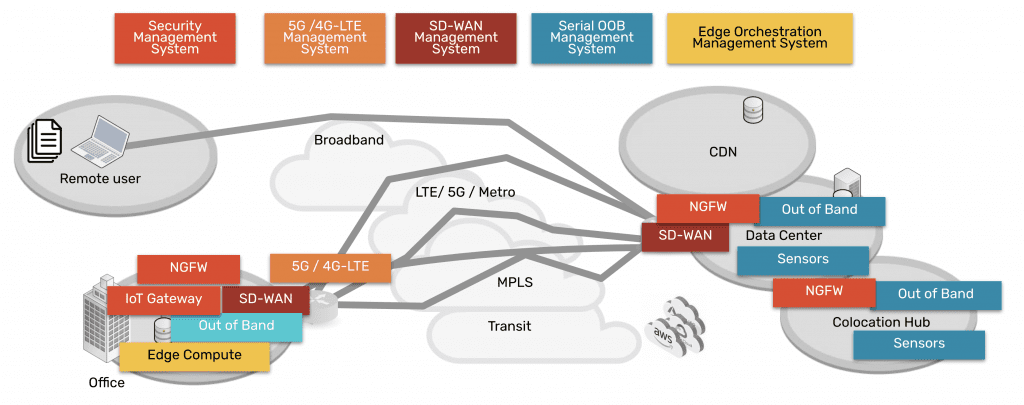
As technologies advanced, companies and their employees discovered that it was becoming easier to work outside of the office. Cloud, SaaS, and edge offerings emerged to create a hybrid infrastructure, as everything moved from being centralized to highly distributed. Now data, security, networking, and computing are everywhere and comprise a complex web of services — owned by enterprises themselves as well as third parties. Securing it all has been an impossible feat for more than a decade.

Network architecture showing complexity of data center, CDN, remote user, branch office, all connected via many paths

Fortunately, Security Service Edge and SASE are models that can address this challenge.

SASE vs Security Service Edge (SSE)

Security Service Edge is a main component of SASE. In the simplest terms, SASE is the architecture that organizations strive to build. It involves delivering networking and security via the cloud, directly to the end user, device, office, etc. instead of having to backhaul through the company’s data center. Aside from SSE, the other main component of SASE is the access portion, which allows the edge services to be deployed and managed. This access portion includes the physical hardware required to connect ‘network’ the edges and services.

Therefore, SASE breaks down into two main components:

  • Security Service Edge, and
  • Access

Keep reading for a detailed explanation of each and why they have been separated out into two pieces now.

Security Service Edge

Security Service Edge (SSE) is the security component of SASE. As Gartner states, SSE ensures secure access to the web, cloud services, and applications. SSE is delivered via the cloud and offers several capabilities, including threat protection, security monitoring, and data security.

Security Service Edge capabilities are available from companies who provide NGFWs (next generation firewalls), SWGs (secure web gateways), and CASBs (cloud access security brokers).

  • NGFWs: Next generation firewalls are implemented to not only secure networking components and services, but also to protect against modern threats that exploit weaknesses in applications.  This type of service secures all the traffic even traffic that’s UDP and also non web based applications including malware exploits.
  • SWGs: Secure web gateways are self explanatory. They are placed between the user and the web, serving as a gateway that provides secure access to the web. Basic functions of SWGs include blocking access to certain websites, preventing unauthorized transfers of data, and inspecting for malicious content.  As its name implies this type of service is limited to web traffic and is used in specific use cases.
  • CASBs: Cloud access security brokers are software that sit between cloud users and cloud applications, to monitor activity and enforce security policies. This software keeps a close eye on data as it moves between cloud environments, SaaS, and users, and enforces security policies to block malware, protect sensitive data, and maintain compliance.  This type of service also has a specific use case of only examining specific cloud applications as its name suggests.

Access for Security Service Edge

In order to use the capabilities of Security Service Edge, you need the physical hardware to deploy services at your locations. This hardware is the access component, and includes SD-WAN capabilities. When deployed, it connects your location to a variety of services (NGFWs, SWGs, CASBs mentioned above) in order to make those services available to your location.

SASE = Security Service Edge + Access

A simple way to think about the SASE concept and its components is to imagine a skyscraper.

Imagine SSE capabilities live in the clouds, and you’d like to bring them down to your enterprise. You’ve got the blueprints to build a skyscraper (SASE) that can connect you to these cloud-based capabilities. But before you can do any of that, you need a sturdy foundation (the access portion) on which to build it all. In other words, your investment in cloud services needs a solid access onramp to those services.

With the right access component, your employees can shuffle in and out of your skyscraper, and easily perform their job functions using SSE capabilities in the cloud. And if you deploy a more robust access solution such as ZPE Systems’ Nodegrid, you’ll be able to maintain your SASE architecture no matter how the clouds change.

How to implement SASE: Focus on Access

When you’re considering implementing SASE architecture, you might be inclined to go to a SASE company to buy everything. But Gartner states that companies that offer the two segments have more mature offerings. 

Therefore, you should focus on purchasing the right solution for the access portion, since it serves as the foundation of your infrastructure at the edge, and then marry this to the right SSE solution for your company. This separation of vendors gives you flexibility to manage several IT systems, and eliminates vendor tie in.

Nodegrid puts the Access in SASE

The Nodegrid SR family of edge routers serves as the access portion in your SASE architecture. A single Nodegrid SR device is a powerful, cost-effective solution to connecting sites to Security Service Edge providers.

The onboard Intel CPU and Linux-based Nodegrid OS offer speed and flexibility. Orchestrate freely across vendors to activate service licenses, spin up VMs, and get your SSE solutions up and running automatically. Additional RAM and storage also help you deploy edge computing for data thinning, de-duplication, monitoring, and other edge workloads.

On top of this, Nodegrid gives you out-of-band management capabilities so you can remotely manage your SASE architecture from anywhere. If you need to optimize bandwidth, investigate data logs for security, or simply power cycle an edge device, you don’t have to get out of your pajamas. Nodegrid gives you secure access to everything via your web browser.

To summarize, the reason SSE has been separated from SASE is that many SD-WAN vendors began to confuse the market by advertising that they offered SASE. This prompted Gartner to point out that there are security-savvy companies that give you more mature security solutions, and to consider such solutions from vendors like zScaler, Netskope, and Acreto, for example. Regarding the Access component, vendors like ZPE Systems provide more capable and robust solutions for connectivity to cloud services, when compared to SD-WAN companies that claim to offer SASE.

Don’t miss out on valuable SSE content. Make sure to sign up for our newsletter using the form below.

If you have questions or would like to speak with an expert, feel free to contact us.


7 Reasons Why We Put Intel CPUs in the Nodegrid Serial Console

Intel® CPUs power many of the computers we use today. These include everything from personal desktops and laptops, to high performance computing clusters that aggregate power to solve major global issues. So when choosing a suitable processor to build into our Nodegrid Serial Console, Intel was the obvious choice. In this post, we’ll go over 7 reasons why we put Intel CPUs in the NSC.

But before we get into the details, let’s review some basics.

Besides Intel CPUs, What Else is Available?

There are mainly two types of CPUs, or processors, available today: x86 (such as Intel’s offerings) and ARM. Though they serve a variety of purposes and can have some overlapping applications, x86 processors are typically deployed when speed & power are main concerns. Meanwhile, ARM processors are used in implementations geared toward minimizing power consumption and maximizing battery life.

The way these types of processors work is based on their underlying instruction set. x86 CPUs take advantage of the Complex Instruction Set Computer (CISC), which is able to process complex instructions that are crammed into a single line. ARM-based CPUs, on the other hand, use the Reduced Instruction Set Computer (RISC), which processes simple instructions over a span of multiple lines.

As for the advantages, x86 processors are able to perform more tasks rapidly, while ARM processors are able to consume less power and maximize energy efficiency. The main drawbacks include more power consumption for the x86 CPU, and slower speeds for the ARM CPU.

This is why purpose-built appliances, such as modems & routers, typically employ an ARM-based processor, while highly demanding devices such as desktops & servers use an x86 CPU.

In a nutshell, this is why we chose the multi-core Intel CPU for the Nodegrid Serial Console. But here’s a more detailed breakdown of the reasons for our choice.

Performance is Key

The Nodegrid Serial Console is designed to maximize speed and capabilities. Using x86 Intel CPUs, we created the world’s fastest 1U serial console that doesn’t compromise on performance. This processor allows for more simultaneous operations, more users, and more input/output than ARM-based CPUs. In terms of real-world benefits, this blazing fast processor means quicker CPU cycles that help customers complete more tasks, reduce MTTR, and increase their ROI.

Commonality Helps Users and Developers

Many existing servers use x86-based CPUs. Naturally, we wanted Nodegrid to integrate seamlessly for both users and developers. The Intel-based processor promises a common platform that these users are already accustomed to. They don’t have to worry about application incompatibilities or slowdowns, nor do they have to spend time learning new systems. The x86 CPU provides a management and maintenance experience that users are familiar with, so they can maintain OS & application availability.

Customization Through a Common Dev Environment

Our Intel-based devices are a perfect platform to deploy custom solutions. The x86 CPU allows developers to benefit from a variety of readily-downloadable SDKs and environments. The Nodegrid Serial Console’s SDK comes with Yocto, which means customers always have the latest updates, packages, and DIY customization capabilities. No more waiting for third-party fixes or workarounds, because customers can create solutions that meet their unique requirements.

Docker

Because the x86 platform is capable of robust performance, Nodegrid allows users to leverage Docker containers and deploy virtualized solutions. With regards to Docker, the Nodegrid Serial Console is optimizable right out of the box so customers can get the most functionality out of a single device.

Availability of Security

When it comes to open networking, the Intel CPU is the industry standard, which means customers get security patches as soon as they’re available. They don’t have to be left vulnerable waiting for third-party kernel patches from other chip makers. With an x86-based device, customers remain safe with up-to-date security, and in some cases can even apply patches before official updates are available.

Peripheral Support Via Multiple Interfaces

Part of designing a more powerful serial console was having the ability to support a variety of peripherals. The Nodegrid Serial Console features USB 3.0 and USB 2.0 ports, allowing customers to connect an array of add-on devices. They’re no longer limited by a single-purpose appliance that comes with minimal additional ports. With the NSC, customers can extend the box’s functionality by adding cellular, Wi-Fi, storage, and other peripherals.

Greater Storage

With power and speed at the core of the Nodegrid Serial Console, we needed to incorporate enough drive space. We built the NSC with 32GB of storage, along with 4GB of RAM. Not only can it store plenty of data, but it also has a healthy amount of memory to accommodate running more apps and functions. And if 32GB isn’t enough, customers can connect external drives via USB for even more local storage capacity.

This list is made up of 7 compelling reasons why we chose x86 Intel CPUs for our devices. However, there’s an 8th reason that we love to share…

Cost Savings That We Pass to Customers

By choosing the readily-available x86 CPU, we pass powerful processing along with cost savings to customers every day. Because we think having the world’s best serial console shouldn’t be prohibitively expensive.

ZPE Systems is an Intel Network Builders Winners’ Circle Partner

Intel

Driving digital innovations and network transformation are visions we closely share with Intel. That’s why ZPE Systems has been recognized as a Winners’ Circle Member and Solution Plus Partner. Together, we offer go-to-market solutions that cultivate customer success and enrich our partner ecosystem with innovative networking technologies.

We partner with Intel to transform networking. See how we do the same with our other partners by visiting our Strategic Alliances page.

Easily Migrate from One Console Server Maker and VM Vendor to Many Vendors

Easily Migrate from One Console Server Maker and VM Vendor to Many Vendors

Background/Problem

A few years back, this company standardized on a particular vendor’s console servers. On top of this, they developed their own management tools based on scriptable CLI to the devices. However, they no longer want to be locked in to one specific console vendor’s server hardware. Also, they need to provide seamless access to the virtual serial port (vSPC) of thousands of VMware VMs and KVM VMs from the same solution, so they can run their scripts on the VMs without having to re-write them.

The Solution – Nodegrid Manager

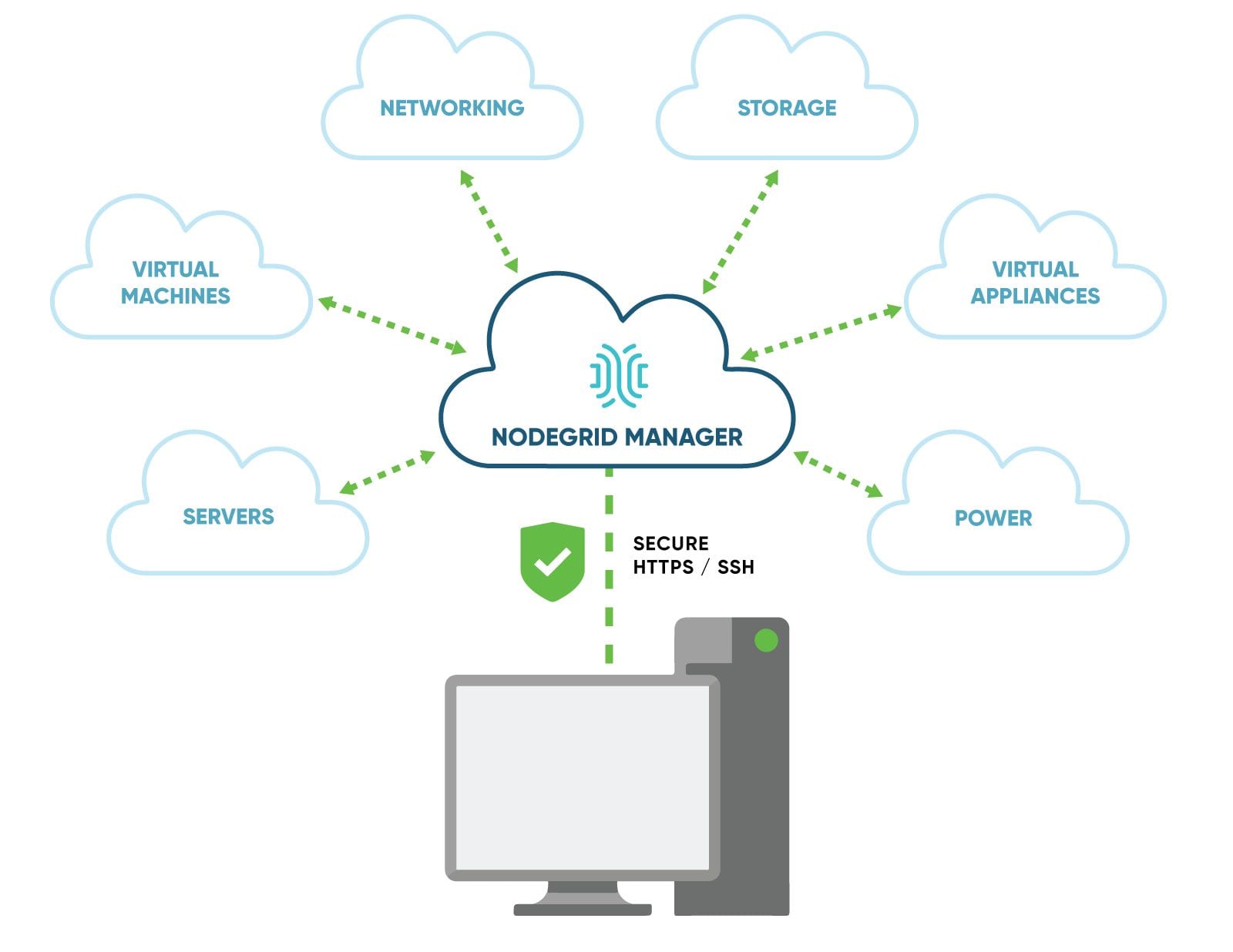
Deploy NodeGrid Manager to bridge legacy and next-generation hardware, as well as abstract heterogeneous constellations of multi-vendor consoles. One of NodeGrid’s key strengths is that it doesn’t care which console server vendor is in use. Whether you’re using one or all of these brands (Cyclades/Avocent/Emerson, Raritan/Legrand, DIGI, OpenGear, Lantronix, Uplogix, Perle, Tripp Lite, WTI, etc), NodeGrid easily and seamlessly provides an agnostic approach to Access and Control across the enterprise. Hardware- and Hypervisor-agnostic NodeGrid manages multiple console server makers’ hardware. But that’s not all that NodeGrid does for you.

NodeGrid also provides remote out-of-band infrastructure (OOBI) management of multi-vendor servers, network switches and routers, storage gear, PDUs, UPSs, and virtual KVM or VMware VMs — all from one control surface.

Additionally, with the same interface and set of commands, NodeGrid provides secure remote control and migration tracking of VMware VMs and Linux KVM VMs. You choose how to access your IT assets:

  • Web browser via HTTPS/HTTP for accessing physical and virtual devices using a direct MKS graphical interface or native Service Processor portal.
  • Command line (CLI) to NodeGrid and the Console of your physical and virtual devices via SSH1/SSH2/Telnet
  • DeviceURL™ direct bookmarks for MKS, CLI, web GUI, or FireTrail™ secure tunnel-through-firewall IT asset access methods
  • NodeIQ™ natural language search for all IT assets regardless of vendor, model or location
  • NodeGrid manages up to 1,000 managed devices (physical and virtual) per instance. NodeGrid ensures efficient and fast delivery of services to these devices by way of live connections. These live connections also provide an active conduit of data collection to notify sysadmins immediately of customizable alarm conditions on a 24 x 7 basis.

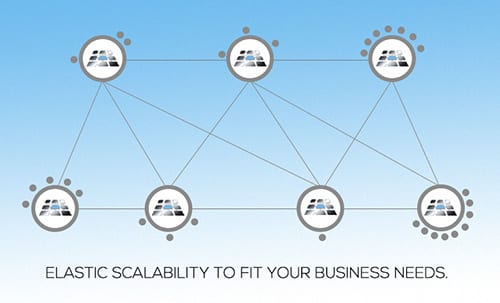
Multiple NodeGrid instances easily manage many thousands of IT devices regardless of where they physically or virtually reside.NodeGrid provides scalable software-defined access and control of your IT Infrastructure in true cloud cluster configuration.

Key FireTrail Tunnel Features

Secured tunnel via SSH TCP port forwarding
Keeps your Firewall whole. There’s no need to punch holes in your Firewall to give per-user access to various devices and ports.
Controlled user visibility of Authorized Devices behind Firewalls based on AD/LDAP enterprise authorization.
Dynamic user/device association. Users receive controlled access per managed device and per TCP port.

elast1

Next Step: Schedule a Demo and See What NodeGrid Can Do For You

We are perfectly positioned to meet anything manufacturers can throw at us. We pioneered IT infrastructure access and control back in the day and we’re pioneering IT infrastructure access and control for today and the future. Check us out. You’ll be glad you did.

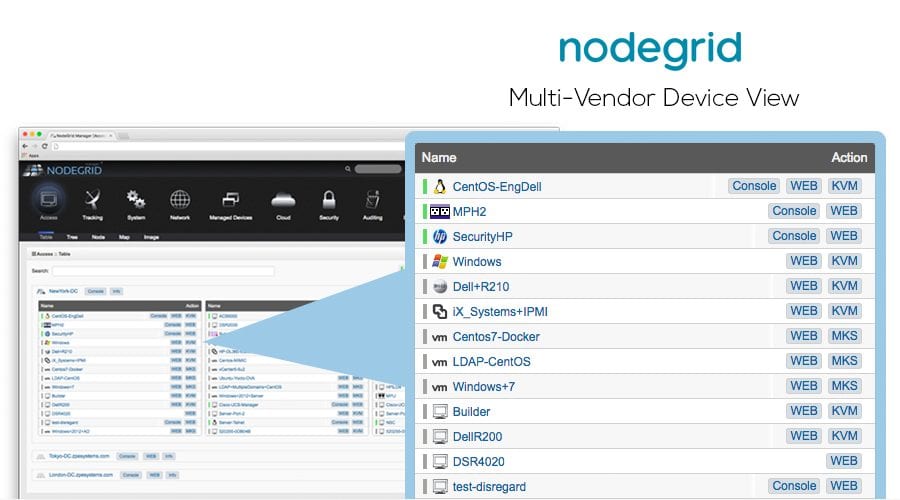
Nodegrid Manager® – Multi-Vendor Viewer

Background/Problem

A Global customer had to deal with various vendor solutions implemented throughout their infrastructure – The customer wanted a single point of management to provide access and control over their devices.

With an environment built up of various manufacturers offerings, vendor lock-in is inevitable. What works to manage one device doesn’t manage same device types of different vendors – i.e PDU’s from Company A and Company B.

Another common pain point in the data center is the use of older Java based KVM management solutions that cause version match issues based on browser, applet, etc…

The Solution – Nodegrid Manager

ZPE Systems’ Nodegrid Manager® allows management of various devices, regardless of manufacturer all under a single software platform – That’s why Nodegrid Manager is Software Defined Infrastructure.

Gone are the days of having to use vendor specific viewers/apps to manage singular devices. Every manufacture has a best-fit solution for your infrastructure – Why can’t it all work together? With Nodegrid Manager, you no longer have to ask that question – Nodegrid Manager was made to be THE management solution for In-Band and Out-of-Band physical and virtual Infrastructure.

Nodegrid
Nodegrid Manager® Infrastructure Management software provides secure, vendor-neutral, out-of-band access and control of physical and virtual IT infrastructures. Make use of our comprehensive solution to control and manage all data center devices from one unified interface.

Existing Environment

  • Java security settings were causing issues, not allowing the customer to run the KVM applet
  • Browser refuses to connect with unsecure certificate
  • Management solution bound to single vendor appliances
  • Authentication limited by single method, server or domain
  • Monolithic solution doesn’t allow segmentation by organization and location
  • Scalability compromised by all nodes storing all data

Nodegrid Manager

  • Nodegrid Manager uses HTML5 connections to communicate with target devices, eliminating the need for Java
  • Browser-in-a-container handles untrusted connections
  • Seamless integration with multi-vendors KVM, PDU, Console Servers
  • Multiple authentication methods with fallback capability
  • Distributed nodes interconnected through SSL
  • Each node stores only its own data
  • Data is indexed and shared among other nodes
NGMDiagram2

How Nodegrid Manager Works

  • Multiple Authentication methods with fallback options
  • Ability to discover and access KVM target devices from multiple vendors
  • KVM sessions via HTML5 (no Java required)
  • Support to Servertech, APC, Emerson, Legrand and others smart PDUs
  • Power merged to managed devices
  • Support to IPMI (Power and vKVM access)
  • DeviceURL direct access
  • Discovery of existing VMs and IPMIs out of the box
  • Device access, control, monitoring and logging via CLI and WEB
  • Device search and 360° device view
  • Data logging, event notification and alarms

Next Step: Schedule a Demo and See What Nodegrid Can Do For You

We are perfectly positioned to meet anything manufacturers can throw at us. We pioneered IT infrastructure access and control back in the day and we’re pioneering IT infrastructure access and control for today and the future. Check us out. You’ll be glad you did.

How One Unified Platform Gives You More Control Over Branch Networking,

Branch networking comes with its own set of challenges that can get in the way of normal operations. As a network engineer, you’re tasked with preventing business disruptions while simultaneously scaling, troubleshooting, and managing network connections. This can be a daunting challenge that may lead to slow deployments, inevitable downtime, and unoptimized connectivity.

The good news is, Nodegrid was built from the ground up to address these major concerns with branch networking. Read on to see how our branch-in-a-box solution helps you scale, troubleshoot, and manage with one innovative system.


Make Branch Networking Easy to Secure and Scale

Consider the common challenges of scaling and adding branch locations to your enterprise network. You’re typically left to ship preconfigured devices to each site, which not only adds more time and cost, but more risk as well. What if these preconfigured devices get lost or end up in the wrong hands? Because they contain user accounts, passwords, and other sensitive information, having these devices get lost or stolen puts your network at greater risk of attack.

Once your devices successfully reach their destination, the real work begins. You need to manually set up all appliances at the location, which involves logging into each individually and making appropriate configurations. This takes even more of your time and money, and leaves you open to potential setbacks that can occur due to human error. What if your compliance documentation contains a mistake, or your IT personnel unknowingly repeat an error while deploying 10, 20, or even 50 new sites?

Nodegrid was made to address these concerns of security and scalability. Nodegrid appliances consolidate network functions, sport Linux OS for third-party application hosting, and feature ZPE Cloud connectivity.

When adding a new branch location, you don’t need to ship anything preconfigured. Ship bare-metal Nodegrid devices, which eliminates the threat of having your data lost or stolen, and simply plug them in. Zero touch provisioning means all configuration data can be automatically downloaded from ZPE Cloud, only when your devices are safely at their destination. This capability is even extended to devices that you connect to Nodegrid appliances.

Suddenly, backdoor security threats are no longer an issue, and neither is costly human error, since all your branch locations can be deployed consistently via the cloud.


Pinpoint Problems for Better Troubleshooting

Face it — troubleshooting issues could be a much more intuitive undertaking. But it’s difficult, mostly because of the sheer number of devices you deploy at each location. When something goes wrong, you probably refer to your spreadsheet that shows specific device information for each branch. From there, you might run through troubleshooting protocols to narrow the list of potentially problematic devices and what the issue might be, and then you can finally work toward a solution.

Nodegrid does away with all the hassle, because it uses consolidated devices and Nodegrid Manager software that pinpoints problems for you.

Nodegrid devices are powerful, featuring x86 64-bit architecture that accommodates third-party application hosting for cyber security, SD-WAN, firewalls, and more. For switching, routing, and computing, you need only a single Nodegrid device. This reduces potential points of failure so you can solve issues easier. On top of this, Nodegrid Manager is software that gives you a complete view of all your network-connected devices. It features alerts and notifications that let you know of problems before they occur. Together, Nodegrid’s hardware and software make it simple to pinpoint issues and prevent downtime.

Manage Using one Intuitive Platform

With many devices at each branch location, it’s likely that your hardware stack includes multiple vendors. This is part of achieving a right-fit solution for your enterprise, which can serve you well when looking at the bigger business picture.

But when you get down to the details of managing branch networking, this mishmash of vendors can be a nightmare. Each device has its own OS and interface, which can exhaust your staff. You need to spend time and money training them to become proficient with each. Still, even your best experts can become quickly fatigued when they’re forced to transition from device to device, interface to interface, protocol to protocol, and so on.

One of the best parts about Nodegrid is that it answers the question, “What if it could all be done using one tool?” That tool is Nodegrid Manager.

Nodegrid Manager shows you every device connected to your Nodegrid appliances, and features Guest OS that gives you total out-of-band control regardless of vendor. With one intuitive interface, you can control your entire infrastructure, get deeper visibility and insight into your network, and even extend features to bridge gaps between devices. It can all be done remotely as well, so you can manage and optimize your branch networking no matter where you are.

If you want a first hand look at all these benefits and more, schedule your Nodegrid demo today!


Free Yourself from Vendor Lock-in!

Back in the early and mid-2000’s the race was on to implement an out-of-band infrastructure (OOBI) to provide access and control to all your IT assets in the data center via a separate management network. Isolating device management to a separate management network was, and still is a great practice. Having the ability to remotely connect to a device in the data center via an isolated network, allows users to perform various tasks such as Reboot, Power off, Power on, run a specific script, provision, test, etc. of specific devices, without impacting the production network processing. Another benefit (among many) is being able to connect to a failed production network device and bring it back in service via remote access and management. Reduces recovery time. Minutes can mean millions when it comes to a production IT outage. The faster you can respond, the less it costs.

Currently, and some 10 years ago, implementing an OOBI required various hardware appliances to be installed in your network to provide access to the device. Serial Console Servers, KVM/IP Switches, Intelligent and Controllable Rack PDU’s, etc… which you need to purchase and install in your data center. 1000’s of dollars were, and still are being spent on the purchase and implementation of these appliances. Why? Because that’s how you do it. Buy more management appliances and add them to your existing infrastructure as you grow. In an attempt to keep up with new technologies like Service Processors (IPMI, ILO, Drac, CIMC, etc) and the explosion of Virtualization, the manufactures have addressed this by creating another appliance for you to buy, add to your rack and network, just to facilitate the access and control to the Service processors and Virtual Machines. These solutions also require periodic updates or upgrades to the vendor specific management software, which was developed (for what was available at the time) over 10 years ago, and based on the use of appliances (sell you more hardware). Not what’s available now.


Today, Virtualization and Service processors are aggressively being adopted in data centers. This greatly reduces the need for expensive, rack cluttering, and heat generating KVM/IP Switches, and perhaps, in some cases, reduced the need for expensive rack PDU’s. Quite a cost savings. But still not enough. Most all OOBI management solutions require additional hardware appliances in order to consolidate and provide access to the Service Processor or Virtual Machine infrastructure. Again, this method of implementing an OOBI came about 10 years ago and required hardware components (KVM/IP, Serial Console, Intelligent Rack PDU’s, Service Processor, and virtual Machine consolidators) in order for it work. And let’s not forget the vendor specific management tools that are useless without the presence of vendor specific appliances and don’t integrate with equivalent competitor products. For example, Console Servers from different vendors. As a result, you, the users are locked in to a specific vendor technology and method of OOBI management. To frame this differently, suppose your company purchases a company which standardized on an OOBI from vendor A. You’re standardized on vendor B. How do you handle this? Maintain both solutions until you can replace one with the other. Buy more hardware from your preferred OOBI manufacturer to replace the hardware from the other manufacturer. Either way, it’s costly and locking you into a specific vendor OOBI technology and method.

So, what can you do? Continue to expand your OOBI infrastructure from a specific vendor with outdated methods and solutions, OR, you could implement a vendor neutral OOBI software-only management solution that provides the same, if not better, secure access and control to devices from both Vendor A and B without having to add additional hardware appliances. Now you can have OOB connectivity and management of your Physical and Virtual infrastructures as it grows, and expands via whatever vendor/s products you decide to use. In fact, you could use a combination of Vendor A, B, C, and D’s OOB appliances to rebuild a best of breed OOBI. Let Freedom Ring. No more OOBI vendor lock-in.

From the team that gave us the Linux Break Safe Console Server, Managed Rack PDU’s, and put IPMI in Service processors, comes the world’s first Software-Only, Vendor Neutral Access and Control solution for the management of both Physical and Virtual (VMware and Kernel Virtualization) IT device Infrastructures, regardless of manufacturer. “NodeGrid Manager” is the first software-only solution for Access and Control that doesn’t require any additional hardware components to provide access and control to your existing OOBI, regardless of manufacturer. NodeGrid Manager’s agnostic approach to device management allows you to take advantage of your existing hardware OOBI without regard for manufacturer, or the addition of expensive KVM/IP, or service processor and virtual machine consolidator hardware appliances. As a byproduct, NodeGrid Manager frees you from vendor lock-in. NodeGrid provides the same user experience regardless of device and manufacturer via a common UI and standardized feature and command stack across the entire infrastructure. User experience is the same for Server, Storage, Network, Power, and Virtual Machine (VMware and Kernel Virtualization) infrastructure regardless of manufacturer.

If it hasn’t already happened, there will come a time when your existing OOBI starts letting you down. When that happens, turn to ZPE Systems NodeGrid Manager for relief. NodeGrid Manager Delivers a true vendor-neutral experience in OOBI management. Oh, and did we mention you don’t have to add expensive vendor specific proprietary appliances to manage your physical and virtual IT infrastructure.


Free your OOBI now from vendor lock-in. Stay ahead of technology changes and growth with NodeGrid Manager. The world’s first, Software-Only, Vendor-Neutral Access and Control Solution for both Physical and Virtual IT Infrastructures, that simply and easily works, and scales to meet your needs.

See for yourself.

The fastest way to learn more – Email us at sales@zpesystems.com (or call +1 510 298 3022) to schedule a chat or request a demo.