Providing Out-of-Band Connectivity to Mission-Critical IT Resources

Serial Console PDU Management Guide
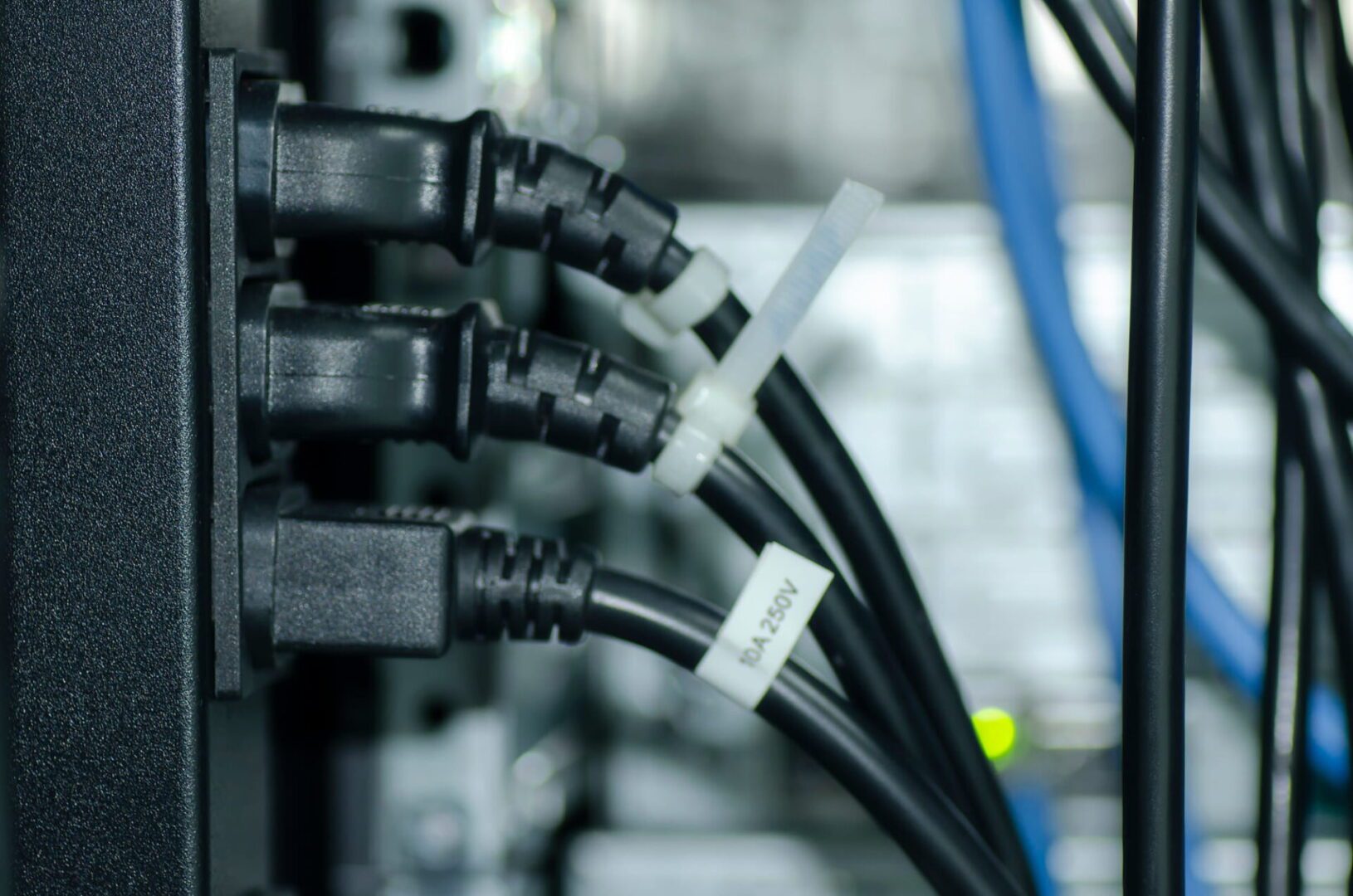
A close-up photo of power cables in a data center rack.

PDUs (power distribution units) control and optimize how power flows to infrastructure devices like servers, routers, firewalls, and switches. PDUs are difficult to manage remotely, for a couple of reasons. First, many aren’t network-connected, so configuring and updating new devices or fixing problems typically requires tedious, on-site work. Those that do have network connectivity tend to lack automation capabilities and integrations with other tools, so they have to be manually and individually managed.  In modern enterprise environments with complex, distributed networks, managing hundreds of individual power devices one at a time is extremely challenging.

A serial console solves this problem by physically connecting to multiple PDUs and using a dedicated network interface to enable remote PDU management. A next-gen solution like Nodegrid also provides a centralized management platform that teams can use to remotely administer all of the PDUs and other infrastructure devices deployed across the entire distributed network. Plus, Nodegrid has an open architecture that supports third-party power software and automation to streamline infrastructure management and boost operational efficiency.

This guide to serial console PDU management explains everything you need to know to get started with remote power control and automated provisioning using the Nodegrid platform.

Deploying Nodegrid for remote PDU management
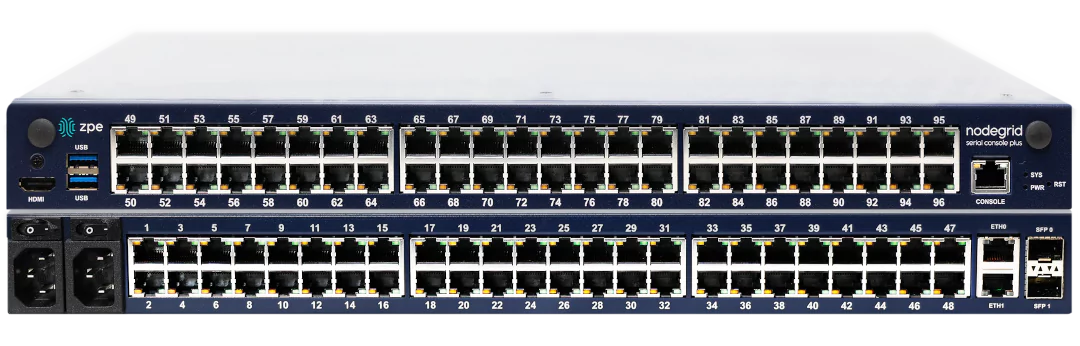
Stacked views of the front and back of the Nodegrid Serial Console Plus.

The Nodegrid family from ZPE Systems includes a range of serial consoles and branch routers that are designed for different use cases. They all provide out-of-band management, network failover, and serial console capabilities, but the number and type of interfaces and managed port configurations vary. Critically, all Nodegrid devices can automatically discover power devices from any vendor and provide secure remote access, eliminating the need to manage PDUs on-site.

Nodegrid also has an open architecture that can host or integrate other vendors’ software for PDU management, NetOps automation, SASE security, and more. It gives administrators a single, unified platform to orchestrate both automated and manual workflows for PDUs and other Nodegrid-connected infrastructure at all distributed business sites.
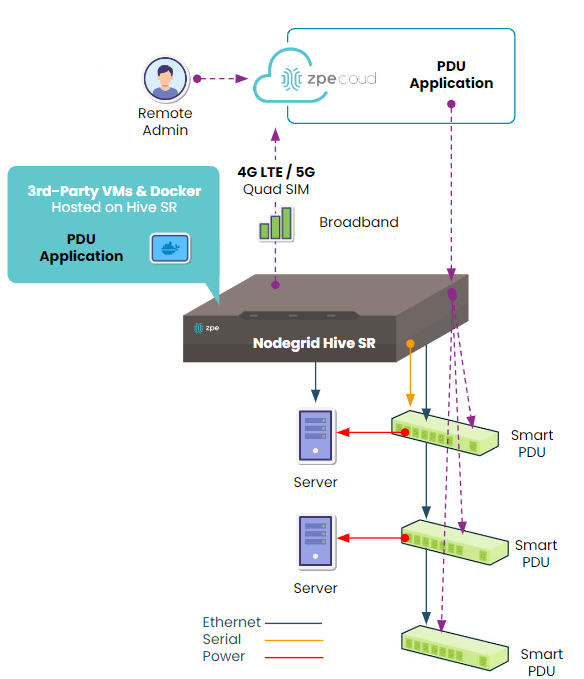
 

How to deploy the Nodegrid Hive SR for serial console PDU management.

How to deploy the Nodegrid Hive SR for serial console PDU management.

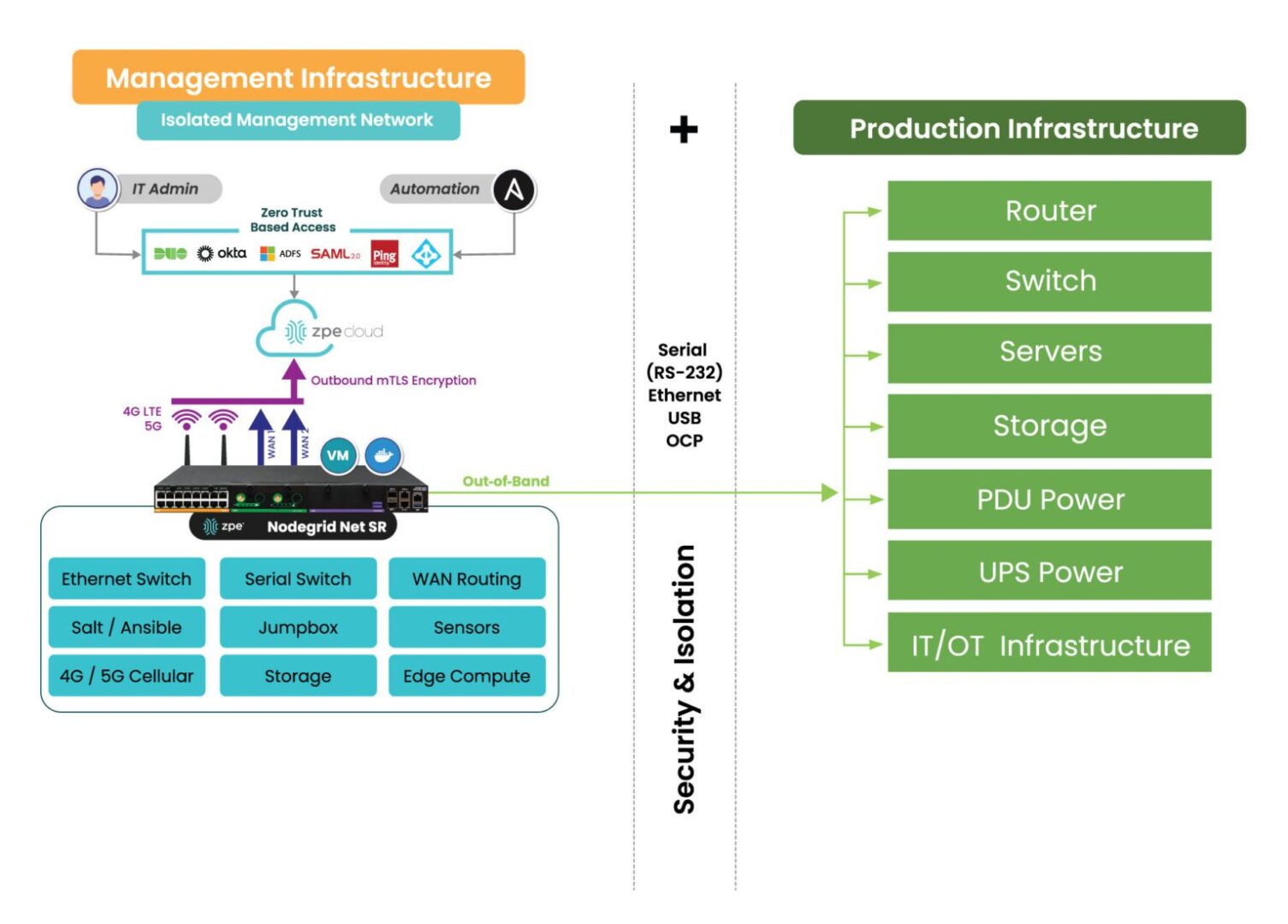
Nodegrid’s out-of-band (OOB) management solution creates an isolated management network that doesn’t rely on production resources and, as such, remains remotely accessible during major outages, ransomware infections, and other adverse events. This gives IT teams a lifeline to remotely roll back PDU firmware updates, power-cycle hung devices, and rebuild infected systems without the time and expense of on-site visits.
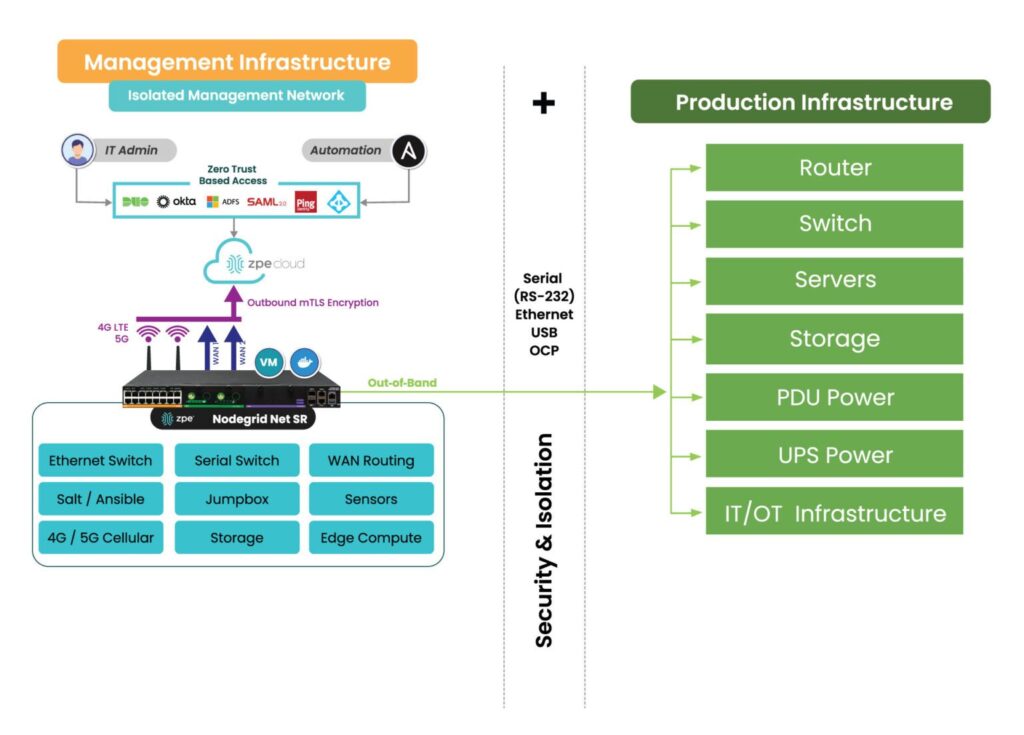
How the Nodegrid Net SR isolates and protects the management network.

How the Nodegrid Net SR isolates and protects the management network.

Accessing and managing PDUs with Nodegrid

Nodegrid serial consoles and services routers are accessible via the on-premises Nodegrid Manager software or the SaaS ZPE Cloud platform. When connected to the physical console ports on PDUs and other devices, it can provide serial console access and live status messages (such as connected, in-use, and disconnected).
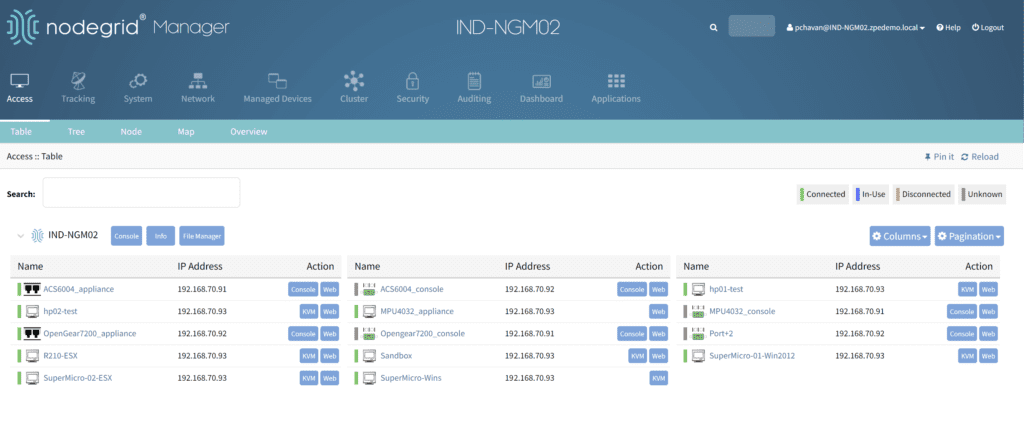
A view of all the equipment connected to a Nodegrid device.

To access and manage a PDU from Nodegrid Manager or ZPE Cloud:

1. Click on the PDU’s name from the access dashboard. The PDU device view screen will appear, as seen below.
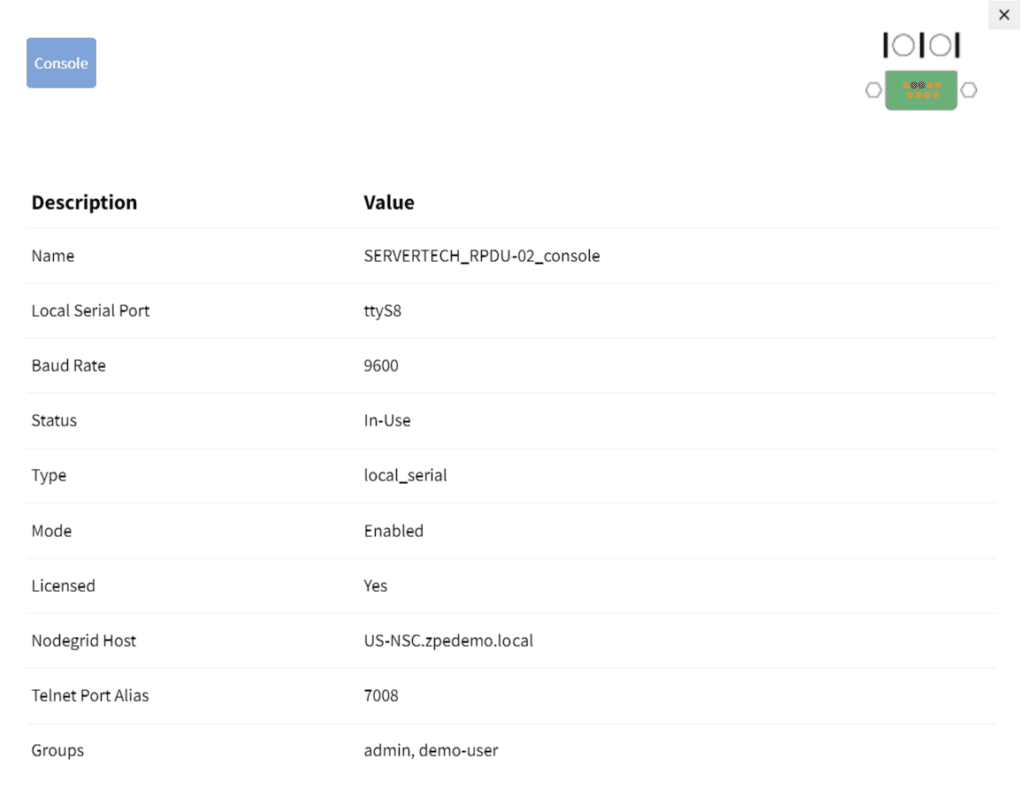
2. Click on the Console tab. A terminal session will open, providing remote console access to the PDU as if you were directly connected.
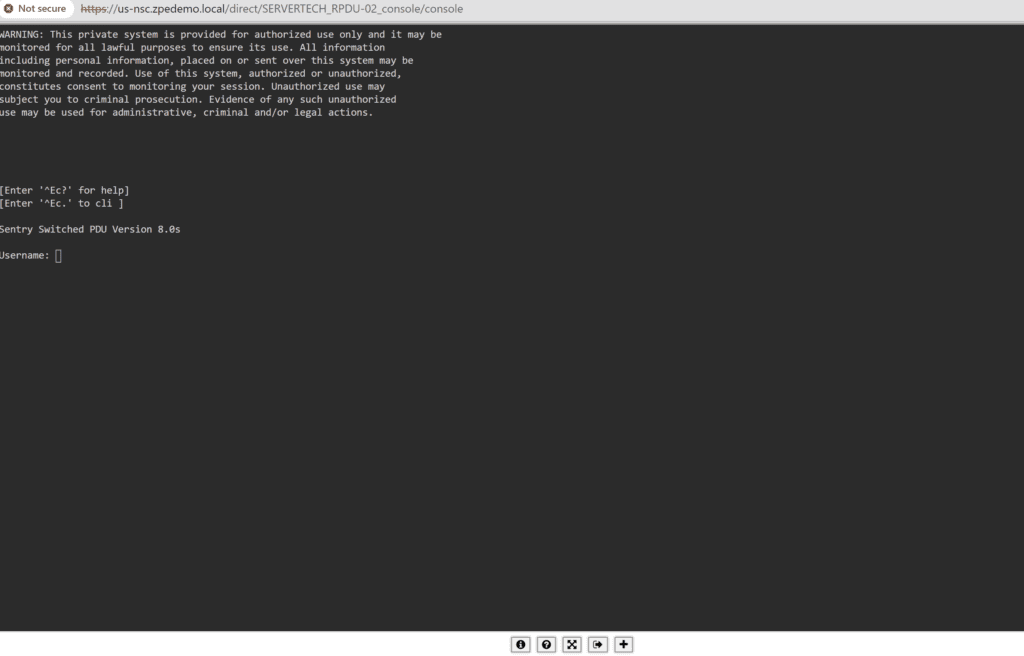
The PDU console session.

3. If your PDU is network-enabled, adding it to the Hive SR via IP address provides access to the Web UI from Nodegrid, adding a WEB tab as seen below.


4. Clicking the WEB tab will open the PDU’s web UI.
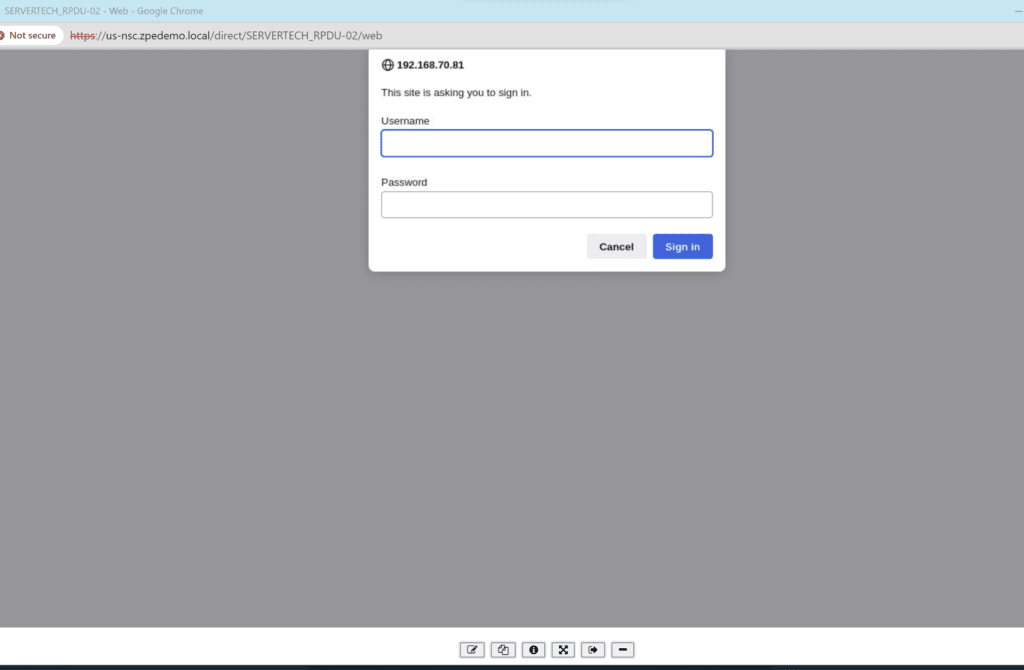
An example of a PDU web UI that will open upon clicking the WEB tab.

An example of a PDU web UI that will open upon clicking the WEB tab.

Remotely controlling power for individual outlets

Nodegrid can integrate your PDU so that each managed serial port on the Hive is mapped to a specific outlet. Doing so allows users to power individual outlets off and on from Nodegrid Manager or ZPE Cloud. It also enables a continuous console session to the managed device with BIOS-level control during the reboot cycle.

To map a PDU outlet to a managed serial port from Nodegrid Manager or ZPE Cloud:

1. Click Managed Devices from the top menu bar, and then select the Devices tab.

The Managed Devices :: Devices menu.

2. Click the Commands tab, click ADD, and then select Outlet.

3. Select the applicable PDU, tower, and outlet to map to the specified managed serial port and then click Add. A confirmation message will appear in the window below.
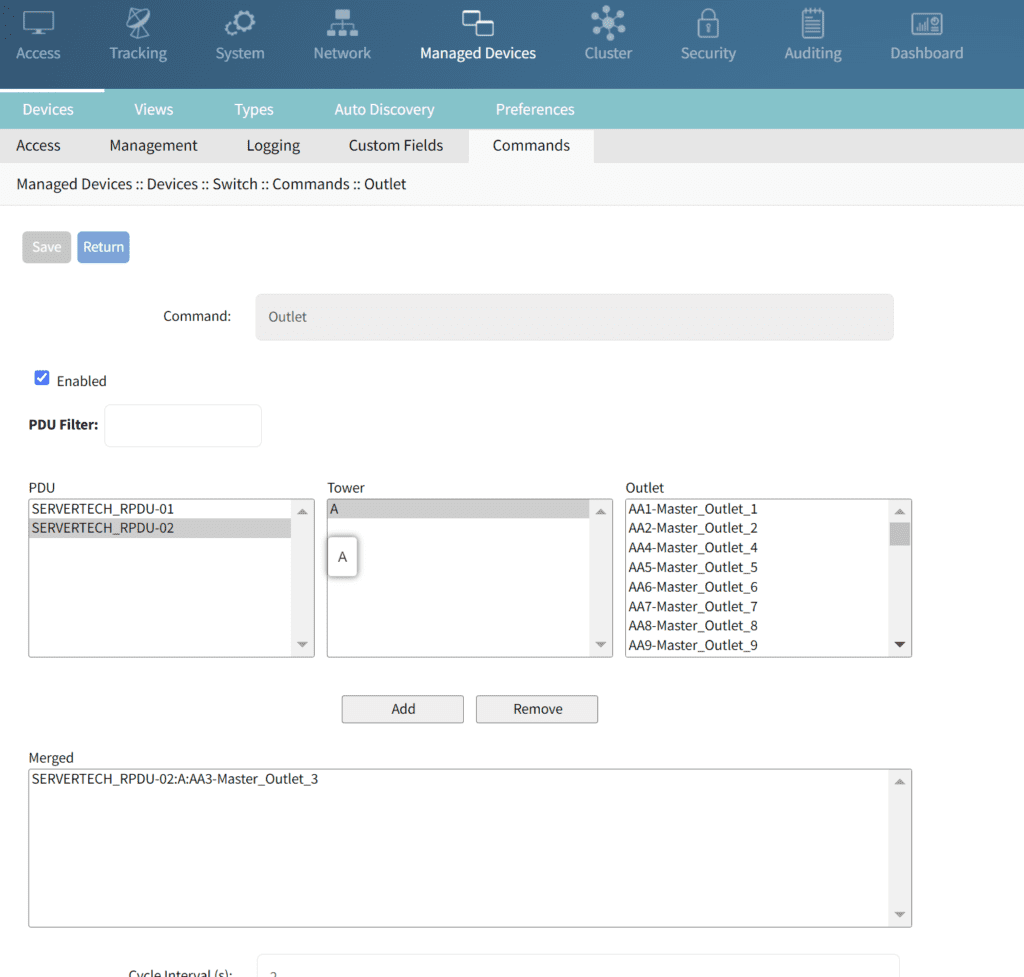
Mapping the selected serial port to Outlet 3 on PDU 2.

Mapping the selected serial port to Outlet 3 on PDU 2.

To control power for a specific serial port/managed device:

1. Click Access from the top menu bar, and then click the name of the relevant port/device

2. If the PDU has been integrated with that port, the Outlet Status display appears as shown below.
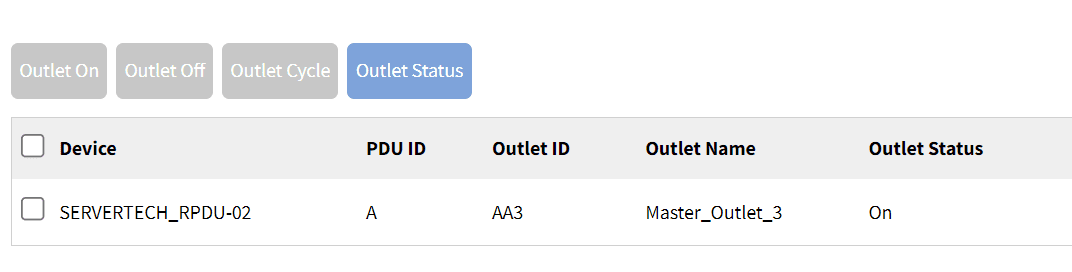
The Outlet Status for the Cisco switch configured on this port and outlet.

The Outlet Status for the Cisco switch configured on this port and outlet.

3. Depending on the outlet’s present status, certain options will be available:

  1. Clicking the Outlet On tab will enable an outlet that is powered off.
  2. Clicking the Outlet Off tab will disable an outlet that is powered off.
  3. Clicking Outlet Cycle will power-cycle the outlet, turning it off and then back on again.

Implementing automated PDU provisioning and updates

Nodegrid uses zero-touch provisioning (ZTP) to automatically configure managed devices on boot-up. If your PDU is network-connected and DHCP-enabled, like some ServerTech and Raritan PDUs, Nodegrid’s ZTP can automate configurations and firmware updates.

To implement zero-touch provisioning for PDUs:

  1. Create configuration files tailored to your specific PDU models. These files typically include:
    1. fwupdate.cfg – required for firmware upgrades
    2. config.txt – contains specific device configurations
    3. devices.csv – manages bulk configurations
  2. Upload configuration and firmware files to the Nodegrid Datastore directory, which acts as a root directory for the integrated TFTP/HTTPS server.
  3. Configure Nodegrid’s DHCP server to point to the fwupdate.cfg file on the TFTP/HTTPS server.
  4. Upon their next DHCP renewal, the PDUs will contact Nodegrid’s DHCP server, which will direct them to the fwupdate.cfg file on the TFTP/HTTPS server. The PDUs will fetch these files and perform the necessary configurations or firmware updates. Other configuration options can also be triggered based on vendor-class-identifier settings in the DHCP options.

Nodegrid ZTP includes a magic cookie, a unique identifier stored on the PDU that prevents the repeated execution of the same configuration tasks. If a mismatch between the stored cookie and the new configuration cookie is detected, the device knows to pull fresh configurations, ensuring that updates are only applied when needed.

Want to learn more?

The Nodegrid solution combines serial console PDU management with consolidated network and infrastructure management capabilities for a unified experience and improved efficiency. Download our solutions guide or contact our sales team to learn more about adding a Nodegrid solution to your management infrastructure.
End of Row vs Top of Rack Deployments

End of Row vs Top of Rack Deployments

The terms end-of-row and top-of-rack refer to two different approaches to data center architecture design. Both approaches have advantages and disadvantages that make them suited to different use cases or teams, with neither being the clear “winner” overall. This blog compares end-of-row vs. top-of-rack deployments based on crucial factors like cost, management complexity, scalability, and resilience to help organizations choose the right approach for their environment.


What is an end-of-row (EoR) deployment?

ZPE Graphic Request IR Nov 4
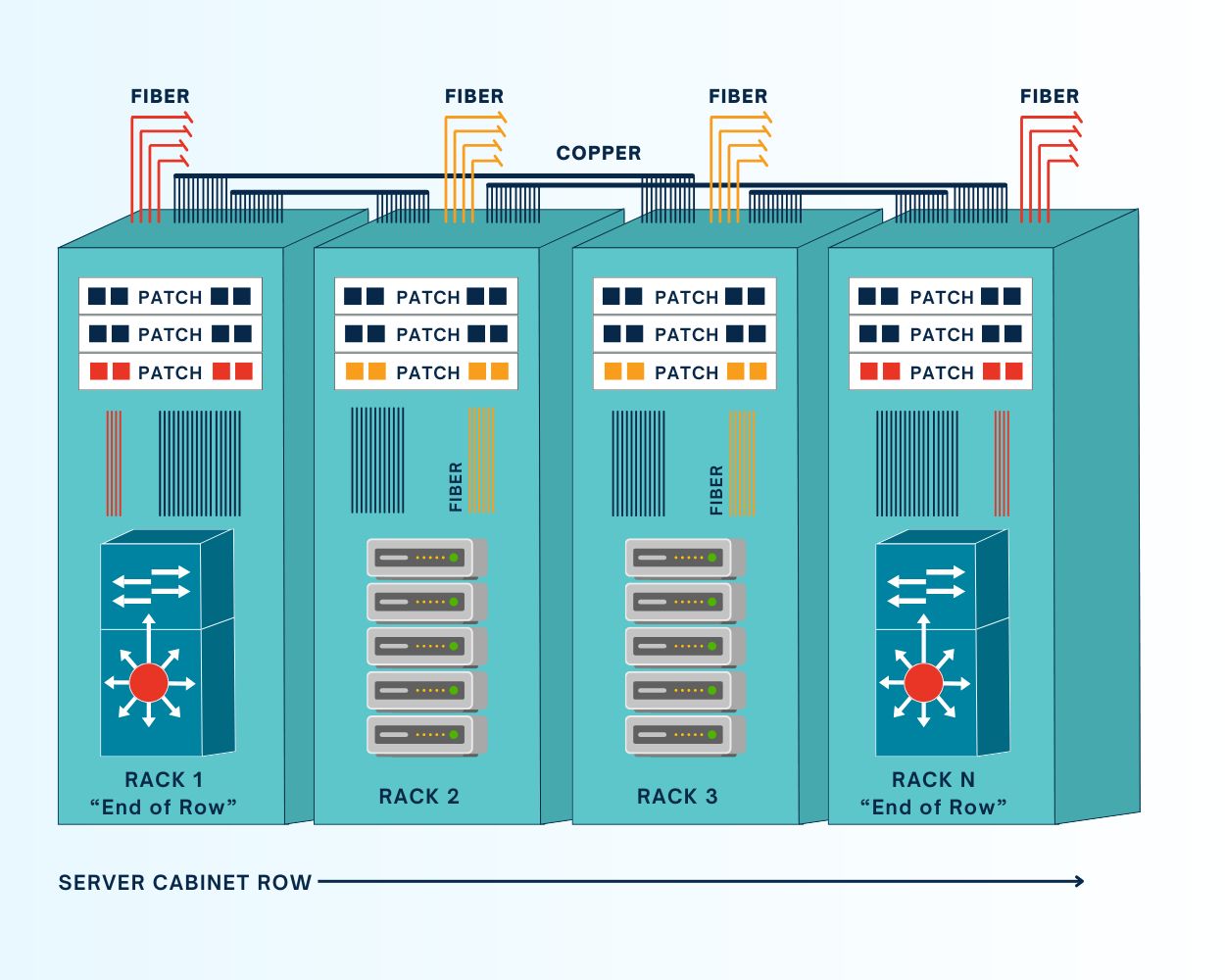
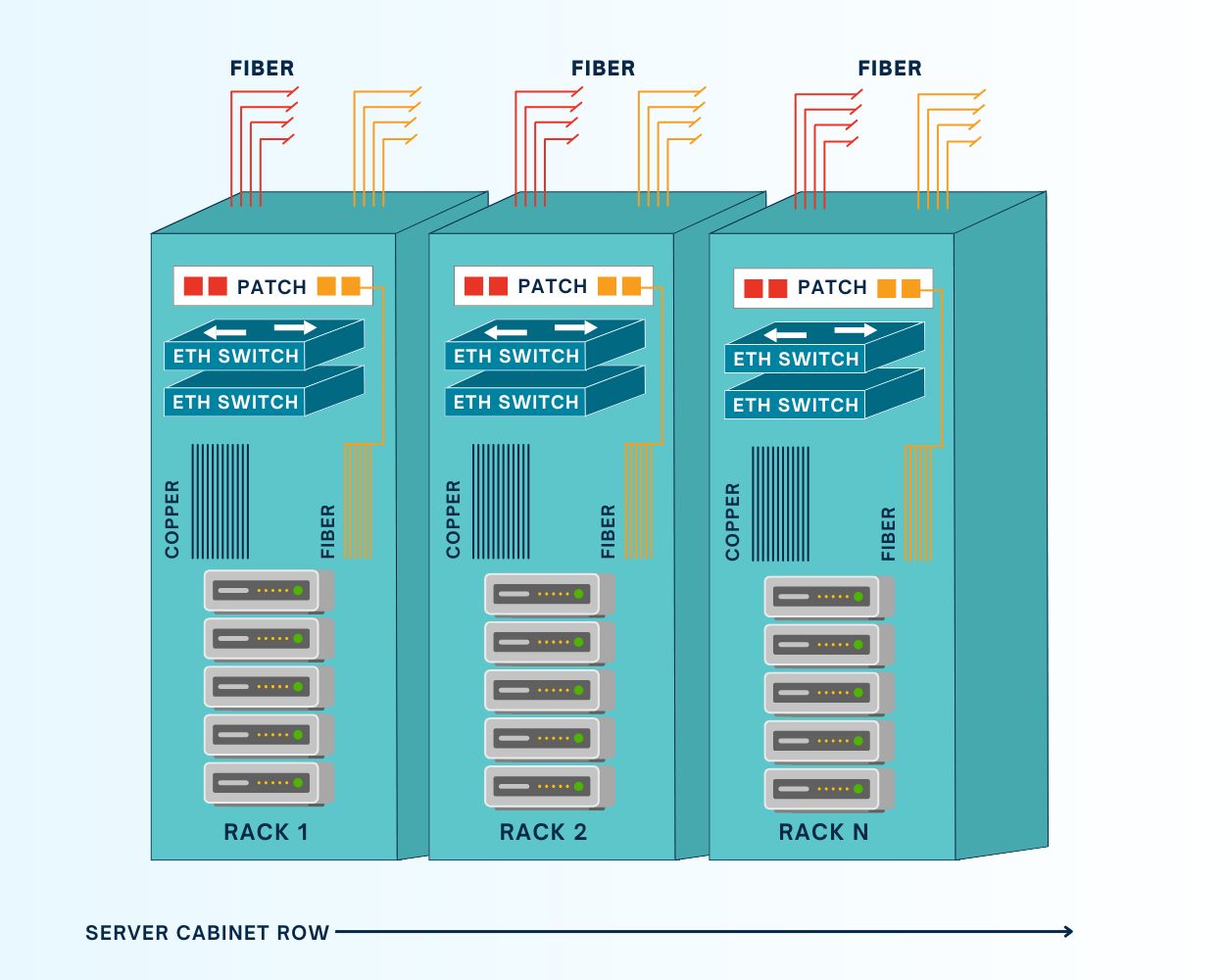
In data center deployments consisting of multiple rows of racks or cabinets, it’s common for teams to consolidate all the networking for each row in one physical location, rather than deploying switches in every single rack. All patch cables for the devices in a particular row are run to the dedicated networking cabinet, which is typically (but not always) at the end of the row. An end-of-row (or EoR) architecture requires fewer switches than a ToR deployment, which helps reduce costs and management complexity while enabling easier scaling.

One of the main drawbacks of this architecture is that the EoR switch is a single point of failure for the entire row. If that switch fails due to a botched update, ransomware attack, or other adverse event, the whole row loses network access. Running cables from each cabinet to the EoR can also get messy very quickly, especially at scale. In the long run, it’s also a less flexible architecture that forces teams to consider an entire row of infrastructure every time they want to change or upgrade networking components.


What is a top-of-rack (ToR) deployment?

ZPE Graphic Request IR Nov 4 (1)
In a top-of-rack data center architecture, DC teams install one or more switches in every rack of their deployment; despite the name, the switch doesn’t need to actually be at the very top of the rack. A ToR deployment keeps copper/Ethernet patch cables inside the rack, which helps with cable management. It also eliminates the single-point-of-failure that an EoR switch represents – if one ToR switch goes down for some reason, only the devices within that rack are affected, vs. the entire row. Another major benefit of EoR deployments is that each rack becomes a modular unit that DC teams can modify, upgrade, or scale without necessarily affecting other racks in the row.

On the other hand, a ToR deployment requires more switches than an EoR deployment, which can increase costs and complexity. More switches equate to more power draw, and they add an extra network hop to local traffic that could possibly affect throughput. Each switch must also be monitored, secured, and regularly patched, potentially creating more work for infrastructure teams. As a result, ToR deployments are also more challenging to scale, as each new rack added to the data center requires an additional ToR switch.

Comparing end-of-row vs top-of-rack deployments: Which should you choose?


End-of-Row Top-of-Rack
Number of switches One or more per row One or more per rack
Cable management Requires patch cables running along the entire row Keeps patch cables within the rack or cabinet
Cost Fewer switches and lower power draw keeps costs down More switches and higher power draw gets more expensive
Complexity Fewer switches to secure, manage, and troubleshoot More devices to manage
Ease of scaling Can deploy an entire new row with only one networking cabinet Each new rack requires one or more switches
Flexibility Inflexible; networking changes affect entire row Each rack is a modular unit that can be changed without affecting others
Resilience EoR switch is a single point of failure for the entire row One rack’s switch can go down without affecting any other racks


Both EoR and ToR architectures have advantages and disadvantages, with neither being the clear-cut winner for every possible use case.

End-of-row deployments are more cost-effective and easier to manage and scale, so they’re often favored by smaller, leaner IT teams or, on the opposite end of the spectrum, very large (or hyperscale) data centers. For example, a large cloud provider might prefer EoR to cut down on the number of switches to purchase, deploy, and manage at their hubs.

Top-of-rack deployments are modular, flexible, and resilient, which makes them a great choice for DevOps teams that need the ability to add or change components at any time without affecting the entire architecture. For example, managed service providers might prefer ToR so they can easily customize or update one customer’s rack without worrying about how the changes will impact others.

How Nodegrid improves resilience for EoR and ToR deployments

Nodegrid serial console switches can be deployed top-of-rack or end-of-row to improve the resilience of either architecture. Nodegrid switches connect to the serial port on data center devices to provide out-of-band (OOB) management, allowing teams to remotely manage and troubleshoot DC equipment even when the primary network is down. They isolate the management interfaces for data center infrastructure, making them inaccessible to malware or malicious actors on the production network. Plus, Nodegrid also provides network failover to keep business-critical services running during adverse events.

Nodegrid serial consoles have an open architecture that can integrate and host other vendors’ software and virtualized network functions. That means a single Nodegrid box could theoretically replace an entire rack of networking hardware, streamlining EoR deployments and making ToR architectures more feasible for lean, budget-strapped IT teams. Plus, Nodegrid switches and all connected devices can be remotely managed from a single, on-premises or cloud-based software platform, significantly reducing management complexity for either deployment.

Reach out to ZPE Systems for more help comparing end-of-row vs. top-of-rack deployments or to see a demo of the Nodegrid platform in action.

Zombie Servers: The Hidden Energy Drainers in Data Centers

Zombies in the data center
As enterprises adopt AI, cloud computing, and data analytics, one thing lurks in the shadows of their data centers: zombie servers. These inactive or severely underutilized servers take a big bite out of operations, drawing power and resources without contributing meaningful work. Research from the Uptime Institute indicates that as much as 30% of servers may be idle at any given time, suggesting enterprises could save millions each year by identifying and eliminating these “zombies.”

The Cost of Zombie Servers

When it comes to cost, zombie servers can devour more than their fair share. Each idle server can consume approximately 200 to 400 watts per hour, resulting in annual power costs of $400 to $600 per server. In large data centers housing thousands of servers, wasted energy expenses can easily scale into the millions. Currently, U.S. data centers account for over 4% of the nation’s total electricity consumption, a figure projected to rise to 6% by 2026 due to growing demands from AI and cloud computing applications.

How ZPE Systems’ Nodegrid Fights Zombie Servers

Out-of-band management (OOBM) solutions, like ZPE Systems’ Nodegrid, provide an effective way to monitor, manage, and optimize data center infrastructure, even when the primary network is down. When combined with ServerTech Intelligent PDUs, data center admins can remote-in to identify and address zombie servers, so they can ensure their operations run at peak efficiency.

Key Features of Nodegrid’s Out-of-Band Management for Zombie Server Management

  • 24/7 Monitoring and Real-Time Insights: Nodegrid allows IT teams to continuously monitor server performance, making it easy to detect underutilized or idle servers. Real-time metrics show server activity, power usage, and health, so teams can pinpoint servers that may need to be repurposed or removed.
  • Detailed Power Usage Data: The combined Nodegrid and ServerTech solution provides comprehensive energy usage data, so teams can see inefficiencies and where power is consumed most. This is essential for high-density data centers, where wasting even a little bit of power adds up to substantial costs. These insights help data center operators pinpoint zombie servers, reducing energy costs and freeing up space.
  • Enhanced Automation and Management Control: With automation features, Nodegrid simplifies the complex task of managing server lifecycles. For instance, automated alerts can notify teams when a server reaches a specific threshold of low utilization, enabling quicker action to reassign or shut down the server.
  • Increased Security and Resilience: Nodegrid enhances security by providing direct access to infrastructure via isolated management. Teams can access critical systems even during network failures, to ensure servers remain compliant, functional, and secure.

Benefits of Removing Zombie Servers

AI and other resource-intensive applications mean data centers need to be as efficient as possible. Zombie servers are not just an energy problem; they impact a data center’s ability to scale and meet demand for high-performance computing. Here are some benefits of removing or repurposing zombie servers:

  • Energy Efficiency: Data centers can significantly lower energy costs and reduce environmental impact by shutting down idle servers.
  • Cost Savings: Operating more efficiently by removing zombie servers can lead to substantial annual savings, freeing up resources for necessary expansions.
  • Optimized AI-Ready Infrastructure: Freeing up resources allows data centers to repurpose space and energy toward servers that can support AI and other high-density applications.

Get Help Fighting Zombie Servers

Set up a call with one of ZPE Systems’ engineers, and we’ll show you how to get zombie servers out of your data center. Click the button below to schedule your call.

Watch a Walkthrough Demo

Watch this 20-minute video where Marcel van Zwienen (Senior Sales Engineer) demonstrates the remote management capabilities of Nodegrid and ZPE Cloud.

Marcel van Zwienen gives a walkthrough of ZPE Cloud for remote device management.

More Valuable Resources for Remote Monitoring

Check out these resources to help fight zombie servers and other inefficiencies lurking in your data center:

Data Center Environmental Sensors: Everything You Need to Know

According to a recent Uptime Institute survey, severe outages can cost more than $1 million USD and lead to reputational loss as well as business and customer disruption. Humidity, air particulates, and other problems could shorten the lifetime of critical equipment or cause outages. Unfortunately, much of a business’s critical digital infrastructure and services are housed in remote data centers, making it difficult for busy IT teams to keep eyes on the environmental conditions.

Data center environmental sensors can help teams prevent downtime by monitoring conditions in remote infrastructure deployments and alerting administrators to any problems before they lead to equipment failure. This blog explains how environmental sensors work and describes the ideal environmental monitoring solution for minimizing outages.

How data center environmental sensors reduce downtime

Data center environmental sensors are deployed around the rack, cabinet, or cage to collect information about various conditions that could negatively affect equipment like routers, servers, and switches. 

Mitigating environmental risks with data center environmental sensors

Environmental Risk Description How Environmental Sensors Help
Temperature All data center equipment has an optimal operating temperature range, as well as a max temp threshold above which devices may overheat. Environmental sensors monitor ambient temperatures and trigger automated alerts when it gets too hot or too cold in the data center.
Humidity If the air in the data center gets too humid, moisture may collect on the internal components of devices and cause corrosion, shorts, or other failures. Environmental sensors monitor the relative humidity in the DC and alert administrators when there’s a danger of moisture accumulation.
Fire A fire in the data center could burn equipment, raise the ambient temperature beyond acceptable limits, or activate automatic fire suppression controls that damage devices. Environmental sensors detect the heat and smoke from fires, giving DC teams time to shut down systems before they’re damaged.
Tampering A malicious actor who’s able to get past data center security (such as an inside threat) could potentially tamper with equipment to damage or breach it. Tamper detection sensors alert remote teams when data center cabinet doors are opened or a device is physically moved.
Air Particulates Smoke, ozone, and other air particulates could potentially damage data center infrastructure by oxidizing components or clogging vents. Environmental sensors monitor air quality and automatically alert teams when particulates are detected.

These sensors report back to monitoring software that’s either deployed on-premises in the data center or hosted in the cloud. Administrators use this software to view real-time conditions or to configure automated alerts.

Environmental monitoring sensors help reduce outages by giving remote IT teams advance warning that something is wrong with conditions in the data center, enabling them to potentially fix the problem before any systems go down. However, traditional monitoring solutions suffer from a number of limitations.

  1. They need a stable internet connection to allow remote access, so if there’s an ISP outage or unknown failure, teams lose their ability to monitor the situation.
  2. Many of them use on-premises software that requires administrators to connect via VPN to monitor or manage the solution, creating security risks and management hurdles.
  3. Most environmental monitoring systems don’t easily integrate with other remote management tools, leaving administrators with a disjointed patchwork of platforms to wrestle with.

The ideal data center environmental monitoring solution

The Nodegrid data center environmental monitoring platform overcomes these challenges with a combination of out-of-band management, cloud-based software, and a vendor-agnostic architecture.

Nodegrid environmental sensors work with Nodegrid serial consoles to provide remote teams with a virtual presence in the data center. These devices create an instant out-of-band network that uses a dedicated internet connection to provide continuous remote access to all connected sensors and infrastructure. This network doesn’t rely on the primary ISP or production network resources, giving administrators a lifeline to monitor and recover remote data center devices during an outage. The addition of Nodegrid Data Lake also allows teams to collect environmental monitoring data, discover trends and insights, and create better automation to address issues.

Nodegrid’s data center environmental monitoring and infrastructure management software is available on-premises or in the cloud, allowing teams to access critical equipment and respond to alerts from anywhere in the world. Plus, all Nodegrid hardware and software is vendor-neutral, supporting seamless integrations with third-party tools for automation, security, and more.

Schedule a free Nodegrid demo to see our data center environmental sensors and vendor-neutral management platform in action!

American Water Cyberattack: Another Wake-Up Call for Critical Infrastructure

Industrial water treatment plant with water
The October 2024 cyberattack on American Water, one of the largest water and wastewater utility companies in the U.S., signals yet another wake-up call for critical infrastructure security. Because millions of people rely on this critical service for safe drinking water and sanitation, this attack highlights why it’s so important to address cyber vulnerabilities.

Let’s trace the timeline of the attack, how it likely started, and the best practice architecture that could have mitigated or prevented the American Water cyberattack.

Timeline of the October 2024 American Water Cyberattack

  • Initial Intrusion (October 5, 2024)
    The attack on American Water was first detected in early October, when cybersecurity monitoring tools flagged suspicious activity within the company’s IT systems. Employees reported an unusual system slowdown, and automated alerts indicated possible unauthorized access.
  • Rapid Escalation (October 6-7, 2024)
    Within 24 hours of detection, the attackers had moved deeper into the company’s IT environment. In response, American Water initiated emergency protocols, including isolating key systems to prevent further damage. To contain the breach, critical operational technology (OT) systems — responsible for managing water treatment and distribution — were temporarily shut down
  • Public Notification and Response (October 8, 2024)
    American Water notified federal authorities, including the Cybersecurity and Infrastructure Security Agency (CISA), state regulators, and the public. The company reassured customers that water quality had not been compromised, but certain automated operations had been affected, leading to temporary disruptions in water distribution.
  • Ongoing Recovery (October 2024 – Present)
    As the investigation continued, third-party cybersecurity firms were brought in to assess the extent of the breach and assist in recovery. Manual operations were implemented in areas where automated systems were impacted. While the threat was contained, the company faced a lengthy process of system restoration and reconfiguration.

Impact of the Attack

The impact of the American Water cyberattack appears minimal. A class-action lawsuit was recently filed seeking $5-million in damages on behalf of affected customers, but this is the typical fallout that results from a breach. American Water did not shut down any treatment plants, and although they were forced to temporarily shut down their customer portal, pause billing, and revert to some manual processes, there were no water contamination or public health risks that came out of the attack. Per American Water’s FAQ page, it seems business is nearly back to normal.

However, this shouldn’t diminish the need for utilities providers to shore-up their defenses and ensure resilience of their IT architectures. The Oldsmar, Florida incident is an example of how an error or breach can change water treatment chemistry (in this case, adding too much lye to the water supply) and poison a population. There have also been many attempts by U.S. adversaries in which attackers were able to change water chemistry or disrupt automated operations.

Government agencies like the EPA have been warning that attacks on water treatment utilities are increasing. Lawmakers are also calling for inspections of IT systems, such as to ensure best practices are being followed for managing passwords and keeping remote access from Internet exposure, and considering civil and criminal penalties for those who don’t comply.

How the Attack Likely Happened

The American Water cyberattack is still under investigation. Specifics of how it occurred haven’t been released, but several likely scenarios have emerged based on trends in similar attacks:

  • Phishing or Social Engineering:
    Employees may have unknowingly opened a malicious email attachment or clicked a harmful link, allowing attackers access to the internal network, similar to 2023’s Ragnar Locker attacks. Water utilities and other public services often have large workforces, which makes them susceptible to phishing campaigns.
  • Ransomware:
    There are indications that ransomware may have encrypted key files and systems, similar to what happened during the MGM hack. Ransomware attacks on critical infrastructure have increased in recent years, with attackers locking companies out of their own data and demanding payment to restore access.
  • IT/OT Integration Vulnerabilities:
    Water utilities often rely on a hybrid network where both information technology (IT) systems and operational technology (OT) systems are integrated to monitor and control water purification, distribution, and wastewater management. While this setup improves efficiency, it can also create additional vulnerabilities if the two environments are not properly segregated. Once attackers gain access to the IT network, they can use it as a bridge to reach OT systems, which are typically less secure.
  • Internet-Facing Systems:
    In the past, the Chinese-sponsored hacker group Volt Typhoon took advantage of firewalls that were connected both to the internet and to critical control systems. This approach also takes advantage of a lack of control plane segregation, as hackers can remote-in via internet-facing systems and gain management access to critical systems.

The Solution: Isolated Management Infrastructure (IMI)

As with the global CrowdStrike outage, the most important takeaway from the American Water cyberattack is that organizations need the ability to recover fast. Remote access solutions help with this, but it matters how these solutions are architected and which capabilities they offer.

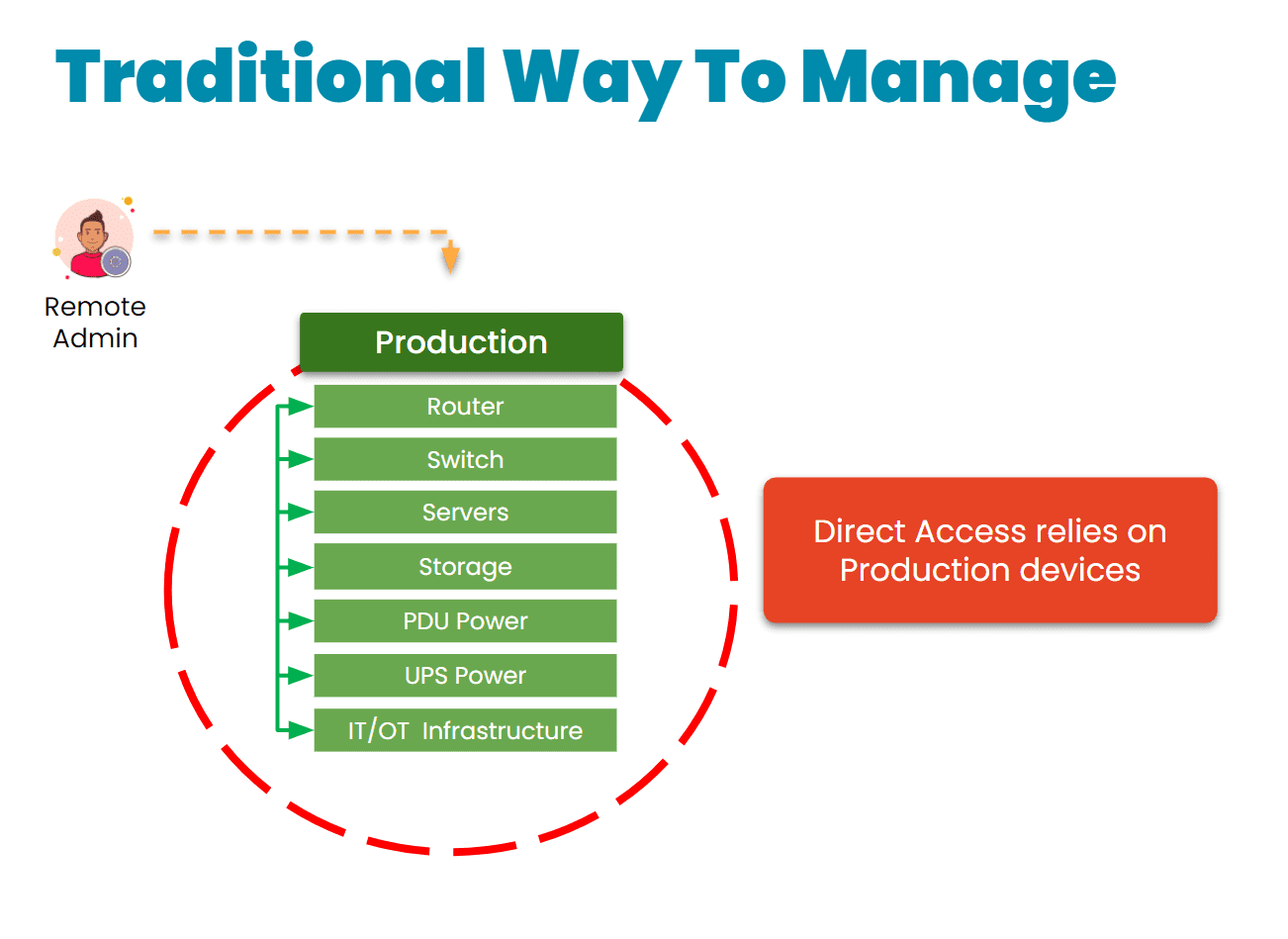
The traditional approach is to gain remote access via a direct link to the affected systems. The problem with this is that when these systems are breached, encrypted, or offline, it’s impossible to remote-into them. This requires teams to physically connect to and revive systems (as with the CrowdStrike incident), or worse – completely replace their infrastructure, as Merck did during the 2017 NotPetya breach.

Traditional remote management via direct link
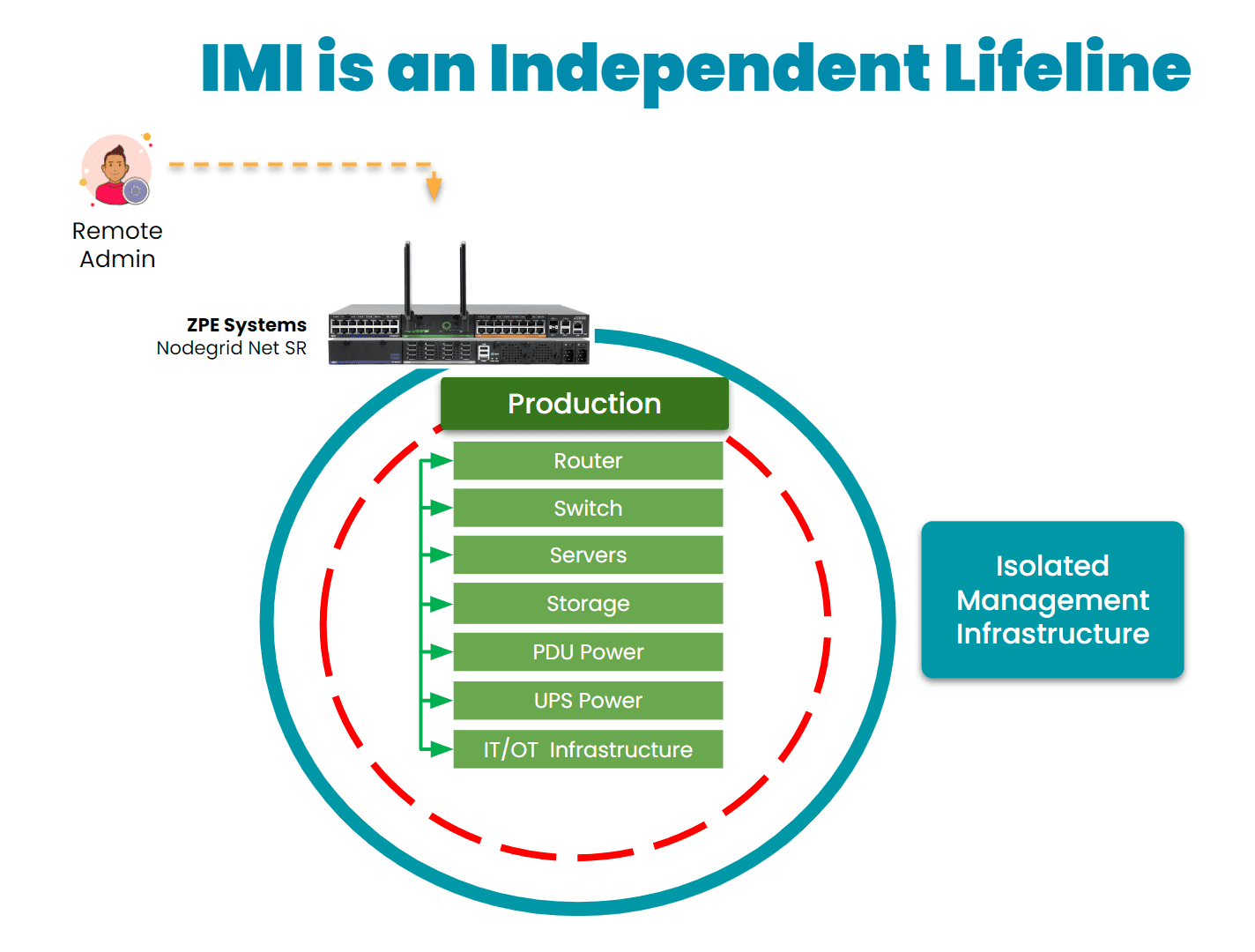
Instead, organizations are turning to a best practice architecture that has been used by hyperscalers and large enterprises for years. This solution is called Isolated Management Infrastructure. IMI creates a management network that is connected to but completely independent of production network equipment, an architecture that resembles out-of-band (OOB) management. This gives teams a lifeline to their main IT and OT systems, including servers, switches, sensors, controllers, and other critical assets, even when their main systems are offline.
IMI is a lifeline to production assets

Here’s how IMI and out-of-band management could have helped mitigate the effects of the American Water attack:

  • Enhanced Containment: By isolating the network used for system control and monitoring, OOB management could have ensured that even if the primary network was compromised, attackers would not have been able to access or disable key operational systems. This would have limited the need to shut down OT systems and prevented widespread operational disruption.
  • Faster Recovery: With isolated management infrastructure, administrators would have been able to access critical systems remotely, even during the attack. This capability enables faster diagnosis of the issue and restoration of services without relying on compromised networks. In the case of a ransomware attack, for example, OOB management can help initiate recovery operations from backups, minimizing downtime.
  • Reduced Attack Surface: By creating an independent network with fewer access points and stricter controls, OOB infrastructure reduces the chances of attackers exploiting vulnerabilities. It’s an additional layer of security that complicates attempts to breach sensitive control systems.
IMI with Nodegrid2

30-year cybersecurity expert James Cabe recently published a walkthrough of how to do this. Read his article, What to do if you’re ransomware’d, to see how to deploy the Gartner-recommended Isolated Recovery Environment that lets you fight through an active attack.

Get the Blueprint for Building IMI

The American Water cyberattack is another wake-up call for critical infrastructure providers to rethink their cybersecurity strategies. Isolated Management Infrastructure is the key approach to retaining control during an attack, but requires the robust capabilities of Generation 3 out-of-band to ensure rapid recovery. To help utilities and essential services fortify their infrastructure, ZPE Systems recently created a blueprint for building IMI. Download the blueprint now to follow the best practices architecture and become resilient against cyberattacks.