Providing Out-of-Band Connectivity to Mission-Critical IT Resources

What does 2001: A Space Odyssey have to do with network automation?

HAL

“I’m sorry, Dave, I’m afraid I can’t do that.”

Those nine words couldn’t possibly be related to network automation. Or could they?

Uttered famously by fictional supercomputer HAL 9000 in the 1968 Stanley Kubrick film 2001: A Space Odyssey, those words might have coincidentally foreshadowed the challenges (and fears) faced by modern network engineers. And it all has to do with automation.

Network automation — as crucial as it is to network resilience — is a daunting task, and it’s no wonder why IT professionals are reluctant to adopt it. One typo, one wrong command, or one coding error is all it takes to lose control of your network. In the movie, it was poor instructions in the HAL machine (e.g. your network) that gave way to a catastrophic sequence of events. Despite the computer’s explicit intentions to be a helpful asset, its actions proved counterintuitive and led to the demise of Discovery One’s entire crew (e.g. your job).

So what does any of this have to do with network automation?

With a little help from the movie, this post will cover:

  • The biggest threat to network resilience
  • Why automation makes network admins anxious
  • How the right tools overcome this anxiety


The biggest threat to network resilience

It’s no secret that human error is the biggest threat to network resilience. In fact, the Uptime Institute reports that as many as 75% of data center outages are caused by human error.

Errors can come from any number of causes. These include anything from minor typos, to significant configuration shifts. With a sprawling number of network sites and devices, it can become incredibly difficult even for experienced IT teams to manually maintain their infrastructure.

This is exactly why companies adopt automation. Rather than manage individually unique devices or environments, automation allows teams to focus on processes and achieve their desired goals.

For technical teams, automation reduces the risk of errors, shrinks their workload, and improves scaling, all of which play a part in increasing resilience. This plays into the business case for automation, which revolves around decreasing outages and revenue losses.

The bottom line: Automation comes with plenty of benefits. So why aren’t more IT teams jumping to automate their networks?


Why network automation scares IT teams

The movie predicted that by the year 2001, we’d all be reaping the benefits of space travel and advanced technology. One of these technologies was the HAL 9000 supercomputer, described in the movie as being “fool-proof” and “incapable of error”. But as anyone knows, a computer designed and instructed by humans is never incapable of error — and that’s exactly why network automation scares IT teams.

Dave Bowman becomes frustrated with HAL 9000

In the movie, the five-man space crew aboard the ship Discovery One is on a mission to Jupiter. The ship is mostly controlled by HAL, the 9000-series supercomputer. HAL observes the crew using glowing red lenses built into the walls and consoles in the ship. HAL takes direct commands from the crew when a door needs to be opened, a communication broadcasted, an EVA (extravehicular activity) pod launched, etc.

The crew has a brief discussion with HAL regarding a similar computer’s malfunction, which HAL then concludes is the result of human error. After this, HAL experiences his own malfunction, which leads to the gradual breakdown of his helpfulness to the crew. HAL sends Frank Poole to his death, locks Dave Bowman out of the ship, and cuts life support measures to the remaining crew who were in cryosleep.

Automation presents such a dichotomy between asset and liability. On one hand, it’s capable of advancing us into our wildest dreams where we can accomplish incredible feats with little effort. On the other hand, a simple human error is all it takes to turn the same automated machine against us, making it capable of tearing down everything we’ve worked for and uprooting life as we know it.

For network engineers, automating IT can mean less downtime, more revenues, and job promotions. But it can also mean catastrophic outages, millions in losses, and a lengthy job search.

Frank Poole floats away from his EVA pod

Simply put, network automation can be unforgiving, much like losing control of your ship in deep space.


How to overcome network automation anxiety

In the movie, Bowman has no option for stopping HAL other than manually pulling the plug. It’s a tedious and dangerous process, but it’s the only way Bowman can contain the damage caused by his artificial counterpart.

Bowman pulls the plug on HAL 9000

This is the same scenario that plays out in IT, albeit with much less drama, when something goes wrong in the automation chain. So how do you overcome this scenario? Can you even overcome it? The big tech companies can, but that’s only because they have the money and resources for it, right?

The reality is, many companies attempt to automate but inevitably fail because they don’t have the proper infrastructure in place. This is the differentiator — tech giants have focused their attention on implementing the right infrastructure over the past decade, and it’s why they’re able to successfully automate for more resilience.

The secret: their infrastructure has a safety net built into it. Their environments are forgiving. So when things don’t go as planned, whether due to mistakes or rogue machines, they have a lifeline that brings them back to safety.


How the Network Automation Blueprint brings you back to safety

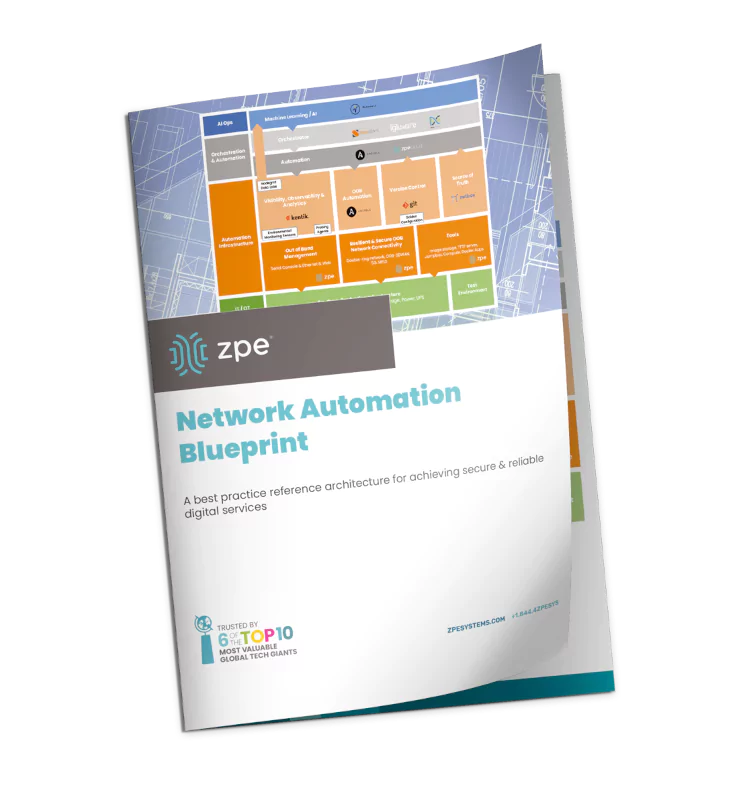
The Network Automation Blueprint is key to overcoming automation anxiety. This architecture incorporates out-of-band management as well as dedicated orchestration and automation infrastructure. These allow you to test workflows and configurations for integrity before pushing them live. They also help you build an isolated recovery environment, which you can use to undo mistakes, such as if you unknowingly upgrade to a vulnerable configuration.

This architecture has been developed in direct collaboration with tech giants, and was recently validated by ONUG’s Hyperautomation Working Group.

Blueprint Automation cover

For more details about this architecture, the ‘undo’ feature, and how they let teams automate without losing control, download the Network Automation Blueprint now.

Hyperautomation vs Automation: How Are They Different?

Automation,Concept,With,Downtown,Skyline,Buildings,In,The,Night

Automation can help you streamline network management in your enterprise by reducing human error, speeding up processes, and facilitating NetDevOps. Hyperautomation takes things a step further by attempting to remove all human intervention from IT and business workflows.

This blog will define hyperautomation and automation, compare both concepts, and discuss the challenges and best practices for implementation.

Hyperautomation vs Automation: How are they different?

What is automation?

Automation is the removal of manual intervention and workloads within IT departments. You can use automation for development, QA testing, systems administration, and security, but we’re focusing on network automation in this blog.

The goal of network automation is to solve specific challenges. For example, configuring and deploying new network devices is a tedious, time-consuming process. A configuration mistake could cause downtime or even a security breach, so reducing human error is critical to preventing these issues. Plus, there are logistical challenges involved in deploying new devices to remote data centers, branch offices, and edge locations: do you pre-stage the device and risk someone intercepting it in transit and gaining access to your enterprise network? Or do you spend the time and money to fly engineers out to remote sites to configure and install the equipment in person? One way automation solves this problem is through what’s known as zero touch provisioning (ZTP), which allows devices to automatically download and install their configurations over the network without human intervention.

ZTP solves one particular problem for you—new device configurations—and that’s all. It isn’t concerned with any other workloads or processes. You can integrate ZTP with other automated tools and systems, or you could use it by itself, and in either case, it’s still considered automation.

Learn more about automation:

→   Automating Your Network Operations Does Not Have to Be Difficult

→   The Importance of NetDevOps Automation for Modern Networks

→   Network Automation Best Practices to Implement in 2022

What is hyperautomation?

Hyperautomation, on the other hand, seeks to automate all (or most) IT and business processes. That means automation is essentially a subset of hyperautomation – you need as much automation as possible if you want to achieve true hyperautomation.

Hyperautomation requires automating every workflow and process involved in achieving a certain outcome, including simple tasks like rebooting devices and complex workflows like updating servers. That also means every part of a workflow sequence of events needs to be automated—both the success path and the failure path—otherwise, you won’t achieve full hyperautomation.

Let’s consider the above example of a new network device that needs to be deployed to a remote site. If everything goes according to plan, the device—let’s say a wireless access point—automatically configures itself via ZTP, and no human intervention is required. However, if something goes wrong and the configuration can’t execute successfully, the ZTP process stops, and a human engineer must jump in to troubleshoot the problem.

Hyperautomation requires that you anticipate and programmatically account for any potential failures in an automated workflow. What happens if the TFTP server is offline or unavailable? What if there’s no existing configuration file for the specific model of AP you’re deploying? There should always be a next step available for your automated workflow, even if the previous step has failed. The hyperautomation failure path may eventually lead to a human being (ideally with automatic alerts and notifications), but only after exhausting all automated troubleshooting and error correction possibilities.

Hyperautomation can only be achieved through the use of an automation orchestration platform. These platforms give you a big-picture overview of your hyperautomation efforts so you can store, deploy, and manage all your automated workflows in one place. Orchestration also involves automating your automation—another essential component of hyperautomation—which means your platform automatically runs, monitors, and troubleshoots your automated processes. This is accomplished through technology like AI (artificial intelligence), SDN (software-defined networking), and ZTP mentioned above.

Learn more about network orchestration:

→   Simplifying Network Edge Orchestration With a Single Platform

→   Orchestrating Hybrid Network Environments: Challenges, Solutions, and Best Practices

→   Why Choose Nodegrid as Your Data Center Orchestration Tool

Hyperautomation challenges

Automation and hyperautomation are a little easier to achieve in development and systems administration, but unfortunately, network automation has been slow to catch up.

The biggest network hyperautomation challenge is automating legacy systems designed without automation in mind. If these legacy systems are left out of your automation efforts, it’s impossible to achieve hyperautomation. You could replace all your legacy devices with newer systems that support automation out of the box, but that’s an expensive and time-consuming endeavor that could delay or even prevent your hyperautomation efforts from getting off the ground. A better solution is to find an orchestration platform that can interact with both legacy and modern systems.

One challenge to network hyperautomation is vendor lock-in. Modern enterprise networks are often composed of several solutions from different vendors. That makes it challenging to find automation solutions compatible with every single piece of your infrastructure—like storage, security, etc. For hyperautomation, you need your orchestration platform to dig its hooks into every device, workflow, and process in your network infrastructure, which means it needs to be truly vendor neutral.

Another difficulty is maintaining the hardware that makes up your network infrastructure so that your hyperautomation can work efficiently. This is especially challenging for highly distributed enterprise networks with critical infrastructure in many remote locations. To ensure successful hyperautomation in such an architecture, you need a robust environmental monitoring system that can detect issues in remote data centers and branches. The data collected by this monitoring system should provide feedback to the orchestration platform so problems like high humidity or physical tampering can be automatically acted upon and remediated before they hamper other automated workflows.

Though network hyperautomation is challenging, there is a solution that can help you overcome all these hurdles.

How Nodegrid supports network hyperautomation

The Nodegrid solution from ZPE Systems is a network orchestration platform that delivers true hyperautomation capabilities without limitations. Nodegrid runs on the open architecture Nodegrid OS, which means it’s compatible with any Linux-based system on your network. Nodegrid also supports integrations with third-party automation and orchestration tools, so you can create a fully customized hyperautomation environment.

Plus, Nodegrid can communicate with legacy devices on your network, for example, through a console connection, as well as modern networking solutions. That’s how ZPE Systems can deliver a hyperautomation platform that can be used consistently across your entire infrastructure to orchestrate and deploy automation on any and all target systems.

Want to learn more about hyperautomation vs automation?

Check out ZPE Systems’ network automation blog, or contact us today at 1-844-4ZPE-SYS.

Contact Us

How to Choose Secure Out-of-Band Management

shutterstock_1638957298

Out-of-band access gives you an alternative path to manage your critical remote infrastructure at data centers, branch offices, and other distributed locations. However, that management link creates an additional point of entry for malicious actors to breach and even control your network.

That’s why secure out-of-band management solutions must include features like onboard firewalls and zero trust security to keep your network protected while still giving you remote management access. Let’s take a look at the many secure out-of-band management features and why they’re crucial to the security of your enterprise network.

What is out-of-band management?

Out-of-band (OOB) management separates your production network from your management plane, giving you a dedicated remote connection to your infrastructure even during an outage. The OOB network is completely independent of your primary network and is specifically  dedicated to infrastructure management. That means you can administer your critical remote infrastructure without affecting production network performance. You can also remotely troubleshoot and recover from outages, preventing expensive and time-consuming truck rolls.

OOB management typically uses serial console servers at data centers and remote offices to create an alternative path to critical network infrastructure. For example, using a DSL modem or 4G cellular connection to provide uninterrupted access. Secure out-of-band management solutions offer additional functionality like zero touch provisioning and onboard firewalls to ensure malicious actors cannot use your OOB access.

How to choose secure out-of-band management

Since an out-of-band management solution provides access to an entire network plane that’s dedicated to managing your critical infrastructure, you must keep this power out of the wrong hands. Here are five secure out-of-band management features to help you defend your network.

1. Third-party security integrations

The most secure OOB platforms are vendor-neutral and support integrations with third-party security solutions. That means you can extend the security functionality of your OOB device to take advantage of technology like next-generation firewalls (NGFW) or security service edge (SSE). A vendor-neutral out-of-band solution lets you keep up to date with security best practices and innovations without needing to replace your OOB hardware. It also conveniently creates a fully integrated platform to manage all your branch network security solutions.

A truly secure out-of-band management solution will address security threats from all angles, including provisioning, patching, intrusion detection, and advanced authentication. In addition, a secure OOB platform should support vendor-neutral integrations with third-party security solutions so you can extend your defensive capabilities.

2. Secure zero touch provisioning

One of the challenges of deploying and managing remote infrastructure is configuring and installing new network devices. Unless you have IT staff at each location to install your bare-metal devices, you’re usually left with two options:

  • Pay for your engineers to travel on-site to deploy the new systems. This option is expensive and time-consuming since it can take full day’s of work or weeks.
  • Pre-stage your devices at the home base and then ship them preconfigured. This option is a huge security risk. If a pre-configured OOB serial console is intercepted in transit, an attacker could potentially use it to access your management network.

Zero touch provisioning (ZTP) solves these problems by automatically deploying new device configurations over the WAN. You can ship a bare-metal OOB appliance to your remote site, have a local employee plug it into the power and network, and then the ZTP device will download its configuration from a remote server (such as a TFTP server). However, not all zero touch provisioning solutions are equally secure. Theoretically, a hacker could still intercept your factory-default appliance, use ZTP to download its configuration, and breach your enterprise network.

A secure ZTP solution uses features like encrypted hardware boot sequences to prevent unauthorized users from being able to fully boot up and configure a stolen OOB device. Additional security features like cloud-based provisioning with 2FA (two-factor authentication) also ensure that your network will be protected even if your OOB serial console falls into the wrong hands.

3. Up-to-date OS and fast patches

One of the most straightforward security features in an OOB solution is a frequently patched and up-to-date OS (operating system) kernel. This is important because hackers often look for OS vulnerabilities to exploit. If such a vulnerability is discovered in your OOB device, an attacker could potentially use it to gain administrative control over your entire network.

You should always look for a secure out-of-band management solution with an up-to-date OS kernel and frequent patch releases. Even better, you could get a managed OOB solution that’s updated by the vendor as soon as they become aware of a security vulnerability, so you don’t need to spend the time or manpower to frequently monitor and patch your OOB device’s OS.

4. Onboard firewall features

A secure out-of-band management solution should also have some onboard firewall functionality to further protect your network. An onboard firewall should protect both the OOB network and the primary network by scanning traffic on both connections.

On the OOB connection, the firewall acts as an additional layer of security that prevents malicious actors from gaining access to your management network. An onboard firewall allows you to consolidate your tech stack by reducing the number of separate devices at each remote site from your main network connection.

5. Zero trust security

Zero trust is a network security paradigm that addresses the challenges of protecting distributed enterprise networks from modern, sophisticated cyberattacks. Zero trust security is based on the principle of “never trust, always verify.” Meaning, all network entities—users, devices, applications, etc.—must be verified every time they connect, even if they’re on your internal network. This limits how much damage a compromised device or account can do to your network.

In addition, zero trust security focuses on shrinking your defensive perimeter into a series of smaller micro-perimeters around the critical data, systems, and resources you’re protecting. This enables you to implement highly specific security policies and controls to address the individual vulnerabilities and risks of each network asset.

A secure out-of-band management solution should support zero trust security principles by allowing you to implement advanced authentication methods like SSO (single sign-on) and 2FA. It should allow you to monitor and control devices across network micro-segments. And, assuming your secure OOB solution includes an onboard firewall, you should be able to apply granular security policies and firewall rules to each of your micro-segments to create micro-perimeters even at your network edge.

How Gen 3 out-of-band management delivers secure, reliable remote access

The Nodegrid secure OOB solution from ZPE Systems combines innovative security features with end-to-end automation support to deliver Gen 3 secure out-of-band management.

Nodegrid uses secure, cloud-based zero touch provisioning so you can safely ship factory-default appliances around the world and deploy them in moments. Nodegrid ZTP uses features like:

  • Secure boot, custom security profiles, and port authentication
  • Password protected BIOS/Grub and signed software
  • Geofence perimeter crossing detection and security prevention
  • Solid state disks (SSDs) with self-encrypted hardware controllers

Nodegrid OOB runs on a modern, 64-bit OS based on the latest Linux Kernel, with all security patches quickly applied. The embedded firewall supports IPSec, Fail2Ban, IP filtering, and advanced authentication via RADIUS, TACAS+, and Kerberos. In addition, Nodegrid is protected by the Zero Trust Security Framework Foundation and works with leading SAML providers like Duo, Okta, and Ping.

Nodegrid’s open architecture makes it easy to integrate your third-party security providers, including NGFWs and SSE platforms. That means you can create a completely customized branch network security solution that’s fully integrated with your out-of-band management. Nodegrid also supports third-party automation and orchestration through tools like Chef, Ansible, and RESTful. All of this can be managed from anywhere in the world, behind one pane of glass, through the ZPE Cloud platform.


Learn more about secure out-of-band management

  Out-of-Band Network Management: Fundamental Principles & Use Cases

  Why Out-of-Band Remote Access is Critical for Branch Networking

The Nodegrid secure out-of-band management solution rolls up OOB, security, and end-to-end automation into one consolidated box.

To learn more about Gen 3 out-of-band management with Nodegrid, contact ZPE Systems or call 1-844-4ZPE-SYS.

Contact Us

Network Automation Best Practices to Implement in 2022

shutterstock_1901387977

As enterprise networks grow more complex and distributed, the need for network automation is rising. Automation can help you manage your network more efficiently, but only if you use it correctly. This article discusses the three best network automation practices as you begin or continue your automation journey.

Network automation best practices to implement in 2022

Network automation uses software abstraction to turn configuration and management workflows into repeatable scripts at a basic level. This is known as software-defined networking, or SDN. For 2022, network automation best practices are focused on simplifying SDN through low code technology and vendor-neutral orchestration, as well as creating more holistic automation strategies with the NetDevOps methodology. Let’s take a deeper look at why these automation practices are so essential for the present and future of your organization.

Low code network automation

The network automation skills gap is one of the biggest hurdles organizations face when adopting automation tools and practices. A recent survey found that only 3% of enterprise networking teams have the automation knowledge required to support their business’s network automation strategies. Part of the problem is that a software-based approach to networking involves writing and managing code, which many network engineers can lack experience in. That’s why the concept of low code network automation is beginning to gain traction in the industry.

Low code isn’t new—it’s been used for web and software development for years—but it’s only now starting to catch on in the networking world. Years ago, you had to know HTML, CSS, and other programming languages to build a website. Now, various tools let you drag and drop (Wix or SquareSpace, for example) instead of having to type lines of code. Low code technology gives engineers a GUI (graphical user interface) with which they can create and manipulate SDN code. Low code network automation abstracts away most of the underlying programming, so engineers can use visual models, drag-and-drop elements, and WYSIWYG (what-you-see-is-what-you-get) interfaces instead of writing and editing code. At the same time, team members with SDN and programming experience can still access the underlying code as needed to create fully customized and automated network architectures.

Low code platforms handle various network automation tasks such as configuration deployments and changes, traffic management, issue detection and remediation, monitoring, and analytics. Notable pioneers of low code network automation technology include Gluware and Anuta ATOM.

Low code technology is a network automation best practice because it can bridge the skills gap in your network engineering team, allowing you to implement network automation faster without needing to retrain team members (or hire new ones).

Vendor-neutral network automation orchestration

Most enterprise network architectures include hardware, software, and automation solutions from multiple vendors. This creates a challenge for network administrators, who need to learn how to configure, deploy, and manage each of these components. A multi-vendor enterprise network can grow very complex, which increases the chances of human error during configurations and changes. Misconfigured infrastructure is a leading cause of security breaches, so this isn’t a challenge you can afford to ignore.

Network automation helps reduce human error by standardizing network configurations, but automating a multi-vendor architecture also presents its own challenges. You still need a way to manage and orchestrate all your automation scripts, APIs, playbooks, and tools. If engineers still need to learn and individually manage a variety of new scripting languages, automation tools, and vendor-specific processes, you’re still at a high risk of human error.

That’s why centralized, vendor-neutral orchestration is crucial for effective network automation in a multi-vendor enterprise environment. There are now modern orchestration platforms that are vendor-neutral, so you can store and manage your diverse set of automation tools behind one pane of glass. It should also be able to hook into every component of your network, no matter where it’s physically located or which vendor it belongs to. That way, you can ensure there are no gaps in your automation and orchestration coverage—which means fewer manual processes, and fewer opportunities for human error.

Vendor-neutral orchestration is a network automation best practice because it allows engineers to control a complex, automated enterprise network infrastructure more effectively and accurately. Plus, many tech giants are focusing more on adopting these best practices due to recent outages (like the Facebook outage).

NetDevOps automation

For most enterprises, the IT department is more than just the networking team—often, there will also be a development team and an operations team. The development team writes, modifies, tests, and supports software code. The operations team configures, administers, and supports the servers (virtual or physical) and cloud platforms that host your enterprise resources, as well as the laptops and other devices people use to connect to those resources. None of these teams can work in a vacuum because their workflows overlap and often depend on each other. Similarly, the technology and processes they’re responsible for relying upon each other as well—for example, applications are developed and hosted on servers (whether physically in a data center or abstracted in the cloud), and the network needs to connect users to those servers so they can access the applications.

Automation makes networking, development, and operations processes more efficient. While it’s certainly possible to implement and manage automation separately for each of these, you’ll see even greater benefits from combining the three. Removing the barriers between these teams allows you to plan new initiatives, like automation with a more complete and holistic view of your business’s IT architecture. It also facilitates better collaboration between networking, development, and operations teams to work more efficiently and with a greater understanding of the business’s ultimate goals. This practice is known as NetDevOps.

The NetDevOps methodology recommends automating and integrating processes from across all your IT teams by:

  1. Using SDN, IaC (infrastructure code), and other abstraction methods to manage your device and networking configurations as software code.
  2. Storing all networking, development, and operations code in a shared, centralized code repository with version control (like GitHub).
  3. Using a systematic approach to automation by identifying and prioritizing processes that will further your business goals.
  4. Eliminating informational siloes and encouraging frequent communication and collaboration between teams.

NetDevOps is a network automation best practice because it creates a more holistic automation strategy and a more streamlined IT department that understands and supports your business goals.

Streamline your network automation journey with Nodegrid

Every enterprise’s network automation journey will look a little different, but these best practices should help you overcome some of the common hurdles along the way. Low code network automation platforms help bridge the skills gap so you can take advantage of automation faster. Vendor-neutral orchestration gives your engineers an easier and more efficient way to manage your network automation solutions. Finally, the NetDevOps methodology facilitates a more comprehensive network automation strategy as well as a more collaborative and efficient IT department.

ZPE Systems can help you follow network automation best practices with Nodegrid vendor-neutral orchestration platform. With support for third-party automation and orchestration tools including low code technology, as well as an open architecture that can hook into all your different vendor solutions, Nodegrid is the ultimate NetDevOps automation platform.

Network automation resources

Learn more about network automation best practices with Nodegrid.

Contact us online or call 1-844-4ZPE-SYS.

Contact Us

Nodegrid OS Version 5.4 New Features

See the new features in Nodegrid OS v5.4

Watch this video to see the new features in the latest release of Nodegrid OS, version 5.4. Sales Engineering Manager Rene Neumann shows you how to use the newest features, and gives you a look at Nodegrid OS’s added support for:

  • Nodegrid Hive SR
  • Out-of-band and gateway profiles
  • Software & security updates
  • Gen 3 out-of-band improvements
  • Networking, ZPE Cloud, & SD-WAN improvements

Watch the walkthrough now. If you have questions or would like a deeper dive, reach out to techdemo@zpesystems.com.

Watch agile networking in action with these Nodegrid demos

title_demoreel

Watch agile networking in action with these Nodegrid demos


ZPE® Systems Network Solutions Architect Rene Neumann shows you how easy it is to enable agile networking. See Nodegrid and ZPE Cloud first hand with our collection of demo videos. You’ll learn how to:


  • Use true zero touch for automatic deployments
  • Fully set up environments using rich orchestration
  • Remotely configure and manage edge workloads

Demo: Deploy Networks Fast with ZPE Cloud’s Zero Touch Provisioning

Demo: Fully Provision Edge Network Workloads with Nodegrid

Demo: Orchestrate Branch Network Devices Using Nodegrid