Providing Out-of-Band Connectivity to Mission-Critical IT Resources

How to Choose the Best Branch Office Connectivity Solution for Your Network

shutterstock_1687381003(1)

Branch network management involves many moving parts. For example, you may need to remotely deploy, orchestrate, and troubleshoot the branch network without on-site IT staff. In addition, you need a way to connect your branch locations to the enterprise network and efficiently route that traffic without affecting performance. You also must keep branch traffic, devices, and connections as secure as the rest of your enterprise network.

Your branch office connectivity solution should provide the innovative tools and technology your engineers and admins require to manage your branch networks effectively, even from hundreds or thousands of miles away.


What you should look for in a branch office connectivity solution

The most crucial components of a comprehensive branch office connectivity solution include:


Remote out-of-band management

One of the biggest challenges in branch networking is remote troubleshooting. If your WAN link to the branch office goes down, you need a way to diagnose and fix the issue without an expensive truck roll.

Remote out-of-band (OOB) management solves this problem by providing an alternative path to your critical branch infrastructure. OOB separates the management plane from your production network and makes it available via a dedicated connection—typically a cellular link. That’s how OOB management gives you 24/7 remote access to troubleshoot, administer, and monitor your branch network infrastructure.

Learn more about why out-of-band remote access is critical for branch networking


Zero touch provisioning

Another branch networking challenge involves the initial deployment of infrastructure. Sending a networking team out to every new branch to install and configure everything by hand is both expensive and time-consuming. However, if you pre-stage new devices at your headquarters and then ship them out to the branch, someone may intercept the package and use those devices to breach your network.

Zero touch provisioning (ZTP) addresses this challenge by automating remote device configurations. A ZTP-enabled device just needs power, network access, and the IP address of a configuration repository. The device will then download and execute the necessary scripts without much (if any) human intervention. ZTP allows you to remotely and automatically deploy an entire branch in just minutes.

For more about ZTP and its benefits, watch this short video: What is Zero Touch Provisioning?


SD-WAN/SD-Branch

Using a traditional WAN (wide area network) to connect your branch offices to your enterprise network comes with a few frustrating limitations. For example, there’s often no way to centrally manage branch router configurations and policies, which means engineers need to update each individual machine when there’s a change.

Software-defined WAN, or SD-WAN, virtualizes your WAN architecture as software and decouples it from the underlying hardware. You can centrally manage and deploy that software from a cloud-based platform, allowing network admins to update configurations and policies quickly and efficiently.

However, SD-WAN typically only covers the larger network infrastructure, but doesn’t extend into the individual branch LANs to give you control over the servers, switches, and other critical networking devices. SD-Branch solves this problem by consolidating SD-WAN, routing, firewalls, security, and LAN functions into a single solution. With SD-Branch, you get cloud-based visibility and control over your branch LANs and WANs from one centralized management platform.

Find out how to control more of your network with SD-Branch


Security

To protect your business from a breach, you must ensure that your branch office connectivity solution allows you to use the same security methodologies, policies, and controls as your enterprise network. For example, your branch gateway router should support zero trust security, which follows the principle of “never trust; always verify” when giving access to sensitive data, applications, and services.

Branch network traffic also needs to route through a firewall, which means—in traditional WAN—backhauling traffic through your central hub or datacenter, even if that traffic is ultimately destined for the cloud. This creates bottlenecks and delays for your entire enterprise network.

You can solve this problem with SASE, or Secure Access Service Edge. SASE uses SD-WAN technology to redirect remote, cloud-destined traffic through a cloud-based firewall, also known as Firewall as a Service (FWaaS).

SASE solutions also include other cloud-based security technologies like Cloud Access Security Brokers (CASB) and Zero Trust Network Access (ZTNA) to ensure maximum branch network security without impacting performance.

Learn more about SASE implementation in this step-by-step guide


Automation

Branches add complexity to your network, as we’ve illustrated in the previous sections. You need to deploy, monitor, troubleshoot, and optimize both the WAN link and the internal branch LAN while keeping everything secure. There are a lot of tedious and repeatable tasks involved in branch network management, which is why automation is a crucial component of next-generation branch office connectivity solutions.

Automation is also foundational to the NetDevOps methodology, which seeks to combine your networking, development, and IT operations into one streamlined and collaborative unit. Network automation for NetDevOps focuses on abstracting network and infrastructure configurations as software scripts that you can repeatedly deploy to many different devices. NetDevOps automation increases the efficiency of your branch network management.

Find out more in Automation: Reducing Costs and Improving Efficiency

Your branch office connectivity solution should contain remote out-of-band access, zero touch provisioning, SD-WAN/SD-Branch networking, security, and automation. However, to get all of these features, you often have to combine many different boxes from several vendors, creating operational complexity and hampering orchestration efforts. The best solution for branch networks combines all these capabilities into a single platform, like Nodegrid.


Why choose Nodegrid as your branch office connectivity solution

The Nodegrid Hive SRTM is a 5-in-1 branch gateway that delivers out-of-band, SD-WAN, security, NetDevOps automation, and compute all in one compact, ZTP-enabled device. The Hive SR consolidates your branch network infrastructure by eliminating the need for multiple branch office connectivity solutions.

Nodegrid Hive SRTM vendor-neutral architecture supports easy integrations with network automation and orchestration tools including Docker, RedHat Ansible, and Puppet so you can take advantage of NetDevOps efficiency. Plus, you can use ZPE Cloud management to orchestrate, administer, and troubleshoot your branch network from anywhere in the world.

Want to see the Nodegrid Hive SR branch office connectivity solution in action?

Schedule a demo or contact ZPE Systems to learn more.
Contact Us

Customer strategies in Ukraine to protect privacy and IP

ZPEUkraine (1)

How autonomous decommissioning via out-of-band has become essential to disaster recovery for edge deployments in uncertain geographies

To say there’s instability in Eastern Europe would be a drastic understatement. Russia continues its attacks on many fronts in Ukraine, displacing millions of Ukrainians who are now left with an uncertain future. Security is on everyone’s mind, and while many have answered the call to arms and stand ready with AK-74 in hand, others recognize that defending Ukraine involves shielding IT infrastructure and intellectual property from cyberattacks.

For this, some of ZPE Systems’ customers are using an unlikely defense: out-of-band management. Despite recent attacks using wiper malware and DDoS to take down government websites, organizations are able to use generation 3 out-of-band to decommission their sites in order to protect their data against adversaries who have boots on the ground.

In this post, we’ll examine the current issues surrounding compromised edge sites and what organizations are doing right now to shield their intellectual property (IP).

What’s at stake?

Many companies have critical IT infrastructure distributed across countries, regions, and continents. This infrastructure consists of networking gear and edge compute equipment, such as servers, switches, routers, and other end devices. These are responsible for connecting users and customers to essential services, processing and storing sensitive data, and running intellectual property such as proprietary operating systems, applications, and network certificates.

All of these are essential to supporting normal business operations and the customers they serve.

For example, telco companies rely on their infrastructure of cell tower sites, fiber cable lines, and their connected hardware and software to provide voice networks and Internet service. These companies run intellectual property within their infrastructure. In many cases, this intellectual property includes software that can cover a range of types and uses, from multi-protocol access proxies that enable IT admins to remotely manage edge network clusters, to analytics applications that track data usage for media delivery and customer experience optimization.

These companies are also responsible for handling sensitive data. For administrative purposes, billing, and compliance, these companies use devices that process and store personal identifying information for customers, including names, addresses, birth dates, etc.

All of this is what is at stake when faced with disaster. This is why it’s important to have the proper disaster recovery plan and tools in place, and mitigate the risk of losing sensitive information or having it fall into the wrong hands.

What disaster looks like

Every enterprise and government organization should assess their level of risk regarding equipment deployed at the edge. Risks can come from geographical and geopolitical factors — such as tornadoes or flooding during seasons of inclimate weather, or regional instability during times of international conflict.

Imagine you’re in charge of a corporate or government organization. One day you stop receiving pingbacks from your edge sites, and you suddenly find that you’re cut off from these locations.

There’s no network. There’s no access. And like many organizations currently struggling in Ukraine, you’re simply no longer in control of what happens to your data.

What do you do now?

Your sensitive user credentials, customer information, and intellectual property are in jeopardy, and possibly being stolen by adversaries.

Could you have prevented this?

Disaster recovery: Autonomous decommissioning to stop data theft

Part of an adequate disaster recovery plan involves having hermetic and autonomous operations, down to the device level. In the case that you need to go into disaster recovery mode, consider all of the information that needs to be wiped at your locations:

  • Servers need to be wiped
  • Disks and partitions need to be wiped
  • Disks need to be overwritten so data can’t be recovered
  • Switches and supporting infrastructure need their configurations wiped

The problem is that since you’re cut off and unable to remotely access this equipment, you can’t perform these tasks.

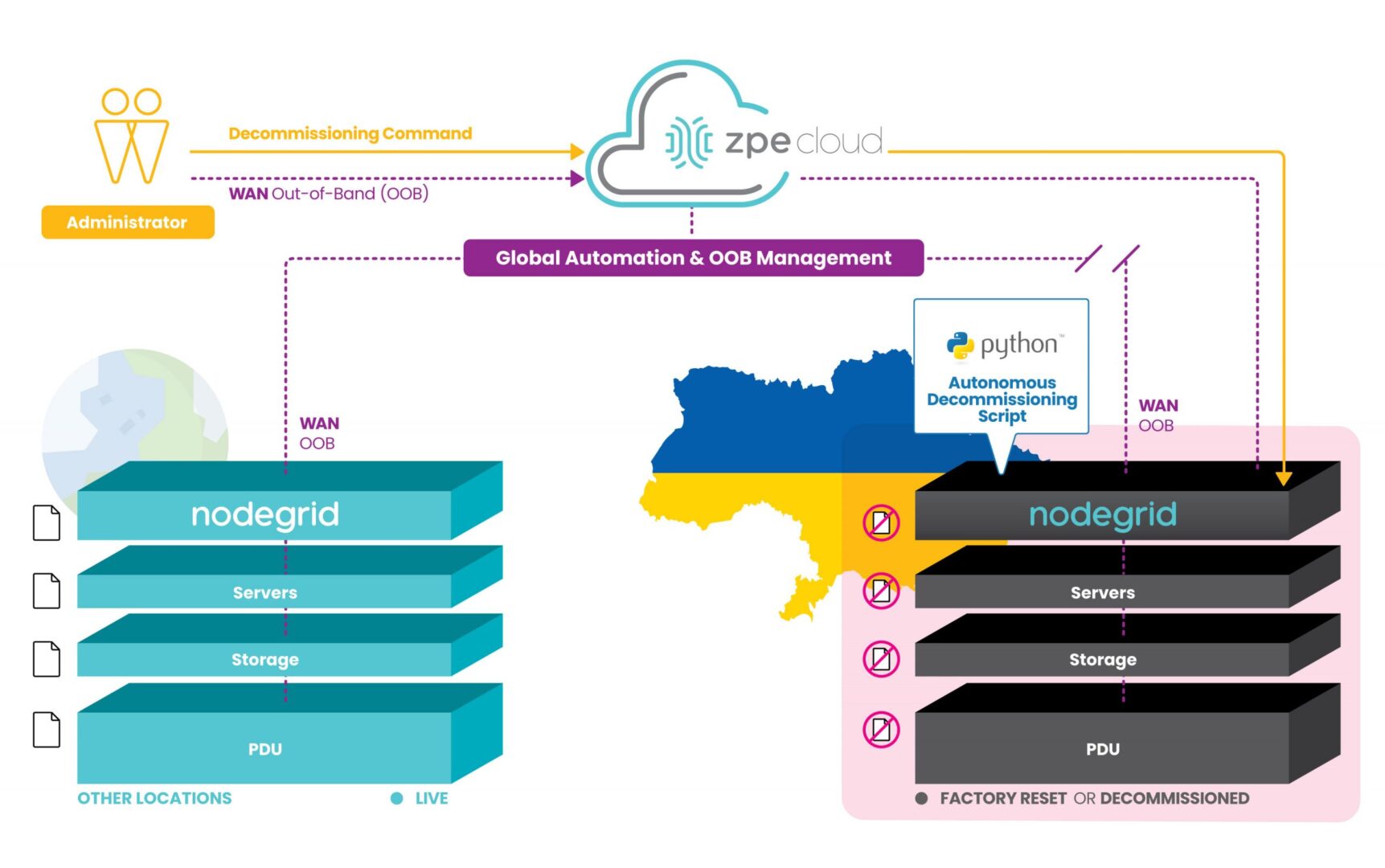
However, ZPE’s customers are currently using our programmable out-of-band infrastructure for this exact use case. It’s being called ‘autonomous decommissioning’, and it combines network automation with manual commands to essentially perform the inverse of launching network sites. This process is being used to protect IP and personal identifying information from falling into the wrong hands.

How does it work?

With our generation 3 serial consoles and services routers co-located at data center and critical edge locations, customers are able to connect all of their equipment to the out-of-band network. Receiving pingbacks at regular intervals from HQ signals that all is well at these sites.

Due to instability in the region, some sites are becoming compromised and cut off from HQ. When this happens, the infrastructure goes into disaster decommissioning mode, and ZPE’s devices serve as on-prem automation workers which help remote IT admins to begin wiping the entire infrastructure.

Autonomous decommissioning network diagram

These devices are hooked into every piece of equipment, and they’re able to receive automated scripts and manual commands from remote admins to push decommissioning tasks to all connected gear. The ZPE device is then able to have its own configuration wiped and returns to its initial ‘seed of life’ mode, in which it awaits further instructions until the connection is restored to HQ. Once this connection is restored, Nodegrid waits for instructions to rebuild the infrastructure following the immutable infrastructure framework.

This autonomous decommissioning prevents data from being stolen by adversaries. By wiping all data and returning to its seed-of-life state, it also keeps the environment’s configurations secure. That’s because the devices no longer contain any configuration information once they’ve been wiped, and configurations can only be restored once an authenticated connection is reestablished with HQ.

Check out a live demo at ONUG!

See how to automate without anxiety to combat cyberattacks. Join us Thursday, April 28 at 11:10am EST at ONUG for a live demo. Click here to register or get your free virtual pass.

Why Out-of-Band Remote Access is Critical for Branch Networking

Social,Network,Illustration

Branch locations—retail stores, shipping warehouses, and satellite offices—present a big network management challenge to the engineers supporting them. Traditional remote network management requires a WAN link to each branch, but what happens if that link goes down? Out-of-band remote access, also known as OOB, solves this problem by separating the network management plane from the data plane, and giving you a dedicated alternate connection to your remote infrastructure.

Why out-of-band remote access is critical for branch networking

To illustrate the importance of out-of-band remote access, let’s walk through a few branch networking scenarios that many IT professionals encounter during their careers.

Scenario 1: Your network and systems are suddenly offline

You’re an on-call network engineer working for a retail company headquartered in Seattle, WA. At 3 a.m., you receive a phone call from the Tampa, FL branch saying their network and all systems are entirely offline. Their store opens in a few hours. How do you determine and fix the root cause from the other side of the country?

Without OOB remote access, you’re left with a few options. You and the store manager could walk through some basic diagnostic troubleshooting over the phone. Still, unless they’re savvy with technology, you’re unlikely to progress very far with this method. You could pay for a local tech to work on it, but unless you already have a consultant on retainer, it could take hours or even days to schedule the service. As a last resort, you could fly across the country at a high cost to your company, both in terms of travel expenses and the hours of lost revenue while the branch is waiting for you to arrive and fix the problem. In conclusion, without remote OOB, any approach you take will be very costly and time-consuming.

Scenario 2: A virus is quickly spreading across your network

You’re a SOC (security operations center) engineer working in the home office of a national logistics company. You receive an alert that a warehouse computer across the country is infected with a Trojan virus, and it’s quickly spreading across the branch network. How do you isolate that branch network and remove the virus?

Taking the branch offline is crucial to prevent the virus from jumping to the enterprise network and spreading even further. However, once you lose WAN access, you’ll be unable to remove the virus or assess and mitigate the damage it caused. Your options in this scenario are even more limited due to the severity of the issue. You can’t walk someone through this process over the phone, and if you’re going to hire an outsider, it needs to be a trusted partner with security expertise. More likely, you’re looking at a truck roll, which again means travel time and expenses. To put it in a nutshell, all of these options mean more time for the virus to infect more of your network and compromise your business on a grander scale.

Scenario 3: You learn about a security vulnerability in your switch’s firmware

Your company has a satellite office in an isolated, rural location with only a skeleton crew of essential staff on-site, which is currently unavailable when the update needs to occur. You learn about a security vulnerability in their switch’s firmware, so you need to update the BIOS. How do you access the BIOS menu and power cycle the switch across a WAN connection?

Often, a switch must be managed from an HTTP or HTTPS session in a web browser. However, you need to power cycle the device and get into the menu before the switch fully boots up to access the BIOS menu. Plus, once the update is complete, the device will automatically power off, and then you’ll be unable to remotely turn it back on. It’s hard to justify the expense of a truck roll for such a simple procedure, but you also can’t leave the device exposed to potential threats. Without OOB, you’re more likely to delay critical updates and security patches, which increases the chances of a hacker finding and exploiting vulnerabilities to breach your enterprise network.

In each of these scenarios, you could save time, money, and trust with out-of-band remote access.

OOB lets you remotely diagnose, troubleshoot, and fix issues with your critical branch infrastructure through a dedicated cellular connection. You’ll have access even if your ISP has an outage, or if you need to temporarily sever the WAN link. You can also use OOB to manage powered down devices, simplifying BIOS updates and other essential maintenance. That’s why out-of-band remote access is critical to branch networking.

However, not all out-of-band solutions provide the same level of control, flexibility, and security. For instance, some OOB products only work within that vendor’s ecosystem, which means you can’t manage any of your other appliances or solutions, or you’re locked into their products and features.

You may also find branch network automation a challenge with your OOB solution—often, the appliances themselves have limited automation capabilities, and are challenging to integrate with third-party orchestration platforms. Plus, many OOB devices lack essential security features like single sign-on (SSO), multi factor authentication (MFA), and zero trust security, which could leave your branches exposed to potential threats and negatively impact your reputation and customer trust.

See how Nodegrid out-of-band remote access can simplify your branch network management

Nodegrid is a 3rd-gen out-of-band management solution, meaning you get reliable remote access to your branch networks without any of the limitations of a typical OOB product.

In the Nodegrid demo, you’ll see how the open, x86 Nodegrid OS makes it easy to integrate all of your Linux-based solutions for complete control and flexibility. We’ll also demonstrate how Nodegrid OOB delivers true end-to-end network automation and orchestration capabilities, with support for Ansible, Puppet, Chef, RESTful APIs, and more. Plus, all Nodegrid solutions are designed with security at the forefront, including zero trust security, SSO, MFA, and advanced authentication with unlimited fallback methods.

Learn more about out-of-band remote access for branch networking.

Visit our OOB learning center or request a free demo of the Nodegrid out-of-band solution.

Watch A Demo

Watch agile networking in action with these Nodegrid demos

title_demoreel

Watch agile networking in action with these Nodegrid demos


ZPE® Systems Network Solutions Architect Rene Neumann shows you how easy it is to enable agile networking. See Nodegrid and ZPE Cloud first hand with our collection of demo videos. You’ll learn how to:


  • Use true zero touch for automatic deployments
  • Fully set up environments using rich orchestration
  • Remotely configure and manage edge workloads

Demo: Deploy Networks Fast with ZPE Cloud’s Zero Touch Provisioning

Demo: Fully Provision Edge Network Workloads with Nodegrid

Demo: Orchestrate Branch Network Devices Using Nodegrid

HEAnet: providing network uptime for education


HEAnet logo

If there’s one sector that relies on network uptime more than ever before, it’s the education sector. For both in-person and virtual learning, students and staff connect to crucial resources around the world to share information. The infrastructure that enables this connectivity is critical, and in the country of Ireland, this infrastructure is deployed and maintained by HEAnet.

As the national education and research network, HEAnet is a provider who must adhere to stringent service levels in order to keep entire education communities online. But they recently faced a few major challenges as their out-of-band (OOB) management solution neared its end-of-life (EOL) date. This system was crucial to maintaining network uptime, as it gave engineers remote access to their 50+ nationwide locations. They needed to quickly roll out a new solution, but they were faced with a second challenge — limited staff.

It seemed HEAnet was stuck between a rock and a hard place. They would surely need to outsource the job, and that’s when they turned to Rahi, the world-renowned MSP who introduced them to ZPE Systems’ Nodegrid.

The rest is history, and for a deep dive into that lesson, download the full HEAnet case study below.

But before you do, here’s a quick refresher on critical infrastructure and why network uptime can be difficult to maintain.

Critical infrastructure and network uptime

Critical infrastructure is made up of the systems that connect sites to each other and to the rest of the world. The data center is an obvious example of where critical infrastructure is deployed. Points-of-presence (POPs) and colocations are other somewhat obvious examples. All of these house components, such as servers, switches, and routers, which are essential to handling data and traffic that organizations rely on.

Here are more examples of where critical infrastructure is commonly found:

  • Warehouses: servers, routers, and Wi-Fi access points help humans and their automated counterparts track inventories, fulfill orders, and communicate with vendors.
  • Manufacturing plants: operationalized technology like sensors and IoT devices collect data from gauges, robots, and machining equipment to ensure accurate measurements, maintain quality control, and streamline fabrication processes.
  • Cellular base stations: compute, storage, and failover devices process signals, store data, and provide backup connectivity for critical cell site components.

Organizations must maintain high levels of network uptime for their critical infrastructure, since it supports the lifeblood of everything they do. But this can be a challenge because these components are not always located within convenient reach of skilled engineers.

Why can network uptime be so challenging to maintain?

Maintaining network uptime can be challenging even for fully-staffed locations. This difficulty is amplified — quite dramatically — when organizations have to recover and maintain sites that are located far off the beaten path.

Imagine this: you’re responsible for monitoring and troubleshooting critical infrastructure for a network of college campuses in your region. One of your most remote sites, which serves more than one thousand students and faculty on any given day, experiences sudden disruptions and eventually goes offline. It’ll take close to four hours for you to put skilled staff on site to recover the network, which puts you at risk of breaching your SLA. You and your team are stressed out and scrambling, while students and teachers have no option but to cancel some or all of their activities.

Now imagine that you have a tool that allows you to respond instantly and restore the network before anyone even notices. That’s the kind of power you can achieve with a deep, robust out-of-band management solution, which is one of the tools HEAnet deployed to keep disruptions from reaching users.

There’s more that can go wrong, however. Your sites could suffer an ISP outage, leaving locations in the dark if they don’t employ any wireless backup connections. Or if your customer has a multi-vendor MSP solution that you’re part of, the other vendor’s components may be to blame, and you need a tool that can help you quickly diagnose the root cause.

Download the HEAnet case study

To see more challenges you might face when maintaining network uptime, download the HEAnet case study. You’ll also discover how Nodegrid gave them seamless backup connectivity and allowed a single Rahi engineer to deploy two sites in a single day. Get the case study now.

3 Tips to Improve Edge Network Resilience

ZPE Systems and Palo Alto Networks

When it comes to improving edge network resilience, traditional WAN architectures can easily get in your way.

Suppose you’re setting up an electrical substation, cellular base station, or other distributed remote infrastructure to incorporate cloud-based networking. To deploy, you need to configure a slew of cloud-enabled devices, from IoT sensors, to routers, firewalls, SD-WAN boxes, and out-of-band and cellular failover appliances. The physical footprint alone is intimidating, and is rife with points of failure. On top of all this, you need the right management tools to ensure everything runs smoothly. You might need visibility on power grid sampling, application performance, or user experience, with management software that lets you troubleshoot individual components of your infrastructure.

It’s not just your network or your business riding on your shoulders — it’s people’s livelihoods, whether they rely on you for delivering essential utilities or keeping them connected to the world.

That’s why it’s so important to boost edge network resilience and shield your customers from outages. And it’s why ZPE Systems now hosts Palo Alto Networks’ Prisma SD-WAN offering. Read the full press release, and download the brief below for details.

But before you do, here are three tips to help you improve edge network resilience.

How to improve edge network resilience

1. Respond fast with out-of-band

It’s 8pm, and suddenly a surge of customer tickets crowds your support desk. You quickly scan the issues and realize that one of your towers is offline, causing an outage for many of your rural customers. One of your on-call technicians is standing by for dispatch, but the hour-long drive means your teams will be fielding complaints for at least 60 minutes. Meanwhile, customer satisfaction begins to drop and one star reviews pour into your online channels.

This is all too common with edge network support, and it highlights why out-of-band management can be a life saver. Instead of having to dispatch IT support technicians to establish a physical connection and allow HQ to remote-in for troubleshooting, what if you could respond instantly from anywhere? With out-of-band, you get an isolated management network that’s separate from your production network, and you can establish a connection using cellular, broadband, DSL, or even phone lines. This means you can quickly gain access to your infrastructure, and with an advanced out-of-band solution like Nodegrid, you can simply open your web browser to troubleshoot and resolve issues — whether you need to reboot a network switch, reconfigure a firewall, or analyze and adjust traffic flows.

No matter your deployment, out-of-band is essential to improving edge network resilience.

2. Stay connected with cellular backup

Part of boosting edge network resilience involves diversifying the types of connections at each location. But this doesn’t mean adding more layers of physical connections.

Although T1, T3, and MPLS links can serve as reliable backups, these physical connections most likely follow the same path as your main connection. So when a flood sends currents your way or a construction crew sinks a thousand-pound excavator bucket into your main line, chances are your physical backups will go down, too.

Backhoe digging a large trench, putting underground communication lines at risk.

If you have 5G/4G LTE cellular, you can keep your locations online through all this. Your cellular connections can serve as failover paths, but also provide reliable backup for out-of-band networks. Download the joint solutions brief below and see how Nodegrid’s failover helped a large oil and gas company eliminate the majority of their continuity issues at the edge.

3. Go vendor-neutral to centralize control

One of the biggest drawbacks to managing traditional WAN architecture is vendor lock-in. When you purchase one provider’s SD-WAN or security solution, you’re limited to using their unique management tools and integrating only pre-approved solutions (usually from them as well). This can make edge network resilience difficult to maintain, since you’ll have to learn several different systems, protocols, interfaces, commands, etc.

When you centralize control, however, you get access to all the tools you need, using a single gateway. The best platforms for this feature a vendor-neutral operating system and rich API library that can accommodate your custom and third-party integrations.

Imagine no longer needing to log in and out of every solution in your stack, and instead using single sign-on to gain access to your SD-WAN’s cloud controller, next-gen firewall, application performance monitoring app, and every part of your edge infrastructure. For a major digital security company, this meant cutting resolution times in half using a single tool that helped them provide continuous monitoring and achieve instant response times.

See how Palo Alto Networks and ZPE Systems boost edge network resilience

Prisma SD-WAN and Nodegrid help companies streamline deployment, configuration, and management of their edge networks. Download the brief for full details.