Today’s IT teams must maintain a growing infrastructure of on-prem and cloud solutions. These range from physical routers, out-of-band devices, and firewalls, to Zero Trust Security solutions, micro-segmentation tools, and network automation integrations. Despite an abundance of physical and virtual solutions meant to help keep digital services online, many organizations face an overwhelming number of tasks just to sustain everyday operations.
With the rising risk of recession, organizations will be forced to cut back on resources including staff, training, and tools. This will only worsen the existing challenges teams face in their efforts to maintain their distributed infrastructure.
In this blog, we’ll explore three gaps that will leave IT teams scrambling and show you several practical approaches to cope during recession.
Gap 1: Lack of staff
IT teams have been historically understaffed, and most people can remember at least one significant tech worker hiring campaign from the past decade. Today’s CIOs may in fact be facing the biggest talent gap since 2008. For example, in the cybersecurity sector alone, the 2021 (ISC)2 Cybersecurity Workforce Study reported that despite adding 700,000 cybersecurity professionals to the workforce in 2021, there’s still a gap of more than 2.7 million workers globally, 377,000 of which are needed in the United States.
Trained staff are a must for managing an organization’s distributed sites, especially as team silos disappear and workers are required to have a breadth of skills. Business leaders increasingly need people who are proficient in networking and programming, so they can maintain normal operations while progressing their digital transformation initiatives such as hyperautomation. It’s a challenge that often comes down to hiring new talent or increasing the skills of existing employees, and both of these approaches require plenty of time and money.
This issue will only worsen with the coming recession as companies begin to tighten their belts and slash budgets. Major brands have already shed thousands of workers this year, leaving IT teams to make due with existing staff numbers or even reduced headcounts. In the simplest terms, the coming recession will leave companies much less willing or able to invest in staff.
Gap 2: Lack of tools to reduce workloads
Today’s infrastructure incorporates solutions from many different vendors, but the problem is these often come with their own unique tools that are meant to serve only a specific function. Managing SD-WAN, SASE, ZTNA, orchestration, and out-of-band solutions means jumping between disparate tools, many of which lack integration with one another. This complexity leaves operational teams stuck in a reactionary break/fix posture trying to climb mountains of never-ending support tickets.
To address this challenge, many Big Tech companies empower their IT teams through digital transformation initiatives, such as using automation to achieve a proactive approach. But this requires additional investments in upskilling staff and acquiring adequate automation infrastructure/tools. For many organizations, a lack of money and resources makes this difficult during normal economic conditions, and will only become exacerbated with the coming recession. IT teams will continue scrambling with their inflated workloads.
Gap 3: Lack of trust in automation
Automation can greatly reduce the risk of human error (and subsequent outages) by handling simple workloads, such as device provisioning and firmware updates. However, companies that do have the resources to implement automation also recognize its limitations. Automation solutions that aren’t optimized leave IT teams with mundane tasks like managing, scheduling, and restarting bots. But to even reach this level of automation requires training staff who typically don’t have a background in programming or development.
These teams will be unfamiliar with NetOps/DevOps concepts. In order to develop essential automation practices, these employees will need to learn through trial and error. This is a problem because most organizations lack the proper automation infrastructure and tools that allow their IT teams to recover from mistakes. Operational teams in charge of keeping infrastructure running often fear automation for this exact reason — if they make one error, there’s the potential that it will bring down the network, lead to unhappy customers, and cost them their job.
Close these gaps with the Network Automation Blueprint
You can close these gaps for good using out-of-band, jump boxes, and tools you already have. After years of working directly with tech giants, we’ve created a best practice reference architecture any company can use to automate their network. This Network Automation Blueprint has been proven by global enterprises to increase capabilities and reduce workloads through trustworthy automation.
Network engineers need powerful tools to keep digital services online and customers happy. This is especially true during economic downturn, when organizations must freeze hiring and put more strain on existing staff. Revenue relies on network availability, and with experts predicting a recession this winter, significant operational challenges are inevitable for most organizations.
The burden of overcoming these challenges falls on network engineers. Success means maintaining reliable services and reaping any professional benefits (salary increases, promotions, etc.). Failure, on the other hand, means the very realistic possibility of major business losses and job cuts, including yours.
In order to make sure you don’t fall into the latter scenario, here are five must-have tools and techniques to help network engineers overcome these challenges.
Tool 1. OOBI-LAN™
Out-of-band (OOB) management is an essential part of a network engineer’s toolkit. At the conceptual level, out-of-band is meant to provide management access to production equipment, even if the production equipment is offline.
One major problem is that many organizations invest a lot of time and money into their production infrastructure, but not into any dedicated OOB infrastructure. In other words, they deploy OOB solutions that rely in part on their production equipment, such as OOB VLANs connected to in-band switches. All it takes is a mistake, misconfiguration, or attack to bring down the production and management networks, leaving network engineers to rebuild the entire system from scratch while their services remain offline to customers. This is simply not acceptable in a slow economy, where the business’ resources and revenue are already too thin.
From the pandemic lockdowns, organizations have learned that they need a way to more quickly recover their network locations. According to the Uptime Institute’s 2022 Outage Analysis, outages lasting longer than 24 hours increased to nearly 30% in 2021. This has led many to build dedicated OOB infrastructure for the LAN (OOBI-LAN). They deploy a serial console locally to establish connectivity to the management ports of their sensitive equipment. Network engineers must use this serial console to access their production infrastructure. This serial console minimizes the attack surface since it’s the only device connected to the Internet, and allows network engineers to restore services even if production equipment is down.
Tool 2. OOBI-WAN™
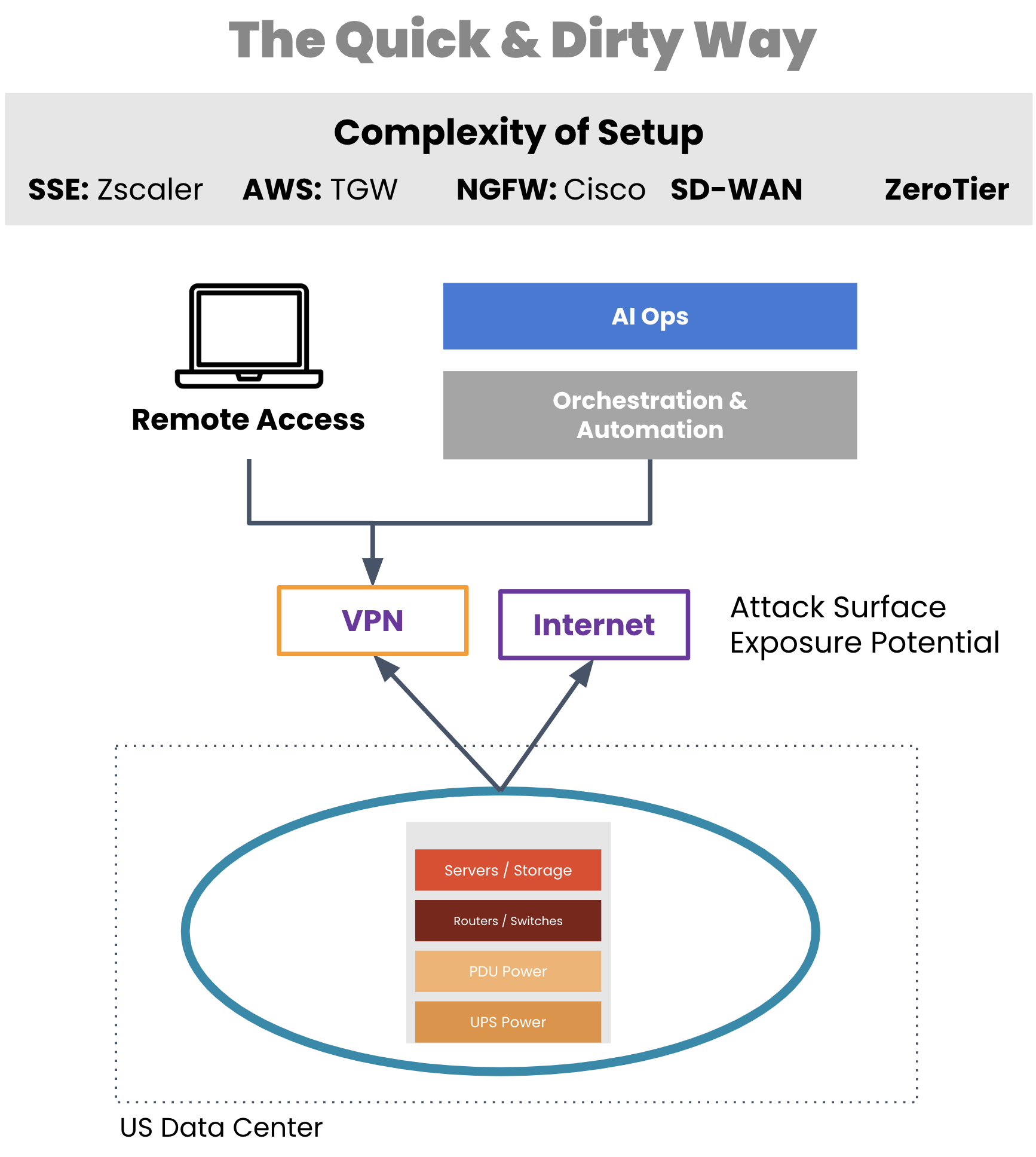
A critical tool for network engineers is out-of-band that enables remote WAN management. But typically, organizations employ a WAN management strategy that also relies on their production infrastructure, such as for creating VPN tunnels for management traffic. If a VPN tunnel becomes broken or the production gear fails, network engineers are suddenly left without remote access to their equipment.
Aside from a lack of availability, traditional OOB access comes with real security risks. Exposing LTE modems to the Internet, leveraging untrusted third-party VPN services, using OOB hardware that’s old and unpatched, and worse — exposing the management port of devices to public Internet. All of these are attack surfaces, any of which can give access to your infrastructure and be used as the pivot point to get to the rest of the infrastructure.
Image: Management access depends on production equipment to establish VPN tunnels.
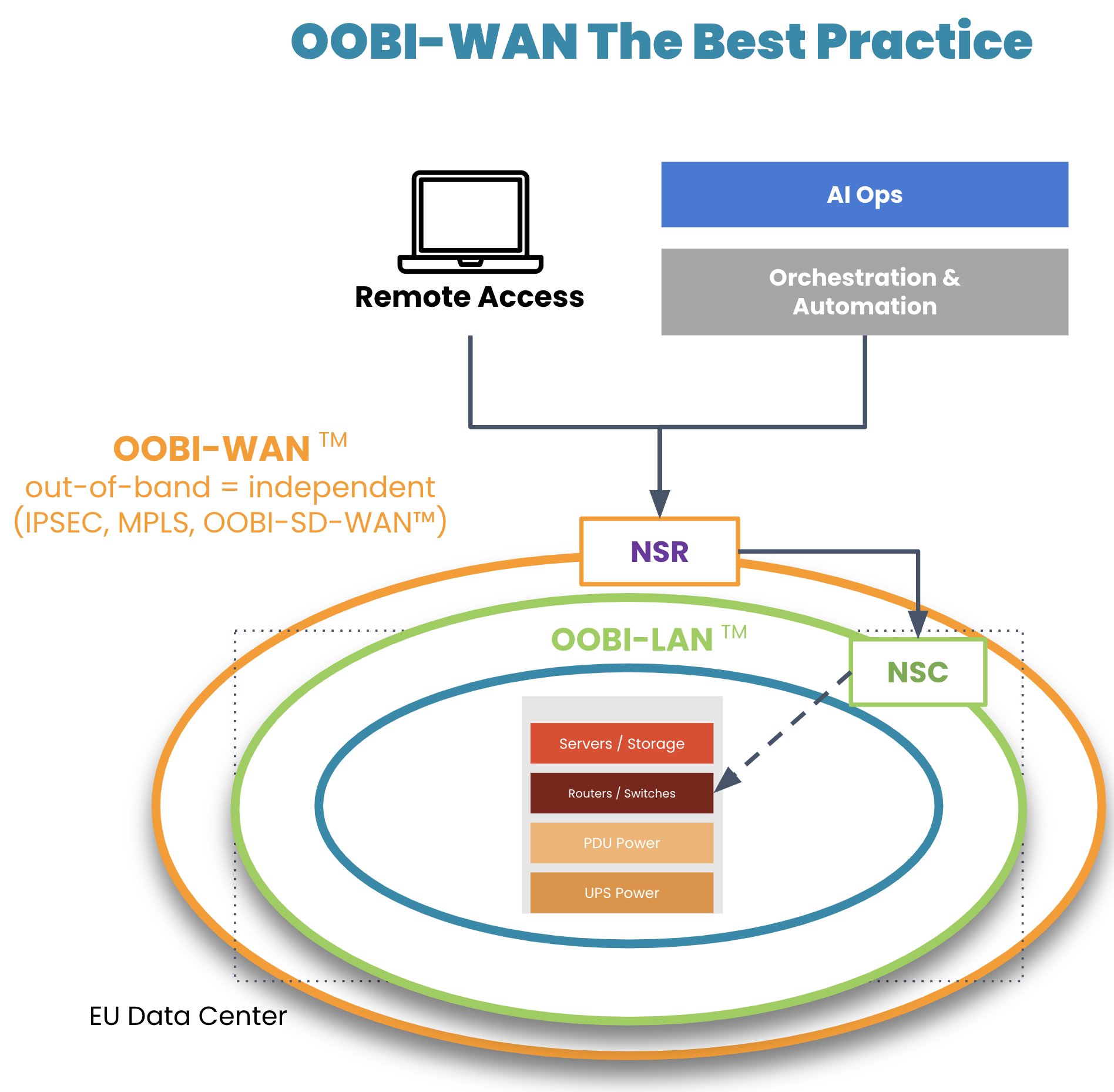
On top of their OOBI-LAN, organizations have built dedicated OOB infrastructure for the WAN (OOBI-WAN – there’s a Star Wars reference somewhere in there) for added resilience against these scenarios.
Image: OOBI-WAN and OOBI-LAN create a fully separate out-of-band infrastructure that can be used to completely rebuild production infrastructure.
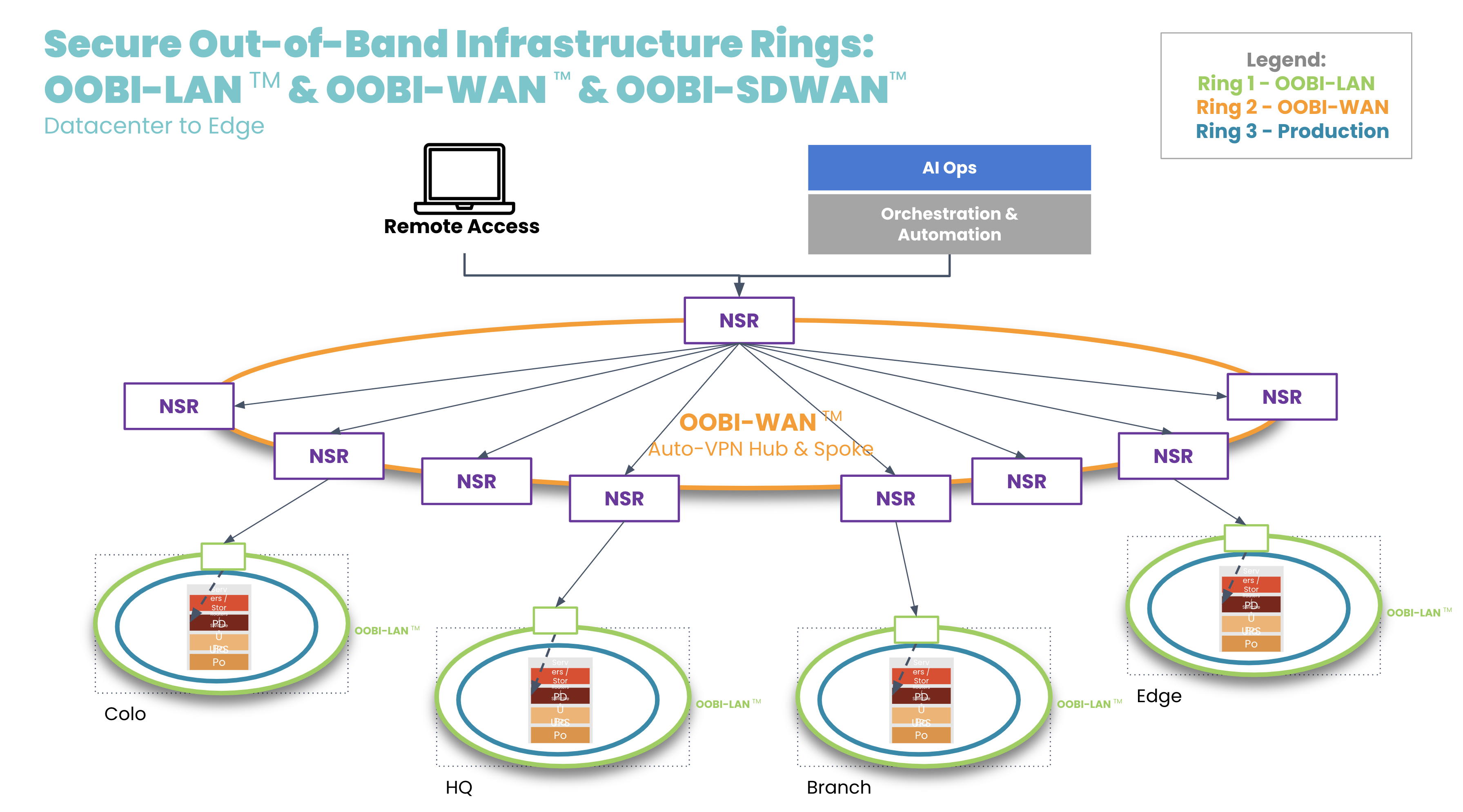
OOBI-WAN uses MPLS, IPsec, or SD-WAN links to create an overlay network dedicated specifically to management traffic. This gives network engineers private access to their infrastructure for management and troubleshooting, essentially creating a completely separate OOB network that does not rely on any part of the production network. OOBI-WAN lets network engineers use their WAN connection to remotely access their OOBI-LAN and fully rebuild their distributed networks, regardless of the state of their production infrastructure.
A key part of OOBI-WAN is the inherent security that is built at all layers. To build secure OOBI-WAN, the best practice is to use OOBI-SDWAN™ which automates the building of VPN tunnels between all the nodes that need to be managed. OOBI-SDWAN provides the expected auto-VPN feature which means VPN encryption keys remain secure, as they don’t need to be copied/pasted/typed into multiple third-party devices. OOBI-SDWAN also ensures that an SLA is provided on the OOBI network along with observability dashboards of connectivity and the access state of the network. The combination of OOBI-SDWAN with a zero trust security framework is the best way to gain reliability in a way that reduces your risk.
Another tool that network engineers are becoming familiar with is automation. Network automation codifies repetitive tasks to reduce workloads for configuration management, compliance, and troubleshooting. During a slow economy, being able to scale an IT team’s efforts is especially valuable to business operations and end customers.
There is one major concern, however: having automation that runs loose and begins destroying the network, much like a bull in a China shop. Network engineers typically must learn new automation tools and programming languages, which requires trial and error. And because there is a lack of a best practice reference architecture, teams don’t know any better than to automate directly on the production network. This causes anxiety, as one mistake could bring down the network, cause catastrophic losses, and leave network engineers without an efficient way to recover.
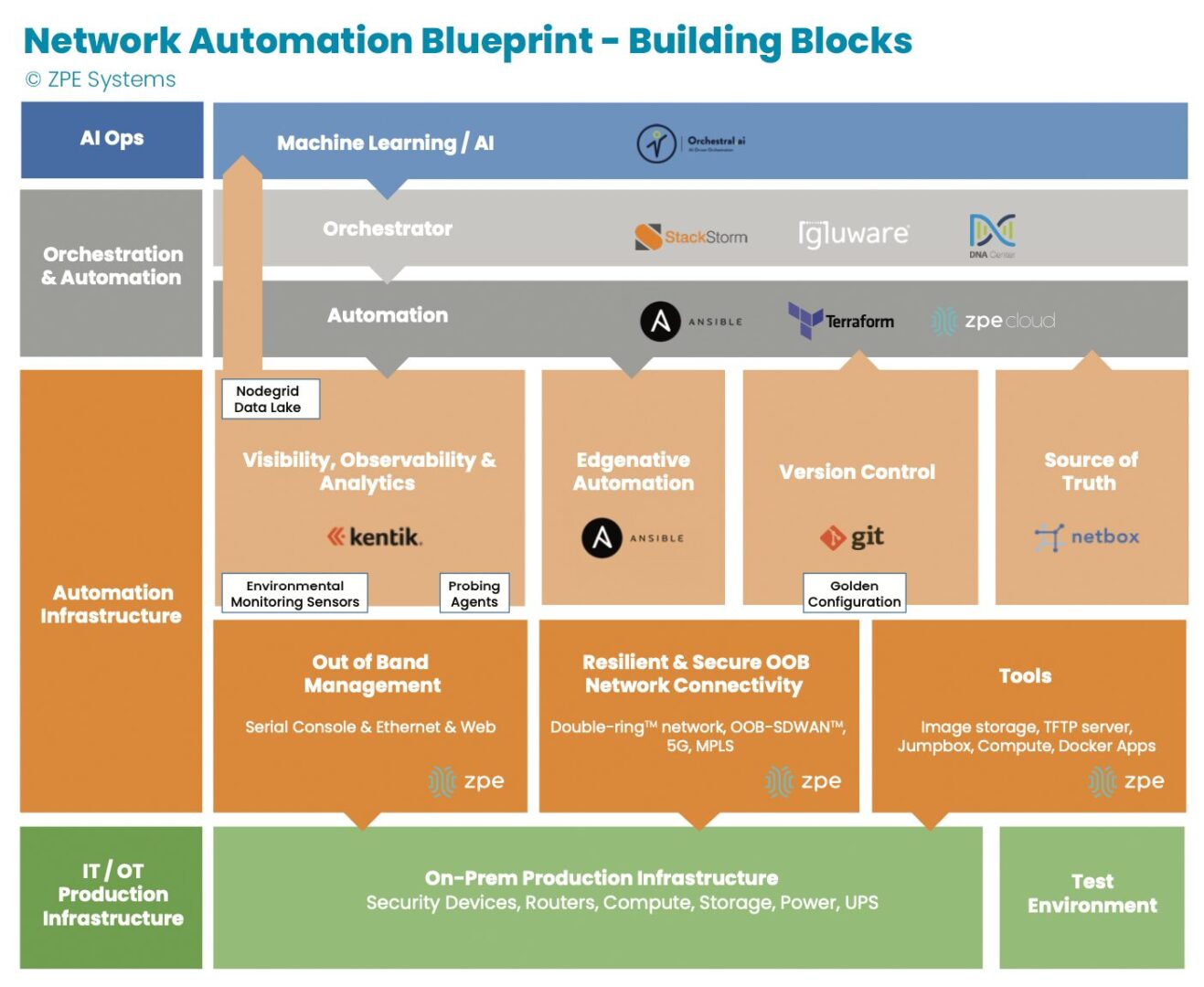
Image: The orange section describes dedicated automation infrastructure used for safely implementing automation.
In recent years, teams have been deploying automation on dedicated infrastructure like their OOB network. This automation infrastructure sits between the production infrastructure and the orchestration infrastructure, and serves as a safe way to build an automation pipeline. Open, Linux-based appliances like the Nodegrid Net SR combine a variety of functions and can host automation tools, like those for observability and analytics, version control, and source of truth. This independent automation infrastructure allows network engineers to ensure the integrity of configuration changes, software updates, and remediation protocols in an out-of-band manner, rather than testing directly on the production network. They can scale their capabilities, and in case of errors, roll back to a golden configuration that keeps services online.
Tool 4. Remote access to local jump box
Network engineers have another tool at their disposal: the jump box (a.k.a. jump server, jump host). A jump box hosts tools for maintaining operations, and these include file servers, image storage, configuration management tools, and troubleshooting commands. The jump box is a valuable asset for normal operations and for restoring services, such as when a device fails and needs its image rebuilt.
The issue with jump boxes is that they are typically a separate device that requires power, cooling, rack space, and maintenance. Some jump boxes also require on-site technicians to physically connect to the equipment needing repair.
Many organizations have adapted by upgrading their OOB infrastructure with appliances that can run full virtual machines (VMs). These can run all the tools mentioned above as well as with Docker containers, while consolidating power consumption, cooling resources, and rack space. The OOB appliance can double as a jump box. Combined with OOBI-LAN and OOBI-WAN, network engineers get remote access to re-image a device, diagnose DNS/routing issues, and perform any other necessary tasks. Key point is that discrete jump boxes – Like the Intel NUC — to be converted to virtual jump boxes running on a secure OOB platform like the Nodegrid Service routers.
Tool 5. Smart hands
A final way that network engineers get help through a slow economy is by outsourcing to so-called ‘smart hands.’ Employing smart hands means involving a third-party expert who can take on some of the IT workload. It’s a viable strategy, especially for teams feeling crushed by corporate belt tightening and the resulting mountain of tasks.
Companies who take this approach must be aware that the skills of smart hands varies greatly, as does the cost. This means it’s essential to strike a balance between which tasks to outsource, and which tasks to keep in house. For example, many organizations use smart hands for simple jobs such as replacing hardware and installing equipment at new sites. For more specialized jobs that require deeper knowledge of the environment, such as fixing a misconfigured IP address or route, teams use in-house personnel. This balance helps organizations get the support they need to keep operations running.
Get a cheat sheet to implement these tools fast
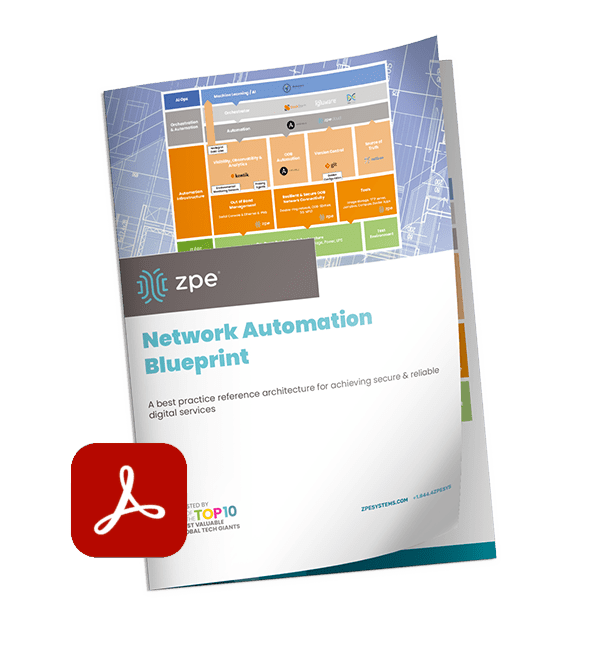
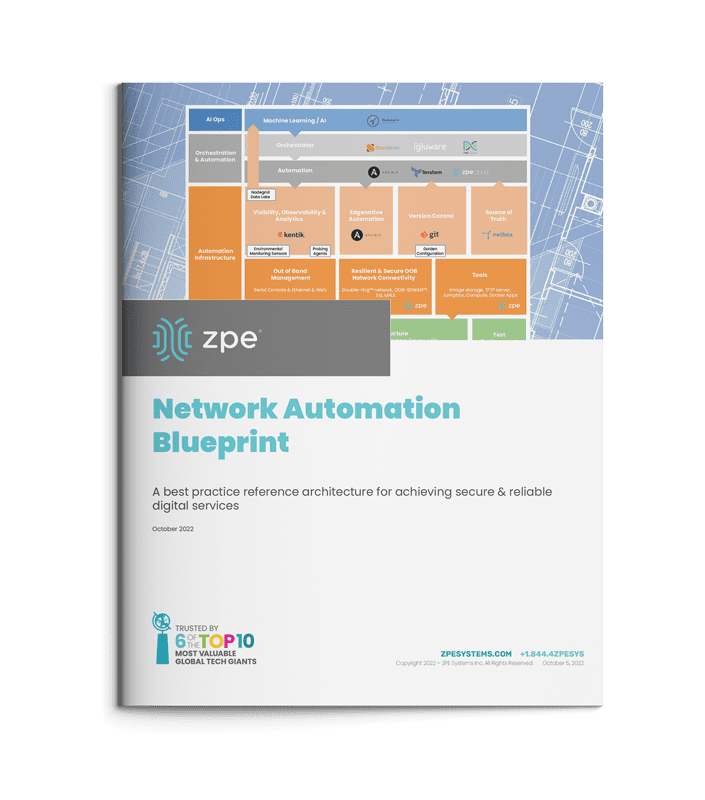
Some companies thrive during economic downturn, because they’ve intelligently placed these tools within their network architecture. Over the past decade, we’ve worked with these companies — including the largest tech giants — to describe in painstaking detail how they set up their infrastructure. We just released all 40+ pages of this validated reference architecture, complete with implementation diagrams and examples.
It’s called the network automation blueprint and it combines all of these tools. Network engineers can confidently answer questions like:
How do we meet SLAs with a smaller workforce?
How can we keep sites operating without physical access to equipment?
How can we perform weekly updates/patching without breaking things?
The blueprint is your cheat sheet to implementing a more resilient network, and fast. Click the button below to download your copy now.
Today’s IT teams must maintain a growing infrastructure of on-prem and cloud solutions. These range from physical routers, out-of-band devices, and firewalls, to Zero Trust Security solutions, micro-segmentation tools, and network automation integrations. Despite an abundance of physical and virtual solutions meant to help keep digital services online, many organizations face an overwhelming number of tasks just to sustain everyday operations.
With the rising risk of recession, organizations will be forced to cut back on resources including staff, training, and tools. This will only worsen the existing challenges teams face in their efforts to maintain their distributed infrastructure.
In this blog, we’ll explore three gaps that will leave IT teams scrambling this winter, and show you several practical approaches to cope during recession.
Gap 1: Lack of staff
IT teams have been historically understaffed, and most people can remember at least one significant tech worker hiring campaign from the past decade. Today’s CIOs may in fact be facing the biggest talent gap since 2008. For example, in the cybersecurity sector alone, the 2021 (ISC)2 Cybersecurity Workforce Study reported that despite adding 700,000 cybersecurity professionals to the workforce in 2021, there’s still a gap of more than 2.7 million workers globally, 377,000 of which are needed in the United States.
Trained staff are a must for managing an organization’s distributed sites, especially as team silos disappear and workers are required to have a breadth of skills. Business leaders increasingly need people who are proficient in networking and programming, so they can maintain normal operations while progressing their digital transformation initiatives such as hyperautomation. It’s a challenge that often comes down to hiring new talent or increasing the skills of existing employees, and both of these approaches require plenty of time and money.
This issue will only worsen with the coming recession as companies begin to tighten their belts and slash budgets. Major brands have already shed thousands of workers this year, leaving IT teams to make due with existing staff numbers or even reduced headcounts. In the simplest terms, the coming recession will leave companies much less willing or able to invest in staff.
Gap 2: Lack of tools to reduce workloads
Today’s infrastructure incorporates solutions from many different vendors, but the problem is these often come with their own unique tools that are meant to serve only a specific function. Managing SD-WAN, SASE, ZTNA, orchestration, and out-of-band solutions means jumping between disparate tools, many of which lack integration with one another. This complexity leaves operational teams stuck in a reactionary break/fix posture trying to climb mountains of never-ending support tickets.
To address this challenge, many Big Tech companies empower their IT teams through digital transformation initiatives, such as using automation to achieve a proactive approach. But this requires additional investments in upskilling staff and acquiring adequate automation infrastructure/tools. For many organizations, a lack of money and resources makes this difficult during normal economic conditions, and will only become exacerbated with the coming recession. IT teams will continue scrambling with their inflated workloads.
Gap 3: Lack of trust in automation
Automation can greatly reduce the risk of human error (and subsequent outages) by handling simple workloads, such as device provisioning and firmware updates. However, companies that do have the resources to implement automation also recognize its limitations. Automation solutions that aren’t optimized leave IT teams with mundane tasks like managing, scheduling, and restarting bots. But to even reach this level of automation requires training staff who typically don’t have a background in programming or development.
These teams will be unfamiliar with NetOps/DevOps concepts. In order to develop essential automation practices, these employees will need to learn through trial and error. This is a problem because most organizations lack the proper automation infrastructure and tools that allow their IT teams to recover from mistakes. Operational teams in charge of keeping infrastructure running often fear automation for this exact reason — if they make one error, there’s the potential that it will bring down the network, lead to unhappy customers, and cost them their job.
Close these gaps with the Network Automation Blueprint
You can close these gaps for good using out-of-band, jump boxes, and tools you already have. After years of working directly with tech giants, we’ve created a best practice reference architecture any company can use to automate their network. This Network Automation Blueprint has been proven by global enterprises to increase capabilities and reduce workloads through trustworthy automation.
The Dow recently posted decreases of 1,300 and 1,000 points within weeks of each other. Companies including Apple, Google, and Netflix have slowed hiring this year or outright cut staff. For CIOs, the message is clear: Winter is coming, and so is a recession.
We all know that company revenue is directly tied to IT infrastructure and the digital services it provides. In the simplest terms: network down, revenue down. So when economic downturns lead to hiring freezes and increasing workloads for IT, CIOs need to figure out how to ‘do more with less’ in order to maintain service levels. The reality is that we’d still expect IT to fulfill our support tickets even during the zombie apocalypse.
Today, business leaders are gearing up for the possibility of such challenges looming larger on the horizon, not to mention the potential for more covid lockdowns and other disruptions. No matter the reason, the expectation remains the same – keep networks reliable and secure.
Business leaders are uncertain about the coming winter
Business leaders are growing uncertain about the coming winter months because of the potential for more major operational shakeups, like those that occurred at the start of the coronavirus pandemic in 2020. This uncertainty stems from two looming possibilities:
A winter recession, which economists predict is more likely as inflation increases. This will force business leaders to freeze hiring and keep operations running with limited staff on hand.
A covid resurgence, which experts predict could lead to up to one million daily cases in the United States alone and infect 100 million Americans. Having more than one-third of the adult population unable to work for weeks at a time will leave infrastructure minimally maintained, leading to service downtime and revenue loss.
As CIO, your peers will ask how you plan to increase top line revenue despite the winter recession, limited staff numbers, and potential lockdowns. This means you’ll need solid answers to three critical questions that will come up at your next board meeting.
3 Questions to Help CIOs Survive the Winter Recession
If we need to freeze hiring, can we continue to fulfill SLAs for internal & external digital services?
The IT workload has grown exponentially since infrastructure moved from centralized to decentralized. There’s just too much infrastructure scattered in so many data centers, colocations, and branch offices — from servers and routers, to branch gateways, remote sensors, smart building infrastructure, user experience monitoring applications, and firewalls. On top of this, pushing workloads to edge compute and 5G will inevitably lead to more micro and nano data centers that need to be maintained. Your IT teams are already struggling to keep up with everyday operations like configuration management, troubleshooting, and recovering down equipment. Now imagine how much stress they’ll endure if they’re unable to get additional help due to hiring freezes or pandemic lockdowns.
If staff can no longer physically access equipment, can we maintain IT availability?
As we saw at the beginning of the Covid pandemic, companies scrambled to find ways to accommodate normal operations while shifting staff to a fully digital workplace. But many companies were unprepared and are still struggling to adapt. In fact in 2021, IT organizations reported that their highest priority was to improve digital work for employees, but 66% said they didn’t have the capabilities to support the needs of remote and hybrid work. IT organizations must be prepared to accommodate flexible work well into the future, but this typically means employing a mix of local smart hands, third party service providers, and remote management solutions that significantly inflate operating costs. Despite any potential lockdowns, physical access can already be challenging when equipment resides at remote locations that are costly, inconvenient, or downright dangerous to access.
Will we be able to stay in compliance and keep up with security patches?
Many security breaches occur not because patches don’t exist, but because installing these patches might lead to unforeseen breakages. Some IT teams still run software that’s years old and several major revisions outdated. Meanwhile, these teams can only hope that vulnerabilities won’t be exploited and lead to business incurring regulatory fines or penalties. In a nutshell, systems go unpatched and grow more vulnerable as time goes on, because teams are afraid to risk breakages that they can’t easily recover from. This problem will only worsen when hiring is put on hold and physical site access is restricted.
Big tech has it figured out
Big tech companies have thrived on recessions and often come out stronger. How? Because they understand that they must empower their IT organizations during economic downturn. According to Gartner, there’s no better way to do this than to invest in digital transformation. But exactly what digital investments do these companies make? As CIO, you have such a large and distributed IT organization to wrap your arms around, that it’s difficult to define the practical steps you need to take. When answering these three key questions, your IT and executive teams will need to know: “How do you plan to accomplish this?”
Use big tech’s secret: The Network Automation Blueprint
The network automation blueprint is made up of four major building blocks that create a management network design pattern to accommodate hyperautomation. These building blocks are:
IT/OT production infrastructure: This includes servers, switches, routers, and common production equipment.
Automation infrastructure: This is a truly independent network that enables automation to reach the production infrastructure in an out-of-band fashion. Customers call this the double-ring network. This layer often uses a combination of serial console and Ethernet connections, and also includes staging jump boxes, local storage, TFTP source of truth, and version control systems.
Orchestration and automation systems: This is where the desired outcome and playbooks are sourced from. The key is that the orchestration reaches the production systems through the independent out-of-band network to achieve the desired outcome.
AI Ops infrastructure: This layer receives rich information from observability platforms to make reactive and predictive decisions at scale. Using machine learning and artificial intelligence, this layer learns the network’s normal behaviors and pushes changes through the orchestration and automation layer.
This blueprint is the reference architecture validated to successfully implement Gartner’s definition of hyperautomation, as well as meet the Open Networking User Group (ONUG) Orchestration and Automation recommendations. This blueprint gives you the necessary layers to confidently answer the three questions that will come up during your boardroom meeting, and outlines the practical steps required to achieve IT resilience. Here’s how it answers these questions:
If we need to freeze hiring, can we continue providing reliable IT services?
By separating the automation infrastructure from the production network, teams can build hyperautomated environments while having a safe way to recover from errors. Despite having limited staff and/or a virtual workforce, teams can develop their automation pipelines to reduce workloads and meet SLAs.
If staff can no longer physically access equipment, can we maintain IT availability?
With the network automation blueprint, teams get a management network design pattern that ties into all of their solutions. This means they get a full virtual presence to manage SD-WAN, firewalls, switches, servers, routers, and their entire stack. The blueprint also calls for running automation locally so workloads can be carried out despite connectivity problems. These allow teams to maintain their sites and availability across distributed architectures.
Will we be able to stay in compliance and keep up with security patches?
Automating via out-of-band means teams no longer need anxiety about the dreaded Friday night upgrade. Instead of running outdated software and configurations because “if it ain’t broke, don’t fix it,” teams can ensure the integrity of updates before pushing them live. This allows them to take advantage of the latest software releases, close security gaps, and maintain compliance.
Meeting customer expectations for always-on digital services is a major challenge for any enterprise. That’s why it’s important for CIOs to empower their teams with hyperautomation and automate as many processes as possible. The network automation blueprint gives you the reference architecture that’s been validated by big tech as the safe way to build hyperautomated environments. This blueprint is now available just in time to help organizations prepare for the looming winter recession.
Get the Network Automation Blueprint now
Now is the time to prepare for winter, and you can start laying the groundwork for hyperautomation. Click the button below to download the network automation blueprint. You’ll see the same network architecture used by Big Tech, now tailored to help any size company provide reliable digital services.
Modern enterprise networks are no longer contained to a single building or LAN. They’re highly distributed, with branch offices, remote employees, and global data centers that communicate and work together. That’s why traditional enterprise network security software—designed for on-premises infrastructure and castle-and-moat protection strategies—often struggles to secure the edge.
The challenge of traditional enterprise network security software at the edge
For years, enterprise network security followed the castle-and-moat approach. All the enterprise’s valuable systems and data are kept on the internal network (a.k.a. the castle), and a firewall creates a security perimeter (a.k.a. the moat) around those resources. This is easier to do when everything is housed in the same location. This becomes challenging (if not impossible) when those resources are spread across large geographical and logical distances.
For example, organizations may have a hard time extending their enterprise security policies to users, devices, and applications that aren’t on the main network. That goes beyond remote workers to also include cloud platforms and remote edge data centers. Some teams overcome this challenge by creating separate policies, but then they’re left with the logistical nightmare of updating and maintaining these policies across many different systems and locations. Due to errors or negligence, inconsistent security policies can leave gaps in your network security coverage.
In addition, traditional network security requires all remote traffic to be backhauled through the main firewall for inspection, creating a network bottleneck. That means all network requests worldwide must travel to the central data center, even if the traffic is ultimately destined for remote or cloud resources. This added network load can cause latency, timeouts, and other performance issues for the entire enterprise.
Challenges like these led to the evolution of enterprise network security software for edge deployments.
How enterprise network security software has evolved for the edge
Edge computing is all about moving resources closer to the users, systems, and applications that need them. Enterprise network security software for the edge does the same thing—it places security policies and controls in the cloud or small regional data centers, so remote systems and users don’t need to be routed back to the central network. The leading solution for edge security is Security Service Edge, or SSE.
SSE rolls up multiple security technologies into one integrated, cloud-based platform. Traffic from the edge is routed through the SSE security stack using SD-WAN (software-defined wide area networking). If that traffic is bound for cloud- or web-based resources, it’s allowed to bypass the central network entirely. Zero Trust Network Access (ZTNA) ensures safe and secure access if the traffic is destined for resources on the enterprise network.
Let’s discuss the specific technology that makes SSE the best solution for edge network security.
Zero Trust Network Access (ZTNA)
Zero Trust Network Access allows remote users and systems to access resources on the enterprise network, similar to a VPN. ZTNA is more secure than VPNs because it only gives users access to one specific resource at a time. They cannot jump around the network without re-authenticating and re-verifying trust. That means the lateral movement of a compromised account is limited, with malicious actors needing to re-verify their identity repeatedly, increasing their chances of getting caught.
ZTNA gives edge users and devices seamless access to the enterprise resources they need while reducing the risk of remote connections. It allows you to apply zero trust security principles to your network’s edge to ensure consistent security across your enterprise.
Firewall as a Service (FWaaS)
Firewall as a Service delivers network firewall capabilities as a cloud-based service. Incoming and outgoing edge traffic is routed through the FWaaS instead of the physical firewall in the data center, reducing the load on the enterprise network. FWaaS solutions for SSE typically include features like:
❖URL/IP filtering
❖Intrusion detection and prevention
❖Network monitoring
❖Deep packet inspection (DPI)
A Firewall as a Service is entirely cloud-based, which means you don’t need to deploy any additional hardware to edge locations. This also makes FWaaS easily scalable, allowing you to protect new branch offices or add additional features with the click of a button. FWaaS delivers powerful firewall functionality to the edge without expensive hardware or network bottlenecks.
Cloud Access Security Broker (CASB)
A Cloud Access Security Broker allows you to extend your enterprise security policies to cloud resources and traffic. The CASB acts as a gatekeeper between your enterprise network and the cloud, enforcing zero trust policies on any traffic flowing between the two. In an SSE solution, the CASB performs many functions, such as:
→ Analyzing the behavior of users and entities to determine if they’re trustworthy before allowing access to cloud resources. This is also known as User and Entity Behavior Analytics, or UEBA.
→ Using firewall and antivirus technology to detect malicious software (malware) and block it from entering the enterprise network
→ Using enterprise data governance policies to prevent data exfiltration, which is known as Data Loss Prevention (DLP).
→ Discovering, identifying, and analyzing all the enterprise’s cloud resources to determine relative risk. This is known as Cloud Discovery.
The CASB is what an SSE solution uses to extend your enterprise security policies to remote and cloud-based systems. This allows you to maintain precise and consistent zero trust policies across your distributed infrastructure, so your edge doesn’t become a weakness in your defense strategy.
SSE is powerful because it combines a complete security stack into one cloud-based service. That means you don’t have to force your edge resources into the perimeter created by traditional enterprise network security software.
Connecting your edge to SSE solutions
There’s still one critical component that’s missing: the technology that connects your edge resources and traffic to the SSE stack in the cloud. The most reliable and efficient on-ramp to an SSE solution is SD-WAN technology. SD-WAN creates a virtual overlay network on top of your WAN hardware, which enables automation and orchestration of remote, edge traffic management. SD-WAN uses intelligent routing to automatically separate edge traffic destined for the cloud, allowing it to bypass your firewall and flow through your SSE stack instead.
For example, the Nodegrid SD-WAN solution from ZPE Systems allows seamless integrations with SSE solutions. Placing Nodegrid Services Routers in your edge locations creates an access on-ramp to SSE and provides powerful branch networking functionality.
Want to learn more about network security software?
Watch a free demo of Nodegrid in action to see for yourself how enterprise network security software has evolved for the edge. Or get in contact with us!
Hybrid cloud deployments allow you to combine the best features of public cloud, private cloud, and on-premises infrastructure. But what exactly goes into hybrid cloud infrastructure, and how is it achieved? In this blog, we’ll compare the expectations of a hybrid cloud to the realities of implementation and provide advice on overcoming these challenges.
What is hybrid cloud infrastructure?
Hybrid cloud infrastructure involves using a combination of public cloud, private cloud, and on-premises data center environments. True hybrid cloud architecture allows you to move workloads back and forth among these environments safely and securely.
A public cloud is what most people think of when they hear cloud computing. Public cloud services are decoupled from the underlying infrastructure and delivered as a web-based application or platform. The actual compute resources are shared amongst many other customers. Examples of a public cloud include Microsoft 365 and Google Apps.
Private cloud infrastructure is owned and managed by a third-party provider, but other customers do not share the hardware you use. You rent dedicated storage and compute resources, but have no physical access to or control over the infrastructure. Examples of a private cloud include Microsoft Azure and Amazon Virtual Private Cloud (VPC).
An on-premises data center is a data center that your organization has complete control over. It may or may not be on the same premises as your headquarters office. Not all hybrid cloud infrastructures include on-premises environments—only public and private clouds are required.
The public cloud offers many benefits for enterprises, such as scalability and cost savings. However, organizations frequently need greater control over certain data and resources. For example, any company working with healthcare information, or providing services to the federal government, must follow strict privacy and security regulations. That’s why many organizations opt to keep some of their resources in on-premises data centers or private clouds.
That said, keeping these resources isolated from your public cloud services, applications, and data is not always feasible. There’s a need for interoperability and orchestration of workloads among mixed architectures. In a hybrid cloud infrastructure, there is a virtual service that acts as a managed “bridge” between different environments. This allows you to move workloads, applications, data, and other resources around as needed to ensure peak performance without compromising security.
Hybrid cloud infrastructure: expectations vs. reality
The expectation for hybrid cloud infrastructure is that all of your systems, services, and applications will work together seamlessly. Your data and other resources will be portable, so you can move them from one cloud to another without compatibility issues or other headaches. Most importantly, you’ll have a centralized, web-based platform to orchestrate workloads across your heterogenous environment. The reality of hybrid cloud, however, is often much more complicated.
Vendor lock-in
One major hurdle to implementing a hybrid network environment is closed ecosystems. Vendor lock-in can prevent your legacy on-premises solutions from interoperating with cloud hardware and software, and vice-versa. Data and applications designed for traditional infrastructure may be incompatible with cloud platforms. And not only do these systems all need to communicate and work together, but you also need an orchestration platform that can dig its hooks into disparate vendor solutions and control them equally.
Issues with vendor interoperability could force you to rebuild your entire stack just to enable hybrid orchestration. To get around this expensive and time-consuming challenge, you need a hybrid cloud infrastructure orchestration platform that’s based on an open architecture for true vendor neutrality. This will allow you to manage workloads across cloud and legacy environments without replacing the systems and software already in place.
Infrastructure complexity
Hybrid cloud infrastructure reduces the number of physical servers and storage devices you’re responsible for, so you might assume this will reduce the complexity of your network operations. This isn’t necessarily the case. The virtual and physical hardware responsibility is shifted to the cloud vendor, but your team will still need to know how to configure, monitor, and maintain all your cloud services.
In a hybrid cloud infrastructure, there are often many different platforms from different vendors. That means you need people who are experts in all these systems. Plus, you’ll also need a more complex network architecture to support a seamless hybrid cloud environment. That often means purchasing more boxes from more vendors, which your team must also learn to configure and maintain.
One way to reduce the complexity of your hybrid cloud infrastructure is by consolidating your networking stack. For example, you can use high-density serial console switches that provide out-of-band (OOB) management interfaces, network failover, environmental monitoring, and network switching. Similarly, you can look for modular, multi-function devices that allow you to create a custom box that includes all the specific hardware and functionality you need.This will reduce the number of devices in your rack and provide administrators with a single platform to manage all this functionality.
Spiraling costs
Cloud services are often less expensive to deploy and scale than on-premises infrastructure. Instead of a large up-front cost to purchase and install new hardware solutions, you typically pay a smaller recurring fee. When you need more resources, you simply upgrade your services for additional cost without needing to buy and configure more hardware.
The issue is that these recurring fees can begin to snowball over time, especially if you keep increasing your contract. Many cloud services often come in bundles or packages, meaning you can’t just pick and choose the functionality you need a la carte. So, you could end up paying for features you don’t even need.
Plus, you’ll incur additional costs if you need to rebuild part or all of your on-premises stack to enable hybrid cloud orchestration. The same goes for the networking technology that’s required for hybrid integrations. These expenses can be reduced by following the advice above—using a completely vendor-neutral hybrid cloud orchestration platform. Plus, consolidating and streamlining your infrastructure in as many ways as possible, such as with the hardware itself, but also with the software and management layers. For example, an OS allows you to easily/seamlessly integrate many different solutions, and a management platform allows you to manage everything from a normalized UI—rather than having to spend money on many different specialists.
Implementing a hybrid cloud infrastructure is often more challenging than organizations expect. However, by using vendor-neutral solutions and consolidating your tech stack, you can avoid vendor lock-in, reduce the complexity of your infrastructure, and keep costs in check.
Ready to simplify hybrid cloud infrastructure?
The Nodegrid infrastructure management solution from ZPE Systems enables true hybrid cloud orchestration. Nodegrid’s open architecture and vendor-neutral hardware can get its hooks into all your legacy, on-premises, and cloud solutions, so you have total control over your hybrid environment. With the ZPE Cloud management platform, you can monitor and orchestrate your entire infrastructure from behind one pane of glass.
Plus, Nodegrid’s consolidated networking hardware can help you reduce the complexity of your tech stack while still delivering all the features and functionality you need. Some of the world’s biggest tech companies are benefiting from this, by using Nodegrid to deploy and manage their hybrid infrastructures.
What is hybrid cloud infrastructure, and how can Nodegrid help you achieve it?
ZPE Systems delivers innovative solutions to simplify infrastructure managment at the datacenter, branch, and edge.
Learn how our Zero Pain Ecosystem can solve your biggest network orchestration pain points.