Providing Out-of-Band Connectivity to Mission-Critical IT Resources

CIOs: 3 Boardroom Questions to Survive Winter Recession & Lockdowns

Winter is Approaching
The Dow recently posted decreases of 1,300 and 1,000 points within weeks of each other. Companies including Apple, Google, and Netflix have slowed hiring this year or outright cut staff. For CIOs, the message is clear: Winter is coming, and so is a recession.

We all know that company revenue is directly tied to IT infrastructure and the digital services it provides. In the simplest terms: network down, revenue down. So when economic downturns lead to hiring freezes and increasing workloads for IT, CIOs need to figure out how to ‘do more with less’ in order to maintain service levels. The reality is that we’d still expect IT to fulfill our support tickets even during the zombie apocalypse.

Today, business leaders are gearing up for the possibility of such challenges looming larger on the horizon, not to mention the potential for more covid lockdowns and other disruptions. No matter the reason, the expectation remains the same – keep networks reliable and secure.

Business leaders are uncertain about the coming winter

Business leaders are growing uncertain about the coming winter months because of the potential for more major operational shakeups, like those that occurred at the start of the coronavirus pandemic in 2020. This uncertainty stems from two looming possibilities:

As CIO, your peers will ask how you plan to increase top line revenue despite the winter recession, limited staff numbers, and potential lockdowns. This means you’ll need solid answers to three critical questions that will come up at your next board meeting.

3 Questions to Help CIOs Survive the Winter Recession

If we need to freeze hiring, can we continue to fulfill SLAs for internal & external digital services?

The IT workload has grown exponentially since infrastructure moved from centralized to decentralized. There’s just too much infrastructure scattered in so many data centers, colocations, and branch offices — from servers and routers, to branch gateways, remote sensors, smart building infrastructure, user experience monitoring applications, and firewalls. On top of this, pushing workloads to edge compute and 5G will inevitably lead to more micro and nano data centers that need to be maintained. Your IT teams are already struggling to keep up with everyday operations like configuration management, troubleshooting, and recovering down equipment. Now imagine how much stress they’ll endure if they’re unable to get additional help due to hiring freezes or pandemic lockdowns.

If staff can no longer physically access equipment, can we maintain IT availability?

As we saw at the beginning of the Covid pandemic, companies scrambled to find ways to accommodate normal operations while shifting staff to a fully digital workplace. But many companies were unprepared and are still struggling to adapt. In fact in 2021, IT organizations reported that their highest priority was to improve digital work for employees, but 66% said they didn’t have the capabilities to support the needs of remote and hybrid work. IT organizations must be prepared to accommodate flexible work well into the future, but this typically means employing a mix of local smart hands, third party service providers, and remote management solutions that significantly inflate operating costs. Despite any potential lockdowns, physical access can already be challenging when equipment resides at remote locations that are costly, inconvenient, or downright dangerous to access.

Will we be able to stay in compliance and keep up with security patches?

Many security breaches occur not because patches don’t exist, but because installing these patches might lead to unforeseen breakages. Some IT teams still run software that’s years old and several major revisions outdated. Meanwhile, these teams can only hope that vulnerabilities won’t be exploited and lead to business incurring regulatory fines or penalties. In a nutshell, systems go unpatched and grow more vulnerable as time goes on, because teams are afraid to risk breakages that they can’t easily recover from. This problem will only worsen when hiring is put on hold and physical site access is restricted.

Big tech has it figured out

Big tech companies have thrived on recessions and often come out stronger. How? Because they understand that they must empower their IT organizations during economic downturn. According to Gartner, there’s no better way to do this than to invest in digital transformation. But exactly what digital investments do these companies make? As CIO, you have such a large and distributed IT organization to wrap your arms around, that it’s difficult to define the practical steps you need to take. When answering these three key questions, your IT and executive teams will need to know: “How do you plan to accomplish this?”

Use big tech’s secret: The Network Automation Blueprint 

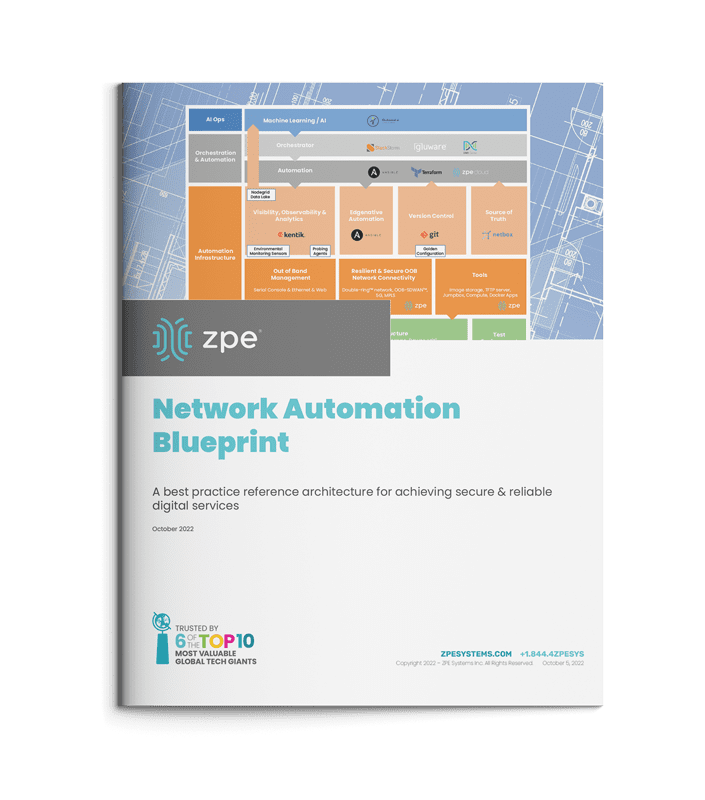
The network automation blueprint is made up of four major building blocks that create a management network design pattern to accommodate hyperautomation. These building blocks are:

  • IT/OT production infrastructure: This includes servers, switches, routers, and common production equipment.
  • Automation infrastructure: This is a truly independent network that enables automation to reach the production infrastructure in an out-of-band fashion.  Customers call this the double-ring network. This layer often uses a combination of serial console and Ethernet connections, and also includes staging jump boxes, local storage, TFTP source of truth, and version control systems.
  • Orchestration and automation systems: This is where the desired outcome and playbooks are sourced from. The key is that the orchestration reaches the production systems through the independent out-of-band network to achieve the desired outcome.
  • AI Ops infrastructure: This layer receives rich information from observability platforms to make reactive and predictive decisions at scale. Using machine learning and artificial intelligence, this layer learns the network’s normal behaviors and pushes changes through the orchestration and automation layer.

This blueprint is the reference architecture validated to successfully implement Gartner’s definition of hyperautomation, as well as meet the Open Networking User Group (ONUG) Orchestration and Automation recommendations. This blueprint gives you the necessary layers to confidently answer the three questions that will come up during your boardroom meeting, and outlines the practical steps required to achieve IT resilience. Here’s how it answers these questions:

If we need to freeze hiring, can we continue providing reliable IT services?

By separating the automation infrastructure from the production network, teams can build hyperautomated environments while having a safe way to recover from errors. Despite having limited staff and/or a virtual workforce, teams can develop their automation pipelines to reduce workloads and meet SLAs.

If staff can no longer physically access equipment, can we maintain IT availability?

With the network automation blueprint, teams get a management network design pattern that ties into all of their solutions. This means they get a full virtual presence to manage SD-WAN, firewalls, switches, servers, routers, and their entire stack. The blueprint also calls for running automation locally so workloads can be carried out despite connectivity problems. These allow teams to maintain their sites and availability across distributed architectures.

Will we be able to stay in compliance and keep up with security patches?

Automating via out-of-band means teams no longer need anxiety about the dreaded Friday night upgrade. Instead of running outdated software and configurations because “if it ain’t broke, don’t fix it,” teams can ensure the integrity of updates before pushing them live. This allows them to take advantage of the latest software releases, close security gaps, and maintain compliance.

Meeting customer expectations for always-on digital services is a major challenge for any enterprise. That’s why it’s important for CIOs to empower their teams with hyperautomation and automate as many processes as possible. The network automation blueprint gives you the reference architecture that’s been validated by big tech as the safe way to build hyperautomated environments. This blueprint is now available just in time to help organizations prepare for the looming winter recession.
Blueprint

Get the Network Automation Blueprint now

Now is the time to prepare for winter, and you can start laying the groundwork for hyperautomation. Click the button below to download the network automation blueprint. You’ll see the same network architecture used by Big Tech, now tailored to help any size company provide reliable digital services.


 

How Enterprise Network Security Software has Evolved for the Edge

Enterprise Network Security Software.

Modern enterprise networks are no longer contained to a single building or LAN. They’re highly distributed, with branch offices, remote employees, and global data centers that communicate and work together. That’s why traditional enterprise network security software—designed for on-premises infrastructure and castle-and-moat protection strategies—often struggles to secure the edge.

The challenge of traditional enterprise network security software at the edge

For years, enterprise network security followed the castle-and-moat approach. All the enterprise’s valuable systems and data are kept on the internal network (a.k.a. the castle), and a firewall creates a security perimeter (a.k.a. the moat) around those resources. This is easier to do when everything is housed in the same location. This becomes challenging (if not impossible) when those resources are spread across large geographical and logical distances.

For example, organizations may have a hard time extending their enterprise security policies to users, devices, and applications that aren’t on the main network. That goes beyond remote workers to also include cloud platforms and remote edge data centers. Some teams overcome this challenge by creating separate policies, but then they’re left with the logistical nightmare of updating and maintaining these policies across many different systems and locations. Due to errors or negligence, inconsistent security policies can leave gaps in your network security coverage.

In addition, traditional network security requires all remote traffic to be backhauled through the main firewall for inspection, creating a network bottleneck. That means all network requests worldwide must travel to the central data center, even if the traffic is ultimately destined for remote or cloud resources. This added network load can cause latency, timeouts, and other performance issues for the entire enterprise.

Challenges like these led to the evolution of enterprise network security software for edge deployments.

How enterprise network security software has evolved for the edge

Edge computing is all about moving resources closer to the users, systems, and applications that need them. Enterprise network security software for the edge does the same thing—it places security policies and controls in the cloud or small regional data centers, so remote systems and users don’t need to be routed back to the central network. The leading solution for edge security is Security Service Edge, or SSE.

SSE rolls up multiple security technologies into one integrated, cloud-based platform. Traffic from the edge is routed through the SSE security stack using SD-WAN (software-defined wide area networking). If that traffic is bound for cloud- or web-based resources, it’s allowed to bypass the central network entirely. Zero Trust Network Access (ZTNA) ensures safe and secure access if the traffic is destined for resources on the enterprise network.

Let’s discuss the specific technology that makes SSE the best solution for edge network security.

Zero Trust Network Access (ZTNA)

Zero Trust Network Access allows remote users and systems to access resources on the enterprise network, similar to a VPN. ZTNA is more secure than VPNs because it only gives users access to one specific resource at a time. They cannot jump around the network without re-authenticating and re-verifying trust. That means the lateral movement of a compromised account is limited, with malicious actors needing to re-verify their identity repeatedly, increasing their chances of getting caught.

ZTNA gives edge users and devices seamless access to the enterprise resources they need while reducing the risk of remote connections. It allows you to apply zero trust security principles to your network’s edge to ensure consistent security across your enterprise.

Firewall as a Service (FWaaS)

Firewall as a Service delivers network firewall capabilities as a cloud-based service. Incoming and outgoing edge traffic is routed through the FWaaS instead of the physical firewall in the data center, reducing the load on the enterprise network. FWaaS solutions for SSE typically include features like:

  • ❖URL/IP filtering
  • ❖Intrusion detection and prevention
  • ❖Network monitoring
  • ❖Deep packet inspection (DPI)

A Firewall as a Service is entirely cloud-based, which means you don’t need to deploy any additional hardware to edge locations. This also makes FWaaS easily scalable, allowing you to protect new branch offices or add additional features with the click of a button. FWaaS delivers powerful firewall functionality to the edge without expensive hardware or network bottlenecks.

Cloud Access Security Broker (CASB)

A Cloud Access Security Broker allows you to extend your enterprise security policies to cloud resources and traffic. The CASB acts as a gatekeeper between your enterprise network and the cloud, enforcing zero trust policies on any traffic flowing between the two. In an SSE solution, the CASB performs many functions, such as:

  • → Analyzing the behavior of users and entities to determine if they’re trustworthy before allowing access to cloud resources. This is also known as User and Entity Behavior Analytics, or UEBA.
  • → Using firewall and antivirus technology to detect malicious software (malware) and block it from entering the enterprise network
  • → Using enterprise data governance policies to prevent data exfiltration, which is known as Data Loss Prevention (DLP).
  • → Discovering, identifying, and analyzing all the enterprise’s cloud resources to determine relative risk. This is known as Cloud Discovery.

The CASB is what an SSE solution uses to extend your enterprise security policies to remote and cloud-based systems. This allows you to maintain precise and consistent zero trust policies across your distributed infrastructure, so your edge doesn’t become a weakness in your defense strategy.

SSE is powerful because it combines a complete security stack into one cloud-based service. That means you don’t have to force your edge resources into the perimeter created by traditional enterprise network security software.

Connecting your edge to SSE solutions

There’s still one critical component that’s missing: the technology that connects your edge resources and traffic to the SSE stack in the cloud. The most reliable and efficient on-ramp to an SSE solution is SD-WAN technology. SD-WAN creates a virtual overlay network on top of your WAN hardware, which enables automation and orchestration of remote, edge traffic management. SD-WAN uses intelligent routing to automatically separate edge traffic destined for the cloud, allowing it to bypass your firewall and flow through your SSE stack instead.

For example, the Nodegrid SD-WAN solution from ZPE Systems allows seamless integrations with SSE solutions. Placing Nodegrid Services Routers in your edge locations creates an access on-ramp to SSE and provides powerful branch networking functionality.

Learn more about securing your edge with SSE:

→ Top Security Service Edge Use Cases & Benefits for Enterprises
→ Security Service Edge (SSE) Implementation Guide for Enterprises
→ SSE Magic Quadrant: Key Takeaways of the 2022 Report

Want to learn more about network security software?

Watch a free demo of Nodegrid in action to see for yourself how enterprise network security software has evolved for the edge. Or get in contact with us!

Contact us!

Why cybersecurity can make you feel lost in space

Space Odyssey – Frank Poole

Cybersecurity has been a hot topic for years. With many high-profile breaches, malware attacks, and pricey payouts, it’s no wonder why companies continue to add more and more protection for their IT systems.

Despite this, hackers continue to succeed at exploiting vulnerabilities. Why are there still vulnerabilities in the first place? All it takes is one weak spot and one bad actor (looking at you, HAL 9000) to lock you out and leave you scrambling to regain control.

In this post, we’ll cover how network infrastructure has evolved in the past decade, why cybersecurity can make you feel lost in space, and why recovery is crucial to modern cybersecurity.


How network infrastructure evolved

The movie 2001: A Space Odyssey predicted that by the year 2001, technological advancements would enable things like space travel and virtual conferencing. In reality, we were still rolling around in gas-powered cars or waiting for 56kbps dial-up connections to load our email inboxes.

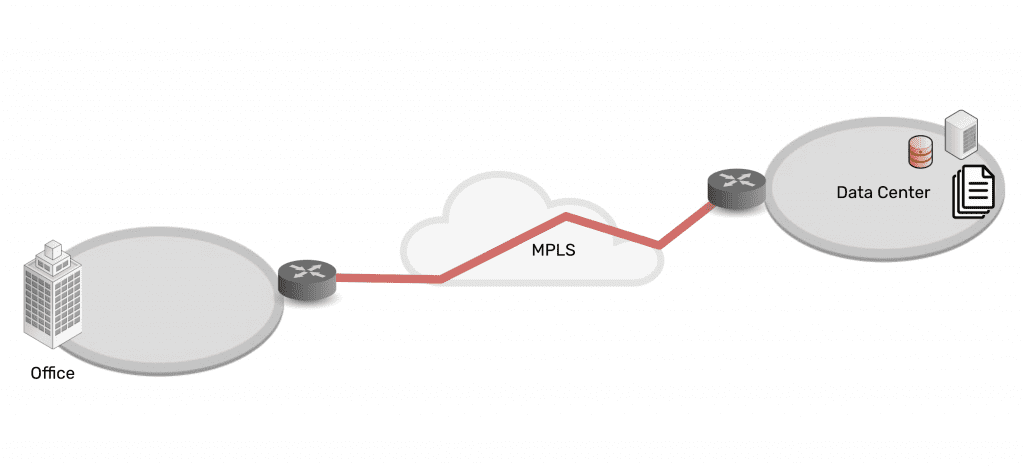
Times were simpler, but that also meant that network infrastructure and cybersecurity were simpler. Most people would go to work at a physical location like an HQ or branch office, and distributed or remote work technologies were very much in their infancy. This meant that network infrastructures were more simple and localized, usually requiring a simple MPLS connection from their off-site data center (if they had one) to their branch offices. Cybersecurity was simple: it was either inherent to the connection type (like MPLS), or required something like a basic firewall or encryption method.

Network architecture showing simplicity of data center connected via MPLS to branch office

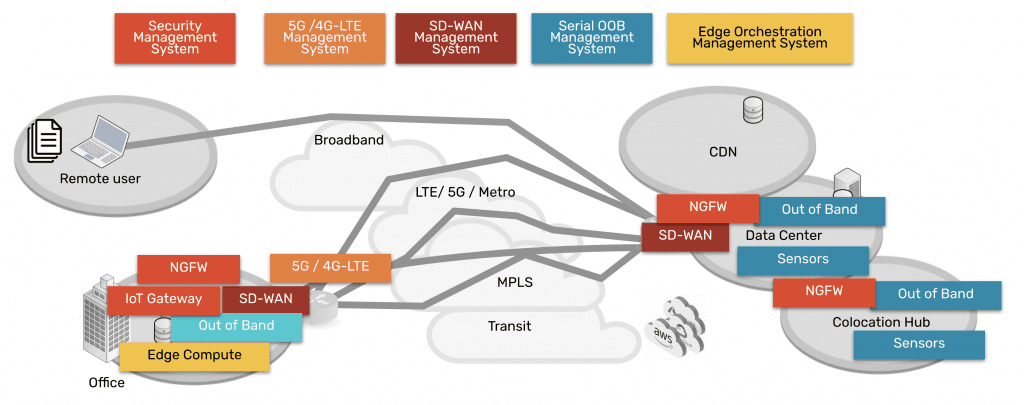
Fast forward more than 20 years, and the network infrastructure common to 2001 is barely recognizable. With customers and employees demanding companies adapt to their on-the-go and remote-work lifestyles, the network infrastructure exploded, causing a sort of Big Bang of cybersecurity as we know it today.

Network architecture showing complexity of data center, CDN, remote user, branch office, all connected via many paths

Modern networks need to serve many branch offices and remote locations, and the only way to succeed is by incorporating a myriad of on-prem, cloud, and SaaS solutions. This creates a hybrid infrastructure of data, security, networking, and computing distributed everywhere. In other words, the attack surface continues to expand much like the universe itself, and security professionals have been struggling to contain all the vulnerabilities left in its wake.


Why cybersecurity makes you feel lost in space

You might relate to Frank Poole. In the movie, the HAL 9000 supercomputer leads Frank to perform a spacewalk in order to repair a portion of their ship. While Frank floats toward the ship, the corrupted HAL takes control of an EVA pod and slams it into Frank, causing him to tumble helplessly through the black void of space and eventually meet his demise.

Frank Poole death

Trying to secure your IT infrastructure can make you feel just as helpless and out of control. That’s because cybersecurity presents several challenges that make it difficult to gain your footing. And with 2021’s executive order regarding zero trust security, cybersecurity seems even more daunting as previous protection methodologies are becoming wholly obsolete.

Here’s a brief look at some of the challenges of modern cybersecurity.


Too many products

Regardless of your industry, there are so many security products to choose from that it can easily feel like you’re floating amongst an endless sky of stars. It’s difficult enough choosing properly secured servers, routers, storage devices, and other physical equipment. Add on the other crucial pieces of the modern network architecture, and it’s easy to make a full time job of researching, comparing, and selecting the right cloud and SaaS security products. Here’s a list that barely scratches the surface of different types of security products to choose from:

  • Firewalls & next-gen firewalls (NGFWs)
  • Security information and event management (SIEM) systems
  • Identify and access management (IAM) products
  • Pen testers
  • Data analytics
  • Intrusion prevention and detection systems (IDPS)
  • Endpoint protection apps
  • Database security solutions
  • Ransomware/malware detection and removal
  • Authentication and single sign-on


Too many vendors

All of these products have to originate from somewhere, which brings us to the next challenge: there are too many cybersecurity vendors to choose from. This isn’t necessarily a bad thing, since competition creates better products, but it does complicate the cybersecurity professional’s journey to achieving holistic protection.

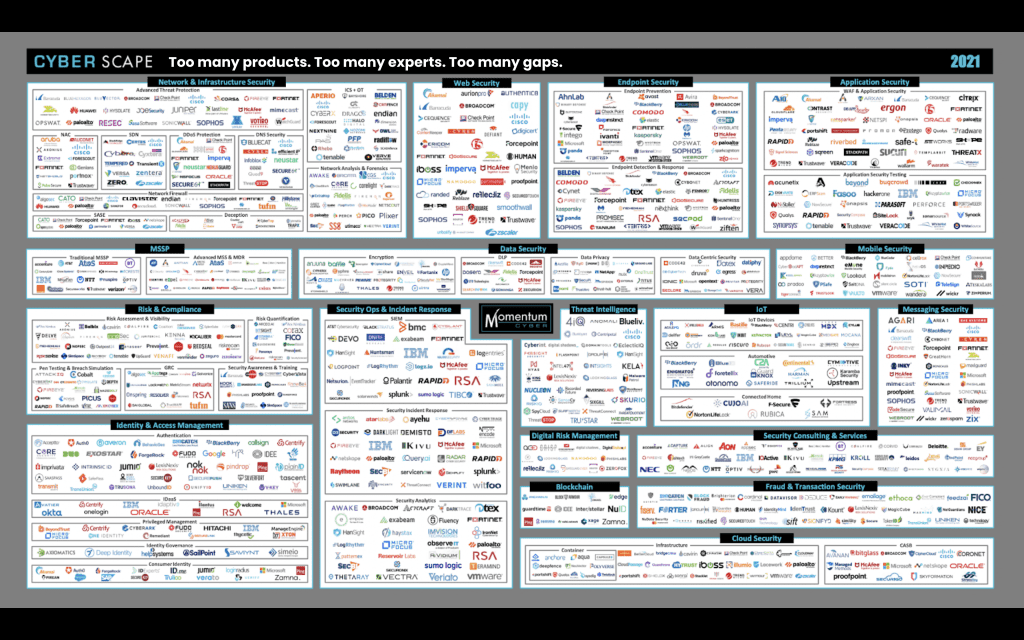
At RSA Conference 2022, for example, there were 450 security exhibitors present, 70 of which were funded well enough to afford the cost of a booth. During the show, many discussed that in the previous 18 months there were 1,800 new cybersecurity vendors that received funding to be installed in networks. The TL;DR — this multi-vendor ecosystem will persist (and probably grow even more), and so will the challenge of achieving holistic security.

Of course everyone wants the best of the best, which might draw your attention to staples like Cisco, Fortinet, and Palo Alto Networks. But because the modern hybrid infrastructure is so diverse, there now exist so many niche products available from thousands of vendors. In fact, CyberDB compiled a database that includes more than 3,500 security companies from the United States alone.

Here’s a graphic that puts into perspective just a fraction of the available vendors:

so many security vendors


Too many gaps

The third and most important challenge stems from the first two above: there are just too many security gaps to address. Part of this problem is due to the diversity of hybrid infrastructure. But once you’re able to identify the gaps, you’ll find that addressing these will more often than not create even more gaps.

That’s because there’s no single vendor or suite of products that provides holistic cybersecurity. You deploy a variety of products but inevitably run into interoperability issues, which only perpetuates more vulnerabilities as you add more solutions to address these gaps.

What you end up with is a plethora of solutions that are secure themselves, but that don’t provide protection for your infrastructure as a whole.


Why recovery is key to modern cybersecurity

According to a Sophos survey, 66% of surveyed organizations suffered ransomware attacks in 2022. And when attacks happened, 70% of organizations needed more than two weeks to recover. Ransomware is the modern disaster, which makes minimizing recovery times an essential part of modern cybersecurity.

Recall the Fortinet 7.0 CVE from 2022. Customers upgrading to the then latest release of FortiOS suddenly found themselves vulnerable to an authentication bypass, where attackers could gain admin access using certain HTTP/S requests. This typical scenario leaves IT teams waiting for a solution while their business remains vulnerable. What’s needed is the ability to recover quickly and automatically, whether from an active attack or an at-risk configuration.


Get the blueprint for fast recovery times

Big Tech companies have spent years building this capability into their infrastructure. At ZPE Systems, we’ve directly collaborated with these companies and have created best practices based on these proven architectures. This Network Automation Blueprint details the components and practical steps to take, from automating IT/OT production infrastructure, to implementing an effective design for orchestration and automation environments.

The blueprint is your template to achieving fast recovery times and reducing your risk of attack. Download the blueprint now.


Watch the blueprint recover a failed upgrade

Watch this tech demo from Tech Field Day 26, where Rene Neumann shows how the blueprint helps you recover a failed device upgrade in minutes.

Supply Chain Security Risk Management Best Practices

supply chain security risk management

A supply chain attack is when cybercriminals breach your network by compromising an outside vendor or partner. Often, these attacks exploit a weak link in your trusted ecosystem of third-party software, hardware, and integrations. A hacker will, for example, use a compromised vendor service account—one using the same username and password across many different client systems—to infiltrate all the third-party networks with privileged access for the vendor.

Several high-profile incidents like the SolarWinds attack and the Microsoft Exchange exploit illustrated how even the largest and most respected firms can introduce risk to your supply chain. In this post, we’ll use these examples to highlight the security challenges posed by supply chain attacks before providing supply chain security risk management best practices and solutions to protect your enterprise.

Supply chain security risk management challenges

→  SolarWinds attack uses trusted infrastructure monitoring software to compromise customer systems

In early 2020, an advanced persistent threat infiltrated a SolarWinds update server—It was a highly sophisticated group of hackers allegedly acting on behalf of a foreign state. The hackers injected malicious code into new builds of SolarWinds’ Orion platform, which thousands of customers use to monitor their critical IT infrastructure. These infected updates were unknowingly pushed out to over 18,000 customers, creating 18,000 backdoors for hackers to breach.

Once the compromised software was installed on target networks—including U.S. government agencies like the Department of Homeland Security and tech giants like Microsoft—attackers used these backdoors to steal identities and tokens to impersonate real users. Then, they were able to sidestep multi-factor authentication and spread laterally within affected networks, causing untold damage in their wake.

The full fallout and consequences of the SolarWinds attack are still unfolding more than two years later. This supply chain attack was devastating since they used the exploited software to monitor network infrastructure. That means hackers had privileged access to the most sensitive, vulnerable, and critical systems on affected networks. In addition, the advanced persistent threat used sophisticated techniques to bypass MFA and impersonate authorized users, making it extraordinarily difficult to track and prevent their movements.

The SolarWinds attack proved a few critical things about supply chain security:

  1. The infected software could contaminate customer systems, meaning intrusion prevention and anti-malware software weren’t advanced enough to detect the malicious code.
  2. The hackers were sophisticated enough to bypass MFA and other advanced authentication technologies, showing that these measures alone aren’t sufficient to prevent accounts from being compromised.
  3. The hackers were able to use those compromised accounts to freely move around on breached networks, illustrating the need for internal defenses and trust verification.


→  Microsoft Exchange attack exploits vulnerabilities on legacy on-premises systems

In early 2021, hackers used multiple zero day exploits to attack the on-premises version of Microsoft Exchange. They compromised servers at over 30,000 organizations in the United States, accessing email accounts and installing web shell malware. They used this malware to remotely access server functions and jump to other connected systems. In addition, hackers could use compromised email accounts as conduits to infect other organizations. They would look for a high-value contact in a compromised account’s contact list (for example, an executive at a major financial firm) and then send phishing messages and infected attachments to that target, extending their reach even further.

One of the reasons this attack was so successful is because hackers targeted on-premises Exchange implementations on legacy systems. Many organizations that still use legacy Exchange servers are less technically-savvy than those that jumped to the cloud. They may not have a large team of specialist admins and security engineers monitoring servers and applying regular updates to legacy systems. That made it easier for hackers to exploit unpatched vulnerabilities, and gave them more time to execute their endgame (infecting higher-value targets at connected organizations) before being detected.

So, what lessons have we learned from these two incidents, and how can we apply them to supply chain security risk management?

Supply chain security risk management best practices

These high-profile events illustrated a few key challenges:

  1. Many signature-based intrusion detection and security monitoring solutions aren’t sophisticated enough to detect zero-day exploits and novel malware.
  2. Cybercriminals can outsmart MFA and other advanced authentication methods, so they must be layered with other security controls.
  3. Organizations must not neglect internal defenses (including trust re-verification and network segmentation) because they’re crucial for preventing the spread of infections and compromised accounts.
  4. Organizations must have a plan for adequately monitoring, patching, and controlling legacy systems on their enterprise network.

Zero trust security

Zero trust security is a supply chain security risk management best practice due to its guiding principle of “never trust, always verify.” Zero trust creates a multi-layered defense of highly specific security policies and controls that focus on preventing breaches and limiting their damage once they’ve already occurred.

Next-generation firewalls (or NGFWs) use advanced machine learning and artificial intelligence technology to monitor network traffic for threats. Rather than relying on a signature database of known threats (which can’t account for zero-day exploits and novel malware), they use deep learning and other AI technology to analyze traffic with greater accuracy. NGFWs also enable network microsegmentation and may even include UEBA.

Microsegmentation is the zero trust practice of grouping systems and resources into small logical network segments. Microsegmentation allows you to create highly specific micro-perimeters of security policies and controls around each network segment. This ensures that all network resources are accounted for and adequately protected, and also allows you to reverify an account’s trust as they move from microsegment to microsegment.

User and Entity Behavior Analytics (or UEBA) technology monitors the behavior of entities (accounts, devices, applications, etc.) on your network. It uses machine learning to establish baselines of normal behavior, allowing it to analyze entity activity in real-time contextually. If an account or device behaves suspiciously, UEBA can block access, alert security, and/or force that entity to re-establish trust before letting it access another microsegment.

Even if the malicious code injected into the SolarWinds Orion updates made it past your NGFW’s initial defenses, zero trust security tools and practices will limit the attacker’s movement inside your enterprise network. Microsegmentation, aided by technology such as UEBA, would force a compromised account to re-establish trust before accessing additional resources while alerting security personnel to a potential breach.

Legacy modernization

Sounds scary and expensive, but it’s a critical process for securing on-premises and hybrid network environments. Obviously, the best-case scenario would be to replace your existing out-of-date hardware with newer systems or to migrate all your legacy services to the cloud, but that’s not realistic for many organizations. A more cost-effective way to modernize legacy systems is centralized infrastructure management, monitoring, and orchestration.

An infrastructure management platform that can hook into all your legacy, on-premises, data center, and cloud systems will help you ensure your entire architecture is always patched and secure. Your engineers won’t have to jump from box to box or switch between on-premises and cloud monitoring systems, increasing the efficiency they can maintain and control every piece of your infrastructure. Legacy modernization with unified infrastructure orchestration would have enabled engineers to patch on-premises Exchange vulnerabilities and detect the signs of a breach much faster.

Zero trust security and legacy modernization would have reduced the impact of these supply chain attacks and are critical for preventing similar events from occurring in the future. ZPE Systems can help you implement supply chain security risk management best practices through our Nodegrid family of secure infrastructure management solutions.

All Nodegrid hardware and software are protected by the Zero Trust Security Framework Foundation, with features like secure boot, geofencing, and up-to-date OS kernels and encryption modules. Nodegrid is vendor-neutral and supports integrations with your choice of NGFW and security software. Plus, Nodegrid supports legacy pinouts, so you can connect your on-premises infrastructure to the Nodegrid Manager or ZPE Cloud network orchestration solutions.

Learn more about supply chain security risk management best practices:

→   What Are the Key Zero Trust Security Principles?
→   The Importance of Micro-Segmentation for Zero Trust Networks
→   Data Center Modernization Strategy: How to Streamline Your Legacy Environment

Learn how Nodegrid supports supply chain security risk management best practices.

Call 1-844-4ZPE-SYS or contact us to view a demo.

Contact Us

How to Implement Zero Trust: Technologies to Shield You From Million-Dollar Losses

Staff on laptop with zero trust security in place.

How to implement zero trust security is a growing focus of organizations across the globe. With cyber attacks frequently hitting some of the largest companies and threatening entire economies, it’s no wonder why comprehensive network security is a top priority among public- and private-sector entities.

In this post, we’ll show you what you need to implement zero trust security, from big-picture items to individual technologies.

But first, here’s a recap of zero trust security and why your business won’t be safe without it.

Why you need Zero Trust Security

Imagine bringing in a new hire to your department. Soon after, you notice suspicious computer slowdowns and applications that don’t respond as usual. You dive into your program files and discover an unknown .exe file, and you dive deeper to discover attackers actively exploiting your resources. You quickly pull your team together to lock down your network, sanitize every computer and connection, and send out a company-wide instruction to have every employee reset their password.

It turns out, your newest employee unknowingly clicked a bad link and opened the door for a trojan horse attack. But because of your quick response, no significant damage was done and you can rest easy again.

Months later, you come in for your normal workday only to find all your systems locked and unresponsive. Dave, a senior engineer, retired on the day of the attack and never reset his password. The hackers stole his credentials and have gone unnoticed for months. Now your company and its customers are compromised, and the consumer markets you serve are in a frenzy due to a shortage of goods. You can’t help but feel somewhat responsible for the entire ordeal.

This example mimics recent real-world cyberattacks and highlights the importance of moving away from traditional security approaches.

Traditional architecture uses the castle-and-moat security approach. Once a user gains access (crosses the moat), they become trusted to use your organization’s resources (the castle). Aside from the occasional password reset or other authentication protocol, this approach leaves plenty of opportunities for outsider and insider attacks. Zero trust security, however, places a moat around every node and user. This means that no matter how often a system or user needs to access a resource, they always have to verify their identity and intent.

In other words: never trust, always verify. In our example above, implementing simple two-factor authentication could have alerted Dave to his stolen credentials, which would have prevented the attack.

The need for zero trust is due to the explosion of distributed networking. Communications used to be straightforward and centralized: a trusted user using a trusted device would connect from a trusted office location to the data center. Apps and data were securely transmitted between parties, and sealing out attackers could be as simple as deploying a new point solution or product. But user expectations changed all this; now, they need to connect from anywhere using a variety of devices, which means the modern network includes SaaS, cloud, and third-party platforms. This hybrid infrastructure means there are now more nodes and lines of communication than ever — and each is vulnerable to attack.

If the recent attacks on SolarWinds, Microsoft Exchange, and Colonial Pipeline aren’t convincing enough, consider the latest hack involving Kaseya, an American company that specializes in IT and network management software. By exploiting the virtual systems/server administrator (VSA), attackers were able to compromise up to 1,500 of Kaseya’s customers, shutting down educational services, law firms, and an outpatient surgical center in South Carolina.

Pervasive attacks like these have prompted political action, with the President signing a cybersecurity executive order this past May. Read our breakdown of the legislation and how it aims to improve cybersecurity across public and private sectors.

Now that you know why you need better security, how do you implement zero trust?

How to implement Zero Trust: The big picture

Zero trust is merely a concept, however implementing Zero Trust Network Access (ZTNA) means putting this concept to work. Implementing ZTNA involves two parts:

  • The processes, which we covered in a previous post, and
  • The technologies, which we’ll talk about in this post

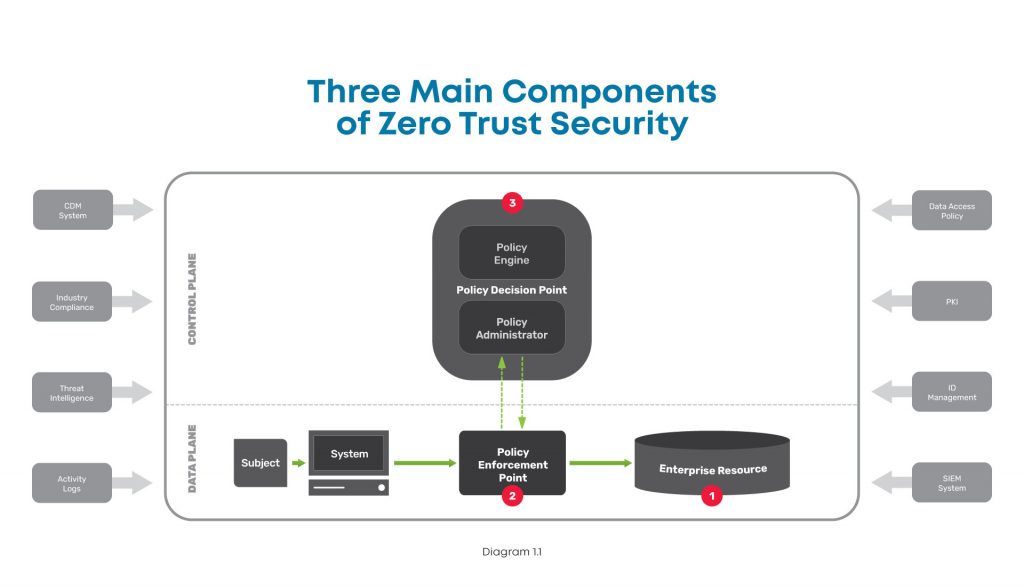
At a high level, this diagram shows the components you need when considering how to implement zero trust.

A high level diagram of the three main components of zero trust security, including the enterprise resource, policy enforcement point, and policy decision point.

There are three major components to look at in the big picture of zero trust security:

  1. Enterprise resource — This includes all the IT stuff you need to protect and that your business relies on, like hardware, software, and network equipment. In simple terms, this is like the gold that you keep carefully guarded in the center of your castle.
  2. Policy enforcement point — This is the datapath element that enables, monitors, and terminates connections between users / devices / applications and enterprise resources. Simply put, this is like the guard that accompanies those wishing to access your gold.
  3. Policy decision point — This is the layer that decides who / what is safe and grants / revokes access accordingly. In other words, this is the gatekeeper who determines who is allowed into your castle.

To better understand these, here’s a closer look at each:

Enterprise resource

This component is pretty straightforward, and consists of elements you need to operate and manage IT environments. These elements can include hardware like computers and data storage devices; software such as web servers, content management systems, and operating systems; and network equipment like servers, routers, firewalls, and out-of-band devices.


Policy enforcement point

This component consists of the datapath elements that enable, monitor, and terminate connections between subjects (users / devices / applications) and your enterprise resources. Though this is represented as one component, it is comprised of two parts that are both typically used in deployments. These parts are:

  • A client-side agent, usually deployed on a laptop or server.
  • A resource-side gateway, which controls access in cases where a client-side agent is not used. Examples where gateways are used include regulated healthcare equipment, ATM machines, and operational technology equipment.


Policy decision point

This component is the management and orchestration layer. This layer essentially checks identities to verify who is safe, and assigns policies to determine who gets access and to what. This is also represented as one component but is comprised of two parts:

  • Policy engine — This is the engine that decides whether a machine or web traffic is safe. To accomplish this, the engine uses a variety of data sources when making its determination, such as PKIs and identity management providers, CDM systems, and activity logs.
  • Policy administrator — This administrator uses the policy engine’s determination to grant or revoke access to a machine or web traffic.

There are many tools available to help you monitor and visualize traffic, so you can create policies and configure your policy decision point to meet your zero trust outcomes.

In order to create your zero trust configuration, you need to deploy several essential technologies.

How to implement Zero Trust: Essential technologies

Zero trust is a complete re-imagining of network security and can be a daunting task. But when you add its fundamental technologies to your toolkit, you can effectively build the three components described above and achieve Zero Trust Network Access (ZTNA). Here are the essential technologies you need to accomplish this.


Identity and access management

Such a big part of zero trust security relies on verifying that a device or user really is who they say they are. For this, you need an identity management solution from a trusted provider and public key infrastructure (PKI). This allows you to essentially create and issue a digital fingerprint for every user, and includes information such as their username, role, and other unique data. Multi-factor authentication is a critical component of identity verification, which requires users to present two or more pieces of identification/verification before granting access.

Additionally, access management is an important piece that determines a user’s authorization level, or in other words, which resources they can access. Identity and access management both feed information into your zero trust model’s policy engine.


Policy management

Another essential technology to have is a policy management solution. This is integrated into your security stack and serves as a single policy creation point. This allows you to define access and authentication policies for your entire organization.

You can specify data access rules for users, devices, and roles, which is vital to achieving micro-segmentation, limiting lateral movement, and enforcing least-privilege access. All of these feed into your policy engine and are used by your policy enforcement point to validate whether a session is allowed to continue.


Zero trust equipment and applications

Tying everything together requires equipment and applications that are able to enforce your policies. These are physical or virtual solutions that sit in front of servers and serve as your enforcement points. For example, this could be your next-gen firewall (NGFW) that initiates the multi-factor authentication protocol, verifies a user’s identity, and uses your defined policies to restrict the user’s access to a specific segment of your network.

Where can you get these essential Zero Trust technologies?

When considering how to implement zero trust, keep in mind that there are many vendors who can provide you with the essential technologies.

  • Obtaining an identity and access management solution is the easiest task when implementing zero trust. Many organizations offer an identity store, such as Azure Active Directory or Google Cloud Identity. You can also use companies dedicated to identity management, such as Duo, Okta, or Ping Identity. Keep in mind that if you need to control third-party access, such as for customers or equipment management contractors, you’ll need a solution that can access multiple identity stores simultaneously.
  • Obtaining a policy management solution requires careful consideration and should be part of your overall security stack. Look for a solution that allows you to create policies and set up datapath enforcement points. An adequate framework enables you to create authentication and post-authentication access rules, with an enforcement point that segments your network and continuously authenticates sessions. This security stack can be an on-prem NGFW, or delivered via the cloud using a Secure Access Service Edge (SASE) model, both of which are available from trusted providers like Palo Alto Networks.
  • Regardless of whether you use an on-prem or SASE model, you need an edge infrastructure platform to sit in front of servers and host the enforcement point. For on-prem, this platform must be able to host an NGFW to secure network segments and VLANs. For SASE, this platform must be able to create VPN tunnels to your SASE platform, which can be used for inline inspection and policy enforcement. Either approach requires powerful computing capabilities and a flexible operating system to accommodate workloads for detecting, analyzing, and automatically responding to threats, which few vendors offer.

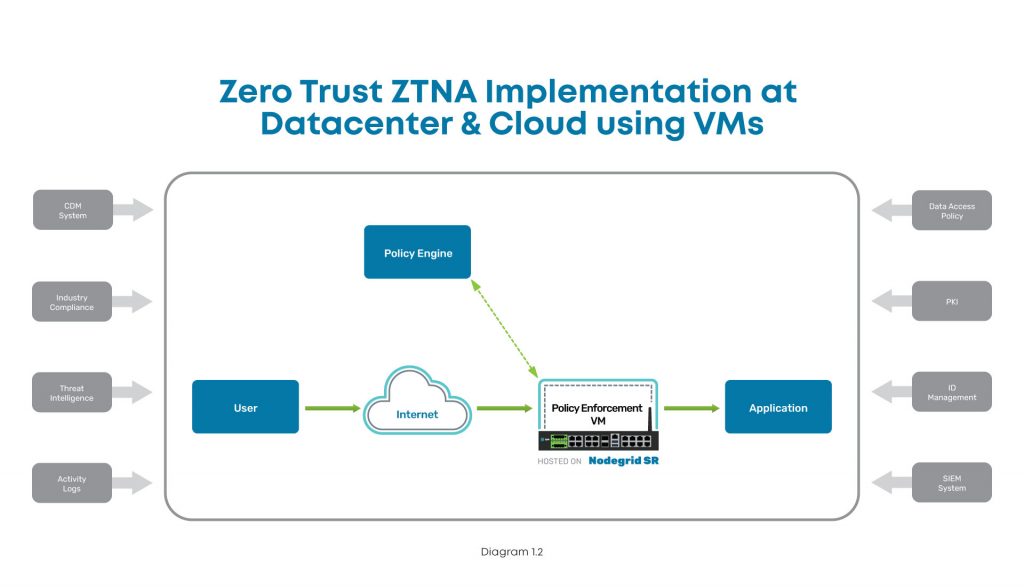
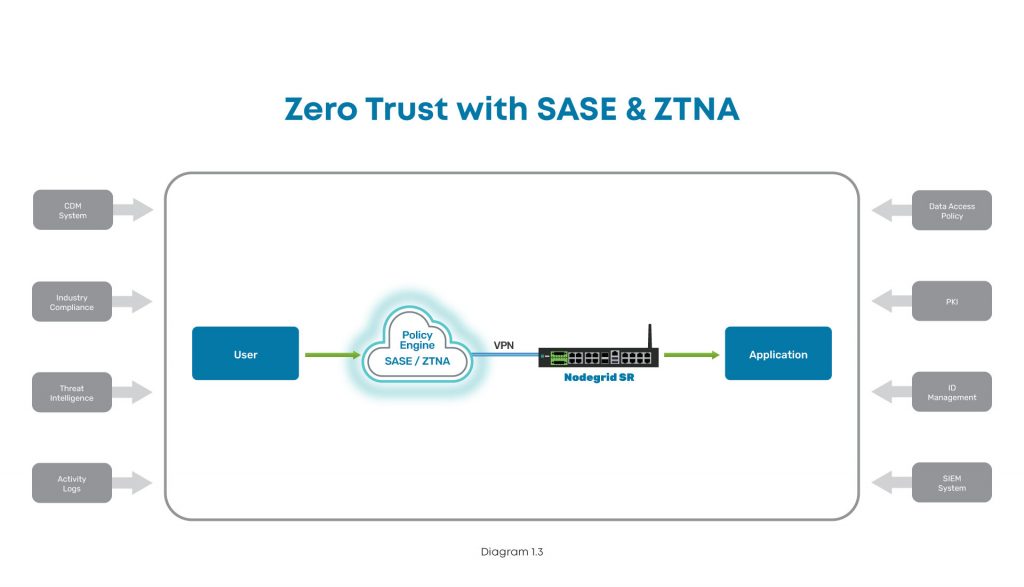
Here are examples of what proper zero trust implementations look like, with ZPE Systems’ Nodegrid as the edge infrastructure platform:

Implementation diagram showing how to implement ZTNA at the data center using Nodegrid.

In this diagram, you can see where ZTNA and Nodegrid fit into the scheme at the data center. The user connects via Internet, and the Nodegrid SR device serves as the Policy Enforcement Point hosting a VM. This VM communicates with the Policy Engine to authenticate the user, and then grants access to the data center application.

Implementation diagram showing how to implement ZTNA at a branch, edge, or other distributed location.

In this diagram, the user tries to connect to an application at a branch, edge, or other distributed location. The user connects via Internet, where SASE and ZTNA provide secure connectivity. The Nodegrid SR device connects via VPN to the Policy Engine for authentication, and then grants access to the branch application.

How to implement Zero Trust: A recap

To protect your organization, implementing zero trust requires you to build out the main components. With the policy decision point and policy enforcement point in place, you can secure your enterprise resources from outsider and insider attacks. Ensuring these components work like a well-oiled machine means you need the proper identity and access management tools, a complete policy management solution built into your security stack, and equipment and applications that can enforce your zero trust security policies.

Because user expectations have caused infrastructure to become incredibly distributed and complex, the attack surface has increased dramatically. The traditional castle-and-moat approach to security is no longer adequate, and recent newsworthy cyberattacks showcase the network vulnerabilities that even the largest companies still struggle to address. The President’s latest cybersecurity executive order is a step in the right direction to bolster infrastructure protection for public and private sector entities, and you can use this blog as a starting point to begin your zero trust journey.

Don’t get caught without these 5 security must-haves

Watch our webinar, Cyberattacks: 5 Security Must-Haves for Hybrid Infrastructure Gateways, and learn how to lay a solid foundation that makes implementing zero trust easier. Our experts will talk you through how to:

  • Keep edge networks and users fully protected
  • Make smart buying decisions
  • Get complete security and control for years of serviceability

Watch now to protect your business from growing cybercrime.

What Is Zero Trust Security? 5 Critical Things You Need to Know

Data,Protection,Cyber,Security,Privacy,Business,Internet,Technology,Concept

Zero trust security is not a new concept, but it has gained popularity in recent years. As companies become increasingly distributed, they must offer flexible network access without putting sensitive data at risk. That’s where zero trust security comes in. What is zero trust security? Let’s discuss the five critical things you should know.

What is zero trust security?

Zero trust security can be boiled down to a simple concept: never trust, always verify. That means you must always verify the identity and trustworthiness of every user and device trying to access your network. Traditional networking safeguards are based on a castle-and-moat architecture. This means that all users and devices within the network are assumed to be trustworthy and can access the resources they need. Those outsides of the network (or moat) must be verified and trusted before gaining access. One of the glaring problems with this approach is that it doesn’t consider the possibility of insider attacks coming from an authorized user/device within the network. That means that an attacker simply needs to hack into the network—for example, by compromising a user account—and then there are few, if any, obstacles remaining in their way. What is zero trust security? It’s a reimagining of network security based on the concept that you shouldn’t automatically trust anyone or anything trying to connect to your network. Instead, you should verify users and devices that try to connect, whether they’re coming from the outside or inside the network perimeter. In other words: trust no one.

Where did zero trust security come from?

The concept of zero trust was first prototyped more than a decade ago by John Kindervag at Forrester, but it didn’t truly gain traction in the industry until recently. The zero trust security architecture came from the realization that the traditional castle-and-moat model was becoming increasingly vulnerable. Years ago, a typical organization’s sensitive data was kept in a central location. This made the network and its resources easy to monitor for threats and protect from attacks. Now, many enterprises are adopting technologies that offer more outstanding networking capabilities for distributed access. These technologies include public and private clouds, service-based software and infrastructure, virtualized SD-WAN and firewall solutions, and more. Securing an entire enterprise network means putting multiple safeguards in place. The traditional security architecture is being replaced by the more flexible and robust zero trust security model.

Zero trust security benefits

One of the fundamental goals of networking is to allow the flow of information between computers, people, and organizations. However, that information is becoming more decentralized and must be relayed through various channels, which increases risk.  Since traditional security architectures simply can’t provide omnipresent protection for data and communications, organizations around the globe are adopting zero trust security.

Zero trust security use cases and examples

  • Scaling with remote and branch offices: Setting up new branches comes with its own set of security risks. However, using a zero trust model, you can get granular control over who and what can access your network. This can help eliminate attacks from stolen equipment, devices, or credentials.
  • Remote and work-from-home: When setting up a Secure Access Service Edge (SASE) configuration, whether for faraway branch offices or remote and traveling workers, zero trust security keeps networks and resources secure. Zero trust requires user identities and devices to be verified, which eliminates many methods of attack.
  • Securing data at HQ: When you define access rights using an SD-Perimeter approach, zero trust enables you to restrict access to sensitive resources to only the personnel who need it. This restricts lateral movement on your network and keeps data secure from both outside actors and malicious insiders.

Zero trust security benefits your business by giving you granular control over security controls and access policies, so you can better protect the network.

How to implement zero trust security

Now that you understand what zero trust security is, you can create a plan for implementing it. The best strategy is to break your implementation process up into a series of small, repeatable steps so you can slowly build out your zero trust architecture while improving and refining things as you go. The five basic steps to implement zero trust security are:

Step 1: Define your protect surface(s)

You may be familiar with the term “attack surface,” which is the sum of all the potential access points an attacker could use to penetrate your network. With traditional network security methodologies, you need to defend your attack surface by creating a perimeter of security controls (like firewalls and intrusion detection systems) that extends around your entire network. This used to be easy when all of your sensitive data was located on one centralized server, and you could only access it from inside the local network. Now that your enterprise data, devices, and users can be located in and accessed from anywhere in the world, it’s essentially impossible to identify, define, and defend every potential access point. The zero trust security model asks you to focus on the micro-level—the individual data, applications, assets, and services you need to protect. These items are known as your protect surfaces, and your goal is to create access control policies and establish security controls specifically designed to protect each of them. So, the first step towards implementing zero trust security is to identify and define each protect surface. You may find it helpful to use the acronym DAAS—Data, Applications, Assets, and Services—when determining what to include in your protect surfaces: D: Identify any data that contains sensitive or proprietary information that may be valuable to a hacker or damaging to your organization if it were stolen—e.g., HIPAA data, financial records, trade secrets. A: Do any of your enterprise applications process sensitive data or contain proprietary code? Those applications need to be included in a protect surface. A: All network assets, including laptops, point-of-sale terminals, IoT devices, cell phones, and manufacturing equipment, need to be inventoried and protected. S: Identify and locate all critical network services that could impact your business productivity or security, such as DHCP, Active Directory, and VoIP.

Step 2: Map your interdependencies

How do traffic and data flow between each of the items you identified in your DAAS? You need to know how each of these resources interact with each other to account for these interdependencies when you create access policies and enable security controls around protect surfaces. By mapping your interdependencies ahead of time, you can safeguard each protect surface without accidentally breaking anything.

Step 3: Construct micro-perimeters

You’ve already narrowed your focus from one attack surface to many small protect surfaces. Now you need to shrink your big network perimeter into a series of smaller micro-perimeters. That means you need to segment your network around your DAAS and implement security controls for each individual protect surface.   One of the greatest things about zero trust security is getting very granular with your security controls. Since you’re focusing on a small network segment, you can use the best security technology for that specific job. You want to segment your network as much as possible to create small protect surfaces that target security controls with a high level of specificity.

Step 4: Establish access control policies

Your micro-perimeters will rely on access control policies to determine who can have access and how to establish trust. You should use the “Kipling Method” to decide who should have access to each protect surface, which means asking the following questions:

  1. Who should have access to this resource?
  2. What application is being used to access this resource?
  3. When is the resource being accessed?
  4. Where is the user or device that’s requesting access?
  5. Why do they need access to this resource?
  6. How should you allow access to this resource?

Again, the smaller your network segments, the more precise you can get with your access control policies.

Step 5: Monitor and optimize

Once you’ve segmented your network, created micro-perimeters, and enabled your zero trust access control policies, you need to monitor each protect surface and conduct frequent log reviews to ensure operations are running smoothly. You should look for signs of latency and performance issues, as well as make sure your policies are being applied correctly and your security controls are restricting access appropriately. By following these five basic steps, you can create a zero trust security implementation that’s completely customized around your business requirements, protect surfaces, and security vulnerabilities.

Zero trust security best practices

Here are some additional tips for implementing zero trust security in your enterprise.

1. Assess your current strengths and weaknesses:

Zero trust security doesn’t necessarily require an expensive technology upgrade to implement. Instead, you should look for ways to augment your existing network and security architecture using zero trust principles and policies. By thoroughly analyzing your existing tools and solutions, you can identify gaps in your zero trust readiness and avoid spending money on things you don’t need or already have.

2. Invest in discovery and classification tools:

Identifying your DAAS is the critical first step in your zero trust journey, so you should make things easier on yourself by investing in the right tools for the job. Look for solutions that can automatically discover network assets, application interdependencies, and sensitive data. These automated tools won’t just make your job faster—they’ll ensure you don’t let anything slip between the cracks.

3. Assess trust dynamically and consistently:

Verifying the identity of a user or device is only part of the zero trust equation— you also need to determine their trustworthiness, which may change depending on context. For example, is this an average time for this user to connect to your network? Is this device in a geographic location that makes sense in this situation? Has the user or device been involved in any suspicious behavior elsewhere on your network? You need to determine trust on a dynamic basis, and apply the same criteria to every account, whether they’re in the office, at home, or abroad.

4. Implement zero trust identity and access management (IAM):

Without an identity and access management (IAM) solution that supports zero trust security principles and security controls, you can’t verify identities and establish trust. For example, you may want a solution that incorporates user and entity behavior analytics (UEBA), which monitors account and device behavior so it can spot unusual or risky activity, report it, and block access. You’ll also need features such as single sign-on (SSO) and multi-factor authentication (MFA) to provide additional identity verification and security levels. SSO allows users to access all enterprise resources using the same user name and password, which means you can enforce the same password complexity requirements and access control policies across your entire network. MFA requires users to provide a second method of identity verification, usually with a code texted to their smartphone or generated by an app.

Zero trust security simplified

What is zero trust security? It’s both a mindset and a methodology for security that addresses the limitations of a castle-and-moat architecture for today’s distributed business network. By following the principle of “never trust, always verify,” and using the implementation steps and best practices outlined above, you can take advantage of zero trust security’s benefits for your enterprise. Are you looking for a way to streamline your zero trust deployment without sacrificing security? Nodegrid’s Zero Trust Security Framework Foundation is a family of network management hardware and software that supports zero trust principles through features like:

  • Secure boot and geofencing technology so only you can install and boot your configuration
  • Integration with zero trust IAM providers like Duo, Okta, and Ping for SSO and MFA capabilities
  • Unified cloud management, control, and access for consistent configuration across branches

What is zero trust security?

Learn more about zero trust or request a demo of Nodegrid’s zero trust framework by contacting ZPE Systems today at 1-844-4ZPE-SYS.

Contact Us