Providing Out-of-Band Connectivity to Mission-Critical IT Resources

Streamlining Remote Data Center Management

Streamlining Remote Data Center Management

With the tech industry in turmoil and an ongoing recession forcing cutbacks, many sysadmins and engineers are struggling to efficiently manage their data center infrastructure. Overworked admins are more likely to make mistakes and issues are more likely to fall between the cracks, making the enterprise network less resilient. In the current economy, businesses can’t afford to lose revenue due to data center outages, and that’s why it’s crucial to invest in the tools teams need to efficiently manage and monitor remote infrastructure.

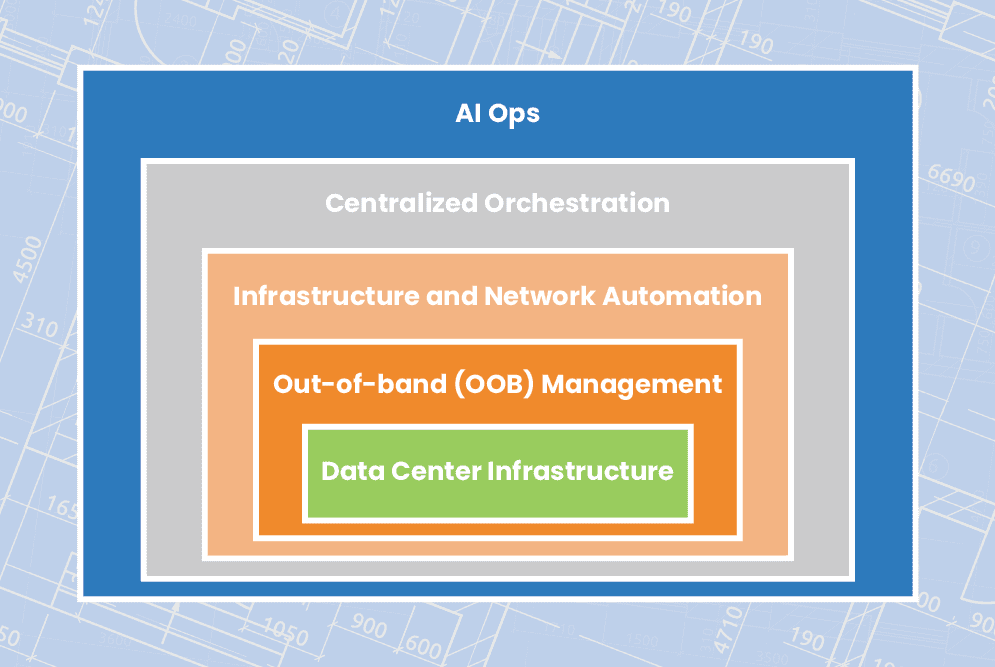
This blog explains how to streamline remote data center management using technologies like out-of-band (OOB) management, automation, orchestration, and AIOps to ensure network resiliency.

How to streamline remote data center management

Out-of-band management

Organizations commonly deploy redundant internet connections at their data centers to provide network failover, ensuring business continuity in case the primary ISP suffers an outage. However, if the data center WAN or LAN goes down due to an equipment failure, configuration mistake, or security breach, network failover won’t help admins solve the problem. If remote data center devices are unable to get an IP address, then they’ll be unreachable on the production network, leaving remote teams without a way to diagnose and fix the issue. That means expensive truck rolls or on-site managed services, plus the revenue and reputation costs of extended downtime.

What’s needed to ensure business continuity and reduce the cost of outages is an out-of-band (OOB) management network that doesn’t rely on any production infrastructure. The most efficient way to accomplish this is with Gen 3 OOB serial consoles. These systems include redundant network interfaces – often using cellular – to ensure continuous remote access even if the production ISP or MPLS link goes down. An OOB serial console directly connects to data center infrastructure devices via the serial port, which means remote admins can access and manage them without an IP address. The result is that remote data center management teams can diagnose and fix problems without traveling on-site, saving money on recovery costs as well as reducing the duration and business impact of outages.

Plus, an OOB management network can be used to execute resource-intensive automation and orchestration workflows without using valuable MPLS bandwidth or affecting production network performance. Gen 3 serial consoles are vendor-neutral and support the use of third-party automation scripts and playbooks, giving remote data center teams a centralized orchestration platform for more streamlined infrastructure and network management.

Infrastructure and network automation

Staff cutbacks have left data center teams stretched paper-thin, and reduced budgets mean they’re being asked to do more with less. When admins are overworked with many tedious, manual tasks, they’re more likely to make mistakes. These mistakes are a major cybersecurity threat, with Microsoft estimating that up to 80% of ransomware attacks are caused by misconfigured devices, applications, and security systems.

Automation helps remediate human error by taking over the repetitive, tedious workflows that computers are best at, leaving admins and engineers free to handle the creative, intuitive work that only humans can accomplish. For example, teams can use infrastructure as code (IaC) and zero touch provisioning (ZTP) to turn data center device configurations into software scripts that are deployed and executed automatically. Automated configuration management tools can then monitor these devices for changes that might introduce a security vulnerability and then automatically roll-back to the last known good configuration. Teams can also use software-defined networking (SDN) and software-defined wide area networking (SD-WAN) to automate traffic management and optimization, load balancing, access control list (ACL) updates, and other network management workflows.

Automation makes it possible for small network operation centers (NOCs) and data center teams to efficiently control large and distributed enterprise deployments. While network automation hasn’t quite caught up to infrastructure automation in terms of adoption and tool maturity, the use of vendor-neutral devices and platforms allows teams to use their existing IaC and configuration management tools to deploy and control network devices like routers, switches, load balancers, and security appliances. Vendor-neutral solutions also make it easier to implement centralized orchestration to manage automation workflows across the entire network architecture.

Centralized orchestration

Automation’s goal is to streamline data center management, but when it’s not handled correctly, it can easily wind up overcomplicating things instead. If admins aren’t monitoring their automated workflows, there could be changes occurring without any human oversight, leading to potential security risks and making it harder to perform root-cause analysis (RCA) when issues arise. In addition, without an organized, centralized repository for network automation scripts and configurations, engineers could end up duplicating each other’s work and negating any productivity gains. Plus, having a fragmented automation architecture makes it impossible for admins and security analysts to holistically monitor and manage the enterprise network.

Centralized orchestration provides a single platform from which to deploy, monitor, and manage automation across data center deployments and distributed network architectures. A data center infrastructure orchestration platform should include:

  • Source code version control – A centralized repository for automation scripts that tracks changes and acts as a single source of truth for the entire automated infrastructure.
  • Vendor-neutral orchestrator – A tool that controls all of the automated workflows in a data center deployment, essentially automating the automation.
  • ⮕Visibility & analytics – Dashboards where admins can monitor automated workflows, view current device health and network performance, and gain insights from their AIOps and big data tools.

To ensure optimal coverage and efficiency, the source code repository must be compatible with the chosen scripting language(s), the orchestrator must support any IaC playbooks, and the visibility tools must be able to hook into all systems, applications, and devices in the data center. That means the orchestration platform should be vendor-neutral.

AIOps

Data center infrastructure, and the platforms used to monitor and manage it, all generate a lot of logs. The data contained in these logs can provide valuable insights about the health, performance, and security of that infrastructure, but only if teams have the ability to collect and analyze it. Unfortunately, human beings aren’t very adept at parsing vast quantities of data to spot and predict patterns. However, humans have designed artificial intelligence to pick up the slack.

Artificial intelligence for IT operations – or AIOps – uses technologies like machine learning (ML) and natural language processing (NLP) to analyze logs from data centers and network infrastructure. AIOps pulls data from sources such as monitoring and orchestration platforms, environmental monitoring sensors, and firewall logs, then utilizes that data to provide business insights, predict future outcomes, and make decisions to solve problems.

AIOps is a relatively new technology and as such its capabilities continue to evolve. However, data center teams are currently using AIOps for things like enhanced threat modeling, automatic root cause analysis, and intelligent performance monitoring. For overworked and understaffed data center teams, AIOps essentially acts as an extra brain devoted to the monitoring and analysis of automated infrastructure.

Streamlining remote data center management with ZPE Systems

A resilient enterprise network uses out-of-band (OOB) management, automation, orchestration, and AIOps to streamline remote data center management and ensure business continuity. The backbone of such an architecture is vendor-neutral solutions, such as the Nodegrid platform from ZPE Systems. Nodegrid serial consoles provide Gen 3 OOB management with complete vendor freedom, so you can control any device, deploy your choice of automation scripts and playbooks, host third-party security and AIOps solutions, and unify the management of all of the above with a single orchestration platform.

Ready to learn more about data center management?

To learn more about remote data center management with Nodegrid, contact ZPE Systems today.

Contact Us

Need an in-depth guide to building a more resilient network infrastructure? Fill out the form below to download the Network Automation Blueprint from ZPE Systems.

Building an IoT Device Management System

shutterstock_1350962531(1)(1)

Internet of Things (IoT) devices are integral components of many modern businesses. In 2020, there were almost 9 billion active IoT devices—that number is predicted to exceed 25 billion by 2030. Effectively deploying, monitoring, and managing all of these devices in an enterprise environment requires powerful, centralized orchestration using an IoT device management system. This post discusses the best practices and key considerations to keep in mind when planning, designing, and building your IoT device management system.

What is an IoT device management system?

An IoT device management system provides a unified platform from which to manage all of the IoT devices in use by an organization. Many of these devices operate with little-to-no human interaction, in remote sites that may be difficult or even dangerous to access for routine maintenance. For example, IoT sensors are used inside oil pipelines to monitor crucial metrics like flow, pressure, and temperature. In addition, one organization may need to employ dozens or hundreds of different IoT devices to handle specific functions. These devices often come from different vendors, with separate management platforms, patch schedules, and configuration schemes. This results in a lot of management complexity for the IT teams responsible for provisioning, maintaining, and troubleshooting all of these devices, creating the need for an IoT device management system. The goal of such a solution is to bring all of the tasks involved in IoT device management under one roof, including:


  • → Onboarding:
    Bringing new IoT devices onto the network with the proper credentials and security policies
  • → Configuration: Provisioning new IoT devices with the necessary settings
  • → Maintenance: Updating firmware and applying security patches in a timely manner
  • → Security: Applying enterprise security policies to all IoT devices on the network
  • → Diagnostics: Collecting and analyzing logs to help identify and fix IoT device issues
  • → End-of-life management: Decommissioning EOL devices so they don’t create a security risk by remaining online and unpatched
Nodegrid is a vendor-agnostic IoT device management system that enables end-to-end automation and reliable OOB management access. To see Nodegrid in action, schedule a free demo.

Best practices for building an IoT device management system

Here are some best practices and key considerations to keep in mind when planning, designing, and building your IoT device management system.

Avoid closed ecosystems

There are off-the-shelf software solutions for IoT device management that are designed to work within a single vendor’s ecosystem. While they may offer some support for third-party devices, they generally work best if you’re already operating within that vendor’s environment. For example, AWS IoT Device Management works with third-party IoT devices but requires an existing AWS infrastructure to use it effectively. These types of solutions will usually include a library of features and supported integrations, but you may not be able to integrate your preferred scripting languages, open-source tools, or other third-party components. A vendor-neutral, or vendor-agnostic, IoT device management system does not suffer from these limitations. In addition to the ability to hook into multi-vendor IoT devices, these platforms also allow you to use your choice of third-party software and scripts. A vendor-neutral solution gives you the freedom to build a truly bespoke IoT device management system that makes use of your team’s existing skills, preferred tools, and custom innovations.

Ensure 24/7 remote management access

One of the benefits of IoT devices is they can be deployed anywhere. However, maintaining continuous access to devices in remote and hard-to-reach environments can prove challenging. Natural disasters, LAN failures, ISP outages, political instability, and global pandemics can all occur with little-to-no warning, leaving organizations cut off from their critical remote IoT devices and infrastructure. Out-of-band (OOB) management solves this problem by providing an alternative path to remote network infrastructure. For example, an IoT device management system can use OOB serial consoles to create a management network that’s dedicated to the orchestration, maintenance, and troubleshooting of production network equipment. These serial consoles have multiple redundant network interfaces (e.g., 5G cellular, Fiber, and Wi-Fi) so admins can remotely access the IoT device management system even when the remote site loses its main internet connection. This ensures that organizations can recover from remote network failures faster, continue internal operations during ISP outages, and maintain continuous access to their IoT devices.

Protect IoT infrastructure with Zero Trust Security

IoT device management systems help ensure the security of remote IoT devices by simplifying tasks like firmware updates and vulnerability patch deployment. However, the IoT device management platform itself is a potential target for malicious actors hoping to gain complete control over an organization’s IoT infrastructure. That’s why organizations must protect their IoT device management system using Zero Trust Security. Zero Trust Security follows the principle of “never trust, always verify” by requiring all users, systems, and devices to continuously prove their trustworthiness as they access the network and enterprise resources. It also requires the consistent application of enterprise security policies and controls to every system and application that connects to the network, including the IoT device management system. That means, for example, that you should use technology such as two-factor authentication (2FA) and identity and access management (IAM) to control access and prevent compromised accounts from gaining control.

  • ☆ Bonus tip: Zero Trust Security is easier to apply if you use a vendor-neutral IoT device management system that supports integrations with third-party security solutions like next-generation firewalls (NGFWs) and Secure Access Service Edge (SASE). This will also ensure that Zero Trust controls are in place to protect the OOB management network from unauthorized access.

However, it’s important to acknowledge that there’s currently no way to completely prevent a breach from occurring. According to the Sophos State of Ransomware 2022 survey, 66% of organizations were hit by ransomware in 2021 alone, and that number is only expected to trend upwards over time. That’s why another critical aspect of Zero Trust Security for IoT device management is building a resilient network architecture with automation tools that reduce the MTTR (mean time to recovery) when—and not if—a breach occurs. Learn more about how to implement such an architecture with ZPE’s network automation blueprint.

Building an IoT device management system with Nodegrid

An IoT device management system is meant to simplify and streamline the management of remote, hard-to-reach, and complex IoT devices and infrastructure. Vendor-neutral systems allow you to customize your platform with the third-party tools and solutions that work best for your team and your organization’s use case. Out-of-band (OOB) management ensures that IT teams have reliable, 24/7 access to remote IoT systems. Finally, Zero Trust Security protects the IoT device management system and all connected devices from malicious attacks. The Nodegrid platform from ZPE Systems is a completely vendor-agnostic IoT device management system supported by Gen 3 OOB serial consoles like the Nodegrid Serial Console Plus (NSCP) and all-in-one edge gateway routers like the Mini Services Router (MSR). Nodegrid supports integrations with your choice of custom scripts, automation tools, and security solutions so you can build a bespoke IoT device management system that addresses your organization’s unique challenges and use cases.

Ready to learn more about the Nodegrid IoT device management system?

Contact ZPE Systems today to learn more about the Nodegrid IoT device management system, contact ZPE Systems today. Contact Us

Key Automation Infrastructure Components That Enable End-to-End Network Automation

A resilient network containing automation infrastructure components and concepts overlays a busy industrial plant that uses OT automation.

As inflation rises, new business declines, and another COVID-19 surge looms on the horizon, many organizations are bracing for a recession. CIOs and IT managers are having to do more with less—less staff, less budget for upgrades and repairs, and less access to on-site infrastructure. Despite these restrictions, they still need to ensure the 24/7 availability and optimal performance of enterprise network resources as any amount of downtime could severely impact business revenue.

The ability to continue providing digital services in less-than-ideal situations is known as network resiliency. Network automation is a key tool for ensuring resiliency during staffing shortages and lockdowns, and a network automation framework provides the tools and methodologies needed to create a fully-automated network infrastructure.

The four building blocks of a resilient network automation framework include:

  1. IT/OT production infrastructure
  2. Automation infrastructure
  3. Orchestration infrastructure
  4. AIOps

We’ve previously discussed the role of IT/OT production infrastructure in network automation and how an IT/OT convergence strategy accelerates network automation. In this post, we’ll describe the automation infrastructure components that enable end-to-end network automation. Future blogs will explain how the orchestration infrastructure layer and AIOps layer build upon these components to ensure business resiliency.

What is automation infrastructure?

Automation infrastructure is composed of all the hardware and software solutions that enable automation to occur. These solutions target the IT and OT production infrastructure and automate some or all of their workflows.

Key automation infrastructure components

There are a variety of hardware and software solutions that provide automation capabilities for specific workflows, use cases, and deployment models. As part of a resilient network automation framework, the most important automation infrastructure components include:

Gen 3 OOB serial consoles

Serial consoles are typically installed in data centers and used to manage other devices over a serial cable connection. They create an out-of-band management (OOBM) network that’s dedicated to troubleshooting, management, and orchestration traffic, and which is accessible via a secondary internet connection (often using cellular). This secondary connection ensures administrators always have remote management access to critical data center infrastructure even when the primary ISP, WAN link, or production LAN goes down. That means businesses can recover from outages faster and without dispatching expensive truck rolls.

The latest generation of serial consoles, Gen 3, gives administrators the ability to automate workflows on all data center infrastructure. Gen 3 serial consoles are vendor-neutral, which means they can extend their automated management capabilities to any vendor’s device. That vendor neutrality also means that Gen 3 serial consoles support custom scripts and third-party automation tools in addition to whatever automation capabilities are built-in.

For peak resiliency, data center deployments should follow a two-tier OOB architecture. That means each rack of IT/OT production infrastructure should connect to its own Gen 3 serial console, which provides OOB management access and automation. These top-of-rack serial consoles should then connect to an OOB appliance in the middle or end of the row. This ensures OOBM access for the top-of-rack appliances and creates an additional layer of redundancy and resiliency.

Screenshot 2022-12-05 202130
Another important aspect of Gen 3 serial consoles is security. Since serial consoles provide comprehensive management access to critical infrastructure, they’re a tempting target for cybercriminals. A secure Gen 3 OOBM solution includes:

  • Integration support for third-party security solutions like next-generation firewalls (NGFWs), security service edge (SSE), and SAML 2.0
  • An up-to-date operating system (OS) kernel that’s frequently patched by the vendor when vulnerabilities are identified
  • Onboard firewall functionality to inspect traffic on both the OOB network and the production network
  • Hardware security features like encrypted boot sequences and BIOS protection to prevent unauthorized access on stolen serial consoles

Gen 3 OOB serial consoles are the automation infrastructure components that enable automation and resiliency for data center deployments at the core of enterprise networks.

SD-WAN gateway routers

A gateway router is used to connect a LAN infrastructure to the internet and the enterprise WAN architecture. As part of a resilient network automation framework, all gateway routers should support SD-WAN (software-defined wide area networking).

SD-WAN separates the control and management processes from underlying WAN hardware and virtualizes them as software. SD-WAN uses features like application awareness and guaranteed minimum bandwidth to automatically optimize network performance. An SD-WAN solution can also use automatic load balancing and failover to ensure continuous availability in the event of a localized failure or data center outage.

SD-WAN is usually a cloud-based service that delivers centralized management and orchestration of automated workflows. This service runs on top of the gateway routers deployed at each site.

An SD-WAN gateway router is a key automation infrastructure component for the main office, data center, branch, and edge deployments because it enables automated WAN management and orchestration. An all-in-one cloud-managed gateway router is particularly useful for OT automation in remote facilities like warehouses and factories because it provides SD-WAN capabilities, OOBM, and routing in one multi-function device.

Monitoring, visibility, and analytics

Monitoring and visibility solutions give administrators virtual eyes and ears on remote network infrastructure. As part of a resilient network automation framework, a visibility solution should be vendor neutral so it can dig its probes into any device in a mixed vendor environment. It should also include environmental monitoring sensors that collect data on conditions in the rack.

Device monitoring and environmental sensors give administrators the ability to detect potential issues and respond quickly to prevent outages. Monitoring and visibility solutions also collect valuable data that can feed into the AIOps building block of the network automation framework.

Infrastructure as Code

Infrastructure as Code, or IaC, uses software abstraction to decouple infrastructure configurations from the underlying hardware. Configurations are written as scripts or definition files that automatically provision virtual machines (VMs), containers, or software-defined networking (SDN) devices. An IaC definition file can be deployed repeatedly, which means many identical resources can be spun up quickly while ensuring consistent configurations. An IaC config can also undergo automatic security testing before it’s deployed to any devices to prevent vulnerabilities from affecting production.

Another important aspect of IaC is automatic configuration management. Configuration management solutions like RedHat Ansible allow administrators to define the desired state of a system or network resource. The configuration management tool continuously monitors the resource to detect unauthorized changes, which might be made by a careless sysadmin or could be a sign of a malware infection. As soon as the change is detected, the configuration management solution uses a programmatic playbook to take whatever actions are needed to restore the system to its proper state.

IaC helps ensure network resiliency by reducing human error in device configurations and updates, as well as by enabling the use of pre-production automated security vulnerability scanning and configuration management. Infrastructure as Code also facilitates another key automation infrastructure component—immutable infrastructure.

Immutable infrastructure

In-place system and device updates are a common cause of hangs or failures which can be challenging to resolve remotely. Immutable infrastructure resolves this problem by eliminating updates and configuration changes altogether. Immutable infrastructure refers to virtual systems and network resources that are never changed in place. If an immutable resource has an issue or vulnerability, or if its OS is out of date, an entirely new resource is spun up and the old one is simply deleted.

IaC is an immutable infrastructure best practice because it gives administrators the ability to provision many devices very quickly and with identical configurations. Immutable infrastructure is secure, easy to deploy, and resilient to failure, making it an important part of the network automation framework.

Why Nodegrid is a key automation infrastructure component

The automation infrastructure building block of the network automation framework relies on vendor-neutral OOBM devices like gateway routers and Gen 3 serial consoles that extend automation to converged IT/OT production infrastructure. These devices must also support monitoring and visibility solutions, Infrastructure as Code with configuration management, and immutable infrastructure.

For example, the Nodegrid platform from ZPE Systems includes OOB management hardware for a variety of data centers, branch, and edge deployments. Nodegrid serial consoles, such as the NSCP, can dig their hooks into any device in your data center to enable end-to-end network automation. A Nodegrid Gen 3 OOB serial console can even extend IaC and immutable practices to legacy devices to ensure resiliency without expensive forklift upgrades.

Nodegrid services routers, such as the Mini SR, are compact edge gateways that deliver SD-WAN support, OOBM, and cloud management capabilities to IT/OT infrastructure in smaller branch office and edge data center deployments. Nodegrid SRs can help you consolidate an entire rack of branch infrastructure into a single device to reduce management complexity, CapEx, and OpEx.

Nodegrid out-of-band is delivered via WiFi, Ethernet, or 5G/4G LTE to ensure administrators have fast and reliable access to remote infrastructure. All Nodegrid OOB devices are protected by robust hardware security features like BIOS protection, UEFI Secure Boot, geofencing, disk encryption, and TPM 2.0. Plus, Nodegrid supports integrations with Zero Trust Security solutions like identity and access management (IAM) and SAML 2.0, as well as providing an on-ramp to SSE.

Nodegrid serial consoles and services routers also include interfaces for environmental monitoring sensors to collect crucial data about conditions in your rack. These sensors, as well as any other connected devices, can all be observed and managed from a single, centralized monitoring and reporting platform.

What makes Nodegrid a crucial element of automation infrastructure is its ability to directly host Infrastructure as Code and automated configuration solutions, including Ansible, Chef, Puppet, SaltStack, Monit, and Docker. Nodegrid appliances can then extend the capabilities of the IaC solution to any of the modern, legacy, and mixed-vendor devices it manages.

ZPE’s Network Automation Blueprint

Automation infrastructure works together with IT/OT production infrastructure, orchestration, and AIOps to ensure network resiliency during uncertain times. The Network Automation Blueprint from ZPE Systems provides a reference architecture for achieving Gartner’s definition of hyperautomation as well as meeting the Open Networking User Group (ONUG) Orchestration and Automation recommendations.

In future blog posts, we’ll discuss the remaining two building blocks of the Network Automation Blueprint in depth. In the meantime, you can read about IT/OT production infrastructure or click here to get a sneak peek of the blueprint, which includes a 10-step checklist to get started with automation now.

Want to learn more about key automation infrastructure?

To learn more about Nodegrid as a key automation infrastructure component, contact ZPE Systems today.

Contact Us

How an IT/OT Convergence Strategy Accelerates Network Automation

An ITOT convergence strategy visualized with many digital services organized together in a data center.
In the face of a looming recession, Covid-19 uncertainty, global political instability, and an increasing frequency of natural disasters, network resiliency should be on every organization’s mind. Network resiliency is the ability to continue providing services and connectivity even during disruptions, such as when buildings are locked down or layoffs reduce the number of staff available to maintain or operate the technology. Network automation is the key to ensuring continuous, consistent, and streamlined management during tumultuous times.

A network automation framework provides all the tools and processes needed to create an efficient, resilient, fully automated network infrastructure. The four building blocks of a resilient network automation framework include:

  1. IT/OT production infrastructure
  2. Automation infrastructure
  3. Orchestration infrastructure
  4. AIOps

In this blog, we’ll discuss why an IT/OT convergence strategy is critical for forming the foundation of a network automation framework. Future posts will discuss the other three building blocks and how they work together to ensure business resiliency.

What is IT/OT convergence?

IT/OT convergence is exactly what it sounds like—bringing your information technology (IT) and operational technology together under unified management.

Operational technology, or OT, controls equipment interacting with the physical world, such as industrial machinery or HVAC systems. OT automation runs on specialized industrial computers, such as programmable logic controllers (PLCs) and supervisory control and data acquisition systems (SCADAs). Those computers are usually completely isolated from IT networks, which means operators have no way to access them remotely. If operators can’t get onsite, whether due to a Covid-19 lockdown or natural disaster, they lose the ability to manage OT.

For example, Southern California is home to many high tech manufacturing plants, especially in the aerospace and defense industries. Due to the effects of climate change, there’s been an increase in the frequency and severity of wildfires in this region, leading to more frequent evacuation orders and plant closures. That means operators can’t access their computer systems to control and monitor OT devices, forcing these businesses to pause their operations.

In addition, OT control systems aren’t usually within the purview of IT management because they use specialized computers and automation software that needs to be operated and supported by OT experts. That means IT infrastructure automation and OT infrastructure automation are siloed, which can lead to cost and management inefficiencies. With recession anxieties running high, many organizations are looking for ways to reduce such inefficiencies by converging their IT and OT infrastructure.

IT/OT convergence involves bringing your operational technology under the same management and automation umbrella as your IT network infrastructure. In a converged IT/OT infrastructure, OT control systems like PLCs and SCADAs connect to the same management hardware (e.g., serial consoles or cloud-managed gateway routers) as IT servers and network devices. This gives administrators a single platform from which to orchestrate automation across both IT and OT infrastructure.

What does IT/OT convergence look like?

IT and OT equipment being managed
First, you have the IT and OT equipment being managed. On the IT side, this includes things like servers, storage, security appliances, and SD-WAN devices. On the OT side, you have devices like environmental sensors, cameras, and power distribution units, as well as industrial computers used to monitor and control physical equipment. Some examples of those industrial systems include:

  • Programmable logic controllers (PLCs), which control industrial machines, robotic devices, and other manufacturing processes.
  • Supervisory control and data acquisition (SCADA), which is a control system for high-level supervision of industrial processes, including PLCs.
  • Building management systems (BMSs) which manage building equipment such as HVAC, fire suppression, lighting, and automatic doors.

These IT devices and OT computers all connect to common management hardware. For large deployments, these might be high-density serial consoles; in smaller deployments, these might be network edge routers with integrated serial console management functionality. This management hardware then connects to an orchestration platform that’s used to monitor, deploy, and manage automation across the converged IT/OT infrastructure.

How an IT/OT convergence strategy accelerates network automation

Bringing operational technology onto IT networks makes it possible for operators to remotely access their OT systems when they’re unable to come onsite. That means that your business can continue to function even during pandemic lockdowns, extreme weather events, or wars that prevent your staff from entering the building.

IT/OT convergence also allows you to bring operational technology under the same management umbrella as IT, so you can use the automation tools you’re already familiar with on the IT side to automate your OT. This reduces the overall management complexity of the IT/OT infrastructure and facilitates holistic orchestration of a fully automated—or even hyperautomated—enterprise network. This level of automation can help organizations reduce wasteful processes, eliminate redundancies, and increase operational efficiency so they can weather recessions and other economic difficulties.

Building IT/OT convergence into a resilient network automation framework

Your IT and OT infrastructure represent the target devices that are automated as part of a network automation framework. For maximum resiliency, your IT/OT convergence strategy should include:

Out-of-band (OOB) connectivity

Out-of-band (OOB) connectivity provides an alternative path to remote IT and OT infrastructure when the primary ISP connection goes down. In addition, OOB management devices (like serial consoles) directly connect to IT/OT devices, so administrators can manage them without an IP address or LAN connectivity. While OOB is not itself a component of IT/OT infrastructure, it’s a crucial element of the management devices and orchestration solution you’ll use to converge your IT and OT infrastructure.

Wired and wireless connectivity

Your converged IT/OT management solution also needs to support a variety of wired and wireless connectivity options to ensure resilience and flexibility. For example, if the ISP’s wired network infrastructure is disrupted due to extreme weather or warfare, you should be able to fail over to a 5G or 4G cellular connection. Or you may have some devices that lack RJ-45 ports, which means you need a management solution that supports USB. The goal is for your management solution to be adaptable to any scenario so that sudden changes or unforeseen issues don’t cripple your network operations.

Power control with UPS backup

As a remote network infrastructure, one of the most frustrating issues to deal with is a device that locks up after a system crash or failed firmware update. Often, a power cycle is all that’s needed to fix the problem, but that requires an on-site technician, which means an expensive and time-consuming truck roll. To ensure network resiliency while reducing the incidence of truck rolls, you need an IT/OT management solution that includes rack PDUs and IPMI options to facilitate remote power control of all connected devices.

In addition, an uninterruptible power supply (UPS) improves resiliency by providing backup power in case of an outage. This gives network teams time to investigate the problem and (hopefully) implement a fix before losing power. As part of the network resilience framework, all UPS units should hook into the management solution to allow for automated monitoring, optimization, and troubleshooting.

Environmental Sensors

Environmental sensors are used to monitor conditions in the location where IT and OT infrastructure is deployed. Traditionally, these sensors monitor racks in remote data centers, but they’re especially critical for IT/OT infrastructure that resides in less-ideal locations. For example, environmental sensors can provide data on the temperature and humidity levels in remote warehouses, offshore oil rigs, outdoor “smart city” deployments, and other locations when environmental conditions can’t be controlled.

Environmental sensors alert administrators when conditions grow too extreme for IT/OT equipment to function optimally. That means that teams can respond quickly and prevent equipment failures from bringing down critical resources. In addition, your infrastructure orchestration solution can analyze the data from these sensors to predict future issues or recommend optimizations to improve efficiency and resiliency.

How Nodegrid accelerates IT/OT convergence

The most successful IT/OT convergence strategy relies on vendor-agnostic platforms that can connect to both IT and OT infrastructure. For example, the Nodegrid solution includes management hardware that can connect to modern and legacy devices in a mixed vendor IT/OT infrastructure, such as the Nodegrid Serial Console Plus (NSCP) for large and hyperscale data center deployments and the Nodegrid Net Services Router (NSR) for flexible edge and branch deployments. These devices allow you to use the ZPE Cloud management platform to extend automation and orchestration to all your IT and OT targets to create a unified, efficient, and resilient converged network infrastructure.

ZPE’s Network Automation Blueprint

IT/OT production infrastructure works together with automation infrastructure, orchestration, and AIOps to ensure network resiliency during uncertain times. The Network Automation Blueprint from ZPE Systems provides a reference architecture for achieving Gartner’s definition of hyperautomation as well as meeting the Open Networking User Group (ONUG) Orchestration and Automation recommendations.

In future blog posts, we’ll discuss the remaining three building blocks of the Network Automation Blueprint in depth. In the meantime, click here to get a sneak peek of the blueprint, which includes a 10-step checklist to get started with automation now.

Ready to learn more about implementing an IT/OT convergence strategy?

To learn more about implementing an IT/OT convergence strategy with Nodegrid, contact ZPE Systems today.

Contact Us

What Is Edge Computing for Machine Learning?

Edge computing for machine learning is visualized as an artificial brain on the monitor of a remote industrial machine
Edge computing and machine learning technologies are helping organizations use their data more efficiently and effectively. In this blog, we’ll explain what edge computing is and discuss how it’s used with machine learning to improve performance and keep data secure. We’ll also explore two different edge computing deployment models for machine learning and provide advice on how to manage them.

What is edge computing?

For many modern enterprises, most of their data is no longer generated in a centralized data center or office building. These days, that data comes from IoT devices, “smart” industrial systems, and other remote locations around the globe. Transferring all that data to and from a central data center for processing can introduce latency and negatively impact performance. Transmitting sensitive data over the internet also increases the risk of interception by hackers.

Edge computing moves computational power closer to the source of data so that data doesn’t need to be sent to a separate location for processing. The benefit of edge computing is that data doesn’t need to travel as far, which translates to less latency and improved application performance. Plus, the data stays behind the firewall on the local network, reducing security risks.

What is edge computing for machine learning?

Machine learning (ML) is powered by data, and with data moving to the edge of enterprise networks, machine learning needs to decentralize as well. Edge computing for machine learning places ML applications closer to remote sources of data. The benefits of edge computing for machine learning are the same for edge computing in general, just supercharged.

Machine learning requires data to make intelligent predictions and decisions. In many cases, that data originates from the edge of the network. For example, the healthcare industry uses ML algorithms to analyze health data from smart devices in hospitals and clinics around the world, sometimes in hard-to-reach and politically unstable regions.

Getting patient health data from these remote facilities back to a centralized data center for machine learning processing can be very challenging, especially if the internet infrastructure is outdated or inconsistent. In addition, this data is personal and sensitive, and healthcare organizations are obligated to ensure its protection, so transferring it over uncertain internet connections is too risky.

Instead, organizations can install the ML algorithm on servers in each remote facility, or even on the smart devices themselves. This drastically reduces their reliance on outside network infrastructure for running machine learning workloads, which improves performance and ensures patient health data stays private.

How to deploy edge computing for machine learning

There are two basic deployment models for machine learning at the edge.

A traditional edge machine learning deployment uses one or more racks of heavy-duty servers with high-performance machine learning processing units. This deployment model is best suited to large ML workloads that process massive amounts of edge data.

A “thin” or “nano” edge machine learning deployment runs on smaller servers or multi-purpose devices that share rack space with other edge infrastructure. This deployment model is more cost-effective and works best for smaller ML workloads in buildings where space is limited.

For either deployment model, you need a solution in place for remote management so administrators can maintain and troubleshoot edge infrastructure without traveling on-site. The best way to ensure reliable management access is through out-of-band (OOB) management. OOB management creates a separate network dedicated to remote management and troubleshooting, and that  provides an alternative path to remote infrastructure (typically via cellular LTE) in case the primary ISP or WAN link goes down.

Through that OOB management network, you can orchestrate workloads, push out security patches, and monitor the health and performance of edge infrastructure.

Deploy and manage edge computing machine learning infrastructure with Nodegrid

The Nodegrid Net Services Router (NSR) from ZPE Systems supports both traditional and nano edge computing machine learning deployment models. The NSR is a modular and customizable solution that delivers OOB management, cellular failover, edge routing and switching, and automation in a single device.

You can use the NSR’s serial console modules to monitor, manage, and orchestrate an entire rack of edge machine learning servers. For less intensive workloads, you can use the edge compute module to host ML applications, virtual machines, and Docker images.

Either way, you can take advantage of 5G/4G LTE to ensure fast and reliable OOB access and cellular failover. The NSR is also secured by Zero Trust features like SAML 2.0 integration and BIOS protection to keep edge machine learning data protected.

Ready to learn more about 5G/4G LTE to ensure fast and reliable OOB access?

To learn more about edge computing for machine learning with Nodegrid, contact ZPE Systems today.

Contact Us

Comparing Cellular Failover Router, Gateway & Bridge for Business Continuity

NSRSTACK2-1(1)
Cellular failover is critical for business continuity because it ensures uninterrupted internet access even if the primary ISP connection goes down. When looking for an enterprise cellular failover solution, you’re likely to see the terms “cellular failover router,” “cellular failover bridge,” and “cellular failover gateway” used somewhat interchangeably. These three types of devices offer similar (and often overlapping) capabilities, which can make it difficult to tell which is the best option for your particular use case. In this post, we’ll define and compare these different cellular failover devices before discussing the best option for business continuity.

Cellular failover router vs. cellular failover bridge vs. cellular failover gateway

Let’s define the network functions provided by these devices and describe how cellular failover fits in. We’ll start with bridges, which provide the least amount of functionality.

What is a cellular failover router?

This router connects multiple LANs together but can also forward traffic to and from locations outside the domain. It forwards packets on the network layer of the OSI model (layer 3) using IP addresses. A basic router does not provide access to the internet—it must route traffic through a modem to forward packets outside of the LAN.

A cellular failover router provides a secondary internet connection over which traffic can be routed if the primary ISP link goes down. It includes a cellular modem for internet access as well as IP routing capabilities, giving it more functionality than a cellular failover bridge. Since cellular failover routers combine a modem and router into a single device, they’re often referred to as cellular failover gateways.

What is a cellular failover bridge?

A network bridge connects multiple local area networks (LANs) into a single domain but is not capable of moving data outside of the domain. It forwards frames on the data link layer of the OSI model (layer 2) using MAC addresses (also known as physical or hardware addresses).

A cellular failover bridge is essentially a device that connects the primary network to the cellular failover network so LAN devices can access that network if the ISP connection goes down. Usually, these come in the form of cellular modems configured in bridge mode. A cellular modem in bridge mode provides internet access via the cellular LTE network and gives devices on the LAN a link (or “bridge”) to cross over to that cellular network. It does not provide routing functionality itself, however, so it needs the primary router for that.

A basic network topology using a cellular modem in bridge mode for failover.

Fig. 1: A basic network topology using a cellular modem in bridge mode for failover.

What is a cellular failover gateway?

A gateway is a device that connects multiple networks with different transmission protocols together. All traffic flowing into and out of an enterprise network must pass through a gateway. Network gateways combine the functionality of a modem and a router, so they provide both an internet connection and the ability to route packets to and from IP addresses. That’s why cellular failover routers—which combine a cellular internet connection and IP routing—are frequently called cellular failover gateways.

A basic network topology using a cellular failover gateway router

Fig. 2: A basic network topology using a cellular failover gateway router

Cellular failover routers/gateways also function as cellular failover bridges, but the reverse is not true. A cellular failover bridge must rely on an external router for IP-based packet forwarding.

Why choose an integrated cellular failover device?

Generally speaking, the terms cellular failover router, bridge, or gateway refer to standalone devices. Often, they’re designed to provide simple cellular connectivity and rely on the primary router/gateway in order to function, such as Cradlepoint cellular failover adapters. Another option is to get a standalone cellular gateway, such as a Meraki, that you deploy alongside your primary router and fail traffic over to when the primary connection goes down.

In both cases, you’re investing in a single-purpose cellular failover device that must be purchased, installed, and managed in addition to the primary gateway router, network switches, serial consoles, etc. While this may not seem like a big deal in a single-site, centralized enterprise LAN, it grows much more onerous in a large and distributed network with many remote sites and a complicated SD-WAN architecture.

A much better option is to buy an all-in-one device that combines many networking capabilities into one, such as a Nodegrid Services Router. Nodegrid devices include production gateway, routing, and switching functionality in addition to cellular failover, remote out-of-band (OOB) management over serial, and more.

A basic network topology using a Nodegrid Net Services Router with integrated networking, cellular failover, hosted firewall solution, and a serial console module.

Fig. 3: A basic network topology using a Nodegrid Net Services Router with integrated networking, cellular failover, hosted firewall solution, and a serial console module.

The Nodegrid solution is highly customizable, with six integrated routers to choose from depending on your deployment size and use case. The most flexible option is the Nodegrid Net Services Router (NSR) with a modular design that lets you swap out expansion modules to get the exact functionality you need without paying for extras that you don’t. A single Nodegrid device can replace an entire rack of networking equipment, simplifying deployments in branch offices, edge computing data centers, manufacturing plants, and other remote sites.

Plus, Nodegrid’s vendor-neutral hardware and software allow you to consolidate infrastructure management behind a single pane of glass. You can use Nodegrid to orchestrate cellular failover, SD-WAN, DCIM, and more over a dedicated, reliable, and blazing-fast OOB management network.

Ready to learn more about Nodegrid cellular failover router connectivity?

To learn more or see a demo of Nodegrid in action, contact ZPE Systems today.

Contact Us