Providing Out-of-Band Connectivity to Mission-Critical IT Resources

The Importance of Out-of-Band Data Center Connectivity

The importance of data center connectivity is illustrated with overlapping digital globes superimposed over racks of data center equipment

Data center connectivity is more crucial than ever. Data, applications, and digital services power every aspect of business, which means your infrastructure needs to be available 24/7. However, according to the Uptime Institute’s 2022 Outage Analysis report, outages are still a frequent problem for enterprises and data centers, and the financial consequences of the resulting business interruptions are staggering.

One of the best tools for maintaining data center connectivity is remote out-of-band (OOB) management. OOB management creates an alternative path to remote infrastructure on a dedicated management network. An OOB management solution uses serial consoles and data center infrastructure management (DCIM) software to give administrators the ability to monitor and control remote data center infrastructure. With OOB, you can recover from outages faster and regain control over remote data center infrastructure even when the main network is down.

The importance of out-of-band data center connectivity

The first major takeaway from the Uptime Institute report is that outage rates have remained high over recent years. Twenty percent of responding organizations experienced a serious outage in the last three years, which is slightly higher than in the 2021 report. It was noted that 80% of data centers reported an outage of some kind (with varying severity), which hasn’t changed much since previous reports. The implication here is that businesses and data centers are both still struggling to maintain the 24/7 availability expected by their customers. Let’s dig deeper into the causes and effects of data center outages and discuss how out-of-band management can help.

  1. Network issues are the biggest cause of downtime
    According to the 2022 report, networking problems were the single largest cause of outages over the last three years. These issues are frequently due to the complexity of distributed and software-defined network architectures, especially in cloud or hybrid cloud deployments.Out-of-band data center connectivity solutions use serial consoles which directly connect to other data center devices using the serial port. That means administrators can access and manage those devices without needing to use their IP addresses. So, if a configuration mistake causes the production LAN to go down, administrators can still remotely fix the problem, shortening the duration of the outage. And, since OOB serial consoles provide a secondary network interface—often an LTE cellular modem—you’ll still have remote access even if human error brings down the WAN or SD-WAN architecture.
    .
  2. Power failures are another leading cause of outages
    Respondents reported that 43% of significant outages—ones that resulted in business interruption and financial loss—were caused by power issues. Many of those incidents were due to uninterruptible power supply (UPS) failures.As part of a data center infrastructure management (DCIM) solution, an OOB serial console gives administrators the ability to remotely monitor and manage UPS devices in the rack. Admins get alerts when devices aren’t performing efficiently or begin to show signs of imminent failure. That means organizations can proactively schedule repairs or deploy replacements before a power outage occurs.
    .
  3. Out-of-band data center connectivity shortens recovery time
    One of the most alarming statistics from the report is the percentage of public outages lasting more than 24 hours. In 2017, just 8% of outages lasted longer than a day, but that increased to nearly 30% in 2021.Out-of-band data center connectivity can significantly reduce the time to recovery by ensuring administrators always have remote access to data center infrastructure. That means your organization will waste less time waiting for on-site managed services to arrive or for in-house technicians to travel to the data center. As soon as DCIM monitoring alerts them to an issue, admins can begin diagnosing and fixing the problem from their remote desktop.
    .
  4. Outages are more expensive than ever
    Over 60% of reported outages resulted in at least $100,000 in losses, an increase of 21% since 2019. The number of outages costing more than $1 million also increased by 4%.OOB management gives teams the ability to remotely troubleshoot and recover from many issues, so you don’t need to pay for truck rolls or on-site managed services. If remote troubleshooting reveals that the problem requires an on-site fix, technicians can go in already knowing the source of the issue and with all the necessary tools to repair it. Either way, your organization saves time and money.

Out-of-band data center connectivity gives organizations reliable access to remote infrastructure even during a network outage. OOB serial consoles also provide visibility into the health and performance of critical data center devices like UPSs, so you can proactively address issues and prevent downtime from occurring. Through 24/7 remote access, monitoring, and management, you can reduce the incidence, duration, cost, and impact of data center downtime.

Gen 3 OOB data center connectivity with Nodegrid

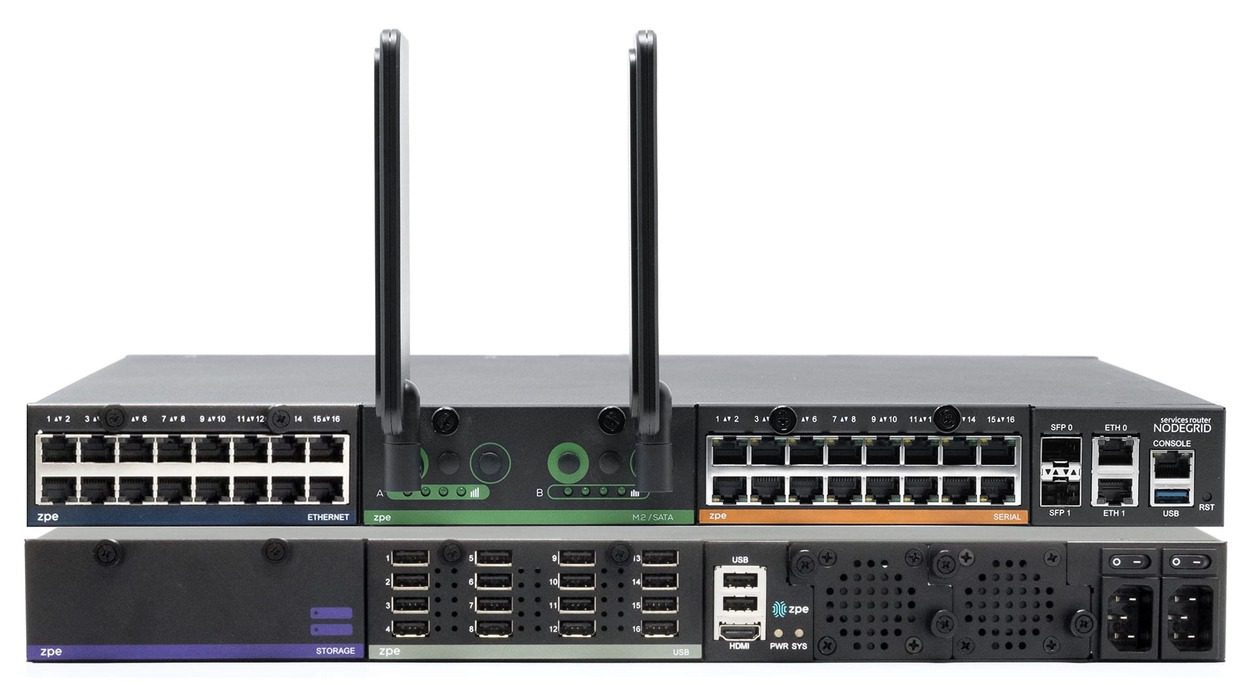
The Nodegrid Serial Console Plus (NSCP) is a Gen 3 out-of-band data center connectivity solution that delivers reliable and blazing-fast remote access to up to 96 data center devices from a single 1U rack-mounted box. Nodegrid’s vendor-neutral OOB DCIM platform supports integrations with your choice of infrastructure solutions and automation tools, giving you total and efficient control over your data center infrastructure.

Ready to learn more about out-of-band data center connectivity?

To learn more about out-of-band data center connectivity with Nodegrid, contact ZPE Systems today.
Contact Us

Network Engineers: 5 Must-Have Tools During a Slow Economy

Network Engineers: 5 Must-Have Tools During a Slow Economy

Network engineers need powerful tools to keep digital services online and customers happy. This is especially true during economic downturn, when organizations must freeze hiring and put more strain on existing staff. Revenue relies on network availability, and with experts predicting a recession this winter, significant operational challenges are inevitable for most organizations.

The burden of overcoming these challenges falls on network engineers. Success means maintaining reliable services and reaping any professional benefits (salary increases, promotions, etc.). Failure, on the other hand, means the very realistic possibility of major business losses and job cuts, including yours.

In order to make sure you don’t fall into the latter scenario, here are five must-have tools and techniques to help network engineers overcome these challenges.

Tool 1. OOBI-LAN™

Out-of-band (OOB) management is an essential part of a network engineer’s toolkit. At the conceptual level, out-of-band is meant to provide management access to production equipment, even if the production equipment is offline.

One major problem is that many organizations invest a lot of time and money into their production infrastructure, but not into any dedicated OOB infrastructure. In other words, they deploy OOB solutions that rely in part on their production equipment, such as OOB VLANs connected to in-band switches. All it takes is a mistake, misconfiguration, or attack to bring down the production and management networks, leaving network engineers to rebuild the entire system from scratch while their services remain offline to customers. This is simply not acceptable in a slow economy, where the business’ resources and revenue are already too thin.

From the pandemic lockdowns, organizations have learned that they need a way to more quickly recover their network locations. According to the Uptime Institute’s 2022 Outage Analysis, outages lasting longer than 24 hours increased to nearly 30% in 2021. This has led many to build dedicated OOB infrastructure for the LAN (OOBI-LAN). They deploy a serial console locally to establish connectivity to the management ports of their sensitive equipment. Network engineers must use this serial console to access their production infrastructure. This serial console minimizes the attack surface since it’s the only device connected to the Internet, and allows network engineers to restore services even if production equipment is down.

Tool 2. OOBI-WAN™

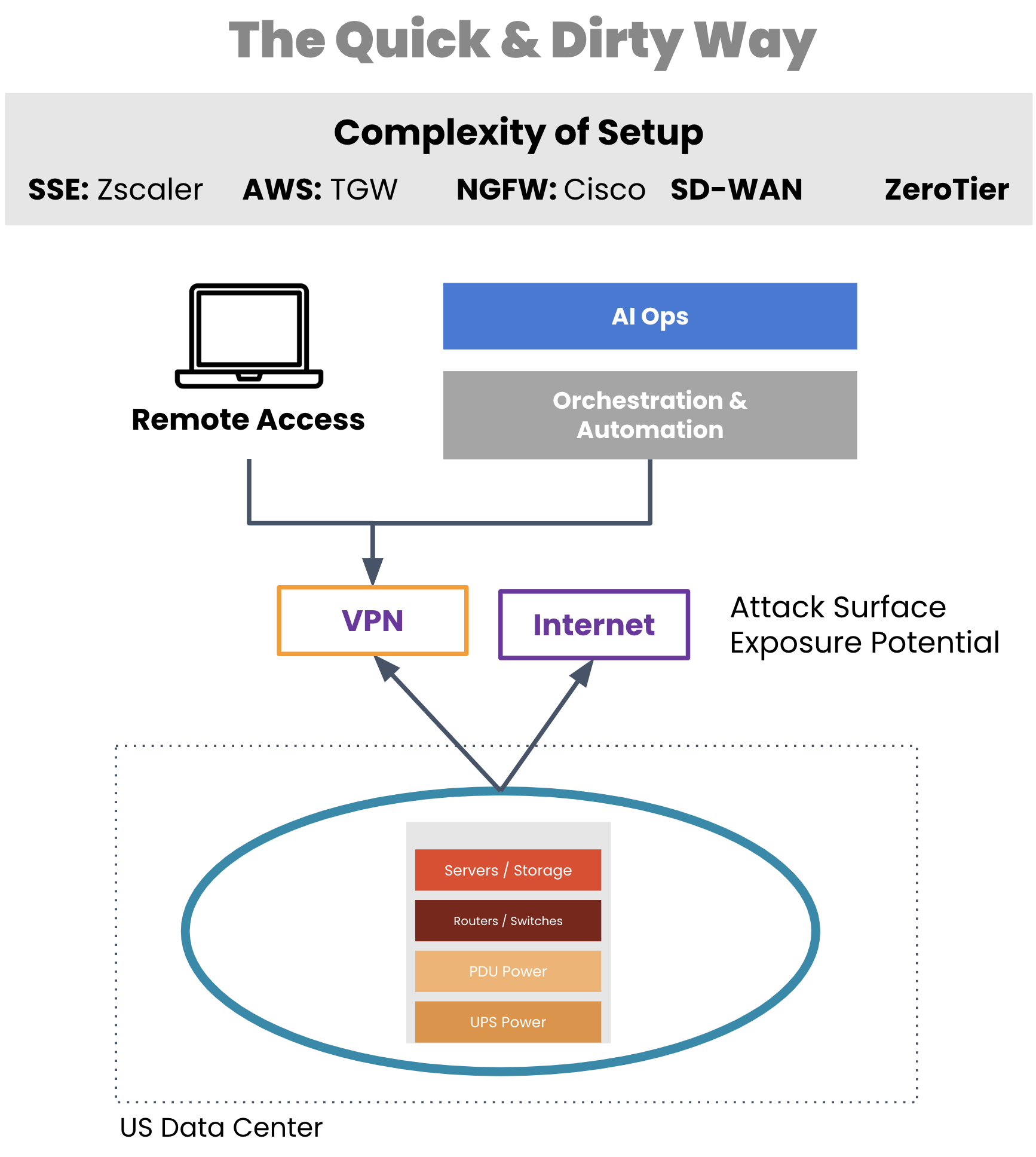
A critical tool for network engineers is out-of-band that enables remote WAN management. But typically, organizations employ a WAN management strategy that also relies on their production infrastructure, such as for creating VPN tunnels for management traffic. If a VPN tunnel becomes broken or the production gear fails, network engineers are suddenly left without remote access to their equipment.

Aside from a lack of availability, traditional OOB access comes with real security risks. Exposing LTE modems to the Internet, leveraging untrusted third-party VPN services, using OOB hardware that’s old and unpatched, and worse — exposing the management port of devices to public Internet. All of these are attack surfaces, any of which can give access to your infrastructure and be used as the pivot point to get to the rest of the infrastructure.

traditional WAN management approach

Image: Management access depends on production equipment to establish VPN tunnels. 

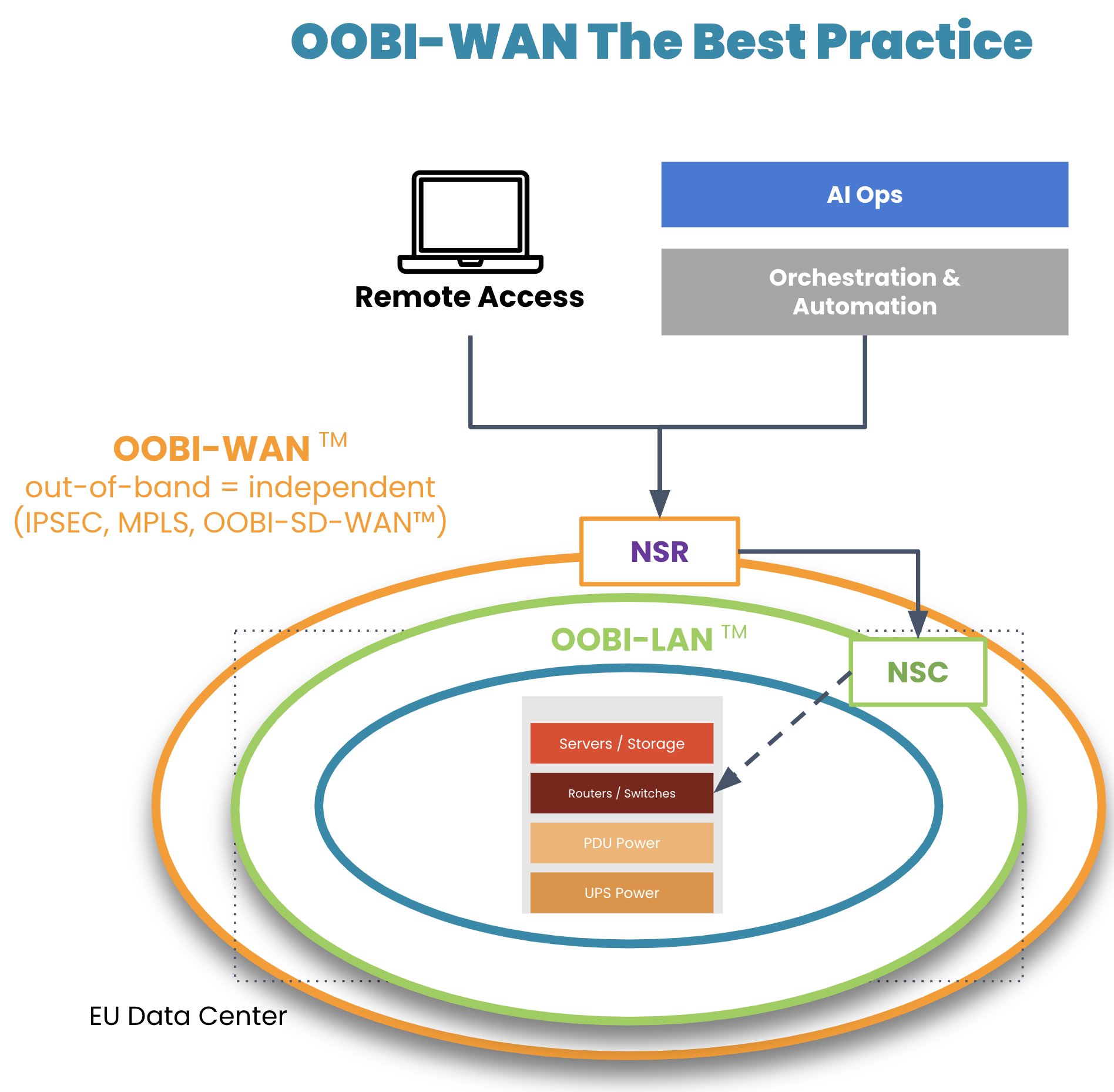
On top of their OOBI-LAN, organizations have built dedicated OOB infrastructure for the WAN (OOBI-WAN – there’s a Star Wars reference somewhere in there) for added resilience against these scenarios.

OOBI-WAN is the WAN best practice

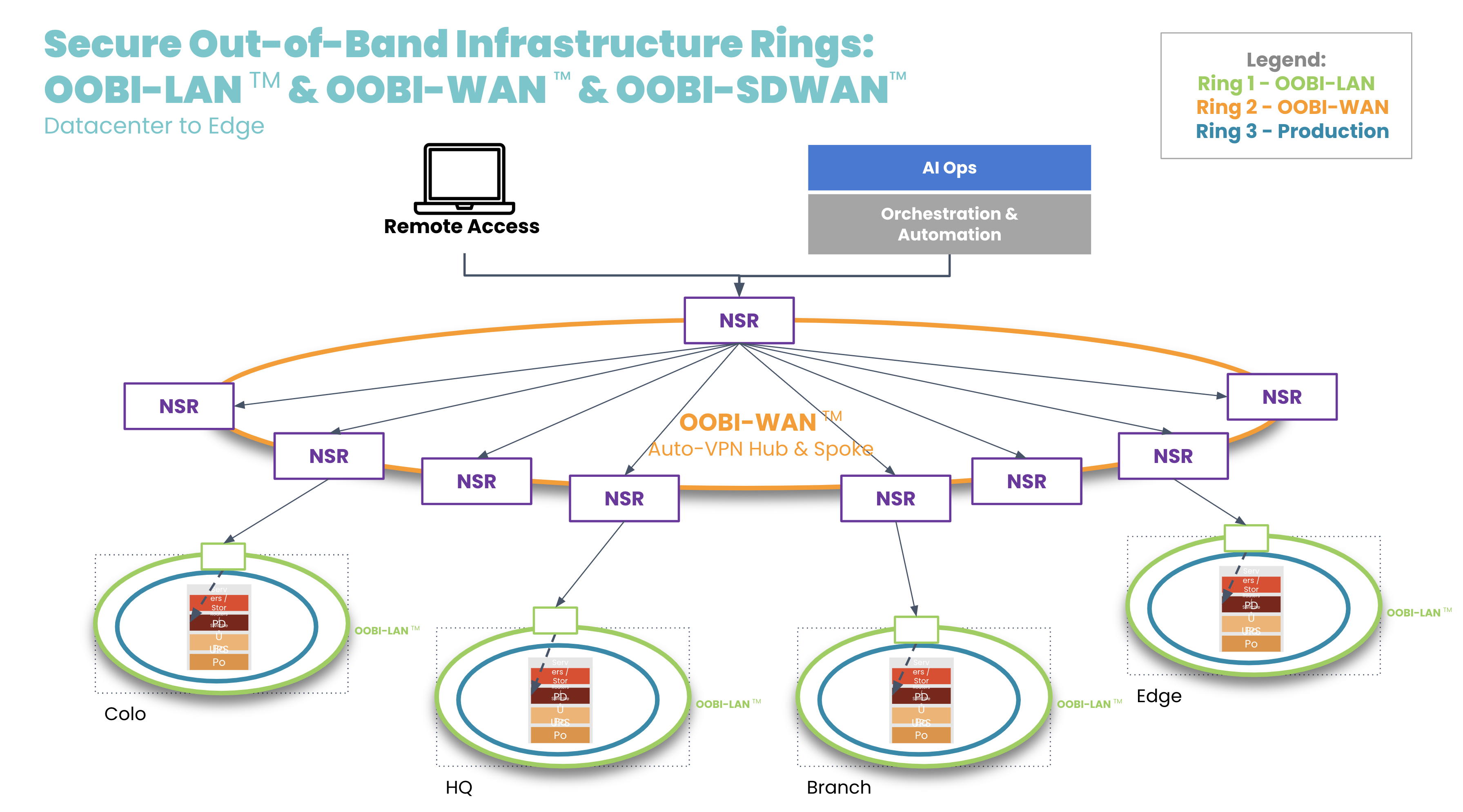
Image: OOBI-WAN and OOBI-LAN create a fully separate out-of-band infrastructure that can be used to completely rebuild production infrastructure. 

OOBI-WAN uses MPLS, IPsec, or SD-WAN links to create an overlay network dedicated specifically to management traffic. This gives network engineers private access to their infrastructure for management and troubleshooting, essentially creating a completely separate OOB network that does not rely on any part of the production network. OOBI-WAN lets network engineers use their WAN connection to remotely access their OOBI-LAN and fully rebuild their distributed networks, regardless of the state of their production infrastructure.  

A key part of OOBI-WAN is the inherent security that is built at all layers. To build secure OOBI-WAN, the best practice is to use OOBI-SDWAN™ which automates the building of VPN tunnels between all the nodes that need to be managed. OOBI-SDWAN provides the expected auto-VPN feature which means VPN encryption keys remain secure, as they don’t need to be copied/pasted/typed into multiple third-party devices. OOBI-SDWAN also ensures that an SLA is provided on the OOBI network along with observability dashboards of connectivity and the access state of the network. The combination of OOBI-SDWAN with a zero trust security framework is the best way to gain reliability in a way that reduces your risk.

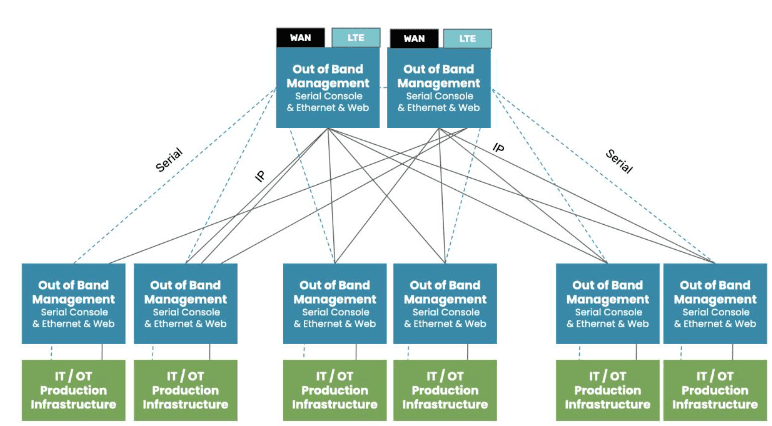
OOBI-WAN hub and spoke

Tool 3. Fully independent automation infrastructure

Another tool that network engineers are becoming familiar with is automation. Network automation codifies repetitive tasks to reduce workloads for configuration management, compliance, and troubleshooting. During a slow economy, being able to scale an IT team’s efforts is especially valuable to business operations and end customers.

There is one major concern, however: having automation that runs loose and begins destroying the network, much like a bull in a China shop. Network engineers typically must learn new automation tools and programming languages, which requires trial and error. And because there is a lack of a best practice reference architecture, teams don’t know any better than to automate directly on the production network. This causes anxiety, as one mistake could bring down the network, cause catastrophic losses, and leave network engineers without an efficient way to recover.

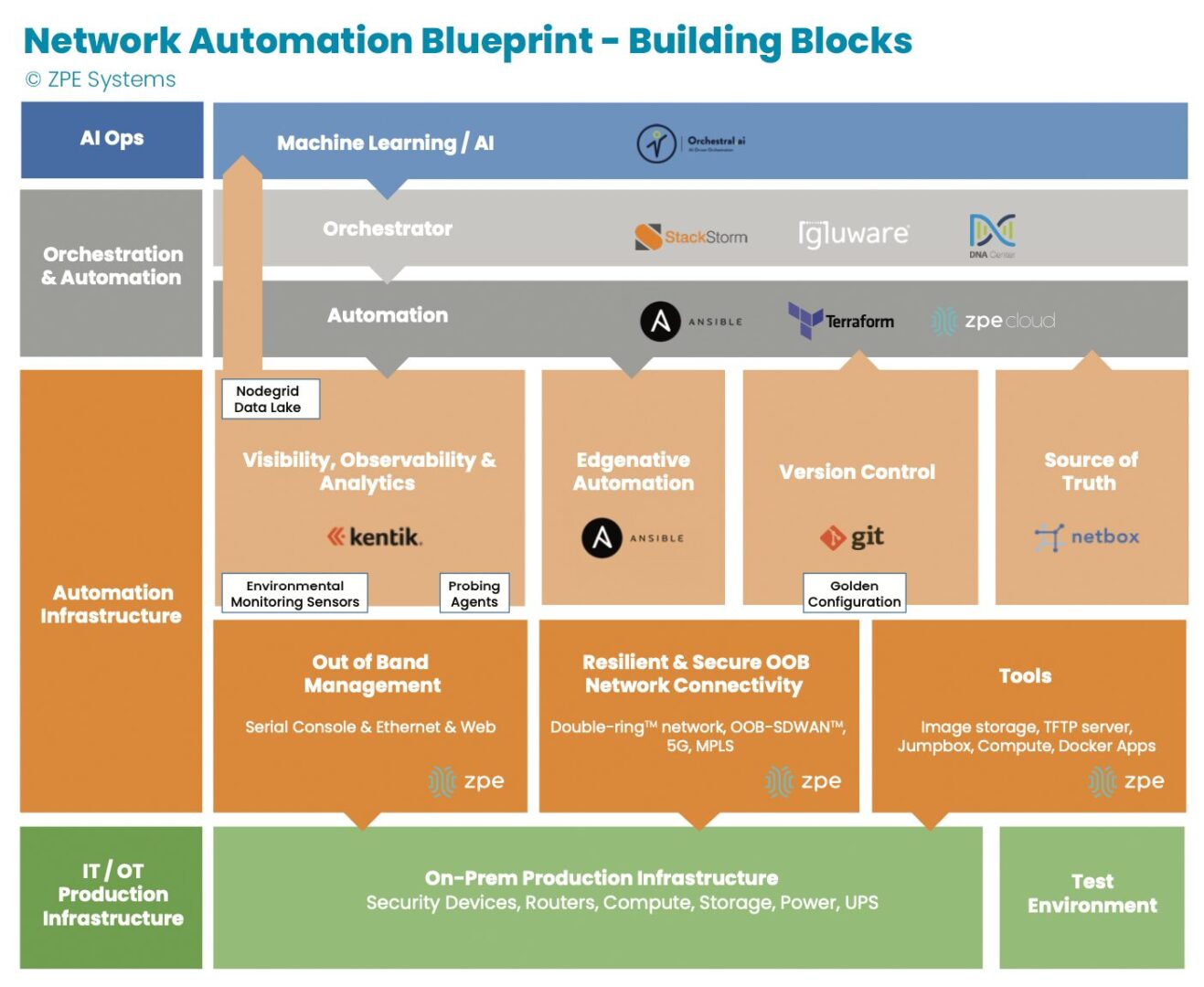
Image: The orange section describes dedicated automation infrastructure used for safely implementing automation.

In recent years, teams have been deploying automation on dedicated infrastructure like their OOB network. This automation infrastructure sits between the production infrastructure and the orchestration infrastructure, and serves as a safe way to build an automation pipeline. Open, Linux-based appliances like the Nodegrid Net SR combine a variety of functions and can host automation tools, like those for observability and analytics, version control, and source of truth. This independent automation infrastructure allows network engineers to ensure the integrity of configuration changes, software updates, and remediation protocols in an out-of-band manner, rather than testing directly on the production network. They can scale their capabilities, and in case of errors, roll back to a golden configuration that keeps services online.

Tool 4. Remote access to local jump box

Network engineers have another tool at their disposal: the jump box (a.k.a. jump server, jump host). A jump box hosts tools for maintaining operations, and these include file servers, image storage, configuration management tools, and troubleshooting commands. The jump box is a valuable asset for normal operations and for restoring services, such as when a device fails and needs its image rebuilt.

The issue with jump boxes is that they are typically a separate device that requires power, cooling, rack space, and maintenance. Some jump boxes also require on-site technicians to physically connect to the equipment needing repair.

Many organizations have adapted by upgrading their OOB infrastructure with appliances that can run full virtual machines (VMs). These can run all the tools mentioned above as well as with Docker containers, while consolidating power consumption, cooling resources, and rack space. The OOB appliance can double as a jump box. Combined with OOBI-LAN and OOBI-WAN, network engineers get remote access to re-image a device, diagnose DNS/routing issues, and perform any other necessary tasks. Key point is that discrete jump boxes – Like the Intel NUC — to be converted to virtual jump boxes running on a secure OOB platform like the Nodegrid Service routers.

Tool 5. Smart hands

A final way that network engineers get help through a slow economy is by outsourcing to so-called ‘smart hands.’ Employing smart hands means involving a third-party expert who can take on some of the IT workload. It’s a viable strategy, especially for teams feeling crushed by corporate belt tightening and the resulting mountain of tasks.

Companies who take this approach must be aware that the skills of smart hands varies greatly, as does the cost. This means it’s essential to strike a balance between which tasks to outsource, and which tasks to keep in house. For example, many organizations use smart hands for simple jobs such as replacing hardware and installing equipment at new sites. For more specialized jobs that require deeper knowledge of the environment, such as fixing a misconfigured IP address or route, teams use in-house personnel. This balance helps organizations get the support they need to keep operations running.

Get a cheat sheet to implement these tools fast

Some companies thrive during economic downturn, because they’ve intelligently placed these tools within their network architecture. Over the past decade, we’ve worked with these companies — including the largest tech giants — to describe in painstaking detail how they set up their infrastructure. We just released all 40+ pages of this validated reference architecture, complete with implementation diagrams and examples.

It’s called the network automation blueprint and it combines all of these tools. Network engineers can confidently answer questions like:

  • How do we meet SLAs with a smaller workforce?
  • How can we keep sites operating without physical access to equipment?
  • How can we perform weekly updates/patching without breaking things?

The blueprint is your cheat sheet to implementing a more resilient network, and fast. Click the button below to download your copy now.

Upgrade Network Infrastructure With Minimal Business Interruption

upgrade network infrastructure

Outdated network infrastructure poses a significant risk to the security and continuity of business operations. According to NTT’s “2020 Global Network Insights Report,” obsolete devices contain nearly twice as many security vulnerabilities as currently supported solutions. Outdated network hardware is also more likely to fail, and the ability to recover from a failure is severely hampered by a lack of vendor support. However, network upgrades can be highly disruptive, so many organizations delay network upgrades to avoid business interruption. They don’t realize that their outdated devices are like ticking time bombs that could bring down their network at any moment. In this post, we’ll provide advice that helps answer the question: How do I upgrade network infrastructure without disrupting business operations?

Why and when to upgrade network infrastructure

Obsolete network infrastructure no longer receives updates and security patches from the vendor. That means any vulnerabilities that exist on the device will remain open, giving cybercriminals time to find and exploit them. In addition, older network solutions often lack the advanced security features like SSO and MFA, which are required for Zero Trust.

Even supported legacy devices suffer from limitations that can prevent a business from achieving its technological goals. For instance, legacy devices may not support automation, making it difficult to achieve NetDevOps transformation. Plus, as enterprise networks grow more distributed, there’s a need for solutions that support SD-WAN and SD-Branch technology.

Sometimes the solutions themselves aren’t terribly outdated, it’s just that business requirements have changed in such a way that the existing infrastructure can’t support. For example, an organization may migrate some applications and systems to the cloud, so they need networking solutions that support hybrid environments. In addition, the mix of old and new devices and cloud and on-premises resources increases management complexity and prevents teams from effectively leveraging network orchestration.

Obsolete devices, outdated security, limited automation support, and changing business requirements are all important reasons to upgrade network infrastructure. However, these upgrades must be approached with a thoughtful strategy to reduce the impact on the performance and availability of business resources.

How to upgrade network infrastructure with minimal business interruption

Vendor agnostic platforms are the key to smooth network infrastructure upgrades. Vendor agnostic (a.k.a. vendor neutral) network management platforms support integrations with all or most viable and established network solutions, including legacy devices.

Vendor-neutral management devices, such as the Nodegrid Serial Console, support both legacy and modern Cisco pinouts. That means Nodegrid provides a single, unified platform from which to manage all the outdated devices you already have as well as any new solutions you add to your infrastructure. This reduces management complexity for network administrators, giving them more time to focus on optimizing performance and planning future network upgrades.

Additionally, a vendor-neutral network orchestration platform can use that management device to extend modern automation and orchestration to legacy hardware. A truly vendor-agnostic platform, such as Nodegrid Manager (for on-premises and private cloud deployments) or ZPE Cloud (for public cloud and hybrid deployments) can run third-party automation playbooks and custom Python scripts. This gives network administrators the unprecedented ability to implement a fully-automated NetOps environment even while still rolling out infrastructure upgrades.

The final piece of the puzzle is vendor-neutral Zero Touch Provisioning (ZTP). ZTP gives you the ability to deploy new devices efficiently and securely in remote data centers, branch offices, and edge compute sites. ZTP devices are provisioned automatically over the network, reducing the need for onsite deployments or pre-staging. A vendor-neutral ZTP solution like Nodegrid can extend ZTP to other vendors’ devices so you can quickly deploy upgraded infrastructure.

Nodegrid delivers vendor-neutral management, orchestration, and ZTP so you can upgrade network infrastructure with minimal business interruption.

Need Help Upgrading Your Network Infrastructure?

Contact ZPE Systems to learn how to upgrade your network infrastructure with Nodegrid.

Contact Us

Creating the Future of Network Automation

The future of network automation will offer more security and adaptability
The future of network management will focus heavily on automation. While many organizations already employ network automation in some form or another, full implementation still lags far behind other areas of IT such as development and infrastructure (server) management.

The current network automation landscape

Currently, network automation focuses on individual tasks and suffers from several limitations that prevent networking teams from using it effectively.

Automating individual network administration workflows

Typical network automation solutions are designed to solve specific challenges by automating individual tasks or workflows. For example, network automation tools, such as Zero Touch Provisioning (ZTP), allow administrators to automatically deploy new device configurations over the network. Automatic device configurations both speed up the provisioning process and decrease the risk of human error.

ZTP automates one individual workflow to solve a specific problem, but it does not eliminate the need for human intervention. Someone still needs to create the configuration script, monitor for deployment errors, and, if necessary, manually troubleshoot failures and other issues. With any network administration workflow, the more a human gets involved in the process, the higher the chances of mistakes, which increases the risk of an outage. Currently, most network solutions don’t allow for enough automation to remove the human element entirely.

Lagging behind infrastructure and software automation

Thanks in part to the popularity of the DevOps methodology, automation has made great leaps forward in the realms of IT infrastructure management, software development, and software testing. For example, technologies like immutable infrastructure and Infrastructure as Code (IaC) make it possible to automate almost every aspect of deploying, managing, scaling, monitoring, and troubleshooting servers and development environments. However, on the networking side of operations, automation is still lagging behind.

There are a few reasons for this delay. First, network architectures still tend to rely on legacy, hardware-based solutions which may not support software-defined networking, immutable principles, or automation paradigms. Second, there’s a network automation skills gap, which means network engineers and administrators don’t have the training or experience needed to work with software-defined networking code and other automation technologies. And third, many network solutions are still closed ecosystems which makes it difficult or impossible to integrate third-party automation and orchestration tools.

The future of network automation will be focused on reducing human intervention, extending virtualization to legacy devices, bridging the network automation skills gap, and eliminating vendor lock-in.

Looking into the future of network automation

In the future, network automation solutions will need to address the above challenges to keep up with the speed, performance, and reliability required for modern business operations. Creating the future of network automation will involve network hyperautomation, legacy modernization, low-code network automation, and vendor agnostic solutions.

Network hyperautomation

Hyperautomation is the practice of automating all (or most) network management workflows to eliminate human intervention. That means every workflow and process needed to achieve a certain outcome is automated, including error correction and other troubleshooting if a particular step fails. Hyperautomation is only achievable with an orchestration platform, which essentially automates your automation. A network orchestration platform gives you a centralized, big-picture overview of your entire network architecture and every automated workflow. This allows you to monitor your hyperautomation processes and, if necessary, manually intervene to fix problems or update workflows. Hyperautomation significantly reduces manual work, which decreases the chances of human error.

Legacy modernization

Obviously, the easiest way to modernize your infrastructure is to simply replace all your legacy hardware with virtualized, cloud-based solutions, but this is unrealistic for most organizations. It’s much less expensive, time-consuming, and disruptive to slowly upgrade your infrastructure over time, but that means you need a way to integrate automated processes with your legacy hardware. A legacy modernization solution (such as ZPE’s Nodegrid Serial Console R-Series) acts as a bridge between your old network hardware and your modern network automation platform.

These solutions directly connect to both your legacy hardware and your upgraded infrastructure, which allows you to manage both from a unified control panel. They also integrate with modern network orchestration platforms, so you can extend automation technology like software-defined networking and hyperautomation playbooks to your legacy devices. This will make it possible to increase your network automation efforts to stay ahead of evolving business requirements and DevOps initiatives.

Low-code network automation

Network automation typically involves software abstraction, which means turning configurations and workflows into software code. Unfortunately, many network administrators and engineers lack programming experience (beyond CLI scripts), which prevents organizations from moving forward with network automation initiatives.

Low-code network automation seeks to bridge the skills gap by reducing the need for manual coding. Low code solutions hide most of the underlying programming behind GUIs (graphical user interfaces) which administrators use to create and manipulate software-defined networking code and automation playbooks. At the same time, engineers who do have programming experience can still access that underlying code to supplement the capabilities of the GUI for more advanced workflows.

Low-code solutions represent a way into the future of network automation for organizations that currently suffer from a lack of resources and expertise. This future is made possible thanks to low code network automation pioneers like Gluware and Anuta ATOM.

Vendor-agnostic solutions

The future of network automation is vendor agnostic (also known as vendor neutral). Current network solutions with closed ecosystems provide some built-in automation capabilities but make it difficult to integrate third-party automation scripts, low code tools, and orchestration platforms. A vendor-agnostic network solution includes open hardware, Linux-based operating systems, and an orchestration platform that supports integrations with your choice of third-party tools and software. Vendor-agnostic solutions make it possible to automate and orchestrate your entire network from one centralized control panel without any gaps in coverage.

Vendor-agnostic platforms also give you the freedom to adopt new network automation solutions without needing to purchase additional proprietary hardware to host them. For instance, AIOps is an emerging technology which uses advanced artificial intelligence algorithms to detect, prevent, and even predict new cybersecurity threats. This network automation technology is better at identifying novel malware and advanced persistent threats than traditional intrusion prevention systems because AI is able to extrapolate and predict new risks based on past data, even if it hasn’t seen that particular attack method before. A vendor-agnostic network platform can host or integrate with third-party AIOps solutions and other cutting edge technology so your organization can stay ahead of the curve.

Creating the future of network automation with ZPE Systems

In the future, network automation will evolve into hyperautomation, legacy devices will be brought under the same management umbrella as modern solutions, low code automation will bridge the skills gap, and vendor-agnostic platforms will make it possible to automate and orchestrate an entire network architecture from one centralized control panel. Luckily, you can create this future now with the help of ZPE Systems.

ZPE’s Nodegrid is a holistic network orchestration platform that helps you overcome network automation challenges with forward-thinking solutions. ZPE Cloud unifies the management of your entire network architecture behind one pane of glass, so you have a complete overview of and control over all your automation. Nodegrid’s vendor-agnostic hardware and software support seamless integrations with your choice of third-party automation workflows, legacy devices, and low-code tools. With Nodegrid, you can accelerate your network automation efforts now and stay ahead of future automation trends.

Network automation learning center:

→   Automating Your Network Operations Does Not Have to Be Difficult
→   Network Automation Best Practices to Implement in 2022
→   The Importance of NetDevOps Automation for Modern Networks

Want to know more about how Nodegrid can create the future of network automation?

Contact ZPE Systems today!

Contact ZPE Systems

Data Center Management Best Practices for NetDevOps Transformation

data center management best practices

The goal of NetDevOps is to take the collaborative, highly efficient processes that work so well in DevOps environments and apply them to networking workflows. The result is a fast, tightly integrated pipeline that delivers high-performance software and services. One of the keys to successful NetDevOps transformation is efficient management of data center and colocation infrastructure, using technologies like Infrastructure as Code (IaC), automation, orchestration, and environmental monitoring. Let’s discuss how these data center management best practices contribute to NetDevOps.

Data center management best practices for NetDevOps transformation

These best practices will help you manage your data center infrastructure more efficiently, and they enable the application of DevOps principles and practices.

Infrastructure as Code/Network as Code

Often, one of the biggest bottlenecks in a software development pipeline is resource provisioning. Spinning up new VMs or nodes with manual configurations is time-consuming, leaving developers sitting around waiting for new environments before they can begin working. Infrastructure as Code, or IaC, aims to streamline the provisioning process by turning all infrastructure configurations into software code. IaC configurations are stored in a centralized repository and can be deployed over and over again, which saves time and ensures consistent configurations across systems—like development, test, and production environments.

Network as Code uses the same technology to manage network device configurations, such as routers and switches. Probably the most commonly used Network as Code technology is zero touch provisioning (ZTP), which deploys device configuration files over the network and executes them automatically. This enables efficient and remote deployments and updates of large-scale and hyperscale data center networks.

Turning data center configurations into software code makes it easier to integrate these workflows into a DevOps pipeline. It also ensures that networking and operations teams can provision new infrastructure at the velocity needed for fast-paced DevOps release cycles.  

Vendor-neutral automation

Automation is one of the foundational principles of NetDevOps because it speeds up processes while reducing the risk of human error. In the data center, automation tools and scripts are used for device configurations, network and power load balancing, system backups, vulnerability scanning, and more. The challenge is in ensuring all these automated components are compatible with your data center infrastructure, especially in multi-vendor, hybrid, and hyperscale environments.

That’s why vendor-neutrality is a major data center management best practice. Using vendor-neutral hardware will make it easier to deploy your choice of automation tools without modifying your scripts for each device. Even better, a vendor-neutral DCIM (data center infrastructure management) solution provides a unified interface from which to create and deploy automation tools while being able to dig its hooks into every component of your data center infrastructure.

Orchestration

Even in a vendor-neutral environment, keeping track of all your automation workflows can be challenging. Data center orchestration is sometimes defined as “automating your automation,” because it reduces the need for administrators to manually execute automated scripts and workflows. This makes automation even more efficient and reduces the workload for administrators, giving them more time to work on new technology initiatives that bring more business value.

Orchestration solutions can also react to situations in real-time, often much faster than human beings are capable of. For example, DCIM orchestration can monitor for usage spikes and perform automatic load balancing before a network administrator has even had time to read the alert message. Data center orchestration makes it easier to maintain optimal performance and respond to changing network conditions.

Environmental monitoring

The environmental conditions in a data center can have a huge impact on the performance and lifetime of your equipment. However, if your infrastructure is housed in remote colocation facilities, you may not have staff on-site to physically monitor things like temperature, humidity, and air quality. Data center environmental risks can cause system shutdowns, performance issues, and equipment failure, so you need a virtual presence to detect and mitigate these threats.

Environmental monitoring systems use sensors to collect data on temperature, humidity, power, airflow, and other important conditions in the rack. Administrators receive automatic alerts when conditions exceed optimal levels, so they can act quickly to remediate the problem. In addition, some systems include analytics and automated playbooks that make it even easier to optimize data center performance. Environmental monitoring ensures that administrators can keep data center infrastructure performing optimally to support NetDevOps pipelines and services.

How Nodegrid empowers data center management best practices

The Nodegrid DCIM orchestration solution delivers everything you need to follow data center management best practices and achieve NetDevOps transformation. Nodegrid’s vendor-neutral hardware and software can directly host your choice of Infrastructure as Code and Network as Code scripts and supports integrations with any third-party automation solution. ZPE Cloud provides centralized DCIM orchestration that unifies all your automation behind one pane of glass, with the ability to “say yes” to any vendor’s hardware. Plus, with Nodegrid’s cloud-managed environmental sensors, you can keep your infrastructure running at peak efficiency to power your NetDevOps transformation.

Learn more about data center management:

→   Top Data Center Infrastructure Management (DCIM) Trends of 2022
→   Data Center Modernization Strategy: How to Streamline Your Legacy Environment
→   Why Choose Nodegrid as Your Data Center Orchestration Tool

Want to find out more about how Nodegrid can help you with these data center management best practices?

Contact ZPE Systems today!

Contact Us

Data Center Colocation Services: Best Practices for Managing Remote Infrastructure

Data center colocation services can help your customers stay secure

The demand for data center colocation services is on the rise, with the industry estimating an increase of 13.35% in 2022. Colocation services are often less expensive than maintaining an on-site data center, allowing you to redirect resources to more exciting and lucrative technology initiatives. However, remote infrastructure can be more challenging to monitor, secure, and troubleshoot. Plus, if you’re not careful, usage-based pricing could cause your budget to spiral out of control. Here’s what to know about the potential challenges and the best practices to implement to avoid common pitfalls.

Data center colocation services: Challenges and solutions

Challenge 1: Visibility

One way that data center colocation services differ from on-premises data centers is that there is often less physical access to and visibility over the infrastructure. Administrators can’t pop in every day to check environmental conditions like temperature and humidity or to verify that nobody has opened the cage without permission or physically tampered with the equipment. This can make it challenging to maintain optimal conditions to extend the life of your equipment and prevent catastrophic failure.

In addition, colocation facilities also follow the shared responsibility model, which means they’re responsible for a certain portion of security, and you’re responsible for the rest. The facility usually has security cameras, electronic door locks, and other security measures in place, but you generally won’t have access to the videos or logs as a customer. That means you need to ensure that you make up the difference with comprehensive monitoring solutions so there are no gaps in your coverage.

Solution 1: Environmental and infrastructure monitoring

Environmental monitoring sensors collect data on conditions in the data center, providing administrators with a virtual presence in remote colocation facilities. The sensors connect to the I/O ports of console servers and other infrastructure management systems, allowing administrators to monitor things like temperature, humidity, and air quality. Often, these systems use pre-set baselines and will trigger automatic alerts when conditions exceed safe levels, making it easier to efficiently monitor remote infrastructure.

Some environmental monitoring systems also include physical tampering sensors, which will alert administrators if someone opens the door to your cage or comes in close proximity to your equipment without prior authorization. This helps to supplement the physical security provided by colocation services and gives you more control over your remote infrastructure.

Challenge 2: Compliance with data privacy regulations

When the infrastructure used to store and process data is no longer managed on-site by in-house staff, it gets much more difficult to stay compliant with strict data privacy regulations. For example, if your organization processes HIPAA data, you need to know exactly who has access to that data, what specific data they access, and why they need access. That also includes access to the infrastructure that stores and processes the data.

If that infrastructure is housed and managed by a third party, as is the case with data center colocation, you need stricter privacy and security controls to maintain compliance.

Solution 2: Zero trust security

The zero trust security methodology is based on the principle of “never trust, always verify.” In the zero trust model, you microsegment your network to facilitate the creation of highly precise security policies and controls. This allows you to control exactly who has access to which resources in your colocation facility.

In addition, the zero trust methodology recommends identity and access management (IAM) solutions with two-factor authentication (2FA) and user and entity behavior analytics (UEBA). These solutions force an account to re-verify its identity and re-establish trust before it can move to different microsegments and access other resources. This both aids in data privacy compliance and limits the lateral movement of compromised accounts, improving the overall security of your remote infrastructure.

Challenge 3: Around-the-clock access to remote infrastructure

Colocation data center infrastructure is managed remotely over the WAN, which requires an internet connection. When administrators manage that infrastructure on the same production network used for data traffic, it’s known as in-band management.

The issue with in-band management is that it relies on the same LAN architecture that’s used in production. That means a misconfiguration or hardware failure that takes the LAN offline will also cut off all management access, making remote troubleshooting impossible. The same issue occurs if there’s a WAN failure or ISP outage.

If administrators can’t troubleshoot and recover the infrastructure remotely, you will need to dispatch a truck roll, which is both expensive and time-consuming. And, the longer that infrastructure is offline, the higher your downtime costs, including lost business and reputation damage.

Solution 3: Out-of-band (OOB) management

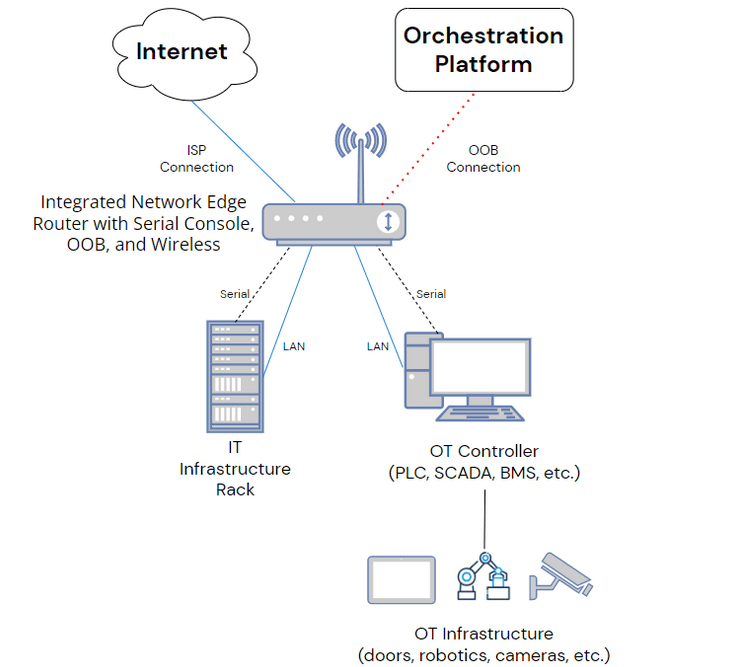
Out-of-band (OOB) management uses serial consoles with secondary WAN interfaces to provide an alternative path to remote infrastructure. OOB serial consoles create a dedicated management network that’s separate from the production LAN. This gives you the ability to perform resource-intensive orchestration workflows without negatively impacting production performance.

OOB management also allows administrators to remotely troubleshoot device failures, LAN misconfigurations, and other sources of outages. This reduces your reliance on truck rolls and helps you recover from outages quicker, so you can lower your costs and protect your reputation.

Challenge 4: Colocation bills

The cost of data center colocation services is generally dependent on your power and bandwidth usage as well as the amount of space your equipment takes up. If not managed properly, usage-based pricing can cause your monthly bill to vary dramatically, wreaking havoc on your budget. Many factors lead to usage spikes, such as sudden surges in demand and inefficient power distribution.

Plus, as your business grows and your technology requirements evolve, you may need to scale up the number of devices in your rack. And as you add more computing, storage, and server resources, you also need more management devices (e.g., serial consoles), all of which take up valuable real estate in the data center.

Solution 4: DCIM orchestration, SDN, and all-in-one devices

This particular challenge has multiple solutions, any or all of which can help keep costs in check while enabling easier scaling.

Data center infrastructure management (DCIM) solutions provide a centralized platform from which to monitor and control remote infrastructure. DCIM tools give administrators the ability to monitor power flows and redistribute loads on demand for more efficient power usage. Modern DCIM orchestration solutions also include automation capabilities for optimal power load balancing.

Software-defined networking (SDN) creates a virtual overlay network, dedicated to management and orchestration, that sits on top of the network architecture. This facilitates the use of sophisticated network automation workflows such as intelligent routing, which can automatically redirect traffic to alternative resources when the bandwidth load on your colocation infrastructure is too high. SDN can help you stay within bandwidth usage thresholds at your colocation data center(s), so you can use your services more cost-effectively.

Finally, all-in-one networking devices can help you reduce the number of boxes in your rack, so you use less square footage in the data center. For example, a device like the Nodegrid Serial Console Plus provides out-of-band management access, routing, switching, and network failover in a single box. Plus, it includes 96 managed serial ports in a single 1U rack-mount form factor, reducing the number of management devices required to control large-scale data center deployments.

Want more solutions on how ZPE can help?

Learn more about how Nodegrid can help you efficiently manage your data center colocation services!

Contact ZPE Systems