Providing Out-of-Band Connectivity to Mission-Critical IT Resources

What is a Hyperscale Data Center?

shutterstock_2204212039(1)

As today’s enterprises race toward digital transformation with cloud-based applications, software-as-a-service (SaaS), and artificial intelligence (AI), data center architectures are evolving. Organizations rely less on traditional server-based infrastructures, preferring the scalability, speed, and cost-efficiency of cloud and hybrid-cloud architectures using major platforms such as AWS and Google. These digital services are supported by an underlying infrastructure comprising thousands of servers, GPUs, and networking devices in what’s known as a hyperscale data center.

The size and complexity of hyperscale data centers present unique management, scaling, and resilience challenges that providers must overcome to ensure an optimal customer experience. This blog explains what a hyperscale data center is and compares it to a normal data center deployment before discussing the unique challenges involved in managing and supporting a hyperscale deployment.

What is a hyperscale data center?

As the name suggests, a hyperscale data center operates at a much larger scale than traditional enterprise data centers. A typical data center houses infrastructure for dozens of customers, each containing tens of servers and devices. A hyperscale data center deployment supports at least 5,000 servers dedicated to a single platform, such as AWS. These thousands of individual machines and services must seamlessly interoperate and rapidly scale on demand to provide a unified and streamlined user experience.

The biggest hyperscale data center challenges

Operating data center deployments on such a massive scale is challenging for several key reasons.


Hyperscale Data Center Challenges

Complexity

Hyperscale data center infrastructure is extensive and complex, with thousands of individual devices, applications, and services to manage. This infrastructure is distributed across multiple facilities in different geographic locations for redundancy, load balancing, and performance reasons. Efficiently managing these resources is impossible without a unified platform, but different vendor solutions and legacy systems may not interoperate, creating a fragmented control plane.

Scaling

Cloud and SaaS customers expect instant, streamlined scaling of their services, and demand can fluctuate wildly depending on the time of year, economic conditions, and other external factors. Many hyperscale providers use serverless, immutable infrastructure that’s elastic and easy to scale, but these systems still rely on a hardware backbone with physical limitations. Adding more compute resources also requires additional management and networking hardware, which increases the cost of scaling hyperscale infrastructure.

Resilience

Customers rely on hyperscale service providers for their critical business operations, so they expect reliability and continuous uptime. Failing to maintain service level agreements (SLAs) with uptime requirements can negatively impact a provider’s reputation. When equipment failures and network outages occur - as they always do, eventually - hyperscale data center recovery is difficult and expensive.

Overcoming hyperscale data center challenges requires unified, scalable, and resilient infrastructure management solutions, like the Nodegrid platform from ZPE Systems.

How Nodegrid simplifies hyperscale data center management

The Nodegrid family of vendor-neutral serial console servers and network edge routers streamlines hyperscale data center deployments. Nodegrid helps hyperscale providers overcome their biggest challenges with:

  • A unified, integrated management platform that centralizes control over multi-vendor, distributed hyperscale infrastructures.
  • Innovative, vendor-neutral serial console servers and network edge routers that extend the unified, automated control plane to legacy, mixed-vendor infrastructure.
  • The open, Linux-based Nodegrid OS which hosts or integrates your choice of third-party software to consolidate functions in a single box.
  • Fast, reliable out-of-band (OOB) management and 5G/4G cellular failover to facilitate easy remote recovery for improved resilience.

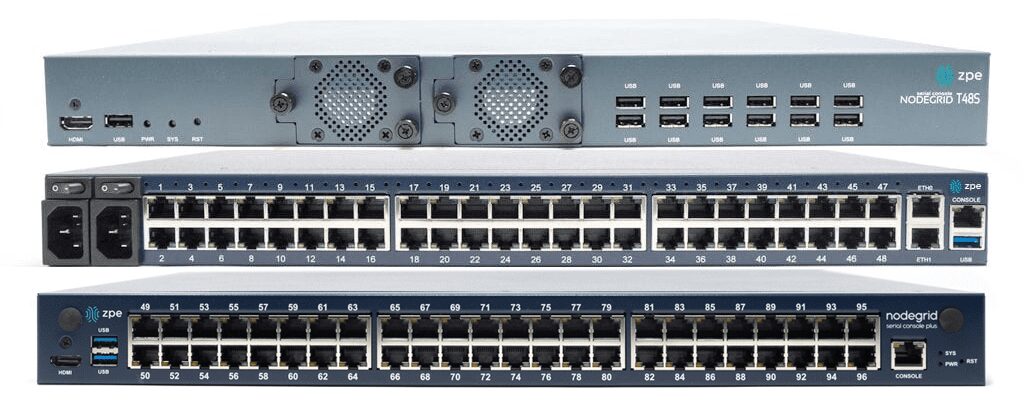
The Nodegrid platform gives hyperscale providers single-pane-of-glass control over multi-vendor, legacy, and distributed data center infrastructure for greater efficiency. With a device like the Nodegrid Serial Console Plus (NSCP), you can manage up to 96 devices with a single piece of 1RU rack-mounted hardware, significantly reducing scaling costs. Plus, the vendor-neutral Nodegrid OS can directly host other vendors’ software for monitoring, security, automation, and more, reducing the number of hardware solutions deployed in the data center.

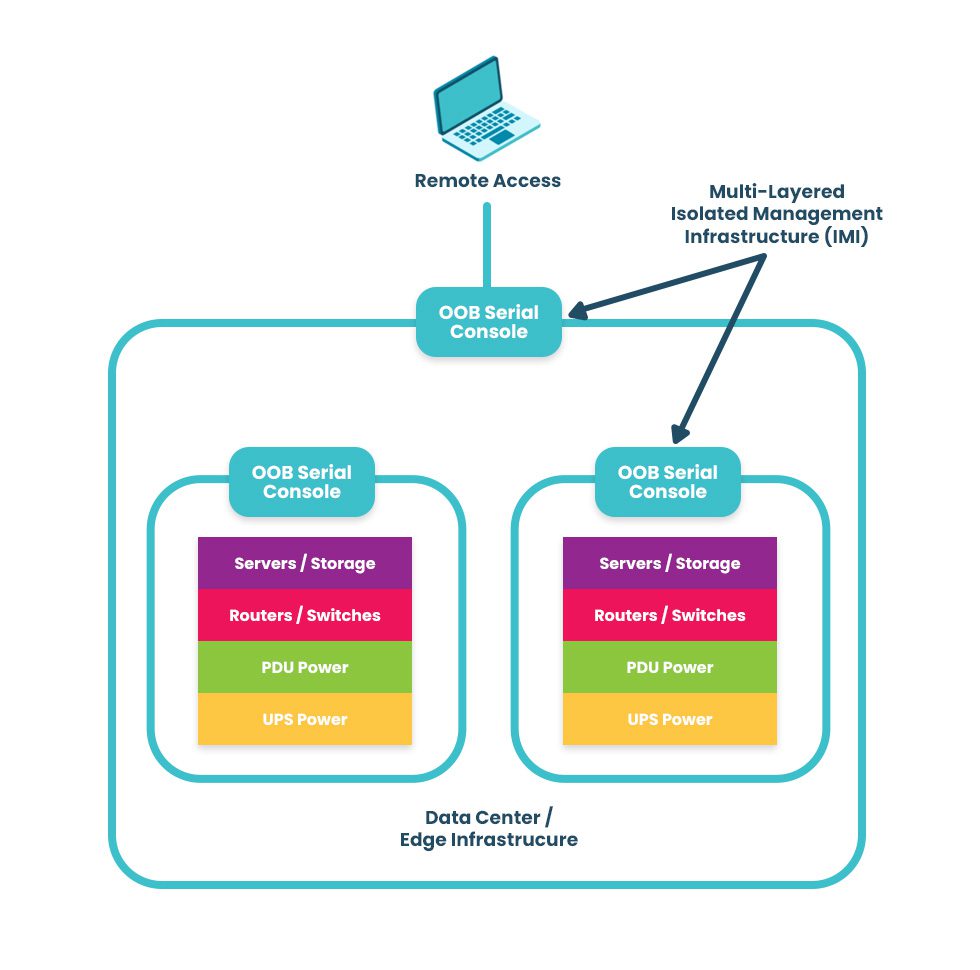
Nodegrid’s out-of-band (OOB) management creates an isolated control plane that doesn’t rely on production network resources, giving teams a lifeline to recover remote infrastructure during outages, equipment failures, and ransomware attacks. The addition of 5G/4G LTE cellular failover allows hyperscale providers to keep vital services running during recovery operations so they can maintain customer SLAs.

Want to learn more about Nodegrid hyperscale data center solutions from ZPE Systems?

Nodegrid’s vendor-neutral hardware and software help hyperscale cloud providers streamline their operations with unified management, enhanced scalability, and resilient out-of-band management. Request a free Nodegrid demo to see our hyperscale data center solutions in action.

Request a Demo

Data Center Migration Checklist

A data center migration is represented by a person physically pushing a rack of data center infrastructure into place
Various reasons may prompt a move to a new data center, like finding a different provider with lower prices, or the added security of relocating assets from an on-premises location to a colocation facility or private cloud.

Despite the potential benefits, data center migrations are often tough on enterprises, both internally and from the client side of things. Data center managers, systems administrators, and network engineers must cope with the logistical difficulties of planning, executing, and supporting the move. End-users may experience service disruptions and performance issues that make their jobs harder. Migrations also tend to reveal any weaknesses in the actual infrastructure that’s moved, which means systems that once worked perfectly may require extra support during and after the migration.

The best way to limit headaches and business disruptions is to plan every step of a data center migration meticulously. This guide provides a basic data center migration checklist to help with planning and includes additional resources for streamlining your move.

Data center migration checklist

Data center migrations are always complex and unique to each organization, but there are typically two major approaches:

  • Lift-and-shift. You physically move infrastructure from one data center to another. In some ways, this is the easiest approach because all components are known, but it can limit your potential benefits if gear remains in racks for easy transport to the new location rather than using the move as an opportunity to improve or upgrade certain parts.
  • New build. You replace some or all of your infrastructure with different solutions in a new data center. This approach is more complex because services and dependencies must be migrated to new environments, but it also permits organizations to simultaneously improve operational processes, cut costs, and update existing tech stacks.

The following data center migration checklist will help guide your planning for either approach and ensure you’re asking the right questions to prepare for any potential problems.

Quick Data Center Migration Checklist

  • Conduct site surveys of the current and the new data centers to determine the existing limitations and available resources, like space, power, cooling, cable management, and security.

  • Locate – or create – documentation for infrastructure requirements such as storage, compute, networking, and applications.

  • Outline the dependencies and ancillary systems from the current data center environment that you must replicate in the new data center.

  • Plan the physical layout and overall network topology of the new environment, including physical cabling, out-of-band management, network, storage, power, rack layout, and cooling.

  • Plan your management access, both for the deployment and for ongoing maintenance, and determine how to assist the rollout (for example, with remote access and automation).

  • Determine your networking requirements (e.g., VLANs, IP addresses, DNS, MPLS) and make an implementation plan.

  • Plan out the migration itself and include disaster recovery options and checkpoints in case something changes or issues arise.

  • Determine who is responsible for which aspects of the move and communicate all expectations and plans.

  • Assign a dedicated triage team to handle end-user support requests if there are issues during or immediately after the move.

  • Create a list of vendor contacts for each migrated component so it’s easier to contact support if something goes wrong.

  • If possible, use a lab environment to simulate key steps of the data center migration to identify potential issues or gaps.

  • Have a testing plan ready to execute once the move is complete to ensure infrastructure integrity, performance, and reliability in the new data center environment.

1.  Site surveys

The first step is to determine your physical requirements – how much space, power, cooling, cable management, etc., you’ll need in the new data center. Then, conduct site surveys of the new environment to identify existing limitations and available resources. For example, you’ll want to make sure the HVAC system can provide adequate climate control – specific to the new locale – for your incoming hardware. You may need to verify that your power supply can support additional chillers or dehumidifiers, if necessary, to maintain optimal temperature ranges. In addition to physical infrastructure requirements, factors like security and physical accessibility are important considerations for your new location.

2. Infrastructure documentation

At a bare minimum, you need an accurate list of all the physical and virtual infrastructure you’re moving to the new data center. You should also collect any existing documentation on your application and system requirements for storage, compute, networking, and security to ensure you cover all these bases in the migration. If that documentation doesn’t exist, now’s the time to create it. Having as much documentation as possible will streamline many of the following steps in your data center move.

3. Dependencies and ancillary services

Aside from the infrastructure you’re moving, hundreds or thousands of other services will likely be affected by the change. It’s important to map out these dependencies and ancillary services to learn how the migration will affect them and what you can do to smooth the transition. For example, if an application or service relies on a legacy database, you may need to upgrade both the database and its hardware to ensure end-users have uninterrupted access. As an added benefit, creating this map also aids in implementing micro-segmentation for Zero Trust security.

4. Layout and topology

The next step is to plan the physical layout of the new data center infrastructure. Where will network, storage, and power devices sit in the rack and cabinets? How will you handle cable management? Will your planned layout provide enough airflow for cooling? This is also the time to plan the network topology – how traffic will flow to, from, and within the new data center infrastructure.

5. Management access

You must determine how your administrators will deploy and manage the new data center infrastructure. Will you enable remote access? If so, how will you ensure continuous availability during migration or when issues arise? Do you plan to automate your deployment with zero touch provisioning?

6. Network planning

If you didn’t cover this in your infrastructure documentation, you’ll need specific documentation for your data center networking requirements – both WAN (wide area networking) and LAN (local area networking). This is a good time to determine whether you want to exactly replicate your existing network environment or make any network infrastructure upgrades. Then, create a detailed implementation plan covering everything from VLANs to IP address provisioning, DNS migrations, and ordering MPLS circuits.

7. Migration & build planning

Next, plan out each step of the move or build itself – the actions your team will perform immediately before, during, and after the migration. It’s important to include disaster recovery options in case critical services break, or unforeseen changes cause delays. Implementing checkpoints at key stages of the move will help ensure any issues are fixed before they impact subsequent migration steps.

8. Assembling a team

At this stage, you likely have a team responsible for planning the data center migration, but you also need to identify who’s responsible for every aspect of the move itself. It’s critical to do this as early as possible so you have time to set expectations, communicate the plan, and handle any required pre-migration training or support. Additionally, ensure this team includes dedicated support staff who can triage end-user requests if any issues arise during or after the migration.

9. Vendor support

Any experienced sysadmin will tell you that anything that could go wrong with a data center migration probably will, so you should plan for the worst but hope for the best. That means collecting a list of vendor contacts for each hardware and software component you’re migrating so it will be easier to contact support if something goes awry. For especially critical systems, you may even want to alert your vendor POCs prior to the move so they can be on hand (or near their phones) on the day of the move.

10. Lab simulation

This step may not be feasible for every organization, but ideally, you’ll use a lab environment to simulate key stages of the data center migration before you actually move. Running a virtualized simulation can help you identify potential hiccups with connection settings or compatibility issues. It can also highlight gaps in your planning – like forgetting to restore user access and security rules after building new firewalls – so you can address them before they affect production services.

11. Post-migration testing

Finally, you need to create a post-migration testing plan that’s ready to implement as soon as the move is complete. Testing will validate the integrity, performance, and reliability of infrastructure in the new environment, allowing teams to proactively resolve issues instead of waiting for monitoring notifications or end-user complaints.

Streamlining your data center migration

Using this data center migration checklist to create a comprehensive plan will help reduce setbacks on the day of the move. To further streamline the migration process and set yourself up for success in your new environment, consider upgrading to a vendor-neutral data center orchestration platform. Such a platform will provide a unified tool for administrators and engineers to monitor, deploy, and manage modern, multi-vendor, and legacy data center infrastructure. Reducing the number of individual solutions you need to access and manage during migration will decrease complexity and speed up the move, so you can start reaping the benefits of your new environment sooner.

Want to learn more about Data Center migration?

For a complete data center migration checklist, including in-depth guidance and best practices for moving day, click here to download our Complete Guide to Data Center Migrations or contact ZPE Systems today to learn more.
Contact Us Download Now

Network Automation Cost Savings Calculator

automation cost savings calculator
Many organizations feel continuous financial pressure to cut costs and streamline operations due to economic factors like the ongoing threat of a recession and global supply chain interruptions. Network automation can help companies across all industries save money during lean financial times. A recent Cisco and ACG Research study found that network automation can reduce OPEX by 55% by streamlining workflows such as device provisioning and service ticket management. Though they aren’t mentioned in the study, additional savings are generated by using automation to avoid outages and accelerate recovery efforts.

This post discusses how to save money through automation and provides a network automation cost savings calculator for a more customized estimate of your potential ROI.


Table of contents

How network automation provides cost savings

Network automation reduces costs by streamlining operations, preventing outages, and aiding in backup and recovery workflows.

Network automation saves money by solving problems

Problem: High OPEX

Solution: Automation tackles repetitive tasks like new installs and ticketing operations, which helps you generate revenue sooner and reduce the time and resources spent on maintaining operations.

Problem: Too many outages

Solution: Automation allows teams to be proactive by leveraging critical data to identify potential problems before they cause outages, freeing them from the typical break/fix approach.

Problem: Slow recovery

Solution: Automation speeds up processes like backups, snapshotting, and device re-imaging, which makes networks more resilient by accelerating recovery from outages and ransomware.

Reduces OPEX

The focus of the Cisco/ACG study was the economic benefits of streamlining network operations through automation. For example, the OPEX (operational expenditure) involved in spinning up a new branch is too high because deployments require so much work, time, and staff. Using automation to provision and deploy new resources can significantly reduce the time it takes to spin up a new branch, which means the site could start generating revenue much sooner. Using automation to monitor device health and environmental conditions could extend the life expectancy of critical (and expensive) equipment while reducing the number of on-site staff needed to maintain that equipment.

Network automation reduces OPEX by increasing the efficiency of repetitive or tedious tasks like new installs, incident management, and device monitoring. Crucially, automation does so without reducing the quality of service for end users and often only improves the speed, reliability, and overall experience.

Prevents outages

Network downtime is an expense that cash-strapped businesses can’t afford to bear. According to a recent ITIC survey, a single hour of downtime costs most organizations (91%) over $300,000 in lost business, with 44% of enterprises reporting outage costs exceeding $1 million. However, preventing downtime is difficult when most network teams are caught in a reactive break/fix cycle because they lack the staffing, resources, and technology required to maintain visibility and identify issues before they occur.

Network automation solves this problem using advanced machine learning algorithms to analyze monitoring data and identify potential issues before they cause outages. For example, AIOps (artificial intelligence for IT operations) solutions provide real-time analysis of infrastructure, network, and security logs. AIOps is adept at recognizing patterns and detecting anomalies in data so that it can identify issues before they affect the performance or reliability of the network.

Accelerates recovery

While network automation helps to reduce downtime, it can’t eliminate outages altogether. When outages do occur, recovery is often a long, drawn-out process involving a lot of manual work, during which time revenue and customer faith may be lost. Network resilience is the ability to quickly recover from ransomware, equipment failures, and other causes of downtime with as little impact as possible on end users and business revenue. Automation speeds up recovery efforts in a few critical ways:

  • Streamlined backups – Automation makes performing regular backups and snapshots easier, reducing the risk of gaps or inaccuracies.
  • Reduced imaging delays – Automatic provisioning ensures that clean systems are spun up quickly so that business can resume as soon as possible.
  • Faster failover – Automatic network failover and routing technologies can reroute traffic around downed nodes before a human admin has time to respond, providing a more seamless end-user experience.

Network automation is a direct source of cost savings because it reduces OPEX without negatively impacting the business or customer experience. Automation also indirectly saves money by helping organizations avoid outages through proactive monitoring and maintenance. In addition, network automation technologies make businesses more resilient by speeding up recovery efforts when breaches and failures do occur.

Network automation cost savings calculator

ZPE Systems provides network and infrastructure automation solutions for any use case, pain point, or technological need. ZPE’s vendor-neutral platform allows you to extend automation to every device on your network, including legacy and mixed-vendor solutions, so that you can achieve true end-to-end automation (a.k.a. hyperautomation). For a customized estimation of how much money you can save by automating your network operations with ZPE Systems, check out our network automation cost savings calculator.

Ready to Learn More?

For help with the network automation cost savings calculator or to learn more about automating your network operations, contact ZPE Systems today.

Contact Us

Cisco 2900 EOL: Replacement Options

cisco 2900 eol

The Cisco ISR 2900 series of branch routers went EOS (end-of-sale) on the 9th of December 2017, and Cisco concluded support on the 31st of December 2022. In this guide, we’ll compare migration options for the Cisco ISR 2900 EOL models to help you select a solution that supports your business use case, deployment size, and future growth.

Disclaimer: This comparison was written by a third party in collaboration with ZPE Systems using data gathered from publicly available data sheets and admin guides, as of 5/12/2023. Please email us if you have corrections or edits, or want to review additional attributes: Matrix@zpesystems.com


Table of Contents

Cisco ISR 2900 overview

The Cisco ISR 2900 is a line of enterprise gateway routers designed for branch and edge networking. It’s a modular solution that can be expanded with optional Network Interface Modules (NIMs) and Service Modules (SMs) for more functionality. There are two primary use cases for the 2900:

Converged branch networking – The ISR 2900 easily integrates with Cisco’s SD-WAN, SD-Branch, cloud security, and DNA network management software, can be extended with optional modules for added hardware capabilities, and supports NFV (network functions virtualization) for all-in-one branch networking.

Out-of-band (OOB) management – Using serial port modules, the ISR 2900 turns into an out-of-band (OOB) serial console solution that provides remote management access to the control plane of branch infrastructure.

The ISR 2900 is officially EOL as of the 31st of December 2022. The EOL models include all 2901, 2911, 2921, and 2951 ISR product SKUs.

Looking for replacement options for your other Cisco ISR EOL products? Read our guide to Cisco ISR EOL Replacement Options.


Cisco 2900 EOL replacement options

The discontinuation of the Cisco 2900 has left many organizations looking for migration options. Let’s compare two direct replacements from Cisco before discussing alternative options that deliver better branch management capabilities and greater opportunities for automation.

Cisco ISR 1100

Cisco ISR 1100 is a series of enterprise branch routers, though in this comparison we’re only looking at the models that support SD-WAN and thus serve as direct replacements for the discontinued 2900 models. The capabilities of the 1100 series vary, mostly because only some of the models are modular. For example, the fixed form-factor 1100-4G/4G LTE models have cellular functionality but offer fewer networking and security features. Conversely, the 1161X-8P and 112x-8P models are modular and can be extended with optional modules (like cellular for the 1161X or terminal server ports for the 112x-8P).

Even with these expansions, the compact ISR 1100s are best suited for smaller deployments in branch offices or small, provider-managed edge data centers. If your organization uses the ISR 2900 for converged branch networking, the 1100s are the closest Cisco replacement, though it supports OOB serial modules as well.

Cisco Catalyst C8300

The Cisco Catalyst C8300 series is a modular branch and edge networking solution, though due to its large size, it’s sometimes used as a primary on-premises gateway router. There are four models to choose from – two 2RU units with 2 SM and 2 NIM slots, and two 1RU units with 1 SM and 1 NIM slot. Each chassis comes with 6 embedded Layer3 Ethernet ports (1 Gbps and/or 10 Gbps) as well as a console port and USB port. All other port configurations and capabilities come via Cisco expansion modules, including options for 5G/4G cellular.

The Catalyst C8300 is a big, robust solution that’s designed for medium to large deployments such as campuses, colocation sites, and AI/machine learning data centers. The C8300 is primarily a converged branch networking solution like the ISR 1100 series, but it provides OOB management with optional serial cards.

Cisco 2900 replacement option comparison table


Cisco ISR 2900 (EOL)

Cisco ISR 1100

Cisco Catalyst 8300

Nodegrid Net SR

Nodegrid Serial Console Plus

Form Factor

1-2 RU

Desktop-1RU

1-2 RU

1 RU

1 RU

Max IPsec Throughput

Not defined

Up to 18.8 Gbps

Up to 18.8 Gbps

600 Mbps – 1.2 Gbps

600Mbps

Total Onboard WAN or LAN 10/100/1000 Ports

2-3

4-6

4-6

2

2

Total Onboard WAN or LAN 10Gbps Ports

0

0

0-2

2

2

WAN Ports

2-3

0-6

2-6

1+, configurable

0-4

LAN Ports

2-3

0-6

2-6

4-84

0-4

Slots

2-3

0-1

2-4

5

0

Default Memory

512 MB

4 GB

8 GB

8 GB

4 GB

Max Memory

2 GB

8 GB

32 GB

64 GB

16 GB

Compute

UCS-E Card

On-board, Compute card

On-board

OOB Capabilities

Requires Serial Card

Requires Serial Card

Requires Serial Card

Included

Included

Environmental Monitoring

N/A

N/A

N/A

Included

Included

For users looking for a Cisco solution to replace their EOL ISR 2900, the ISR 1100 series and Catalyst C8300 are the closest direct replacements. However, both product lines suffer from a major limitation – they aren’t vendor-neutral.

While Cisco routers integrate with some third-party partners, they do not support custom or third-party applications for automation and orchestration, which limits you to the automation offered by Cisco’s software. This lack of open integrations increases the chances that a Cisco solution won’t be able to hook into all the hardware and software components of a distributed and multi-vendor network architecture.

For example, if you utilize different SD-WAN and next-generation firewall (NGFW) vendors at some of your remote sites, Cisco’s automation may not extend to these devices. That means you’ll need to send out technicians to all remote sites (which could number in the dozens or hundreds) just to set up these services when you otherwise could have deployed them automatically.

Want to learn more about breaking free of locked ecosystems? Read The Benefits of Vendor Agnostic Platforms in Network Management

When network solutions like the Cisco 2900 go EOL, it’s the perfect opportunity to look for alternative options that provide the functionality you need without locking you into an ecosystem or limiting your automation capabilities.

Cisco 2900 direct replacement options from ZPE Systems

ZPE Systems provides a line of vendor-neutral solutions for branch and edge networking called Nodegrid. The Nodegrid Net Services Router (NSR) and Nodegrid Serial Console Plus (NSCP) serve as direct replacements for Cisco 2900 EOL products.

Nodegrid Net Services Router (NSR)

The Nodegrid NSR is a modular branch networking solution that you can customize to increase your terminal server ports, storage space, processing power, or switch ports. The NSR delivers converged branch networking capabilities like SD-WAN, SD-Branch, and NFVs, plus it can host your choice of custom and third-party applications for automation, security, and more.

While the NSR is the perfect converged branch solution to replace the Cisco ISR 2900, it also provides 3rd generation (or Gen 3) OOB management. That means Nodegrid’s OOB network is completely vendor-neutral and can extend automation capabilities to all your legacy and mixed-vendor infrastructure for efficient deployments, management, and orchestration.

Want to see the Nodegrid converged branch networking solution in action? Watch a Demo

Nodegrid Serial Console Plus (NSCP)

The NSCP is a robust, scalable branch networking and out-of-band serial console solution. The NSCP comes in 16-, 32-, 48-, and 96-port models, so you can choose the solution that’s right-sized to your deployment and use case. Plus, you can get built-in 5G/4G LTE and Wi-Fi options for failover and out-of-band.

Like the NSR, the NSCP is also an open platform that can run your choice of software to expand your capabilities and reduce your tech stack. Like the NSR, the NSCP delivers Gen 3 OOB management of all connected infrastructure, enabling true end-to-end automation in data centers, branches, and other remote sites. The NSCP is the perfect replacement for enterprises utilizing the Cisco 2900 for out-of-band management, though it also provides converged branch networking capabilities at any scale.

All Nodegrid devices run the open, Linux-based Nodegrid OS which can host your choice of third-party or custom applications, freeing you from vendor lock-in. You can even integrate infrastructure orchestration tools like Puppet, Chef, and Ansible to extend automation to end devices, regardless of vendor. This is what makes Nodegrid the world’s first Gen 3 branch networking solution.

Want to see how Nodegrid stacks up against Cisco’s replacement options? Click here to download the services routers comparative matrix.

Global support and supply chain

Leaving a trusted ecosystem behind to adopt alternative options can be risky, so it’s important to find a vendor that offers the support you need to make the transition and keep your operations running smoothly. ZPE Systems offers global product support using the “follow the sun” model, which means you get support when you need it, regardless of your timezone. You also won’t have to worry about supply chain issues causing stock shortages – ZPE supplies hyperscalers in 10K+ units per quarter and has great, consistent supply chain control.

Need to replace your Cisco 2900 EOL?

To learn more about replacing your Cisco 2900 EOL solution with the vendor-neutral Nodegrid platform and our shipping in as little as two weeks, contact ZPE Systems today. Contact Us

Cisco 2900 EOL product tables with migration SKUs

Cisco 2900 EOL Model

In Scope Features

Replacement Product (modular form factor)

Cisco ISR 2901

Cisco ISR 2911

Cisco ISR 2921

Cisco ISR 2951

Serial Console Module, Routing, 16 serial ports

ZPE-NSR-816-DAC with 1 x 16 port serial module 1 x ZPE-NSR-16SRL-EXPN

Cisco ISR 2901

Cisco ISR 2911

Cisco ISR 2921

Cisco ISR 2951

Serial Console Module, Routing, 32 serial ports

ZPE-NSR-816-DAC with 2×16 port serial module 2x ZPE-NSR-16SRL-EXPN

Cisco ISR 2901

Cisco ISR 2911

Cisco ISR 2921

Cisco ISR 2951

Serial Console Module, Routing, 48 serial ports

ZPE-NSR-816-DAC with 3×16 port serial module 3x ZPE-NSR-16SRL-EXPN

Cisco ISR 2901

Cisco ISR 2911

Cisco ISR 2921

Cisco ISR 2951

Serial Console Module, Routing, 60 serial ports

ZPE-NSR-816-DAC with 4×16 port serial module 4x ZPE-NSR-16SRL-EXPN

80 serial port option – no Cisco equivalent

Serial Console Module, Routing, 80 serial ports

ZPE-NSR-816-DAC with 5×16 port serial module 5x ZPE-NSR-16SRL-EXPN


Cisco 2900 EOL Model

In Scope Features

Replacement Product (fixed form factor)

Cisco ISR 2901

Cisco ISR 2911

Cisco ISR 2921

Cisco ISR 2951

Serial Console Module, Routing, 16 serial ports

ZPE-NSCP-T16R-STND-DAC

Cisco ISR 2901

Cisco ISR 2911

Cisco ISR 2921

Cisco ISR 2951

Serial Console Module, Routing, 32 serial ports

ZPE-NSCP-T32R-STND-DAC

Cisco ISR 2901

Cisco ISR 2911

Cisco ISR 2921

Cisco ISR 2951

Serial Console Module, Routing, 48 serial ports

ZPE-NSCP-T48R-STND-DAC

96 serial port option – no Cisco equivalent

Serial Console Module, Routing, 96 serial ports

ZPE-NSCP-T96R-STND-DAC

Want to see how Nodegrid compares to other serial console solutions?

Defusing Cisco SD-WAN Time-bomb requires out-of-band access

Viptela SD-WAN devices are used at large enterprise branches all around the world. The success of SD-WAN replaced dedicated service provider managed MPLS with customer managed boxes that used commodity internet connectivity giving more options and power to leadership and engineering. It solved the single-point-of-failure issues with Internet connectivity and using overlay networking, created a secure WAN topology never thought possible with commodity Internet connectivity. The unsolved issue is the platform itself. Viptela SD-WAN vEdge devices like many others have a fatal flaw in built-in encryption and authentication. The issue reared its head on May 9th 2023. The boxes shipped with a 10 year root certificate that was created in 2013. The flaw, designed 10 years ago, is that the certificate is a single point of failure to ensure the platform can’t be trusted to form encrypted connections any longer after the certificate expires. This flaw takes down the entire control plane of the platform which in turn takes down the entire dataplane for all user traffic.

Designing PKI certificate management into the platform during the development cycle would have ensured that this never happened. The platform QA team would then be alerted that the cert is about to expire and securely rotate it or simply build a new software patch with a new 10 year root certificate that pushes out the validity window. These are common problems and do fall into cracks from time to time taking down branch networks and what IT teams need to do to fix it is even worse. Today we see many companies calling emergency meeting for “PKI lifecycle management”

The fix to this problem requires upgrade of the control software in the cloud or datacenter which is not so bad. To automate and properly secure the certificate on the platform the branch hardware also needs to be upgraded. This due to limitations for secure chips like a TPM (Trusted Platform Module) to correctly secure the supply chain of the platform.

In the Viptela case, SD-WAN device in most customer environments was the only way to get into the branch then there is no way to upgrade it when its down. Cisco website requires an out-of-band device to have been previously installed at remote locations. If an out-of-band serial console device is not installed then the fix will require a costly truck roll at a rough cost of $1200/site. This will not count the cost of downtime.
ZPE systems has a cost calculator on the website that shows the cost of downtime for this Cisco outage for an organization with 400 branch locations is ~$5M USD. This is the cost of truck rolls at $1200 each and cost of downtime for 8 hours at $1K/hour. ZPE Systems’ Cost of Downtime ROI Calculator
Many customers will suffer as it may not be possible to drive to 400 locations., This problem will take down many branches for at least a week. Cisco Viptela was so successful with this product there are 1000’s of customers that are impacted each with 100’s of locations and there are not enough resources to fix this in a timely fashion.

For this reason Cisco requires out-of-band connectivity devices to recover from this issue. To be a completely touchless solution, the device should also be deliverable with Zero Touch Provisioning (ZTP) so that the device can be simply shipped in, and physically connected by onsite staff. In the Cisco article below you’ll see the note that the only way to recovery from this issue is to have out-of-band connectivity to service as a dedicated control plane to get back into your remote networks and remediate quickly and automatically.

Note Cisco caution below:
Caution: To recover these devices, out-of-band access is required.

Cisco

Source: https://www.cisco.com/c/en/us/support/docs/routers/sd-wan/220448-identify-vedge-certificate-expired-on-ma.html

At the time of purchase it’s hard to sign a check for a device that may not be used that often, but not only its used often, it actually saves money and increases productivity and here’s how.

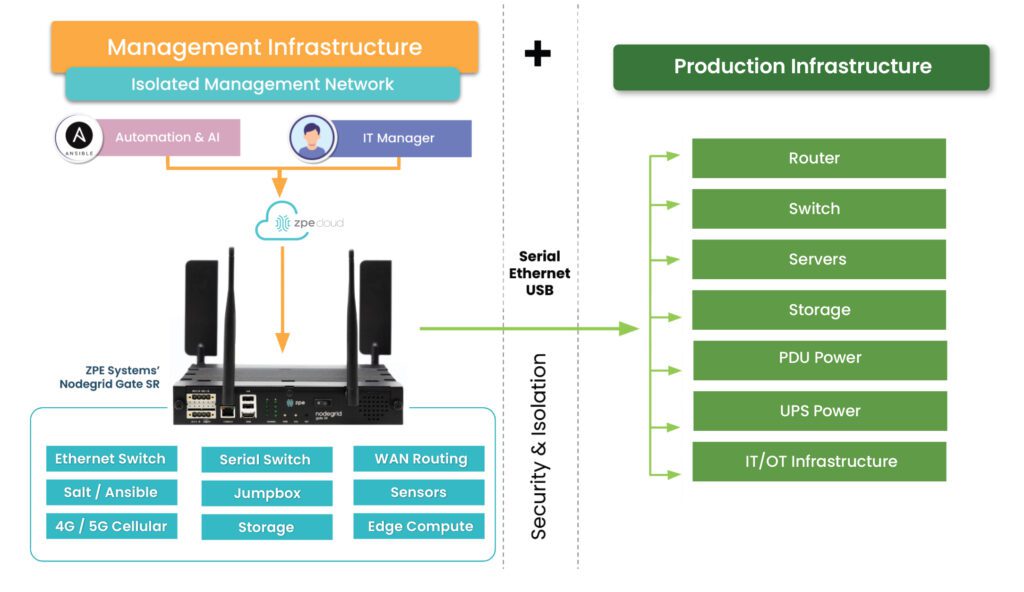
The Resilience System with out-of-band such as ZPE Systems Nodegrid Bold SR shown below creates an isolated control plane network (left side of graphic below) that can be accessed independent from the production network (right side of graphic below). IT admins and automation systems connect to this network through ZPE cloud to gain access to the system in production network. This is fundamental validated reference design that is now the foundational requirement for resilient networks. This solution will enable the engineers to securely update the certificates on Cisco Viptela. Automation built into the Resilience Systems, will enable all branches to be updated simultaneously.

The Solution

ZPE Systems Out-of-Band Infrastructure Recovery Kit

ZPE is the leader in out-of-band serial console and service routers and directly addresses the resilience and uptime challenged this Cisco issue has caused. We are making our ZPE out-of-band recovery devices available as a subscription to help the community to address this immediate issue.

Screenshot 2023-05-16 at 9.52.18 AM

Existing Viptela customers who are affected by the current issue and are struggling in recovering their Viptela environment across the globe, can utilize ZPE System’s “Out-of-Band Infrastructure Recovery Kit” to avoid truck rolls and bring sites up faster.

The kit contains a Nodegrid Mini SR, with global LTE connectivity, a Cisco Console cable and all the connectivity and capabilities to recover your Viptela environment. Customers can order the kit directly from ZPE Systems and we ship it to your HQ or any other location in the world. The unit will automatically call to ZPE Cloud, using its LTE connection. Using ZPE Cloud you claim the Nodegrid Mini SR unit and can gain access to the SD-WAN hardware console and management interface without the requirement to setup a complex VPN connection or client. The setup is easy and with zero-attack surface in the remote location.

Administrators can easily distribute the Viptela firmware to all locations using ZPE Cloud storage and use the build-in tools to recover the Viptela appliances, without the need to send a highly skilled and over-worked network admin on-site. And we have experts on standby to help you with the scripts you need to enable the recovery.

ZPE Systems Out-of-Band Infrastructure Recovery Kit – Overview

HSR-KIT

SKU: ZPE-MSR-24-4G-KIT

  • ZPE Systems Nodegrid Mini SR, with global LTE modem and global data sim covering, allowing the unit to communicate with ZPE Cloud out of the box
  • Buit-in global LTE modem
  • ZPE Cloud – provide global VPN and Clientless communication with MiniSR
  • ZPE Cloud Storage holds the vEdge images
  • USB Cisco console cable
  • All required tools to recover the Viptela appliance, including TFTP, Console access, connectivity testing and more

Get your Out-of-Band Recovery Kit to fix those ticking time bombs

Please get in touch with us if you need more details on the Out-of-Band Recovery Kit or want a trial unit. Send an email to info@zpesystems.com or use the form to get started.

Zero Touch Deployment Cheat Sheet

A zero touch deployment cheat sheet is visualized as a literal cheat sheet used by a student during an exam

Zero touch deployment is meant to make admins’ lives easier by automatically provisioning new devices. However, many teams find the reality of zero touch deployment much more frustrating than manual device configurations. For example, zero touch deployment isn’t always compatible with legacy systems, can be difficult to scale, and is often error-prone and difficult to remotely troubleshoot. This post provides a “cheat sheet” of solutions to the most common zero touch deployment challenges to help organizations streamline their automatic device provisioning.

Zero touch deployment cheat sheet

Zero touch deployment – also known as zero touch provisioning (ZTP) – uses software scripts or definition files to automatically configure new devices. The goal is for a team to be able to ship a new-in-box device to a remote branch where a non-technical user can plug in the device’s power and network cables, at which point the device automatically downloads its configuration from a centralized repository via the branch DHCP server.

In practice, however, there are a variety of common issues that force admins to intervene in the “zero touch” deployment. This guide discusses these challenges and advises how to overcome them to achieve truly zero touch deployments.

Zero touch deployment challenge: The solution:
Legacy systems don’t have native support for zero touch Extending zero touch to legacy systems using a vendor-neutral platform
Deployment errors result in costly truck-rolls Recovering from errors remotely with Gen 3 out-of-band (OOB) management
Securing remote deployments causes firewall bottlenecks Moving security to the edge with Zero trust gateways and Secure Access Service Edge (SASE)
Automating deployments at scale increases management complexity Maintaining control through centralized, vendor-neutral orchestration with version control

Extend zero touch to legacy systems with a vendor-neutral platform

Challenge Solution

While many new systems and networking solutions support zero touch deployment, sometimes there’s still a need to repurpose or reconfigure legacy systems that don’t come with native ZTP support.

Pre-staging these devices before shipping them to the branch is a security risk because the system could be intercepted in transit; plus, they’re likely already deployed at remote sites and need to be reconfigured in place. Without a way to extend zero touch deployment capabilities to those legacy systems, companies often have to pay for admins to travel to remote branches, negating any cost savings they were hoping to gain from reusing older devices.

One way to extend zero touch to legacy systems is with a vendor-neutral management platform. For example, a vendor-neutral serial console switch with auto-sensing ports can connect to modern and legacy infrastructure solutions in a heterogeneous branch deployment so they can all be managed from a single place.

From that unified management platform, admins can write and deploy configuration scripts to connected devices, including legacy systems that don’t support zero touch. Technically, this isn’t zero touch deployment because the system doesn’t automatically download and run its configuration file, but it’s still a way to turn an on-site, manual process into one that’s remotely activated and mostly automated.

Recover from deployment errors with Gen 3 OOB management

Challenge Solution

A new branch deployment almost never goes completely according to plan, and this is especially true when teams are using zero touch for the first time, or aren’t completely comfortable with software-defined infrastructure and networking. In the best-case scenario, when there’s a configuration error, the zero touch deployment aborts, and an admin is able to correct the problem and restart the process.

However, sometimes the deployment hiccup causes the device to hang, freeze, or get stuck in a reboot cycle. Or, even worse, an unnoticed error in the configuration could allow the deployment to finish successfully but then go on to affect other production dependencies and bring the entire branch network down. Either way, organizations must again deal with the expenses involved in sending a tech out to troubleshoot and fix the problem.

The best way to ensure continuous access to remote infrastructure is with out-of-band (OOB) management. An OOB solution, such as a serial console or all-in-one branch gateway, connects to the management ports on infrastructure devices so admins can remotely monitor and control every device from a single place without IP addresses.

This creates a separate (out-of-band) network that’s dedicated to management and troubleshooting, making it possible for teams to remotely recover devices that have failed the zero touch deployment process or brought down production LAN dependencies. Plus, the OOB gateway uses independent, redundant network interfaces to ensure admins still have remote access even if the production WAN or ISP link goes down.

To ensure full OOB management coverage of a heterogenous, mixed-vendor environment, the out-of-band solution should be completely vendor-neutral. An open OOB device also supports integrations with third-party solutions for automation, orchestration, and security. This kind of out-of-band platform is known as Gen 3 OOB. Gen 3 OOB management ensures that teams can remotely recover from zero touch deployment errors no matter what device is affected or how the production network is impacted.

Secure remote deployments with zero trust gateways and SASE

Challenge Solution

Organizations need to secure all devices at all remote sites using consistent policies and security controls. However, for smaller branches and IoT sites, it usually isn’t cost-effective to deploy a security appliance in each location.

Plus, adding more firewalls also adds more management complexity. That means traffic is usually backhauled through the main data center firewall, creating bottlenecks and causing network latency for the entire enterprise.

Using zero trust gateways and cloud-based security services, companies can move security to the branch without the cost and complexity of additional firewalls. An all-in-one, zero trust gateway solution combines SD-WAN, gateway routing, and OOB management in a single device. It also supports zero trust authentication technologies like SAML 2.0 and 2FA. A zero trust gateway also needs to support network micro-segmentation, which will allow the use of highly specific security policies and targeted security controls. Plus, by enabling software-defined wide area networking (SD-WAN), a zero trust gateway facilitates the use of SASE.

Secure Access Service Edge (SASE) is a cloud-based service that combines several enterprise security solutions into a single platform. Zero trust gateways use SD-WAN’s intelligent routing capabilities to detect branch traffic that’s destined for the cloud or web. This traffic is directed through the SASE stack for firewall inspection and security policy application, allowing it to bypass the main security appliance entirely. SASE helps reduce the load on the enterprise firewall, reducing bottlenecks and improving performance without sacrificing security.

Scale zero touch deployments with centralized orchestration

Challenge Solution
Zero touch deployments occur (at least in theory) without any admin intervention, but they still need to be monitored for failures. Keeping track of a handful of automatic deployments may seem easy enough, but as the number and frequency increases, it becomes more challenging. This is especially true when companies kick off large-scale expansions, deploying dozens of devices at once, all of which could be plugged in at any time to begin the automated provisioning process. Plus, different devices need different configuration files, and admins need a way to work together without overwriting each other’s code or duplicating each other’s efforts. A vendor-neutral orchestration platform provides a central hub for network and infrastructure automation across the entire enterprise. This platform uses the serial consoles and OOB gateways in each remote location to gain control over all the connected devices, so network teams can monitor and deploy all their zero touch configurations from one place. An orchestration platform is the single source of truth for all automation, so it needs to support version control. This ensures that admins can see who created or changed a configuration file and revert to a previous version when there’s a mistake.

Simplifying zero touch deployment with Nodegrid

Zero touch deployment can be a hassle, but using vendor-neutral management systems, Gen 3 OOB management, zero trust gateways, and centralized orchestration can help organizations overcome the most common hurdles. For example, a vendor-neutral Nodegrid branch gateway deployed at each remote site helps you extend automation to legacy systems, provides fast and reliable out-of-band access to recover from issues, enables zero trust security & SASE, and gives you unified orchestration through the Nodegrid Manager (on premises) and ZPE Cloud software.

Ready to learn more about zero touch deployment?

Nodegrid has a solution for every zero touch deployment challenge. Schedule a demo to see how Nodegrid’s vendor-neutral platform can simplify zero touch deployment for your enterprise.

Contact Us