Providing Out-of-Band Connectivity to Mission-Critical IT Resources

Network Disaster Recovery Plan Checklist
shutterstock_309021146

Your organization may feel secure now, but a disaster could occur at any moment. For example, the war in Ukraine took the world by surprise and left many organizations scrambling to protect and recover critical infrastructure, applications, and data from Ukrainian facilities.

To ensure you’re ready to weather any crisis, you need a robust disaster recovery (DR) plan that accounts for many different scenarios and challenges. This blog provides a network disaster recovery plan checklist to help you establish protocols for protecting your systems, data, and business.

Your network disaster recovery plan checklist

Identify potential disasters

There’s no one-size-fits-all disaster recovery plan—recovering from ransomware is a much different process than recovering from a tornado. You need to determine what types of disasters are most likely to occur and assess each scenario’s individual risk to your facilities, systems, and data.

Network disaster recovery plan checklist:

  Make a list of disasters (natural, man-made, and otherwise) that could pose a threat to your organization.

  Briefly describe what each disaster would look like and how they would impact your company.

  Prioritize your list of disasters based on how likely they are to occur.

Establish the potential impact of a disaster

You should conduct what’s known as a business impact analysis to define how each of these disaster scenarios would impact your organization.

Network disaster recovery plan checklist:

  Determine which business processes, systems, and data are affected by each disaster scenario on your list.

★  Tip: Don’t forget your cloud and edge resources

  Outline precisely how operations will be disrupted by losing or disrupting critical business services.

  Analyze the impact on every aspect of your organization, including productivity, revenue, reputation, etc.

  Calculate the estimated cost of each disaster, both in terms of lost revenue and recovery costs.

Create recovery protocols

What steps do you need to take to recover from a disaster, and what technology will you use to do it? You should create specific recovery protocols for each high-priority disaster scenario on your list.

Network disaster recovery plan checklist:

  Make a detailed list of all recovery procedures and who is responsible for each.

  Make a list of all the technology that will be leveraged in a disaster (e.g., backup data solutions, network failover)

  Outline instructions for every step in every recovery procedure, including branching recovery paths in case one or more of your recovery systems is unavailable.

Set expectations and timelines

Once you know how you’ll recover from each potential disaster scenario, you need to determine the realistic timeline for recovery. This timeline should be based on data and information from the individual team members involved in recovery efforts, as well as the business impact analysis you performed earlier.

Network disaster recovery plan checklist:

  Define how long it would take to complete the recovery procedures for each disaster.

  Compare this to the business impact analysis showing the estimated cost of a disaster to see if your recovery protocols will work quickly enough to prevent unacceptable losses.

★  Tip: If your recovery protocols are too time-consuming, you may need to return to step 3 and re-evaluate your technologies and procedures.

Define individual roles and responsibilities

When disaster strikes, it’s crucial to take action immediately. This is only possible if everyone involved in disaster recovery knows their responsibilities clearly and who is in charge of decision-making.

Network disaster recovery plan checklist:

  Identify disaster recovery team members and determine how they should be contacted when there’s an emergency.

  List the stakeholders who must be kept updated on the recovery status.

  Assign a person (or team) responsible for monitoring the business impact of an ongoing disaster.

  Assign people at each site who will decide on evacuation or relocation of staff and assets.

  Identify the people who have access to secure systems and/or can grant access to others.

Establish lines of communication

Everyone in your organization needs to know who’s in charge of communicating vital information and how to get in touch with key members of the disaster recovery team. You should also identify a single person (or small team of people) responsible for communicating relevant updates to the public to ensure consistent messaging.

Network disaster recovery plan checklist:

  Determine how to communicate with the disaster recovery team (and the rest of the organization) if email and phones are down.

  Create a flowchart outlining who should be contacted in what order for each specific disaster scenario and recovery step.

  Identify a single point of contact responsible for disseminating critical information to staff.

  Make a list (in multiple locations to ensure constant availability) of vendor and support phone numbers to call in case of a cloud or service-related outage.

★  Tip: Also include the support numbers for all your recovery-related technology.

  Identify a single point of contact through which all information about your disaster will be disseminated to the public/customers.

Create a disaster recovery playbook

You should collect all of the information gathered and analyzed in the previous steps into a single playbook that will act as the source of truth for your disaster recovery efforts. This playbook should be made readily available to everyone involved in the disaster recovery plan and duplicated across redundant systems to ensure it’s accessible when a disaster occurs. Essential information from the playbook (such as points of contact) should be shared with everyone in your organization, even if they don’t have a role to play in recovery.

Test your plan regularly

How do you know your plan actually works? You need to test your plan after implementation and then test again on a regular basis. Conduct employee drills to make sure everyone involved knows what they need to do if a disaster occurs. Test your processes and technologies to make sure they still function correctly and that you can recover within the timeline outlined above. Regular testing will let you know if any processes, instructions, or contact points are outdated.

The challenge of network disaster recovery

Even with the most robust network disaster recovery plan, you’re likely to face some hurdles when it comes time to execute your protocols.

For example, what if a disaster occurs at a remote branch office or data center? If you lose network access to your remote infrastructure, do you have a way to remotely troubleshoot and recover, or do you need to lose time and money to truck rolls or local consultants?

How do you deploy replacement devices if remote hardware fails or is irreparably damaged? Do you have staff on-site who can install and configure new devices?  If you stage new equipment at HQ and then ship it to the remote site, what happens if a malicious actor intercepts the package?

Do you have a way to monitor your infrastructure centrally and orchestrate your disaster recovery efforts? Can that system dig its hooks into every network architecture component, including legacy systems?

How ZPE Systems empowers streamlined network disaster recovery

The Nodegrid solution from ZPE Systems helps you execute your disaster recovery plan while avoiding all the most common challenges. Remote out-of-band management gives you access to all your remote network infrastructure via a dedicated link so you can still view, troubleshoot, and recover systems during an outage.

Ultra-secure zero touch provisioning (ZTP) allows you to ship factory-default equipment to remote sites and deploy configurations in a matter of moments, so you can recover faster. Plus, the vendor-neutral ZPE Cloud management platform gives you complete control and visibility on your distributed network infrastructure so you can monitor for issues and implement recovery protocols from anywhere in the world.

Learn more about network disaster recovery:

★  Customer Strategies in Ukraine to Protect Privacy and IP
★  Data Center Environmental Monitoring: How to Stop Disaster Before It Strikes
★  3 Tips to Improve Edge Network Resilience

Execute your network disaster recovery plan checklist with the Nodegrid solution from ZPE Systems.

Get in contact with us or call 1-844-4ZPE-SYS for a free demo.

Contact Us

Top Data Center Infrastructure Management (DCIM) Trends of 2022

shutterstock_2075585047(1)

Data center infrastructure management (DCIM) keeps evolving to address enterprises’ changing goals, requirements, and concerns. We spoke with DCIM sales engineers to find out which pain points are on their customer’s minds, and which emerging technologies their enterprises are currently excited about:

  • Providing 24/7 remote access with a virtual presence.
  • Consolidating infrastructure for simpler management.
  • Strategically automating DCIM workflows and equipment.

This blog will discuss why enterprises implement these DCIM tools and technologies and provide the best advice about using them within your data center environment.

The Top 3 DCIM trends of 2022

Remote DCIM

The Covid-19 pandemic has accelerated the existing trend towards remote DCIM with minimal on-site staff. Many organizations are cutting budgets and downsizing their staffing, and many  of the people they keep on board are working remotely. If you don’t have subject matter experts physically at your data centers, you need to be able to deploy, manage, and troubleshoot your infrastructure remotely.

One way to ensure you have 24/7 remote access to your data center infrastructure is with out-of-band (OOB) management. OOB separates the network management plane from the data plane and provides a dedicated connection to your management device, which means you always have access to your infrastructure even if there’s an ISP outage. A complementary component to having a virtual presence  is environmental monitoring, which uses sensors to detect temperature, humidity, tampering, and other data center conditions.

When an on-site visit is unavoidable, remote DCIM helps you determine the root cause of the issue beforehand so you can ensure you already have the parts and tools you need to fix it. Doing so prevents your engineers from making multiple trips or wasting time diagnosing problems on-site. Remote DCIM not only allows you to efficiently monitor and manage data center infrastructure, but it also helps minimize the amount of time and money spent traveling to remote sites to troubleshoot and fix issues.

Consolidated solutions

One of the biggest challenges in DCIM is dealing with many different appliances, solutions, and vendors. This means engineers and technicians need to be trained in deploying, managing, and troubleshooting all these disparate solutions. Vendor lock-in may prevent all these systems from working together or integrating with a central DCIM tool, which means engineers have to jump from box to box to monitor issues or perform maintenance. Plus, there’s the hassle of license management, and different vendor contracts coming up for renewal at different times.

That’s why many organizations are moving towards consolidated DCIM solutions with all-in-one devices. Instead of looking for best-of-breed solutions for routing, out-of-band access, infrastructure management, server/compute, and other data center devices, you can get all of these functions rolled-up into a single box. An all-in-one data center solution is like the Swiss Army Knife of DCIM—it may not be the absolute best at any one feature, but you get all the tools you need in one device.

Another way that organizations overcome vendor lock-in and infrastructure complexity is through vendor-neutral DCIM platforms. With an open-architecture platform, you can integrate all your disparate devices and solutions into one centralized control panel. This increases the ease and efficiency of your engineers to manage your entire data center infrastructure.

All-in-one devices and vendor-neutral DCIM platforms both help reduce the complexity of your data center infrastructure, saving you time, money, and frustration.

DCIM automation

Many organizations are beginning or continuing their DCIM automation initiatives in 2022. Some examples of the data center management workflows that are frequently automated include:

  • Power load balancing and management
  • VM (virtual machine) deployment and management
  • Environmental monitoring and analysis
  • Network load balancing
  • Issue remediation

DCIM automation reduces the amount of time your engineers spend performing tedious, repeatable, and manual tasks. This, in turn, reduces the risk of human error, so you can ensure optimal performance and uptime in your data center.

Often, organizations make the mistake of automating the low-hanging fruit first (whichever tasks are easily automated by their chosen solution) rather than analyzing and prioritizing DCIM workflows based on what will help them achieve their specific business goals. This may not make DCIM any easier or more efficient for them in the long run. Other enterprises assume that DCIM automation is an all-or-nothing proposition that requires orchestration and highly complicated scripts and tooling. This leaves them feeling too intimidated to even begin their automation efforts.

DCIM automation doesn’t have to be difficult. Suppose you start with a complete understanding of your data center infrastructure and which workflows are most critical to your business. In that case, you can then automate them in the order that’s most beneficial to your team and your enterprise. And it doesn’t need to happen all at once—you can begin by creating a simple script to handle a single process, then move on to using technology like zero touch provisioning (ZTP) to automatically configure new data center devices. It is important to use DCIM devices and solutions that provide all the automation capabilities you need without locking you into a single vendor’s ecosystem or feature roadmap. This way, your automation initiatives can scale with you in exactly the way you need them to.

When you take the right approach, DCIM automation can help your organization run more efficiently to save time and resources.

In 2022, many enterprises are prioritizing remote DCIM solutions that give them a 24/7 virtual presence in their data center. They’re also consolidating their data center infrastructure with all-in-one solutions that provide centralized monitoring and management. Finally, organizations are looking for ways to automate DCIM workflows without adding to the complexity of their data center infrastructure and management.

Achieve your DCIM goals in 2022 with Nodegrid

Nodegrid is an innovative data center infrastructure management platform that can help you stay ahead of DCIM trends in 2022 and beyond.

shutterstock_2129974520(1)
The Nodegrid Serial Console delivers remote OOB management of up to 96 connected devices in a single 1U rack-mounted device, ensuring you have 24/7 access to monitor and manage your data center infrastructure. Nodegrid’s modular design means you can create a customized data center management solution with all the functionality you need in one box. You can also use Nodegrid’s environmental monitoring sensors to keep an eye on environmental conditions in your rack, even from thousands of miles away.

Any data center infrastructure connected to a Nodegrid box can be deployed, managed, and monitored from one consolidated software platform—Nodegrid Manager for fully on-premises deployments, or ZPE Cloud for hybrid and cloud-based infrastructure.

Finally, Nodegrid enables and simplifies DCIM automation through features like zero touch provisioning and network scripting support. With the vendor-neutral, Linux-based Nodegrid OS, you can automate and orchestrate your data center infrastructure without vendor lock-in hampering your efforts. Nodegrid allows you to create a completely customized automation architecture using third-party tools like Ansible, Docker, and RESTful.

Want to learn more about DCIM? Read our Q&A with a 20-year DCIM expert.

See how Nodegrid can help you take advantage of DCIM trends in 2022.

Contact ZPE Systems to view a free demo.

Contact Us

Automating Your Network Operations Does Not Have to Be Difficult

automating your network operations

The importance of network automation is clear—you can reduce human error, create more efficient workflows, and streamline operations. However, many enterprises delay their automation efforts because of how challenging the process can be.

Fortunately, automating your network operations does not have to be difficult if you start with a comprehensive plan and implement the right tools and solutions.


Best practices for automating your network operations

1. Automate what you need versus what you can

Start your automation journey by identifying and prioritizing the most beneficial workflows for your business to automate. It may seem easier to choose whatever automation tools are provided by your existing vendors and then try to make them work with your infrastructure. However, that could lead you to follow the automation path that’s best for your vendors, versus the path that’s best for your particular use cases and requirements.  Though the former approach may seem simpler in the short-term, it will reduce the overall success of your automation efforts and make it harder to achieve your goals.

You need a full understanding of all the components that make up your network infrastructure so you can accurately identify and prioritize which devices, processes, and applications to automate in which order. Then, you need to ensure your automation solution can get its hooks into every aspect of your infrastructure, including things like environmental monitoring sensors, PDUs (power distribution units), and other devices that may not be part of your initial orchestration framework. Automating your network operations based on what you need, versus what’s easiest, will ultimately save you time and effort in reaching your automation goals.

This ultimately means that every enterprise’s path to automation should look a little different. However, below are some recommendations for network operations, workflows, and tasks to automate.


2. Automate device provisioning

Device provisioning is often a time-consuming, tedious task, which makes it prone to human error—and a prime candidate for automation. There are a couple of common ways to automatically spin up new infrastructure, including:

Zero touch provisioning (ZTP): Devices enabled with ZTP automatically download and execute configurations over the network, allowing you to deploy routers, switches, console servers, and other appliances with very little human intervention. This is especially beneficial for remote infrastructure at colocation facilities, branch offices, warehouses, and other locations where you may not have IT staff available to install and configure devices on-site.

Infrastructure as Code (IaC): IaC uses software abstraction to separate infrastructure configurations from the underlying hardware. This allows you to write configurations as repeatable scripts that you can deploy and manage automatically. You can also use IaC orchestration tools like RedHat Ansible to store and automatically execute configuration scripts for all your infrastructure devices from one central control panel.

Automating the device provisioning process with ZTP and IaC will streamline your network operations by increasing the speed and accuracy with which you can spin up new resources.


3. Automate WAN and Branch management

Managing WAN (wide area network) and branch networks can be very challenging without automation. Often, you don’t have on-site staff to monitor and troubleshoot networking equipment. You also need to back-haul all remote traffic through your primary firewall to apply security policies and controls, which creates bottlenecks on the network and reduces productivity. Plus, every new site you add will further increase the complexity of your enterprise network.

One way to automate WAN and branch management is through software-defined wide area networking, or SD-WAN. SD-WAN decouples the WAN management plane from the underlying hardware and, similarly to IaC, abstracts it as software. This makes it easier to introduce automation to your WAN management. For example, you can use SD-WAN intelligent routing to separate cloud-destined traffic and divert to a cloud-based security stack such as Security Service Edge (SSE), reducing bottlenecks and improving performance. Automating your WAN and branch management through SD-WAN reduces the challenge of distributed network management.


4. Automate with NetDevOps

DevOps is a popular paradigm that combines software development and IT operations departments into one collaborative team to streamline software releases. NetDevOps takes this a step further by integrating network management into the equation. NetDevOps focuses on operationalizing processes by using a systematic approach to automating and orchestrating network management, development, and operations tasks.

NetDevOps automation uses technologies like IaC and SD-WAN but takes things a step further by integrating them with DevOps tools like code repositories, test automation, and CI/CD (continuous integration/continuous delivery). This allows your entire IT department to function together as one efficient unit, eliminating bottlenecks between teams and streamlining product releases.

  Want to learn more? Read What is NetDevOps? The Definitive Guide

Automating your network operations does not have to be difficult if you start with a robust plan that focuses on your organization’s unique environment, requirements, and capabilities. Often, enterprises start with automatic device provisioning because it’s a tedious and repeatable process. WAN and branch management is another good candidate for automation because it can have a large impact on overall network performance. Finally, for development-focused organizations, the NetDevOps methodology integrates DevOps tools and processes into network automation efforts to create more efficient software release cycles.


Automating your network operations is easier with the right solution

Not all network automation platforms offer the same capabilities, features, or level of control. For example, many solutions don’t allow integrations with popular IaC tools like Ansible, Chef, and Puppet. If your platform isn’t vendor-neutral, you’re going to find it challenging to create a fully-integrated NetDevOps environment using code repositories, IaC, and test automation. For true end-to-end automation, you need a platform that can get its hooks into every piece of your infrastructure, or else you’ll end up with a bloated patchwork of solutions that’s difficult to orchestrate and optimize.

ZPE Systems delivers a vendor-neutral network automation platform that doesn’t suffer from any of these limitations. Our Zero Pain Ecosystem can “say yes” to any device, system, or service you add to your network, ensuring you’re able to automate what you need, when you need it. With features like secure zero touch provisioning, SD-WAN, and even SD-Branch, you can automatically deploy and manage your infrastructure from behind one pane of glass. And, all ZPE solutions integrate with leading third-party automation tools, giving you end-to-end automation with consolidated, centralized orchestration.

Automating your network operations is easier with ZPE Systems. But don’t take our word for itsee our solution in action by requesting a free demo today.

How to Achieve Network Security: 4 Essential Steps for IT Professionals

shutterstock_356286569(1)
How critical is network security today?. According to IBM, the cost of a data breach rose to $4.24 million in 2021, and that figure continues to rise. In this blog, we’ll describe how to achieve network security through micro-segmentation, zero trust principles, cloud-based edge security, and network automation.

How to achieve network security: 4 essential steps for IT professionals

1. Shrink your perimeter

The traditional strategy for network security involves creating one large security perimeter around your entire enterprise network to protect all the data, accounts, devices, and applications contained within—even those hosted in the cloud, at remote branch offices, and in small edge data centers. The security controls and policies in use by this perimeter need to account for every single vulnerability and attack surface. Often, that leaves you with a complex, bloated patchwork of security appliances and services that are difficult to manage across multiple vendors and platforms. The harder it is to manage your security perimeter, the more likely you are to accidentally leave gaps in your coverage or miss the subtler signs of a potential breach.

To achieve network security in your enterprise, you need to shrink your perimeter and focus on protecting the individual data, applications, assets, and services at risk. You do this by micro-segmenting your network to logically separate your data, applications, assets, and services. This allows you to create micro-perimeters of highly specific policies and controls that account for the security risks, vulnerabilities, sensitivity, and value of each of your enterprise resources.

Shrinking your security perimeter and micro-segmenting your network also facilitates the implementation of zero trust security. Learn more about the importance of micro-segmentation for zero trust networks.

2. Never trust, always verify

Zero trust security is a proven strategy for protecting enterprise networks – in fact, the President signed an executive order in 2021 urging organizations to adopt a zero trust architecture. Zero trust security follows the principle of “never trust, always verify.” That means you don’t automatically assume the trustworthiness of any network entities even if they’re on your internal enterprise network. You also reduce the privileges granted to any individual account, making sure each network entity has access to the specific resources they need and nothing more. This reduces the lateral movement of a compromised account and limits the amount of damage that can be inflicted during an attack.

To apply and enforce zero trust access policies, you need an identity and access management (IAM) solution that allows you to dynamically and consistently assess an entity’s trustworthiness based on the context of the situation. Many IAM platforms utilize user and entity behavior analytics (UEBA), which monitors the activity of accounts and devices on your network to establish a baseline of behavior. UEBA can then use that baseline to determine when a network entity is behaving in a risky or unusual way, and then force that entity to reestablish trust before it accesses any new resources.

Zero trust security uses the methodology of “never trust, always verify” to limit the damage done by compromised user accounts and devices on your network. Learn more in our ultimate guide to a zero trust security model for an enterprise.

3. Secure your network edge

If your enterprise includes branch offices, work-from-home employees, small data centers, and other remote locations, you need a strategy to secure your network edge. Typically, that means backhauling all remote traffic through a firewall in the central data center, even if that traffic is bound for cloud resources. This can create bottlenecks in your enterprise network and reduce productivity.

Security service edge, or SSE, uses a cloud-based security stack to monitor and protect your remote, cloud-destined traffic without needing to route through your data center. SSE uses technologies like zero trust network access (ZTNA), secure web gateways (SWG), cloud access security brokers (CASB), and firewall as a service (FWaaS) to secure your edge traffic. Each of these security controls is delivered as a cloud-based service, so your remote users and devices can access your cloud resources securely without routing through your main firewall.

Security service edge, or SSE, provides enterprise-grade protection to your edge networks without impacting network performance or productivity. Learn more in What is security service edge (SSE)? Everything you need to know.

4. Reduce human error

According to Gartner, up to 99% of firewall breaches are caused by human error. When IT professionals need to manually configure and manage many different devices in a complex enterprise network, the risk of human error increases. A misconfigured security setting or user account could create vulnerabilities and leave you exposed to attacks. One way to reduce human error and the associated risk of a security breach is through network automation.

For example, zero touch provisioning can be leveraged to automatically configure and deploy network appliances. Software-defined networking (SDN) and infrastructure as code (IaC) are methods for decoupling device configurations from the underlying hardware, which allows you to use automated scripts to configure, update, and manage appliances and computing resources. Software-defined wide area networking, or SD-WAN, provides the same software abstraction and automation capabilities for your remote edge network infrastructure.

Network automation reduces the risk of configuration mistakes, which contributes to a more secure enterprise network. Plus, network automation is critical if you want to implement NetDevOps. Learn more about the importance of NetDevOps automation for modern networks.

To achieve network security, you need to rethink the old “castle and moat” strategy in which you have one big security perimeter (the moat) surrounding your entire enterprise and you assume everything within that perimeter (the castle) is safe and trustworthy. You should also consider a cloud-based approach to protecting your remote, cloud-destined traffic to improve the security and performance of your entire enterprise. Finally, you should use network automation to reduce the time you’re spending on tedious configurations, which will help eliminate configuration mistakes.

Achieve network security with the right solution

When you’re following the steps above, you’re likely to face a few challenges. For example, vendor lock-in can make it difficult to apply zero trust security controls or integrate third-party automation solutions. Additionally, to route your edge traffic through an SSE technology stack such as Zscaler or Cloudflare, you need an SD-WAN on-ramp with the ability to intelligently identify and re-route cloud-destined traffic. Plus, implementing all these security technologies can leave you with many different solutions to manage, increasing the complexity and difficulty of your enterprise network management.

ZPE Systems solves all these challenges with an innovative and vendor-neutral family of network management solutions. ZPE’s line of network edge routers and data center serial consoles runs on the Nodegrid OS, an open, x86 Linux-based operating system that allows easy integrations with zero trust security solutions and supports third-party automation via tools like Ansible and Chef. ZPE’s SD-WAN platform is the best on-ramp to your SSE stack, providing a secure, lightweight cloud solution from which to manage your edge network. Plus, with ZPE Cloud, you can consolidate management of your entire network behind one pane of glass, allowing you to efficiently deploy and orchestrate your network security strategy.

Want to learn more about how to achieve network security?

Visit our network security blog or contact ZPE Systems today.

Contact Us

Data Center Temperature & Humidity Best Practices: A Complete Checklist

Businessman,Holding,Pencil,At,Complete,Checklist,With,Tick,Marks.,Business

Temperature and humidity have a significant impact on your data center infrastructure. High temperatures can cause devices to overheat, whereas extreme low temperatures can cause mechanical and electrical failures. High humidity can lead to moisture build-up, corrosion, and shorts, but low humidity can lead to electrostatic discharge. That’s why it’s critical that you monitor the environment in your cabinets and follow data center temperature and humidity best practices.

Data center temperature and humidity guidelines

Each piece of data center equipment—including enterprise servers, storage devices, switches, firewalls, and other appliances—has a recommended temperature and humidity range at which it operates most efficiently. However, you can’t create individual climates for each piece of gear, because it all needs to coexist in the same space. That’s why broader guidelines exist, such as those provided by ASHRAE (the American Society of Heating, Refrigerating and Air-Conditioning Engineers).

ASHRAE outlines four classes, based on temperature and humidity sensitivity, into which you can organize your data center equipment. Plus, arranging the layout of your data center to account for these classes can help you manage environmental conditions more efficiently (more on that later). The four equipment classes are:

A1: The most sensitive enterprise servers, legacy hardware, and specialty equipment that requires the strictest level of environmental control.

  • Temperature range: 15°C (59°F) to 32°C (89.6°F)
  • Relative humidity range: 20% to 80%

A2: Most modern servers, appliances, storage devices, and personal workstations fall into this class.

  • Temperature range: 10°C (50°F) to 35°C (95°F)
  • Relative humidity range: 20% to 80%

A3: Some newer equipment that’s designed to withstand a broader range of temperatures and humidity.

  • Temperature range: 5°C (41°F) to 40°C (104°F)
  • Relative humidity range: 8% to 85%

A4: Equipment that’s specifically made to operate in extreme environments.

  • Temperature range: 5°C (41°F) to 45°C (113°F)
  • Relative humidity range: 8% to 90%

It’s important to note that there is still a “sweet spot” where a piece of equipment will perform best even within these recommended temperature ranges. The key is to balance that performance against other devices’ cooling costs and needs in the same rack or cabinet.

Data center temperature and humidity best practices: a complete checklist

Now, let’s dig into the data center temperature and humidity best practices to help you achieve these standards.

1. Monitor rack conditions, not just room conditions

The location of your sensors matters a lot. Simply monitoring the ambient temperature and humidity in the room doesn’t give you an accurate picture of the conditions in each rack. Different spots within the room may report different readings depending on the location of the cooling system vents, how particular hot machines are running, and other factors.

Instead, data center temperature and humidity best practices recommend installing multiple sensors in each cabinet. You need to monitor the air that’s flowing into your equipment, so to get the most accurate readings you should place your sensors near the air intake vents (typically at the front of a rack-mount chassis).

2. Calculate and optimize your power usage effectiveness (PUE)

Power usage effectiveness, or PUE, is a metric that data center infrastructure management (DCIM) engineers track to determine their data center’s energy efficiency. You calculate data center PUE by dividing the amount of power flowing into the facility by the power usage of the devices and infrastructure contained within. The higher your PUE number, the less efficiently you’re using your power. According to Uptime Institute’s annual Global Data Center Survey, the average PUE was 1.57 in 2021. You want your PUE to be as close to 1 as possible, but at the bare minimum, you should strive to meet that average number.

Data center HVAC (heating, ventilation, and air conditioning) systems are notorious power hogs. You need to keep temperature and humidity within acceptable limits, but you also need to consider the power costs—both in terms of money and your data center carbon footprint. Keeping an eye on your PUE will help you determine that balance.

3. Design for more efficient cooling

If your PUE is too high, you should look into more efficient cooling techniques to build on that last point. Data center cooling systems are known as CRACs (computer room air conditioners) or CRAHs (computer room air handlers). CRACs use refrigerants and compressors to cool the air, whereas CRAHs blow air across chilled water. Both systems require a lot of power, but there are ways to increase your cooling efficiency without increasing your energy consumption.

For example, you can strategically arrange your data center equipment to maximize cooling efficiency. In a smaller server room, you could place your highly sensitive, A1-class equipment closest to your cooling system. The best practice is in large data centers and colocation facilities to have “hot and cold aisles.” That means arranging cabinet aisles back-to-back, so all the hot air venting out the back of your equipment flows to the exit vents in one concentrated stream.

It would be best if you always strived to stay within the temperature and humidity guidelines specified by device manufacturers, and your data center should follow the environmental standards outlined by ASHRAE. These data center temperature and humidity best practices for environmental monitoring, power usage tracking, and efficient cooling will help you meet those standards while saving money and optimizing performance.

4. Monitor the environment in your cabinets

Environmental monitoring sensors collect data on the conditions in your rack so you can ensure that the temperature and humidity are within recommended limits. Some best practices for data center environmental monitoring include:

  • If you’re managing remote data center infrastructure, you should implement remote out-of-band management, which provides a dedicated connection to your environmental sensors even during a network outage.
  • Temperature and humidity aren’t the only data center environmental risks. Your environmental monitoring solution should also include sensors for tampering, smoke, airflow, dust, and particulates.
  • You can’t keep your eyes on your monitoring logs 24/7, so you should set up automatic alerts, so you’ll be notified if conditions exceed expected thresholds. To gain even more control, you should look for an environmental monitoring solution that includes web dashboards with visualizations so you can track conditions over time and spot opportunities for optimization.

Achieve comprehensive data center temperature and humidity monitoring with Nodegrid

Nodegrid’s line of environmental monitoring sensors gives you a complete picture of the conditions in your rack so you can follow data center temperature and humidity best practices. With sensors for airflow and temperature, particulates, smoke, proximity, temperature, and humidity, you can keep a close eye on your physical equipment even from thousands of miles away.

ZPE Cloud provides a cloud-based web portal to monitor and manage your sensors, with analytics and visualizations to help you monitor power usage trends, detecting temperature spikes, and more. Plus, when you connect your rack infrastructure to Nodegrid Serial Consoles, you get reliable, secure out-of-band access to your environmental sensors and other data center devices, even during a network outage.

Learn more about data center environmental monitoring

Learn more about Nodegrid’s data center solutions

Need more help achieving data center temperature and humidity best practices with Nodegrid?

Reach out to contact ZPE Systems online or call 1-844-4ZPE-SYS.

Contact Us

Customer strategies in Ukraine to protect privacy and IP

ZPEUkraine (1)

How autonomous decommissioning via out-of-band has become essential to disaster recovery for edge deployments in uncertain geographies

To say there’s instability in Eastern Europe would be a drastic understatement. Russia continues its attacks on many fronts in Ukraine, displacing millions of Ukrainians who are now left with an uncertain future. Security is on everyone’s mind, and while many have answered the call to arms and stand ready with AK-74 in hand, others recognize that defending Ukraine involves shielding IT infrastructure and intellectual property from cyberattacks.

For this, some of ZPE Systems’ customers are using an unlikely defense: out-of-band management. Despite recent attacks using wiper malware and DDoS to take down government websites, organizations are able to use generation 3 out-of-band to decommission their sites in order to protect their data against adversaries who have boots on the ground.

In this post, we’ll examine the current issues surrounding compromised edge sites and what organizations are doing right now to shield their intellectual property (IP).

What’s at stake?

Many companies have critical IT infrastructure distributed across countries, regions, and continents. This infrastructure consists of networking gear and edge compute equipment, such as servers, switches, routers, and other end devices. These are responsible for connecting users and customers to essential services, processing and storing sensitive data, and running intellectual property such as proprietary operating systems, applications, and network certificates.

All of these are essential to supporting normal business operations and the customers they serve.

For example, telco companies rely on their infrastructure of cell tower sites, fiber cable lines, and their connected hardware and software to provide voice networks and Internet service. These companies run intellectual property within their infrastructure. In many cases, this intellectual property includes software that can cover a range of types and uses, from multi-protocol access proxies that enable IT admins to remotely manage edge network clusters, to analytics applications that track data usage for media delivery and customer experience optimization.

These companies are also responsible for handling sensitive data. For administrative purposes, billing, and compliance, these companies use devices that process and store personal identifying information for customers, including names, addresses, birth dates, etc.

All of this is what is at stake when faced with disaster. This is why it’s important to have the proper disaster recovery plan and tools in place, and mitigate the risk of losing sensitive information or having it fall into the wrong hands.

What disaster looks like

Every enterprise and government organization should assess their level of risk regarding equipment deployed at the edge. Risks can come from geographical and geopolitical factors — such as tornadoes or flooding during seasons of inclimate weather, or regional instability during times of international conflict.

Imagine you’re in charge of a corporate or government organization. One day you stop receiving pingbacks from your edge sites, and you suddenly find that you’re cut off from these locations.

There’s no network. There’s no access. And like many organizations currently struggling in Ukraine, you’re simply no longer in control of what happens to your data.

What do you do now?

Your sensitive user credentials, customer information, and intellectual property are in jeopardy, and possibly being stolen by adversaries.

Could you have prevented this?

Disaster recovery: Autonomous decommissioning to stop data theft

Part of an adequate disaster recovery plan involves having hermetic and autonomous operations, down to the device level. In the case that you need to go into disaster recovery mode, consider all of the information that needs to be wiped at your locations:

  • Servers need to be wiped
  • Disks and partitions need to be wiped
  • Disks need to be overwritten so data can’t be recovered
  • Switches and supporting infrastructure need their configurations wiped

The problem is that since you’re cut off and unable to remotely access this equipment, you can’t perform these tasks.

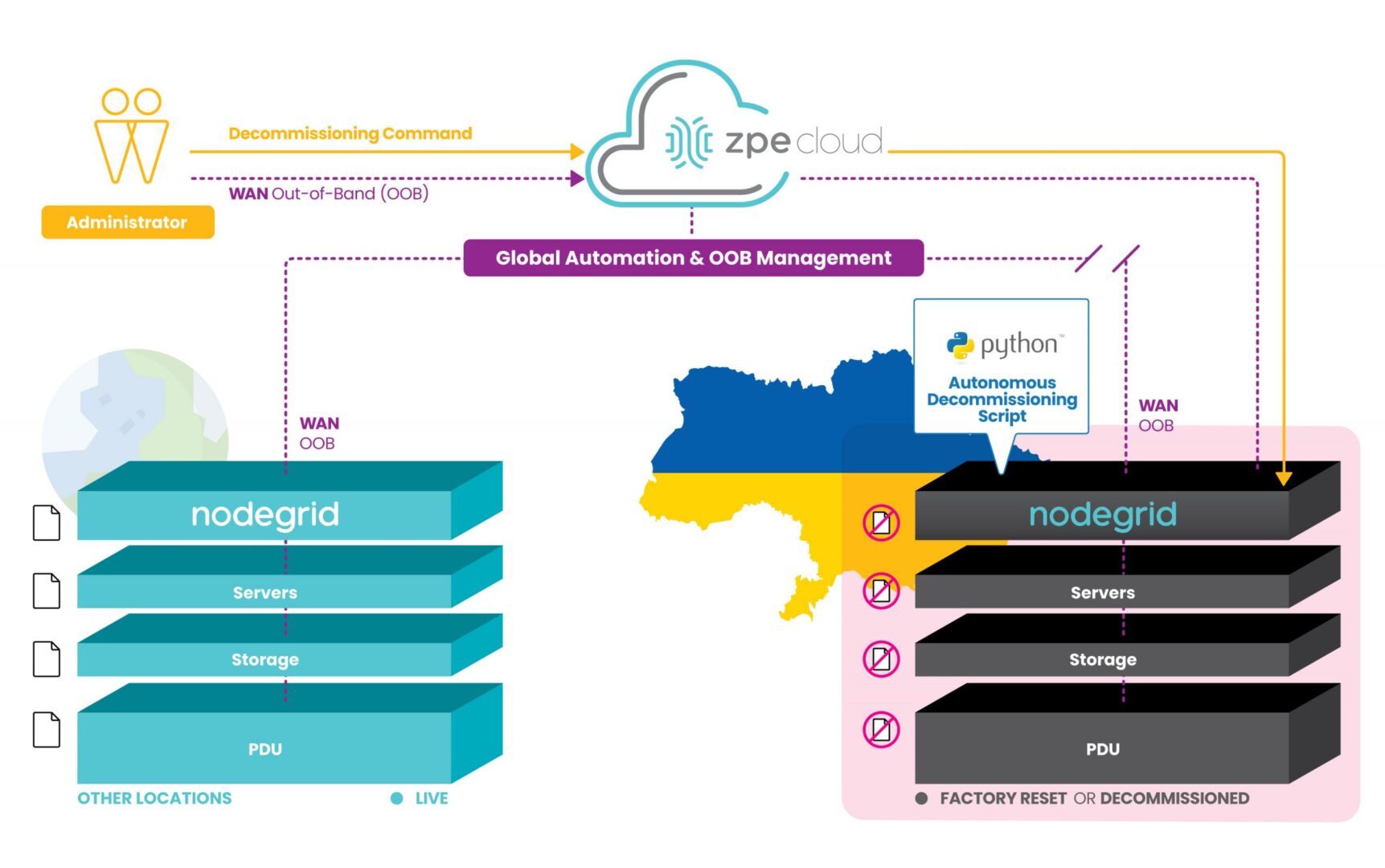
However, ZPE’s customers are currently using our programmable out-of-band infrastructure for this exact use case. It’s being called ‘autonomous decommissioning’, and it combines network automation with manual commands to essentially perform the inverse of launching network sites. This process is being used to protect IP and personal identifying information from falling into the wrong hands.

How does it work?

With our generation 3 serial consoles and services routers co-located at data center and critical edge locations, customers are able to connect all of their equipment to the out-of-band network. Receiving pingbacks at regular intervals from HQ signals that all is well at these sites.

Due to instability in the region, some sites are becoming compromised and cut off from HQ. When this happens, the infrastructure goes into disaster decommissioning mode, and ZPE’s devices serve as on-prem automation workers which help remote IT admins to begin wiping the entire infrastructure.

Autonomous decommissioning network diagram

These devices are hooked into every piece of equipment, and they’re able to receive automated scripts and manual commands from remote admins to push decommissioning tasks to all connected gear. The ZPE device is then able to have its own configuration wiped and returns to its initial ‘seed of life’ mode, in which it awaits further instructions until the connection is restored to HQ. Once this connection is restored, Nodegrid waits for instructions to rebuild the infrastructure following the immutable infrastructure framework.

This autonomous decommissioning prevents data from being stolen by adversaries. By wiping all data and returning to its seed-of-life state, it also keeps the environment’s configurations secure. That’s because the devices no longer contain any configuration information once they’ve been wiped, and configurations can only be restored once an authenticated connection is reestablished with HQ.

Check out a live demo at ONUG!

See how to automate without anxiety to combat cyberattacks. Join us Thursday, April 28 at 11:10am EST at ONUG for a live demo. Click here to register or get your free virtual pass.