Providing Out-of-Band Connectivity to Mission-Critical IT Resources

Terminal Server Alternative for Simple Break/Fix Use Cases


The Nodegrid Serial Console Core Edition terminal server alternative.

A terminal server is a device that provides consolidated remote management access to routers, switches, and other network infrastructure in data centers. There are numerous reasons to consider replacing an existing terminal server solution. Many of these devices are old and unpatched, leaving them vulnerable to exploits. Older solutions may not integrate well with newer hardware and software or lack the ability to unify management for all deployed terminal servers across a distributed enterprise network, creating a lot of management complexity and potential human error.

On the other hand, some newer terminal server solutions (also known as serial consoles or console servers) include advanced features or beefed-up hardware that increase both costs and complexity. It’s important to find the right balance between security, functionality, and ease-of-use for your particular use case. This guide compares five terminal server alternatives that are optimized for simple break/fix deployments, giving teams reliable remote management access without unnecessary complications.

Key takeaways


Pros

Cons

ZPE Nodegrid NSCP-Core Edition

  • Up to 48 managed serial ports in a 1U appliance
  • Extends OOB management and ZTP to legacy and mixed-vendor infrastructure
  • Analog modem and 5G/4G LTE options available
  • Robust on-board security features like BIOS protection and TPM
  • Integrates with third-party software
  • Supports a wide range of USB environmental monitoring sensors
  • Supports automation only via ZPE Cloud

Opengear CM8100

  • 2U model can manage up to 96 devices 
  • Extensible operating system
  • Automatic port discovery
  • No cellular, Wi-Fi, or analog modem
  • Doesn’t support 2FA or SAML 2.0 security
  • Most automation requires Lighthouse Enterprise software upgrade

WTI DSM Series

  • Can manage up to 50 devices
  • Optional analog modem or 4G cellular
  • Integrates with select third-party vendors
  • OS is not extensible
  • Lacks an embedded firewall
  • No environmental sensor ports

Vertiv Avocent ACS8000

  • Includes 8 managed USB ports for 56 total serial connections
  • 4G LTE WAN, OOB, and failover support
  • Environmental sensor port
  • Doesn’t support any third-party integrations 
  • Lacks advanced authentication features
  • No embedded firewall or VPN

Perle IOLAN SDSC

  • Simple, easy-to-manage solution
  • Includes an analog modem for OOB
  • Robust security features
  • OOB is only available over an analog connection
  • Doesn’t integrate with any third-party software
  • Barebones internal hardware can’t support modern software

Comparing terminal server alternatives for break/fix use cases

Read our in-depth reviews of the best terminal server alternatives below, or click here to compare tech specs.

ZPE Nodegrid NSCP-Core Edition

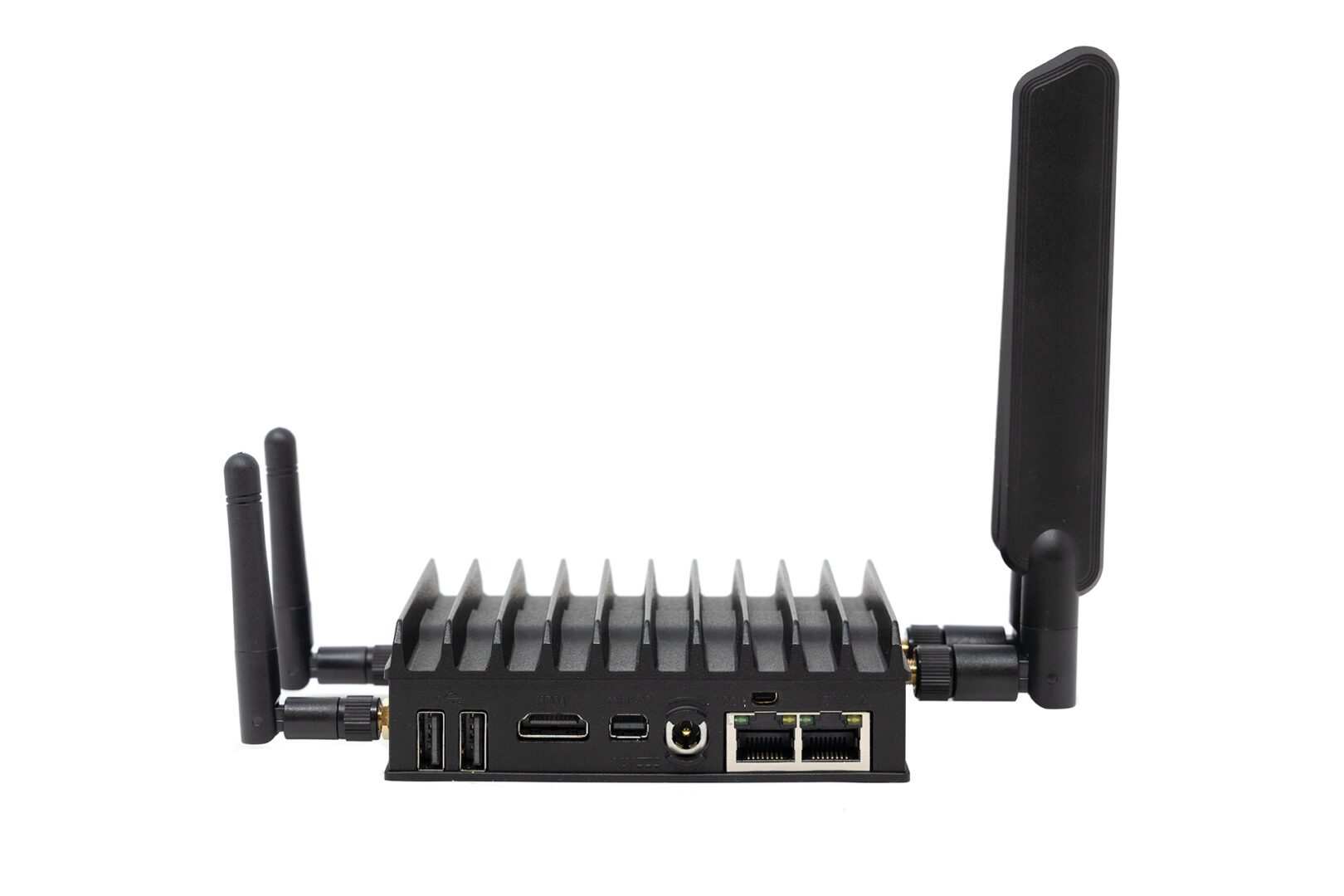
The Nodegrid Serial Console Core Edition (NSCP-CE) from ZPE Systems provides out-of-band (OOB) serial console management for up to 48 devices. It’s vendor-neutral, which means it can extend OOB control and zero-touch provisioning (ZTP) to legacy and mixed-vendor infrastructure. It has dual SFP+ and dual Ethernet ports as well as 5G/4G LTE, Wi-Fi, and analog modem options for both network failover and OOB management.

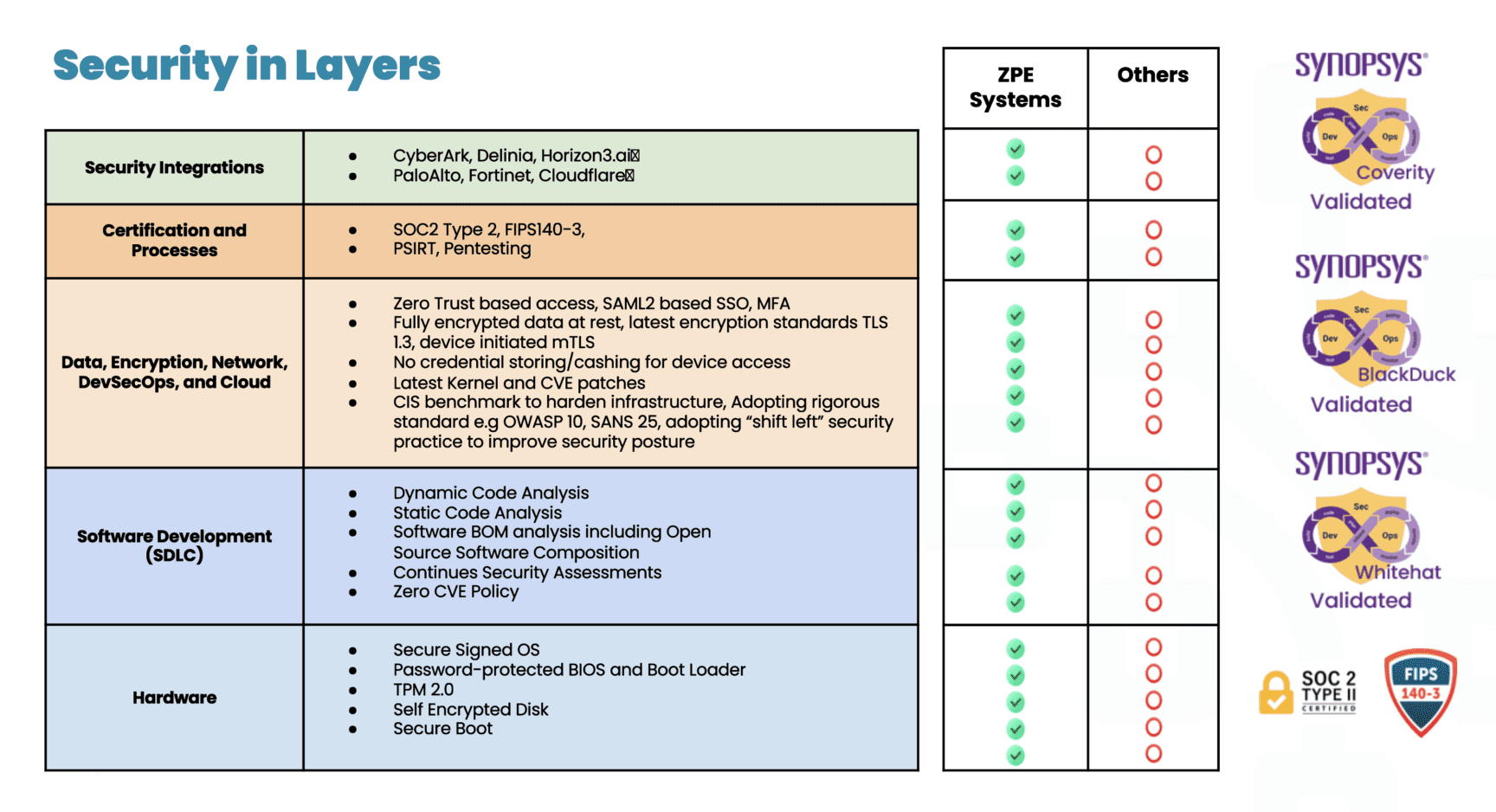
Nodegrid’s management software is available either on-premises or in the cloud so you can choose the best option for your use case. ZPE frequently patches the NSCP-CE’s software, firmware, and modern, Linux-based operating system to prevent known exploits. Plus, the device itself comes backed with security features like BIOS protection, UEFI Secure Boot, self-encrypted disk (SED), Trusted Platform Module (TPM) 2.0, and multi-site VPN using IPSec, WireGuard, and OpenSSL protocols.

The NSCP-CE’s vendor-neutral architecture integrates with third-party 2FA and SAML 2.0 authentication providers as well as other software for security, automation, and troubleshooting. It also supports a wide range of USB environmental monitoring sensors to help remote teams control conditions in the data center.

Pros:

  • Up to 48 managed serial ports in a 1U appliance
  • Extends OOB management and ZTP to legacy and mixed-vendor infrastructure
  • Analog modem and 5G/4G LTE options available
  • Robust on-board security features like BIOS protection and TPM
  • Integrates with third-party software
  • Supports a wide range of USB environmental monitoring sensors

Cons:

  •  Supports automation only via ZPE Cloud

Opengear CM8100

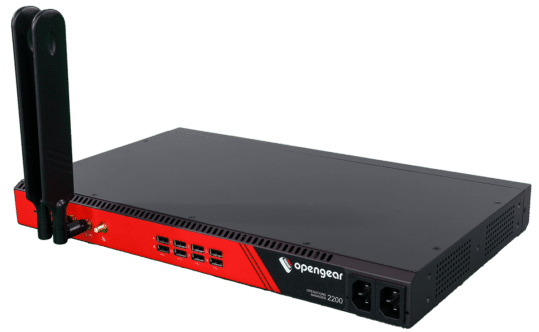
The Opengear CM8100 console server provides remote terminal server management for up to 48 devices in a 1U form-factor, or up to 96 devices in a 2U form-factor. It comes with dual ETH ports or dual switchable ETH/SFP ports for in-band, out-of-band, and failover, without any alternative network interfaces like cellular or analog modem. It supports some automation, such as ZTP and Python scripts, but only with an upgraded version of the Opengear Lighthouse management software.

The CM8100 includes some advanced security features like IPsec & OpenVPN, SSL tunnels, and Secure Shell (SSHv2) as well as a stateful firewall with IP filtering and port forwarding. While its embedded Linux operating system is programmable and extensible with third-party integrations, it does not support 2FA, SAML 2.0, or multi-site IPsec VPN.

Pros:

  • 2U model can manage up to 96 devices
  • Extensible operating system
  • Automatic port discovery

Cons:

  • No cellular, Wi-Fi, or analog modem
  • Doesn’t support 2FA or SAML 2.0 security
  • Most automation requires Lighthouse Enterprise software upgrade

WTI DSM Series

The WTI DSM series provides out-of-band terminal server management for up to 50 devices. It comes with options for single or dual Ethernet interfaces as well as an optional analog modem or cellular interface. The WTI centralized management software integrates with some third-party software like PRTG and Splunk, and it provides ZTP and RESTful API support for automation. However, only a small handful of providers are supported, and the device’s OS is not extensible.

DSM console servers come with robust security features including advanced authentication, port-specific password protection, and invalid access lockout and alarm. It also integrates with Duo, RSA, Okta, and Azure for 2FA. It lacks an embedded firewall, however, as well as an environmental sensor port.

Pros:

  • Can manage up to 50 devices
  • Optional analog modem or 4G cellular
  • Integrates with select third-party vendors

Cons:

  • OS is not extensible
  • Lacks an embedded firewall
  • No environmental sensor ports

Vertiv Avocent ACS8000

The Vertiv Avocent ACS800 can manage up to 48 devices over RS-232 serial and up to 8 devices over USB for a total of 56 managed ports. In addition to dual Ethernet and dual SFP ports, you can add 4G LTE connectivity for WAN, OOB, and failover. The on-premises DSView management software provides ZTP as well as event logging and notifications, but it doesn’t support any third-party integrations.

The ACS8000 doesn’t support 2FA, SAML 2.0, or advanced authentication features, though it does support FIPS 410-2 cryptography. It also lacks an embedded firewall and VPN functionality. It does, however, have an environmental sensor port.

Pros:

  • Includes 8 managed USB ports for 56 total serial connections
  • 4G LTE WAN, OOB, and failover support
  • Environmental sensor port

Cons:

  • Doesn’t support any third-party integrations
  • Lacks advanced authentication features
  • No embedded firewall or VPN

Perle IOLAN SDSC

The Perle IOLAN SDSC is a simple break/fix terminal server that can manage up to 32 devices. It has dual Ethernet ports for WAN and failover, but OOB is only available via the included analog modem, so it’ll be a much slower experience for remote administrators. Perle’s management software provides ZTP but does not offer any automation capabilities or integrate with any third-party solutions. Additionally, the SDSC’s barebones CPU, RAM, and storage hardware may make the software itself slow and frustrating to use, even over the in-band Ethernet connection.

The IOLAN SDSC comes with an embedded firewall and advanced security features like 2FA, IPsec VPN/OpenVPN, and remote RADIUS, TACACS+, and LDAP authentication.

Pros:

  • Simple, easy-to-manage solution
  • Includes an analog modem for OOB
  • Robust security features

Cons:

  • OOB is only available over an analog connection
  • Doesn’t integrate with any third-party software
  • Barebones internal hardware can’t support modern software

Tech Specs: Terminal server alternatives for break/fix use cases


Nodegrid NSCP-CE

Opengear CM8100

WTI OOB Rescue

Vertiv Avocent ACS8000

Perle IOLAN SDSC

Serial Ports

16 / 32 / 48x RS-232

16 / 32 / 48 / 96x RS-232

8 / 24 / 40x RS-232 

8 / 16 / 32 / 48x RS-232

8 / 16 / 32x RS-232

Network Interfaces

2x SFP & 2x ETH

1x Analog modem (optional)

2x 5G/4G LTE (optional)

2x ETH

1x ETH

or

2x ETH

1x Analog modem (optional)

1x 4G Cellular (optional)

2x SFP & 2x ETH

2x ETH

Additional Interfaces

1x RS-232 console

2x USB 3.0 Type A

1x RS-232 console

2x USB 3.0

1x RS-232 console

1x USB Mini Set-up Port

1x RS-232 console

8x USB 2.0 Type A

CPU

Intel x86_64 Dual-Core

ARM Cortex-A9 1.6 GHz Dual-Core

ARM Cortex-A9 Dual-Core

MPC8349E 400 MHz

Storage

16GB Flash (upgrades available)

32GB eMMC Flash

16GB eMMC Flash

16MB Flash

RAM

4GB DDR4 (upgrades available)

2GB DDR4

1GB DDR3L

64MB

Environmental Monitoring

Any USB sensors

4 digital-in ports

Wi-Fi

Optional

No

No

No

No

Cellular

Optional

No

Optional

Optional

No

Power

Dual AC

or

Dual DC

Dual AC

or

Dual DC

Single AC

or

Single DC

Single or Dual AC

or

Single or Dual DC

Single AC

Form Factor

1U Rack Mounted

1U Rack Mounted (up to 48 ports)

2U Rack Mounted (96 ports)

1U Rack Mounted

1U Rack Mounted

1U Rack Mounted

Experience the convenience of a vendor-neutral management platform

The Nodegrid Serial Console Core Edition is a vendor-neutral terminal server alternative that strikes the perfect balance between simplicity, functionality, and security. With flexible OOB and networking options, extensible cloud-based software, and industry-leading security features, Nodegrid can streamline and protect any environment.

Schedule a demo to see the Nodegrid terminal server alternative in action.

Edge Computing Platforms: Insights from Gartner’s 2024 Market Guide

Interlocking cogwheels containing icons of various edge computing examples are displayed in front of racks of servers

Edge computing allows organizations to process data close to where it’s generated, such as in retail stores, industrial sites, and smart cities, with the goal of improving operational efficiency and reducing latency. However, edge computing requires a platform that can support the necessary software, management, and networking infrastructure. Let’s explore the 2024 Gartner Market Guide for Edge Computing, which highlights the drivers of edge computing and offers guidance for organizations considering edge strategies.

What is an Edge Computing Platform (ECP)?

Edge computing moves data processing close to where it’s generated. For bank branches, manufacturing plants, hospitals, and others, edge computing delivers benefits like reduced latency, faster response times, and lower bandwidth costs. An Edge Computing Platform (ECP) provides the foundation of infrastructure, management, and cloud integration that enable edge computing. The goal of having an ECP is to allow many edge locations to be efficiently operated and scaled with minimal, if any, human touch or physical infrastructure changes.

Before we describe ECPs in detail, it’s important to first understand why edge computing is becoming increasingly critical to IT and what challenges arise as a result.

What’s Driving Edge Computing, and What Are the Challenges?

Here are the five drivers of edge computing described in Gartner’s report, along with the challenges that arise from each:

1. Edge Diversity

Every industry has its unique edge computing requirements. For example, manufacturing often needs low-latency processing to ensure real-time control over production, while retail might focus on real-time data insights to deliver hyper-personalized customer experiences.

Challenge: Edge computing solutions are usually deployed to address an immediate need, without taking into account the potential for future changes. This makes it difficult to adapt to diverse and evolving use cases.

2. Ongoing Digital Transformation

Gartner predicts that by 2029, 30% of enterprises will rely on edge computing. Digital transformation is catalyzing its adoption, while use cases will continue to evolve based on emerging technologies and business strategies.

Challenge: This rapid transformation means environments will continue to become more complex as edge computing evolves. This complexity makes it difficult to integrate, manage, and secure the various solutions required for edge computing.

3. Data Growth

The amount of data generated at the edge is increasing exponentially due to digitalization. Initially, this data was often underutilized (referred to as the “dark edge”), but businesses are now shifting towards a more connected and intelligent edge, where data is processed and acted upon in real time.

Challenge: Enormous volumes of data make it difficult to efficiently manage data flows and support real-time processing without overwhelming the network or infrastructure.

4. Business-Led Requirements

Automation, predictive maintenance, and hyper-personalized experiences are key business drivers pushing the adoption of edge solutions across industries.

Challenge: Meeting business requirements poses challenges in terms of ensuring scalability, interoperability, and adaptability.

5. Technology Focus

Emerging technologies such as AI/ML are increasingly deployed at the edge for low-latency processing, which is particularly useful in manufacturing, defense, and other sectors that require real-time analytics and autonomous systems.

Challenge: AI and ML make it difficult for organizations to determine how to strike a balance between computing power and infrastructure costs, without sacrificing security.

What Features Do Edge Computing Platforms Need to Have?

To address these challenges, here’s a brief look at three core features that ECPs need to have according to Gartner’s Market Guide:

  1. Edge Software Infrastructure: Support for edge-native workloads and infrastructure, including containers and VMs. The platform must be secure by design.
  2. Edge Management and Orchestration: Centralized management for the full software stack, including orchestration for app onboarding, fleet deployments, data storage, and regular updates/rollbacks.
  3. Cloud Integration and Networking: Seamless connection between edge and cloud to ensure smooth data flow and scalability, with support for upstream and downstream networking.

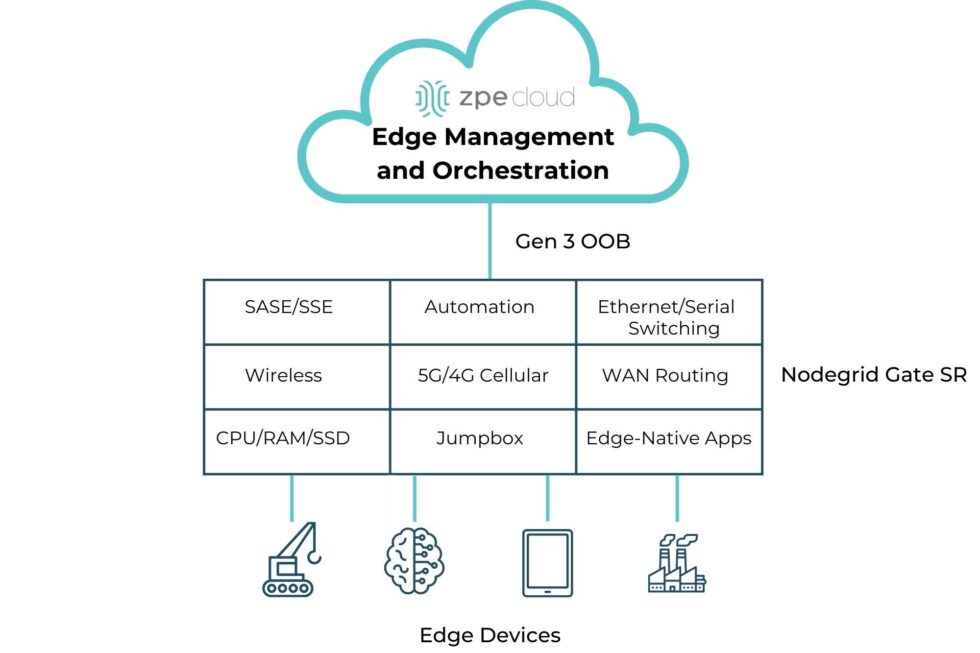
A simple diagram showing the computing and networking capabilities that can be delivered via Edge Management and Orchestration.

Image: A simple diagram showing the computing and networking capabilities that can be delivered via Edge Management and Orchestration.

  1.  

How ZPE Systems’ Nodegrid Platform Addresses Edge Computing Challenges

ZPE Systems’ Nodegrid is a Secure Service Delivery Platform that meets these needs. Nodegrid covers all three feature categories outlined in Gartner’s report, allowing organizations to host and manage edge computing via one platform. Not only is Nodegrid the industry’s most secure management infrastructure, but it also features a vendor-neutral OS, hypervisor, and multi-core Intel CPU to support necessary containers, VMs, and workloads at the edge. Nodegrid follows isolated management best practices that enable end-to-end orchestration and safe updates/rollbacks of global device fleets. Nodegrid integrates with all major cloud providers, and also features a variety of uplink types, including 5G, Starlink, and fiber, to address use cases ranging from setting up out-of-band access, to architecting Passive Optical Networking.

Here’s how Nodegrid addresses the five edge computing challenges:

1. Edge Diversity: Adapting to Industry-Specific Needs

Nodegrid is built to handle diverse requirements, with a flexible architecture that supports containerized applications and virtual machines. This architecture enables organizations to tailor the platform to their edge computing needs, whether for handling automated workflows in a factory or data-driven customer experiences in retail.

2. Ongoing Digital Transformation: Supporting Continuous Growth

Nodegrid supports ongoing digital transformation by providing zero-touch orchestration and management, allowing for remote deployment and centralized control of edge devices. This enables teams to perform initial setup of all infrastructure and services required for their edge computing use cases. Nodegrid’s remote access and automation provide a secure platform for keeping infrastructure up-to-date and optimized without the need for on-site staff. This helps organizations move much of their focus away from operations (“keeping the lights on”), and instead gives them the agility to scale their edge infrastructure to meet their business goals.

3. Data Growth: Enabling Real-Time Data Processing

Nodegrid addresses the challenge of exponential data growth by providing local processing capabilities, enabling edge devices to analyze and act on data without relying on the cloud. This not only reduces latency but also enhances decision-making in time-sensitive environments. For instance, Nodegrid can handle the high volumes of data generated by sensors and machines in a manufacturing plant, providing instant feedback for closed-loop automation and improving operational efficiency.

4. Business-Led Requirements: Tailored Solutions for Industry Demands

Nodegrid’s hardware and software are designed to be adaptable, allowing businesses to scale across different industries and use cases. In manufacturing, Nodegrid supports automated workflows and predictive maintenance, ensuring equipment operates efficiently. In retail, it powers hyperpersonalization, enabling businesses to offer tailored customer experiences through edge-driven insights. The vendor-neutral Nodegrid OS integrates with existing and new infrastructure, and the Net SR is a modular appliance that allows for hot-swapping of serial, Ethernet, computing, storage, and other capabilities. Organizations using Nodegrid can adapt to evolving use cases without having to do any heavy lifting of their infrastructure.

5. Technology Focus: Supporting Advanced AI/ML Applications

Emerging technologies such as AI/ML require robust edge platforms that can handle complex workloads with low-latency processing. Nodegrid excels in environments where real-time analytics and autonomous systems are crucial, offering high-performance infrastructure designed to support these advanced use cases. Whether processing data for AI-driven decision-making in defense or enabling real-time analytics in industrial environments, Nodegrid provides the computing power and scalability needed for AI/ML models to operate efficiently at the edge.

Read Gartner’s Market Guide for Edge Computing Platforms

As businesses continue to deploy edge computing solutions to manage increasing data, reduce latency, and drive innovation, selecting the right platform becomes critical. The 2024 Gartner Market Guide for Edge Computing Platforms provides valuable insights into the trends and challenges of edge deployments, emphasizing the need for scalability, zero-touch management, and support for evolving workloads.

Click below to download the report.

Get a Demo of Nodegrid’s Secure Service Delivery

Our engineers are ready to walk you through the software infrastructure, edge management and orchestration, and cloud integration capabilities of Nodegrid. Use the form to set up a call and get a hands-on demo of this Secure Service Delivery Platform.

Zombie Servers: The Hidden Energy Drainers in Data Centers

Zombies in the data center
As enterprises adopt AI, cloud computing, and data analytics, one thing lurks in the shadows of their data centers: zombie servers. These inactive or severely underutilized servers take a big bite out of operations, drawing power and resources without contributing meaningful work. Research from the Uptime Institute indicates that as much as 30% of servers may be idle at any given time, suggesting enterprises could save millions each year by identifying and eliminating these “zombies.”

The Cost of Zombie Servers

When it comes to cost, zombie servers can devour more than their fair share. Each idle server can consume approximately 200 to 400 watts per hour, resulting in annual power costs of $400 to $600 per server. In large data centers housing thousands of servers, wasted energy expenses can easily scale into the millions. Currently, U.S. data centers account for over 4% of the nation’s total electricity consumption, a figure projected to rise to 6% by 2026 due to growing demands from AI and cloud computing applications.

How ZPE Systems’ Nodegrid Fights Zombie Servers

Out-of-band management (OOBM) solutions, like ZPE Systems’ Nodegrid, provide an effective way to monitor, manage, and optimize data center infrastructure, even when the primary network is down. When combined with ServerTech Intelligent PDUs, data center admins can remote-in to identify and address zombie servers, so they can ensure their operations run at peak efficiency.

Key Features of Nodegrid’s Out-of-Band Management for Zombie Server Management

  • 24/7 Monitoring and Real-Time Insights: Nodegrid allows IT teams to continuously monitor server performance, making it easy to detect underutilized or idle servers. Real-time metrics show server activity, power usage, and health, so teams can pinpoint servers that may need to be repurposed or removed.
  • Detailed Power Usage Data: The combined Nodegrid and ServerTech solution provides comprehensive energy usage data, so teams can see inefficiencies and where power is consumed most. This is essential for high-density data centers, where wasting even a little bit of power adds up to substantial costs. These insights help data center operators pinpoint zombie servers, reducing energy costs and freeing up space.
  • Enhanced Automation and Management Control: With automation features, Nodegrid simplifies the complex task of managing server lifecycles. For instance, automated alerts can notify teams when a server reaches a specific threshold of low utilization, enabling quicker action to reassign or shut down the server.
  • Increased Security and Resilience: Nodegrid enhances security by providing direct access to infrastructure via isolated management. Teams can access critical systems even during network failures, to ensure servers remain compliant, functional, and secure.

Benefits of Removing Zombie Servers

AI and other resource-intensive applications mean data centers need to be as efficient as possible. Zombie servers are not just an energy problem; they impact a data center’s ability to scale and meet demand for high-performance computing. Here are some benefits of removing or repurposing zombie servers:

  • Energy Efficiency: Data centers can significantly lower energy costs and reduce environmental impact by shutting down idle servers.
  • Cost Savings: Operating more efficiently by removing zombie servers can lead to substantial annual savings, freeing up resources for necessary expansions.
  • Optimized AI-Ready Infrastructure: Freeing up resources allows data centers to repurpose space and energy toward servers that can support AI and other high-density applications.

Get Help Fighting Zombie Servers

Set up a call with one of ZPE Systems’ engineers, and we’ll show you how to get zombie servers out of your data center. Click the button below to schedule your call.

Watch a Walkthrough Demo

Watch this 20-minute video where Marcel van Zwienen (Senior Sales Engineer) demonstrates the remote management capabilities of Nodegrid and ZPE Cloud.

Marcel van Zwienen gives a walkthrough of ZPE Cloud for remote device management.

More Valuable Resources for Remote Monitoring

Check out these resources to help fight zombie servers and other inefficiencies lurking in your data center:

American Water Cyberattack: Another Wake-Up Call for Critical Infrastructure

Industrial water treatment plant with water
The October 2024 cyberattack on American Water, one of the largest water and wastewater utility companies in the U.S., signals yet another wake-up call for critical infrastructure security. Because millions of people rely on this critical service for safe drinking water and sanitation, this attack highlights why it’s so important to address cyber vulnerabilities.

Let’s trace the timeline of the attack, how it likely started, and the best practice architecture that could have mitigated or prevented the American Water cyberattack.

Timeline of the October 2024 American Water Cyberattack

  • Initial Intrusion (October 5, 2024)
    The attack on American Water was first detected in early October, when cybersecurity monitoring tools flagged suspicious activity within the company’s IT systems. Employees reported an unusual system slowdown, and automated alerts indicated possible unauthorized access.
  • Rapid Escalation (October 6-7, 2024)
    Within 24 hours of detection, the attackers had moved deeper into the company’s IT environment. In response, American Water initiated emergency protocols, including isolating key systems to prevent further damage. To contain the breach, critical operational technology (OT) systems — responsible for managing water treatment and distribution — were temporarily shut down
  • Public Notification and Response (October 8, 2024)
    American Water notified federal authorities, including the Cybersecurity and Infrastructure Security Agency (CISA), state regulators, and the public. The company reassured customers that water quality had not been compromised, but certain automated operations had been affected, leading to temporary disruptions in water distribution.
  • Ongoing Recovery (October 2024 – Present)
    As the investigation continued, third-party cybersecurity firms were brought in to assess the extent of the breach and assist in recovery. Manual operations were implemented in areas where automated systems were impacted. While the threat was contained, the company faced a lengthy process of system restoration and reconfiguration.

Impact of the Attack

The impact of the American Water cyberattack appears minimal. A class-action lawsuit was recently filed seeking $5-million in damages on behalf of affected customers, but this is the typical fallout that results from a breach. American Water did not shut down any treatment plants, and although they were forced to temporarily shut down their customer portal, pause billing, and revert to some manual processes, there were no water contamination or public health risks that came out of the attack. Per American Water’s FAQ page, it seems business is nearly back to normal.

However, this shouldn’t diminish the need for utilities providers to shore-up their defenses and ensure resilience of their IT architectures. The Oldsmar, Florida incident is an example of how an error or breach can change water treatment chemistry (in this case, adding too much lye to the water supply) and poison a population. There have also been many attempts by U.S. adversaries in which attackers were able to change water chemistry or disrupt automated operations.

Government agencies like the EPA have been warning that attacks on water treatment utilities are increasing. Lawmakers are also calling for inspections of IT systems, such as to ensure best practices are being followed for managing passwords and keeping remote access from Internet exposure, and considering civil and criminal penalties for those who don’t comply.

How the Attack Likely Happened

The American Water cyberattack is still under investigation. Specifics of how it occurred haven’t been released, but several likely scenarios have emerged based on trends in similar attacks:

  • Phishing or Social Engineering:
    Employees may have unknowingly opened a malicious email attachment or clicked a harmful link, allowing attackers access to the internal network, similar to 2023’s Ragnar Locker attacks. Water utilities and other public services often have large workforces, which makes them susceptible to phishing campaigns.
  • Ransomware:
    There are indications that ransomware may have encrypted key files and systems, similar to what happened during the MGM hack. Ransomware attacks on critical infrastructure have increased in recent years, with attackers locking companies out of their own data and demanding payment to restore access.
  • IT/OT Integration Vulnerabilities:
    Water utilities often rely on a hybrid network where both information technology (IT) systems and operational technology (OT) systems are integrated to monitor and control water purification, distribution, and wastewater management. While this setup improves efficiency, it can also create additional vulnerabilities if the two environments are not properly segregated. Once attackers gain access to the IT network, they can use it as a bridge to reach OT systems, which are typically less secure.
  • Internet-Facing Systems:
    In the past, the Chinese-sponsored hacker group Volt Typhoon took advantage of firewalls that were connected both to the internet and to critical control systems. This approach also takes advantage of a lack of control plane segregation, as hackers can remote-in via internet-facing systems and gain management access to critical systems.

The Solution: Isolated Management Infrastructure (IMI)

As with the global CrowdStrike outage, the most important takeaway from the American Water cyberattack is that organizations need the ability to recover fast. Remote access solutions help with this, but it matters how these solutions are architected and which capabilities they offer.

The traditional approach is to gain remote access via a direct link to the affected systems. The problem with this is that when these systems are breached, encrypted, or offline, it’s impossible to remote-into them. This requires teams to physically connect to and revive systems (as with the CrowdStrike incident), or worse – completely replace their infrastructure, as Merck did during the 2017 NotPetya breach.

Traditional remote management via direct link
Instead, organizations are turning to a best practice architecture that has been used by hyperscalers and large enterprises for years. This solution is called Isolated Management Infrastructure. IMI creates a management network that is connected to but completely independent of production network equipment, an architecture that resembles out-of-band (OOB) management. This gives teams a lifeline to their main IT and OT systems, including servers, switches, sensors, controllers, and other critical assets, even when their main systems are offline.
IMI is a lifeline to production assets

Here’s how IMI and out-of-band management could have helped mitigate the effects of the American Water attack:

  • Enhanced Containment: By isolating the network used for system control and monitoring, OOB management could have ensured that even if the primary network was compromised, attackers would not have been able to access or disable key operational systems. This would have limited the need to shut down OT systems and prevented widespread operational disruption.
  • Faster Recovery: With isolated management infrastructure, administrators would have been able to access critical systems remotely, even during the attack. This capability enables faster diagnosis of the issue and restoration of services without relying on compromised networks. In the case of a ransomware attack, for example, OOB management can help initiate recovery operations from backups, minimizing downtime.
  • Reduced Attack Surface: By creating an independent network with fewer access points and stricter controls, OOB infrastructure reduces the chances of attackers exploiting vulnerabilities. It’s an additional layer of security that complicates attempts to breach sensitive control systems.
IMI with Nodegrid2

30-year cybersecurity expert James Cabe recently published a walkthrough of how to do this. Read his article, What to do if you’re ransomware’d, to see how to deploy the Gartner-recommended Isolated Recovery Environment that lets you fight through an active attack.

Get the Blueprint for Building IMI

The American Water cyberattack is another wake-up call for critical infrastructure providers to rethink their cybersecurity strategies. Isolated Management Infrastructure is the key approach to retaining control during an attack, but requires the robust capabilities of Generation 3 out-of-band to ensure rapid recovery. To help utilities and essential services fortify their infrastructure, ZPE Systems recently created a blueprint for building IMI. Download the blueprint now to follow the best practices architecture and become resilient against cyberattacks.

Using Isolated Management Infrastructure to Access the Debug Port of Open Compute Project (OCP) Devices in AI Deployments

Data center computers large facility with servers storage. Illustration AI Generative

As artificial intelligence (AI) workloads grow more demanding, data centers are turning to specialized hardware like Open Compute Project (OCP) cards to meet their needs.

OCP cards, known for their open-source architecture and scalability, have become popular in AI-driven infrastructures due to their flexibility and cost-efficiency.

However, managing and troubleshooting these cards — especially in large-scale AI deployments — can pose significant challenges, particularly when it comes to accessing debug ports for diagnostics.

In this post, we’ll explore how isolated management infrastructure (IMI) offers a secure and reliable solution for accessing the debug ports of OCP cards used in AI systems. We’ll also discuss the importance of debugging in AI, the obstacles that come with large-scale deployments, and the role of IMI in overcoming those hurdles.

OCP Cards in AI: A High-Performance Solution

Open Compute Project cards have become central to AI and machine learning (ML) environments due to their powerful compute capabilities, scalability, and open-source design. These cards are often integrated into large data centers tasked with training AI models, running inference operations, and handling massive data streams.

With OCP cards, companies can optimize their data center hardware for specific workloads without being tied to proprietary solutions. This open-source approach allows for flexibility in AI infrastructure, but it also introduces challenges when managing such hardware at scale, especially when components fail or need troubleshooting.

The Importance of Debugging and Monitoring in AI

Debugging and monitoring are critical components of maintaining AI infrastructure. AI model training, in particular, places heavy demands on hardware, making performance consistency a key factor. Any malfunction at the hardware or software level needs to be identified and resolved quickly to avoid costly downtime.

One way to troubleshoot hardware-related problems is by accessing the debug ports of OCP cards. Debug ports provide administrators with direct access to diagnostics, enabling them to monitor system health and perform necessary repairs. However, accessing these ports can be difficult, particularly in AI deployments where hardware is distributed across large data centers.

The Challenges of Accessing Debug Ports in AI Deployments

In a large AI deployment, accessing the debug ports of individual OCP cards can present several obstacles:

  • Physical Access: High-density data centers make it challenging for technicians to reach hardware components physically. In many cases, the OCP cards are housed in remote locations, requiring specialized tools for diagnostics.
  • Security Risks: Allowing unrestricted access to debug ports can introduce security vulnerabilities. If these ports are not properly secured, cyber attackers could exploit them to gain control of critical infrastructure.
  • Network Disruptions: During system failures, it can be difficult to access the network and troubleshoot the issue. When the primary network goes down, relying on that same network to manage hardware can delay recovery efforts and worsen the outage.

These challenges make it essential to adopt a secure, remote solution for managing OCP cards and their debug ports, especially when it comes to AI environments where any downtime can disrupt business-critical operations.

How Isolated Management Infrastructure (IMI) Works

Isolated management infrastructure (IMI) is a dedicated, separate network used exclusively for system management and maintenance. Unlike the primary network that handles day-to-day operations, the management network is isolated to ensure uninterrupted access to critical systems, even during outages or security incidents.

OOB management network isolation with the Nodegrid platform.

Image: Isolated Management Infrastructure physically separates management access from production assets.

By implementing IMI, administrators can remotely access the debug ports of OCP cards without affecting the main production network. This setup not only secures the debug ports but also ensures that troubleshooting can be done in real-time, even if the primary network is down.

Benefits of Using IMI for OCP Debug Ports:

  • Secure, Controlled Access: Since the management network is isolated, it limits access to only authorized personnel. This reduces the chances of an attacker compromising critical hardware through exposed debug ports.
  • Reduced Downtime: IMI enables administrators to access, troubleshoot, and repair systems quickly, minimizing downtime during failures or performance issues. Even during major network outages, IMI ensures out-of-band (OOB) access to the OCP cards’ debug ports.
  • Lower Security Risks: By separating management traffic from regular operations, IMI reduces the attack surface. It becomes more difficult for hackers to use network vulnerabilities to gain unauthorized access to critical infrastructure.

Out-of-band management for OCP servers

Implementing Isolated Management for OCP Debug Access

To implement isolated management infrastructure for accessing the debug ports of OCP cards, follow these steps:

  • Network Segmentation: Physically separate your management network from the production network. Ensure that management traffic is not routed through the same pathways used for regular operations.
  • Use Out-of-Band Management Devices: Deploy dedicated OOB management hardware that allows for remote access and control of the OCP cards, even when the primary network is unavailable. This can include IPMI (Intelligent Platform Management Interface) or SSH (Secure Shell) for secure communication.
  • Integrate with Monitoring Systems: Combine IMI with automated monitoring and alerting systems. This way, any anomaly detected in the AI environment will trigger a response, allowing administrators to quickly access the OCP card’s debug port for diagnostics.

Security Benefits of Isolated Management Infrastructure

In addition to improving accessibility, IMI enhances security across the board in AI environments. Here’s how: 

  • Limited Access Points: Isolating management infrastructure limits the number of entry points for attackers, significantly reducing the attack surface.
  • Controlled User Access: Only authorized users can access the isolated network, meaning that internal threats and insider attacks are also mitigated.
  • Compliance and Auditing: For industries with strict regulatory requirements, IMI provides clear documentation and control over system access, helping organizations meet compliance standards and pass security audits.

Real-World Example

Consider a scenario in a data center where an AI model’s training process experiences sudden instability. The system administrator, located remotely, uses IMI to securely access the OCP card’s debug port through an OOB management interface.

The problem is quickly diagnosed and resolved without needing physical access to the hardware, minimizing downtime and ensuring that the AI model’s training can continue uninterrupted.

Deploy IMI with Nodegrid to Strengthen AI Environments

As AI infrastructures grow, so do the risks and complexities associated with managing them. The October 2024 cyberattack on American Water, which impacted their operational technology and water distribution, highlights the need for robust, secure, and isolated management networks to avoid large-scale disruptions.

By integrating isolated management infrastructure into your AI data center, you can ensure quick access to critical systems like OCP devices, reduce the impact of system failures, and improve security. ZPE Systems’ Nodegrid is a Gen 3 out-of-band management platform that allows you to deploy IMI in your data center environment, and it’s the only out-of-band management built to manage OCP cards. It can integrate or directly host third-party applications for automation, security, and much more, consolidating an entire tech stack into a single, cost-efficient solution.

Schedule a demo to see how Nodegrid gives remote access to OCP cards and strengthens your AI deployments.

Top 5 Data Center Mistakes and How To Avoid Them

Top 5 Data Center Mistakes and How To Avoid Them

Data center deployments require careful planning and execution. The sheer complexity makes it easy to stumble into common pitfalls that can compromise uptime, security, and scalability. After talking with hundreds of customers, we’ve compiled the top five data center mistakes organizations often make during deployments, with tips on how to avoid them.

1. Overlooking Isolated Management Infrastructure

In the data center, the focus is bringing production infrastructure online, including power, cabling, racks, servers, and network gear. But many project managers and architects say they wished they’d given more attention to setting up proper management infrastructure. This oversight usually leads to business challenges down the line, especially when management access relies on the production infrastructure. When a device fails or goes offline, there’s no choice but to go on-site to manually troubleshoot and recover. Many professionals admit to making this data center mistake and wish that they had considered this early in the planning process. Incorporating something called Isolated Management Infrastructure from the start can avoid this challenge, since it provides a dedicated management plane through which teams can access production gear without relying on the production network. 

Tip: Make management infrastructure a priority in your initial planning stages. This proactive approach can prevent complications later.

IMI

2. Neglecting Automation for Configuration and Scaling

Many data center implementors focus heavily on the “rack and stack” initial setup, but fail to automate processes for configuration and scaling operations. This data center mistake often leads to days’ or weeks’ worth of manual, repetitive work, while also exposing the organization to human error. A lot of people we talked to wish they’d invested just a few weeks into automating essential tasks such as switch setup, VLAN configurations, and IP address assignments, which would have saved them lots of time later on and likely helped to prevent errors. Additionally, if rearchitecting is needed, automated systems allow for quick reimplementation, minimizing the time and complexity involved. 

Tip: Dedicate time to automating routine processes. This investment will pay off in enhanced operational efficiency and reduced human error.

3. Inadequate Out-of-Band Management

When people think of out-of-band (OOB) management, a common misconception is that it is solely about Ethernet switches. However, it’s crucial not to overlook the importance of having management access to your entire device stack. Low-level access can be essential for system recovery and management. The recent CrowdStrike outage is a perfect example – when the failed devices needed to be reimaged, typical out-of-band management solutions were inadequate at providing this type of low-level access. Generation three out-of-band serial consoles, like the Nodegrid Net SR, give Ethernet, serial, and USB access, allowing teams to remote-in at the BIOS level to revive failed devices. Using this kind of comprehensive out-of-band – on a fully isolated management plane – helps teams remotely recover and confidently automate processes.

Tip: Ensure that your OOB strategy includes robust serial console access to enhance system reliability and recovery capabilities.

IMI with Nodegrid2

4. Ignoring Security Best Practices

Zero trust security is no longer just advisable, it’s essential. The typical approach is to establish direct connectivity to devices to configure, troubleshoot, upgrade, etc. But this comes with unnecessary risks, often exposing management ports to the Internet and leaving you at risk of attack. Without a fully isolated management plane and zero trust security controls, how would you recover if you were ransomware’d? This is why it’s essential to implement security controls like role-based access and multi-factor authentication, and ensure complete separation of management and production networks. 

Tip: Prioritize security by adopting a zero-trust approach and implementing rigorous access controls to safeguard your data center.

5. Cutting Corners on Out-of-Band Management

In the race for implementing AI, it’s crucial to invest in AI data center infrastructure. But organizations often cut corners on their ability to manage the underlying infrastructure that powers AI. Management access should not stop at ethernet switches; it should extend to encompass serial console access, PDUs, jump boxes, 5G connectivity, routing, WAN links, and a centralized cloud hub with secure tunnels to colocation sites. Using a comprehensive and centralized platform like Nodegrid consolidates many management devices into one while giving remote control to optimize AI’s underlying infrastructure. Aside from enhancing efficiency, this approach minimizes waste and energy consumption, which addresses environmental, social, and governance (ESG) concerns. 

Tip: Avoid the partial out-of-band management deployment. A complete system not only supports resilience and security but also contributes to sustainability goals.


Addressing these common data center mistakes can significantly enhance operational efficiency, security, and scalability. By prioritizing management infrastructure, automating processes, ensuring adequate out-of-band access, implementing robust security measures, and investing wisely in management systems, organizations can build resilient data centers equipped to meet the demands of today and the future.

See ZPE Cloud in action with this video demo

Senior Sales Engineer Marcel van Zwienen gives you a hands-on demo of ZPE Cloud in this video. Watch Marcel take you from signing in to gaining remote access for troubleshooting, to showing how to apply configuration changes automatically across device fleets. Watch now at the link below.

Use Our Blueprint to Avoid Data Center Mistakes

Our blueprint shows how to deploy an isolated management infrastructure, which gives you secure remote access to recover from outages and automate operations. Download now for the complete guide.