Providing Out-of-Band Connectivity to Mission-Critical IT Resources

Using Isolated Management Infrastructure to Access the Debug Port of Open Compute Project (OCP) Devices in AI Deployments

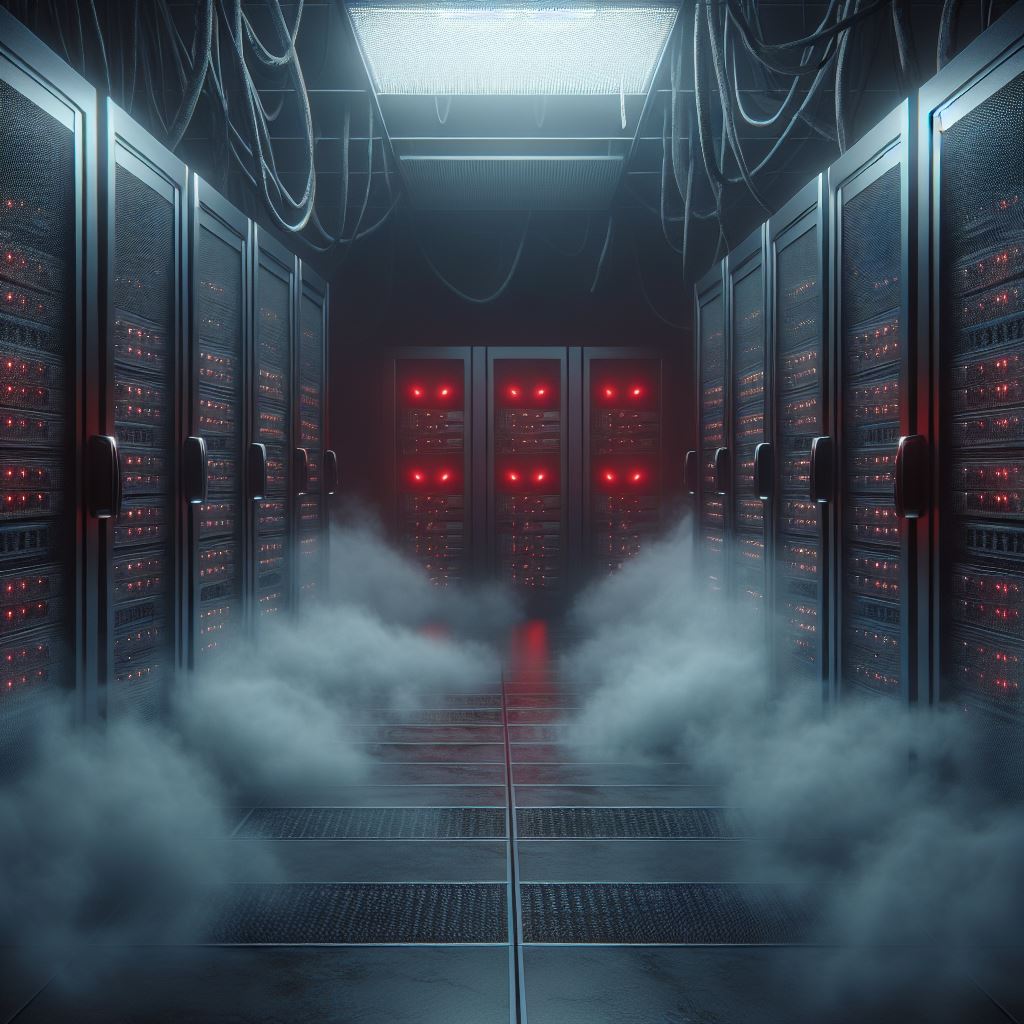
Data center computers large facility with servers storage. Illustration AI Generative

As artificial intelligence (AI) workloads grow more demanding, data centers are turning to specialized hardware like Open Compute Project (OCP) cards to meet their needs.

OCP cards, known for their open-source architecture and scalability, have become popular in AI-driven infrastructures due to their flexibility and cost-efficiency.

However, managing and troubleshooting these cards — especially in large-scale AI deployments — can pose significant challenges, particularly when it comes to accessing debug ports for diagnostics.

In this post, we’ll explore how isolated management infrastructure (IMI) offers a secure and reliable solution for accessing the debug ports of OCP cards used in AI systems. We’ll also discuss the importance of debugging in AI, the obstacles that come with large-scale deployments, and the role of IMI in overcoming those hurdles.

OCP Cards in AI: A High-Performance Solution

Open Compute Project cards have become central to AI and machine learning (ML) environments due to their powerful compute capabilities, scalability, and open-source design. These cards are often integrated into large data centers tasked with training AI models, running inference operations, and handling massive data streams.

With OCP cards, companies can optimize their data center hardware for specific workloads without being tied to proprietary solutions. This open-source approach allows for flexibility in AI infrastructure, but it also introduces challenges when managing such hardware at scale, especially when components fail or need troubleshooting.

The Importance of Debugging and Monitoring in AI

Debugging and monitoring are critical components of maintaining AI infrastructure. AI model training, in particular, places heavy demands on hardware, making performance consistency a key factor. Any malfunction at the hardware or software level needs to be identified and resolved quickly to avoid costly downtime.

One way to troubleshoot hardware-related problems is by accessing the debug ports of OCP cards. Debug ports provide administrators with direct access to diagnostics, enabling them to monitor system health and perform necessary repairs. However, accessing these ports can be difficult, particularly in AI deployments where hardware is distributed across large data centers.

The Challenges of Accessing Debug Ports in AI Deployments

In a large AI deployment, accessing the debug ports of individual OCP cards can present several obstacles:

  • Physical Access: High-density data centers make it challenging for technicians to reach hardware components physically. In many cases, the OCP cards are housed in remote locations, requiring specialized tools for diagnostics.
  • Security Risks: Allowing unrestricted access to debug ports can introduce security vulnerabilities. If these ports are not properly secured, cyber attackers could exploit them to gain control of critical infrastructure.
  • Network Disruptions: During system failures, it can be difficult to access the network and troubleshoot the issue. When the primary network goes down, relying on that same network to manage hardware can delay recovery efforts and worsen the outage.

These challenges make it essential to adopt a secure, remote solution for managing OCP cards and their debug ports, especially when it comes to AI environments where any downtime can disrupt business-critical operations.

How Isolated Management Infrastructure (IMI) Works

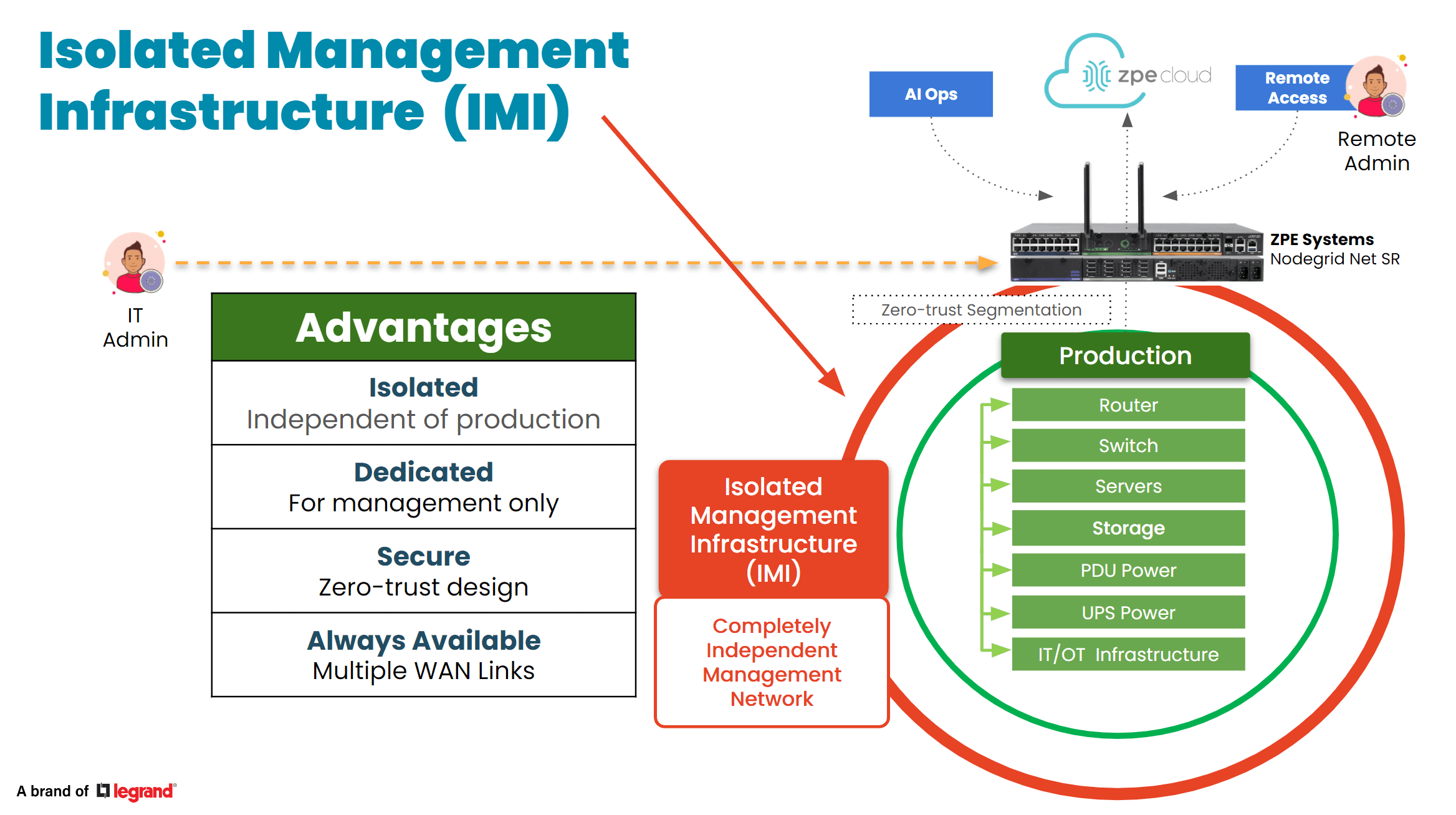
Isolated management infrastructure (IMI) is a dedicated, separate network used exclusively for system management and maintenance. Unlike the primary network that handles day-to-day operations, the management network is isolated to ensure uninterrupted access to critical systems, even during outages or security incidents.

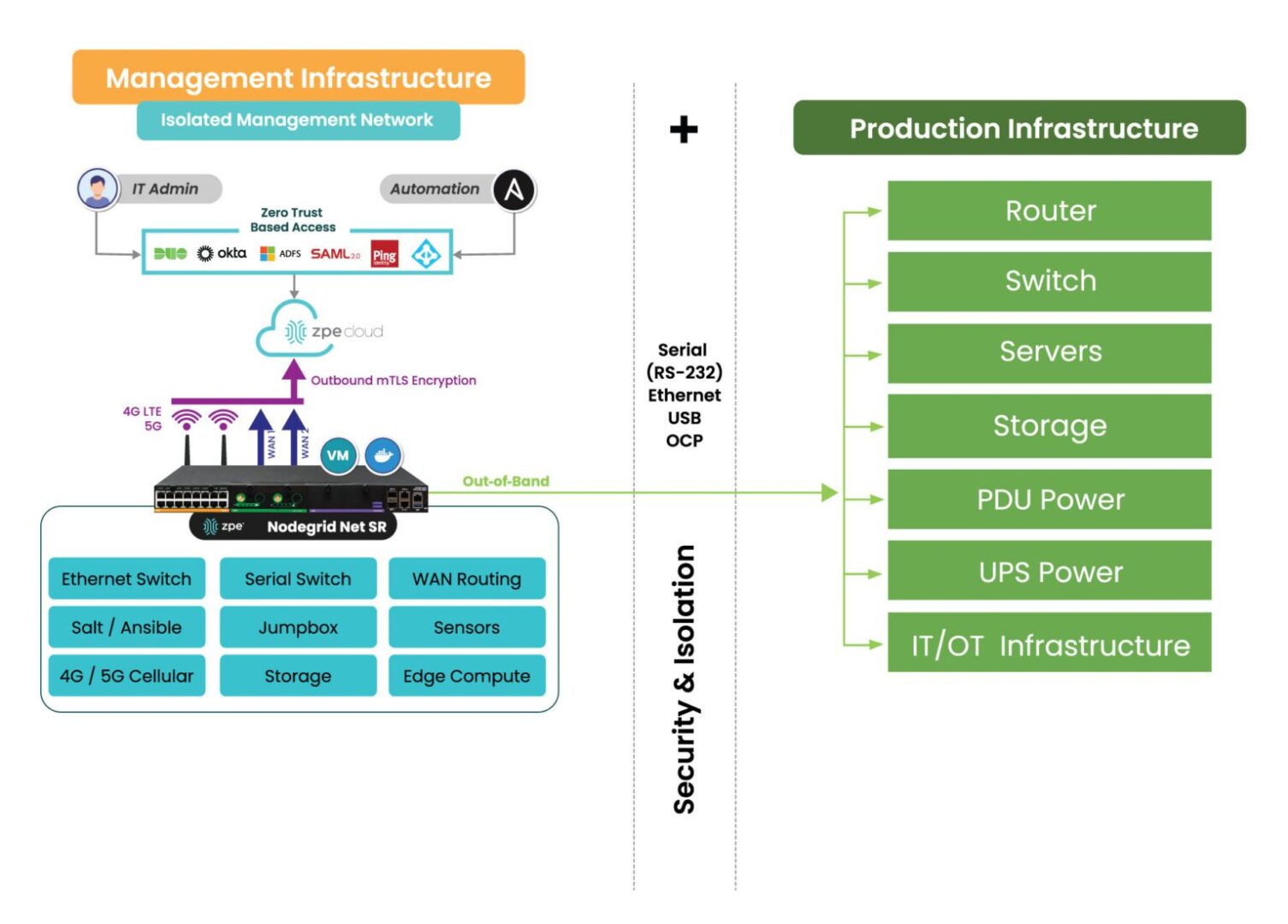
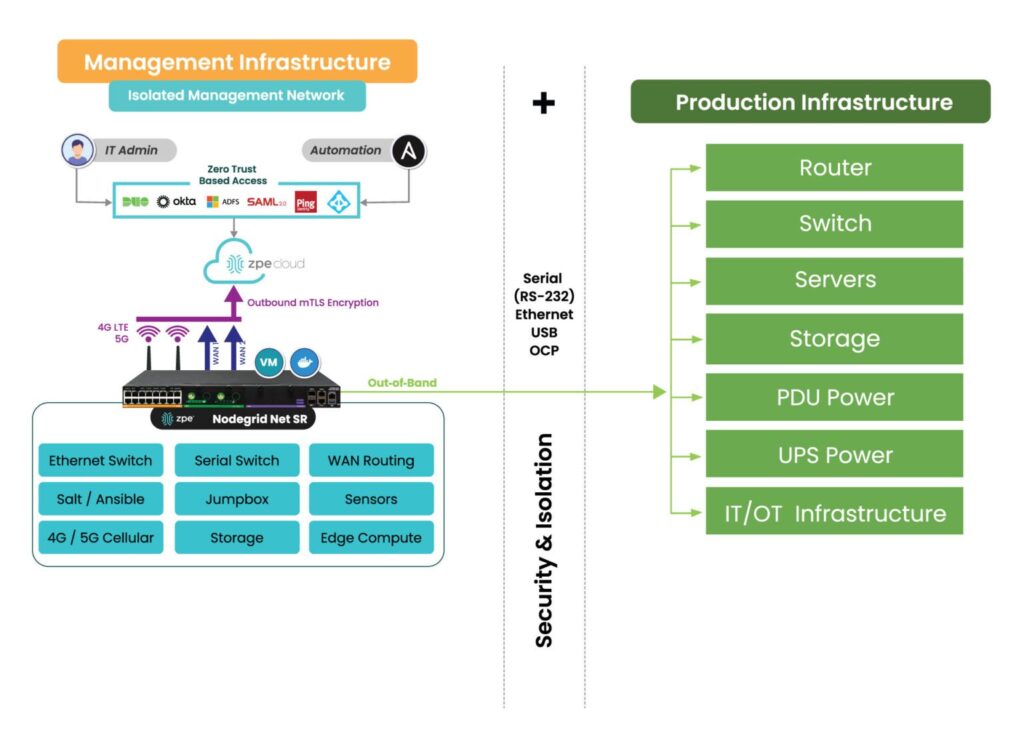
OOB management network isolation with the Nodegrid platform.

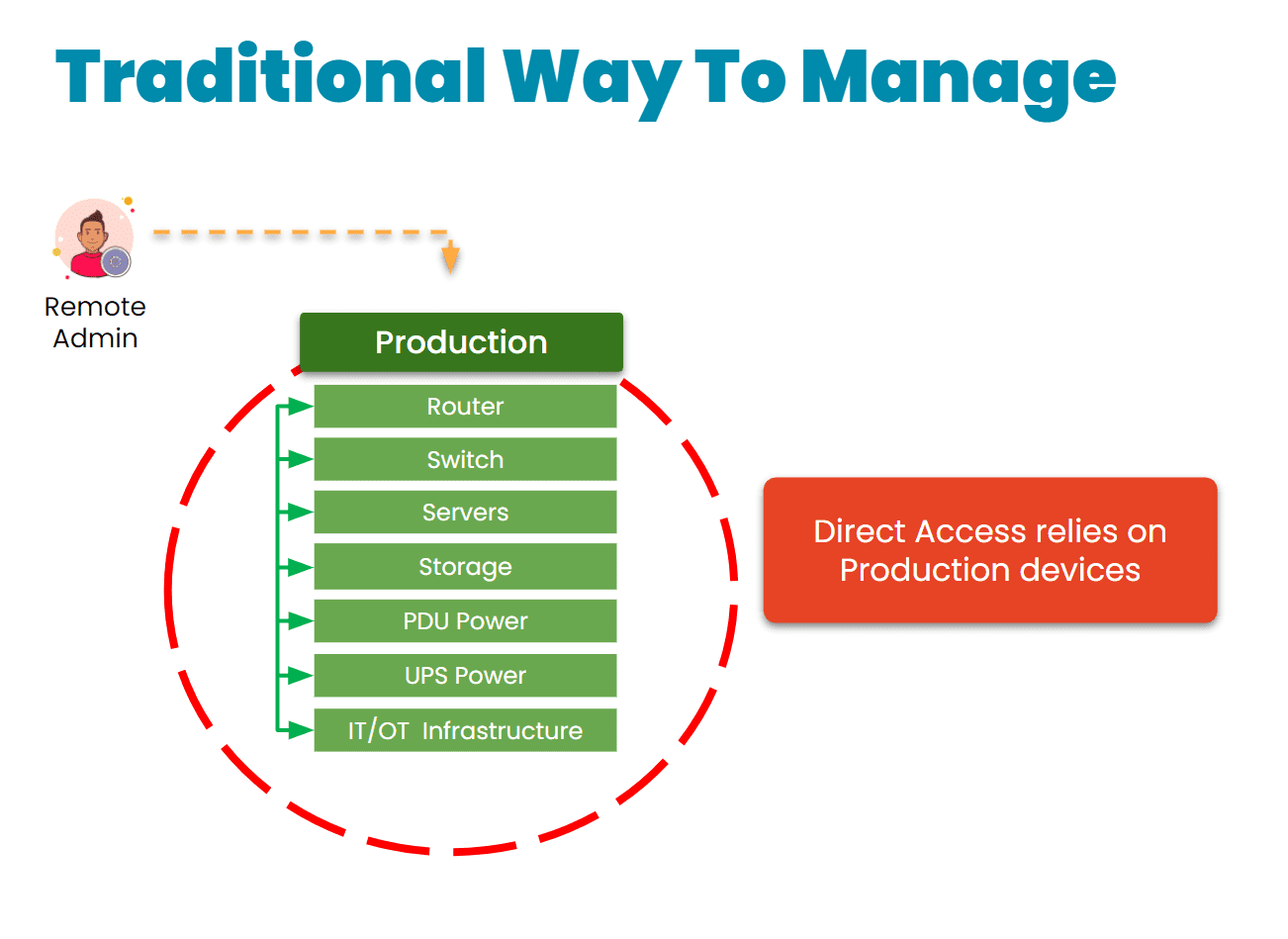
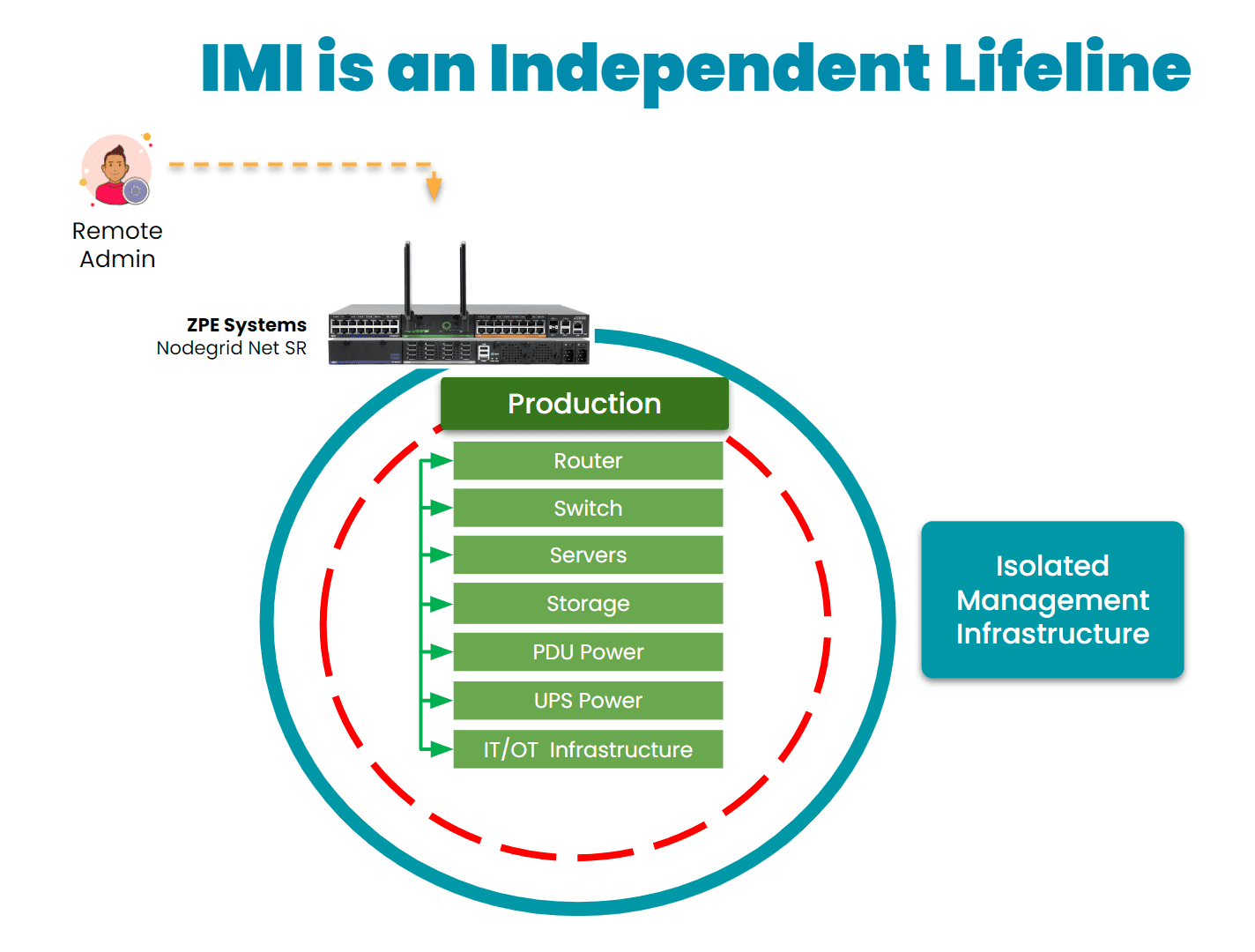
Image: Isolated Management Infrastructure physically separates management access from production assets.

By implementing IMI, administrators can remotely access the debug ports of OCP cards without affecting the main production network. This setup not only secures the debug ports but also ensures that troubleshooting can be done in real-time, even if the primary network is down.

Benefits of Using IMI for OCP Debug Ports:

  • Secure, Controlled Access: Since the management network is isolated, it limits access to only authorized personnel. This reduces the chances of an attacker compromising critical hardware through exposed debug ports.
  • Reduced Downtime: IMI enables administrators to access, troubleshoot, and repair systems quickly, minimizing downtime during failures or performance issues. Even during major network outages, IMI ensures out-of-band (OOB) access to the OCP cards’ debug ports.
  • Lower Security Risks: By separating management traffic from regular operations, IMI reduces the attack surface. It becomes more difficult for hackers to use network vulnerabilities to gain unauthorized access to critical infrastructure.

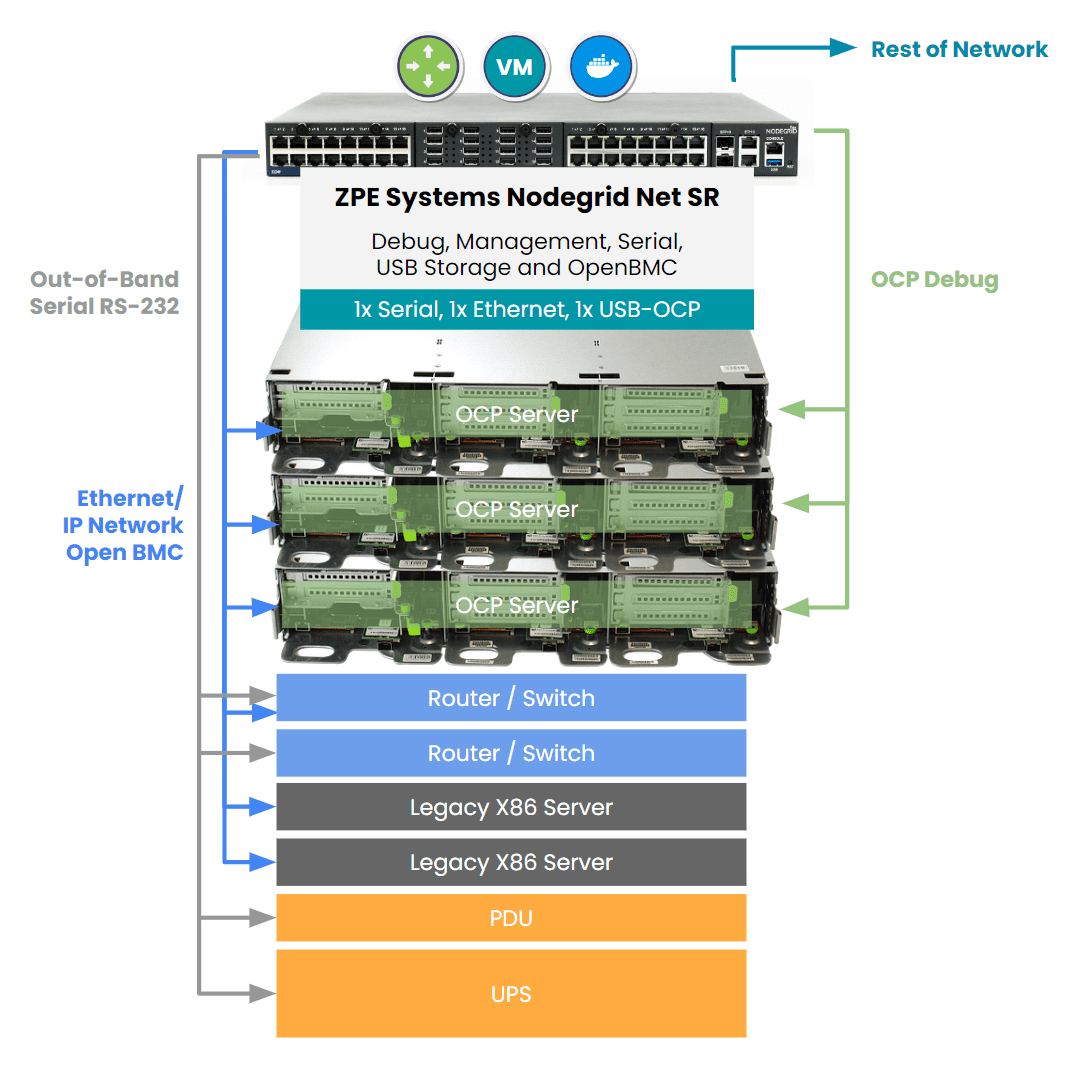
Out-of-band management for OCP servers

Implementing Isolated Management for OCP Debug Access

To implement isolated management infrastructure for accessing the debug ports of OCP cards, follow these steps:

  • Network Segmentation: Physically separate your management network from the production network. Ensure that management traffic is not routed through the same pathways used for regular operations.
  • Use Out-of-Band Management Devices: Deploy dedicated OOB management hardware that allows for remote access and control of the OCP cards, even when the primary network is unavailable. This can include IPMI (Intelligent Platform Management Interface) or SSH (Secure Shell) for secure communication.
  • Integrate with Monitoring Systems: Combine IMI with automated monitoring and alerting systems. This way, any anomaly detected in the AI environment will trigger a response, allowing administrators to quickly access the OCP card’s debug port for diagnostics.

Security Benefits of Isolated Management Infrastructure

In addition to improving accessibility, IMI enhances security across the board in AI environments. Here’s how: 

  • Limited Access Points: Isolating management infrastructure limits the number of entry points for attackers, significantly reducing the attack surface.
  • Controlled User Access: Only authorized users can access the isolated network, meaning that internal threats and insider attacks are also mitigated.
  • Compliance and Auditing: For industries with strict regulatory requirements, IMI provides clear documentation and control over system access, helping organizations meet compliance standards and pass security audits.

Real-World Example

Consider a scenario in a data center where an AI model’s training process experiences sudden instability. The system administrator, located remotely, uses IMI to securely access the OCP card’s debug port through an OOB management interface.

The problem is quickly diagnosed and resolved without needing physical access to the hardware, minimizing downtime and ensuring that the AI model’s training can continue uninterrupted.

Deploy IMI with Nodegrid to Strengthen AI Environments

As AI infrastructures grow, so do the risks and complexities associated with managing them. The October 2024 cyberattack on American Water, which impacted their operational technology and water distribution, highlights the need for robust, secure, and isolated management networks to avoid large-scale disruptions.

By integrating isolated management infrastructure into your AI data center, you can ensure quick access to critical systems like OCP devices, reduce the impact of system failures, and improve security. ZPE Systems’ Nodegrid is a Gen 3 out-of-band management platform that allows you to deploy IMI in your data center environment, and it’s the only out-of-band management built to manage OCP cards. It can integrate or directly host third-party applications for automation, security, and much more, consolidating an entire tech stack into a single, cost-efficient solution.

Schedule a demo to see how Nodegrid gives remote access to OCP cards and strengthens your AI deployments.

Top 5 Data Center Mistakes and How To Avoid Them

Top 5 Data Center Mistakes and How To Avoid Them

Data center deployments require careful planning and execution. The sheer complexity makes it easy to stumble into common pitfalls that can compromise uptime, security, and scalability. After talking with hundreds of customers, we’ve compiled the top five data center mistakes organizations often make during deployments, with tips on how to avoid them.

1. Overlooking Isolated Management Infrastructure

In the data center, the focus is bringing production infrastructure online, including power, cabling, racks, servers, and network gear. But many project managers and architects say they wished they’d given more attention to setting up proper management infrastructure. This oversight usually leads to business challenges down the line, especially when management access relies on the production infrastructure. When a device fails or goes offline, there’s no choice but to go on-site to manually troubleshoot and recover. Many professionals admit to making this data center mistake and wish that they had considered this early in the planning process. Incorporating something called Isolated Management Infrastructure from the start can avoid this challenge, since it provides a dedicated management plane through which teams can access production gear without relying on the production network. 

Tip: Make management infrastructure a priority in your initial planning stages. This proactive approach can prevent complications later.

IMI

2. Neglecting Automation for Configuration and Scaling

Many data center implementors focus heavily on the “rack and stack” initial setup, but fail to automate processes for configuration and scaling operations. This data center mistake often leads to days’ or weeks’ worth of manual, repetitive work, while also exposing the organization to human error. A lot of people we talked to wish they’d invested just a few weeks into automating essential tasks such as switch setup, VLAN configurations, and IP address assignments, which would have saved them lots of time later on and likely helped to prevent errors. Additionally, if rearchitecting is needed, automated systems allow for quick reimplementation, minimizing the time and complexity involved. 

Tip: Dedicate time to automating routine processes. This investment will pay off in enhanced operational efficiency and reduced human error.

3. Inadequate Out-of-Band Management

When people think of out-of-band (OOB) management, a common misconception is that it is solely about Ethernet switches. However, it’s crucial not to overlook the importance of having management access to your entire device stack. Low-level access can be essential for system recovery and management. The recent CrowdStrike outage is a perfect example – when the failed devices needed to be reimaged, typical out-of-band management solutions were inadequate at providing this type of low-level access. Generation three out-of-band serial consoles, like the Nodegrid Net SR, give Ethernet, serial, and USB access, allowing teams to remote-in at the BIOS level to revive failed devices. Using this kind of comprehensive out-of-band – on a fully isolated management plane – helps teams remotely recover and confidently automate processes.

Tip: Ensure that your OOB strategy includes robust serial console access to enhance system reliability and recovery capabilities.

IMI with Nodegrid2

4. Ignoring Security Best Practices

Zero trust security is no longer just advisable, it’s essential. The typical approach is to establish direct connectivity to devices to configure, troubleshoot, upgrade, etc. But this comes with unnecessary risks, often exposing management ports to the Internet and leaving you at risk of attack. Without a fully isolated management plane and zero trust security controls, how would you recover if you were ransomware’d? This is why it’s essential to implement security controls like role-based access and multi-factor authentication, and ensure complete separation of management and production networks. 

Tip: Prioritize security by adopting a zero-trust approach and implementing rigorous access controls to safeguard your data center.

5. Cutting Corners on Out-of-Band Management

In the race for implementing AI, it’s crucial to invest in AI data center infrastructure. But organizations often cut corners on their ability to manage the underlying infrastructure that powers AI. Management access should not stop at ethernet switches; it should extend to encompass serial console access, PDUs, jump boxes, 5G connectivity, routing, WAN links, and a centralized cloud hub with secure tunnels to colocation sites. Using a comprehensive and centralized platform like Nodegrid consolidates many management devices into one while giving remote control to optimize AI’s underlying infrastructure. Aside from enhancing efficiency, this approach minimizes waste and energy consumption, which addresses environmental, social, and governance (ESG) concerns. 

Tip: Avoid the partial out-of-band management deployment. A complete system not only supports resilience and security but also contributes to sustainability goals.


Addressing these common data center mistakes can significantly enhance operational efficiency, security, and scalability. By prioritizing management infrastructure, automating processes, ensuring adequate out-of-band access, implementing robust security measures, and investing wisely in management systems, organizations can build resilient data centers equipped to meet the demands of today and the future.

See ZPE Cloud in action with this video demo

Senior Sales Engineer Marcel van Zwienen gives you a hands-on demo of ZPE Cloud in this video. Watch Marcel take you from signing in to gaining remote access for troubleshooting, to showing how to apply configuration changes automatically across device fleets. Watch now at the link below.

Use Our Blueprint to Avoid Data Center Mistakes

Our blueprint shows how to deploy an isolated management infrastructure, which gives you secure remote access to recover from outages and automate operations. Download now for the complete guide.

Perle Console Server Replacement Options

NCSP Back side

Perle offers two console server solutions for out-of-band (OOB) management of data center infrastructure: the IOLAN SCG and the IOLAN SCR. The SCG is available in both fixed and modular form factors, while the SCR comes in four models with different combinations of 56 managed ports, allowing companies to choose the OOB management hardware that best suits their environment. Unfortunately, IOLAN solutions suffer from hardware and software limitations that can curb scalability and limit agility. This guide discusses Perle console server replacement options that enable streamlined growth through automation capabilities and vendor freedom.


Key takeaways

  • Perle IOLAN SCG appliances offer out-of-band console server management for up to 48 devices in a fixed or modular form factor. Perle IOLAN SCR console servers come with four different managed port configurations for added flexibility.
  • Perle console servers offer some automation capabilities, like auto-discovery and zero-touch provisioning, as well as comprehensive firewall functionality. However, their underpowered hardware and closed management software prevent Guest OS hosting or third-party infrastructure automation and orchestration.
  • The Nodegrid platform from ZPE Systems overcomes these limitations with robust CPU, RAM, and storage, as well as vendor-neutral software. It enables data center scalability by providing high-density serial port configurations and supporting 3rd-party automation.
  • Nodegrid can also run networking, security, edge computing, AIOps, and more, consolidating the data center tech stack and improving operational efficiency.


Perle IOLAN console server overview

Perle IOLAN SCG console servers provide out-of-band management for up to 48 infrastructure devices. Fixed-form-factor models use copper Ethernet for networking and OOB, while the modular version has options for Wi-Fi, cellular, and dial-up. The modular series also has three expansion bays that support any combination of 16-port RS-232 or USB serial modules.

Perle IOLAN SCR console servers come in four different models with up to 56 managed serial, USB, and Ethernet ports, as well as optional cellular integration.

Click here to compare Perle console server tech specs.

Perle console servers have automatic LLDP (Link Layer Discovery Protocol) discovery and can extend zero-touch provisioning (ZTP) to end-devices. They come with an embedded firewall, OpenVPN and IPSec VPN, and AES encryption. The PerleVIEW cloud-based management software provides centralized monitoring and control of all connected data center infrastructure.


Why consider Perle console server alternatives

IOLAN console servers have an underpowered 500 MHz core 32-bit ARM processor, 4GB of flash storage, and 1GB RAM. This hardware may be sufficient for basic infrastructure management workflows and ZTP, but it prevents Guest OS hosting and more advanced automation. The Perle platform also doesn’t integrate with any third-party automation or orchestration solutions.

An inability to fully automate infrastructure management workflows – or to orchestrate those tasks that can be automated – ultimately limits operational efficiency and data center scalability. Consequently, IT teams can’t effectively support the needs of the growing business, adapt to strategy changes, or focus on revenue-driving innovations like artificial intelligence and machine learning (AI/ML).

What’s needed is an open platform that can manage any device, automate any workflow, and work with third-party software to provide a fully integrated infrastructure orchestration experience.


Perle console server replacement options from ZPE Systems

Nodegrid is a family of vendor-neutral console server solutions from ZPE Systems. It comes in four models:

  1. The Nodegrid Serial Console Plus (NSCP) is a robust platform offering up to 96 managed serial ports in a 1U rack-mounted form factor for hyperscale data centers and cloud service providers.
  2. The Nodegrid Serial Console S Series provides up to 48 auto-sensing ports to unify management of legacy, modern, and multi-vendor data center environments.
  3. The Nodegrid Net Services Router (NSR) is a modular solution that can be customized with a range of serial, networking, storage, and compute cards to adapt to any use case.
  4. The Nodegrid Serial Console Plus Core Edition (NSCP-CE) is ideal for break-fix deployments while providing more robust security capabilities than comparable solutions.

Nodegrid devices come with Intel x86-32 bit processors, robust (and upgradable) internal storage and RAM options, and a Linux-based Nodegrid OS. The NSCP, S Series, and NSR support Guest OS and Docker containers for third-party applications. That means they can directly host infrastructure automation and orchestration (like Ansible, Puppet, and Chef), security (like Palo Alto’s next-generation firewalls), and much more. Plus, it can extend this automation to legacy and mixed-vendor devices that otherwise wouldn’t support it.

All Nodegrid models can use a wide range of USB environmental monitoring sensors to help remote teams maintain optimal conditions in the data center. Nodegrid hardware protects the control plane with advanced security features like BIOS protection, UEFI Secure Boot, self-encrypted disk (SED), Trusted Platform Module (TPM) 2.0, and a multi-site VPN using IPSec, WireGuard, and OpenSSL protocols. The Nodegrid OS and the ZPE Cloud management software are also Synopsys-validated as achieving industry-leading security.


Which Nodegrid serial console is right for you?

Use Cases
Serial
Network
CPU
Guest OS
Docker Apps
Storage
RAM
Wi-Fi
Cellular
Power
Data Sheet
Nodegrid NSCP
Hyperscale data centers and cloud service providers
16 / 32 / 48 / 96
2 SFP+ & 2 ETH
Intel x86_64 quad core
1
1-2
32GB SSD
4GB DDR4
Optional
Optional
Single or Dual AC

Dual DC

Nodegrid NSC S Series
Mixed legacy, modern, and multi-vendor environments
16 / 32 / 48
2 SFP+ or 2 ETH
Intel x86_64 dual core
1
1-2
32GB SSD
4GB DDR3
Optional
Optional
Single or Dual AC

Dual DC

Nodegrid NSR
Modular and adaptable to any use case
16 / 32 / 48 / 64 / 80
2 SFP+ & 2 ETH
Intel x86_64 quad core or 8-core
1-6
1-4
32GB – 128GB
8GB DDR4
Optional
Optional
Single or Dual AC

Dual DC

Nodegrid NSCP-CE
Break-fix solution for data centers, colocations, and branches
16 / 32 / 48
2 SFP & 2 ETH
Intel x86_64 dual core
0
0
16GB SSD
4GB DDR4
Optional
Optional
Dual AC

Dual DC

Future-proof your data center with Nodegrid

Perle console servers deliver unified, out-of-band management of remote data center infrastructure with some basic automation capabilities, but their closed architecture and underpowered hardware limit extensibility and scalability. Nodegrid improves upon outdated console server solutions with a vendor-neutral platform that supports unlimited innovation and growth with less management complexity.

To learn more about Perle console server replacement options, schedule a demo of the vendor-neutral Nodegrid platform.


Perle IOLAN console server tech specs

Use Cases
Serial
Network
CPU
Guest OS
Docker Apps
Storage
RAM
Wi-Fi
Cellular
Power
IOLAN SCG (Fixed)
Data centers
16 / 32 / 48
1 ETH
ARM 32-bit 500MHz single core
0
0
4GB Flash
1GB
No
No
Single AC
IOLAN SCG (Modular)
Multiple
Up to 50
2 SFP or 2 ETH
ARM 32-bit 500MHz single core
0
0
4GB Flash
1GB
Optional
Optional
Dual AC

Dual AC

IOLAN SCG (Modular)
Large data centers
24 / 32 / 40 / 56
2 SFP (SCR256)

2 SFP & 2 ETH (SCR226, 242, 258)

ARM 32-bit 500MHz single core
0
0
4GB Flash
1GB
Optional
Optional
Dual AC

Ready to replace your outdated Perle console server?


We know that replacing outdated, EOL devices takes a lot of effort. That’s why ZPE now offers a complete package of budget-friendly products and engineering services to help streamline the process.

Click here to see how we make it easy to upgrade to next-gen out-of-band management.

How Oxidized Network Backups Improve Resilience

How Oxidized Network Backups Improve Resilience

A network administrator configures an enterprise networking device.

Network outages are extraordinarily expensive and disruptive to business, with recent EMA research finding that outages cost an average of $14,056 per minute in 2024. While these outages have numerous possible causes, two of the largest and most preventable are human error and configuration issues. Enterprise networks keep growing bigger and more complicated, with factors like network decentralization, the use of network automation solutions, and the constant threat of cybersecurity breaches contributing to management complexity and the risk of costly mistakes.

Oxidized is an open-source network configuration backup and change management tool that can help prevent human errors and malicious actors from disrupting network services. It also accelerates recovery from equipment failures and ransomware attacks without increasing network complexity. This guide explains how Oxidized network backups can improve resilience, or the ability to withstand adversity and continue business operations with minimal disruption.

What is Oxidized, and how does it work?

Oxidized is a lightweight tool that automatically backs up network device configurations and tracks changes. It supports more than 130 operating systems and easily integrates with third-party network management tools like LibreNMS.

Oxidized uses REST APIs to pull configurations from network devices and send them to a Git repository or network management platform. Administrators can configure it to make backups according to a specific schedule, and it automatically pulls a new version (called a diff version) whenever a device’s configuration is changed. Teams can view diff versions in the Oxidized web UI as well as whichever Git repository or management platform the backups are being sent to.

Viewing Oxidized network backup diff versions in the web UI.

Viewing diff versions in the Oxidized web UI. Source

How Oxidized network backups improve resilience

Network resilience is the ability to minimize business disruptions when adverse events occur, such as ransomware attacks, botched updates, natural disasters, and equipment failures. Oxidized network backups improve resilience in numerous ways. For example:

  1. Administrators can easily roll-back device configurations to a previous version if a change causes problems. This significantly shortens the duration of outages or service degradations.
  2. Teams can quickly deploy known-good configurations to replacement devices when equipment failures or ransomware breaches happen, significantly accelerating recovery times.
  3. Configurations can be monitored with version control to prevent unauthorized changes from proliferating unnoticed, helping teams stop ransomware and other malicious actors in their tracks.

Enhancing network resilience with out-of-band management

Network backups are crucial, but they’re only one piece of the resilience puzzle. Another best practice for minimizing business disruption is to isolate the network control plane with out-of-band (OOB) management. OOB moves all network management and infrastructure control functions to an entirely separate network that runs parallel with the production (or in-band) network but doesn’t rely on any of the same infrastructure or services. It allows teams to perform management, troubleshooting, backup, and recovery workflows remotely on a dedicated connection, such as secondary Fiber or cellular LTE, that remains available even if the in-band network goes down from an equipment failure, ISP outage, or ransomware attack.

By isolating management interfaces and workflows on a separate network, OOB management helps prevent malicious software or people from accessing them from a breached production system. For example, running Oxidized backups on the OOB network ensures that teams can safely deploy configs to new or rebuilt equipment without risking ransomware reinfection, speeding up recovery times and reducing financial impacts.

Minimize business disruption with Oxidized + Nodegrid

Nodegrid is a vendor-neutral out-of-band management platform that uses console servers and integrated branch services routers to isolate your control plane without the need for parallel infrastructure.

OOB management network isolation with the Nodegrid platform.

OOB management network isolation with the Nodegrid platform.

Nodegrid’s open architecture and extensible management software allow you to integrate, host, and run your choice of third-party services and solutions. You can use it to deploy network automation, run next-generation firewall software, host recovery tools, or even deliver services while the primary network or systems are down. With the combination of Oxidized network backups and Nodegrid OOB, you can minimize the impact of adverse events without driving up costs or complexity.

Deploying Oxidized network backups with Nodegrid OOB helps reduce the duration, expense, and hassle of downtime. Schedule a Nodegrid demo to learn more.

How to Shrink Supply Chain Security Risks in Networking Infrastructure

Silhouette of businessman looking at container cargo freight ship in port with network connection concept

Our way of life relies on networking infrastructure. Financial transactions, healthcare communications, national security, and everything in between depends on an interconnected web of networking and IT services. As end users, we reap the benefits of instant communications and information at our fingertips. However, this web presents an almost immeasurable amount of supply chain security risk that must be addressed, a job that’s more complex with every solution that enters the ecosystem.

What are the Impacts of Inadequate Supply Chain Security?

Insecure supply chains can lead to widespread and long-lasting consequences. We’ve seen this with backdoor vulnerabilities in firewall hardware, zero-day exploits of popular software products, and many attacks targeting the network’s control plane. The impacts can range from simple data leaks to entire regions being cut off from critical resources due to ransomware attacks.

  • Economic Losses: Cyberattacks on insecure supply chains can lead to significant financial losses, both directly through theft or fraud, and indirectly through damage to reputation and customer trust.
  • National Security Threats: Critical infrastructure such as power grids, transportation systems, and communication networks are prime targets for nation-state actors. Compromised networking hardware or software in these sectors can have severe implications for national security.
  • Global Impact: The interconnected nature of global supply chains means that a vulnerability’s impact can ripple across the world. For example, a compromised component in one region could lead to a cascading failure in networks across multiple countries.


What Do Supply Chain Security Vulnerabilities Look Like?

When talking about supply chain security vulnerabilities in networking, this refers to different ways attackers can exploit hardware and software during manufacturing, distribution, and maintenance. These systems are essentially vulnerable during their entire lifespan – from the time their motherboards are installed and code is written, to when they’re in-transit to the customer, to when IT teams are administering regular updates and troubleshooting. But, what do these vulnerabilities look like?

Hardware Vulnerabilities

A technician assembles a motherboard to be used in hardware.

Networking infrastructure relies on hardware. Illegitimate or counterfeit components can be inserted into the supply chain and make their way into hardware manufacturing processes. This can cause equipment failures, degraded performance, or even deliberate backdoors that allow unauthorized access.

  • Physical Backdoors: Malicious actors can introduce hardware backdoors during the manufacturing process, allowing unauthorized access to the network. These backdoors are difficult to detect and can remain hidden until activated.
  • Long-Term Vulnerabilities: Once a compromised piece of hardware is deployed, it can remain a vulnerability for years, especially in critical infrastructure where hardware lifecycles are longer. Replacing hardware is often costly and logistically challenging.
  • Trust and Reliability: Networking hardware is the first line of defense against cyber threats. Compromised hardware can lead to a loss of trust, not only in the network but also in the organizations responsible for its deployment and maintenance.


Software Vulnerabilities

Lines of software code shown on a computer screen

Hardware provides the physical framework, while software controls and manages the flow of data within the network. Malicious code or compromised firmware can be introduced at any point in the software development lifecycle, while some software even ships with zero-day exploits (as with the MOVEit ransomware attack), leading to severe security breaches.

  • Firmware Integrity: Firmware is the software that directly interfaces with hardware. If compromised, it can be used to control or disable hardware components, leading to catastrophic network failures.
  • Regular Updates and Patches: Software vulnerabilities are often discovered post-deployment. Having a robust process for regular updates and patches is crucial in mitigating these risks. However, if the update process itself is compromised, malicious actors can introduce vulnerabilities under the guise of legitimate updates.
  • End-to-End Encryption: Secure software ensures that data transmitted across the network is encrypted, reducing the risk of interception or tampering. This is especially critical in protecting sensitive information from being accessed by unauthorized entities.
  • Third-Party & Open Source Software: Third-party and open source software are used throughout networking infrastructure. When this software is integrated into the ecosystem, it can introduce vulnerabilities and code quality risks, especially if the organization doesn’t have access to the underlying code.


Third-Party and Insider Threats

Most companies rely on third-party vendors and suppliers, whether for hardware manufacturing, procurement and logistics, or software development. This adds layers of complexity. If any of these third parties are compromised, the impact can ripple throughout the entire supply chain and contaminate the end products.

Employees or contractors can also put infrastructure integrity at risk. When these employees are trusted with access to sensitive parts of the supply chain, they can compromise overall security, even unintentionally.

How ZPE Systems Shrinks Supply Chain Security Risks

ZPE Systems provides the network management infrastructure that’s essential to managing critical IT for organizations across industries. Although there are many network management infrastructure vendors, most lack a holistic approach to security. Hardware components may be sourced from untrusted manufacturers, and software development may be loosely-controlled and inadequately tested. These parts of the supply chain introduce vulnerabilities that can put customers at much more risk than they realize.

ZPE takes a security-centric approach and offers the industry’s most secure out-of-band management platform. This includes dozens of hardware security features, a Synopsys-validated software development lifecycle, and the most third-party certifications and validations, including FIPS 140-3, SOC 2 Type 2, ISO 27001, and others.

Get the full breakdown of our end-to-end supply chain security approach by downloading the pdf below.

Security in Layers

Serial Console Redirection Guide

Serial Console Redirection Guide

Serial-console-rediction-guide

Serial console redirection involves sending a server’s keyboard and video signals through the serial port as well as the normal endpoints (USB and video), allowing them to be used in headless mode. It gives administrators remote access to pre-boot functions, such as the BIOS menu, that are typically unavailable to them with software-based remote access solutions. This is important because it allows remote teams to install new operating systems, troubleshoot hung servers, and perform other critical hardware management tasks without costly on-site visits. It also means administrators can control remote servers with out-of-band (OOB) serial consoles, devices that streamline remote infrastructure management and improve network resilience.

Why enable serial console redirection?

The primary reason to redirect keyboard control over the serial port is to gain remote access to pre-boot menus and functions. Typically, systems administrators remotely manage servers using a software-based remote access client that only works while the OS is running. While this is sufficient for most remote administration workflows, it means that admins can’t do anything with the server until it has booted to the operating system, which poses several problems:

  1. Administrators cannot remotely install the OS on a new or recovered server without someone on-site to physically enter commands and select options with a keyboard and mouse. This is especially problematic when the OS needs to be reinstalled after a crash or ransomware breach, because it forces companies to send teams on-site or pay for expensive managed services, driving up the cost and duration of outages.
  2. Remote teams are powerless to intervene if the server hangs during a reboot or update. Again, they have to either travel on-site or pay for managed services just to press a few keys or access troubleshooting tools.
  3. Remotely installing new UEFI/BIOS versions or making any configuration changes can be tricky. Many server vendors provide software utilities that allow admins to push out BIOS updates over the network, but it can be very difficult to troubleshoot any problems that arise. In multi-vendor environments, teams may also find it tedious to coordinate updates across multiple tools with different interfaces and commands.

There are also IPMI-based (intelligent platform management interface) remote management tools that provide full remote control but add another component to the tech stack that must be maintained and secured, creating additional complexity.

Serial console redirection and out-of-band management

Another major advantage of serial console redirection is that it enables out-of-band (OOB) management. OOB creates an entirely separate network that runs parallel with your production (or in-band) network but doesn’t rely on the same network infrastructure or services. OOB management allows administrators to remotely manage servers and other infrastructure on a dedicated connection, such as secondary fiber or cellular LTE, that will remain available even if the in-band network goes down from an equipment failure, ISP outage, or ransomware attack.

OOB serial consoles

hotos of the Nodegrid Serial Console server solution.

The Nodegrid Serial Console Plus provides unified serial console management for many servers and infrastructure devices.

Serial console redirection also allows teams to manage servers with serial consoles, also known as console servers, console server switches, or terminal servers. One of these devices can be used to manage several pieces of data center equipment, so sysadmins don’t need to connect to each server individually.

The management interface for the Nodegrid Serial Console Plus allows admins to manage many servers and infrastructure devices from one convenient location.

The management interface for the Nodegrid Serial Console Plus allows admins to manage many servers and infrastructure devices from one convenient location.

Serial consoles also create an OOB network without the need to deploy a bunch of redundant devices and services. Solutions like the Nodegrid Serial Console from ZPE Systems provide additional functionality like power control, giving remote teams the ability to power-cycle a hung device or turn systems back on after a power failure. OOB serial consoles help improve management efficiency and overall resilience without driving up costs or complexity.

How to configure serial console redirection

Serial console redirection is typically configured in the server’s UEFI (Unified Extensible Firmware Interface) or BIOS (Basic Input/Output System) settings. As such, it’s important to consult the vendor-provided documentation for instructions on how to enable it for your server hardware.

Serial console redirection enabled in BIOS. Source:

Serial console redirection enabled in BIOS. Source: ASRock Rack

Additionally, some Windows and Linux-based operating systems need to be configured for serial console management. It’s best to look up the OS-specific instructions on the vendor’s website, but here are a few links to get you started:

Why choose the Nodegrid Serial Console solution

Configuring serial console redirection is relatively straightforward, and it allows sysadmins to remotely control and troubleshoot servers even when the OS isn’t available. It also enables the use of OOB serial consoles like the Nodegrid solution from ZPE Systems, which streamlines remote management workflows and reduces the business impact of system failures.

Nodegrid consolidates a sysadmin’s entire management tech stack into a single appliance for greater operational efficiency.

A diagram showing all the capabilities of a Gen 3 serial console interface.

Nodegrid consolidates a sysadmin’s entire management tech stack into a single appliance for greater operational efficiency.

Nodegrid is a Gen 3 out-of-band management platform that provides vendor-neutral control over mixed-vendor infrastructure. It can integrate or directly host third-party applications for automation, security, and much more, consolidating an entire tech stack into a single, cost-efficient solution.

Serial console redirection with Nodegrid improves operational efficiency and network resilience. Schedule a demo to see a Nodegrid Serial Console in action!