Network outages are extraordinarily expensive and disruptive to business, with recent EMA research finding that outages cost an average of $14,056 per minute in 2024. While these outages have numerous possible causes, two of the largest and most preventable are human error and configuration issues. Enterprise networks keep growing bigger and more complicated, with factors like network decentralization, the use of network automation solutions, and the constant threat of cybersecurity breaches contributing to management complexity and the risk of costly mistakes.
Oxidized is an open-source network configuration backup and change management tool that can help prevent human errors and malicious actors from disrupting network services. It also accelerates recovery from equipment failures and ransomware attacks without increasing network complexity. This guide explains how Oxidized network backups can improve resilience, or the ability to withstand adversity and continue business operations with minimal disruption.
What is Oxidized, and how does it work?
Oxidized is a lightweight tool that automatically backs up network device configurations and tracks changes. It supports more than 130 operating systems and easily integrates with third-party network management tools like LibreNMS.
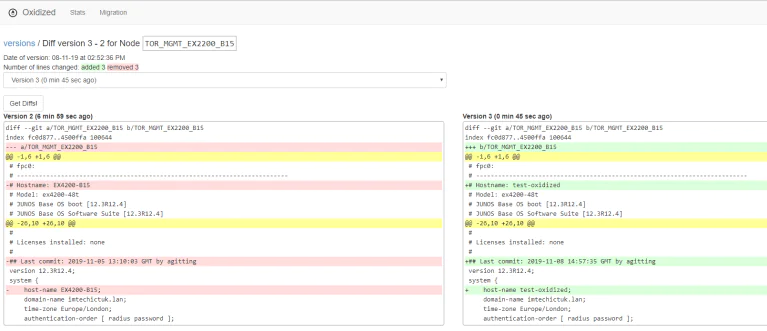
Oxidized uses REST APIs to pull configurations from network devices and send them to a Git repository or network management platform. Administrators can configure it to make backups according to a specific schedule, and it automatically pulls a new version (called a diff version) whenever a device’s configuration is changed. Teams can view diff versions in the Oxidized web UI as well as whichever Git repository or management platform the backups are being sent to.
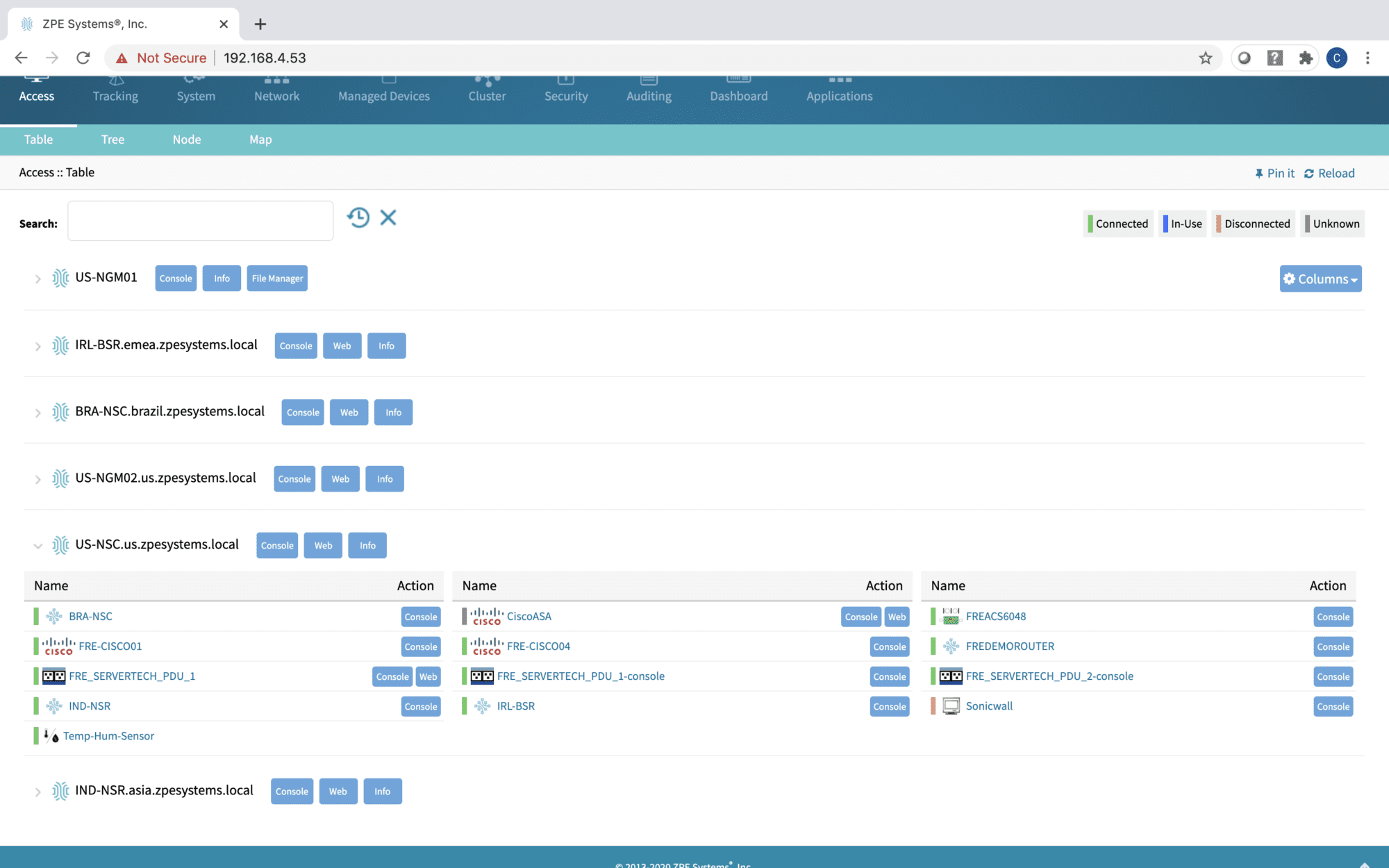
Viewing diff versions in the Oxidized web UI. Source
How Oxidized network backups improve resilience
Network resilience is the ability to minimize business disruptions when adverse events occur, such as ransomware attacks, botched updates, natural disasters, and equipment failures. Oxidized network backups improve resilience in numerous ways. For example:
Administrators can easily roll-back device configurations to a previous version if a change causes problems. This significantly shortens the duration of outages or service degradations.
Teams can quickly deploy known-good configurations to replacement devices when equipment failures or ransomware breaches happen, significantly accelerating recovery times.
Configurations can be monitored with version control to prevent unauthorized changes from proliferating unnoticed, helping teams stop ransomware and other malicious actors in their tracks.
Enhancing network resilience with out-of-band management
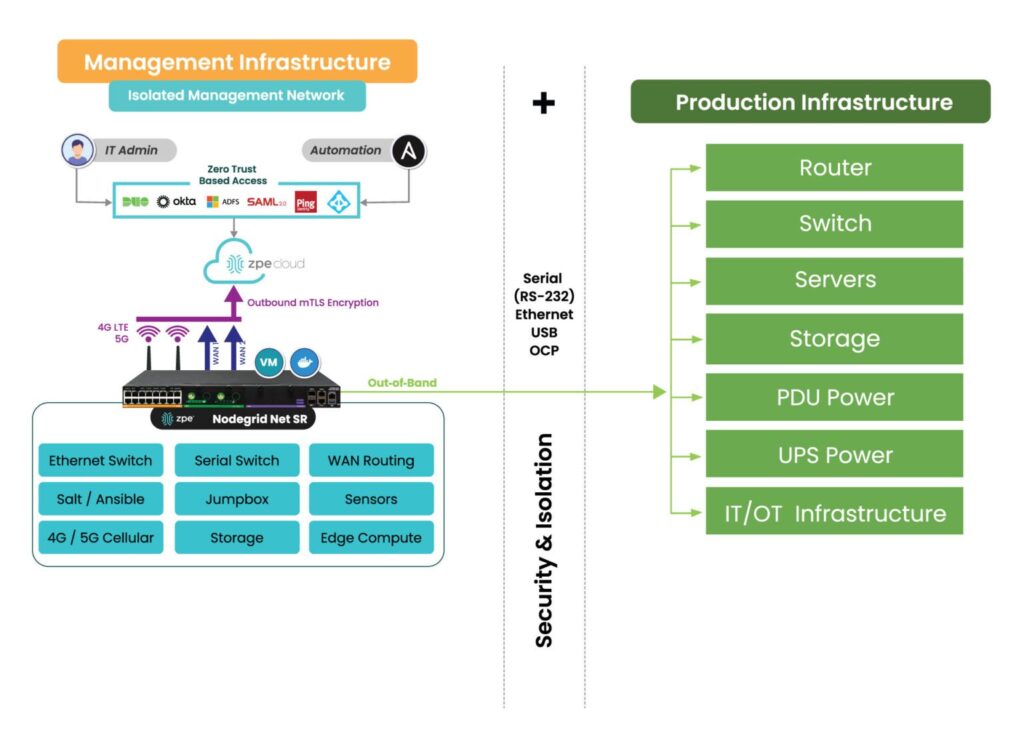
Network backups are crucial, but they’re only one piece of the resilience puzzle. Another best practice for minimizing business disruption is to isolate the network control plane with out-of-band (OOB) management. OOB moves all network management and infrastructure control functions to an entirely separate network that runs parallel with the production (or in-band) network but doesn’t rely on any of the same infrastructure or services. It allows teams to perform management, troubleshooting, backup, and recovery workflows remotely on a dedicated connection, such as secondary Fiber or cellular LTE, that remains available even if the in-band network goes down from an equipment failure, ISP outage, or ransomware attack.
By isolating management interfaces and workflows on a separate network, OOB management helps prevent malicious software or people from accessing them from a breached production system. For example, running Oxidized backups on the OOB network ensures that teams can safely deploy configs to new or rebuilt equipment without risking ransomware reinfection, speeding up recovery times and reducing financial impacts.
Minimize business disruption with Oxidized + Nodegrid
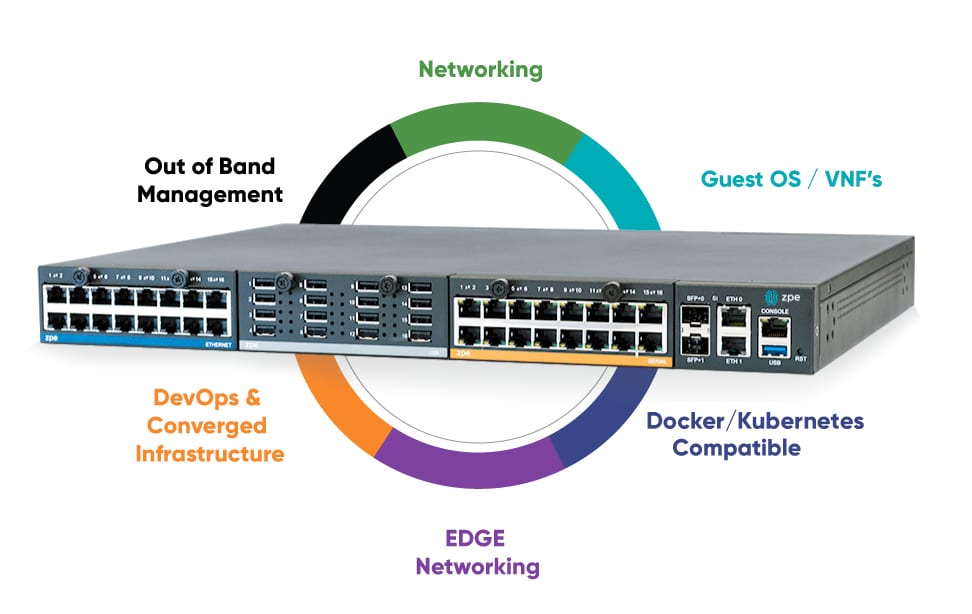
OOB management network isolation with the Nodegrid platform.
Nodegrid’s open architecture and extensible management software allow you to integrate, host, and run your choice of third-party services and solutions. You can use it to deploy network automation, run next-generation firewall software, host recovery tools, or even deliver services while the primary network or systems are down. With the combination of Oxidized network backups and Nodegrid OOB, you can minimize the impact of adverse events without driving up costs or complexity.
Deploying Oxidized network backups with Nodegrid OOB helps reduce the duration, expense, and hassle of downtime. Schedule a Nodegrid demo to learn more.
Our way of life relies on networking infrastructure. Financial transactions, healthcare communications, national security, and everything in between depends on an interconnected web of networking and IT services. As end users, we reap the benefits of instant communications and information at our fingertips. However, this web presents an almost immeasurable amount of supply chain security risk that must be addressed, a job that’s more complex with every solution that enters the ecosystem.
What are the Impacts of Inadequate Supply Chain Security?
Insecure supply chains can lead to widespread and long-lasting consequences. We’ve seen this with backdoor vulnerabilities in firewall hardware, zero-day exploits of popular software products, and many attacks targeting the network’s control plane. The impacts can range from simple data leaks to entire regions being cut off from critical resources due to ransomware attacks.
Economic Losses: Cyberattacks on insecure supply chains can lead to significant financial losses, both directly through theft or fraud, and indirectly through damage to reputation and customer trust.
National Security Threats: Critical infrastructure such as power grids, transportation systems, and communication networks are prime targets for nation-state actors. Compromised networking hardware or software in these sectors can have severe implications for national security.
Global Impact: The interconnected nature of global supply chains means that a vulnerability’s impact can ripple across the world. For example, a compromised component in one region could lead to a cascading failure in networks across multiple countries.
What Do Supply Chain Security Vulnerabilities Look Like?
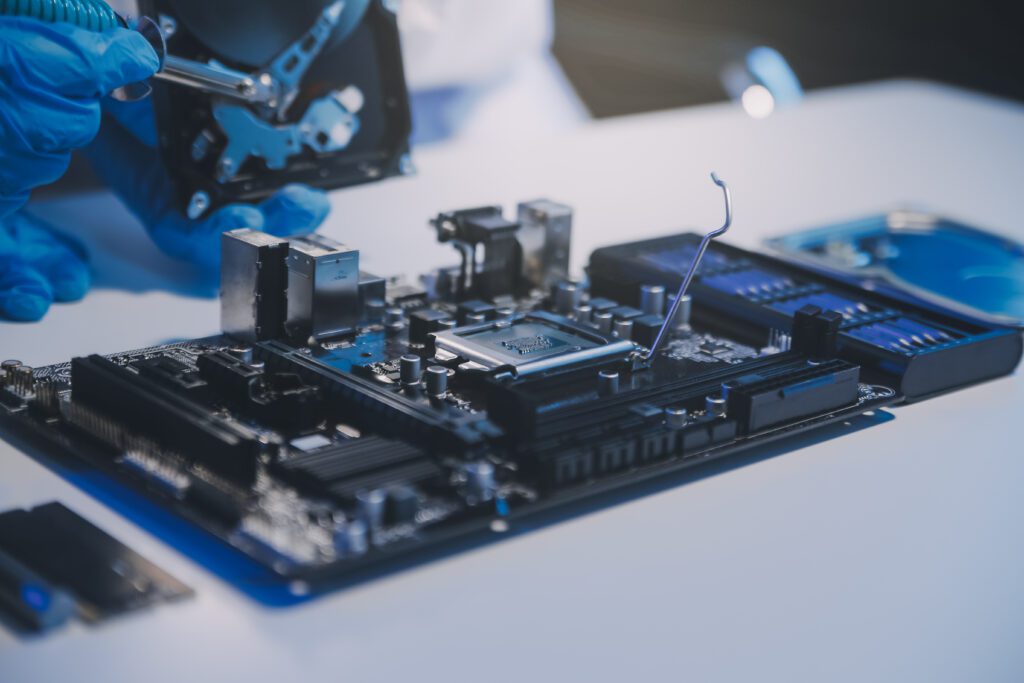
When talking about supply chain security vulnerabilities in networking, this refers to different ways attackers can exploit hardware and software during manufacturing, distribution, and maintenance. These systems are essentially vulnerable during their entire lifespan – from the time their motherboards are installed and code is written, to when they’re in-transit to the customer, to when IT teams are administering regular updates and troubleshooting. But, what do these vulnerabilities look like?
Hardware Vulnerabilities
Networking infrastructure relies on hardware. Illegitimate or counterfeit components can be inserted into the supply chain and make their way into hardware manufacturing processes. This can cause equipment failures, degraded performance, or even deliberate backdoors that allow unauthorized access.
Physical Backdoors: Malicious actors can introduce hardware backdoors during the manufacturing process, allowing unauthorized access to the network. These backdoors are difficult to detect and can remain hidden until activated.
Long-Term Vulnerabilities: Once a compromised piece of hardware is deployed, it can remain a vulnerability for years, especially in critical infrastructure where hardware lifecycles are longer. Replacing hardware is often costly and logistically challenging.
Trust and Reliability: Networking hardware is the first line of defense against cyber threats. Compromised hardware can lead to a loss of trust, not only in the network but also in the organizations responsible for its deployment and maintenance.
Software Vulnerabilities
Hardware provides the physical framework, while software controls and manages the flow of data within the network. Malicious code or compromised firmware can be introduced at any point in the software development lifecycle, while some software even ships with zero-day exploits (as with the MOVEit ransomware attack), leading to severe security breaches.
Firmware Integrity: Firmware is the software that directly interfaces with hardware. If compromised, it can be used to control or disable hardware components, leading to catastrophic network failures.
Regular Updates and Patches: Software vulnerabilities are often discovered post-deployment. Having a robust process for regular updates and patches is crucial in mitigating these risks. However, if the update process itself is compromised, malicious actors can introduce vulnerabilities under the guise of legitimate updates.
End-to-End Encryption: Secure software ensures that data transmitted across the network is encrypted, reducing the risk of interception or tampering. This is especially critical in protecting sensitive information from being accessed by unauthorized entities.
Third-Party & Open Source Software: Third-party and open source software are used throughout networking infrastructure. When this software is integrated into the ecosystem, it can introduce vulnerabilities and code quality risks, especially if the organization doesn’t have access to the underlying code.
Third-Party and Insider Threats
Most companies rely on third-party vendors and suppliers, whether for hardware manufacturing, procurement and logistics, or software development. This adds layers of complexity. If any of these third parties are compromised, the impact can ripple throughout the entire supply chain and contaminate the end products.
Employees or contractors can also put infrastructure integrity at risk. When these employees are trusted with access to sensitive parts of the supply chain, they can compromise overall security, even unintentionally.
How ZPE Systems Shrinks Supply Chain Security Risks
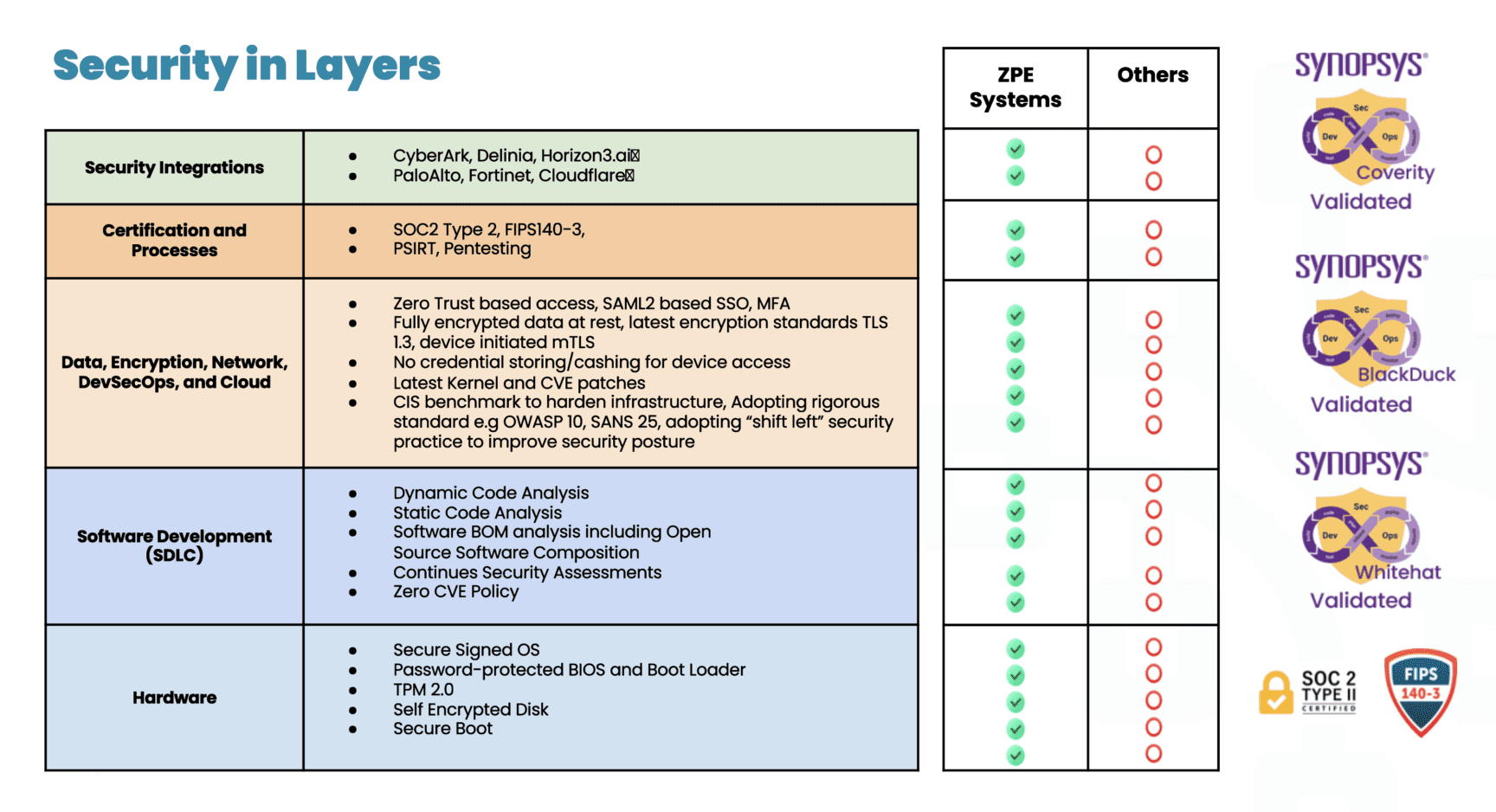
ZPE Systems provides the network management infrastructure that’s essential to managing critical IT for organizations across industries. Although there are many network management infrastructure vendors, most lack a holistic approach to security. Hardware components may be sourced from untrusted manufacturers, and software development may be loosely-controlled and inadequately tested. These parts of the supply chain introduce vulnerabilities that can put customers at much more risk than they realize.
ZPE takes a security-centric approach and offers the industry’s most secure out-of-band management platform. This includes dozens of hardware security features, a Synopsys-validated software development lifecycle, and the most third-party certifications and validations, including FIPS 140-3, SOC 2 Type 2, ISO 27001, and others.
Get the full breakdown of our end-to-end supply chain security approach by downloading the pdf below.
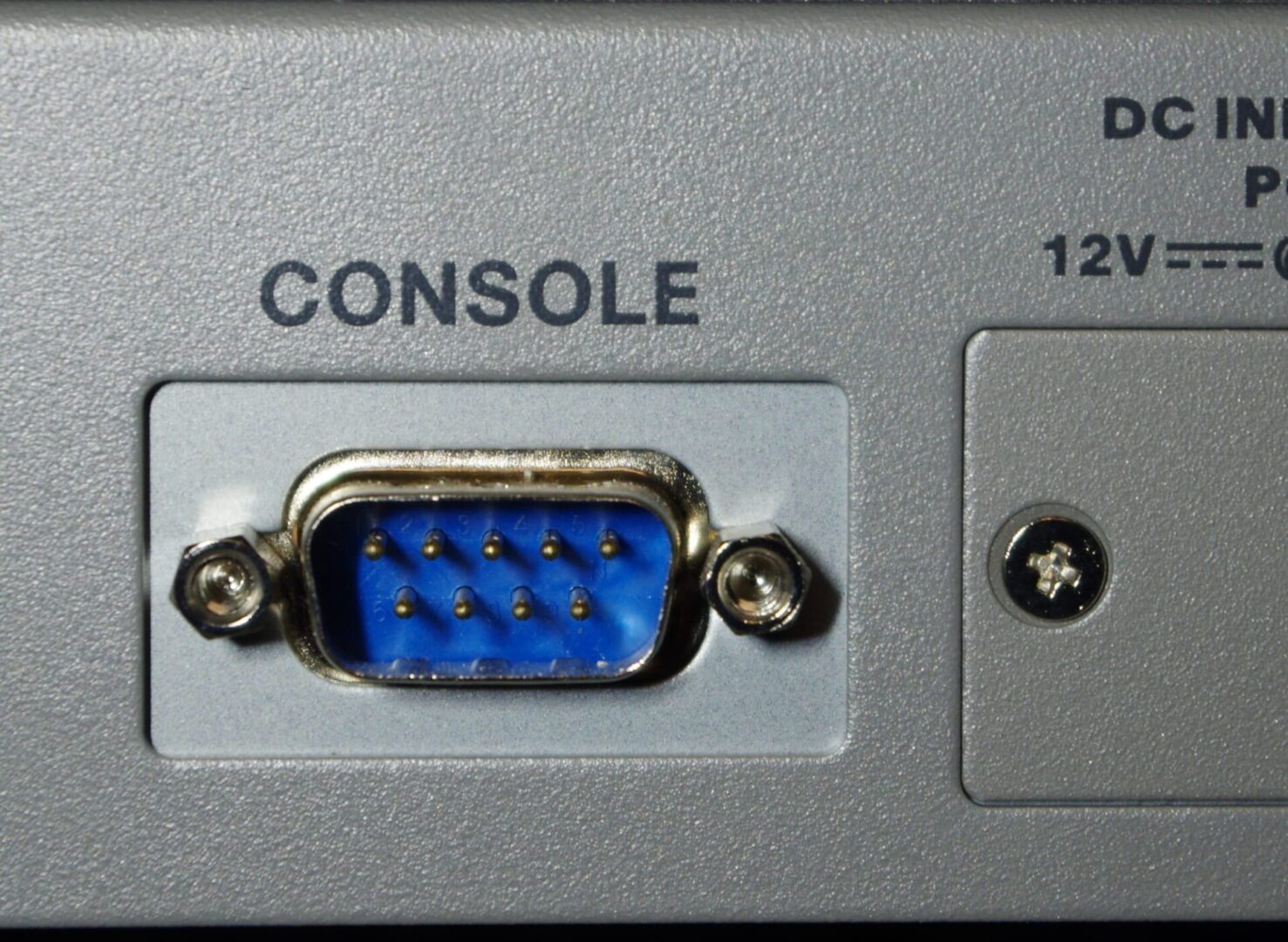
Serial console redirection involves sending a server’s keyboard and video signals through the serial port as well as the normal endpoints (USB and video), allowing them to be used in headless mode. It gives administrators remote access to pre-boot functions, such as the BIOS menu, that are typically unavailable to them with software-based remote access solutions. This is important because it allows remote teams to install new operating systems, troubleshoot hung servers, and perform other critical hardware management tasks without costly on-site visits. It also means administrators can control remote servers with out-of-band (OOB) serial consoles, devices that streamline remote infrastructure management and improve network resilience.
Why enable serial console redirection?
The primary reason to redirect keyboard control over the serial port is to gain remote access to pre-boot menus and functions. Typically, systems administrators remotely manage servers using a software-based remote access client that only works while the OS is running. While this is sufficient for most remote administration workflows, it means that admins can’t do anything with the server until it has booted to the operating system, which poses several problems:
Administrators cannot remotely install the OS on a new or recovered server without someone on-site to physically enter commands and select options with a keyboard and mouse. This is especially problematic when the OS needs to be reinstalled after a crash or ransomware breach, because it forces companies to send teams on-site or pay for expensive managed services, driving up the cost and duration of outages.
Remote teams are powerless to intervene if the server hangs during a reboot or update. Again, they have to either travel on-site or pay for managed services just to press a few keys or access troubleshooting tools.
Remotely installing new UEFI/BIOS versions or making any configuration changes can be tricky. Many server vendors provide software utilities that allow admins to push out BIOS updates over the network, but it can be very difficult to troubleshoot any problems that arise. In multi-vendor environments, teams may also find it tedious to coordinate updates across multiple tools with different interfaces and commands.
There are also IPMI-based (intelligent platform management interface) remote management tools that provide full remote control but add another component to the tech stack that must be maintained and secured, creating additional complexity.
Serial console redirection and out-of-band management
Another major advantage of serial console redirection is that it enables out-of-band (OOB) management. OOB creates an entirely separate network that runs parallel with your production (or in-band) network but doesn’t rely on the same network infrastructure or services. OOB management allows administrators to remotely manage servers and other infrastructure on a dedicated connection, such as secondary fiber or cellular LTE, that will remain available even if the in-band network goes down from an equipment failure, ISP outage, or ransomware attack.
OOB serial consoles
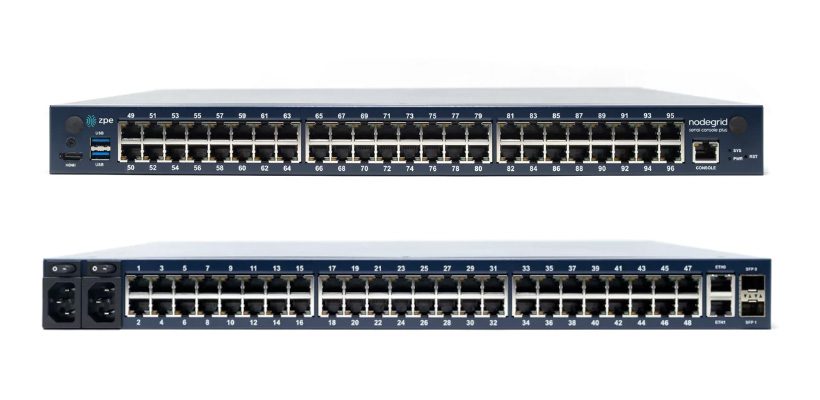
The Nodegrid Serial Console Plus provides unified serial console management for many servers and infrastructure devices.
Serial console redirection also allows teams to manage servers with serial consoles, also known as console servers, console server switches, or terminal servers. One of these devices can be used to manage several pieces of data center equipment, so sysadmins don’t need to connect to each server individually.
The management interface for the Nodegrid Serial Console Plus allows admins to manage many servers and infrastructure devices from one convenient location.
The management interface for the Nodegrid Serial Console Plus allows admins to manage many servers and infrastructure devices from one convenient location.
Serial consoles also create an OOB network without the need to deploy a bunch of redundant devices and services. Solutions like the Nodegrid Serial Console from ZPE Systems provide additional functionality like power control, giving remote teams the ability to power-cycle a hung device or turn systems back on after a power failure. OOB serial consoles help improve management efficiency and overall resilience without driving up costs or complexity.
Learn more about serial consoles and OOB management:
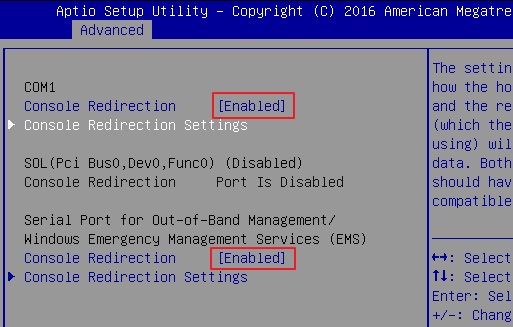
Serial console redirection is typically configured in the server’s UEFI (Unified Extensible Firmware Interface) or BIOS (Basic Input/Output System) settings. As such, it’s important to consult the vendor-provided documentation for instructions on how to enable it for your server hardware.
Serial console redirection enabled in BIOS. Source: ASRock Rack
Additionally, some Windows and Linux-based operating systems need to be configured for serial console management. It’s best to look up the OS-specific instructions on the vendor’s website, but here are a few links to get you started:
Configuring serial console redirection is relatively straightforward, and it allows sysadmins to remotely control and troubleshoot servers even when the OS isn’t available. It also enables the use of OOB serial consoles like the Nodegrid solution from ZPE Systems, which streamlines remote management workflows and reduces the business impact of system failures.
Nodegrid consolidates a sysadmin’s entire management tech stack into a single appliance for greater operational efficiency.
Nodegrid consolidates a sysadmin’s entire management tech stack into a single appliance for greater operational efficiency.
Nodegrid is a Gen 3 out-of-band management platform that provides vendor-neutral control over mixed-vendor infrastructure. It can integrate or directly host third-party applications for automation, security, and much more, consolidating an entire tech stack into a single, cost-efficient solution.
Serial console redirection with Nodegrid improves operational efficiency and network resilience. Schedule a demo to see a Nodegrid Serial Console in action!
The serial console port on a Linux device allows administrators to manage the machine via the command line interface (CLI), without a keyboard, mouse, or monitor attached. Serial console management is useful for performing administrative tasks on headless Linux servers (meaning, those without ports for a keyboard or monitor) and embedded Linux systems like routers and storage devices.
While it’s possible to directly connect a laptop or Intel NUC jump box to the serial console port on a Linux device with a serial cable, this only allows you to manage one machine at a time, so it’s inefficient at scale. A serial console server (also known as a serial console or console server) provides multiple managed serial ports that administrators can connect to Linux machines, as well as many other devices. It unifies the management of all connected machines so administrators can control them all from one place, significantly streamlining infrastructure workflows.
Enterprise serial consoles for Linux provide additional capabilities like out-of-band (OOB) management, infrastructure automation, and embedded security. This guide compares the best solutions to help you choose the right console server for your enterprise.
How to use the serial console port on a Linux device
The Linux kernel does not support serial console capabilities by default, so it must be configured to output console messages to the serial port first. This involves modifying the bootloader to specify new kernel options, formatted like so:
console=device,options

device:         tty0 for the foreground virtual console
                ttyX for any other virtual console
                ttySx for a serial port
                lp0 for the first parallel port
                ttyUSB0 for the first USB serial device

options:        depend on the driver. For the serial port this
                defines the baudrate/parity/bits/flow control of
                the port, in the format BBBBPNF, where BBBB is the
                speed, P is parity (n/o/e), N is number of bits,
                and F is flow control ('r' for RTS). Default is
                9600n8. The maximum baudrate is 115200.
For more information on configuring the Linux serial console, read guides from docs.kernel.org, RedHat, or Ubuntu.
Comparing the best serial consoles for Linux
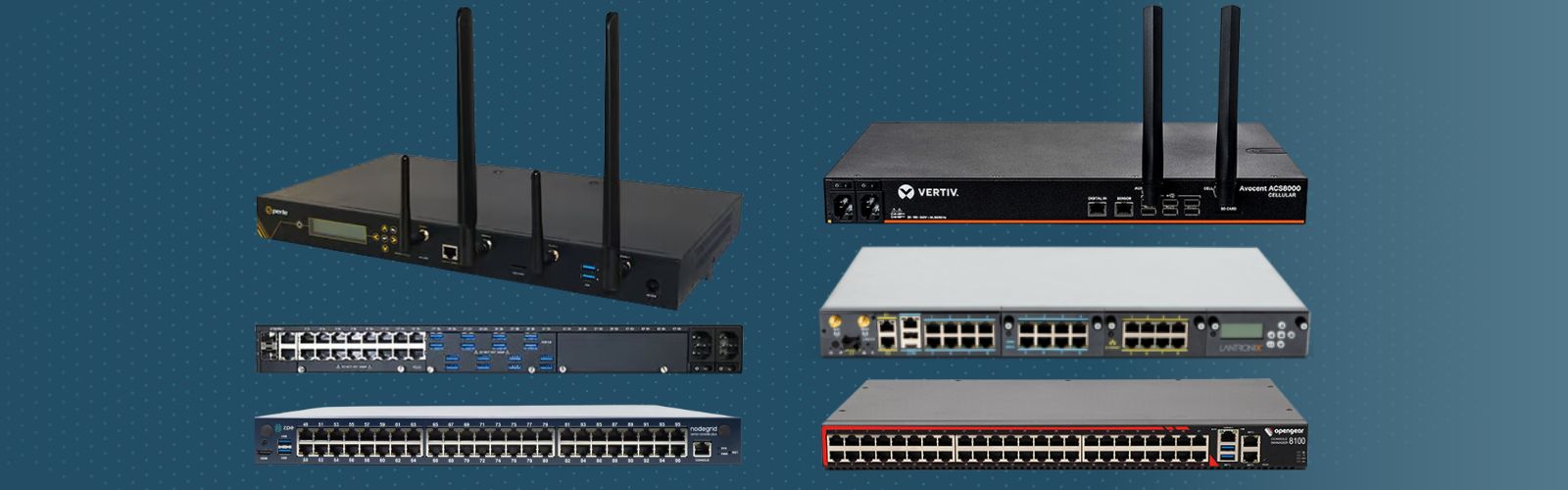
ZPE Nodegrid
Opengear CM8100
Perle IOLAN SCG LWM
Lantronix LM83X
Vertiv Avocent ACS8000
Cellular OOB
✔
✖
✔
✔
✔
ZTP for End Devices
✔
✔
✔
✔
✔
Guest OS
✔
✔
✖
✖
✖
3rd Party Automation
✔
✔
✖
✖
✖
Embedded Firewall
✔
✔
✔
✖
✔
3rd Party Security
✔
✖
✔
✖
✖
All of these solutions provide remote out-of-band management and consolidated control for Linux infrastructure. They also offer automation capabilities via zero-touch provisioning (ZTP), automatically deploying configurations over the network as soon as new devices come online. Some important differentiating features include cellular capabilities for OOB and failover, advanced security features like an embedded firewall and VPN support, and the ability to host and integrate third-party automation tools.
1. Nodegrid Serial Console
Nodegrid is a family of serial console server solutions from ZPE Systems. Nodegrid provides up to 96 managed serial ports while only taking up a single unit of rack space (Patent No. 9,905,980), significantly reducing the number of management devices needed to control large data center deployments. The Nodegrid Serial Console Plus (NSCP) comes with built-in 4G/5G LTE and Wi-Fi for failover and OOB management, while the S Series has auto-sensing serial ports for mixed legacy/modern environments. The NSCP-Core Edition is a low-cost alternative for break-fix deployments that provides Gen 3 security and OOB serial console management.
The Nodegrid platform runs on the open, Linux-based Nodegrid OS and uses Intel x86 processors, allowing it to natively run VM and Docker applications for other vendors’ software. That means you can host third-party NetOps automation solutions like Ansible and Chef, and even extend that automation to legacy equipment. Nodegrid also provides device auto-discovery and ZTP.
Nodegrid serial consoles include an embedded firewall with a multi-site IPsec VPN and advanced authentication support to protect the OOB network. It also comes with unique hardware security features like geofencing, BIOS protection, and UEFI Secure Boot to prevent malicious actors from hijacking the management network with a stolen device.
Pros:
Up to 96 managed serial ports in a 1U appliance
Fast OOB with 4G/5G LTE and Wi-Fi options
2 Ethernet and 2 10GB SFP+ ports (NSCP) or 2 Ethernet and 1 1GB SFP+ (NSCP-Core)
Intel x86 CPU and lots of RAM for 3rd-party Docker and VM apps
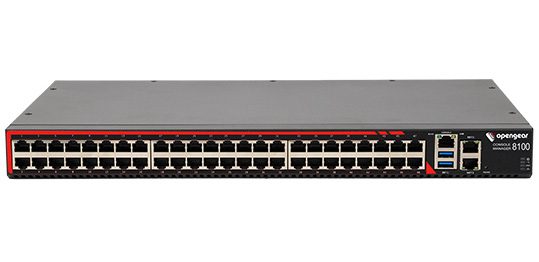
The Opengear CM8100 serial console has up to 48 ports in a 1U model or 96 ports in a 2U model. It only uses Ethernet for failover and OOB, without any options for cellular or Wi-Fi. It runs an embedded Linux operating system that is programmable and extensible with third-party integrations.
With an upgraded “Automation” edition of its Lighthouse software, Opengear console servers gain ZTP, RESTful APIs, Docker containers, and Python scripts for infrastructure automation capabilities. The CM8100 comes with a stateful firewall that provides IP filtering and port forwarding. It supports IPsec & OpenVPN and advanced authentication, but not 2FA or SAML 2.0.
Pros:
Programmable and extensible
Gateway router features
Stateful firewall
2 Ethernet ports (16 & 32 port models) or 2 Ethernet or 2 SFP+ (48 & 96 port models)
Cons:
Automation and ZTP require software upgrade
No support for 2FA or SAML 2.0
No cellular or Wi-Fi access
Perle IOLAN SCG
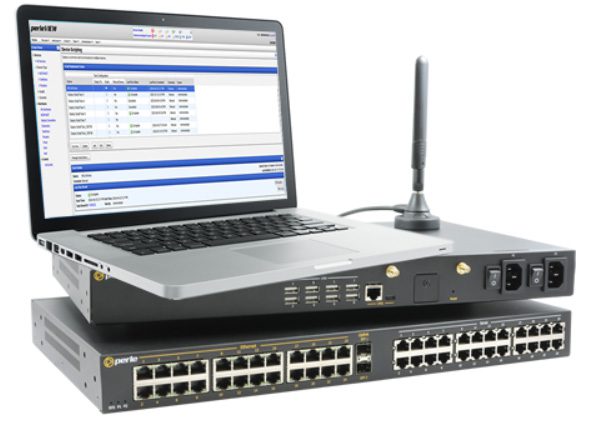
The Perle IOLAN SCG serial console supports up to 48 managed serial ports. While its fixed-form-factor models only support copper Ethernet for networking and OOB, the SCG also has a modular version with options for Wi-Fi, cellular, and analog modem.
IOLAN SCG console servers contain an underpowered 500 MHz core 32-bit ARM processor and little storage or memory headroom for automation, though Perle’s management software can extend ZTP to end devices. The solution does include a robust embedded firewall and support for two-factor authentication.
Pros:
Programmable and extensible
Gateway router features
Stateful firewall
Cons:
Automation and ZTP require software upgrade
No support for 2FA or SAML 2.0
No cellular or Wi-Fi access
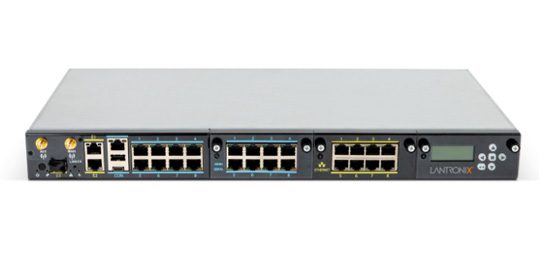
Lantronix LM83X
The Lantronix LM83X serial console is a modular solution with three expansion bays, supporting up to 104 managed serial ports. It has versatile options for 4G LTE, analog modem, fiber, DSL, or satellite for OOB and failover.
The LM83X’s ARM CPU architecture prevents it from running VMs and Docker containers for automation or third-party software. The Lantronix Control Center software does not support any third-party integrations, though it does provide some built-in automation and playbook capabilities. The LM83X offers some advanced authentication support and IP filtering but lacks an embedded firewall or VPN.
Pros:
Manages up to 104 serial devices with expansion cards
Flexible OOB and failover options
Robust device monitoring tools
Cons:
Can’t run Guest OS or 3rd-party apps
No support for 3rd-party integrations
No embedded firewall
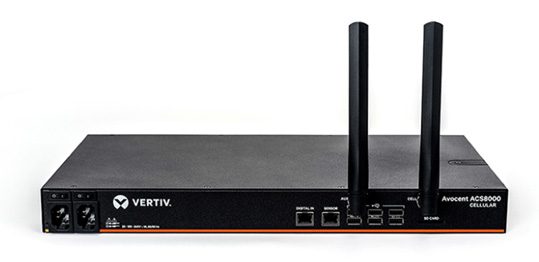
Vertiv Avocent ACS8000
The Vertiv Avocent ACS8000 provides up to 48 managed serial ports, with faster-than-average minimum port speeds of 1200 bps. It uses 4G LTE for OOB and failover and has an updated Linux operating system.
While the ACS8000 has ZTP for end devices, its ARM architecture does not support VMs, Docker apps, or third-party automation and orchestration. The proprietary DSViewTM software offers some automation capabilities for event logging and notifications but is not extensible with third-party integrations. The ACS8000 has an embedded firewall and IPSec VPN support, but lacks advanced authentication features.
Pros:
Fast minimum port speeds
4G cellular for OOB and failover
Environmental sensor port
Cons:
No support for Docker or third-party orchestration
Software is not extensible
Lacks advanced authentication features
How to choose the best serial console for your Linux environment
These solutions all provide remote out-of-band management and consolidated infrastructure control for Linux devices. However, Nodegrid goes above and beyond by offering a truly vendor-neutral platform that supports third-party integrations and direct hosting of other vendors’ automation and orchestration software. Plus, only Nodegrid secures the automated control plane with robust on-board hardware security protection and a full suite of firewall, encryption, and authentication features like 2FA and SAML.
Ready to replace your outdated console servers?
We know that replacing outdated, EOL devices takes a lot of effort. That’s why ZPE now offers a complete package of budget-friendly products and engineering services to help. Click here to see how we make it easy to upgrade to the best serial console for Linux.
Which Nodegrid serial console is right for you?
NSCP
S Series
NSCP-CE
NSR
Use Cases
Hyperscale data centers and cloud service providers
Mixed legacy, modern, and multi-vendor environments
Break-fix solution for data centers, colocations, and branches
Most organizations rely on critical IT in order to serve their essential business functions. A reliable method to maintain critical IT is to use dedicated out-of-band (OOB) management networks, which traditionally have relied on plain old telephone service (POTS) lines or dedicated telephony circuits for remote access. However, these traditional links come with high costs, lots of complexity, and slow performance, which make them difficult to deploy and maintain.
Enter Starlink, a satellite-based Internet service that offers a cost-effective and scalable alternative for out-of-band remote access. This post discusses how Starlink solves these common problems and gives you a free guide that walks you through the setup process.
Problem: POTS and Telephony Lines Are Expensive
For decades, IT professionals have relied on POTS and telephony lines for OOB management, mainly because these lines remain operational even when the primary data network goes down. A major problem is that POTS lines are increasingly expensive to install and maintain, particularly in remote or rural areas. Additionally, 4G/5G LTE options aren’t always available due to coverage limitations or large enough data plans. The shift towards VoIP (Voice over IP) and digital communications has made POTS lines even less relevant, with many service providers phasing out support. This leaves businesses with fewer options and higher costs for maintaining these legacy systems.
Solution: Starlink is Cost-Effective
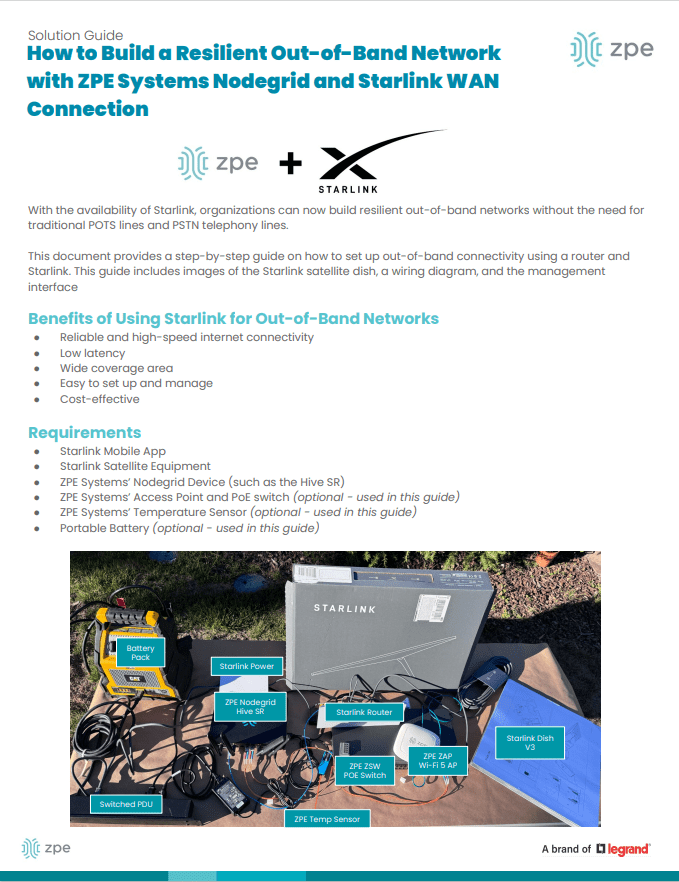
Starlink offers a much more cost-effective solution. You can use off-the-shelf routers to set up an OOB management network for a fraction of the cost of traditional methods. Starlink also has a relatively low monthly subscription fee and straightforward pricing model, which make it easy to budget and plan IT expenditures. If components fail or break, you can typically repair or replace them yourself to get back up and running quickly.
Figure 1: Starlink requires only a dish, router, and few other components, making it a cost-effective alternative to expensive POTS lines.
Problem: Traditional Lines Are Difficult To Scale
Traditional POTS-based systems are notoriously difficult to scale, often requiring significant infrastructure investments and complex configurations. Copper wiring is expensive to install and maintain, and as more connections come online, switching systems must be upgraded. On top of this, POTS lines are being phased out, which means there are fewer resources being devoted to scaling and maintaining them.
Solution: Starlink is Simple to Set Up and Scale
Starlink entirely eliminates the need for telephony lines, and is a simple and scalable solution for OOB remote access. You can find the full list of components in our setup guide below, but with a Starlink terminal, compatible router, and minimal configuration, you can scale your OOB network wherever you have Starlink coverage. This ease-of-use extends to day-to-day management as well. Starlink’s satellite service offers global coverage, meaning you can manage your network devices, servers, and other critical infrastructure from virtually anywhere in the world.
Figure 2: Starlink comes with a straightforward out-of-box experience and step-by-step instructions. You can set up an out-of-band network in about one hour.
Problem: POTS Lines Lack Performance
POTS is designed primarily for voice communication and offers extremely limited bandwidth. It can’t support modern data services (such as video or high-speed internet) efficiently. As out-of-band management advances with data and video monitoring capabilities (such as AI computer vision), POTS infrastructure just doesn’t have the bandwidth to keep up.
Solution: Starlink Meets Modern Performance Requirements
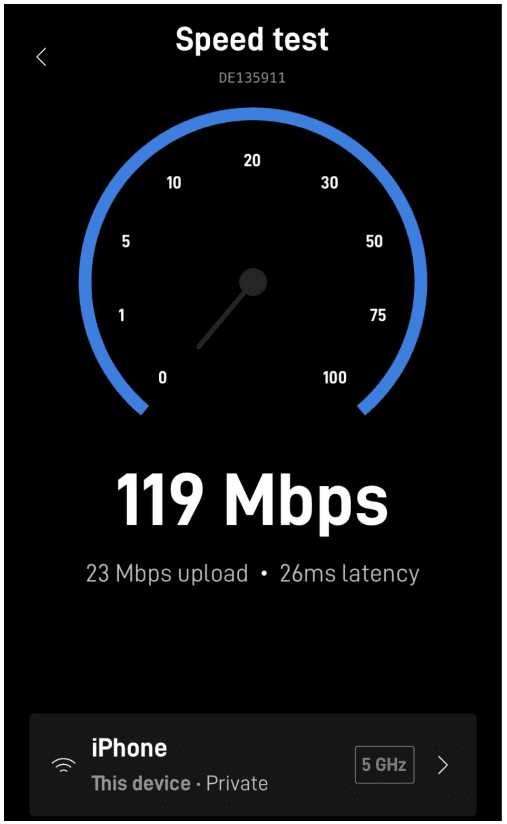
Starlink provides high-speed internet, at speeds that typically range from 50 to 200Mbps. The connection handles much larger volumes of data than POTS lines are capable of, and Starlink’s low-Earth orbit satellites reduce latency to as low at 25ms compared to the typical 150ms of POTS lines. Out-of-band using Starlink means that IT teams can manage more systems and data, and have a more responsive experience, whether they’re managing edge routers across their bank branches or monitoring the cooling systems in their distributed colocations.
Figure 3: Starlink provides high-speed connectivity, with speeds ranging from 50 to 200Mbps.
Get Started With Starlink Using Our Setup Guide
We created this step-by-step walkthrough that shows how to set up Starlink for out-of-band. It instructs how to connect the components according to a wiring diagram, configure your ZPE Nodegrid hardware, and test your connection performance using free tools. Read it now using the button below.
Passive optical networking (PON) is a high-speed broadband technology that enables the delivery of multiple services over a single fiber optic cable. XGS-PON – 10G Symmetrical PON – offers speeds of up to 10 Gbps downstream and 10 Gbps upstream (hence the term ‘symmetrical’), making it ideal for applications such as video streaming, online gaming, and cloud computing.
What Problems Does PON Solve for Out-of-Band Management?
PON addresses the issue of efficiency in terms of both uplink costs and bandwidth usage. Traditional POTS lines and dedicated circuits rely on legacy infrastructure that requires regular maintenance. This infrastructure must scale as more out-of-band devices are added to the network, which increases costs and energy consumption. On top of this, using a 10G uplink for a serial console’s 10K traffic is like throwing away 99% of that high bandwidth. Per Gartner’s Market Guide for Optical Transport Systems report (Published 20 November 2023) the best way to “lower cost and energy per transported bit” is by using technologies such as passive optical networking.
Because PON uses passive optical splitters that have no moving parts or powered components between the central hub and end users, PON is much more efficient for deploying serial consoles close to target assets. These out-of-band devices can be deployed in large quantities and close to the network edge, with up to 256 devices sharing one uplink. This reduces cabling and power requirements, and is ideal for MSP and campus operators, where there are many out-of-band devices distributed over long distances.
More About PON: GPON and XGS-PON Technologies
Passive Optical Networking (PON) leverages time-division multiplexing (TDM) and different wavelengths of light to transmit and receive data on a single fiber strand. This allows efficient communication among up to 256 devices over a single fiber. Initially developed for fiber-to-the-home (FTTH) deployments, PON technology has evolved to facilitate the addition of network nodes with minimal infrastructure changes. GPON (gigabit-capable PON)and XGS-PON use different frequencies for upstream and downstream data transmission. The upstream headend, known as the Optical Line Terminal (OLT), manages and coordinates the time slots allocated to downstream Optical Network Units (ONUs) for data transmission.
GPON and XGS-PON Support on ZPE Systems’ Nodegrid SR Gateway
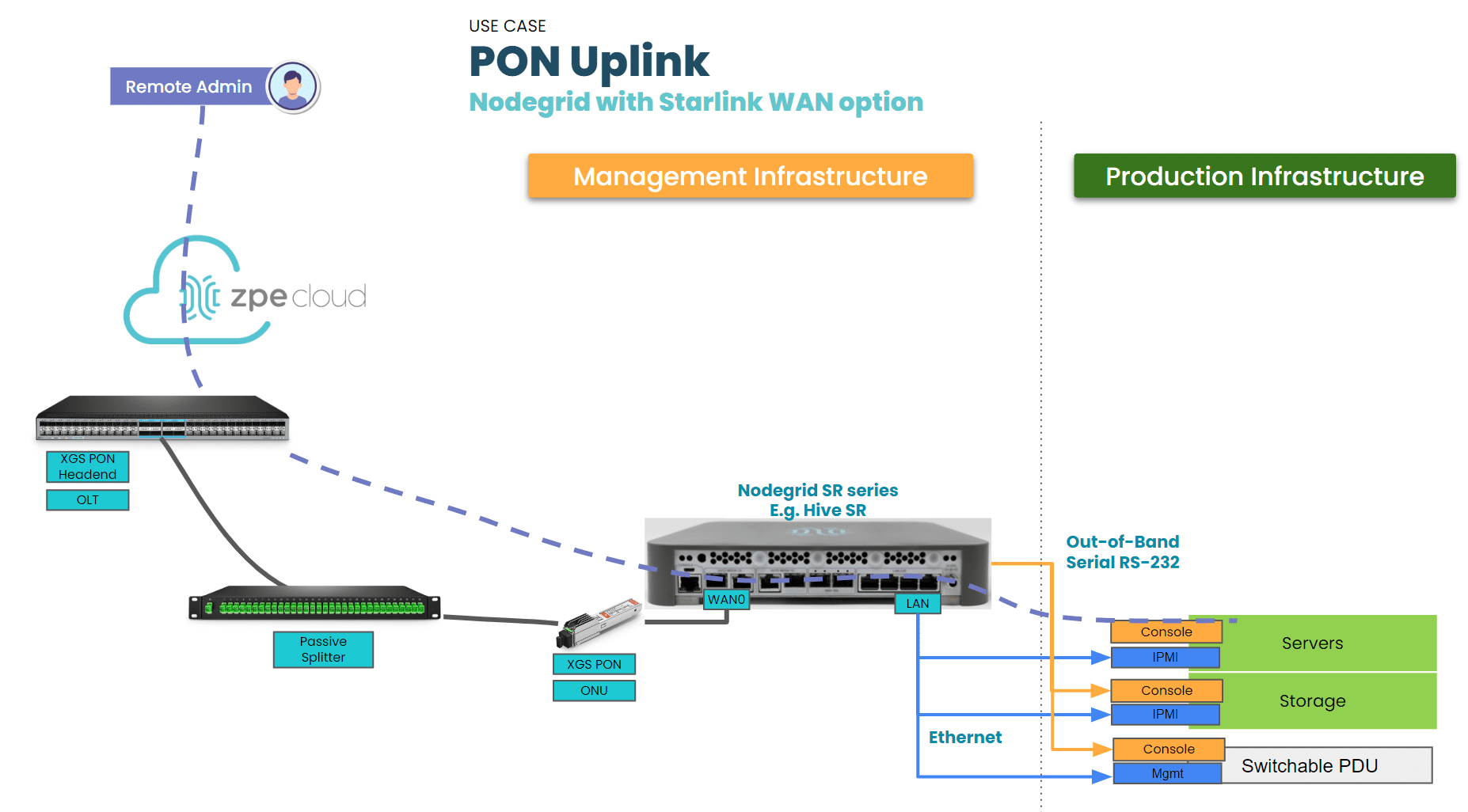
ZPE Systems’ Nodegrid SR appliances, which are used as out-of-band access nodes or complete branch gateways, now support GPON and XGS-PON technology (patent pending) via SFP and SFP+ ports. The Nodegrid SR family is offered in multiple form factors to be right-sized for deployments in branch offices, factories, smart buildings, and industrial environments (such as for SCADA).
Having support for GPON and XGS-PON means network engineers now have a flexible choice of high-speed uplink technologies. This versatility makes the Nodegrid SR gateway suitable for edge deployments, where it can establish an OOBI-WAN™ (out-of-band infrastructure WAN) link, and for data centers, where it enhances uplink efficiency. Given the low bandwidth requirements of serial console and out-of-band communications, PON technology is well-suited for these applications. A single fiber strand can be shared among hundreds of out-of-band and serial console devices using passive optical splitters. Organizations can deploy out-of-band devices close to the racks and edges of the network in a cost- and energy-efficient manner. Additionally, ZPE devices support ONU SFPs compatible with third-party OLT headends, ensuring broad interoperability and integration.
Benefits of Using XGS-PON with ZPE Systems’ Nodegrid SR Gateway
The benefits of using XGS-PON with ZPE Systems’ Nodegrid SR gateway include:
High-Speed Connectivity: XGS-PON delivers symmetrical speeds of up to 10 Gbps, making it ideal for high-bandwidth applications like video streaming, online gaming, and cloud computing. This ensures consistent and high-quality service for end-users.
Cost-Effectiveness: Deploying XGS-PON is a cost-effective solution for delivering high-speed broadband services, especially in scenarios where upgrading existing infrastructure may be challenging.
Scalability: The Nodegrid SR Gateway, acting as an ONU, can connect up to 256 serial consoles through a single fiber strand. PON’s use of asymmetric wavelengths and TDM enables multiple devices to share the same fiber strand efficiently. Optical splitters, which require no external power, facilitate the sharing of fiber between multiple ONUs, which makes scaling much more cost and energy efficient.
Reliability: The Nodegrid SR gateway is proven by service providers worldwide. Its robust design and compatibility with various network configurations make it a reliable choice for delivering high-quality broadband services.
Figure 1: ZPE Nodegrid SR gateway with XGS-PON ONU support
XGS-PON Enhances Efficiency of Out-of-Band
XGS-PON is a significant advancement over traditional, copper-based uplinks. The integration of XGS-PON support in the ZPE Systems Nodegrid SR Gateway allows network architects to deploy a dedicated out-of-band ring that is not only high-speed but also cost-effective, energy-efficient, and capable of covering longer distances. PON technology, with its ability to handle the lower data rates of out-of-band transmissions, is an ideal uplink medium for serial console transmission. The combination of XGS-PON and the Nodegrid SR Gateway provides a powerful and flexible solution for modern network infrastructure.
Be one of the first to try PON on the Nodegrid SR Gateway
Set up a demo for a deeper dive into PON use cases and how it can benefit your organization.
ZPE Systems delivers innovative solutions to simplify infrastructure managment at the datacenter, branch, and edge.
Learn how our Zero Pain Ecosystem can solve your biggest network orchestration pain points.