Providing Out-of-Band Connectivity to Mission-Critical IT Resources

7 Security Benefits of Implementing FIPS 140-3 for Out-of-Band Management
ZPE Systems -FIPS 140-3

Out-of-band (OOB) management is essential for maintaining control over critical network infrastructure, especially during outages or cyberattacks. This separate management network enables administrators to remotely access, troubleshoot, and recover production equipment. However, managing network devices outside the main data path also brings unique security challenges, as these channels often carry sensitive control data and system access credentials.

Implementing FIPS 140-3-certified encryption within OOB systems can help organizations secure this vital access path to ensure that management data can’t be intercepted or manipulated by unauthorized actors. Here’s how FIPS 140-3 certification can enhance the security, reliability, and compliance of your out-of-band management.

What is FIPS 140-3 Certification?

FIPS (Federal Information Processing Standard) 140-3 is a high-level security standard developed by the National Institute of Standards and Technology (NIST). It specifies rigorous requirements for cryptographic modules used to protect sensitive data. FIPS 140-3 certification covers everything from data encryption to user authentication and physical security. For out-of-band management, FIPS 140-3 certification ensures that cryptographic components in hardware, software, and firmware meet stringent data security standards.

By implementing FIPS-certified solutions, organizations can ensure their OOB management is resilient against modern cyber threats, protecting both the control channels and the sensitive data they carry. Here are seven security benefits of implementing FIPS 140-3 for out-of-band management.

7 Security Benefits of Implementing FIPS 140-3 for Out-of-Band Management

1. Secure Encryption of Management Traffic

OOB management often involves remote access to routers, switches, servers and other critical devices. FIPS 140-3 certification guarantees that all cryptographic modules used in these systems have been rigorously tested to secure data in transit. Encrypting management traffic is crucial to prevent interception or manipulation by unauthorized users, particularly for tasks such as command execution, configuration updates, and device monitoring.

With FIPS-certified encryption, companies can protect OOB traffic between management devices and network components, so that only authorized administrators have access to sensitive system commands and device settings.

2. Enhanced Authentication and Access Control

OOB management solutions typically support different user roles, each with its own access privileges. FIPS 140-3-certified modules, like ZPE Systems’ Nodegrid, feature multi-factor authentication (MFA) to control who can initiate OOB management sessions. Certified solutions also include secure key management practices that prevent unauthorized access, ensuring that only verified users can control and modify network devices.

These protections mean FIPS-certified solutions help mitigate the risk of unauthorized users accessing high-value assets. This is especially important during ransomware recovery efforts, when teams need to launch a secure, Isolated Recovery Environment to combat an active attack in a compromised environment.

3. Protection Against Tampering and Physical Attacks

Many organizations deploy IT infrastructure in locations where physical device security is lacking. For example, remote colocations, unmonitored drilling sites, or rural health clinics can easily expose network infrastructure to device tampering. FIPS 140-3 certification mandates tamper-evident and tamper-resistant features to protect the cryptographic modules used in OOB systems. OOB solutions like ZPE Systems’ Nodegrid provide robust protection against tampering, with features including:

  • UEFI secure boot: Prevents the execution of unauthorized software during the boot process.
  • TPM 2.0: Ensures secure key generation and storage, so only authorized software can run.
  • Secure erase: Allows for deletion of all data from storage, so no data can be recovered from devices that have been tampered with.

These features prevent unauthorized individuals from physically accessing OOB equipment to intercept or modify management traffic. In remote and edge locations, FIPS-certified cryptographic modules provide robust protection against physical attacks, making it harder for adversaries to compromise OOB management pathways.

4. Compliant and Secure Logging of Access Activities

Because OOB management systems provide access to critical equipment, organizations need transparency into OOB users and their management activities. This means logging and auditing are essential to maintaining security and compliance. FIPS 140-3-certified modules support secure logging of all management activities, creating a clear audit trail of access attempts and security events. These logs are stored securely to prevent unauthorized users from altering or erasing them, providing valuable insights for security monitoring and incident response.

Secure logging is not only critical for monitoring access but also necessary for meeting regulatory compliance. FIPS 140-3 ensures that OOB management systems can satisfy audit requirements, making compliance easier and protecting organizations from potential regulatory penalties.

5. Meeting Regulatory Requirements in Sensitive Environments

Many industries handle sensitive data, especially government, healthcare, and finance. For organizations in these industries, it’s often mandatory to use FIPS-certified cryptographic solutions. FIPS 140-3 certification helps OOB management systems align with federal security regulations and standards like HIPAA and PCI-DSS. By deploying FIPS-certified encryption, organizations can comply with these standards, streamline audits, reduce the risk of regulatory penalties, and reinforce trust with customers.

6. Consistent Security Across Main and OOB Networks

It’s easy for organizations to focus mostly on securing the main network, while overlooking the security protections that they employ on their out-of-band network. FIPS-certified solutions help establish consistent security standards across both paths. This is especially important in protecting against lateral attacks, where hackers infiltrate one network and are then able to jump to the other. In cases where attackers gain access to one segment of the network, matching security protocols across the main and OOB networks prevents them from moving laterally into sensitive management channels.

Using FIPS 140-3-certified encryption across both networks also strengthens the organization’s ability to monitor, manage, and control devices, even when the primary network is under threat.

7. Securing Remote and Edge Devices

For organizations with remote infrastructure, such as telecom and retail, OOB management is critical for managing network devices in distant locations. However, these environments often lack the physical security of centralized data centers, making them vulnerable to tampering. FIPS-certified solutions ensure that all communication with remote OOB devices is encrypted, which protects management data from unauthorized access.

FIPS 140-3 certification also supports the resilience of IoT and edge devices, which often require OOB management for secure monitoring, patching, and configuration.

Implement the Most Secure Out-of-Band Management with ZPE Systems
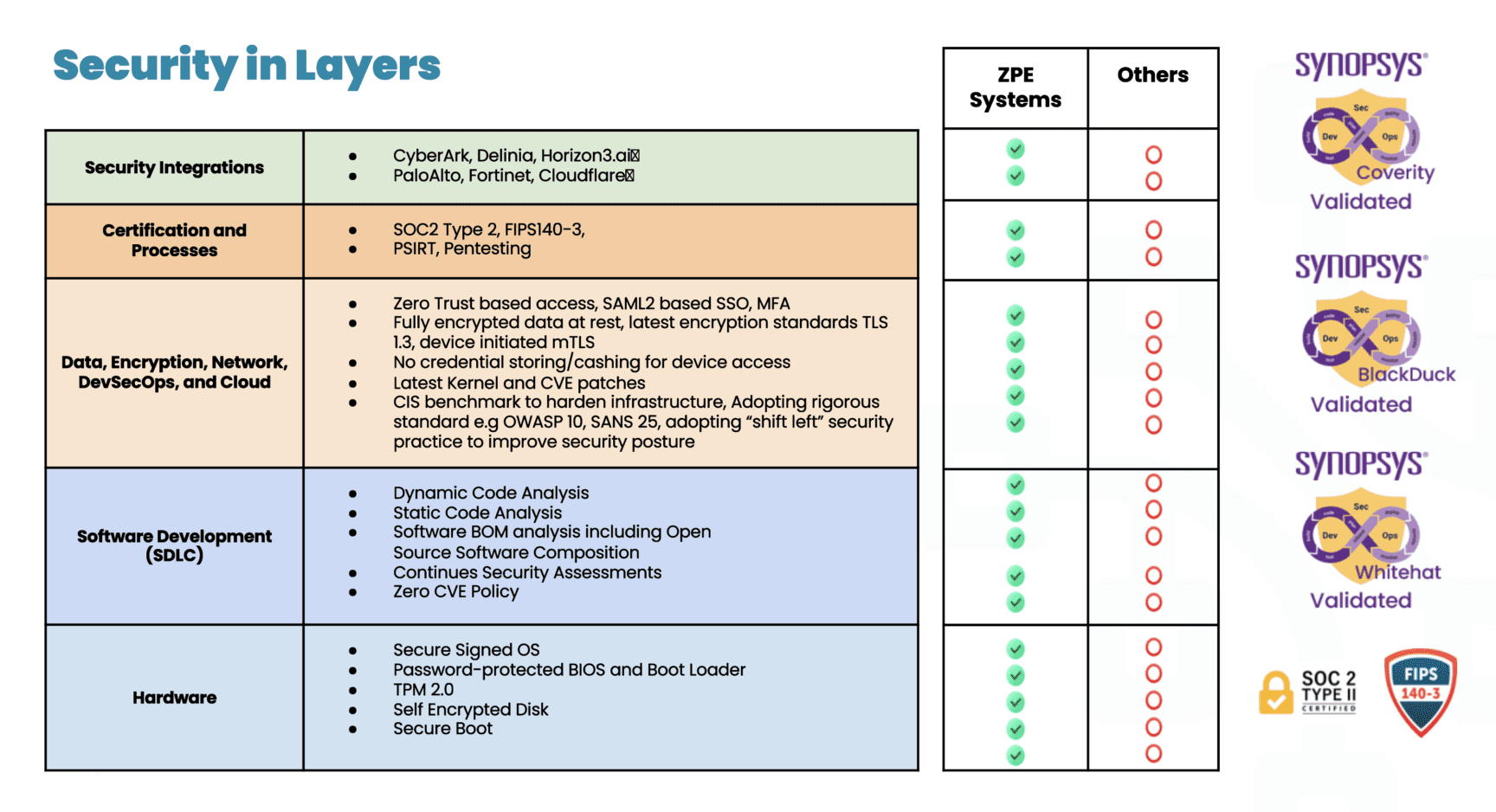
Security in Layers

ZPE Systems’ Nodegrid is the industry’s most secure out-of-band management solution. Not only do we carry FIPS 140-3, SOC 2 Type 2, and ISO27001 certifications, but we also feature a Synopsys-validated codebase and dozens of security features across the hardware, software, and cloud layers. These are all part of a multi-layered, secure-by-design approach that ensures the strongest physical and cyber safeguards.

Download our pdf to explore more of our security assurance.

See FIPS-Certified Out-of-Band in Action

Our engineers are ready to walk you through our industry-leading out-of-band management. Use the button below to set up a 15-minute demo and explore FIPS 140-3 security features first-hand.


Terminal Server Alternative for Simple Break/Fix Use Cases


The Nodegrid Serial Console Core Edition terminal server alternative.

A terminal server is a device that provides consolidated remote management access to routers, switches, and other network infrastructure in data centers. There are numerous reasons to consider replacing an existing terminal server solution. Many of these devices are old and unpatched, leaving them vulnerable to exploits. Older solutions may not integrate well with newer hardware and software or lack the ability to unify management for all deployed terminal servers across a distributed enterprise network, creating a lot of management complexity and potential human error.

On the other hand, some newer terminal server solutions (also known as serial consoles or console servers) include advanced features or beefed-up hardware that increase both costs and complexity. It’s important to find the right balance between security, functionality, and ease-of-use for your particular use case. This guide compares five terminal server alternatives that are optimized for simple break/fix deployments, giving teams reliable remote management access without unnecessary complications.

Key takeaways


Pros

Cons

ZPE Nodegrid NSCP-Core Edition

  • Up to 48 managed serial ports in a 1U appliance
  • Extends OOB management and ZTP to legacy and mixed-vendor infrastructure
  • Analog modem and 5G/4G LTE options available
  • Robust on-board security features like BIOS protection and TPM
  • Integrates with third-party software
  • Supports a wide range of USB environmental monitoring sensors
  • Supports automation only via ZPE Cloud

Opengear CM8100

  • 2U model can manage up to 96 devices 
  • Extensible operating system
  • Automatic port discovery
  • No cellular, Wi-Fi, or analog modem
  • Doesn’t support 2FA or SAML 2.0 security
  • Most automation requires Lighthouse Enterprise software upgrade

WTI DSM Series

  • Can manage up to 50 devices
  • Optional analog modem or 4G cellular
  • Integrates with select third-party vendors
  • OS is not extensible
  • Lacks an embedded firewall
  • No environmental sensor ports

Vertiv Avocent ACS8000

  • Includes 8 managed USB ports for 56 total serial connections
  • 4G LTE WAN, OOB, and failover support
  • Environmental sensor port
  • Doesn’t support any third-party integrations 
  • Lacks advanced authentication features
  • No embedded firewall or VPN

Perle IOLAN SDSC

  • Simple, easy-to-manage solution
  • Includes an analog modem for OOB
  • Robust security features
  • OOB is only available over an analog connection
  • Doesn’t integrate with any third-party software
  • Barebones internal hardware can’t support modern software

Comparing terminal server alternatives for break/fix use cases

Read our in-depth reviews of the best terminal server alternatives below, or click here to compare tech specs.

ZPE Nodegrid NSCP-Core Edition

The Nodegrid Serial Console Core Edition (NSCP-CE) from ZPE Systems provides out-of-band (OOB) serial console management for up to 48 devices. It’s vendor-neutral, which means it can extend OOB control and zero-touch provisioning (ZTP) to legacy and mixed-vendor infrastructure. It has dual SFP+ and dual Ethernet ports as well as 5G/4G LTE, Wi-Fi, and analog modem options for both network failover and OOB management.

Nodegrid’s management software is available either on-premises or in the cloud so you can choose the best option for your use case. ZPE frequently patches the NSCP-CE’s software, firmware, and modern, Linux-based operating system to prevent known exploits. Plus, the device itself comes backed with security features like BIOS protection, UEFI Secure Boot, self-encrypted disk (SED), Trusted Platform Module (TPM) 2.0, and multi-site VPN using IPSec, WireGuard, and OpenSSL protocols.

The NSCP-CE’s vendor-neutral architecture integrates with third-party 2FA and SAML 2.0 authentication providers as well as other software for security, automation, and troubleshooting. It also supports a wide range of USB environmental monitoring sensors to help remote teams control conditions in the data center.

Pros:

  • Up to 48 managed serial ports in a 1U appliance
  • Extends OOB management and ZTP to legacy and mixed-vendor infrastructure
  • Analog modem and 5G/4G LTE options available
  • Robust on-board security features like BIOS protection and TPM
  • Integrates with third-party software
  • Supports a wide range of USB environmental monitoring sensors

Cons:

  •  Supports automation only via ZPE Cloud

Opengear CM8100

The Opengear CM8100 console server provides remote terminal server management for up to 48 devices in a 1U form-factor, or up to 96 devices in a 2U form-factor. It comes with dual ETH ports or dual switchable ETH/SFP ports for in-band, out-of-band, and failover, without any alternative network interfaces like cellular or analog modem. It supports some automation, such as ZTP and Python scripts, but only with an upgraded version of the Opengear Lighthouse management software.

The CM8100 includes some advanced security features like IPsec & OpenVPN, SSL tunnels, and Secure Shell (SSHv2) as well as a stateful firewall with IP filtering and port forwarding. While its embedded Linux operating system is programmable and extensible with third-party integrations, it does not support 2FA, SAML 2.0, or multi-site IPsec VPN.

Pros:

  • 2U model can manage up to 96 devices
  • Extensible operating system
  • Automatic port discovery

Cons:

  • No cellular, Wi-Fi, or analog modem
  • Doesn’t support 2FA or SAML 2.0 security
  • Most automation requires Lighthouse Enterprise software upgrade

WTI DSM Series

The WTI DSM series provides out-of-band terminal server management for up to 50 devices. It comes with options for single or dual Ethernet interfaces as well as an optional analog modem or cellular interface. The WTI centralized management software integrates with some third-party software like PRTG and Splunk, and it provides ZTP and RESTful API support for automation. However, only a small handful of providers are supported, and the device’s OS is not extensible.

DSM console servers come with robust security features including advanced authentication, port-specific password protection, and invalid access lockout and alarm. It also integrates with Duo, RSA, Okta, and Azure for 2FA. It lacks an embedded firewall, however, as well as an environmental sensor port.

Pros:

  • Can manage up to 50 devices
  • Optional analog modem or 4G cellular
  • Integrates with select third-party vendors

Cons:

  • OS is not extensible
  • Lacks an embedded firewall
  • No environmental sensor ports

Vertiv Avocent ACS8000

The Vertiv Avocent ACS800 can manage up to 48 devices over RS-232 serial and up to 8 devices over USB for a total of 56 managed ports. In addition to dual Ethernet and dual SFP ports, you can add 4G LTE connectivity for WAN, OOB, and failover. The on-premises DSView management software provides ZTP as well as event logging and notifications, but it doesn’t support any third-party integrations.

The ACS8000 doesn’t support 2FA, SAML 2.0, or advanced authentication features, though it does support FIPS 410-2 cryptography. It also lacks an embedded firewall and VPN functionality. It does, however, have an environmental sensor port.

Pros:

  • Includes 8 managed USB ports for 56 total serial connections
  • 4G LTE WAN, OOB, and failover support
  • Environmental sensor port

Cons:

  • Doesn’t support any third-party integrations
  • Lacks advanced authentication features
  • No embedded firewall or VPN

Perle IOLAN SDSC

The Perle IOLAN SDSC is a simple break/fix terminal server that can manage up to 32 devices. It has dual Ethernet ports for WAN and failover, but OOB is only available via the included analog modem, so it’ll be a much slower experience for remote administrators. Perle’s management software provides ZTP but does not offer any automation capabilities or integrate with any third-party solutions. Additionally, the SDSC’s barebones CPU, RAM, and storage hardware may make the software itself slow and frustrating to use, even over the in-band Ethernet connection.

The IOLAN SDSC comes with an embedded firewall and advanced security features like 2FA, IPsec VPN/OpenVPN, and remote RADIUS, TACACS+, and LDAP authentication.

Pros:

  • Simple, easy-to-manage solution
  • Includes an analog modem for OOB
  • Robust security features

Cons:

  • OOB is only available over an analog connection
  • Doesn’t integrate with any third-party software
  • Barebones internal hardware can’t support modern software

Tech Specs: Terminal server alternatives for break/fix use cases


Nodegrid NSCP-CE

Opengear CM8100

WTI OOB Rescue

Vertiv Avocent ACS8000

Perle IOLAN SDSC

Serial Ports

16 / 32 / 48x RS-232

16 / 32 / 48 / 96x RS-232

8 / 24 / 40x RS-232 

8 / 16 / 32 / 48x RS-232

8 / 16 / 32x RS-232

Network Interfaces

2x SFP & 2x ETH

1x Analog modem (optional)

2x 5G/4G LTE (optional)

2x ETH

1x ETH

or

2x ETH

1x Analog modem (optional)

1x 4G Cellular (optional)

2x SFP & 2x ETH

2x ETH

Additional Interfaces

1x RS-232 console

2x USB 3.0 Type A

1x RS-232 console

2x USB 3.0

1x RS-232 console

1x USB Mini Set-up Port

1x RS-232 console

8x USB 2.0 Type A

–

CPU

Intel x86_64 Dual-Core

ARM Cortex-A9 1.6 GHz Dual-Core

–

ARM Cortex-A9 Dual-Core

MPC8349E 400 MHz

Storage

16GB Flash (upgrades available)

32GB eMMC Flash

–

16GB eMMC Flash

16MB Flash

RAM

4GB DDR4 (upgrades available)

2GB DDR4

–

1GB DDR3L

64MB

Environmental Monitoring

Any USB sensors

–

–

4 digital-in ports

–

Wi-Fi

Optional

No

No

No

No

Cellular

Optional

No

Optional

Optional

No

Power

Dual AC

or

Dual DC

Dual AC

or

Dual DC

Single AC

or

Single DC

Single or Dual AC

or

Single or Dual DC

Single AC

Form Factor

1U Rack Mounted

1U Rack Mounted (up to 48 ports)

2U Rack Mounted (96 ports)

1U Rack Mounted

1U Rack Mounted

1U Rack Mounted

Experience the convenience of a vendor-neutral management platform

The Nodegrid Serial Console Core Edition is a vendor-neutral terminal server alternative that strikes the perfect balance between simplicity, functionality, and security. With flexible OOB and networking options, extensible cloud-based software, and industry-leading security features, Nodegrid can streamline and protect any environment.

Schedule a demo to see the Nodegrid terminal server alternative in action.

Edge Computing Platforms: Insights from Gartner’s 2024 Market Guide

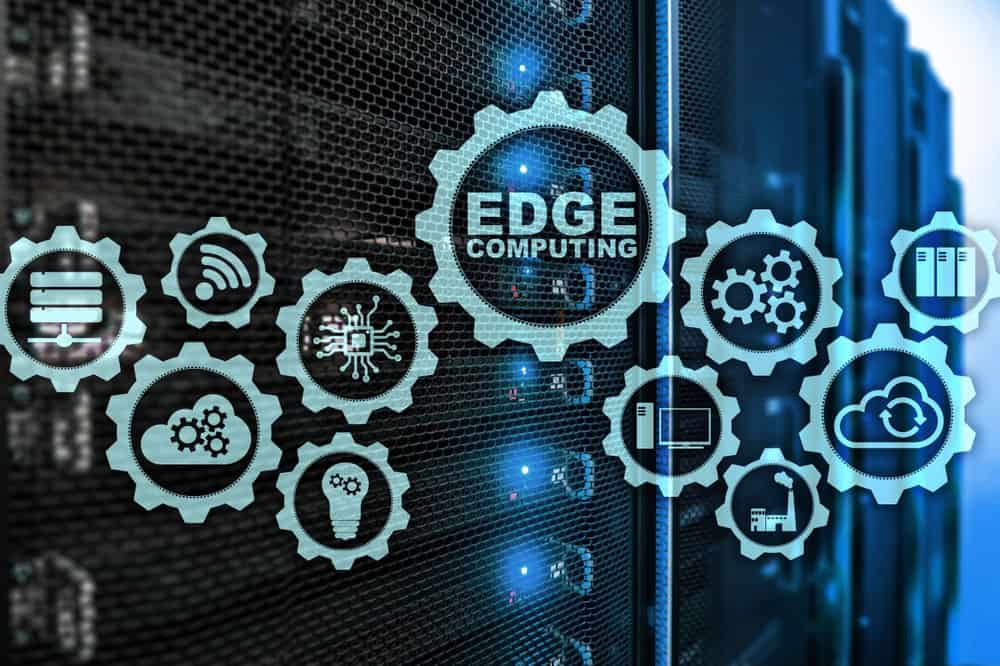
Interlocking cogwheels containing icons of various edge computing examples are displayed in front of racks of servers

Edge computing allows organizations to process data close to where it’s generated, such as in retail stores, industrial sites, and smart cities, with the goal of improving operational efficiency and reducing latency. However, edge computing requires a platform that can support the necessary software, management, and networking infrastructure. Let’s explore the 2024 Gartner Market Guide for Edge Computing, which highlights the drivers of edge computing and offers guidance for organizations considering edge strategies.

What is an Edge Computing Platform (ECP)?

Edge computing moves data processing close to where it’s generated. For bank branches, manufacturing plants, hospitals, and others, edge computing delivers benefits like reduced latency, faster response times, and lower bandwidth costs. An Edge Computing Platform (ECP) provides the foundation of infrastructure, management, and cloud integration that enable edge computing. The goal of having an ECP is to allow many edge locations to be efficiently operated and scaled with minimal, if any, human touch or physical infrastructure changes.

Before we describe ECPs in detail, it’s important to first understand why edge computing is becoming increasingly critical to IT and what challenges arise as a result.

What’s Driving Edge Computing, and What Are the Challenges?

Here are the five drivers of edge computing described in Gartner’s report, along with the challenges that arise from each:

1. Edge Diversity

Every industry has its unique edge computing requirements. For example, manufacturing often needs low-latency processing to ensure real-time control over production, while retail might focus on real-time data insights to deliver hyper-personalized customer experiences.

Challenge: Edge computing solutions are usually deployed to address an immediate need, without taking into account the potential for future changes. This makes it difficult to adapt to diverse and evolving use cases.

2. Ongoing Digital Transformation

Gartner predicts that by 2029, 30% of enterprises will rely on edge computing. Digital transformation is catalyzing its adoption, while use cases will continue to evolve based on emerging technologies and business strategies.

Challenge: This rapid transformation means environments will continue to become more complex as edge computing evolves. This complexity makes it difficult to integrate, manage, and secure the various solutions required for edge computing.

3. Data Growth

The amount of data generated at the edge is increasing exponentially due to digitalization. Initially, this data was often underutilized (referred to as the “dark edge”), but businesses are now shifting towards a more connected and intelligent edge, where data is processed and acted upon in real time.

Challenge: Enormous volumes of data make it difficult to efficiently manage data flows and support real-time processing without overwhelming the network or infrastructure.

4. Business-Led Requirements

Automation, predictive maintenance, and hyper-personalized experiences are key business drivers pushing the adoption of edge solutions across industries.

Challenge: Meeting business requirements poses challenges in terms of ensuring scalability, interoperability, and adaptability.

5. Technology Focus

Emerging technologies such as AI/ML are increasingly deployed at the edge for low-latency processing, which is particularly useful in manufacturing, defense, and other sectors that require real-time analytics and autonomous systems.

Challenge: AI and ML make it difficult for organizations to determine how to strike a balance between computing power and infrastructure costs, without sacrificing security.

What Features Do Edge Computing Platforms Need to Have?

To address these challenges, here’s a brief look at three core features that ECPs need to have according to Gartner’s Market Guide:

  1. Edge Software Infrastructure: Support for edge-native workloads and infrastructure, including containers and VMs. The platform must be secure by design.
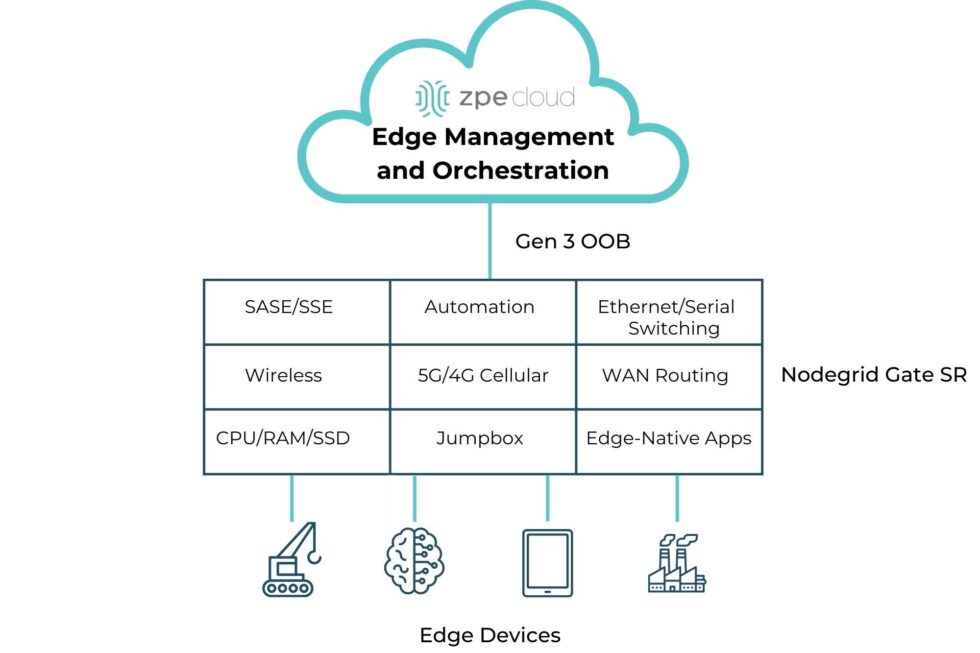
  2. Edge Management and Orchestration: Centralized management for the full software stack, including orchestration for app onboarding, fleet deployments, data storage, and regular updates/rollbacks.
  3. Cloud Integration and Networking: Seamless connection between edge and cloud to ensure smooth data flow and scalability, with support for upstream and downstream networking.

A simple diagram showing the computing and networking capabilities that can be delivered via Edge Management and Orchestration.

Image: A simple diagram showing the computing and networking capabilities that can be delivered via Edge Management and Orchestration.

  1.  

How ZPE Systems’ Nodegrid Platform Addresses Edge Computing Challenges

ZPE Systems’ Nodegrid is a Secure Service Delivery Platform that meets these needs. Nodegrid covers all three feature categories outlined in Gartner’s report, allowing organizations to host and manage edge computing via one platform. Not only is Nodegrid the industry’s most secure management infrastructure, but it also features a vendor-neutral OS, hypervisor, and multi-core Intel CPU to support necessary containers, VMs, and workloads at the edge. Nodegrid follows isolated management best practices that enable end-to-end orchestration and safe updates/rollbacks of global device fleets. Nodegrid integrates with all major cloud providers, and also features a variety of uplink types, including 5G, Starlink, and fiber, to address use cases ranging from setting up out-of-band access, to architecting Passive Optical Networking.

Here’s how Nodegrid addresses the five edge computing challenges:

1. Edge Diversity: Adapting to Industry-Specific Needs

Nodegrid is built to handle diverse requirements, with a flexible architecture that supports containerized applications and virtual machines. This architecture enables organizations to tailor the platform to their edge computing needs, whether for handling automated workflows in a factory or data-driven customer experiences in retail.

2. Ongoing Digital Transformation: Supporting Continuous Growth

Nodegrid supports ongoing digital transformation by providing zero-touch orchestration and management, allowing for remote deployment and centralized control of edge devices. This enables teams to perform initial setup of all infrastructure and services required for their edge computing use cases. Nodegrid’s remote access and automation provide a secure platform for keeping infrastructure up-to-date and optimized without the need for on-site staff. This helps organizations move much of their focus away from operations (“keeping the lights on”), and instead gives them the agility to scale their edge infrastructure to meet their business goals.

3. Data Growth: Enabling Real-Time Data Processing

Nodegrid addresses the challenge of exponential data growth by providing local processing capabilities, enabling edge devices to analyze and act on data without relying on the cloud. This not only reduces latency but also enhances decision-making in time-sensitive environments. For instance, Nodegrid can handle the high volumes of data generated by sensors and machines in a manufacturing plant, providing instant feedback for closed-loop automation and improving operational efficiency.

4. Business-Led Requirements: Tailored Solutions for Industry Demands

Nodegrid’s hardware and software are designed to be adaptable, allowing businesses to scale across different industries and use cases. In manufacturing, Nodegrid supports automated workflows and predictive maintenance, ensuring equipment operates efficiently. In retail, it powers hyperpersonalization, enabling businesses to offer tailored customer experiences through edge-driven insights. The vendor-neutral Nodegrid OS integrates with existing and new infrastructure, and the Net SR is a modular appliance that allows for hot-swapping of serial, Ethernet, computing, storage, and other capabilities. Organizations using Nodegrid can adapt to evolving use cases without having to do any heavy lifting of their infrastructure.

5. Technology Focus: Supporting Advanced AI/ML Applications

Emerging technologies such as AI/ML require robust edge platforms that can handle complex workloads with low-latency processing. Nodegrid excels in environments where real-time analytics and autonomous systems are crucial, offering high-performance infrastructure designed to support these advanced use cases. Whether processing data for AI-driven decision-making in defense or enabling real-time analytics in industrial environments, Nodegrid provides the computing power and scalability needed for AI/ML models to operate efficiently at the edge.

Read Gartner’s Market Guide for Edge Computing Platforms

As businesses continue to deploy edge computing solutions to manage increasing data, reduce latency, and drive innovation, selecting the right platform becomes critical. The 2024 Gartner Market Guide for Edge Computing Platforms provides valuable insights into the trends and challenges of edge deployments, emphasizing the need for scalability, zero-touch management, and support for evolving workloads.

Click below to download the report.

Get a Demo of Nodegrid’s Secure Service Delivery

Our engineers are ready to walk you through the software infrastructure, edge management and orchestration, and cloud integration capabilities of Nodegrid. Use the form to set up a call and get a hands-on demo of this Secure Service Delivery Platform.

Serial Console PDU Management Guide

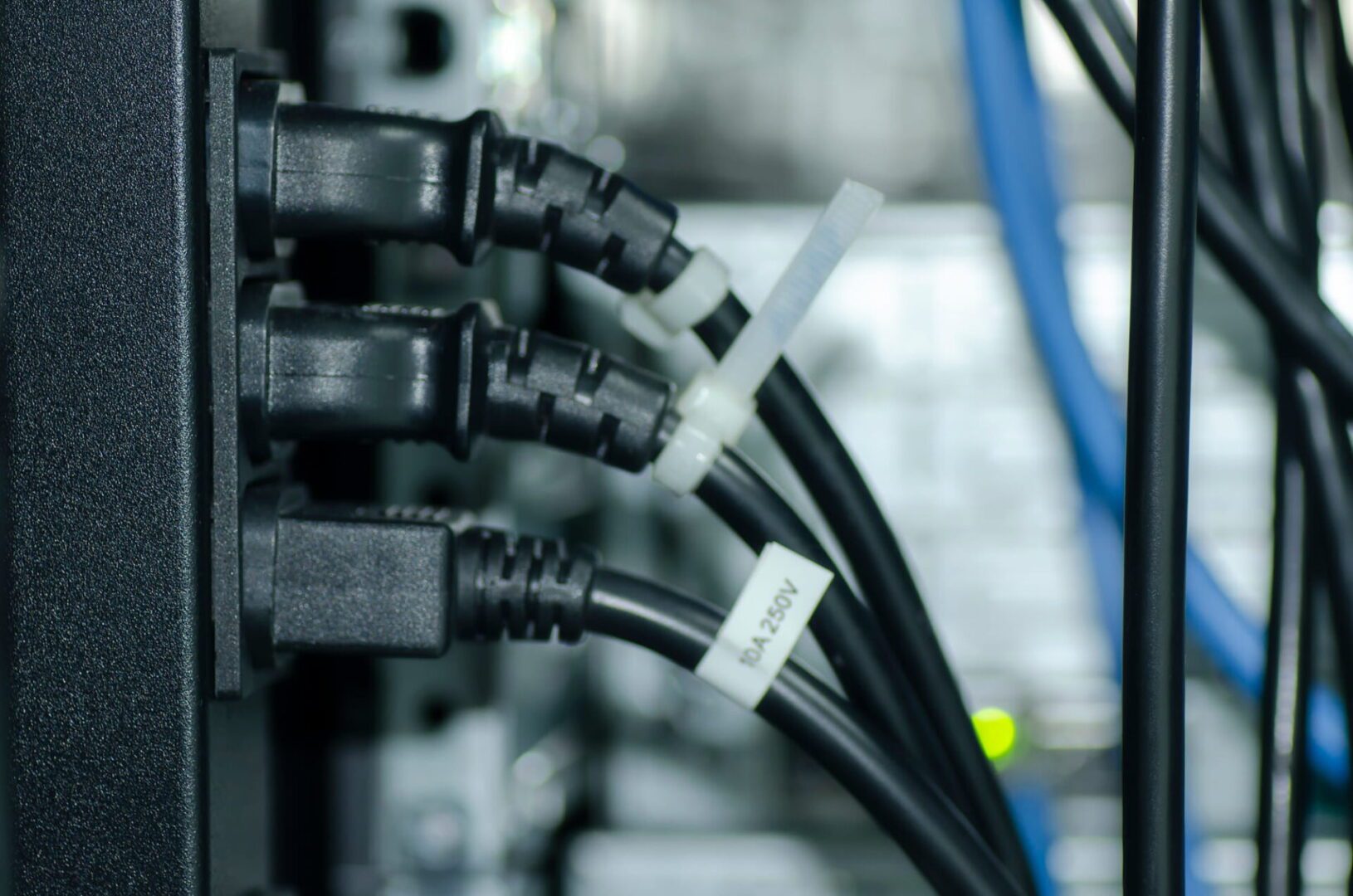
A close-up photo of power cables in a data center rack.

PDUs (power distribution units) control and optimize how power flows to infrastructure devices like servers, routers, firewalls, and switches. PDUs are difficult to manage remotely, for a couple of reasons. First, many aren’t network-connected, so configuring and updating new devices or fixing problems typically requires tedious, on-site work. Those that do have network connectivity tend to lack automation capabilities and integrations with other tools, so they have to be manually and individually managed.  In modern enterprise environments with complex, distributed networks, managing hundreds of individual power devices one at a time is extremely challenging.

A serial console solves this problem by physically connecting to multiple PDUs and using a dedicated network interface to enable remote PDU management. A next-gen solution like Nodegrid also provides a centralized management platform that teams can use to remotely administer all of the PDUs and other infrastructure devices deployed across the entire distributed network. Plus, Nodegrid has an open architecture that supports third-party power software and automation to streamline infrastructure management and boost operational efficiency.

This guide to serial console PDU management explains everything you need to know to get started with remote power control and automated provisioning using the Nodegrid platform.

Deploying Nodegrid for remote PDU management

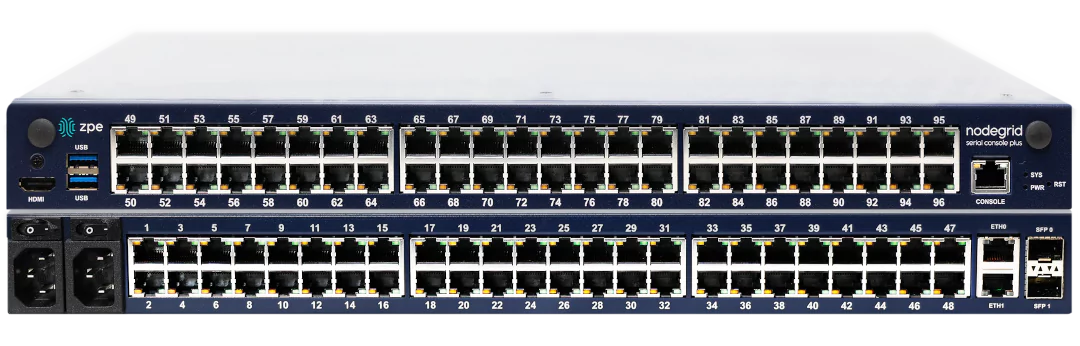
Stacked views of the front and back of the Nodegrid Serial Console Plus.

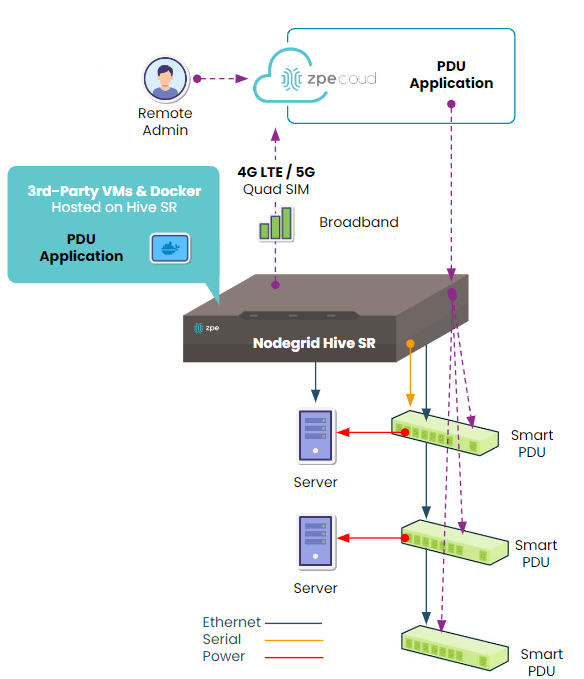
The Nodegrid family from ZPE Systems includes a range of serial consoles and branch routers that are designed for different use cases. They all provide out-of-band management, network failover, and serial console capabilities, but the number and type of interfaces and managed port configurations vary. Critically, all Nodegrid devices can automatically discover power devices from any vendor and provide secure remote access, eliminating the need to manage PDUs on-site.

Nodegrid also has an open architecture that can host or integrate other vendors’ software for PDU management, NetOps automation, SASE security, and more. It gives administrators a single, unified platform to orchestrate both automated and manual workflows for PDUs and other Nodegrid-connected infrastructure at all distributed business sites.


How to deploy the Nodegrid Hive SR for serial console PDU management.

How to deploy the Nodegrid Hive SR for serial console PDU management.

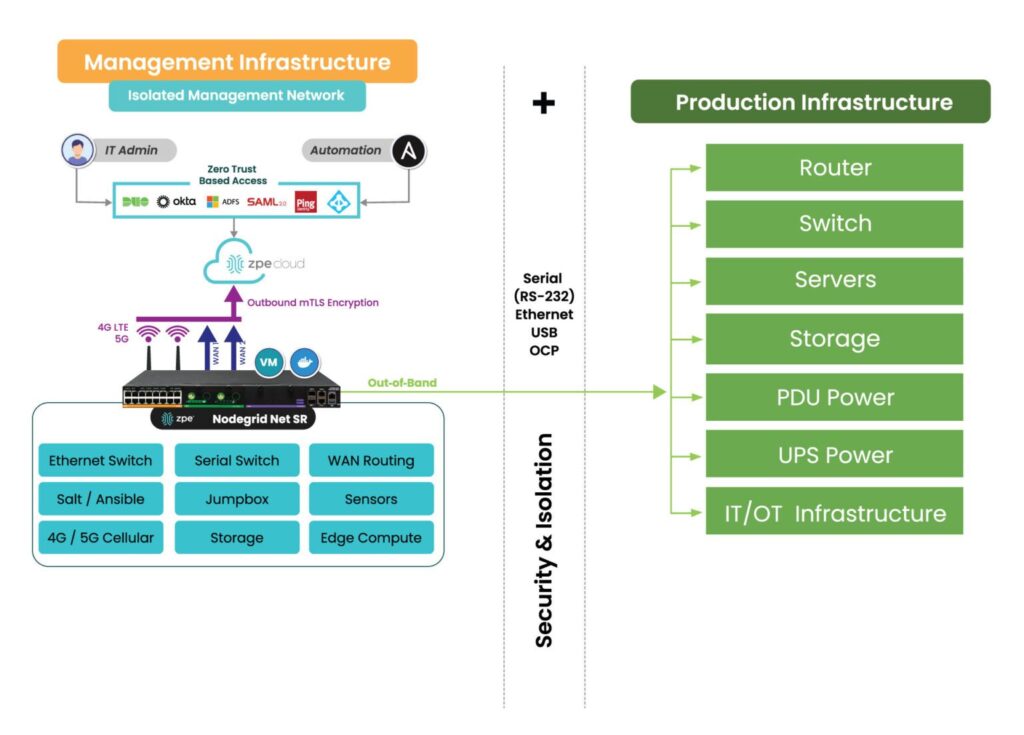
Nodegrid’s out-of-band (OOB) management solution creates an isolated management network that doesn’t rely on production resources and, as such, remains remotely accessible during major outages, ransomware infections, and other adverse events. This gives IT teams a lifeline to remotely roll back PDU firmware updates, power-cycle hung devices, and rebuild infected systems without the time and expense of on-site visits.

How the Nodegrid Net SR isolates and protects the management network.

How the Nodegrid Net SR isolates and protects the management network.

Accessing and managing PDUs with Nodegrid

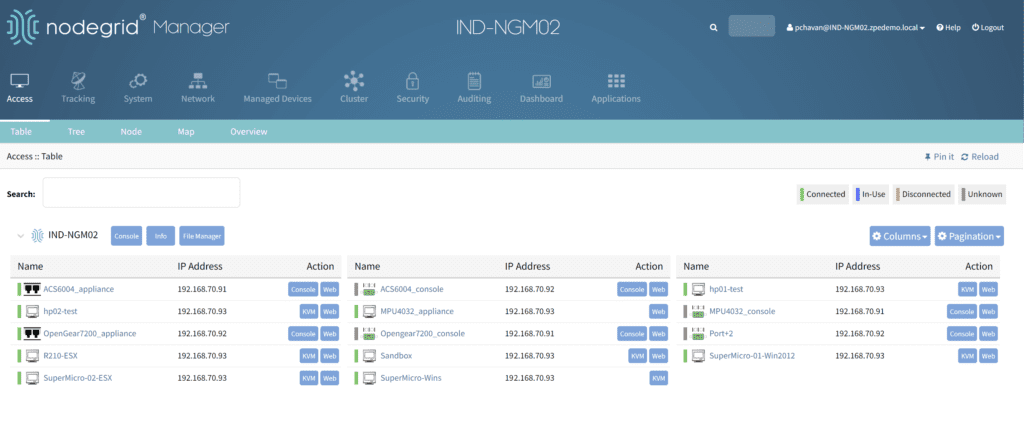
Nodegrid serial consoles and services routers are accessible via the on-premises Nodegrid Manager software or the SaaS ZPE Cloud platform. When connected to the physical console ports on PDUs and other devices, it can provide serial console access and live status messages (such as connected, in-use, and disconnected).

A view of all the equipment connected to a Nodegrid device.

To access and manage a PDU from Nodegrid Manager or ZPE Cloud:

1. Click on the PDU’s name from the access dashboard. The PDU device view screen will appear, as seen below.

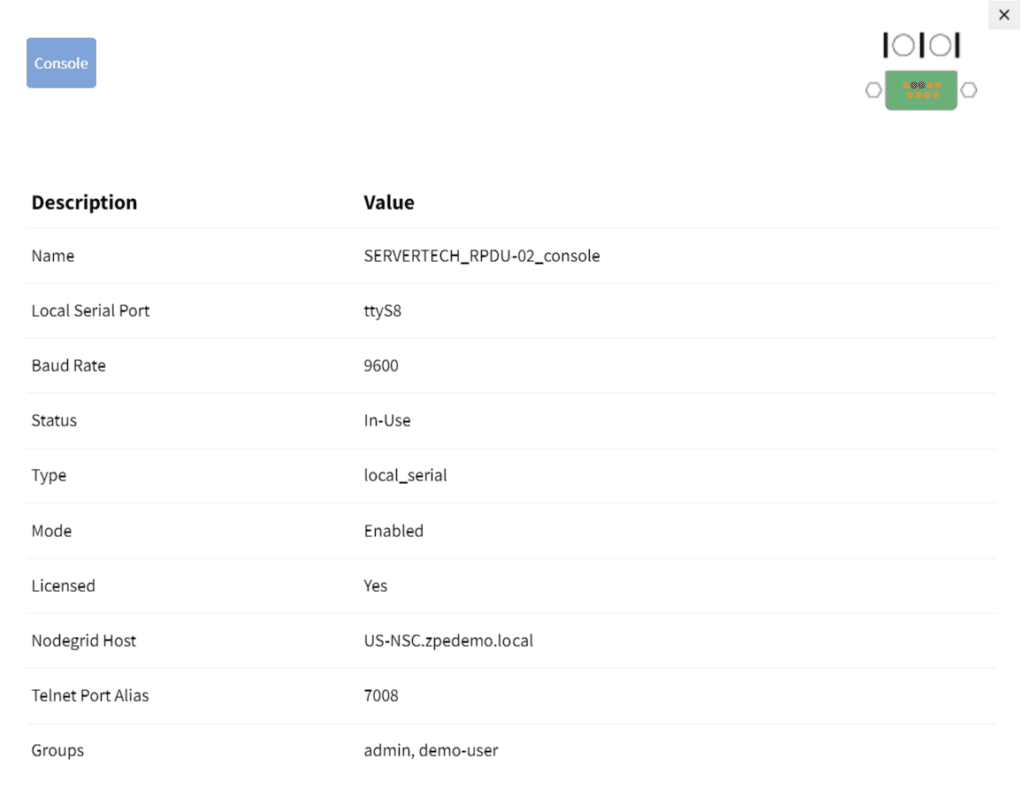
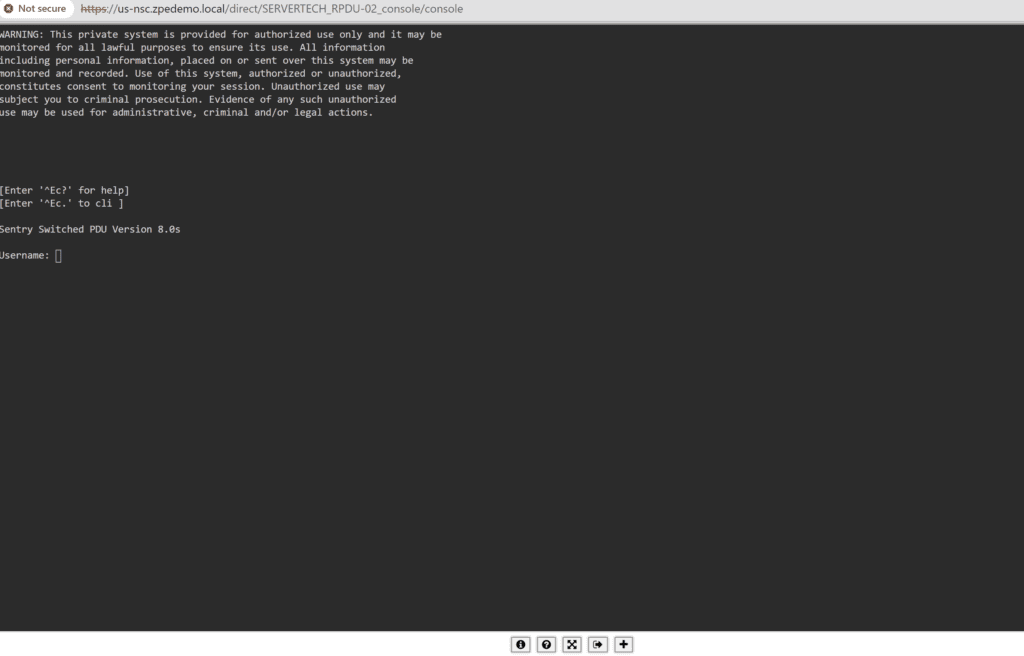
2. Click on the Console tab. A terminal session will open, providing remote console access to the PDU as if you were directly connected.

The PDU console session.

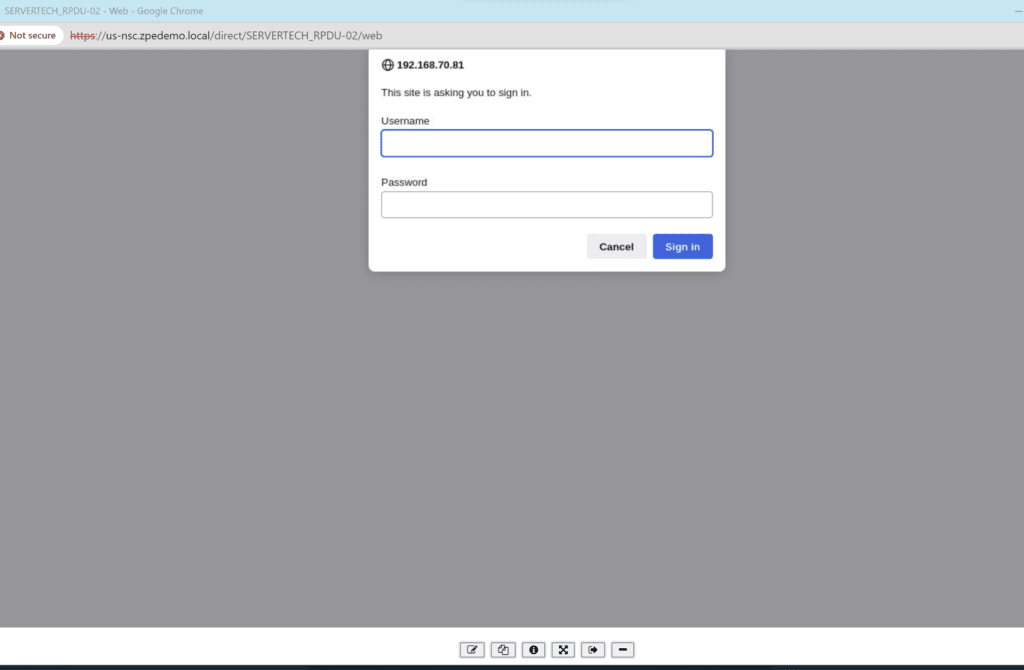
3. If your PDU is network-enabled, adding it to the Hive SR via IP address provides access to the Web UI from Nodegrid, adding a WEB tab as seen below.


4. Clicking the WEB tab will open the PDU’s web UI.

An example of a PDU web UI that will open upon clicking the WEB tab.

An example of a PDU web UI that will open upon clicking the WEB tab.

Remotely controlling power for individual outlets

Nodegrid can integrate your PDU so that each managed serial port on the Hive is mapped to a specific outlet. Doing so allows users to power individual outlets off and on from Nodegrid Manager or ZPE Cloud. It also enables a continuous console session to the managed device with BIOS-level control during the reboot cycle.

To map a PDU outlet to a managed serial port from Nodegrid Manager or ZPE Cloud:

1. Click Managed Devices from the top menu bar, and then select the Devices tab.

The Managed Devices :: Devices menu.

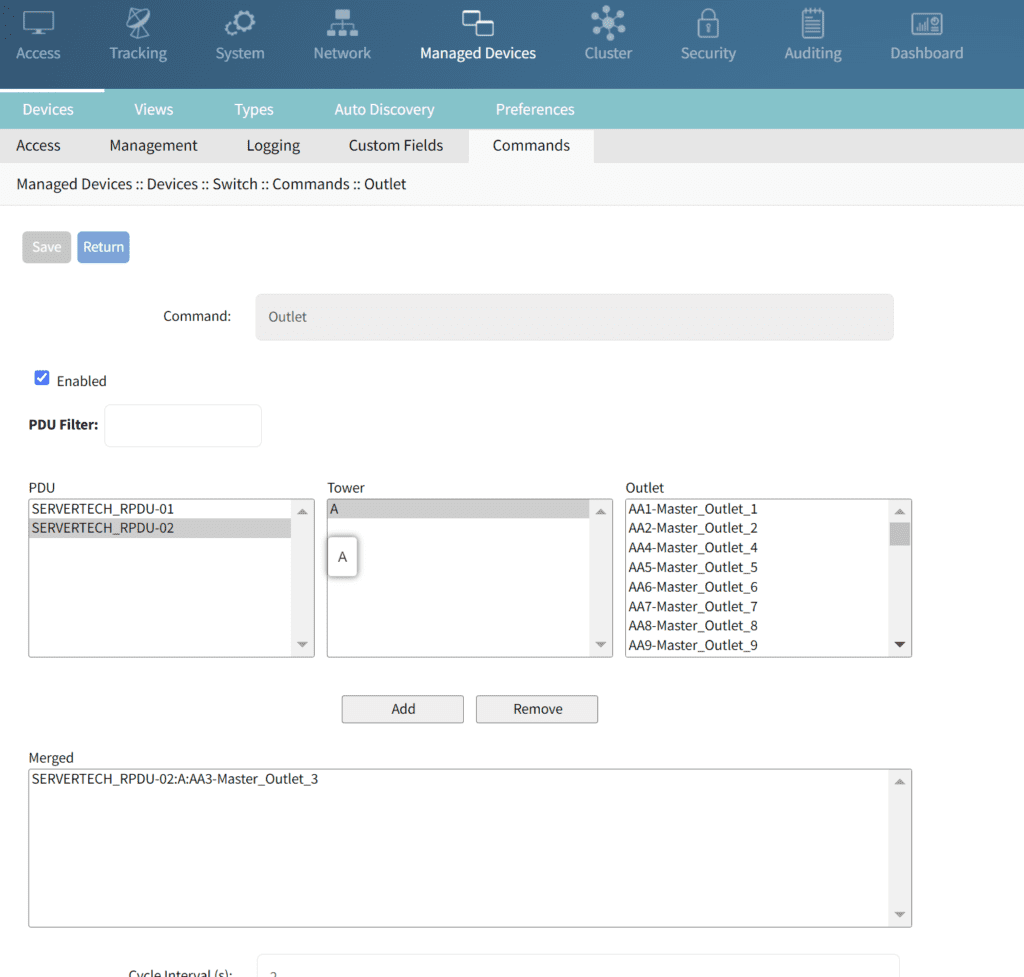
2. Click the Commands tab, click ADD, and then select Outlet.

3. Select the applicable PDU, tower, and outlet to map to the specified managed serial port and then click Add. A confirmation message will appear in the window below.

Mapping the selected serial port to Outlet 3 on PDU 2.

Mapping the selected serial port to Outlet 3 on PDU 2.

To control power for a specific serial port/managed device:

1. Click Access from the top menu bar, and then click the name of the relevant port/device

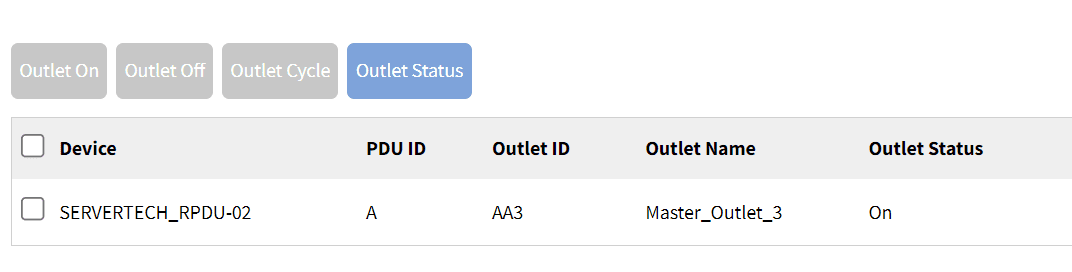
2. If the PDU has been integrated with that port, the Outlet Status display appears as shown below.

The Outlet Status for the Cisco switch configured on this port and outlet.

The Outlet Status for the Cisco switch configured on this port and outlet.

3. Depending on the outlet’s present status, certain options will be available:

  1. Clicking the Outlet On tab will enable an outlet that is powered off.
  2. Clicking the Outlet Off tab will disable an outlet that is powered off.
  3. Clicking Outlet Cycle will power-cycle the outlet, turning it off and then back on again.

Implementing automated PDU provisioning and updates

Nodegrid uses zero-touch provisioning (ZTP) to automatically configure managed devices on boot-up. If your PDU is network-connected and DHCP-enabled, like some ServerTech and Raritan PDUs, Nodegrid’s ZTP can automate configurations and firmware updates.

To implement zero-touch provisioning for PDUs:

  1. Create configuration files tailored to your specific PDU models. These files typically include:
    1. fwupdate.cfg – required for firmware upgrades
    2. config.txt – contains specific device configurations
    3. devices.csv – manages bulk configurations
  2. Upload configuration and firmware files to the Nodegrid Datastore directory, which acts as a root directory for the integrated TFTP/HTTPS server.
  3. Configure Nodegrid’s DHCP server to point to the fwupdate.cfg file on the TFTP/HTTPS server.
  4. Upon their next DHCP renewal, the PDUs will contact Nodegrid’s DHCP server, which will direct them to the fwupdate.cfg file on the TFTP/HTTPS server. The PDUs will fetch these files and perform the necessary configurations or firmware updates. Other configuration options can also be triggered based on vendor-class-identifier settings in the DHCP options.

Nodegrid ZTP includes a magic cookie, a unique identifier stored on the PDU that prevents the repeated execution of the same configuration tasks. If a mismatch between the stored cookie and the new configuration cookie is detected, the device knows to pull fresh configurations, ensuring that updates are only applied when needed.

Want to learn more?

The Nodegrid solution combines serial console PDU management with consolidated network and infrastructure management capabilities for a unified experience and improved efficiency. Download our solutions guide or contact our sales team to learn more about adding a Nodegrid solution to your management infrastructure.

End of Row vs Top of Rack Deployments

End of Row vs Top of Rack Deployments

The terms end-of-row and top-of-rack refer to two different approaches to data center architecture design. Both approaches have advantages and disadvantages that make them suited to different use cases or teams, with neither being the clear “winner” overall. This blog compares end-of-row vs. top-of-rack deployments based on crucial factors like cost, management complexity, scalability, and resilience to help organizations choose the right approach for their environment.


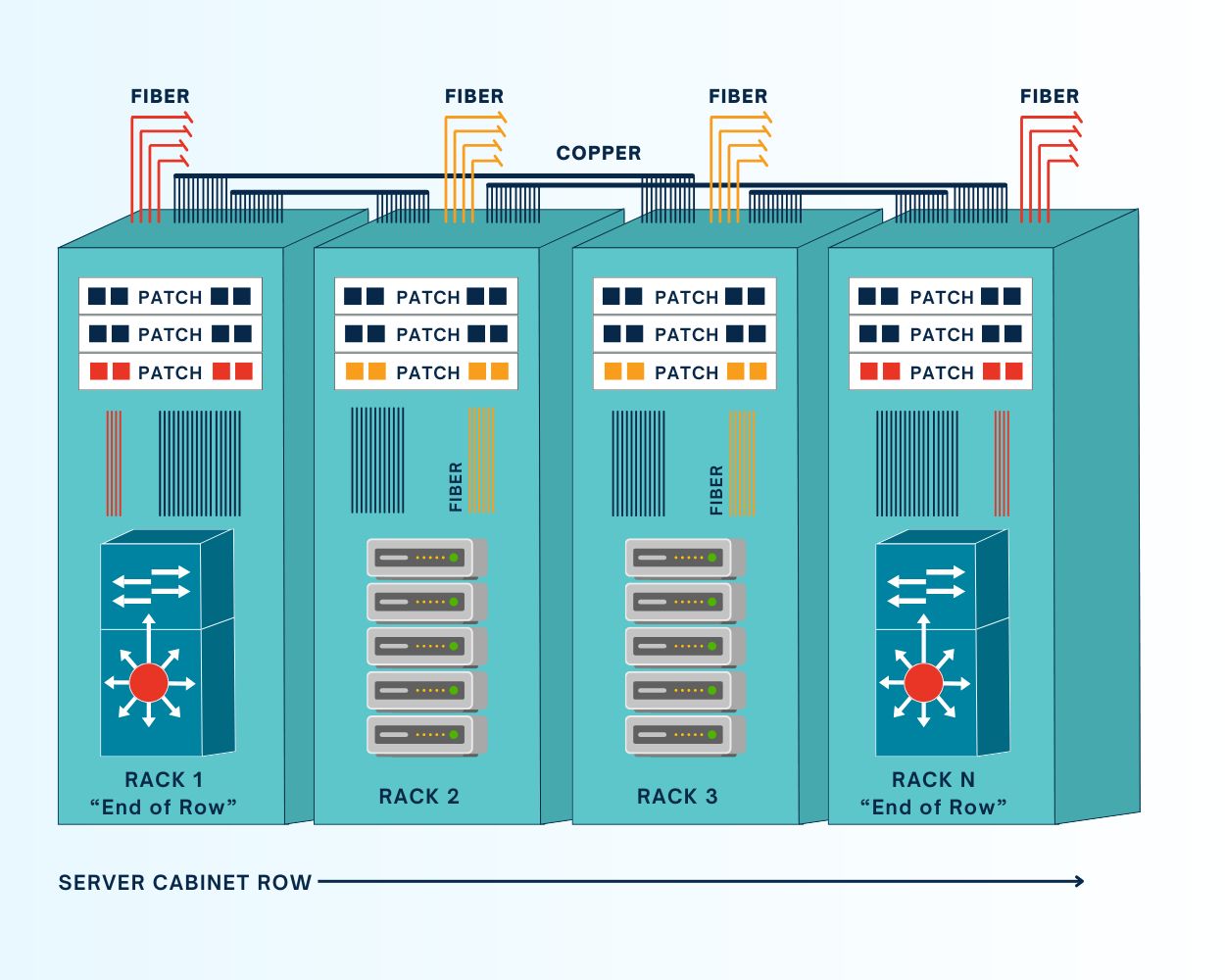
What is an end-of-row (EoR) deployment?

ZPE Graphic Request IR Nov 4
In data center deployments consisting of multiple rows of racks or cabinets, it’s common for teams to consolidate all the networking for each row in one physical location, rather than deploying switches in every single rack. All patch cables for the devices in a particular row are run to the dedicated networking cabinet, which is typically (but not always) at the end of the row. An end-of-row (or EoR) architecture requires fewer switches than a ToR deployment, which helps reduce costs and management complexity while enabling easier scaling.

One of the main drawbacks of this architecture is that the EoR switch is a single point of failure for the entire row. If that switch fails due to a botched update, ransomware attack, or other adverse event, the whole row loses network access. Running cables from each cabinet to the EoR can also get messy very quickly, especially at scale. In the long run, it’s also a less flexible architecture that forces teams to consider an entire row of infrastructure every time they want to change or upgrade networking components.


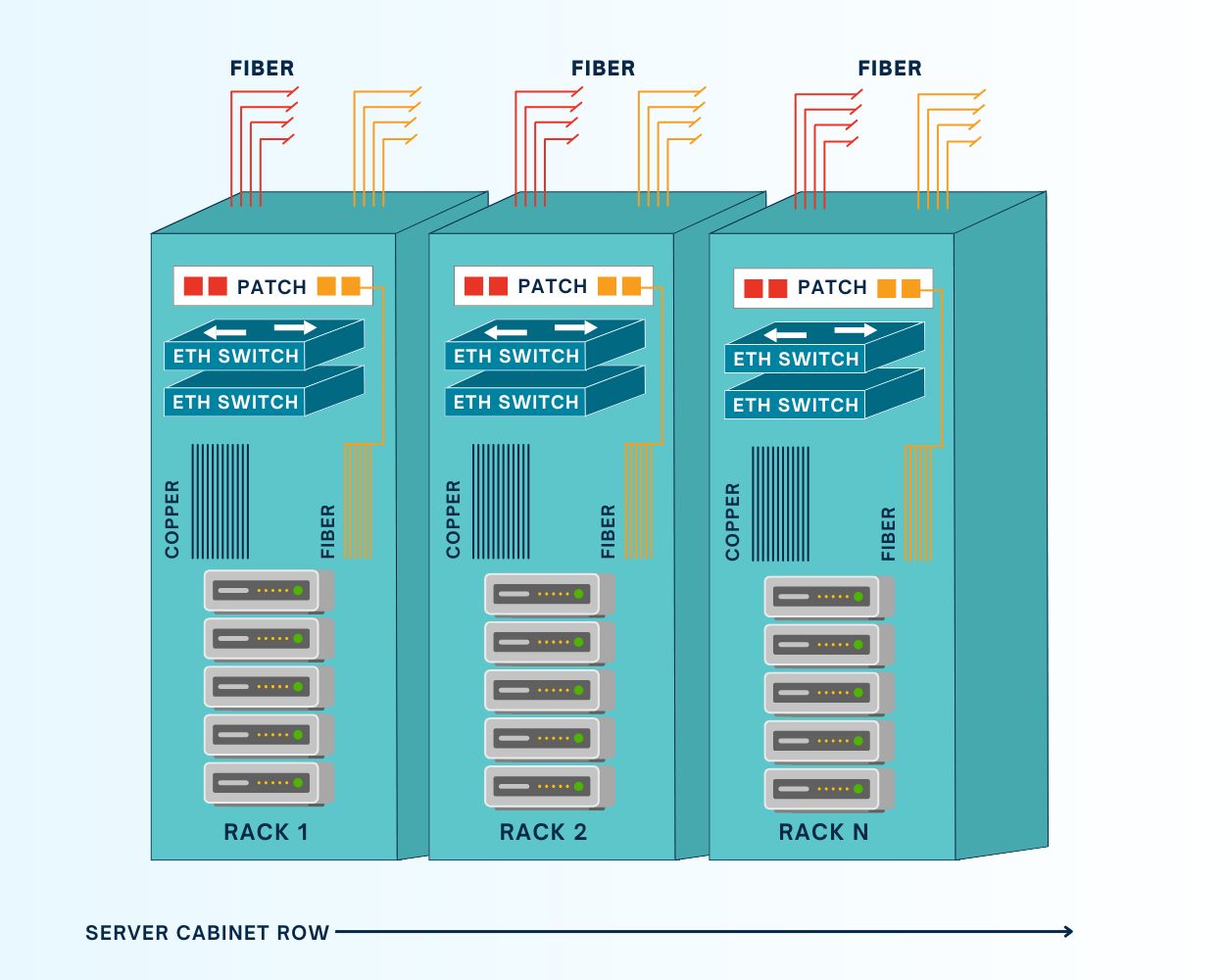
What is a top-of-rack (ToR) deployment?

ZPE Graphic Request IR Nov 4 (1)
In a top-of-rack data center architecture, DC teams install one or more switches in every rack of their deployment; despite the name, the switch doesn’t need to actually be at the very top of the rack. A ToR deployment keeps copper/Ethernet patch cables inside the rack, which helps with cable management. It also eliminates the single-point-of-failure that an EoR switch represents – if one ToR switch goes down for some reason, only the devices within that rack are affected, vs. the entire row. Another major benefit of EoR deployments is that each rack becomes a modular unit that DC teams can modify, upgrade, or scale without necessarily affecting other racks in the row.

On the other hand, a ToR deployment requires more switches than an EoR deployment, which can increase costs and complexity. More switches equate to more power draw, and they add an extra network hop to local traffic that could possibly affect throughput. Each switch must also be monitored, secured, and regularly patched, potentially creating more work for infrastructure teams. As a result, ToR deployments are also more challenging to scale, as each new rack added to the data center requires an additional ToR switch.

Comparing end-of-row vs top-of-rack deployments: Which should you choose?


End-of-Row Top-of-Rack
Number of switches One or more per row One or more per rack
Cable management Requires patch cables running along the entire row Keeps patch cables within the rack or cabinet
Cost Fewer switches and lower power draw keeps costs down More switches and higher power draw gets more expensive
Complexity Fewer switches to secure, manage, and troubleshoot More devices to manage
Ease of scaling Can deploy an entire new row with only one networking cabinet Each new rack requires one or more switches
Flexibility Inflexible; networking changes affect entire row Each rack is a modular unit that can be changed without affecting others
Resilience EoR switch is a single point of failure for the entire row One rack’s switch can go down without affecting any other racks


Both EoR and ToR architectures have advantages and disadvantages, with neither being the clear-cut winner for every possible use case.

End-of-row deployments are more cost-effective and easier to manage and scale, so they’re often favored by smaller, leaner IT teams or, on the opposite end of the spectrum, very large (or hyperscale) data centers. For example, a large cloud provider might prefer EoR to cut down on the number of switches to purchase, deploy, and manage at their hubs.

Top-of-rack deployments are modular, flexible, and resilient, which makes them a great choice for DevOps teams that need the ability to add or change components at any time without affecting the entire architecture. For example, managed service providers might prefer ToR so they can easily customize or update one customer’s rack without worrying about how the changes will impact others.

How Nodegrid improves resilience for EoR and ToR deployments

Nodegrid serial console switches can be deployed top-of-rack or end-of-row to improve the resilience of either architecture. Nodegrid switches connect to the serial port on data center devices to provide out-of-band (OOB) management, allowing teams to remotely manage and troubleshoot DC equipment even when the primary network is down. They isolate the management interfaces for data center infrastructure, making them inaccessible to malware or malicious actors on the production network. Plus, Nodegrid also provides network failover to keep business-critical services running during adverse events.

Nodegrid serial consoles have an open architecture that can integrate and host other vendors’ software and virtualized network functions. That means a single Nodegrid box could theoretically replace an entire rack of networking hardware, streamlining EoR deployments and making ToR architectures more feasible for lean, budget-strapped IT teams. Plus, Nodegrid switches and all connected devices can be remotely managed from a single, on-premises or cloud-based software platform, significantly reducing management complexity for either deployment.

Reach out to ZPE Systems for more help comparing end-of-row vs. top-of-rack deployments or to see a demo of the Nodegrid platform in action.

Zombie Servers: The Hidden Energy Drainers in Data Centers

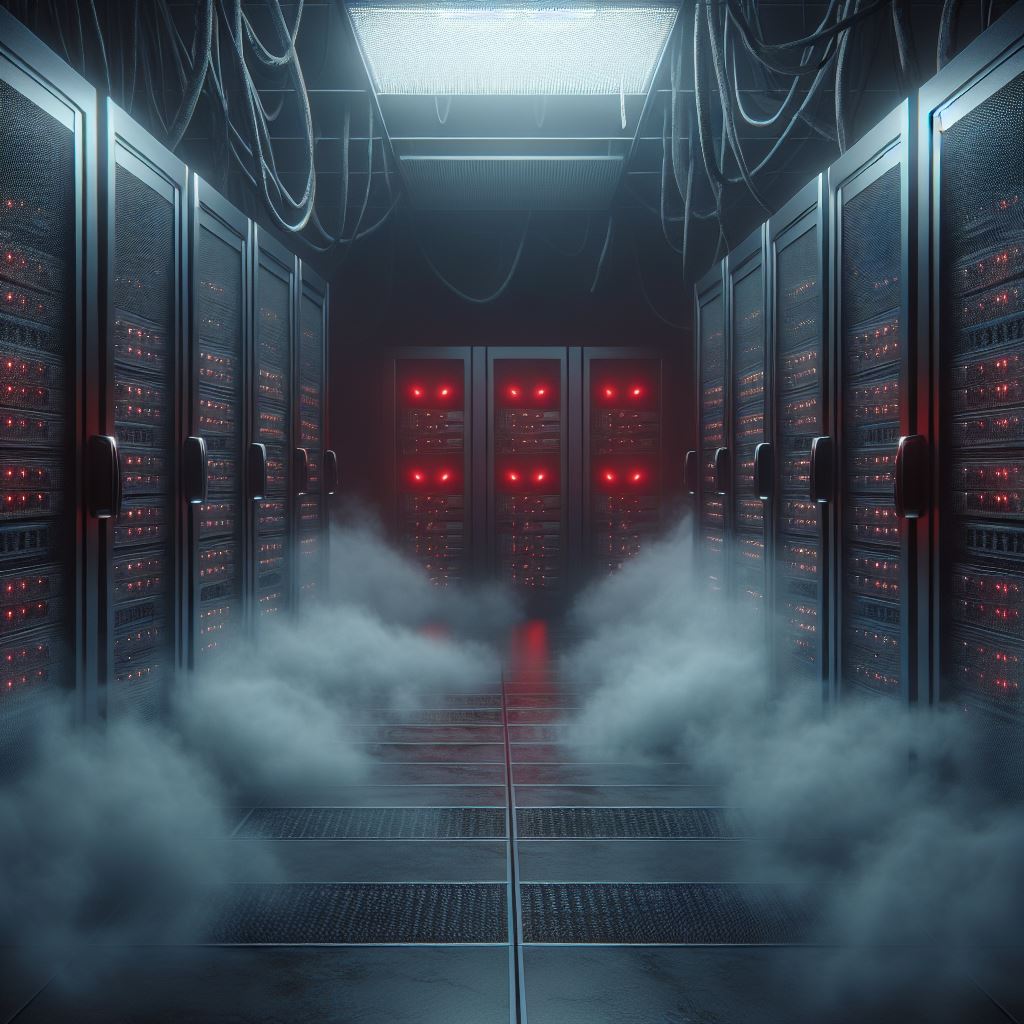
Zombies in the data center
As enterprises adopt AI, cloud computing, and data analytics, one thing lurks in the shadows of their data centers: zombie servers. These inactive or severely underutilized servers take a big bite out of operations, drawing power and resources without contributing meaningful work. Research from the Uptime Institute indicates that as much as 30% of servers may be idle at any given time, suggesting enterprises could save millions each year by identifying and eliminating these “zombies.”

The Cost of Zombie Servers

When it comes to cost, zombie servers can devour more than their fair share. Each idle server can consume approximately 200 to 400 watts per hour, resulting in annual power costs of $400 to $600 per server. In large data centers housing thousands of servers, wasted energy expenses can easily scale into the millions. Currently, U.S. data centers account for over 4% of the nation’s total electricity consumption, a figure projected to rise to 6% by 2026 due to growing demands from AI and cloud computing applications.

How ZPE Systems’ Nodegrid Fights Zombie Servers

Out-of-band management (OOBM) solutions, like ZPE Systems’ Nodegrid, provide an effective way to monitor, manage, and optimize data center infrastructure, even when the primary network is down. When combined with ServerTech Intelligent PDUs, data center admins can remote-in to identify and address zombie servers, so they can ensure their operations run at peak efficiency.

Key Features of Nodegrid’s Out-of-Band Management for Zombie Server Management

  • 24/7 Monitoring and Real-Time Insights: Nodegrid allows IT teams to continuously monitor server performance, making it easy to detect underutilized or idle servers. Real-time metrics show server activity, power usage, and health, so teams can pinpoint servers that may need to be repurposed or removed.
  • Detailed Power Usage Data: The combined Nodegrid and ServerTech solution provides comprehensive energy usage data, so teams can see inefficiencies and where power is consumed most. This is essential for high-density data centers, where wasting even a little bit of power adds up to substantial costs. These insights help data center operators pinpoint zombie servers, reducing energy costs and freeing up space.
  • Enhanced Automation and Management Control: With automation features, Nodegrid simplifies the complex task of managing server lifecycles. For instance, automated alerts can notify teams when a server reaches a specific threshold of low utilization, enabling quicker action to reassign or shut down the server.
  • Increased Security and Resilience: Nodegrid enhances security by providing direct access to infrastructure via isolated management. Teams can access critical systems even during network failures, to ensure servers remain compliant, functional, and secure.

Benefits of Removing Zombie Servers

AI and other resource-intensive applications mean data centers need to be as efficient as possible. Zombie servers are not just an energy problem; they impact a data center’s ability to scale and meet demand for high-performance computing. Here are some benefits of removing or repurposing zombie servers:

  • Energy Efficiency: Data centers can significantly lower energy costs and reduce environmental impact by shutting down idle servers.
  • Cost Savings: Operating more efficiently by removing zombie servers can lead to substantial annual savings, freeing up resources for necessary expansions.
  • Optimized AI-Ready Infrastructure: Freeing up resources allows data centers to repurpose space and energy toward servers that can support AI and other high-density applications.

Get Help Fighting Zombie Servers

Set up a call with one of ZPE Systems’ engineers, and we’ll show you how to get zombie servers out of your data center. Click the button below to schedule your call.

Watch a Walkthrough Demo

Watch this 20-minute video where Marcel van Zwienen (Senior Sales Engineer) demonstrates the remote management capabilities of Nodegrid and ZPE Cloud.

Marcel van Zwienen gives a walkthrough of ZPE Cloud for remote device management.

More Valuable Resources for Remote Monitoring

Check out these resources to help fight zombie servers and other inefficiencies lurking in your data center: