Providing Out-of-Band Connectivity to Mission-Critical IT Resources

Network Virtualization Platforms: Benefits & Best Practices

Network Virtualization Platforms: Benefits & Best Practices

Simulated network virtualization platforms overlaying physical network infrastructure.

Network virtualization decouples network functions, services, and workflows from the underlying hardware infrastructure and delivers them as software. In the same way that server virtualization makes data centers more scalable and cost-effective, network virtualization helps companies streamline network deployment and management while reducing hardware expenses.

This guide describes several types of network virtualization platforms before discussing the benefits of virtualization and the best practices for improving efficiency, scalability, and ROI.

What do network virtualization platforms do?

There are three forms of network virtualization that are achieved with different types of platforms. These include:

Type of Virtualization Description Examples of Platforms
Virtual Local Area Networking (VLAN) Creates an abstraction layer over physical local networking infrastructure so the company can segment the network into multiple virtual networks without installing additional hardware.

SolarWinds Network Configuration Manager

ManageEngine Network Configuration Manager

Software-Defined Networking (SDN) Decouples network routing and control functions from the actual data packets so that IT teams can deploy and orchestrate workflows across multiple devices and VLANs from one centralized platform.

Meraki

Juniper

Network Functions Virtualization (NFV) Separates network functions like routing, switching, and load balancing from the underlying hardware so teams can deploy them as virtual machines (VMs) and use fewer physical devices.

Red Hat OpenStack

VMware vCloud NFV

While network virtualization is primarily concerned with software, it still requires a physical network infrastructure to serve as the foundation for the abstraction layer (just like server virtualization still requires hardware in the data center or cloud to run hypervisor software). Additionally, the virtualization software itself needs storage or compute resources to run, either on a server/hypervisor or built-in to a networking device like a router or switch. Sometimes, this hardware is also referred to as a network virtualization platform.

The benefits of network virtualization

Virtualizing network services and workflows with VLANs, SDN, and NFVs can help companies:

  • Improve operational efficiency with automation. Network virtualization enables the use of scripts, playbooks, and software to automate workflows and configurations. Network automation boosts productivity so teams can get more work done with fewer resources.
  • Accelerate network deployments and scaling. Legacy deployments involve configuring and installing dedicated boxes for each function. Virtualized network functions and configurations can be deployed in minutes and infinitely copied to get new sites up and running in a fraction of the time.
  • Reduce network infrastructure costs. Decoupling network functions, services, and workflows from the underlying hardware means you can run multiple functions from once device, saving money and space.
  • Strengthen network security. Virtualization makes it easier to micro-segment the network and implement precise, targeted Zero-Trust security controls to protect sensitive and valuable assets.

Network virtualization platform best practices

Following these best practices when selecting and implementing network virtualization platforms can help companies achieve the benefits described above while reducing hassle.

Vendor neutrality

Ensuring that the virtualization software works with the underlying hardware is critical. The struggle is that many organizations use devices from multiple vendors, which makes interoperability a challenge. Rather than using different virtualization platforms for each vendor, or replacing perfectly good devices with ones that are all from the same vendor, it’s much easier and more cost-effective to use virtualization software that interoperates with any networking hardware. This type of software is called ‘vendor neutral.’

To improve efficiency even more, companies can use vendor-neutral networking hardware to host their virtualization software. Doing so eliminates the need for a dedicated server, allowing SDN software and virtualized network functions (VNFs) to run directly from a serial console or router that’s already in use. This significantly consolidates deployments, which saves  money and reduces the amount of space needed This can be a lifesaver in branch offices, retail stores, manufacturing sites, and other locations with limited space.
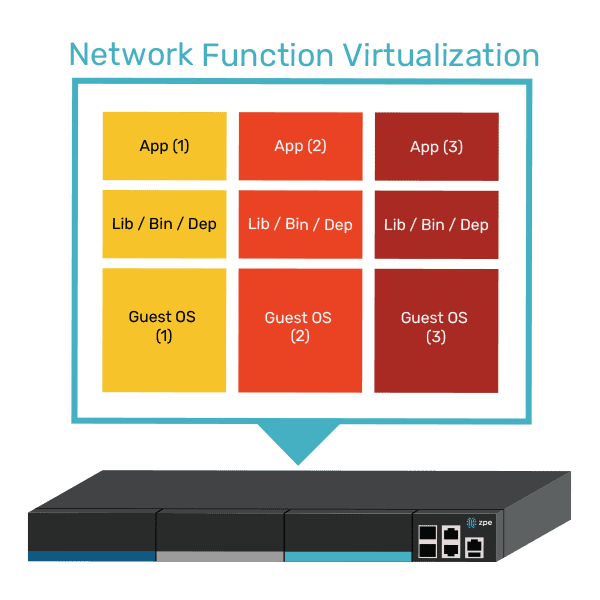
A diagram showing how multiple VNFs can run on a single vendor-neutral platform.

Virtualizing the WAN

We’ve mostly discussed virtualization in a local networking context, but it can also be extended to the WAN (wide area network). For example, SD-WAN (software-defined wide area networking) streamlines and automates the management of WAN infrastructure and workflows. WAN gateway routing functions can also be virtualized as VNFs that are deployed and controlled independently of the physical WAN gateway, significantly accelerating new branch launches.

Unifying network orchestration

The best way to maximize network management efficiency is to consolidate the orchestration of all virtualization with a single, vendor-neutral platform. For example, the Nodegrid solution from ZPE Systems uses vendor-neutral hardware and software to give networking teams a single platform to host, deploy, monitor, and control all virtualized workflows and devices. Nodegrid streamlines network virtualization with:

  • An open, x86-64bit Linux-based architecture that can run other vendors’ software, VNFs, and even Docker containers to eliminate the need for dedicated virtualization appliances.
  • Multi-functional hardware devices that combine gateway routing, switching, out-of-band serial console management, and more to further consolidate network deployments.
  • Vendor-neutral orchestration software, available in on-premises or cloud form, that provides unified control over both physical and virtual infrastructure across all deployment sites for a convenient management experience.

Want to see vendor-neutral network orchestration in action?

Nodegrid unifies network virtualization platforms and workflows to boost productivity while reducing infrastructure costs. Schedule a free demo to experience the benefits of vendor-neutral network orchestration firsthand.
Schedule a Demo

PDU Remote Management

PDU Remote Management

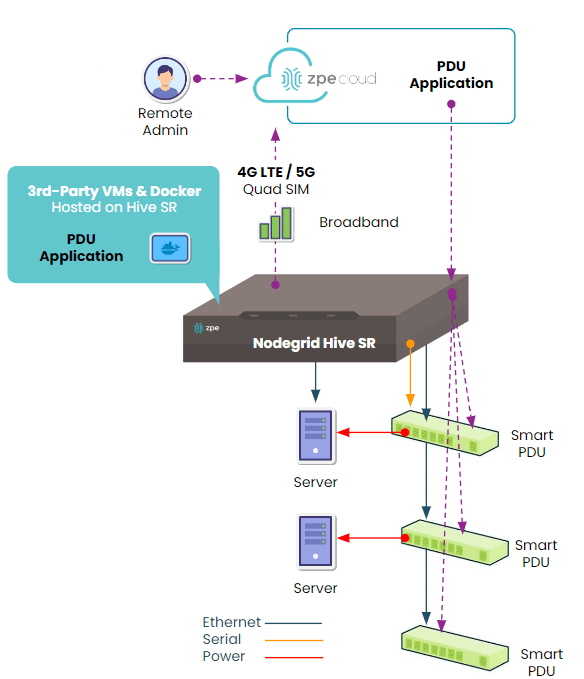
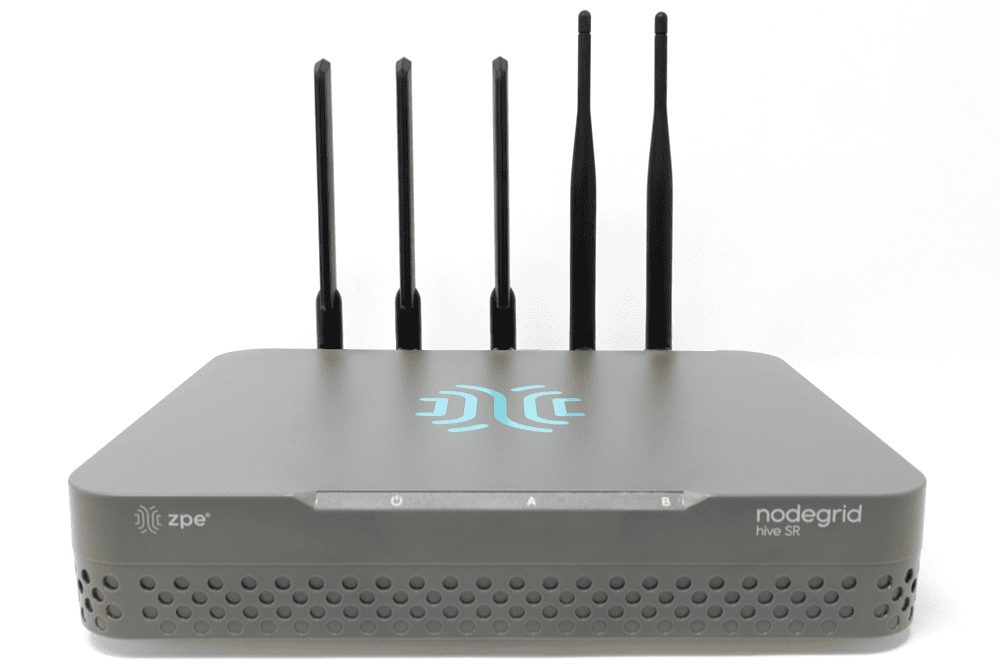
The Hive SR PDU remote management solution from ZPE Systems.

PDUs (power distribution units) and busways are critical network infrastructure devices that control and optimize how power flows to equipment like servers, routers, firewalls, and switches. They’re difficult to manage remotely, so configuring and updating new devices or fixing problems typically requires tedious, on-site work. This difficulty is magnified in complex, distributed networks with hundreds of individual power devices that must be managed one at a time. What’s needed is a PDU remote management solution that unifies control over distributed devices. It should also streamline infrastructure management with an open architecture that supports third-party power software and automation.

The problem: PDU management is cumbersome for large, distributed networks

PDUs and busways are deployed across remote and distributed locations beyond the central data center, including edge computing sites, automated manufacturing plants, and colocations. They typically aren’t network-connected and do not come with up-to-date firmware at deployment time, requiring on-site technicians for maintenance. Upgrading and managing thousands of PDUs and busways requires hundreds of work hours from on-site IT teams who must manually connect to each unit.

The current solution: PDU remote management with jump boxes or serial consoles

Since most PDUs and busways can’t connect to the network, the only way to remotely manage them is to physically connect them via serial (a.k.a., RS-232) cable to a device that can be remotely accessed, such as an Intel NUC jump box or a serial console.

Unfortunately, jump boxes usually aren’t set up to manage more than one serial connection at a time, so they only solve the remote access problem without providing any centralized management of multiple PDUs or multiple sites. Jump boxes are often deployed without antivirus or other security software installed and with insecure, unpatched operating systems containing potential vulnerabilities, leaving branch networks exposed.

On the other hand, serial consoles can manage multiple serial devices at once and provide remote access, but they often don’t integrate with PDU/busway software and only support a few chosen vendors, which limits their control capabilities and may prevent remote firmware updates. They’re also usually single-purpose devices that take up valuable rack space in remote sites with limited real estate and don’t interoperate with third-party software for automation, monitoring, and security.

The Hive SR + ZPE Cloud: A next-gen PDU remote management solution

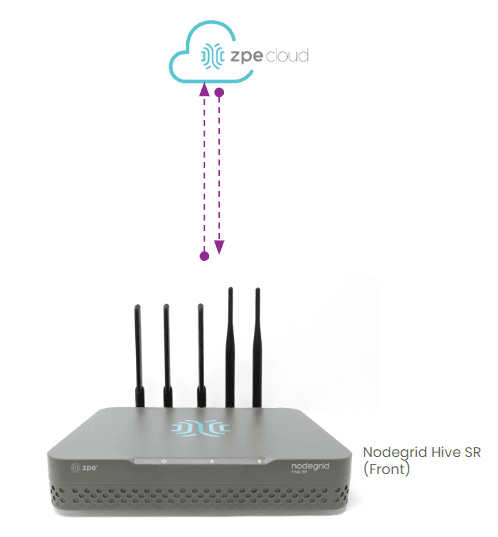
The ZPE Cloud and Nodegrid Hive SR solutions for PDU remote management.
The Hive SR is an integrated branch services router from the Nodegrid family of vendor-neutral infrastructure management solutions offered by ZPE Systems. The Hive automatically discovers power devices and provides secure remote access, eliminating the need to manage PDUs and busways on-site. The ZPE Cloud management platform gives IT teams centralized control over power devices and other infrastructure at all distributed locations so they can update or roll-back firmware, configure and power-cycle equipment, and see monitoring alerts.

The ZPE Cloud PDU remote management solution from ZPE Systems.

In addition to integrated branch networking capabilities like gateway routing, switching, firewall, Wi-Fi access point, 5G/4G cellular WAN failover, and centralized infrastructure control, the Hive SR and ZPE Cloud also deliver vendor-neutral out-of-band (OOB) management. ZPE’s Gen 3 OOB solution creates an isolated management network that doesn’t rely on production resources and, as such, remains remotely accessible during major outages, ransomware infections, and other adverse events. This gives IT teams a lifeline to perform remote recovery actions, including rolling-back PDU firmware updates, power-cycling hung devices, and rebuilding infected systems, without the time and expense of an on-site visit.

A diagram showing how the Nodegrid Hive SR can be deployed for PDU remote management.

The Hive and ZPE Cloud have open architectures that can host or integrate other vendors’ software for PDU/busway management, NetOps automation, zero-trust and SASE security, and more. Administrators get a single, unified, cloud-based platform to orchestrate both automated and manual workflows for PDUs, busways, and any other Nodegrid-connected infrastructure at all distributed business sites. Plus, all ZPE solutions are frequently patched and protected by industry-leading security features to defend your critical branch infrastructure.


Download our Automated PDU Provisioning and Configuration solution guide to learn more about vendor-neutral PDU remote management with Nodegrid devices like the Hive SR.
Download

Download our Centralized IT Infrastructure Management and Orchestration solution guide to learn how ZPE Cloud can improve your operational efficiency and resilience.
Download

Top 5 Data Center Mistakes and How To Avoid Them

Top 5 Data Center Mistakes and How To Avoid Them

Data center deployments require careful planning and execution. The sheer complexity makes it easy to stumble into common pitfalls that can compromise uptime, security, and scalability. After talking with hundreds of customers, we’ve compiled the top five data center mistakes organizations often make during deployments, with tips on how to avoid them.

1. Overlooking Isolated Management Infrastructure

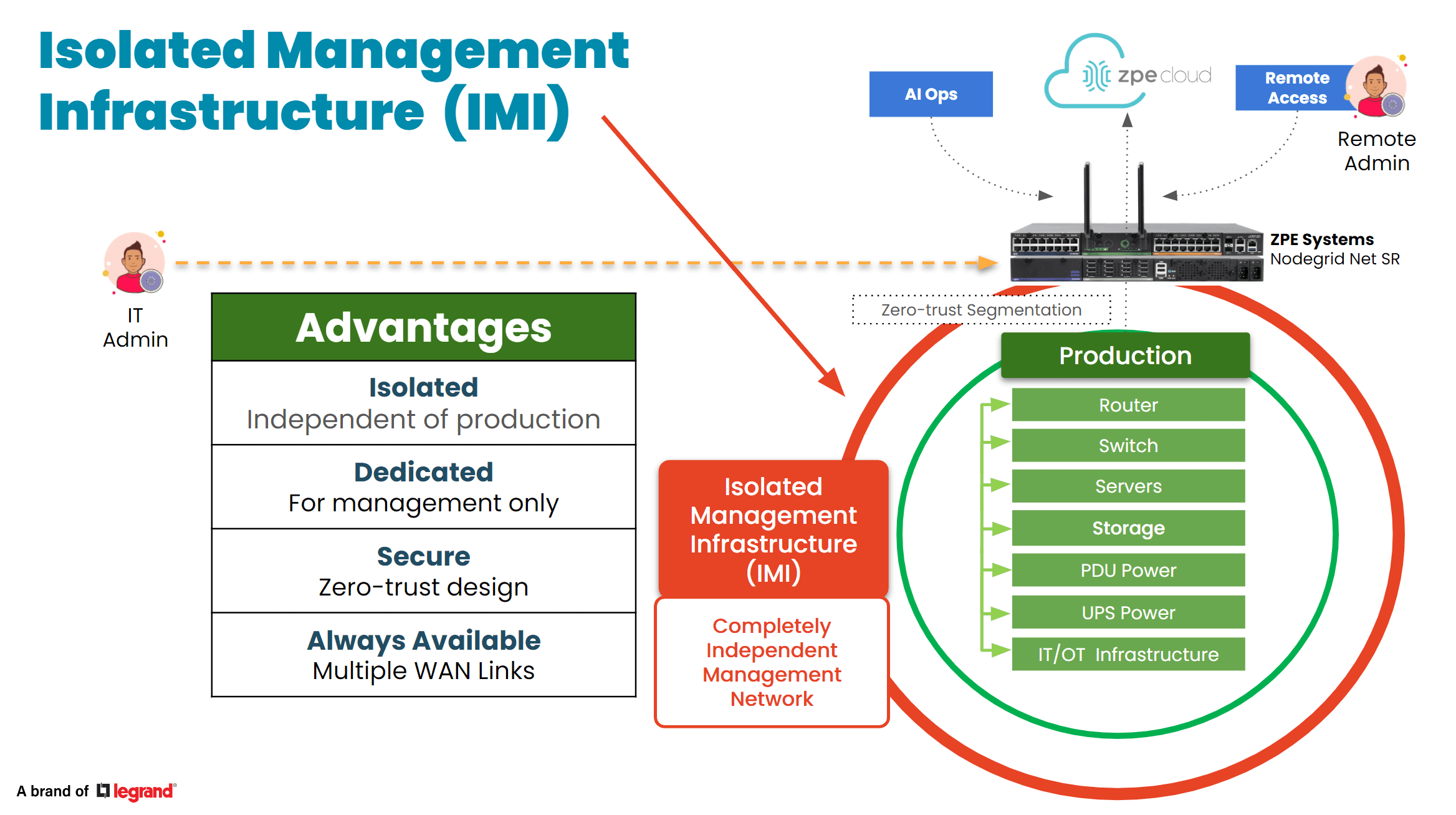
In the data center, the focus is bringing production infrastructure online, including power, cabling, racks, servers, and network gear. But many project managers and architects say they wished they’d given more attention to setting up proper management infrastructure. This oversight usually leads to business challenges down the line, especially when management access relies on the production infrastructure. When a device fails or goes offline, there’s no choice but to go on-site to manually troubleshoot and recover. Many professionals admit to making this data center mistake and wish that they had considered this early in the planning process. Incorporating something called Isolated Management Infrastructure from the start can avoid this challenge, since it provides a dedicated management plane through which teams can access production gear without relying on the production network. 

Tip: Make management infrastructure a priority in your initial planning stages. This proactive approach can prevent complications later.

IMI

2. Neglecting Automation for Configuration and Scaling

Many data center implementors focus heavily on the “rack and stack” initial setup, but fail to automate processes for configuration and scaling operations. This data center mistake often leads to days’ or weeks’ worth of manual, repetitive work, while also exposing the organization to human error. A lot of people we talked to wish they’d invested just a few weeks into automating essential tasks such as switch setup, VLAN configurations, and IP address assignments, which would have saved them lots of time later on and likely helped to prevent errors. Additionally, if rearchitecting is needed, automated systems allow for quick reimplementation, minimizing the time and complexity involved. 

Tip: Dedicate time to automating routine processes. This investment will pay off in enhanced operational efficiency and reduced human error.

3. Inadequate Out-of-Band Management

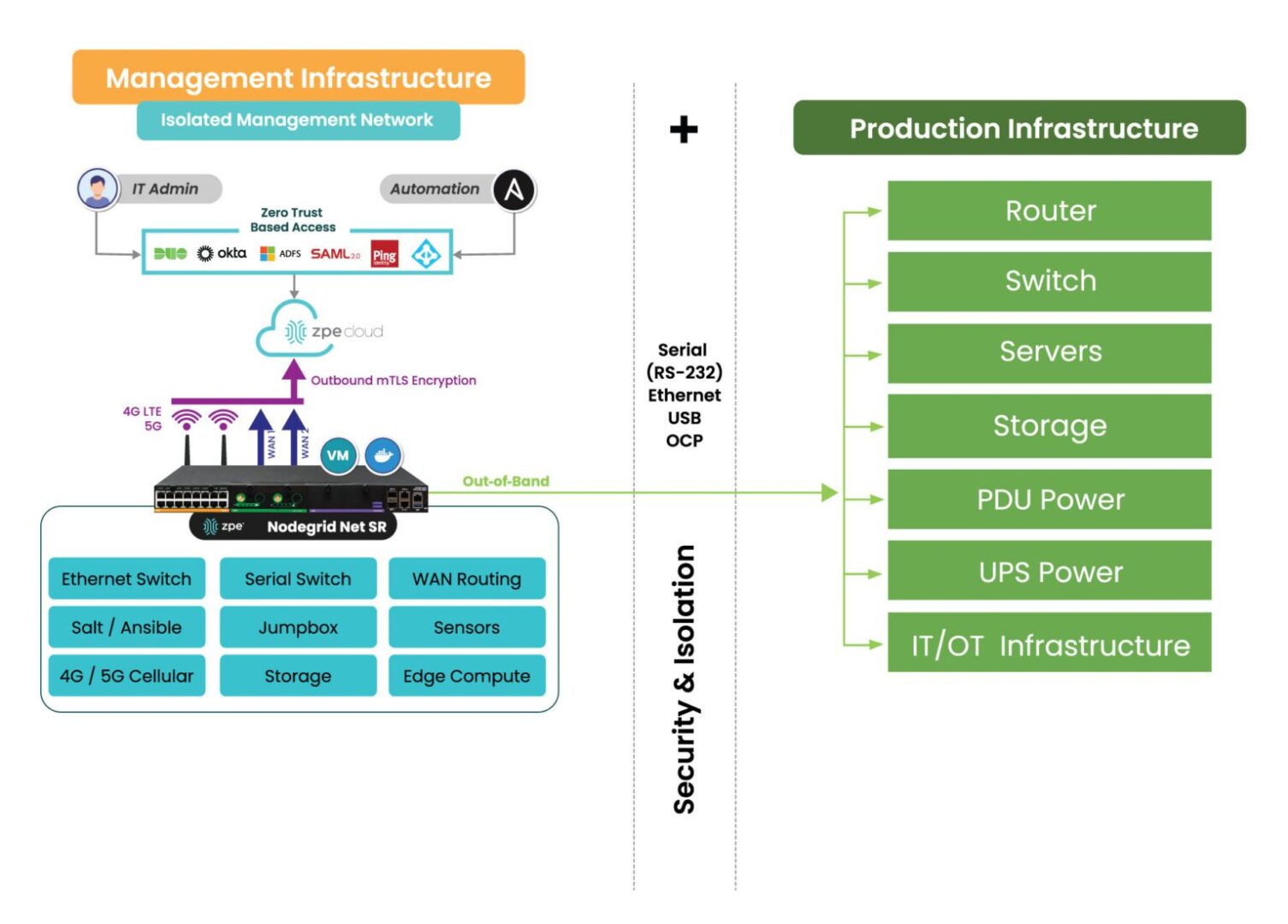
When people think of out-of-band (OOB) management, a common misconception is that it is solely about Ethernet switches. However, it’s crucial not to overlook the importance of having management access to your entire device stack. Low-level access can be essential for system recovery and management. The recent CrowdStrike outage is a perfect example – when the failed devices needed to be reimaged, typical out-of-band management solutions were inadequate at providing this type of low-level access. Generation three out-of-band serial consoles, like the Nodegrid Net SR, give Ethernet, serial, and USB access, allowing teams to remote-in at the BIOS level to revive failed devices. Using this kind of comprehensive out-of-band – on a fully isolated management plane – helps teams remotely recover and confidently automate processes.

Tip: Ensure that your OOB strategy includes robust serial console access to enhance system reliability and recovery capabilities.

IMI with Nodegrid2

4. Ignoring Security Best Practices

Zero trust security is no longer just advisable, it’s essential. The typical approach is to establish direct connectivity to devices to configure, troubleshoot, upgrade, etc. But this comes with unnecessary risks, often exposing management ports to the Internet and leaving you at risk of attack. Without a fully isolated management plane and zero trust security controls, how would you recover if you were ransomware’d? This is why it’s essential to implement security controls like role-based access and multi-factor authentication, and ensure complete separation of management and production networks. 

Tip: Prioritize security by adopting a zero-trust approach and implementing rigorous access controls to safeguard your data center.

5. Cutting Corners on Out-of-Band Management

In the race for implementing AI, it’s crucial to invest in AI data center infrastructure. But organizations often cut corners on their ability to manage the underlying infrastructure that powers AI. Management access should not stop at ethernet switches; it should extend to encompass serial console access, PDUs, jump boxes, 5G connectivity, routing, WAN links, and a centralized cloud hub with secure tunnels to colocation sites. Using a comprehensive and centralized platform like Nodegrid consolidates many management devices into one while giving remote control to optimize AI’s underlying infrastructure. Aside from enhancing efficiency, this approach minimizes waste and energy consumption, which addresses environmental, social, and governance (ESG) concerns. 

Tip: Avoid the partial out-of-band management deployment. A complete system not only supports resilience and security but also contributes to sustainability goals.


Addressing these common data center mistakes can significantly enhance operational efficiency, security, and scalability. By prioritizing management infrastructure, automating processes, ensuring adequate out-of-band access, implementing robust security measures, and investing wisely in management systems, organizations can build resilient data centers equipped to meet the demands of today and the future.

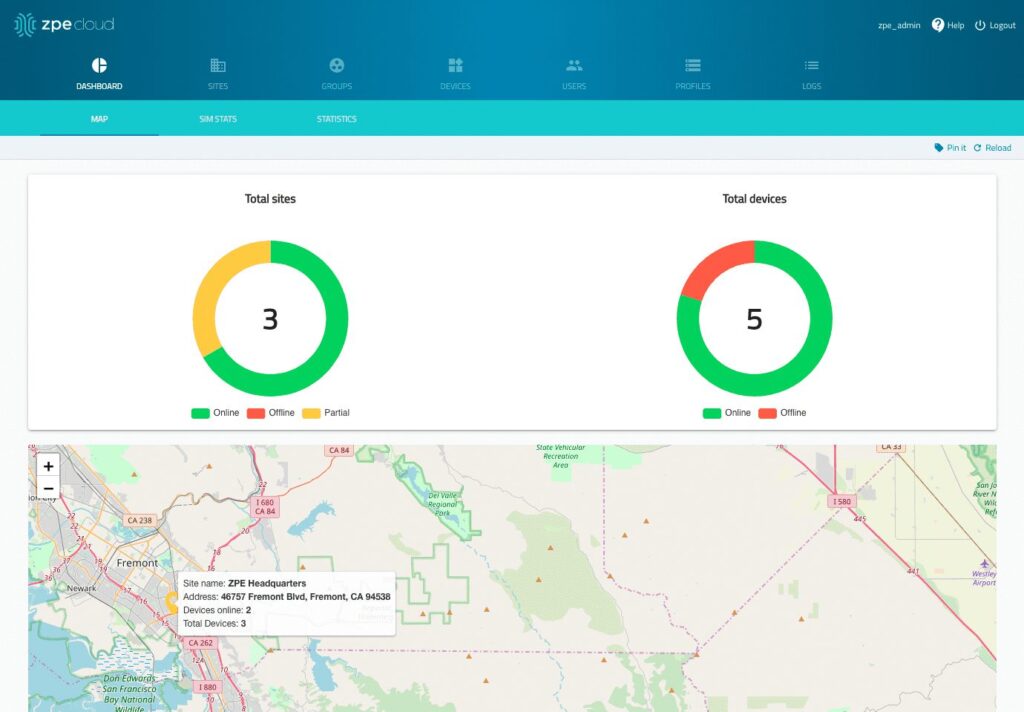
See ZPE Cloud in action with this video demo

Senior Sales Engineer Marcel van Zwienen gives you a hands-on demo of ZPE Cloud in this video. Watch Marcel take you from signing in to gaining remote access for troubleshooting, to showing how to apply configuration changes automatically across device fleets. Watch now at the link below.

Use Our Blueprint to Avoid Data Center Mistakes

Our blueprint shows how to deploy an isolated management infrastructure, which gives you secure remote access to recover from outages and automate operations. Download now for the complete guide.

Perle Console Server Replacement Options

NCSP Back side

Perle offers two console server solutions for out-of-band (OOB) management of data center infrastructure: the IOLAN SCG and the IOLAN SCR. The SCG is available in both fixed and modular form factors, while the SCR comes in four models with different combinations of 56 managed ports, allowing companies to choose the OOB management hardware that best suits their environment. Unfortunately, IOLAN solutions suffer from hardware and software limitations that can curb scalability and limit agility. This guide discusses Perle console server replacement options that enable streamlined growth through automation capabilities and vendor freedom.


Key takeaways

  • Perle IOLAN SCG appliances offer out-of-band console server management for up to 48 devices in a fixed or modular form factor. Perle IOLAN SCR console servers come with four different managed port configurations for added flexibility.
  • Perle console servers offer some automation capabilities, like auto-discovery and zero-touch provisioning, as well as comprehensive firewall functionality. However, their underpowered hardware and closed management software prevent Guest OS hosting or third-party infrastructure automation and orchestration.
  • The Nodegrid platform from ZPE Systems overcomes these limitations with robust CPU, RAM, and storage, as well as vendor-neutral software. It enables data center scalability by providing high-density serial port configurations and supporting 3rd-party automation.
  • Nodegrid can also run networking, security, edge computing, AIOps, and more, consolidating the data center tech stack and improving operational efficiency.


Perle IOLAN console server overview

Perle IOLAN SCG console servers provide out-of-band management for up to 48 infrastructure devices. Fixed-form-factor models use copper Ethernet for networking and OOB, while the modular version has options for Wi-Fi, cellular, and dial-up. The modular series also has three expansion bays that support any combination of 16-port RS-232 or USB serial modules.

Perle IOLAN SCR console servers come in four different models with up to 56 managed serial, USB, and Ethernet ports, as well as optional cellular integration.

Click here to compare Perle console server tech specs.

Perle console servers have automatic LLDP (Link Layer Discovery Protocol) discovery and can extend zero-touch provisioning (ZTP) to end-devices. They come with an embedded firewall, OpenVPN and IPSec VPN, and AES encryption. The PerleVIEW cloud-based management software provides centralized monitoring and control of all connected data center infrastructure.


Why consider Perle console server alternatives

IOLAN console servers have an underpowered 500 MHz core 32-bit ARM processor, 4GB of flash storage, and 1GB RAM. This hardware may be sufficient for basic infrastructure management workflows and ZTP, but it prevents Guest OS hosting and more advanced automation. The Perle platform also doesn’t integrate with any third-party automation or orchestration solutions.

An inability to fully automate infrastructure management workflows – or to orchestrate those tasks that can be automated – ultimately limits operational efficiency and data center scalability. Consequently, IT teams can’t effectively support the needs of the growing business, adapt to strategy changes, or focus on revenue-driving innovations like artificial intelligence and machine learning (AI/ML).

What’s needed is an open platform that can manage any device, automate any workflow, and work with third-party software to provide a fully integrated infrastructure orchestration experience.


Perle console server replacement options from ZPE Systems

Nodegrid is a family of vendor-neutral console server solutions from ZPE Systems. It comes in four models:

  1. The Nodegrid Serial Console Plus (NSCP) is a robust platform offering up to 96 managed serial ports in a 1U rack-mounted form factor for hyperscale data centers and cloud service providers.
  2. The Nodegrid Serial Console S Series provides up to 48 auto-sensing ports to unify management of legacy, modern, and multi-vendor data center environments.
  3. The Nodegrid Net Services Router (NSR) is a modular solution that can be customized with a range of serial, networking, storage, and compute cards to adapt to any use case.
  4. The Nodegrid Serial Console Plus Core Edition (NSCP-CE) is ideal for break-fix deployments while providing more robust security capabilities than comparable solutions.

Nodegrid devices come with Intel x86-32 bit processors, robust (and upgradable) internal storage and RAM options, and a Linux-based Nodegrid OS. The NSCP, S Series, and NSR support Guest OS and Docker containers for third-party applications. That means they can directly host infrastructure automation and orchestration (like Ansible, Puppet, and Chef), security (like Palo Alto’s next-generation firewalls), and much more. Plus, it can extend this automation to legacy and mixed-vendor devices that otherwise wouldn’t support it.

All Nodegrid models can use a wide range of USB environmental monitoring sensors to help remote teams maintain optimal conditions in the data center. Nodegrid hardware protects the control plane with advanced security features like BIOS protection, UEFI Secure Boot, self-encrypted disk (SED), Trusted Platform Module (TPM) 2.0, and a multi-site VPN using IPSec, WireGuard, and OpenSSL protocols. The Nodegrid OS and the ZPE Cloud management software are also Synopsys-validated as achieving industry-leading security.


Which Nodegrid serial console is right for you?

Use Cases
Serial
Network
CPU
Guest OS
Docker Apps
Storage
RAM
Wi-Fi
Cellular
Power
Data Sheet
Nodegrid NSCP
Hyperscale data centers and cloud service providers
16 / 32 / 48 / 96
2 SFP+ & 2 ETH
Intel x86_64 quad core
1
1-2
32GB SSD
4GB DDR4
Optional
Optional
Single or Dual AC

Dual DC

Nodegrid NSC S Series
Mixed legacy, modern, and multi-vendor environments
16 / 32 / 48
2 SFP+ or 2 ETH
Intel x86_64 dual core
1
1-2
32GB SSD
4GB DDR3
Optional
Optional
Single or Dual AC

Dual DC

Nodegrid NSR
Modular and adaptable to any use case
16 / 32 / 48 / 64 / 80
2 SFP+ & 2 ETH
Intel x86_64 quad core or 8-core
1-6
1-4
32GB – 128GB
8GB DDR4
Optional
Optional
Single or Dual AC

Dual DC

Nodegrid NSCP-CE
Break-fix solution for data centers, colocations, and branches
16 / 32 / 48
2 SFP & 2 ETH
Intel x86_64 dual core
0
0
16GB SSD
4GB DDR4
Optional
Optional
Dual AC

Dual DC

Future-proof your data center with Nodegrid

Perle console servers deliver unified, out-of-band management of remote data center infrastructure with some basic automation capabilities, but their closed architecture and underpowered hardware limit extensibility and scalability. Nodegrid improves upon outdated console server solutions with a vendor-neutral platform that supports unlimited innovation and growth with less management complexity.

To learn more about Perle console server replacement options, schedule a demo of the vendor-neutral Nodegrid platform.


Perle IOLAN console server tech specs

Use Cases
Serial
Network
CPU
Guest OS
Docker Apps
Storage
RAM
Wi-Fi
Cellular
Power
IOLAN SCG (Fixed)
Data centers
16 / 32 / 48
1 ETH
ARM 32-bit 500MHz single core
0
0
4GB Flash
1GB
No
No
Single AC
IOLAN SCG (Modular)
Multiple
Up to 50
2 SFP or 2 ETH
ARM 32-bit 500MHz single core
0
0
4GB Flash
1GB
Optional
Optional
Dual AC

Dual AC

IOLAN SCG (Modular)
Large data centers
24 / 32 / 40 / 56
2 SFP (SCR256)

2 SFP & 2 ETH (SCR226, 242, 258)

ARM 32-bit 500MHz single core
0
0
4GB Flash
1GB
Optional
Optional
Dual AC

Ready to replace your outdated Perle console server?


We know that replacing outdated, EOL devices takes a lot of effort. That’s why ZPE now offers a complete package of budget-friendly products and engineering services to help streamline the process.

Click here to see how we make it easy to upgrade to next-gen out-of-band management.

The Best Serial Consoles for Linux

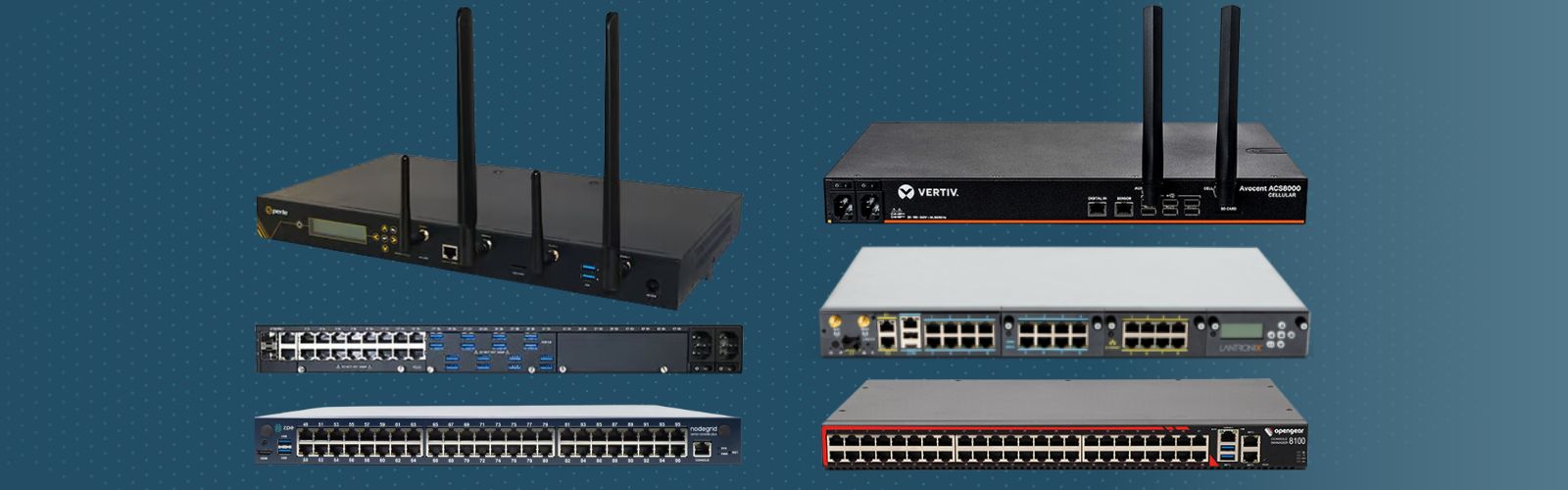
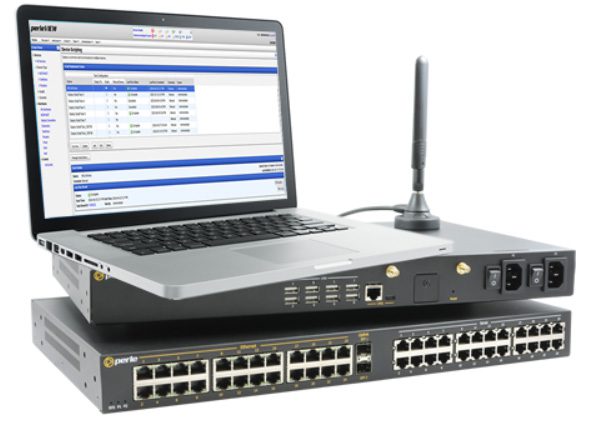
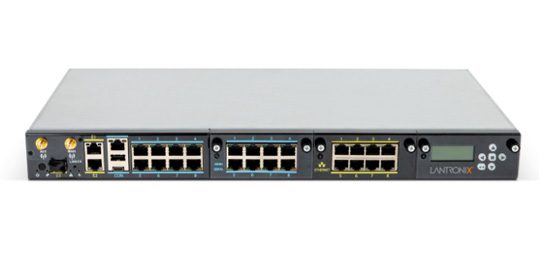
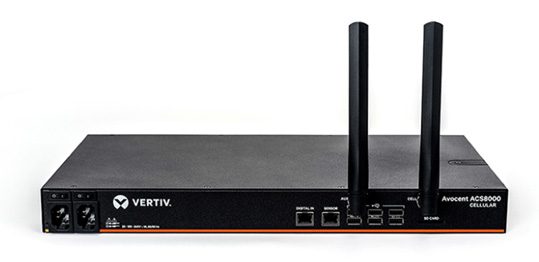
Photos of the best serial consoles for Linux

The serial console port on a Linux device allows administrators to manage the machine via the command line interface (CLI), without a keyboard, mouse, or monitor attached. Serial console management is useful for performing administrative tasks on headless Linux servers (meaning, those without ports for a keyboard or monitor) and embedded Linux systems like routers and storage devices.

While it’s possible to directly connect a laptop or Intel NUC jump box to the serial console port on a Linux device with a serial cable, this only allows you to manage one machine at a time, so it’s inefficient at scale. A serial console server (also known as a serial console or console server) provides multiple managed serial ports that administrators can connect to Linux machines, as well as many other devices. It unifies the management of all connected machines so administrators can control them all from one place, significantly streamlining infrastructure workflows.

Enterprise serial consoles for Linux provide additional capabilities like out-of-band (OOB) management, infrastructure automation, and embedded security. This guide compares the best solutions to help you choose the right console server for your enterprise.

Quick Links

  1. Nodegrid Serial Console
  2. Opengear CM8100
  3. Perle IOLAN SCG
  4. Lantronix LM83X
  5. Vertiv Avocent ACS8000

How to use the serial console port on a Linux device

The Linux kernel does not support serial console capabilities by default, so it must be configured to output console messages to the serial port first. This involves modifying the bootloader to specify new kernel options, formatted like so:

console=device,options

device:         tty0 for the foreground virtual console
                ttyX for any other virtual console
                ttySx for a serial port
                lp0 for the first parallel port
                ttyUSB0 for the first USB serial device

options:        depend on the driver. For the serial port this
                defines the baudrate/parity/bits/flow control of
                the port, in the format BBBBPNF, where BBBB is the
                speed, P is parity (n/o/e), N is number of bits,
                and F is flow control ('r' for RTS). Default is
                9600n8. The maximum baudrate is 115200.

Source

For more information on configuring the Linux serial console, read guides from docs.kernel.org, RedHat, or Ubuntu.

Comparing the best serial consoles for Linux

  ZPE Nodegrid Opengear CM8100 Perle IOLAN SCG LWM Lantronix LM83X Vertiv Avocent ACS8000
Cellular OOB
ZTP for End Devices
Guest OS
3rd Party Automation
Embedded Firewall
3rd Party Security


All of these solutions provide remote out-of-band management and consolidated control for Linux infrastructure. They also offer automation capabilities via zero-touch provisioning (ZTP), automatically deploying configurations over the network as soon as new devices come online. Some important differentiating features include cellular capabilities for OOB and failover, advanced security features like an embedded firewall and VPN support, and the ability to host and integrate third-party automation tools.

1. Nodegrid Serial Console

Nodegrid is a family of serial console server solutions from ZPE Systems. Nodegrid provides up to 96 managed serial ports while only taking up a single unit of rack space (Patent No. 9,905,980), significantly reducing the number of management devices needed to control large data center deployments. The Nodegrid Serial Console Plus (NSCP) comes with built-in 4G/5G LTE and Wi-Fi for failover and OOB management, while the S Series has auto-sensing serial ports for mixed legacy/modern environments. The NSCP-Core Edition is a low-cost alternative for break-fix deployments that provides Gen 3 security and OOB serial console management.

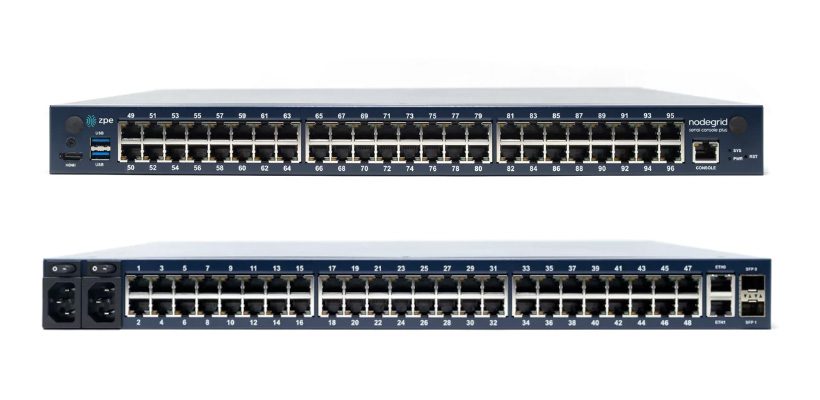
Front and back views of the Nodegrid Serial Console from ZPE Systems

The Nodegrid platform runs on the open, Linux-based Nodegrid OS and uses Intel x86 processors, allowing it to natively run VM and Docker applications for other vendors’ software. That means you can host third-party NetOps automation solutions like Ansible and Chef, and even extend that automation to legacy equipment. Nodegrid also provides device auto-discovery and ZTP.

Nodegrid serial consoles include an embedded firewall with a multi-site IPsec VPN and advanced authentication support to protect the OOB network. It also comes with unique hardware security features like geofencing, BIOS protection, and UEFI Secure Boot to prevent malicious actors from hijacking the management network with a stolen device.

Pros:

  • Up to 96 managed serial ports in a 1U appliance
  • Fast OOB with 4G/5G LTE and Wi-Fi options
  • 2 Ethernet and 2 10GB SFP+ ports (NSCP) or 2 Ethernet and 1 1GB SFP+ (NSCP-Core)
  • Intel x86 CPU and lots of RAM for 3rd-party Docker and VM apps
  • Comprehensive security including SAML 2.0
  • Supports ZTP and NetOps orchestration tools
  • Vendor-neutral infrastructure orchestration platform

Cons:

  • USB ports limited on 96-port model


Opengear CM8100

The Opengear CM8100 serial console has up to 48 ports in a 1U model or 96 ports in a 2U model. It only uses Ethernet for failover and OOB, without any options for cellular or Wi-Fi. It runs an embedded Linux operating system that is programmable and extensible with third-party integrations.

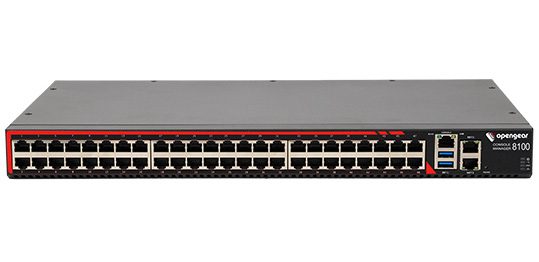
The Opengear CM8100 console server

With an upgraded “Automation” edition of its Lighthouse software, Opengear console servers gain ZTP, RESTful APIs, Docker containers, and Python scripts for infrastructure automation capabilities. The CM8100 comes with a stateful firewall that provides IP filtering and port forwarding. It supports IPsec & OpenVPN and advanced authentication, but not 2FA or SAML 2.0.

Pros:

  • Programmable and extensible
  • Gateway router features
  • Stateful firewall
  • 2 Ethernet ports (16 & 32 port models) or 2 Ethernet or 2 SFP+ (48 & 96 port models)

Cons:

  • Automation and ZTP require software upgrade
  • No support for 2FA or SAML 2.0
  • No cellular or Wi-Fi access


Perle IOLAN SCG

The Perle IOLAN SCG serial console supports up to 48 managed serial ports. While its fixed-form-factor models only support copper Ethernet for networking and OOB, the SCG also has a modular version with options for Wi-Fi, cellular, and analog modem.

The Perle IOLAN SCG LWM modular console server

IOLAN SCG console servers contain an underpowered 500 MHz core 32-bit ARM processor and little storage or memory headroom for automation, though Perle’s management software can extend ZTP to end devices. The solution does include a robust embedded firewall and support for two-factor authentication.

Pros:

  • Programmable and extensible
  • Gateway router features
  • Stateful firewall

Cons:

  • Automation and ZTP require software upgrade
  • No support for 2FA or SAML 2.0
  • No cellular or Wi-Fi access


Lantronix LM83X

The Lantronix LM83X serial console is a modular solution with three expansion bays, supporting up to 104 managed serial ports. It has versatile options for 4G LTE, analog modem, fiber, DSL, or satellite for OOB and failover.

The Lantronix LM83X console server

The LM83X’s ARM CPU architecture prevents it from running VMs and Docker containers for automation or third-party software. The Lantronix Control Center software does not support any third-party integrations, though it does provide some built-in automation and playbook capabilities. The LM83X offers some advanced authentication support and IP filtering but lacks an embedded firewall or VPN.

Pros:

  • Manages up to 104 serial devices with expansion cards
  • Flexible OOB and failover options
  • Robust device monitoring tools

Cons:

  • Can’t run Guest OS or 3rd-party apps
  • No support for 3rd-party integrations
  • No embedded firewall


Vertiv Avocent ACS8000

The Vertiv Avocent ACS8000 provides up to 48 managed serial ports, with faster-than-average minimum port speeds of 1200 bps. It uses 4G LTE for OOB and failover and has an updated Linux operating system.

The Vertiv Avocent ACS8000 console server

While the ACS8000 has ZTP for end devices, its ARM architecture does not support VMs, Docker apps, or third-party automation and orchestration. The proprietary DSViewTM software offers some automation capabilities for event logging and notifications but is not extensible with third-party integrations. The ACS8000 has an embedded firewall and IPSec VPN support, but lacks advanced authentication features.

Pros:

  • Fast minimum port speeds
  • 4G cellular for OOB and failover
  • Environmental sensor port

Cons:

  • No support for Docker or third-party orchestration
  • Software is not extensible
  • Lacks advanced authentication features


How to choose the best serial console for your Linux environment

These solutions all provide remote out-of-band management and consolidated infrastructure control for Linux devices. However, Nodegrid goes above and beyond by offering a truly vendor-neutral platform that supports third-party integrations and direct hosting of other vendors’ automation and orchestration software. Plus, only Nodegrid secures the automated control plane with robust on-board hardware security protection and a full suite of firewall, encryption, and authentication features like 2FA and SAML.

Ready to replace your outdated console servers?

We know that replacing outdated, EOL devices takes a lot of effort. That’s why ZPE now offers a complete package of budget-friendly products and engineering services to help. Click here to see how we make it easy to upgrade to the best serial console for Linux.


Which Nodegrid serial console is right for you?

  NSCP S Series NSCP-CE NSR
Use Cases Hyperscale data centers and cloud service providers Mixed legacy, modern, and multi-vendor environments Break-fix solution for data centers, colocations, and branches Modular and adaptable to any use case
Serial 16 / 32 / 48 / 96 16 / 32 / 48 16 / 32 / 48 16 / 32 / 48 / 64 / 80
Network 2 SFP+ & 2 ETH 2 SFP+ or 2 ETH 2 SFP & 2 ETH 2 SFP+ & 2 ETH
CPU Intel x86_64 quad core Intel x86_64 dual core Intel x86_64 dual core Intel x86_64 quad core or 8-core
Guest OS 1 1 0 1-6
Docker Apps 1-2 1-2 0 1-4
Storage 32GB SSD 32GB SSD 16GB SSD 32GB – 128GB
RAM 4GB DDR4 4GB DDR3 4GB DDR4 8GB DDR4
Wi-Fi Optional Optional Optional Optional
Cellular Optional Optional Optional Optional
Power

Single or Dual AC

Dual DC

Single or Dual AC

Dual DC

Dual AC

Dual DC

Single or Dual AC

Dual DC

Data Sheet Download Download Download Download


To learn more about Nodegrid serial consoles for Linux

contact ZPE Systemswatch a demo

3 Reasons to Use Starlink for Out-of-Band (and How to Set it Up)

ZPE Systems and Starlink setup guide

Most organizations rely on critical IT in order to serve their essential business functions. A reliable method to maintain critical IT is to use dedicated out-of-band (OOB) management networks, which traditionally have relied on plain old telephone service (POTS) lines or dedicated telephony circuits for remote access. However, these traditional links come with high costs, lots of complexity, and slow performance, which make them difficult to deploy and maintain.

Enter Starlink, a satellite-based Internet service that offers a cost-effective and scalable alternative for out-of-band remote access. This post discusses how Starlink solves these common problems and gives you a free guide that walks you through the setup process.


Problem: POTS and Telephony Lines Are Expensive

For decades, IT professionals have relied on POTS and telephony lines for OOB management, mainly because these lines remain operational even when the primary data network goes down. A major problem is that POTS lines are increasingly expensive to install and maintain, particularly in remote or rural areas. Additionally, 4G/5G LTE options aren’t always available due to coverage limitations or large enough data plans. The shift towards VoIP (Voice over IP) and digital communications has made POTS lines even less relevant, with many service providers phasing out support. This leaves businesses with fewer options and higher costs for maintaining these legacy systems.

Solution: Starlink is Cost-Effective

Starlink offers a much more cost-effective solution. You can use off-the-shelf routers to set up an OOB management network for a fraction of the cost of traditional methods. Starlink also has a relatively low monthly subscription fee and straightforward pricing model, which make it easy to budget and plan IT expenditures. If components fail or break, you can typically repair or replace them yourself to get back up and running quickly.

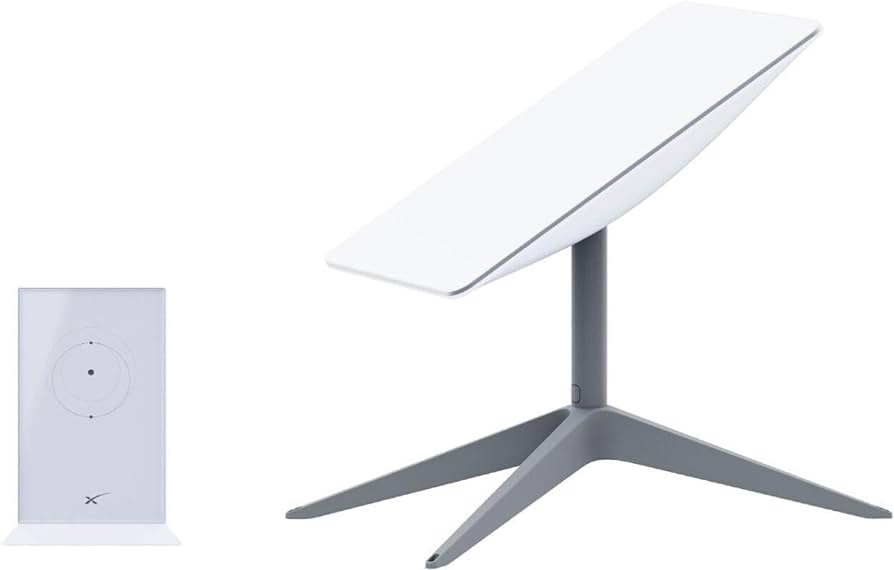
An image of a Starlink dish

Figure 1: Starlink requires only a dish, router, and few other components, making it a cost-effective alternative to expensive POTS lines.

Problem: Traditional Lines Are Difficult To Scale

Traditional POTS-based systems are notoriously difficult to scale, often requiring significant infrastructure investments and complex configurations. Copper wiring is expensive to install and maintain, and as more connections come online, switching systems must be upgraded. On top of this, POTS lines are being phased out, which means there are fewer resources being devoted to scaling and maintaining them.

Solution: Starlink is Simple to Set Up and Scale

Starlink entirely eliminates the need for telephony lines, and is a simple and scalable solution for OOB remote access. You can find the full list of components in our setup guide below, but with a Starlink terminal, compatible router, and minimal configuration, you can scale your OOB network wherever you have Starlink coverage. This ease-of-use extends to day-to-day management as well. Starlink’s satellite service offers global coverage, meaning you can manage your network devices, servers, and other critical infrastructure from virtually anywhere in the world.

The setup process for Starlink includes simple instructions that you can follow on your smartphone

Figure 2: Starlink comes with a straightforward out-of-box experience and step-by-step instructions. You can set up an out-of-band network in about one hour.

Problem: POTS Lines Lack Performance

POTS is designed primarily for voice communication and offers extremely limited bandwidth. It can’t support modern data services (such as video or high-speed internet) efficiently. As out-of-band management advances with data and video monitoring capabilities (such as AI computer vision), POTS infrastructure just doesn’t have the bandwidth to keep up.

Solution: Starlink Meets Modern Performance Requirements

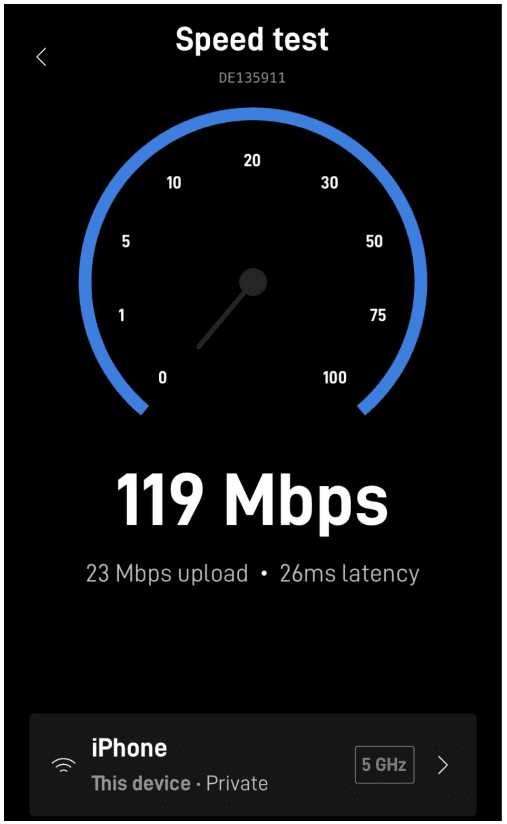
Starlink provides high-speed internet, at speeds that typically range from 50 to 200Mbps. The connection handles much larger volumes of data than POTS lines are capable of, and Starlink’s low-Earth orbit satellites reduce latency to as low at 25ms compared to the typical 150ms of POTS lines. Out-of-band using Starlink means that IT teams can manage more systems and data, and have a more responsive experience, whether they’re managing edge routers across their bank branches or monitoring the cooling systems in their distributed colocations.

Image of the Starlink speed test performed on a smartphone

Figure 3: Starlink provides high-speed connectivity, with speeds ranging from 50 to 200Mbps.

Get Started With Starlink Using Our Setup Guide

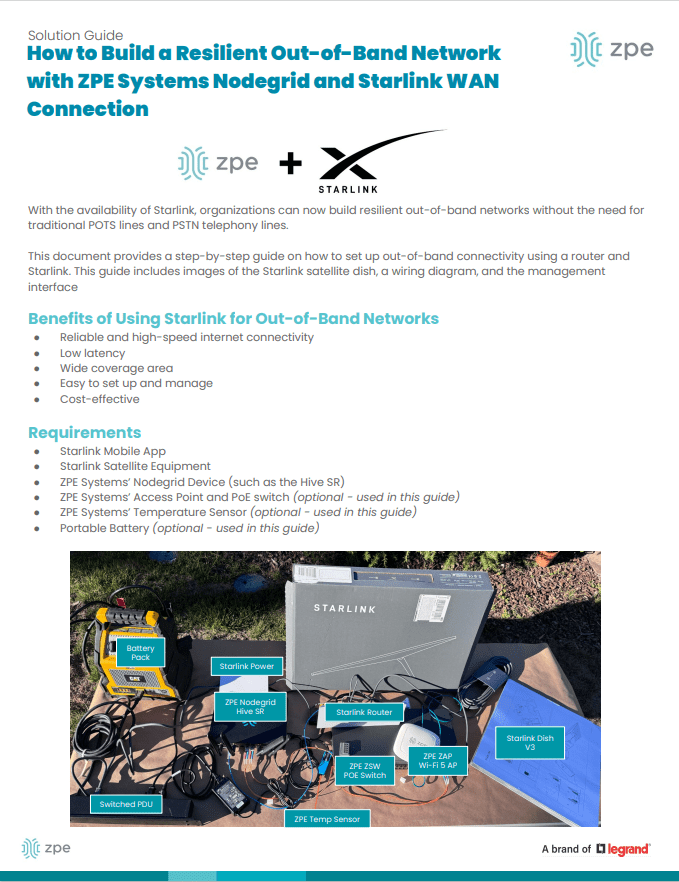
We created this step-by-step walkthrough that shows how to set up Starlink for out-of-band. It instructs how to connect the components according to a wiring diagram, configure your ZPE Nodegrid hardware, and test your connection performance using free tools. Read it now using the button below.

Get Starlink Setup Guide

Starlink setup guide