Providing Out-of-Band Connectivity to Mission-Critical IT Resources

What Is Hybrid Cloud Infrastructure: Expectations vs. Reality
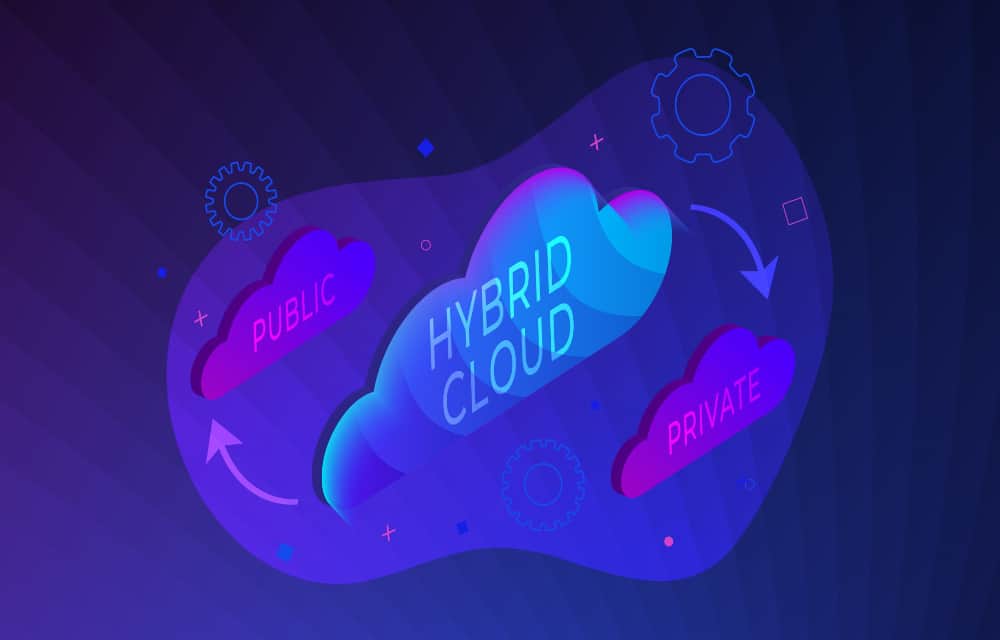
what is hybrid cloud infrastructure

Hybrid cloud deployments allow you to combine the best features of public cloud, private cloud, and on-premises infrastructure. But what exactly goes into hybrid cloud infrastructure, and how is it achieved? In this blog, we’ll compare the expectations of a hybrid cloud to the realities of implementation and provide advice on overcoming these challenges.

What is hybrid cloud infrastructure?

Hybrid cloud infrastructure involves using a combination of public cloud, private cloud, and on-premises data center environments. True hybrid cloud architecture allows you to move workloads back and forth among these environments safely and securely.

  • A public cloud is what most people think of when they hear cloud computing. Public cloud services are decoupled from the underlying infrastructure and delivered as a web-based application or platform. The actual compute resources are shared amongst many other customers. Examples of a public cloud include Microsoft 365 and Google Apps.
  • Private cloud infrastructure is owned and managed by a third-party provider, but other customers do not share the hardware you use. You rent dedicated storage and compute resources, but have no physical access to or control over the infrastructure. Examples of a private cloud include Microsoft Azure and Amazon Virtual Private Cloud (VPC).
  • An on-premises data center is a data center that your organization has complete control over. It may or may not be on the same premises as your headquarters office. Not all hybrid cloud infrastructures include on-premises environments—only public and private clouds are required.

The public cloud offers many benefits for enterprises, such as scalability and cost savings. However, organizations frequently need greater control over certain data and resources. For example, any company working with healthcare information, or providing services to the federal government, must follow strict privacy and security regulations. That’s why many organizations opt to keep some of their resources in on-premises data centers or private clouds.

That said, keeping these resources isolated from your public cloud services, applications, and data is not always feasible. There’s a need for interoperability and orchestration of workloads among mixed architectures. In a hybrid cloud infrastructure, there is a virtual service that acts as a managed “bridge” between different environments. This allows you to move workloads, applications, data, and other resources around as needed to ensure peak performance without compromising security.

Hybrid cloud infrastructure: expectations vs. reality

The expectation for hybrid cloud infrastructure is that all of your systems, services, and applications will work together seamlessly. Your data and other resources will be portable, so you can move them from one cloud to another without compatibility issues or other headaches. Most importantly, you’ll have a centralized, web-based platform to orchestrate workloads across your heterogenous environment. The reality of hybrid cloud, however, is often much more complicated.

Vendor lock-in

One major hurdle to implementing a hybrid network environment is closed ecosystems. Vendor lock-in can prevent your legacy on-premises solutions from interoperating with cloud hardware and software, and vice-versa. Data and applications designed for traditional infrastructure may be incompatible with cloud platforms. And not only do these systems all need to communicate and work together, but you also need an orchestration platform that can dig its hooks into disparate vendor solutions and control them equally.

Issues with vendor interoperability could force you to rebuild your entire stack just to enable hybrid orchestration. To get around this expensive and time-consuming challenge, you need a hybrid cloud infrastructure orchestration platform that’s based on an open architecture for true vendor neutrality. This will allow you to manage workloads across cloud and legacy environments without replacing the systems and software already in place.

Infrastructure complexity

Hybrid cloud infrastructure reduces the number of physical servers and storage devices you’re responsible for, so you might assume this will reduce the complexity of your network operations. This isn’t necessarily the case. The virtual and physical hardware responsibility is shifted to the cloud vendor, but your team will still need to know how to configure, monitor, and maintain all your cloud services.

In a hybrid cloud infrastructure, there are often many different platforms from different vendors. That means you need people who are experts in all these systems. Plus, you’ll also need a more complex network architecture to support a seamless hybrid cloud environment. That often means purchasing more boxes from more vendors, which your team must also learn to configure and maintain.

One way to reduce the complexity of your hybrid cloud infrastructure is by consolidating your networking stack. For example, you can use high-density serial console switches that provide out-of-band (OOB) management interfaces, network failover, environmental monitoring, and network switching. Similarly, you can look for modular, multi-function devices that allow you to create a custom box that includes all the specific hardware and functionality you need.This will reduce the number of devices in your rack and provide administrators with a single platform to manage all this functionality.

Spiraling costs

Cloud services are often less expensive to deploy and scale than on-premises infrastructure. Instead of a large up-front cost to purchase and install new hardware solutions, you typically pay a smaller recurring fee. When you need more resources, you simply upgrade your services for additional cost without needing to buy and configure more hardware.

The issue is that these recurring fees can begin to snowball over time, especially if you keep increasing your contract. Many cloud services often come in bundles or packages, meaning you can’t just pick and choose the functionality you need a la carte. So, you could end up paying for features you don’t even need.

Plus, you’ll incur additional costs if you need to rebuild part or all of your on-premises stack to enable hybrid cloud orchestration. The same goes for the networking technology that’s required for hybrid integrations. These expenses can be reduced by following the advice above—using a completely vendor-neutral hybrid cloud orchestration platform. Plus, consolidating and streamlining your infrastructure in as many ways as possible, such as with the hardware itself, but also with the software and management layers. For example, an OS allows you to easily/seamlessly integrate many different solutions, and a management platform allows you to manage everything from a normalized UI—rather than having to spend money on many different specialists.

Implementing a hybrid cloud infrastructure is often more challenging than organizations expect. However, by using vendor-neutral solutions and consolidating your tech stack, you can avoid vendor lock-in, reduce the complexity of your infrastructure, and keep costs in check.

Ready to simplify hybrid cloud infrastructure?

The Nodegrid infrastructure management solution from ZPE Systems enables true hybrid cloud orchestration. Nodegrid’s open architecture and vendor-neutral hardware can get its hooks into all your legacy, on-premises, and cloud solutions, so you have total control over your hybrid environment. With the ZPE Cloud management platform, you can monitor and orchestrate your entire infrastructure from behind one pane of glass.

Plus, Nodegrid’s consolidated networking hardware can help you reduce the complexity of your tech stack while still delivering all the features and functionality you need. Some of the world’s biggest tech companies are benefiting from this, by using Nodegrid to deploy and manage their hybrid infrastructures.

What is hybrid cloud infrastructure, and how can Nodegrid help you achieve it? 

Contact ZPE Systems to learn more.
Contact Us
Why You Need to Adopt Edge Networking

What does edge networking mean to your enterprise? Does it mean fast service delivery to hundreds of remote locations? Or smooth networking & security for your work-from-home staff?

When your organization uses strong edge networking capabilities, you can adapt well into the future no matter how much you need to scale. This allows you to save time & money, allocate resources efficiently, and provide reliable connectivity across your enterprise.

Click the link below to hear John Paul Kang, one of ZPE Systems’ Solutions Architects, discussing edge networking and the benefits it brings to business.

Edge Networking Podcast-1 400×250

If you’re short on time, read this post for a glimpse of what’s in the podcast.

What exactly is edge networking?

Edge networking is how distributed locations connect back to an enterprise’s main systems.

Traditional enterprise network setups employ a main data center, which is at the core of the network, and then distributed locations, which are at the edge. Edge networking refers to the systems and infrastructure that connect these edge locations back to the core.

If you think about a centralized network, the edge is what is located at the fringe or periphery.

Is edge networking different from edge computing?

Absolutely.

Again, looking at a traditional, centralized enterprise network, you can see that all of the computing and storage happens at the core. This core is what processes all of the information, including everything that comes from the enterprise’s edge networks.

Edge computing, however, is essentially distributing some of the core’s processes to the edge, in order to alleviate the core’s workload. Instead of having all computing workloads, application services, and data storage take place at the core, these processes (or parts of them) are handled near the edge. Once the edge computing systems process the information, it’s then the job of edge networking to transfer the information back to the core (if necessary).


Use edge networking & computing to overcome challenges

Edge networking brings a lot of benefits to the business, and it’s easy to understand why organizations are evolving their edge capabilities. The easiest way to realize its advantages is by comparing it to the conventional methods of centralized networking.

In traditional network configurations, you put a lot of strain on your core systems. This is because you have to backhaul all of your edge traffic to the core for processing. The results? Bottlenecking, slowdowns, and increased risk of bringing your network (and business) to a standstill.

Just imagine you and some friends using a funnel to fill a bucket with marbles. To represent traditional networking, all of you would essentially put your marbles into the same funnel. This would lead to plenty of waiting and likely cause a jam or stoppage, which would require you to manually troubleshoot and fix.

But with better edge networking, you can decentralize and redistribute your workload. Using this cloud-based model, you no longer need to backhaul traffic or bog down your core systems. You can move your critical networking and security functions to the edge. Paired with edge computing, you get more balanced workloads and efficient bandwidth usage for faster speeds, more responsiveness, and improved performance across the board.

Back to the bucket of marbles analogy. To represent better edge networking, you would not only have a single funnel at the core, but also individual funnels around the periphery. Instead of dumping all the marbles into the center, you would be able to take advantage of the outer funnels to achieve a more efficient system free of frequent stoppages.

Having better edge networking capabilities means you can overcome a lot of the challenges of a centralized system.

Edge networking comes with some obstacles

Implementing more robust edge networking isn’t without hurdles. You’ll need to face a few challenges associated with:

  • Physical distance — It can be difficult to put people and equipment on site when locations are isolated. This becomes increasingly challenging when you have very remote branches.
  • Staff limitations — Response times can drag on for days or weeks depending on the staff (or lack thereof) you have. You may have very few skilled IT team members on site, or even none at all.
  • Accessibility & downtime — Edge networks can be incredibly difficult to access, which means downtime comes with more risk and potentially severe consequences.

Get over these obstacles using new technologies

To improve your edge networking capabilities and get past the inherent challenges, use some of the latest and most innovative technologies:

  • Secure Access Service Edge — SASE puts networking and security in the cloud, so you can give your workers reliable network access even from thousands of miles away.
  • Zero touch provisioning — Use this in conjunction with the cloud, and you can significantly decrease the need for any staff presence at your remote sites. Zero touch provisioning uses automation to help scale and provision without manual input, and with the cloud, you can respond instantly to troubleshoot issues, perform configuration management tasks, provision, and more — no matter how far away you are from the site.
  • Remote out-of-band — If you deploy a comprehensive out-of-band management solution, you get peace of mind knowing that you can access your sites with ease. Use a solution that lets you achieve redundancy through connections like broadband, cellular, satellite, and others, and that also gives you in-depth control of your branch networks.

Want to learn more about the edge? Browse our blog
Take a look at some of our other posts to learn more about edge networking. Get a closer look at SASE, zero touch provisioning, and remote out-of-band, and see how you can strengthen your edge capabilities.

Optimize Edge Networking With This Free Guide to Out-of-Band, SD-Branch, & More

GG2 – branch and edge networking

Edge networking continues to grow as a vital component to business. With more people working remotely, whether from home, in the field, or on the road, it’s now critical to have a network that goes wherever your people go. And achieving that kind of connectivity is becoming easier by the day, as companies like ZPE Systems carry on innovating new technologies to accommodate secure, on-the-go networking.

Traditional network architectures are becoming obsolete, simply because they can’t offer flexibility at the edge. Their rigid systems and protocols restrict both IT and non-IT staff from accessing the resources they need, when they need them. This has only spurred the evolution of better edge networking, and now many companies operate remotely 100-percent of the time.

Even if your goal isn’t to fully migrate your workforce out of the office, you can reap major benefits from strengthening your edge networking capabilities. That’s why you need to get our free Gorilla Guide to Deploying, Maintaining, and Maximizing Branch & Edge Networking. Keep reading to learn more.

What are some crucial edge networking capabilities & their benefits?

Think of a few ideal capabilities you’d like your business network to have.

  • Do you want to give full remote access to IT and network staff?
  • Do you want to gain in-depth visibility & control of branch networks?
  • Do you want to deliver safe, reliable connectivity where your workers go?
The good news is, you can get all these and more when you use an open, cloud-enabled edge networking platform like Nodegrid. Here’s how you can benefit:

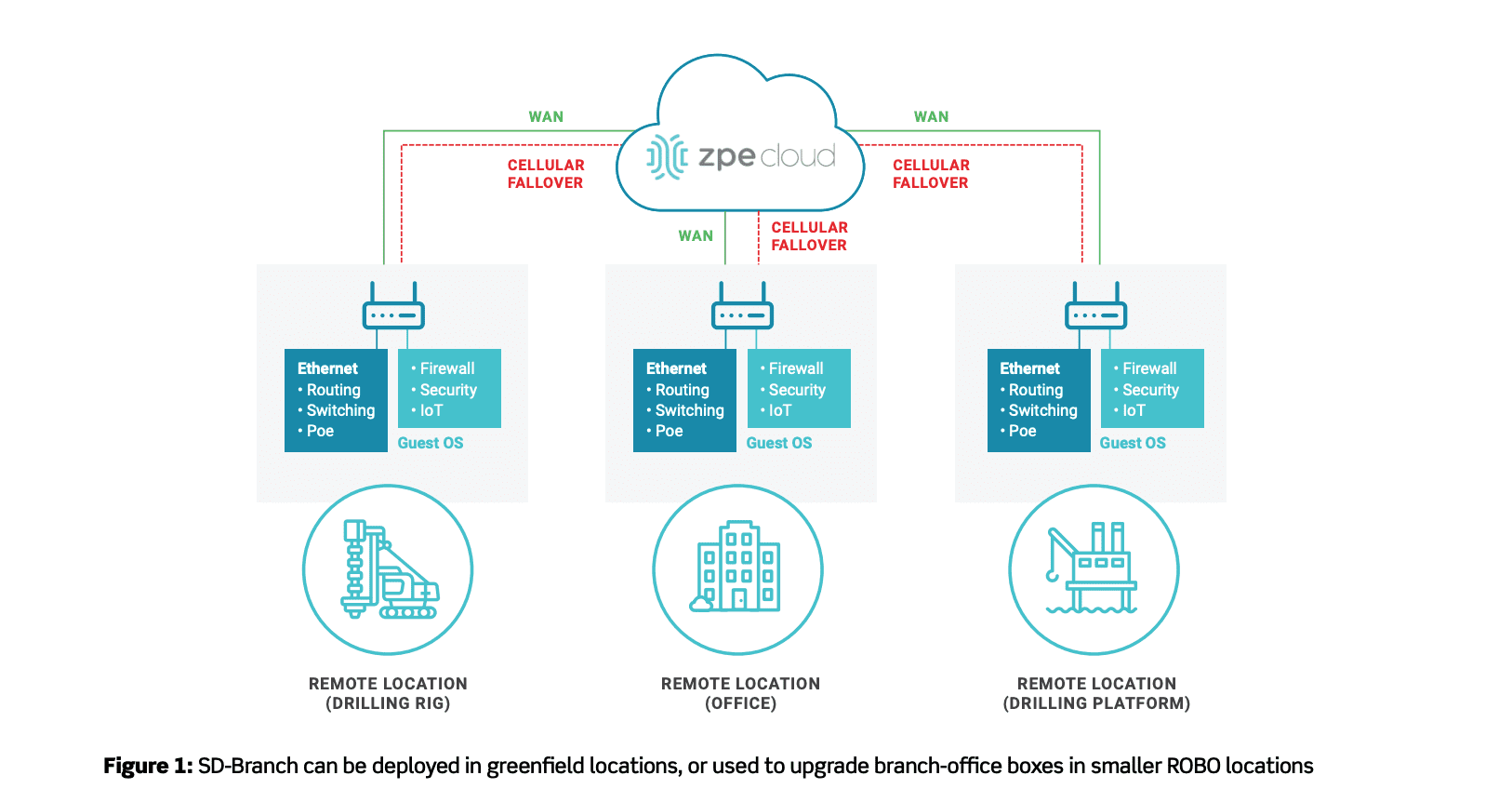
  • You can make easy work of every deployment thanks to cloud-based provisioning. If you need to set up a new branch network, even at a very isolated location such as an offshore drilling platform, the cloud gives you push-button simplicity. You don’t have to preconfigure devices or put staff on-site to manually provision the stack. You can ship boxes that are 100% unconfigured, which gives you complete security, and then simply boot your devices. The cloud does everything for you using zero touch provisioning, so you can sit back and watch your network build itself.
  • You don’t have to put IT staff on-site in order to troubleshoot network issues, fix configuration errors, and restore uptime. You can take advantage of remote out-of-band management and cloud-based provisioning. These allow you to fulfill all of your network administration duties from afar. When a router goes offline or a software version needs to be rolled back, you can respond quickly and remediate the problem — even from thousands of miles away. These technologies work together so you can maintain branch networks without breaking a sweat.
  • You can optimize your branch networks by taking advantage of software-defined branch (SD-Branch) capabilities. Traditionally, SD-WAN gives you control of only what goes to and from your branch networks. But with SD-Branch, you can see and control WANs and LANs, with comprehensive capabilities that let you access what goes on inside each location. SD-Branch lets you manage at a granular level. Not only can you adjust traffic priorities and specific device settings, but you can also manage all the clients connected to your network. This means that you don’t need to dispatch support teams for troubleshooting or management, so you can save time & money on operations.
  • You can deliver pick-up-and-go networking by using Secure Access Service Edge. SASE is a new model that combines networking and security in the cloud, and delivers them to users wherever they need secure network access. It’s also identity driven to provide even more flexibility. For remote and on-the-go workers, you no longer need to allocate resources to configure company laptops or other devices. Because SASE ties network access to a user’s identity, you can let them connect from anywhere using any device. With SASE, business can continue seamlessly no matter what change you need to adapt to.

Why download our free guide?

For details about how you can improve your edge networking abilities, get our free Gorilla Guide to Deploying, Maintaining, and Maximizing Branch & Edge Networking. It shows you:

  • Why you need cloud provisioning — Discover how a cloud-based approach to provisioning gives you valuable benefits, such as hardened security and effortless deployments.
  • How the cloud makes out-of-band better — See how to easily maintain branch locations with the cloud on your side, from remote troubleshooting to configuration management.
  • Best practices for optimizing branch networks — Learn how to deploy and optimize your distributed networks, and take advantage of in-depth SD-Branch for total network control.
  • Why you need to get SASE — Explore Secure Access Service Edge and how it transforms the edge with nimble networking & security, for business that goes wherever your employees go.

It’s never been more critical to give your edge networking capabilities a boost. Now’s your chance to improve business agility with a free download, the Gorilla Guide to Deploying, Maintaining, and Maximizing Branch & Edge Networking.

SD-Branch for a Digital Security Leader

SD-Branch delivers some major advantages over traditional SD-WAN capabilities. Where typical software-defined approaches fall short at the branch level, SD-Branch picks up the slack to help you see and do much more.

In case you need to catch up, here’s a 90-second video showing some ways you can benefit from using SD-Branch.

If you’re super short on time, the advantages boil down like this:

  • SD-Branch lets you see inside your branch locations, by combining SD-WAN, routing, security, and all your network functions
  • You can see & control on a granular level, including activity for IoT devices, cameras, laptops, & all clients on your branch networks
  • You get more operational agility with a system that centralizes your infrastructure management & lets you take control remotely

Now that you’re caught up, you might be wondering…

How does Nodegrid make SD-Branch better?

Nodegrid gives you SD-Branch capabilities and a lot more. All-in-one Nodegrid devices, like the Nodegrid Services Router (NSR), reduce your stack thanks to the ability to handle many network functions in a single box. Support for automation and containerization via tools like Puppet, Ansible, Docker, and Kubernetes takes your orchestration and management capabilities to an entirely new level. It gets even better with out-of-band management that you can use even during an outage (thanks to cellular failover). Nodegrid hardware and software are vendor neutral, too, which means you can adapt your network to your changing business needs.

Sounds Pretty Awesome. But How Does it Work in the Real World?

See What SD-Branch Brings to a Leading Digital Security Company

Cellular-Failover-Diagram-628LI

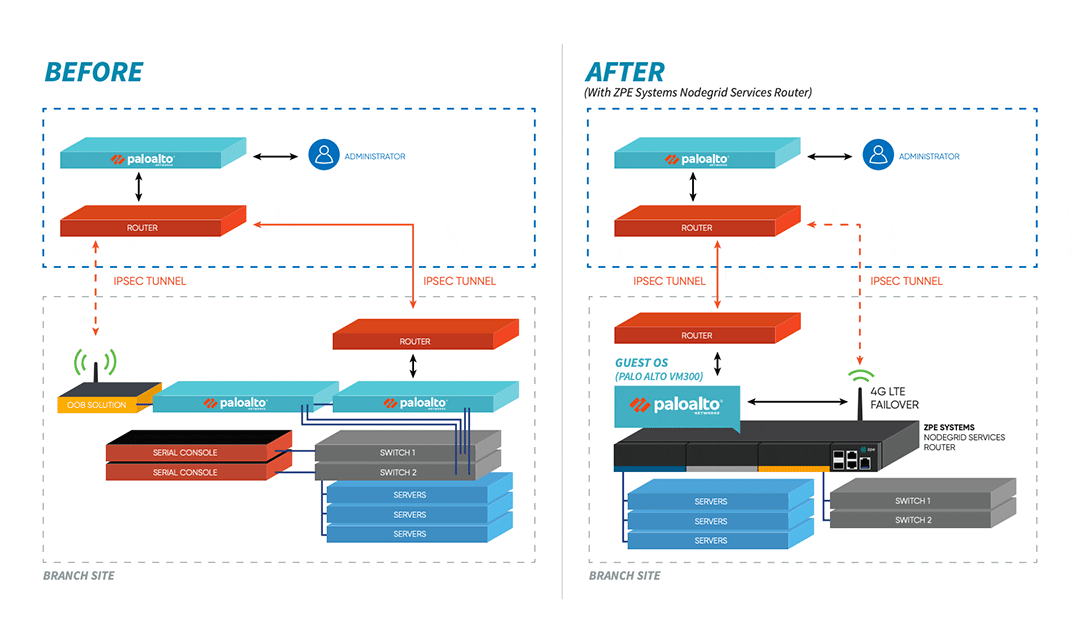
When a digital security enterprise, whose offices span the globe, needed help with their complex network infrastructure, they chose ZPE Systems’ Nodegrid. The powerful NSR solution relieved many of their branch network headaches, and even extended additional benefits to their data center operations. Their large, cumbersome stacks were replaced by a streamlined, all-in-one solution that made management easy, provided reliable backup via cellular, and leveraged the world-class security of Palo Alto Networks’ next-gen firewalls. Ready for the details?

Case Study: SD-Branch for a Digital Security Leader

SD-Branch delivers some major advantages over traditional SD-WAN capabilities. Where typical software-defined approaches fall short at the branch level, SD-Branch picks up the slack to help you see and do much more.

In case you need to catch up, here’s a 90-second video showing some ways you can benefit from using SD-Branch.

If you’re super short on time, the advantages boil down like this:

  • SD-Branch lets you see inside your branch locations, by combining SD-WAN, routing, security, and all your network functions
  • You can see & control on a granular level, including activity for IoT devices, cameras, laptops, & all clients on your branch networks
  • You get more operational agility with a system that centralizes your infrastructure management & lets you take control remotely

Now that you’re caught up, you might be wondering…

How does Nodegrid make SD-Branch better?

Nodegrid gives you SD-Branch capabilities and a lot more. All-in-one Nodegrid devices, like the Nodegrid Services Router (NSR), reduce your stack thanks to the ability to handle many network functions in a single box. Support for automation and containerization via tools like Puppet, Ansible, Docker, and Kubernetes takes your orchestration and management capabilities to an entirely new level. It gets even better with out-of-band management that you can use even during an outage (thanks to cellular failover). Nodegrid hardware and software are vendor neutral, too, which means you can adapt your network to your changing business needs.

Sounds Pretty Awesome. But How Does it Work in the Real World?

See What SD-Branch Brings to a Leading Digital Security Company

Cellular-Failover-Diagram

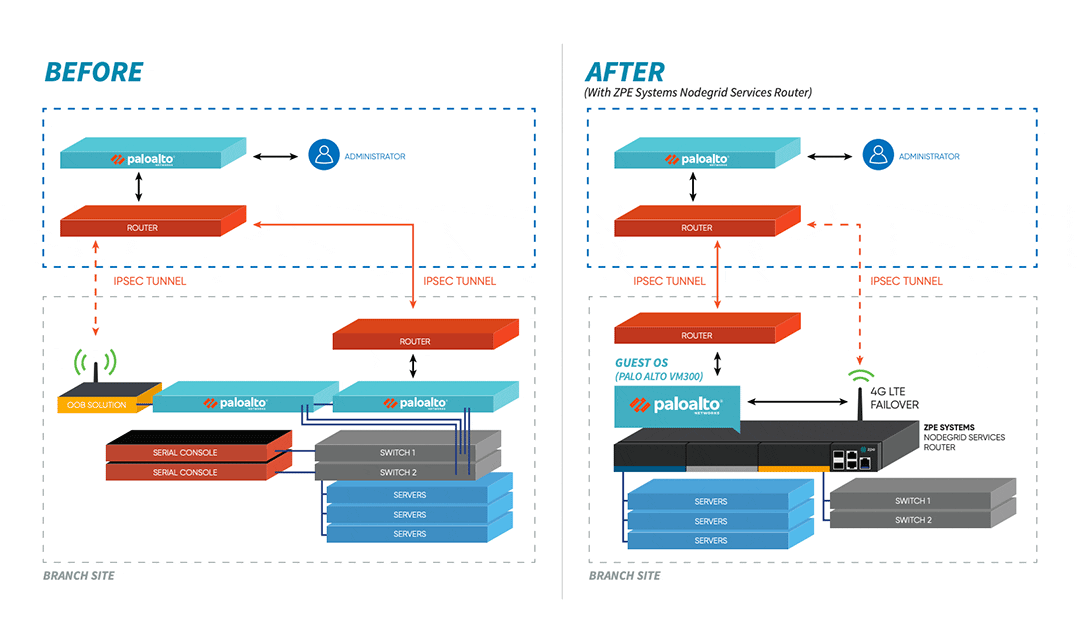
When a digital security enterprise, whose offices span the globe, needed help with their complex network infrastructure, they chose ZPE Systems’ Nodegrid. The powerful NSR solution relieved many of their branch network headaches, and even extended additional benefits to their data center operations. Their large, cumbersome stacks were replaced by a streamlined, all-in-one solution that made management easy, provided reliable backup via cellular, and leveraged the world-class security of Palo Alto Networks’ next-gen firewalls. Ready for the details?

Download the Case Study

Secure Access Service Edge: What It Is, Why It Matters

Secure Access Service Edge (SASE): It’s one of those new-ish IT acronyms that many folks have heard about, but far fewer have actually used or really even understand it. But if you have remote and branch office (ROBO) infrastructure as part of your operations, you will need to know about it—and sooner rather than later.

 As its name implies, it helps secure your network edge. But SASE provides much more than secure connectivity and remote access—it also provides add-ons to edge devices that can bring hyper converged infrastructure (HCI) capabilities to branch offices. 

Edge computing lifts the lid on local computing capabilities, and can support local data acquisition, filtering, and clean-up before sending data into the cloud or data center location for further aggregation and analysis. This is particularly useful for locations where large volumes of data may be collected at the edge.


Cloud Safety

SASE provides networking and security to ROBO locations via the cloud. SASE is identity-driven and supports all edge locations. Users can identify themselves at the edge, and establish proper credentials and access controls before they access WAN or Internet connections. This helps give users safe, reliable access to the organization’s network no matter where they might be located.

Tech Brief 8 SASE + OOBM

SASE also addresses important needs for more secure, flexible connectivity in the field. Traditional networking is neither designed nor built to accommodate a widely distributed staff base. Nor is it well-adapted to cope with a plethora of BYOD devices (personal computers, laptops, notebooks, tablets, and smartphones), any or all of which may be used to access corporate resources such as email, collaboration tools, tele- or video-conferencing, and so forth. Too often, this puts remote workers at a disadvantage, encumbered with slow, restricted network access with less-than-industrial strength security.

 Without SASE, organizations must backhaul traffic through their main network’s firewall. This creates a bottleneck that bogs down productivity with reduced speeds, frequent delays, and occasional interruptions of service. Remote connections may be more open to threats, owing to thinner, less comprehensive security measures.

 Simply put, legacy solutions limit networks to specific locations and devices. Until recently, adding agility or extra capability meant adding to an already complex stack of applications and devices. In stark contrast, SASE beats legacy solutions because it lets employees connect from anywhere. It also protects those employees (and your organization) through its robust security capabilities delivered via the cloud.


 Location Freedom

Instead of forcing staff to expend extra effort to work remotely, SASE packs everything they need into the cloud. Because the cloud is accessible anywhere there’s an Internet link, workers need not remain tethered to a specific workstation or a custom-configured laptop. Instead, they can use any device to enjoy secure access to the physical and cloud resources that SASE provides.

Whereas remote legacy solutions require a lot of setup, such as installing proper laptop software, adjusting network settings, establishing reliable VPN links, and more, SASE lets staff authenticate locally and seamlessly pick up the software, services, and configurations they need.

SASE offers comprehensive control and flexibility through its converged software stack for everything from SD-WAN and traffic management, to firewall and security. It also eliminates any need for discrete or loosely coupled point solutions that take extra time and money to learn, buy, and maintain.

Instead, SASE lets organizations control all networking and security functions through a single, consistent console. Also, access is no longer bound to specific locations, so IT staff can manage the entire network from wherever they happen to be—even across the globe.


SASE Flexibility and Power

Not all SASE solutions are created equal, so exercise care when researching vendors. ZPE Nodegrid supports a comprehensive SASE platform you can deploy to the network edge, for more flexibility and edge computing power. Nodegrid’s patented 64-bit architecture supports guest OS runtime environments. In turn, those guest OSes support virtualized applications, so organizations can deploy them directly on Nodegrid SR devices.

Thus, organizations can craft and tailor network security solutions by deploying WAN accelerators (which have both central office and branch office components), additional firewalls, anti-malware and content filtering solutions, and more. In addition, Nodegrid’s modularity means that organizations can customize solutions for specific branch or remote office requirements with very little added effort and expense.


Nodegrid: Your Ready-to-Run SASE Platform

ZPE Nodegrid allows organizations to take advantage of flexible, secure ROBO connectivity and capability. Organizations can add applications and services to properly equipped Nodegrid SR devices in the branch to support IoT, data acquisition and analysis, local services and applications, enhanced security, and more.

Nodegrid’s built-in automation also helps to streamline deployment and scaling. This makes SASE easy to set up and use across an entire organization, including HQ, data center, and ROBO locations. With its 4G/LTE failover (5G solutions are on the way) and OOBM, organizations gain in-depth control over SD-WAN, security, and third-party applications and services. Nodegrid offers complete flexibility to your organization’s network. Learn more in our latest tech brief: Branch Out-of-Band Management is Deployed. Now what?


Download the Tech Brief