Providing Out-of-Band Connectivity to Mission-Critical IT Resources

Edge Computing Platforms: Insights from Gartner’s 2024 Market Guide

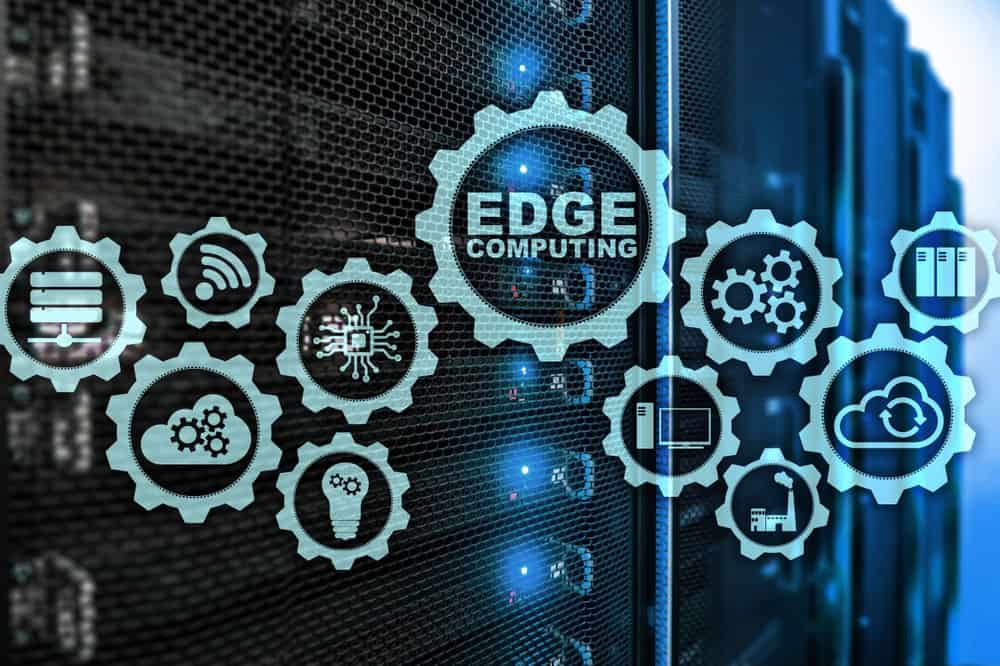
Interlocking cogwheels containing icons of various edge computing examples are displayed in front of racks of servers

Edge computing allows organizations to process data close to where it’s generated, such as in retail stores, industrial sites, and smart cities, with the goal of improving operational efficiency and reducing latency. However, edge computing requires a platform that can support the necessary software, management, and networking infrastructure. Let’s explore the 2024 Gartner Market Guide for Edge Computing, which highlights the drivers of edge computing and offers guidance for organizations considering edge strategies.

What is an Edge Computing Platform (ECP)?

Edge computing moves data processing close to where it’s generated. For bank branches, manufacturing plants, hospitals, and others, edge computing delivers benefits like reduced latency, faster response times, and lower bandwidth costs. An Edge Computing Platform (ECP) provides the foundation of infrastructure, management, and cloud integration that enable edge computing. The goal of having an ECP is to allow many edge locations to be efficiently operated and scaled with minimal, if any, human touch or physical infrastructure changes.

Before we describe ECPs in detail, it’s important to first understand why edge computing is becoming increasingly critical to IT and what challenges arise as a result.

What’s Driving Edge Computing, and What Are the Challenges?

Here are the five drivers of edge computing described in Gartner’s report, along with the challenges that arise from each:

1. Edge Diversity

Every industry has its unique edge computing requirements. For example, manufacturing often needs low-latency processing to ensure real-time control over production, while retail might focus on real-time data insights to deliver hyper-personalized customer experiences.

Challenge: Edge computing solutions are usually deployed to address an immediate need, without taking into account the potential for future changes. This makes it difficult to adapt to diverse and evolving use cases.

2. Ongoing Digital Transformation

Gartner predicts that by 2029, 30% of enterprises will rely on edge computing. Digital transformation is catalyzing its adoption, while use cases will continue to evolve based on emerging technologies and business strategies.

Challenge: This rapid transformation means environments will continue to become more complex as edge computing evolves. This complexity makes it difficult to integrate, manage, and secure the various solutions required for edge computing.

3. Data Growth

The amount of data generated at the edge is increasing exponentially due to digitalization. Initially, this data was often underutilized (referred to as the “dark edge”), but businesses are now shifting towards a more connected and intelligent edge, where data is processed and acted upon in real time.

Challenge: Enormous volumes of data make it difficult to efficiently manage data flows and support real-time processing without overwhelming the network or infrastructure.

4. Business-Led Requirements

Automation, predictive maintenance, and hyper-personalized experiences are key business drivers pushing the adoption of edge solutions across industries.

Challenge: Meeting business requirements poses challenges in terms of ensuring scalability, interoperability, and adaptability.

5. Technology Focus

Emerging technologies such as AI/ML are increasingly deployed at the edge for low-latency processing, which is particularly useful in manufacturing, defense, and other sectors that require real-time analytics and autonomous systems.

Challenge: AI and ML make it difficult for organizations to determine how to strike a balance between computing power and infrastructure costs, without sacrificing security.

What Features Do Edge Computing Platforms Need to Have?

To address these challenges, here’s a brief look at three core features that ECPs need to have according to Gartner’s Market Guide:

  1. Edge Software Infrastructure: Support for edge-native workloads and infrastructure, including containers and VMs. The platform must be secure by design.
  2. Edge Management and Orchestration: Centralized management for the full software stack, including orchestration for app onboarding, fleet deployments, data storage, and regular updates/rollbacks.
  3. Cloud Integration and Networking: Seamless connection between edge and cloud to ensure smooth data flow and scalability, with support for upstream and downstream networking.

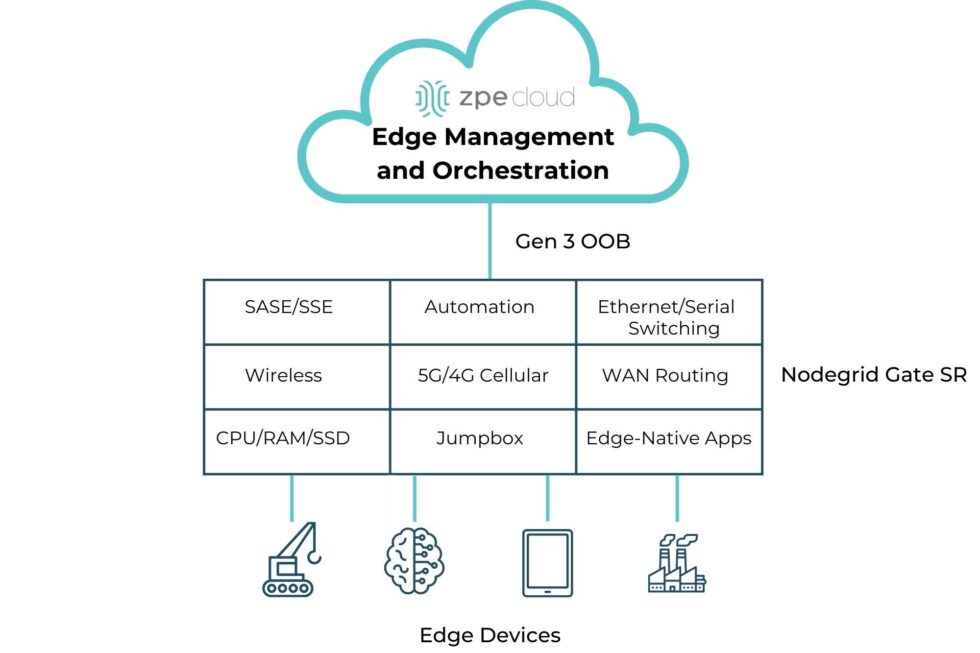
A simple diagram showing the computing and networking capabilities that can be delivered via Edge Management and Orchestration.

Image: A simple diagram showing the computing and networking capabilities that can be delivered via Edge Management and Orchestration.

  1.  

How ZPE Systems’ Nodegrid Platform Addresses Edge Computing Challenges

ZPE Systems’ Nodegrid is a Secure Service Delivery Platform that meets these needs. Nodegrid covers all three feature categories outlined in Gartner’s report, allowing organizations to host and manage edge computing via one platform. Not only is Nodegrid the industry’s most secure management infrastructure, but it also features a vendor-neutral OS, hypervisor, and multi-core Intel CPU to support necessary containers, VMs, and workloads at the edge. Nodegrid follows isolated management best practices that enable end-to-end orchestration and safe updates/rollbacks of global device fleets. Nodegrid integrates with all major cloud providers, and also features a variety of uplink types, including 5G, Starlink, and fiber, to address use cases ranging from setting up out-of-band access, to architecting Passive Optical Networking.

Here’s how Nodegrid addresses the five edge computing challenges:

1. Edge Diversity: Adapting to Industry-Specific Needs

Nodegrid is built to handle diverse requirements, with a flexible architecture that supports containerized applications and virtual machines. This architecture enables organizations to tailor the platform to their edge computing needs, whether for handling automated workflows in a factory or data-driven customer experiences in retail.

2. Ongoing Digital Transformation: Supporting Continuous Growth

Nodegrid supports ongoing digital transformation by providing zero-touch orchestration and management, allowing for remote deployment and centralized control of edge devices. This enables teams to perform initial setup of all infrastructure and services required for their edge computing use cases. Nodegrid’s remote access and automation provide a secure platform for keeping infrastructure up-to-date and optimized without the need for on-site staff. This helps organizations move much of their focus away from operations (“keeping the lights on”), and instead gives them the agility to scale their edge infrastructure to meet their business goals.

3. Data Growth: Enabling Real-Time Data Processing

Nodegrid addresses the challenge of exponential data growth by providing local processing capabilities, enabling edge devices to analyze and act on data without relying on the cloud. This not only reduces latency but also enhances decision-making in time-sensitive environments. For instance, Nodegrid can handle the high volumes of data generated by sensors and machines in a manufacturing plant, providing instant feedback for closed-loop automation and improving operational efficiency.

4. Business-Led Requirements: Tailored Solutions for Industry Demands

Nodegrid’s hardware and software are designed to be adaptable, allowing businesses to scale across different industries and use cases. In manufacturing, Nodegrid supports automated workflows and predictive maintenance, ensuring equipment operates efficiently. In retail, it powers hyperpersonalization, enabling businesses to offer tailored customer experiences through edge-driven insights. The vendor-neutral Nodegrid OS integrates with existing and new infrastructure, and the Net SR is a modular appliance that allows for hot-swapping of serial, Ethernet, computing, storage, and other capabilities. Organizations using Nodegrid can adapt to evolving use cases without having to do any heavy lifting of their infrastructure.

5. Technology Focus: Supporting Advanced AI/ML Applications

Emerging technologies such as AI/ML require robust edge platforms that can handle complex workloads with low-latency processing. Nodegrid excels in environments where real-time analytics and autonomous systems are crucial, offering high-performance infrastructure designed to support these advanced use cases. Whether processing data for AI-driven decision-making in defense or enabling real-time analytics in industrial environments, Nodegrid provides the computing power and scalability needed for AI/ML models to operate efficiently at the edge.

Read Gartner’s Market Guide for Edge Computing Platforms

As businesses continue to deploy edge computing solutions to manage increasing data, reduce latency, and drive innovation, selecting the right platform becomes critical. The 2024 Gartner Market Guide for Edge Computing Platforms provides valuable insights into the trends and challenges of edge deployments, emphasizing the need for scalability, zero-touch management, and support for evolving workloads.

Click below to download the report.

Get a Demo of Nodegrid’s Secure Service Delivery

Our engineers are ready to walk you through the software infrastructure, edge management and orchestration, and cloud integration capabilities of Nodegrid. Use the form to set up a call and get a hands-on demo of this Secure Service Delivery Platform.

Top 5 Data Center Mistakes and How To Avoid Them

Top 5 Data Center Mistakes and How To Avoid Them

Data center deployments require careful planning and execution. The sheer complexity makes it easy to stumble into common pitfalls that can compromise uptime, security, and scalability. After talking with hundreds of customers, we’ve compiled the top five data center mistakes organizations often make during deployments, with tips on how to avoid them.

1. Overlooking Isolated Management Infrastructure

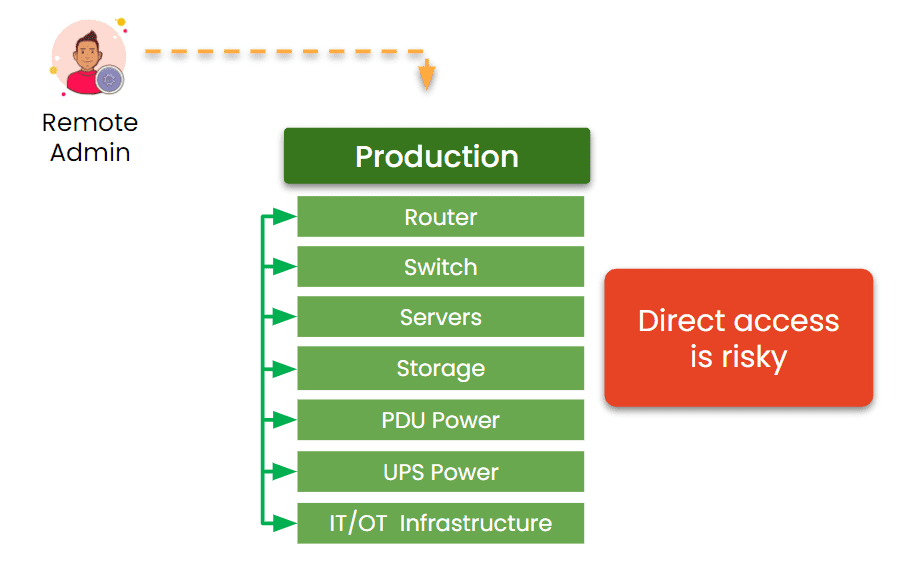
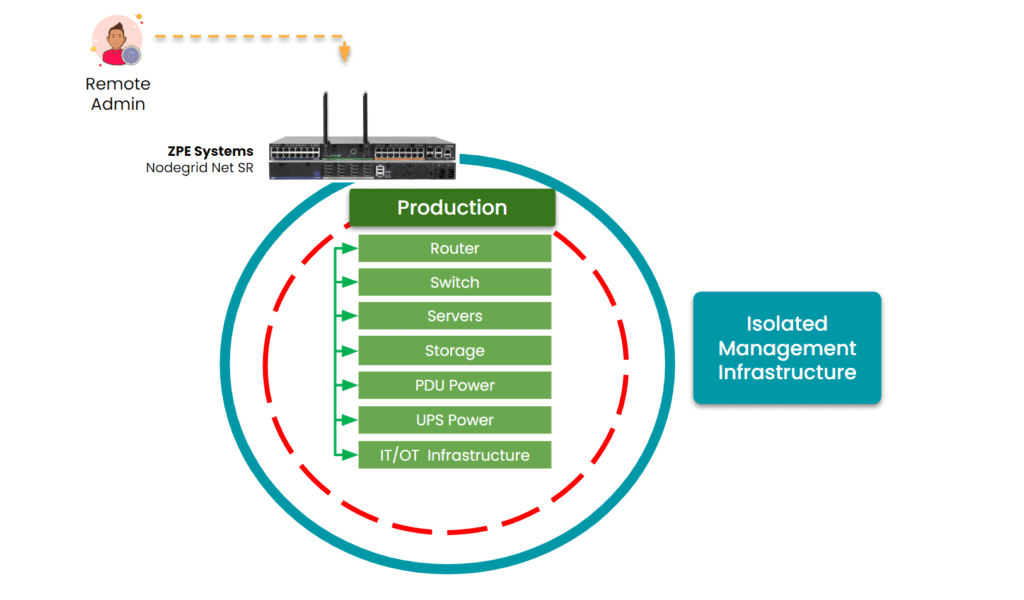
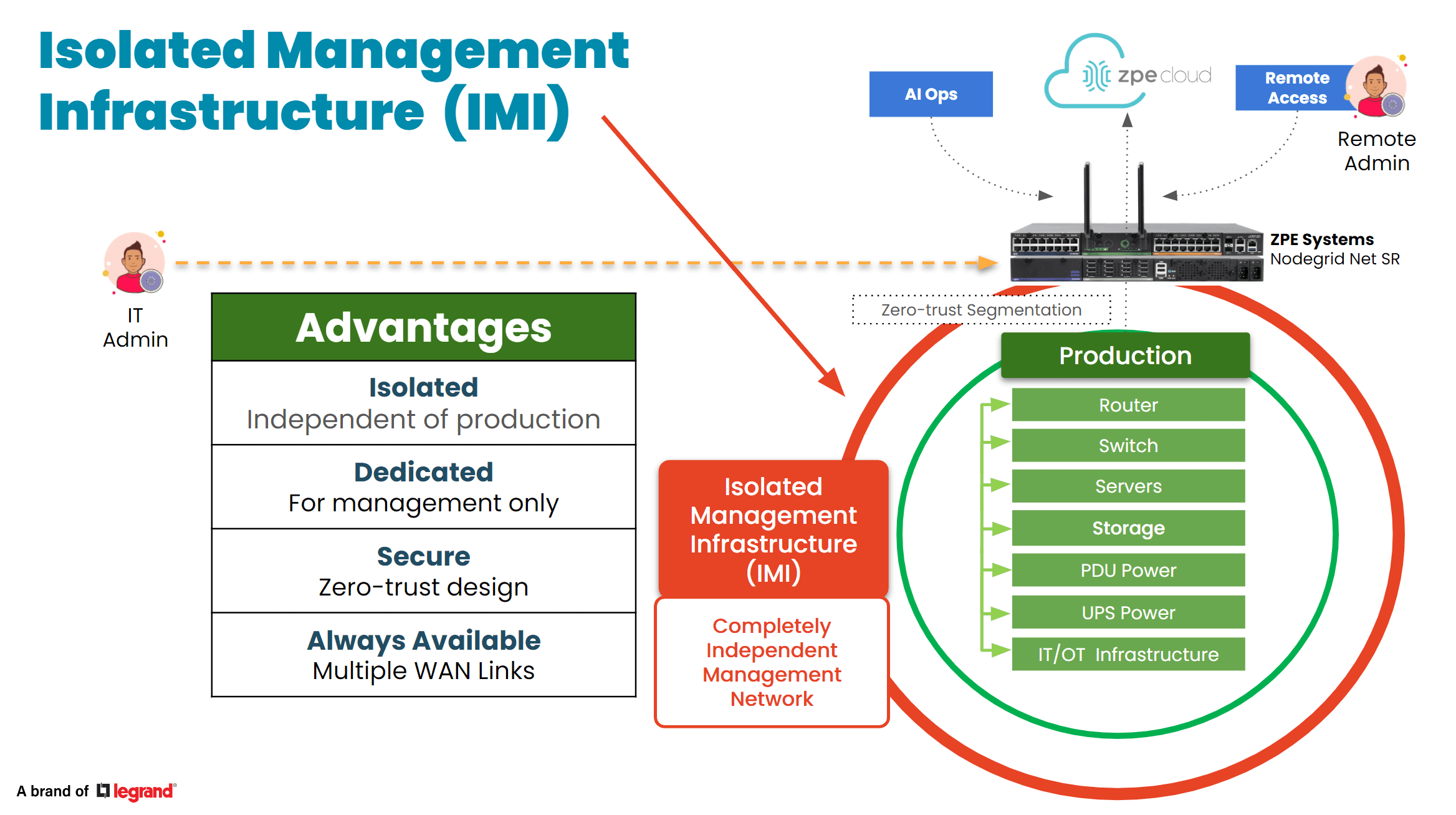
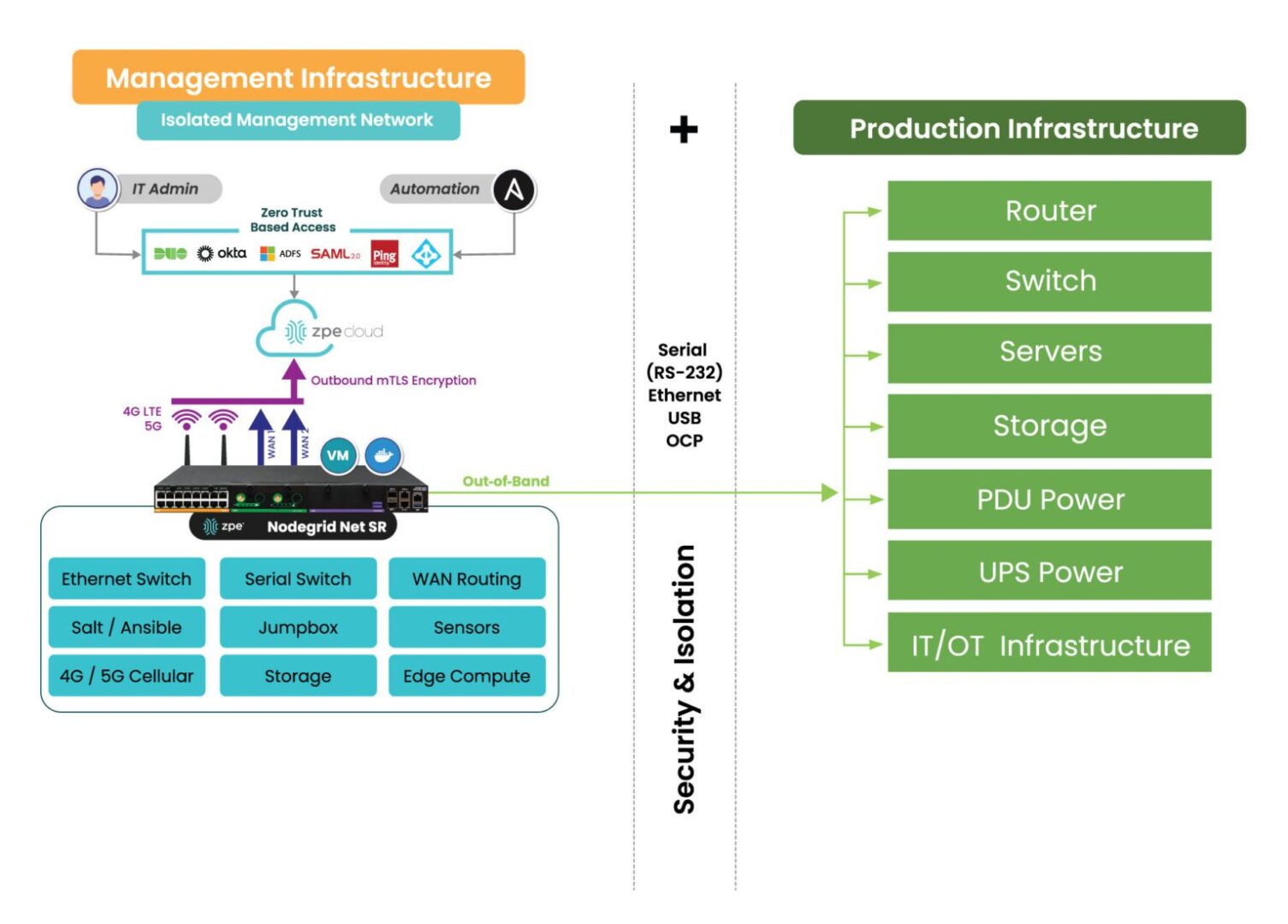
In the data center, the focus is bringing production infrastructure online, including power, cabling, racks, servers, and network gear. But many project managers and architects say they wished they’d given more attention to setting up proper management infrastructure. This oversight usually leads to business challenges down the line, especially when management access relies on the production infrastructure. When a device fails or goes offline, there’s no choice but to go on-site to manually troubleshoot and recover. Many professionals admit to making this data center mistake and wish that they had considered this early in the planning process. Incorporating something called Isolated Management Infrastructure from the start can avoid this challenge, since it provides a dedicated management plane through which teams can access production gear without relying on the production network. 

Tip: Make management infrastructure a priority in your initial planning stages. This proactive approach can prevent complications later.

IMI

2. Neglecting Automation for Configuration and Scaling

Many data center implementors focus heavily on the “rack and stack” initial setup, but fail to automate processes for configuration and scaling operations. This data center mistake often leads to days’ or weeks’ worth of manual, repetitive work, while also exposing the organization to human error. A lot of people we talked to wish they’d invested just a few weeks into automating essential tasks such as switch setup, VLAN configurations, and IP address assignments, which would have saved them lots of time later on and likely helped to prevent errors. Additionally, if rearchitecting is needed, automated systems allow for quick reimplementation, minimizing the time and complexity involved. 

Tip: Dedicate time to automating routine processes. This investment will pay off in enhanced operational efficiency and reduced human error.

3. Inadequate Out-of-Band Management

When people think of out-of-band (OOB) management, a common misconception is that it is solely about Ethernet switches. However, it’s crucial not to overlook the importance of having management access to your entire device stack. Low-level access can be essential for system recovery and management. The recent CrowdStrike outage is a perfect example – when the failed devices needed to be reimaged, typical out-of-band management solutions were inadequate at providing this type of low-level access. Generation three out-of-band serial consoles, like the Nodegrid Net SR, give Ethernet, serial, and USB access, allowing teams to remote-in at the BIOS level to revive failed devices. Using this kind of comprehensive out-of-band – on a fully isolated management plane – helps teams remotely recover and confidently automate processes.

Tip: Ensure that your OOB strategy includes robust serial console access to enhance system reliability and recovery capabilities.

IMI with Nodegrid2

4. Ignoring Security Best Practices

Zero trust security is no longer just advisable, it’s essential. The typical approach is to establish direct connectivity to devices to configure, troubleshoot, upgrade, etc. But this comes with unnecessary risks, often exposing management ports to the Internet and leaving you at risk of attack. Without a fully isolated management plane and zero trust security controls, how would you recover if you were ransomware’d? This is why it’s essential to implement security controls like role-based access and multi-factor authentication, and ensure complete separation of management and production networks. 

Tip: Prioritize security by adopting a zero-trust approach and implementing rigorous access controls to safeguard your data center.

5. Cutting Corners on Out-of-Band Management

In the race for implementing AI, it’s crucial to invest in AI data center infrastructure. But organizations often cut corners on their ability to manage the underlying infrastructure that powers AI. Management access should not stop at ethernet switches; it should extend to encompass serial console access, PDUs, jump boxes, 5G connectivity, routing, WAN links, and a centralized cloud hub with secure tunnels to colocation sites. Using a comprehensive and centralized platform like Nodegrid consolidates many management devices into one while giving remote control to optimize AI’s underlying infrastructure. Aside from enhancing efficiency, this approach minimizes waste and energy consumption, which addresses environmental, social, and governance (ESG) concerns. 

Tip: Avoid the partial out-of-band management deployment. A complete system not only supports resilience and security but also contributes to sustainability goals.


Addressing these common data center mistakes can significantly enhance operational efficiency, security, and scalability. By prioritizing management infrastructure, automating processes, ensuring adequate out-of-band access, implementing robust security measures, and investing wisely in management systems, organizations can build resilient data centers equipped to meet the demands of today and the future.

See ZPE Cloud in action with this video demo

Senior Sales Engineer Marcel van Zwienen gives you a hands-on demo of ZPE Cloud in this video. Watch Marcel take you from signing in to gaining remote access for troubleshooting, to showing how to apply configuration changes automatically across device fleets. Watch now at the link below.

Use Our Blueprint to Avoid Data Center Mistakes

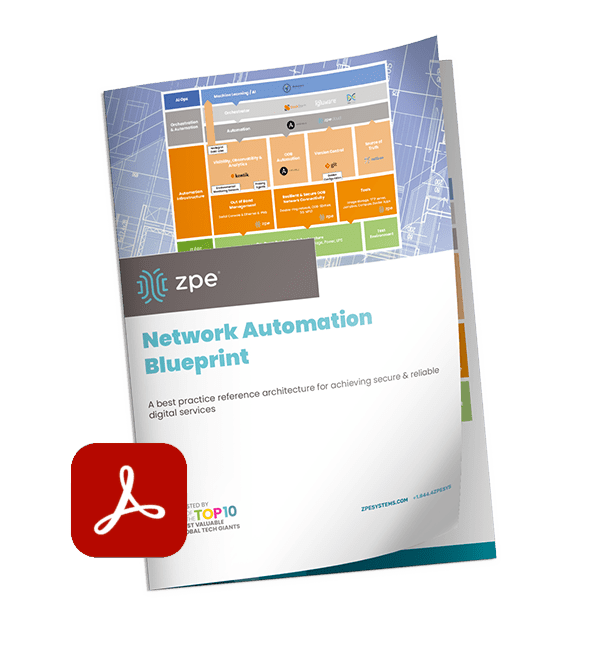
Our blueprint shows how to deploy an isolated management infrastructure, which gives you secure remote access to recover from outages and automate operations. Download now for the complete guide.

Perle Console Server Replacement Options

NCSP Back side

Perle offers two console server solutions for out-of-band (OOB) management of data center infrastructure: the IOLAN SCG and the IOLAN SCR. The SCG is available in both fixed and modular form factors, while the SCR comes in four models with different combinations of 56 managed ports, allowing companies to choose the OOB management hardware that best suits their environment. Unfortunately, IOLAN solutions suffer from hardware and software limitations that can curb scalability and limit agility. This guide discusses Perle console server replacement options that enable streamlined growth through automation capabilities and vendor freedom.


Key takeaways

  • Perle IOLAN SCG appliances offer out-of-band console server management for up to 48 devices in a fixed or modular form factor. Perle IOLAN SCR console servers come with four different managed port configurations for added flexibility.
  • Perle console servers offer some automation capabilities, like auto-discovery and zero-touch provisioning, as well as comprehensive firewall functionality. However, their underpowered hardware and closed management software prevent Guest OS hosting or third-party infrastructure automation and orchestration.
  • The Nodegrid platform from ZPE Systems overcomes these limitations with robust CPU, RAM, and storage, as well as vendor-neutral software. It enables data center scalability by providing high-density serial port configurations and supporting 3rd-party automation.
  • Nodegrid can also run networking, security, edge computing, AIOps, and more, consolidating the data center tech stack and improving operational efficiency.


Perle IOLAN console server overview

Perle IOLAN SCG console servers provide out-of-band management for up to 48 infrastructure devices. Fixed-form-factor models use copper Ethernet for networking and OOB, while the modular version has options for Wi-Fi, cellular, and dial-up. The modular series also has three expansion bays that support any combination of 16-port RS-232 or USB serial modules.

Perle IOLAN SCR console servers come in four different models with up to 56 managed serial, USB, and Ethernet ports, as well as optional cellular integration.

Click here to compare Perle console server tech specs.

Perle console servers have automatic LLDP (Link Layer Discovery Protocol) discovery and can extend zero-touch provisioning (ZTP) to end-devices. They come with an embedded firewall, OpenVPN and IPSec VPN, and AES encryption. The PerleVIEW cloud-based management software provides centralized monitoring and control of all connected data center infrastructure.


Why consider Perle console server alternatives

IOLAN console servers have an underpowered 500 MHz core 32-bit ARM processor, 4GB of flash storage, and 1GB RAM. This hardware may be sufficient for basic infrastructure management workflows and ZTP, but it prevents Guest OS hosting and more advanced automation. The Perle platform also doesn’t integrate with any third-party automation or orchestration solutions.

An inability to fully automate infrastructure management workflows – or to orchestrate those tasks that can be automated – ultimately limits operational efficiency and data center scalability. Consequently, IT teams can’t effectively support the needs of the growing business, adapt to strategy changes, or focus on revenue-driving innovations like artificial intelligence and machine learning (AI/ML).

What’s needed is an open platform that can manage any device, automate any workflow, and work with third-party software to provide a fully integrated infrastructure orchestration experience.


Perle console server replacement options from ZPE Systems

Nodegrid is a family of vendor-neutral console server solutions from ZPE Systems. It comes in four models:

  1. The Nodegrid Serial Console Plus (NSCP) is a robust platform offering up to 96 managed serial ports in a 1U rack-mounted form factor for hyperscale data centers and cloud service providers.
  2. The Nodegrid Serial Console S Series provides up to 48 auto-sensing ports to unify management of legacy, modern, and multi-vendor data center environments.
  3. The Nodegrid Net Services Router (NSR) is a modular solution that can be customized with a range of serial, networking, storage, and compute cards to adapt to any use case.
  4. The Nodegrid Serial Console Plus Core Edition (NSCP-CE) is ideal for break-fix deployments while providing more robust security capabilities than comparable solutions.

Nodegrid devices come with Intel x86-32 bit processors, robust (and upgradable) internal storage and RAM options, and a Linux-based Nodegrid OS. The NSCP, S Series, and NSR support Guest OS and Docker containers for third-party applications. That means they can directly host infrastructure automation and orchestration (like Ansible, Puppet, and Chef), security (like Palo Alto’s next-generation firewalls), and much more. Plus, it can extend this automation to legacy and mixed-vendor devices that otherwise wouldn’t support it.

All Nodegrid models can use a wide range of USB environmental monitoring sensors to help remote teams maintain optimal conditions in the data center. Nodegrid hardware protects the control plane with advanced security features like BIOS protection, UEFI Secure Boot, self-encrypted disk (SED), Trusted Platform Module (TPM) 2.0, and a multi-site VPN using IPSec, WireGuard, and OpenSSL protocols. The Nodegrid OS and the ZPE Cloud management software are also Synopsys-validated as achieving industry-leading security.


Which Nodegrid serial console is right for you?

Use Cases
Serial
Network
CPU
Guest OS
Docker Apps
Storage
RAM
Wi-Fi
Cellular
Power
Data Sheet
Nodegrid NSCP
Hyperscale data centers and cloud service providers
16 / 32 / 48 / 96
2 SFP+ & 2 ETH
Intel x86_64 quad core
1
1-2
32GB SSD
4GB DDR4
Optional
Optional
Single or Dual AC

Dual DC

Nodegrid NSC S Series
Mixed legacy, modern, and multi-vendor environments
16 / 32 / 48
2 SFP+ or 2 ETH
Intel x86_64 dual core
1
1-2
32GB SSD
4GB DDR3
Optional
Optional
Single or Dual AC

Dual DC

Nodegrid NSR
Modular and adaptable to any use case
16 / 32 / 48 / 64 / 80
2 SFP+ & 2 ETH
Intel x86_64 quad core or 8-core
1-6
1-4
32GB – 128GB
8GB DDR4
Optional
Optional
Single or Dual AC

Dual DC

Nodegrid NSCP-CE
Break-fix solution for data centers, colocations, and branches
16 / 32 / 48
2 SFP & 2 ETH
Intel x86_64 dual core
0
0
16GB SSD
4GB DDR4
Optional
Optional
Dual AC

Dual DC

Future-proof your data center with Nodegrid

Perle console servers deliver unified, out-of-band management of remote data center infrastructure with some basic automation capabilities, but their closed architecture and underpowered hardware limit extensibility and scalability. Nodegrid improves upon outdated console server solutions with a vendor-neutral platform that supports unlimited innovation and growth with less management complexity.

To learn more about Perle console server replacement options, schedule a demo of the vendor-neutral Nodegrid platform.


Perle IOLAN console server tech specs

Use Cases
Serial
Network
CPU
Guest OS
Docker Apps
Storage
RAM
Wi-Fi
Cellular
Power
IOLAN SCG (Fixed)
Data centers
16 / 32 / 48
1 ETH
ARM 32-bit 500MHz single core
0
0
4GB Flash
1GB
No
No
Single AC
IOLAN SCG (Modular)
Multiple
Up to 50
2 SFP or 2 ETH
ARM 32-bit 500MHz single core
0
0
4GB Flash
1GB
Optional
Optional
Dual AC

Dual AC

IOLAN SCG (Modular)
Large data centers
24 / 32 / 40 / 56
2 SFP (SCR256)

2 SFP & 2 ETH (SCR226, 242, 258)

ARM 32-bit 500MHz single core
0
0
4GB Flash
1GB
Optional
Optional
Dual AC

Ready to replace your outdated Perle console server?


We know that replacing outdated, EOL devices takes a lot of effort. That’s why ZPE now offers a complete package of budget-friendly products and engineering services to help streamline the process.

Click here to see how we make it easy to upgrade to next-gen out-of-band management.

The Best Serial Consoles for Linux

Photos of the best serial consoles for Linux

The serial console port on a Linux device allows administrators to manage the machine via the command line interface (CLI), without a keyboard, mouse, or monitor attached. Serial console management is useful for performing administrative tasks on headless Linux servers (meaning, those without ports for a keyboard or monitor) and embedded Linux systems like routers and storage devices.

While it’s possible to directly connect a laptop or Intel NUC jump box to the serial console port on a Linux device with a serial cable, this only allows you to manage one machine at a time, so it’s inefficient at scale. A serial console server (also known as a serial console or console server) provides multiple managed serial ports that administrators can connect to Linux machines, as well as many other devices. It unifies the management of all connected machines so administrators can control them all from one place, significantly streamlining infrastructure workflows.

Enterprise serial consoles for Linux provide additional capabilities like out-of-band (OOB) management, infrastructure automation, and embedded security. This guide compares the best solutions to help you choose the right console server for your enterprise.

Quick Links

  1. Nodegrid Serial Console
  2. Opengear CM8100
  3. Perle IOLAN SCG
  4. Lantronix LM83X
  5. Vertiv Avocent ACS8000

How to use the serial console port on a Linux device

The Linux kernel does not support serial console capabilities by default, so it must be configured to output console messages to the serial port first. This involves modifying the bootloader to specify new kernel options, formatted like so:

console=device,options

device:         tty0 for the foreground virtual console
                ttyX for any other virtual console
                ttySx for a serial port
                lp0 for the first parallel port
                ttyUSB0 for the first USB serial device

options:        depend on the driver. For the serial port this
                defines the baudrate/parity/bits/flow control of
                the port, in the format BBBBPNF, where BBBB is the
                speed, P is parity (n/o/e), N is number of bits,
                and F is flow control ('r' for RTS). Default is
                9600n8. The maximum baudrate is 115200.

Source

For more information on configuring the Linux serial console, read guides from docs.kernel.org, RedHat, or Ubuntu.

Comparing the best serial consoles for Linux

  ZPE Nodegrid Opengear CM8100 Perle IOLAN SCG LWM Lantronix LM83X Vertiv Avocent ACS8000
Cellular OOB
ZTP for End Devices
Guest OS
3rd Party Automation
Embedded Firewall
3rd Party Security


All of these solutions provide remote out-of-band management and consolidated control for Linux infrastructure. They also offer automation capabilities via zero-touch provisioning (ZTP), automatically deploying configurations over the network as soon as new devices come online. Some important differentiating features include cellular capabilities for OOB and failover, advanced security features like an embedded firewall and VPN support, and the ability to host and integrate third-party automation tools.

1. Nodegrid Serial Console

Nodegrid is a family of serial console server solutions from ZPE Systems. Nodegrid provides up to 96 managed serial ports while only taking up a single unit of rack space (Patent No. 9,905,980), significantly reducing the number of management devices needed to control large data center deployments. The Nodegrid Serial Console Plus (NSCP) comes with built-in 4G/5G LTE and Wi-Fi for failover and OOB management, while the S Series has auto-sensing serial ports for mixed legacy/modern environments. The NSCP-Core Edition is a low-cost alternative for break-fix deployments that provides Gen 3 security and OOB serial console management.

Front and back views of the Nodegrid Serial Console from ZPE Systems

The Nodegrid platform runs on the open, Linux-based Nodegrid OS and uses Intel x86 processors, allowing it to natively run VM and Docker applications for other vendors’ software. That means you can host third-party NetOps automation solutions like Ansible and Chef, and even extend that automation to legacy equipment. Nodegrid also provides device auto-discovery and ZTP.

Nodegrid serial consoles include an embedded firewall with a multi-site IPsec VPN and advanced authentication support to protect the OOB network. It also comes with unique hardware security features like geofencing, BIOS protection, and UEFI Secure Boot to prevent malicious actors from hijacking the management network with a stolen device.

Pros:

  • Up to 96 managed serial ports in a 1U appliance
  • Fast OOB with 4G/5G LTE and Wi-Fi options
  • 2 Ethernet and 2 10GB SFP+ ports (NSCP) or 2 Ethernet and 1 1GB SFP+ (NSCP-Core)
  • Intel x86 CPU and lots of RAM for 3rd-party Docker and VM apps
  • Comprehensive security including SAML 2.0
  • Supports ZTP and NetOps orchestration tools
  • Vendor-neutral infrastructure orchestration platform

Cons:

  • USB ports limited on 96-port model


Opengear CM8100

The Opengear CM8100 serial console has up to 48 ports in a 1U model or 96 ports in a 2U model. It only uses Ethernet for failover and OOB, without any options for cellular or Wi-Fi. It runs an embedded Linux operating system that is programmable and extensible with third-party integrations.

The Opengear CM8100 console server

With an upgraded “Automation” edition of its Lighthouse software, Opengear console servers gain ZTP, RESTful APIs, Docker containers, and Python scripts for infrastructure automation capabilities. The CM8100 comes with a stateful firewall that provides IP filtering and port forwarding. It supports IPsec & OpenVPN and advanced authentication, but not 2FA or SAML 2.0.

Pros:

  • Programmable and extensible
  • Gateway router features
  • Stateful firewall
  • 2 Ethernet ports (16 & 32 port models) or 2 Ethernet or 2 SFP+ (48 & 96 port models)

Cons:

  • Automation and ZTP require software upgrade
  • No support for 2FA or SAML 2.0
  • No cellular or Wi-Fi access


Perle IOLAN SCG

The Perle IOLAN SCG serial console supports up to 48 managed serial ports. While its fixed-form-factor models only support copper Ethernet for networking and OOB, the SCG also has a modular version with options for Wi-Fi, cellular, and analog modem.

The Perle IOLAN SCG LWM modular console server

IOLAN SCG console servers contain an underpowered 500 MHz core 32-bit ARM processor and little storage or memory headroom for automation, though Perle’s management software can extend ZTP to end devices. The solution does include a robust embedded firewall and support for two-factor authentication.

Pros:

  • Programmable and extensible
  • Gateway router features
  • Stateful firewall

Cons:

  • Automation and ZTP require software upgrade
  • No support for 2FA or SAML 2.0
  • No cellular or Wi-Fi access


Lantronix LM83X

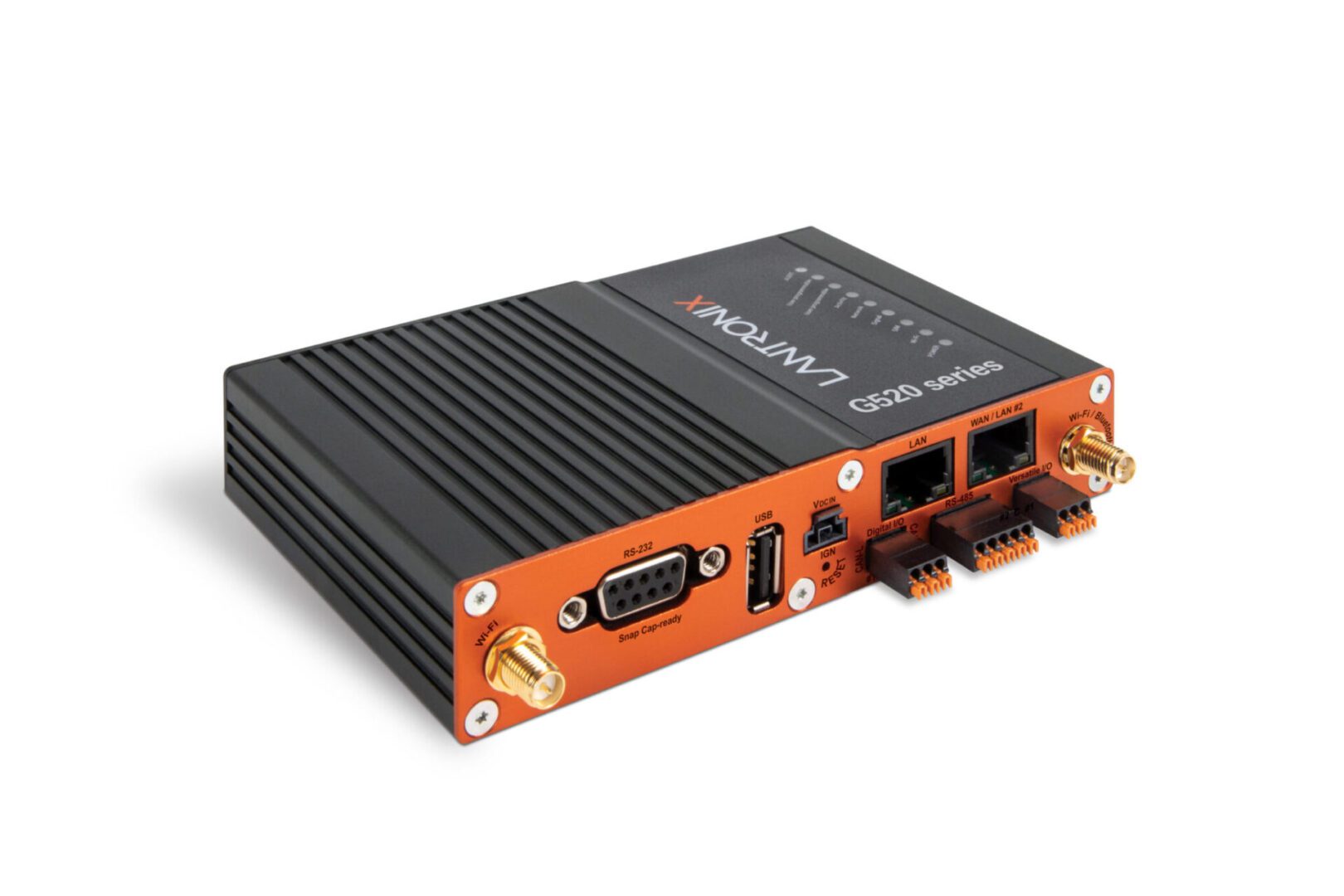
The Lantronix LM83X serial console is a modular solution with three expansion bays, supporting up to 104 managed serial ports. It has versatile options for 4G LTE, analog modem, fiber, DSL, or satellite for OOB and failover.

The Lantronix LM83X console server

The LM83X’s ARM CPU architecture prevents it from running VMs and Docker containers for automation or third-party software. The Lantronix Control Center software does not support any third-party integrations, though it does provide some built-in automation and playbook capabilities. The LM83X offers some advanced authentication support and IP filtering but lacks an embedded firewall or VPN.

Pros:

  • Manages up to 104 serial devices with expansion cards
  • Flexible OOB and failover options
  • Robust device monitoring tools

Cons:

  • Can’t run Guest OS or 3rd-party apps
  • No support for 3rd-party integrations
  • No embedded firewall


Vertiv Avocent ACS8000

The Vertiv Avocent ACS8000 provides up to 48 managed serial ports, with faster-than-average minimum port speeds of 1200 bps. It uses 4G LTE for OOB and failover and has an updated Linux operating system.

The Vertiv Avocent ACS8000 console server

While the ACS8000 has ZTP for end devices, its ARM architecture does not support VMs, Docker apps, or third-party automation and orchestration. The proprietary DSViewTM software offers some automation capabilities for event logging and notifications but is not extensible with third-party integrations. The ACS8000 has an embedded firewall and IPSec VPN support, but lacks advanced authentication features.

Pros:

  • Fast minimum port speeds
  • 4G cellular for OOB and failover
  • Environmental sensor port

Cons:

  • No support for Docker or third-party orchestration
  • Software is not extensible
  • Lacks advanced authentication features


How to choose the best serial console for your Linux environment

These solutions all provide remote out-of-band management and consolidated infrastructure control for Linux devices. However, Nodegrid goes above and beyond by offering a truly vendor-neutral platform that supports third-party integrations and direct hosting of other vendors’ automation and orchestration software. Plus, only Nodegrid secures the automated control plane with robust on-board hardware security protection and a full suite of firewall, encryption, and authentication features like 2FA and SAML.

Ready to replace your outdated console servers?

We know that replacing outdated, EOL devices takes a lot of effort. That’s why ZPE now offers a complete package of budget-friendly products and engineering services to help. Click here to see how we make it easy to upgrade to the best serial console for Linux.


Which Nodegrid serial console is right for you?

  NSCP S Series NSCP-CE NSR
Use Cases Hyperscale data centers and cloud service providers Mixed legacy, modern, and multi-vendor environments Break-fix solution for data centers, colocations, and branches Modular and adaptable to any use case
Serial 16 / 32 / 48 / 96 16 / 32 / 48 16 / 32 / 48 16 / 32 / 48 / 64 / 80
Network 2 SFP+ & 2 ETH 2 SFP+ or 2 ETH 2 SFP & 2 ETH 2 SFP+ & 2 ETH
CPU Intel x86_64 quad core Intel x86_64 dual core Intel x86_64 dual core Intel x86_64 quad core or 8-core
Guest OS 1 1 0 1-6
Docker Apps 1-2 1-2 0 1-4
Storage 32GB SSD 32GB SSD 16GB SSD 32GB – 128GB
RAM 4GB DDR4 4GB DDR3 4GB DDR4 8GB DDR4
Wi-Fi Optional Optional Optional Optional
Cellular Optional Optional Optional Optional
Power

Single or Dual AC

Dual DC

Single or Dual AC

Dual DC

Dual AC

Dual DC

Single or Dual AC

Dual DC

Data Sheet Download Download Download Download


To learn more about Nodegrid serial consoles for Linux

contact ZPE Systemswatch a demo

3 Reasons to Use Starlink for Out-of-Band (and How to Set it Up)

ZPE Systems and Starlink setup guide

Most organizations rely on critical IT in order to serve their essential business functions. A reliable method to maintain critical IT is to use dedicated out-of-band (OOB) management networks, which traditionally have relied on plain old telephone service (POTS) lines or dedicated telephony circuits for remote access. However, these traditional links come with high costs, lots of complexity, and slow performance, which make them difficult to deploy and maintain.

Enter Starlink, a satellite-based Internet service that offers a cost-effective and scalable alternative for out-of-band remote access. This post discusses how Starlink solves these common problems and gives you a free guide that walks you through the setup process.


Problem: POTS and Telephony Lines Are Expensive

For decades, IT professionals have relied on POTS and telephony lines for OOB management, mainly because these lines remain operational even when the primary data network goes down. A major problem is that POTS lines are increasingly expensive to install and maintain, particularly in remote or rural areas. Additionally, 4G/5G LTE options aren’t always available due to coverage limitations or large enough data plans. The shift towards VoIP (Voice over IP) and digital communications has made POTS lines even less relevant, with many service providers phasing out support. This leaves businesses with fewer options and higher costs for maintaining these legacy systems.

Solution: Starlink is Cost-Effective

Starlink offers a much more cost-effective solution. You can use off-the-shelf routers to set up an OOB management network for a fraction of the cost of traditional methods. Starlink also has a relatively low monthly subscription fee and straightforward pricing model, which make it easy to budget and plan IT expenditures. If components fail or break, you can typically repair or replace them yourself to get back up and running quickly.

An image of a Starlink dish

Figure 1: Starlink requires only a dish, router, and few other components, making it a cost-effective alternative to expensive POTS lines.

Problem: Traditional Lines Are Difficult To Scale

Traditional POTS-based systems are notoriously difficult to scale, often requiring significant infrastructure investments and complex configurations. Copper wiring is expensive to install and maintain, and as more connections come online, switching systems must be upgraded. On top of this, POTS lines are being phased out, which means there are fewer resources being devoted to scaling and maintaining them.

Solution: Starlink is Simple to Set Up and Scale

Starlink entirely eliminates the need for telephony lines, and is a simple and scalable solution for OOB remote access. You can find the full list of components in our setup guide below, but with a Starlink terminal, compatible router, and minimal configuration, you can scale your OOB network wherever you have Starlink coverage. This ease-of-use extends to day-to-day management as well. Starlink’s satellite service offers global coverage, meaning you can manage your network devices, servers, and other critical infrastructure from virtually anywhere in the world.

The setup process for Starlink includes simple instructions that you can follow on your smartphone

Figure 2: Starlink comes with a straightforward out-of-box experience and step-by-step instructions. You can set up an out-of-band network in about one hour.

Problem: POTS Lines Lack Performance

POTS is designed primarily for voice communication and offers extremely limited bandwidth. It can’t support modern data services (such as video or high-speed internet) efficiently. As out-of-band management advances with data and video monitoring capabilities (such as AI computer vision), POTS infrastructure just doesn’t have the bandwidth to keep up.

Solution: Starlink Meets Modern Performance Requirements

Starlink provides high-speed internet, at speeds that typically range from 50 to 200Mbps. The connection handles much larger volumes of data than POTS lines are capable of, and Starlink’s low-Earth orbit satellites reduce latency to as low at 25ms compared to the typical 150ms of POTS lines. Out-of-band using Starlink means that IT teams can manage more systems and data, and have a more responsive experience, whether they’re managing edge routers across their bank branches or monitoring the cooling systems in their distributed colocations.

Image of the Starlink speed test performed on a smartphone

Figure 3: Starlink provides high-speed connectivity, with speeds ranging from 50 to 200Mbps.

Get Started With Starlink Using Our Setup Guide

We created this step-by-step walkthrough that shows how to set up Starlink for out-of-band. It instructs how to connect the components according to a wiring diagram, configure your ZPE Nodegrid hardware, and test your connection performance using free tools. Read it now using the button below.

Get Starlink Setup Guide

Starlink setup guide

What is Passive Optical Networking?

What is Passive Optical Networking (PON)?

Passive optical networking (PON) is a high-speed broadband technology that enables the delivery of multiple services over a single fiber optic cable. XGS-PON – 10G Symmetrical PON –  offers speeds of up to 10 Gbps downstream and 10 Gbps upstream (hence the term ‘symmetrical’), making it ideal for applications such as video streaming, online gaming, and cloud computing.


What Problems Does PON Solve for Out-of-Band Management?

PON addresses the issue of efficiency in terms of both uplink costs and bandwidth usage. Traditional POTS lines and dedicated circuits rely on legacy infrastructure that requires regular maintenance. This infrastructure must scale as more out-of-band devices are added to the network, which increases costs and energy consumption. On top of this, using a 10G uplink for a serial console’s 10K traffic is like throwing away 99% of that high bandwidth. Per Gartner’s Market Guide for Optical Transport Systems report (Published 20 November 2023) the best way to “lower cost and energy per transported bit” is by using technologies such as passive optical networking.

Because PON uses passive optical splitters that have no moving parts or powered components between the central hub and end users, PON is much more efficient for deploying serial consoles close to target assets. These out-of-band devices can be deployed in large quantities and close to the network edge, with up to 256 devices sharing one uplink. This reduces cabling and power requirements, and is ideal for MSP and campus operators, where there are many out-of-band devices distributed over long distances. 


More About PON: GPON and XGS-PON Technologies

Passive Optical Networking (PON) leverages time-division multiplexing (TDM) and different wavelengths of light to transmit and receive data on a single fiber strand. This allows efficient communication among up to 256 devices over a single fiber. Initially developed for fiber-to-the-home (FTTH) deployments, PON technology has evolved to facilitate the addition of network nodes with minimal infrastructure changes. GPON (gigabit-capable PON) and XGS-PON use different frequencies for upstream and downstream data transmission. The upstream headend, known as the Optical Line Terminal (OLT), manages and coordinates the time slots allocated to downstream Optical Network Units (ONUs) for data transmission.


GPON and XGS-PON Support on ZPE Systems’ Nodegrid SR Gateway

ZPE Systems’ Nodegrid SR appliances, which are used as out-of-band access nodes or complete branch gateways, now support GPON and XGS-PON technology (patent pending) via SFP and SFP+ ports. The Nodegrid SR family is offered in multiple form factors to be right-sized for deployments in branch offices, factories, smart buildings, and industrial environments (such as for SCADA).

Having support for GPON and XGS-PON means network engineers now have a flexible choice of high-speed uplink technologies. This versatility makes the Nodegrid SR gateway suitable for edge deployments, where it can establish an OOBI-WAN™ (out-of-band infrastructure WAN) link, and for data centers, where it enhances uplink efficiency. Given the low bandwidth requirements of serial console and out-of-band communications, PON technology is well-suited for these applications. A single fiber strand can be shared among hundreds of out-of-band and serial console devices using passive optical splitters. Organizations can deploy out-of-band devices close to the racks and edges of the network in a cost- and energy-efficient manner. Additionally, ZPE devices support ONU SFPs compatible with third-party OLT headends, ensuring broad interoperability and integration.


Benefits of Using XGS-PON with ZPE Systems’ Nodegrid SR Gateway

The benefits of using XGS-PON with ZPE Systems’ Nodegrid SR gateway include:

  • High-Speed Connectivity: XGS-PON delivers symmetrical speeds of up to 10 Gbps, making it ideal for high-bandwidth applications like video streaming, online gaming, and cloud computing. This ensures consistent and high-quality service for end-users.
  • Cost-Effectiveness: Deploying XGS-PON is a cost-effective solution for delivering high-speed broadband services, especially in scenarios where upgrading existing infrastructure may be challenging.
  • Scalability: The Nodegrid SR Gateway, acting as an ONU, can connect up to 256 serial consoles through a single fiber strand. PON’s use of asymmetric wavelengths and TDM enables multiple devices to share the same fiber strand efficiently. Optical splitters, which require no external power, facilitate the sharing of fiber between multiple ONUs, which makes scaling much more cost and energy efficient.
  • Reliability: The Nodegrid SR gateway is proven by service providers worldwide. Its robust design and compatibility with various network configurations make it a reliable choice for delivering high-quality broadband services.

A network diagram showing a PON Uplink on Nodegrid SR Gateway

Figure 1: ZPE Nodegrid SR gateway with XGS-PON ONU support


XGS-PON Enhances Efficiency of Out-of-Band

XGS-PON is a significant advancement over traditional, copper-based uplinks. The integration of XGS-PON support in the ZPE Systems Nodegrid SR Gateway allows network architects to deploy a dedicated out-of-band ring that is not only high-speed but also cost-effective, energy-efficient, and capable of covering longer distances. PON technology, with its ability to handle the lower data rates of out-of-band transmissions, is an ideal uplink medium for serial console transmission. The combination of XGS-PON and the Nodegrid SR Gateway provides a powerful and flexible solution for modern network infrastructure.

Be one of the first to try PON on the Nodegrid SR Gateway

Set up a demo for a deeper dive into PON use cases and how it can benefit your organization.

Schedule a demo