Providing Out-of-Band Connectivity to Mission-Critical IT Resources

Home » EdgeOps » Page 3

What is a radio access network (RAN)?

This post provides an introduction to radio access networks (RAN) before discussing 5G RAN challenges, solutions, and use cases.
5G cellular technology is used for internet of things (IoT) deployments and operational technology (OT) automation across many different kinds of organizations, including city governments, global logistics companies, and healthcare providers. 5G access is provided by a radio access network (RAN) using mobile towers and small cells, but deploying these networks is challenging due to numerous factors, including poor public opinion. This post provides an introduction to radio access networks before discussing 5G RAN challenges, solutions, and use cases.

Table of Contents:

What is a Radio Access Network (RAN)?

A radio access network (RAN) is the portion of a cellular network that connects smartphones and other end-user devices to the internet. Information is communicated back and forth between smartphones and the RAN’s transceivers via radio waves. Those wireless signals are translated into digital form, passed to the core network, and then to the global internet.

What is 5G RAN?

Every cellular generation has its own associated RAN technology. 4G RAN was the first generation based entirely on the internet protocol (IP) rather than older circuit-based technology. The newest generation, 5G, supports faster speeds, great capacity, and lower latency than previous generations. However, there are significant challenges in the way of 5G implementation.

5G Radio Access Network (RAN) challenges

There are three major hurdles to 5G implementation:

  1. Public opinion – Thanks in part to misinformation and conspiracy theories, there has been a lot of resistance to 5G implementations. While many people already use smartphones with 5G technology, they tend to balk at the idea of giant cell towers and masts going up in their town or city.
  2. mmWave limitations – Wireless frequencies in the mmWave (millimeter wave) spectrum provide the speed and capacity required for 5G, but they have a shorter range and difficulty penetrating walls. That makes 5G tricky in industrial settings and office buildings.
  3. Remote recovery – A 5G RAN typically operates in cramped spaces without a continuous human presence, and administrators monitor and manage the equipment remotely over the cellular network. However, if that cell link goes down due to equipment failure or natural disaster, teams are cut off, and a truck must be rolled to fix the issue, adding significant costs and downtime.

Addressing these hurdles is complicated, as the solutions often create additional challenges. For example, the first two points can be addressed with 5G small cell technology. Small cells are typically compact enough to deploy on top of buildings or street furniture to extend 5G coverage into densely populated areas without a full-size mobile mast. This makes 5G small cell networks more palatable to city officials and the general public alike. However, small cells are still subject to planning restrictions, and the absence of a common 5G small cell framework makes the application process difficult and time-consuming.

In addition, some small cells are tiny enough to deploy indoors, improving 5G propagation and coverage in buildings. However, operators would need to deploy dozens or hundreds of small cells to achieve the speed and reliability needed for industrial IoT and high-tech use cases. Each one requires significant power resources as well as a fiber or wireless backhaul, and due to a lack of standardization, operators may even have to submit many individual planning applications. Plus, a small cell network of that size is complex to monitor and manage, requiring additional hardware and software solutions that add even more costs and complexity.

Addressing the third point requires an out-of-band network connection to 5G RAN deployments. For example, a 4G/LTE serial console provides an alternative internet connection so teams can remotely access RAN equipment during 5G outages. A serial console directly connects to radio access network infrastructure so remote administrators can do things like reboot a hung device or refresh DHCP even if the local network is down.

However, many serial consoles suffer from vendor lock-in, meaning they don’t connect to all devices or support third-party management, troubleshooting, and recovery tools. This either limits an administrator’s ability to remotely recover from outages or forces them to deploy additional hardware and software solutions to gain all the remote functionality required, adding to the expense and complexity of 5G RAN deployments.

A new approach to 5G deployments

The upgrade from 4G to 5G is proving to be more fraught than previous transitions between generations, so it’s clear that a new approach is needed. Small cell technology is a good start, but a lack of standardization severely hampers its adoption. Help is on the way, though – a group called the Small Cell Forum (SCF), which is made up of wireless leaders like AT&T, Cisco, Qualcomm, and Samsung, is working to establish a set of common definitions and recommendations to help the industry standardize 5G small cell networks.

In their definitional report, the SCF highlights the need for vendor-neutral hardware that’s customizable and swappable for various 5G use cases. Architectural design and planning applications are simpler when all of a small cell network’s equipment supports the same common 5G interface. Multi-functional devices combining networking, out-of-band access, and third-party application hosting significantly reduce expenses and management complexity.

Let’s examine some potential 5G use cases that could benefit from this new approach.

Smart cities

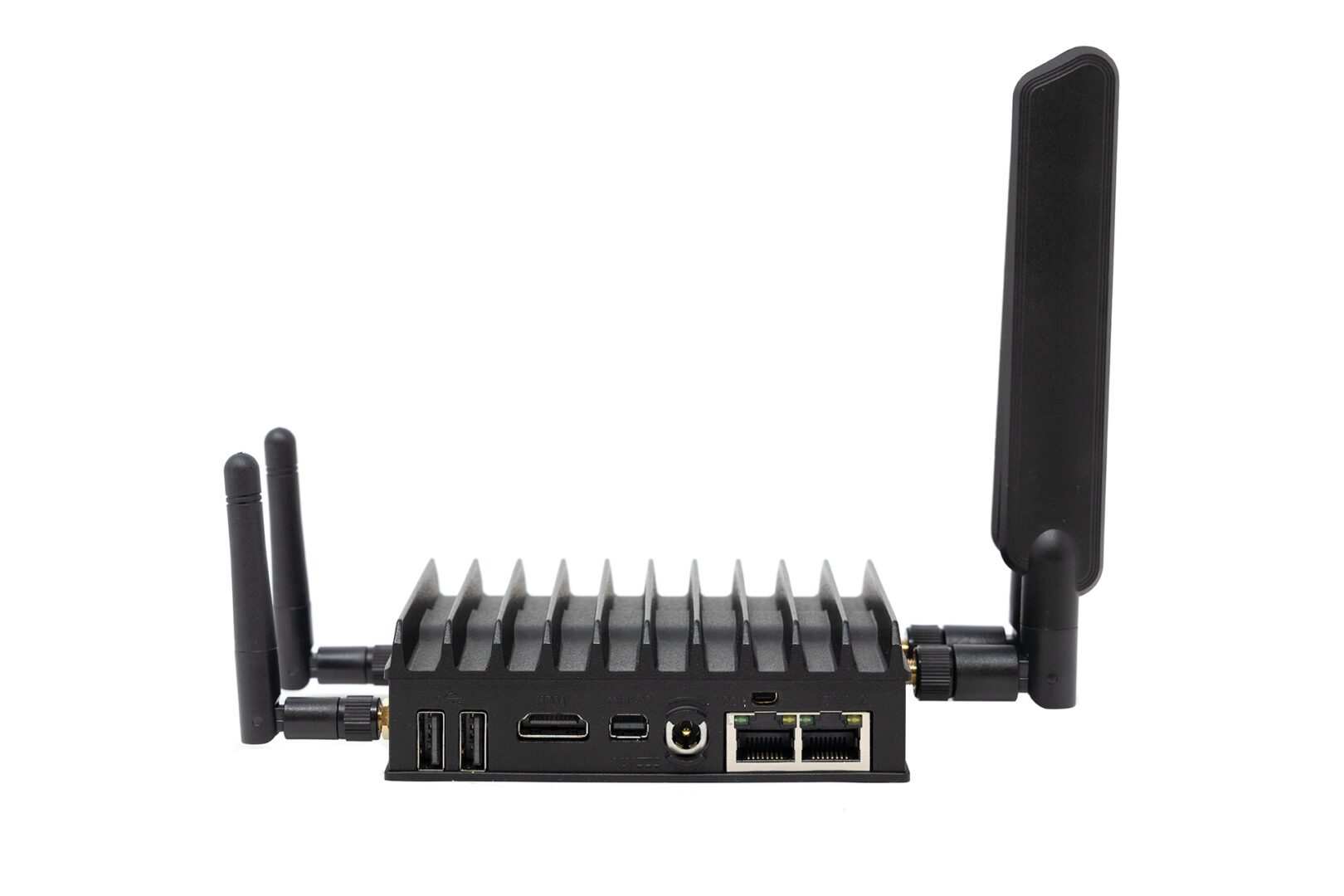
A smart city is the ideal use case for a 5G small cell network. Since wireless clients are packed into densely populated areas, an array of 5G small cells should provide sufficient coverage without the need for a full-sized mast. Deploying a small, vendor-neutral, multi-functional device like the Nodegrid Mini Services Router alongside small cells provides flexible backhaul options, out-of-band remote management, and application hosting. Installing small cells and Mini SRs on streetlamps, parking structures, and other public infrastructure gives teams everything they need to remotely monitor, operate, and recover 5G smart city infrastructure without adding more complexity to the network.

Global asset tracking and logistics

The internet of things (IoT) makes it possible for large, global enterprises to streamline asset tracking and supply chain logistics. Organizations use IoT-enabled devices to handle inventory management, fulfillment, shipment tracking, quality control, and more. 5G small cell technology provides the necessary speed, coverage, and bandwidth, but the sheer number of devices – and their global distribution – creates a lot of management complexity.

All-in-one solutions like Nodegrid reduce the tech stack by combining networking, management, and application hosting in a single box. Plus, Nodegrid provides a centralized management platform that can unify all connected devices, apps, and services in a single place. Administrators get a single pane of glass to monitor, control, troubleshoot, and automate the entire global architecture, reducing costs and streamlining operations.

Building automation

Many large property management companies rely on building automation systems that use operational technology (OT) to control door locks, lighting, HVAC, and more with very little human intervention. 5G’s improved speed and lower latency open up even greater automation capabilities, especially in warehouses and manufacturing plants.

Nodegrid’s compact, vendor-neutral solutions give remote operators a reliable, out-of-band connection to automated building systems to keep businesses running 24/7, even during 5G outages or LAN failures. You can deploy the Mini SR in cramped or semi-outdoor spaces to extend monitoring, security, and management coverage to every part of the 5G deployment. Nodegrid enables end-to-end building automation and makes 5G networks more resilient to failure.

Simplifying 5G with Nodegrid

A 5G radio access network (RAN) provides internet access to 5G-enabled systems, such as smartphones and IoT devices. While 5G deployments are proving complicated and fraught with issues, these challenges are overcome using small cell technology and vendor-neutral, multi-function devices like Nodegrid. Nodegrid’s integrated services routers deliver all-in-one networking, out-of-band management, backhauling, and application hosting capabilities to simplify 5G deployments without compromise.

Learn how Nodegrid can help deliver simplified 5G with out-of-band management!

Request a free Nodegrid demo to see how vendor-neutral solutions simplify 5G radio access network (RAN) deployments.

Contact Us

What is an Application Delivery Platform?

An illustration showing a breakout of various software application components to highlight the need for an application delivery platform

Modern software architectures are highly complex and often very difficult to maintain and operate. A single enterprise application comprises hundreds (or even thousands) of individual services, technologies, and toolchains while requiring a lot of underlying infrastructure, such as servers, routing and load balancing rules, and security controls. All of this complexity increases overhead costs and adds to the ever-growing workloads of software, network, and infrastructure teams, especially when you multiply this effort across dozens or hundreds of software deployments.

Platform engineering is a new discipline introduced by Gartner to address these challenges by reducing the complexity of software engineering, network operations, and application delivery. The platforms built by these engineers are known by several names, including internal developer platforms, internal developer portals, and application delivery platforms. This guide defines an application delivery platform, discusses the underlying technology, and highlights a leading platform engineering solution.
.

Table of Contents:
  1. What is an application delivery platform?
  2. What is the importance of an application delivery platform?
  3. What technology makes up an application delivery platform?
  4. Introducing ZPE Systems’ Services Delivery Platform

What is an application delivery platform?

An application delivery platform is a suite of technologies that handles all the services that support an application, including security, traffic management, load balancing, and data management. Platform engineers combine all these services into a common toolset used to deploy applications at customer sites, so there’s no need to build a new architecture every time. This streamlined experience makes application delivery cost-effective by significantly reducing workloads and deployment timelines.

What is the importance of an application delivery platform?

The goal of an application delivery platform is to reduce deployment and management complexity. Deployment complexity leads to a greater risk of human error when configuring things like security controls and access policies, and any mistakes are likely to be found and exploited by cybercriminals. Management complexity makes it harder to stay on top of patch schedules. Unpatched software often contains vulnerabilities that are exploited by cybercriminals; for example, known ransomware groups targeted unpatched IBM software earlier this year.

By reducing complexity, an application delivery platform also reduces the attack surface, improving an organization’s overall security posture.

What technology makes up an application delivery platform?

By its very nature, an application delivery platform is highly customized to fit the needs of the applications being supported. Here are some examples of the services and technologies that are often included.

  • Server storage & compute: The platform needs storage (usually solid-state) and processing units (CPUs or GPUs) to run the applications and store necessary data. Ideally, the OS and computing architecture will support containers (e.g., Docker) for microservices applications.
  •  
  • Automation tools: A key feature of application delivery platforms is the ability to automatically provision and deploy new environments, apps, and network services as well activate services licenses and service chaining. That means the platform should host automation tools for configuration management, code delivery, and software-defined networking (SDN).
  •  
  • Security: The ideal platform makes it possible to deliver applications without configuring security every time. That means it provides unified management and repeatable deployments for security services like firewall traffic inspection, access control lists, and advanced authentication.
  •  
  • Routing & load balancing: A lot of backend networking goes into the typical application deployment to ensure traffic is routed correctly and optimized for performance. An application delivery platform should support network functions virtualization (NFVs) and SDN so standard network configurations can be easily deployed alongside the applications being delivered.
  • Management tools: Engineers need a way to remotely access, manage, and troubleshoot application deployments, even (and especially) during major service disruptions. The ideal platform includes out-of-band serial console management and supports third-party troubleshooting tools so remote teams can quickly recover systems and applications without an expensive on-site visit.

While this list is far from exhaustive, it covers the foundational technology that supports an application delivery platform. Platform engineering is still in its infancy, and many organizations struggle to efficiently execute it because of how many moving pieces need to be considered. The goal is to find a solution that provides the best framework of hardware and software capabilities that platform engineers can build upon, so they can create a fully customized application delivery platform without reinventing the wheel.

Introducing ZPE Systems’ Services Delivery Platform

Zero Pain Ecosysteme

The Services Delivery Platform from ZPE Systems is the perfect foundation for any platform engineering initiative. Nodegrid edge routers serve as the hardware backbone, providing networking and failover capabilities, OOB serial console management, and plenty of memory, storage, and CPU headroom for additional apps and services. You can build a fully customized hardware platform with the modular Net Services Router (NSR), extending your storage or compute capabilities or adding more ports to support your application deployment.

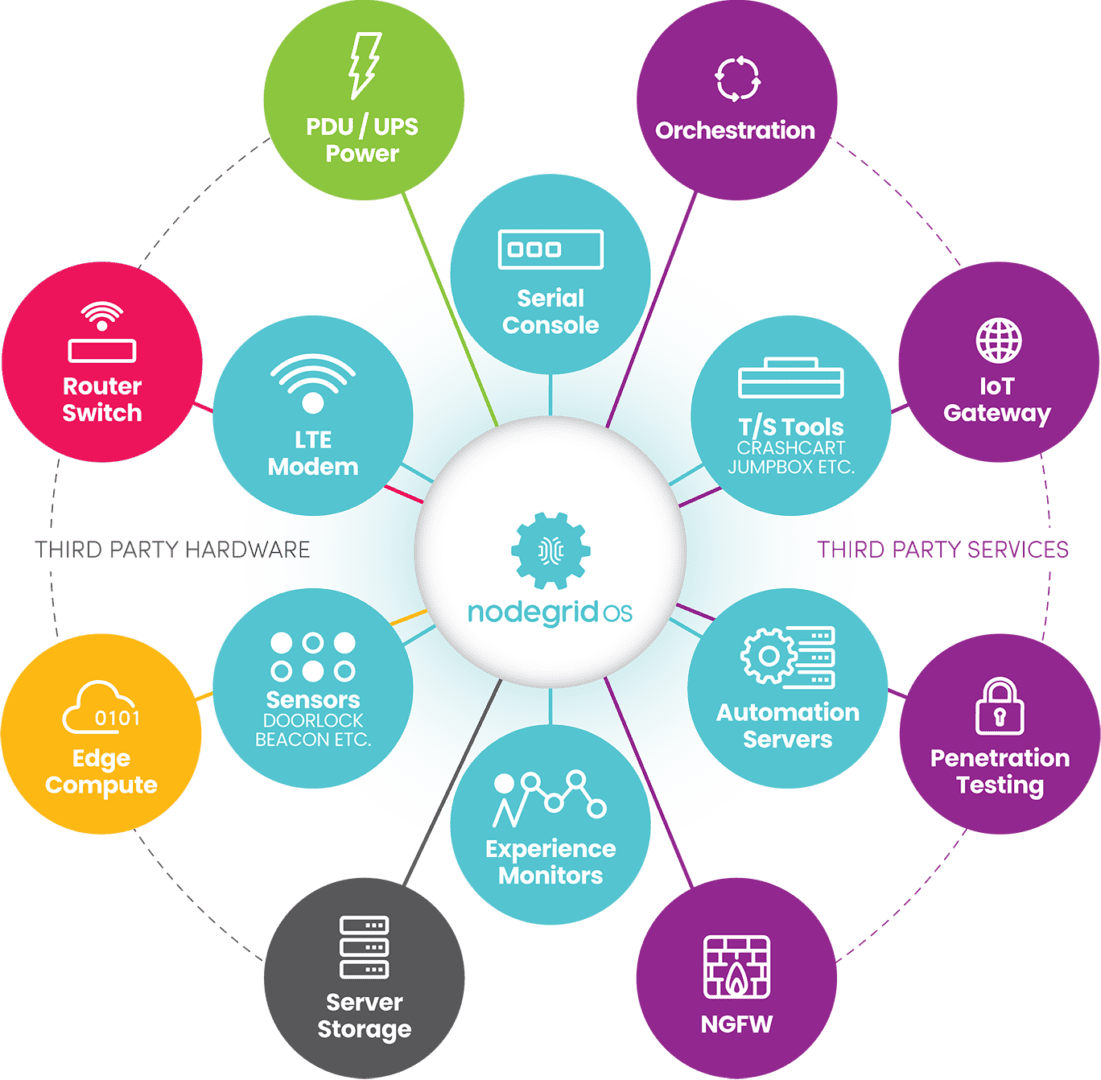
The vendor-neutral, Linux-based Nodegrid OS can run your custom applications as well as third-party automation, security, DevOps, and management tools. Plus, Nodegrid unifies all connected services and applications under a single management umbrella, allowing teams to oversee and orchestrate all of their deployments from one convenient portal.


Ready to Learn More?

The Services Delivery Platform from ZPE Systems simplifies platform engineering with powerful, multipurpose hardware and an open, vendor-neutral OS. Contact us today to learn more about using Nodegrid for your application delivery platform!

Contact Us

Zero Touch Deployment Cheat Sheet

A zero touch deployment cheat sheet is visualized as a literal cheat sheet used by a student during an exam

Zero touch deployment is meant to make admins’ lives easier by automatically provisioning new devices. However, many teams find the reality of zero touch deployment much more frustrating than manual device configurations. For example, zero touch deployment isn’t always compatible with legacy systems, can be difficult to scale, and is often error-prone and difficult to remotely troubleshoot. This post provides a “cheat sheet” of solutions to the most common zero touch deployment challenges to help organizations streamline their automatic device provisioning.

Zero touch deployment cheat sheet

Zero touch deployment – also known as zero touch provisioning (ZTP) – uses software scripts or definition files to automatically configure new devices. The goal is for a team to be able to ship a new-in-box device to a remote branch where a non-technical user can plug in the device’s power and network cables, at which point the device automatically downloads its configuration from a centralized repository via the branch DHCP server.

In practice, however, there are a variety of common issues that force admins to intervene in the “zero touch” deployment. This guide discusses these challenges and advises how to overcome them to achieve truly zero touch deployments.

Zero touch deployment challenge: The solution:
Legacy systems don’t have native support for zero touch Extending zero touch to legacy systems using a vendor-neutral platform
Deployment errors result in costly truck-rolls Recovering from errors remotely with Gen 3 out-of-band (OOB) management
Securing remote deployments causes firewall bottlenecks Moving security to the edge with Zero trust gateways and Secure Access Service Edge (SASE)
Automating deployments at scale increases management complexity Maintaining control through centralized, vendor-neutral orchestration with version control

Extend zero touch to legacy systems with a vendor-neutral platform

Challenge Solution

While many new systems and networking solutions support zero touch deployment, sometimes there’s still a need to repurpose or reconfigure legacy systems that don’t come with native ZTP support.

Pre-staging these devices before shipping them to the branch is a security risk because the system could be intercepted in transit; plus, they’re likely already deployed at remote sites and need to be reconfigured in place. Without a way to extend zero touch deployment capabilities to those legacy systems, companies often have to pay for admins to travel to remote branches, negating any cost savings they were hoping to gain from reusing older devices.

One way to extend zero touch to legacy systems is with a vendor-neutral management platform. For example, a vendor-neutral serial console switch with auto-sensing ports can connect to modern and legacy infrastructure solutions in a heterogeneous branch deployment so they can all be managed from a single place.

From that unified management platform, admins can write and deploy configuration scripts to connected devices, including legacy systems that don’t support zero touch. Technically, this isn’t zero touch deployment because the system doesn’t automatically download and run its configuration file, but it’s still a way to turn an on-site, manual process into one that’s remotely activated and mostly automated.

Recover from deployment errors with Gen 3 OOB management

Challenge Solution

A new branch deployment almost never goes completely according to plan, and this is especially true when teams are using zero touch for the first time, or aren’t completely comfortable with software-defined infrastructure and networking. In the best-case scenario, when there’s a configuration error, the zero touch deployment aborts, and an admin is able to correct the problem and restart the process.

However, sometimes the deployment hiccup causes the device to hang, freeze, or get stuck in a reboot cycle. Or, even worse, an unnoticed error in the configuration could allow the deployment to finish successfully but then go on to affect other production dependencies and bring the entire branch network down. Either way, organizations must again deal with the expenses involved in sending a tech out to troubleshoot and fix the problem.

The best way to ensure continuous access to remote infrastructure is with out-of-band (OOB) management. An OOB solution, such as a serial console or all-in-one branch gateway, connects to the management ports on infrastructure devices so admins can remotely monitor and control every device from a single place without IP addresses.

This creates a separate (out-of-band) network that’s dedicated to management and troubleshooting, making it possible for teams to remotely recover devices that have failed the zero touch deployment process or brought down production LAN dependencies. Plus, the OOB gateway uses independent, redundant network interfaces to ensure admins still have remote access even if the production WAN or ISP link goes down.

To ensure full OOB management coverage of a heterogenous, mixed-vendor environment, the out-of-band solution should be completely vendor-neutral. An open OOB device also supports integrations with third-party solutions for automation, orchestration, and security. This kind of out-of-band platform is known as Gen 3 OOB. Gen 3 OOB management ensures that teams can remotely recover from zero touch deployment errors no matter what device is affected or how the production network is impacted.

Secure remote deployments with zero trust gateways and SASE

Challenge Solution

Organizations need to secure all devices at all remote sites using consistent policies and security controls. However, for smaller branches and IoT sites, it usually isn’t cost-effective to deploy a security appliance in each location.

Plus, adding more firewalls also adds more management complexity. That means traffic is usually backhauled through the main data center firewall, creating bottlenecks and causing network latency for the entire enterprise.

Using zero trust gateways and cloud-based security services, companies can move security to the branch without the cost and complexity of additional firewalls. An all-in-one, zero trust gateway solution combines SD-WAN, gateway routing, and OOB management in a single device. It also supports zero trust authentication technologies like SAML 2.0 and 2FA. A zero trust gateway also needs to support network micro-segmentation, which will allow the use of highly specific security policies and targeted security controls. Plus, by enabling software-defined wide area networking (SD-WAN), a zero trust gateway facilitates the use of SASE.

Secure Access Service Edge (SASE) is a cloud-based service that combines several enterprise security solutions into a single platform. Zero trust gateways use SD-WAN’s intelligent routing capabilities to detect branch traffic that’s destined for the cloud or web. This traffic is directed through the SASE stack for firewall inspection and security policy application, allowing it to bypass the main security appliance entirely. SASE helps reduce the load on the enterprise firewall, reducing bottlenecks and improving performance without sacrificing security.

Scale zero touch deployments with centralized orchestration

Challenge Solution
Zero touch deployments occur (at least in theory) without any admin intervention, but they still need to be monitored for failures. Keeping track of a handful of automatic deployments may seem easy enough, but as the number and frequency increases, it becomes more challenging. This is especially true when companies kick off large-scale expansions, deploying dozens of devices at once, all of which could be plugged in at any time to begin the automated provisioning process. Plus, different devices need different configuration files, and admins need a way to work together without overwriting each other’s code or duplicating each other’s efforts. A vendor-neutral orchestration platform provides a central hub for network and infrastructure automation across the entire enterprise. This platform uses the serial consoles and OOB gateways in each remote location to gain control over all the connected devices, so network teams can monitor and deploy all their zero touch configurations from one place. An orchestration platform is the single source of truth for all automation, so it needs to support version control. This ensures that admins can see who created or changed a configuration file and revert to a previous version when there’s a mistake.

Simplifying zero touch deployment with Nodegrid

Zero touch deployment can be a hassle, but using vendor-neutral management systems, Gen 3 OOB management, zero trust gateways, and centralized orchestration can help organizations overcome the most common hurdles. For example, a vendor-neutral Nodegrid branch gateway deployed at each remote site helps you extend automation to legacy systems, provides fast and reliable out-of-band access to recover from issues, enables zero trust security & SASE, and gives you unified orchestration through the Nodegrid Manager (on premises) and ZPE Cloud software.

Ready to learn more about zero touch deployment?

Nodegrid has a solution for every zero touch deployment challenge. Schedule a demo to see how Nodegrid’s vendor-neutral platform can simplify zero touch deployment for your enterprise.

Contact Us

The Importance of Remote Site Monitoring for Network Resilience

remote site monitoring

Enterprise networks are huge and complex, with infrastructure hosted in many different facilities across a wide geographic area. Though most network infrastructure isn’t housed in the same location as the core business, it’s still vital to the business’s continual operation. Remote site monitoring gives network admins a virtual presence in remote sites like data centers, manufacturing facilities, electrical substations, water treatment plants, and oil pipelines.

Most organizations already have some form of remote infrastructure monitoring, but traditional solutions come with major limitations that make it difficult for networking teams to maintain 24/7 uptime. In this blog, we’ll discuss the importance of remote site monitoring, analyze the limitations of traditional solutions, and explain how the ideal remote monitoring platform improves network resilience.

The importance of remote site monitoring

Many organizations have reduced their IT staff due to the economic recession, leaving networking and infrastructure teams stretched too thin. When there aren’t enough eyes on remote infrastructure, enterprise networks are more vulnerable to breaches, hardware failures, and other major causes of network outages. With the average cost of downtime rising above $100k in 2022, and cyberattacks causing major disruptions to oil pipelines in recent years, this is a problem that’s too expensive to ignore.

The limitations of traditional remote site monitoring solutions

Many organizations rely on remote site monitoring solutions that are fragmented and vendor-specific. Admins have to log in to one platform to view monitoring data for a remote site’s wireless access points, for example, and a different platform to monitor IoT devices in the warehouse. These complex and repetitive tasks can lead to fatigue and negligence, especially for overworked and understaffed networking teams. At an even higher level, this makes it difficult to see the relationships between different systems and solutions or get a complete picture of the overall health of the enterprise network.

Another limitation of traditional solutions is that they’re often affected by the same issues as the infrastructure they’re monitoring. For example, if the LAN goes down in a remote office and the on-premises security appliance can’t get an IP address, then admins won’t be able to remotely access that appliance to view the monitoring logs. This can significantly delay or even prevent remote diagnostic and recovery efforts, leading to expensive truck rolls.

The problem gets even worse if the remote site is inaccessible due to natural disasters, conflicts, or other external factors. Network teams need a way to get eyes on the problem, diagnose the root cause, and deploy fixes without physically seeing or touching the affected infrastructure.

The ideal remote site monitoring solution

To avoid these limitations and ensure network resilience, the ideal remote site monitoring solution should consider the following factors:

Vendor-neutral and centralized

A vendor-neutral monitoring platform can collect and analyze logs from every component of your infrastructure. This gives admins complete coverage, so nothing falls between the cracks.

Another benefit of vendor neutrality is that it enables unified, centralized monitoring. That means networking teams only need to log in to a single portal to observe the entire distributed enterprise architecture.

Out-of-band

Deploying remote site monitoring on an out-of-band (OOB) network means that it won’t rely on production LAN, WAN, or ISP infrastructure. This ensures that admins always have access to vital monitoring data even during an outage, making it easier to remotely diagnose the issue.

Plus, using an OOB management solution for monitoring improves network resilience even further by giving admins a direct connection to remote infrastructure that doesn’t require an IP address. That means they can still access and fix remote devices during an outage.

Automated

Automated monitoring solutions help to ensure that admins are quickly notified of potential issues and that possible remediation steps are taken even if nobody is available right away. Some solutions can, for example, automatically refresh DHCP on a device that lost its IP address or re-direct traffic to a secondary resource when the primary server stops responding.

Automated monitoring solutions help to reduce the workload on understaffed networking teams without sacrificing resilience.

Building network resilience with ZPE Systems

A centralized, vendor-neutral remote site monitoring solution with out-of-band management and automation support helps to ensure network resilience even when IT staff is reduced or remote sites become inaccessible. The Network Automation Blueprint from ZPE Systems provides a reference architecture for achieving network resilience with OOB, automation, monitoring, and more.

Ready to learn more?

To learn more about remote site monitoring and network resilience, contact ZPE Systems today.

Contact Us

Building an IoT Device Management System

shutterstock_1350962531(1)(1)

Internet of Things (IoT) devices are integral components of many modern businesses. In 2020, there were almost 9 billion active IoT devices—that number is predicted to exceed 25 billion by 2030. Effectively deploying, monitoring, and managing all of these devices in an enterprise environment requires powerful, centralized orchestration using an IoT device management system. This post discusses the best practices and key considerations to keep in mind when planning, designing, and building your IoT device management system.

What is an IoT device management system?

An IoT device management system provides a unified platform from which to manage all of the IoT devices in use by an organization. Many of these devices operate with little-to-no human interaction, in remote sites that may be difficult or even dangerous to access for routine maintenance. For example, IoT sensors are used inside oil pipelines to monitor crucial metrics like flow, pressure, and temperature. In addition, one organization may need to employ dozens or hundreds of different IoT devices to handle specific functions. These devices often come from different vendors, with separate management platforms, patch schedules, and configuration schemes. This results in a lot of management complexity for the IT teams responsible for provisioning, maintaining, and troubleshooting all of these devices, creating the need for an IoT device management system. The goal of such a solution is to bring all of the tasks involved in IoT device management under one roof, including:


  • → Onboarding:
    Bringing new IoT devices onto the network with the proper credentials and security policies
  • → Configuration: Provisioning new IoT devices with the necessary settings
  • → Maintenance: Updating firmware and applying security patches in a timely manner
  • → Security: Applying enterprise security policies to all IoT devices on the network
  • → Diagnostics: Collecting and analyzing logs to help identify and fix IoT device issues
  • → End-of-life management: Decommissioning EOL devices so they don’t create a security risk by remaining online and unpatched
Nodegrid is a vendor-agnostic IoT device management system that enables end-to-end automation and reliable OOB management access. To see Nodegrid in action, schedule a free demo.

Best practices for building an IoT device management system

Here are some best practices and key considerations to keep in mind when planning, designing, and building your IoT device management system.

Avoid closed ecosystems

There are off-the-shelf software solutions for IoT device management that are designed to work within a single vendor’s ecosystem. While they may offer some support for third-party devices, they generally work best if you’re already operating within that vendor’s environment. For example, AWS IoT Device Management works with third-party IoT devices but requires an existing AWS infrastructure to use it effectively. These types of solutions will usually include a library of features and supported integrations, but you may not be able to integrate your preferred scripting languages, open-source tools, or other third-party components. A vendor-neutral, or vendor-agnostic, IoT device management system does not suffer from these limitations. In addition to the ability to hook into multi-vendor IoT devices, these platforms also allow you to use your choice of third-party software and scripts. A vendor-neutral solution gives you the freedom to build a truly bespoke IoT device management system that makes use of your team’s existing skills, preferred tools, and custom innovations.

Ensure 24/7 remote management access

One of the benefits of IoT devices is they can be deployed anywhere. However, maintaining continuous access to devices in remote and hard-to-reach environments can prove challenging. Natural disasters, LAN failures, ISP outages, political instability, and global pandemics can all occur with little-to-no warning, leaving organizations cut off from their critical remote IoT devices and infrastructure. Out-of-band (OOB) management solves this problem by providing an alternative path to remote network infrastructure. For example, an IoT device management system can use OOB serial consoles to create a management network that’s dedicated to the orchestration, maintenance, and troubleshooting of production network equipment. These serial consoles have multiple redundant network interfaces (e.g., 5G cellular, Fiber, and Wi-Fi) so admins can remotely access the IoT device management system even when the remote site loses its main internet connection. This ensures that organizations can recover from remote network failures faster, continue internal operations during ISP outages, and maintain continuous access to their IoT devices.

Protect IoT infrastructure with Zero Trust Security

IoT device management systems help ensure the security of remote IoT devices by simplifying tasks like firmware updates and vulnerability patch deployment. However, the IoT device management platform itself is a potential target for malicious actors hoping to gain complete control over an organization’s IoT infrastructure. That’s why organizations must protect their IoT device management system using Zero Trust Security. Zero Trust Security follows the principle of “never trust, always verify” by requiring all users, systems, and devices to continuously prove their trustworthiness as they access the network and enterprise resources. It also requires the consistent application of enterprise security policies and controls to every system and application that connects to the network, including the IoT device management system. That means, for example, that you should use technology such as two-factor authentication (2FA) and identity and access management (IAM) to control access and prevent compromised accounts from gaining control.

  • ☆ Bonus tip: Zero Trust Security is easier to apply if you use a vendor-neutral IoT device management system that supports integrations with third-party security solutions like next-generation firewalls (NGFWs) and Secure Access Service Edge (SASE). This will also ensure that Zero Trust controls are in place to protect the OOB management network from unauthorized access.

However, it’s important to acknowledge that there’s currently no way to completely prevent a breach from occurring. According to the Sophos State of Ransomware 2022 survey, 66% of organizations were hit by ransomware in 2021 alone, and that number is only expected to trend upwards over time. That’s why another critical aspect of Zero Trust Security for IoT device management is building a resilient network architecture with automation tools that reduce the MTTR (mean time to recovery) when—and not if—a breach occurs. Learn more about how to implement such an architecture with ZPE’s network automation blueprint.

Building an IoT device management system with Nodegrid

An IoT device management system is meant to simplify and streamline the management of remote, hard-to-reach, and complex IoT devices and infrastructure. Vendor-neutral systems allow you to customize your platform with the third-party tools and solutions that work best for your team and your organization’s use case. Out-of-band (OOB) management ensures that IT teams have reliable, 24/7 access to remote IoT systems. Finally, Zero Trust Security protects the IoT device management system and all connected devices from malicious attacks. The Nodegrid platform from ZPE Systems is a completely vendor-agnostic IoT device management system supported by Gen 3 OOB serial consoles like the Nodegrid Serial Console Plus (NSCP) and all-in-one edge gateway routers like the Mini Services Router (MSR). Nodegrid supports integrations with your choice of custom scripts, automation tools, and security solutions so you can build a bespoke IoT device management system that addresses your organization’s unique challenges and use cases.

Ready to learn more about the Nodegrid IoT device management system?

Contact ZPE Systems today to learn more about the Nodegrid IoT device management system, contact ZPE Systems today. Contact Us

What To Look for In a Cloud Edge Gateway Solution

Mini-SR-Rear
Gartner predicts that by 2029 more than 15 billion IoT devices will connect to enterprise infrastructure. Many of these devices will operate outside of the centralized enterprise network, in satellite offices, manufacturing facilities, retail stores, and other remote locations. These remote – or edge – IoT devices need a secure and reliable way to connect to cloud resources and applications.

A cloud edge gateway is a hardware or software solution used to connect edge devices to the cloud. Some edge gateways are also routers that connect the edge location’s network to the WAN (wide area network) or SD-WAN (software-defined wide area network). In addition, many cloud edge gateway solutions also provide management access to connected devices, so administrators can remotely monitor and control edge infrastructure.

Some popular use cases for cloud edge gateways include:

  • Retail stores: Cloud edge gateways give retail stores a fast and secure connection for POS (point of sale) terminals, credit card readers, and security cameras.
  • Remote health facilities: Hospitals and clinics in remote areas use cloud edge gateways to securely and reliably transmit health data from IoT medical devices.
  • Police/emergency response vehicles: Cloud edge gateways enable secure data transmission from police, fire, and EMS vehicles to cloud applications.

In this blog post, we’ll discuss the key characteristics and components of a robust, secure, and reliable cloud edge gateway solution.

What to look for in a cloud edge gateway

Vendor neutrality

In a decentralized network with many remote locations, network solutions like edge gateways are often chosen based on which vendor offered the best deal or had the most compelling sales pitch at the time a new site was opening. This creates a heterogeneous network architecture, with each vendor offering their own platform from which to monitor and manage their solutions. With so many platforms to learn and keep track of, it becomes very challenging for admins to keep networks operating at peak efficiency.

A vendor-neutral cloud edge gateway solution reduces management complexity by seamlessly integrating with the existing edge infrastructure. For example, Nodegrid Services Routers can run other vendors’ software, so admins can keep using the management platform they’re most comfortable with. Or, admins can use the ZPE Cloud network orchestration platform to manage any other vendor solution that’s connected to a Nodegrid device.

Vendor-neutral cloud edge gateways give organizations the freedom to continue expanding to new locations without worrying about integration issues. Vendor neutrality also reduces headaches for network administrators so they can focus on improving efficiency and optimizing performance.

High-speed cellular failover and out-of-band management

Edge IoT devices are used for critical operations, which means they need 24/7 connectivity. Cellular failover provides a secondary internet connection that’s independent of wired network infrastructure. A cloud edge gateway with cellular failover ensures that IoT devices have uninterrupted access to the cloud even if the primary ISP connection goes down. The best solution supports high-speed 4G/5G cellular to reduce the performance impact of failover, as well as providing dual-SIM slots for redundancy.

In addition, admins need management access to edge infrastructure and IoT devices that are independent of both the WAN and the LAN (local area network), so if something like a firmware update causes the local network to go down, they can repair the issue without needing to dispatch an expensive truck roll. Out-of-band (OOB) management uses a secondary network interface (like a 5G cellular SIM) to create an OOB network that’s dedicated to management and troubleshooting. An edge gateway with OOB management ensures that admins have 24/7 high-speed access to remote infrastructure so they can recover from problems faster and reduce downtime.

Secure hardware and software

The security threats to enterprise networks are ceaseless and growing more sophisticated by the day. Many IoT devices and edge locations operate with little-to-no human intervention, which means breaches could go undetected for a long time. In addition, it can be difficult to stay on top of patch schedules or remotely install security updates on so many devices in so many locations, which can leave edge networks vulnerable to attack.

The right cloud edge gateway comes with robust hardware security features like BIOS protection, encrypted disks, and geofencing that prevent malicious actors from using a stolen gateway to hijack edge networks. Its management software should also include Zero Trust security features like SAML 2.0 integration, selectable cryptographic protocols and cipher suite levels, and two-factor authentication (2FA). With a vendor-neutral solution like Nodegrid, admins can even use the cloud edge gateway to push out security updates to connected devices using the ZPE Cloud management platform.

Automation support

It’s growing more difficult for people to simultaneously manage the complex network infrastructures required for modern business operations while ensuring peak performance and 24/7 availability. Network automation solutions help decrease the burden on overworked admins and can improve the performance and reliability of edge networks.

Many edge gateways include some automation features as part of their management software. However, these tend to be limited to baked-in workflows, meaning admins may not be able to use custom scripts or third-party playbooks. The best cloud edge gateway has vendor-neutral automation support so admins can use their choice of automation solutions. For example, Nodegrid edge gateways can directly host automation playbooks from all the major platforms including Ansible and Puppet. Nodegrid also supports custom scripting and third-party integrations for even greater flexibility.

The best cloud edge gateway solution is vendor-neutral, uses high-speed cellular for failover and OOB management, follows Zero Trust best practices to keep the infrastructure secure, and supports all of the major automation tools and scripting languages. With the edge gateway market still being somewhat new, there’s really only one solution that checks all these boxes: the Nodegrid family of cloud edge gateway routers.

Why choose the Nodegrid cloud edge gateway solution?

There are six Nodegrid Services Router models to choose from based on your deployment size, networking requirements, and use case. For example, the Mini SR delivers versatile edge networking capabilities in a device approximately the size of an iPhone, which is perfect for mobile emergency response units or retail branches where space is at a premium.

For larger deployments, such as an edge compute data center or Smart Building system, the Net SR provides a modular solution with options for additional serial console ports, disk space, compute, PoE, and more.

Nodegrid’s vendor-neutral platform is extensible and capable of directly hosting other vendor solutions for automation, security, and other networking functions. Cellular failover and high-speed OOB are delivered via dual- or quad-SIM cellular slots with 5G/4G LTE support. Nodegrid devices are protected by secure hardware features, SAML 2.0 and 2FA support, and advanced authentication, plus the OS is kept up-to-date with frequent patches. Nodegrid is also the only cloud edge gateway with full support for all the top automation and IaC (infrastructure as code) solutions, including Ansible, Chef, and Puppet.

Ready to learn more about the Nodegrid cloud edge gateway solution?

Contact ZPE Systems today to learn more about the Nodegrid cloud edge gateway solution.

Contact Us