Providing Out-of-Band Connectivity to Mission-Critical IT Resources

What is Security as a Service?
Security as a Service is visualized as a cloud with a variety of security concepts emanating out from it.
Enterprise network security continues to grow more complex. Business networks keep expanding to include branch offices, internet of things (IoT) deployments, work-from-home employees, and other remote sites, making it difficult to establish a secure perimeter. Cyberattacks are also increasing in frequency and severity, forcing IT teams to continuously upgrade their security capabilities. A recent report estimates that organizations will spend $219 billion on cybersecurity solutions in 2023 to try to keep pace with emerging threats.

The typical enterprise network includes dozens or even hundreds of these security solutions cobbled together from a variety of vendors. Each solution needs dedicated hardware and operating systems to run on, deployed at every single edge, branch, and data center site. Plus, there’s typically little-to-no interoperability between security solutions, so network teams must learn, manage, and troubleshoot each one individually.

One approach to curbing this complexity is known as Security as a Service, which follows the SaaS model of delivering technology solutions as a subscription-based service. This blog defines Security as a Service, discusses the pros and cons of this approach, and provides an alternative solution for streamlined and scalable cybersecurity management.

What is Security as a Service?

Security as a Service (sometimes referred to as SECaaS) delivers cybersecurity as a subscription-based service. An organization outsources some or all of their security management to a third-party company, with varying levels of in-house involvement. For example, an organization may outsource their security monitoring to a SECaaS solution, but their own network admins will have access to customize the settings and monitor the dashboards.

Security as a Service may be an on-premises solution that’s installed on hardware in your data center, but it’s usually based in the cloud. SECaaS solutions are nominally vendor-neutral in that they’re typically capable of securing network infrastructure hardware from any vendor. However, they don’t usually integrate with other security solutions or monitoring platforms.

Security as a Service pros and cons

Pros Cons
Reduces the workload on in-house network admins and security analysts. Reduces the control an org has over their security operations.
Makes it easier to upgrade to new security technologies. Exposes organizations to shared vulnerabilities.
Scales easier than on-premises network security architectures There’s little interoperability with other security solutions and platforms.

Security as a Service outsources cybersecurity to a third-party, which frees up smaller network teams to focus on more profitable technology initiatives. However, that also means organizations have less control over their security operations, which makes things like data privacy compliance more challenging.

The SECaaS model allows companies to take advantage of new security technologies with fewer up-front costs, so they can stay at the forefront of cybersecurity and potentially avoid emerging threats. For example, an org could deploy Okta for single sign-on management and Proofpoint for advanced email security without purchasing additional hardware or committing to a fixed number of software licenses. On the other hand, SECaaS can also potentially expose organizations to shared vulnerabilities if one of their other customers or applications is breached.

One of the biggest benefits of Security as a Service is scalability – organizations can easily add new branches without needing to deploy additional hardware. However, since Security as a Service doesn’t typically integrate with other solutions for security, monitoring, and orchestration, complexity still becomes a major issue as organizations scale up and out.

While Security as a Service can be helpful for smaller organizations looking to simplify their network security operations, vendor lock-in prevents it from completely solving the problem being faced by enterprise network teams. What’s really needed is a single, streamlined platform from which to orchestrate every aspect of network security and management.

Security with ZPE’s Services Delivery Platform

ZPE Systems takes a platform-based approach to security management. ZPE’s powerful, vendor-neutral Nodegrid hardware and software serve as the platform to host all the apps and services required to manage and secure a complex enterprise network. That means organizations don’t have to give up control in order to streamline their operations.
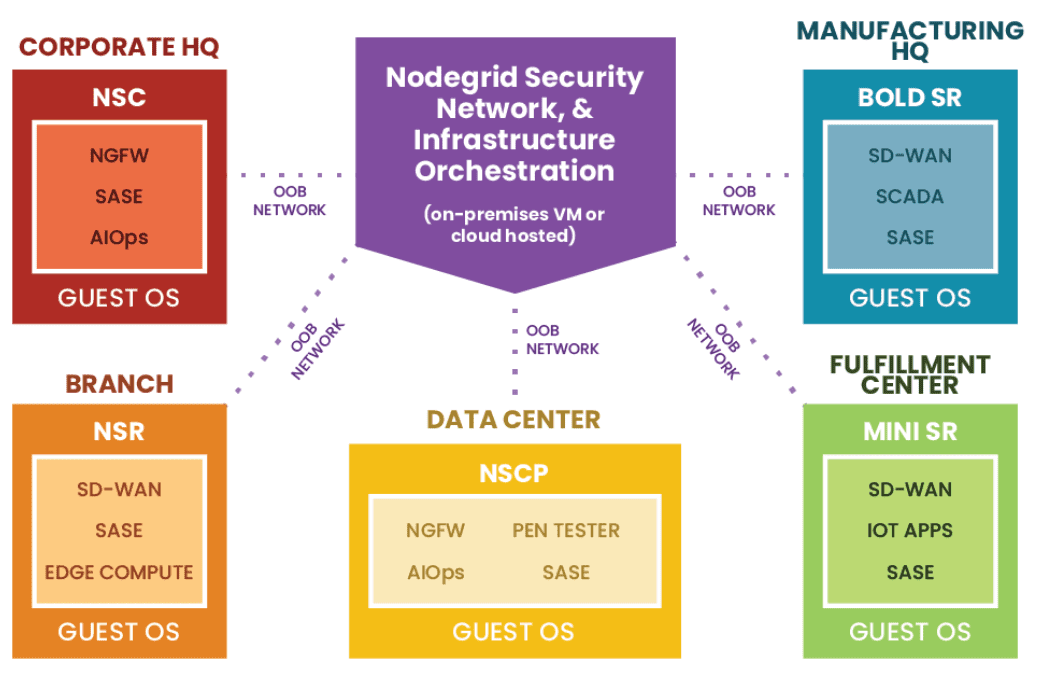
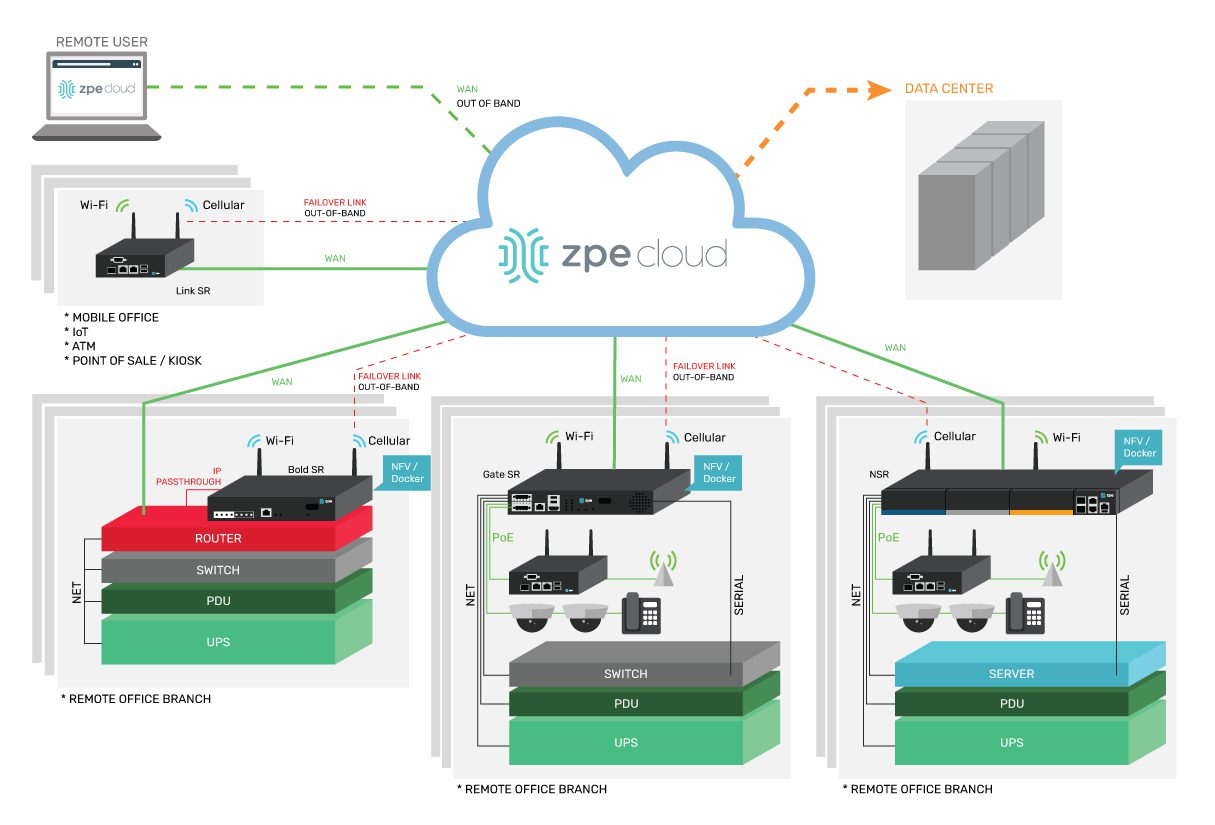
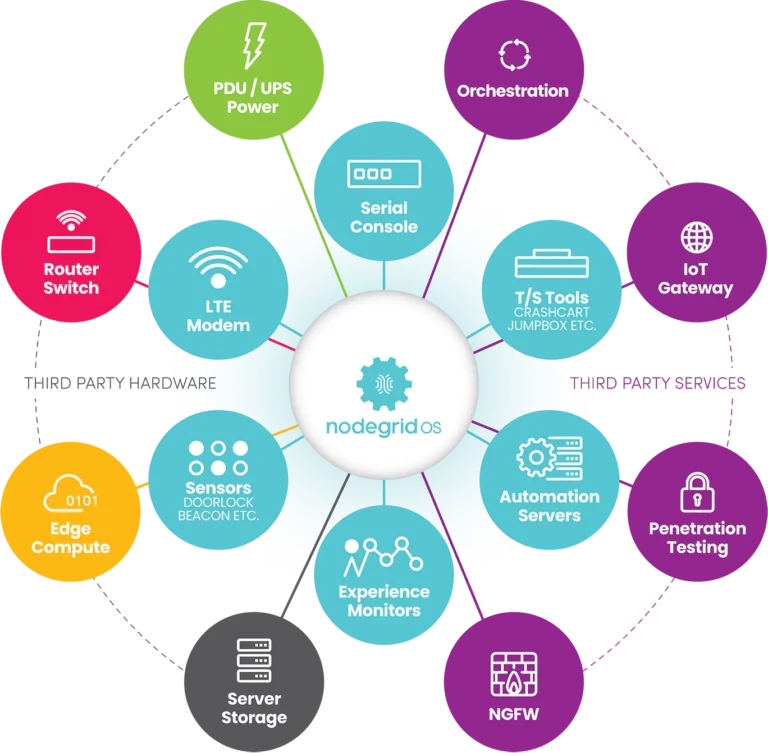
An example deployment diagram of ZPE’s Services Delivery Platform.

A single Nodegrid serial console server or integrated branch router can replace an entire stack of networking solutions. In addition to out-of-the-box features like OOB management, cellular failover, and gateway routing, Nodegrid boxes can run VMs, containers, and any choice of third-party or custom applications.

For example, Cloudflare provides a great SECaaS SASE and ZTNA solution, but the problem is that many devices (such as printers, cameras, and IoT sensors) can’t run the Cloudflare agent. To solve this problem, you can deploy a Nodegrid Net Services Router (NSR) at each site to directly host the Cloudflare agent. The NSR can then extend the Cloudflare One SASE/ZTNA solution to any connected devices, overcoming vendor lock-in and eliminating the need for additional servers and OS licenses.

The hardware components of the Services Delivery Platform hook into ZPE’s vendor-neutral management software, which you can host on-premises or access through ZPE’s cloud. This software serves as the orchestrator for the entire architecture of connected solutions. In addition to managing the apps deployed to Nodegrid devices, you can use ZPE’s platform to integrate tools hosted elsewhere. This creates a unified platform that streamlines security, network, and infrastructure orchestration and provides truly holistic coverage.

Security as a Service attempts to simplify network security management, but it fails to provide a truly streamlined environment. Contact ZPE Systems today to learn more about overcoming those limitations with the Services Delivery Platform.

Want to learn how to simplify network security management?

Contact us today or visit our products page to discuss how ZPE Systems Nodegrid can simplify your enterprise networking needs.
Contact Us

ZPE Systems’ Services Delivery Platform accelerates time-to-market

Zero Pain Ecosystemedit

ZPE Systems’ Services Delivery Platform accelerates time-to-market with any app, anytime, anywhere

IT teams can deliver instant business value with the on-demand services delivery architecture

Fremont, CA, April 25, 2023 — ZPE Systems’ Services Delivery Platform is IT’s ‘easy’ button for delivering instant business value. Instead of deploying dedicated NGFW hardware and Intel® NUCs, ZPE’s Intel-based platform runs 3rd party apps at remote locations delivered via ZPE Cloud app marketplace. This speed and flexibility simplify global service delivery and fleet management for manufacturing, healthcare, finance, and other industries, where any app can be automatically deployed from the cloud.

Why is this important?

Private-cloud and on-prem services must run on dedicated systems, which causes infrastructure sprawl. This complexity pulls IT teams away from generating revenue, recovering from outages, and stopping ransomware attacks. Their job becomes managing low-level infrastructure and inefficient delivery pipelines. The Services Delivery Platform alleviates this by giving them the speed and flexibility to:

  • Secure remote locations with cloud-deployed pen test agents & other services
  • Segment edge networks regardless of interface type
  • Eliminate supply chain risks with hardened devices
  • Shrink attack surfaces with swift centralized patch management
  • Collapse device stacks into 1RU or less using virtual services

Services Delivery Platform apps and services

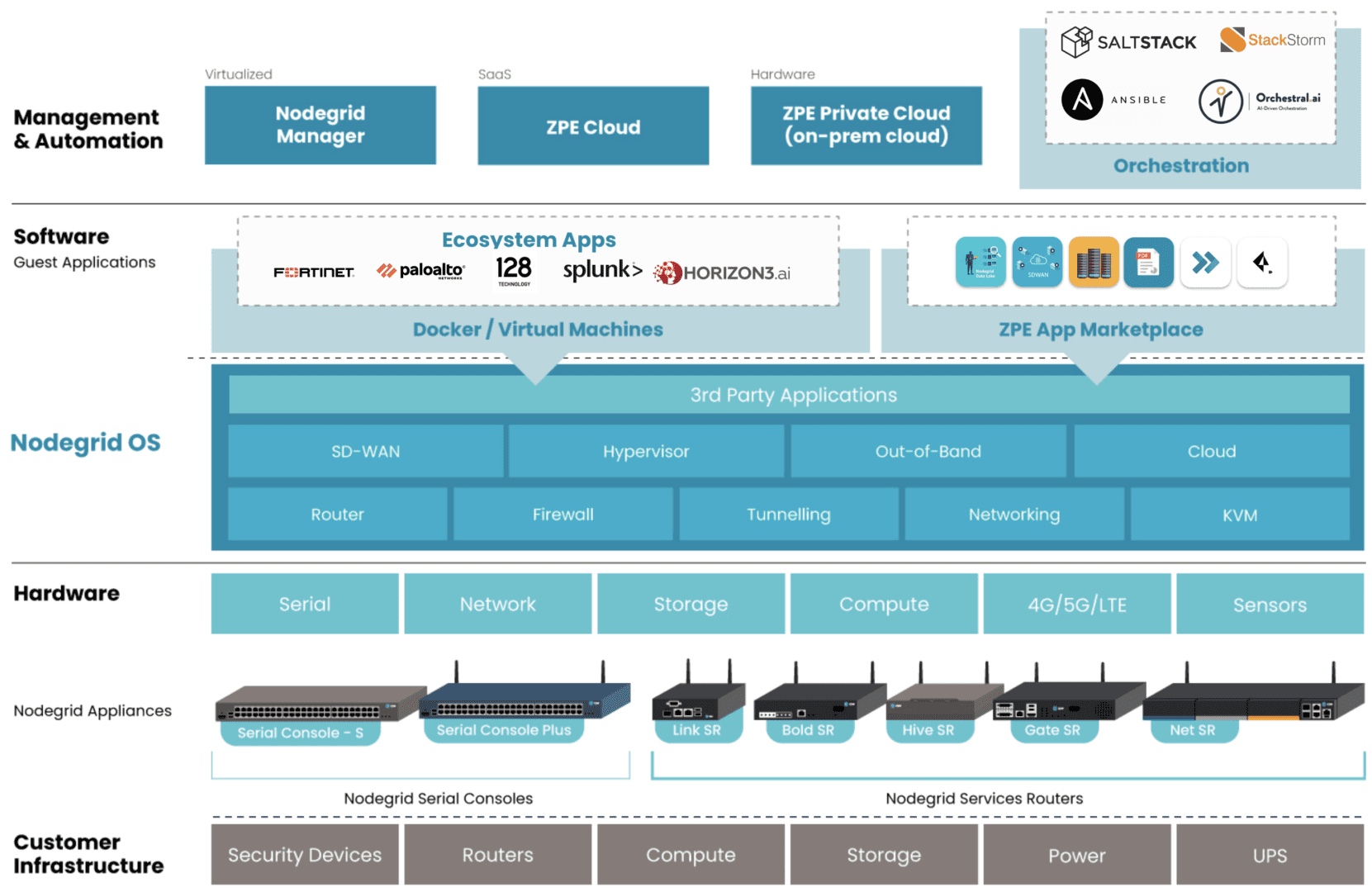
Graphic: ZPE’s Services Delivery Platform is represented as blue blocks. Examples of 3rd-party hosted apps are represented in white blocks under Ecosystem Apps.

The Services Delivery Platform brings to life Gartner’s concept of platform engineering. This platform-as-a-service model allows admins to tailor environments with the right apps for SD-WAN, NGFW, pen testing, and other functions, without battling vendor lock-in or changes in security posture. They also gain a consistent management experience across private-cloud and on-prem solutions.

Teams typically avoid platform engineering because there are no best practices for creating the proper control plane management network on secure devices.

ZPE Systems worked with Big Tech to define these best practices, which enterprises can now apply to private-cloud colo and edge deployments using the Services Delivery Platform. This establishes the resilient control plane management network and platform engineering component, both on a single, multi-function device connected to the cloud.

Enterprises accelerate revenue generation, reduce outage costs, and stop ransomware attacks using this architecture.

How does it work?

Nodegrid edge routers bring dedicated LAN and WAN links through multiple interface types (serial, ethernet, USB, IPMI). These create a secure control plane — a Double-RingTM management architecture — while eliminating the hardware attack surface with security features including TPM 2.0, encrypted disk, geofencing, and fully-signed Nodegrid OS.

This network is the foundation of the Services Delivery Platform. Along with hosting the management network, Nodegrid devices directly run VMs, containers, and any choice of app using the onboard multi-core Intel CPU and Linux-based Nodegrid OS. This OS also extends automation across environments and devices to give teams end-to-end activation and chaining of SASE, NGFWs, SD-WAN, and any cloud or on-prem solution.

“I’ve been in ops for a long time. Most of your day is spent just figuring out how to get your environments to work right,” says James Cabe, Director, Technical Alliances at ZPE Systems. “The Services Delivery Platform is a game-changer. The whole thing sits right on the Nodegrid box and you can switch or swap out services whenever you need to. Just choose what you want to deploy and go. It’s all done via separate control plane with no attack surface and no exposure to the Internet.”

Where can I find more information?

Go to zpesystems.com/services-delivery-platform to learn more about the Services Delivery Platform.

If you’re attending RSA Conference April 24-27, visit ZPE Systems at booth 4125 between north and south halls and ask for a demo.  Use this code for free RSA expo pass: 52EZPESYSXP

Zero Touch Deployment Cheat Sheet

A zero touch deployment cheat sheet is visualized as a literal cheat sheet used by a student during an exam

Zero touch deployment is meant to make admins’ lives easier by automatically provisioning new devices. However, many teams find the reality of zero touch deployment much more frustrating than manual device configurations. For example, zero touch deployment isn’t always compatible with legacy systems, can be difficult to scale, and is often error-prone and difficult to remotely troubleshoot. This post provides a “cheat sheet” of solutions to the most common zero touch deployment challenges to help organizations streamline their automatic device provisioning.

Zero touch deployment cheat sheet

Zero touch deployment – also known as zero touch provisioning (ZTP) – uses software scripts or definition files to automatically configure new devices. The goal is for a team to be able to ship a new-in-box device to a remote branch where a non-technical user can plug in the device’s power and network cables, at which point the device automatically downloads its configuration from a centralized repository via the branch DHCP server.

In practice, however, there are a variety of common issues that force admins to intervene in the “zero touch” deployment. This guide discusses these challenges and advises how to overcome them to achieve truly zero touch deployments.

Zero touch deployment challenge: The solution:
Legacy systems don’t have native support for zero touch Extending zero touch to legacy systems using a vendor-neutral platform
Deployment errors result in costly truck-rolls Recovering from errors remotely with Gen 3 out-of-band (OOB) management
Securing remote deployments causes firewall bottlenecks Moving security to the edge with Zero trust gateways and Secure Access Service Edge (SASE)
Automating deployments at scale increases management complexity Maintaining control through centralized, vendor-neutral orchestration with version control

Extend zero touch to legacy systems with a vendor-neutral platform

Challenge Solution

While many new systems and networking solutions support zero touch deployment, sometimes there’s still a need to repurpose or reconfigure legacy systems that don’t come with native ZTP support.

Pre-staging these devices before shipping them to the branch is a security risk because the system could be intercepted in transit; plus, they’re likely already deployed at remote sites and need to be reconfigured in place. Without a way to extend zero touch deployment capabilities to those legacy systems, companies often have to pay for admins to travel to remote branches, negating any cost savings they were hoping to gain from reusing older devices.

One way to extend zero touch to legacy systems is with a vendor-neutral management platform. For example, a vendor-neutral serial console switch with auto-sensing ports can connect to modern and legacy infrastructure solutions in a heterogeneous branch deployment so they can all be managed from a single place.

From that unified management platform, admins can write and deploy configuration scripts to connected devices, including legacy systems that don’t support zero touch. Technically, this isn’t zero touch deployment because the system doesn’t automatically download and run its configuration file, but it’s still a way to turn an on-site, manual process into one that’s remotely activated and mostly automated.

Recover from deployment errors with Gen 3 OOB management

Challenge Solution

A new branch deployment almost never goes completely according to plan, and this is especially true when teams are using zero touch for the first time, or aren’t completely comfortable with software-defined infrastructure and networking. In the best-case scenario, when there’s a configuration error, the zero touch deployment aborts, and an admin is able to correct the problem and restart the process.

However, sometimes the deployment hiccup causes the device to hang, freeze, or get stuck in a reboot cycle. Or, even worse, an unnoticed error in the configuration could allow the deployment to finish successfully but then go on to affect other production dependencies and bring the entire branch network down. Either way, organizations must again deal with the expenses involved in sending a tech out to troubleshoot and fix the problem.

The best way to ensure continuous access to remote infrastructure is with out-of-band (OOB) management. An OOB solution, such as a serial console or all-in-one branch gateway, connects to the management ports on infrastructure devices so admins can remotely monitor and control every device from a single place without IP addresses.

This creates a separate (out-of-band) network that’s dedicated to management and troubleshooting, making it possible for teams to remotely recover devices that have failed the zero touch deployment process or brought down production LAN dependencies. Plus, the OOB gateway uses independent, redundant network interfaces to ensure admins still have remote access even if the production WAN or ISP link goes down.

To ensure full OOB management coverage of a heterogenous, mixed-vendor environment, the out-of-band solution should be completely vendor-neutral. An open OOB device also supports integrations with third-party solutions for automation, orchestration, and security. This kind of out-of-band platform is known as Gen 3 OOB. Gen 3 OOB management ensures that teams can remotely recover from zero touch deployment errors no matter what device is affected or how the production network is impacted.

Secure remote deployments with zero trust gateways and SASE

Challenge Solution

Organizations need to secure all devices at all remote sites using consistent policies and security controls. However, for smaller branches and IoT sites, it usually isn’t cost-effective to deploy a security appliance in each location.

Plus, adding more firewalls also adds more management complexity. That means traffic is usually backhauled through the main data center firewall, creating bottlenecks and causing network latency for the entire enterprise.

Using zero trust gateways and cloud-based security services, companies can move security to the branch without the cost and complexity of additional firewalls. An all-in-one, zero trust gateway solution combines SD-WAN, gateway routing, and OOB management in a single device. It also supports zero trust authentication technologies like SAML 2.0 and 2FA. A zero trust gateway also needs to support network micro-segmentation, which will allow the use of highly specific security policies and targeted security controls. Plus, by enabling software-defined wide area networking (SD-WAN), a zero trust gateway facilitates the use of SASE.

Secure Access Service Edge (SASE) is a cloud-based service that combines several enterprise security solutions into a single platform. Zero trust gateways use SD-WAN’s intelligent routing capabilities to detect branch traffic that’s destined for the cloud or web. This traffic is directed through the SASE stack for firewall inspection and security policy application, allowing it to bypass the main security appliance entirely. SASE helps reduce the load on the enterprise firewall, reducing bottlenecks and improving performance without sacrificing security.

Scale zero touch deployments with centralized orchestration

Challenge Solution
Zero touch deployments occur (at least in theory) without any admin intervention, but they still need to be monitored for failures. Keeping track of a handful of automatic deployments may seem easy enough, but as the number and frequency increases, it becomes more challenging. This is especially true when companies kick off large-scale expansions, deploying dozens of devices at once, all of which could be plugged in at any time to begin the automated provisioning process. Plus, different devices need different configuration files, and admins need a way to work together without overwriting each other’s code or duplicating each other’s efforts. A vendor-neutral orchestration platform provides a central hub for network and infrastructure automation across the entire enterprise. This platform uses the serial consoles and OOB gateways in each remote location to gain control over all the connected devices, so network teams can monitor and deploy all their zero touch configurations from one place. An orchestration platform is the single source of truth for all automation, so it needs to support version control. This ensures that admins can see who created or changed a configuration file and revert to a previous version when there’s a mistake.

Simplifying zero touch deployment with Nodegrid

Zero touch deployment can be a hassle, but using vendor-neutral management systems, Gen 3 OOB management, zero trust gateways, and centralized orchestration can help organizations overcome the most common hurdles. For example, a vendor-neutral Nodegrid branch gateway deployed at each remote site helps you extend automation to legacy systems, provides fast and reliable out-of-band access to recover from issues, enables zero trust security & SASE, and gives you unified orchestration through the Nodegrid Manager (on premises) and ZPE Cloud software.

Ready to learn more about zero touch deployment?

Nodegrid has a solution for every zero touch deployment challenge. Schedule a demo to see how Nodegrid’s vendor-neutral platform can simplify zero touch deployment for your enterprise.

Contact Us

Streamlining Remote Data Center Management

Streamlining Remote Data Center Management

With the tech industry in turmoil and an ongoing recession forcing cutbacks, many sysadmins and engineers are struggling to efficiently manage their data center infrastructure. Overworked admins are more likely to make mistakes and issues are more likely to fall between the cracks, making the enterprise network less resilient. In the current economy, businesses can’t afford to lose revenue due to data center outages, and that’s why it’s crucial to invest in the tools teams need to efficiently manage and monitor remote infrastructure.

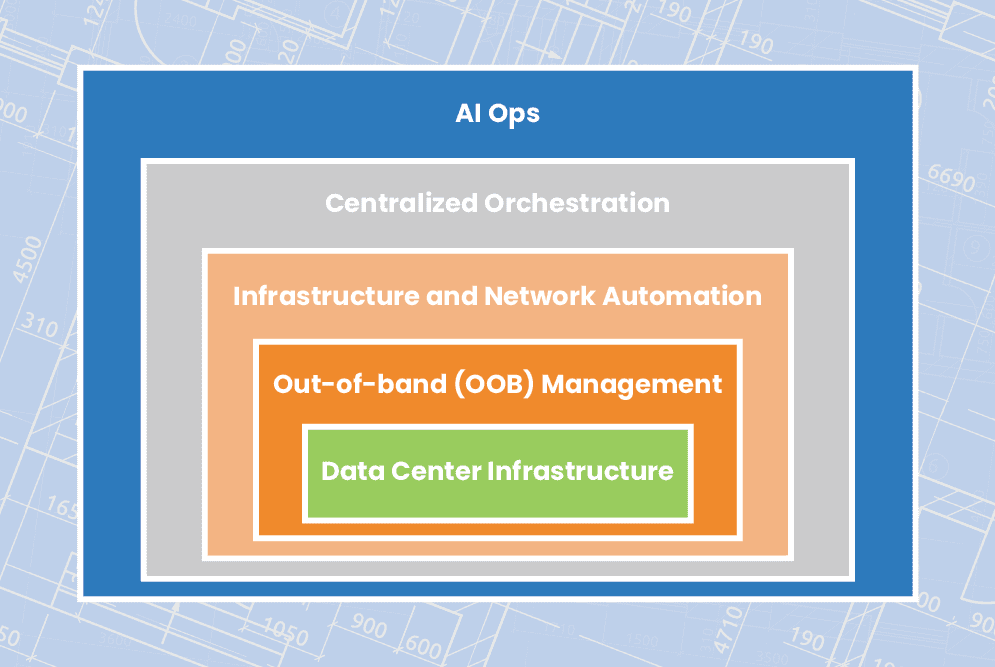
This blog explains how to streamline remote data center management using technologies like out-of-band (OOB) management, automation, orchestration, and AIOps to ensure network resiliency.

How to streamline remote data center management

Out-of-band management

Organizations commonly deploy redundant internet connections at their data centers to provide network failover, ensuring business continuity in case the primary ISP suffers an outage. However, if the data center WAN or LAN goes down due to an equipment failure, configuration mistake, or security breach, network failover won’t help admins solve the problem. If remote data center devices are unable to get an IP address, then they’ll be unreachable on the production network, leaving remote teams without a way to diagnose and fix the issue. That means expensive truck rolls or on-site managed services, plus the revenue and reputation costs of extended downtime.

What’s needed to ensure business continuity and reduce the cost of outages is an out-of-band (OOB) management network that doesn’t rely on any production infrastructure. The most efficient way to accomplish this is with Gen 3 OOB serial consoles. These systems include redundant network interfaces – often using cellular – to ensure continuous remote access even if the production ISP or MPLS link goes down. An OOB serial console directly connects to data center infrastructure devices via the serial port, which means remote admins can access and manage them without an IP address. The result is that remote data center management teams can diagnose and fix problems without traveling on-site, saving money on recovery costs as well as reducing the duration and business impact of outages.

Plus, an OOB management network can be used to execute resource-intensive automation and orchestration workflows without using valuable MPLS bandwidth or affecting production network performance. Gen 3 serial consoles are vendor-neutral and support the use of third-party automation scripts and playbooks, giving remote data center teams a centralized orchestration platform for more streamlined infrastructure and network management.

Infrastructure and network automation

Staff cutbacks have left data center teams stretched paper-thin, and reduced budgets mean they’re being asked to do more with less. When admins are overworked with many tedious, manual tasks, they’re more likely to make mistakes. These mistakes are a major cybersecurity threat, with Microsoft estimating that up to 80% of ransomware attacks are caused by misconfigured devices, applications, and security systems.

Automation helps remediate human error by taking over the repetitive, tedious workflows that computers are best at, leaving admins and engineers free to handle the creative, intuitive work that only humans can accomplish. For example, teams can use infrastructure as code (IaC) and zero touch provisioning (ZTP) to turn data center device configurations into software scripts that are deployed and executed automatically. Automated configuration management tools can then monitor these devices for changes that might introduce a security vulnerability and then automatically roll-back to the last known good configuration. Teams can also use software-defined networking (SDN) and software-defined wide area networking (SD-WAN) to automate traffic management and optimization, load balancing, access control list (ACL) updates, and other network management workflows.

Automation makes it possible for small network operation centers (NOCs) and data center teams to efficiently control large and distributed enterprise deployments. While network automation hasn’t quite caught up to infrastructure automation in terms of adoption and tool maturity, the use of vendor-neutral devices and platforms allows teams to use their existing IaC and configuration management tools to deploy and control network devices like routers, switches, load balancers, and security appliances. Vendor-neutral solutions also make it easier to implement centralized orchestration to manage automation workflows across the entire network architecture.

Centralized orchestration

Automation’s goal is to streamline data center management, but when it’s not handled correctly, it can easily wind up overcomplicating things instead. If admins aren’t monitoring their automated workflows, there could be changes occurring without any human oversight, leading to potential security risks and making it harder to perform root-cause analysis (RCA) when issues arise. In addition, without an organized, centralized repository for network automation scripts and configurations, engineers could end up duplicating each other’s work and negating any productivity gains. Plus, having a fragmented automation architecture makes it impossible for admins and security analysts to holistically monitor and manage the enterprise network.

Centralized orchestration provides a single platform from which to deploy, monitor, and manage automation across data center deployments and distributed network architectures. A data center infrastructure orchestration platform should include:

  • Source code version control – A centralized repository for automation scripts that tracks changes and acts as a single source of truth for the entire automated infrastructure.
  • Vendor-neutral orchestrator – A tool that controls all of the automated workflows in a data center deployment, essentially automating the automation.
  • ⮕Visibility & analytics – Dashboards where admins can monitor automated workflows, view current device health and network performance, and gain insights from their AIOps and big data tools.

To ensure optimal coverage and efficiency, the source code repository must be compatible with the chosen scripting language(s), the orchestrator must support any IaC playbooks, and the visibility tools must be able to hook into all systems, applications, and devices in the data center. That means the orchestration platform should be vendor-neutral.

AIOps

Data center infrastructure, and the platforms used to monitor and manage it, all generate a lot of logs. The data contained in these logs can provide valuable insights about the health, performance, and security of that infrastructure, but only if teams have the ability to collect and analyze it. Unfortunately, human beings aren’t very adept at parsing vast quantities of data to spot and predict patterns. However, humans have designed artificial intelligence to pick up the slack.

Artificial intelligence for IT operations – or AIOps – uses technologies like machine learning (ML) and natural language processing (NLP) to analyze logs from data centers and network infrastructure. AIOps pulls data from sources such as monitoring and orchestration platforms, environmental monitoring sensors, and firewall logs, then utilizes that data to provide business insights, predict future outcomes, and make decisions to solve problems.

AIOps is a relatively new technology and as such its capabilities continue to evolve. However, data center teams are currently using AIOps for things like enhanced threat modeling, automatic root cause analysis, and intelligent performance monitoring. For overworked and understaffed data center teams, AIOps essentially acts as an extra brain devoted to the monitoring and analysis of automated infrastructure.

Streamlining remote data center management with ZPE Systems

A resilient enterprise network uses out-of-band (OOB) management, automation, orchestration, and AIOps to streamline remote data center management and ensure business continuity. The backbone of such an architecture is vendor-neutral solutions, such as the Nodegrid platform from ZPE Systems. Nodegrid serial consoles provide Gen 3 OOB management with complete vendor freedom, so you can control any device, deploy your choice of automation scripts and playbooks, host third-party security and AIOps solutions, and unify the management of all of the above with a single orchestration platform.

Ready to learn more about data center management?

To learn more about remote data center management with Nodegrid, contact ZPE Systems today.

Contact Us

Need an in-depth guide to building a more resilient network infrastructure? Fill out the form below to download the Network Automation Blueprint from ZPE Systems.

Cloud-Delivered Branch: Simplifying Remote Management

BranchDiagram
Modern enterprises must grow to remain competitive, but this expansion makes WAN management more challenging. Spinning up a new branch or edge computing site with traditional WAN infrastructure can be time-consuming and expensive, with network solutions needing to be purchased and installed and new MPLS links taking weeks or even months to activate. Each branch has infrastructure that admins need to manage remotely, which means accessing many different jump boxes and remembering many different configuration schemas. Essentially, it’s like each branch has its own unique toolkit. That means every additional branch increases the management complexity, making it more likely that mistakes or inefficiencies will occur.

The cloud-delivered branch is a relatively new concept that provides branch networking, security, and management solutions as a cloud-based service. The idea is to simplify remote management by reducing the number of individual solutions deployed at each branch and allowing admins to monitor and control all of their branches from a single place. This is like giving teams one single toolkit that can service every branch.

This post describes the three cloud-based services involved in a cloud-delivered branch, and gives an example of how to implement a cloud-delivered branch using the Nodegrid platform from ZPE Systems.

To see examples of a cloud-delivered branch in action, request a free demo of the Nodegrid platform.

Request a Demo

How a cloud-delivered branch simplifies remote management

There are three key components of a cloud-delivered branch: cloud-based infrastructure management, cloud-based network management, and cloud-based cybersecurity. Let’s discuss the technologies used in each component.

Cloud-managed branch gateways

A branch gateway is a networking device that lives in the branch and provides access to the enterprise WAN as well as cloud resources and the internet. A gateway that’s optimized for branch networking will usually combine multiple network functionalities in one to save rack space and reduce complexity. For the purposes of the cloud-delivered branch, one of these features should be device management, i.e. serial console/console server technology. This functionality means that any infrastructure component connected to the gateway, whether it’s via RJ-45 or Wi-Fi, can be remotely managed by simply logging into the gateway’s software, reducing the need for a jump box or dedicated management hardware. Of course, what makes it a cloud-managed branch gateway is that admins manage it (and all connected infrastructure) from a cloud platform instead of directly connecting to the gateway over the WAN. This means that admins have management access from anywhere in the world, without needing to be on the enterprise network.

Software-defined wide area networking (SD-WAN)

SD-WAN, or software-defined wide area networking, simplifies WAN management by decoupling control functions from the underlying hardware and making them available as software. Essentially, SD-WAN splits a WAN architecture into two layers: the physical hardware that connects branches to the enterprise network (e.g., cloud-managed branch gateways), and the networking logic that orchestrates WAN traffic (e.g., routing rules and load balancing). In a cloud-delivered branch, SD-WAN’s software lives in the cloud, giving network teams a centralized place from which to monitor and control the entire WAN architecture, no matter how many branches are involved.

Secure Access Service Edge (SASE)

SASE (pronounced “sassy”) is a solution that combines multiple enterprise security technologies into a single stack that’s delivered as a cloud-based service. SASE uses SD-WAN technology to directly connect branch users and devices to enterprise resources in the cloud, first passing that traffic through the SASE stack to ensure that security policies and controls are applied. That means this traffic doesn’t need to go through a traditional firewall, which reduces bottlenecks at the central data center without requiring a security appliance at each branch. Eliminating firewalls at most branches decreases management complexity for network admins, and reducing the load on a centralized data center firewall improves performance for the entire enterprise.

How to implement a cloud-delivered branch with Nodegrid

A cloud-delivered branch uses cloud-based infrastructure management, network management, and security to simplify remote branch management. The best practices for building infrastructure to support a cloud-delivered branch include:

Best practices: Benefits:
Using vendor-neutral hardware and software solutions Reduces the number of infrastructure devices that need to be deployed

Enables unified, centralized infrastructure management

Supports third-party apps and automation

Implementing out-of-band (OOB) management at each site Provides an alternative path to critical remote infrastructure during WAN/LAN outages

Reduces the frequency and cost of truck-rolls

Ensures that resource-intensive automation workflows don’t cause production latency

Incorporating branch LAN management into the cloud-management umbrella Extends software-defined networking control into the branch LAN

Unifies branch WAN and LAN management behind a single pane of glass

Increases efficiency and ensures holistic coverage

Let’s walk through an example of how these best practices are implemented using the Nodegrid platform from ZPE Systems.

Vendor-neutral branch gateways and cloud management

A Nodegrid branch gateway such as the Bold Services Router is installed at each branch to provide WAN and internet access. These all-in-one networking solutions provide routing, switching, and console server management functionality, reducing the number of infrastructure devices that need to be deployed. All Nodegrid devices are completely vendor-neutral, which means you can use them to host your SD-WAN, SASE, or edge computing applications, saving you from buying and installing additional hardware. In addition, vendor-neutral Nodegrid gateways unify branch infrastructure management through the ZPE Cloud software. Any infrastructure connected to a Nodegrid device at any branch is available to manage through ZPE’s centralized, cloud-based platform, simplifying remote management and providing greater opportunities for optimization and automation. Plus, ZPE Cloud software is also vendor-neutral, meaning you can integrate third-party apps and tools to create a fully customizable infrastructure and network orchestration platform.

Gen 3 out-of-band management

One of the most challenging aspects of remote branch management is recovering from network outages without any technical staff on-site to reboot devices or refresh IP addresses. Out-of-band (OOB) management solves this problem by providing an alternative path to critical remote infrastructure that doesn’t rely on the production WAN or LAN. Teams use OOB management to troubleshoot and fix problems and recover from outages, reducing the need for costly truck-rolls. Nodegrid branch gateways provide Gen 3 OOB management capabilities, the most advanced form of OOB technology. Nodegrid gateways are considered Gen 3 because they support third-party infrastructure and network automation via the OOB network. That means teams can use their preferred scripting languages and tools to execute resource-intensive automation workflows on a management network that’s completely separate from the production network. For example, admins can run AIOps root-cause analysis tools to fix problems, or orchestrate automation device provisioning, without taking up valuable MPLS bandwidth or creating additional latency on the production LAN. Additionally, companies typically need a jump box at every branch to host all their troubleshooting, remediation, and automation tools. The benefit of vendor-neutral Nodegrid devices is that they become a one-stop shop for OOB as well as all the services and tools you’d normally install on a jump box. This eliminates the need for separate out-of-band management and jump box appliances.

Branch LAN management with SD-Branch

SD-WAN provides software abstraction and cloud management for WAN architectures, but it typically stops at the edge of the branch, meaning admins use a different solution to manage the internal branch LANs. Nodegrid gateways extend software-defined networking control into the branch LAN using technology called SD-Branch. That means teams can use the same ZPE Cloud platform to control every aspect of branch networking, creating a streamlined management environment that increases efficiency and ensures holistic coverage. Using a Nodegrid device for your cloud-delivered branch reduces the number of network solutions deployed at each site, standardizes branch network management, and increases your automation and orchestration capabilities. Deploying fewer boxes decreases the cost to spin up a new branch, while standardization and automation helps to reduce operating expenses and increase operational efficiency.

Ready to learn more about implementing a cloud-delivered branch?

To learn more about implementing a cloud-delivered branch with Nodegrid, contact ZPE Systems today.

Contact Us

A Guide to SD-WAN Deployment Models

SD-WAN

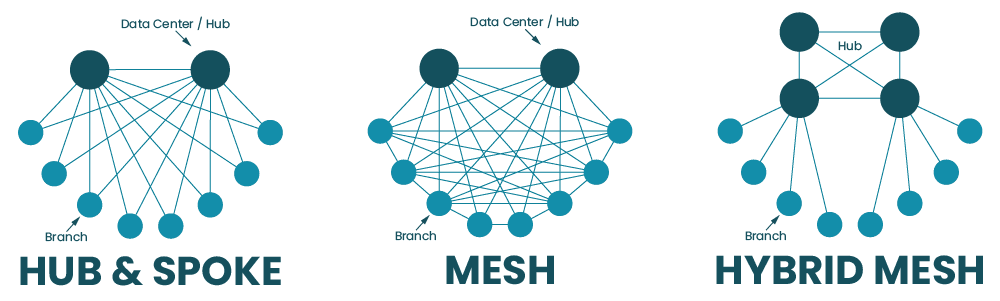
Software-defined wide area networking, or SD-WAN, uses software abstraction to create a virtual overlay network that sits on top of the underlying WAN infrastructure. This gives organizations greater control over distributed network architectures and enables a high degree of automation. SD-WAN can be deployed in a hub-and-spoke model or a variety of mesh topologies depending on the organization’s requirements and capabilities.

In this guide are the most common SD-WAN deployment models with diagrams, pros and cons, and best practices to help organizations choose the right topology.

Hub-and-spoke SD-WAN deployment models

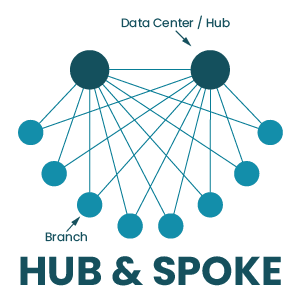
In the hub-and-spoke model, large data centers serve as centralized hubs that all SD-WAN traffic must flow through. The spokes are the campuses, branch offices, and edge sites that connect to each hub in order to access the enterprise WAN.

Hub & Spoke

The hub-and-spoke SD-WAN deployment model can be executed in a couple of different ways:

Spoke-to-hub only

In this SD-WAN deployment model, the spokes for a particular hub are unable to communicate with each other, they can only interact with the central hub. The networking logic for this deployment model is relatively simple compared to the others. It’s also useful when spoke sites need to be isolated from each other for security, privacy, or regulatory reasons.

Spoke-to-spoke via hub

In this deployment, spoke sites can communicate with each other, but all of their traffic must pass through the central hub first. Again, this makes SD-WAN networking logic a little simpler than allowing direct communication between sites. It also allows spoke traffic to pass through a centralized firewall first so that traffic can be inspected and security policies can be applied without needing to deploy firewall appliances at each spoke site.

Hub-and-spoke pros and cons

The hub-and-spoke approach is relatively easy to deploy and manage because all SD-WAN traffic must flow through a limited number of hub data centers. There’s no need to configure, secure, and load-balance network traffic between the numerous spoke sites that comprise an enterprise network, so organizations that are adopting SD-WAN for the first time tend to favor this approach.

However, since all spoke traffic needs to pass through a centralized hub, this creates bottlenecks that can impact network performance for all connected sites. Centralized hubs also represent single points of failure for the spokes that rely on them for enterprise network access – if a hub goes down due to a cybersecurity breach, ISP outage, or equipment failure, then spokes will lose their ability to communicate with each other or access enterprise network resources. Plus, since all traffic and data are aggregated in centralized hubs, they present attractive targets to cybercriminals, who can easily get all the valuable data they want in a single location instead of needing to move around the network.

Hub-and-spoke best practices

If you’re considering the hub-and-spoke approach, it’s important to have a business continuity plan that accounts for hub failures. For example, you should have some sort of network failover option (such as cellular LTE) in case the ISP connection goes down. You should also be able to redirect traffic from one hub to another if the first hub gets overloaded or experiences a failure. In addition, hubs should be deployed with out-of-band (OOB) management so network admins have 24/7 management access even if the SD-WAN connection goes down.

Learn more about Out-of-band (OOB) management.

Mesh SD-WAN deployment models

In the mesh deployment model, campuses, branch offices, and edge sites have some ability to communicate with each other directly, without their traffic needing to pass through a hub first. The degree to which sites can interact with each other depends on the type of mesh topology that’s deployed.

Full mesh deployment

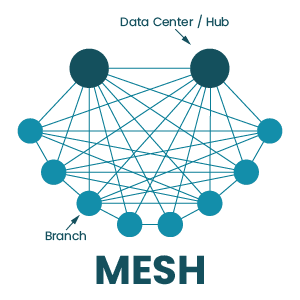
In a full mesh deployment, there is any-to-any communication between edge and branch sites using overlay tunnels. There are often still hub data centers to handle requests for centralized enterprise resources, but most other requests are handled by services deployed at the network edge (either at the sites themselves or in the cloud).

Mesh

Full mesh pros and cons

The full mesh topology enables faster communication between sites. It also allows organizations to deploy applications and services at the edge of the network where data is being generated and used, which is known as edge computing. There are also no single points of failure in the full mesh SD-WAN architecture, which reduces the risk of an outage and shortens the duration of outages that do occur. In addition, data and applications are distributed across many different locations, which can limit the damage caused by security breaches – instead of finding all your valuable data in a single server, cybercriminals have to jump around the network, increasing the chances they’ll be caught.

However, the full mesh topology is the most challenging to implement, manage, and optimize because there are so many moving parts involved. Each site needs a full stack of networking and security solutions because they aren’t relying on a centralized hub. Increasing the complexity of the SD-WAN architecture also increases the risk that mistakes will be made during configurations, deployments, and updates.

Partial mesh deployment

In this topology, some spokes can directly communicate with each other, and some services are deployed at the edge. However, there isn’t a full decentralization of applications and security, so some traffic still needs to pass through a hub.

Partial mesh pros and cons

Many organizations arrive at a partial mesh deployment on their journey from a hub-and-spoke deployment to a full mesh. A partial mesh topology reduces some of the load on centralized hubs and firewalls by moving certain services to the edge and allowing some direct site-to-site communications, which can improve performance. The organization can still rely on some centralized security functionality, reducing the number of security appliances or cloud-based services needed to protect the edge.

However, a partial mesh doesn’t completely address the limitations of a more centralized hub-and-spoke deployment. Hubs still represent potential bottlenecks and points of failure in the SD-WAN architecture. Plus, there’s still a lot of data centralization, meaning that storage and data processing servers in hubs will make attractive targets to hackers.

Hybrid mesh deployment

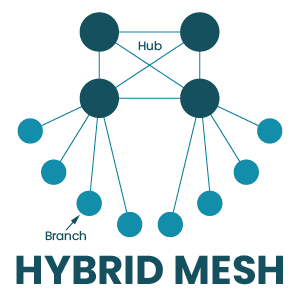
In a hybrid mesh, many hubs are deployed in a mesh topology, which means there is frequent communication and a high level of redundancy. However, branch and edge sites are still deployed as spokes, which means all their traffic goes through the hub mesh.

Hybrid Mesh

Hybrid mesh pros and cons

A hybrid mesh deployment ensures that no single hub acts as a single point of failure, enabling a high degree of redundancy and load balancing. Spoke sites can’t directly interact with each other, which reduces the complexity of the SD-WAN topology and decreases the number of security appliances to purchase and manage. Bottlenecking is also less of an issue because traffic from spokes doesn’t have to pass through a single designated hub, and can instead be distributed across multiple hubs.

However, a hybrid mesh topology is still fairly centralized, so you don’t get all the security and performance benefits of a decentralized full mesh deployment. Hubs are still valuable targets for cybercriminals, edge sites still need to send data to hubs for processing, and spokes cannot access enterprise network resources without going through the hub mesh. If that hub mesh is unavailable for any reason, spoke sites will be completely cut off.

Regional mesh

A regional mesh allows organizations to implement different deployment models for different regions. For instance, one region may have a spoke-to-spoke deployment, while another has a partial mesh. When traffic from one region needs to go to another, it must pass through a regional hub first.

Regional mesh pros and cons

The regional mesh model gives large or highly distributed organizations the flexibility to use deployments that meet the specific requirements of each region. For example, there may be a cluster of branch offices that process classified data for the defense industry, so the organization uses the spoke-to-hub-only deployment to isolate those sites from the rest of the enterprise network. In another region, the org may run a lot of edge computing for machine learning applications and need there to be fast and seamless communication between edge data centers. In that case, they might deploy a full mesh topology in that specific region.

However, this flexibility can also create a lot of management complexity. Admins need to learn, manage, and troubleshoot different configurations, network logic, and security rules for different regions. Plus, each region is subject to the downsides and limitations of whichever deployment model is used there. In addition, regional hubs often still act as potential bottlenecks and points of failure between each region and the enterprise network.

Mesh best practices

All of the best practices for the hub-and-spoke model also apply to mesh SD-WAN deployments. There are a couple of additional considerations for organizations considering a more decentralized deployment, including:

Cloud-delivered security – Mesh deployments typically require security solutions deployed at the edge, so that traffic doesn’t need to pass through a centralized firewall. However, purchasing appliances for each location is expensive and adds to the complexity of the architecture. Solutions like SSE (Security Service Edge) allow you to use your SD-WAN technology to send edge traffic through security services in the cloud. SSE takes many of the capabilities of traditional security appliances and combines them into a cloud-delivered stack, so organizations can get enterprise-level protection without needing to deploy additional hardware or route traffic through a central bottleneck.

Network automation – Manually configuring and controlling a complex mesh network increases the risk of human error. Luckily, SD-WAN’s software abstraction makes it easier to use automated scripts and playbooks to handle a lot of the tedious, repetitive tasks that are prone to mistakes such as device configurations and ACL (access control list) updates. Automation also means that work can get done faster and without putting additional pressure on overworked network teams.

Centralized orchestration – Mesh topologies have so many moving parts, and needing to manage each one of them separately makes it impossible to holistically control, optimize, and secure the deployment. Centralized orchestration gives network teams a common interface they can use to create, organize, deploy, monitor, and troubleshoot automated and manual SD-WAN workflows. That means the orchestrator should be vendor-neutral so it can dig its hooks into every device, application, and service in every SD-WAN site in your deployment.

Vendor neutrality – On that note, vendor neutrality is also a best practice because of how it simplifies and strengthens automation infrastructure. Many vendors lock you into using specific tools, applications, and devices, which makes automation pipelines more complicated and brittle — if one component breaks, the whole infrastructure goes down. Using vendor-neutral tools and orchestration platforms means you don’t have to inflate your toolkit or overcomplicate your automation pipeline, improving resiliency.

Choosing the right SD-WAN deployment model

Every SD-WAN topology comes with its own advantages and limitations, so organizations must assess their requirements and capabilities to determine which one to deploy. For example, if your team doesn’t have any SD-WAN experience, then jumping right into a full mesh deployment may not be practical. If you need your edge sites to have real-time data processing abilities (for example, in healthcare applications), then you may want to consider a less centralized mesh topology.

  Pros Cons
Hub-and-spoke
  • Easy to deploy
  • Reduced management complexity
  • Creates bottlenecks
  • Hubs are single points of failure
  • Centralized data is a target for hackers
Full mesh
  • Enables edge computing
  • No single points of failure
  • Decentralized data limits the blast radius of breaches
  • Complex implementation and management
  • Increases risk of human error
  • Requires edge or cloud-delivered security solutions
Partial mesh
  • Reduces some load on centralized hubs
  • Easier to deploy than a full mesh
  • Enables edge computing
  • Hubs can still create bottlenecks
  • Hubs are still potential points of failure
  • There is still some data centralization
Hybrid mesh
  • Enables a high degree of redundancy among hubs
  • Not as complex as a full mesh
  • Reduces bottlenecks
  • There is still some data centralization
  • There is still some bottlenecking
  • Hub mesh is still a point of failure
Regional mesh
  • Flexible and customizable
  • Addresses specific needs of individual sites and regions
  • Each regional hub is a potential point of failure
  • Variety of topologies creates a lot of management complexity
  • Subject to the downsides and limitations of all the deployment models in use

Ready to learn more about SD-WAN deployment models?

For more guidance on how to choose and implement SD-WAN deployment models, contact the experts at ZPE Systems. Contact Us