Providing Out-of-Band Connectivity to Mission-Critical IT Resources

“That’s So Obvious Now…” – 3 Real Lessons in Network Resilience

Ahmed Algam – Thats So Obvious Now

3 Real Lessons in Network Resilience

By Ahmed Algam

Failure is a necessary part of life. It shines a light on things that you didn’t give enough attention to, so you can learn and grow. The same goes for life in IT. We do a lot of planning to prevent failure, but it inevitably shows up and reveals the flaws in our plans. We don’t like failure, but we kind of need it.

Over the past few months, I’ve seen many real-world examples of this. These incidents drove home a hard truth about architecting for network resilience:

Out-of-Band (OOB) access isn’t optional. It’s essential.

Here are three short but very real stories that made this point crystal clear.

1. The Power Outage That Didn’t Stop Us

Our Fremont office went dark. Completely dark. There was a power outage and our provider failed to give us a heads-up, so it took us by surprise.

No power meant routers, ESXi hosts, Proxmox servers, backup systems, and even Wi-Fi were knocked offline. It was a total blackout.

But we weren’t scrambling. We had architected a true out-of-band path using LTE. Even with the production network down, we still had a way in.

From miles away, we diagnosed the problem, rebooted critical infrastructure, and got things running again before most people even noticed.

Lesson: Your recovery plan is only as good as your last mile. If your failover path isn’t truly independent, it’s not a plan – it’s wishful thinking.

2. The Engineer Who Locked Himself Out

A partner’s network went down during a routine change. Not uncommon. What was uncommon? The fact that they had no access to fix it.

All their management traffic – SSH, APIs, everything – was routed through the same production network that had just failed. When that network died, so did their ability to reach any routers or switches. The team was flying blind.

We got the call, helped them recover, and discussed IMI best practices afterward.

Lesson: Never mix management and user traffic. You need a control plane that exists outside your data plane, especially when uptime is mission-critical.

3. “That’s So Obvious Now…” – The Failover Fail

A customer had the right idea: install a 4G modem as a failover path. This is common, and it’s a great way to gain access in case the main path goes down.

But the modem was physically wired into their primary Cisco router.

When that router failed (power surge), so did the modem. To make things worse, their monitoring agent was running in-band. So when the network collapsed, their monitoring did, too. No visibility, no access, no control.

We pointed out this problem. Then we suggested running the agent on dedicated OOB gear instead. Their response?

That’s so obvious now…but I didn’t even think about it.

Lesson: Monitoring doesn’t help if it goes down with everything else. Build it into your OOB infrastructure. Make it resilient, not just present.

What I Want You To Take Away From These Stories

Resilience isn’t just about having backup tools or extra hardware. It’s about designing for failure.

It’s about building your architecture so that even if the core goes dark, you still have eyes and hands on the network.

Out-of-Band isn’t a Luxury. It’s your Lifeline. Make sure to Architect it like one.

Here Are Resources to Help Build Your OOB Lifeline


Get Hands-On Help From Our Engineers

My colleagues have years of experience architecting these resilience practices. Please use the form to send us a message and get help with your specific use case.

After The Firewall Fails: How Gen 3 Out-of-Band Cuts the Ransomware Killchain

How Gen 3 Out-of-Band Cuts the Ransomware Killchain

It’s always frustrating for me to hear about another breach that goes deep. Not because attacks happen (they will), but because so many of them spiral out of control for the same reason: no access, no visibility, no plan that uses the best tools available

Leadership feels reassured when they spend top dollar on prevention. But they overlook the most important part of resilience: mitigation. You can’t build a resilient network with defense alone. You need a plan for when that defense fails. There’s no shortage of high-profile reminders of this

Imagine a submarine breach. Cold water rushes in. The crew is trained, alert, and ready to respond. But when they open the repair locker, all they find is duct tape, a flashlight, and hope. That’s what most IT teams face in a cyberattack.

Without the right tools in place, even the best trained teams can be rendered powerless by a breach. Gen 3 Out-of-Band changes that. It’s your pressure control, isolation chamber, and emergency patch kit that works when everything else doesn’t

Let’s look at a reality-based scenario of how these attacks play out…and how the results can be completely different.

The Breach And The Catastrophe That Follows

The attack begins quietly in the early morning hours. It’s 4:19AM when a sleeper process hidden in the network core activates. Within seconds, systems begin to go offline. At first, it looks like a glitch. But it’s not. It’s ransomware – coordinated, efficient, and already moving laterally.

Dashboards light up, but the core infrastructure is already compromised. Your monitoring tools freeze. VPNs fail. DNS is offline. Something’s wrong, but you can’t see how bad it is. And worse, you can’t do anything about it.

A dark and ominous underwater scene featuring a large submarine submerged in deep ocean waters. The

Your best engineer tries to log in from home. But, SSH hangs. Remote desktop times out. Someone asks if there’s a different way in. Maybe out-of-band access that is not dependent on VLAN1? There’s a moment of hope. An old console server buried in a rack…

But it was decommissioned years ago. Management called it redundant.

Locked Out And Looking In

Internal chats fill with speculation as the situation deteriorates by the minute. Even the cloud console is inaccessible. Your team is blind. No one knows how wide the blast radius is. You can’t tell which systems are down, which are salvageable, or where the attack might spread to next. Backup jobs that were configured on the same network are silent too.

In a last ditch effort, someone volunteers to drive to the datacenter. But, all that’s waiting for them is a locked building that they can’t get into. The badge reader is on the same compromised system. No remote access. No local access. Just a locked door and a blinking red light.

By 8:00 AM, retail locations are trying to open. Customers are walking through the doors and the IT team can only watch the damage unfold. Sure, trucks are rolling, but the systems are down and social media is lighting up. And while the team knows exactly what’s happening, there’s nothing they can do to stop it.

What Goes Wrong With In-Band Management

The problem isn’t that no one had a plan. It’s that they had no access. Without a resilient, independent management plane, even the best playbook can’t be executed.

  • You can’t isolate systems.
  • You can’t confirm where the threat is.
  • You can’t cycle power, restore backups, or even assess the blast radius.
  • You can’t prove you did anything right, because you can’t do anything at all!

When everything depends on a single, fragile production path, any failure becomes total. You’re not just locked out of tools – you’re locked out of the fight.

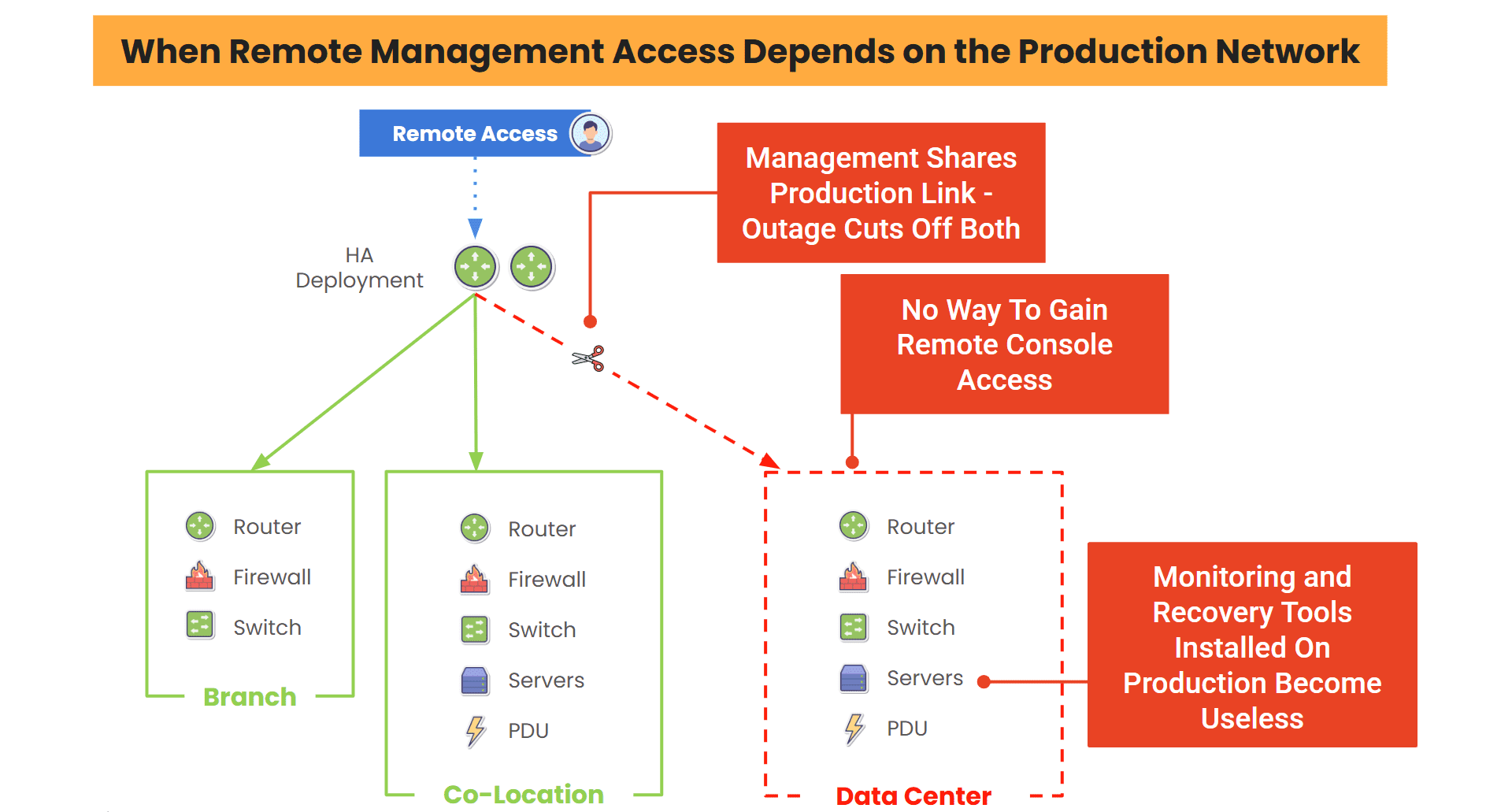
In-Band management risks admin access

Image: In-band management is risky because admin access shares the same link as the production network. Any production failure cuts admin access.

The Breach And Fast Recovery With Gen 3 Out-of-Band

Now imagine the same breach, at the same hour. The ransomware behaves the same way. Core systems go down. DNS disappears. Monitoring dies. But this time, the team has something different: ZPE’s Gen 3 Out-of-Band infrastructure.

As the attack unfolds, IT first responders are already inside, connected securely through ZPE’s Nodegrid. It doesn’t matter if DNS is down or the VPN won’t connect. You don’t need the production network at all. Unlike that old console server, this connection is entirely separate, isolated by design, and hardened for moments like this.

Instead of floundering in the dark, the team sees exactly what’s happening. They access routers, switches, and servers directly from wherever they are without relying on the compromised environment. One by one, they identify which systems are clean, which are compromised, and which need to be taken offline.

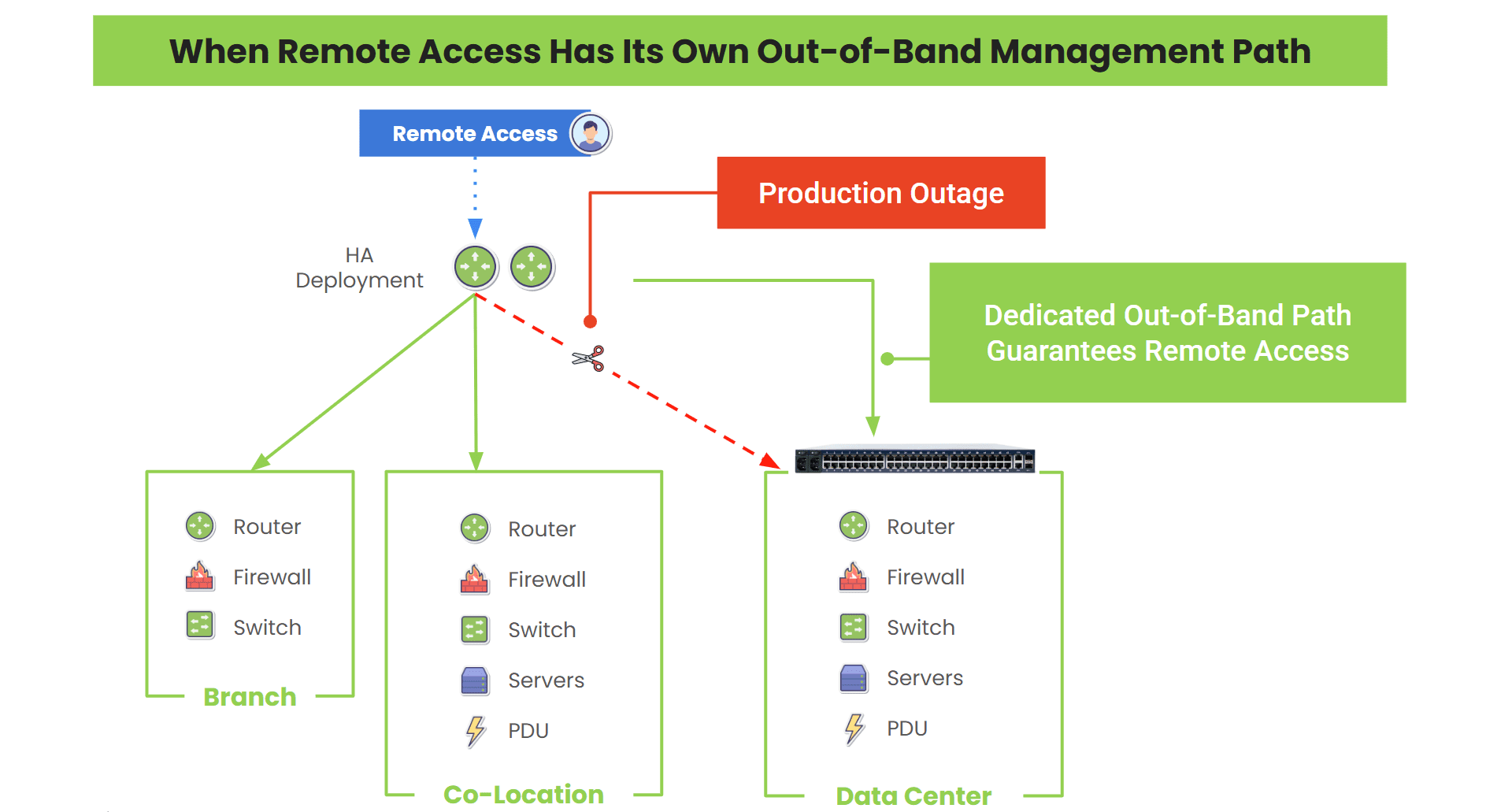
IMI via Gen 3 out-of-band

Image: Gen 3 out-of-band is fully isolated, giving you admin access to isolate, cleanse, and restore systems. This is the only way to cut the ransomware killchain and recover from an attack.

There’s no guesswork, only action. Segments of the network go dark, but intentionally this time. Teams shut down infected zones by port, node, or site. They use ZPE’s devices to restore clean systems from verified backups, remotely power cycle PDUs, and automatically push restore scripts locally. There’s no need for physical access. No one drives to the datacenter. There’s no scramble for access credentials or badge overrides.

The breach is being contained before customers begin to arrive. Core systems are stable. Edge environments are clean. Business resumes without disruption. No social backlash. No ticket surge. No headlines. The fire never reaches the storefront.

How Gen 3 Out-of-Band Makes The Difference

Gen 3 Out-of-Band gives you something most teams don’t have during a crisis: control. Not the illusion of control, but real, operational access no matter what happens to your primary infrastructure.

  • You don’t depend on your main network.
  • You don’t wait for remote hands.
  • You don’t lose time chasing access.
  • You take action quickly, securely, and from anywhere.
ZPE is the drop-in Gen 3 out-of-band solution

Image: ZPE’s Gen 3 out-of-band management solution drops into your environment and hosts all the tools and services for cutting the ransomware killchain.

Because when your network goes dark, Gen 3 out-of-band stays lit. That’s the difference between responding to a crisis and becoming one.

See How to Build Your Recovery Environment

3Building an Isolated Recovery Environment

See how to set up a Secure Isolated Recovery Environment (SIRE) that helps you fight through attacks and hide management access from hackers. Our article walks you through how to build survivable data backups and the designated infrastructure you need to stay secure.

Rollback Gone Wrong: How Out-of-Band Management Saved Our Engineering Backbone

Ahmed Algam – Rollback Gone Wrong
My name is Ahmed Algam. I am an IT & Systems Administrator for ZPE Systems – A Brand of Legrand, with over 20 years of experience in network administration, system infrastructure, Microsoft ERP solutions, and enterprise IT management. I have a B.S. in Computer Science and will soon complete my Master’s of Information and Data Science.

Every IT person knows that network updates are routine. Sometimes they can work perfectly, and other times, the update messes things up and you have to roll back to the last good configuration.

But what do you do when the rollback goes wrong?

Here’s my first-hand experience with this exact scenario.

We recently implemented what was intended to be a routine update for our engineering network. The change timeframe, internal signoff, test coverage, and rollback strategy were all set up. Every step was even pre-documented. The setup was textbook.

But if you’ve been in IT for more than five minutes, you know that upgrades don’t always fail in the first stage.

The initial steps had gone smoothly and we had a sense of confidence. But midway through, this one failed. It damaged a core routing service and stopped our ability to reach our remote sites.

No big deal. We had a step-by-step rollback plan that we validated in the lab. We even walked through it with a dry run.

Then things took an unexpected turn.

Our rollback failed!

Why? In the background, one dependent service was automatically upgraded. This silently triggered a chain reaction. We found ourselves dealing with Entra ID login loops, DHCP failures, and version mismatches across multiple services. Our internal DNS collapsed. With DNS gone, so was access to our identity provider, our management tools, and even our door badge system.

The access control system was no longer available to us. It was one of those nights. The rollback was supposed to save us, but what could save us from the rollback?

Luckily, we had out-of-band management

We were saved by Out-of-Band (OOB) management through our ZPE architecture.

We used secure OOB serial and cellular failover. That gave us direct control of the devices, even when the core network was down and identity services were unreachable. We stayed operational.

Ahmed Algam uses out-of-band management to recover from a failed rollback

Image: The out-of-band management path is a dedicated access network. It acts as a safety net for instances when a rollback fails and recovery processes must take place.

Fortunately, we had already segmented the engineering network from the business network. That isolation meant the failure didn’t spread. We could take our time rebuilding the broken pieces without impacting customer operations or internal productivity tools.

All services were back up and running within a few hours.

What did we learn?

I’m posting this because a lot of IT teams, particularly those in growth-stage businesses, neglect early architecture segmentation or OOB access. It is considered a “Phase 2” assignment. However, it’s the only way out should things go wrong, which they will.

Here’s what we learned:

  • The quality of your assumptions determines how well your rollback strategy works. A rollback that depends on “nothing else changes” is fragile by design.
  • DNS, Identity (like Entra ID), and VPN are interdependent. They form a delicate triangle, and when one goes, the others often follow.
  • Out-of-Band is a fundamental design need, not just a catastrophe recovery tool. If you’re managing remote or critical infrastructure, there is no substitute for direct, independent access.
  • Documentation is important. Access is more important. All the runbooks in the world won’t help if you can’t reach the system that runs them.

Prepare for failure. Walk through your worst-case scenario. Don’t count on luck to save you.

Watch this demo on how to roll back and recover

My colleague Marcel put together this demo video which shows how to access, configure, and recover infrastructure, even if you’re thousands of miles away.

Marcel van Zwienen gives a walkthrough of ZPE Cloud for remote device management.

Set Up Your Own Out-of-Band Management With Starlink

Download this guide on how to set up an out-of-band network using Starlink. It includes technical wiring diagrams and a guided walkthrough.

You can download it here: How to Build Out-of-Band With Starlink

Starlink setup guide

Why Gen 3 Out-of-Band Is Your Strategic Weapon in 2025

Mike Sale – Why Gen 3 Out-of-Band is Your Strategic Weapon

I think it’s time to revisit the old school way of thinking about managing and securing IT infrastructure. The legacy use case for OOB is outdated. For the past decade, most IT teams have viewed out-of-band (OOB) as a last resort; an insurance policy for when something goes wrong. That mindset made sense when OOB technology was focused on connecting you to a switch or router.

Technology and the role of IT have changed so much in the last few years. There’s a lot more pressure on IT folks these days! But we get it, and that’s why ZPE’s OOB platform has changed to help you.

At a minimum, you have to ensure system endpoints are hardened against attacks, patch and update regularly, back up and restore critical systems, and be prepared to isolate compromised networks. In other words, you have to make sure those complicated hybrid environments don’t go off the rails and cost your company money. OOB for the “just-in-case” scenario doesn’t cut it anymore, and treating it that way is a huge missed opportunity.

Don’t Be Reactive. Be Resilient By Design.

Some OOB vendors claim they have the solution to get you through installation day, doomsday, and everyday ops. But if I’m candid, ZPE is the only vendor who can live up to this standard.   We do what no one else can do! Our work with the world’s largest, most well-known hyperscale and tech companies proves our architecture and design principles.

This Gen 3 out-of-band (aka Isolated Management Infrastructure) is about staying in control no matter what gets thrown at you.

OOB Has A New Job Description

Out-of-band is evolving because of today’s radically different network demands:

  • Edge computing is pushing infrastructure into hard-to-reach (sometimes hostile) environments.
  • Remote and hybrid ops teams need 24/7 secure access without relying on fragile VPNs.
  • Ransomware and insider threats are rising, requiring an isolated recovery path that can’t be hijacked by attackers.
  • Patching delays leave systems vulnerable for weeks or months, and faulty updates can cause crashes that are difficult to recover from.
  • Automation and Infrastructure as Code (IaC) are no longer nice-to-haves – they’re essential for things like initial provisioning, config management, and everyday ops.

It’s a lot to add to the old “break/fix” job description. That’s why traditional OOB solutions fall short and we succeed. ZPE is designed to help teams enforce security policies, manage infrastructure proactively, drive automation, and do all the things that keep the bad stuff from happening in the first place. ZPE’s founders knew this evolution was coming, and that’s why they built Gen 3 out-of-band.

Gen 3 Out-of-Band Is Your Strategic Weapon

Unlike normal OOB setups that are bolted onto the production network, Gen 3 out-of-band is physically and logically separated via Isolated Management Infrastructure (IMI) approach. That separation is key – it gives teams persistent, secure access to infrastructure without touching the production network.

This means you stay in control no matter what.

Gen 3 out-of-band management uses IMI

Image: Gen 3 out-of-band management takes advantage of an approach called Isolated Management Infrastructure, a fully separate network that guarantees admin access when the main network is down.

Imagine your OOB system helping you:

  • Push golden configurations across 100 remote sites without relying on a VPN.
  • Automatically detect config drift and restore known-good states.
  • Trigger remediation workflows when a security policy is violated.
  • Run automation playbooks at remote locations using integrated tools like Ansible, Terraform, or GitOps pipelines.
  • Maintain operations when production links are compromised or hijacked.
  • Deploy the Gartner-recommended Secure Isolated Recovery Environment to stop an active cyberattack in hours (not weeks).


Gen 3 out-of-band is the dedicated management plane that enables all these things, which is a huge strategic advantage. Here are some real-world examples:

  • Vapor IO shrunk edge data center deployment times to one hour and achieved full lights-out operations. No more late-night wakeup calls or expensive on-site visits.
  • IAA refreshed their nationwide infrastructure while keeping 100% uptime and saving $17,500 per month in management costs.
  • Living Spaces quadrupled business while saving $300,000 per year. They actually shrunk their workload and didn’t need to add any headcount.

OOB is no longer just for the worst day. Gen 3 out-of-band gives you the architecture and platform to build resilience into your business strategy and minimize what the worst day could be.

Mike Sale on LinkedIn

Connect With Me!

When IT Goes Dark: What I Wish I Knew 20 Years Ago

Ahmed Algam

“No one ever tells you this part…”

My name is Ahmed Algam. I am a Network & Systems Administrator for ZPE Systems – A Brand of Legrand, with over 20 years of experience in network administration, system infrastructure, Microsoft ERP solutions, and enterprise IT management. I have a B.S. in Computer Science and will soon complete my Master’s of Information and Data Science.

In the early days of my IT career, I learned how to build systems from scratch, configure networks, and apply patches.

Like many, I was trained to focus on the obvious goals: keep things running, keep everything secure, and automate what I can.

But what no one taught me? What to do when everything goes dark – literally.

That’s exactly what happened recently.

ZPE’s Fremont branch lost power unexpectedly and without notice from our provider.

One by one, our services went down

  • ESXi Hosts
  • Backup Servers
  • VPN Tunnels
  • Core Routers and Switches

Here is the part that I wish I knew 20 years ago…

You won’t be rescued by dashboards, spreadsheets, or documentation when IT goes dark. What WILL save you is system design, specifically out-of-band management.

And for which I am lucky that design did save us.

Without Out-of-band (OOB), I would have had to spend the whole night at the office manually rebooting, configuring, and troubleshooting everything. It’s a nightmare for IT admins because you might get the call while you’re attending your kids’ sporting events, attending college courses, or spending quality time with your family. IT emergencies can really intrude on your life outside of work. It’s just part of the job.

But I was so grateful to have OOB because it gave me a separate path dedicated to recovery, which was just what I needed. I was able to instantly remote-into my infrastructure without leaving home.

IMI and OOBM are a dedicated path to system recovery

Image: Isolated Management Infrastructure uses out-of-band management (OOBM) serial consoles to access production devices when they are offline.

Within minutes, I was able to:

  • Remotely connect through our OOB console
  • Restart critical infrastructure
  • Monitor recovery independently of the production path

I didn’t have to head for the office or change the plans I had with my family. With our OOB system in place, I knew that I could fix the problem, have services restored before sunrise, and still get a good night’s sleep.

This wasn’t luck

It was the result of:

  • Planning for the worst-case scenario, not just the routine
  • Having OOB in all essential areas
  • Testing access methods instead of assuming they’ll just work
  • Separating management traffic from production flows
  • Staying calm with an architecture designed to withstand chaos


Even highly-skilled IT teams come to a full standstill during disruptions

It has nothing to do with a lack of talent or skill. The reason is their inability to access the malfunctioning systems.

So here’s my advice to every IT professional:

  • Now is the time to prepare for the worst
  • Make an OOB network
  • Separate management paths from production (and test access!)

    Because when the lights go out, that’s when real IT begins.

    Starlink setup guide

    Here’s How You Can Set Up Out-of-Band Management

    My colleagues recently created this guide on how to set up an out-of-band network using Starlink. It includes technical wiring diagrams and a guided walkthrough.

    You can download it here: How to Build Out-of-Band With Starlink

    Out-of-Band vs. Isolated Management Infrastructure: What’s the Difference?

    Out-of-band vs IMI
    To stay ahead of network outages, cyberattacks, and unexpected infrastructure failures, IT teams rely on remote access tools. Out-of-band (OOB) management is traditionally used for quick access to troubleshoot and resolve issues when the main network goes down. But in the past decade, hyperscalers and leading enterprises have developed a more advanced approach called Isolated Management Infrastructure (IMI). Although IMI incorporates OOB, it’s important to understand the distinction between the two, especially when designing infrastructure to be resilient and scalable.

    What is Out-of-Band Management?

    Out-of-Band Management has been around for decades. It gives IT administrators remote access to network equipment through an independent channel, serving as a lifeline when the primary network is down.

    Traditional out-of-band provides a secondary path to production equipment

    Image: Traditional out-of-band solutions provide a secondary path to production infrastructure, but still rely in part on production equipment.

    Most OOB solutions are like a backup entrance: if the main network is compromised, locked, or unavailable, OOB provides a way to “go around the front door” and fix the problem from the outside.

    Key Characteristics:

    • Separate Path: Usually uses dedicated serial ports, USB consoles, or cellular links.
    • Primary Use Cases: Though OOB can be used for regular maintenance and updates, it’s typically used for emergency access, remote rebooting, BIOS/firmware-level diagnostics, and sometimes initial provisioning.
    • Tools Involved: Console servers, terminal servers, or devices with embedded OOB ports (e.g., BMC/IPMI for servers).

    Business Impact:

    From a business standpoint, traditional OOB solutions offer reactive resilience that helps resolve outages faster and without costly site visits. It also reduces Mean Time to Repair (MTTR) and enhances the ability to manage remote or unmanned locations.

    However, solutions like ZPE Systems’ Nodegrid provide robust capability that evolves out-of-band to a new level. This comprehensive, next-gen OOB is called Isolated Management Infrastructure.

    What is Isolated Management Infrastructure?

    Isolated Management Infrastructure furthers the concept of resilience and is a natural evolution of out-of-band. IMI does two things:

    1. Rather than just providing a secondary path into production devices, IMI creates a completely separate management plane that does not rely on any production device.
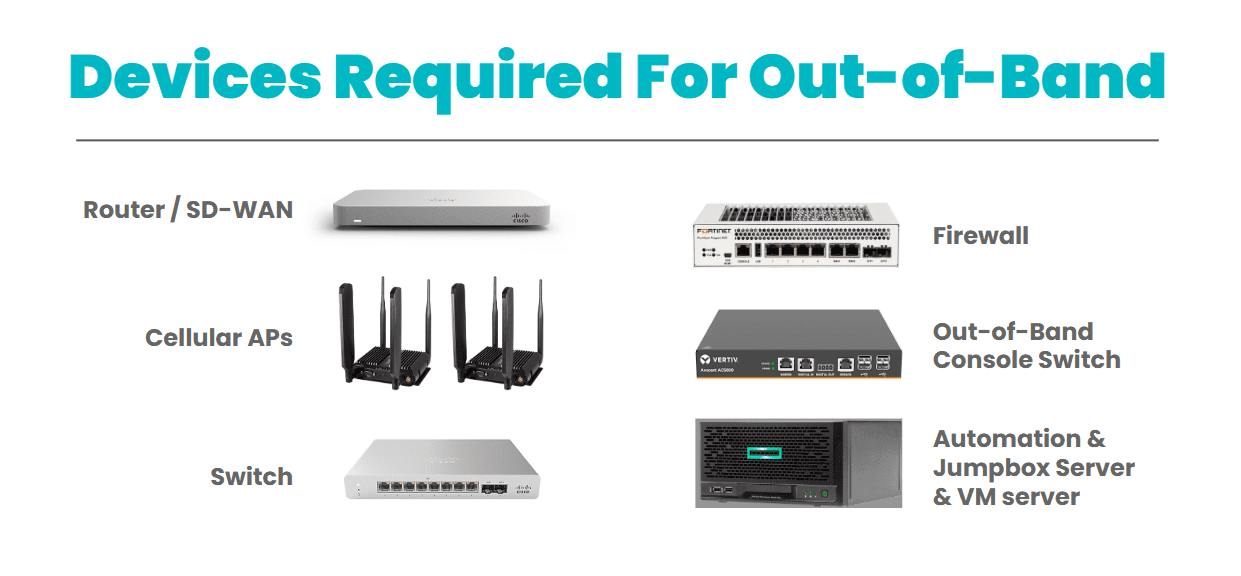
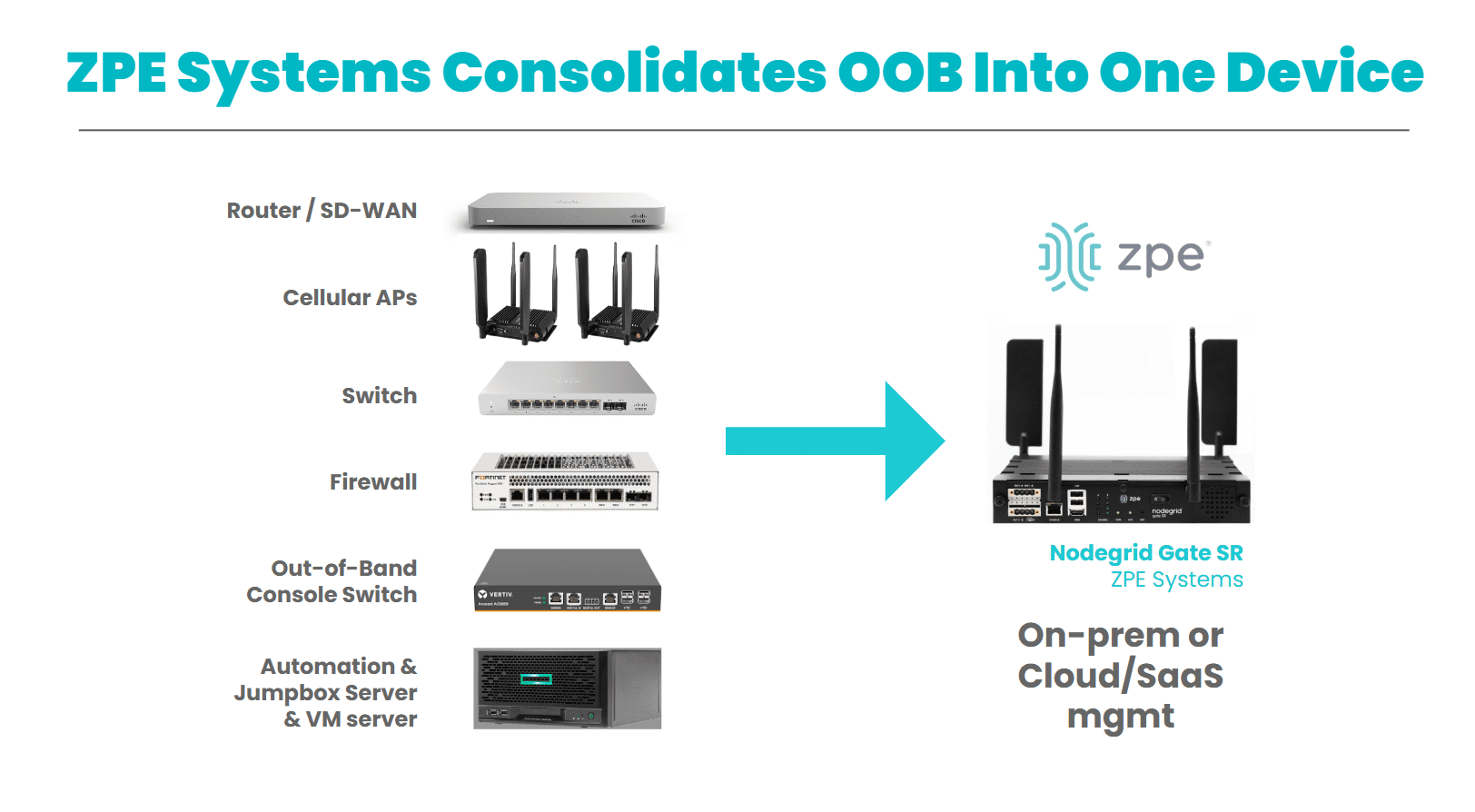
    2. IMI incorporates its own switches, routers, servers, and jumpboxes to support additional critical IT functions like networking, computing, security, and automation.

    Isolated management infrastructure provides a fully separate management path

    Image: Isolated Management Infrastructure creates a completely separate management plane and full-stack platform for maintaining critical services even during disruptions, and is strongly encouraged by CISA BOD 23-02.

    IMI doesn’t just provide access during a crisis – it creates a separate layer of control and serves as a resilience system that keeps core services running no matter what. This gives organizations proactive resilience from simple upgrade errors and misconfigurations, to ransomware attacks and global disruptions like 2024’s CrowdStrike outage.

    Key Characteristics:

    • Fully Isolated Design: The management plane is physically and logically isolated from the production network, with console access to all production devices via a variety of interfaces including RS-232, Ethernet, USB, and IPMI.
    • Backup Links: Uses two or more backup links for reliable access, such as 5G, Starlink, and others.
    • Multi-Functionality: Hosts network monitoring, DNS, DHCP, automation engines, virtual firewalls, and all tools and functions to support critical services during disruptions.
    • Automation: Provides a safe environment for teams to build, test, and integrate automation workflows, with the ability to automatically revert back to a golden image in case of errors.
    • Ransomware Recovery: Hosts all tools, apps, and services to deploy the Gartner-recommended Secure Isolated Recovery Environments (SIRE).
    • Zero Trust and Compliance Ready: Built to minimize blast radius and support regulated environments, with segmentation and zero trust security features such as MFA and Role-Based Access Controls (RBAC).

    Business Impact:

    IMI enables operational continuity in the face of cyberattacks, misconfigurations, or outages. It aligns with zero-trust principles and regulatory frameworks like NIST 800-207, making it ideal for government, finance, and healthcare. It also provides a foundation for modern DevSecOps and AI-driven automation strategies.

    Comparing Reactive vs. Proactive Resilience


    Purpose
    Deployment
    Services Hosted
    Typical Vendors
    Best For
    Out-of-Band
    Recover access when production is down
    Console servers or cellular-based devices
    None (access only)
    Opengear, Lantronix
    Legacy networks, branch recovery
    IMI
    Maintain operations even when production is down
    Full-stack platform (compute, network, storage)
    Firewalls, monitoring, DNS, etc.
    ZPE Systems (Nodegrid), custom-built IMI
    Modern, zero-trust, AI-driven environments

    Why Businesses Should Care

    For CIOs and CTOs

    IMI is more than a management tool – it’s a strategic shift in infrastructure design. It minimizes dependency on the production network for critical IT functions and gives teams a layered defense. For organizations using AI, hybrid-cloud architectures, or edge computing, IMI is strongly encouraged and should be incorporated into the initial design.

    For Network Architects and Engineers

    IMI significantly reduces manual intervention during incidents. Instead of scrambling to access firewalls or core switches when something breaks, teams can rely on an isolated environment that remains fully operational. It also enables advanced automation workflows (e.g., self-healing, dynamic traffic rerouting) that just aren’t possible in traditional OOB environments.

    Get a Demo of IMI

    Set up a 15-minute demo to see IMI in action. Our experts will show you how to automatically provision devices, recover failed equipment, and combat ransomware. Use the button to set up your demo now.

    Watch How IMI Improves Security

    Rene Neumann (Director of Solution Engineering) gives a 10-minute presentation on IMI and how it enhances security.

    Cisco Live 2024 – Securing the Network Backbone