Providing Out-of-Band Connectivity to Mission-Critical IT Resources

When IT Goes Dark: What I Wish I Knew 20 Years Ago

Ahmed Algam

“No one ever tells you this part…”

My name is Ahmed Algam. I am a Network & Systems Administrator for ZPE Systems – A Brand of Legrand, with over 20 years of experience in network administration, system infrastructure, Microsoft ERP solutions, and enterprise IT management. I have a B.S. in Computer Science and will soon complete my Master’s of Information and Data Science.

In the early days of my IT career, I learned how to build systems from scratch, configure networks, and apply patches.

Like many, I was trained to focus on the obvious goals: keep things running, keep everything secure, and automate what I can.

But what no one taught me? What to do when everything goes dark – literally.

That’s exactly what happened recently.

ZPE’s Fremont branch lost power unexpectedly and without notice from our provider.

One by one, our services went down

  • ESXi Hosts
  • Backup Servers
  • VPN Tunnels
  • Core Routers and Switches

Here is the part that I wish I knew 20 years ago…

You won’t be rescued by dashboards, spreadsheets, or documentation when IT goes dark. What WILL save you is system design, specifically out-of-band management.

And for which I am lucky that design did save us.

Without Out-of-band (OOB), I would have had to spend the whole night at the office manually rebooting, configuring, and troubleshooting everything. It’s a nightmare for IT admins because you might get the call while you’re attending your kids’ sporting events, attending college courses, or spending quality time with your family. IT emergencies can really intrude on your life outside of work. It’s just part of the job.

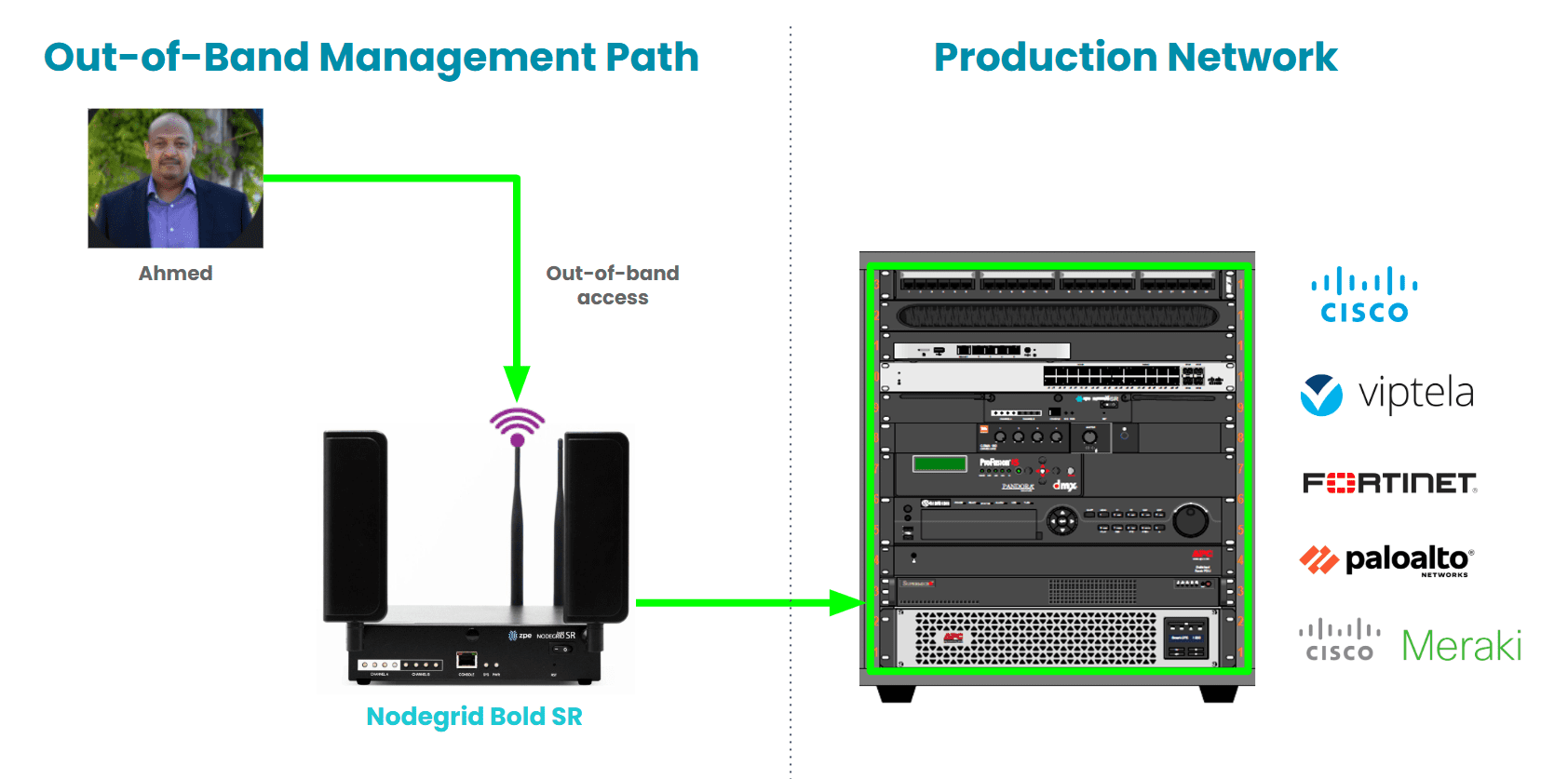
But I was so grateful to have OOB because it gave me a separate path dedicated to recovery, which was just what I needed. I was able to instantly remote-into my infrastructure without leaving home.

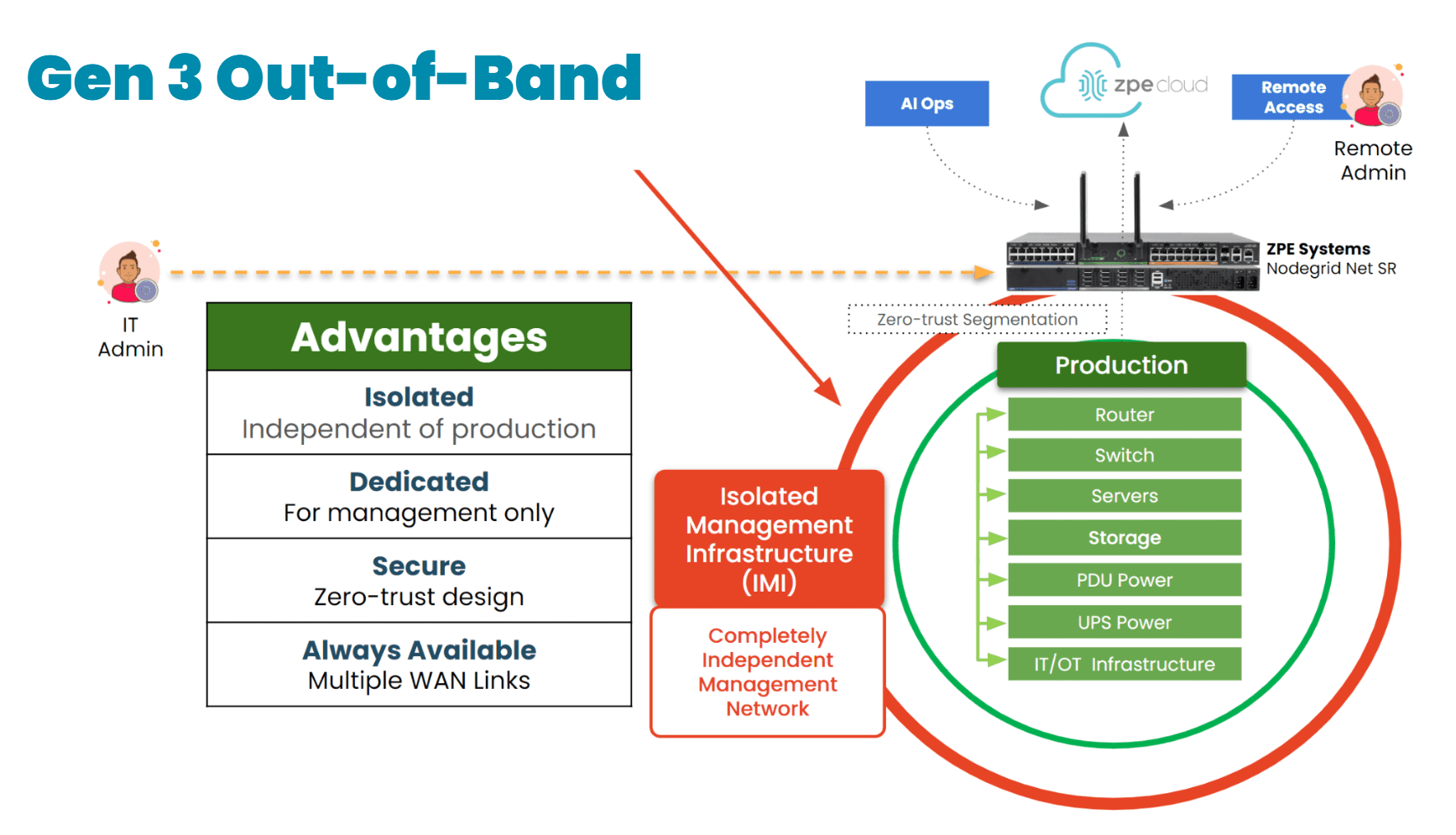
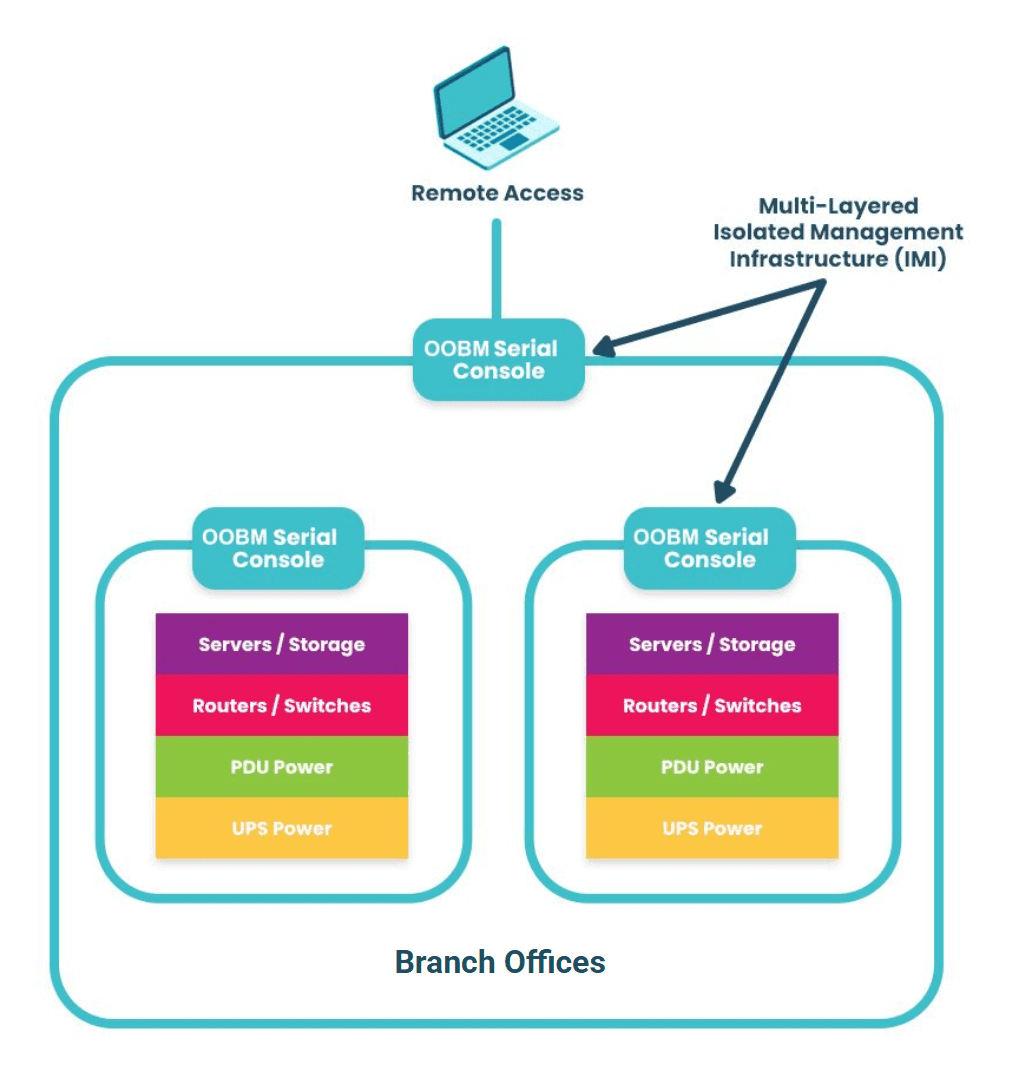
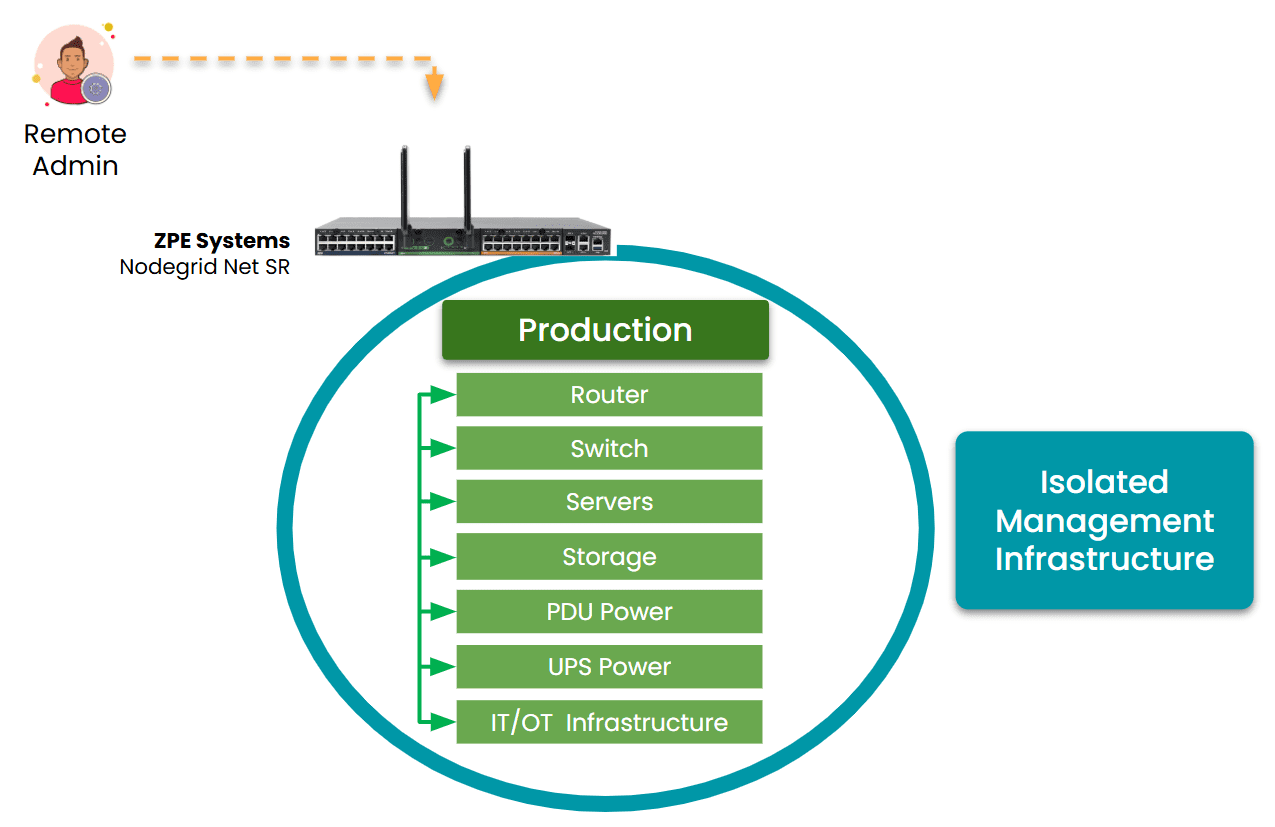
IMI and OOBM are a dedicated path to system recovery

Image: Isolated Management Infrastructure uses out-of-band management (OOBM) serial consoles to access production devices when they are offline.

Within minutes, I was able to:

  • Remotely connect through our OOB console
  • Restart critical infrastructure
  • Monitor recovery independently of the production path

I didn’t have to head for the office or change the plans I had with my family. With our OOB system in place, I knew that I could fix the problem, have services restored before sunrise, and still get a good night’s sleep.

This wasn’t luck

It was the result of:

  • Planning for the worst-case scenario, not just the routine
  • Having OOB in all essential areas
  • Testing access methods instead of assuming they’ll just work
  • Separating management traffic from production flows
  • Staying calm with an architecture designed to withstand chaos


Even highly-skilled IT teams come to a full standstill during disruptions

It has nothing to do with a lack of talent or skill. The reason is their inability to access the malfunctioning systems.

So here’s my advice to every IT professional:

  • Now is the time to prepare for the worst
  • Make an OOB network
  • Separate management paths from production (and test access!)

    Because when the lights go out, that’s when real IT begins.

    Starlink setup guide

    Here’s How You Can Set Up Out-of-Band Management

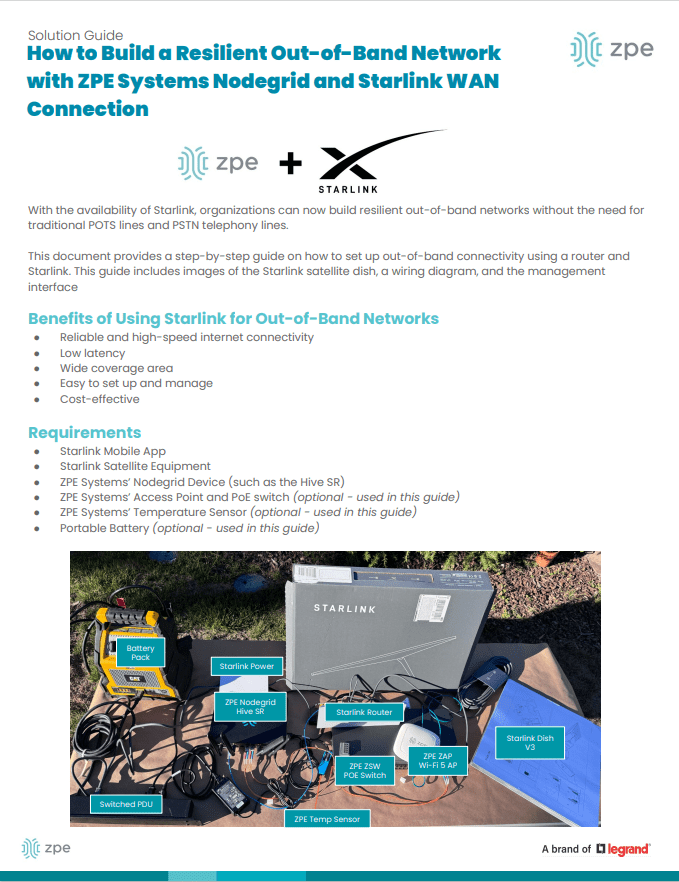
    My colleagues recently created this guide on how to set up an out-of-band network using Starlink. It includes technical wiring diagrams and a guided walkthrough.

    You can download it here: How to Build Out-of-Band With Starlink
    Why AI System Reliability Depends On Secure Remote Network Management

    Thumbnail – AI System Reliability

    AI is quickly becoming core to business-critical ops. It’s making manufacturing safer and more efficient, optimizing retail inventory management, and improving healthcare patient outcomes. But there’s a big question for those operating AI infrastructure: How can you make sure your systems stay online even when things go wrong?

    AI system reliability is critical because it’s not just about building or using AI – it’s about making sure it’s available through outages, cyberattacks, and any other disruptions. To achieve this, organizations need to support their AI systems with a robust underlying infrastructure that enables secure remote network management.

    The High Cost of Unreliable AI

    When AI systems go down, customers and business users immediately feel the impact. Whether it’s a failed inference service, a frozen GPU node, or a misconfigured update that crashes an edge device, downtime results in:

    • Missed business opportunities
    • Poor customer experiences
    • Safety and compliance risks
    • Unrecoverable data losses

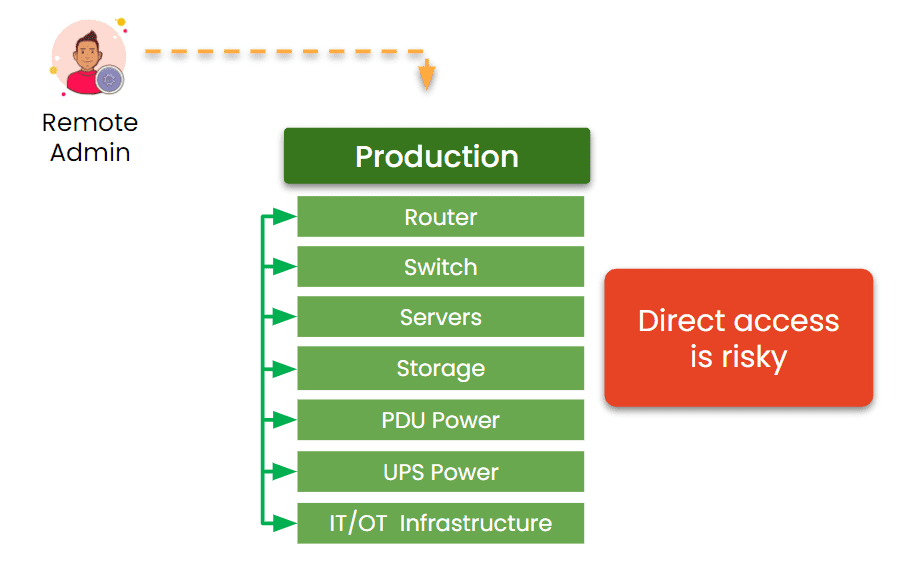
    So why can’t admins just remote-in to fix the problem? Because traditional network infrastructure setups use a shared management plane. This means that management access depends on the same network as production AI workloads. When your management tools rely on the production network, you lose access exactly when you need it most – during outages, misconfigurations, or cyber incidents. It’s like if you were free-falling and your reserve parachute relied on your main parachute.

    Direct remote access is risky

    Image: Traditional network infrastructures are built so that remote admin access depends at least partially on the production network. If a production device fails, admin access is cut off.

    This is why hyperscalers developed a specific best practice that is now catching on with large enterprises, Fortune companies, and even government agencies. This best practice is called Isolated Management Infrastructure, or IMI.

    What is Isolated Management Infrastructure?

    Isolated Management Infrastructure (IMI) separates management access from the production network. It’s a physically and logically distinct environment used exclusively for managing your infrastructure – servers, network switches, storage devices, and more. Remember the parachute analogy? It’s just like that: the reserve chute is a completely separate system designed to save you when the main system is compromised.

    IMI separates management access from the production network

    Image: Isolated Management Infrastructure fully separates management access from the production network, which gives admins a dependable path to ensure AI system reliability.

    This isolation provides a reliable pathway to access and control AI infrastructure, regardless of what’s happening in the production environment.

    How IMI Enhances AI System Reliability:

    1. Always-On Access to Infrastructure
      Even if your production network is compromised or offline, IMI remains reachable for diagnostics, patching, or reboots.
    2. Separation of Duties
      Keeping management traffic separate limits the blast radius of failures or breaches, and helps you confidently apply or roll back config changes through a chain of command.
    3. Rapid Problem Resolution
      Admins can immediately act on alerts or failures without waiting for primary systems to recover, and instantly launch a Secure Isolated Recovery Environment (SIRE) to combat active cyberattacks.
    4. Secure Automation
      Admins are often reluctant to apply firmware/software updates or automation workflows out of fear that they’ll cause an outage. IMI gives them a safe environment to test these changes before rolling out to production, and also allows them to safely roll back using a golden image.

    IMI vs. Out-of-Band: What’s the Difference?

    While out-of-band (OOB) management is a component of many reliable infrastructures, it’s not sufficient on its own. OOB typically refers to a single device’s backup access path, like a serial console or IPMI port.

    IMI is broader and architectural: it builds an entire parallel management ecosystem that’s secure, scalable, and independent from your AI workloads. Think of IMI as the full management backbone, not just a side street or second entrance, but a dedicated freeway. Check out this full breakdown comparing OOB vs IMI.

    Use Case: Finance

    Consider a financial services firm using AI for fraud detection. During a network misconfiguration incident, their LLMs stop receiving real-time data. Without IMI, engineers would be locked out of the systems they need to fix, similar to the CrowdStrike outage of 2024. But with IMI in place, they can restore routing in minutes, which helps them keep compliance systems online while avoiding regulatory fines, reputation damage, and other potential fallout.

    Use Case: Manufacturing

    Consider a manufacturing company using AI-driven computer vision on the factory floor to spot defects in real time. When a firmware update triggers a failure across several edge inference nodes, the primary network goes dark. Production stops, and on-site technicians no longer have access to the affected devices. With IMI, the IT team can remote-into the management plane, roll back the update, and bring the system back online within minutes, keeping downtime to a minimum while avoiding expensive delays in order fulfillment.

    How To Architect for AI System Reliability

    Achieving AI system reliability starts well before the first model is trained and even before GPU racks come online. It begins at the infrastructure layer. Here are important things to consider when architecting your IMI:

    • Build a dedicated management network that’s isolated from production.
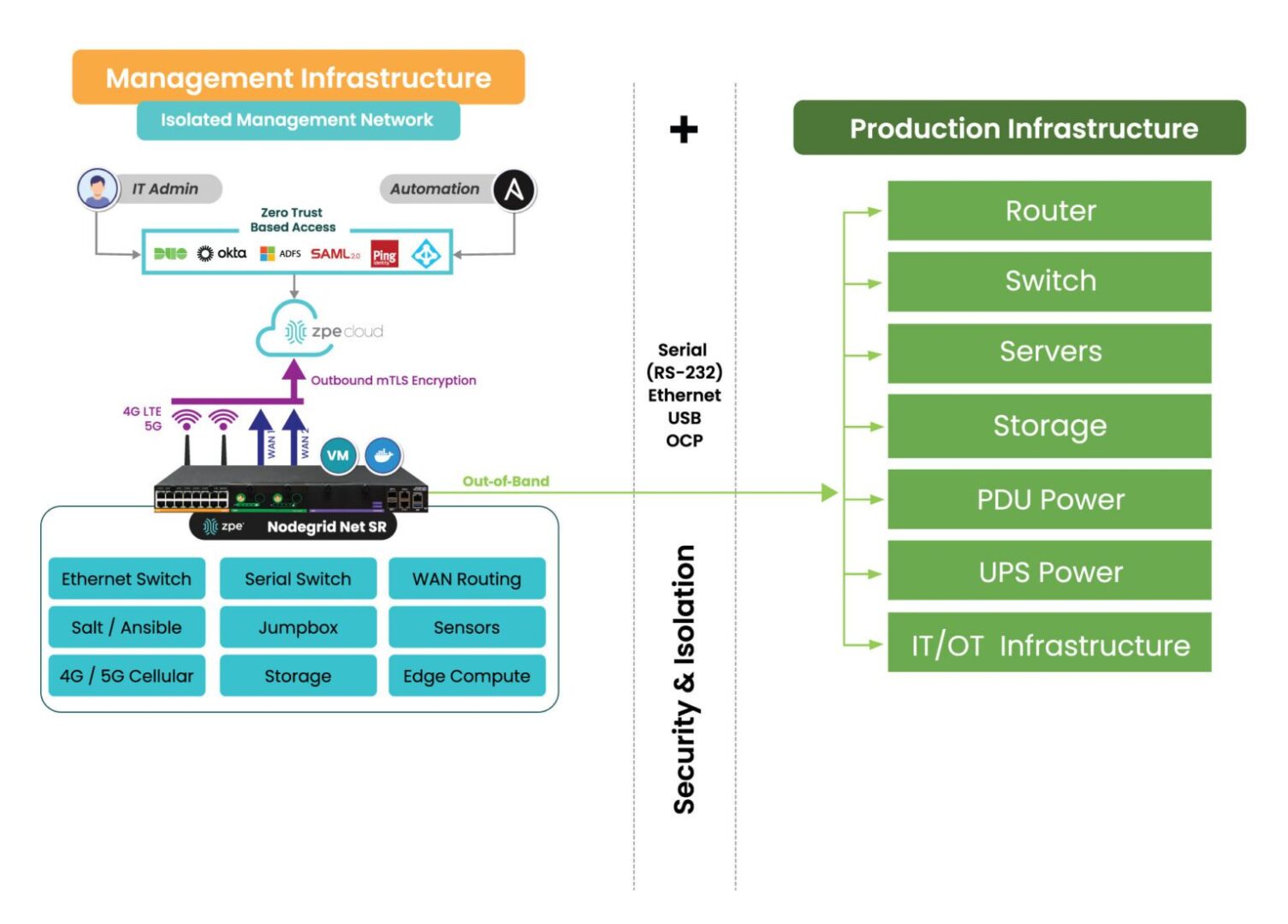
    • Make sure to support functions such as Ethernet switching, serial switching, jumpbox/crash-cart, 5G, and automation.
    • Use zero-trust access controls and role-based permissions for administrative actions.
    • Design your IMI to scale across data centers, colocation sites, and edge locations.

    How the Nodegrid Net SR isolates and protects the management network.

    Image: Architecting AI system reliability using IMI means deploying Ethernet switches, serial switches, WAN routers, 5G, and up to nine total functions. ZPE Systems’ Nodegrid eliminates the need for separate devices, as these edge routers can host all the functions necessary to deploy a complete IMI.

    By treating management access as mission-critical, you ensure that AI system reliability is built-in rather than reactive.

    Download the AI Best Practices Guide

    AI-driven infrastructure is quickly becoming the industry standard. Organizations that integrate an Isolated Management Infrastructure will gain a competitive edge in AI system reliability, while ensuring resilience, security, and operational control.

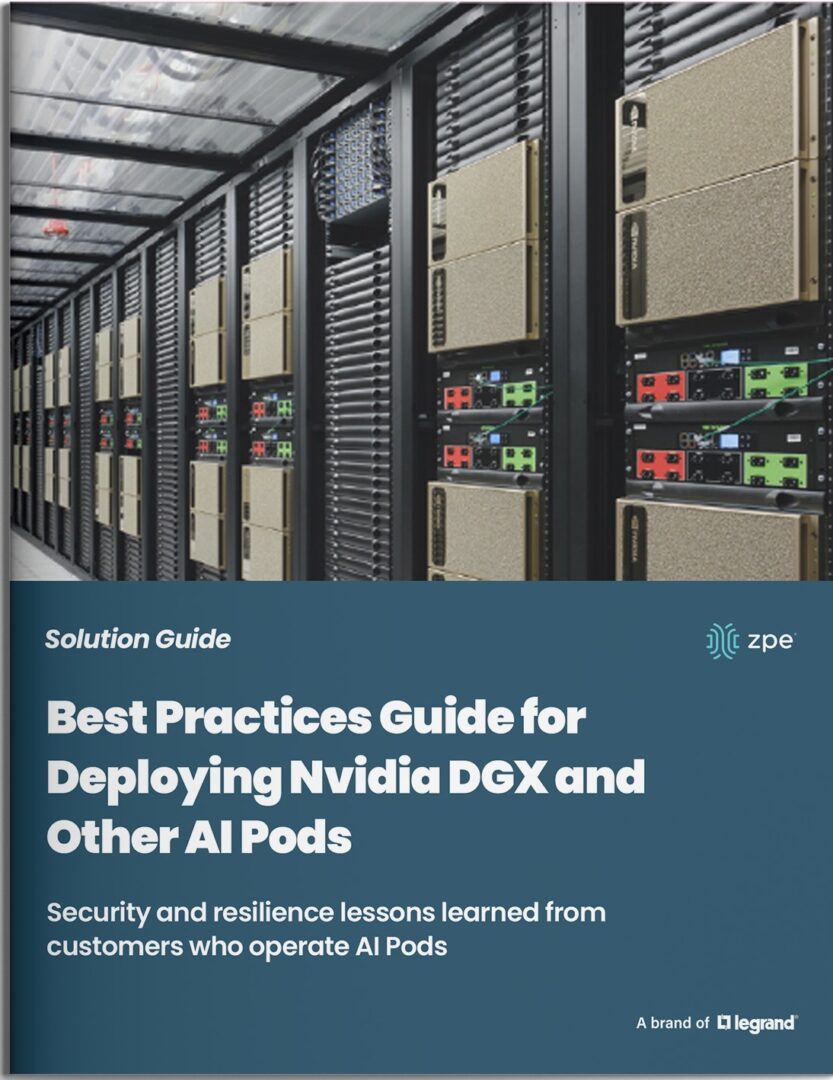
    To help you implement IMI, ZPE Systems has developed a comprehensive Best Practices Guide for Deploying Nvidia DGX and Other AI Pods. This guide outlines the technical success criteria and key steps required to build a secure, AI-operated network.

    Download the guide and take the next step in AI-driven network resilience.

    Overcoming the Challenges of PDU Management in Modern IT Environments

    Overcoming PDU Management Challenges

    Power Distribution Units (PDUs) are the unsung heroes of reliable IT operations. They provide the one thing that nobody pays attention to unless it’s gone: stable, uninterrupted power. Despite their essential role in hyperscale data centers, colocations, and remote edge sites, PDU management often remains one of the least optimized and most overlooked areas in IT operations. As organizations grow and expand their infrastructure footprints, the challenges associated with PDU management multiply to create inefficiencies, drive up costs, and expose critical systems to unnecessary downtime.

    Why PDU Management is a Growing Concern

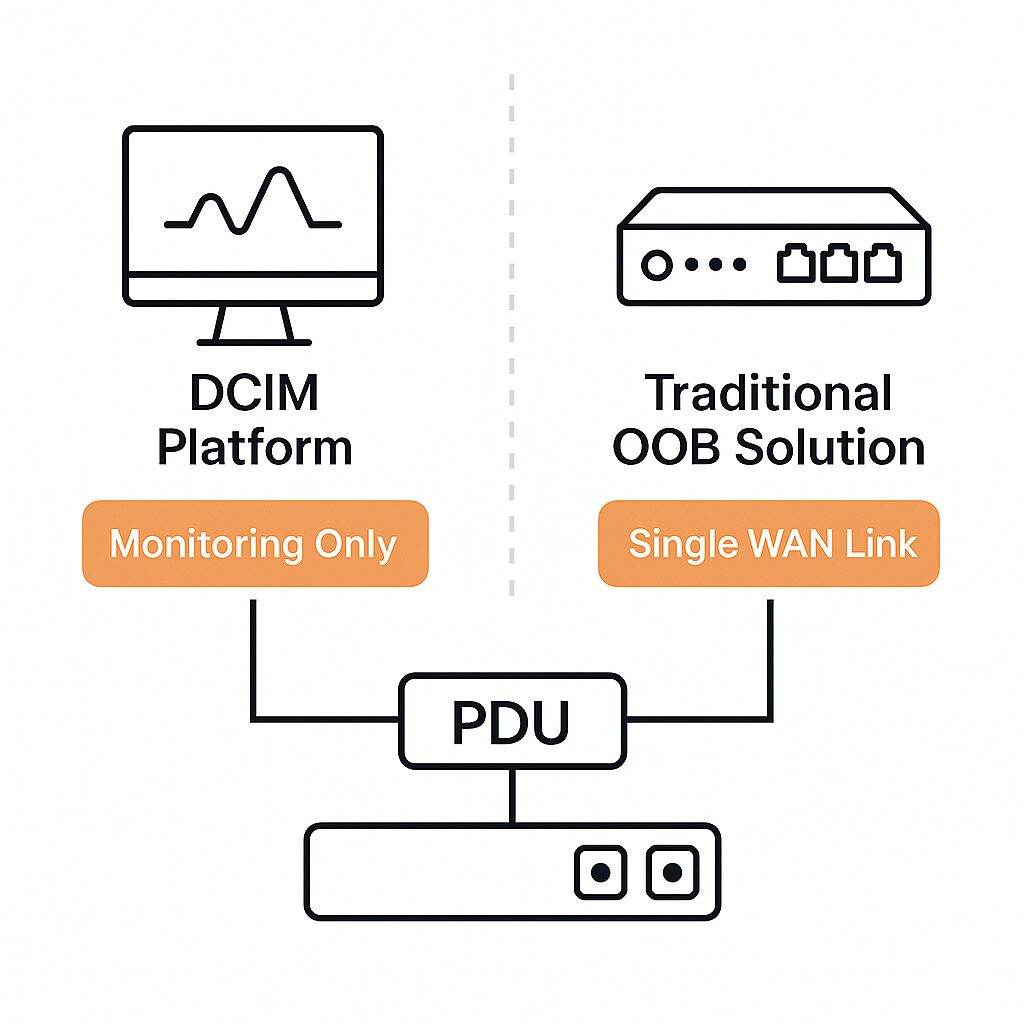
    For enterprises that have adopted traditional Data Center Infrastructure Management (DCIM) platforms or out-of-band (OOB) solutions, it might seem like power infrastructure is already covered. However, these tools fall short when it comes to giving teams granular control of PDUs. Many only support SNMP-based monitoring, which means teams can see status data but can’t push configurations, perform power cycling, or recover unresponsive devices. OOB solutions also rely on a single WAN link, which can fail and cut off admin access.

    DCIM and OOB solutions lack PDU Management capabilities

    This lack of control results in IT teams still having to perform routine power management tasks on-site, even in supposedly modernized environments.

    The Three Major Challenges of PDU Management

    1. Operational Inefficiencies

    Most PDUs still require manual interaction for updates, configuration changes, or outlet-level power cycling. If a PDU becomes unresponsive, or if firmware updates fail mid-process, SNMP interfaces become useless and recovery options are limited. In these cases, IT personnel must physically travel to the site (sometimes covering long distances) just to perform a simple reboot or plug in a crash cart. This introduces unnecessary downtime, drains IT resources, and slows incident resolution.

    2. Slow Scaling

    As businesses grow, so does the number of PDUs deployed across their infrastructure. Yet when it comes to providing network capabilities, power systems are not designed with scalability in mind. Even network-connected PDUs lack support for modern automation frameworks like Ansible, Terraform, or Python. Without REST APIs, scripting interfaces, or integration with infrastructure-as-code platforms, IT teams are left managing each unit individually through outdated web GUIs or vendor-specific software. This manual approach doesn’t scale and leads to costly delays, especially during site rollouts or large-scale upgrades.

    3. High Administrative Overhead

    Enterprises managing hundreds or thousands of PDUs across distributed environments face overwhelming complexity. Without centralized visibility, tracking the health, configuration status, or firmware version of each device becomes impossible. When each PDU requires its own login, manual updates, and independent troubleshooting processes, power management becomes reactive, not strategic. This overhead increases the risk of misconfigurations, security gaps, and service disruptions.

    Best Practices for Modern PDU Management

    To move beyond these limitations, organizations must rethink their approach. The goal is to eliminate on-site dependencies, enable remote control, and consolidate management across all PDUs. This is where Isolated Management Infrastructure (IMI) comes into play.

    1. Enable Remote Power Management

    Connect PDUs to a dedicated management network, ideally through both Ethernet and serial interfaces. This allows for complete remote access, from initial provisioning to ongoing troubleshooting, even if the primary network link goes down.

    2. Automate Everything

    Adopt solutions that support infrastructure-as-code, automation scripts, and third-party integrations. By automating tasks like firmware updates, power cycling, and configuration pushes, organizations can drastically reduce manual workloads and improve accuracy.

    3. Centralize Administration

    Deploy a unified platform that can manage all PDUs, regardless of vendor or model, from a single interface. Centralization enables consistent policies, rapid issue resolution, and streamlined operations across all environments.

    Learn from the Experts: Download the Best Practices Guide

    ZPE Systems has worked with some of the world’s largest data center operators and remote IT teams to refine their power management strategies. IMI is their foundation for resilient, scalable, and efficient infrastructure operations. Our latest whitepaper, Best Practices for Managing Power Distribution Units in Data Centers & Remote Locations, dives deep into proven strategies for remote management, automation, and centralized control.

    What you’ll learn:

    • How to eliminate manual, on-site work with remote power management
    • How to scale PDU operations using automation and zero-touch provisioning
    • How to simplify administration across thousands of PDUs using an open-architecture platform

    Download the guide now to take the next step toward smarter, more sustainable IT operations.

    Get in Touch for a Demo of Remote PDU Management

    Our engineers are ready to show you how to manage your global PDU fleet and give you a demo of these best practices. Click below to set up a demo.

    Cloud Repatriation: Why Companies Are Moving Back to On-Prem

    Cloud Repatriation

    The Shift from Cloud to On-Premises

    Cloud computing has been the go-to solution for businesses seeking scalability, flexibility, and cost savings. But according to a 2024 IDC survey, 80% of IT decision-makers expect to repatriate some workloads from the cloud within the next 12 months. As businesses mature in their digital journeys, they’re realizing that the cloud isn’t always the most effective – or economical – solution for every application.

    This trend, known as cloud repatriation, is gaining momentum.

    Key Takeaways From This Article:

    • Cloud repatriation is a strategic move toward cost control, improved performance, and enhanced compliance.
    • Performance-sensitive and highly regulated workloads benefit most from on-prem or edge deployments.
    • Hybrid and multi-cloud strategies offer flexibility without sacrificing control.
    • ZPE Systems enables enterprises to build and manage cloud-like infrastructure outside the public cloud.

    What is Cloud Repatriation?

    Cloud repatriation refers to the process of moving data, applications, or workloads from public cloud services back to on-premises infrastructure or private data centers. Whether driven by cost, performance, or compliance concerns, cloud repatriation helps organizations regain control over their IT environments.

    Why Are Companies Moving Back to On-Prem?

    Here are the top six reasons why companies are moving away from the cloud and toward a strategy more suited for optimizing business operations.

    1. Managing Unpredictable Cloud Costs

    While cloud computing offers pay-as-you-go pricing, many businesses find that costs can spiral out of control. Factors such as unpredictable data transfer fees, underutilized resources, and long-term storage expenses contribute to higher-than-expected bills.

    Key Cost Factors Leading to Cloud Repatriation:

    • High data egress and transfer fees
    • Underutilized cloud resources
    • Long-term costs that outweigh on-prem investments

    By bringing workloads back in-house or pushed out to the edge, organizations can better control IT spending and optimize resource allocation.

    2. Enhancing Security and Compliance

    Security and compliance remain critical concerns for businesses, particularly in highly regulated industries such as finance, healthcare, and government.

    Why cloud repatriation boosts security:

    • Data sovereignty and jurisdictional control
    • Minimized risk of third-party breaches
    • Greater control over configurations and policy enforcement

    Repatriating sensitive workloads enables better compliance with laws like GDPR, CCPA, and other industry-specific regulations.

    3. Boosting Performance and Reducing Latency

    Some workloads – especially AI, real-time analytics, and IoT – require ultra-low latency and consistent performance that cloud environments can’t always deliver.

    Performance benefits of repatriation:

    • Reduced latency for edge computing
    • Greater control over bandwidth and hardware
    • Predictable and optimized infrastructure performance

    Moving compute closer to where data is created ensures faster decision-making and better user experiences.

    4. Avoiding Vendor Lock-In

    Public cloud platforms often use proprietary tools and APIs that make it difficult (and expensive) to migrate.

    Repatriation helps businesses:

    • Escape restrictive vendor ecosystems
    • Avoid escalating costs due to over-dependence
    • Embrace open standards and multi-vendor flexibility

    Bringing workloads back on-premises or adopting a multi-cloud or hybrid strategy allows businesses to diversify their IT infrastructure, reducing dependency on any one provider.

    5. Meeting Data Sovereignty Requirements

    Many organizations operate across multiple geographies, making data sovereignty a major consideration. Laws governing data storage and privacy can vary by region, leading to compliance risks for companies storing data in public cloud environments.

    Cloud repatriation addresses this by:

    • Storing data in-region for legal compliance
    • Reducing exposure to cross-border data risks
    • Strengthening data governance practices

    Repatriating workloads enables businesses to align with local regulations and maintain compliance more effectively.

    6. Embracing a Hybrid or Multi-Cloud Strategy

    Rather than choosing between cloud or on-prem, forward-thinking companies are designing hybrid and multi-cloud architectures that combine the best of both worlds.

    Benefits of a Hybrid or Multi-Cloud Strategy:

    • Leverages the best of both public and private cloud environments
    • Optimizes workload placement based on cost, performance, and compliance
    • Enhances disaster recovery and business continuity

    By strategically repatriating specific workloads while maintaining cloud-based services where they make sense, businesses achieve greater resilience and efficiency.

    The Challenge: Retaining Cloud-Like Flexibility On-Prem

    Many IT teams hesitate to repatriate due to fears of losing cloud-like convenience. Cloud platforms offer centralized management, on-demand scaling, and rapid provisioning that traditional infrastructure lacks – until now.

    That’s where ZPE Systems comes in.

    ZPE Systems Accelerates Cloud Repatriation

    For over a decade, ZPE Systems has been behind the scenes, helping build the very cloud infrastructures enterprises rely on. Now, ZPE empowers businesses to reclaim that control with:

    • The Nodegrid Services Router platform: Bringing cloud-like orchestration and automation to on-prem and edge environments
    • ZPE Cloud: A unified management layer that simplifies remote operations, provisioning, and scaling

    With ZPE, enterprises can repatriate cloud workloads while maintaining the agility and visibility they’ve come to expect from public cloud environments.

    How the Nodegrid Net SR isolates and protects the management network.

    The Nodegrid platform combines powerful hardware with intelligent, centralized orchestration, serving as the backbone of hybrid infrastructures. Nodegrid devices are designed to handle a wide variety of functions, from secure out-of-band management and automation to networking, workload hosting, and even AI computer vision. ZPE Cloud serves as the cloud-based management and orchestration platform, which gives organizations full visibility and control over their repatriated environments..

    • Multi-functional infrastructure: Nodegrid devices consolidate networking, security, and workload hosting into a single, powerful platform capable of adapting to diverse enterprise needs.
    • Automation-ready: Supports custom scripts, APIs, and orchestration tools to automate provisioning, failover, and maintenance across remote sites.
    • Cloud-based management: ZPE Cloud provides centralized visibility and control, allowing teams to manage and orchestrate edge and on-prem systems with the ease of a public cloud.

    Ready to Explore Cloud Repatriation?

    Discover how your organization can take back control of its IT environment without sacrificing agility. Schedule a demo with ZPE Systems today and see how easy it is to build a modern, flexible, and secure on-prem or edge infrastructure.

    The Elephant in the Data Center: How to Make AI Infrastructure Resilient

    ELEPHANT IN THE DC

    The Growing Role of AI in Networking and Security

    AI is transforming industries, and networking and security are no exceptions. Whether businesses consume AI tools as a service or integrate them directly into their infrastructure for cost savings and control, the impact of AI is undeniable. Organizations worldwide are rapidly adopting AI-powered solutions to optimize network operations, automate security responses, and improve overall efficiency.

    But one glaring issue remains: After acquiring AI infrastructure, many organizations find themselves asking, “Now what?”

    Despite the excitement around AI’s potential, there is a significant lack of clear, actionable guidance on how to deploy, recover, and secure AI-powered networks. This gap in best practices and implementation strategies leaves businesses vulnerable to operational inefficiencies, unforeseen challenges, and security risks.

    So, how can organizations harness AI’s potential and ensure the resilience of their multi-million-dollar investment? Here are lessons learned from enterprises that have successfully implemented AI in their IT environments, along with a downloadable best practices guide for deploying, recovering, and securing AI data centers.

    Understanding AI’s Role in Network Management

    Like autonomous driving, AI adoption in network management operates at different levels:

    1. No AI: Traditional, manual network operations.
    2. AI consuming logs for alerts: Basic monitoring and reporting.
    3. AI consuming logs with broader data access: Enhanced insights for more informed decision-making.
    4. AI-driven network decision-making in specific areas: AI autonomously manages certain aspects of the network.
    5. AI managing all IT infrastructure: A fully autonomous, AI-powered network.

    As with autonomous vehicles, human oversight remains crucial. There must always be a way for administrators to take control in case AI makes an error. The key to ensuring uninterrupted access and oversight is by using an Isolated Management Infrastructure (IMI) — a separate, dedicated management layer designed for resilience and security.

    Why an Isolated Management Infrastructure (IMI) is Essential to AI Resilience

    AI-driven networks need a dedicated infrastructure that enables human operators to intervene when necessary. Here are a few reasons why:

    • Security and Isolation: What if AI induces a vulnerability or disruption? IMI is separate from production, giving teams a lifeline to gain management access and fix the problem.
    • Network Recovery & Control: What if AI misconfigures the network? IMI allows human administrators to override AI decisions and roll back to the last good configuration.
    • Resilience Against Threats: What if ransomware strikes? IMI’s isolation keeps admin access safe from attack and allows teams to fight back using an Isolated Recovery Environment.

    IMI is a safe environment for managing AI infrastructure

    Diagram: Isolated Management Infrastructure provides a separate, secure environment for admins to manage and automate AI infrastructure.

    IMI is also becoming the standard called for by regulatory bodies. CISA and DORA mandate separate, air-gapped network infrastructures to support zero-trust security frameworks and strengthen resilience. The major roadblock that most organizations face, however, is that successfully implementing an IMI requires technical expertise and a strategic approach.

    Challenges in Deploying an IMI

    Organizations looking to build a robust, isolated management network must navigate several challenges:

    • High Complexity & Cost: Traditional approaches require multiple devices (routers, VPNs, serial consoles, 5G WAN, etc.), leading to higher costs and integration challenges.
    • Manual Network Management: Some organizations still rely on IT personnel or truck rolls to resolve issues, which increases costs and forces teams to focus on operations rather than improving business value.
    • Machine-Speed Operations vs. Human Response Times: AI operates at unprecedented speeds, making manual intervention impractical without an automated and isolated management solution.
    • Extremely Limited Space: AI deployments are “packed to the gills” with compute nodes, storage, networking, power/cooling, and management gear, and there is often no room to deploy the 6+ devices needed for a proper IMI.

    The Blueprint for AI-Operated Networks

    ZPE Systems has collaborated with leading enterprises to define best practices for implementing an IMI. These best practices are described in the downloadable guide below. Here’s a snapshot of some key components:

    1. A Unified Hardware or Virtual Device

    • A central out-of-band management platform for both physical and cloud infrastructure.
    • Open, extensible architecture to run critical applications securely.

    2. Comprehensive Interface Support

    • Traditional RS-232 serial console, USB, and OCP interfaces for network recovery.
    • Serial console access ensures recovery even if AI misconfigures IP routing or network addresses.

    3. Switchable Power Distribution Units (PDUs)

    • Enables remote power cycling to recover hardware that becomes unresponsive during software updates.

    4. An Integrated Software Stack

    • Historically, enterprises combined Juniper routers, Dell switches, Cradlepoint 4G modems, serial consoles, HP jump servers, Palo Alto Firewalls, and SD-WAN for remote access.
    • ZPE Systems consolidates these functions into a single, cohesive solution with Nodegrid out-of-band management.

    5. Flexible Management Options

    • Supports both on-premises and cloud-based management solutions for varying operational needs.

    6. Security at all Layers

    Download the AI Best Practices Guide

    AI-driven infrastructure is quickly becoming the industry standard. Organizations that integrate AI with an Isolated Management Infrastructure will gain a competitive edge while ensuring resilience, security, and operational control.

    To help you implement IMI, ZPE Systems has developed a comprehensive Best Practices Guide for Deploying Nvidia DGX and Other AI Pods. This guide outlines the technical success criteria and key steps required to build a secure, AI-operated network.

    Download the guide and take the next step in AI-driven network resilience.

    Get in Touch for a Demo of AI Infrastructure Best Practices

    Our engineers are ready to walk you through the basics and give you a demo of these best practices. Click below to set up a demo.

    KVM Switch vs. Serial Console: Understanding the Key Differences and Best Use Cases

    KVM Switch vs Serial Console

    In IT infrastructure management, two essential tools often come into play: KVM switches and serial consoles. While they may seem similar at first glance, understanding their distinct functionalities is crucial for system administrators. In this guide, we’ll break down their differences, use cases, and how they can work together for optimal infrastructure management.

    What is a KVM Switch?

    A KVM (Keyboard, Video, Mouse) switch is a hardware device that allows users to control multiple computers from a single keyboard, monitor, and mouse. This setup eliminates the need for multiple peripherals, streamlining IT operations.

    Benefits of using a KVM switch:

    • Centralized Management: Control multiple servers from one console.
    • Space & Cost Efficiency: Reduces clutter and hardware costs in server rooms.
    • Graphical Interface Access: Enables GUI-based management for various operating systems.
    • Remote Management: Some KVM switches offer IP-based remote access for IT teams.

    KVM switches are ideal for data centers, server management, and IT environments where GUI access is necessary.

    What is a Serial Console?

    A serial console, also called a console server, provides remote access to devices via serial ports. It is primarily used to manage network equipment such as routers, switches, and firewalls — especially when network access is unavailable.

    Key advantages of serial consoles:

    • Out-of-Band Management: Provides access even when the primary network is down.
    • Command-Line Interface (CLI) Support: Essential for configuring network devices.
    • Improved Security: Enables remote troubleshooting without exposing devices to the main network.
    • Multi-Vendor Support: Works with various networking and industrial hardware.

    Serial consoles are indispensable for network management, disaster recovery, and remote troubleshooting of mission-critical systems. They provide low-level access to equipment and serve as an administrative lifeline when the primary network is not working properly.

    KVM Switch vs. Serial Console: A Side-By-Side Comparison

    Feature
    Access Type
    Primary Use Case
    Connectivity
    Best For
    Network Dependency
    KVM Switch
    Graphical (GUI) access
    Managing multiple computers
    Video & USB interfaces
    Servers, desktops, workstations
    Requires active network/IP-based models available
    Serial Console
    Command-line (CLI) access
    Managing network devices
    Serial ports (RS-232, USB)
    Routers, switches, firewalls
    Works without network access

    When to Use a KVM Switch vs. Serial Console

    Choose a KVM switch if:

    • You need to manage multiple servers with a graphical interface.
    • Your IT infrastructure includes Windows, Linux, or other GUI-based systems.
    • Remote desktop-style management is required.

    Choose a serial console if:

    • You need to configure network hardware like routers and firewalls.
    • Out-of-band management is crucial for your IT setup.
    • You need access when the primary network fails.

    Combining KVM Switches and Serial Consoles for More Capability

    Many IT environments benefit from using both KVM switches and serial consoles in tandem. This setup allows IT teams to efficiently manage both graphical and command-line-based systems, ensuring comprehensive remote access and troubleshooting capabilities. The drawback to this is that it requires deploying more devices, which not only increases costs, but also increases complexity and workloads for IT teams.

    Simplify IT Management with ZPE Systems’ Nodegrid Devices

    Why choose between a KVM switch and a serial console when you can have both in a single device? ZPE Systems’ Nodegrid solutions combine KVM and serial console functionality into an all-in-one platform, simplifying IT infrastructure management.

    Why choose Nodegrid?

    • Unified Management: Access servers, routers, switches, and more from one interface.
    • Enhanced Security: Secure out-of-band management with built-in Zero Trust architecture.
    • Remote Access: Control your entire infrastructure from anywhere, even during network failures.
    • Scalability: Streamline operations for edge, branch, and data center environments.

    Upgrade your IT management with the versatile, secure, and efficient out-of-band solution. Browse our collection of products that combine KVM and serial console functionalities, and get in touch for a free demo.

    See KVM & Serial Console Functionality in This Tech Demo

    Jordan Baker (Tech Writer) shows how to migrate your existing solution to Nodegrid, and gives a 5-minute tech demo of what it’s like to manage serial connections, PDUs, and KVM switches, all from one interface. Watch now and visit our serial console migration page for special offers.